transmission BMW M3 COUPE 2013 E92 User Guide
[x] Cancel search | Manufacturer: BMW, Model Year: 2013, Model line: M3 COUPE, Model: BMW M3 COUPE 2013 E92Pages: 311, PDF Size: 6.89 MB
Page 79 of 311
74
ControlsDriving
Windshield washer nozzles
Both windshield washer nozzles are automati-
cally heated with the engine running or the
ignition switched on.
Washer fluid
Washer fluid antifreeze is flammable.
Therefore, keep it away from ignition
sources and only store it in the closed original
container that is kept out of reach of children;
otherwise, there is a risk of personal injury.
Comply with the instructions on the
container. <
United States: the washer fluid mixture ratio is
regulated by the U.S. EPA and many individual
states; do not exceed the allowable washer fluid
dilution ratio limits that apply. Follow the usage
instructions on the washer fluid container. Use
BMW's Windshield Washer Concentrate or the
equivalent.
Washer fluid filler neck
Only add washer fluid after allowing the
engine to cool and close the cover com-
pletely in order to prevent the washer fluid from
contacting hot engine parts. Otherwise, fluid
spills or leaks constitute a fire hazard and a risk
to personal safety. <
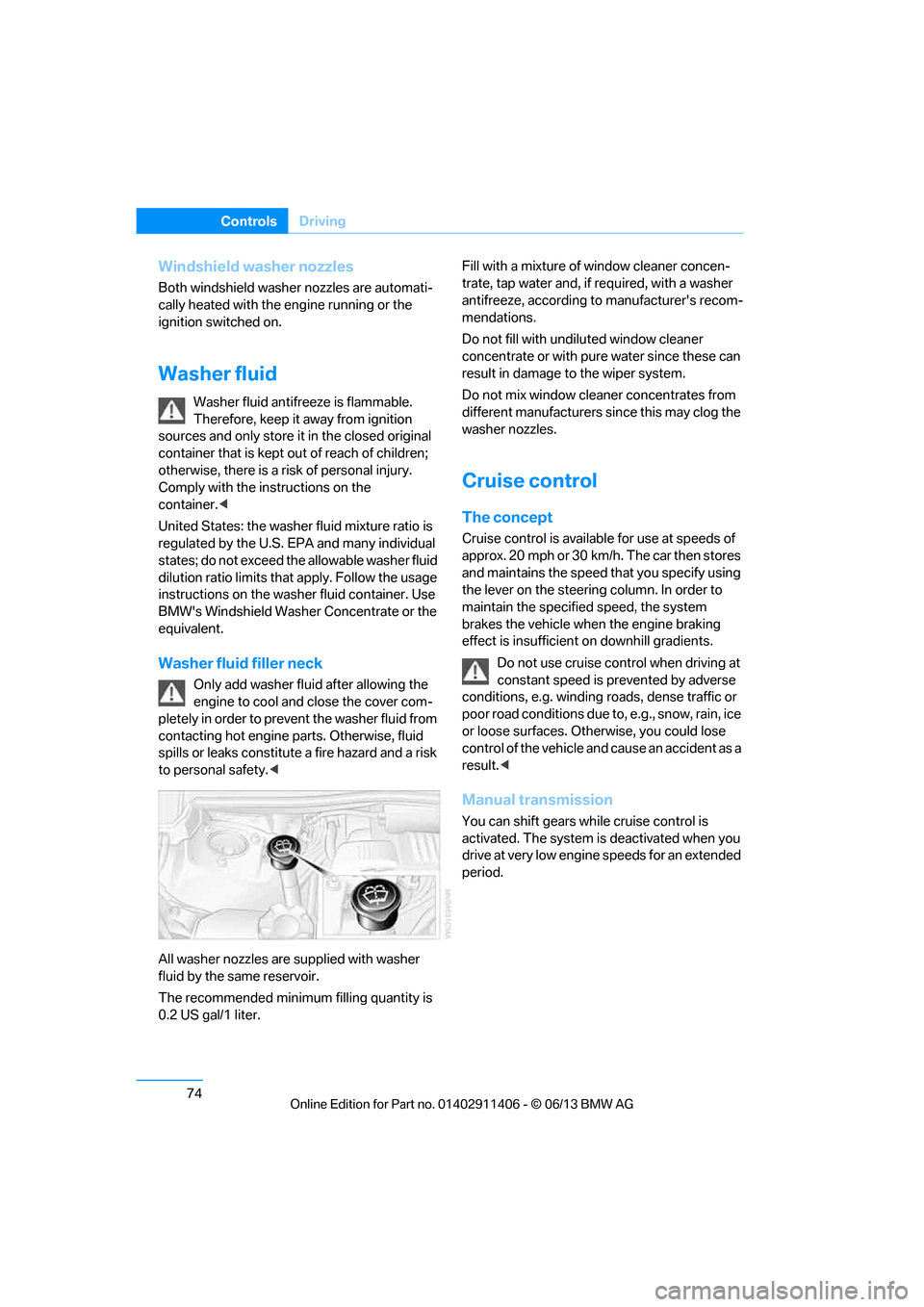
All washer nozzles are supplied with washer
fluid by the same reservoir.
The recommended minimu m filling quantity is
0.2 US gal/1 liter. Fill with a mixture of window cleaner concen-
trate, tap water and, if required, with a washer
antifreeze, according to
manufacturer's recom-
mendations.
Do not fill with undiluted window cleaner
concentrate or with pure water since these can
result in damage to the wiper system.
Do not mix window cleaner concentrates from
different manufacturers since this may clog the
washer nozzles.
Cruise control
The concept
Cruise control is availa ble for use at speeds of
approx. 20 mph or 30 km/h. The car then stores
and maintains the speed that you specify using
the lever on the steering column. In order to
maintain the specified speed, the system
brakes the vehicle when the engine braking
effect is insufficient on downhill gradients.
Do not use cruise control when driving at
constant speed is prevented by adverse
conditions, e.g. winding roads, dense traffic or
poor road conditions due to, e.g., snow, rain, ice
or loose surfaces. Otherwise, you could lose
control of the vehicle and cause an accident as a
result.<
Manual transmission
You can shift gears while cruise control is
activated. The system is deactivated when you
drive at very low engine speeds for an extended
period.
00320051004F004C00510048000300280047004C0057004C005200510003
Page 80 of 311
75
Driving
Controls
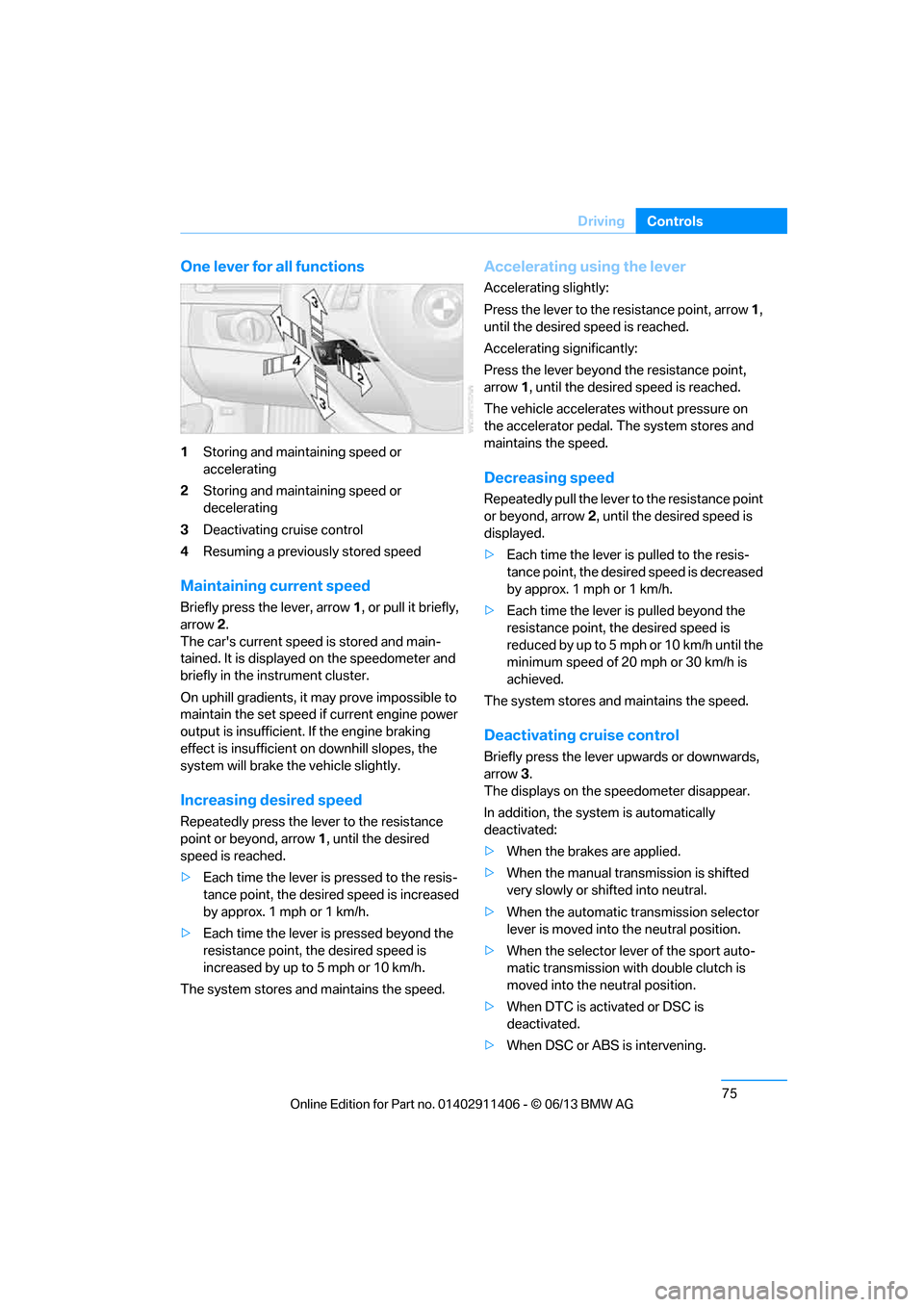
One lever for all functions
1
Storing and maintaining speed or
accelerating
2 Storing and maintaining speed or
decelerating
3 Deactivating cruise control
4 Resuming a previously stored speed
Maintaining current speed
Briefly press the lever, arrow 1, or pull it briefly,
arrow 2 .
The car's current speed is stored and main-
tained. It is displayed on the speedometer and
briefly in the instrument cluster.
On uphill gradients, it may prove impossible to
maintain the set speed if current engine power
output is insufficient. If the engine braking
effect is insufficient on downhill slopes, the
system will brake the vehicle slightly.
Increasing desired speed
Repeatedly press the lever to the resistance
point or beyond, arrow 1, until the desired
speed is reached.
> Each time the lever is pressed to the resis-
tance point, the desired speed is increased
by approx. 1 mph or 1 km/h.
> Each time the lever is pressed beyond the
resistance point, the desired speed is
increased by up to 5 mph or 10 km/h.
The system stores and maintains the speed.
Accelerating using the lever
Accelerating slightly:
Press the lever to the resistance point, arrow 1,
until the desired speed is reached.
Accelerating significantly:
Press the lever beyond the resistance point,
arrow 1 , until the desired speed is reached.
The vehicle accelerates without pressure on
the accelerator pedal. The system stores and
maintains the speed.
Decreasing speed
Repeatedly pull the lever to the resistance point
or beyond, arrow 2, until the desired speed is
displayed.
> Each time the lever is pulled to the resis-
tance point, the desired speed is decreased
by approx. 1 mph or 1 km/h.
> Each time the lever is pulled beyond the
resistance point, the desired speed is
re duced by up to 5 m ph o r 10 km /h until the
minimum speed of 20 mph or 30 km/h is
achieved.
The system stores and maintains the speed.
Deactivating cruise control
Briefly press the lever upwards or downwards,
arrow 3.
The displays on the speedometer disappear.
In addition, the system is automatically
deactivated:
> When the brakes are applied.
> When the manual transmission is shifted
very slowly or shifted into neutral.
> When the automatic transmission selector
lever is moved into the neutral position.
> When the selector lever of the sport auto-
matic transmission with double clutch is
moved into the neutral position.
> When DTC is activated or DSC is
deactivated.
> When DSC or ABS is intervening.
00320051004F004C00510048000300280047004C0057004C005200510003
Page 81 of 311
76
ControlsDriving
Cruise control is not deactivated by depressing
the accelerator pedal. Once the accelerator
pedal is released, the stored speed is achieved
again and maintained.
Warning lamp
The warning lamp lights up when
cruise control is deactivated due to
control intervention by the DSC, for
example. A message appears on the Control
Display.
Resuming a previously stored speed
Press the button, arrow 4.
The last stored speed is resumed and
maintained.
In the following instance s, the stored speed is
deleted and can no longer be resumed:
> When driving stability control systems are
intervening.
> In cars with manual transmission: when you
shift gears very slowly or shift to neutral.
> In cars with automati c transmission: when
you engage selector lever position N.
> In cars with Sport automatic transmission
with double clutch: when you engage
selector lever position N.
> When the ignition is switched off
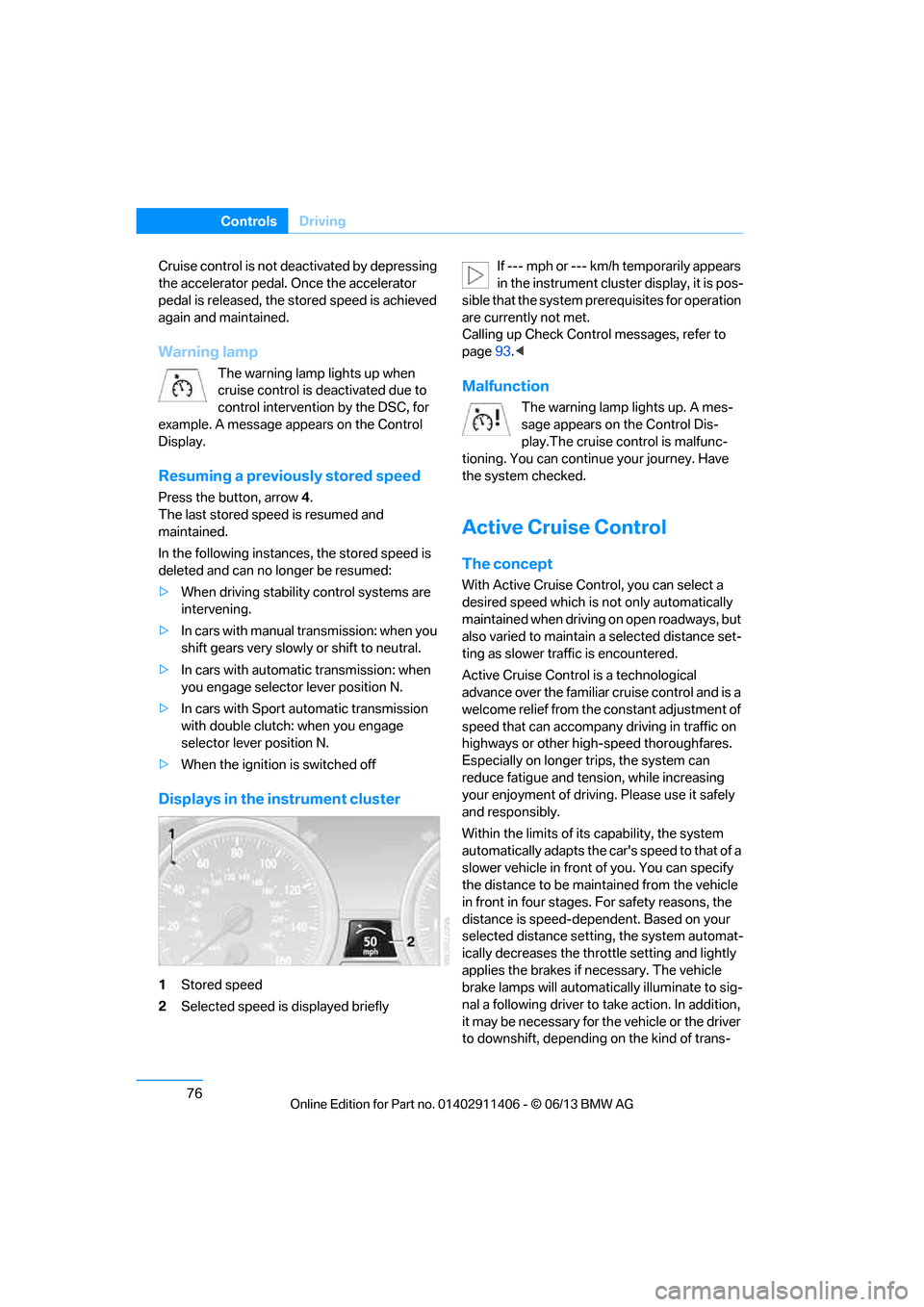
Displays in the instrument cluster
1Stored speed
2 Selected speed is displayed briefly If --- mph or --- km/h temporarily appears
in the instrument cluster display, it is pos-
sible that the system prerequisites for operation
are currently not met.
Calling up Check Contro l messages, refer to
page 93.<
Malfunction
The warning lamp lights up. A mes-
sage appears on the Control Dis-
play.The cruise control is malfunc-
tioning. You can continue your journey. Have
the system checked.
Active Cruise Control
The concept
With Active Cruise Cont rol, you can select a
desired speed which is not only automatically
maintained when driving on open roadways, but
also varied to maintain a select ed distance set-
ting as slower traffic is encountered.
Active Cruise Control is a technological
advance over the familiar cruise control and is a
welcome relief from the constant adjustment of
speed that can accompany driving in traffic on
highways or other high-speed thoroughfares.
Especially on longer trips, the system can
reduce fatigue and tens ion, while increasing
your enjoyment of driving. Please use it safely
and responsibly.
Within the limits of its capability, the system
automatically adapts the ca r's speed to that of a
slower vehicle in front of you. You can specify
the distance to be main tained from the vehicle
in front in four stages. For safety reasons, the
distance is speed-depe ndent. Based on your
selected distance setting, the system automat-
ically decreases the thro ttle setting and lightly
applies the brakes if necessary. The vehicle
brake lamps will automati cally illuminate to sig-
nal a following driver to take action. In addition,
it may be necessary for the vehicle or the driver
to downshift, depending on the kind of trans-
00320051004F004C00510048000300280047004C0057004C005200510003
Page 82 of 311
77
Driving
Controls
mission your vehicle is equipped with, to main-
tain the distance setting
selected. If the vehicle
ahead speeds up or when the lane ahead
becomes clear, your vehi cle will accelerate to
the speed you have selected by increasing the
throttle setting and shifting gears automatically
or by the driver as needed. Your selected speed
will be held when driving downhill, too.
Since this Active Cruise Control system is a
new technology and operates differently from
conventional cruise co ntrol systems which you
may be accustomed to, you are strongly urged
to read all of the pages relating to this system
before use. Pay special attention to the System
limitations section beginning on page 81.
Braking sensation
>If you step on the brake pedal while the sys-
tem is braking, peda l sensation will be
slightly different from the usual.
> Possible noises during automatic braking
are normal.
Manual transmission
You can shift gears while cruise control is acti-
vated. The system is deactivated when you
drive at very low engine speeds for an extended
period.
Range of applications
The minimum desired speed is 20 mph or
30 km/h, the maximum desired speed is
110 mph or 180 km/h.
As with conventional cruise control sys-
tems, Active Cruise Control in no way
diminishes or substitutes for the driver’s own
personal responsibility, alertness and aware-
ness in adjusting speed, braking or otherwise
controlling the vehicle. The driver should
decide when to use the system on the basis of
road, traffic, visibility, and weather conditions.
Active Cruise Control is intended for use on
highway-type roadways wh ere traffic is moving
relatively smoothly. Do not use this system in
city driving; heavy traffic such as during rush hour; on curvy, winding ro
ads, slippery roads or
roads with sharp curves such as highway off-
ramps; during inclement weather such as snow,
strong rain or fog; or when entering inter-
changes, service/parkin g areas or toll booths.
It is also important to regulate your vehicle's
speed and distance setti ng within applicable
legal limits. Always be re ady to take action or
apply the brakes if necessary, especially when
the system is actively fo llowing a vehicle in front
of you. Otherwise, driving situations could
result that pose the risk of accidents. <
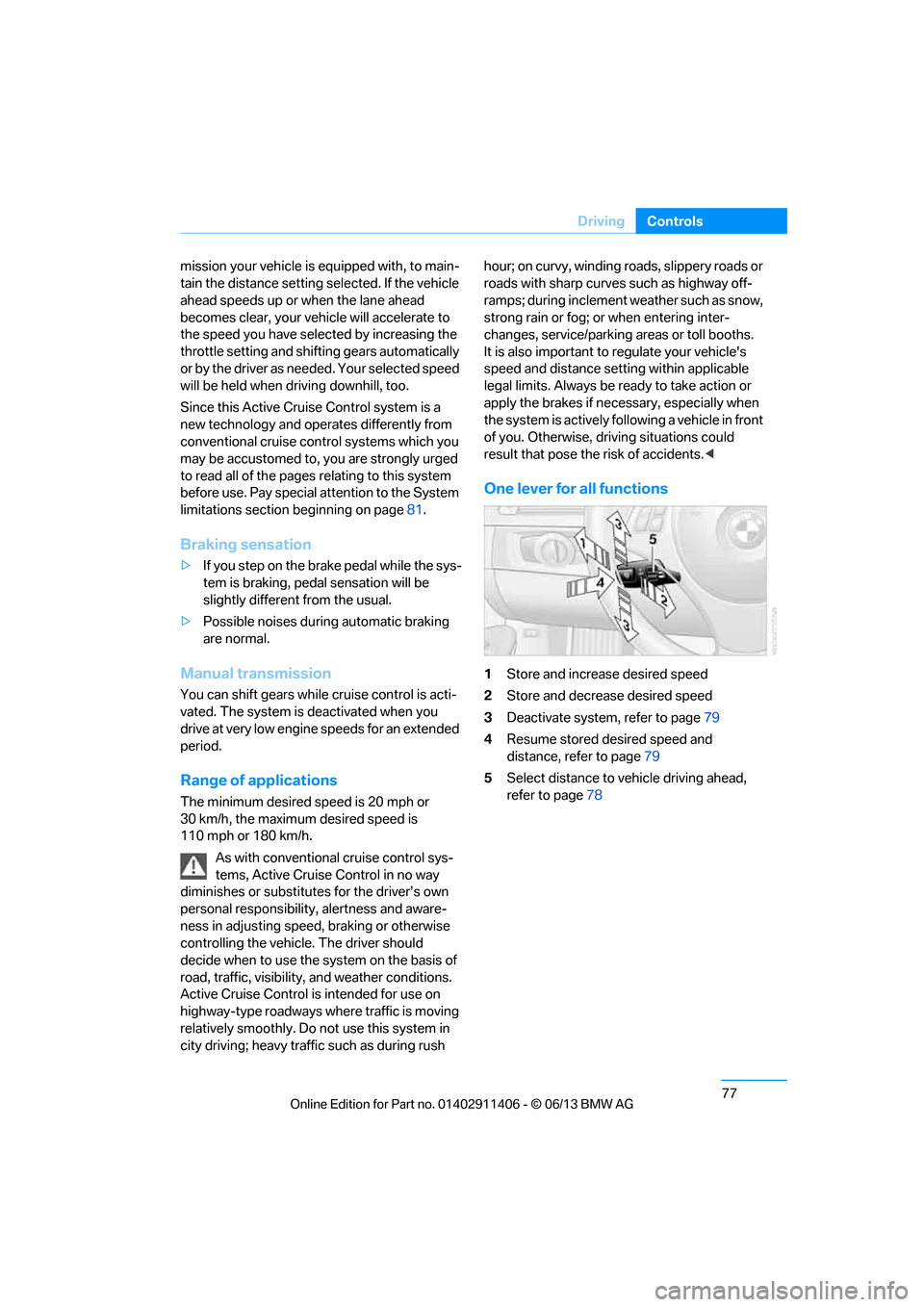
One lever for all functions
1Store and increase desired speed
2 Store and decrease desired speed
3 Deactivate system, refer to page 79
4 Resume stored desired speed and
distance, refer to page 79
5 Select distance to vehicle driving ahead,
refer to page 78
00320051004F004C00510048000300280047004C0057004C005200510003
Page 84 of 311
79
Driving
Controls
Deactivating cruise control
Press the lever upward or downward, arrow
3.
The displays on the speedometer disappear.
In addition, the system is automatically
deactivated:
> When the brakes are applied.
> When the speed is reduced to below
20 mph or 30 km/h due to a traffic situation.
> When the manual transmission is shifted
very slowly or shifted into neutral.
> When the automatic transmission selector
lever is moved into the neutral position.
> When the selector lever of the sport auto-
matic transmission with double clutch is
moved into the neutral position.
> When Dynamic Traction Control DTC is
activated.
> When Dynamic Stability Control DSC is
deactivated.
> When DSC or ABS is intervening.
> When the system does not recognize any
objects for a longer time, e. g. on infre-
quently traveled roads without a shoulder or
guard rails, or if the ra dar sensor is covered
with dirt, refer to page 80.
> When the parking brake is engaged.
When the system is deactivated, you
must brake the vehicle yourself and/or
maneuver as necessary; otherwise, there is a
risk of accidents. <
Warning lamp
The warning lamp lights up when
Active Cruise Control has been
automatically deactivated, for
example due to a driving speed below
20 mph or 30 km/h or a DSC intervention. A
message appears on the Control Display.
Resuming stored desired speed and
distance
Briefly press the button, arrow 4.
The stored speed and distance are regained
and maintained.
In the following instances, the stored speed is
deleted and can no longer be resumed:
> When driving stability control systems are
intervening.
> In cars with manual transmission: when you
shift gears very slowly or shift to neutral.
> In cars with automatic transmission: when
you engage selector lever position N.
> In cars with Sport au tomatic transmission
with double clutch: when you engage
selector lever position N.
> When the ignition is switched off.
Displays in the instrument cluster
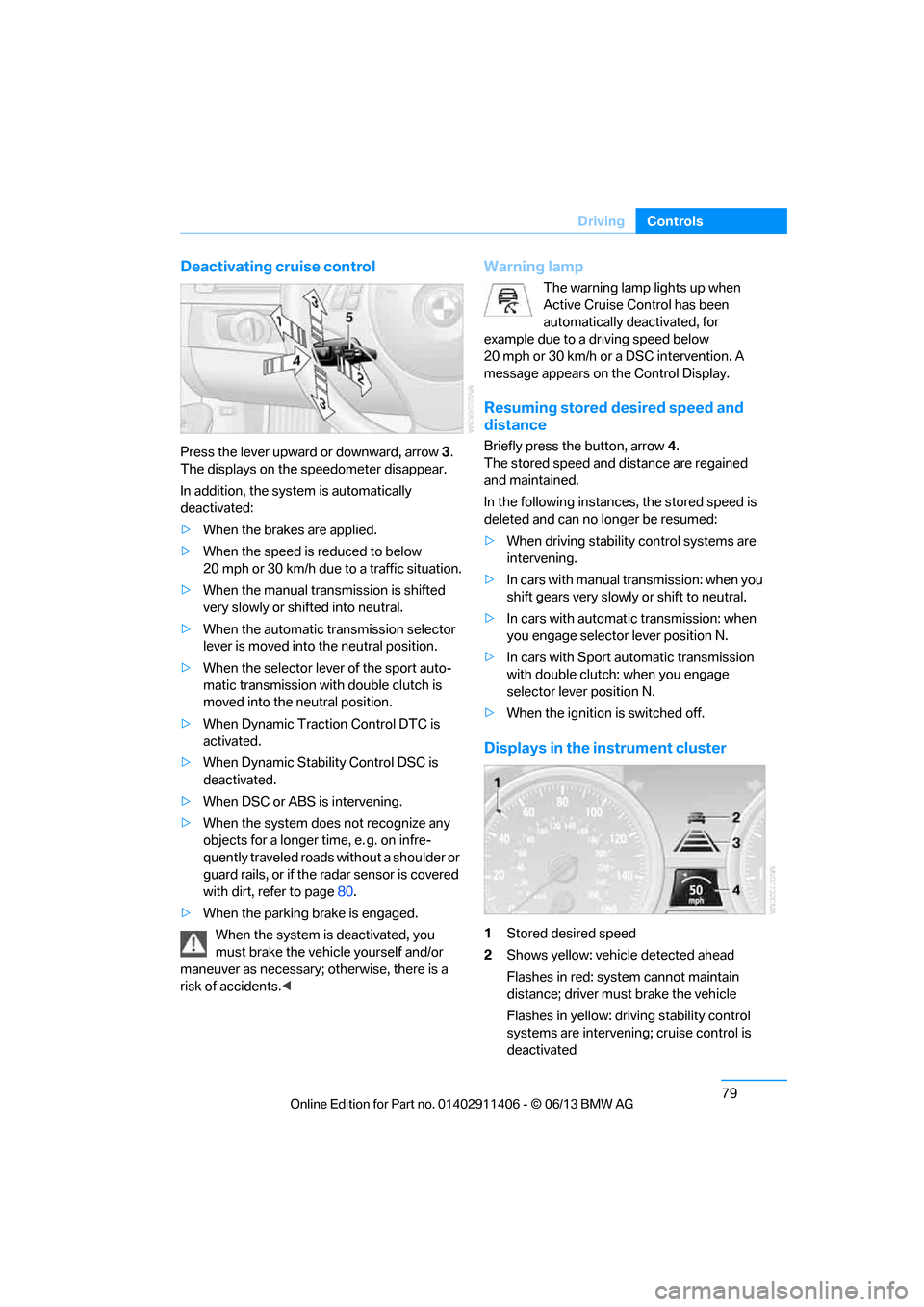
1Stored desired speed
2 Shows yellow: vehicle detected ahead
Flashes in red: system cannot maintain
distance; driver must brake the vehicle
Flashes in yellow: driving stability control
systems are intervening; cruise control is
deactivated
00320051004F004C00510048000300280047004C0057004C005200510003
Page 101 of 311
96
ControlsTechnology for driving comfort and safety
Technology for driving comfort and safety
Vehicle equipment
In this chapter, all pr oduction, country, and
optional equipment that is offered in the model
range is described. For this reason, descrip-
tions will be given of some equipment that may
not be available in a vehi cle, for example due to
the special options or national-market version
selected. This also app lies to safety related
functions and systems.
Park Distance Control PDC
The concept
The PDC assists you with maneuvering in tight
parking spaces. Acoustic signals and a visual
indicator warn you of the presence of an object
in front of or behind your vehicle. To measure
the distance, there are four ultrasonic sensors
in either bumper.
These sensors have a range of approx. 6.5 ft/
2 m. However, an acoustic warning does not
sound until an object is approx. 24 in/60 cm
from the front sensors and rear corner sensors,
or approx. 5 ft/1.50 m from the rear center
sensors.
PDC is a parking aid that can indicate
objects when they are approached
slowly, as is usually th e case when parking.
Avoid approaching an object at high speed; oth-
erwise, physical circumstances may lead to the
system warning being issued too late. <
Switching on automatically
With the engine running or the ignition switched
on, the system is activated after approx. one
second when you shift into reverse or move the
automatic transmission selector lever to
position R. Wait this short period before driving.
Switching off automatically
After approx. 50 ft/50 m of driving or above
approx. 20 mph or 30 km/h, the system
switches off and the LED goes out.
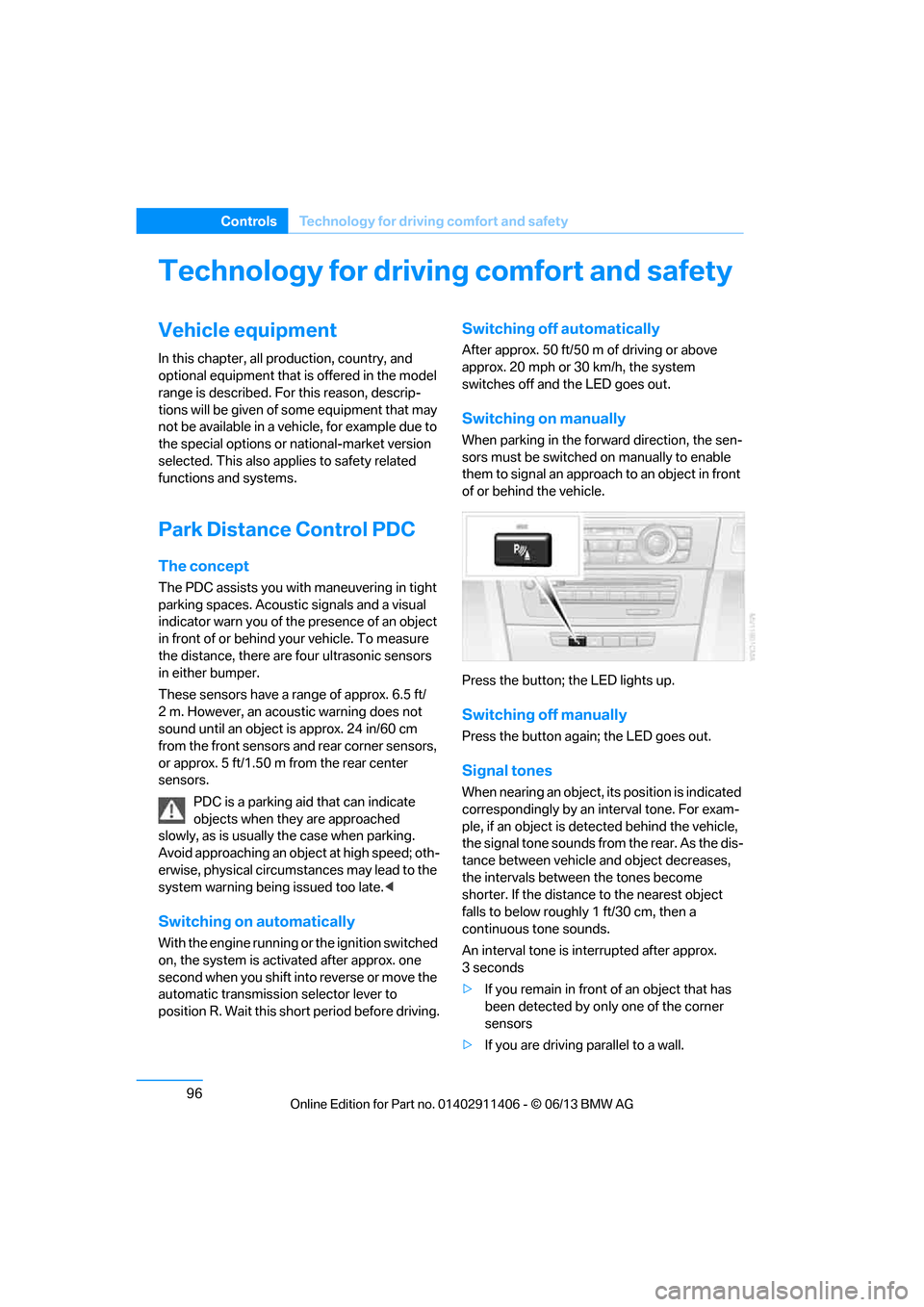
Switching on manually
When parking in the forward direction, the sen-
sors must be switched on manually to enable
them to signal an approach to an object in front
of or behind the vehicle.
Press the button; the LED lights up.
Switching off manually
Press the button again; the LED goes out.
Signal tones
When nearing an object, its position is indicated
correspondingly by an interval tone. For exam-
ple, if an object is dete cted behind the vehicle,
the signal tone sounds from the rear. As the dis-
tance between vehicle an d object decreases,
the intervals betwee n the tones become
shorter. If the distance to the nearest object
falls to below roughly 1 ft/30 cm, then a
continuous tone sounds.
An interval tone is interrupted after approx.
3seconds
> If you remain in front of an object that has
been detected by only one of the corner
sensors
> If you are driving parallel to a wall.
00320051004F004C00510048000300280047004C0057004C005200510003
Page 104 of 311
99
Technology for driving comfort and safety
Controls
xDrive
xDrive is your BMW's fo
ur-wheel-drive system.
The combined efforts of xDrive and DSC help to
further optimize traction and driving dynamics.
The xDrive four-wheel-drive system distributes
driving power variably to the front and rear axles
depending on the driving situation and road
conditions.
Hill Descent Control HDC
HDC is a downhill driving assistant that controls
your speed on steep downhill gradients and
makes it even easier to control your BMW's
handling under these conditions. The vehicle
then moves slightly fast er than double walking
speed without the driver needing to intervene.
HDC is available for activation at vehicle speeds
below approx. 20 mph or 35 km/h. When driving
downhill at a speed of under approx. 20 mph or
35 km/h, the vehicle's speed is automatically
reduced to slightly more than double walking
speed and maintained.
Increasing or de creasing speed
You can use the accelerato r or brakes to vary
this automatically cont rolled speed within a
range of between approx. 3 mph/5 km/h and
20 mph/25 km/h.
You can specify a target speed within the same
range by using the lever of the cruise control.
1 To increase speed
2 To decrease speed
Activating HDC
Press the button; the LED lights up.
When the vehicle is being braked automatically,
the LED flashes.
Deactivating HDC
Press the button again; the LED goes out.
HDC is automatically de activated at speeds
over approx. 40 mph or 60 km/h.
Using HDC
In cars with manual transmission:
Use HDC in lower gears and in reverse gear.
With automatic transmission:
You can use HDC in any drive position.
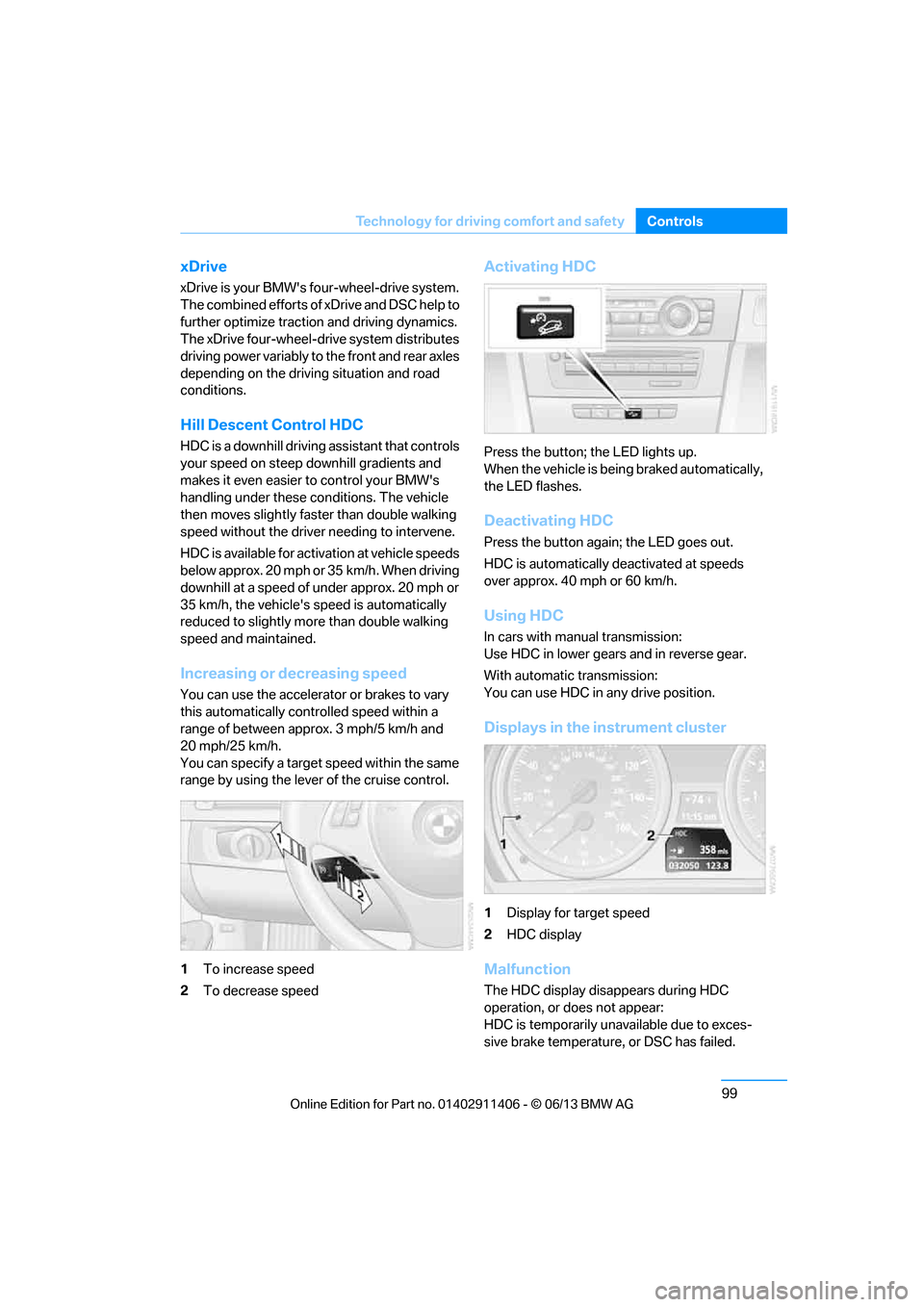
Displays in the instrument cluster
1 Display for target speed
2 HDC display
Malfunction
The HDC display disappears during HDC
operation, or does not appear:
HDC is temporarily unav ailable due to exces-
sive brake temperature, or DSC has failed.
00320051004F004C00510048000300280047004C0057004C005200510003
Page 107 of 311
102
ControlsTechnology for driving comfort and safety
Tire Pressure Monitor TPM
The concept
Check the inflation pressure in the four installed
tires. The system notifies you if there is a signif-
icant loss of pressure in one or more tires.
Functional requirement
The system must have been reset while the
inflation pressure was correct; otherwise, reli-
able signaling of a flat tire is not ensured.
Always use wheels with TPM electronics to
ensure that the system will operate properly.
Each time a tire inflation pressure has been
corrected or a wheel or tire has been changed,
reset the system.
System limitations
Sudden serious tire damage caused by
external influences cannot be indicated in
advance.<
The system does not function correctly if it has
not been reset. For example, a flat tire may be
indicated even though th e tire inflation pres-
sures are correct.
The system is inactive an d cannot indicate a flat
tire:
> When a wheel without TPM electronics is
installed.
> Interference with TPM by other systems
or devices with the same transmission
frequency.
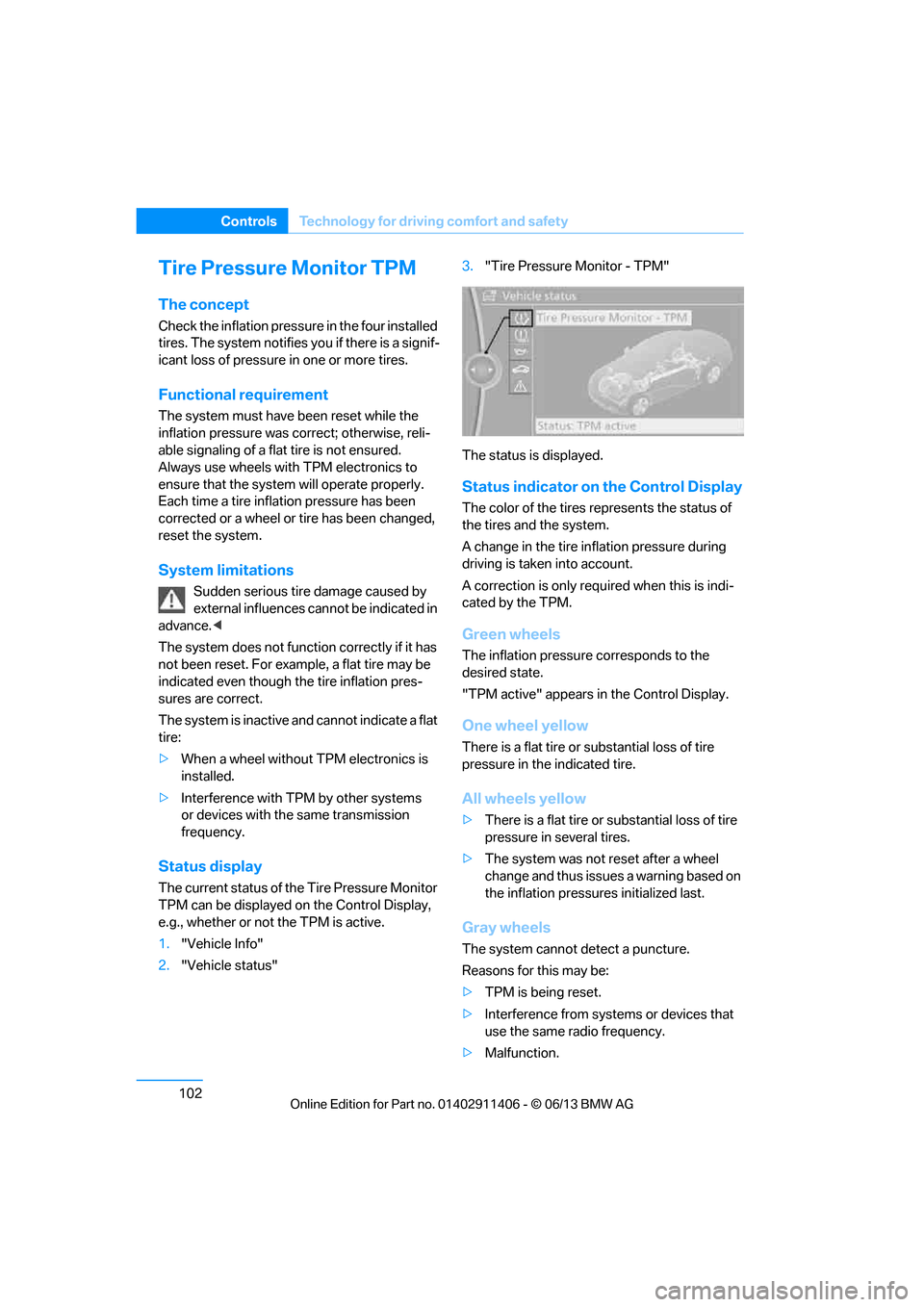
Status display
The current status of th e Tire Pressure Monitor
TPM can be displayed on the Control Display,
e.g., whether or not the TPM is active.
1. "Vehicle Info"
2. "Vehicle status" 3.
"Tire Pressure Monitor - TPM"
The status is displayed.
Status indicator on the Control Display
The color of the tires represents the status of
the tires and the system.
A change in the tire in flation pressure during
driving is taken into account.
A correction is only requ ired when this is indi-
cated by the TPM.
Green wheels
The inflation pressure corresponds to the
desired state.
"TPM active" appears in the Control Display.
One wheel yellow
There is a flat tire or substantial loss of tire
pressure in the indicated tire.
All wheels yellow
> There is a flat tire or substantial loss of tire
pressure in several tires.
> The system was not reset after a wheel
change and thus issues a warning based on
the inflation pressure s initialized last.
Gray wheels
The system cannot de tect a puncture.
Reasons for this may be:
> TPM is being reset.
> Interference from systems or devices that
use the same radio frequency.
> Malfunction.
00320051004F004C00510048000300280047004C0057004C005200510003
Page 129 of 311
124
ControlsPractical interior accessories
Coupe:
Roller sunblinds
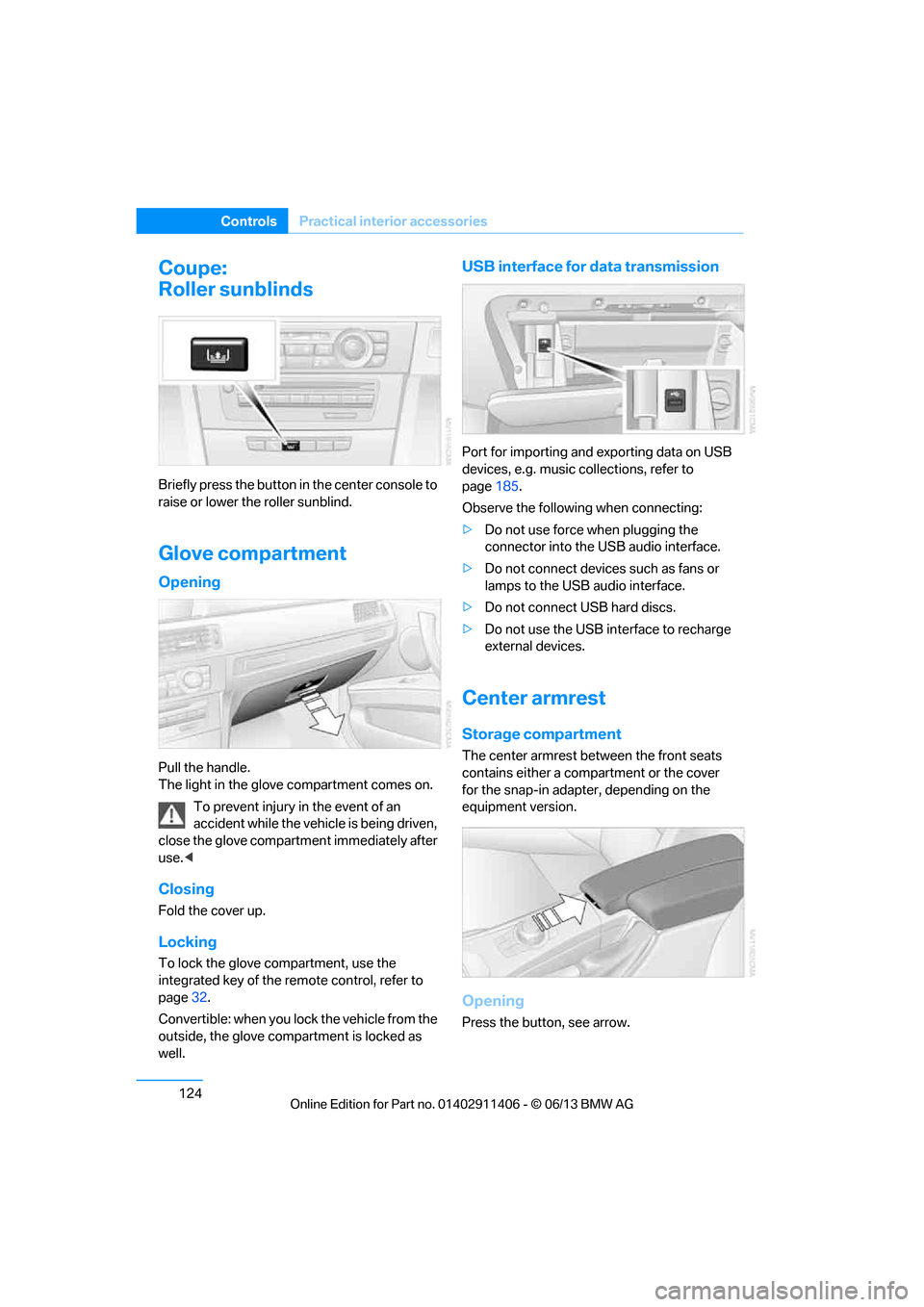
Briefly press the button in the center console to
raise or lower the roller sunblind.
Glove compartment
Opening
Pull the handle.
The light in the glove compartment comes on.
To prevent injury in the event of an
accident while the vehicle is being driven,
close the glove compartment immediately after
use. <
Closing
Fold the cover up.
Locking
To lock the glove compartment, use the
integrated key of the re mote control, refer to
page 32.
Convertible: when you lock the vehicle from the
outside, the glove comp artment is locked as
well.
USB interface for data transmission
Port for importing and exporting data on USB
devices, e.g. music collections, refer to
page 185.
Observe the following when connecting:
> Do not use force when plugging the
connector into the USB audio interface.
> Do not connect devices such as fans or
lamps to the USB audio interface.
> Do not connect USB hard discs.
> Do not use the USB in terface to recharge
external devices.
Center armrest
Storage compartment
The center armrest between the front seats
contains either a compartment or the cover
for the snap-in adapter, depending on the
equipment version.
Opening
Press the button, see arrow.
00320051004F004C00510048000300280047004C0057004C005200510003
Page 141 of 311
136
Driving tipsThings to remember when driving
Things to remember when driving
Vehicle equipment
In this chapter, all pr oduction, country, and
optional equipment that is offered in the model
range is described. For this reason, descrip-
tions will be given of some equipment that may
not be available in a vehi cle, for example due to
the special options or national-market version
selected. This also app lies to safety related
functions and systems.
Break-in period
Moving parts need breaking-in time to adjust to
each other. Please follo w the instructions below
in order to achieve the optimal service life and
economy of operation for your vehicle.
Engine and differential
Always obey all official speed limits.
Up to 1,200 miles/2,000 km
Drive at varying engine and road speeds, but do
not exceed an engine speed of 4,500 rpm or a
road speed of 100 mph/160 km/h.
Avoid full-throttle operation and use of the
transmission's kickdown mode.
After driving 1,200 miles/2,000 km
Engine and vehicle speeds can be gradually
increased.
Tires
Due to technical factors associated with their
manufacture, tires do not achieve their full
traction potential until af ter an initial break-in
period. Therefore, drive cautiously during the
first 200 miles/300 km.
Brake system
Brakes require an initial break-in period of
approx. 300 miles/500 km to achieve optimized
contact and wear patterns between brake pads
and rotors. Drive cautiously during this break-in
period.
Clutch
The function of the clut ch reaches its optimal
level only after a distance driven of approx.
300 miles/500 km. During this break-in period,
engage the clutch gently.
Following part replacement
The same break-in procedures should be
observed if any of the components mentioned
above have to be renewe d in the course of the
vehicle's operating life.
Saving fuel
The fuel consumption of your vehicle depends
on several factors. You can lower fuel consump-
tion and the environmental impact by taking
certain measures, adjusting your driving style
and having the vehicl e serviced regularly.
Remove any unneeded cargo
Additional weight increases fuel consumption.
Remove any mounted parts after you
have finished using them
Remove unneeded additional mirrors, the roof
rack and the rear luggage rack after use.
Mounted parts affect th e vehicle's aerodynam-
ics and increase fuel consumption.
Close the windows and glass roof
An open glass roof or window causes higher
air resistance and thus increases fuel
consumption.
00320051004F004C00510048000300280047004C0057004C005200510003