window BMW M3 SEDAN 2008 E90 Owner's Guide
[x] Cancel search | Manufacturer: BMW, Model Year: 2008, Model line: M3 SEDAN, Model: BMW M3 SEDAN 2008 E90Pages: 266, PDF Size: 8.85 MB
Page 126 of 266
Starting the navigation system
124
Starting the navigation system
Your navigation system can use satellites to
ascertain the precise position of your vehicle
and guide you reliably to any destination you
enter.
Navigation DVD
The navigation system requires a special navi-
gation DVD. You can obtain the latest version at
your BMW center.
Inserting navigation DVD
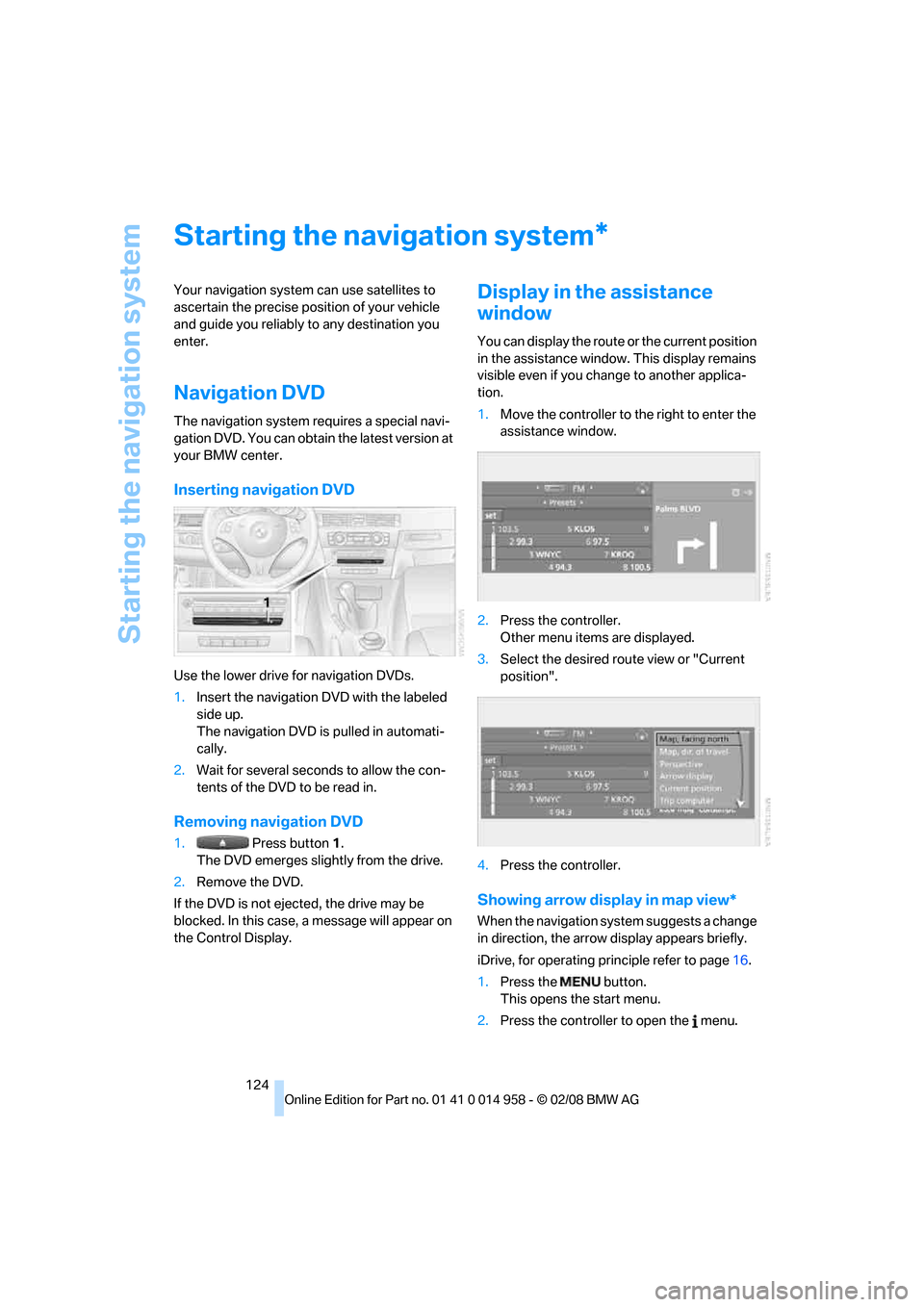
Use the lower drive for navigation DVDs.
1.Insert the navigation DVD with the labeled
side up.
The navigation DVD is pulled in automati-
cally.
2.Wait for several seconds to allow the con-
tents of the DVD to be read in.
Removing navigation DVD
1. Press button 1.
The DVD emerges slightly from the drive.
2.Remove the DVD.
If the DVD is not ejected, the drive may be
blocked. In this case, a message will appear on
the Control Display.
Display in the assistance
window
You can display the route or the current position
in the assistance window. This display remains
visible even if you change to another applica-
tion.
1.Move the controller to the right to enter the
assistance window.
2.Press the controller.
Other menu items are displayed.
3.Select the desired route view or "Current
position".
4.Press the controller.
Showing arrow display in map view*
When the navigation system suggests a change
in direction, the arrow display appears briefly.
iDrive, for operating principle refer to page16.
1.Press the button.
This opens the start menu.
2.Press the controller to open the menu.
*
Page 127 of 266
Navigation
Driving tips
125Reference
At a glance
Controls
Communications
Entertainment
Mobility
3.Turn the controller until "Settings" is
selected and press the controller.
4.Turn the controller until "Language / Units"
is selected and press the controller.
5.If necessary, move the highlight marker to
the uppermost field. Turn the controller
until "Languages" is selected and press the
controller.
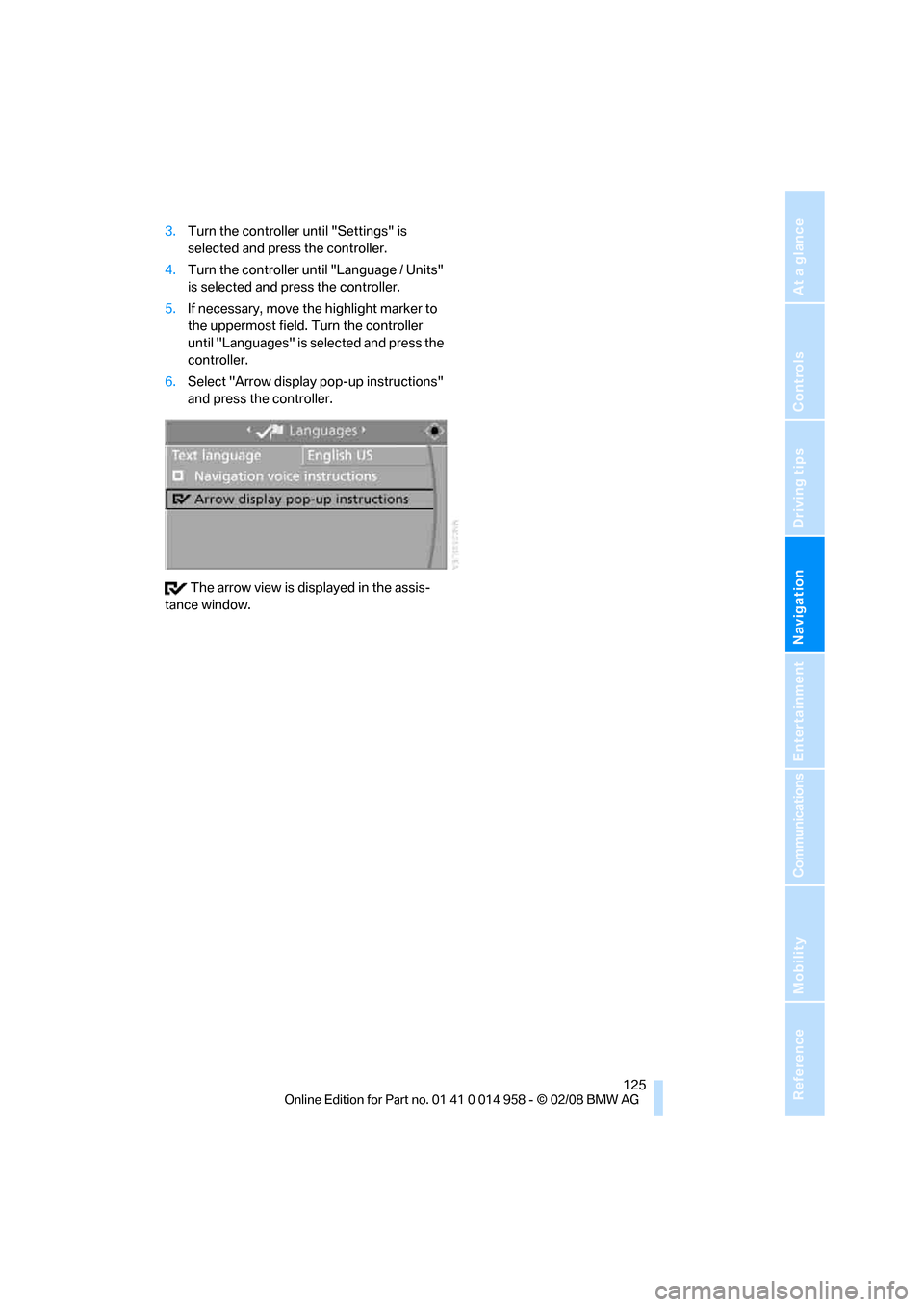
6.Select "Arrow display pop-up instructions"
and press the controller.
The arrow view is displayed in the assis-
tance window.
Page 186 of 266
Telephoning
184 >Selecting stored phone numbers, e.g. from
the list of accepted calls
>Ending a call
When the ignition and radio readiness are
switched off, e.g. after taking the remote control
out of the ignition switch, you can continue an
ongoing call via the hands-free system for no
more than 25 minutes.
Voice quality
If the person you are talking to is having difficul-
ties understanding you, this may be due to
excessive background noise. The full mobile
phone preparation package can compensate
for these noises to a certain extent. To optimize
voice quality during a call, we recommend that
you:
>Reduce background noise, e.g. by closing
the windows, reducing air flow from the
automatic climate control or by pointing the
open front air vents downward
>Reduce the volume of the hands-free sys-
tem
Requirements
>The mobile phone's pairing data are stored
by the vehicle and the mobile phone is oper-
ational.
>The engine is running or the ignition is
switched on.
>The mobile phone is recognized by the
vehicle.
Calling up communication
Many of the functions described below are con-
trolled using the "Communication" menu.
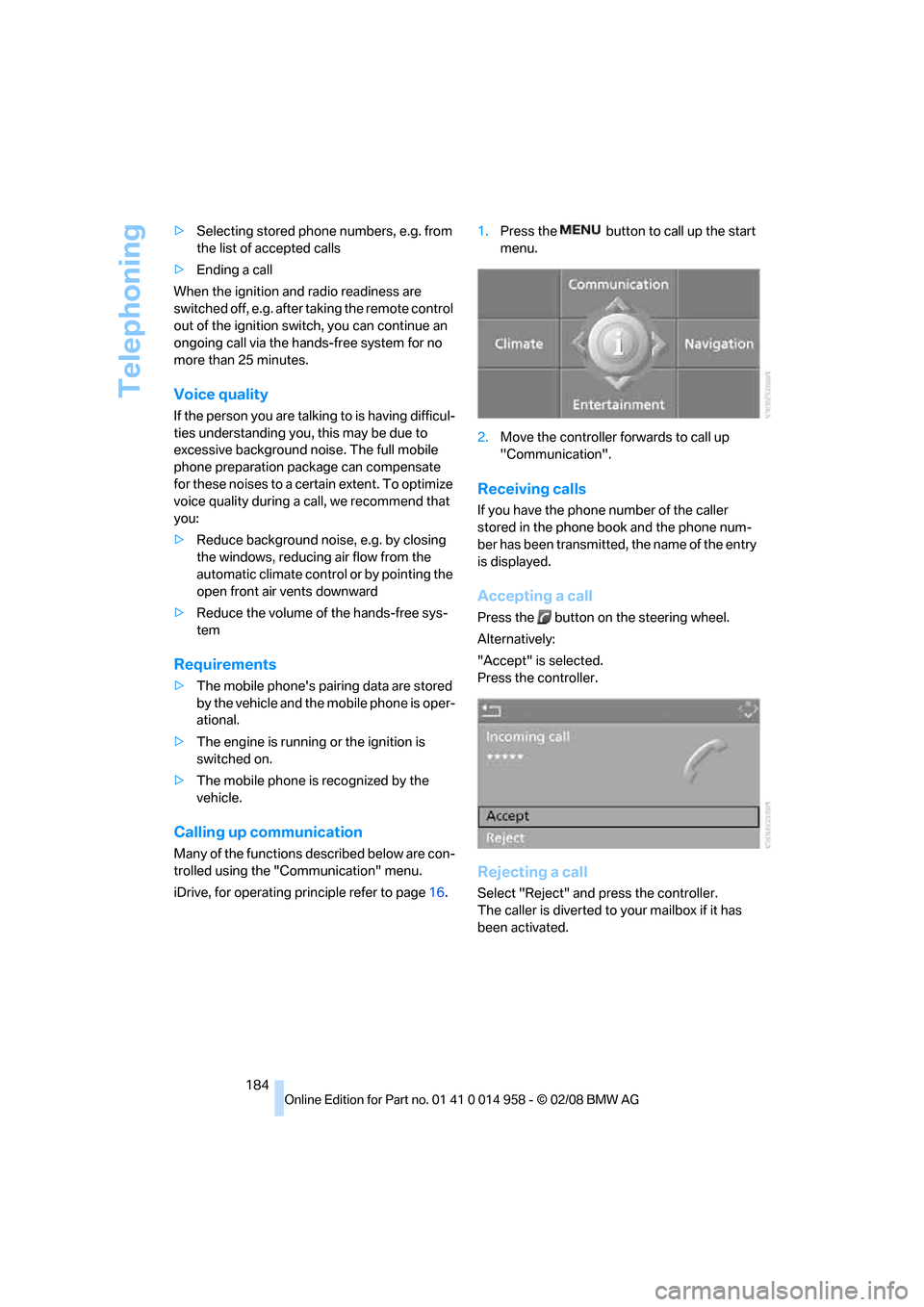
iDrive, for operating principle refer to page16.1.Press the button to call up the start
menu.
2.Move the controller forwards to call up
"Communication".
Receiving calls
If you have the phone number of the caller
stored in the phone book and the phone num-
ber has been transmitted, the name of the entry
is displayed.
Accepting a call
Press the button on the steering wheel.
Alternatively:
"Accept" is selected.
Press the controller.
Rejecting a call
Select "Reject" and press the controller.
The caller is diverted to your mailbox if it has
been activated.
Page 193 of 266
191
Entertainment
Reference
At a glance
Controls
Driving tips Communications
Navigation
Mobility
Notes
Important for voice commands
For voice commands, bear in mind the follow-
ing:
>Pronounce the commands smoothly and at
normal volume, avoiding excessive empha-
ses and pauses.
>Keep the doors, windows and glass roof
closed to prevent interference from outside
noise.
>Avoid ambient noise in the vehicle while
speaking.
Inserting/removing snap-in
adapter*
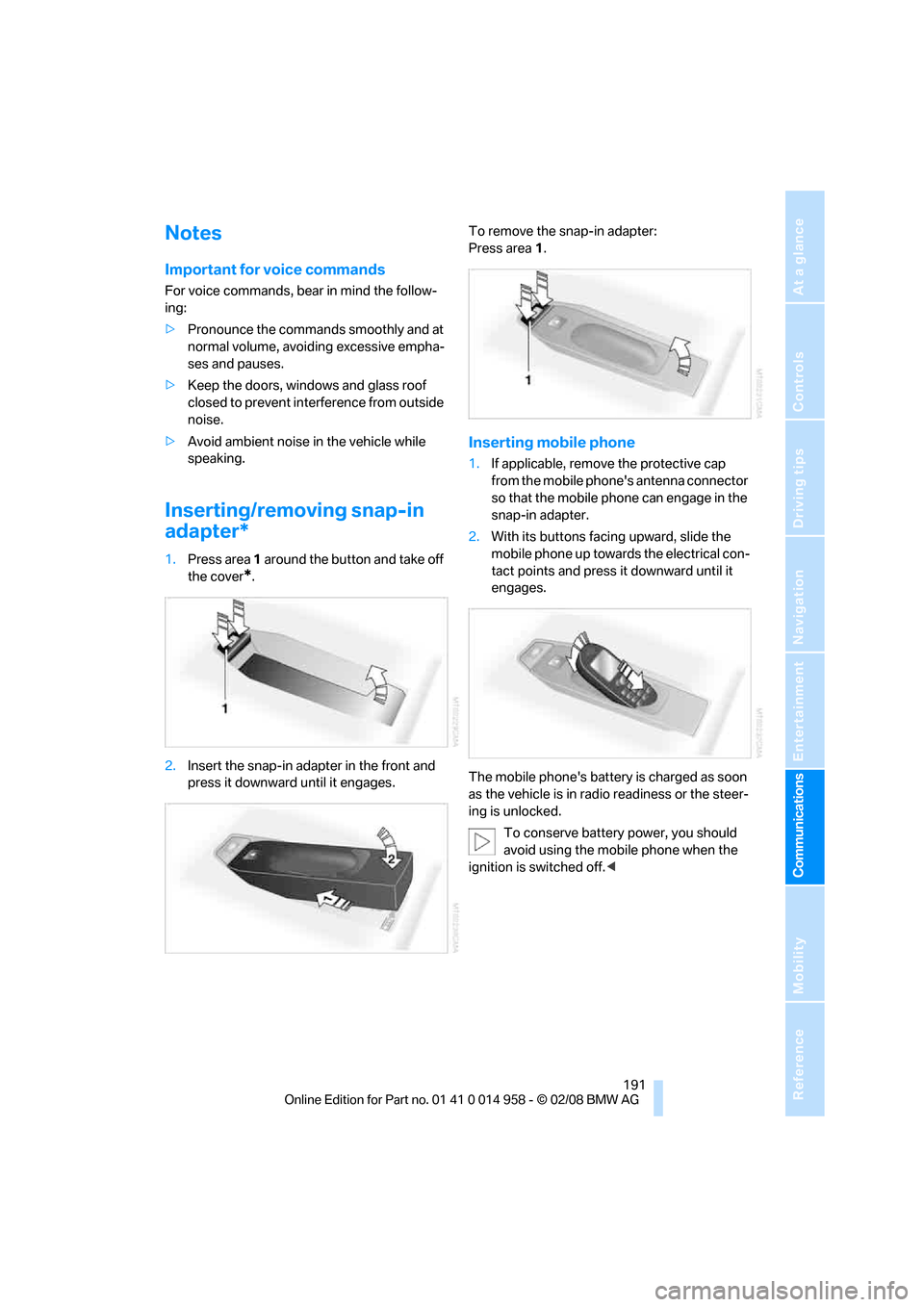
1.Press area 1 around the button and take off
the cover
*.
2.Insert the snap-in adapter in the front and
press it downward until it engages.To remove the snap-in adapter:
Press area 1.
Inserting mobile phone
1.If applicable, remove the protective cap
from the mobile phone's antenna connector
so that the mobile phone can engage in the
snap-in adapter.
2.With its buttons facing upward, slide the
mobile phone up towards the electrical con-
tact points and press it downward until it
engages.
The mobile phone's battery is charged as soon
as the vehicle is in radio readiness or the steer-
ing is unlocked.
To conserve battery power, you should
avoid using the mobile phone when the
ignition is switched off.<
Page 216 of 266
Care
214
Care
Care products
Regular cleaning and care contributes signifi-
cantly to the value retention of your BMW.
BMW recommends cleaning and caring for your
vehicle with products that are approved by
BMW for this purpose.
Your BMW center will be happy to advise you on
the products and services available for cleaning
and caring for your BMW.
Original BMW CareProducts have been
material tested, laboratory checked and
proven in the field, and offer optimal care and
protection for your vehicle.<
Do not use cleaners that contain alcohol
or solvents as these may result in dam-
age.<
Cleaning agents can contain substances
that are dangerous or hazardous to your
health. Therefore, follow the warning and safety
instructions on the packaging. When cleaning
inside the vehicle, always open the doors or
windows of the vehicle. In enclosed areas, pro-
vide for sufficient ventilation. Only use products
designed for cleaning vehicles.<
Exterior care
Washing the vehicle
Especially during the winter months,
ensure that the vehicle is washed more
frequently. Heavy soiling and road salt can lead
to vehicle damage.<
After washing the vehicle, apply the
brakes briefly to dry them, otherwise
water can reduce braking efficiency over the
short term and the brake discs can corrode.<
Automatic car washes
Preference should be given to cloth car washes.
Before driving into a car wash, ensure that it is
suitable for your BMW. Check the following:>Dimensions of your vehicle, refer to
page239.
>If necessary: fold in the exterior mirrors,
refer to page45.
>Maximum permissible tire width.
Preparations before driving into an automatic
car wash:
>Deactivate the rain sensor
* to avoid unin-
tentional activation of the wipers.
>Remove additional attachments, e.g.
spoiler or telephone antennas, if there is a
possibility that they could be damaged.
M dual clutch transmission
Before driving into an automatic car wash, per-
form the following steps to ensure that the vehi-
cle can roll:
1.Insert the remote control, even with conve-
nient access, into the ignition lock.
2.Engage transmission position N.
3.Release the parking brake.
4.Switch off the engine.
5.Leave the remote control in the ignition lock
so that the vehicle can roll.
Steam jets / high-pressure washers
When using steam jets or high-pressure
washers, ensure that you maintain a suffi-
cient clearance to the vehicle and do not exceed
a temperature of 1407/606.
Insufficient clearance or excessive pressure or
temperature can lead to component damage or
water penetration. Follow the operating instruc-
tions of the high-pressure washer.<
When using high-pressure washers, do
not spray against the sensors and cam-
eras, e.g. Park Distance Control, for an
extended period and maintain a distance of at
least 12 in/30 cm.<
Page 217 of 266
Mobility
215Reference
At a glance
Controls
Driving tips
Communications
Navigation
Entertainment
Washing the car manually
When washing the vehicle by hand, use large
quantities of water and car shampoo if neces-
sary. Clean the vehicle with a sponge or wash-
ing brush, applying light pressure only.
Before cleaning the windshield, deacti-
vate the rain sensor or switch off the igni-
tion to prevent unintentional activation of the
wipers.<
Observe local regulations pertaining to
washing vehicles by hand.<
Headlamps
Do not rub them dry and do not use abrasive or
corrosive cleaning agents.
Remove contamination, such as insects, by
soaking with shampoo or insect remover and
then rinsing with plenty of water.
Thaw ice with a windshield de-icer and do not
use an ice scraper.
Windows
Clean the inside and outside surfaces of the
windows and the mirrors with window cleaner.
Do not clean the mirrors with cleaners
containing quartz.<
Wiper blades
Clean with soapy water and replace regularly to
avoid streaking.
Wax and preservative residue and con-
tamination on the window can lead to
streaking when operating the windshield wip-
ers, leading to premature wear of the wiper
blades and causing the rain sensor to malfunc-
tion.<
Paintwork care
Regular care contributes to value retention and
protects the paintwork against the long-term
effects of damaging substances.
Region-specific environmental influences can
damage the vehicle paintwork. Therefore, it is
important to adapt the frequency and scope of
car care accordingly.Immediately remove very aggressive sub-
stances, e.g. spilled fuel, oil, grease, tree resin
or bird droppings, to prevent damage to the
paintwork.
Repairing paintwork damage
Immediately repair scratches or similar
damage, such as that caused by stones
hitting the vehicle, where necessary to prevent
rusting.<
BMW recommends having paintwork damage
repaired by a professional paint repair work-
shop according to BMW specifications using
original BMW paint materials.
Preservation
A preservation treatment is necessary when
water no longer beads off of the clean paintwork
surface. Only use products for paintwork pres-
ervation that contain carnauba or synthetic
waxes.
Rubber seals
Treat only with water or rubber care products.
Do not use silicon-containing care prod-
ucts on rubber seals, otherwise noise and
damage could occur.<
Chrome parts
Carefully clean vehicle parts, such as the radia-
tor grill, door handles or window frames, with
copious quantities of water and a shampoo
additive. For additional treatment, use a chrome
polish.
Light-alloy wheels
For technical reasons, dust is generated during
braking that is deposited on the light-alloy
wheels. Remove the dust regularly using acid-
free rim cleaner.
Do not use aggressive, acidic, strongly
alkaline and abrasive cleaning agents or
steam jets over 1407/606, otherwise dam-
age may occur.<
Page 221 of 266
Mobility
219Reference
At a glance
Controls
Driving tips
Communications
Navigation
Entertainment
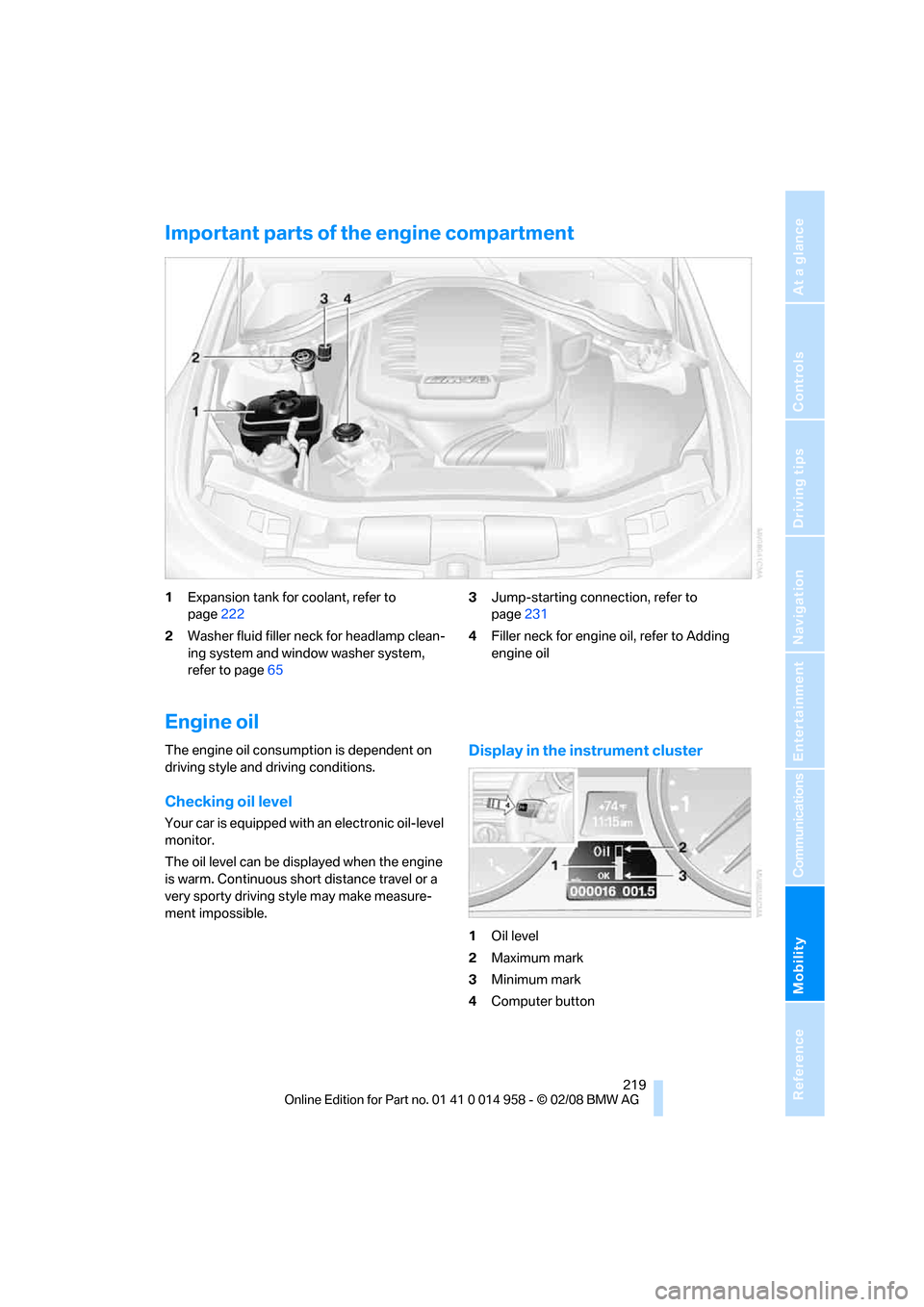
Important parts of the engine compartment
1Expansion tank for coolant, refer to
page222
2Washer fluid filler neck for headlamp clean-
ing system and window washer system,
refer to page653Jump-starting connection, refer to
page231
4Filler neck for engine oil, refer to Adding
engine oil
Engine oil
The engine oil consumption is dependent on
driving style and driving conditions.
Checking oil level
Your car is equipped with an electronic oil-level
monitor.
The oil level can be displayed when the engine
is warm. Continuous short distance travel or a
very sporty driving style may make measure-
ment impossible.
Display in the instrument cluster
1Oil level
2Maximum mark
3Minimum mark
4Computer button
Page 243 of 266
Reference 241
At a glance
Controls
Driving tips
Communications
Navigation
Entertainment
Mobility
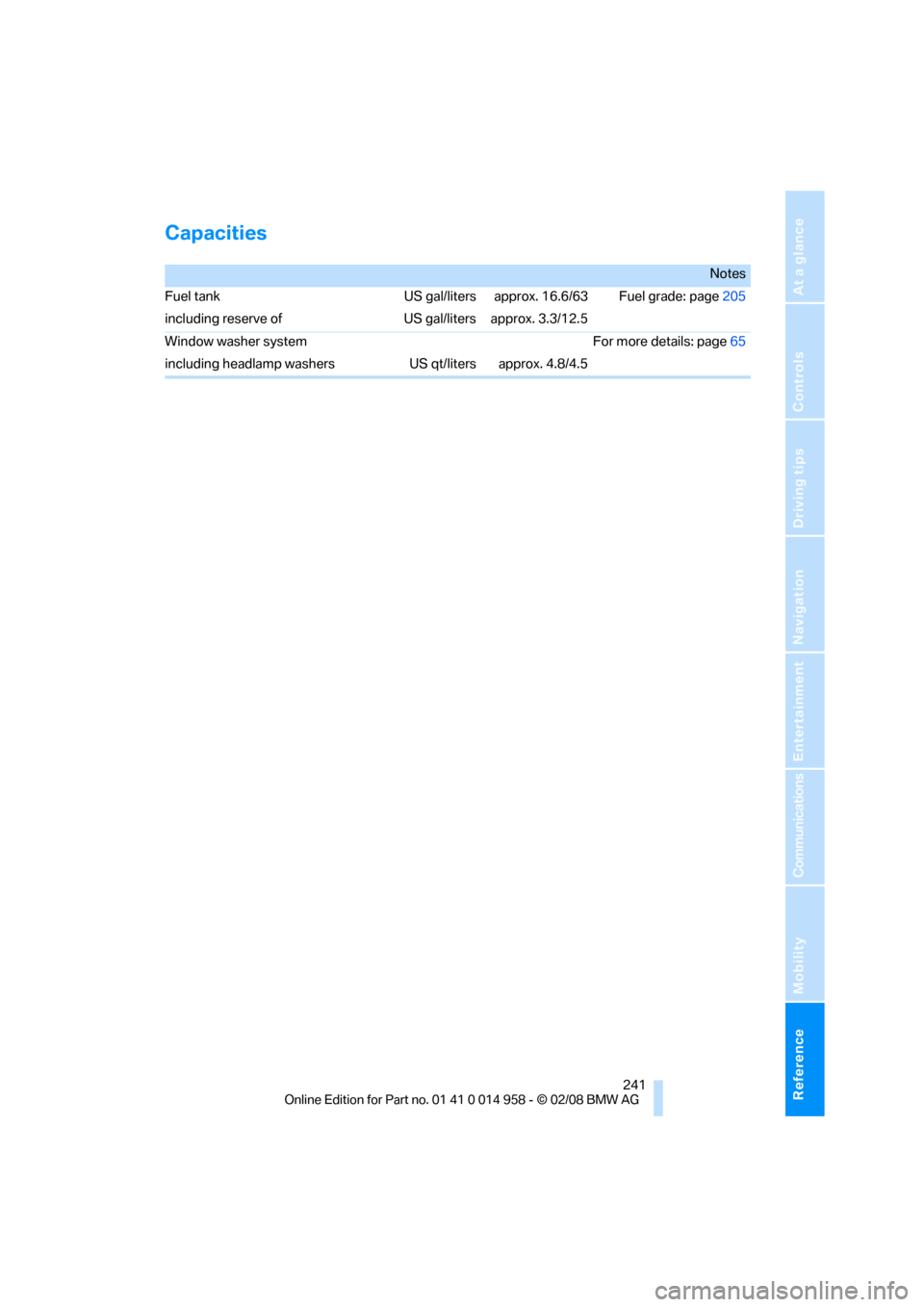
Capacities
Notes
Fuel tank US gal/liters approx. 16.6/63 Fuel grade: page205
including reserve of US gal/liters approx. 3.3/12.5
Window washer system For more details: page65
including headlamp washers US qt/liters approx. 4.8/4.5
Page 244 of 266
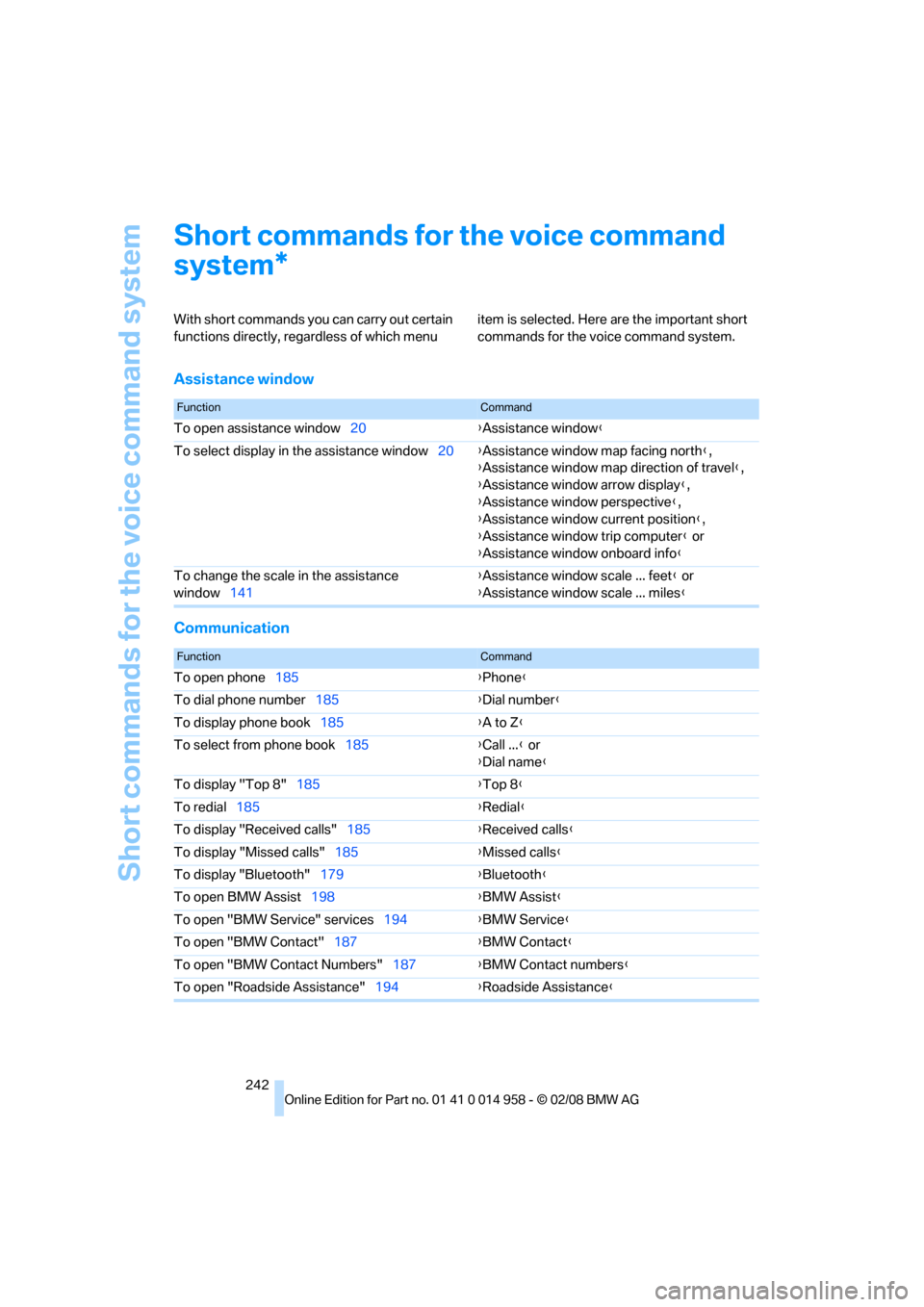
Short commands for the voice command system
242
Short commands for the voice command
system
With short commands you can carry out certain
functions directly, regardless of which menu item is selected. Here are the important short
commands for the voice command system.
Assistance window
Communication
*
FunctionCommand
To open assistance window20{Assistance window}
To select display in the assistance window20{Assistance window map facing north},
{Assistance window map direction of travel},
{Assistance window arrow display},
{Assistance window perspective},
{Assistance window current position},
{Assistance window trip computer} or
{Assistance window onboard info}
To change the scale in the assistance
window141{Assistance window scale ... feet} or
{Assistance window scale ... miles}
FunctionCommand
To open phone185{Phone}
To dial phone number185{Dial number}
To display phone book185{A to Z}
To select from phone book185{Call ...} or
{Dial name}
To display "Top 8"185{Top 8}
To redial185{Redial}
To display "Received calls"185{Received calls}
To display "Missed calls"185{Missed calls}
To display "Bluetooth"179{Bluetooth}
To open BMW Assist198{BMW Assist}
To open "BMW Service" services194{BMW Service}
To open "BMW Contact"187{BMW Contact}
To open "BMW Contact Numbers"187{BMW Contact numbers}
To open "Roadside Assistance"194{Roadside Assistance}
Page 248 of 266
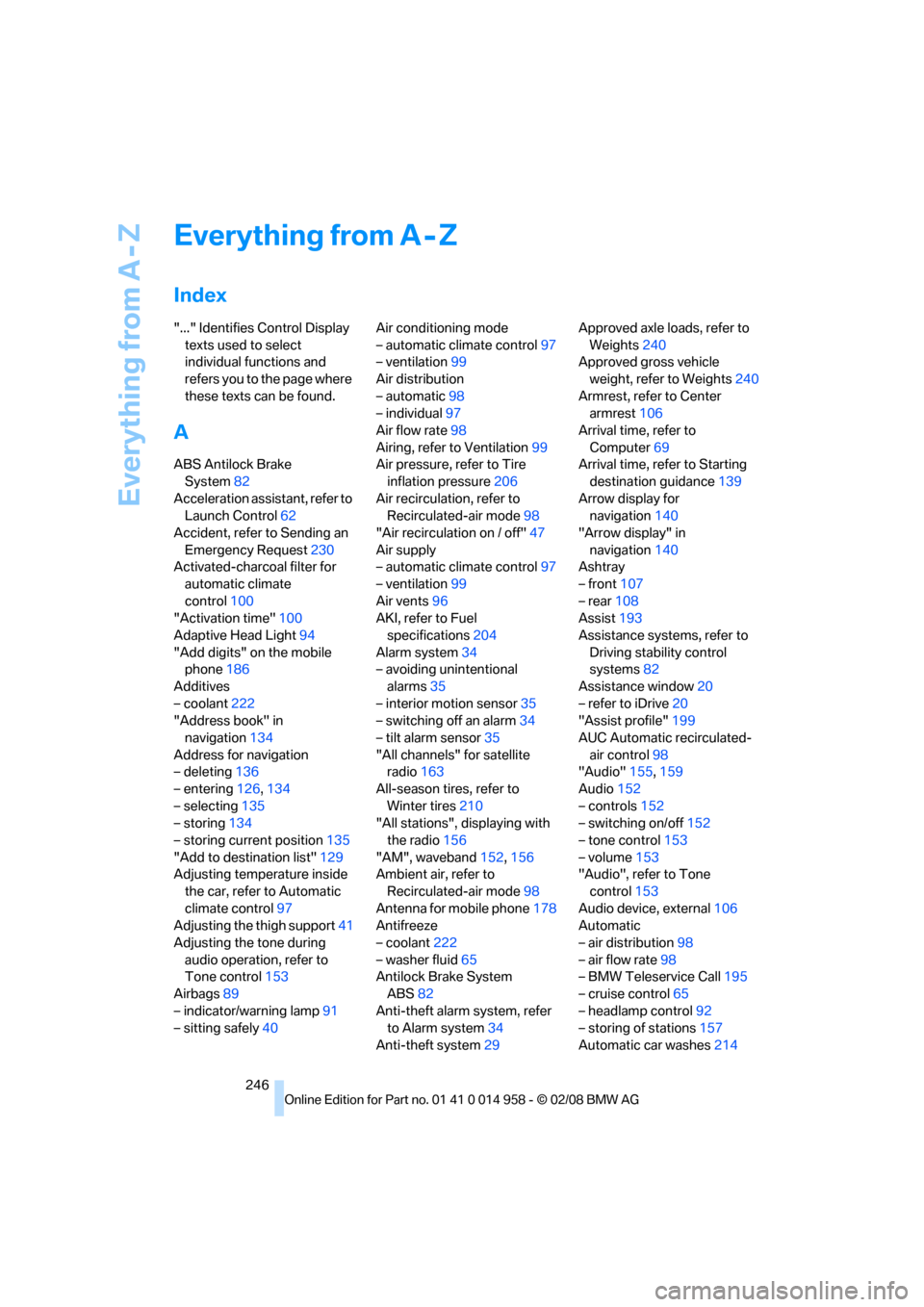
Everything from A - Z
246
Everything from A - Z
Index
"..." Identifies Control Display
texts used to select
individual functions and
refers you to the page where
these texts can be found.
A
ABS Antilock Brake
System82
Acceleration assistant, refer to
Launch Control62
Accident, refer to Sending an
Emergency Request230
Activated-charcoal filter for
automatic climate
control100
"Activation time"100
Adaptive Head Light94
"Add digits" on the mobile
phone186
Additives
– coolant222
"Address book" in
navigation134
Address for navigation
– deleting136
– entering126,134
– selecting135
– storing134
– storing current position135
"Add to destination list"129
Adjusting temperature inside
the car, refer to Automatic
climate control97
Adjusting the thigh support41
Adjusting the tone during
audio operation, refer to
Tone control153
Airbags89
– indicator/warning lamp91
– sitting safely40Air conditioning mode
– automatic climate control97
– ventilation99
Air distribution
– automatic98
– individual97
Air flow rate98
Airing, refer to Ventilation99
Air pressure, refer to Tire
inflation pressure206
Air recirculation, refer to
Recirculated-air mode98
"Air recirculation on / off"47
Air supply
– automatic climate control97
– ventilation99
Air vents96
AKI, refer to Fuel
specifications204
Alarm system34
– avoiding unintentional
alarms35
– interior motion sensor35
– switching off an alarm34
– tilt alarm sensor35
"All channels" for satellite
radio163
All-season tires, refer to
Winter tires
210
"All stations", displaying with
the radio156
"AM", waveband152,156
Ambient air, refer to
Recirculated-air mode98
Antenna for mobile phone178
Antifreeze
– coolant222
– washer fluid65
Antilock Brake System
ABS82
Anti-theft alarm system, refer
to Alarm system34
Anti-theft system29Approved axle loads, refer to
Weights240
Approved gross vehicle
weight, refer to Weights240
Armrest, refer to Center
armrest106
Arrival time, refer to
Computer69
Arrival time, refer to Starting
destination guidance139
Arrow display for
navigation140
"Arrow display" in
navigation140
Ashtray
– front107
– rear108
Assist193
Assistance systems, refer to
Driving stability control
systems82
Assistance window20
– refer to iDrive20
"Assist profile"199
AUC Automatic recirculated-
air control98
"Audio"155,159
Audio152
– controls152
– switching on/off152
– tone control153
– volume153
"Audio", refer to Tone
control153
Audio device, external106
Automatic
– air distribution98
– air flow rate98
– BMW Teleservice Call195
– cruise control65
– headlamp control92
– storing of stations157
Automatic car washes214