wheel BMW M3 SEDAN 2009 E90 User Guide
[x] Cancel search | Manufacturer: BMW, Model Year: 2009, Model line: M3 SEDAN, Model: BMW M3 SEDAN 2009 E90Pages: 246, PDF Size: 11.68 MB
Page 45 of 246
Controls
43Reference
At a glance
Driving tips
Communications
Navigation
Entertainment
Mobility
pressing button3. This can be beneficial in nar-
row streets, for example, or for moving mirrors
that were folded in by hand back out into their
correct positions. Mirrors that were folded in are
folded out automatically at a speed of approx.
25 mph/40 km/h.
Before entering an automatic car wash,
fold in the exterior mirrors manually or
with button3 to prevent them from being dam-
aged, depending on the width of the vehicle.<
Automatic heating*
Depending on the outside temperature, both
exterior mirrors are heated automatically when
the engine is running or the ignition is switched
on.
Passenger-side mirror tilt function –
automatic curb monitor*
Activating
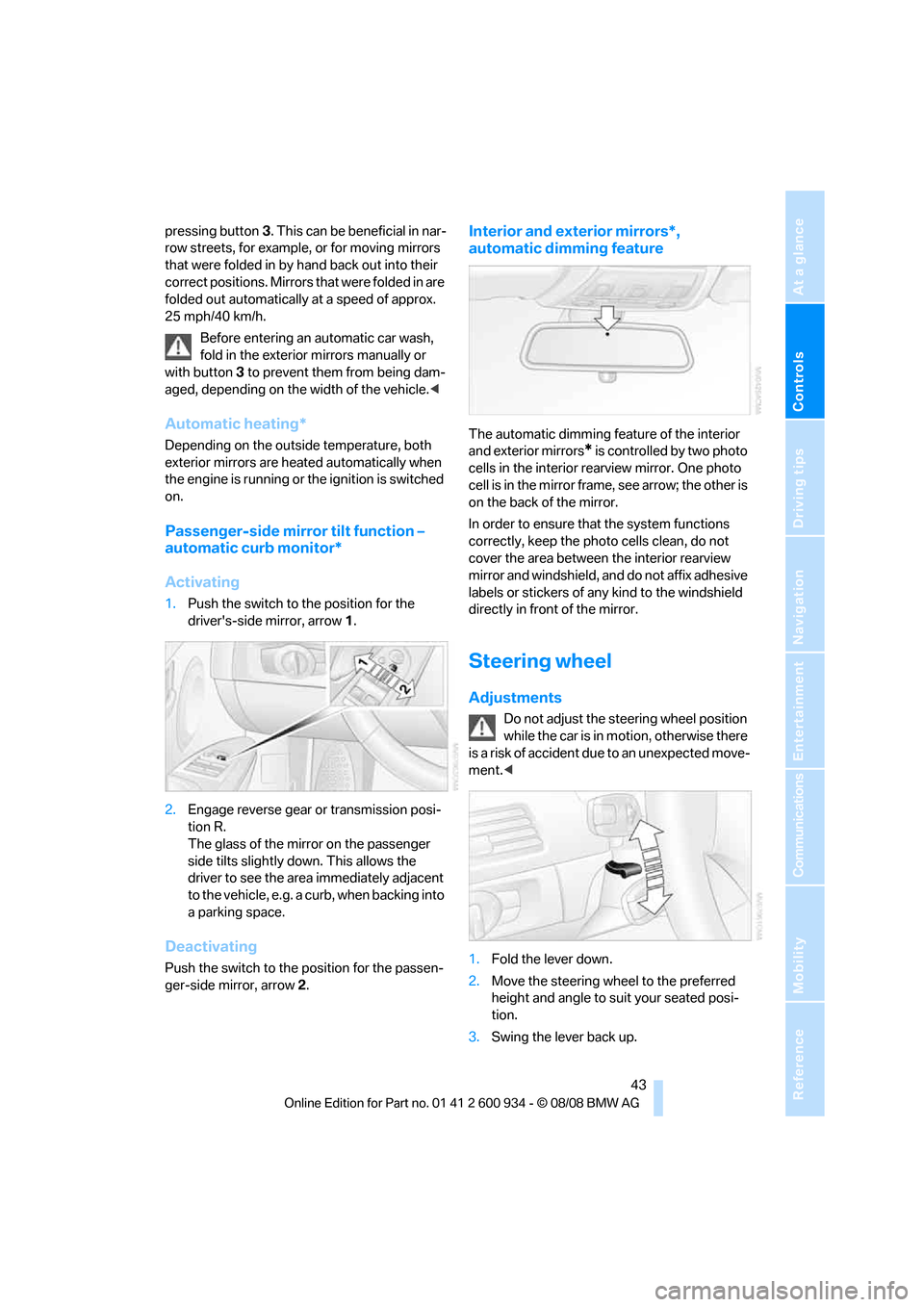
1.Push the switch to the position for the
driver's-side mirror, arrow 1.
2.Engage reverse gear or transmission posi-
tion R.
The glass of the mirror on the passenger
side tilts slightly down. This allows the
driver to see the area immediately adjacent
to the vehicle, e.g. a curb, when backing into
a parking space.
Deactivating
Push the switch to the position for the passen-
ger-side mirror, arrow 2.
Interior and exterior mirrors*,
automatic dimming feature
The automatic dimming feature of the interior
and exterior mirrors
* is controlled by two photo
cells in the interior rearview mirror. One photo
cell is in the mirror frame, see arrow; the other is
on the back of the mirror.
In order to ensure that the system functions
correctly, keep the photo cells clean, do not
cover the area between the interior rearview
mirror and windshield, and do not affix adhesive
labels or stickers of any kind to the windshield
directly in front of the mirror.
Steering wheel
Adjustments
Do not adjust the steering wheel position
while the car is in motion, otherwise there
is a risk of accident due to an unexpected move-
ment.<
1.Fold the lever down.
2.Move the steering wheel to the preferred
height and angle to suit your seated posi-
tion.
3.Swing the lever back up.
ba8_E90M3_cic.book Seite 43 Dienstag, 19. August 2008 11:51 11
Page 46 of 246
Adjustments
44 Do not use force to swing the lever
back up, otherwise the mechanism
will be damaged.<
MDrive*
With MDrive you can configure several individ-
ual settings for your vehicle on the Control Dis-
play and activate them using the button on
the steering wheel.
Configuring settings
You can set MDrive on the Control Display
when the ignition is switched on.
iDrive, for operating principle refer to page16.
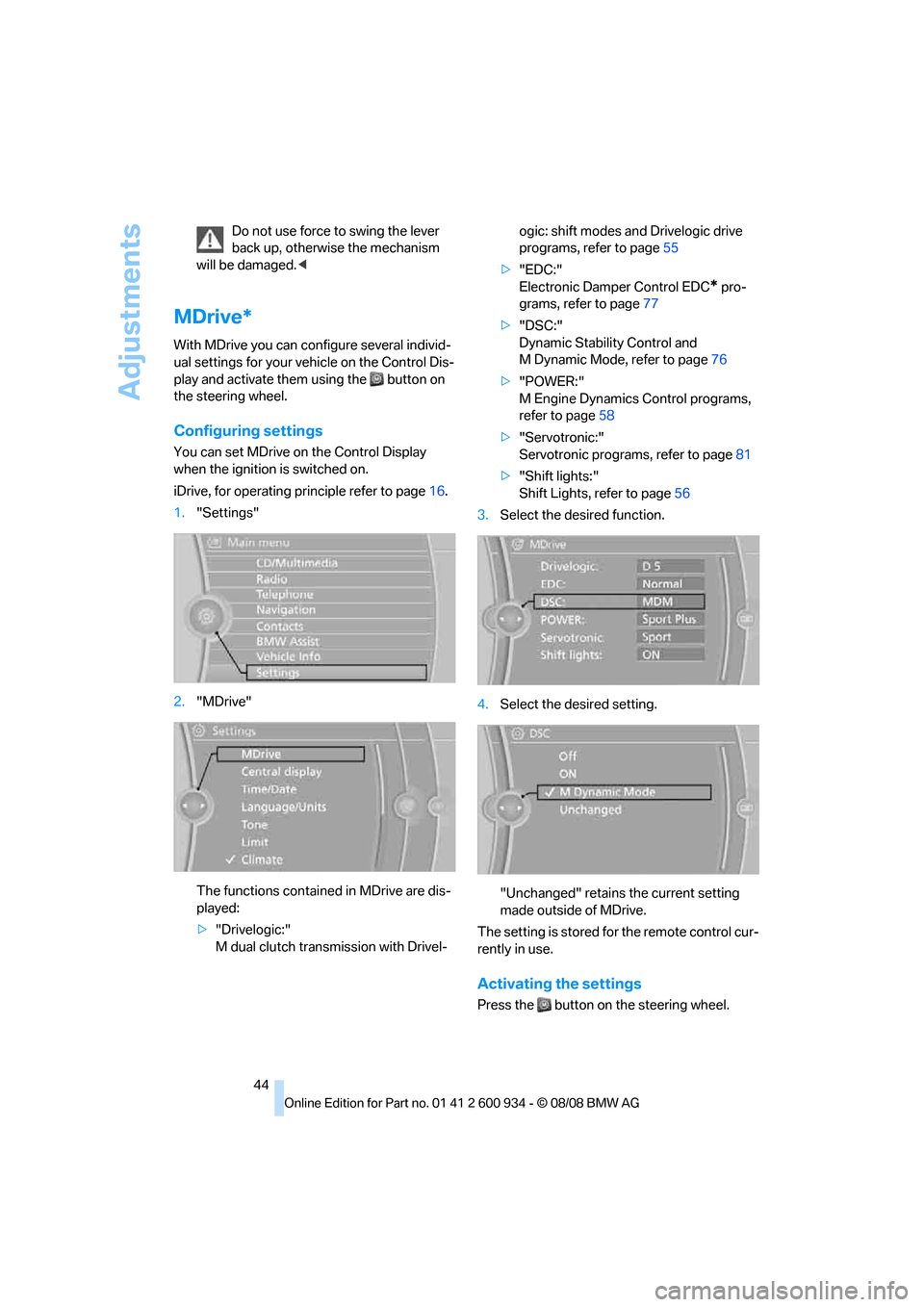
1."Settings"
2."MDrive"
The functions contained in MDrive are dis-
played:
>"Drivelogic:"
M dual clutch transmission with Drivel-ogic: shift modes and Drivelogic drive
programs, refer to page55
>"EDC:"
Electronic Damper Control EDC
* pro-
grams, refer to page77
>"DSC:"
Dynamic Stability Control and
M Dynamic Mode, refer to page76
>"POWER:"
M Engine Dynamics Control programs,
refer to page58
>"Servotronic:"
Servotronic programs, refer to page81
>"Shift lights:"
Shift Lights, refer to page56
3.Select the desired function.
4.Select the desired setting.
"Unchanged" retains the current setting
made outside of MDrive.
The setting is stored for the remote control cur-
rently in use.
Activating the settings
Press the button on the steering wheel.
ba8_E90M3_cic.book Seite 44 Dienstag, 19. August 2008 11:51 11
Page 53 of 246
Controls
51Reference
At a glance
Driving tips
Communications
Navigation
Entertainment
Mobility
3.Remove the remote control from the igni-
tion lock, refer to page49. This automati-
cally engages transmission position P.
Before driving into a car wash
The vehicle is able to roll when you perform the
following steps:
1.Insert the remote control, even with conve-
nient access, into the ignition lock.
2.Depress the brake.
3.Engage transmission position N.
4.Switch off the engine.
Transmission position P is engaged:
>Automatically after approx. 30 minutes
>When you remove the remote control from
the ignition lock
Parking brake
The parking brake is primarily intended to pre-
vent the vehicle from rolling while parked; it
brakes the rear wheels.
Indicator lamp
The indicator lamp is lit, and when you
drive off an acoustic signal sounds in
addition. The parking brake is still
applied.
Indicator lamp for Canadian models.
Applying
The lever locks in position automatically.
Releasing
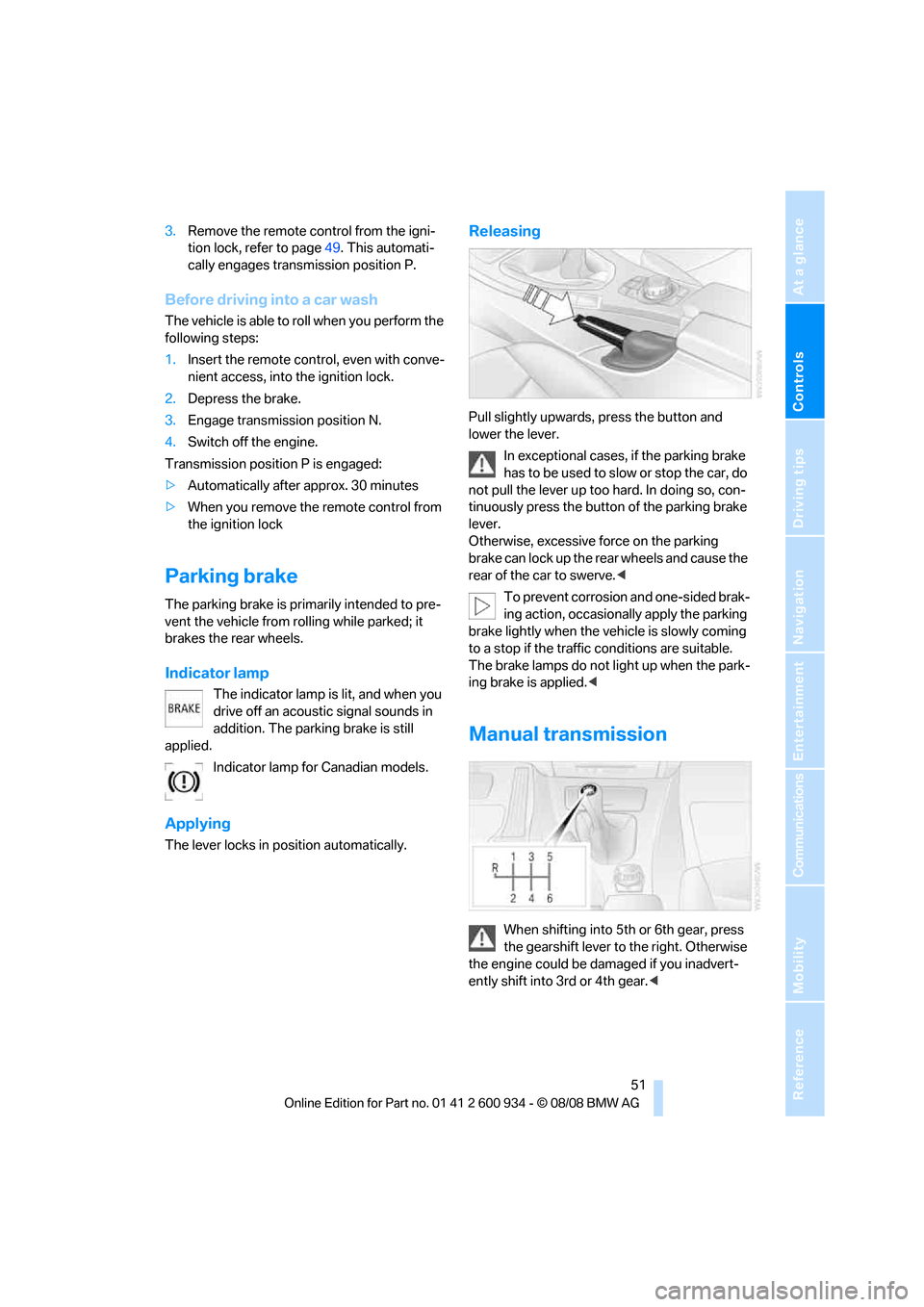
Pull slightly upwards, press the button and
lower the lever.
In exceptional cases, if the parking brake
has to be used to slow or stop the car, do
not pull the lever up too hard. In doing so, con-
tinuously press the button of the parking brake
lever.
Otherwise, excessive force on the parking
brake can lock up the rear wheels and cause the
rear of the car to swerve.<
To prevent corrosion and one-sided brak-
ing action, occasionally apply the parking
brake lightly when the vehicle is slowly coming
to a stop if the traffic conditions are suitable.
The brake lamps do not light up when the park-
ing brake is applied.<
Manual transmission
When shifting into 5th or 6th gear, press
the gearshift lever to the right. Otherwise
the engine could be damaged if you inadvert-
ently shift into 3rd or 4th gear.<
ba8_E90M3_cic.book Seite 51 Dienstag, 19. August 2008 11:51 11
Page 54 of 246
Driving
52
Reverse gear
Select this only when the vehicle is stationary.
When the gearshift lever is pressed to the left, a
slight resistance has to be overcome.
M dual clutch transmission
with Drivelogic*
The concept
The M dual clutch transmission with Drivelogic
is an automated manual transmission with two
clutches and a partial transmission in which an
electro-hydraulic system takes over clutch
action and shifting.
With the M dual clutch transmission, gears are
changed without interruption of the traction
force.
The M dual clutch transmission is operated
using the selector lever and two shift paddles
on the steering wheel.
The transmission offers you the following func-
tions:
>Selection between manual or automatic
operation, sequential mode or drive mode
>Selection between different drive pro-
grams, Drivelogic, refer to page55
>Shift Lights, refer to page56
>Automatic downshifting and protection
against selecting the wrong gear even in
sequential mode
>Launch Control, refer to page57
>Automatic throttle blip
>Low Speed Assistant
System limitations
The M dual clutch transmission is equipped
with an overheating protection system that pro-
tects the clutch against extreme loads.
The indicator lamp lights up yellow
when the transmission becomes too
warm. Avoid high engine loads and
driving off frequently. When the transmission is
overheated, the indicator lamp lights up red and
the fuel supply to the engine is cut off. You can-not continue driving until the transmission has
cooled down.
Avoid driving off frequently with high accelera-
tion and do not hold the vehicle on inclines by
pressing lightly on the accelerator while letting
the clutch slip, as this may cause the transmis-
sion to overheat.
In traffic congestion or at very low speeds, use
the Low Speed Assistant, refer to the informa-
tion below.
Low Speed Assistant
The Low Speed Assistant supports you when
driving at very low speeds: the vehicle moves at
walking speed and automatically controls the
engine speed. You can also use the Low Speed
Assistant when rocking the vehicle out of deep
snow. To do so, shift between reverse gear and
the forward position without pressing the brake.
Activating
1.Engage a drive position.
2.Briefly tap the accelerator.
The vehicle rolls at the minimum speed.
Do not press the brake continuously as
this may cause the transmission to over-
heat.<
Deactivating
Brake the vehicle to a stop to deactivate the
Low Speed Assistant.
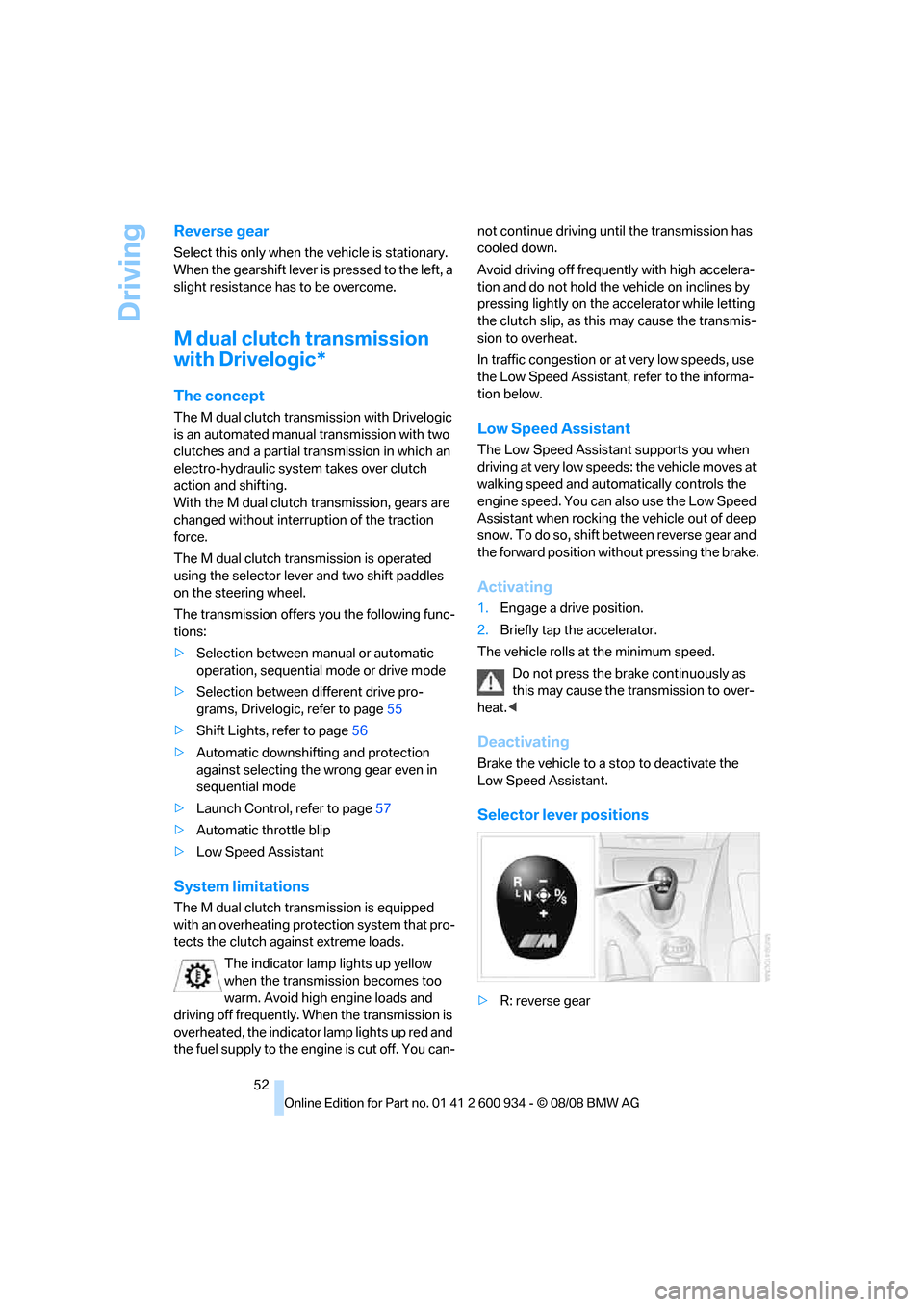
Selector lever positions
>R: reverse gear
ba8_E90M3_cic.book Seite 52 Dienstag, 19. August 2008 11:51 11
Page 56 of 246
Driving
54 resistance point. This provides maximum accel-
eration.
P Park
P engages automatically when you switch
off the engine unless N is engaged and
the remote control remains in the ignition lock,
refer to page49. As soon as you remove the
remote control from the ignition lock, P
engages regardless of the position of the selec-
tor lever.<
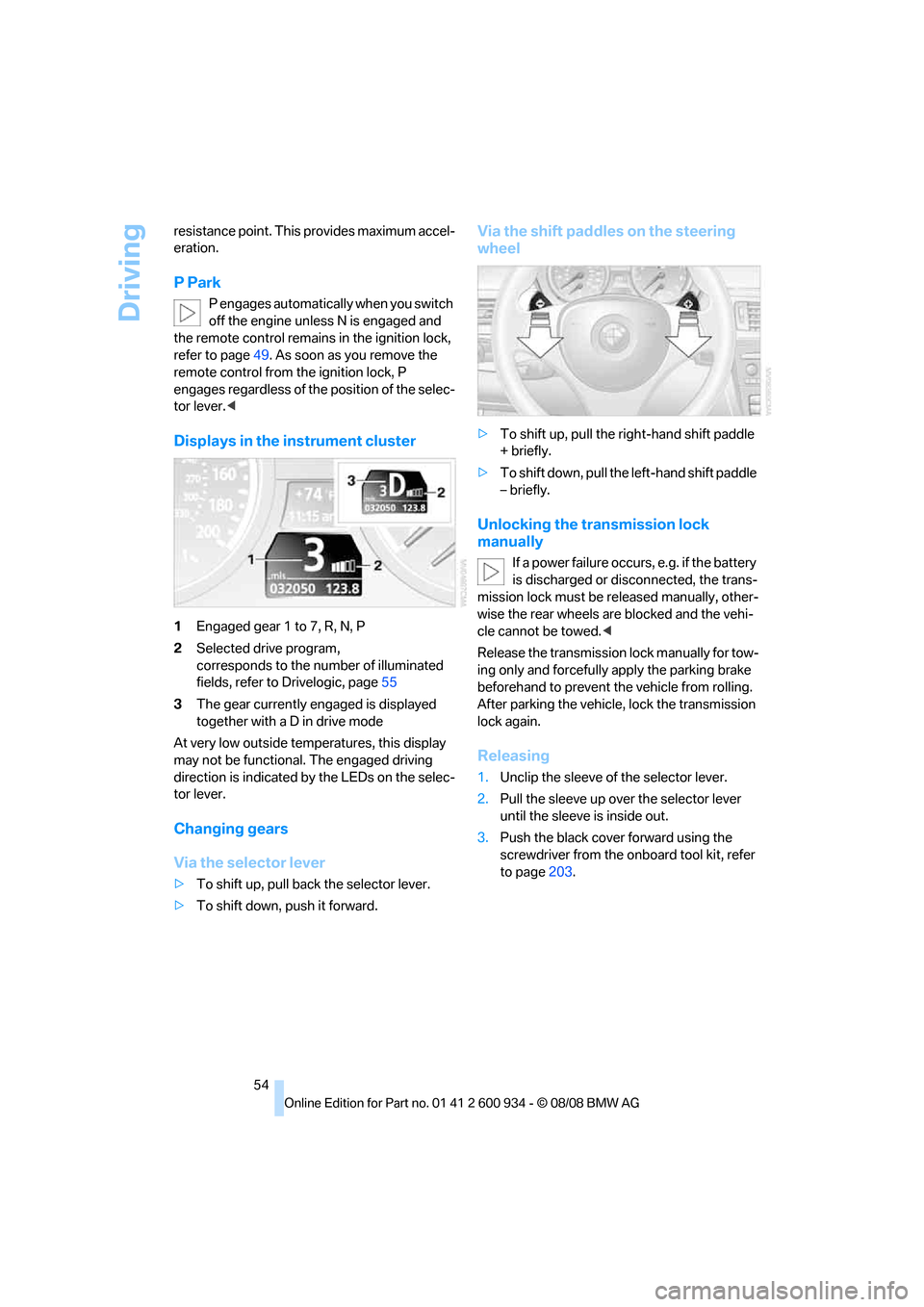
Displays in the instrument cluster
1Engaged gear 1 to 7, R, N, P
2Selected drive program,
corresponds to the number of illuminated
fields, refer to Drivelogic, page55
3The gear currently engaged is displayed
together with a D in drive mode
At very low outside temperatures, this display
may not be functional. The engaged driving
direction is indicated by the LEDs on the selec-
tor lever.
Changing gears
Via the selector lever
>To shift up, pull back the selector lever.
>To shift down, push it forward.
Via the shift paddles on the steering
wheel
>To shift up, pull the right-hand shift paddle
+ briefly.
>To shift down, pull the left-hand shift paddle
– briefly.
Unlocking the transmission lock
manually
If a power failure occurs, e.g. if the battery
is discharged or disconnected, the trans-
mission lock must be released manually, other-
wise the rear wheels are blocked and the vehi-
cle cannot be towed.<
Release the transmission lock manually for tow-
ing only and forcefully apply the parking brake
beforehand to prevent the vehicle from rolling.
After parking the vehicle, lock the transmission
lock again.
Releasing
1.Unclip the sleeve of the selector lever.
2.Pull the sleeve up over the selector lever
until the sleeve is inside out.
3.Push the black cover forward using the
screwdriver from the onboard tool kit, refer
to page203.
ba8_E90M3_cic.book Seite 54 Dienstag, 19. August 2008 11:51 11
Page 57 of 246
Controls
55Reference
At a glance
Driving tips
Communications
Navigation
Entertainment
Mobility
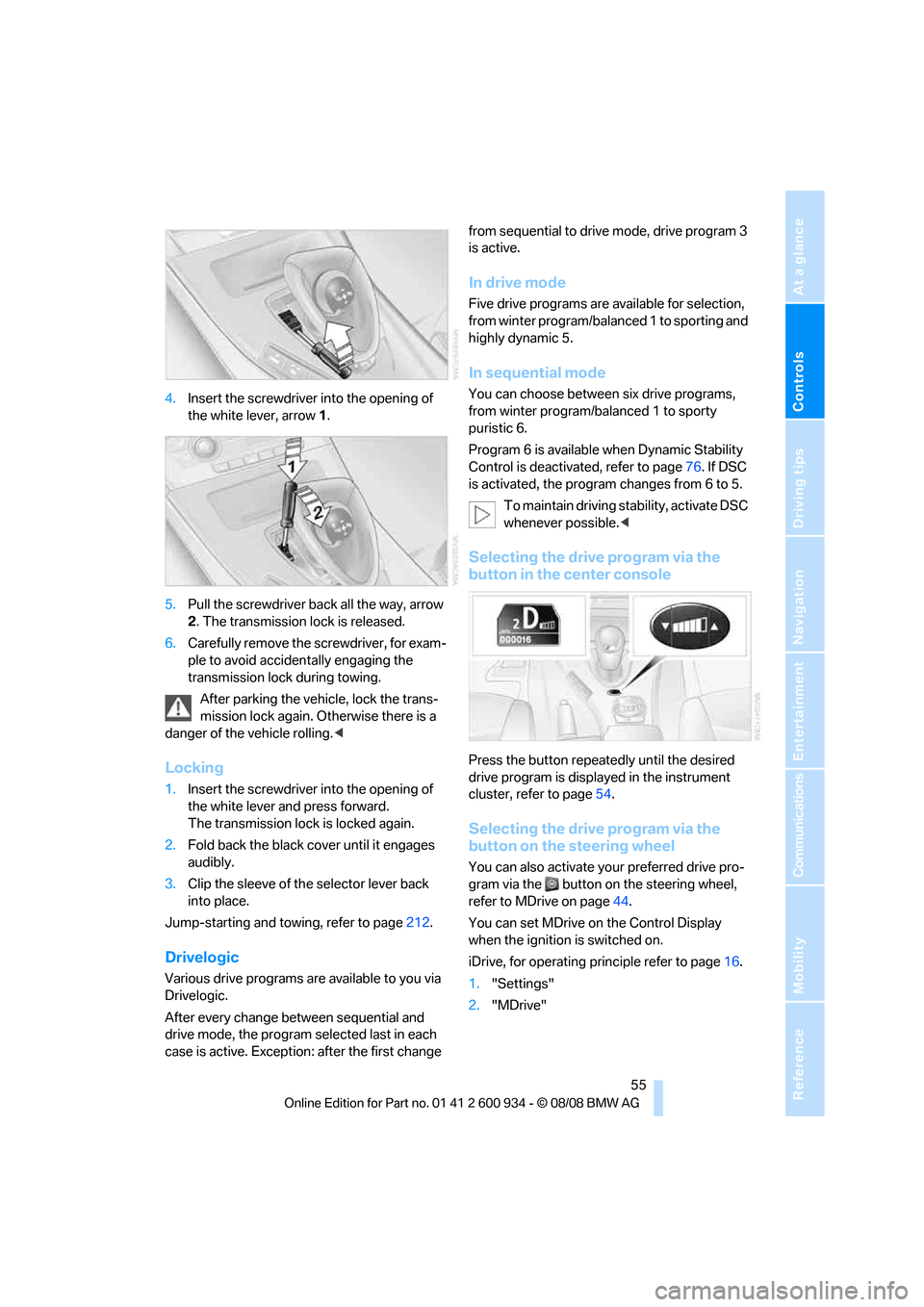
4.Insert the screwdriver into the opening of
the white lever, arrow 1.
5.Pull the screwdriver back all the way, arrow
2. The transmission lock is released.
6.Carefully remove the screwdriver, for exam-
ple to avoid accidentally engaging the
transmission lock during towing.
After parking the vehicle, lock the trans-
mission lock again. Otherwise there is a
danger of the vehicle rolling.<
Locking
1.Insert the screwdriver into the opening of
the white lever and press forward.
The transmission lock is locked again.
2.Fold back the black cover until it engages
audibly.
3.Clip the sleeve of the selector lever back
into place.
Jump-starting and towing, refer to page212.
Drivelogic
Various drive programs are available to you via
Drivelogic.
After every change between sequential and
drive mode, the program selected last in each
case is active. Exception: after the first change from sequential to drive mode, drive program 3
is active.
In drive mode
Five drive programs are available for selection,
from winter program/balanced 1 to sporting and
highly dynamic 5.
In sequential mode
You can choose between six drive programs,
from winter program/balanced 1 to sporty
puristic 6.
Program 6 is available when Dynamic Stability
Control is deactivated, refer to page76. If DSC
is activated, the program changes from 6 to 5.
To maintain driving stability, activate DSC
whenever possible.<
Selecting the drive program via the
button in the center console
Press the button repeatedly until the desired
drive program is displayed in the instrument
cluster, refer to page54.
Selecting the drive program via the
button on the steering wheel
You can also activate your preferred drive pro-
gram via the button on the steering wheel,
refer to MDrive on page44.
You can set MDrive on the Control Display
when the ignition is switched on.
iDrive, for operating principle refer to page16.
1."Settings"
2."MDrive"
ba8_E90M3_cic.book Seite 55 Dienstag, 19. August 2008 11:51 11
Page 61 of 246
Controls
59Reference
At a glance
Driving tips
Communications
Navigation
Entertainment
Mobility
3."Triple turn signal"
Triple turn signal activation is activated and
is stored for the remote control currently in use.
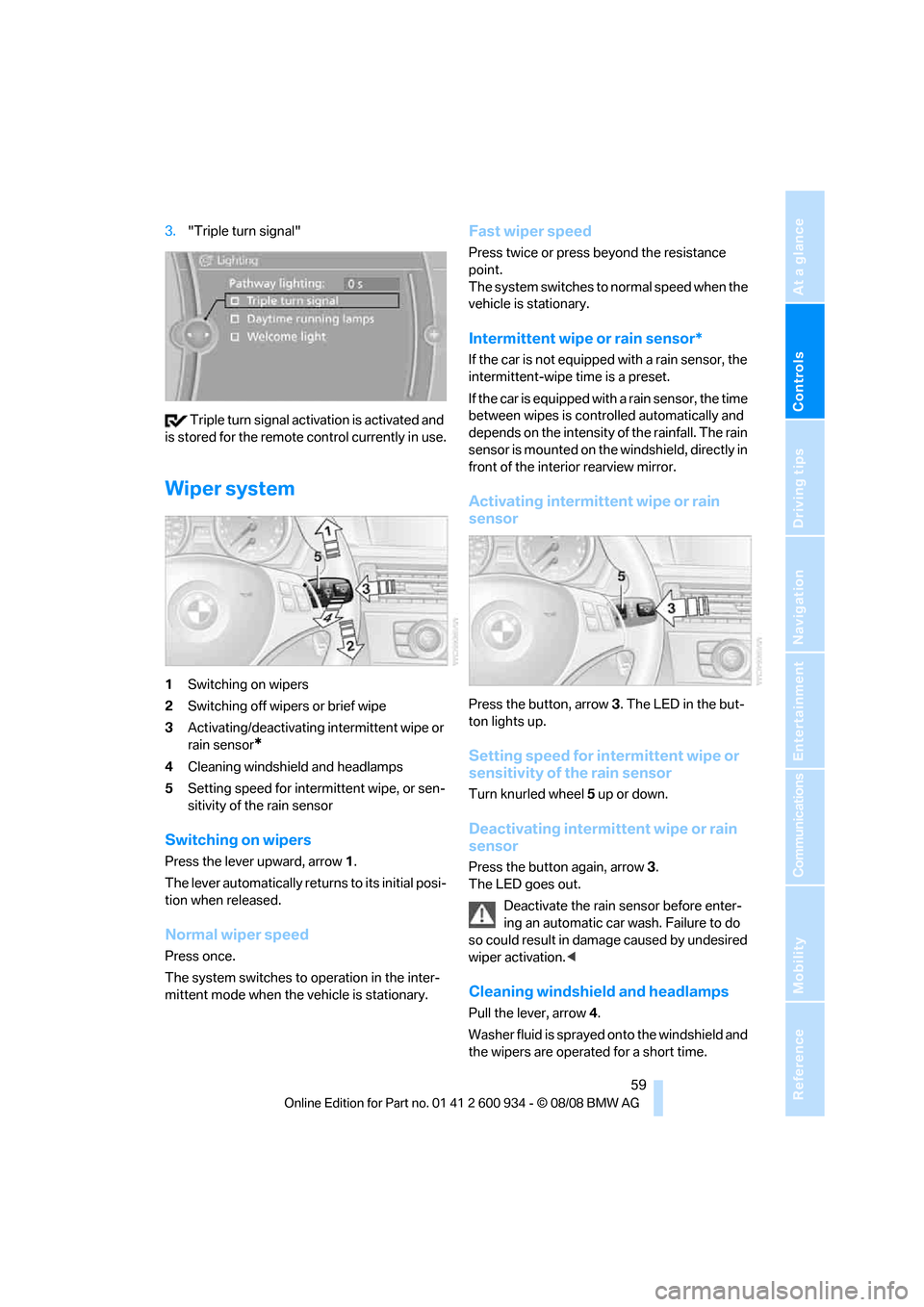
Wiper system
1Switching on wipers
2Switching off wipers or brief wipe
3Activating/deactivating intermittent wipe or
rain sensor
*
4Cleaning windshield and headlamps
5Setting speed for intermittent wipe, or sen-
sitivity of the rain sensor
Switching on wipers
Press the lever upward, arrow 1.
The lever automatically returns to its initial posi-
tion when released.
Normal wiper speed
Press once.
The system switches to operation in the inter-
mittent mode when the vehicle is stationary.
Fast wiper speed
Press twice or press beyond the resistance
point.
The system switches to normal speed when the
vehicle is stationary.
Intermittent wipe or rain sensor*
If the car is not equipped with a rain sensor, the
intermittent-wipe time is a preset.
If the car is equipped with a rain sensor, the time
between wipes is controlled automatically and
depends on the intensity of the rainfall. The rain
sensor is mounted on the windshield, directly in
front of the interior rearview mirror.
Activating intermittent wipe or rain
sensor
Press the button, arrow3. The LED in the but-
ton lights up.
Setting speed for intermittent wipe or
sensitivity of the rain sensor
Turn knurled wheel5 up or down.
Deactivating intermittent wipe or rain
sensor
Press the button again, arrow3.
The LED goes out.
Deactivate the rain sensor before enter-
ing an automatic car wash. Failure to do
so could result in damage caused by undesired
wiper activation.<
Cleaning windshield and headlamps
Pull the lever, arrow 4.
Washer fluid is sprayed onto the windshield and
the wipers are operated for a short time.
ba8_E90M3_cic.book Seite 59 Dienstag, 19. August 2008 11:51 11
Page 78 of 246
Technology for driving comfort and safety
76
Driving stability control
systems
Your BMW has a number of systems that help
to maintain the vehicle's stability even in
adverse driving conditions.
Antilock Brake System ABS
ABS prevents locking of the wheels during
braking. Safe steering response is maintained
even during full braking. Active safety is thus
increased.
The ABS is operational every time you start the
engine. Braking safely, refer to page107.
Electronic brake-force distribution
The system controls the brake pressure in the
rear wheels to ensure stable braking behavior.
Brake assist
When you apply the brakes rapidly, this system
automatically produces the maximum braking
force boost and thus helps to achieve the short-
est possible braking distance during full brak-
ing. This system exploits all of the benefits pro-
vided by ABS.
Do not reduce the pressure on the brake for the
duration of the full braking application.
Dynamic Stability Control DSC
DSC optimizes driving stability and traction. In
addition, the system recognizes unstable driv-
ing situations such as understeering and over-
steering, and helps keep the vehicle on a safe
course within physical limits by reducing engine
power and applying the brakes on individual
wheels.
The laws of physics cannot be repealed,
even with DSC. An appropriate driving
style always remains the responsibility of the
driver. Therefore, do not reduce the additional
safety margin again by taking risks, as this could
result in an accident.<
M Dynamic Mode MDM*
M Dynamic Mode is a mode of the Dynamic
Stability Control DSC that permits greater lon-gitudinal and lateral acceleration when driving
on dry surfaces, yet with reduced driving stabil-
ity. Only at the absolute limit of stability does
the system intervene to stabilize the vehicle by
reducing engine power and applying the brakes
on the wheels. In such situations, additional
corrective steering maneuvers may be neces-
sary.
M Dynamic Mode is switched off every time the
engine is restarted.
When the M Dynamic Mode is on, stabi-
lizing measures are performed to a limited
degree only. Take action yourself, otherwise
there is a risk of an accident.<
To maintain vehicle stability, drive with
the DSC activated and the
MDynamicMode deactivated whenever possi-
ble.<
Activating MDM
Press the button on the steering wheel, refer
to MDrive
* on page44. The MDM indicator
lamp in the instrument cluster lights up if you
previously selected the M Dynamic Mode MDM
in MDrive.
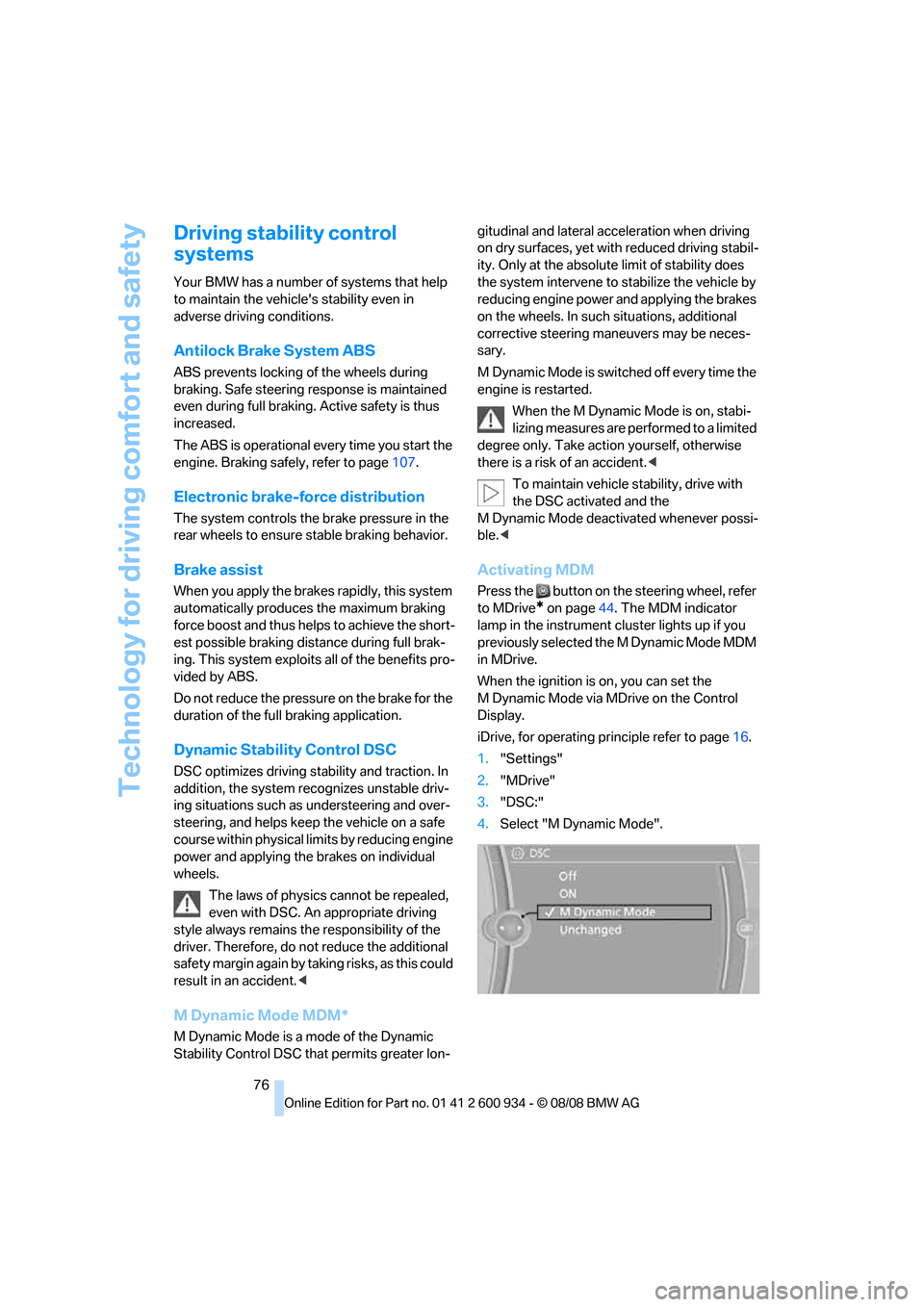
When the ignition is on, you can set the
M Dynamic Mode via MDrive on the Control
Display.
iDrive, for operating principle refer to page16.
1."Settings"
2."MDrive"
3."DSC:"
4.Select "M Dynamic Mode".
ba8_E90M3_cic.book Seite 76 Dienstag, 19. August 2008 11:51 11
Page 79 of 246
Controls
77Reference
At a glance
Driving tips
Communications
Navigation
Entertainment
Mobility
Deactivating MDM
Press the button on the steering wheel
again; the MDM indicator lamp in the instru-
ment cluster goes out.
For better control
The indicator lamp goes out briefly after
the engine is started.
If the indicator lamp lights up:
M Dynamic Mode is activated.
The indicator lamp lights up perma-
nently and the DSC indicator lamp
flashes: M Dynamic Mode is control-
ling the drive and braking forces.
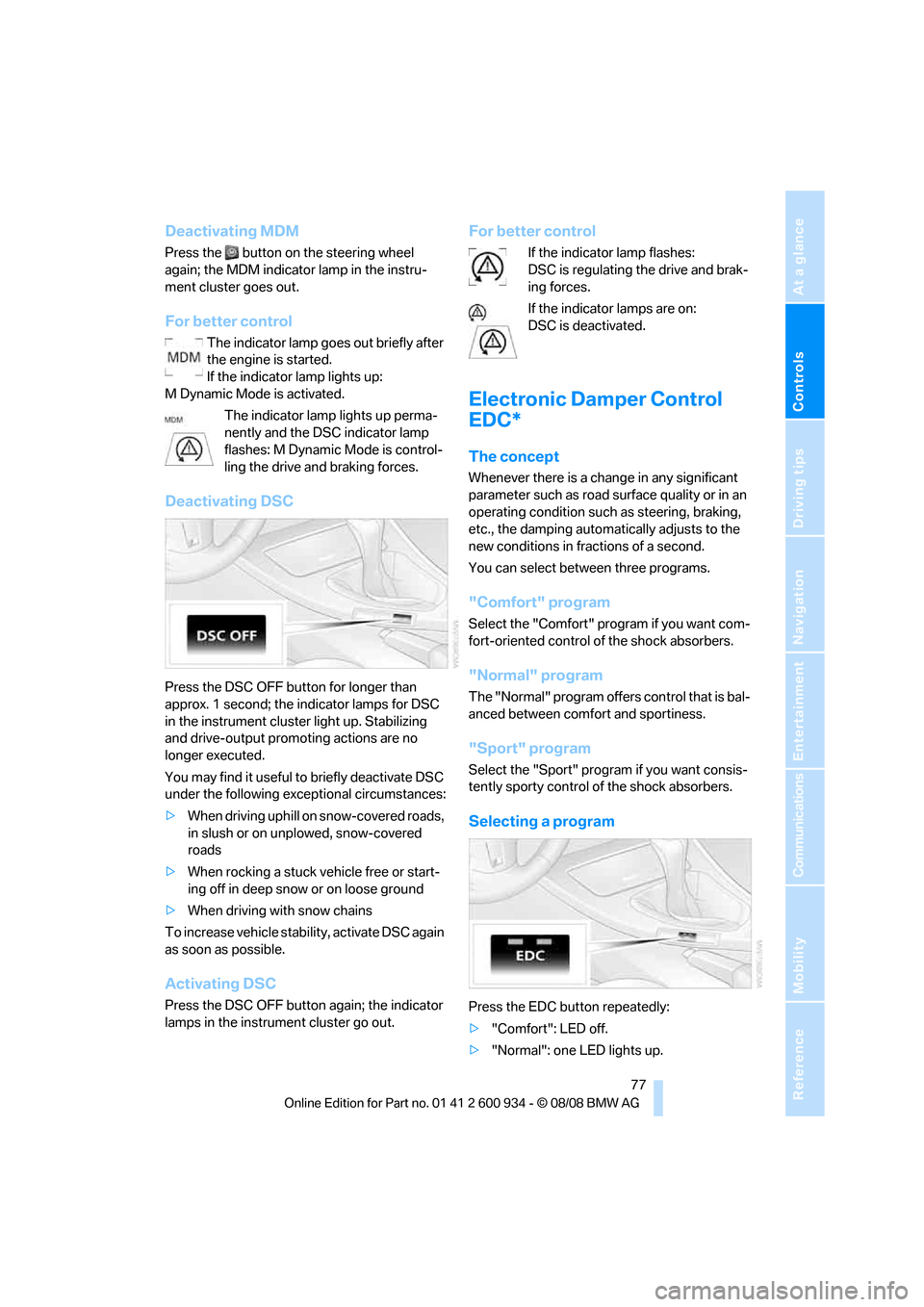
Deactivating DSC
Press the DSC OFF button for longer than
approx. 1 second; the indicator lamps for DSC
in the instrument cluster light up. Stabilizing
and drive-output promoting actions are no
longer executed.
You may find it useful to briefly deactivate DSC
under the following exceptional circumstances:
>When driving uphill on snow-covered roads,
in slush or on unplowed, snow-covered
roads
>When rocking a stuck vehicle free or start-
ing off in deep snow or on loose ground
>When driving with snow chains
To increase vehicle stability, activate DSC again
as soon as possible.
Activating DSC
Press the DSC OFF button again; the indicator
lamps in the instrument cluster go out.
For better control
If the indicator lamp flashes:
DSC is regulating the drive and brak-
ing forces.
If the indicator lamps are on:
DSC is deactivated.
Electronic Damper Control
EDC*
The concept
Whenever there is a change in any significant
parameter such as road surface quality or in an
operating condition such as steering, braking,
etc., the damping automatically adjusts to the
new conditions in fractions of a second.
You can select between three programs.
"Comfort" program
Select the "Comfort" program if you want com-
fort-oriented control of the shock absorbers.
"Normal" program
The "Normal" program offers control that is bal-
anced between comfort and sportiness.
"Sport" program
Select the "Sport" program if you want consis-
tently sporty control of the shock absorbers.
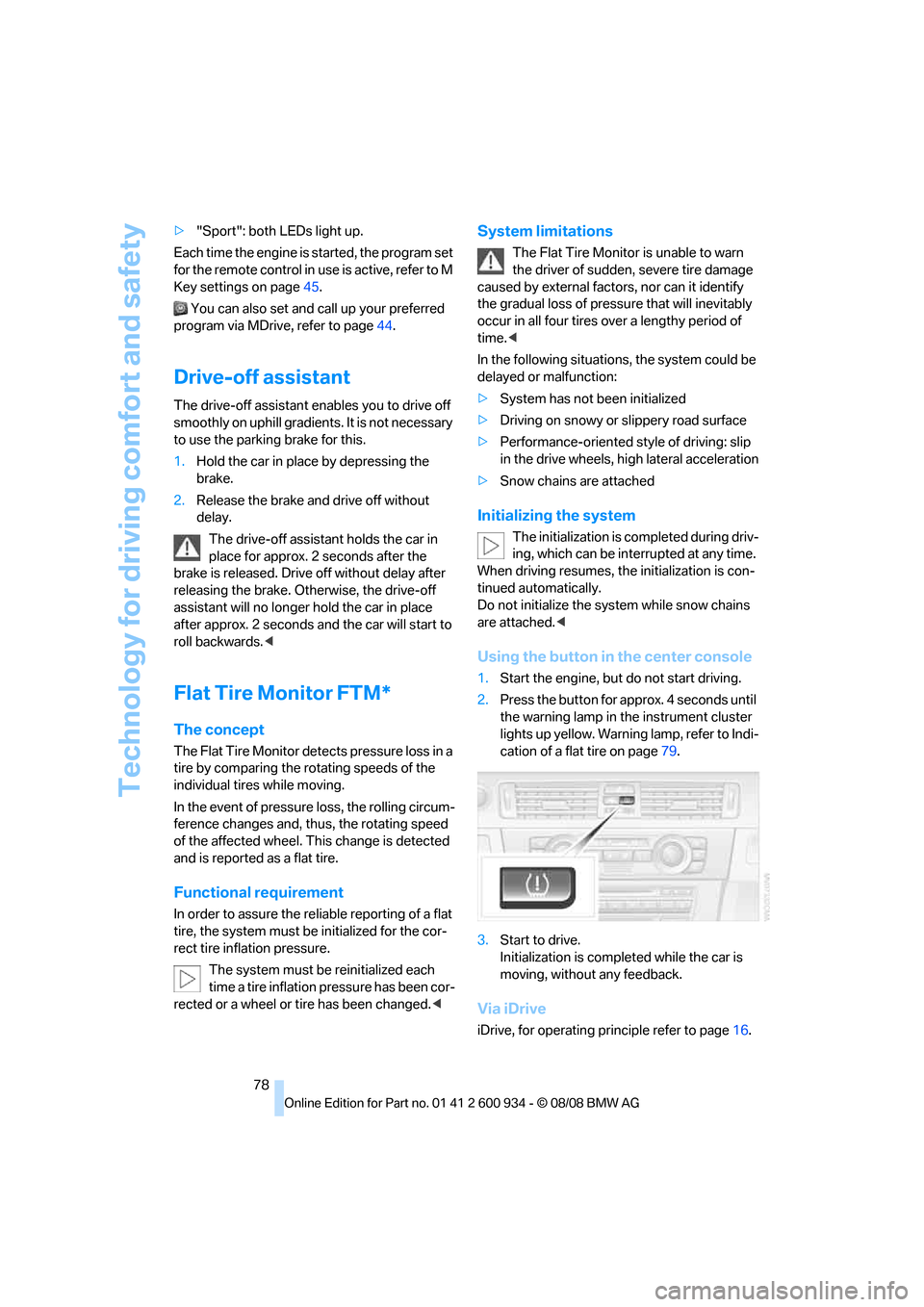
Selecting a program
Press the EDC button repeatedly:
>"Comfort": LED off.
>"Normal": one LED lights up.
ba8_E90M3_cic.book Seite 77 Dienstag, 19. August 2008 11:51 11
Page 80 of 246
Technology for driving comfort and safety
78 >"Sport": both LEDs light up.
Each time the engine is started, the program set
for the remote control in use is active, refer to M
Key settings on page45.
You can also set and call up your preferred
program via MDrive, refer to page44.
Drive-off assistant
The drive-off assistant enables you to drive off
smoothly on uphill gradients. It is not necessary
to use the parking brake for this.
1.Hold the car in place by depressing the
brake.
2.Release the brake and drive off without
delay.
The drive-off assistant holds the car in
place for approx. 2 seconds after the
brake is released. Drive off without delay after
releasing the brake. Otherwise, the drive-off
assistant will no longer hold the car in place
after approx. 2 seconds and the car will start to
roll backwards.<
Flat Tire Monitor FTM*
The concept
The Flat Tire Monitor detects pressure loss in a
tire by comparing the rotating speeds of the
individual tires while moving.
In the event of pressure loss, the rolling circum-
ference changes and, thus, the rotating speed
of the affected wheel. This change is detected
and is reported as a flat tire.
Functional requirement
In order to assure the reliable reporting of a flat
tire, the system must be initialized for the cor-
rect tire inflation pressure.
The system must be reinitialized each
time a tire inflation pressure has been cor-
rected or a wheel or tire has been changed.<
System limitations
The Flat Tire Monitor is unable to warn
the driver of sudden, severe tire damage
caused by external factors, nor can it identify
the gradual loss of pressure that will inevitably
occur in all four tires over a lengthy period of
time.<
In the following situations, the system could be
delayed or malfunction:
>System has not been initialized
>Driving on snowy or slippery road surface
>Performance-oriented style of driving: slip
in the drive wheels, high lateral acceleration
>Snow chains are attached
Initializing the system
The initialization is completed during driv-
ing, which can be interrupted at any time.
When driving resumes, the initialization is con-
tinued automatically.
Do not initialize the system while snow chains
are attached.<
Using the button in the center console
1.Start the engine, but do not start driving.
2.Press the button for approx. 4 seconds until
the warning lamp in the instrument cluster
lights up yellow. Warning lamp, refer to Indi-
cation of a flat tire on page79.
3.Start to drive.
Initialization is completed while the car is
moving, without any feedback.
Via iDrive
iDrive, for operating principle refer to page16.
ba8_E90M3_cic.book Seite 78 Dienstag, 19. August 2008 11:51 11