jack BMW M3 SEDAN 2009 E90 Owner's Manual
[x] Cancel search | Manufacturer: BMW, Model Year: 2009, Model line: M3 SEDAN, Model: BMW M3 SEDAN 2009 E90Pages: 246, PDF Size: 11.68 MB
Page 33 of 246
Controls
31Reference
At a glance
Driving tips
Communications
Navigation
Entertainment
Mobility
Locking or unlocking separately
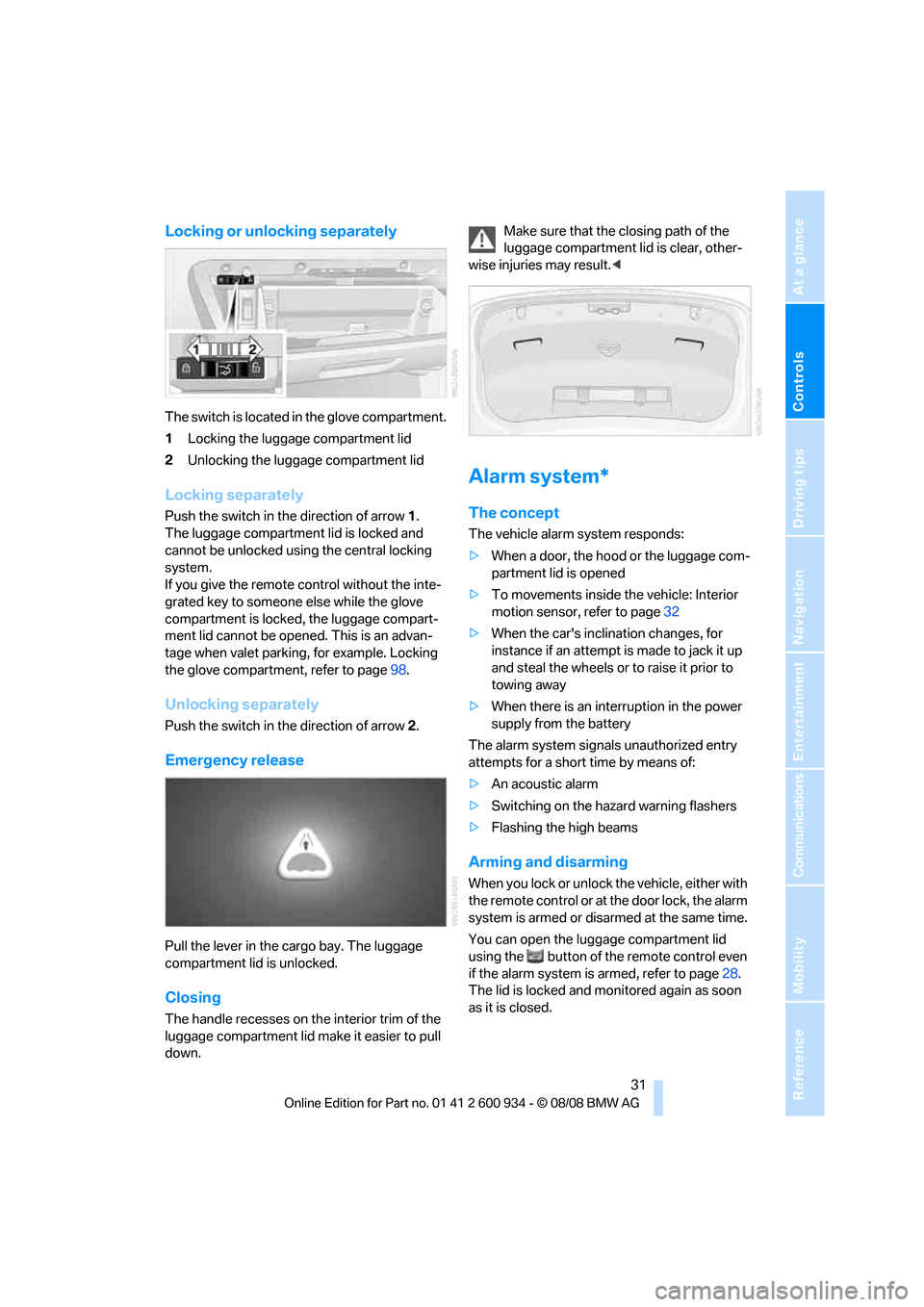
The switch is located in the glove compartment.
1Locking the luggage compartment lid
2Unlocking the luggage compartment lid
Locking separately
Push the switch in the direction of arrow 1.
The luggage compartment lid is locked and
cannot be unlocked using the central locking
system.
If you give the remote control without the inte-
grated key to someone else while the glove
compartment is locked, the luggage compart-
ment lid cannot be opened. This is an advan-
tage when valet parking, for example. Locking
the glove compartment, refer to page98.
Unlocking separately
Push the switch in the direction of arrow 2.
Emergency release
Pull the lever in the cargo bay. The luggage
compartment lid is unlocked.
Closing
The handle recesses on the interior trim of the
luggage compartment lid make it easier to pull
down.Make sure that the closing path of the
luggage compartment lid is clear, other-
wise injuries may result.<
Alarm system*
The concept
The vehicle alarm system responds:
>When a door, the hood or the luggage com-
partment lid is opened
>To movements inside the vehicle: Interior
motion sensor, refer to page32
>When the car's inclination changes, for
instance if an attempt is made to jack it up
and steal the wheels or to raise it prior to
towing away
>When there is an interruption in the power
supply from the battery
The alarm system signals unauthorized entry
attempts for a short time by means of:
>An acoustic alarm
>Switching on the hazard warning flashers
>Flashing the high beams
Arming and disarming
When you lock or unlock the vehicle, either with
the remote control or at the door lock, the alarm
system is armed or disarmed at the same time.
You can open the luggage compartment lid
using the button of the remote control even
if the alarm system is armed, refer to page28.
The lid is locked and monitored again as soon
as it is closed.
ba8_E90M3_cic.book Seite 31 Dienstag, 19. August 2008 11:51 11
Page 34 of 246
Opening and closing
32
Panic mode*
You can trigger the alarm system if you find
yourself in a dangerous situation:
Press the button for at least three seconds.
To switch off the alarm: press any button.
Switching off an alarm
>Unlock the car with the remote control, refer
to page27.
>Insert the remote control all the way into the
ignition lock.
Indicator lamp displays
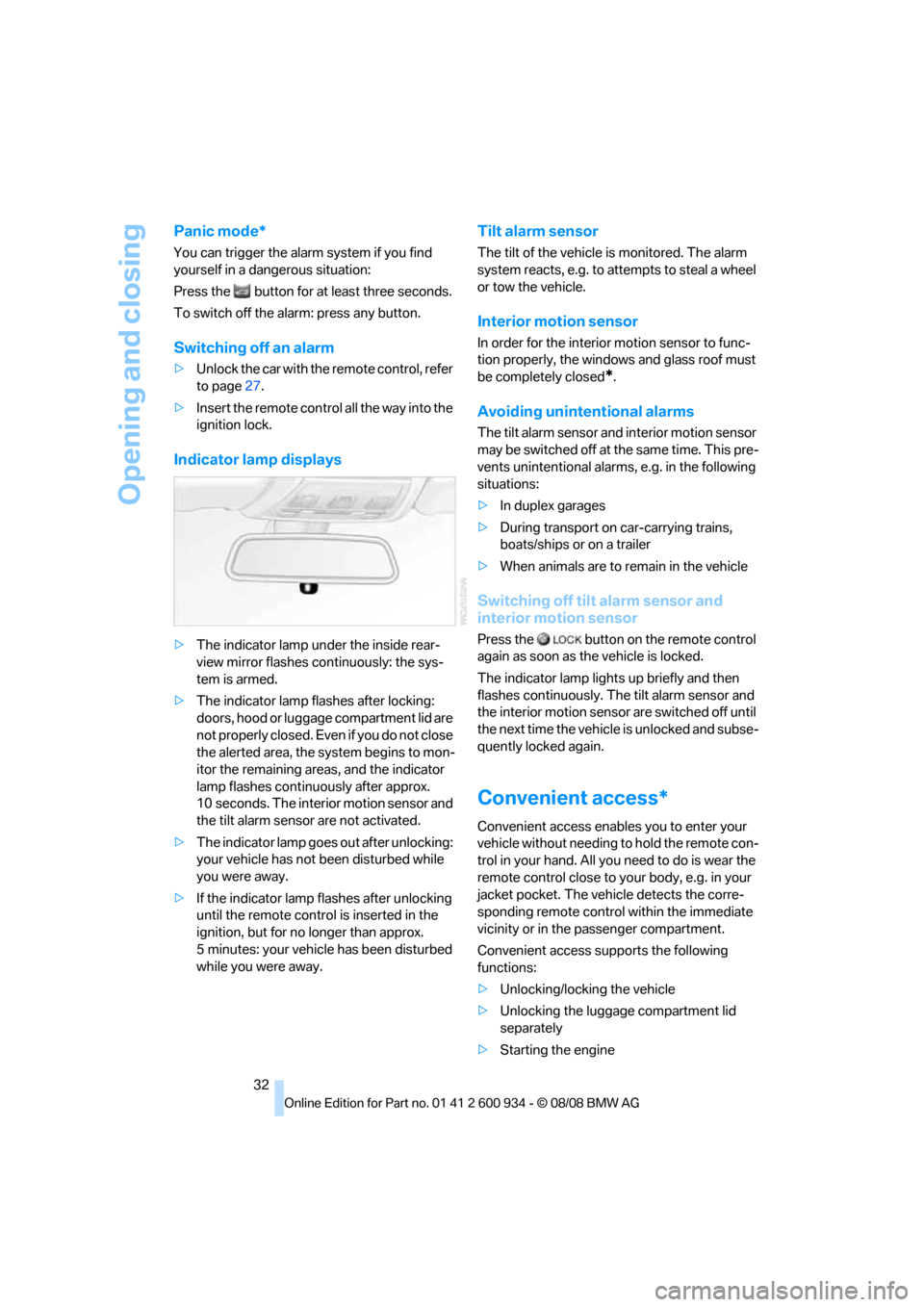
>The indicator lamp under the inside rear-
view mirror flashes continuously: the sys-
tem is armed.
>The indicator lamp flashes after locking:
doors, hood or luggage compartment lid are
not properly closed. Even if you do not close
the alerted area, the system begins to mon-
itor the remaining areas, and the indicator
lamp flashes continuously after approx.
10 seconds. The interior motion sensor and
the tilt alarm sensor are not activated.
>The indicator lamp goes out after unlocking:
your vehicle has not been disturbed while
you were away.
>If the indicator lamp flashes after unlocking
until the remote control is inserted in the
ignition, but for no longer than approx.
5 minutes: your vehicle has been disturbed
while you were away.
Tilt alarm sensor
The tilt of the vehicle is monitored. The alarm
system reacts, e.g. to attempts to steal a wheel
or tow the vehicle.
Interior motion sensor
In order for the interior motion sensor to func-
tion properly, the windows and glass roof must
be completely closed
*.
Avoiding unintentional alarms
The tilt alarm sensor and interior motion sensor
may be switched off at the same time. This pre-
vents unintentional alarms, e.g. in the following
situations:
>In duplex garages
>During transport on car-carrying trains,
boats/ships or on a trailer
>When animals are to remain in the vehicle
Switching off tilt alarm sensor and
interior motion sensor
Press the button on the remote control
again as soon as the vehicle is locked.
The indicator lamp lights up briefly and then
flashes continuously. The tilt alarm sensor and
the interior motion sensor are switched off until
the next time the vehicle is unlocked and subse-
quently locked again.
Convenient access*
Convenient access enables you to enter your
vehicle without needing to hold the remote con-
trol in your hand. All you need to do is wear the
remote control close to your body, e.g. in your
jacket pocket. The vehicle detects the corre-
sponding remote control within the immediate
vicinity or in the passenger compartment.
Convenient access supports the following
functions:
>Unlocking/locking the vehicle
>Unlocking the luggage compartment lid
separately
>Starting the engine
ba8_E90M3_cic.book Seite 32 Dienstag, 19. August 2008 11:51 11
Page 85 of 246
Controls
83Reference
At a glance
Driving tips
Communications
Navigation
Entertainment
Mobility
integral side airbags to the front seats. Do not
hang items of clothing such as coats or jackets
over the backrests. Do not attempt to remove
the airbag retention system from the vehicle. Do
not modify the individual components of the
system or its wiring in any way. This includes
the upholstered covers on the steering wheel,
instrument panel, seats and roof posts, as well
as the sides of the roof lining. Do not attempt to
remove or dismantle the steering wheel.
Do not touch the individual components imme-
diately after the system has been triggered,
because there is a danger of burns.
In the event of malfunctions, deactivation or
triggering of the airbag restraint system, have
the testing, repair, removal and disposal of air-
bag generators executed only by a BMW center
or a workshop that works according to repair
procedures of BMW with correspondingly
trained personnel and that has the required
explosives licenses. Unprofessional attempts to
work on the system could lead to failure in an
emergency or to undesired airbag activation,
either of which could result in personal injury.<
Warning notices and information about the air-
bags can also be found on the sun visors.
Automatic deactivation of the front
passenger airbags
An analysis of the impression in the front pas-
senger seat cushion determines whether and
how the seat is occupied. The front and side air-
bags for the front passenger are activated or
deactivated by the system accordingly.
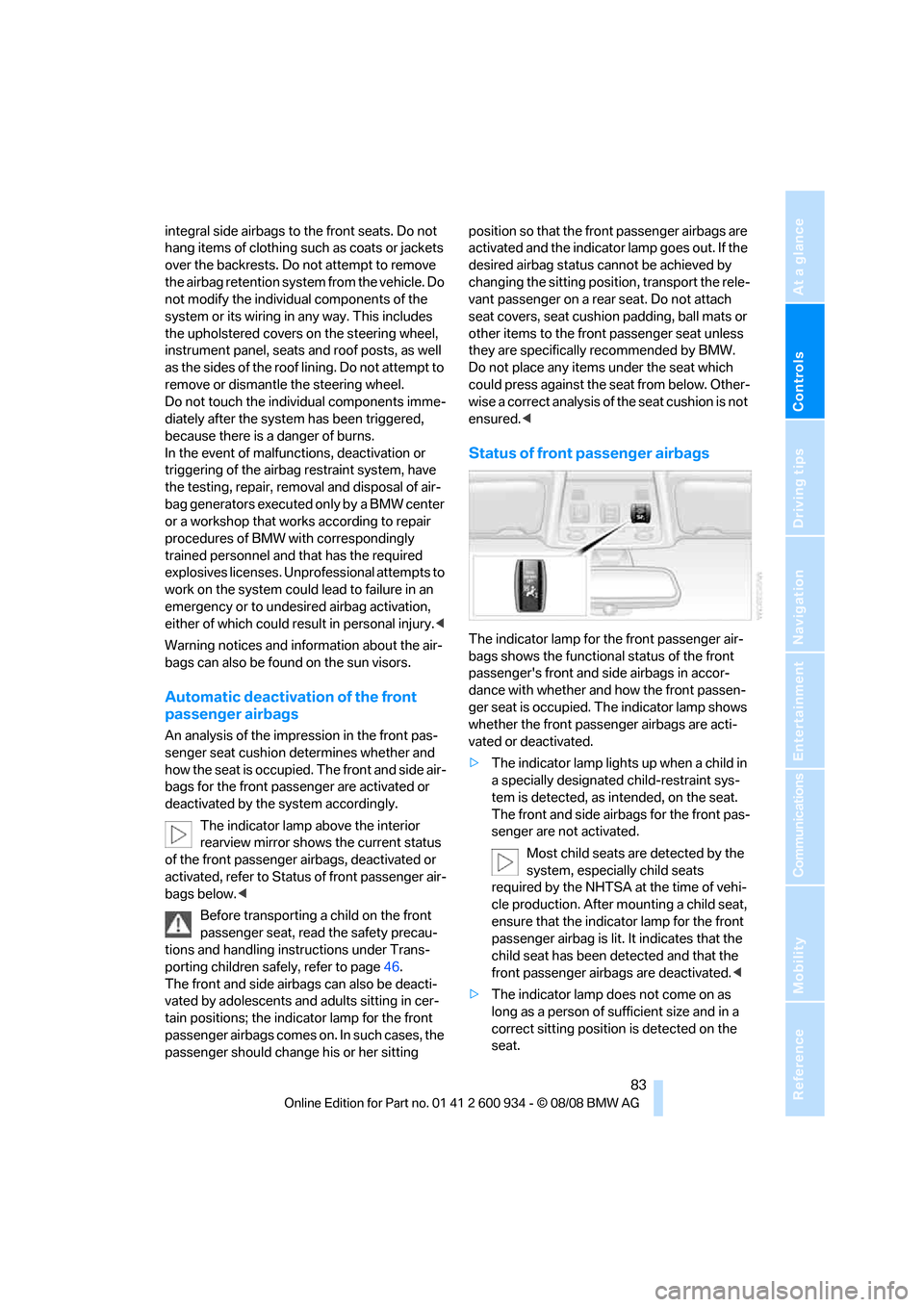
The indicator lamp above the interior
rearview mirror shows the current status
of the front passenger airbags, deactivated or
activated, refer to Status of front passenger air-
bags below.<
Before transporting a child on the front
passenger seat, read the safety precau-
tions and handling instructions under Trans-
porting children safely, refer to page46.
The front and side airbags can also be deacti-
vated by adolescents and adults sitting in cer-
tain positions; the indicator lamp for the front
passenger airbags comes on. In such cases, the
passenger should change his or her sitting position so that the front passenger airbags are
activated and the indicator lamp goes out. If the
desired airbag status cannot be achieved by
changing the sitting position, transport the rele-
vant passenger on a rear seat. Do not attach
seat covers, seat cushion padding, ball mats or
other items to the front passenger seat unless
they are specifically recommended by BMW.
Do not place any items under the seat which
could press against the seat from below. Other-
wise a correct analysis of the seat cushion is not
ensured.<
Status of front passenger airbags
The indicator lamp for the front passenger air-
bags shows the functional status of the front
passenger's front and side airbags in accor-
dance with whether and how the front passen-
ger seat is occupied. The indicator lamp shows
whether the front passenger airbags are acti-
vated or deactivated.
>The indicator lamp lights up when a child in
a specially designated child-restraint sys-
tem is detected, as intended, on the seat.
The front and side airbags for the front pas-
senger are not activated.
Most child seats are detected by the
system, especially child seats
required by the NHTSA at the time of vehi-
cle production. After mounting a child seat,
ensure that the indicator lamp for the front
passenger airbag is lit. It indicates that the
child seat has been detected and that the
front passenger airbags are deactivated.<
>The indicator lamp does not come on as
long as a person of sufficient size and in a
correct sitting position is detected on the
seat.
ba8_E90M3_cic.book Seite 83 Dienstag, 19. August 2008 11:51 11
Page 103 of 246
Controls
101Reference
At a glance
Driving tips
Communications
Navigation
Entertainment
Mobility
3.Push the corresponding head restraint
down as far as it will go, refer to page39.
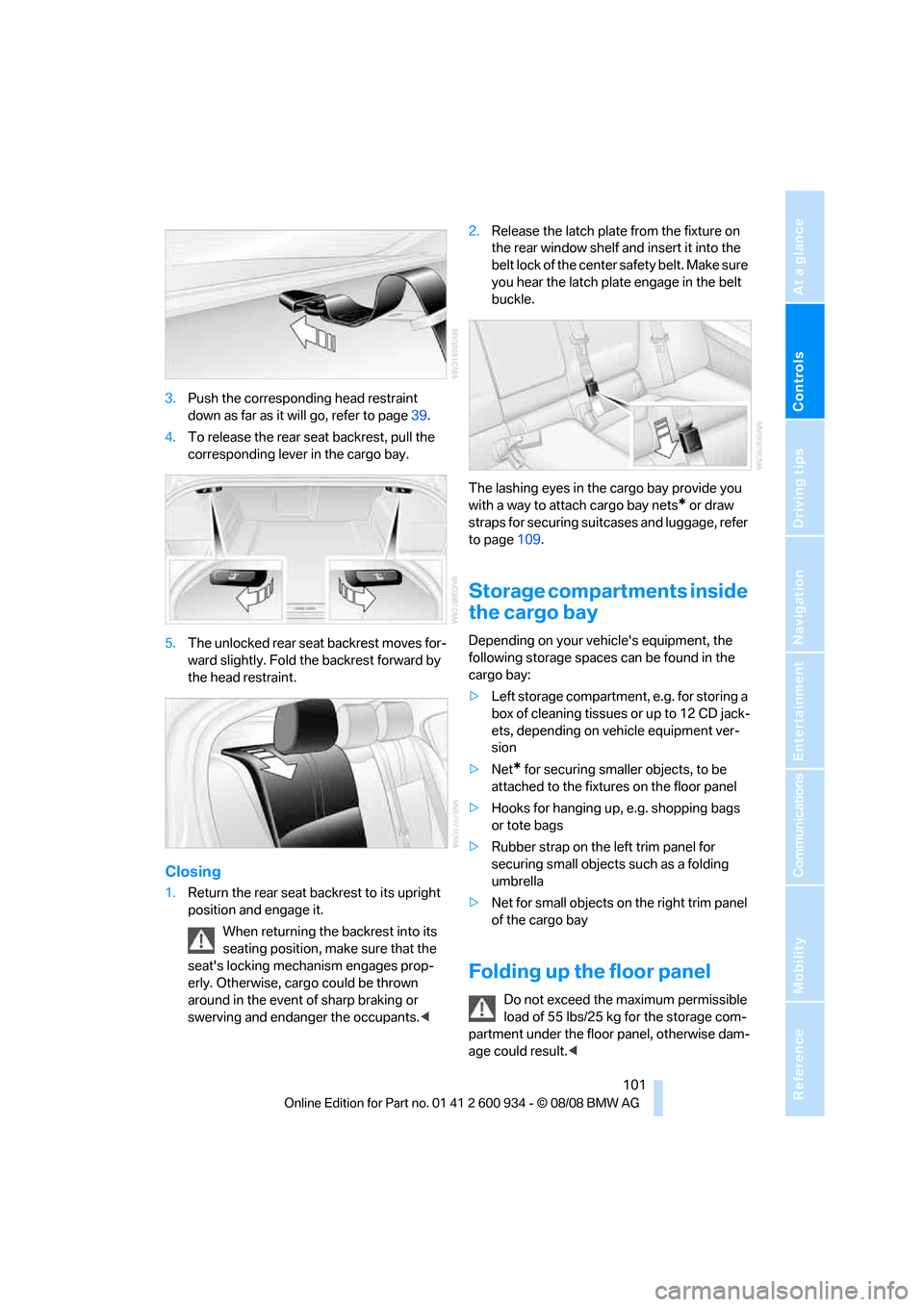
4.To release the rear seat backrest, pull the
corresponding lever in the cargo bay.
5.The unlocked rear seat backrest moves for-
ward slightly. Fold the backrest forward by
the head restraint.
Closing
1.Return the rear seat backrest to its upright
position and engage it.
When returning the backrest into its
seating position, make sure that the
seat's locking mechanism engages prop-
erly. Otherwise, cargo could be thrown
around in the event of sharp braking or
swerving and endanger the occupants.<2.Release the latch plate from the fixture on
the rear window shelf and insert it into the
belt lock of the center safety belt. Make sure
you hear the latch plate engage in the belt
buckle.
The lashing eyes in the cargo bay provide you
with a way to attach cargo bay nets
* or draw
straps for securing suitcases and luggage, refer
to page109.
Storage compartments inside
the cargo bay
Depending on your vehicle's equipment, the
following storage spaces can be found in the
cargo bay:
>Left storage compartment, e.g. for storing a
box of cleaning tissues or up to 12 CD jack-
ets, depending on vehicle equipment ver-
sion
>Net
* for securing smaller objects, to be
attached to the fixtures on the floor panel
>Hooks for hanging up, e.g. shopping bags
or tote bags
>Rubber strap on the left trim panel for
securing small objects such as a folding
umbrella
>Net for small objects on the right trim panel
of the cargo bay
Folding up the floor panel
Do not exceed the maximum permissible
load of 55 lbs/25 kg for the storage com-
partment under the floor panel, otherwise dam-
age could result.<
ba8_E90M3_cic.book Seite 101 Dienstag, 19. August 2008 11:51 11
Page 210 of 246
Replacing components
208 Do not exceed a speed of 35 mph/
60 km/h. If possible, do not fall below a
speed of 12 mph/20 km/h.<
Producing the tire inflation pressure
1.After driving approx. 2 miles/3 km, stop at a
suitable location.
2.Connect connection hose9 of the com-
pressor directly to the tire valve.
3.Insert connector 3 into the cigarette lighter
socket/power socket in the interior of the
vehicle.
4.Adjust the tire inflation pressure to 29 psi/
200 kPa. With the ignition switched on, pro-
ceed as follows:
>To increase the inflation pressure:
Switch on the compressor, position I. To
check the current inflation pressure set-
ting, briefly switch off the compressor.
Do not let the compressor run for
more than 10 minutes, otherwise the
device will overheat and may be dam-
aged.<
>To reduce the inflation pressure: turn
screw 8 on the pressure gauge.
If the inflation pressure is not maintained,
drive the vehicle a second time, refer to
Distributing the sealant. Then repeat steps 1 to
4.
Use of the M Mobility System may be ineffec-
tual for tire damage larger than approx. 0.16 in/
4 mm. Please contact the nearest BMW center,
refer to page210, or a workshop that works
according to BMW repair procedures with cor-
respondingly trained personnel if the tire can-
not be made roadworthy with the M Mobility
System.<
The tire inflation pressure must be at least
29 psi/200 kPa. If it is not, do not continue
driving.<
Continuing your trip
Do not exceed the maximum allowable
speed of 50 mph/80 km/h to avoid the risk
of an accident.
Have the faulty tire and the sealant bottle of the
M Mobility System replaced as soon as possi-
ble.<
Changing wheels
The tools for changing wheels are avail-
able as optional accessories from your
BMW center.<
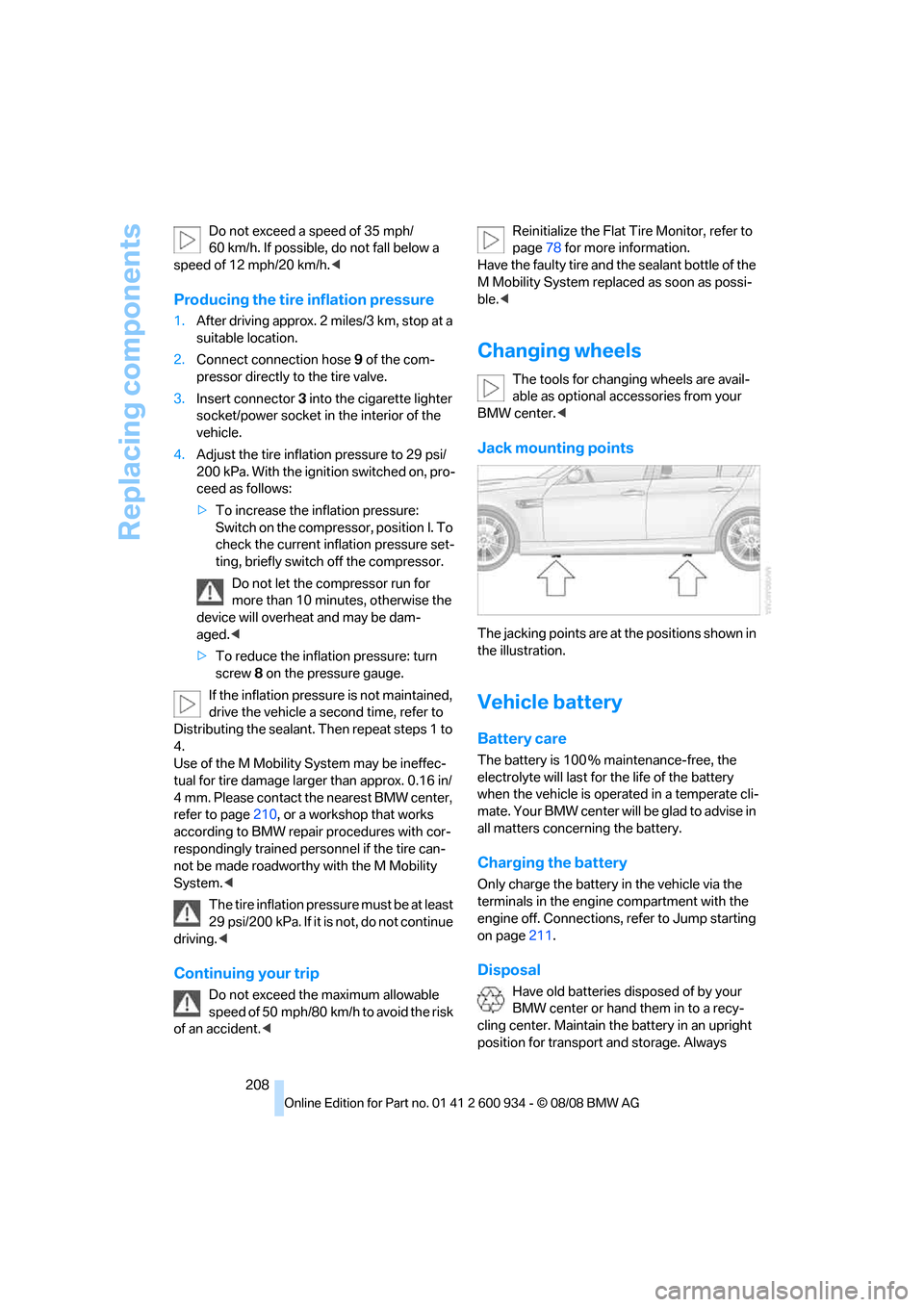
Jack mounting points
The jacking points are at the positions shown in
the illustration.
Vehicle battery
Battery care
The battery is 100 % maintenance-free, the
electrolyte will last for the life of the battery
when the vehicle is operated in a temperate cli-
mate. Your BMW center will be glad to advise in
all matters concerning the battery.
Charging the battery
Only charge the battery in the vehicle via the
terminals in the engine compartment with the
engine off. Connections, refer to Jump starting
on page211.
Disposal
Have old batteries disposed of by your
BMW center or hand them in to a recy-
cling center. Maintain the battery in an upright
position for transport and storage. Always
ba8_E90M3_cic.book Seite 208 Dienstag, 19. August 2008 11:51 11
Page 232 of 246
Everything from A - Z
230 Cargo bay
– capacity220
– convenient access33
– folding up the floor
panel101
– lamp, refer to Interior
lamps87
– opening from inside30
– opening from outside30
Cargo loading
– securing cargo109
– stowing cargo109
– vehicle108
Car jack
– jacking points208
Car key, refer to Remote
control26
Car phone
– installation location, refer to
Center armrest98
– refer to separate Owner's
Manual
Car phone, refer to
Telephone162
Car radio, refer to Radio139
Car shampoo201
Car wash
– before entering51
Catalytic converter, refer to
Hot exhaust system106
CBS Condition Based
Service197
CD, audio playback144
CD changer144
– controls136
– fast forward/reverse146
– installation location148
– random play sequence145
– selecting a track144
– switching on/off136
– tone control136
– volume136CD player144
– controls136
– fast forward/reverse146
– random play sequence145
– selecting a track144
– switching on/off136
– tone control136
– volume136
Center armrest98
Center brake lamp, replacing
bulb206
Center console, refer to
Around the center
console14
Central locking
– from inside29
– from outside27
Central locking system27
– convenient access32
– hotel function31
Changes, technical, refer to
For your own safety5
Changing bulbs, refer to
Lamps and bulbs203
Changing gears54
Changing the language on the
Control Display73
Changing the measurement
units on the Control
Display65
Changing wheels208
Chassis number, refer to
Engine compartment193
Check Control70
Check Gas Cap184
Child-restraint fixing system
LATCH47
Child-restraint systems46
Child-safety lock48
Child seats, refer to
Transporting children
safely46
Chrome parts201
Chrome polish201
Cigarette lighter, refer to
Lighter99
Cleaning headlamps59
– washer fluid60Cleaning your BMW, refer to
Care199
Clock62
– 12h/24h mode69
– setting the time and date69
– setting time68
Closing
– from inside29
– from outside27
Clothes hooks98
Cockpit10
Cold start, refer to Starting the
engine50
Combined instrument, refer to
Instrument cluster12
Comfort access, refer to
Convenient access32
Comfort area, refer to Around
the center console14
Compartment for remote
control, refer to Ignition
lock49
Compass96
Computer63
– displays on Control
Display64
Computer, refer to iDrive16
Concierge service175
Condensation, refer to When
the vehicle is parked108
Condition Based Service
CBS197
Configuring settings, refer to
Personal Profile
26
Confirmation signals for
locking/unlocking the
vehicle28
Congestion
– refer to Route, bypassing
sections128
Connecting vacuum cleaner,
refer to Connecting
electrical appliances100
Consumption, refer to
Average consumption64
Consumption indicator, refer
to Average consumption64
Control Center, refer to
iDrive16
ba8_E90M3_cic.book Seite 230 Dienstag, 19. August 2008 11:51 11
Page 236 of 246
Everything from A - Z
234
I
IBOC, refer to High Definition
Radio140
Ice warning, refer to Outside
temperature warning62
ID3 tag, refer to Information
about the track145
ID3 tags, refer to Album
information153
Identification marks, tire
coding188
iDrive16
– adjusting brightness73
– changing language73
– changing units of measure
and display format65
– controls16
– menu guidance17
– operating principle16
– overview16
– setting the date and time69
– start menu17
– status information19
iDrive operating principle16
Ignition49
– switched off50
– switched on49
Ignition key, refer to Remote
control26
Ignition key position 1, refer to
Radio readiness49
Ignition key position 2, refer to
Ignition on49
Ignition lock49
Imprint2
Indicator and warning
lamps13
– MDrive45
– M Dynamic Mode77
– Tire Pressure Monitor
TPM80
Inflation pressure, refer to Tire
inflation pressure186
Inflation pressure monitoring,
refer to Tire Pressure
Monitor TPM79Initializing
– after power failure209
– compass, refer to Digital
compass, calibrating96
– Flat Tire Monitor FTM78
– glass roof36
– radio, refer to Station,
storing139
– refer to Setting the time and
date69
Installation location
– CD changer148
– navigation DVD drive116
– telephone98
Instructions for navigation
system, refer to Voice
instructions128
Instrument cluster12
Instrument lighting87
Instrument panel, refer to
Cockpit10
Integrated key26
Integrated universal remote
control94
Interior lamps87
– remote control28
Interior motion sensor32
Interior rearview mirror43
– automatic dimming
feature43
– compass96
Intermittent mode of the
wipers59
Intersection, entering,
navigation118
iPod, connecting, refer to
AUX-IN port155
iPod, connecting, refer to
USB-audio interface156
J
Jacking points208
Joystick, refer to iDrive16
Jumpering, refer to Jump
starting211
Jump starting211
K
Key, refer to Remote
control26
Keyless go, refer to
Convenient access32
Keyless opening and closing,
refer to Convenient
access32
Key Memory, refer to Personal
Profile26
Knock control184
L
Lamps
– automatic headlamp
control85
– parking lamps/low beams85
Lamps and bulbs, replacing
bulbs203
Lap-and-shoulder belt, refer
to Safety belts41
Lashing eyes, refer to
Securing cargo109
Last destinations120
LATCH child-restraint fixing
system47
Launch Control57
Leather care201
LED light-emitting diodes203
Length, refer to
Dimensions219
License plate lamp, replacing
bulb206
Light-alloy wheels200
Light-emitting diodes
LED203
Lighter99
– connecting electrical
appliances100
Lighting
– instruments87
– lamps and bulbs203
– vehicle, refer to Lamps85
Light switch85
Limit, refer to Speed limit72
Load securing equipment,
refer to Securing cargo109
ba8_E90M3_cic.book Seite 234 Dienstag, 19. August 2008 11:51 11
Page 242 of 246
Everything from A - Z
240 TMC station, refer to
Traffic bulletins130
Tone
– control136
– middle setting138
Tools, refer to Onboard tool
kit203
Top 50 of music
collection153
Torque, refer to Engine
data218
Tow bar213
Tow fitting212
– screw thread212
Tow fittings for tow-starting
and towing away212
Towing212
– with manual
transmission213
– with M dual clutch
transmission213
Towing and tow-starting212
Towing methods213
Town/city, for navigation117
Tow rope213
Tow-starting212,213
TPM, refer to Tire Pressure
Monitor79
Track
– selecting on CD144
Traction control, refer to
Dynamic Stability Control
DSC76
Traffic bulletins
– categories131
Traffic bulletins, filtering131
Traffic bulletins for
navigation130
– during destination
guidance131
– in map display131
Traffic jam
– displaying traffic
bulletins130Transmission
– Drivelogic55
– Launch Control57
– manual transmission51
– reverse gear53
– Shift Lights56
– unlocking transmission lock
manually54
Transmission lock, unlocking
manually54
Transporting children
safely46
Transport securing devices,
refer to Securing cargo109
Travel instructions,
refer to Voice
instructions128
Tread depth, refer to Minimum
tire tread189
Trip-distance counter, refer to
Trip odometer62
Triple turn signal activation58
Trip odometer62
Trunk lid, refer to Luggage
compartment lid30
Turning circle, refer to
Dimensions219
Turn signal indicators
– indicator/warning lamp12
– triple turn signal58
Turn signals58
TV
– control elements136
– switching on/off136
– tone control136
– volume136
Tying down loads, refer to
Cargo loading109
U
Uniform Tire Quality Grading/
UTQR188
Units
– average consumption65
– temperature65
Universal garage door opener,
refer to Integrated universal
remote control94Universal mobile phone
preparation package, refer
to separate Owner's Manual
Universal remote control94
Unlatching, refer to
Unlocking32
Unlocking
– from inside30
– from outside27
– luggage compartment lid33
– without remote control, refer
to Convenient access32
USB-audio interface156
V
VCD146
Vehicle
– battery208
– breaking in106
– cargo loading108
– Identification Number, refer
to Engine compartment193
– measurements, refer to
Dimensions219
– parking50
– weight220
Vehicle jack208
Vehicle position, refer to
Displaying current
position133
Vehicle storage202
Ventilation92
– draft-free92
– in the rear92
Ventilation, refer to Climate89
Ventilation while at a
standstill92
Vents, refer to Ventilation92
Video menu146
Video playback146
Voice, refer to Destination
guidance through voice
instructions128
Voice commands
– overview22
– short commands221
ba8_E90M3_cic.book Seite 240 Dienstag, 19. August 2008 11:51 11