tire pressure BMW M4 2015 User Guide
[x] Cancel search | Manufacturer: BMW, Model Year: 2015, Model line: M4, Model: BMW M4 2015Pages: 228, PDF Size: 4.87 MB
Page 181 of 228
Retreaded tires
Possibly substantial variations in the de‐
sign and age of the tire casing structures can
limit service life and have a negative impact on
road safety.◀
Winter tires
Winter tires are recommended for operating on
winter roads.
Although so-called all-season M+S tires pro‐
vide better winter traction than summer tires, they do not provide the same level of perform‐
ance as winter tires.
Maximum speed of winter tires If the maximum speed of the vehicle is higher
than the permissible speed for the winter tires,
then a respective symbol is displayed in your
field of vision. You can obtain this sign from the
tire specialist or from your service center.
Maximum speed for winter tires
Do not exceed the maximum speed for
the respective winter tires; otherwise, tire dam‐
age and accidents can occur.◀
Rotating wheels between axles The manufacturer of your vehicle advises
against switching wheels between the front
and rear axles. This can impair the handling
characteristics.
Rotating the tires is not permissible on vehi‐
cles with different tire sizes or rim sizes on the
front and rear axles.
StorageStore wheels and tires in a cool, dry place with
as little exposure to light as possible.
Always protect tires against all contact with oil,
grease and fuels.
Do not exceed the maximum tire inflation pres‐
sure indicated on the side wall of the tire.Mobility System
The concept
With the Mobility System, minor tire damage
can be sealed quickly to enable continued
travel. To accomplish this, sealant is pumped
into the tires, which seals the damage from the
inside.
The compressor can be used to check the tire
inflation pressure.
Hints▷Follow the instructions on using the Mobi‐
lity System found on the compressor and
sealant container.▷Use of the Mobility System may be ineffec‐
tive if the tire puncture measures approx.
1/8 in/4 mm or more.▷Contact the nearest service center if the
tire cannot be made drivable.▷If possible, do not remove foreign bodies
that have penetrated the tire.▷Pull the speed limit sticker off the sealant
container and apply it to the steering
wheel.▷The use of a sealant can damage the TPM
wheel electronics. In this case, have the
electronics checked at the next opportu‐
nity and have them replaced if needed.
Enclosed areas
Do not let the engine run in enclosed
areas, since breathing in exhaust fumes may
lead to loss of consciousness and death. The
exhaust gases contain carbon monoxide, an
odorless and colorless but highly toxic gas.◀
Storage The Mobility System is located under the
cargo floor panel.
Seite 177Wheels and tiresMobility177
Online Edition for Part no. 01 40 2 960 786 - II/15
Page 182 of 228
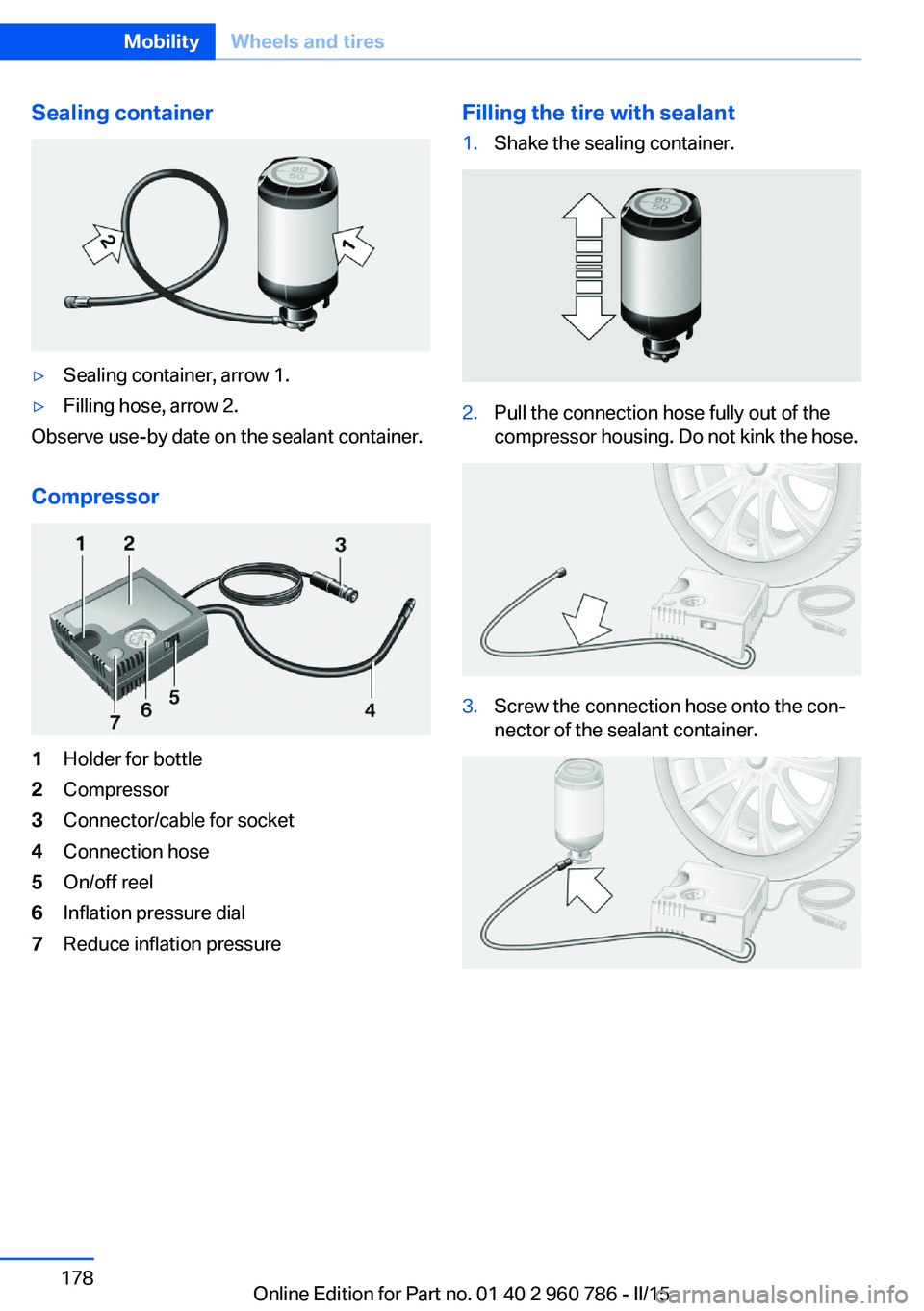
Sealing container▷Sealing container, arrow 1.▷Filling hose, arrow 2.
Observe use-by date on the sealant container.
Compressor
1Holder for bottle2Compressor3Connector/cable for socket4Connection hose5On/off reel6Inflation pressure dial7Reduce inflation pressureFilling the tire with sealant1.Shake the sealing container.2.Pull the connection hose fully out of the
compressor housing. Do not kink the hose.3.Screw the connection hose onto the con‐
nector of the sealant container.Seite 178MobilityWheels and tires178
Online Edition for Part no. 01 40 2 960 786 - II/15
Page 183 of 228
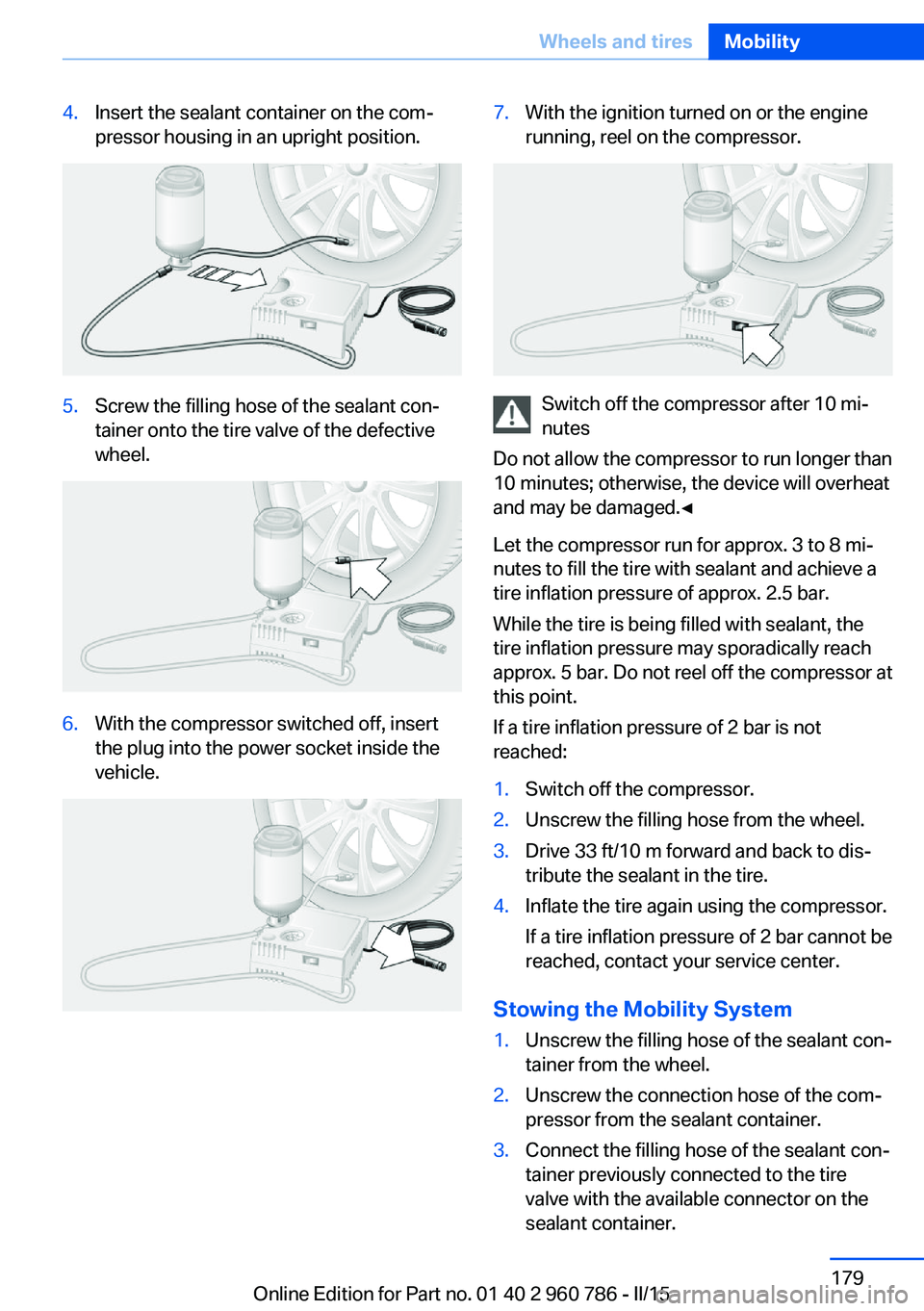
4.Insert the sealant container on the com‐
pressor housing in an upright position.5.Screw the filling hose of the sealant con‐
tainer onto the tire valve of the defective
wheel.6.With the compressor switched off, insert
the plug into the power socket inside the
vehicle.7.With the ignition turned on or the engine
running, reel on the compressor.
Switch off the compressor after 10 mi‐
nutes
Do not allow the compressor to run longer than
10 minutes; otherwise, the device will overheat
and may be damaged.◀
Let the compressor run for approx. 3 to 8 mi‐
nutes to fill the tire with sealant and achieve a
tire inflation pressure of approx. 2.5 bar.
While the tire is being filled with sealant, the
tire inflation pressure may sporadically reach
approx. 5 bar. Do not reel off the compressor at
this point.
If a tire inflation pressure of 2 bar is not
reached:
1.Switch off the compressor.2.Unscrew the filling hose from the wheel.3.Drive 33 ft/10 m forward and back to dis‐
tribute the sealant in the tire.4.Inflate the tire again using the compressor.
If a tire inflation pressure of 2 bar cannot be
reached, contact your service center.
Stowing the Mobility System
1.Unscrew the filling hose of the sealant con‐
tainer from the wheel.2.Unscrew the connection hose of the com‐
pressor from the sealant container.3.Connect the filling hose of the sealant con‐
tainer previously connected to the tire
valve with the available connector on the
sealant container.Seite 179Wheels and tiresMobility179
Online Edition for Part no. 01 40 2 960 786 - II/15
Page 184 of 228
This prevents leftover sealant from escap‐
ing from the container.4.Wrap the empty sealant container in suita‐
ble material to avoid dirtying the cargo
area.5.Stow the Mobility System back in the vehi‐
cle.
Distributing the sealant
Immediately drive approx. 5 miles/10 km to en‐
sure that the sealant is evenly distributed in the
tire.
Do not exceed a speed of 50 mph/80 km/h.
If possible, do not drive at speeds less than
12 mph/20 km/h.
To correct the tire inflation pressure
1.Stop at a suitable location.2.Screw the connection hose of the com‐
pressor directly onto the tire valve stem.3.Insert the connector into the power socket
inside the vehicle.4.Correct the tire inflation pressure to
2.5 bar.▷Increase pressure: with the ignition
turned on or the engine running, reel
on the compressor.▷To reduce the pressure: press the but‐
ton on the compressor.
Continuing the trip
Do not exceed the maximum permissible
speed of 50 mph/80 km/h.
Reinitialize the Tire Pressure Monitor.
Replace the defective tire and the sealant con‐
tainer of the Mobility System as soon as possi‐
ble.
Snow chains
Fine-link snow chains Only certain types of fine-link snow chains
have been tested by the manufacturer of the
vehicle, classified as road-safe and approved.
Information about the approved snow chains
are available from the service center.
Use Use only in pairs on the rear wheels, equipped
with the tires of the following size:▷255/40 R 18▷255/35 R 19
Follow the snow chain manufacturer's instruc‐
tions.
Make sure that the snow chains are always
sufficiently tight. Retighten as needed accord‐
ing to the chain manufacturer's instructions.
Do not initialize the Tire Pressure Monitor after
mounting snow chains, as doing so may result
in incorrect readings.
When driving with snow chains, if needed
briefly activate M Dynamic Mode.
Maximum speed with snow chains
Do not exceed a speed of 30 mph/50 km/h
when using snow chains.
Seite 180MobilityWheels and tires180
Online Edition for Part no. 01 40 2 960 786 - II/15
Page 199 of 228
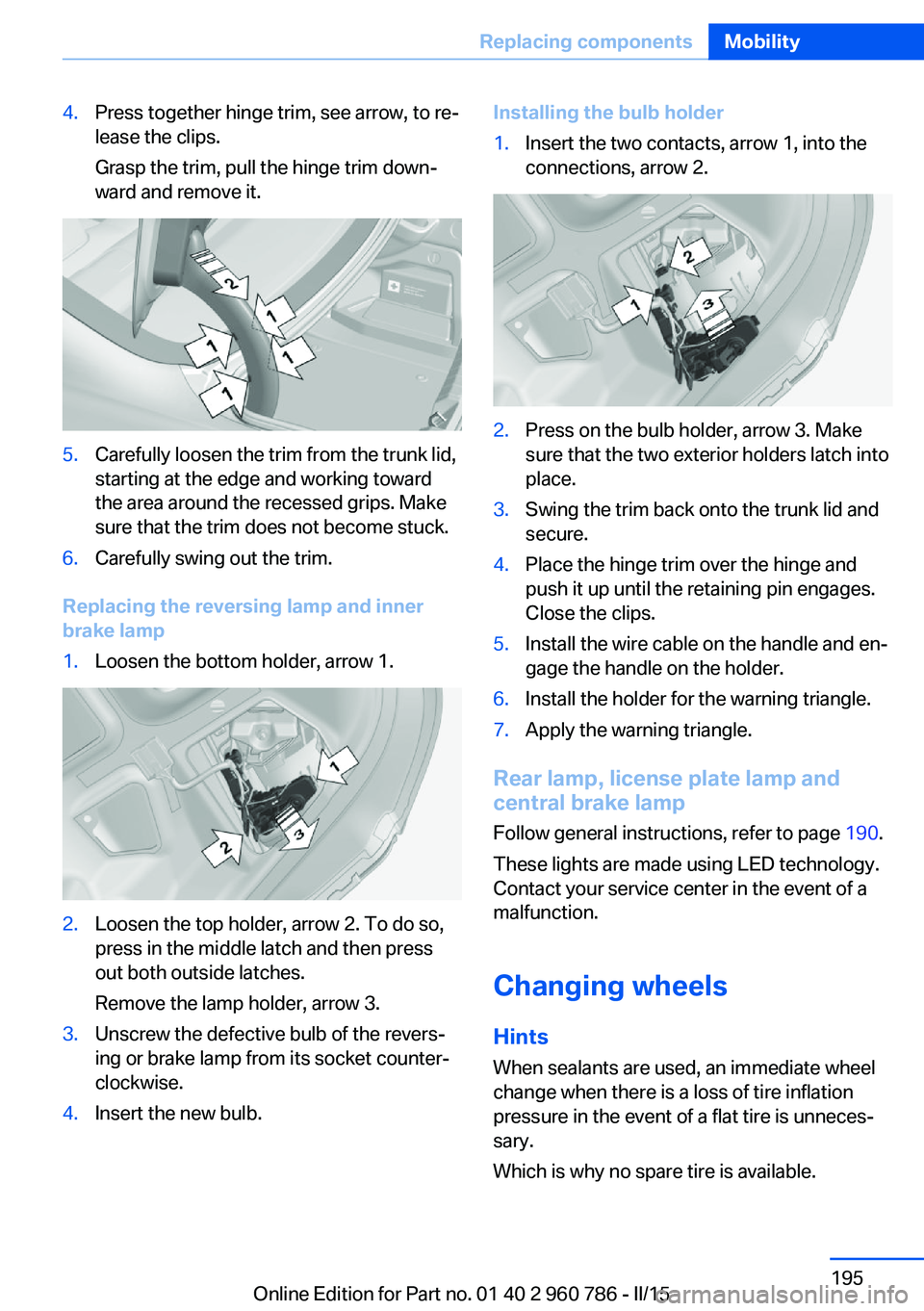
4.Press together hinge trim, see arrow, to re‐
lease the clips.
Grasp the trim, pull the hinge trim down‐
ward and remove it.5.Carefully loosen the trim from the trunk lid,
starting at the edge and working toward
the area around the recessed grips. Make
sure that the trim does not become stuck.6.Carefully swing out the trim.
Replacing the reversing lamp and inner
brake lamp
1.Loosen the bottom holder, arrow 1.2.Loosen the top holder, arrow 2. To do so,
press in the middle latch and then press
out both outside latches.
Remove the lamp holder, arrow 3.3.Unscrew the defective bulb of the revers‐
ing or brake lamp from its socket counter‐
clockwise.4.Insert the new bulb.Installing the bulb holder1.Insert the two contacts, arrow 1, into the
connections, arrow 2.2.Press on the bulb holder, arrow 3. Make
sure that the two exterior holders latch into
place.3.Swing the trim back onto the trunk lid and
secure.4.Place the hinge trim over the hinge and
push it up until the retaining pin engages.
Close the clips.5.Install the wire cable on the handle and en‐
gage the handle on the holder.6.Install the holder for the warning triangle.7.Apply the warning triangle.
Rear lamp, license plate lamp and
central brake lamp
Follow general instructions, refer to page 190.
These lights are made using LED technology.
Contact your service center in the event of a
malfunction.
Changing wheels
Hints When sealants are used, an immediate wheel
change when there is a loss of tire inflation
pressure in the event of a flat tire is unneces‐
sary.
Which is why no spare tire is available.
Seite 195Replacing componentsMobility195
Online Edition for Part no. 01 40 2 960 786 - II/15
Page 209 of 228
CareVehicle features and optionsThis chapter describes all standard, country-
specific and optional features offered with the
series. It also describes features that are not
necessarily available in your car, e. g., due to
the selected options or country versions. This
also applies to safety-related functions and
systems. The respectively applicable country
provisions must be observed when using the
respective features and systems.
Car washes General information
Regularly remove foreign objects such as
leaves in the area below the windshield when
the hood is raised.
Wash your vehicle frequently, particularly in
winter. Intense soiling and road salt can dam‐
age the vehicle.
Hints Steam jets or high-pressure washers
When using steam jets or high-pressure
washers, hold them a sufficient distance away
and use a maximum temperature of
140 ℉/60 ℃.
If the vehicle has a glass sunroof, ensure that a
distance of at least 31.5 inches/80 cm is main‐
tained. Holding them too close or using exces‐
sively high pressures or temperatures can
cause damage or preliminary damage that may
then lead to long-term damage.
Follow the user's manual for the high-pressure
washer.◀Cleaning sensors/camera lenses with
high-pressure washers
When using high-pressure washers, do not
spray the sensors and camera lenses on the
outside of the vehicle for long periods and
maintain a distance of at least 12 in/30 cm.◀
Automatic car washes
Hints Do not use high pressure washing sys‐
tems
With washing systems operating at high pres‐
sures and nozzle positions close to the win‐
dows, drops of water can penetrate.◀▷Give preference to cloth car washes or
those that use soft brushes in order to
avoid paint damage.▷Make sure that the wheels and tires are not
damaged by the transport mechanisms.▷Fold in the exterior mirrors; otherwise, they
may be damaged, depending on the width
of the vehicle.▷Deactivate the rain sensor, refer to
page 68, to avoid unintentional wiper acti‐
vation.▷In some cases, an unintentional alarm can
be triggered by the interior motion sensor
of the alarm system. Follow the instruc‐
tions on avoiding an unintentional alarm,
refer to page 45.
Guide rails in car washes
Avoid car washes with guide rails higher
than 4 in/10 cm; otherwise, the vehicle body
could be damaged.◀
Before driving into a car wash In order to ensure that the vehicle can roll in a
car wash, take the following steps:
Seite 205CareMobility205
Online Edition for Part no. 01 40 2 960 786 - II/15
Page 218 of 228
Everything from A to Z
IndexA ABS, Antilock Brake Sys‐ tem 114
Acceleration Assistant, refer to Launch Control 73
Accessories and parts 7
Activated-charcoal filter 137
Active Blind Spot Detec‐ tion 111
Active M differential 117
Adaptive brake lights, refer to Brake force display 113
Adaptive Light Control 94
Adaptive M chassis 117
Additives, oil 185
Adjustments, seats/head re‐ straints 49
After washing vehicle 206
Airbags 98
Airbags, indicator/warning light 99
Air circulation, refer to Recir‐ culated-air mode 136
Air, dehumidifying, refer to Cooling function 135
Air distribution, manual 136
Air flow, automatic climate control 136
Air pressure, tires 172
Air vents, refer to Ventila‐ tion 137
Alarm system 44
Alarm, unintentional 45
All around the center con‐ sole 16
All around the roofliner 17
All around the steering wheel 14
All-season tires, refer to Win‐ ter tires 177 Alternating-code hand-held
transmitter 140
Alternative oil types 185
Ambient light 96
Antifreeze, washer fluid 69
Antilock Brake System, ABS 114
Anti-slip control, refer to DSC 115
Approved axle load 212
Approved engine oils, see Suitable engine oil
types 185
Arrival time 87
Ash tray 143
Assistance when driving off 118
Attentiveness assistant 113
AUTO intensity 135
Automatic car wash 205
Automatic climate con‐ trol 134
Automatic Curb Monitor 55
Automatic deactivation, front- seat passenger airbags 100
Automatic headlight con‐ trol 94
Automatic locking 44
Automatic recirculated-air control 136
AUTO program, automatic cli‐ mate control 135
AUTO program, intensity 135
Auto Start/Stop function 64
Average fuel consumption 87
Average speed 87
Axle loads, weights 212 B
Backrest curvature, refer to Lumbar support 51
Backrest, width 51
Band-aids, refer to First aid kit 200
Bar for tow-starting/ towing 203
Battery replacement, vehicle battery 196
Battery replacement, vehicle remote control 35
Battery, vehicle 196
Belt holder 54
Belts, safety belts 53
Beverage holder, cu‐ pholder 149
Blinds, sun protection 47
BMW Assist, see user's manual for Navigation, En‐
tertainment and Communi‐
cation
BMW Driver’s Guide App 6
BMW Homepage 6
BMW Internet page 6
BMW maintenance sys‐ tem 188
BMW M technology 154
Bottle holder, refer to Cu‐ pholders 149
Brake assistant 114
Brake discs, break-in 156
Brake force display 113
Brake lights, adaptive 113
Brake lights, brake force dis‐ play 113
Brake pads, break-in 156
Braking, hints 157
Breakdown assistance 199
Break-in 156 Seite 214ReferenceEverything from A to Z214
Online Edition for Part no. 01 40 2 960 786 - II/15
Page 221 of 228
Eyes for securing cargo 161
F
Failure message, see Check Control 77
False alarm, refer to Uninten‐ tional alarm 45
Fan, refer to Air flow 136
Filler neck for engine oil 184
Fine wood, care 207
First aid kit 200
Fitting for towing, see Tow fit‐ ting 203
Flat tire, changing wheels 195
Flat tire, Tire Pressure Moni‐ tor TPM 101
Flat tire, warning lamp 102
Flooding 157
Floor carpet, care 208
Floor mats, care 208
Fold down the rear seat back‐ rest, see Though-loading
system 145
Fold-out position, wiper 69
Foot brake 157
Front airbags 98
Front-end collision warning with City Braking func‐
tion 105
Front lights 191
front-seat passenger airbags, automatic deactivation 100
Front-seat passenger airbags, indicator lamp 100
Fuel 170
Fuel consumption, current 82
Fuel consumption, refer to Average fuel consump‐
tion 87
Fuel filler flap 168
Fuel gauge 80
Fuel lid 168
Fuel quality 170
Fuel recommendation 170 Fuel, tank capacity 213
Fuse 197
G
Garage door opener, refer to Universal Integrated Remote
Control 139
Gasoline 170
Gear change 72
Gear shift indicator 84
General driving notes 157
Glare shield 143
Glass sunroof, powered 47
Glove compartment 147
Gross vehicle weight, ap‐ proved 212
Ground clearance 158
H
Handbrake, refer to parking brake 66
Hand-held transmitter, alter‐ nating code 140
Hazard warning flashers 199
Head airbags 98
Headlight control, auto‐ matic 94
Headlight courtesy delay fea‐ ture 93
Headlight flasher 67
Headlight glass 191
Headlights 191
Headlights, care 206
Headlight washer system 67
Head restraints 49
Head restraints, front 54
Head-up Display 90
Head-up Display, care 208
Head-up display, M view 91
Head-up display, standard view 90
Heavy cargo, stowing 161
Height, vehicle 212
High-beam Assistant 95 High beams 67
High beams/low beams, refer to High-beam Assistant 95
High-performance en‐ gine 154
Hills 158
Hill start assistant, refer to Drive-off assistant 118
Hints 6
Holder for beverages 149
Homepage 6
Hood 181
Horn 14
Hotel function, trunk lid 41
Hot exhaust system 157
HUD Head-up Display 90
Hydroplaning 157
I Ice warning, see External temperature warning 81
Icy roads, see External tem‐ perature warning 81
Identification marks, tires 173
Identification number, see ve‐ hicle identification num‐
ber 9
iDrive 18
Ignition key, refer to Remote control 34
Ignition off 62
Ignition on 62
Indication of a flat tire 102
Indicator and alarm lamps, see Check Control 77
Indicator lamp, see Check Control 77
Individual air distribution 136
Individual settings, refer to M Drive 114
Individual settings, refer to Personal Profile 35
Inflation pressure, tires 172
Info display, refer to On- Board computer 86 Seite 217Everything from A to ZReference217
Online Edition for Part no. 01 40 2 960 786 - II/15
Page 222 of 228
Initialize, Tire Pressure Moni‐tor TPM 102
Instrument cluster 76
Instrument cluster, electronic displays 76
Instrument lighting 96
Integrated key 34
Integrated Owner's Manual in the vehicle 30
Intelligent Emergency Re‐ quest 199
Intelligent Safety 104
Intensity, AUTO pro‐ gram 135
Interior equipment 139
Interior lights 96
Interior lights during unlock‐ ing 37
Interior lights with the vehicle locked 38
Interior motion sensor 45
Interior rearview mirror, auto‐ matic dimming feature 56
Interior rearview mirror, com‐ pass 141
Internet page 6
Interval display, service re‐ quirements 83
Interval mode 68
J Jacking points for the vehicle jack 196
Jump-starting 200
K
Key/remote control 34
Keyless Go, refer to Comfort Access 41
Key Memory, refer to Per‐ sonal Profile 35
Knee airbag 99 L
Lamp replacement 190
Lamp replacement, front 191
Lamp replacement, rear 193
Lane departure warning 110
Lane margin, warning 110
Language on Control Dis‐ play 89
Lashing eyes, securing cargo 161
LATCH child restraint sys‐ tem 60
Launch Control 73
Leather, care 207
LED light, bulb replace‐ ment 192
LEDs, light-emitting di‐ odes 191
Length, vehicle 212
Letters and numbers, enter‐ ing 25
Light alloy wheels, care 207
Light control 94
Light-emitting diodes, LEDs 191
Lighter 143
Lighting 93
Lights 93
Lights and bulbs 190
Light switch 93
Load 161
Loading 160
Lock, door 39
Locking/unlocking via door lock 39
Locking/unlocking with re‐ mote control 37
Locking, automatic 44
Locking, settings 43
Locking via trunk lid 40
Low beams 93
Low beams, automatic, refer to High-beam Assistant 95
Lower back support 51
Low Speed Assistant 71 Luggage rack, see Roof-
mounted luggage rack 162
Lumbar support 51
M
Maintenance 188
Maintenance require‐ ments 188
Maintenance, service require‐ ments 83
Maintenance system, BMW 188
Make-up mirror 143
Malfunction displays, see Check Control 77
Manual air distribution 136
Manual air flow 136
Manual operation, door lock 39
Manual operation, exterior mirrors 55
Manual operation, fuel filler flap 168
Manual operation, Park Dis‐ tance Control PDC 123
Manual operation, rearview camera 125
Manual operation, Side View 128
Manual operation, Top View 129
Manual transmission 70
Marking on approved tires 176
Master key, refer to Remote control 34
Maximum cooling 135
Maximum speed, display 85
Maximum speed, winter tires 177
M carbon ceramic brake 154
M Compound brake 154
M differential, active 117
MDM, M Dynamic Mode 116 Seite 218ReferenceEverything from A to Z218
Online Edition for Part no. 01 40 2 960 786 - II/15
Page 223 of 228
M double-clutch transmis‐sion 70
M Drive 114
M Driving Dynamics Con‐ trol 74
M Dynamic Mode MDM 116
Measure, units of 90
Medical kit 200
Memory, seat, mirror 54
Menu EfficientDynamics 83
Menu in instrument clus‐ ter 86
Menus, operating, iDrive 18
Menus, refer to iDrive operat‐ ing concept 20
Messages, see Check Con‐ trol 77
Microfilter 137
Minimum tread, tires 175
Mirror 55
Mirror memory 54
Mobile communication devi‐ ces in the vehicle 157
Mobility System 177
Modifications, technical, refer to Safety 7
Moisture in headlight 191
Monitor, refer to Control Dis‐ play 18
Mounting of child restraint systems 58
M technology 154
Multifunction steering wheel, buttons 14
M view, Head-up display 91
N
Navigation, see user's manual for Navigation, Entertain‐
ment and Communication
Neck restraints, front, refer to Head restraints 54
Neutral cleaner, see wheel cleaner 207
New wheels and tires 176 Nylon rope for tow-starting/
towing 203
O OBD Onboard Diagnosis 189
OBD, see OBD Onboard Di‐ agnosis 189
Obstacle marking, rearview camera 126
Octane rating, refer to Rec‐ ommended fuel grade 170
Odometer 81
Office, see user's manual for Navigation, Entertainment
and Communication
Oil 183
Oil, adding 184
Oil additives 185
Oil change 185
Oil change interval, service requirements 83
Oil filler neck 184
Oil types, alternative 185
Oil types, approved 185
Old batteries, disposal 197
On-board computer 86
Onboard monitor, refer to Control Display 18
Onboard vehicle tool kit 190
Opening/closing via door lock 39
Opening and closing 34
Opening and closing, without remote control 39
Opening and closing, with re‐ mote control 37
Opening the trunk lid with no- touch activation 42
Operating concept, iDrive 18
Optional equipment, standard equipment 6
Outside air, refer to Auto‐ matic recirculated-air con‐
trol 136 Overheating of engine, refer
to Coolant temperature 81
P Paint, vehicle 206
Parallel parking assistant 130
Park Distance Control PDC 122
Parked-car ventilation 137
Parked vehicle, condensa‐ tion 158
Parking aid, refer to PDC 122
Parking assistant 130
Parking brake 66
Parking lights 93
Parts and accessories 7
Passenger side mirror, tilting downward 55
Pathway lines, rearview cam‐ era 126
PDC Park Distance Con‐ trol 122
Pedestrian warning with city braking function 107
Personal Profile 35
Personal Profile, exporting profiles 36
Personal Profile, importing profiles 37
Pinch protection system, glass sunroof 48
Pinch protection system, win‐ dows 46
Plastic, care 207
Power failure 196
Power sunroof, glass 47
Power windows 46
Pressure, tire air pres‐ sure 172
Preventing Auto Start Stop 65
Profile, refer to Personal Pro‐ file 35
Programmable memory but‐ tons, iDrive 24 Seite 219Everything from A to ZReference219
Online Edition for Part no. 01 40 2 960 786 - II/15