seats BMW M4 2016 User Guide
[x] Cancel search | Manufacturer: BMW, Model Year: 2016, Model line: M4, Model: BMW M4 2016Pages: 228, PDF Size: 4.88 MB
Page 62 of 228
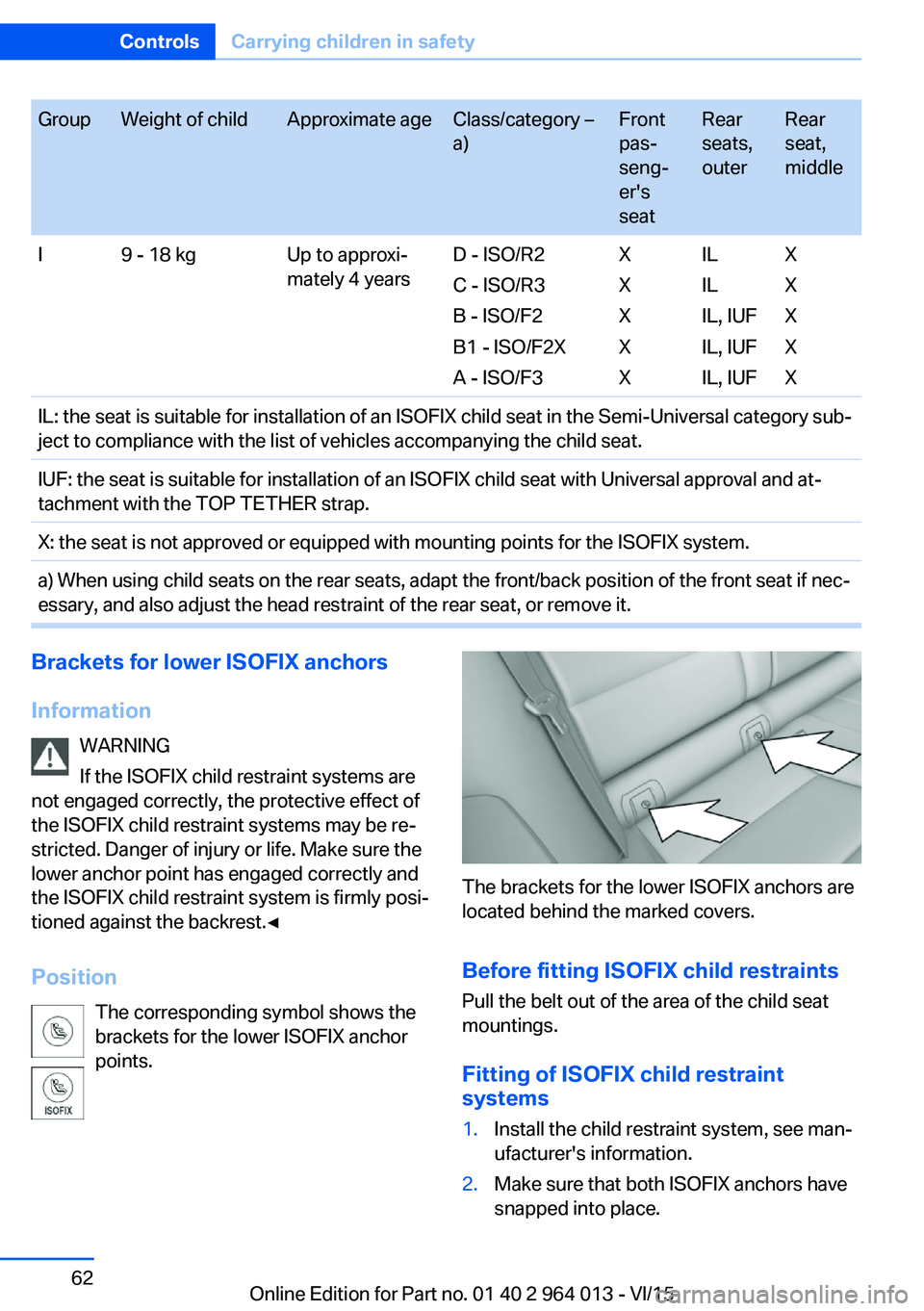
GroupWeight of childApproximate ageClass/category –
a)Front
pas‐
seng‐
er's
seatRear
seats,
outerRear
seat,
middleI9 - 18 kgUp to approxi‐
mately 4 yearsD - ISO/R2
C - ISO/R3
B - ISO/F2
B1 - ISO/F2X
A - ISO/F3X
X
X
X
XIL
IL
IL, IUF
IL, IUF
IL, IUFX
X
X
X
XIL: the seat is suitable for installation of an ISOFIX child seat in the Semi-Universal category sub‐
ject to compliance with the list of vehicles accompanying the child seat.IUF: the seat is suitable for installation of an ISOFIX child seat with Universal approval and at‐
tachment with the TOP TETHER strap.X: the seat is not approved or equipped with mounting points for the ISOFIX system.a) When using child seats on the rear seats, adapt the front/back position of the front seat if nec‐
essary, and also adjust the head restraint of the rear seat, or remove it.Brackets for lower ISOFIX anchors
Information WARNING
If the ISOFIX child restraint systems are
not engaged correctly, the protective effect of
the ISOFIX child restraint systems may be re‐
stricted. Danger of injury or life. Make sure the
lower anchor point has engaged correctly and
the ISOFIX child restraint system is firmly posi‐
tioned against the backrest.◀
Position The corresponding symbol shows the
brackets for the lower ISOFIX anchor
points.
The brackets for the lower ISOFIX anchors are
located behind the marked covers.
Before fitting ISOFIX child restraints
Pull the belt out of the area of the child seat
mountings.
Fitting of ISOFIX child restraint
systems
1.Install the child restraint system, see man‐
ufacturer's information.2.Make sure that both ISOFIX anchors have
snapped into place.Seite 62ControlsCarrying children in safety62
Online Edition for Part no. 01 40 2 964 013 - VI/15
Page 80 of 228
▷Energy recuperation, see page 86.▷Gear display with Drivelogic, see
page 85.▷Seat belt reminder for rear seats, see
page 53.▷Kilometres/trip odometer, see page 84.▷Messages, for example Check Control, see
page 80.▷Current fuel consumption, see page 86.▷Navigation display, see Owner's Handbook
for Navigation, Entertainment, Communi‐
cation.▷Range, see page 85.▷Service requirements, see page 87.▷Speed Limit Information, see page 88.▷System states of the driving dynamics, see
page 86.▷Time, see page 85.
Check control
Principle The check control monitors vehicle functionsand alerts you to any faults in the monitored
systems.
A check control message is displayed as a
combination of indicator or warning lights and
text messages in the instrument cluster and
the Head-Up Display.
If applicable, the text message shown in the
Control Display is accompanied by an addi‐
tional acoustic sound.
Indicator and warning lamps
General Indicator and warning lights in the instrument
cluster can illuminate in a variety of combina‐
tions and colours.
When the engine starts or the ignition is
switched on, the functionality of some lights is
briefly checked.
Red lights
Seat belt reminder Seat belt is not fastened on the driver's
side. For some country versions: front
passenger's seat belt is not fastened or
objects are detected on the front passenger
seat.
Flashing or illuminating: seat belt on the driv‐
er's or front passenger side is not fastened.
The seat belt reminder can also be triggered if
there are objects in the front passenger seat.
Check whether the seat belt has been fas‐
tened correctly.
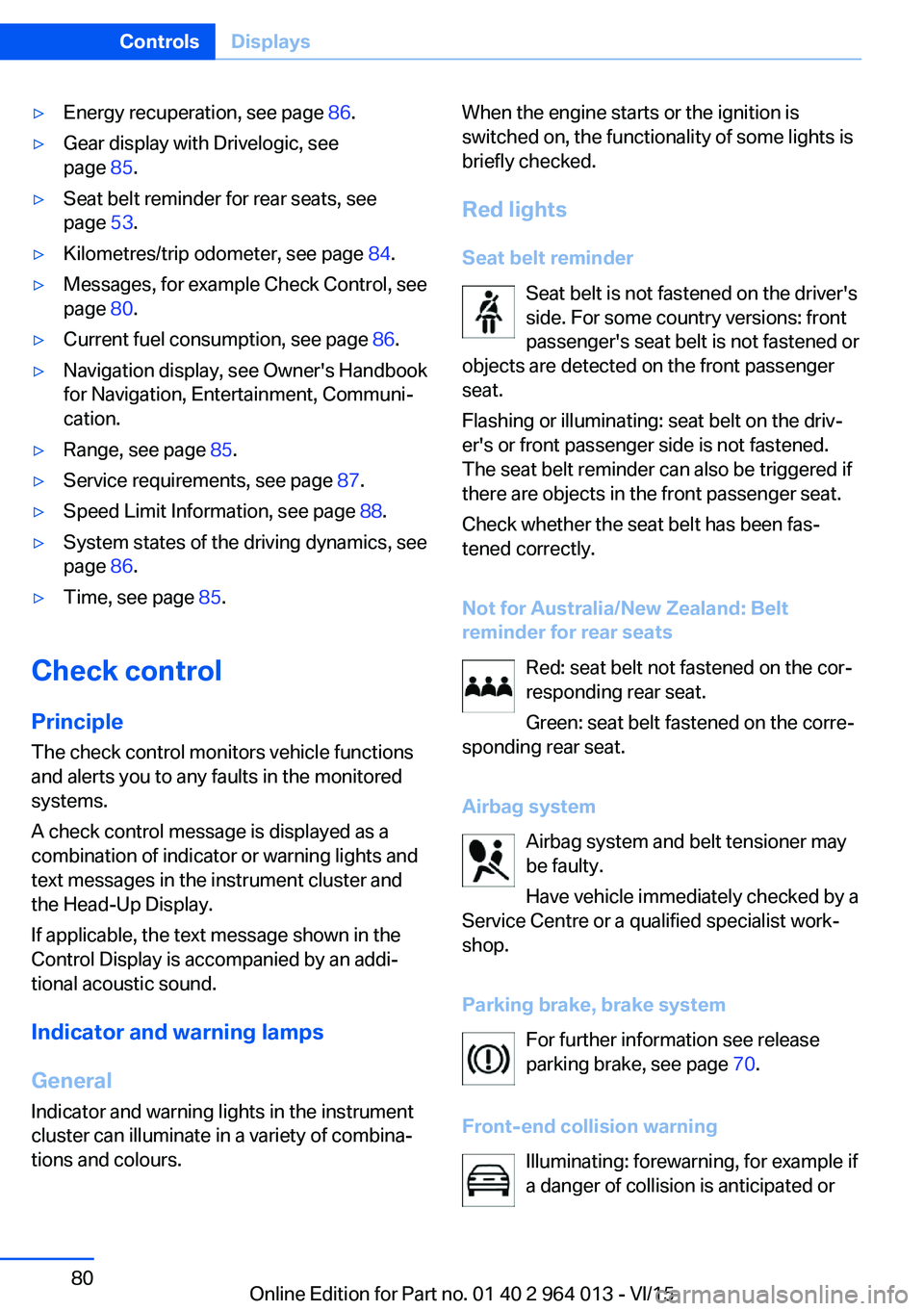
Not for Australia/New Zealand: Belt
reminder for rear seats
Red: seat belt not fastened on the cor‐
responding rear seat.
Green: seat belt fastened on the corre‐
sponding rear seat.
Airbag system Airbag system and belt tensioner may
be faulty.
Have vehicle immediately checked by a
Service Centre or a qualified specialist work‐
shop.
Parking brake, brake system For further information see release
parking brake, see page 70.
Front-end collision warning Illuminating: forewarning, for example if
a danger of collision is anticipated orSeite 80ControlsDisplays80
Online Edition for Part no. 01 40 2 964 013 - VI/15
Page 105 of 228
Notes on optimum protective effect of
the airbag
WARNING
If the seat position is wrong or the de‐
ployment area of the airbag is impaired, the air‐
bag system cannot provide the intended pro‐
tection, or may cause additional injuries when
it deploys. Danger of injury or life. Comply with
these notes for optimum protective effect.◀▷Keep your distance from the airbags.▷Make sure that vehicle occupants keep
their head away from the side airbag.▷Always grip the steering wheel on the
steering wheel rim. Keep you hands in the
3 o'clock and 9 o'clock positions to reduce
the risk of injury to hands or arms when the
airbag deploys.▷Make sure that the front-seat passenger is
sitting correctly, in other words with feet or
legs in the footwell, not resting on the
dashboard.▷Do not position any other persons, pets or
objects between the airbags and persons.▷Never attach any material to the airbag
covers with adhesive; never place material
over them or modify them in any way.▷Keep the dashboard and windscreen in the
area of the passenger's side free, for exam‐
ple do not attach adhesive foil or covers
and do not fit brackets for navigation devi‐
ces or mobile telephones.▷Do not use the front airbag cover on the
front passenger's side as a tray.▷Do not fit seat covers, cushions or other
objects not specifically suitable for seats
with integral side airbags to the front seats.▷Do not hang items of clothing such as
coats or jackets over the backrests.▷Do not modify individual components of
the system or its wiring in any way. This
also applies to the covers of the steering
wheel, the dashboard and seats.▷Do not dismantle the airbag system.
Even if all these notes are complied with, de‐
pending on the circumstances in which an ac‐
cident occurs, certain injuries as a result of
contact with the airbag cannot be entirely ruled
out.
The noise caused by the deployment of an air‐
bag may lead to temporary hearing loss for ve‐
hicle occupants sensitive to noise.
Operational readiness of the airbag
system
Notes WARNING
Individual components of the airbag sys‐
tem can be hot after triggering. Danger of in‐ jury. Do not touch individual components.◀
WARNING
Work carried out incorrectly can lead to a
failure, a malfunction or accidental triggering of
the airbag system. If there is a malfunction, the
airbag system might not trigger as intended in
an accident, in spite of the accident being of
the appropriate severity. Danger of injury or
life. Have the airbag system tested, repaired or
removed and scrapped by a Service Partner or a qualified specialist workshop.◀
Correct function When the ignition is switched on, the
warning light in the instrument cluster
briefly illuminates in order to show the
functional readiness of the entire airbag sys‐
tem and the belt tensioner.
Airbag system disrupted
▷Warning light does not illuminate after the
ignition is switched on.▷Warning lamp is permanently illuminated.Seite 105SecurityControls105
Online Edition for Part no. 01 40 2 964 013 - VI/15
Page 151 of 228
▷Do not connect up USB hard drives.▷Do not use the USB audio interface for
charging external devices.
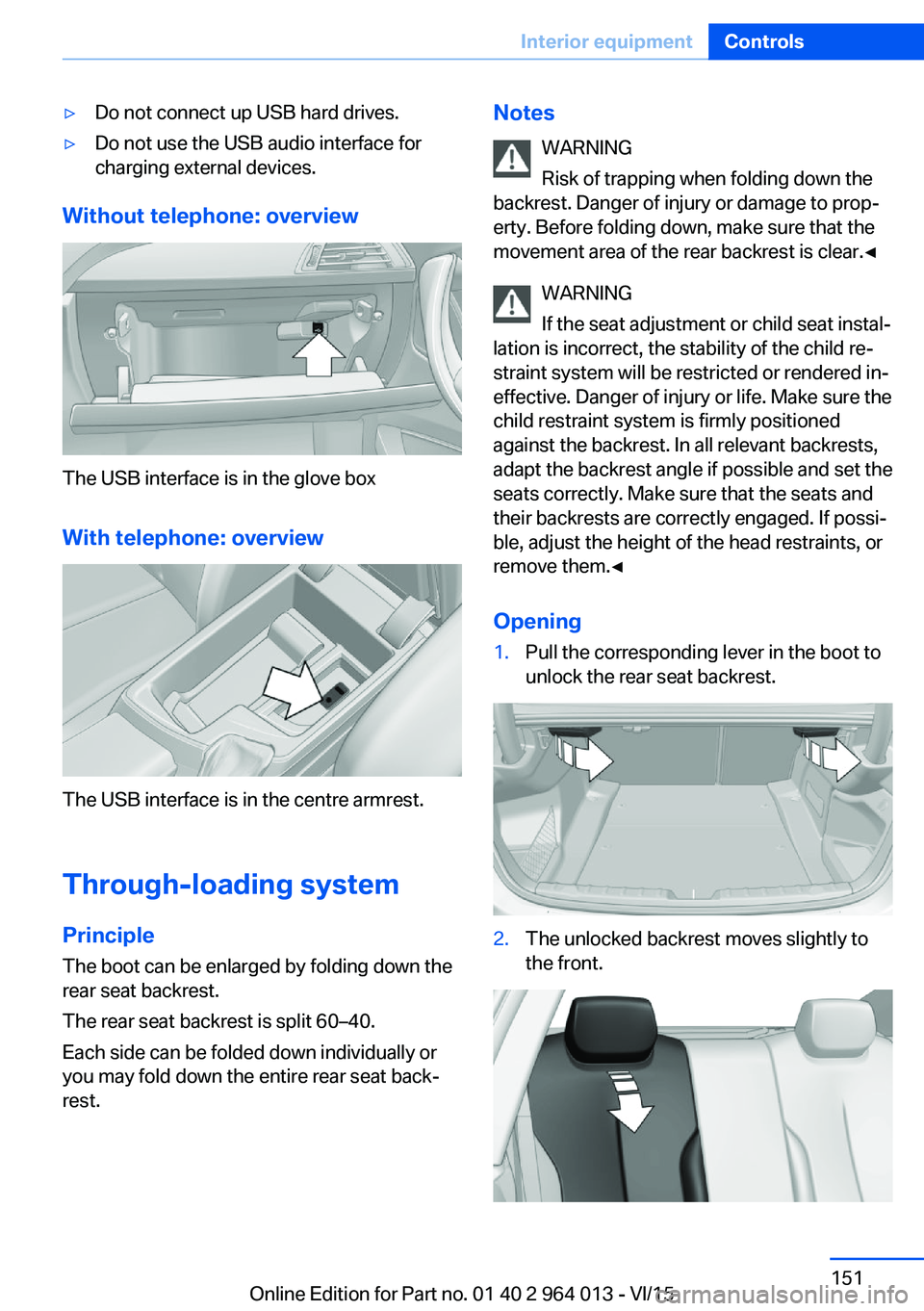
Without telephone: overview
The USB interface is in the glove box
With telephone: overview
The USB interface is in the centre armrest.
Through-loading system PrincipleThe boot can be enlarged by folding down the
rear seat backrest.
The rear seat backrest is split 60–40.
Each side can be folded down individually or
you may fold down the entire rear seat back‐ rest.
Notes
WARNING
Risk of trapping when folding down the
backrest. Danger of injury or damage to prop‐
erty. Before folding down, make sure that the
movement area of the rear backrest is clear.◀
WARNING
If the seat adjustment or child seat instal‐
lation is incorrect, the stability of the child re‐
straint system will be restricted or rendered in‐
effective. Danger of injury or life. Make sure the
child restraint system is firmly positioned
against the backrest. In all relevant backrests,
adapt the backrest angle if possible and set the
seats correctly. Make sure that the seats and
their backrests are correctly engaged. If possi‐
ble, adjust the height of the head restraints, or
remove them.◀
Opening1.Pull the corresponding lever in the boot to
unlock the rear seat backrest.2.The unlocked backrest moves slightly to
the front.Seite 151Interior equipmentControls151
Online Edition for Part no. 01 40 2 964 013 - VI/15
Page 153 of 228
Storage compartmentsVehicle equipmentThis chapter describes all standard, national
and special equipment provided in the model
series. Equipment not available in the vehicle is
therefore also described, for example the se‐
lected special equipment or national version.
This also applies to safety-relevant functions
and systems. Comply with the relevant na‐
tional regulations when using the correspond‐
ing functions and systems.
Notes WARNING
Loose objects in the interior can be
thrown into the interior during the journey, for
example in an accident or during braking and
evasive manoeuvres. Danger of injury. Secure
loose objects in the interior.◀
ATTENTION
Anti-slip mats can damage the dash‐
board. Danger of damage to property. Do not
use anti-slip mats.◀
Storage options The following storage options are located in
the interior:▷Glove box on the passenger side, see
page 153.▷Glove box on the driver's side, see
page 154.▷Without smoker's package: front compart‐
ment, in front of cupholders, see
page 154.▷Storage compartment in the front centre
armrest, see page 154.▷Pockets in the doors, see page 154.▷Nets on the backrests of the front seats.▷Storage compartment between the rear
seats, see page 155.
Glove box
Front passenger's side
Note WARNING
The glove box projects into the interior
when it is opened. Objects in the glove box can
be thrown into the interior during the journey,
for example in an accident or during braking
and evasive manoeuvres. Danger of injury. Im‐
mediately close the glove box after using it.◀
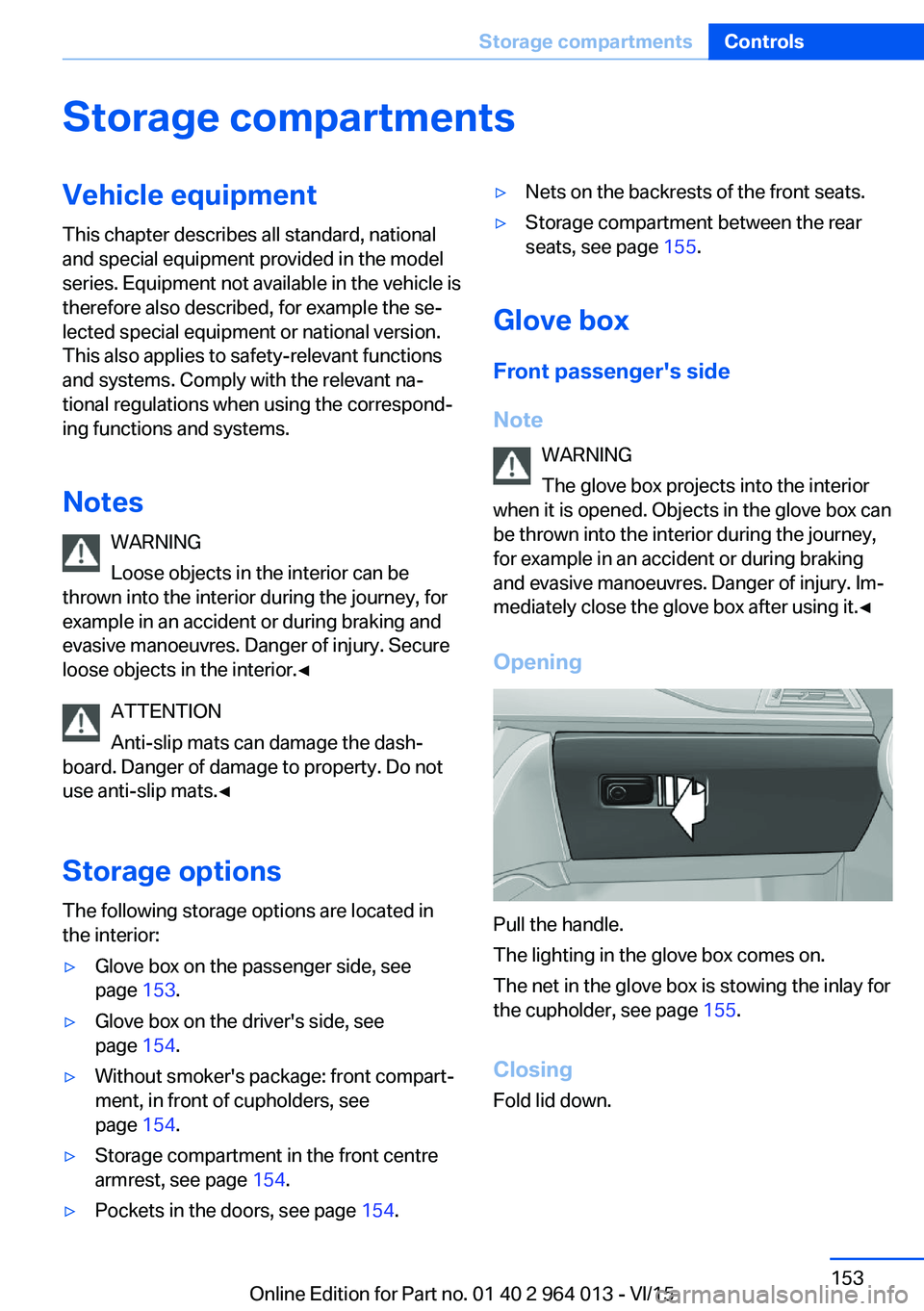
Opening
Pull the handle.
The lighting in the glove box comes on.
The net in the glove box is stowing the inlay for
the cupholder, see page 155.
Closing
Fold lid down.
Seite 153Storage compartmentsControls153
Online Edition for Part no. 01 40 2 964 013 - VI/15
Page 154 of 228
LockingThe glove box can be locked with an integrated
key. This means it is not possible to access the
glove box.
After the glove box has been locked, the re‐
mote control without the integrated key can be
handed over, for example, at a hotel.
Driver's side
Note WARNING
The glove box projects into the interior
when it is opened. Objects in the glove box can
be thrown into the interior during the journey,
for example in an accident or during braking
and evasive manoeuvres. Danger of injury. Im‐
mediately close the glove box after using it.◀
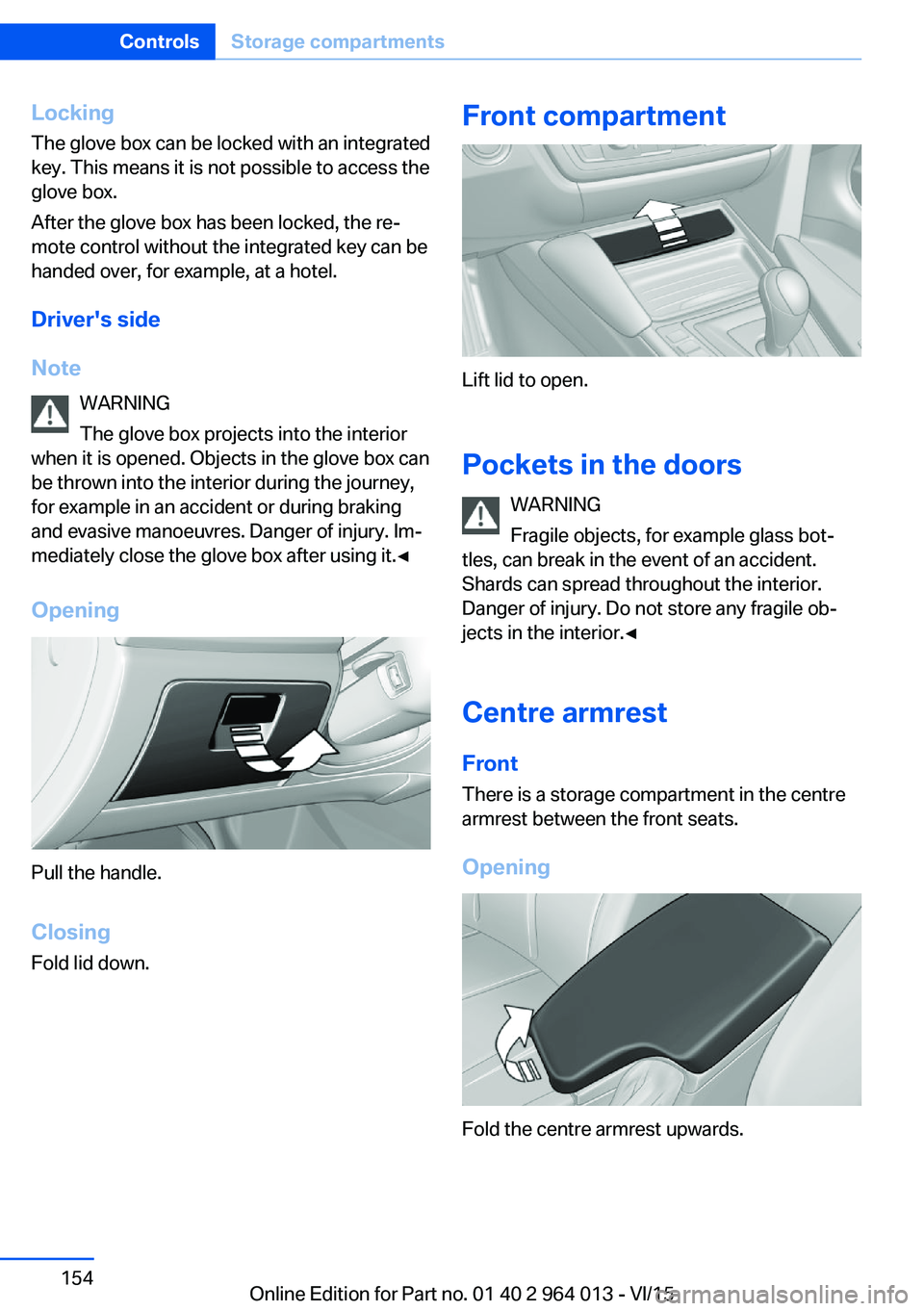
Opening
Pull the handle.
ClosingFold lid down.
Front compartment
Lift lid to open.
Pockets in the doors WARNING
Fragile objects, for example glass bot‐
tles, can break in the event of an accident.
Shards can spread throughout the interior.
Danger of injury. Do not store any fragile ob‐
jects in the interior.◀
Centre armrest
Front There is a storage compartment in the centre
armrest between the front seats.
Opening
Fold the centre armrest upwards.
Seite 154ControlsStorage compartments154
Online Edition for Part no. 01 40 2 964 013 - VI/15
Page 155 of 228
SlidingCentre armrest can be slid in the longitudinal
direction. It engages into the end positions.
Connection for external audio device An external audio device, for ex‐
ample an MP3 player, can be
connected through the AUX-IN
port or the USB audio interface
in the centre armrest.
Storage compartment
between the rear seats
A storage compartment is located between the
rear seats.
Cupholder
Note WARNING
Unsuitable containers in the cupholder
and hot drinks can damage the cupholders,
and increase the risk of injury in an accident.
Danger of injury or damage to property. Use
light, lockable containers that are shatterproof.
Do not transport hot drinks. Do not force ob‐
jects into the cupholder.◀
FrontFittings for front cupholders
With the fitting, the cupholders can be used as
an extra compartment. To do this, put the fit‐
tings into the cupholder.
Only use fittings for small object, for exaple a
key or remote control.
When not in use, stow the fittings in the net in
the glove box. To do this, plug the fittings with
the top upwards in the net. Observe the trape‐
zoidal shape of net and fitting.
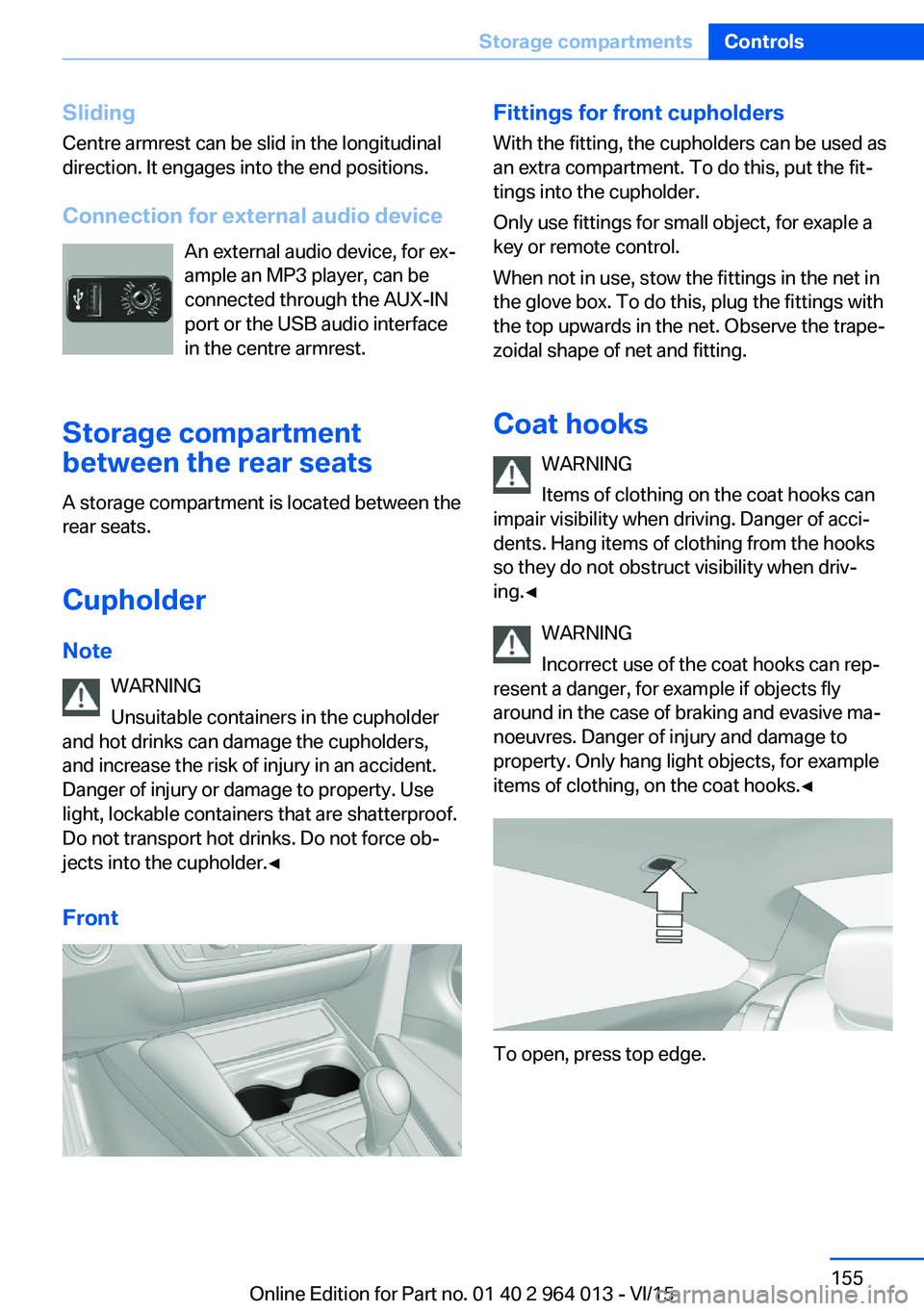
Coat hooks WARNING
Items of clothing on the coat hooks can
impair visibility when driving. Danger of acci‐
dents. Hang items of clothing from the hooks
so they do not obstruct visibility when driv‐
ing.◀
WARNING
Incorrect use of the coat hooks can rep‐
resent a danger, for example if objects fly
around in the case of braking and evasive ma‐
noeuvres. Danger of injury and damage to
property. Only hang light objects, for example items of clothing, on the coat hooks.◀
To open, press top edge.
Seite 155Storage compartmentsControls155
Online Edition for Part no. 01 40 2 964 013 - VI/15
Page 219 of 228
Breakdown, wheelchange 199
Brightness of the Control Dis‐ play 94
Bulb change, rear 196
Bulb change, xenon head‐ light 194
Buttons on the steering wheel 12
Button, start/stop 65
C
Camera, rear-view cam‐ era 134
Camera, Side View 136
Camera, Top View 138
Carbon ceramic brakes M 160
Car care 209
Care, displays 211
Care products 209
Care, vehicle 209
Car jack 199
Car key, see Remote con‐ trol 32
Carpet, care 211
Carrying children safely 58
Car washes 208
Catalytic converter, see Hot exhaust system 163
CBS, Condition Based Serv‐ ice 191
Central key, see Remote con‐ trol 32
Central locking system 38
Central screen, see Control Display 16
Centre armrest 154
Centre console 14
Ceramic brakes 160
Changes, technical, see Your own safety 7
Changing bulb, rear 196
Charcoal canister 146
Chassis, electronic 126 Chassis number, see Vehicle
identification number 9
Check control 80
Checking the oil level elec‐ tronically 185
Child's seats 58
Children, carrying 58
Child restraints 58
Child seat classes, ISOFIX 61
Child seat mounting 59
Child seat mountings, ISO‐ FIX 61
Chrome parts, care 210
Cigarette lighter 149
Cleaning displays 211
Clock 85
Closing/opening using door lock 37
Closing/opening with remote control 35
Coat hooks 155
Cockpit 12
Comfort Access 39
Comfort closing with the re‐ mote control 36
Comfort opening with the re‐ mote control 36
Compound brakes 160
Compressor 178
Computer, see on-board computer 90
Condensate under the vehi‐ cle 165
Condensation on win‐ dows 146
Condition Based Service, CBS 191
Confirmation signals 42
ConnectedDrive 6
ConnectedDrive services 6
Connecting electrical applian‐ ces 150
Contactless opening of boot lid 40
Control Display 16
Control display, settings 93 Controller 17
Control systems, driving sta‐ bility 123
Coolant 189
Coolant temperature 84
Cooling effect, maximum 145
Cooling function 145
Cooling system 189
Cornering light 100
Corrosion of brake discs 164
Courtesy light when unlock‐ ing 35
Courtesy light with the vehi‐ cle locked 36
Cruise Control 129
Cupholder 155
Current fuel consumption 86
D
Damage, tyres 176
Damper control 126
Data, technical 214
Date 85
Daytime driving lights 100
Deactivation, airbags 106
Defrosting, see Defrosting windows 146
Defrosting windows 146
Defrost, see Defrosting win‐ dows 146
Deleting personal data 23
Differential lock 126
Digital clock 85
Digital speed 85
Digital speedometer 85
Dimensions 214
Dimmable exterior mirrors 56
Dimming rear-view mirror 56
Dipping headlights, see High- beam assistance 100
Display in windscreen 94
Display lighting, see Instru‐ ment lighting 102
Displays, cleaning 211 Seite 219Everything from A to ZReference219
Online Edition for Part no. 01 40 2 964 013 - VI/15
Page 224 of 228
Replacement fuse 200
Replacement of parts 193
Replacement of wheels/ tyres 177
Replacing bulbs 193
Replacing bulbs, front 194
Replacing bulbs, LED head‐ lights 195
Replacing parts 193
Replacing the battery, vehicle battery 199
Replacing the battery, vehicle remote control 33
Replacing wiper blades 193
RES button, see Cruise Con‐ trol 129
Reserve warning, see Range 85
Reset, Tyre Pressure Monitor TPM 107
Restraint systems for chil‐ dren 58
Retreaded tyres 177
Reuse 192
Reversing light 196
Revolution counter 84
Right-hand traffic, light set‐ ting 102
Rim cleaner 210
Roller sunblinds 45
RON petrol grade 174
Roof load 215
Roof rack 167
Rope for tow-starting/ towing 206
RPA runflat indicator 109
Rubber parts, care 210
Runflat indicator RPA 109
Running in 162
Running in brake discs 162
Running in brake pads 162
S
Safe seated position 48 Safety package, see Active
Protection 120
Safety systems, airbags 104
Saving fuel 168
Saving settings for seat, mir‐ ror 54
Screen, see Control Dis‐ play 16
Screwdriver, see On-board toolkit 193
Screw thread, see Thread for towing eye 207
Sealing compound 178
Seat and mirror memory 54
Seat belt reminder for driver's and front passenger's
seat 53
Seat belt reminder for rear seats 53
Seat belts 52
Seat belts, care 211
Seat heating, front 50
Seats 48
Securing load 166
Selection list in the instru‐ ment cluster 90
Selector lever 74
Selector lever position 74
Sensors, care 211
Sequential mode 75
Service history 88
Service requirement, dis‐ play 87
Service requirements, Condi‐ tion Based Service
CBS 191
Services, ConnectedDrive 6
Servotronic 127
Settings, locking/unlock‐ ing 41
Settings, M Drive 123
Settings on the control dis‐ play 93
Settings, seats/head re‐ straints 48
Shift Lights 96 Shift point indicator 88
Side airbags 104
Side lights 98
Side View 136
Signals on unlocking 42
Sliding/tilting roof 45
Smallest turning circle 214
Snow chains 181
Socket 150
Socket in rear passenger compartment 150
Socket, on-board diagnosis, OBD 192
SOS button 202
Sound 6
Spanner, see On-board tool‐ kit 193
Spare fuse 200
Special equipment, standard equipment 7
Special ID, remote control 33
Specified engine oil grades 187
Speed, displaying maxi‐ mum 88
Speed Limit Device, see Man‐ ual Speed Limiter 119
Speed limiter, manual 119
Speed Limit Information 88
Speed Limit Information, on- board computer 92
Speed limit, see Manual Speed Limiter 119
Speed warning 92
Split-screen 22
Split-screen view, split- screen 22
Sport displays, torque dis‐ play, power display 92
Stability control systems 123
Standard view, Head-Up Dis‐ play 95
Start/stop button 65
Start function with malfunc‐ tion 33
Starting assistance 203 Seite 224ReferenceEverything from A to Z224
Online Edition for Part no. 01 40 2 964 013 - VI/15