warning lights BMW M4 2016 User Guide
[x] Cancel search | Manufacturer: BMW, Model Year: 2016, Model line: M4, Model: BMW M4 2016Pages: 228, PDF Size: 4.88 MB
Page 80 of 228
▷Energy recuperation, see page 86.▷Gear display with Drivelogic, see
page 85.▷Seat belt reminder for rear seats, see
page 53.▷Kilometres/trip odometer, see page 84.▷Messages, for example Check Control, see
page 80.▷Current fuel consumption, see page 86.▷Navigation display, see Owner's Handbook
for Navigation, Entertainment, Communi‐
cation.▷Range, see page 85.▷Service requirements, see page 87.▷Speed Limit Information, see page 88.▷System states of the driving dynamics, see
page 86.▷Time, see page 85.
Check control
Principle The check control monitors vehicle functionsand alerts you to any faults in the monitored
systems.
A check control message is displayed as a
combination of indicator or warning lights and
text messages in the instrument cluster and
the Head-Up Display.
If applicable, the text message shown in the
Control Display is accompanied by an addi‐
tional acoustic sound.
Indicator and warning lamps
General Indicator and warning lights in the instrument
cluster can illuminate in a variety of combina‐
tions and colours.
When the engine starts or the ignition is
switched on, the functionality of some lights is
briefly checked.
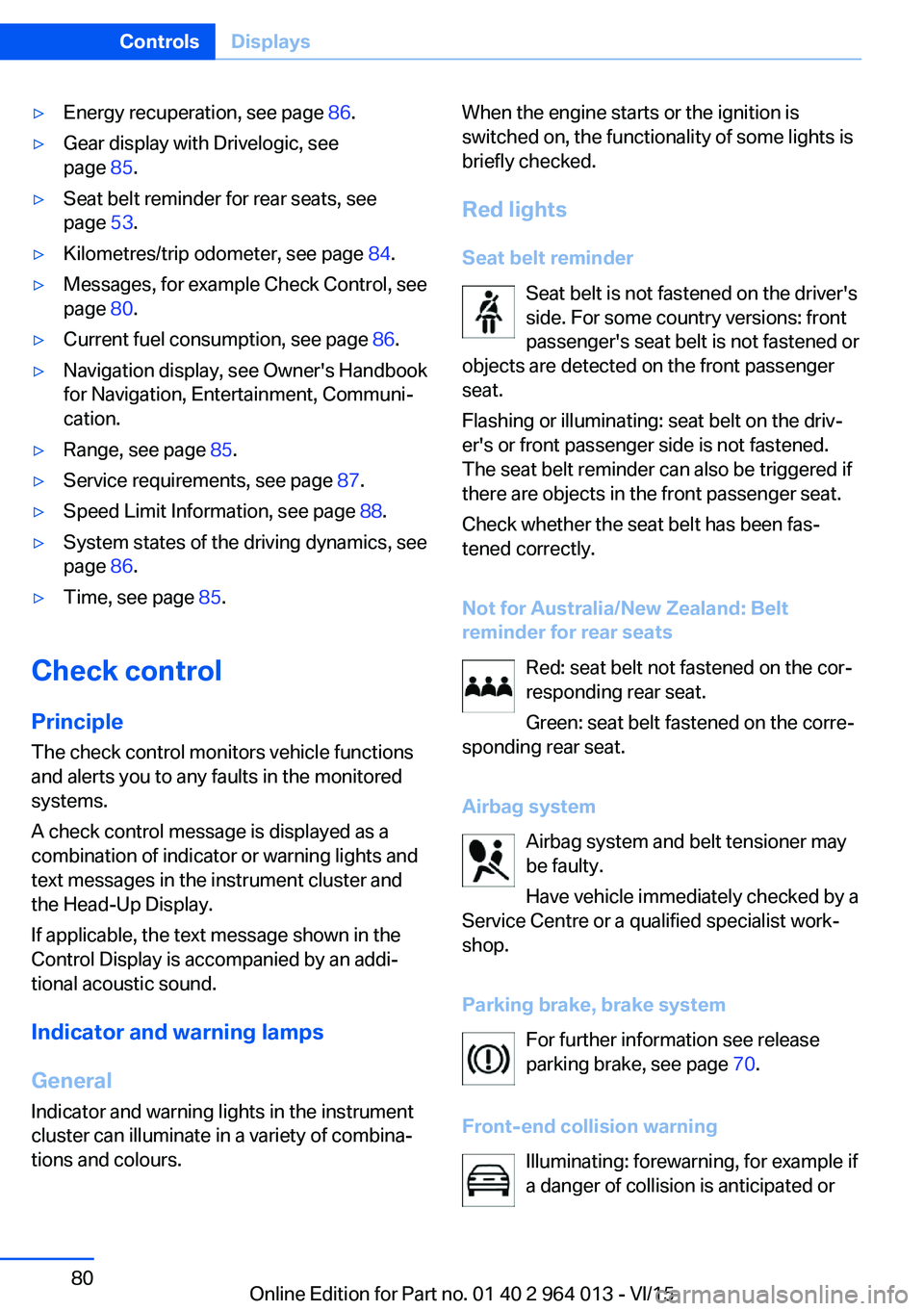
Red lights
Seat belt reminder Seat belt is not fastened on the driver's
side. For some country versions: front
passenger's seat belt is not fastened or
objects are detected on the front passenger
seat.
Flashing or illuminating: seat belt on the driv‐
er's or front passenger side is not fastened.
The seat belt reminder can also be triggered if
there are objects in the front passenger seat.
Check whether the seat belt has been fas‐
tened correctly.
Not for Australia/New Zealand: Belt
reminder for rear seats
Red: seat belt not fastened on the cor‐
responding rear seat.
Green: seat belt fastened on the corre‐
sponding rear seat.
Airbag system Airbag system and belt tensioner may
be faulty.
Have vehicle immediately checked by a
Service Centre or a qualified specialist work‐
shop.
Parking brake, brake system For further information see release
parking brake, see page 70.
Front-end collision warning Illuminating: forewarning, for example if
a danger of collision is anticipated orSeite 80ControlsDisplays80
Online Edition for Part no. 01 40 2 964 013 - VI/15
Page 81 of 228
there is a very short distance to a vehicle
ahead.
Increase distance.
Flashing: acute warning in the event of an im‐
mediate collision if the vehicle approaches an‐
other vehicle with relatively high differential
speed.
Engage by braking and swerving as required.
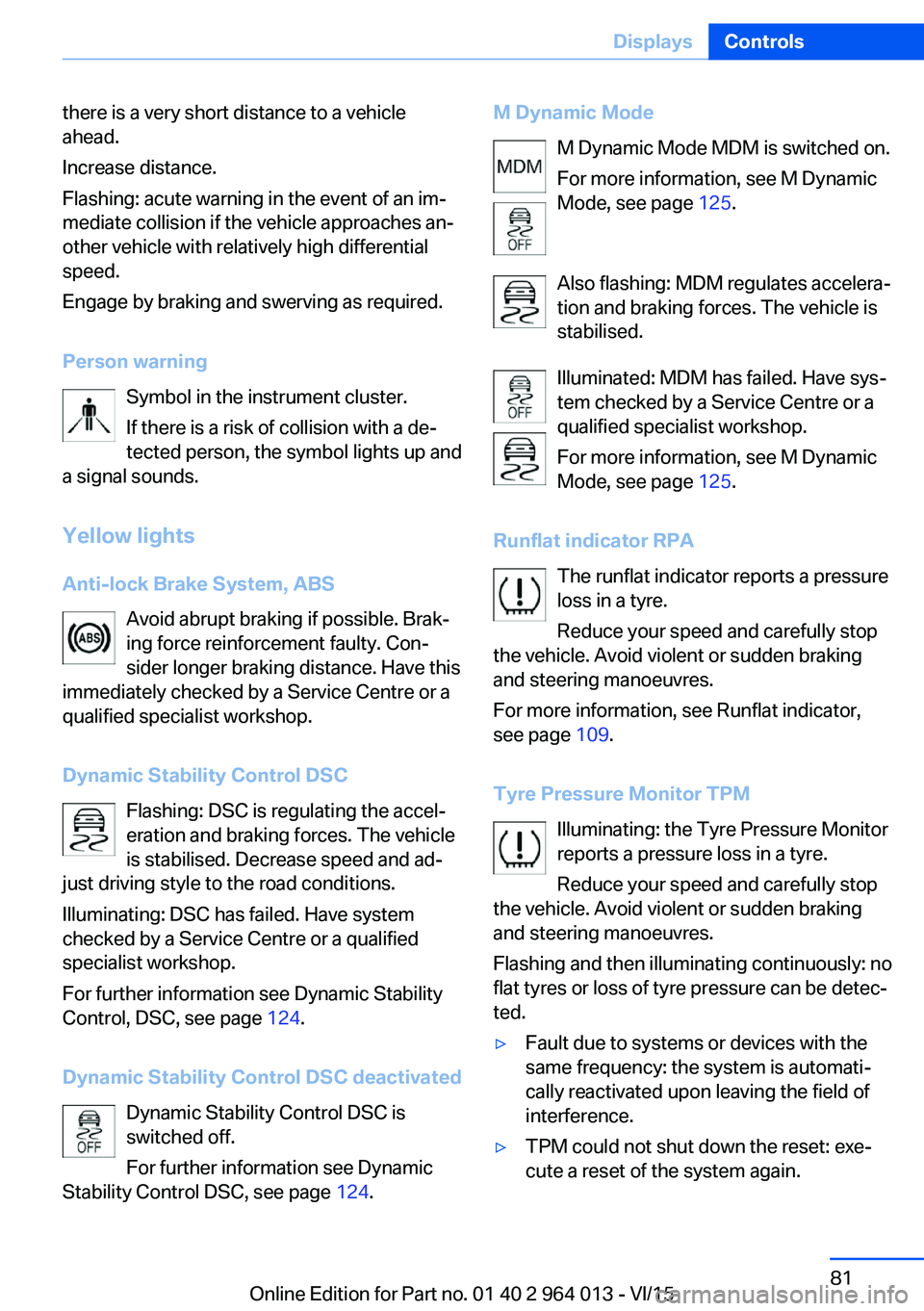
Person warning Symbol in the instrument cluster.If there is a risk of collision with a de‐
tected person, the symbol lights up and
a signal sounds.
Yellow lights
Anti-lock Brake System, ABS Avoid abrupt braking if possible. Brak‐
ing force reinforcement faulty. Con‐
sider longer braking distance. Have this
immediately checked by a Service Centre or a
qualified specialist workshop.
Dynamic Stability Control DSC Flashing: DSC is regulating the accel‐
eration and braking forces. The vehicle
is stabilised. Decrease speed and ad‐
just driving style to the road conditions.
Illuminating: DSC has failed. Have system
checked by a Service Centre or a qualified
specialist workshop.
For further information see Dynamic Stability
Control, DSC, see page 124.
Dynamic Stability Control DSC deactivated Dynamic Stability Control DSC is
switched off.
For further information see Dynamic
Stability Control DSC, see page 124.M Dynamic Mode
M Dynamic Mode MDM is switched on.
For more information, see M Dynamic
Mode, see page 125.
Also flashing: MDM regulates accelera‐
tion and braking forces. The vehicle is
stabilised.
Illuminated: MDM has failed. Have sys‐
tem checked by a Service Centre or a
qualified specialist workshop.
For more information, see M Dynamic
Mode, see page 125.
Runflat indicator RPA The runflat indicator reports a pressure
loss in a tyre.
Reduce your speed and carefully stop
the vehicle. Avoid violent or sudden braking
and steering manoeuvres.
For more information, see Runflat indicator,
see page 109.
Tyre Pressure Monitor TPM Illuminating: the Tyre Pressure Monitor
reports a pressure loss in a tyre.
Reduce your speed and carefully stop
the vehicle. Avoid violent or sudden braking
and steering manoeuvres.
Flashing and then illuminating continuously: no
flat tyres or loss of tyre pressure can be detec‐
ted.▷Fault due to systems or devices with the
same frequency: the system is automati‐
cally reactivated upon leaving the field of
interference.▷TPM could not shut down the reset: exe‐
cute a reset of the system again.Seite 81DisplaysControls81
Online Edition for Part no. 01 40 2 964 013 - VI/15
Page 82 of 228
▷Wheel without TPM electronics is fitted:
have the vehicle checked by a Service
Partner or a qualified specialist workshop if
necessary.▷Malfunction: have the system checked by a
Service Partner or a qualified specialist
workshop.
For more information, see Tyre Pressure Moni‐
tor, see page 107.
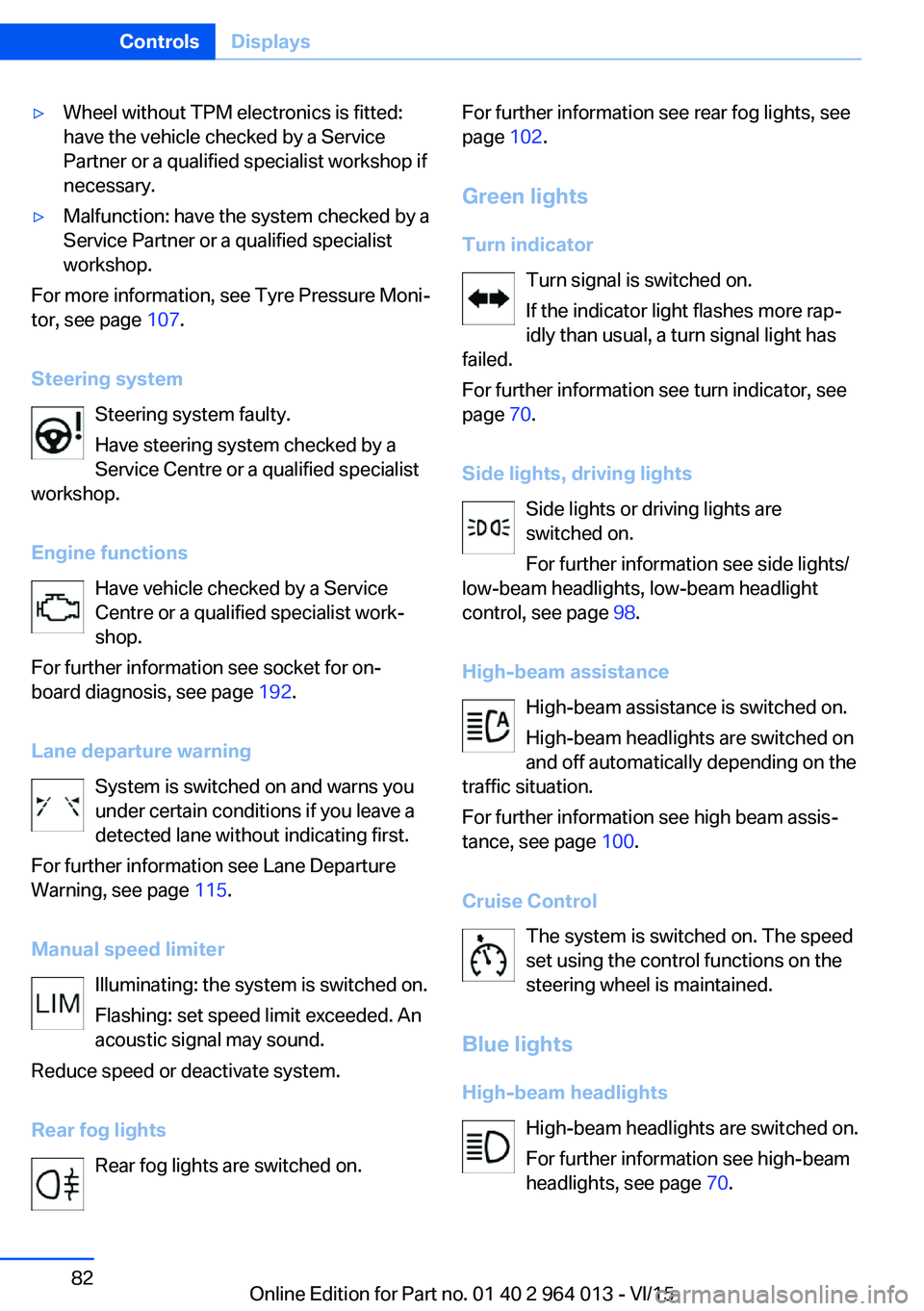
Steering system Steering system faulty.
Have steering system checked by a
Service Centre or a qualified specialist
workshop.
Engine functions Have vehicle checked by a Service
Centre or a qualified specialist work‐
shop.
For further information see socket for on-
board diagnosis, see page 192.
Lane departure warning System is switched on and warns you
under certain conditions if you leave a
detected lane without indicating first.
For further information see Lane Departure
Warning, see page 115.
Manual speed limiter Illuminating: the system is switched on.
Flashing: set speed limit exceeded. An
acoustic signal may sound.
Reduce speed or deactivate system.
Rear fog lights Rear fog lights are switched on.
For further information see rear fog lights, see
page 102.
Green lights Turn indicator Turn signal is switched on.If the indicator light flashes more rap‐
idly than usual, a turn signal light has
failed.
For further information see turn indicator, see
page 70.
Side lights, driving lights Side lights or driving lights are
switched on.
For further information see side lights/
low-beam headlights, low-beam headlight
control, see page 98.
High-beam assistance High-beam assistance is switched on.
High-beam headlights are switched on
and off automatically depending on the
traffic situation.
For further information see high beam assis‐
tance, see page 100.
Cruise Control The system is switched on. The speed
set using the control functions on the
steering wheel is maintained.
Blue lights
High-beam headlights High-beam headlights are switched on.
For further information see high-beam
headlights, see page 70.Seite 82ControlsDisplays82
Online Edition for Part no. 01 40 2 964 013 - VI/15
Page 83 of 228
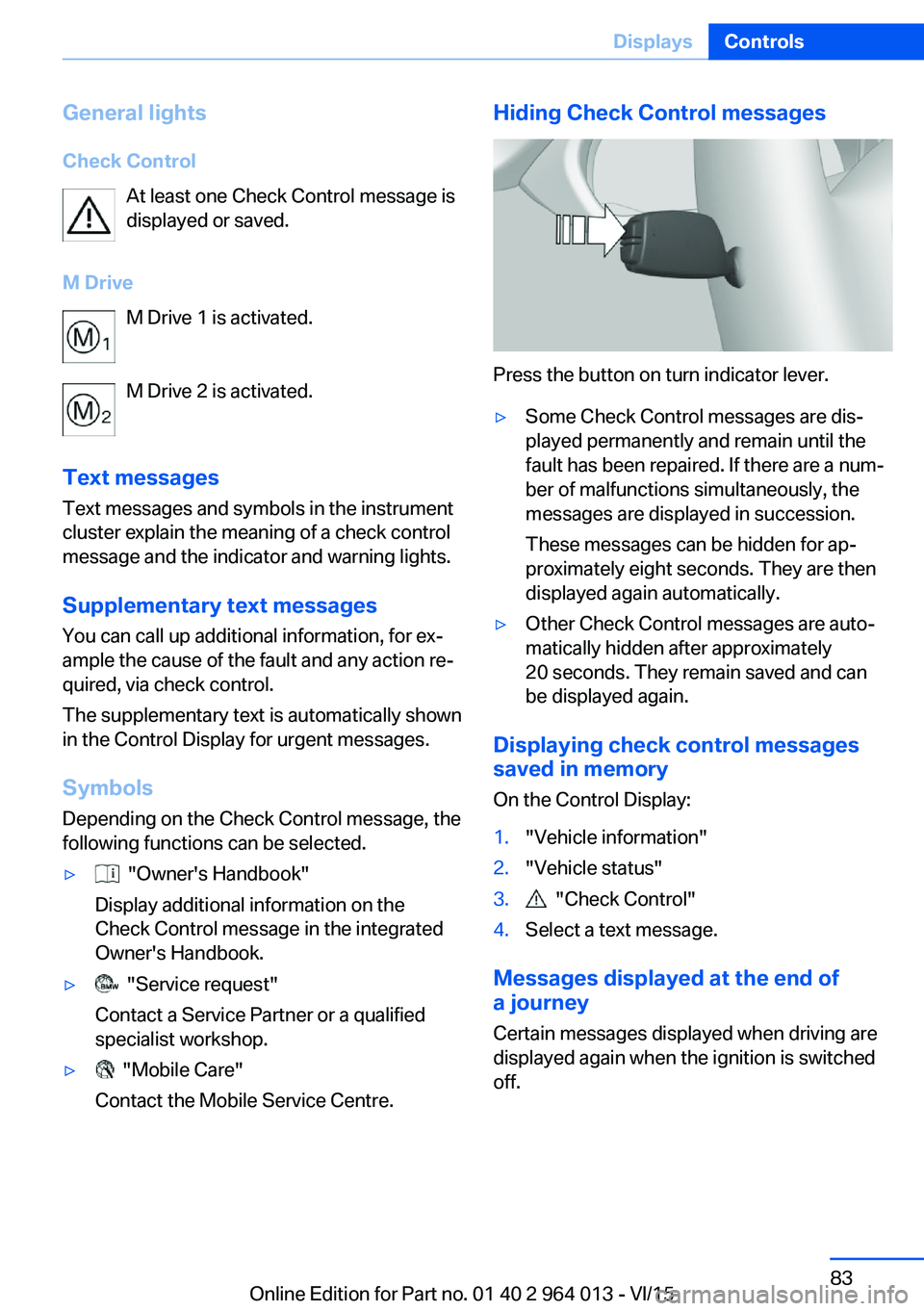
General lightsCheck Control At least one Check Control message is
displayed or saved.
M Drive M Drive 1 is activated.
M Drive 2 is activated.
Text messages Text messages and symbols in the instrument
cluster explain the meaning of a check control
message and the indicator and warning lights.
Supplementary text messages You can call up additional information, for ex‐
ample the cause of the fault and any action re‐
quired, via check control.
The supplementary text is automatically shown
in the Control Display for urgent messages.
Symbols Depending on the Check Control message, the
following functions can be selected.▷ "Owner's Handbook"
Display additional information on the
Check Control message in the integrated
Owner's Handbook.▷ "Service request"
Contact a Service Partner or a qualified
specialist workshop.▷ "Mobile Care"
Contact the Mobile Service Centre.Hiding Check Control messages
Press the button on turn indicator lever.
▷Some Check Control messages are dis‐
played permanently and remain until the
fault has been repaired. If there are a num‐
ber of malfunctions simultaneously, the
messages are displayed in succession.
These messages can be hidden for ap‐
proximately eight seconds. They are then
displayed again automatically.▷Other Check Control messages are auto‐
matically hidden after approximately
20 seconds. They remain saved and can
be displayed again.
Displaying check control messages saved in memory
On the Control Display:
1."Vehicle information"2."Vehicle status"3. "Check Control"4.Select a text message.
Messages displayed at the end of
a journey
Certain messages displayed when driving are
displayed again when the ignition is switched
off.
Seite 83DisplaysControls83
Online Edition for Part no. 01 40 2 964 013 - VI/15
Page 95 of 228
Switching on/off1."Settings"2."Head-up display"3."Head-up display"
Display
Standard view The following information is displayed in the
Head-Up Display:
▷Speed.▷Navigation system.▷Check Control messages.▷Selection list from the instrument cluster.▷Driver Assistance Systems.
Some of this information is only shown briefly
when needed.
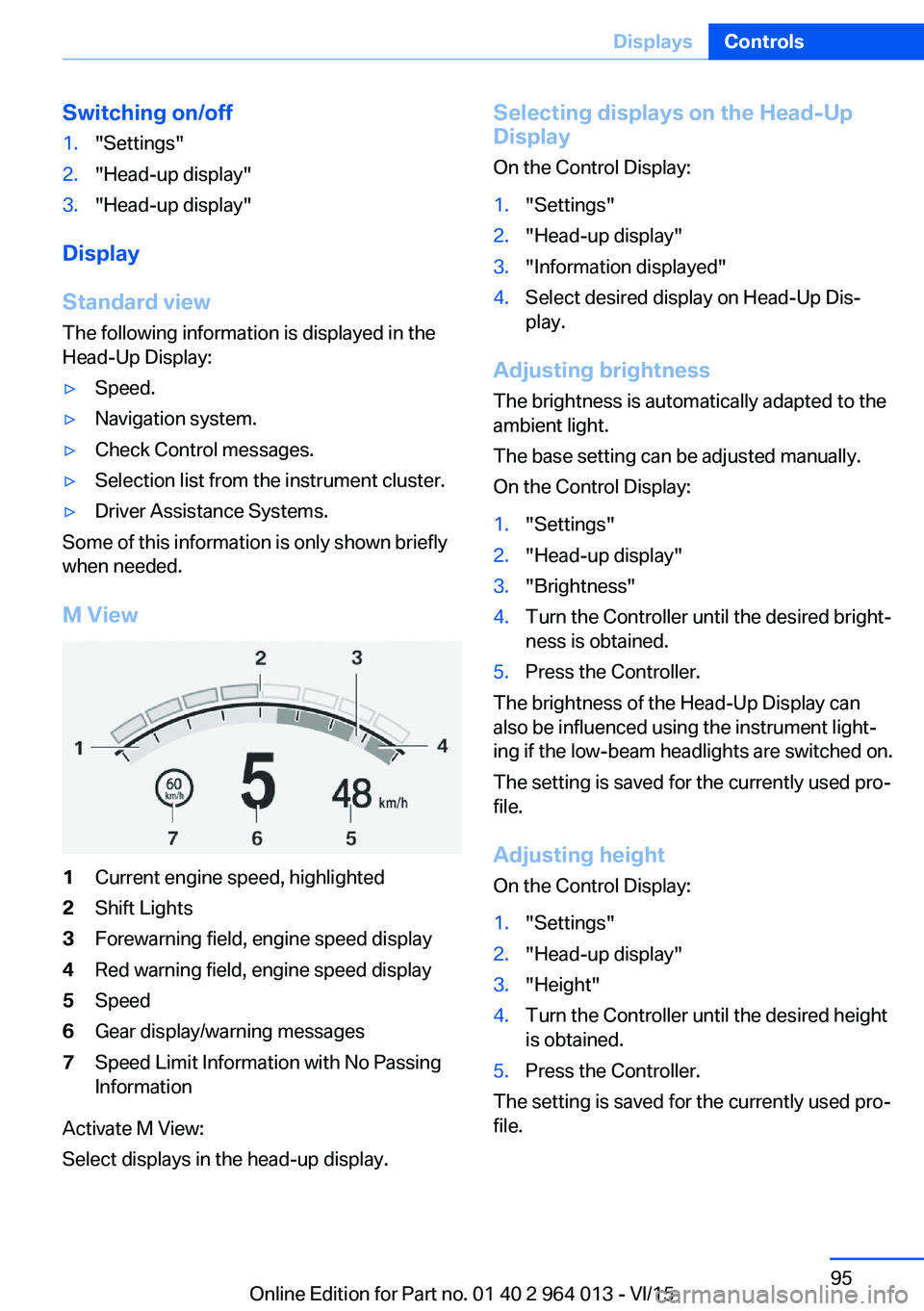
M View
1Current engine speed, highlighted2Shift Lights3Forewarning field, engine speed display4Red warning field, engine speed display5Speed6Gear display/warning messages7Speed Limit Information with No Passing
Information
Activate M View:
Select displays in the head-up display.
Selecting displays on the Head-Up
Display
On the Control Display:1."Settings"2."Head-up display"3."Information displayed"4.Select desired display on Head-Up Dis‐
play.
Adjusting brightness
The brightness is automatically adapted to the
ambient light.
The base setting can be adjusted manually.
On the Control Display:
1."Settings"2."Head-up display"3."Brightness"4.Turn the Controller until the desired bright‐
ness is obtained.5.Press the Controller.
The brightness of the Head-Up Display can
also be influenced using the instrument light‐
ing if the low-beam headlights are switched on.
The setting is saved for the currently used pro‐
file.
Adjusting height
On the Control Display:
1."Settings"2."Head-up display"3."Height"4.Turn the Controller until the desired height
is obtained.5.Press the Controller.
The setting is saved for the currently used pro‐
file.
Seite 95DisplaysControls95
Online Edition for Part no. 01 40 2 964 013 - VI/15
Page 120 of 228
Exceeding the speed limitYou may intentionally exceed the speed limit.There is no acoustic warning in such a case.
To intentionally exceed the set speed limit,
completely depress the accelerator pedal.
If the speed drops below the set speed limit, it
is automatically reactivated.
Warning
Visual warning The indicator light in the instrument
cluster flashes if the set speed limit is
exceeded for as long as you exceed the
set speed limit.
Acoustic warning▷If you unintentionally exceed the set speed
limit, you will hear an acoustic warning af‐
ter approximately five seconds.▷If the speed limit is reduced to below the
current speed during the journey, the
warning sounds after approximately
30 seconds.▷If you intentionally exceed the speed limit
by fully depressing the accelerator pedal,
no warning is given.
Displays in the instrument cluster
Marking of the speed limit Display in the speedometer:
▷Marker illuminates green:
the system is active.▷Marker does not illuminate:
the system is inactive.
Indicator light
▷If the indicator light is illuminated:
the system is switched on.▷If the indicator light is flashing: set speed
limit is exceeded.
Brief status display
Set speed limit briefly appears.
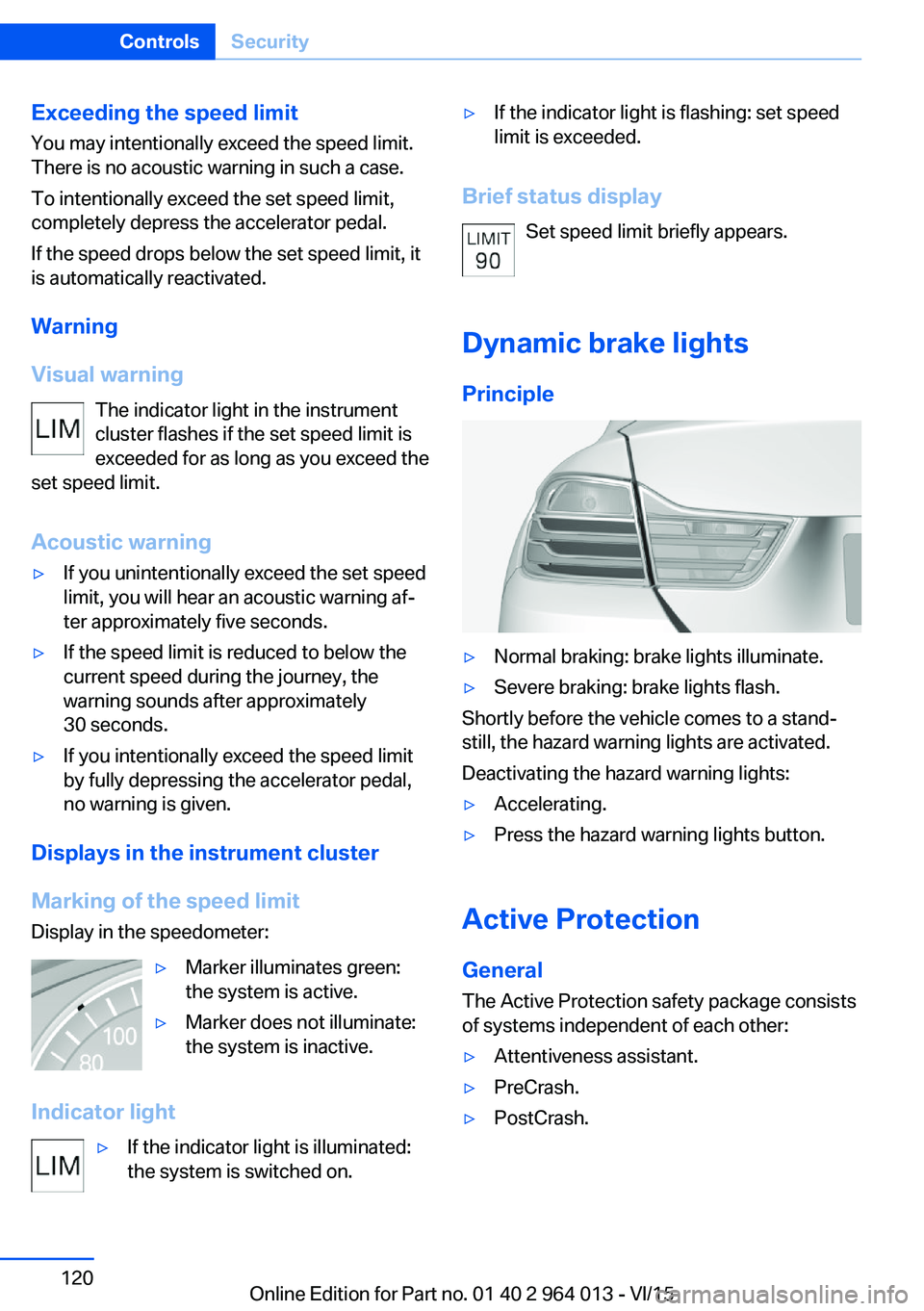
Dynamic brake lights Principle
▷Normal braking: brake lights illuminate.▷Severe braking: brake lights flash.
Shortly before the vehicle comes to a stand‐
still, the hazard warning lights are activated.
Deactivating the hazard warning lights:
▷Accelerating.▷Press the hazard warning lights button.
Active Protection
General
The Active Protection safety package consists
of systems independent of each other:
▷Attentiveness assistant.▷PreCrash.▷PostCrash.Seite 120ControlsSecurity120
Online Edition for Part no. 01 40 2 964 013 - VI/15
Page 125 of 228
WARNING
When driving with a roof load, for exam‐
ple with a roof rack, the higher centre of gravity
can mean that driving safety is no longer guar‐
anteed in critical driving situations. Danger of
accident or damage to property. Do not deacti‐
vate Dynamic Stability Control DSC when driv‐
ing with a roof load.◀
Overview
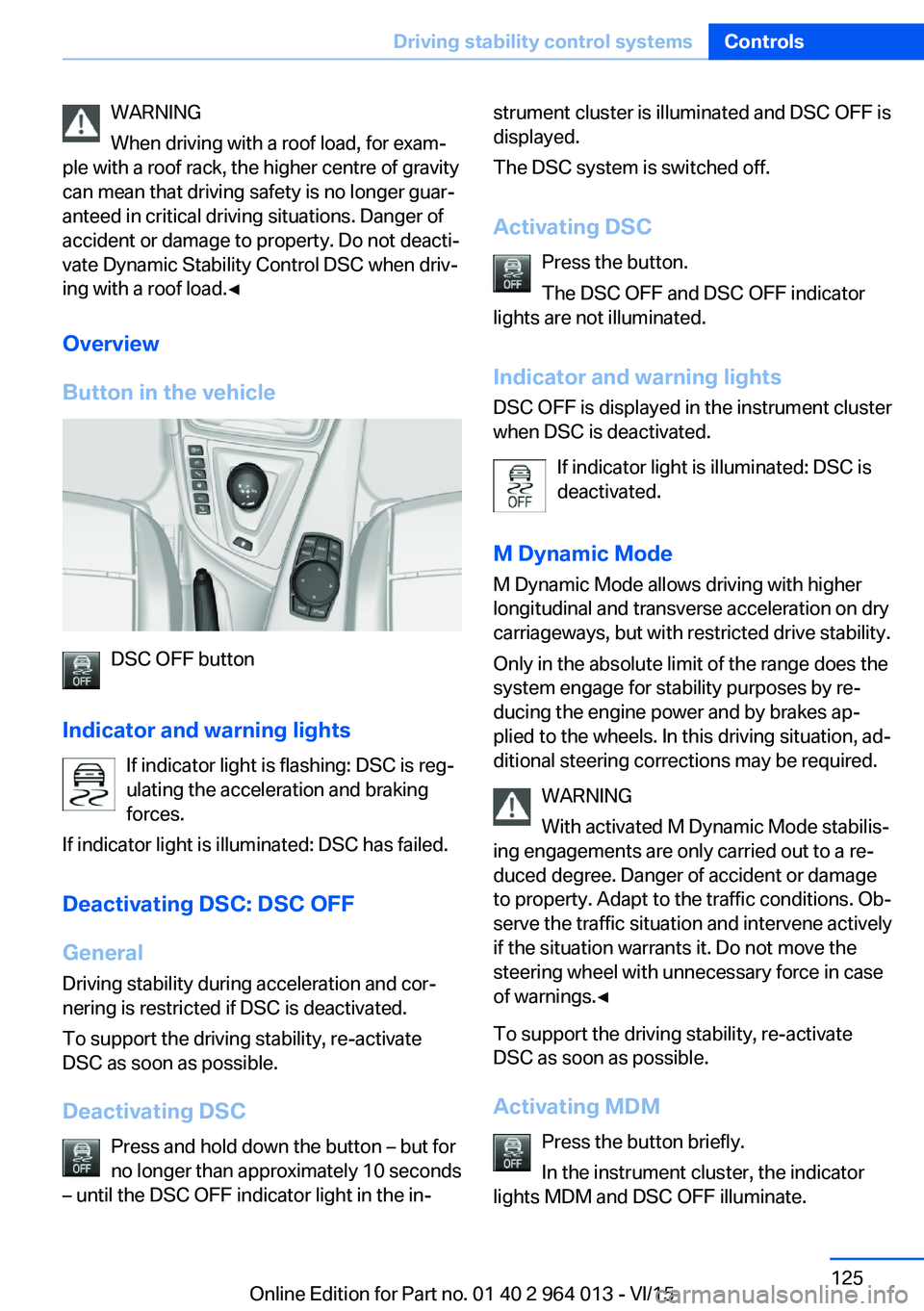
Button in the vehicle
DSC OFF button
Indicator and warning lights If indicator light is flashing: DSC is reg‐ulating the acceleration and braking
forces.
If indicator light is illuminated: DSC has failed.
Deactivating DSC: DSC OFF
General Driving stability during acceleration and cor‐
nering is restricted if DSC is deactivated.
To support the driving stability, re-activate
DSC as soon as possible.
Deactivating DSC Press and hold down the button – but for
no longer than approximately 10 seconds
– until the DSC OFF indicator light in the in‐
strument cluster is illuminated and DSC OFF is
displayed.
The DSC system is switched off.
Activating DSC Press the button.
The DSC OFF and DSC OFF indicator
lights are not illuminated.
Indicator and warning lights DSC OFF is displayed in the instrument cluster
when DSC is deactivated.
If indicator light is illuminated: DSC is
deactivated.
M Dynamic Mode
M Dynamic Mode allows driving with higher
longitudinal and transverse acceleration on dry
carriageways, but with restricted drive stability.
Only in the absolute limit of the range does the
system engage for stability purposes by re‐
ducing the engine power and by brakes ap‐
plied to the wheels. In this driving situation, ad‐
ditional steering corrections may be required.
WARNING
With activated M Dynamic Mode stabilis‐
ing engagements are only carried out to a re‐
duced degree. Danger of accident or damage
to property. Adapt to the traffic conditions. Ob‐
serve the traffic situation and intervene actively
if the situation warrants it. Do not move the
steering wheel with unnecessary force in case
of warnings.◀
To support the driving stability, re-activate
DSC as soon as possible.
Activating MDM Press the button briefly.
In the instrument cluster, the indicator
lights MDM and DSC OFF illuminate.Seite 125Driving stability control systemsControls125
Online Edition for Part no. 01 40 2 964 013 - VI/15
Page 126 of 228
Deactivating MDMPress the button.
Indicator lights MDM and DSC OFF no
longer illuminate.
Via M DriveOn the Control Display:1."Settings"2."M Drive 1" or "M Drive 2"3. Select the symbol.4."MDM"
To call up the desired M Drive with the selec‐
ted settings, press the corresponding button
on the steering wheel:
▷▷
A message appears in the instrument cluster.
This message is operated by pressing the but‐
ton again.
Deactivating MDM
Press the corresponding button 1 or button 2
on the steering wheel again.
M Dynamic Mode and the settings selected
under M Drive are deactivated.
Indicator and warning lights Indicator lights illuminate:
M Dynamic Mode is activated.
DSC indicator light also flashes:
M Dynamic Mode is regulating the driv‐
ing and braking forces.
Indicator lights illuminate:
M Dynamic Mode or DSC has failed.
Active M Differential
Principle The active M Differential blocks the rear axis
transmission steplessly, depending on the
drive situation. In so doing, even with the DSC
switched off and in M Dynamic Mode, spinning
of a single rear wheel is avoided and therefore
optimum traction is provided under all driving
conditions.
The driver is responsible for a driving style ap‐
propriate to the situation.
Adaptive M chassis PrincipleThe system reduces unwanted vehicle move‐
ments when a dynamic driving style is used or
on uneven roads.
Depending on the condition of the road and
the driving style, this enhances driving dynam‐
ics and driving comfort.
Programs Possibilities for adjusting the tuning of the
shock absorbers:▷"Comfort": comfort-oriented▷"Sport": balanced▷"Sport Plus": consistently sporty
Selecting program
Via M Drive
1."Settings"2."M Drive 1" or "M Drive 2"3. Select the symbol.4.Select the desired channel.Seite 126ControlsDriving stability control systems126
Online Edition for Part no. 01 40 2 964 013 - VI/15
Page 133 of 228
▷With persons with certain clothing, for ex‐
ample a coat.▷With external disruption to the ultrasound,
for example by passing vehicles or loud
machines.▷If the sensors are dirty, iced-up, damaged
or incorrectly adjusted.▷In certain weather conditions, for example
high humidity, rain, snowfall, extreme heat
or strong wind.▷With trailer noses and tow hitches of other
vehicles.▷With thin or wedge-shaped objects.▷With moving objects.▷For higher, protruding objects, for example
projecting walls or loads.▷For objects with corners and sharp edges.▷For objects with fine surfaces or struc‐
tures, for example fences.▷For objects with porous surfaces.
Low objects already indicated, such as kerbs,
may enter the sensors' blind areas before or
after a continuous tone is given.
False alarms
Under the following conditions, PDC can issue
a warning although there is no obstacle in the
detection range:
▷In heavy rain.▷If the sensors are very dirty or covered with
ice.▷If the sensors are covered with snow.▷On rough road surfaces.▷On uneven ground, for example speed
bumps.▷In large, rectangular buildings with smooth
walls, for example underground car parks.▷In car washes.▷Due to dense exhaust gas.▷Due to other ultrasonic sources, for exam‐
ple sweeping machines, steam-jet cleaners
or neon lights.
The functional disruption is reported by an
alternating continuous tone between the
front and rear loudspeakers. As soon as
the disruption by other ultrasound sources
is no longer present, the system is fully
functional again.
Malfunction
A Check Control message is shown.
The recording area of the sensors is shown
hatched on the Control Display.
PDC has failed. Have the system checked.
Surround view Principle
Surround view contains various camera assis‐
tance systems, providing support when park‐
ing, manoeuvring and exits and junctions with
poor visibility.
▷Rear-view camera, see page 133.▷Side view, see page 136.▷Top view, see page 137.
Rear-view camera
Principle The rear-view camera offers assistance when
reversing into a parking space or manoeuvring.
To achieve this, the area behind the vehicle is
displayed on the Control Display.
Notes WARNING
The system does not take your personal
responsibility from you when you are estimat‐
ing the traffic situation. Danger of accidents.
Adapt driving style to the driving conditions.
Seite 133Driving comfortControls133
Online Edition for Part no. 01 40 2 964 013 - VI/15
Page 178 of 228
ted speed for the tyres fitted must be dis‐
played in the driver's field of view. The sticker
is available from a Service Partner or a qualified
specialist workshop.
If winter tyres are fitted, observe and comply
with the respectively permitted maximum
speed.
Interchanging front and rear wheels
The manufacturer of your vehicle advises
against interchanging the front and rear
wheels. This could impair vehicle handling
Such a change is not permitted in vehicles with
different tyre or rim dimensions on the front
and rear axles.
Tyre storage
Store wheels and tyres in a cool, dry and pref‐
erably dark place when not in use.
Protect tyres against contamination from oil,
grease and fuel.
Do not exceed the maximum tyre pressure in‐
dicated on the tyre's side wall.
Remedying flat tyres Safety measures▷Park the vehicle on a solid surface and as
far away from moving traffic as possible.▷Switch on hazard warning lights.▷Protect the vehicle against rolling, by ap‐
plying the parking brake.▷Engage the steering wheel lock in the
straight ahead position of the wheels.▷Allow all vehicle occupants get out of the
vehicle and guide them out of the danger
area, for example behind the crash barrier.▷Set up warning triangle an appropriate dis‐
tance away.Mobility system
Principle With the mobility system, minor tyre damage
can be quickly sealed, to allow you to drive on.
To do that, liquid sealant is pumped into the
tyres which encloses the damage from the in‐ side when it hardens.
The compressor can be used to check the tyre
inflation pressure.
Notes▷Please observe the notes on the applica‐
tion of the Mobility system which are on
the compressor and the sealant container.▷Applying the Mobility system can be inef‐
fective for tyre damage as from a size of
approximately 4 mm.▷Contact a Service Partner or a qualified
specialist workshop if you are unable to put
the tyre back in operation.▷If possible, foreign matter that has penetra‐
ted the tyre should remain inside the tyre.▷Remove the speed limit sticker from the
sealant container and attach to the steer‐
ing wheel.▷Using sealants can damage the TPM wheel
electronics. If sealant is used, check the
electronics as soon as you get an opportu‐
nity and have them replaced if necessary.
DANGER
A blocked exhaust pipe or inadequate
ventilation can allow harmful exhaust fumes to
penetrate the vehicle. The exhaust gas con‐
tains carbon monoxide, which is colourless and
odourless, but highly toxic. In enclosed spaces,
the exhaust fumes can also build up outside
the vehicle. Danger of fatal injury. Keep the ex‐
haust pipe clear and ensure sufficient ventila‐
tion.◀
Storage
Mobility system is located under boot floor.
Seite 178MobilityWheels and tyres178
Online Edition for Part no. 01 40 2 964 013 - VI/15