change wheel BMW M4 2016 Owner's Manual
[x] Cancel search | Manufacturer: BMW, Model Year: 2016, Model line: M4, Model: BMW M4 2016Pages: 228, PDF Size: 4.88 MB
Page 176 of 228
Tyre sizes
The pressure values apply for the tyre sizes
categorised by the vehicle manufacturer as
suitable and the tyre makes recommended for
the respective vehicle type.
More information regarding wheels and tyres
can be enquired with a Service Partner or a
qualified specialist workshop.
Tyre tread
Summer tyres
The tyre tread depth should not be less than
3 mm, 0.12 in.
Below a tread depth of 3 mm, approximately
0.12 in, there is a high risk of aquaplaning.
Winter tyres The tyre tread depth should not be less than4 mm, approximately 0.16 in.
Below a tread depth of 4 mm, approximately
0.16 in, suitability for vehicle operation in win‐
ter is restricted.
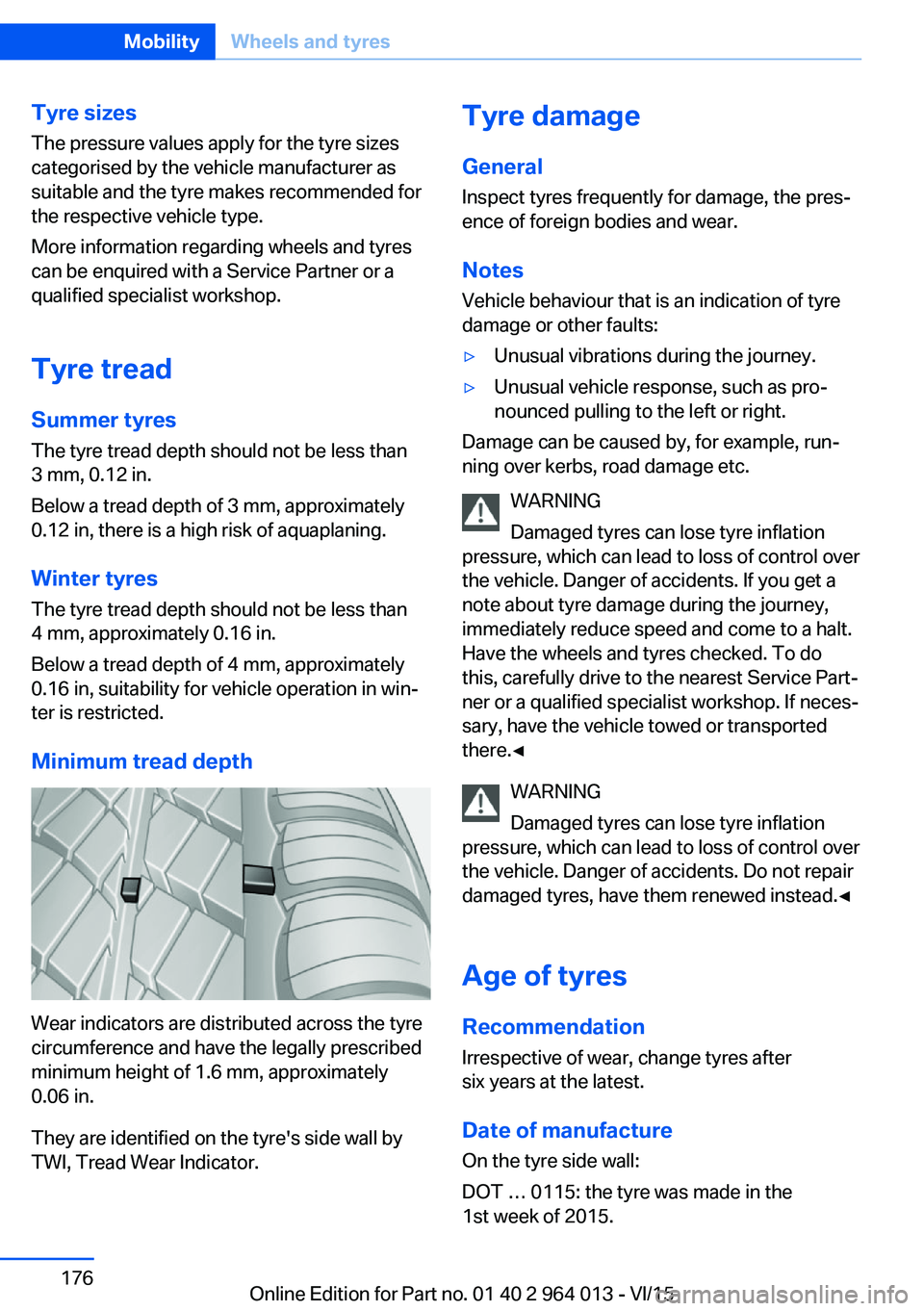
Minimum tread depth
Wear indicators are distributed across the tyre
circumference and have the legally prescribed
minimum height of 1.6 mm, approximately
0.06 in.
They are identified on the tyre's side wall by
TWI, Tread Wear Indicator.
Tyre damage
General Inspect tyres frequently for damage, the pres‐
ence of foreign bodies and wear.
Notes
Vehicle behaviour that is an indication of tyre
damage or other faults:▷Unusual vibrations during the journey.▷Unusual vehicle response, such as pro‐
nounced pulling to the left or right.
Damage can be caused by, for example, run‐
ning over kerbs, road damage etc.
WARNING
Damaged tyres can lose tyre inflation
pressure, which can lead to loss of control over
the vehicle. Danger of accidents. If you get a
note about tyre damage during the journey,
immediately reduce speed and come to a halt.
Have the wheels and tyres checked. To do
this, carefully drive to the nearest Service Part‐
ner or a qualified specialist workshop. If neces‐
sary, have the vehicle towed or transported
there.◀
WARNING
Damaged tyres can lose tyre inflation
pressure, which can lead to loss of control over
the vehicle. Danger of accidents. Do not repair
damaged tyres, have them renewed instead.◀
Age of tyres
Recommendation
Irrespective of wear, change tyres after
six years at the latest.
Date of manufacture
On the tyre side wall:
DOT … 0115: the tyre was made in the
1st week of 2015.
Seite 176MobilityWheels and tyres176
Online Edition for Part no. 01 40 2 964 013 - VI/15
Page 178 of 228
ted speed for the tyres fitted must be dis‐
played in the driver's field of view. The sticker
is available from a Service Partner or a qualified
specialist workshop.
If winter tyres are fitted, observe and comply
with the respectively permitted maximum
speed.
Interchanging front and rear wheels
The manufacturer of your vehicle advises
against interchanging the front and rear
wheels. This could impair vehicle handling
Such a change is not permitted in vehicles with
different tyre or rim dimensions on the front
and rear axles.
Tyre storage
Store wheels and tyres in a cool, dry and pref‐
erably dark place when not in use.
Protect tyres against contamination from oil,
grease and fuel.
Do not exceed the maximum tyre pressure in‐
dicated on the tyre's side wall.
Remedying flat tyres Safety measures▷Park the vehicle on a solid surface and as
far away from moving traffic as possible.▷Switch on hazard warning lights.▷Protect the vehicle against rolling, by ap‐
plying the parking brake.▷Engage the steering wheel lock in the
straight ahead position of the wheels.▷Allow all vehicle occupants get out of the
vehicle and guide them out of the danger
area, for example behind the crash barrier.▷Set up warning triangle an appropriate dis‐
tance away.Mobility system
Principle With the mobility system, minor tyre damage
can be quickly sealed, to allow you to drive on.
To do that, liquid sealant is pumped into the
tyres which encloses the damage from the in‐ side when it hardens.
The compressor can be used to check the tyre
inflation pressure.
Notes▷Please observe the notes on the applica‐
tion of the Mobility system which are on
the compressor and the sealant container.▷Applying the Mobility system can be inef‐
fective for tyre damage as from a size of
approximately 4 mm.▷Contact a Service Partner or a qualified
specialist workshop if you are unable to put
the tyre back in operation.▷If possible, foreign matter that has penetra‐
ted the tyre should remain inside the tyre.▷Remove the speed limit sticker from the
sealant container and attach to the steer‐
ing wheel.▷Using sealants can damage the TPM wheel
electronics. If sealant is used, check the
electronics as soon as you get an opportu‐
nity and have them replaced if necessary.
DANGER
A blocked exhaust pipe or inadequate
ventilation can allow harmful exhaust fumes to
penetrate the vehicle. The exhaust gas con‐
tains carbon monoxide, which is colourless and
odourless, but highly toxic. In enclosed spaces,
the exhaust fumes can also build up outside
the vehicle. Danger of fatal injury. Keep the ex‐
haust pipe clear and ensure sufficient ventila‐
tion.◀
Storage
Mobility system is located under boot floor.
Seite 178MobilityWheels and tyres178
Online Edition for Part no. 01 40 2 964 013 - VI/15
Page 199 of 228
5.Install the cable on the handle of the emer‐
gency release and engage the handle into
the fastening.6.Fit the bracket for the warning triangle.7.Attach the warning triangle.
Tail lights, number plate lights and
centre brake light
These lights use LED technology. Contact a
Service Partner or a qualified specialist work‐
shop in the case of a defect.
Changing a wheel
Notes
When using sealants, immediate wheel change
in the event of loss of tyre pressure in case of
puncture is not required.
As a result, no spare wheel is available.
The tools for changing wheels are available as
optional accessories from a Service Partner or
a qualified specialist workshop.
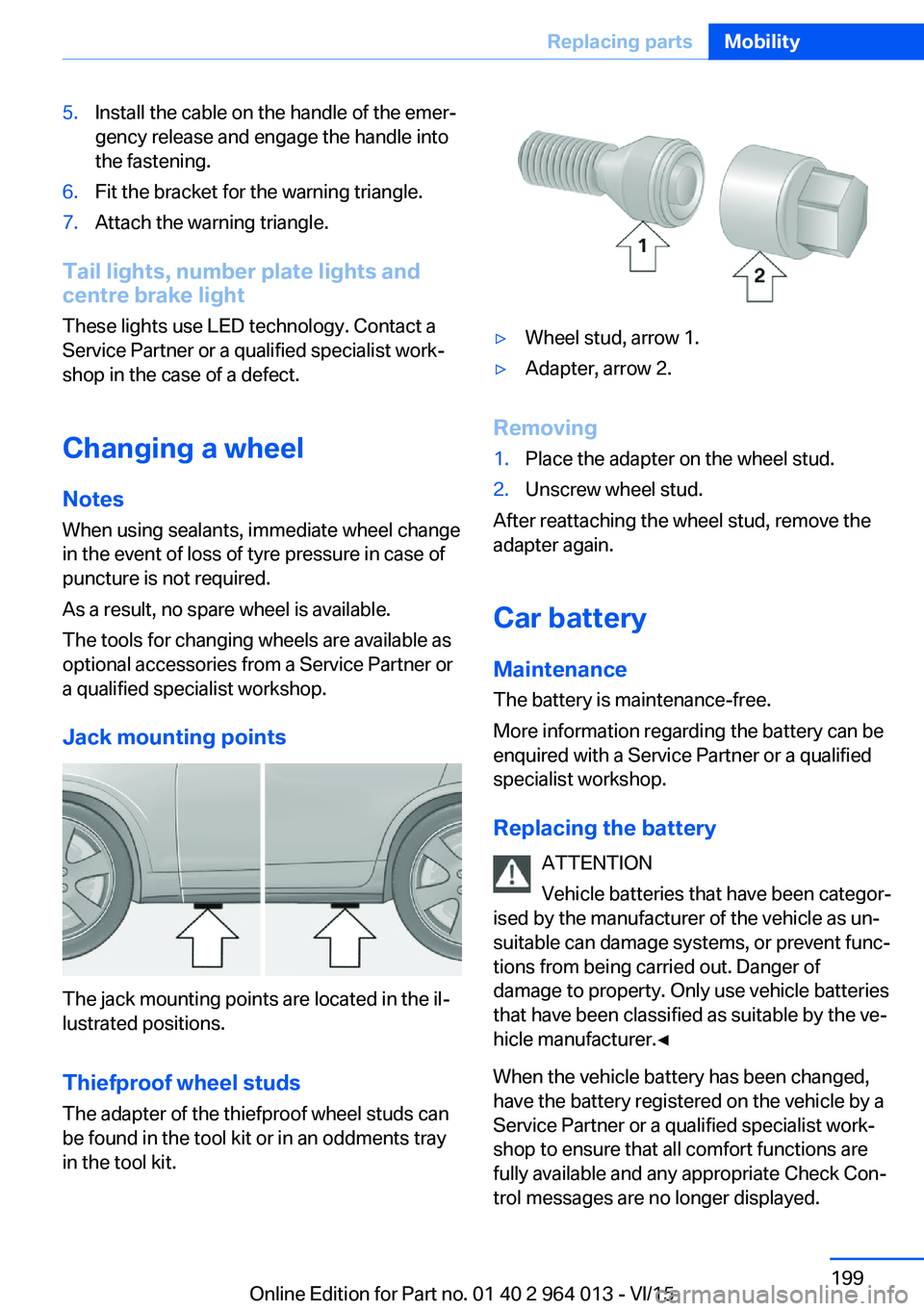
Jack mounting points
The jack mounting points are located in the il‐
lustrated positions.
Thiefproof wheel studs
The adapter of the thiefproof wheel studs can
be found in the tool kit or in an oddments tray
in the tool kit.
▷Wheel stud, arrow 1.▷Adapter, arrow 2.
Removing
1.Place the adapter on the wheel stud.2.Unscrew wheel stud.
After reattaching the wheel stud, remove the
adapter again.
Car battery Maintenance
The battery is maintenance-free.
More information regarding the battery can be
enquired with a Service Partner or a qualified
specialist workshop.
Replacing the battery ATTENTION
Vehicle batteries that have been categor‐
ised by the manufacturer of the vehicle as un‐
suitable can damage systems, or prevent func‐
tions from being carried out. Danger of
damage to property. Only use vehicle batteries
that have been classified as suitable by the ve‐
hicle manufacturer.◀
When the vehicle battery has been changed,
have the battery registered on the vehicle by a
Service Partner or a qualified specialist work‐
shop to ensure that all comfort functions are
fully available and any appropriate Check Con‐
trol messages are no longer displayed.
Seite 199Replacing partsMobility199
Online Edition for Part no. 01 40 2 964 013 - VI/15
Page 219 of 228
Breakdown, wheelchange 199
Brightness of the Control Dis‐ play 94
Bulb change, rear 196
Bulb change, xenon head‐ light 194
Buttons on the steering wheel 12
Button, start/stop 65
C
Camera, rear-view cam‐ era 134
Camera, Side View 136
Camera, Top View 138
Carbon ceramic brakes M 160
Car care 209
Care, displays 211
Care products 209
Care, vehicle 209
Car jack 199
Car key, see Remote con‐ trol 32
Carpet, care 211
Carrying children safely 58
Car washes 208
Catalytic converter, see Hot exhaust system 163
CBS, Condition Based Serv‐ ice 191
Central key, see Remote con‐ trol 32
Central locking system 38
Central screen, see Control Display 16
Centre armrest 154
Centre console 14
Ceramic brakes 160
Changes, technical, see Your own safety 7
Changing bulb, rear 196
Charcoal canister 146
Chassis, electronic 126 Chassis number, see Vehicle
identification number 9
Check control 80
Checking the oil level elec‐ tronically 185
Child's seats 58
Children, carrying 58
Child restraints 58
Child seat classes, ISOFIX 61
Child seat mounting 59
Child seat mountings, ISO‐ FIX 61
Chrome parts, care 210
Cigarette lighter 149
Cleaning displays 211
Clock 85
Closing/opening using door lock 37
Closing/opening with remote control 35
Coat hooks 155
Cockpit 12
Comfort Access 39
Comfort closing with the re‐ mote control 36
Comfort opening with the re‐ mote control 36
Compound brakes 160
Compressor 178
Computer, see on-board computer 90
Condensate under the vehi‐ cle 165
Condensation on win‐ dows 146
Condition Based Service, CBS 191
Confirmation signals 42
ConnectedDrive 6
ConnectedDrive services 6
Connecting electrical applian‐ ces 150
Contactless opening of boot lid 40
Control Display 16
Control display, settings 93 Controller 17
Control systems, driving sta‐ bility 123
Coolant 189
Coolant temperature 84
Cooling effect, maximum 145
Cooling function 145
Cooling system 189
Cornering light 100
Corrosion of brake discs 164
Courtesy light when unlock‐ ing 35
Courtesy light with the vehi‐ cle locked 36
Cruise Control 129
Cupholder 155
Current fuel consumption 86
D
Damage, tyres 176
Damper control 126
Data, technical 214
Date 85
Daytime driving lights 100
Deactivation, airbags 106
Defrosting, see Defrosting windows 146
Defrosting windows 146
Defrost, see Defrosting win‐ dows 146
Deleting personal data 23
Differential lock 126
Digital clock 85
Digital speed 85
Digital speedometer 85
Dimensions 214
Dimmable exterior mirrors 56
Dimming rear-view mirror 56
Dipping headlights, see High- beam assistance 100
Display in windscreen 94
Display lighting, see Instru‐ ment lighting 102
Displays, cleaning 211 Seite 219Everything from A to ZReference219
Online Edition for Part no. 01 40 2 964 013 - VI/15
Page 220 of 228
Displays, electronic, instru‐ment cluster 79
Disposal, coolant 190
Disposal, vehicle battery 200
Distance to destination 91
Distance warning, see PDC 131
Door key, see Remote con‐ trol 32
Door lock 37
Double clutch transmis‐ sion 74
Downhill gradients 164
Drinks holder, see Cu‐ pholder 155
Drivelogic 76
Drive Mode 75
Drive-off assistant 127
Drive programs, see Drive‐ logic 76
Driving Assistant, see Intelli‐ gent Safety 110
Driving dynamics, system states 86
Driving dynamic systems 86
Driving hints 163
Driving information, gen‐ eral 163
Driving information, running in 162
Driving into a car wash 208
Driving lane lines, rear-view camera 135
Driving lights control, auto‐ matic 99
Driving on racing tracks 161
Driving stability control sys‐ tems 123
Drying air, see Cooling func‐ tion 145
DSC Dynamic Stability Con‐ trol 124
Dynamic brake lights 120
Dynamic Stability Control, DSC 124 E
EfficientDynamics 86
EfficientDynamics display 86
EfficientDynamics menu 86
Electrical Glass Roof 45
Electrical power windows 43
Electric steering wheel lock 57
Electronic displays, instru‐ ment cluster 79
Electronic oil measure‐ ment 185
Electronic Stability Program, ESP, see DSC 124
Emergency call 202
Emergency release, boot lid 39
Emergency release, fuel filler flap 172
Emergency start function, en‐ gine start 33
Energy Control 86
Energy recuperation 86
Engine, automatic shut- off 67
Engine, automatic start-stop function 67
Engine compartment 182
Engine coolant 189
Engine Dynamics Control 78
Engine oil 185
Engine oil additives 187
Engine oil change 187
Engine oil filler neck 186
Engine oil grades, alterna‐ tive 187
Engine oil grades, suita‐ ble 187
Engine oil level, checking electronically 185
Engine oil temperature 84
Engine start 66
Engine start with malfunc‐ tion 33
Engine temperature 84 Entering letters and digits 23
ESP, Electronic Stability Pro‐ gram, see DSC 124
Exhaust system 163
Expanding the boot 151
Extended BMW Online serv‐ ices 6
Exterior mirror, automatically dimming 56
Exterior mirrors 55
External starting 203
Eye for towing, see Towing eye 206
Eyes for securing load 166
F Failure message, see Check control 80
False alarm 43
Fastening seat belts, see Seat belts 52
Fault displays, see Check control 80
Favourites buttons, iDrive 22
Filler neck for engine oil 186
Fine wood, care 210
First-aid kit 203
Flat tyre, warning lamp 108, 109
Flooding 163
Floor carpet, care 211
Fold-out position, windscreen wiper 72
Foot brake 163
Foot mats, care 211
Front airbags 104
Front-end collision warning with city braking func‐
tion 111
Front head restraints 54
Front lights 194
Front neck supports, see Head restraints 54
Front passenger airbags, de‐ activating/activating 106 Seite 220ReferenceEverything from A to Z220
Online Edition for Part no. 01 40 2 964 013 - VI/15
Page 222 of 228
Journey computer 92
Jump-starting connection, starting assistance 204
Jump starting, see starting assistance 203
K
Key/remote control 32
Keyless Go, see Comfort Ac‐ cess 39
Key memory, see Personal Profile 33
Key switch for front passen‐ ger airbags 106
L
Labelling of recommended tyres 177
Lane boundary, warning 115
Lane change warning 117
Lane departure warning 115
Language, on the control dis‐ play 94
Lashing eyes, securing load 166
Lashing straps, securing load 166
Launch Control 77
Laying up out of use 211
Laying up, vehicle 211
Leather, care 210
LED light, replacing the bulbs 195
LEDs, light-emitting di‐ odes 194
Left-hand traffic, light set‐ ting 102
Lenses of camera, care 211
Light alloy wheels, care 210
Light-emitting diodes, LEDs 194
Lighter 149
Lighting 98 Light in the exterior mirror,
see Lane Change Warn‐
ing 117
Lights 98
Lights and light bulbs 193
Light switch 98
LIM button, see Manual Speed Limiter 119
Load 166
Loads 166
Lock, door 37
Locking/unlocking using door lock 37
Locking/unlocking with re‐ mote control 35
Locking, automatic 42
Locking settings 41
Locking via the boot lid 38
Lock, wheel studs 199
Low-beam headlights 98
Lower back support 50
Low Speed Assistant 74
Luggage rack, see Roof rack 167
Lumbar support 50
M
Maintenance 191
Maintenance require‐ ment 191
Maintenance, service require‐ ment 87
Maintenance System BMW 191
Malfunction displays, see Check control 80
Manual air distribution 146
Manual air flow 146
Manual gearbox 73
Manual operation, door lock 37
Manual operation, exterior mirrors 56
Manual operation, fuel filler flap 172 Manual operation, Park Dis‐
tance Control, PDC 132
Manual operation, rear-view camera 134
Manual operation, Side View 137
Manual operation, Top View 138
Manual Speed Limiter 119
Maximum cooling effect 145
Maximum speed range 165
Maximum speed, winter tyres 177
M Carbon ceramic brakes 160
M compound brakes 160
M differential, active 126
MDM, M Dynamic Mode 125
M double clutch transmis‐ sion 74
M Drive 123
M Driver's Package, driving instructions 165
M Dynamic Mode MDM 125
Memory, seat, mirror 54
M Engine Dynamics Con‐ trol 78
Menu in the instrument clus‐ ter 90
Menus, see iDrive operating principle 18
Message of a flat tyre 108, 109
Messages, see Check con‐ trol 80
Microfilter 146
Minimum tread depth, tyres 176
Mirror, memory 54
Mirrors 55
Mobile communication equip‐ ment 163
Mobility system 178
Moisture in the headlight 194
Monitor, see Control Dis‐ play 16 Seite 222ReferenceEverything from A to Z222
Online Edition for Part no. 01 40 2 964 013 - VI/15
Page 223 of 228
Mounting child restraints 59
M Technology 160
Multifunction steering wheel, buttons 12
Multimedia 6
M View, Head-Up Display 95
N Navigation 6
Neutral cleaner, see rim cleaner 210
New wheels and tyres 177
No Passing Information 88
Notes 6
Nylon ropes for tow-starting/ towing 206
O OBD, see on-board diagnosis, OBD 192
Obstacle marking, rear-view camera 135
Octane number, see Petrol grade 174
Odometer 84
Office 6
Oil 185
Oil additives 187
Oil change 187
Oil change interval, service requirement 87
Oil filler neck 186
Oil grades, alternative 187
Oil grades, suitable 187
Old battery, disposing 200
On-board computer 90
On-board diagnosis, OBD 192
On-board monitor, see Con‐ trol Display 16
On-board toolkit 193
Opening/closing using door lock 37
Opening and closing 32 Opening and closing, without
remote control 37
Opening and closing with re‐ mote control 35
Operating menus, iDrive 16
Operating principle, iDrive 16
Outside air, see AUC 146
Outside temperature dis‐ play 84
Outside temperature warn‐ ing 84
Overheating of the engine, see Coolant temperature 84
P Paintwork, vehicle 209
Park assistant 139
Park Distance Control PDC 131
Parked vehicle, conden‐ sate 165
Parking aid, see PDC 131
Parking assistant 139
Parking brake 69
Parking lights 99
Part replacement 193
Parts and accessories 8
Passenger's mirror, tilting down 56
PDC Park Distance Con‐ trol 131
Personal data, delete 23
Personal Profile 33
Personal profile, export pro‐ file 34
Personal profile, import pro‐ file 35
Person warning with city braking function 113
Petrol 174
Petrol grade 174
Place for children 58
Plasters, see First-aid kit 203
Plastic, care 210
Pockets in the doors 154 Power failure 200
Power windows 43
Pressure check, tyres 107
Pressure, tyres 175
Pressure warning RPA, tyres 109
Preventing Auto Start Stop 69
Profiles, Personal Profile 33
Protection function, glass Roof 46
Protection function, win‐ dows 44
Puncture, runflat indicator RPA 109
R Radio 6
Radio-control key, see Re‐ mote control 32
Radio ready state 65
Radio signals 163
Rain sensor 71
Range 85
Rear backrests, folding, see Through-loading sys‐
tem 151
Rear fog lights 102
Rear lights 196
Rear-view camera 133
Rear-view mirror, automatic- dim 56
Recirculated-air mode 146
Recirculating air filter 146
Recirculation, see Recircula‐ ted-air mode 146
Recommended tyre makes 177
Recycling 192
Refuelling 172
Remaining distance 85
Remedying flat tyres 178
Remote control/key 32
Remote control, malfunc‐ tion 37 Seite 223Everything from A to ZReference223
Online Edition for Part no. 01 40 2 964 013 - VI/15
Page 225 of 228
Starting assistance, seeDSC 124
Starting, see Engine start 66
Starting the engine 66
Starting the engine, starting assistance 203
Status control display, tyres 107
Status information, iDrive 21
Status of the Owner's Handbook 7
Steering support 127
Steering wheel, adjusting 57
Steering wheel heating 57
Stopping the engine 67
Storage compartments 153
Storage options 153
Storage, tyres 178
Storage, vehicle 211
Suitable engine oil grades 187
Summer tyres, tread 176
Sunblinds, sun guard 45
Sun visor 149
Supplementary text mes‐ sage 83
Surround view 133
Switches, see Driving area 12
Switching off the engine 67
Switch-on times, independ‐ ent ventilation 148
Symbols 6
Symbols in the status field 21
Symbols used 6
System states of the driving dynamics 86
T
Tailgate opening 38
Tail lights 199
Tank display 84
Technical changes, see Your own safety 7
Technical data 214
Technology, BMW M 160 Telephone 6
Temperature, automatic air conditioning 145
Temperature display, outside temperature 84
Temperature, engine oil 84
Tensioning bands, securing load 166
Text message, supplemen‐ tary 83
Thiefproof wheel studs 199
Thread for towing eye 207
Through-loading system 151
Tilt alarm sensor 43
Tilting down, passenger's mirror 56
Tool 193
Topping up engine oil 186
Top View 137
Total weight 215
Total weight, permitted 215
Touchpad 19
Tourist function, see Left- hand/right-hand traffic 102
Tow eye, see Towing eye 206
Towing 204
Towing eye 206
Towing truck 205
Tow-starting 204
TPM Tyre Pressure Moni‐ tor 107
Tread, tyres 176
Trip distance recorder 84
Triple turn signal 70
Turn indicator rear, changing bulb 196
Turn indicators, operation 70
Turning circle 214
Turning circle lines, rear-view camera 135
Tyre damage 176
Tyre pressure monitoring, see RPA 109
Tyre Pressure Monitor TPM 107 Tyre pressures 175
Tyre replacement 177
Tyre sealant 178
Tyres, everything about wheels and tyres 175
Tyre tread 176
U
Units of measure 94
Unloaded weight 215
Unlocking/locking using door lock 37
Unlocking/locking with re‐ mote control 35
Unlocking, settings 41
Updates after going to press 7
Upholstery care 210
USB interface 150
V Vanity mirror 149
Vehicle battery 199
Vehicle battery, chang‐ ing 199
Vehicle equipment 7
Vehicle for tow-starting/ towing 205
Vehicle identification num‐ ber 9
Vehicle paintwork 209
Vehicle, running in 162
Ventilation 147
Ventilation, see Independent ventilation 147
VIN, see Vehicle identification number 9
Voice control system 25
W Wading 163
Warning indicators, see Check control 80 Seite 225Everything from A to ZReference225
Online Edition for Part no. 01 40 2 964 013 - VI/15
Page 226 of 228
Warning lamp in the exteriormirror, see Lane Change
Warning 117
Warning messages, see Check control 80
Warning triangle 203
Warranty 7
Washer fluid 73
Washer jets, windows 72
Washing the vehicle 208
Water on roads 163
Weights 215
Welcome lights 99
Welcome light when unlock‐ ing 35
Wheelbase, vehicle 214
Wheel change 199
Wheel replacement 177
Wheels, everything about wheels and tyres 175
Wheels, run flat indicator RPA 109
Width, vehicle 214
Windscreen washer jets 72
Windscreen washing sys‐ tem 71
Windscreen wipers, see Wiper system 71
Winter storage, care and maintenance 211
Winter tyres, right tyres 177
Winter tyres, tread 176
Wiper, fold-out position 72
Wipers 71
Wiper system 71
Wood, care 210
Wordmatch principle, naviga‐ tion 24
Working in the engine com‐ partment 183
X Xenon light, bulb change 194 Y
Your own safety 7 Seite 226ReferenceEverything from A to Z226
Online Edition for Part no. 01 40 2 964 013 - VI/15