lane assist BMW M4 2016 Owners Manual
[x] Cancel search | Manufacturer: BMW, Model Year: 2016, Model line: M4, Model: BMW M4 2016Pages: 228, PDF Size: 4.88 MB
Page 12 of 228
CockpitVehicle equipment
This chapter describes all standard, national
and special equipment provided in the model
series. Equipment not available in the vehicle is
therefore also described, for example the se‐lected special equipment or national version.
This also applies to safety-relevant functions
and systems. Comply with the relevant na‐
tional regulations when using the correspond‐
ing functions and systems.
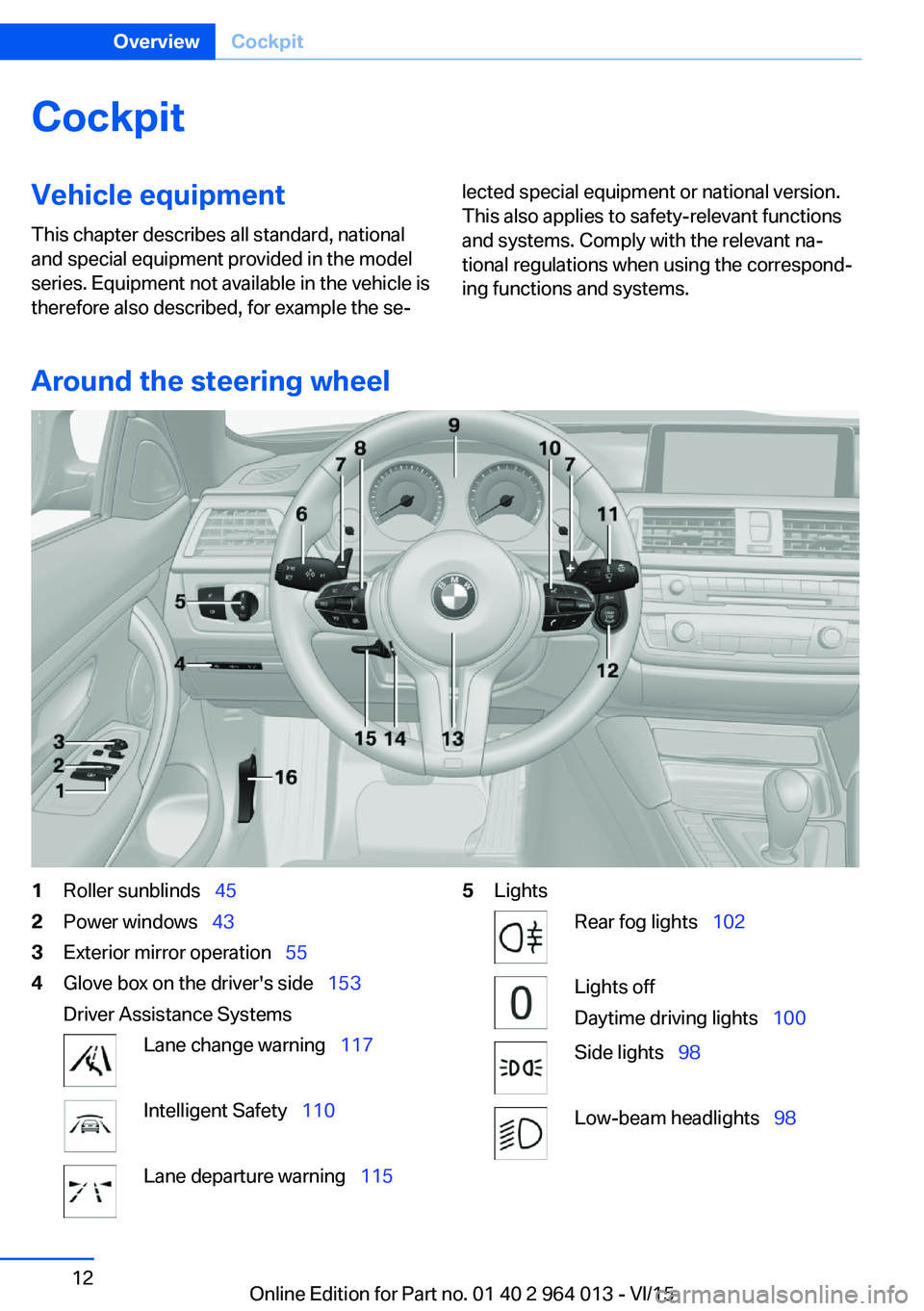
Around the steering wheel
1Roller sunblinds 452Power windows 433Exterior mirror operation 554Glove box on the driver's side 153
Driver Assistance SystemsLane change warning 117Intelligent Safety 110Lane departure warning 1155LightsRear fog lights 102Lights off
Daytime driving lights 100Side lights 98Low-beam headlights 98Seite 12OverviewCockpit12
Online Edition for Part no. 01 40 2 964 013 - VI/15
Page 82 of 228
▷Wheel without TPM electronics is fitted:
have the vehicle checked by a Service
Partner or a qualified specialist workshop if
necessary.▷Malfunction: have the system checked by a
Service Partner or a qualified specialist
workshop.
For more information, see Tyre Pressure Moni‐
tor, see page 107.
Steering system Steering system faulty.
Have steering system checked by a
Service Centre or a qualified specialist
workshop.
Engine functions Have vehicle checked by a Service
Centre or a qualified specialist work‐
shop.
For further information see socket for on-
board diagnosis, see page 192.
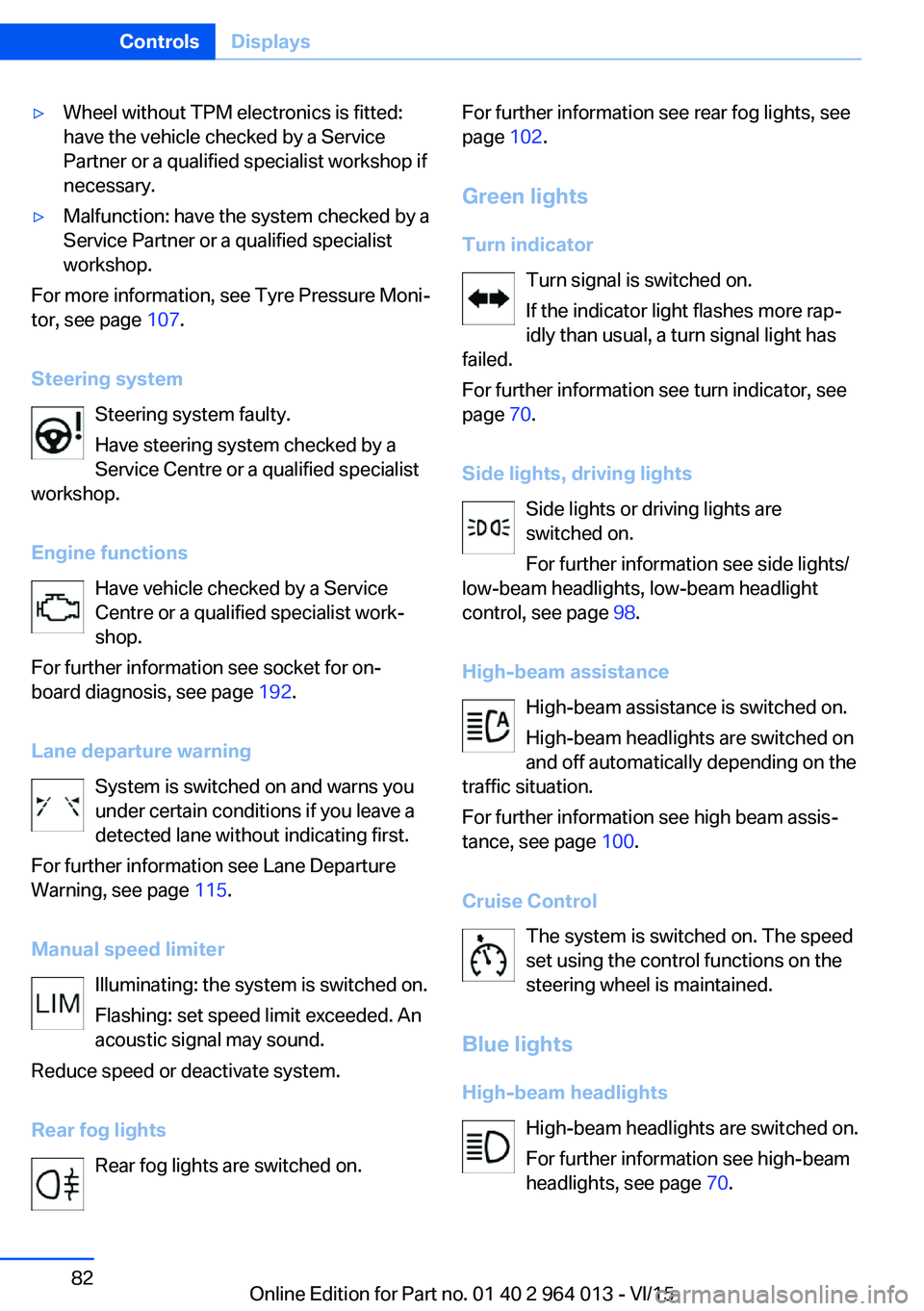
Lane departure warning System is switched on and warns you
under certain conditions if you leave a
detected lane without indicating first.
For further information see Lane Departure
Warning, see page 115.
Manual speed limiter Illuminating: the system is switched on.
Flashing: set speed limit exceeded. An
acoustic signal may sound.
Reduce speed or deactivate system.
Rear fog lights Rear fog lights are switched on.
For further information see rear fog lights, see
page 102.
Green lights Turn indicator Turn signal is switched on.If the indicator light flashes more rap‐
idly than usual, a turn signal light has
failed.
For further information see turn indicator, see
page 70.
Side lights, driving lights Side lights or driving lights are
switched on.
For further information see side lights/
low-beam headlights, low-beam headlight
control, see page 98.
High-beam assistance High-beam assistance is switched on.
High-beam headlights are switched on
and off automatically depending on the
traffic situation.
For further information see high beam assis‐
tance, see page 100.
Cruise Control The system is switched on. The speed
set using the control functions on the
steering wheel is maintained.
Blue lights
High-beam headlights High-beam headlights are switched on.
For further information see high-beam
headlights, see page 70.Seite 82ControlsDisplays82
Online Edition for Part no. 01 40 2 964 013 - VI/15
Page 121 of 228
Attentiveness assistant
Principle The system can detect increasing inattentive‐
ness or tiring of the driver on long monotonous
drives, for example on motorways. In this situa‐
tion, it is recommended that you take a break.
Note WARNING
The system does not take your personal
responsibility from you when you are estimat‐
ing your physical condition. Increasing inatten‐
tion or fatigue might not be detected, or not in
good time. Danger of accidents. Make sure
that the drive is rested and alert. Adapt driving
style to the driving conditions.◀
Function The system is switched on every time the en‐
gine is started and cannot be switched off.
After the start of the drive, the system is adap‐
ted to the driver so that an increase in inatten‐
tion or fatigue can be detected.
This process considers the following criteria:▷Personal driving style, for example, steer‐
ing.▷Drive conditions, for example, time of day,
duration of drive.
The system is active from approxi‐
mately. 70 km/h, 43 mph and can display a rec‐
ommendation to take a break
Recommendation to take a break
With increasing inattention or tiredness of the
driver, an instruction is shown on the control
display with the recommendation to take a
break.
A recommendation to take a break will only be
displayed once during an uninterrupted trip.
After a break, at the earliest another break rec‐
ommendation may be displayed after approxi‐
mately 45 minutes.
System limits
The function may be restricted in situations
such as the following and no warning or a
wrong one is triggered:▷If the time is wrongly set.▷If the speed driven falls considerably below
70 km/h, 43 mph.▷For sporty driving style, for example, with
heavy acceleration or fast cornering.▷In active drive situations, for example, fre‐
quent lane change.▷With bad road conditions.▷With high side-wind.
PreCrash
Principle With the system from 30 km/h/20 mph critical
driving situations may occur, which could
cause an accident. In these situations, auto‐
matically preventative, protective measures
are taken to minimise the risk of accident.
Critical driving situations are, for example:
▷Full braking.▷Heavy understeering.▷Heavy oversteering.
When collision warning or front-end collision
warning with braking function is fitted, within
the limits of the system, threatened collisions
into vehicles in front or stationary vehicles are
detected.
Note WARNING
The system does not take your personal
responsibility from you. Critical situations can‐
not be detected reliably or in good time due to
limitations of the system. Danger of accidents.
Adapt driving style to the driving conditions.
Observe the traffic situation and intervene ac‐
tively if the situation warrants it.◀
Seite 121SecurityControls121
Online Edition for Part no. 01 40 2 964 013 - VI/15
Page 134 of 228
Additionally, look directly to check the traffic
situation and the area around the vehicle and
intervene actively in the corresponding situa‐
tions.◀
Overview
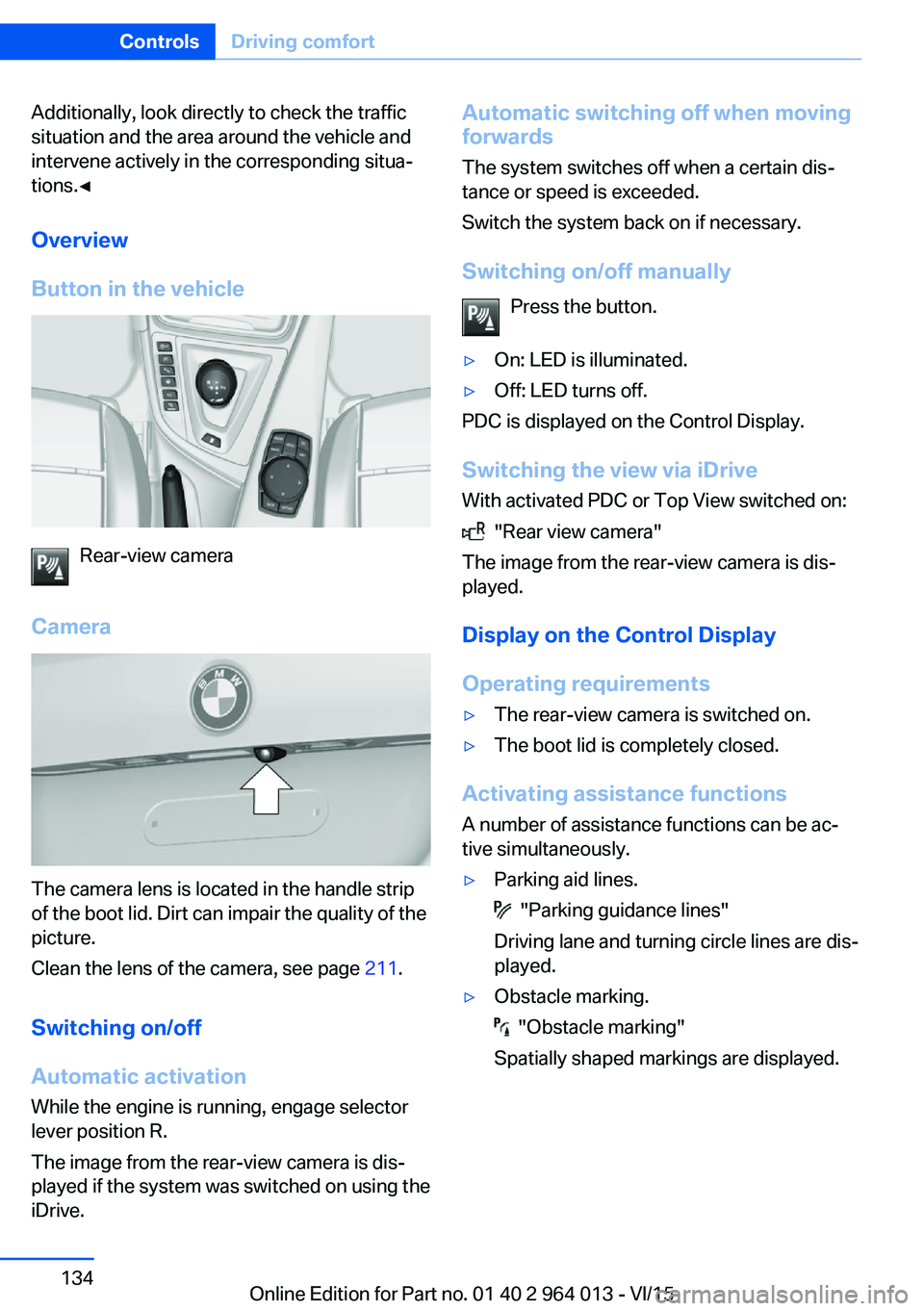
Button in the vehicle
Rear-view camera
Camera
The camera lens is located in the handle strip
of the boot lid. Dirt can impair the quality of the
picture.
Clean the lens of the camera, see page 211.
Switching on/off Automatic activation While the engine is running, engage selector
lever position R.
The image from the rear-view camera is dis‐
played if the system was switched on using the
iDrive.
Automatic switching off when moving
forwards
The system switches off when a certain dis‐
tance or speed is exceeded.
Switch the system back on if necessary.
Switching on/off manually Press the button.▷On: LED is illuminated.▷Off: LED turns off.
PDC is displayed on the Control Display.
Switching the view via iDrive With activated PDC or Top View switched on:
"Rear view camera"
The image from the rear-view camera is dis‐
played.
Display on the Control Display
Operating requirements
▷The rear-view camera is switched on.▷The boot lid is completely closed.
Activating assistance functions
A number of assistance functions can be ac‐
tive simultaneously.
▷Parking aid lines.
"Parking guidance lines"
Driving lane and turning circle lines are dis‐
played.
▷Obstacle marking.
"Obstacle marking"
Spatially shaped markings are displayed.
Seite 134ControlsDriving comfort134
Online Edition for Part no. 01 40 2 964 013 - VI/15
Page 139 of 228
2.Turn the controller until the desired setting
is reached and press the controller.
Displaying the turning circle and
driving lane line
▷The static red turning circle line indicates
the space requirement to the side with full
steering angle.▷The variable green driving lane line helps to
estimate the actual space requirement to
the side.
The lane line depends on the engaged
gear and the current steering angle. The
lane line is continuously adjusted by the
steering wheel movement.
"Parking guidance lines"
The turning circle and driving lane lines are
displayed.
System limits
Top View cannot be used in the following sit‐
uations:
▷With a door open.▷With the boot lid open.▷With an exterior mirror folded in.▷In poor light conditions.
In some of these situations a Check Control
message is displayed.
Park Assistant
Principle
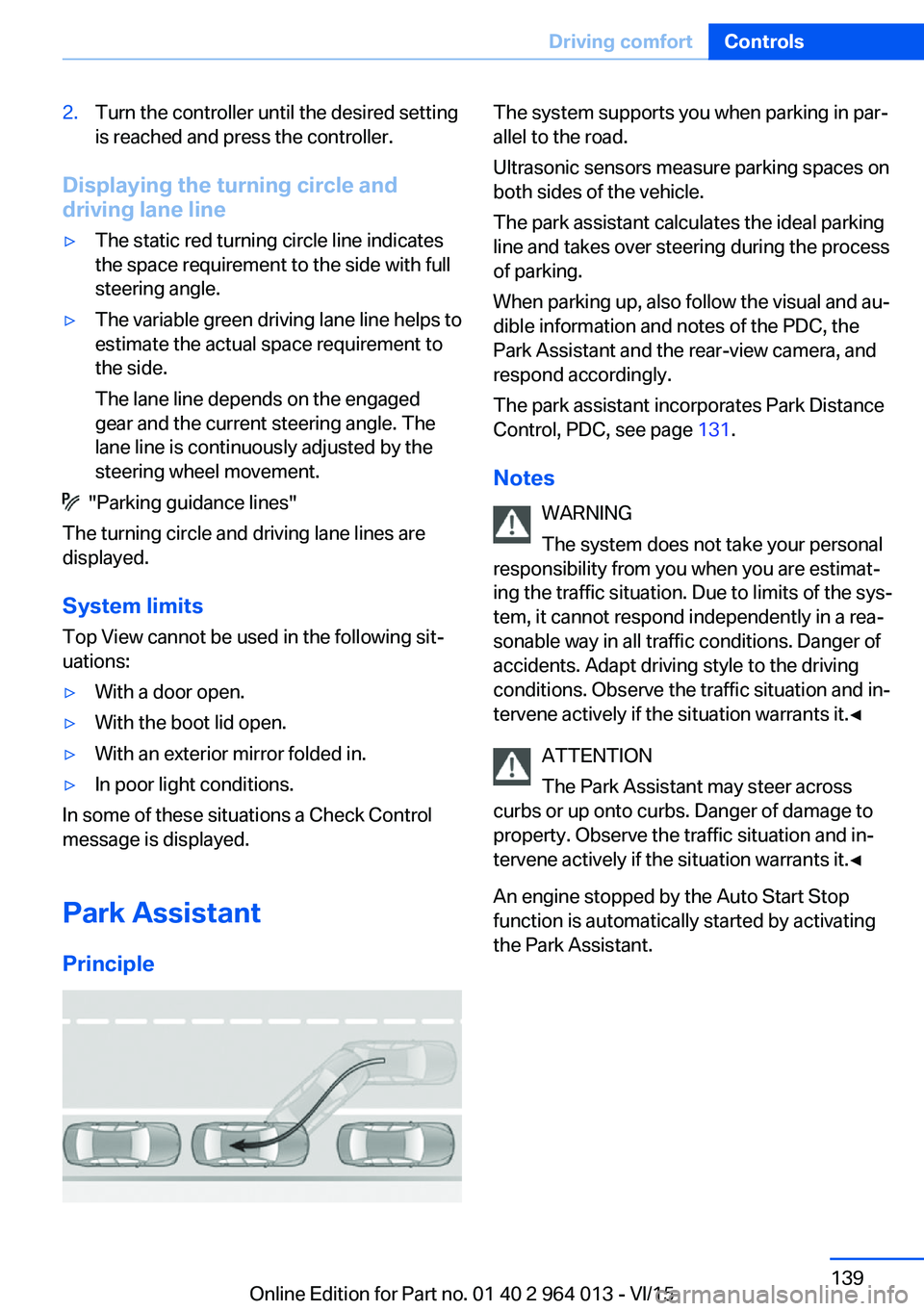
The system supports you when parking in par‐
allel to the road.
Ultrasonic sensors measure parking spaces on
both sides of the vehicle.
The park assistant calculates the ideal parking
line and takes over steering during the process
of parking.
When parking up, also follow the visual and au‐
dible information and notes of the PDC, the
Park Assistant and the rear-view camera, and
respond accordingly.
The park assistant incorporates Park Distance
Control, PDC, see page 131.
Notes WARNING
The system does not take your personal
responsibility from you when you are estimat‐
ing the traffic situation. Due to limits of the sys‐
tem, it cannot respond independently in a rea‐
sonable way in all traffic conditions. Danger of
accidents. Adapt driving style to the driving
conditions. Observe the traffic situation and in‐
tervene actively if the situation warrants it.◀
ATTENTION
The Park Assistant may steer across
curbs or up onto curbs. Danger of damage to
property. Observe the traffic situation and in‐
tervene actively if the situation warrants it.◀
An engine stopped by the Auto Start Stop
function is automatically started by activating
the Park Assistant.Seite 139Driving comfortControls139
Online Edition for Part no. 01 40 2 964 013 - VI/15
Page 220 of 228
Displays, electronic, instru‐ment cluster 79
Disposal, coolant 190
Disposal, vehicle battery 200
Distance to destination 91
Distance warning, see PDC 131
Door key, see Remote con‐ trol 32
Door lock 37
Double clutch transmis‐ sion 74
Downhill gradients 164
Drinks holder, see Cu‐ pholder 155
Drivelogic 76
Drive Mode 75
Drive-off assistant 127
Drive programs, see Drive‐ logic 76
Driving Assistant, see Intelli‐ gent Safety 110
Driving dynamics, system states 86
Driving dynamic systems 86
Driving hints 163
Driving information, gen‐ eral 163
Driving information, running in 162
Driving into a car wash 208
Driving lane lines, rear-view camera 135
Driving lights control, auto‐ matic 99
Driving on racing tracks 161
Driving stability control sys‐ tems 123
Drying air, see Cooling func‐ tion 145
DSC Dynamic Stability Con‐ trol 124
Dynamic brake lights 120
Dynamic Stability Control, DSC 124 E
EfficientDynamics 86
EfficientDynamics display 86
EfficientDynamics menu 86
Electrical Glass Roof 45
Electrical power windows 43
Electric steering wheel lock 57
Electronic displays, instru‐ ment cluster 79
Electronic oil measure‐ ment 185
Electronic Stability Program, ESP, see DSC 124
Emergency call 202
Emergency release, boot lid 39
Emergency release, fuel filler flap 172
Emergency start function, en‐ gine start 33
Energy Control 86
Energy recuperation 86
Engine, automatic shut- off 67
Engine, automatic start-stop function 67
Engine compartment 182
Engine coolant 189
Engine Dynamics Control 78
Engine oil 185
Engine oil additives 187
Engine oil change 187
Engine oil filler neck 186
Engine oil grades, alterna‐ tive 187
Engine oil grades, suita‐ ble 187
Engine oil level, checking electronically 185
Engine oil temperature 84
Engine start 66
Engine start with malfunc‐ tion 33
Engine temperature 84 Entering letters and digits 23
ESP, Electronic Stability Pro‐ gram, see DSC 124
Exhaust system 163
Expanding the boot 151
Extended BMW Online serv‐ ices 6
Exterior mirror, automatically dimming 56
Exterior mirrors 55
External starting 203
Eye for towing, see Towing eye 206
Eyes for securing load 166
F Failure message, see Check control 80
False alarm 43
Fastening seat belts, see Seat belts 52
Fault displays, see Check control 80
Favourites buttons, iDrive 22
Filler neck for engine oil 186
Fine wood, care 210
First-aid kit 203
Flat tyre, warning lamp 108, 109
Flooding 163
Floor carpet, care 211
Fold-out position, windscreen wiper 72
Foot brake 163
Foot mats, care 211
Front airbags 104
Front-end collision warning with city braking func‐
tion 111
Front head restraints 54
Front lights 194
Front neck supports, see Head restraints 54
Front passenger airbags, de‐ activating/activating 106 Seite 220ReferenceEverything from A to Z220
Online Edition for Part no. 01 40 2 964 013 - VI/15
Page 222 of 228
Journey computer 92
Jump-starting connection, starting assistance 204
Jump starting, see starting assistance 203
K
Key/remote control 32
Keyless Go, see Comfort Ac‐ cess 39
Key memory, see Personal Profile 33
Key switch for front passen‐ ger airbags 106
L
Labelling of recommended tyres 177
Lane boundary, warning 115
Lane change warning 117
Lane departure warning 115
Language, on the control dis‐ play 94
Lashing eyes, securing load 166
Lashing straps, securing load 166
Launch Control 77
Laying up out of use 211
Laying up, vehicle 211
Leather, care 210
LED light, replacing the bulbs 195
LEDs, light-emitting di‐ odes 194
Left-hand traffic, light set‐ ting 102
Lenses of camera, care 211
Light alloy wheels, care 210
Light-emitting diodes, LEDs 194
Lighter 149
Lighting 98 Light in the exterior mirror,
see Lane Change Warn‐
ing 117
Lights 98
Lights and light bulbs 193
Light switch 98
LIM button, see Manual Speed Limiter 119
Load 166
Loads 166
Lock, door 37
Locking/unlocking using door lock 37
Locking/unlocking with re‐ mote control 35
Locking, automatic 42
Locking settings 41
Locking via the boot lid 38
Lock, wheel studs 199
Low-beam headlights 98
Lower back support 50
Low Speed Assistant 74
Luggage rack, see Roof rack 167
Lumbar support 50
M
Maintenance 191
Maintenance require‐ ment 191
Maintenance, service require‐ ment 87
Maintenance System BMW 191
Malfunction displays, see Check control 80
Manual air distribution 146
Manual air flow 146
Manual gearbox 73
Manual operation, door lock 37
Manual operation, exterior mirrors 56
Manual operation, fuel filler flap 172 Manual operation, Park Dis‐
tance Control, PDC 132
Manual operation, rear-view camera 134
Manual operation, Side View 137
Manual operation, Top View 138
Manual Speed Limiter 119
Maximum cooling effect 145
Maximum speed range 165
Maximum speed, winter tyres 177
M Carbon ceramic brakes 160
M compound brakes 160
M differential, active 126
MDM, M Dynamic Mode 125
M double clutch transmis‐ sion 74
M Drive 123
M Driver's Package, driving instructions 165
M Dynamic Mode MDM 125
Memory, seat, mirror 54
M Engine Dynamics Con‐ trol 78
Menu in the instrument clus‐ ter 90
Menus, see iDrive operating principle 18
Message of a flat tyre 108, 109
Messages, see Check con‐ trol 80
Microfilter 146
Minimum tread depth, tyres 176
Mirror, memory 54
Mirrors 55
Mobile communication equip‐ ment 163
Mobility system 178
Moisture in the headlight 194
Monitor, see Control Dis‐ play 16 Seite 222ReferenceEverything from A to Z222
Online Edition for Part no. 01 40 2 964 013 - VI/15