belt BMW M5 2006 User Guide
[x] Cancel search | Manufacturer: BMW, Model Year: 2006, Model line: M5, Model: BMW M5 2006Pages: 231, PDF Size: 8.44 MB
Page 101 of 231
Controls
99Reference
At a glance
Driving tips
Communications
Navigation
Entertainment
Mobility
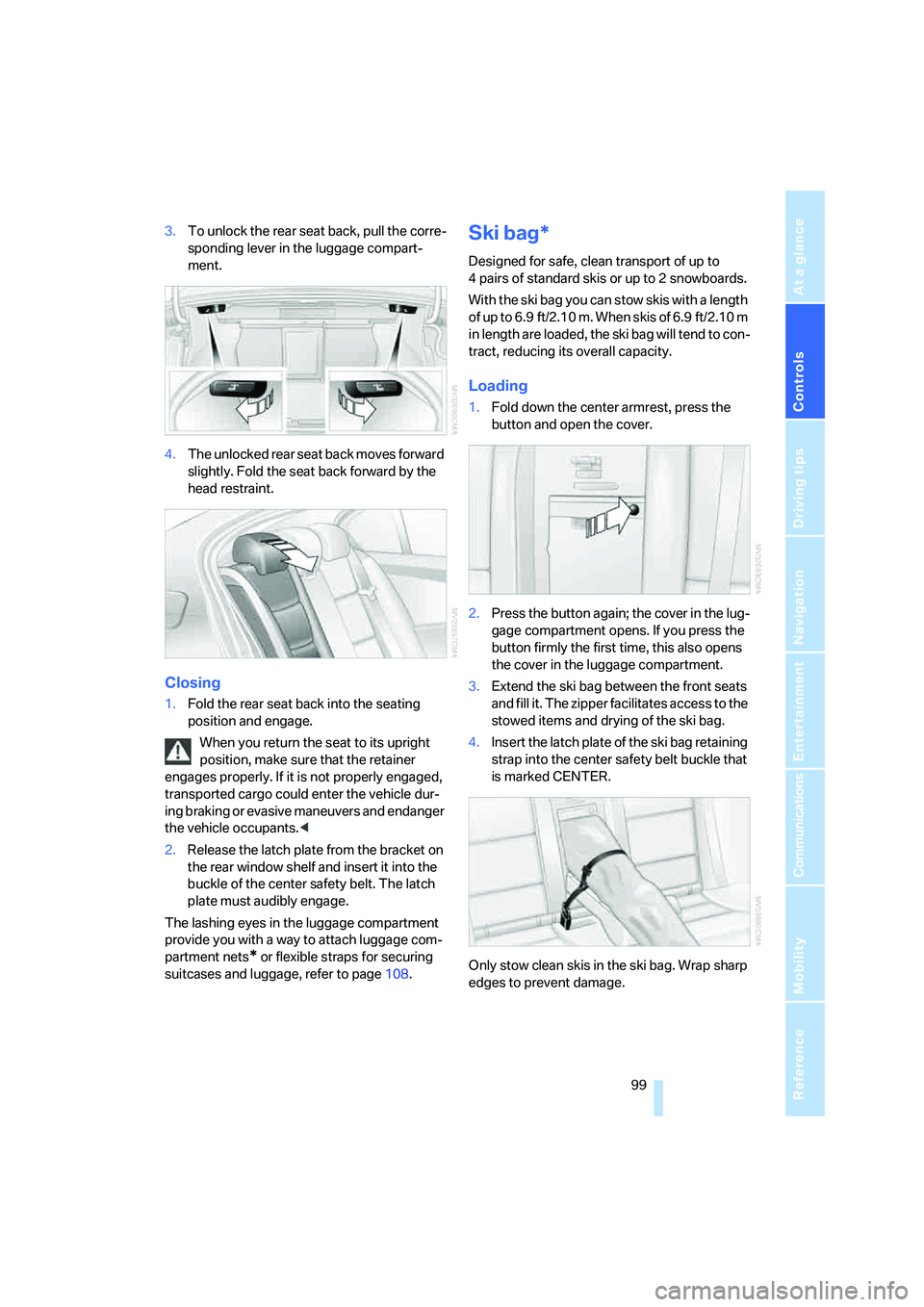
3.To unlock the rear seat back, pull the corre-
sponding lever in the luggage compart-
ment.
4.The unlocked rear seat back moves forward
slightly. Fold the seat back forward by the
head restraint.
Closing
1.Fold the rear seat back into the seating
position and engage.
When you return the seat to its upright
position, make sure that the retainer
engages properly. If it is not properly engaged,
transported cargo could enter the vehicle dur-
ing braking or evasive maneuvers and endanger
the vehicle occupants.<
2.Release the latch plate from the bracket on
the rear window shelf and insert it into the
buckle of the center safety belt. The latch
plate must audibly engage.
The lashing eyes in the luggage compartment
provide you with a way to attach luggage com-
partment nets
* or flexible straps for securing
suitcases and luggage, refer to page108.
Ski bag*
Designed for safe, clean transport of up to
4 pairs of standard skis or up to 2 snowboards.
With the ski bag you can stow skis with a length
o f u p t o 6 . 9 f t / 2 . 1 0 m . W h e n s k i s o f 6 . 9 f t / 2 . 1 0 m
in length are loaded, the ski bag will tend to con-
tract, reducing its overall capacity.
Loading
1.Fold down the center armrest, press the
button and open the cover.
2.Press the button again; the cover in the lug-
gage compartment opens. If you press the
button firmly the first time, this also opens
the cover in the luggage compartment.
3.Extend the ski bag between the front seats
and fill it. The zipper facilitates access to the
stowed items and drying of the ski bag.
4.Insert the latch plate of the ski bag retaining
strap into the center safety belt buckle that
is marked CENTER.
Only stow clean skis in the ski bag. Wrap sharp
edges to prevent damage.
Page 109 of 231
Driving tips
107Reference
At a glance
Controls
Communications
Navigation
Entertainment
Mobility
Determining loading limit
1.Locate the following statement on your
vehicle's placard
*:
The combined weight of occupants
and cargo should never exceed
XXX lbs. or YYY kg. Otherwise, this could
damage the vehicle and produce unstable
vehicle operating conditions.<
2.Determine the combined weight of the
driver and passengers that will be riding in
your vehicle.
3.Subtract the combined weight of the driver
and passengers from XXX lbs. or YYY kg.
4.The resulting figure equals the available
amount of cargo and luggage load capacity.
For example, if the XXX amount equals
1,400 lbs. and there will be five 150-lb. pas-
sengers in your vehicle, the amount of avail-
able cargo and luggage load capacity is
650 lbs.:
1,400 lbs. minus 750 lbs. = 650 lbs.
5.Determine the combined weight of luggage
and cargo being loaded on the vehicle. That
weight may not safely exceed the available
cargo and luggage load capacity calculated
in step 4.
6.If your vehicle will be towing a trailer, part of
the load from your trailer will be transferred
to your vehicle. Consult the manual for
transporting a trailer to determine how this
may reduce the available cargo and luggage
load capacity of your vehicle.
Load
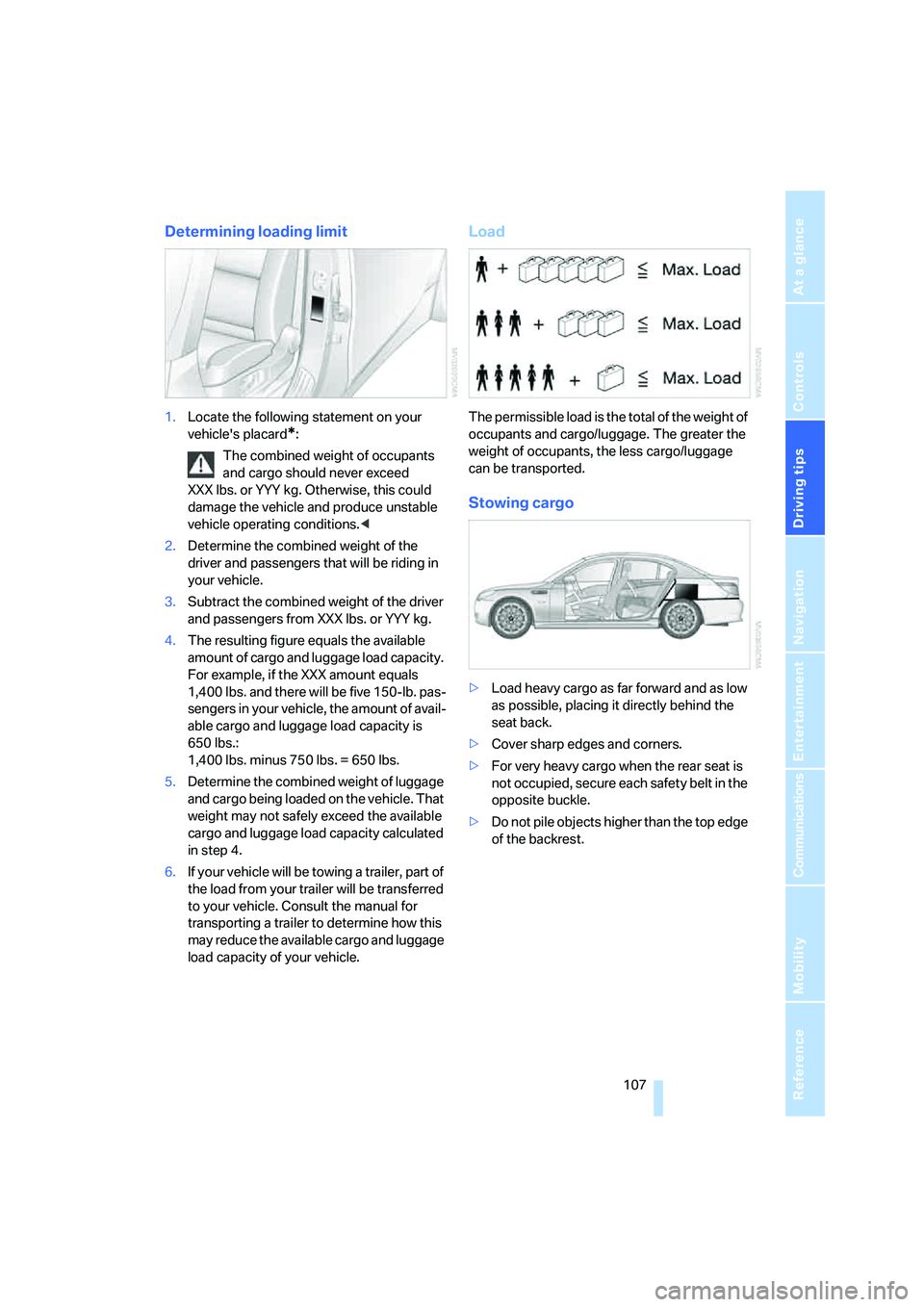
The permissible load is the total of the weight of
occupants and cargo/luggage. The greater the
weight of occupants, the less cargo/luggage
can be transported.
Stowing cargo
>Load heavy cargo as far forward and as low
as possible, placing it directly behind the
seat back.
>Cover sharp edges and corners.
>For very heavy cargo when the rear seat is
not occupied, secure each safety belt in the
opposite buckle.
>Do not pile objects higher than the top edge
of the backrest.
Page 179 of 231
Mobility
177Reference
At a glance
Controls
Driving tips
Communications
Navigation
Entertainment
Observe all national and local maximum speed
limits, otherwise violations of the law could
occur.
Tire identification marks
Knowledge of the labeling on the side of the tire
makes it easier to identify and choose the right
tires.
Tire size
Speed letter
Q = up to 100 mph/160 km/h
T = up to 118 mph/190 km/h
H = up to 131 mph/210 km/h
V = up to 150 mph/240 km/h
W = up to 167 mph/270 km/h
Y = up to 186 mph/300 km/h
Z = over 150 mph/240 km/h
Tire Identification Number
Tires with DOT codes meet the guidelines of
the U.S. Department of Transportation.
DOT code:
Tire age
The manufacturing date of tires is contained in
the tire coding: DOT... 0806 indicates that the
tire was manufactured in week 8 of 2006.
BMW recommends that you replace all tires
after 6 years at most, even if some tires may last
for 10 years. This also concerns the tire of the
spare wheel.
Uniform Tire Quality Grading
Quality grades can be found where applicable
on the tire sidewall between tread shoulder and
maximum section width. For example:
Tread wear 200 Traction AA
Temperature A
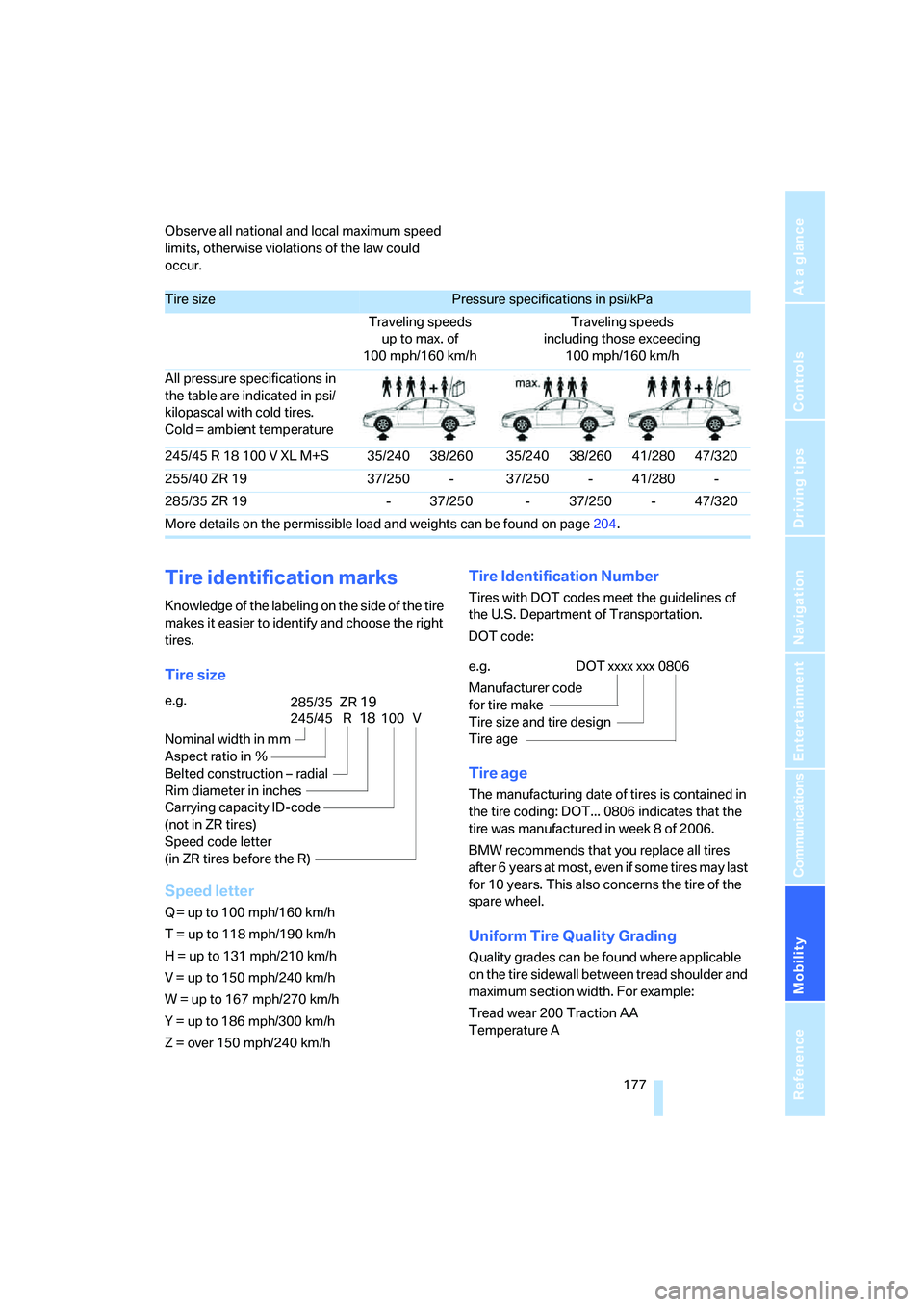
Tire sizePressure specifications in psi/kPa
Traveling speeds
up to max. of
100 mph/160 km/hTraveling speeds
including those exceeding
100 mph/160 km/h
All pressure specifications in
the table are indicated in psi/
kilopascal with cold tires.
Cold = ambient temperature
245/45 R 18 100 V XL M+S 35/240 38/260 35/240 38/260 41/280 47/320
255/40 ZR 19 37/250 - 37/250 - 41/280 -
285/35 ZR 19 - 37/250 - 37/250 - 47/320
More details on the permissible load and weights can be found on page204.
e.g.
Nominal width in mm
Aspect ratio in Ξ
Belted construction – radial
Rim diameter in inches
Carrying capacity ID-code
(not in ZR tires)
Speed code letter
(in ZR tires before the R)
245/45 R18100 V
285/35 ZR19
e.g.
Manufacturer code
for tire make
Tire size and tire design
Tire ageDOT xxxx xxx 0806
Page 195 of 231
Mobility
193Reference
At a glance
Controls
Driving tips
Communications
Navigation
Entertainment
engage a driving position with the selector
lever.
Have all vehicle occupants get out of the vehicle
and ensure that they remain outside the imme-
diate area in a safe place, such as behind a
guardrail.
If a warning triangle
* or portable hazard warning
lamp is required, set it up on the roadside at an
appropriate distance from the rear of the vehi-
cle. Comply with all safety guidelines and regu-
lations.
Change the wheel only on a level, firm surface
which is not slippery. The vehicle or the jack
could slip to the side if you attempt to raise the
vehicle on a soft or slippery surface such as
snow, ice, tiles, etc.
Position the jack on a firm support surface.
Do not use a wooden block or similar object as a
support base for the jack, as this would prevent
it from extending to its full support height and
reduce its load-carrying capacity.
To avoid serious or fatal injury: never lie under
the vehicle, and never start the engine while it is
supported by the jack.<
What you will need
To avoid rattling noises later on, note the posi-
tions of the tools before removing them, then
return them to their initial positions after com-
pleting work.
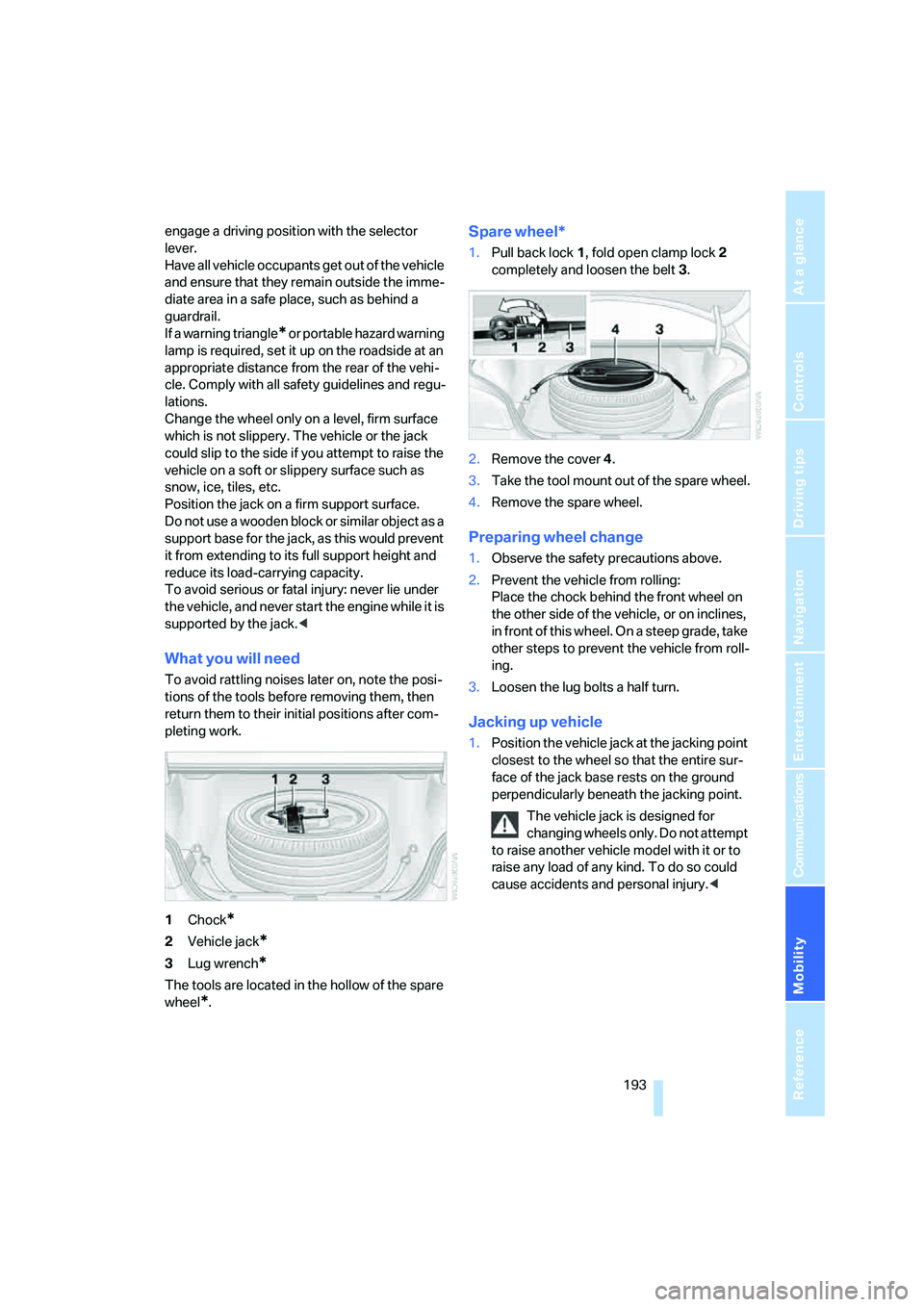
1Chock
*
2Vehicle jack*
3Lug wrench*
The tools are located in the hollow of the spare
wheel
*.
Spare wheel*
1.Pull back lock1, fold open clamp lock2
completely and loosen the belt3.
2.Remove the cover4.
3.Take the tool mount out of the spare wheel.
4.Remove the spare wheel.
Preparing wheel change
1.Observe the safety precautions above.
2.Prevent the vehicle from rolling:
Place the chock behind the front wheel on
the other side of the vehicle, or on inclines,
in front of this wheel. On a steep grade, take
other steps to prevent the vehicle from roll-
ing.
3.Loosen the lug bolts a half turn.
Jacking up vehicle
1.Position the vehicle jack at the jacking point
closest to the wheel so that the entire sur-
face of the jack base rests on the ground
perpendicularly beneath the jacking point.
The vehicle jack is designed for
changing wheels only. Do not attempt
to raise another vehicle model with it or to
raise any load of any kind. To do so could
cause accidents and personal injury.<
Page 196 of 231
Replacing components
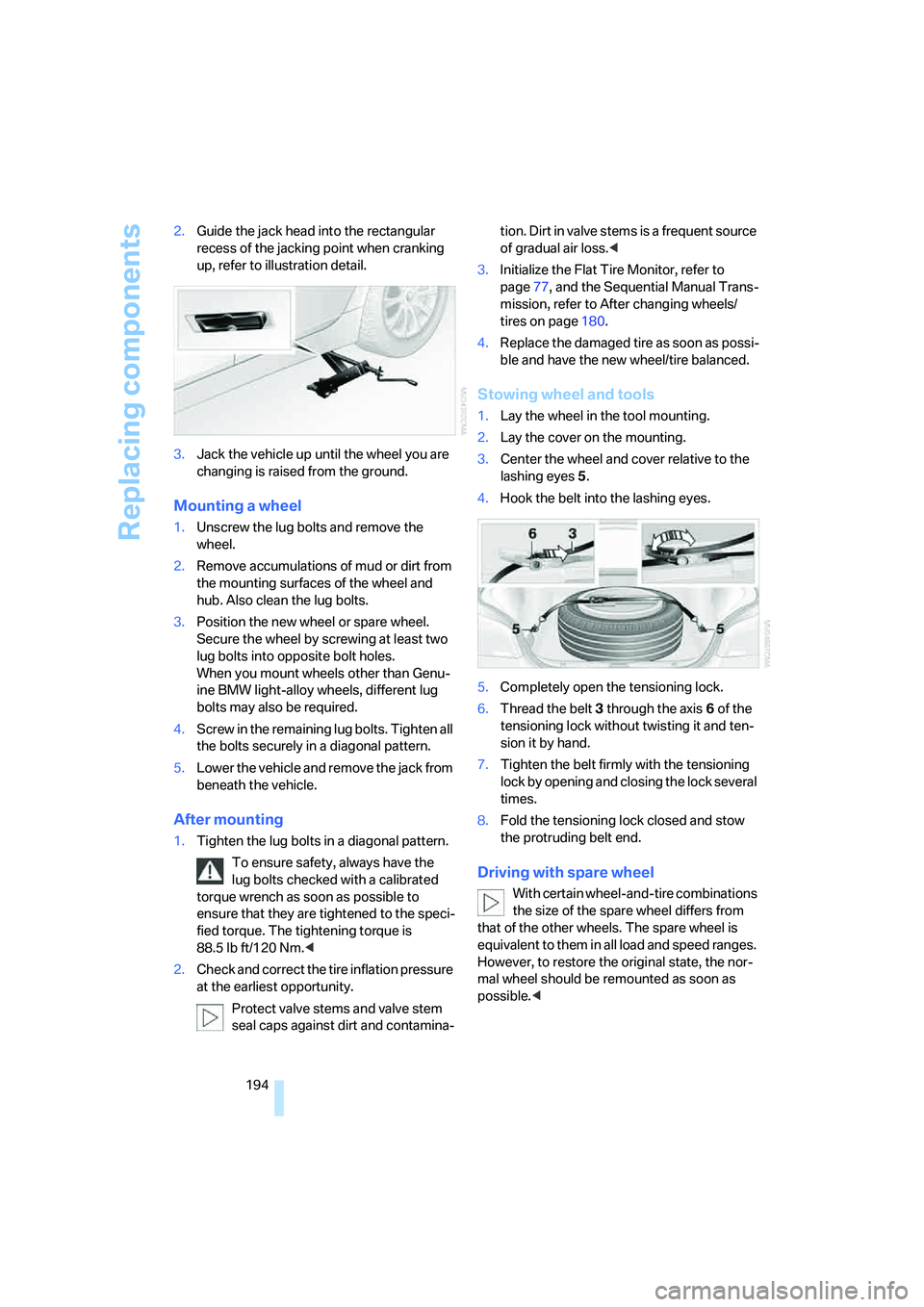
194 2.Guide the jack head into the rectangular
recess of the jacking point when cranking
up, refer to illustration detail.
3.Jack the vehicle up until the wheel you are
changing is raised from the ground.
Mounting a wheel
1.Unscrew the lug bolts and remove the
wheel.
2.Remove accumulations of mud or dirt from
the mounting surfaces of the wheel and
hub. Also clean the lug bolts.
3.Position the new wheel or spare wheel.
Secure the wheel by screwing at least two
lug bolts into opposite bolt holes.
When you mount wheels other than Genu-
ine BMW light-alloy wheels, different lug
bolts may also be required.
4.Screw in the remaining lug bolts. Tighten all
the bolts securely in a diagonal pattern.
5.Lower the vehicle and remove the jack from
beneath the vehicle.
After mounting
1.Tighten the lug bolts in a diagonal pattern.
To ensure safety, always have the
lug bolts checked with a calibrated
torque wrench as soon as possible to
ensure that they are tightened to the speci-
fied torque. The tightening torque is
88.5 lb ft/120 Nm.<
2.Check and correct the tire inflation pressure
at the earliest opportunity.
Protect valve stems and valve stem
seal caps against dirt and contamina-tion. Dirt in valve stems is a frequent source
of gradual air loss.<
3.Initialize the Flat Tire Monitor, refer to
page77, and the Sequential Manual Trans-
mission, refer to After changing wheels/
tires on page180.
4.Replace the damaged tire as soon as possi-
ble and have the new wheel/tire balanced.
Stowing wheel and tools
1.Lay the wheel in the tool mounting.
2.Lay the cover on the mounting.
3.Center the wheel and cover relative to the
lashing eyes5.
4.Hook the belt into the lashing eyes.
5.Completely open the tensioning lock.
6.Thread the belt3 through the axis6 of the
tensioning lock without twisting it and ten-
sion it by hand.
7.Tighten the belt firmly with the tensioning
lock by opening and closing the lock several
times.
8.Fold the tensioning lock closed and stow
the protruding belt end.
Driving with spare wheel
With certain wheel-and-tire combinations
the size of the spare wheel differs from
that of the other wheels. The spare wheel is
equivalent to them in all load and speed ranges.
However, to restore the original state, the nor-
mal wheel should be remounted as soon as
possible.<
Page 213 of 231
Reference 211
At a glance
Controls
Driving tips
Communications
Navigation
Entertainment
Mobility
Audio132
– controls132
– switching on/off132
– tone control133
– volume133
"Audio", refer to Tone
control133
"Audio Aux"132,151
– on external audio device151
Audio device, external96
Automatic
– air distribution88
– air volume88
– headlamp control83
– service notification168
– steering wheel adjustment,
refer to Easy entry/exit47
– storing stations137
Automatically switching
between high beams and
low beams, refer to High-
beam assistant84
Automatic car washes106
– also refer to Caring for your
vehicle brochure
Automatic climate control87
– automatic air distribution88
– switching off90
Automatic closing of doors,
refer to Automatic soft
closing33
Automatic curb monitor46
Automatic lighting
– refer to Automatic headlamp
control83
– refer to Daytime running
lamps84
– refer to High-beam
assistant84
– refer to Interior lamps86
– refer to Pathway lighting83
Automatic low-beam function,
refer to High-beam
assistant84
"Automatic programs"88
Automatic recirculated-air
control AUC90
Automatic soft closing33
Automatic station search137"Automatic ventilation"91
AUTO program for automatic
climate control88
"Autostore" on the
radio136,138
AUX-In
– connection96
– refer to External audio
device151
Average fuel consumption64
– setting the units72
Average speed, refer to
Computer63
"Avoid ferries" for navigation
system123
"Avoid highways" for
navigation system123
Avoiding freeways for
navigation122
Avoiding unintentional
alarms35
"Avoid tollroads" for
navigation system123
Axle loads, refer to
Weights204
"A - Z"160
B
Backrest contour, refer to
Lumbar support41
Backrests, refer to Seats40
Backrest width41
Back seats, refer to Rear seats
Backup lamps, replacing
bulbs189
"Balance", refer to Tone
control134
Balance, refer to Tone
control134
Band-aids, refer to First-aid
kit196
Bass, refer to Tone
control133
"Bass", tone control134
Battery, refer to Vehicle
battery195
– jump starting197Battery disposal
– remote control with comfort
access37
– vehicle battery195
Battery replacement, remote
control with comfort
access37
Being towed198
Belts, refer to Safety belts44
Beverage holder, refer to Cup
holders96
Blower, refer to Air volume89
"BMW Assist"169
BMW Assist167
– enabling167
– services offered168
"BMW Contact"162
"BMW Contact
Numbers"162
BMW homepage4
BMW maintenance
system186
"BMW Service"169
"BMW Service settings"168
BMW website4
Bottle holder, refer to Cup
holders96
Brake Assistant, refer to DBC
Dynamic Brake Control74
Brake fluid185
– warning lamp185
Brake force display78
Brake lamps
– brake force display78
– replacing bulbs189
Brake pads185
– breaking-in104
Brake rotors106
Brakes
– ABS Antilock Brake
System74
– brake fluid
185
– brake force display78
– brake pads185
– breaking-in104
– handbrake55
– warning lamps13
Page 217 of 231
Reference 215
At a glance
Controls
Driving tips
Communications
Navigation
Entertainment
Mobility
Electronic brake-force
distribution74
Electronic Damping Control
EDC76
Emergency call196
Emergency operation, refer to
Manual operation
– door lock32
– driver's door32
– fuel filler door174
– glass sunroof39
– luggage compartment lid34
Emergency release for
luggage compartment lid in
luggage compartment34
Emergency services, refer to
Roadside Assistance197
"Emission inspect."67
"Enable services"168
"End call"159
Engaging driving position,
refer to Selector lever
positions55
Engaging forward position,
refer to Selector lever
positions55
Engine
– breaking-in104
– data202
– M Engine Dynamic
Control58
– overheated, refer to Coolant
temperature62
– speed202
– starting54
– starting, comfort access36
– starting difficulties54
– switching off54
Engine compartment182
Engine coolant184
Engine oil
– adding183
– additives, refer to Approved
engine oils184
– approved engine oil184
– checking oil level182
– exact measurement183
– fast measurement183
– possible displays183Engine oil thermometer63
Engine output, refer to Engine
data202
Engine overheating, refer to
Coolant temperature62
Engine speed202
Engine starting, refer to
Starting engine54
"Enter address"114,120
Entering destination via town/
city name114
Entering the
address113,116
Entering the intersection115
Entering town/city for
navigation114
Entering zip code for
navigation115
"Entertainment"132
"Entertainment
settings"133,140
Entertainment sound output
on/off133
Entry map for destination117
"Equalizer", refer to Tone
control135
Equalizer, refer to Tone
control135
"ESN"142
ESP Electronic Stability
Program, refer to DSC
Dynamic Stability
Control74
Event Data Recorders187
Exhaust system, refer to Hot
exhaust system104
Exterior mirrors45
– automatic dimming
feature105
– automatic heating46
– folding in and out46
– tilting down passenger-side
exterior mirror46
External audio device96,151
Eye for tow-starting and
towing, refer to Tow
fitting198
F
"Fader", refer to Tone
control134
Fader, refer to Tone
control134
Failure messages, refer to
Check Control67
False alarm, refer to Avoiding
unintentional alarms35
Fastening safety belts, refer to
Safety belts44
– warning lamp44
Fastest route for
navigation122
"Fast route" for
navigation123
"Favorites" calling up with
radio139
Filling bottle, refer to
M Mobility System190
Filling sealant into wheel191
First aid, refer to First-aid
kit196
First-aid kit196
Flashing during locking/
unlocking, refer to Setting
confirmation signals31
Flashlight, refer to
Rechargeable flashlight95
Flat tire
– changing wheels192
– Flat Tire Monitor76,77
– M Mobility System77,190
– spare wheel193
Flat Tire Monitor76
– false alarms77
– initializing system77
– show chains180
– system limits77
– warning lamp77
Flat tires, refer to Tire
condition178
"FM", reception
range132,136
FM, waveband136
Folding rear seat back98
Fold-over rear seat back98
Page 219 of 231
Reference 217
At a glance
Controls
Driving tips
Communications
Navigation
Entertainment
Mobility
ID3 tag, refer to Information on
track147
Idle56
iDrive16
– assistance window20
– automatic climate control
with expanded scope88
– changing date and time71
– changing language72
– changing menu page19
– changing settings70
– changing units of measure
and display type72
– confirming selection or
entry19
– controller16
– controls16
– displays, menus17
– selecting menu item19
– setting brightness72
– start menu17
– status information20
– symbols18
Ignition53
– switched off53
– switched on53
Ignition key, refer to Keys/
remote control28
Ignition key position 1, refer to
Radio readiness53
Ignition key position 2, refer to
Ignition on53
Ignition lock53
– starting engine with comfort
access37
Independent ventilation, refer
to Parked car ventilation91
Indicator/warning lamps
– airbags80
– brake fluid185
– brake pads185
– DSC13,75
– Flat Tire Monitor77
– high beams13
– MDrive13,49
– M Dynamic Mode13,75
– parking lamps/low beams13
– safety belt warning44Indicator and warning
lamps13
Individual air distribution89
Individually programmable
button on steering wheel47
Individual settings, refer to
MDrive
48
Individual settings, refer to
Personal Profile29
Inflation pressure, refer to Tire
inflation pressure176
Inflation pressure monitoring,
refer to Flat Tire Monitor76
Information
– on another location118
– on current position118
– on destination location118
"Information" for navigation
system118
"Information on
destination"120
"Initializing..."77
Initializing
– Flat Tire Monitor77
– radio, refer to Storing
stations138
– refer to Power failure195
– refer to Setting time and
date71
– seat, mirror and steering
wheel memory42
"Input map"118
Installation location
– CD changer149
– mobile phone95
– navigation drive112
Instructions for navigation
system, refer to Voice
instructions127
Instrument cluster12
Instrument illumination, refer
to Instrument lighting86
Instrument lighting86
Instrument panel
– refer to Cockpit10
– refer to Instrument
cluster12
Integrated key28Integrated universal remote
control93
Interesting destination for
navigation118
"Interim time"70
Interior lamps86
– switching on with remote
control31
Interior motion sensor35
– switching off35
Interior rearview mirror46
– automatic dimming
feature105
Intermittent mode of the
wipers59
J
Jacking points193
Joystick, refer to iDrive16
Jumpering, refer to Jump
starting197
Jump starting197
K
Keyless-Go, refer to Comfort
access36
Keyless opening and closing,
refer to Comfort access36
Key Memory, refer to Personal
Profile29
"Keypad"162
Keys28
– key-related settings, refer to
Personal Profile29
Knock control175
L
Lamps, refer to Parking lamps/
low beams83
Lamps and bulbs188
"Languages"72
– for navigation system127
Lashing eyes, refer to
Securing cargo108
Page 223 of 231
Reference 221
At a glance
Controls
Driving tips
Communications
Navigation
Entertainment
Mobility
Radio readiness53
– switched off53
– switched on53
– with comfort access37
Rain sensor60
"Random", random play
sequence148
"Random all" in audio
mode148
"Random directory" in audio
mode148
"RDS"139
Reading lamps86
Rear armrest, refer to Center
armrest, rear98
Rear lamps, refer to Tail
lamps189
– replacing bulbs189
Rear seat back, folding98
Rear seats
– adjusting head restraints44
– folding over backrest98
– heating45
Rear socket98
Rear ventilation91
Rearview mirror45
Rear window
– heating89
– roller sun blind, refer to Sun
blinds94
Rear window safety switch38
"Received calls"160
Reception
– quality139
– radio stations139
– regional station137
Reception level of mobile
phone, refer to Status
information20
Rechargeable flashlight95
Recirculated-air mode
– air recirculation90
– AUC Automatic recircu-
lated-air control90
Recording times, refer to
Stopwatch70
"Redial" for mobile phone160
Reflectors, refer to Tail
lamps189Refueling174
Releasing, hood181
"Relock door if not
opened"32
Remaining distance, refer to
Cruising range64
Remaining distance to desti-
nation, refer to Computer64
Remote control28
– battery replacement37
– comfort access36
– garage door opener93
– luggage compartment lid31
– malfunction31,37
Removing condensation on
the windows89
"Repeat directory" in audio
mode148
"Repeat" in audio mode148
"Repeat track" in audio
mode148
Replacement fuses195
Replacement of tires, refer to
Changing wheels192
Replacing bulbs, refer to
Lamps and bulbs188
Replacing tires179
Replacing wheels/tires, refer
to New wheels and tires179
Reporting an accident, refer
Initiating an emergency
call196
Reporting safety defects7
Reserve warning, refer to Fuel
gauge63
Reservoir for washer
systems60
"Reset"
– stopwatch70
– tone settings135
Reset, refer to Resetting tone
settings135
"Reset to default" with
MDrive48
Residual heat90
Restraint systems
– for children50
– refer to Safety belts44Retreaded tires179
Reverse, fast
– CD changer149
– CD player149
Reverse gear56
Road map126
"Roadside
Assistance"162,169
Roadside Assistance197
Roadside parking lamps84
Roller sun blind, refer to Sun
blinds94
Roof load capacity204
Roof-mounted luggage
rack108
Rope, refer to Tow-starting
and towing198
Rotary pushbutton, refer to
iDrive16
Route122
– bypassing sections128
– changing122,128
– displaying
125
– displaying arrow display125
– displaying map126
– displaying town126
– list126
– selecting122
– selecting criteria122
Route map, refer to Map
display126
"Route preference",
changing122
Route selection122
S
Safety5
Safety belts44
– damage44
– sitting safely40
– warning lamp44
Safety belt tensioners
– refer to Airbags78
– refer to Safety belts44
Page 224 of 231
Everything from A to Z
222 Safety systems
– ABS Antilock Brake
System74
– airbags78
– DSC Dynamic Stability
Control74
– safety belts44
Satellite radio141
– enabling channel142
– selecting channel142
– storing channel142
"SAT" with radio132,142
"Save current
destination"122
"Scan"
– sampling stations137
– sampling tracks147
Scan
– CD changer147
– CD player147
– radio137
"Scan all" in audio mode147
"Scan directory" in audio
mode147
Screen, refer to iDrive16
Screw thread for tow
fitting198
SDARS, refer to Satellite
radio141
"Seat heater distribution"45
Seats40
– active backrest width
adjustment41
– adjusting backrest width41
– adjusting height41
– adjusting shoulder
support41
– adjusting the seats40
– adjusting thigh support41
– easy entry/exit42
– heating45
– lumbar support41
– memory, refer to Seat, mirror
and steering wheel
memory42
– sitting safely40
– storing the setting42
– ventilation, refer to Active
seat ventilation45Securing load
– refer to Securing cargo108
– with ski bag, refer to
Securing cargo100
"Select as destination"119
"Select current speed"70
Selecting audio sources, refer
to Operation via iDrive132
Selecting frequency
manually
137
Selecting menu items19
Selecting new scale for
navigation126
Selecting route122
Selection options with
navigation system122
Selector lever55
Selector lever lock, refer to
Shiftlock55
Selector lever positions55
Sequential Manual Trans-
mission with Drivelogic55
– Drivelogic driving
programs57
– idle56
– initializing system, refer to
After changing wheels/
tires180
– reverse gear56
– Sequential mode56
– shift lights58
– shiftlock55
Sequential mode56
"Service"66,168
Service, refer to Roadside
Assistance197
Service and Warranty Infor-
mation Booklet for US
models186
Service interval indicator, refer
to Service requirements66
"Service notification"168
"Service Request"162,169
"Service
requirements"66,168
Service requirements66
– also refer to CBS Condition
Based Service186
"Service Status"168"Set"
– in audio mode132
– on trip computer65
"Set date"72
"Set service date"67
"Set time"71
Settings
– changing on Control
Display70
– clock, 12h/24h mode71
– configuring, refer to
MDrive48
– configuring, refer to
Personal Profile29
Setting speed limit69
Setting time, refer to Prese-
lecting activation time91
"Set tire pressure"77
Shifting56
Shift lever55
Shift lights58
Shiftlock55
Shift paddles57
Shock absorber control, refer
to EDC Electronic Damping
Control76
Short commands of voice
command system205
"Short route" for
navigation123
Short route in navigation, refer
to Selecting route122
Shoulder support41
"Show current position"118
"Show destination
position"118
Shuffled, refer to Random
– CD changer148
– CD player148
Side airbags78
Side marker lamps, replacing
bulbs189
Side turn signals, replacing
bulbs189
Side window blinds, refer to
Sun blinds94
Signal horn, refer to Horn10