reset BMW M5 2006 User Guide
[x] Cancel search | Manufacturer: BMW, Model Year: 2006, Model line: M5, Model: BMW M5 2006Pages: 231, PDF Size: 8.44 MB
Page 145 of 231
Navigation
Entertainment
Driving tips
143Reference
At a glance
Controls
Communications
Mobility
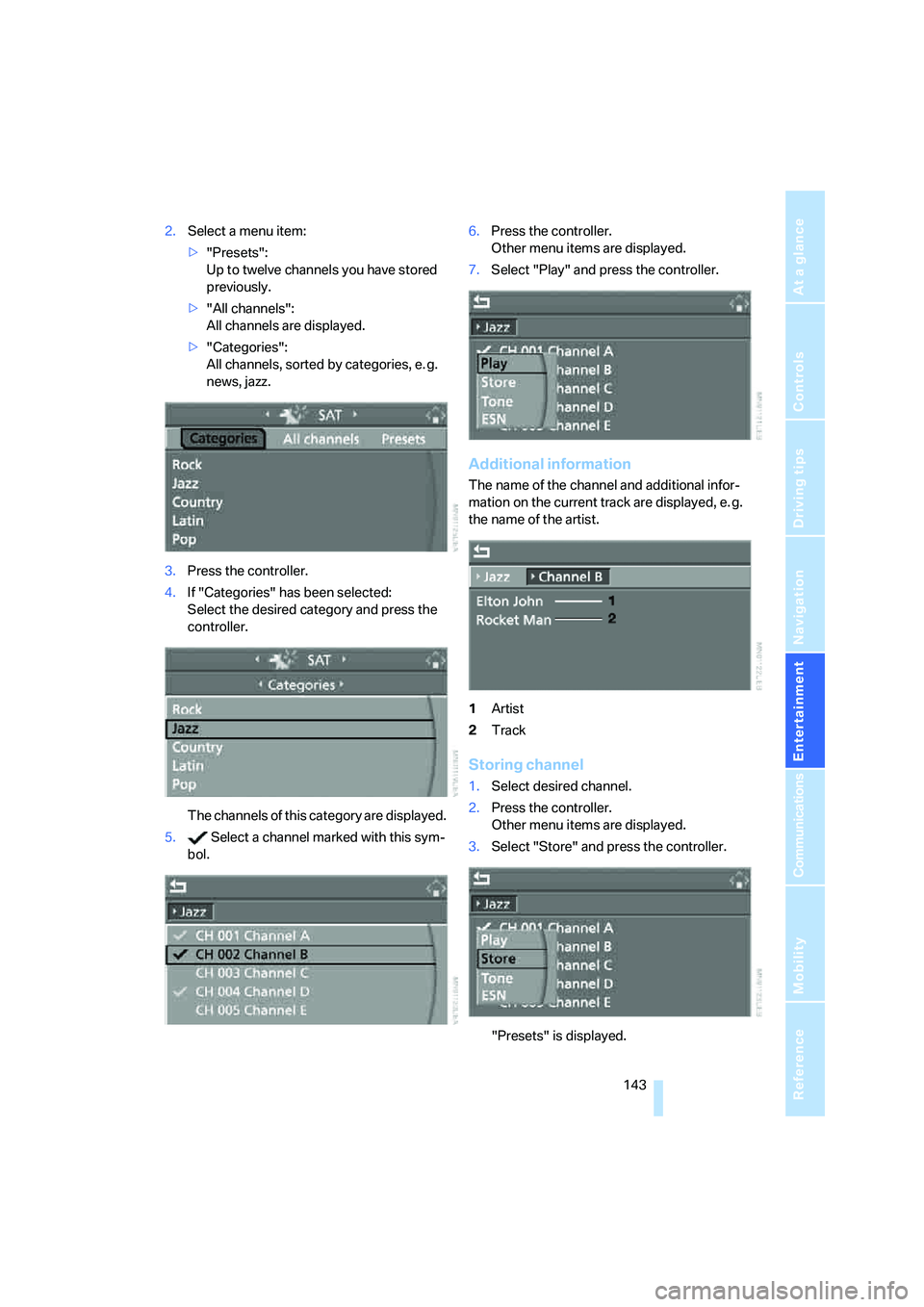
2.Select a menu item:
>"Presets":
Up to twelve channels you have stored
previously.
>"All channels":
All channels are displayed.
>"Categories":
All channels, sorted by categories, e. g.
news, jazz.
3.Press the controller.
4.If "Categories" has been selected:
Select the desired category and press the
controller.
The channels of this category are displayed.
5. Select a channel marked with this sym-
bol.6.Press the controller.
Other menu items are displayed.
7.Select "Play" and press the controller.
Additional information
The name of the channel and additional infor-
mation on the current track are displayed, e. g.
the name of the artist.
1Artist
2Track
Storing channel
1.Select desired channel.
2.Press the controller.
Other menu items are displayed.
3.Select "Store" and press the controller.
"Presets" is displayed.
Page 157 of 231
155
Entertainment
Reference
At a glance
Controls
Driving tips Communications
Navigation
Mobility
Making calls with car phone:
BMW Assist calls
You can use the car phone via the hands-free
system for BMW Assist calls.
When the status information "Communication"
or "BMW Assist" is displayed in "BMW Ser-
vice", only BMW Assist calls are possible.
It may not be possible to establish a telephone
connection using the mobile phone while a con-
nection is being established to BMW Assist or
while a call to BMW Assist is already in
progress. If this happens, you must log off the
mobile phone from the vehicle if you wish to
place a call with the mobile phone.
Commissioning
Logging on mobile phone on vehicle
The following prerequisites must be met:
>The mobile phone is ready to operate.
>The Bluetooth link on the vehicle, refer to
page157, and on the mobile phone is
active.
>Depending on the mobile phone, preset-
tings on the mobile phone are necessary:
e.g. via the menu item Bluetooth activated
or the menu item Connection not with con-
firmation.
>For logging on, specify any desired number
as the Bluetooth passkey, e.g. 1. This Blue-
tooth passkey is no longer required follow-
ing successful logon.
>The ignition is switched on.
Only log on the mobile phone with the
vehicle stopped, otherwise the passen-
gers and other road user can be endangered
due to a lack of attentiveness on the part of the
driver.<
Switching on ignition
1.Insert the remote control as far as possible
into the ignition lock.
2.S w i t c h o n t h e s w i t c h o n i g n i t i o n b y p r e s s i n g
the Start/Stop button without depressing
the brake or clutch pedal.
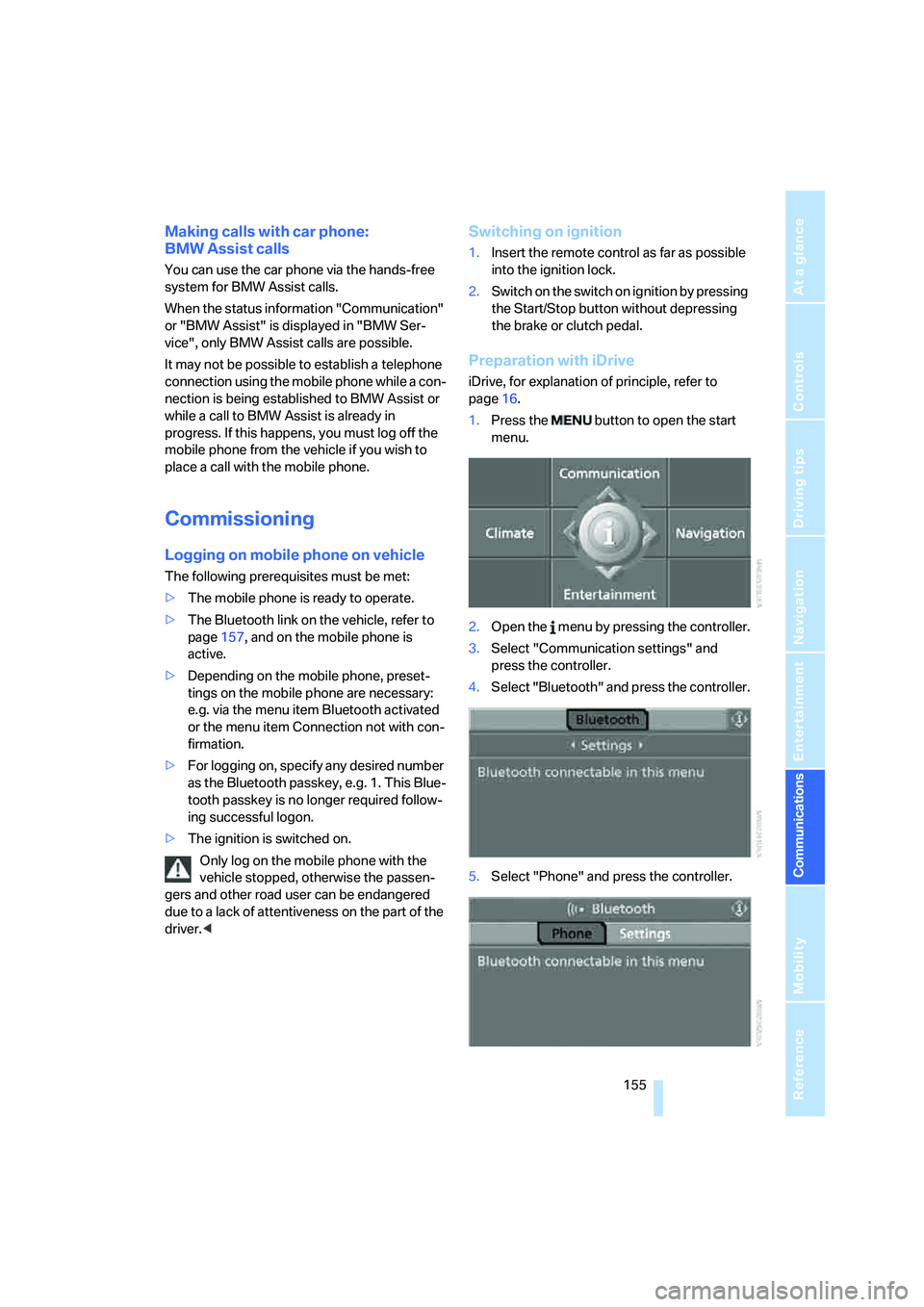
Preparation with iDrive
iDrive, for explanation of principle, refer to
page16.
1.Press the button to open the start
menu.
2.Open the menu by pressing the controller.
3.Select "Communication settings" and
press the controller.
4.Select "Bluetooth" and press the controller.
5.Select "Phone" and press the controller.
Page 209 of 231
Reference 207
At a glance
Controls
Driving tips
Communications
Navigation
Entertainment
Mobility
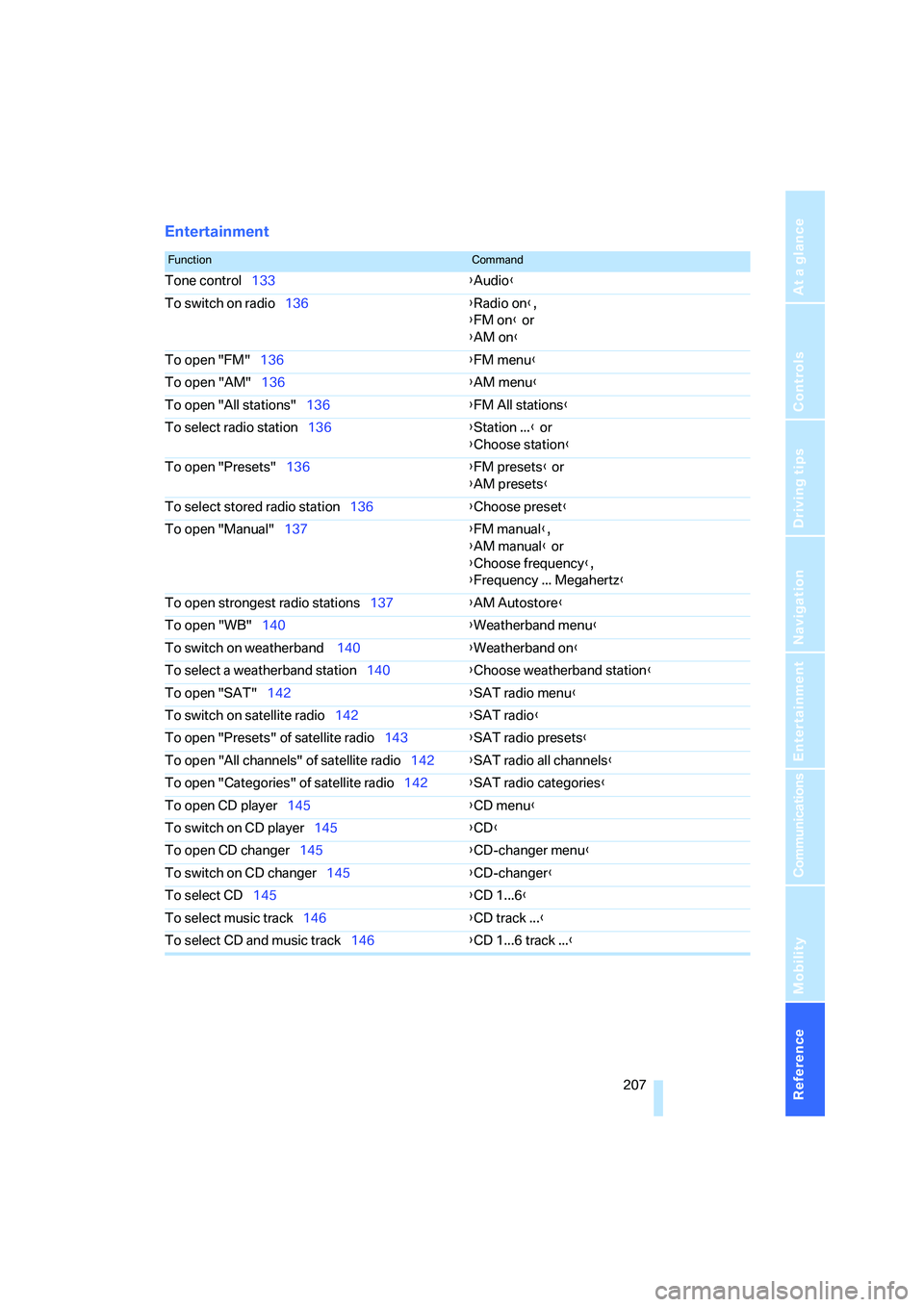
Entertainment
FunctionCommand
Tone control133{Audio}
To switch on radio136{Radio on},
{FM on} or
{AM on}
To open "FM"136{FM menu}
To open "AM"136{AM menu}
To open "All stations"136{FM All stations}
To select radio station136{Station ...} or
{Choose station}
To open "Presets"136{FM presets} or
{AM presets}
To select stored radio station136{Choose preset}
To open "Manual"137{FM manual},
{AM manual} or
{Choose frequency},
{Frequency ... Megahertz}
To open strongest radio stations137{AM Autostore}
To open "WB"140{Weatherband menu}
To switch on weatherband 140{Weatherband on}
To select a weatherband station140{Choose weatherband station}
To open "SAT"142{SAT radio menu}
To switch on satellite radio142{
SAT radio}
To open "Presets" of satellite radio143{SAT radio presets}
To open "All channels" of satellite radio142{SAT radio all channels}
To open "Categories" of satellite radio142{SAT radio categories}
To open CD player145{CD menu}
To switch on CD player145{CD}
To open CD changer145{CD-changer menu}
To switch on CD changer145{CD-changer}
To select CD145{CD 1...6}
To select music track146{CD track ...}
To select CD and music track146{CD 1...6 track ...}
Page 222 of 231
Everything from A to Z
220 Opening and closing
– comfort access36
– from inside32
– from outside30
– using remote control30
– using the door lock32
Operation by voice for mobile
phone163
– adjusting volume164
– canceling163
– commands163
– correcting phone
number164
– dialing phone number164
– placing a call164
– redialing165
– voice phone book164
"Options"170
Orientation menu, refer to
Start menu17
Output, refer to Engine
data202
Outside air, refer to AUC
Automatic recirculated-air
control90
Outside temperature
display63
– changing unit of measure72
– in computer72
P
"P 400"58
"P 500"58
"P 500 Sport"58
Panic mode31
Park Distance Control PDC73
"Parked car operation"91
"Parked car ventilation"91
Parked car ventilation91
– activating activation time92
– indicator lamp87
– preselecting activation
times91
– switching on and off
directly91
Parking, vehicle54
Parking aid, refer to PDC Park
Distance Control73Parking assistant, refer to
PDC Park Distance
Control73
Parking brake, refer to
Handbrake55
Parking lamps83
– indicator lamp13
Parking lamps/low beams,
indicator lamp13
Parts and accessories6
Passenger airbags, deacti-
vating, refer to Exception for
front passenger seat50
Passenger-side exterior
mirror, tilting down46
"Pathway lighting"83
Pathway lighting83
"PDC"74
"PDC display on"74
PDC Park Distance Control73
Personal Profile29
"Perspective"126
"Phone"159
Phone book158
Phone numbers
– deleting from phone
book161
– dialing159
– most recent numbers160
– selecting in phone book160
– Top 8160
Pinch protection system
– glass sunroof, electric39
– power windows38
Plasters, refer to First-aid
kit196
"Play"
– in audio mode146
– on the radio143
Plug-in unit for remote
control, refer to Ignition
lock53
Pollen, refer to Microfilter/
activated charcoal filter91
Position
– displaying128
– storing120
"POWER"48POWER, refer to M Engine
Dynamic Control58
Power failure195
Power windows, refer to
Windows37
Preselecting activation times
of the parked car
ventilation91
"Presets" on the radio136
Pressure, tires176
– producing with M Mobility
System190
"Profile"170
Programming button function,
refer to Programmable
button on steering wheel47
Protective function, refer to
Pinch protection system
– glass sunroof, electric39
– windows38
R
Radio
– Autostore137
– controls132
– High Definition Radio140
– sampling stations137
– satellite radio141
– selecting frequency
manually137
– selecting reception
range132
– selecting waveband136
– station search137
– station selection136
– station with the best
reception137
– storing stations138
– switching on/off132
– tone control133
– volume133
– Weather Band, refer to
Weather news flashes139
Radio key, refer to Keys/
remote control28
Radio position, refer to Radio
readiness53
Page 223 of 231
Reference 221
At a glance
Controls
Driving tips
Communications
Navigation
Entertainment
Mobility
Radio readiness53
– switched off53
– switched on53
– with comfort access37
Rain sensor60
"Random", random play
sequence148
"Random all" in audio
mode148
"Random directory" in audio
mode148
"RDS"139
Reading lamps86
Rear armrest, refer to Center
armrest, rear98
Rear lamps, refer to Tail
lamps189
– replacing bulbs189
Rear seat back, folding98
Rear seats
– adjusting head restraints44
– folding over backrest98
– heating45
Rear socket98
Rear ventilation91
Rearview mirror45
Rear window
– heating89
– roller sun blind, refer to Sun
blinds94
Rear window safety switch38
"Received calls"160
Reception
– quality139
– radio stations139
– regional station137
Reception level of mobile
phone, refer to Status
information20
Rechargeable flashlight95
Recirculated-air mode
– air recirculation90
– AUC Automatic recircu-
lated-air control90
Recording times, refer to
Stopwatch70
"Redial" for mobile phone160
Reflectors, refer to Tail
lamps189Refueling174
Releasing, hood181
"Relock door if not
opened"32
Remaining distance, refer to
Cruising range64
Remaining distance to desti-
nation, refer to Computer64
Remote control28
– battery replacement37
– comfort access36
– garage door opener93
– luggage compartment lid31
– malfunction31,37
Removing condensation on
the windows89
"Repeat directory" in audio
mode148
"Repeat" in audio mode148
"Repeat track" in audio
mode148
Replacement fuses195
Replacement of tires, refer to
Changing wheels192
Replacing bulbs, refer to
Lamps and bulbs188
Replacing tires179
Replacing wheels/tires, refer
to New wheels and tires179
Reporting an accident, refer
Initiating an emergency
call196
Reporting safety defects7
Reserve warning, refer to Fuel
gauge63
Reservoir for washer
systems60
"Reset"
– stopwatch70
– tone settings135
Reset, refer to Resetting tone
settings135
"Reset to default" with
MDrive48
Residual heat90
Restraint systems
– for children50
– refer to Safety belts44Retreaded tires179
Reverse, fast
– CD changer149
– CD player149
Reverse gear56
Road map126
"Roadside
Assistance"162,169
Roadside Assistance197
Roadside parking lamps84
Roller sun blind, refer to Sun
blinds94
Roof load capacity204
Roof-mounted luggage
rack108
Rope, refer to Tow-starting
and towing198
Rotary pushbutton, refer to
iDrive16
Route122
– bypassing sections128
– changing122,128
– displaying
125
– displaying arrow display125
– displaying map126
– displaying town126
– list126
– selecting122
– selecting criteria122
Route map, refer to Map
display126
"Route preference",
changing122
Route selection122
S
Safety5
Safety belts44
– damage44
– sitting safely40
– warning lamp44
Safety belt tensioners
– refer to Airbags78
– refer to Safety belts44
Page 225 of 231
Reference 223
At a glance
Controls
Driving tips
Communications
Navigation
Entertainment
Mobility
Sitting safely40
– with airbags40
– with head restraint40
– with safety belts40
Ski bag99
Sliding/tilt sunroof, refer to
Glass sunroof, electric38
Slope assistant, refer to
Starting off on slopes105
SMG, refer to Sequential
Manual Transmission with
Drivelogic55
"SMG Drivelogic"48,57
Snow chains180
Socket for Onboard
Diagnostics interface187
Socket for remote control,
refer to Ignition lock53
Sockets, refer to Connecting
electrical devices97
Soft closure aid, refer to
Automatic soft closing33
Song search with CD, refer to
Playing a track147
SOS, refer to Initiating an
emergency call196
Spare fuses195
Spare key28
– adapter28
Spare remote control28
Spare wheel193
– driving with spare wheel194
– refer to Changing
wheels192
Special oils, refer to Approved
engine oils184
Specified oil grades, refer to
Approved engine oils184
Speed-dependent
volume134
Speed limit warning, refer to
Speed limit69
Speedometer12
"Speed volume", refer to Tone
control134
Speed with winter tires180"Sport"
– active backrest width
adjustment42
– with EDC76
Stability control, refer to
Driving stability control
systems74
Start/Stop button53
"Start" for stopwatch70
"Start guidance"116,124
Starting, refer to Starting
engine54
Starting assistance, refer to
Jump starting197
Starting assistant, refer to
Starting off on slopes105
Starting difficulties
– jump starting197
– refer to Special starting
conditions54
Starting off
– on a slippery surface105
– on slopes105
Start menu, iDrive17
"Start route guidance"118
"Start service"169
"State / Province" for desti-
nation entry114
"State inspection"67
Station, refer to Radio136
"Stations", presets143
"Status"66
Status of this Owner's Manual
at time of printing5
Steering wheel
– adjustment47
– buttons on steering
wheel11
– easy entry/exit47
– lock53
– locking53
– MDrive button48
– memory42
– programmable button47
"Steering wheel button"47
Steering-wheel shift buttons,
refer to Shift paddles57"Stop" for stopwatch70
"Stopwatch"70
Stopwatch70
Storage compartments96
"Store in address book" for
navigation system120
"Store" on the radio138,143
Storing current position120
Storing radio stations138
Storing sitting position, refer
to Seat, mirror and steering
wheel memory42
Storing tires180
Straps, refer to Loading108
"Street" for destination
entry115
Summer tires, refer to Wheels
and tires176
Sun blinds94
"Surround Settings", refer to
Tone control134
SW, waveband136
Switches, refer to Cockpit10
Switching between high
beams and low beams,
automatic, refer to High-
beam assistant84
Switching cooling function on
and off89
Switching off engine54
Switching off tilt alarm
sensor35
Switching on
– audio132
– CD changer132
– CD player132
– radio132
Switching on hour signal71
Swiveling headlamps, refer to
Adaptive Head Light84
Symbols4
– indicator/warning lamps13