service BMW M5 2006 Owner's Guide
[x] Cancel search | Manufacturer: BMW, Model Year: 2006, Model line: M5, Model: BMW M5 2006Pages: 231, PDF Size: 8.44 MB
Page 190 of 231
Replacing components
188
Replacing components
Onboard toolkit
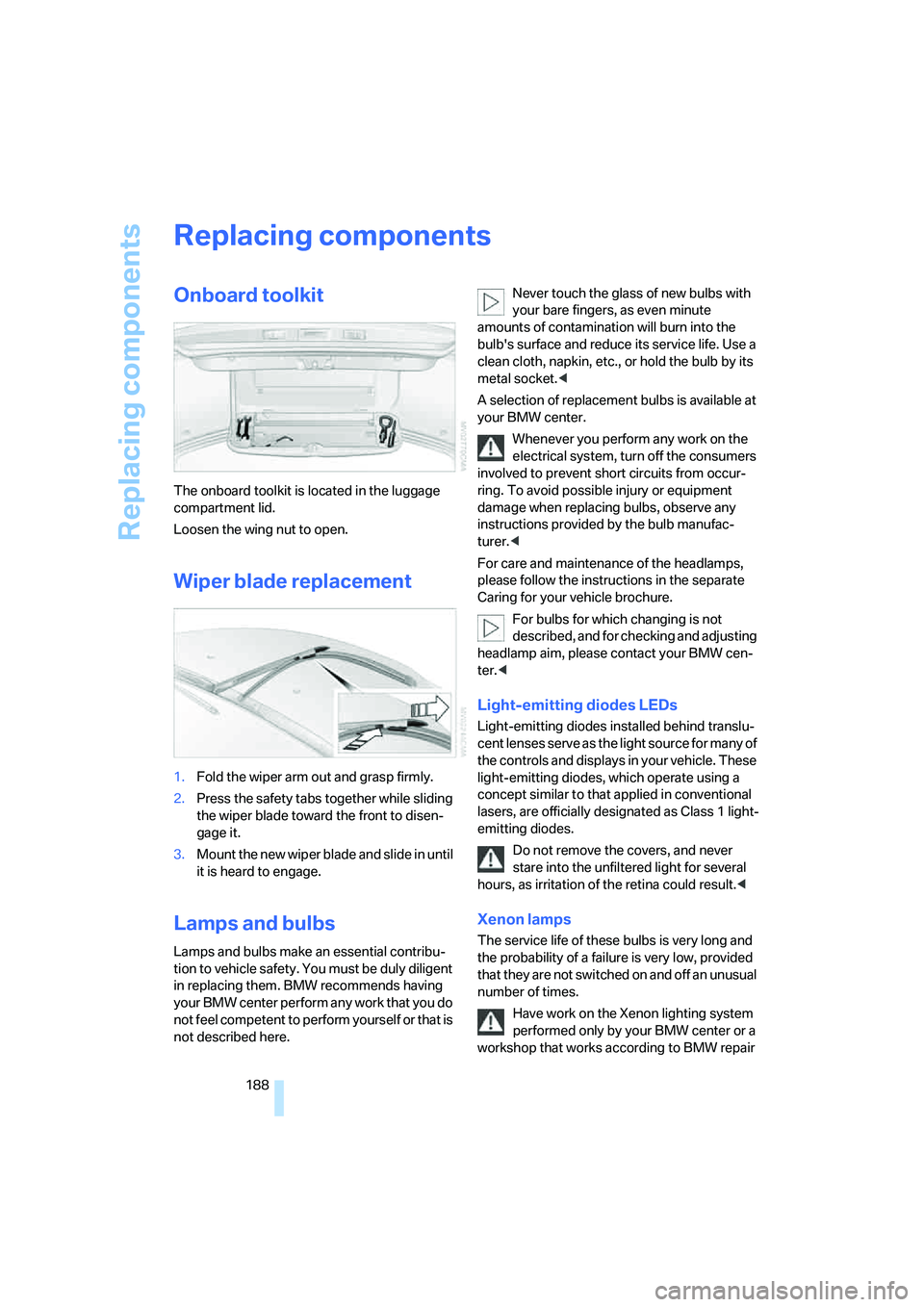
The onboard toolkit is located in the luggage
compartment lid.
Loosen the wing nut to open.
Wiper blade replacement
1.Fold the wiper arm out and grasp firmly.
2.Press the safety tabs together while sliding
the wiper blade toward the front to disen-
gage it.
3.Mount the new wiper blade and slide in until
it is heard to engage.
Lamps and bulbs
Lamps and bulbs make an essential contribu-
tion to vehicle safety. You must be duly diligent
in replacing them. BMW recommends having
your BMW center perform any work that you do
not feel competent to perform yourself or that is
not described here.Never touch the glass of new bulbs with
your bare fingers, as even minute
amounts of contamination will burn into the
bulb's surface and reduce its service life. Use a
clean cloth, napkin, etc., or hold the bulb by its
metal socket.<
A selection of replacement bulbs is available at
your BMW center.
Whenever you perform any work on the
electrical system, turn off the consumers
involved to prevent short circuits from occur-
ring. To avoid possible injury or equipment
damage when replacing bulbs, observe any
instructions provided by the bulb manufac-
turer.<
For care and maintenance of the headlamps,
please follow the instructions in the separate
Caring for your vehicle brochure.
For bulbs for which changing is not
described, and for checking and adjusting
headlamp aim, please contact your BMW cen-
ter.<
Light-emitting diodes LEDs
Light-emitting diodes installed behind translu-
cent lenses serve as the light source for many of
the controls and displays in your vehicle. These
light-emitting diodes, which operate using a
concept similar to that applied in conventional
lasers, are officially designated as Class 1 light-
emitting diodes.
Do not remove the covers, and never
stare into the unfiltered light for several
hours, as irritation of the retina could result.<
Xenon lamps
The service life of these bulbs is very long and
the probability of a failure is very low, provided
that they are not switched on and off an unusual
number of times.
Have work on the Xenon lighting system
performed only by your BMW center or a
workshop that works according to BMW repair
Page 198 of 231
Giving and receiving assistance
196
Giving and receiving assistance
Emergency call
Conditions for an emergency call:
>Full preparation package mobile phone.
With this equipment, an emergency call is
still possible when no mobile phone is
logged on in the vehicle.
>BMW Assist is enabled.
Enabling BMW Assist, refer to page167.
>Radio readiness is activated.
>The car phone is logged on to a mobile
communications network.
>The emergency call system is operable.
When the contract of participation with
BMW Assist expires, the car phone can be
deactivated by a BMW center without having to
visit a workshop. Following deactivation of the
car phone, no emergency calls can be made.
The car phone can be reactivated after signing a
new contract with a BMW center.
Initiating an emergency call
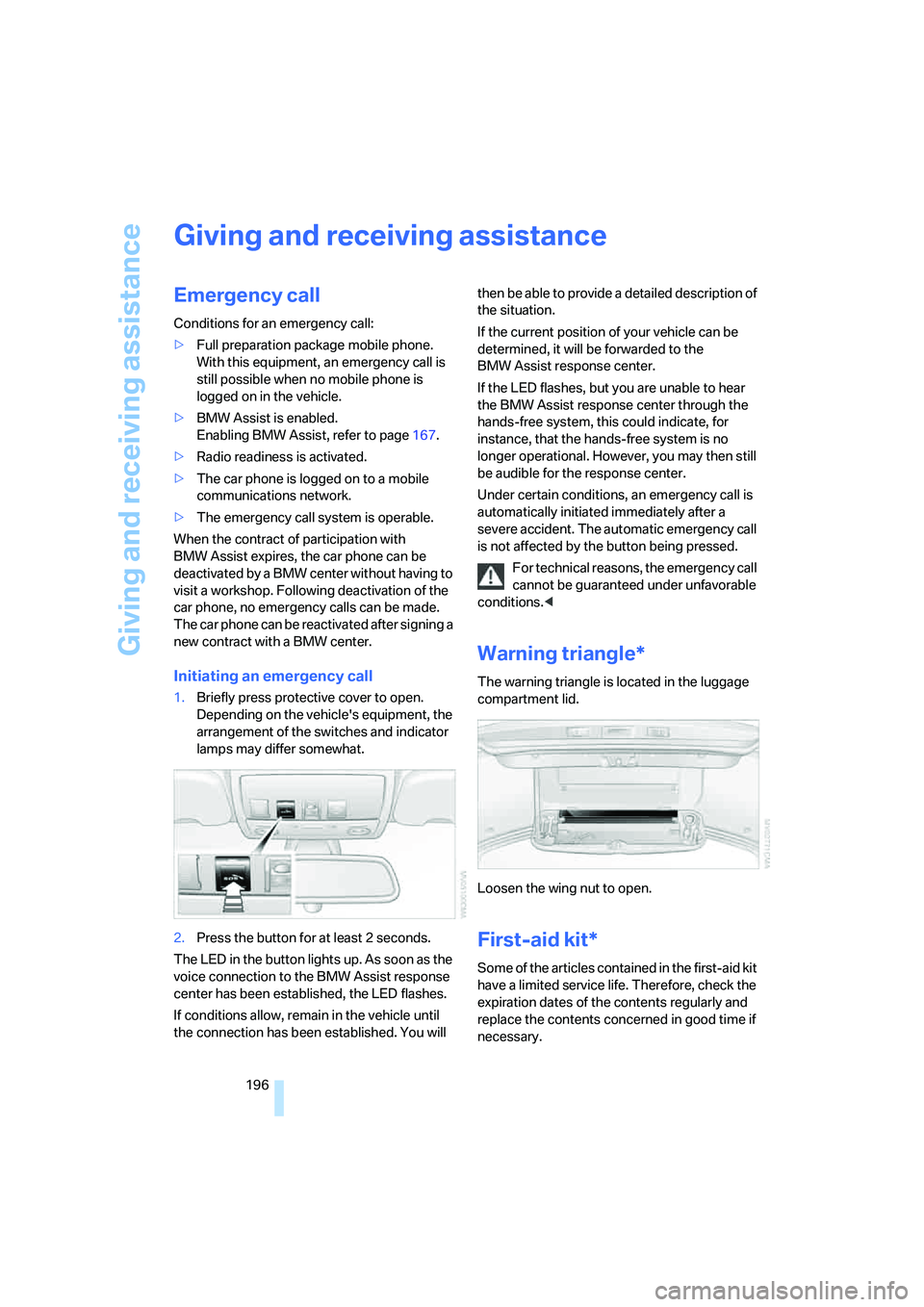
1.Briefly press protective cover to open.
Depending on the vehicle's equipment, the
arrangement of the switches and indicator
lamps may differ somewhat.
2.Press the button for at least 2 seconds.
The LED in the button lights up. As soon as the
voice connection to the BMW Assist response
center has been established, the LED flashes.
If conditions allow, remain in the vehicle until
the connection has been established. You will then be able to provide a detailed description of
the situation.
If the current position of your vehicle can be
determined, it will be forwarded to the
BMW Assist response center.
If the LED flashes, but you are unable to hear
the BMW Assist response center through the
hands-free system, this could indicate, for
instance, that the hands-free system is no
longer operational. However, you may then still
be audible for the response center.
Under certain conditions, an emergency call is
automatically initiated immediately after a
severe accident. The automatic emergency call
is not affected by the button being pressed.
For technical reasons, the emergency call
cannot be guaranteed under unfavorable
conditions.<
Warning triangle*
The warning triangle is located in the luggage
compartment lid.
Loosen the wing nut to open.
First-aid kit*
Some of the articles contained in the first-aid kit
have a limited service life. Therefore, check the
expiration dates of the contents regularly and
replace the contents concerned in good time if
necessary.
Page 199 of 231
Mobility
197Reference
At a glance
Controls
Driving tips
Communications
Navigation
Entertainment
The first-aid kit is located in the luggage com-
partment lid.
Loosen the wing nut to open.
Roadside Assistance*
The Roadside Assistance of the BMW Group
offers you assistance in the event of a break-
down around the clock, including on weekends
and public holidays.
The phone numbers of the Roadside Assis-
tance in your home country can be found in the
Contact brochure.
With BMW Assist or TeleService, you can con-
tact the Roadside Assistance of the BMW
Group for assistance in the event of a break-
down directly via iDrive, refer to page169.
Jump starting
When your battery is discharged, you can use
two jumper cables to start your BMW with
power from the battery in a second vehicle. You
can also use the same method to help start
another vehicle. Use only jumper cables with
fully-insulated clamp handles.
To avoid the risk of potentially fatal injury,
always avoid all contact with electrical
components while the engine is running. Care-
fully adhere to the following sequence, both to
prevent damage to one or both vehicles, and to
guard against possible personal injuries.<
Preparation
1.Check whether the battery of the other
vehicle has a voltage of 12 Volts and
approximately the same capacitance in Ah.
This information can be found on the bat-
tery.
2.Switch off the engine of the assisting vehi-
cle.
3.Switch off any electrical systems and com-
ponents in both vehicles.
There must not be any contact between
the bodies of the two vehicles, otherwise
there is a danger of shorting.<
Connecting jumper cables
To avoid personal injury from sparks, fol-
low this sequence when connecting
jumper cables.<
In your BMW M5, the so-called auxiliary termi-
nal for jump starting in the engine compartment
serves as a positive terminal for the battery, also
refer to engine compartment overview on
page182. The cover cap is marked with a +.
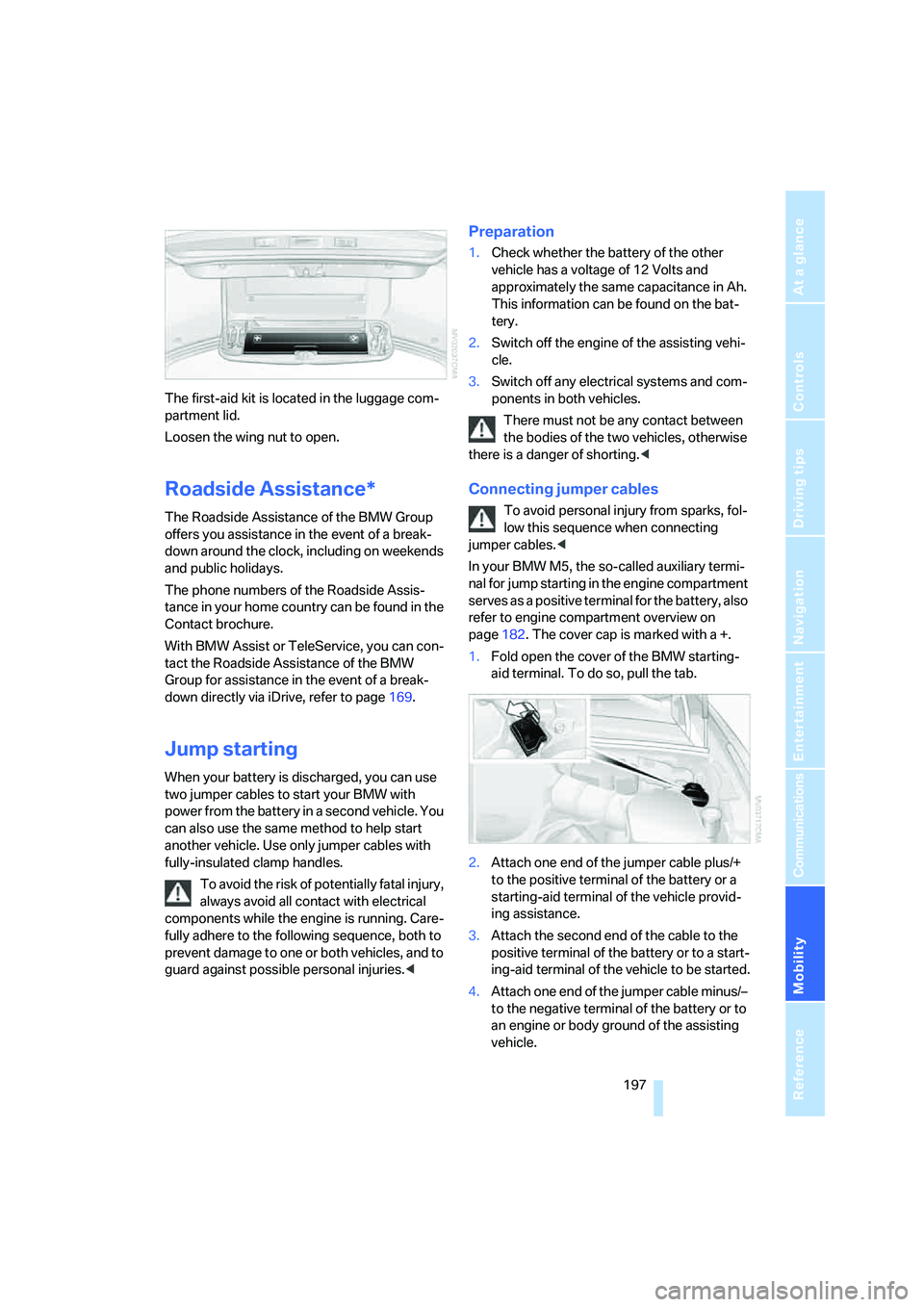
1.Fold open the cover of the BMW starting-
aid terminal. To do so, pull the tab.
2.Attach one end of the jumper cable plus/+
to the positive terminal of the battery or a
starting-aid terminal of the vehicle provid-
ing assistance.
3.Attach the second end of the cable to the
positive terminal of the battery or to a start-
ing-aid terminal of the vehicle to be started.
4.Attach one end of the jumper cable minus/–
to the negative terminal of the battery or to
an engine or body ground of the assisting
vehicle.
Page 207 of 231
Reference 205
At a glance
Controls
Driving tips
Communications
Navigation
Entertainment
Mobility
Short commands of voice command
system
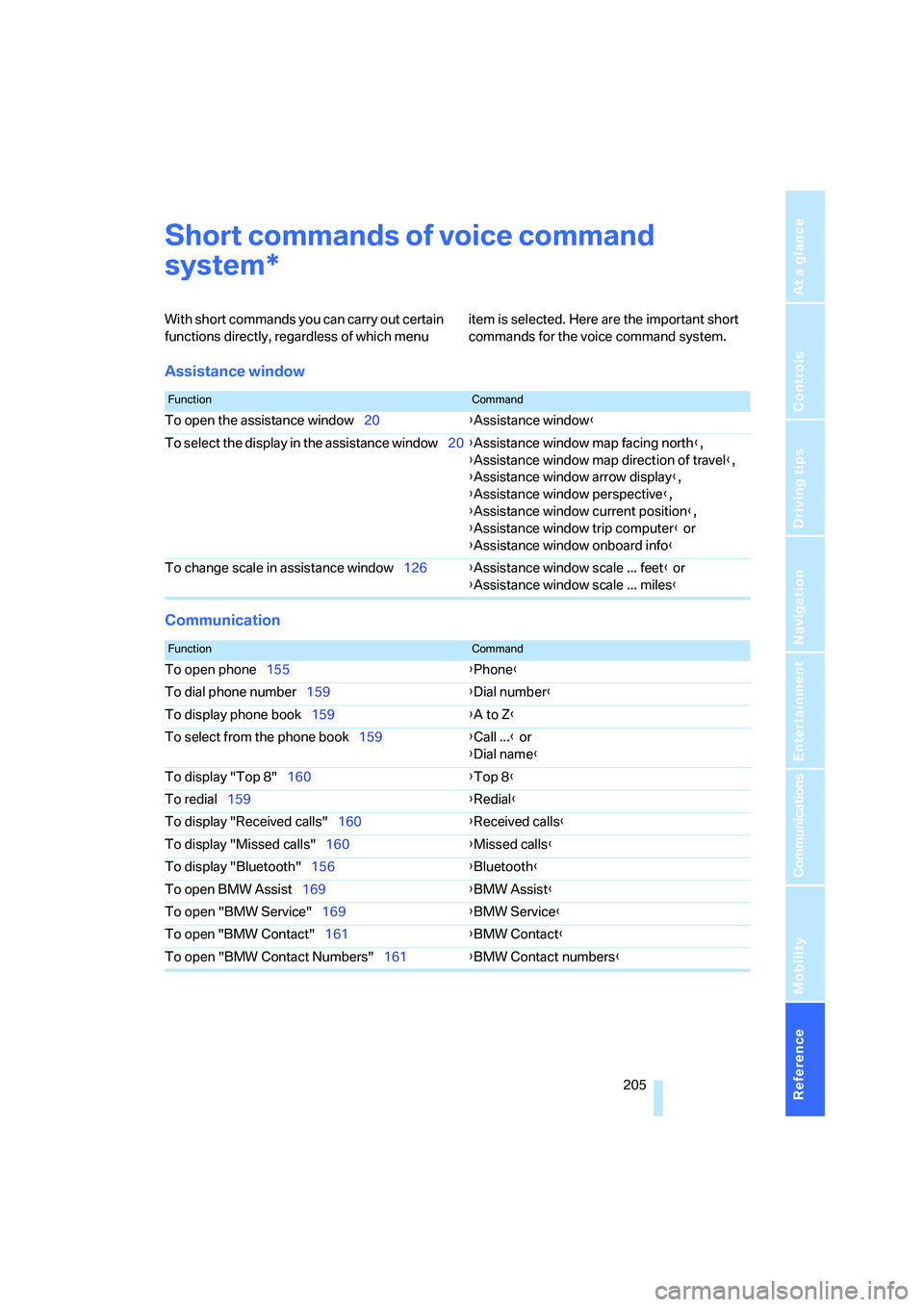
With short commands you can carry out certain
functions directly, regardless of which menu item is selected. Here are the important short
commands for the voice command system.
Assistance window
Communication
*
FunctionCommand
To open the assistance window20{Assistance window}
To select the display in the assistance window20{Assistance window map facing north},
{Assistance window map direction of travel},
{Assistance window arrow display},
{Assistance window perspective},
{Assistance window current position},
{Assistance window trip computer} or
{Assistance window onboard info}
To change scale in assistance window126{Assistance window scale ... feet} or
{Assistance window scale ... miles}
FunctionCommand
To open phone155{Phone}
To dial phone number159{Dial number}
To display phone book159{A to Z}
To select from the phone book159{Call ...} or
{Dial name}
To display "Top 8"160{Top 8}
To redial159{Redial}
To display "Received calls"160{Received calls}
To display "Missed calls"160{Missed calls}
To display "Bluetooth"156{Bluetooth}
To open BMW Assist169{BMW Assist}
To open "BMW Service"169{BMW Service}
To open "BMW Contact"161{BMW Contact}
To open "BMW Contact Numbers"161{BMW Contact numbers}
Page 210 of 231
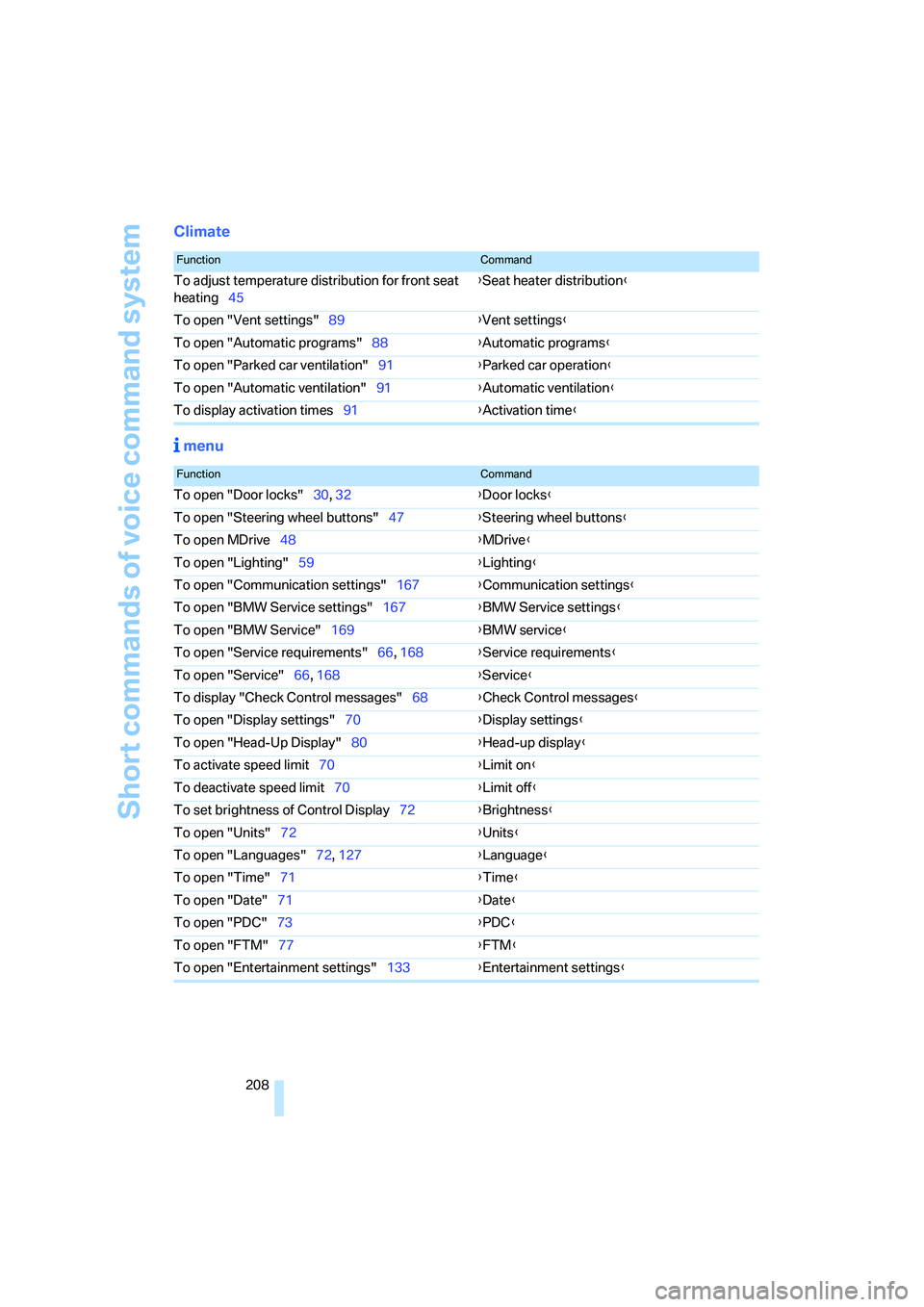
Short commands of voice command system
208
Climate
menu
FunctionCommand
To adjust temperature distribution for front seat
heating45{Seat heater distribution}
To open "Vent settings"89{Vent settings}
To open "Automatic programs"88{Automatic programs}
To open "Parked car ventilation"91{Parked car operation}
To open "Automatic ventilation"91{Automatic ventilation}
To display activation times91{Activation time}
FunctionCommand
To open "Door locks"30, 32{Door locks}
To open "Steering wheel buttons"47{Steering wheel buttons}
To open MDrive48{MDrive}
To open "Lighting"59{Lighting}
To open "Communication settings"167{Communication settings}
To open "BMW Service settings"167{BMW Service settings}
To open "BMW Service"169{BMW service}
To open "Service requirements"66, 168{Service requirements}
To open "Service"66, 168{Service}
To display "Check Control messages"68{Check Control messages}
To open "Display settings"70{Display settings}
To open "Head-Up Display"80{Head-up display}
To activate speed limit70{Limit on}
To deactivate speed limit70{Limit off}
To set brightness of Control Display72{Brightness}
To open "Units"72{Units}
To open "Languages"72, 127{Language}
To open "Time"71{Time}
To open "Date"71{
Date}
To open "PDC"73{PDC}
To open "FTM"77{FTM}
To open "Entertainment settings"133{Entertainment settings}
Page 213 of 231
Reference 211
At a glance
Controls
Driving tips
Communications
Navigation
Entertainment
Mobility
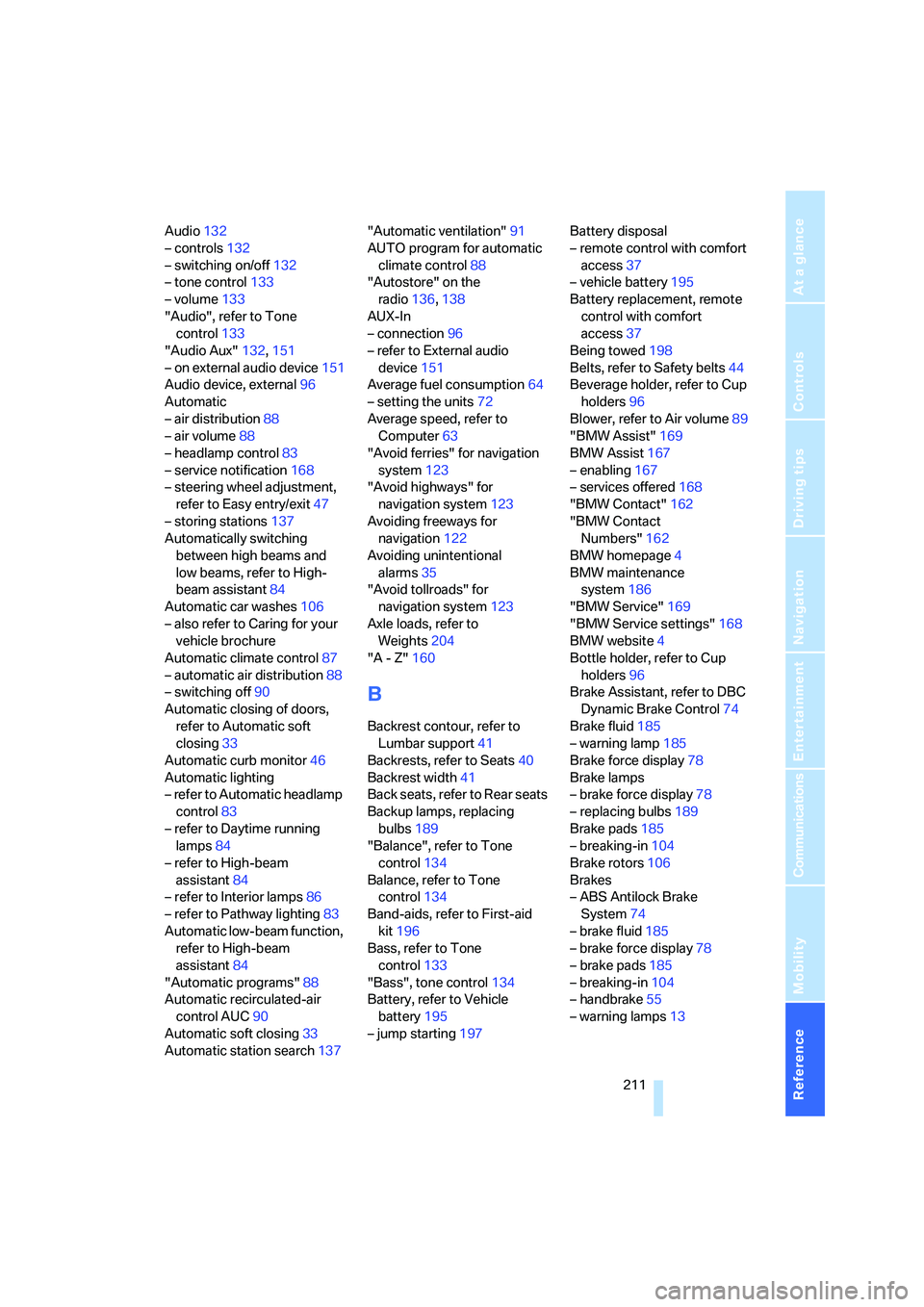
Audio132
– controls132
– switching on/off132
– tone control133
– volume133
"Audio", refer to Tone
control133
"Audio Aux"132,151
– on external audio device151
Audio device, external96
Automatic
– air distribution88
– air volume88
– headlamp control83
– service notification168
– steering wheel adjustment,
refer to Easy entry/exit47
– storing stations137
Automatically switching
between high beams and
low beams, refer to High-
beam assistant84
Automatic car washes106
– also refer to Caring for your
vehicle brochure
Automatic climate control87
– automatic air distribution88
– switching off90
Automatic closing of doors,
refer to Automatic soft
closing33
Automatic curb monitor46
Automatic lighting
– refer to Automatic headlamp
control83
– refer to Daytime running
lamps84
– refer to High-beam
assistant84
– refer to Interior lamps86
– refer to Pathway lighting83
Automatic low-beam function,
refer to High-beam
assistant84
"Automatic programs"88
Automatic recirculated-air
control AUC90
Automatic soft closing33
Automatic station search137"Automatic ventilation"91
AUTO program for automatic
climate control88
"Autostore" on the
radio136,138
AUX-In
– connection96
– refer to External audio
device151
Average fuel consumption64
– setting the units72
Average speed, refer to
Computer63
"Avoid ferries" for navigation
system123
"Avoid highways" for
navigation system123
Avoiding freeways for
navigation122
Avoiding unintentional
alarms35
"Avoid tollroads" for
navigation system123
Axle loads, refer to
Weights204
"A - Z"160
B
Backrest contour, refer to
Lumbar support41
Backrests, refer to Seats40
Backrest width41
Back seats, refer to Rear seats
Backup lamps, replacing
bulbs189
"Balance", refer to Tone
control134
Balance, refer to Tone
control134
Band-aids, refer to First-aid
kit196
Bass, refer to Tone
control133
"Bass", tone control134
Battery, refer to Vehicle
battery195
– jump starting197Battery disposal
– remote control with comfort
access37
– vehicle battery195
Battery replacement, remote
control with comfort
access37
Being towed198
Belts, refer to Safety belts44
Beverage holder, refer to Cup
holders96
Blower, refer to Air volume89
"BMW Assist"169
BMW Assist167
– enabling167
– services offered168
"BMW Contact"162
"BMW Contact
Numbers"162
BMW homepage4
BMW maintenance
system186
"BMW Service"169
"BMW Service settings"168
BMW website4
Bottle holder, refer to Cup
holders96
Brake Assistant, refer to DBC
Dynamic Brake Control74
Brake fluid185
– warning lamp185
Brake force display78
Brake lamps
– brake force display78
– replacing bulbs189
Brake pads185
– breaking-in104
Brake rotors106
Brakes
– ABS Antilock Brake
System74
– brake fluid
185
– brake force display78
– brake pads185
– breaking-in104
– handbrake55
– warning lamps13
Page 214 of 231
Everything from A to Z
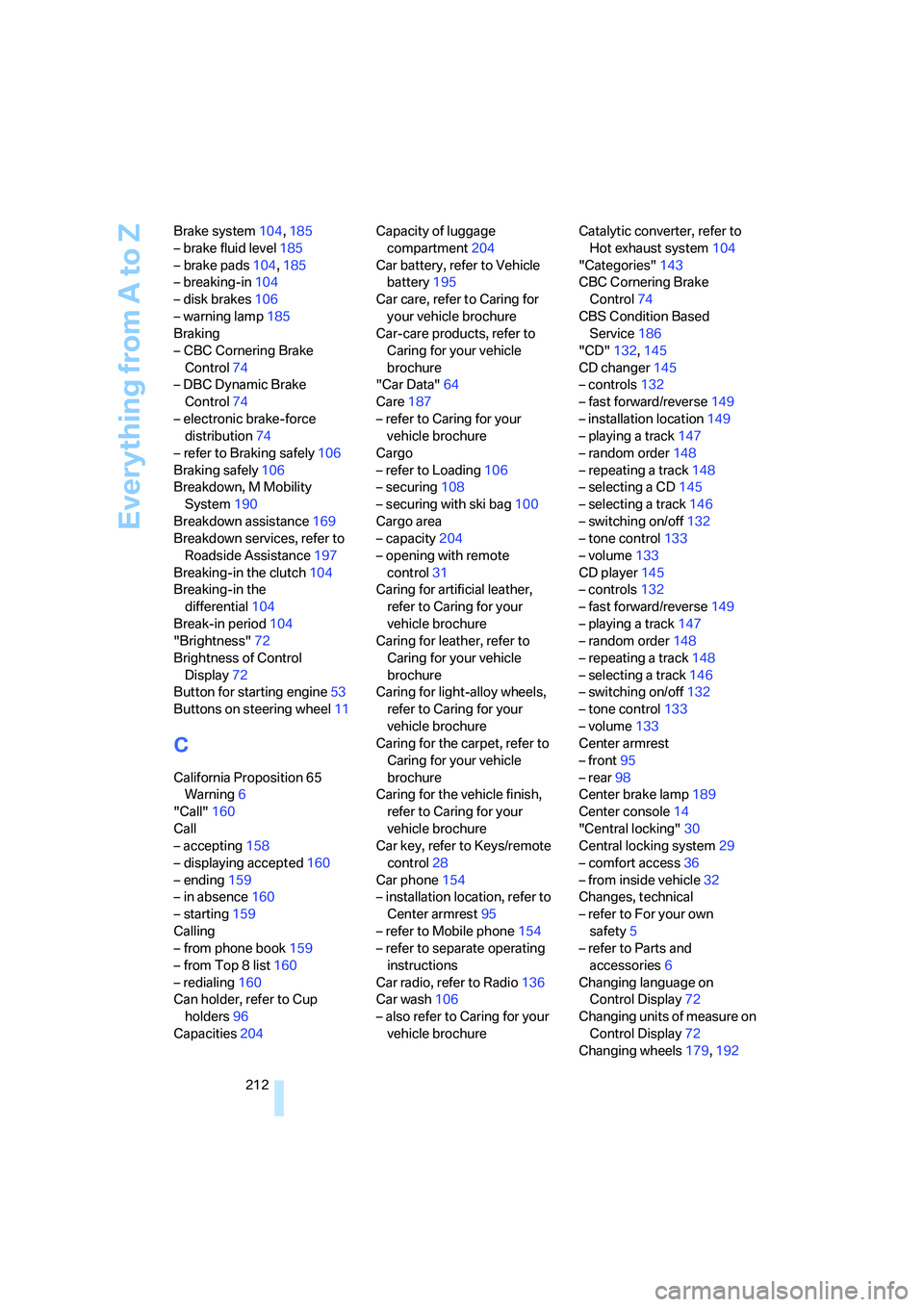
212 Brake system104,185
– brake fluid level185
– brake pads104,185
– breaking-in104
– disk brakes106
– warning lamp185
Braking
– CBC Cornering Brake
Control74
– DBC Dynamic Brake
Control74
– electronic brake-force
distribution74
– refer to Braking safely106
Braking safely106
Breakdown, M Mobility
System190
Breakdown assistance169
Breakdown services, refer to
Roadside Assistance197
Breaking-in the clutch104
Breaking-in the
differential104
Break-in period104
"Brightness"72
Brightness of Control
Display72
Button for starting engine53
Buttons on steering wheel11
C
California Proposition 65
Warning6
"Call"160
Call
– accepting158
– displaying accepted160
– ending159
– in absence160
– starting159
Calling
– from phone book159
– from Top 8 list160
– redialing160
Can holder, refer to Cup
holders96
Capacities204Capacity of luggage
compartment204
Car battery, refer to Vehicle
battery195
Car care, refer to Caring for
your vehicle brochure
Car-care products, refer to
Caring for your vehicle
brochure
"Car Data"64
Care187
– refer to Caring for your
vehicle brochure
Cargo
– refer to Loading106
– securing108
– securing with ski bag100
Cargo area
– capacity204
– opening with remote
control31
Caring for artificial leather,
refer to Caring for your
vehicle brochure
Caring for leather, refer to
Caring for your vehicle
brochure
Caring for light-alloy wheels,
refer to Caring for your
vehicle brochure
Caring for the carpet, refer to
Caring for your vehicle
brochure
Caring for the vehicle finish,
refer to Caring for your
vehicle brochure
Car key, refer to Keys/remote
control28
Car phone154
– installation location, refer to
Center armrest95
– refer to Mobile phone154
– refer to separate operating
instructions
Car radio, refer to Radio136
Car wash106
– also refer to Caring for your
vehicle brochureCatalytic converter, refer to
Hot exhaust system104
"Categories"143
CBC Cornering Brake
Control74
CBS Condition Based
Service186
"CD"132,145
CD changer145
– controls132
– fast forward/reverse149
– installation location149
– playing a track147
– random order148
– repeating a track148
– selecting a CD145
– selecting a track146
– switching on/off132
– tone control133
– volume133
CD player145
– controls132
– fast forward/reverse149
– playing a track147
– random order148
– repeating a track148
– selecting a track146
– switching on/off132
– tone control133
– volume133
Center armrest
– front95
– rear98
Center brake lamp189
Center console14
"Central locking"30
Central locking system29
– comfort access36
– from inside vehicle32
Changes, technical
– refer to For your own
safety5
– refer to Parts and
accessories6
Changing language on
Control Display72
Changing units of measure on
Control Display72
Changing wheels179,192
Page 215 of 231
Reference 213
At a glance
Controls
Driving tips
Communications
Navigation
Entertainment
Mobility
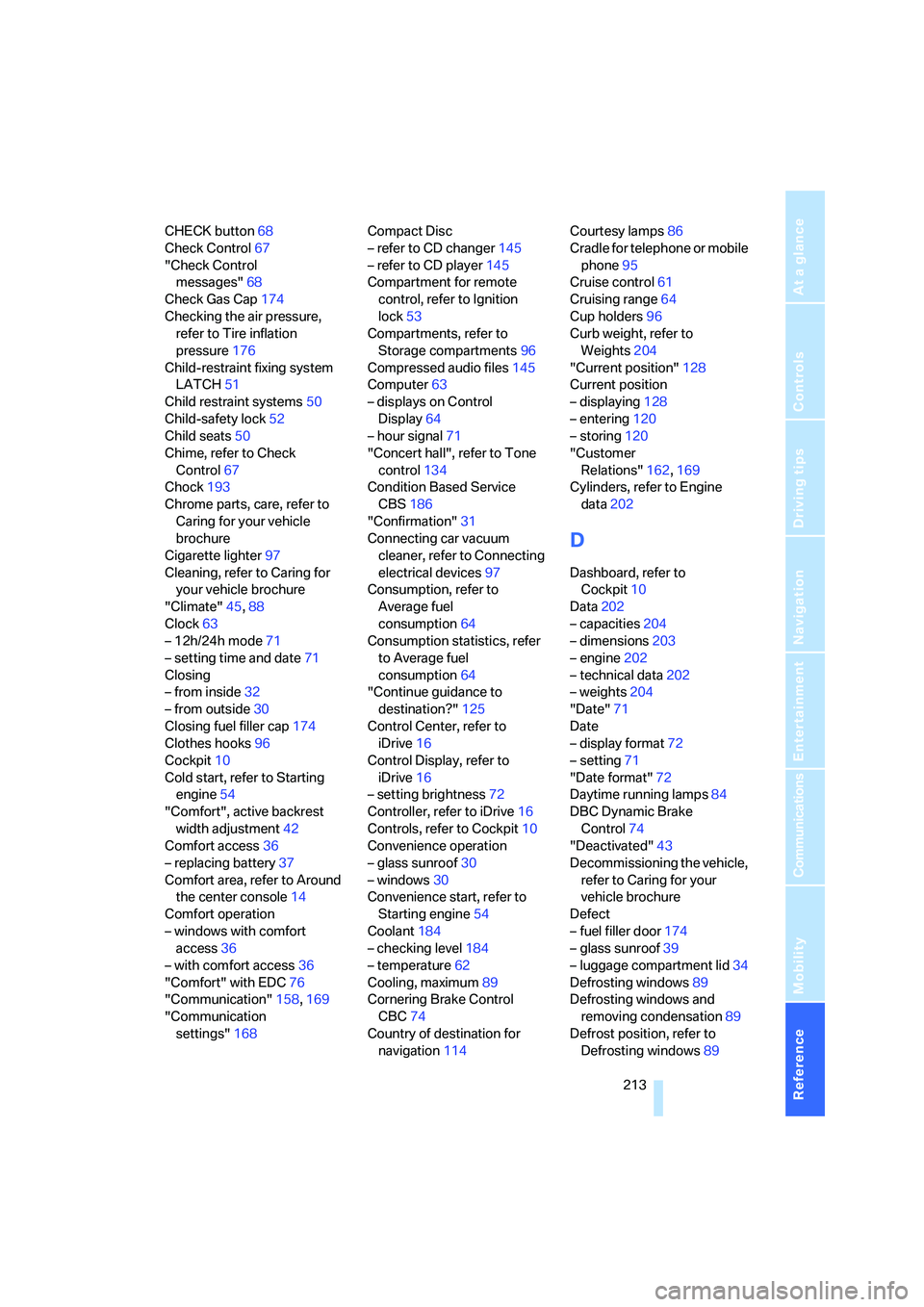
CHECK button68
Check Control67
"Check Control
messages"68
Check Gas Cap174
Checking the air pressure,
refer to Tire inflation
pressure176
Child-restraint fixing system
LATCH51
Child restraint systems50
Child-safety lock52
Child seats50
Chime, refer to Check
Control67
Chock193
Chrome parts, care, refer to
Caring for your vehicle
brochure
Cigarette lighter97
Cleaning, refer to Caring for
your vehicle brochure
"Climate"45,88
Clock63
– 12h/24h mode71
– setting time and date71
Closing
– from inside32
– from outside30
Closing fuel filler cap174
Clothes hooks96
Cockpit10
Cold start, refer to Starting
engine54
"Comfort", active backrest
width adjustment42
Comfort access36
– replacing battery37
Comfort area, refer to Around
the center console14
Comfort operation
– windows with comfort
access36
– with comfort access36
"Comfort" with EDC76
"Communication"158,169
"Communication
settings"168Compact Disc
– refer to CD changer145
– refer to CD player145
Compartment for remote
control, refer to Ignition
lock53
Compartments, refer to
Storage compartments96
Compressed audio files145
Computer63
– displays on Control
Display64
– hour signal
71
"Concert hall", refer to Tone
control134
Condition Based Service
CBS186
"Confirmation"31
Connecting car vacuum
cleaner, refer to Connecting
electrical devices97
Consumption, refer to
Average fuel
consumption64
Consumption statistics, refer
to Average fuel
consumption64
"Continue guidance to
destination?"125
Control Center, refer to
iDrive16
Control Display, refer to
iDrive16
– setting brightness72
Controller, refer to iDrive16
Controls, refer to Cockpit10
Convenience operation
– glass sunroof30
– windows30
Convenience start, refer to
Starting engine54
Coolant184
– checking level184
– temperature62
Cooling, maximum89
Cornering Brake Control
CBC74
Country of destination for
navigation114Courtesy lamps86
Cradle for telephone or mobile
phone95
Cruise control61
Cruising range64
Cup holders96
Curb weight, refer to
Weights204
"Current position"128
Current position
– displaying128
– entering120
– storing120
"Customer
Relations"162,169
Cylinders, refer to Engine
data202
D
Dashboard, refer to
Cockpit10
Data202
– capacities204
– dimensions203
– engine202
– technical data202
– weights204
"Date"71
Date
– display format72
– setting71
"Date format"72
Daytime running lamps84
DBC Dynamic Brake
Control74
"Deactivated"43
Decommissioning the vehicle,
refer to Caring for your
vehicle brochure
Defect
– fuel filler door174
– glass sunroof39
– luggage compartment lid34
Defrosting windows89
Defrosting windows and
removing condensation89
Defrost position, refer to
Defrosting windows89
Page 217 of 231
Reference 215
At a glance
Controls
Driving tips
Communications
Navigation
Entertainment
Mobility
Electronic brake-force
distribution74
Electronic Damping Control
EDC76
Emergency call196
Emergency operation, refer to
Manual operation
– door lock32
– driver's door32
– fuel filler door174
– glass sunroof39
– luggage compartment lid34
Emergency release for
luggage compartment lid in
luggage compartment34
Emergency services, refer to
Roadside Assistance197
"Emission inspect."67
"Enable services"168
"End call"159
Engaging driving position,
refer to Selector lever
positions55
Engaging forward position,
refer to Selector lever
positions55
Engine
– breaking-in104
– data202
– M Engine Dynamic
Control58
– overheated, refer to Coolant
temperature62
– speed202
– starting54
– starting, comfort access36
– starting difficulties54
– switching off54
Engine compartment182
Engine coolant184
Engine oil
– adding183
– additives, refer to Approved
engine oils184
– approved engine oil184
– checking oil level182
– exact measurement183
– fast measurement183
– possible displays183Engine oil thermometer63
Engine output, refer to Engine
data202
Engine overheating, refer to
Coolant temperature62
Engine speed202
Engine starting, refer to
Starting engine54
"Enter address"114,120
Entering destination via town/
city name114
Entering the
address113,116
Entering the intersection115
Entering town/city for
navigation114
Entering zip code for
navigation115
"Entertainment"132
"Entertainment
settings"133,140
Entertainment sound output
on/off133
Entry map for destination117
"Equalizer", refer to Tone
control135
Equalizer, refer to Tone
control135
"ESN"142
ESP Electronic Stability
Program, refer to DSC
Dynamic Stability
Control74
Event Data Recorders187
Exhaust system, refer to Hot
exhaust system104
Exterior mirrors45
– automatic dimming
feature105
– automatic heating46
– folding in and out46
– tilting down passenger-side
exterior mirror46
External audio device96,151
Eye for tow-starting and
towing, refer to Tow
fitting198
F
"Fader", refer to Tone
control134
Fader, refer to Tone
control134
Failure messages, refer to
Check Control67
False alarm, refer to Avoiding
unintentional alarms35
Fastening safety belts, refer to
Safety belts44
– warning lamp44
Fastest route for
navigation122
"Fast route" for
navigation123
"Favorites" calling up with
radio139
Filling bottle, refer to
M Mobility System190
Filling sealant into wheel191
First aid, refer to First-aid
kit196
First-aid kit196
Flashing during locking/
unlocking, refer to Setting
confirmation signals31
Flashlight, refer to
Rechargeable flashlight95
Flat tire
– changing wheels192
– Flat Tire Monitor76,77
– M Mobility System77,190
– spare wheel193
Flat Tire Monitor76
– false alarms77
– initializing system77
– show chains180
– system limits77
– warning lamp77
Flat tires, refer to Tire
condition178
"FM", reception
range132,136
FM, waveband136
Folding rear seat back98
Fold-over rear seat back98
Page 220 of 231
Everything from A to Z
218 Last destinations, refer to
Destination list119
"Last seat pos."43
LATCH child-restraint fixing
system51
Length, refer to
Dimensions203
License plate lamp, replacing
bulbs190
Light-emitting diodes
LEDs188
Lighter97
Lighter socket97
"Lighting"59,83
Lighting
– instruments86
– of the vehicle, refer to
Lamps83
– refer to High-beam
assistant84
Light switch83
"Limit"69
Loading
– securing cargo108
– stowing cargo107
– vehicle106
"Lock after driving"33
Lock buttons in the doors,
refer to Locking33
Locking
– from inside33
– from outside31
– setting confirmation
signals31
– without key, refer to Comfort
access36
Locking and unlocking doors
– from inside32
– from outside30
– setting confirmation
signals31
Locking out, refer to
Unlocking36
Locking without key, refer to
Comfort access36
Low beams83
– automatic83
– indicator lamp13Lower back support, refer to
Lumbar support41
Lug bolts193
– tightening torque, refer to
After mounting194
– wrench193
Luggage compartment
– capacity204
– emergency release34
– opening/closing, refer to
Luggage compartment
lid33
– opening from inside33
– opening from outside33
– opening with remote
control31
– socket98
Luggage compartment lid33
– emergency release34
– locking with remote
control31
– opening from inside33
– opening from outside33
– opening with remote
control31
– unlocking and locking from
inside32
Luggage rack, refer to Roof-
mounted luggage rack108
Lumbar support41
LW, waveband136
M
M Dynamic Mode MDM75
– indicator lamp13,75
M Engine Dynamic Control58
– "P 400"58
– "P 500"58
– "P 500 Sport"58
M Mobility System190
M+S tires, refer to Winter
tires180Maintenance
– refer to Service and
Warranty Information
Booklet for US models186
– refer to Service
requirements66
– refer to Warranty and
Service Guide Booklet for
Canadian models186
Maintenance system186
Malfunction warnings, refer to
Check Control67
Manual air distribution89
Manually controlled recircu-
lated air90
"Manual" on the radio137
Manual operation
– door lock32
– driver's door32
– fuel filler door174
– glass sunroof39
– luggage compartment lid34
"Map direction of travel"126
Map display126
Map display facing north126
"Map facing north"126
Map for navigation
– changing scale126
– destination entry117
Master key, refer to Keys/
remote control28
Maximum cooling89
Maximum speed for winter
tires180
MDM, refer to M Dynamic
Mode75
"MDrive"48,75
MDrive48
"M Dynamic Mode"75
Memory, refer to Seat, mirror
and steering wheel
memory42
Menus, refer to iDrive16
Microfilter91
Microphone
– for telephone14
– for voice command
system14
Mirror dimming feature105