inflation pressure BMW M5 2007 User Guide
[x] Cancel search | Manufacturer: BMW, Model Year: 2007, Model line: M5, Model: BMW M5 2007Pages: 253, PDF Size: 8.57 MB
Page 214 of 253
Replacing components
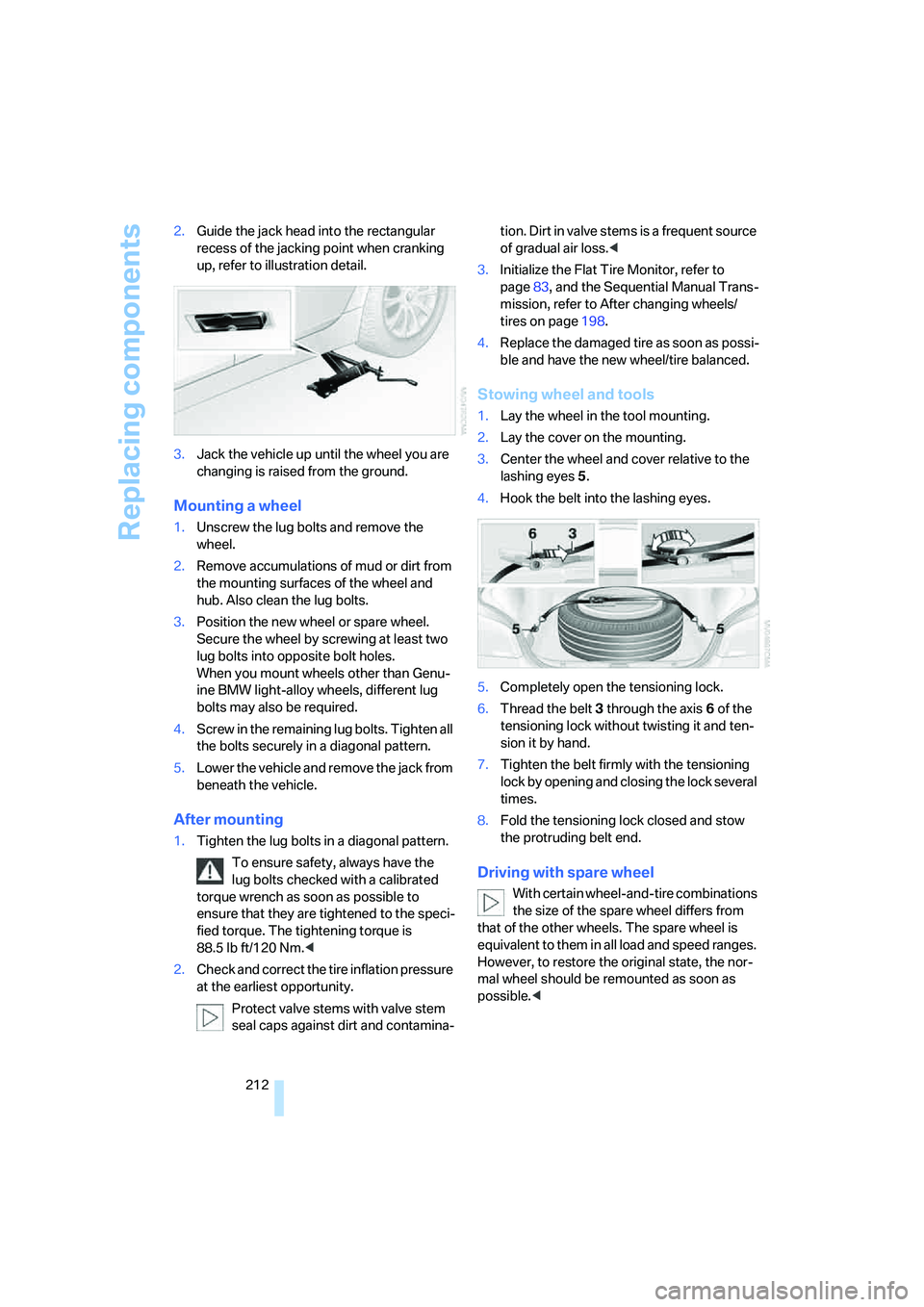
212 2.Guide the jack head into the rectangular
recess of the jacking point when cranking
up, refer to illustration detail.
3.Jack the vehicle up until the wheel you are
changing is raised from the ground.
Mounting a wheel
1.Unscrew the lug bolts and remove the
wheel.
2.Remove accumulations of mud or dirt from
the mounting surfaces of the wheel and
hub. Also clean the lug bolts.
3.Position the new wheel or spare wheel.
Secure the wheel by screwing at least two
lug bolts into opposite bolt holes.
When you mount wheels other than Genu-
ine BMW light-alloy wheels, different lug
bolts may also be required.
4.Screw in the remaining lug bolts. Tighten all
the bolts securely in a diagonal pattern.
5.Lower the vehicle and remove the jack from
beneath the vehicle.
After mounting
1.Tighten the lug bolts in a diagonal pattern.
To ensure safety, always have the
lug bolts checked with a calibrated
torque wrench as soon as possible to
ensure that they are tightened to the speci-
fied torque. The tightening torque is
88.5 lb ft/120 Nm.<
2.Check and correct the tire inflation pressure
at the earliest opportunity.
Protect valve stems with valve stem
seal caps against dirt and contamina-tion. Dirt in valve stems is a frequent source
of gradual air loss.<
3.Initialize the Flat Tire Monitor, refer to
page83, and the Sequential Manual Trans-
mission, refer to After changing wheels/
tires on page198.
4.Replace the damaged tire as soon as possi-
ble and have the new wheel/tire balanced.
Stowing wheel and tools
1.Lay the wheel in the tool mounting.
2.Lay the cover on the mounting.
3.Center the wheel and cover relative to the
lashing eyes5.
4.Hook the belt into the lashing eyes.
5.Completely open the tensioning lock.
6.Thread the belt3 through the axis6 of the
tensioning lock without twisting it and ten-
sion it by hand.
7.Tighten the belt firmly with the tensioning
lock by opening and closing the lock several
times.
8.Fold the tensioning lock closed and stow
the protruding belt end.
Driving with spare wheel
With certain wheel-and-tire combinations
the size of the spare wheel differs from
that of the other wheels. The spare wheel is
equivalent to them in all load and speed ranges.
However, to restore the original state, the nor-
mal wheel should be remounted as soon as
possible.<
Page 235 of 253
Reference 233
At a glance
Controls
Driving tips
Communications
Navigation
Entertainment
Mobility
CD changer159
– controls146
– fast forward/reverse163
– installation location163
– random order162
– repeating a track162
– sampling tracks161
– selecting a CD159
– selecting a track160
– switching on/off146
– tone control147
– volume147
CD player159
– controls146
– fast forward/reverse163
– random order162
– repeating a track162
– sampling a track161
– selecting a track160
– switching on/off146
– tone control147
– volume147
Center armrest
– front104
– rear107
Center brake lamp207
Center console14
"Central locking"30
Central locking
– from inside32
– from outside30
Central locking system30
– comfort access36
Change "Route
preference"131
Changes, technical, refer to
For your own safety5
Changes, technical, refer to
Parts and accessories6
Changing language on
Control Display76
Changing scale for
navigation135
Changing units of measure on
Control Display76
Changing wheels197,210
CHECK button72
Check Control71"Check Control
messages"72
Check Gas Cap192
Checking the air pressure,
refer to Tire inflation
pressure194
Child restraint fixing system
LATCH53
Child restraint systems52
Child-safety lock54
Child seats, refer to
Transporting children
safely52
Chime, refer to Check
Control71
Chock211
Chrome parts, refer to Caring
for your vehicle brochure
Cigarette lighter106
Cigarette lighter socket, refer
to Connecting electrical
devices106
Cleaning, refer to Caring for
your vehicle brochure
"Climate"46,97
Clock67
– 12h/24h mode75
– hour signal75
– setting time and date74
Closing
– from inside32
– from outside30
Closing fuel filler cap192
Clothes hooks105
Cockpit10
Cold start, refer to Starting
engine56
"Comfort", active backrest
width adjustment43
Comfort access36
– replacing battery, remote
control37
Comfort area, refer to Around
the center console14Comfort operation
– glass sunroof31
– windows31
– windows with comfort
access37
– with comfort access37
"Comfort" with EDC82
"Communication"173,183
Compact Disc
– refer to CD changer159
– refer to CD player159
Compartment for remote
control, refer to Ignition
lock55
Compartments, refer to
Storage compartments105
Compressed audio files159
Computer67
– clock67
– displays on Control
Display68
– hour signal75
"Concert hall", refer to Tone
control148
"Concierge"
185
Condensation, refer to When
vehicle is parked114
Condition Based Service
CBS204
"Confirmation"31
Confirmation signals for
locking and unlocking31
Connecting car vacuum
cleaner, refer to Connecting
electrical devices106
Consumption, refer to
Average fuel
consumption68
Consumption statistics, refer
to Average fuel
consumption68
"Continue guidance to
destination?"134
Control Center, refer to
iDrive16
Page 240 of 253
Everything from A to Z
238 Height adjustment
– seats42
– steering wheel48
High beams94
– headlamp flasher94
– indicator lamp13
High Definition Radio154
High water, refer to Driving
through water113
Hills114
Holder for cups105
"Home address" for
navigation130
Homepage of BMW4
Hood199
Horn10
Hot exhaust system112
"Hour memo"75
"House number" for
destination entry124
Hydraulic brake assistant,
refer to DBC Dynamic Brake
Control80
Hydroplaning113
I
IBOC, refer to High Definition
Radio154
Ice, refer to Outside
temperature warning67
ID3 tag, refer to Information on
track161
Identification marks
– recommended tire
brands198
– tire coding195
Idle58iDrive16
– assistance window20
– automatic climate control
with expanded scope97
– changing date and time74
– changing language76
– changing menu page19
– changing settings74
– changing units of measure
and display type76
– confirming selection or
entry19
– controller16
– controls16
– displays, menus17
– operating principle17
– selecting menu item19
– setting brightness76
– start menu17
– status information20
– symbols18
Ignition55
– switched off56
– switched on55
Ignition key, refer to Keys/
remote control28
Ignition key position 1, refer to
Radio readiness55
Ignition key position 2, refer to
Ignition on55
Ignition lock55
– starting engine with comfort
access37
i menu17
Imprint2
Indicator/warning lamps
– ABS Antilock Brake
System81
– airbags88
– brake system81
– DSC13,80
– Flat Tire Monitor84
– high beams13
– MDrive13,51
– M Dynamic Mode
13,80
– parking lamps/low beams13
– safety belt warning46
– TPM Tire Pressure
Monitor85Indicator and warning
lamps13
Inflation pressure, refer to Tire
inflation pressure194
Inflation pressure monitoring,
refer to Flat Tire Monitor82
Inflation pressure monitoring,
refer to TPM Tire Pressure
Monitor84
Info menu17
Information
– on another location127
– on current position127
– on destination location127
"Information" for
navigation127
Information menu, refer to
imenu17
"Information on
destination"128
Information service185
"Info sources"70
Initializing
– Flat Tire Monitor83
– radio, refer to Storing
stations152
– refer to Power failure213
– refer to Setting time and
date74
– seat, mirror and steering
wheel memory43
"Input map"126
Installation location
– CD changer163
– drive for navigation DVD120
– mobile phone104
Instructions for navigation
system, refer to Voice
instructions136
Instrument cluster12
Instrument illumination, refer
to Instrument lighting94
Instrument lighting94
Page 248 of 253
Everything from A to Z
246 Swiveling headlamps, refer to
Adaptive Head Light93
Symbols4
– indicator/warning lamps13
– navigation system139
– status information20
– traffic information with
navigation system137
T
Tachometer66
Tail lamps207
– replacing bulbs207
Tank contents, refer to
Capacities224
Target cursor for
navigation126
Technical alterations, refer to
For your own safety5
Technical data222
– capacities224
– dimensions223
Telematics, refer to
BMW Assist182
Telephone
– installation location, refer to
Center armrest104
– refer to Mobile phone168
"Telephone list"49
TeleService184
Temperature
– adjusting in upper body
region97
– adjusting with automatic
climate control97
– changing units of
measure76
– refer to Coolant
temperature66
Temperature display
– changing units of
measure76
– outside temperature66
– outside temperature
warning67
Temperature gauge, engine
oil67Tempomat, refer to Cruise
control64
"Terminate services"187
"Text language"77
"Theater", refer to Tone
control148
The individual vehicle5
Third brake lamp, refer to
Center brake lamp207
Through-loading system108
Tightening torque of the lug
bolts, refer to After
mounting212
Tilt alarm sensor35
– switching off36
Tilting down passenger-side
exterior mirror48
"Time"75
"Time / Date"74
"Time format"75
Timer, refer to Preselecting
activation times100
"Timer 1" for parked car
ventilation101
"Timer 2" for parked car
ventilation101
Tire inflation pressures194
Tire pressure loss84
Tire Pressure Monitor
TPM84
Tire Quality Grading196
Tire replacement, new wheels
and tires197Tires
– age195
– air loss84,85
– breaking-in112
– changing197
– condition196
– damage197
– flat tire, refer to Changing
wheels210
– inflation pressure194
– M Mobility System208
– new wheels and tires197
– pressure monitoring, refer to
Flat Tire Monitor82
– pressure monitoring, refer to
TPM Tire Pressure
Monitor84
– replacing210
– retreaded tires197
– size195
– tread196
– wear indicators196
– wheel/tire combination197
– winter tires198
"Tires, FTM"83
Tire trouble
– changing wheels210
"Tone"147
Tone dialing method176
Tone in audio mode
– adjusting147
– middle setting149
Tone on locking/unlocking31
Tools, refer to Onboard
toolkit206
"Top 8" for mobile phone174
Torque
– lug bolts, refer to After
mounting212
– refer to Engine data222
Touch tone dialing, refer to
Tone dialing method176
Tow bar217
Tow fitting216
Page 251 of 253
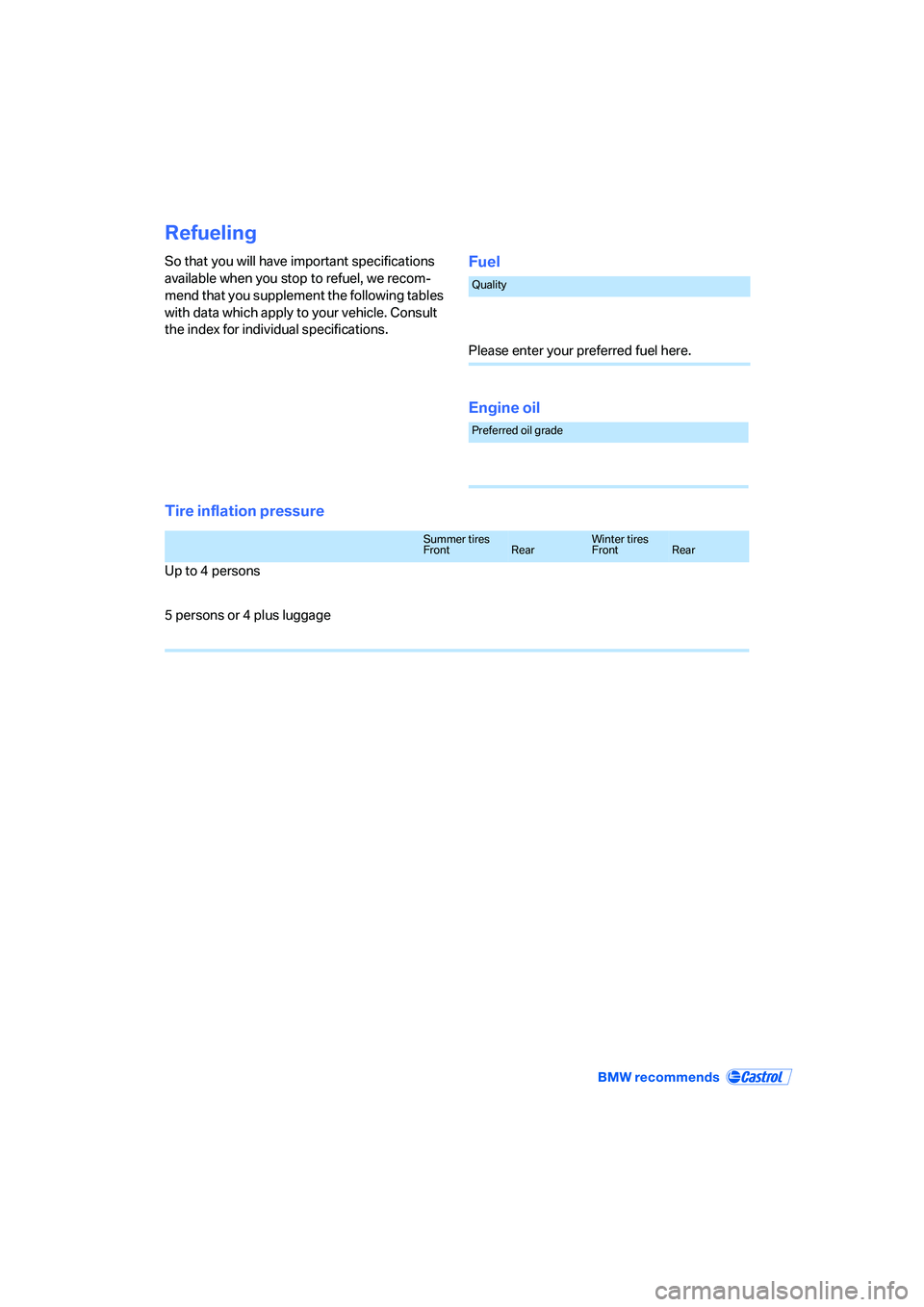
Refueling
So that you will have important specifications
available when you stop to refuel, we recom-
mend that you supplement the following tables
with data which apply to your vehicle. Consult
the index for individual specifications.Fuel
Engine oil
Tire inflation pressure
Quality
Please enter your preferred fuel here.
Preferred oil grade
Summer tires
FrontRearWinter tires
FrontRear
Up to 4 persons
5 persons or 4 plus luggage