reset BMW M5 2007 User Guide
[x] Cancel search | Manufacturer: BMW, Model Year: 2007, Model line: M5, Model: BMW M5 2007Pages: 253, PDF Size: 8.57 MB
Page 152 of 253
Radio
150
Radio
Your radio provides reception of the FM and AM
wavebands.
Listening to radio
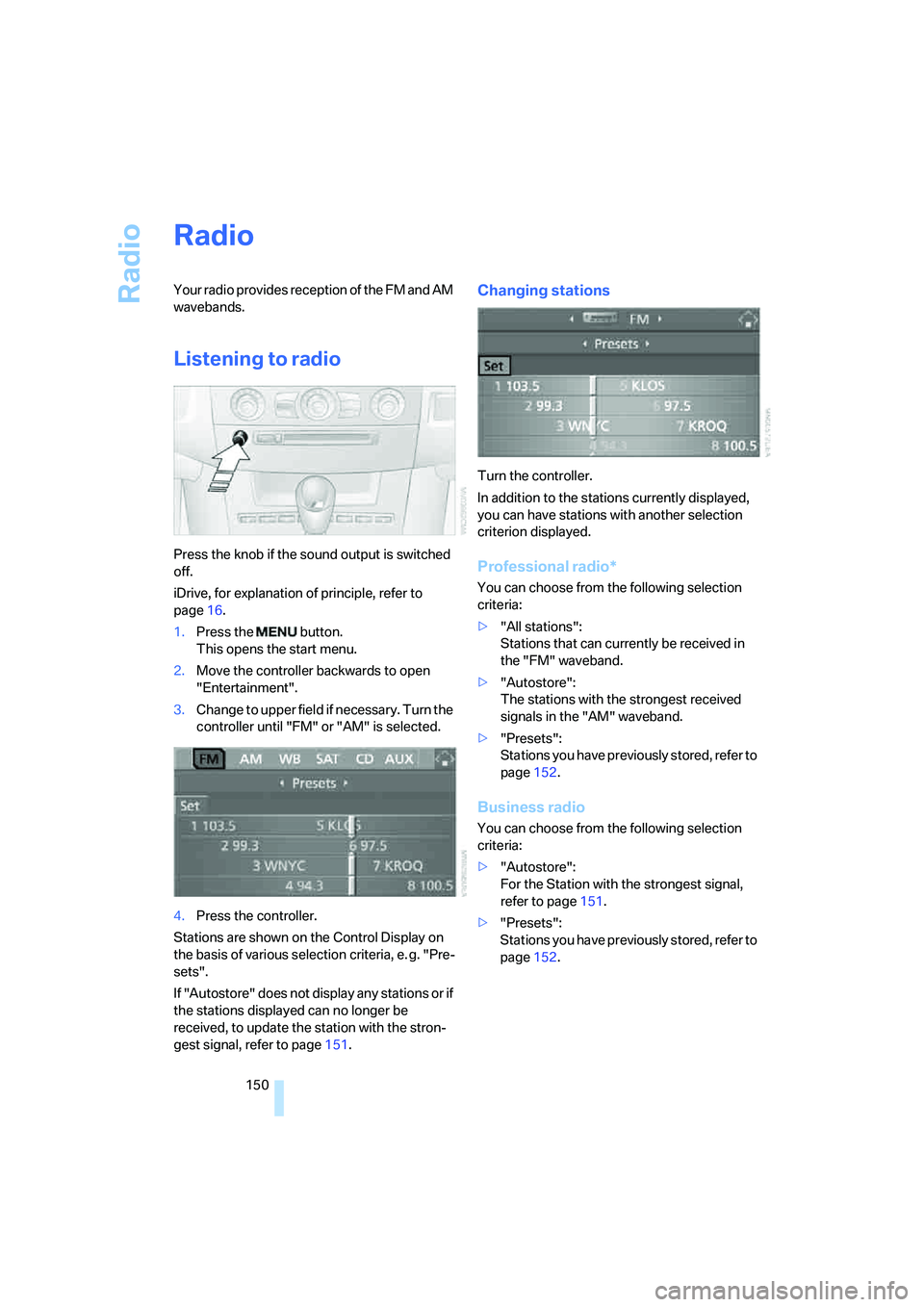
Press the knob if the sound output is switched
off.
iDrive, for explanation of principle, refer to
page16.
1.Press the button.
This opens the start menu.
2.Move the controller backwards to open
"Entertainment".
3.Change to upper field if necessary. Turn the
controller until "FM" or "AM" is selected.
4.Press the controller.
Stations are shown on the Control Display on
the basis of various selection criteria, e. g. "Pre-
sets".
If "Autostore" does not display any stations or if
the stations displayed can no longer be
received, to update the station with the stron-
gest signal, refer to page151.
Changing stations
Turn the controller.
In addition to the stations currently displayed,
you can have stations with another selection
criterion displayed.
Professional radio*
You can choose from the following selection
criteria:
>"All stations":
Stations that can currently be received in
the "FM" waveband.
>"Autostore":
The stations with the strongest received
signals in the "AM" waveband.
>"Presets":
Stations you have previously stored, refer to
page152.
Business radio
You can choose from the following selection
criteria:
>"Autostore":
For the Station with the strongest signal,
refer to page151.
>"Presets":
Stations you have previously stored, refer to
page152.
Page 154 of 253
Radio
152 4.Press the controller.
Other menu items are displayed.
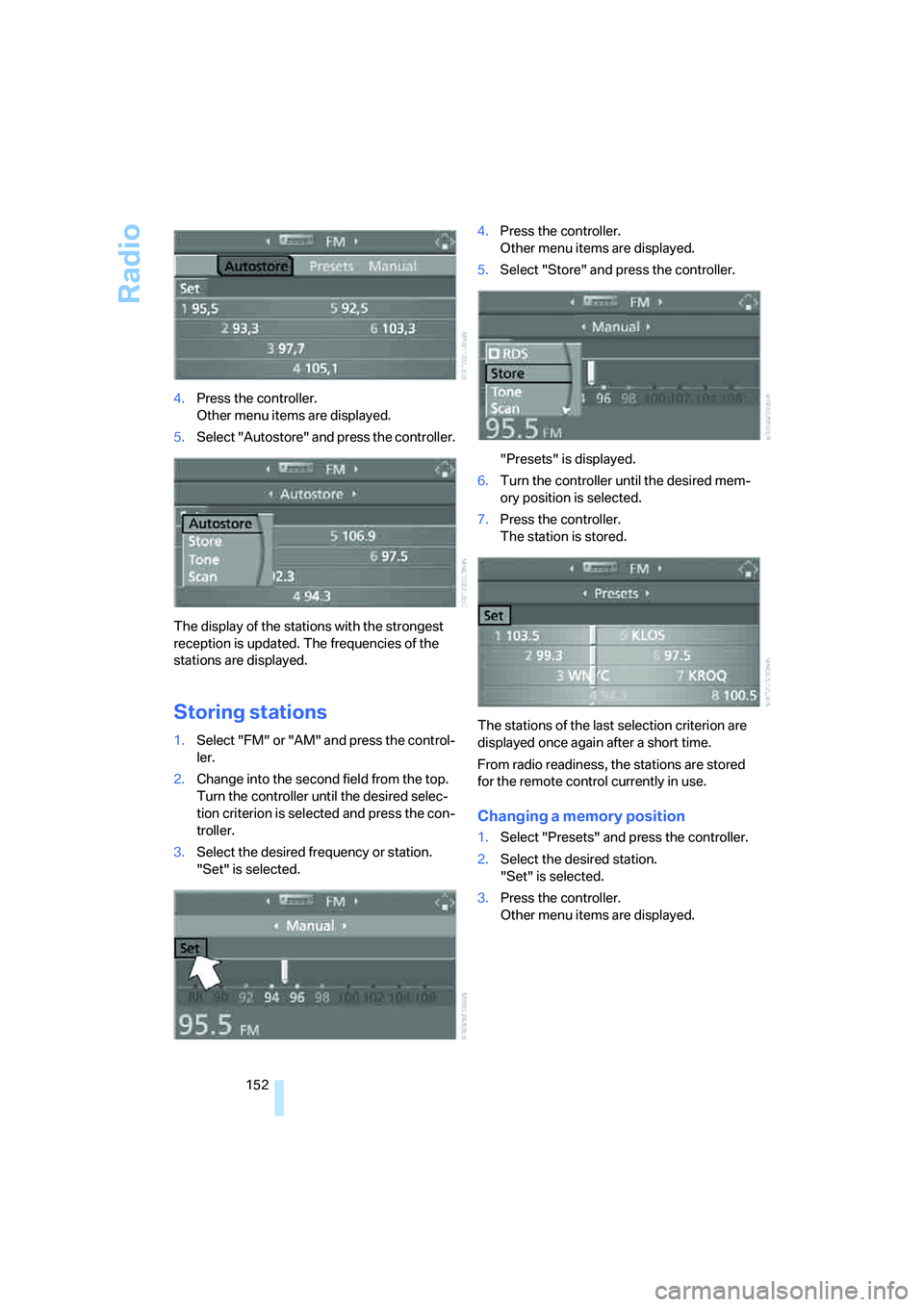
5.Select "Autostore" and press the controller.
The display of the stations with the strongest
reception is updated. The frequencies of the
stations are displayed.
Storing stations
1.Select "FM" or "AM" and press the control-
ler.
2.Change into the second field from the top.
Turn the controller until the desired selec-
tion criterion is selected and press the con-
troller.
3.Select the desired frequency or station.
"Set" is selected.4.Press the controller.
Other menu items are displayed.
5.Select "Store" and press the controller.
"Presets" is displayed.
6.Turn the controller until the desired mem-
ory position is selected.
7.Press the controller.
The station is stored.
The stations of the last selection criterion are
displayed once again after a short time.
From radio readiness, the stations are stored
for the remote control currently in use.
Changing a memory position
1.Select "Presets" and press the controller.
2.Select the desired station.
"Set" is selected.
3.Press the controller.
Other menu items are displayed.
Page 158 of 253
Radio
156 4.Press the controller.
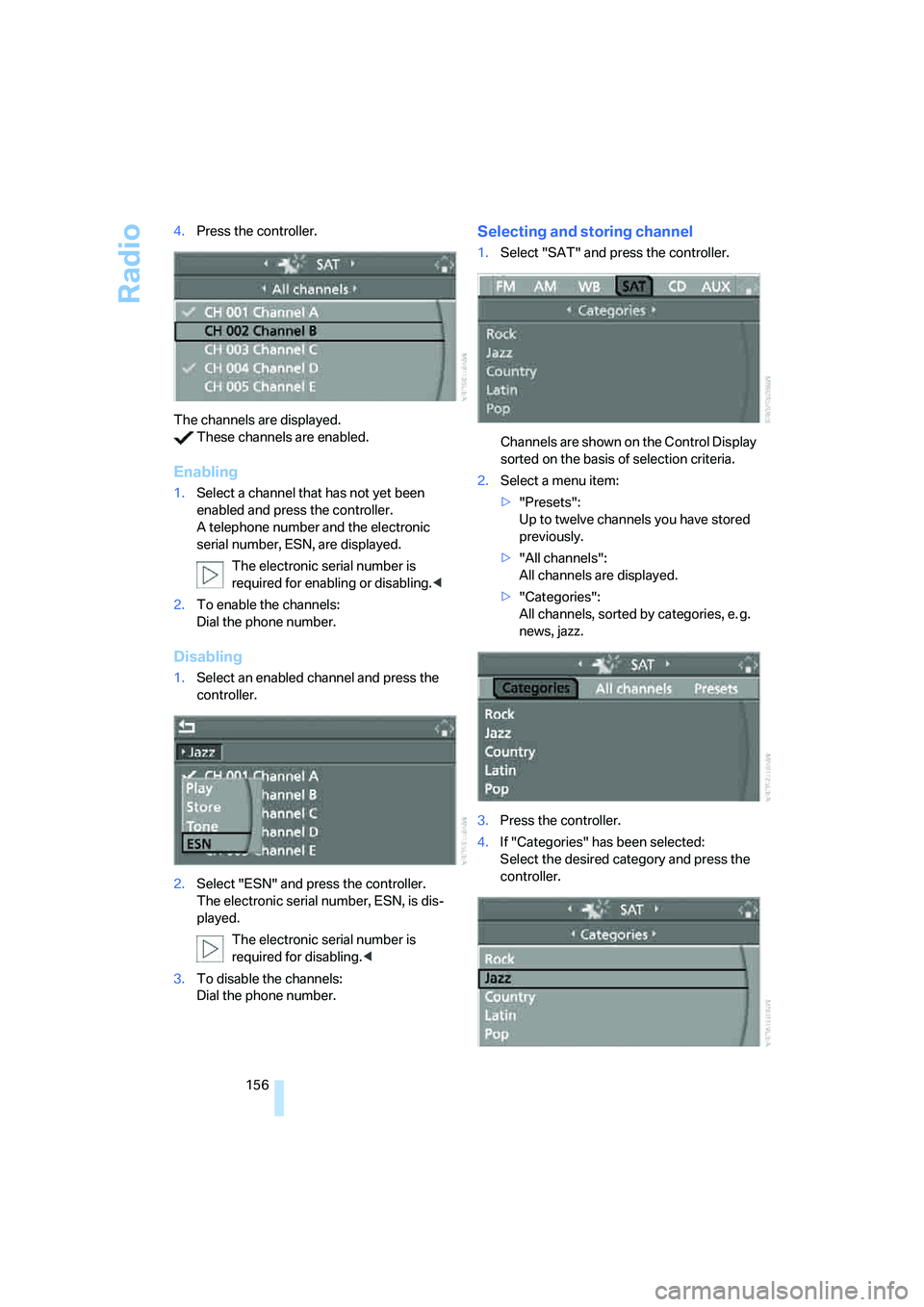
The channels are displayed.
These channels are enabled.
Enabling
1.Select a channel that has not yet been
enabled and press the controller.
A telephone number and the electronic
serial number, ESN, are displayed.
The electronic serial number is
required for enabling or disabling.<
2.To enable the channels:
Dial the phone number.
Disabling
1.Select an enabled channel and press the
controller.
2.Select "ESN" and press the controller.
The electronic serial number, ESN, is dis-
played.
The electronic serial number is
required for disabling.<
3.To disable the channels:
Dial the phone number.
Selecting and storing channel
1.Select "SAT" and press the controller.
Channels are shown on the Control Display
sorted on the basis of selection criteria.
2.Select a menu item:
>"Presets":
Up to twelve channels you have stored
previously.
>"All channels":
All channels are displayed.
>"Categories":
All channels, sorted by categories, e. g.
news, jazz.
3.Press the controller.
4.If "Categories" has been selected:
Select the desired category and press the
controller.
Page 159 of 253
Navigation
Entertainment
Driving tips
157Reference
At a glance
Controls
Communications
Mobility
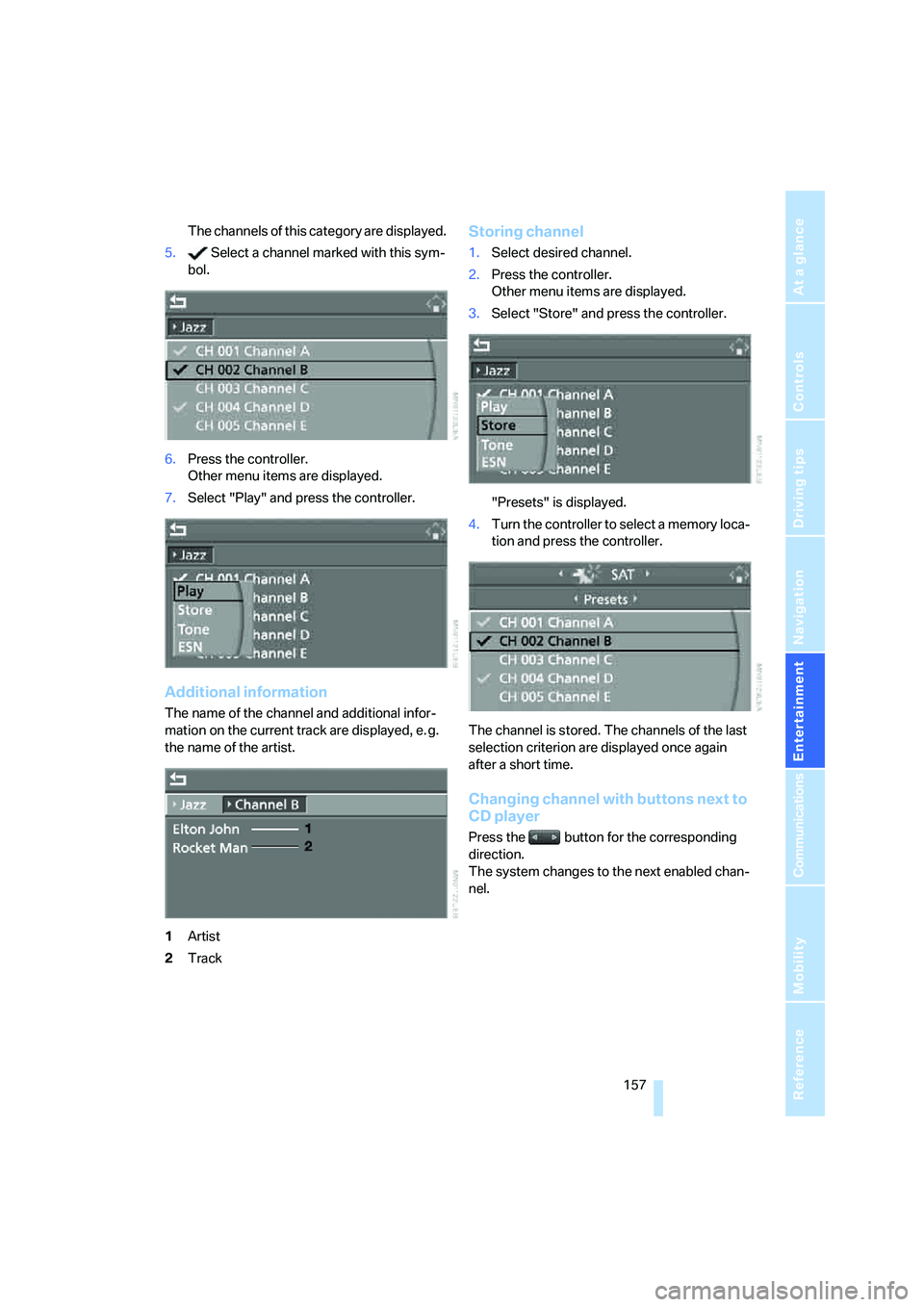
The channels of this category are displayed.
5. Select a channel marked with this sym-
bol.
6.Press the controller.
Other menu items are displayed.
7.Select "Play" and press the controller.
Additional information
The name of the channel and additional infor-
mation on the current track are displayed, e. g.
the name of the artist.
1Artist
2Track
Storing channel
1.Select desired channel.
2.Press the controller.
Other menu items are displayed.
3.Select "Store" and press the controller.
"Presets" is displayed.
4.Turn the controller to select a memory loca-
tion and press the controller.
The channel is stored. The channels of the last
selection criterion are displayed once again
after a short time.
Changing channel with buttons next to
CD player
Press the button for the corresponding
direction.
The system changes to the next enabled chan-
nel.
Page 171 of 253
169
Entertainment
Reference
At a glance
Controls
Driving tips Communications
Navigation
Mobility
Placing phone calls with BMW Assist
system*: BMW Assist calls
You can use the BMW Assist system via the
hands-free unit for BMW Assist calls.
When the status information "Communication"
or "BMW Assist" is displayed in "BMW Ser-
vice", only BMW Assist calls are possible.
It may not be possible to establish a telephone
connection using the mobile phone while a con-
nection is being established to BMW Assist
or while a call to BMW Assist is already in
progress. If this happens, you must log off the
mobile phone from the vehicle if you wish to
place a call with the mobile phone.
Commissioning
Logging on mobile phone on vehicle
The following prerequisites must be met:
>Suitable mobile phone: the mobile phone is
supported by the full mobile phone prepara-
tion package.
>The mobile phone is ready to operate.
>The Bluetooth link on the vehicle, refer to
page172, and on the mobile phone is
active.
>Depending on the mobile phone, preset-
tings on the mobile phone are necessary:
e.g. via the menu item Bluetooth activated
or the menu item Connection not with con-
firmation.
>Depending on the mobile phone model, the
setting energy saving mode can, for exam-
ple, result in vehicle failing to detect the
logged-on mobile phone.
>For logging on, specify any desired number
as the Bluetooth passkey, e.g. 1. This Blue-
tooth passkey is no longer required follow-
ing successful logon.
>The ignition is switched on.Only log on the mobile phone with the
vehicle stopped, otherwise the passen-
gers and other road users can be endangered
due to a lack of attentiveness on the part of the
driver.<
Switching on ignition
1.Insert the remote control as far as possible
into the ignition lock.
2.Switch on the ignition by pressing the Start/
Stop button without depressing the brake
or clutch pedal.
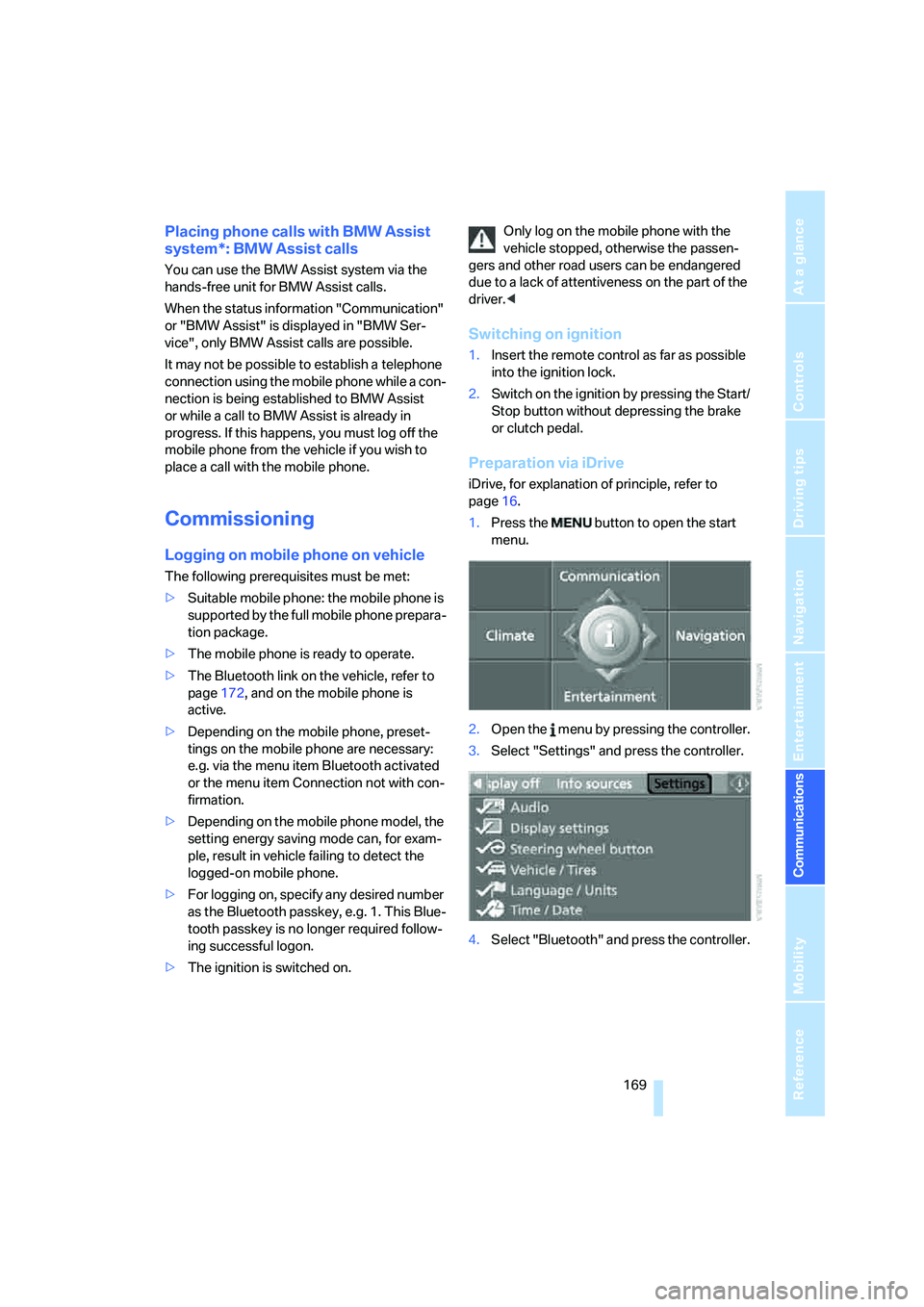
Preparation via iDrive
iDrive, for explanation of principle, refer to
page16.
1.Press the button to open the start
menu.
2.Open the menu by pressing the controller.
3.Select "Settings" and press the controller.
4.Select "Bluetooth" and press the controller.
Page 196 of 253
Wheels and tires
194
Wheels and tires
Tire inflation pressure
Information for your safety
The condition of the tires and the maintenance
of the specified tire pressure are crucial not only
to the tire's service life, but also to driving com-
fort and most importantly, driving safety.
Checking pressure
Only check tire inflation pressure when the tires
are cold. This means after a maximum of
1.25 miles/2 km driving or when the vehicle has
been parked for at least 2 hours. When tires are
warm, the tire inflation pressure increases.
Check the tire inflation pressure regularly
and correct if necessary, including on the
spare wheel
*: at least twice a month and before
starting long trips. Otherwise driving instability
or tire damage, and therefore accidents, can
result from incorrect tire inflation pressures. Do
not drive with a depressurized, i.e. flat, tire. A flat
tire will seriously impair your vehicle's handling
and braking response. Attempts to drive on a
flat tire can lead to a loss of control over the
vehicle.<
After correcting the tire inflation pressure,
reinitialize the Flat Tire Monitor, refer to
page83, or reset the Tire Pressure Monitor,
refer to page85.<
Pressure specifications
The tables below provide all the correct inflation
pressures for the specified tire sizes at ambient
temperature.
The inflation pressures apply to the tire
sizes and tire brands respectively
approved and recommended by BMW; a list of
these is available from your BMW center.
ing:
>Tire sizes of your vehicle
>Load conditions
>Maximum allowable driving speed
Tire inflation pressures for speeds
up to 100 mph/160 km/h
For normal driving up to 100 mph/160 km/h,
adjust pressures to the respective tire inflation
pressures listed on the following pages in the
column Traveling speeds up to max. 100 mph/
160 km/h to achieve optimum driving comfort.
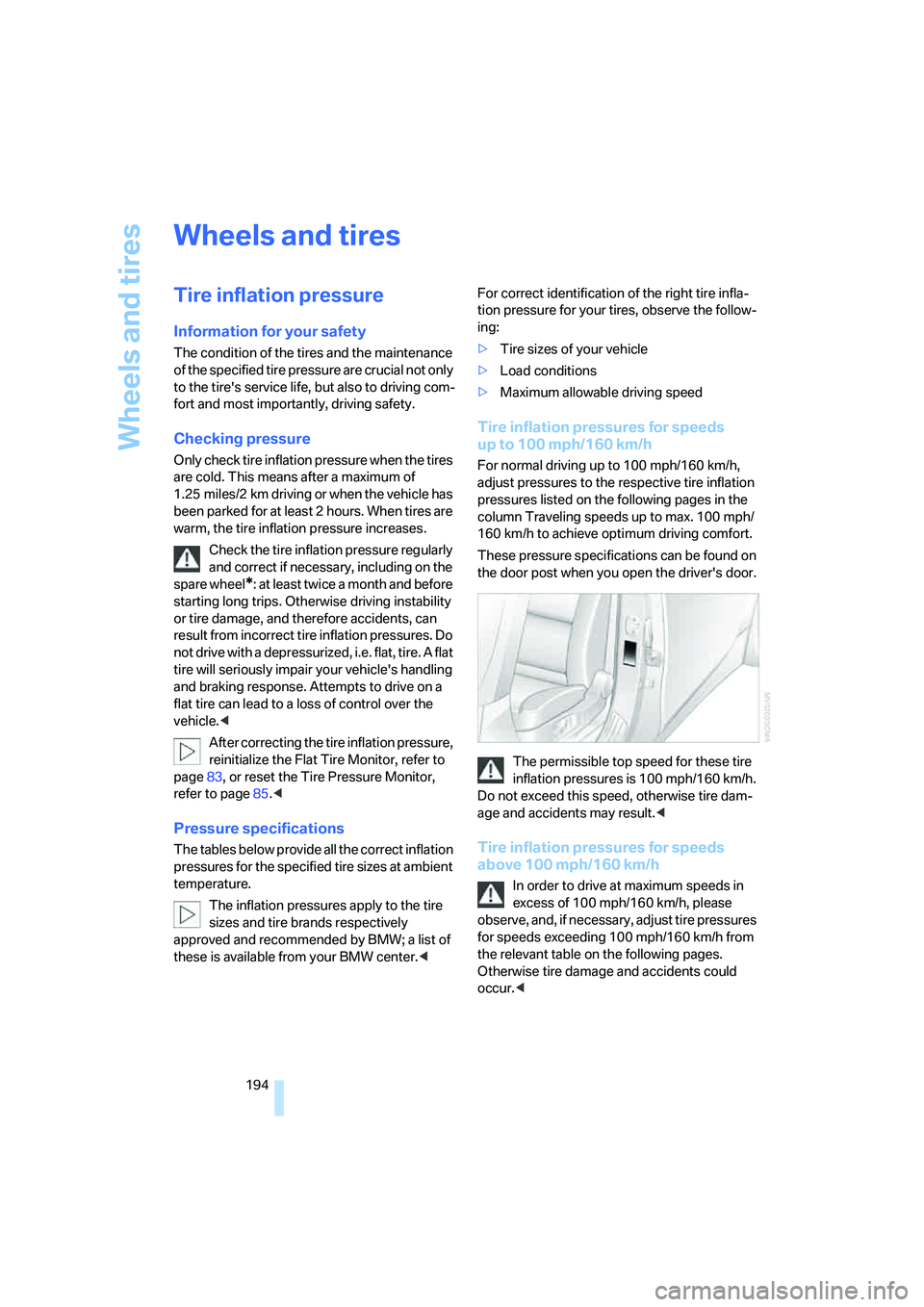
These pressure specifications can be found on
the door post when you open the driver's door.
The permissible top speed for these tire
inflation pressures is 100 mph/160 km/h.
Do not exceed this speed, otherwise tire dam-
age and accidents may result.<
Tire inflation pressures for speeds
above 100 mph/160 km/h
In order to drive at maximum speeds in
excess of 100 mph/160 km/h, please
observe, and, if necessary, adjust tire pressures
for speeds exceeding 100 mph/160 km/h from
the relevant table on the following pages.
Otherwise tire damage and accidents could
occur.<
Page 229 of 253
Reference 227
At a glance
Controls
Driving tips
Communications
Navigation
Entertainment
Mobility
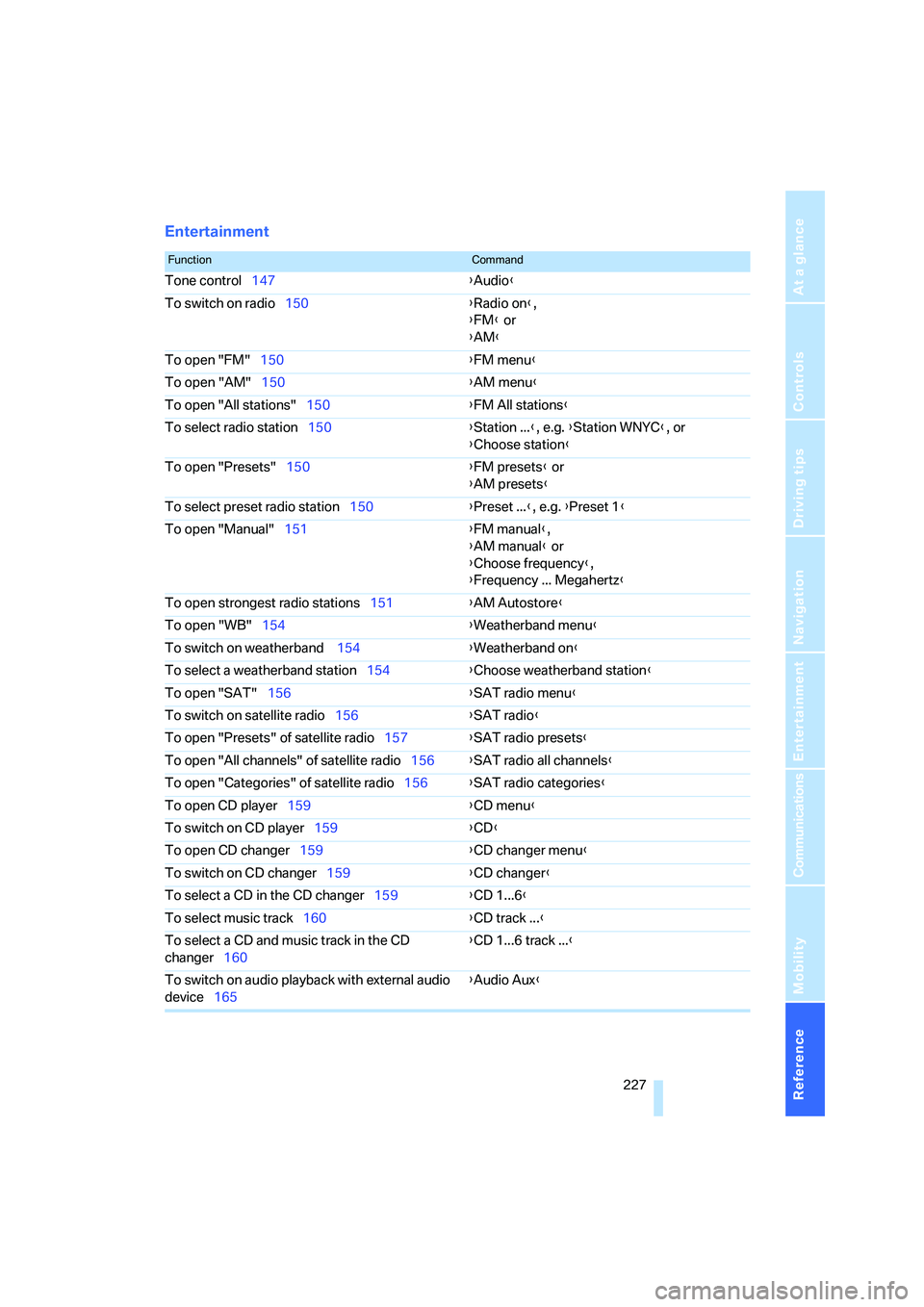
Entertainment
FunctionCommand
Tone control147{Audio}
To switch on radio150{Radio on},
{FM} or
{AM}
To open "FM"150{FM menu}
To open "AM"150{AM menu}
To open "All stations"150{FM All stations}
To select radio station150{Station ...}, e.g. {Station WNYC}, or
{Choose station}
To open "Presets"150{FM presets} or
{AM presets}
To select preset radio station150{Preset ...}, e.g. {Preset 1}
To open "Manual"151{FM manual},
{AM manual} or
{Choose frequency},
{Frequency ... Megahertz}
To open strongest radio stations151{AM Autostore}
To open "WB"154{Weatherband menu}
To switch on weatherband 154{Weatherband on}
To select a weatherband station154{Choose weatherband station}
To open "SAT"156{SAT radio menu}
To switch on satellite radio156{SAT radio}
To open "Presets" of satellite radio157{SAT radio presets}
To open "All channels" of satellite radio156{SAT radio all channels}
To open "Categories" of satellite radio156{SAT radio categories}
To open CD player159{CD menu}
To switch on CD player159{CD}
To open CD changer159{CD changer menu}
To switch on CD changer159{CD changer}
To select a CD in the CD changer159{CD 1...6}
To select music track160{CD track ...}
To select a CD and music track in the CD
changer160{CD 1...6 track ...}
To switch on audio playback with external audio
device165{Audio Aux}
Page 244 of 253
Everything from A to Z
242 Passenger airbags,
deactivating, refer to
Exception for front
passenger seat52
Passenger-side exterior
mirror, tilting down48
"Pathway lighting"93
Pathway lighting92
"PDC"79
"PDC display on"79
PDC Park Distance Control78
Personal Profile29
"Perspective"135
"Phone"170,173
Phone book172
– changing entry174
– creating and editing voice
phone book179
– deleting all entries176
– deleting entry176
– dialing phone number174
Phone numbers
– deleting from phone
book176
– dialing173
– most recent numbers175
– selecting in phone book175
– Top 8175
Pinch protection system
– glass sunroof, electric39
– power windows38
Plasters, refer to First-aid
kit215
Plastic, refer to Caring for your
vehicle brochure
"Play" for radio157
"Play" in audio mode160
Plug-in unit for remote
control, refer to Ignition
lock55
Pollen, refer to Microfilter/
activated charcoal filter100
Position
– displaying140
– storing129
"POWER"50
POWER, refer to M Engine
Dynamic Control61Power failure213
Power windows, refer to
Windows37
Preselecting activation times
of the parked car
ventilation100
"Presets" on the
radio150,156
Pressure, tires194
– producing with M Mobility
System208
Pressure monitoring of tires,
refer to TPM Tire Pressure
Monitor84
"Profile"188
Programmable button on
steering wheel49
Programming button function,
refer to Programmable
button on steering wheel49
Protective function, refer to
Pinch protection system
– glass sunroof, electric39
– windows38
R
Radio
– Autostore151
– controls146
– High Definition Radio154
– sampling stations151
– satellite radio155
– selecting frequency
manually151
– selecting
waveband146,150
– station search151
– station selection150
– station with the best
reception151
– storing stations152
– switching on/off146
– tone control147
– volume147
– Weather Band, refer to
Weather news flashes153
Radio key, refer to Keys/
remote control28Radio position, refer to Radio
readiness55
Radio readiness55
– switched off56
– switched on55
– with comfort access37
Rain sensor63
"Random", random play
sequence162
"Random all" in audio
mode162
"Random directory" in audio
mode162
"RDS"153
Reading lamps95
Rear armrest, refer to Center
armrest, rear107
Rear lamps, refer to Tail
lamps207
– replacing bulbs207
Rear seats
– adjusting head restraints45
– folding over backrest108
– heating47
– removing head restraints45
Rear socket107
Rear ventilation100
Rearview mirror47
Rear window
– heating98
– roller sun blind, refer to Sun
blinds103
Rear window safety switch38
"Received calls"174
Reception
– quality153
– radio stations
153
– regional station151
Reception level of mobile
phone, refer to Status
information20
Rechargeable flashlight104
Recirculated-air mode99
– air recirculation99
– AUC Automatic
recirculated-air control99
Reclining seat, refer to
Seats42
Page 245 of 253
Reference 243
At a glance
Controls
Driving tips
Communications
Navigation
Entertainment
Mobility
Recording times, refer to
Stopwatch74
"Redial" for mobile phone174
Redialing with mobile
phone180
Reflectors, refer to Tail
lamps207
Refueling192
Releasing, hood199
Releasing the locks, refer to
Unlocking36
"Relock door if not
opened"33
Remaining distance, refer to
Cruising range68
Remaining distance to
destination, refer to
Computer68
Remote control28
– comfort access36
– garage door opener102
– luggage compartment lid31
– malfunction31,37
– replacing battery37
Removing condensation on
the windows98
"Repeat directory" in audio
mode162
"Repeat" in audio mode162
"Repeat track" in audio
mode162
Replacement fuses213
Replacement of tires, refer to
Changing wheels210
Replacement remote control,
refer to New remote
controls28
Replacing bulbs, refer to
Lamps and bulbs206
Replacing tires197
Replacing wheels/tires, refer
to New wheels and tires197
Reporting safety defects7
Reserve warning, refer to Fuel
gauge67
"Reset"83,85
Reset, refer to Resetting tone
settings149
"Reset" of tone settings149"Reset" stopwatch74
"resetting FTM …"83
"Reset to default", for
MDrive50
Residual heat99
Restraint systems
– for children52
– refer to Safety belts45
Retreaded tires197
Reverse, fast
– CD changer
163
– CD player163
Reverse gear58
– manual transmission58
Road map134
"Roadside
Assistance"176,183
Roadside Assistance215
Roadside parking lamps94
Roof load capacity224
Roof-mounted luggage
rack116
Rope, refer to Tow-starting
and towing216
Rotary/pushbutton, refer to
iDrive16
Route131
– bypassing sections137
– changing137
– changing criteria131
– displaying134
– displaying arrow display134
– displaying map view134
– displaying streets or towns/
cities135
– selecting131
Route information, refer to
Destination guidance with
voice instructions136
Route map, refer to Displaying
map view134
Route selection131
Rubber parts, refer to Caring
for your vehicle brochure
S
Safety5Safety belts45
– damage46
– refer to Caring for your
vehicle brochure
– sitting safely41
– warning lamp46
Safety belt tensioners
– refer to Airbags87
– refer to Safety belts45
Safety systems
– ABS Antilock Brake
System79
– airbags87
– driving stability control
systems79
– safety belts45
Satellite radio155
– enabling channel155
– selecting channel156
– storing channel156
"SAT" for radio147,155
"Save current
destination"131
"Scan"
– music tracks on CD161
– stations with radio151
Scan
– CD changer161
– CD player161
– radio151
"Scan all" in audio mode161
"Scan directory" in audio
mode161
Screen, refer to iDrive16
Screw thread for tow
fitting216
SDARS, refer to Satellite
radio155
"Seat heater distribution"46
Page 249 of 253
Reference 247
At a glance
Controls
Driving tips
Communications
Navigation
Entertainment
Mobility
Towing216
– methods217
– tow fittings216
– with manual
transmission217
– with Sequential Manual
Transmission with
Drivelogic217
"Town / City" for destination
entry122
Tow rope217
Tow-starting216
"TPM"85
TPM Tire Pressure
Monitor84
– resetting system85
– system limits84
– warning lamp85
Track
– sampling on CD161
– selecting with CD160
Tracks
– random play sequence162
Track width, refer to
Dimensions223
Traction control, refer to DSC
Dynamic Stability
Control80
Traffic congestion
– bypassing140
– displaying traffic
information137
– refer to Bypassing route
sections137
"Traffic Info"137
Traffic information for
navigation
– depiction in route map139
– displaying138
– during destination
guidance140
– symbols139
Traffic information with
navigation137
– selecting stations138Transmission
– breaking-in112
– Drivelogic60
– idle58
– manual transmission57
– reverse gear58
– Sequential Manual
Transmission with
Drivelogic58
– shift lights60
– starting assistant, refer to
Starting off on slopes113
– towing216
– tow-starting217
Transporting children
safely52
Transport securing device,
refer to Securing cargo116
Tread depth, refer to Minimum
tire tread196
"Treble", refer to Tone
control148
Treble, refer to Tone
control147
"Trip computer"69
Trip computer69
Trip-distance counter, refer to
Trip odometer66
"Triple turn signal"62
Trip odometer66
Trunk, refer to Cargo bay
Turning circle, refer to
Dimensions223
Turn signals62
– indicator lamp12
– replacing bulbs207
U
"Unchanged"50,60
Underbody protection, refer to
Caring for your vehicle
brochure
Uniform Tire Quality Grading/
UTQR196
"Units"76Units
– average fuel
consumption76
– temperature76
Universal garage-door
opener, refer to Integrated
universal remote
control102
Universal remote control102
"Unlock button"30
Unlocking
– from inside33
– from outside30
– without key, refer to Comfort
access36
Unlocking without key, refer to
Comfort access36
"Update services"186
Upshift display, refer to Shift
lights60
"Use current location as
address"129,131
Used batteries
– refer to Disposal213
– refer to Replacing battery37
Using turn signals62
V
Valve screw caps, refer to
After mounting212
Vehicle
– battery213
– breaking-in112
– care205
– care, refer to Caring for your
vehicle brochure
– loading114
– measurements, refer to
Dimensions223
– parking57
– washing, refer to Caring for
your vehicle brochure
– weights224
"Vehicle / Tires" for MDrive50
"Vehicle / Tires" for
unlocking30
Vehicle jack211
– jacking points211