audio BMW M5 2007 Owners Manual
[x] Cancel search | Manufacturer: BMW, Model Year: 2007, Model line: M5, Model: BMW M5 2007Pages: 253, PDF Size: 8.57 MB
Page 5 of 253
Reference
At a glance
Controls
Driving tips
Communications
Navigation
Entertainment
Mobility
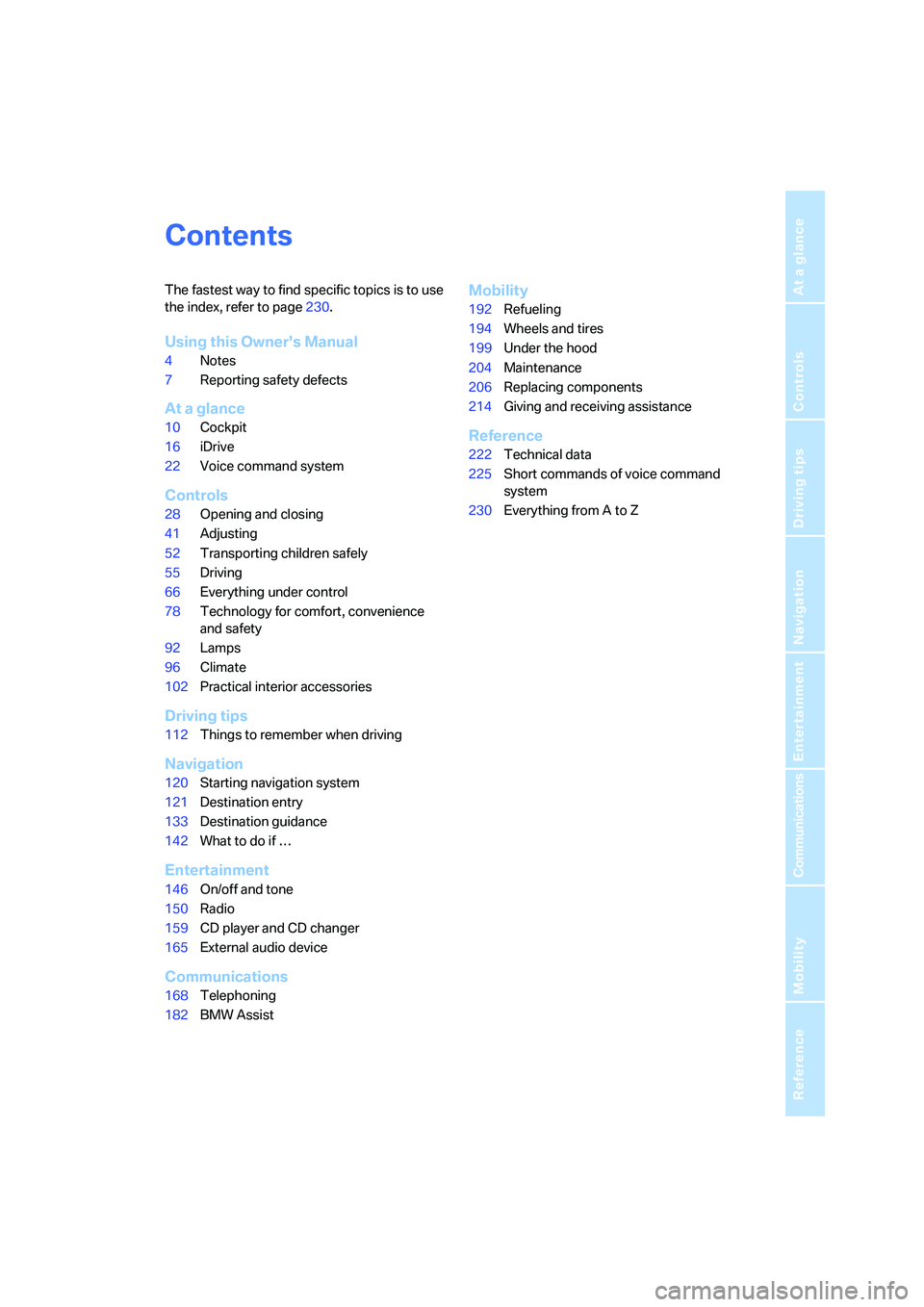
Contents
The fastest way to find specific topics is to use
the index, refer to page230.
Using this Owner's Manual
4Notes
7Reporting safety defects
At a glance
10Cockpit
16iDrive
22Voice command system
Controls
28Opening and closing
41Adjusting
52Transporting children safely
55Driving
66Everything under control
78Technology for comfort, convenience
and safety
92Lamps
96Climate
102Practical interior accessories
Driving tips
112Things to remember when driving
Navigation
120Starting navigation system
121Destination entry
133Destination guidance
142What to do if …
Entertainment
146On/off and tone
150Radio
159CD player and CD changer
165External audio device
Communications
168Telephoning
182BMW Assist
Mobility
192Refueling
194Wheels and tires
199Under the hood
204Maintenance
206Replacing components
214Giving and receiving assistance
Reference
222Technical data
225Short commands of voice command
system
230Everything from A to Z
Page 17 of 253
At a glance
15Reference
Controls
Driving tips
Communications
Navigation
Entertainment
Mobility
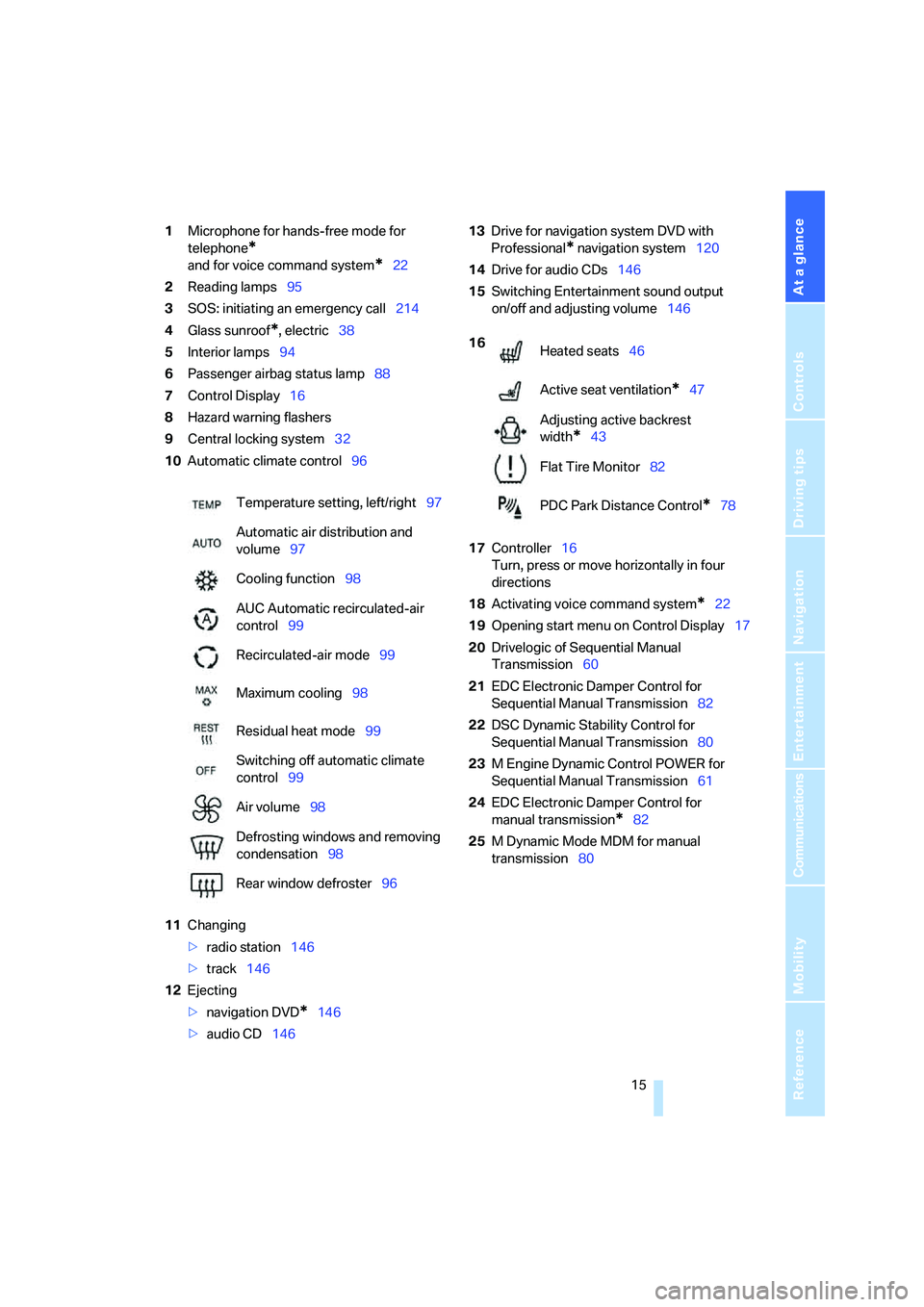
1Microphone for hands-free mode for
telephone
*
and for voice command system*22
2Reading lamps95
3SOS: initiating
an emergency call214
4Glass sunroof
*, electric38
5Interior lamps94
6Passenger airbag status lamp88
7Control Display16
8Hazard warning flashers
9Central locking system32
10Automatic climate control96
11Changing
>radio station146
>track146
12Ejecting
>navigation DVD
*146
>audio CD14613Drive for navigation system DVD with
Professional
* navigation system120
14Drive for audio CDs146
15Switching Entertainment sound output
on/off and adjusting volume146
17Controller16
Turn, press or move horizontally in four
directions
18Activating voice command system
*22
19Opening start menu on Control Display17
20Drivelogic of Sequential Manual
Transmission60
21EDC Electronic Damper Control for
Sequential Manual Transmission82
22DSC Dynamic Stability Control for
Sequential Manual Transmission80
23M Engine Dynamic Control POWER for
Sequential Manual Transmission61
24EDC Electronic Damper Control for
manual transmission
*82
25M Dynamic Mode MDM for manual
transmission80 Temperature setting, left/right97
Automatic air distribution and
volume97
Cooling function98
AUC Automatic recirculated-air
control99
Recirculated-air mode99
Maximum cooling98
Residual heat mode99
Switching off automatic climate
control99
Air volume98
Defrosting windows and removing
condensation98
Rear window defroster96
16
Heated seats46
Active seat ventilation
*47
Adjusting active backrest
width
*43
Flat Tire Monitor82
PDC Park Distance Control
*78
Page 19 of 253
At a glance
17Reference
Controls
Driving tips
Communications
Navigation
Entertainment
Mobility
Menu overview
Communication
>Telephone*
>BMW Assist* or TeleService*
Navigation or onboard information
>Navigation system*
>Onboard information, e.g. for displaying
the average fuel consumption
Entertainment
>Radio
>CD player and CD changer
*
>External audio device
Climate
>Vent settings
>Automatic programs
>Seat heater distribution
*
>Parked car operation
menu
>Switching off Control Display
>Tone and display settings
>Settings for your vehicle, e.g. for MDrive,
or for the central locking system
>Display of maintenance intervals and dead-
lines for legally mandated inspections
>Settings for telephone
Operating principle
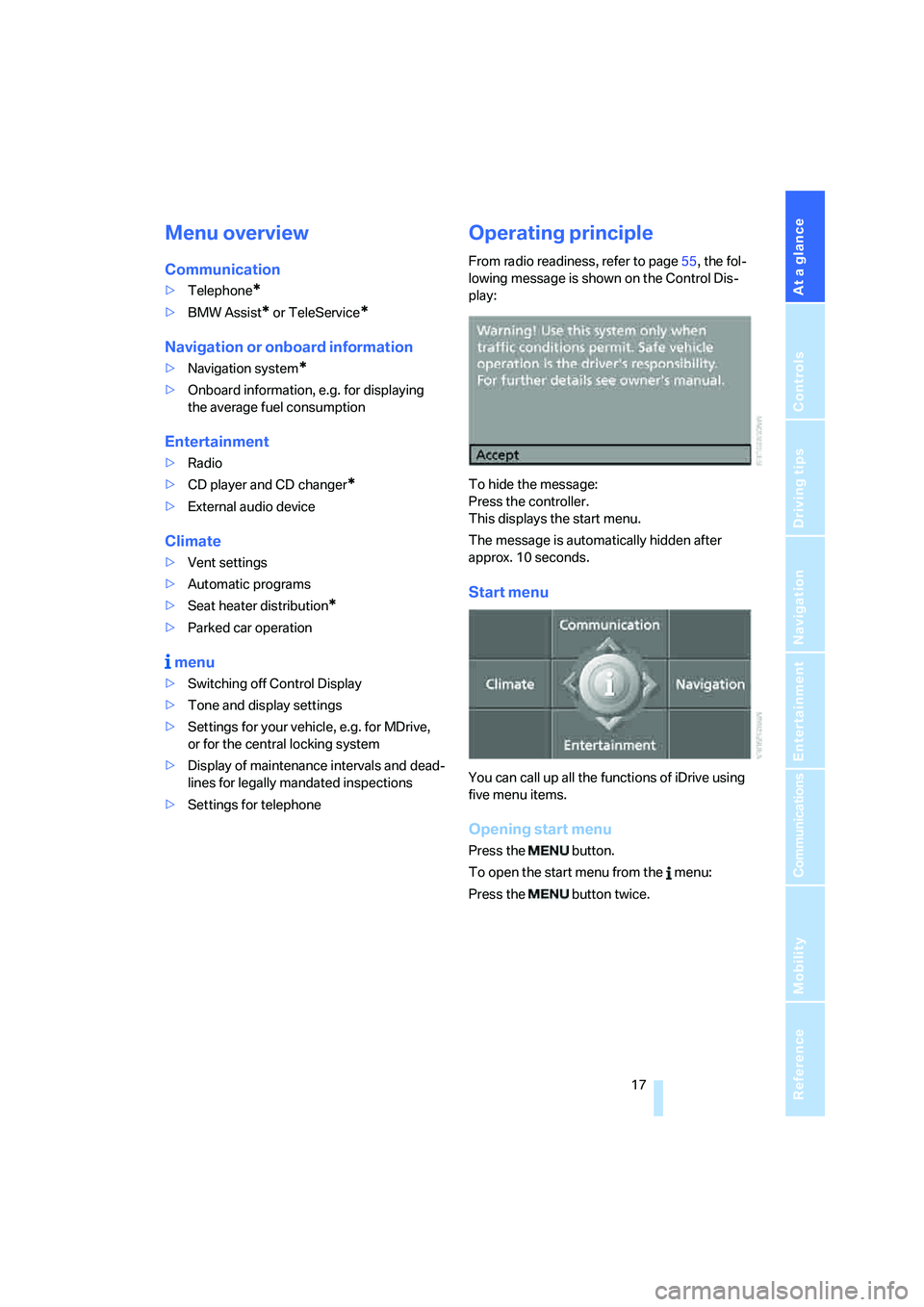
From radio readiness, refer to page55, the fol-
lowing message is shown on the Control Dis-
play:
To hide the message:
Press the controller.
This displays the start menu.
The message is automatically hidden after
approx. 10 seconds.
Start menu
You can call up all the functions of iDrive using
five menu items.
Opening start menu
Press the button.
To open the start menu from the menu:
Press the button twice.
Page 31 of 253
Controls
29Reference
At a glance
Driving tips
Communications
Navigation
Entertainment
Mobility
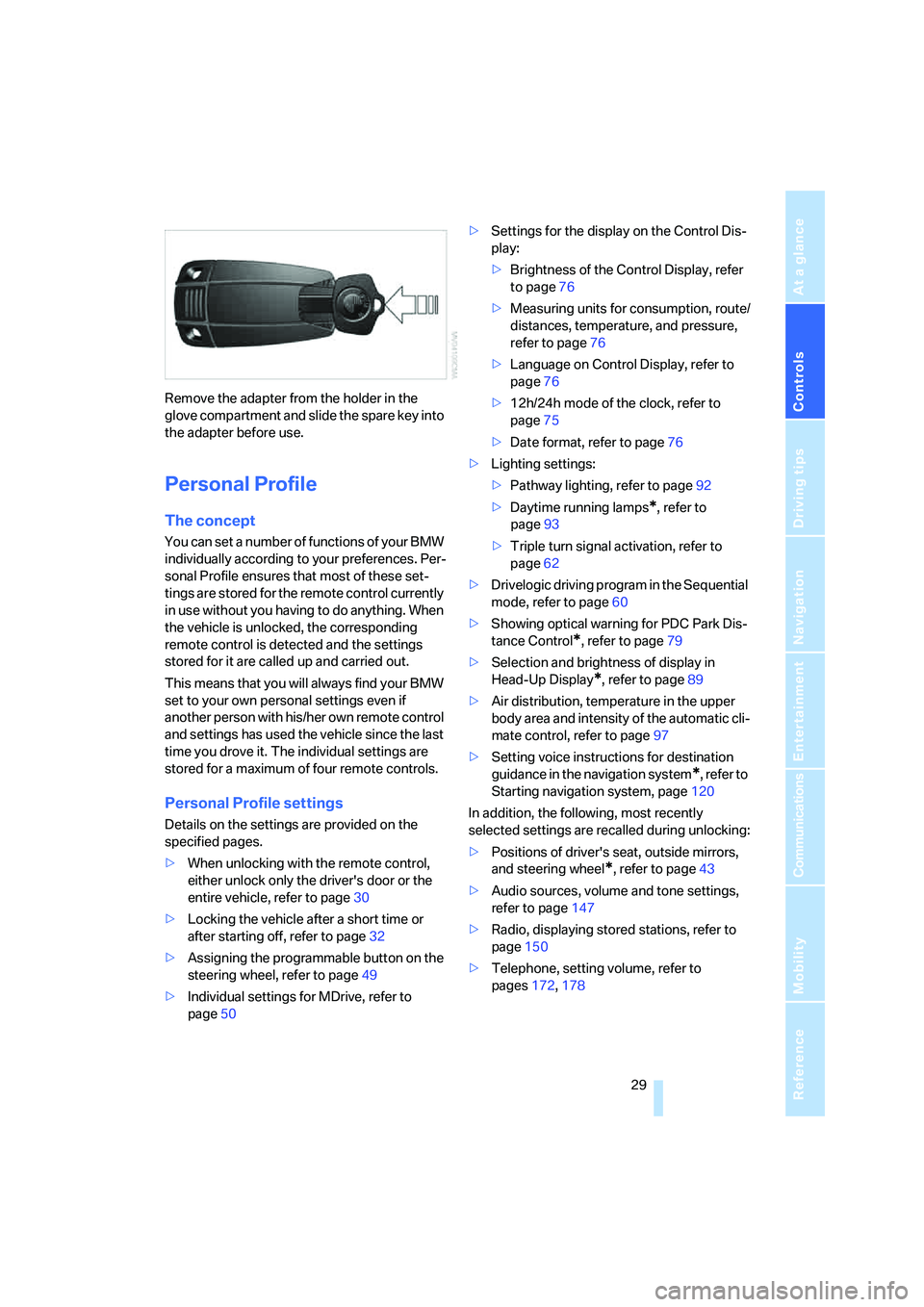
Remove the adapter from the holder in the
glove compartment and slide the spare key into
the adapter before use.
Personal Profile
The concept
You can set a number of functions of your BMW
individually according to your preferences. Per-
sonal Profile ensures that most of these set-
tings are stored for the remote control currently
in use without you having to do anything. When
the vehicle is unlocked, the corresponding
remote control is detected and the settings
stored for it are called up and carried out.
This means that you will always find your BMW
set to your own personal settings even if
another person with his/her own remote control
and settings has used the vehicle since the last
time you drove it. The individual settings are
stored for a maximum of four remote controls.
Personal Profile settings
Details on the settings are provided on the
specified pages.
>When unlocking with the remote control,
either unlock only the driver's door or the
entire vehicle, refer to page30
>Locking the vehicle after a short time or
after starting off, refer to page32
>Assigning the programmable button on the
steering wheel, refer to page49
>Individual settings for MDrive, refer to
page50>Settings for the display on the Control Dis-
play:
>Brightness of the Control Display, refer
to page76
>Measuring units for consumption, route/
distances, temperature, and pressure,
refer to page76
>Language on Control Display, refer to
page76
>12h/24h mode of the clock, refer to
page75
>Date format, refer to page76
>Lighting settings:
>Pathway lighting, refer to page92
>Daytime running lamps
*, refer to
page93
>Triple turn signal activation, refer to
page62
>Drivelogic driving program in the Sequential
mode, refer to page60
>Showing optical warning for PDC Park Dis-
tance Control
*, refer to page79
>Selection and brightness of display in
Head-Up Display
*, refer to page89
>Air distribution, temperature in the upper
body area and intensity of the automatic cli-
mate control, refer to page97
>Setting voice instructions for destination
guidance in the navigation system
*, refer to
Starting navigation system, page120
In addition, the following, most recently
selected settings are recalled during unlocking:
>Positions of driver's seat, outside mirrors,
and steering wheel
*, refer to page43
>Audio sources, volume and tone settings,
refer to page147
>Radio, displaying stored stations, refer to
page150
>Telephone, setting volume, refer to
pages172,178
Page 51 of 253
Controls
49Reference
At a glance
Driving tips
Communications
Navigation
Entertainment
Mobility
Electric steering-wheel lock
The steering wheel locks or unlocks automati-
cally when the remote control is removed or
inserted, refer to page55.
Easy entry/exit*
To facilitate entry and exit, the steering wheel
temporarily moves into the uppermost position.
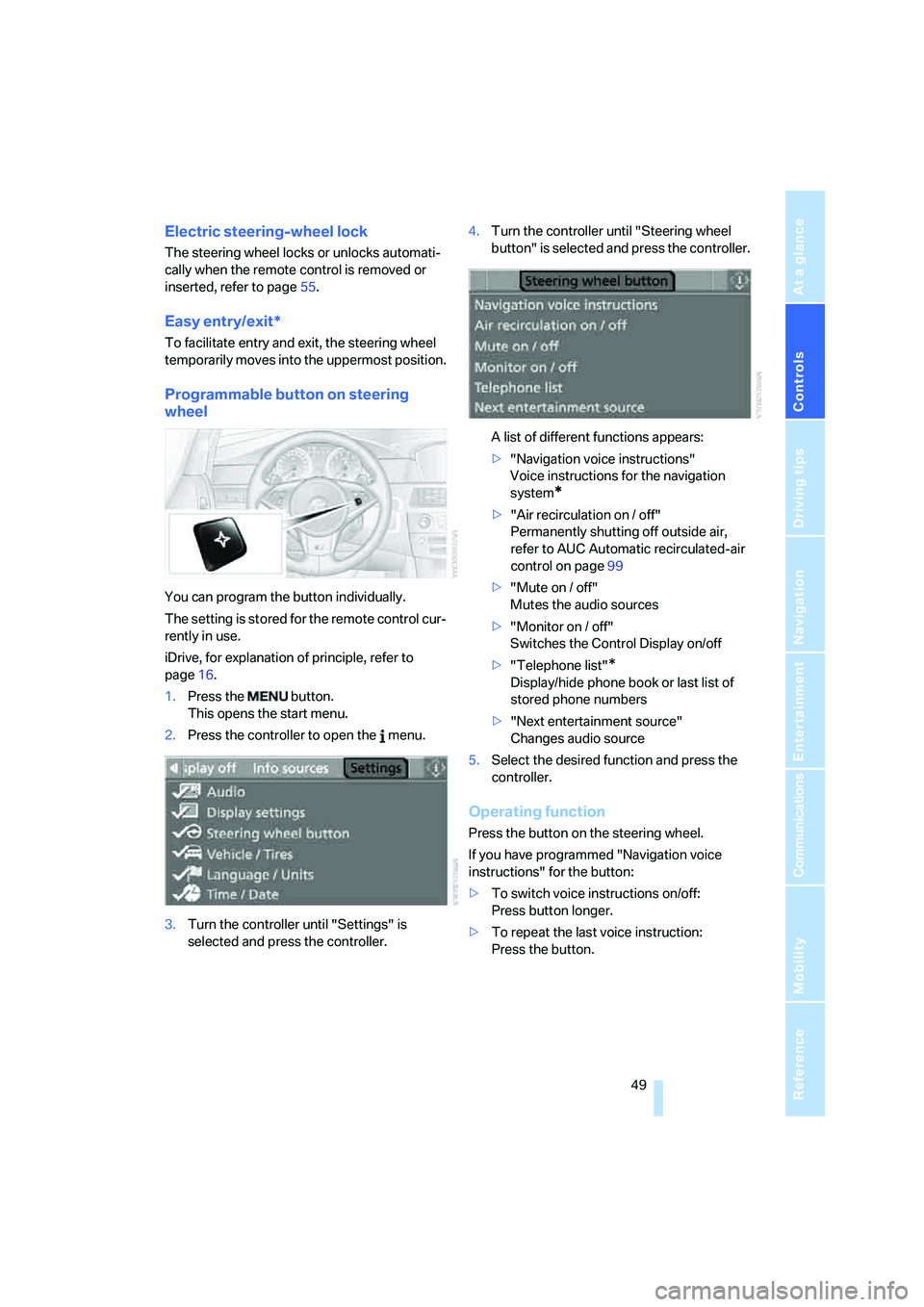
Programmable button on steering
wheel
You can program the button individually.
The setting is stored for the remote control cur-
rently in use.
iDrive, for explanation of principle, refer to
page16.
1.Press the button.
This opens the start menu.
2.Press the controller to open the menu.
3.Turn the controller until "Settings" is
selected and press the controller.4.Turn the controller until "Steering wheel
button" is selected and press the controller.
A list of different functions appears:
>"Navigation voice instructions"
Voice instructions for the navigation
system
*
>"Air recirculation on / off"
Permanently shutting off outside air,
refer to AUC Automatic recirculated-air
control on page99
>"Mute on / off"
Mutes the audio sources
>"Monitor on / off"
Switches the Control Display on/off
>"Telephone list"
*
Display/hide phone book or last list of
stored phone numbers
>"Next entertainment source"
Changes audio source
5.Select the desired function and press the
controller.
Operating function
Press the button on the steering wheel.
If you have programmed "Navigation voice
instructions" for the button:
>To switch voice instructions on/off:
Press button longer.
>To repeat the last voice instruction:
Press the button.
Page 107 of 253
Controls
105Reference
At a glance
Driving tips
Communications
Navigation
Entertainment
Mobility
Ventilating lower compartment
Push the slide in the lower compartment
upward.
Depending on the automatic climate con-
trol setting, the temperature inside the
ventilated compartment may be higher than in
the rest of the interior. Should this be the case,
push the slide downward to close off the venti-
lation.<
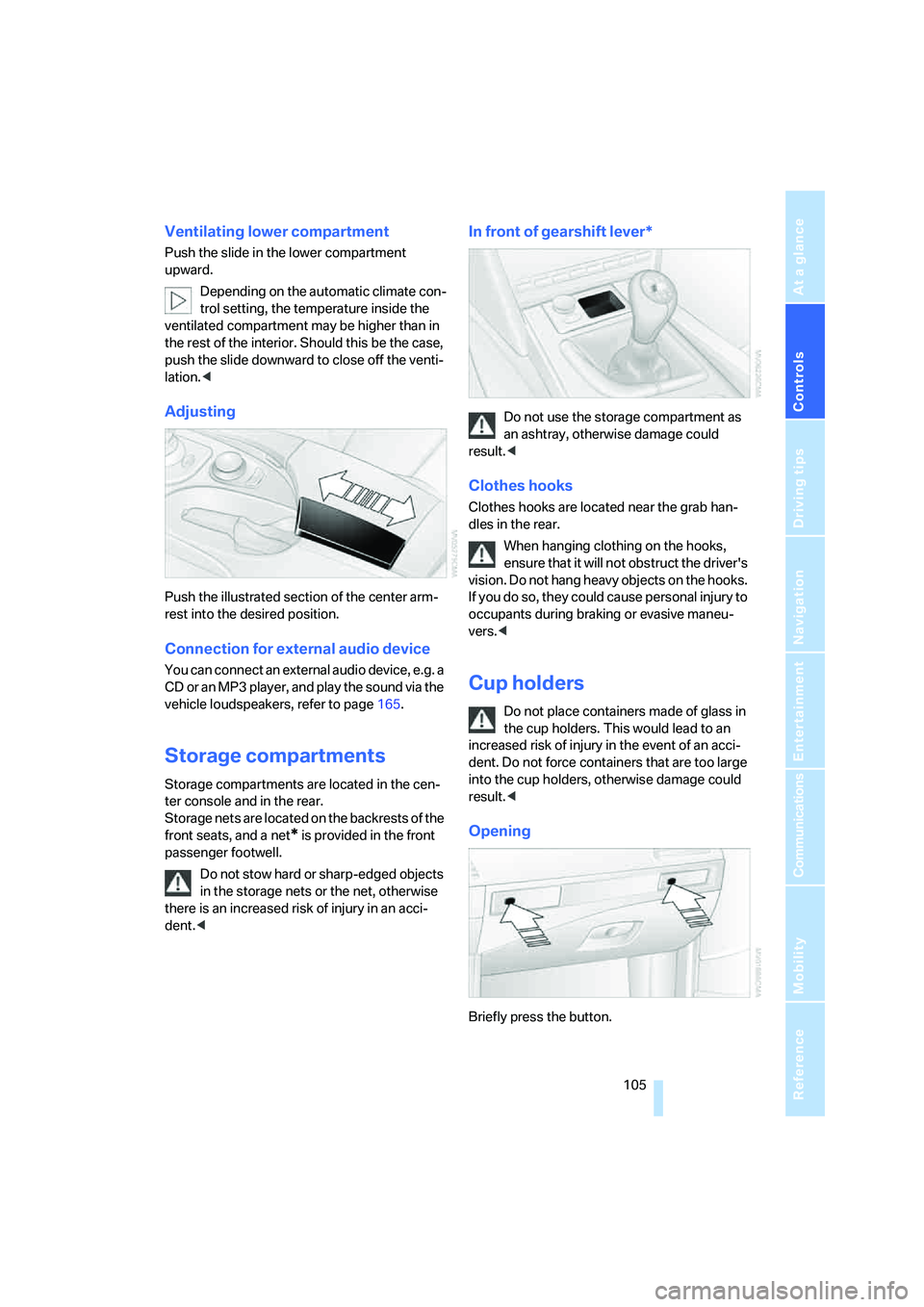
Adjusting
Push the illustrated section of the center arm-
rest into the desired position.
Connection for external audio device
You can connect an external audio device, e.g. a
CD or an MP3 player, and play the sound via the
vehicle loudspeakers, refer to page165.
Storage compartments
Storage compartments are located in the cen-
ter console and in the rear.
Storage nets are located on the backrests of the
front seats, and a net
* is provided in the front
passenger footwell.
Do not stow hard or sharp-edged objects
in the storage nets or the net, otherwise
there is an increased risk of injury in an acci-
dent.<
In front of gearshift lever*
Do not use the storage compartment as
an ashtray, otherwise damage could
result.<
Clothes hooks
Clothes hooks are located near the grab han-
dles in the rear.
When hanging clothing on the hooks,
ensure that it will not obstruct the driver's
vision. Do not hang heavy objects on the hooks.
If you do so, they could cause personal injury to
occupants during braking or evasive maneu-
vers.<
Cup holders
Do not place containers made of glass in
the cup holders. This would lead to an
increased risk of injury in the event of an acci-
dent. Do not force containers that are too large
into the cup holders, otherwise damage could
result.<
Opening
Briefly press the button.
Page 139 of 253
Navigation
Driving tips
137Reference
At a glance
Controls
Communications
Entertainment
Mobility
This volume is independent of the volume of the
audio sources.
The setting is stored for the remote control cur-
rently in use.
Bypassing route sections
During destination guidance, you can revise the
navigation system's route recommendations to
avoid particular stretches of road. Enter the
number of miles/kilometers that you want to
travel before returning to the original route.
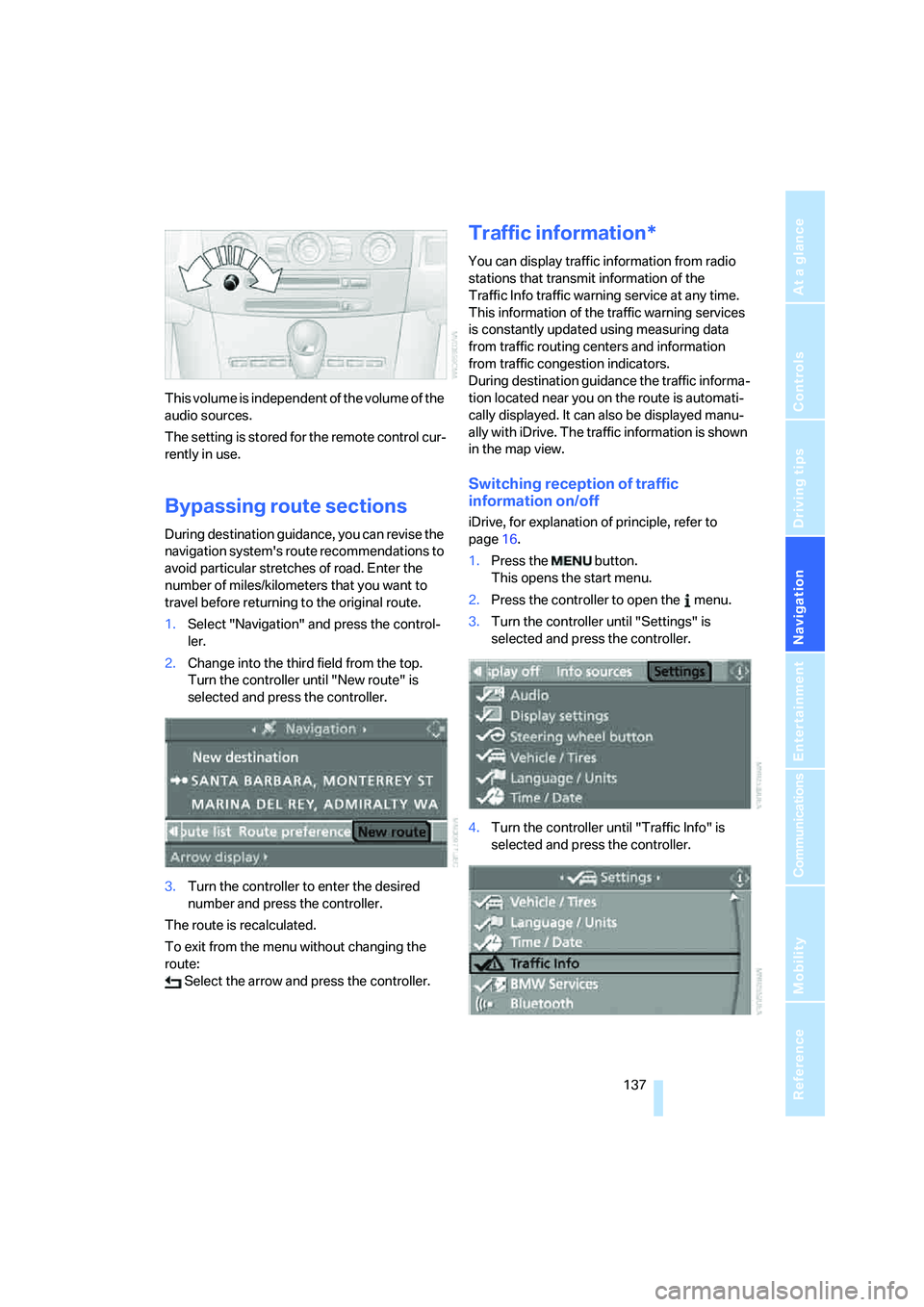
1.Select "Navigation" and press the control-
ler.
2.Change into the third field from the top.
Turn the controller until "New route" is
selected and press the controller.
3.Turn the controller to enter the desired
number and press the controller.
The route is recalculated.
To exit from the menu without changing the
route:
Select the arrow and press the controller.
Traffic information*
You can display traffic information from radio
stations that transmit information of the
Traffic Info traffic warning service at any time.
This information of the traffic warning services
is constantly updated using measuring data
from traffic routing centers and information
from traffic congestion indicators.
During destination guidance the traffic informa-
tion located near you on the route is automati-
cally displayed. It can also be displayed manu-
ally with iDrive. The traffic information is shown
in the map view.
Switching reception of traffic
information on/off
iDrive, for explanation of principle, refer to
page16.
1.Press the button.
This opens the start menu.
2.Press the controller to open the menu.
3.Turn the controller until "Settings" is
selected and press the controller.
4.Turn the controller until "Traffic Info" is
selected and press the controller.
Page 148 of 253
On/off and tone
146
On/off and tone
The following audio sources have shared con-
trols and setting options:
>Professional
* radio or Business radio
>CD player
>CD changer
*
Controls
The audio sources can be operated using:
>Buttons in the area of the CD player
>iDrive
>Buttons on steering wheel, refer to page11
Buttons in area of CD player
The layout of the buttons can vary depending
on your vehicle's equipment.
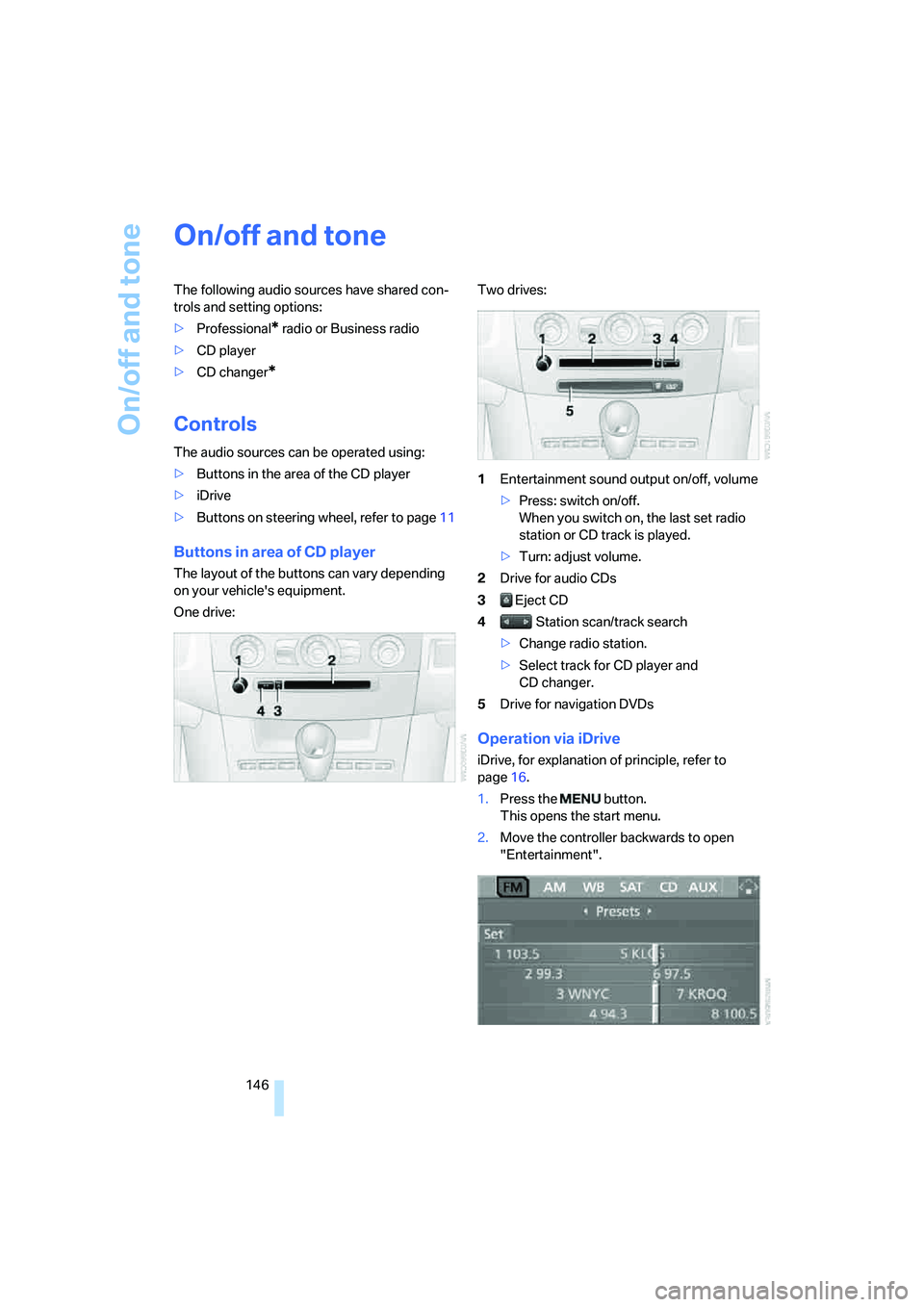
One drive:Two drives:
1Entertainment sound output on/off, volume
>Press: switch on/off.
When you switch on, the last set radio
station or CD track is played.
>Turn: adjust volume.
2Drive for audio CDs
3 Eject CD
4 Station scan/track search
>Change radio station.
>Select track for CD player and
CD changer.
5Drive for navigation DVDs
Operation via iDrive
iDrive, for explanation of principle, refer to
page16.
1.Press the button.
This opens the start menu.
2.Move the controller backwards to open
"Entertainment".
Page 149 of 253
Navigation
Entertainment
Driving tips
147Reference
At a glance
Controls
Communications
Mobility
You have the following choices:
>"FM" and "AM": radio reception
>"WB": Weather Band station
>"SAT": satellite radio
>"CD": CD player or CD changer
>"AUX": external audio device
>"Set": depending on the audio source,
other adjustments can be made, e.g. with
the radio: update station with strongest
reception, store station, tone control, sam-
ple stations.
From another menu, you can change
directly to the screen last displayed,
refer to Comfort opening of menu items on
page18.<
From radio readiness, the selected audio
source is stored for the remote control currently
in use.
Switching on/off
To switch the Entertainment sound output on
and off:
Press knob1 next to the CD player.
This symbol on the Control Display indi-
cates that sound output is switched off.
For a single drive, the sound output is available
for approx. 20 minutes with the ignition
switched off.
Switch on the sound output again for this pur-
pose.
Adjusting volume
Turn knob1 next to the CD player until the
desired volume is set.
You can also adjust the volume with buttons on
the steering wheel, refer to page11.
From radio readiness, the setting is stored for
the remote control currently in use.
Tone control
You can alter various tone settings, e. g. treble
and bass, or the speed-dependent volume
increase.
The tone settings are set for all audio sources at
once.
From radio readiness, the settings are stored
for the remote control currently in use.
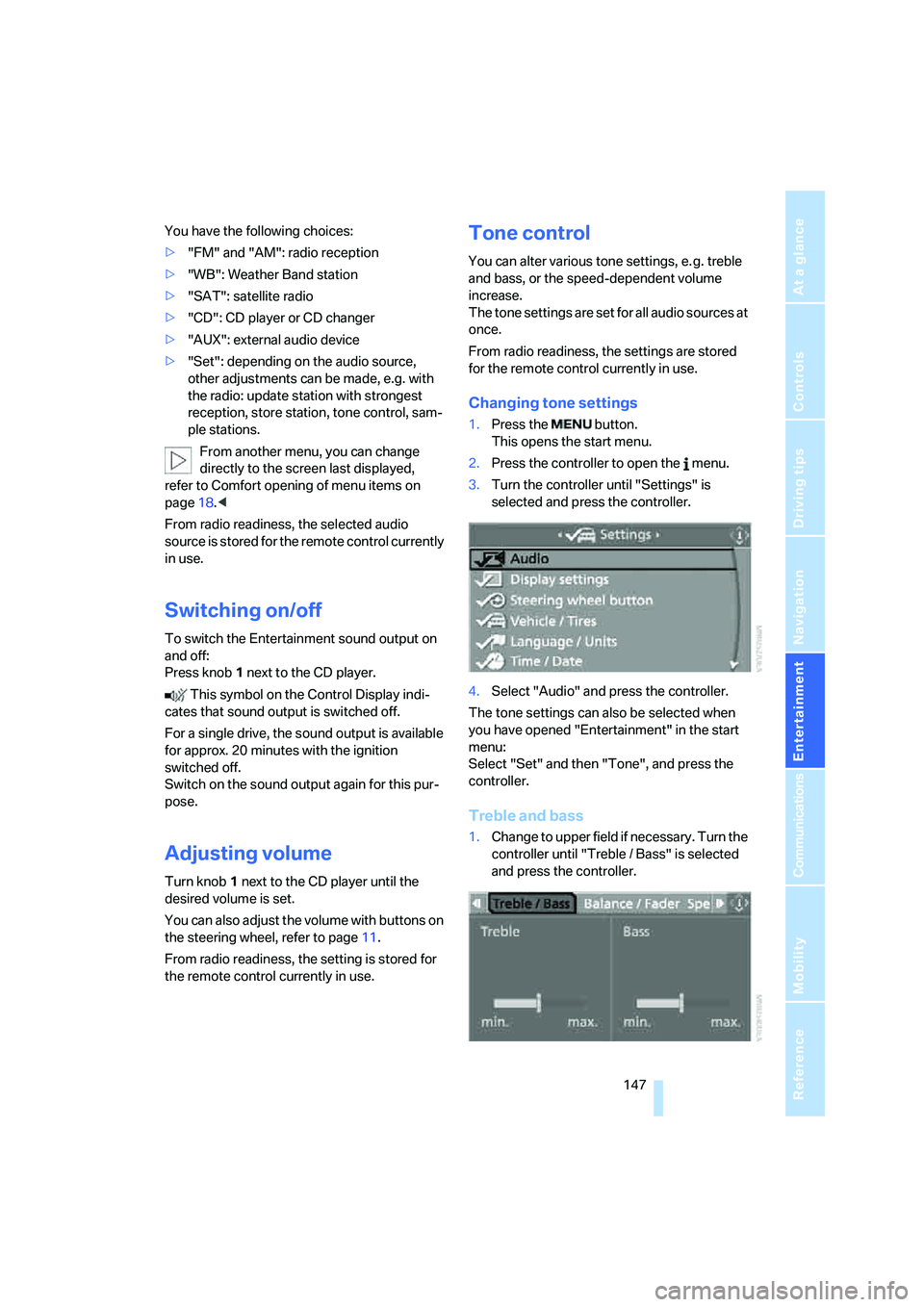
Changing tone settings
1.Press the button.
This opens the start menu.
2.Press the controller to open the menu.
3.Turn the controller until "Settings" is
selected and press the controller.
4.Select "Audio" and press the controller.
The tone settings can also be selected when
you have opened "Entertainment" in the start
menu:
Select "Set" and then "Tone", and press the
controller.
Treble and bass
1.Change to upper field if necessary. Turn the
controller until "Treble / Bass" is selected
and press the controller.
Page 151 of 253
Navigation
Entertainment
Driving tips
149Reference
At a glance
Controls
Communications
Mobility
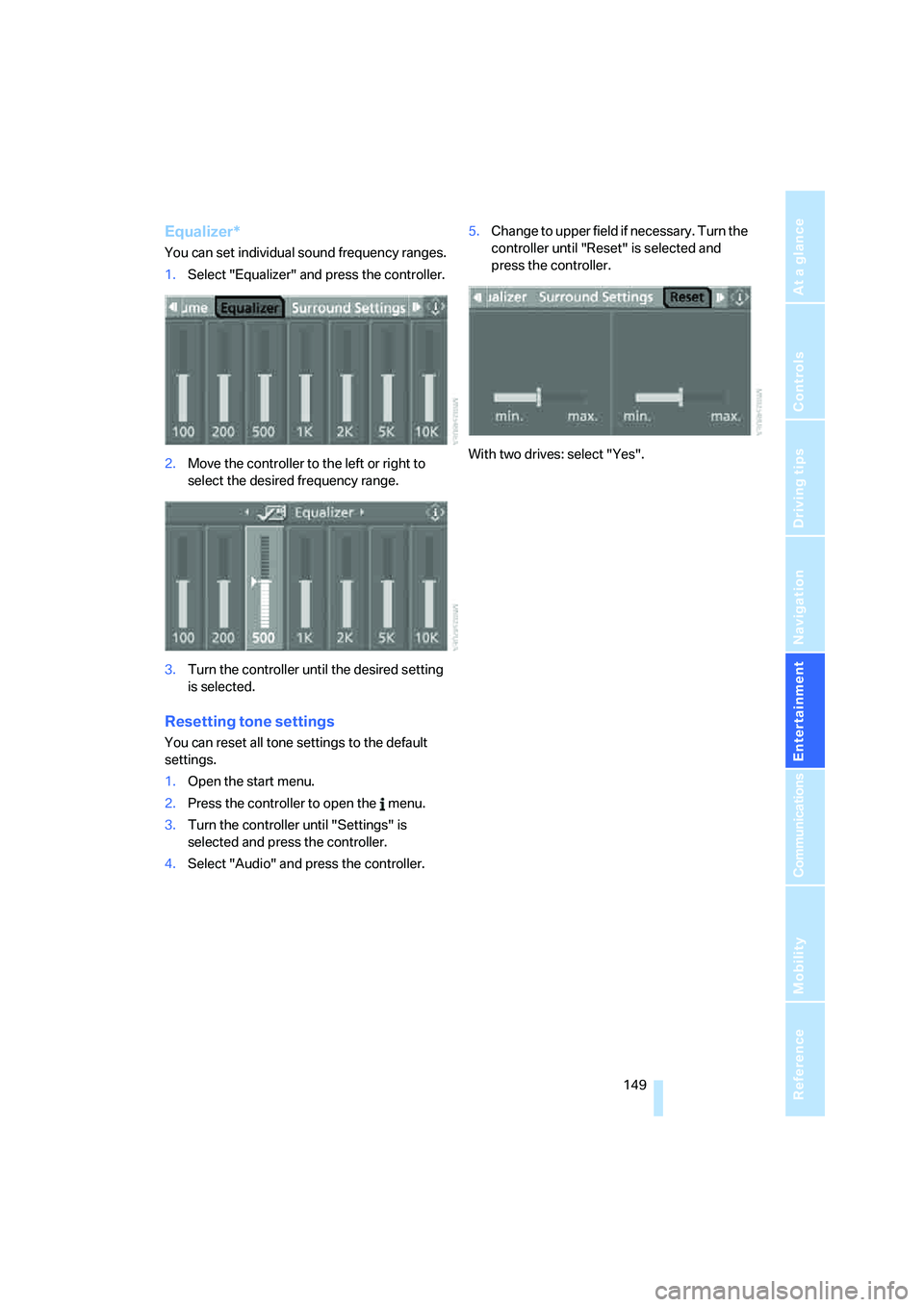
Equalizer*
You can set individual sound frequency ranges.
1.Select "Equalizer" and press the controller.
2.Move the controller to the left or right to
select the desired frequency range.
3.Turn the controller until the desired setting
is selected.
Resetting tone settings
You can reset all tone settings to the default
settings.
1.Open the start menu.
2.Press the controller to open the menu.
3.Turn the controller until "Settings" is
selected and press the controller.
4.Select "Audio" and press the controller.5.Change to upper field if necessary. Turn the
controller until "Reset" is selected and
press the controller.
With two drives: select "Yes".