ad blue BMW M5 2008 User Guide
[x] Cancel search | Manufacturer: BMW, Model Year: 2008, Model line: M5, Model: BMW M5 2008Pages: 260, PDF Size: 6.66 MB
Page 195 of 260
193
Entertainment
Reference
At a glance
Controls
Driving tips Communications
Navigation
Mobility
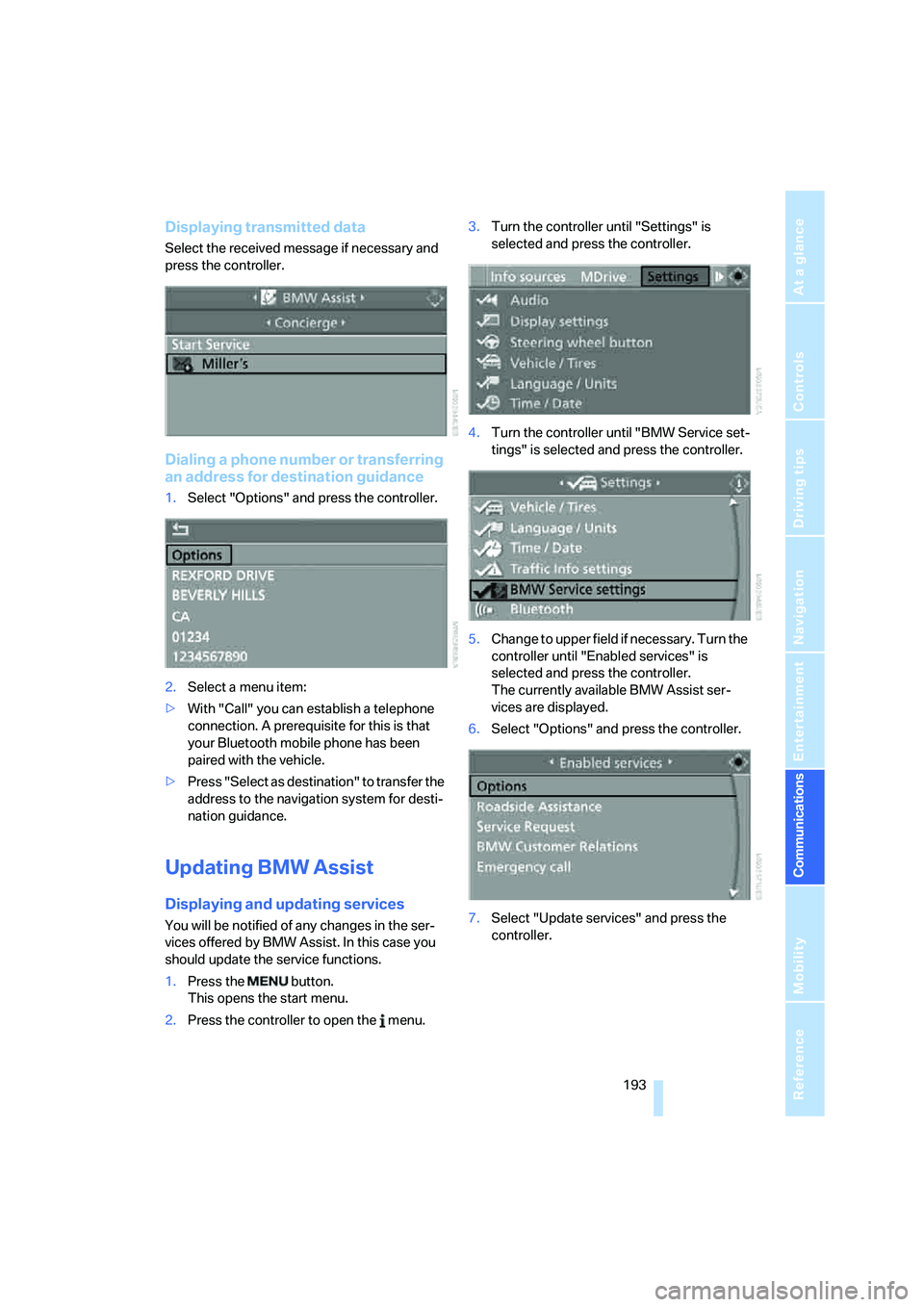
Displaying transmitted data
Select the received message if necessary and
press the controller.
Dialing a phone number or transferring
an address for destination guidance
1.Select "Options" and press the controller.
2.Select a menu item:
>With "Call" you can establish a telephone
connection. A prerequisite for this is that
your Bluetooth mobile phone has been
paired with the vehicle.
>Press "Select as destination" to transfer the
address to the navigation system for desti-
nation guidance.
Updating BMW Assist
Displaying and updating services
You will be notified of any changes in the ser-
vices offered by BMW Assist. In this case you
should update the service functions.
1.Press the button.
This opens the start menu.
2.Press the controller to open the menu.3.Turn the controller until "Settings" is
selected and press the controller.
4.Turn the controller until "BMW Service set-
tings" is selected and press the controller.
5.Change to upper field if necessary. Turn the
controller until "Enabled services" is
selected and press the controller.
The currently available BMW Assist ser-
vices are displayed.
6.Select "Options" and press the controller.
7.Select "Update services" and press the
controller.
Page 235 of 260
Reference 233
At a glance
Controls
Driving tips
Communications
Navigation
Entertainment
Mobility
Short commands of voice command
system
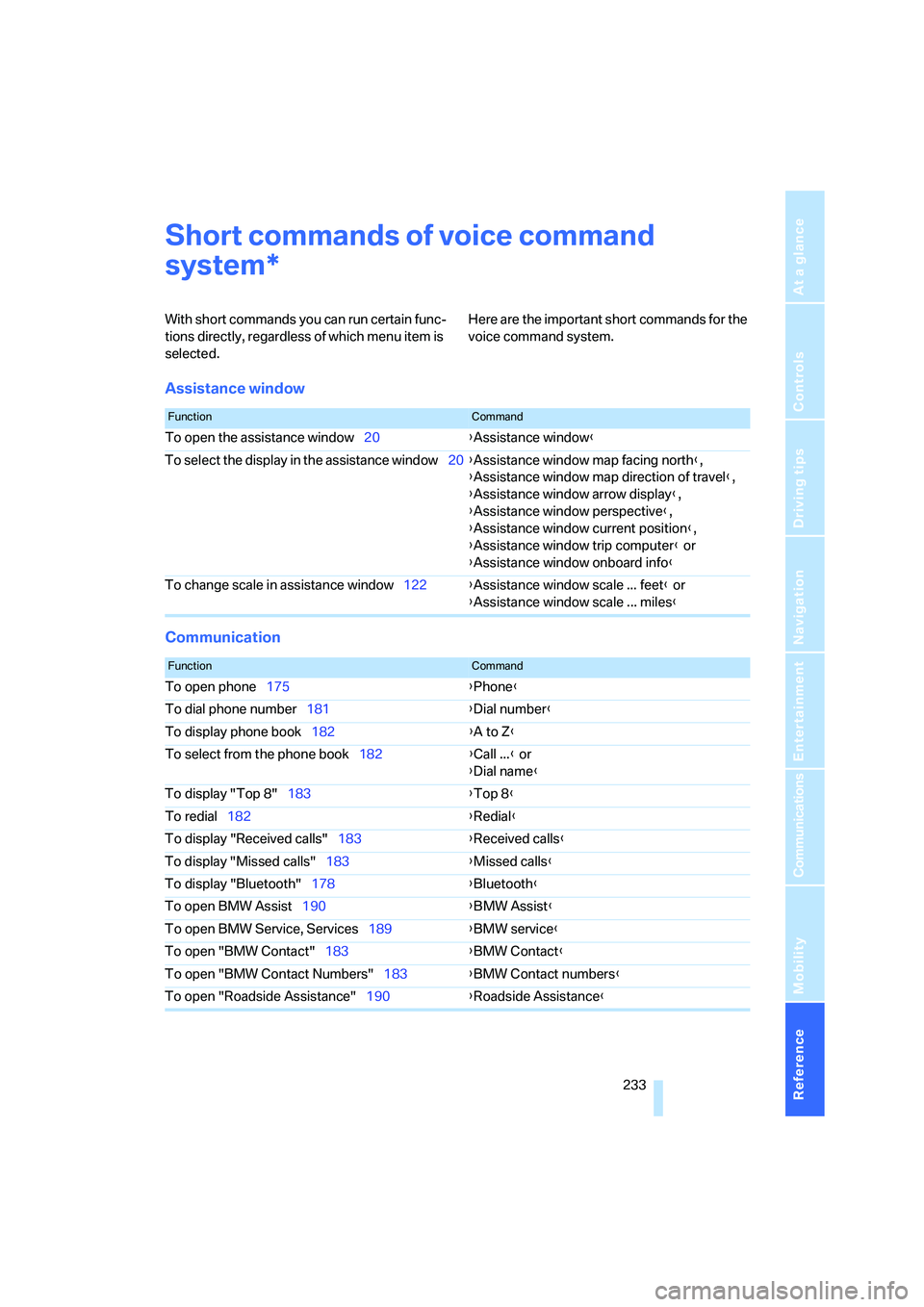
With short commands you can run certain func-
tions directly, regardless of which menu item is
selected. Here are the important short commands for the
voice command system.
Assistance window
Communication
*
FunctionCommand
To open the assistance window20{Assistance window}
To select the display in the assistance window20{Assistance window map facing north},
{Assistance window map direction of travel},
{Assistance window arrow display},
{Assistance window perspective},
{Assistance window current position},
{Assistance window trip computer} or
{Assistance window onboard info}
To change scale in assistance window122{Assistance window scale ... feet} or
{Assistance window scale ... miles}
FunctionCommand
To open phone175{Phone}
To dial phone number181{Dial number}
To display phone book182{A to Z}
To select from the phone book182{Call ...} or
{Dial name}
To display "Top 8"183{Top 8}
To redial182{Redial}
To display "Received calls"183{Received calls}
To display "Missed calls"183{Missed calls}
To display "Bluetooth"178{Bluetooth}
To open BMW Assist190{BMW Assist}
To open BMW Service, Services189{BMW service}
To open "BMW Contact"183{BMW Contact}
To open "BMW Contact Numbers"183{BMW Contact numbers}
To open "Roadside Assistance"190{Roadside Assistance}
Page 238 of 260
Short commands of voice command system
236
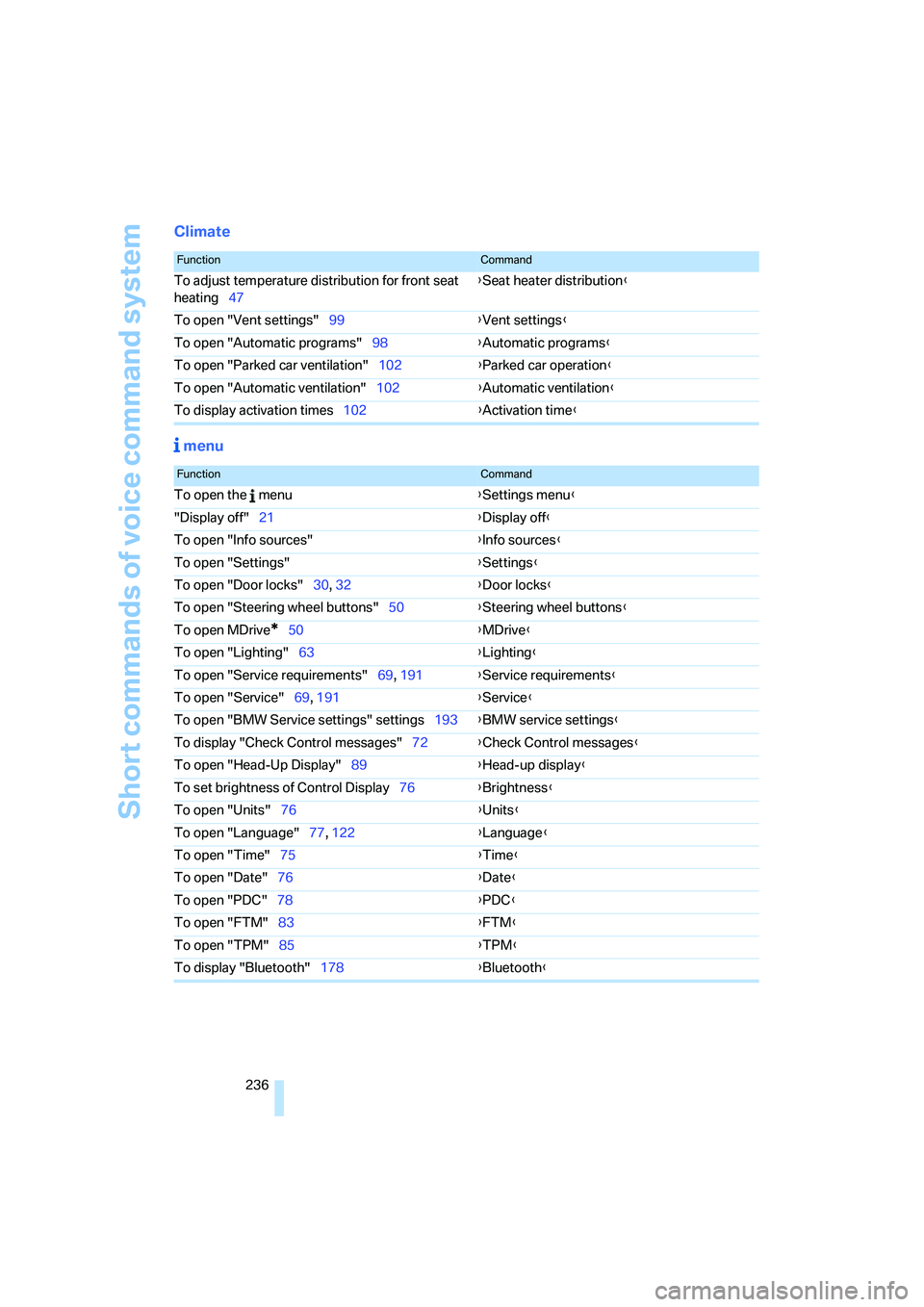
Climate
menu
FunctionCommand
To adjust temperature distribution for front seat
heating47{Seat heater distribution}
To open "Vent settings"99{Vent settings}
To open "Automatic programs"98{Automatic programs}
To open "Parked car ventilation"102{Parked car operation}
To open "Automatic ventilation"102{Automatic ventilation}
To display activation times102{Activation time}
FunctionCommand
To open the menu{Settings menu}
"Display off"21{Display off}
To open "Info sources"{Info sources}
To open "Settings"{Settings}
To open "Door locks"30, 32{Door locks}
To open "Steering wheel buttons"50{Steering wheel buttons}
To open MDrive
*50{MDrive}
To open "Lighting"63{Lighting}
To open "Service requirements"69, 191{Service requirements}
To open "Service"69, 191{Service}
To open "BMW Service settings" settings193{BMW service settings}
To display "Check Control messages"72{Check Control messages}
To open "Head-Up Display"89{Head-up display}
To set brightness of Control Display76{Brightness}
To open "Units"76{Units}
To open "Language"77, 122{Language}
To open "Time"75{Time}
To open "Date"76{Date}
To open "PDC"78{PDC}
To open "FTM"83{FTM}
To open "TPM"85{TPM}
To display "Bluetooth"178{Bluetooth}
Page 241 of 260
Reference 239
At a glance
Controls
Driving tips
Communications
Navigation
Entertainment
Mobility
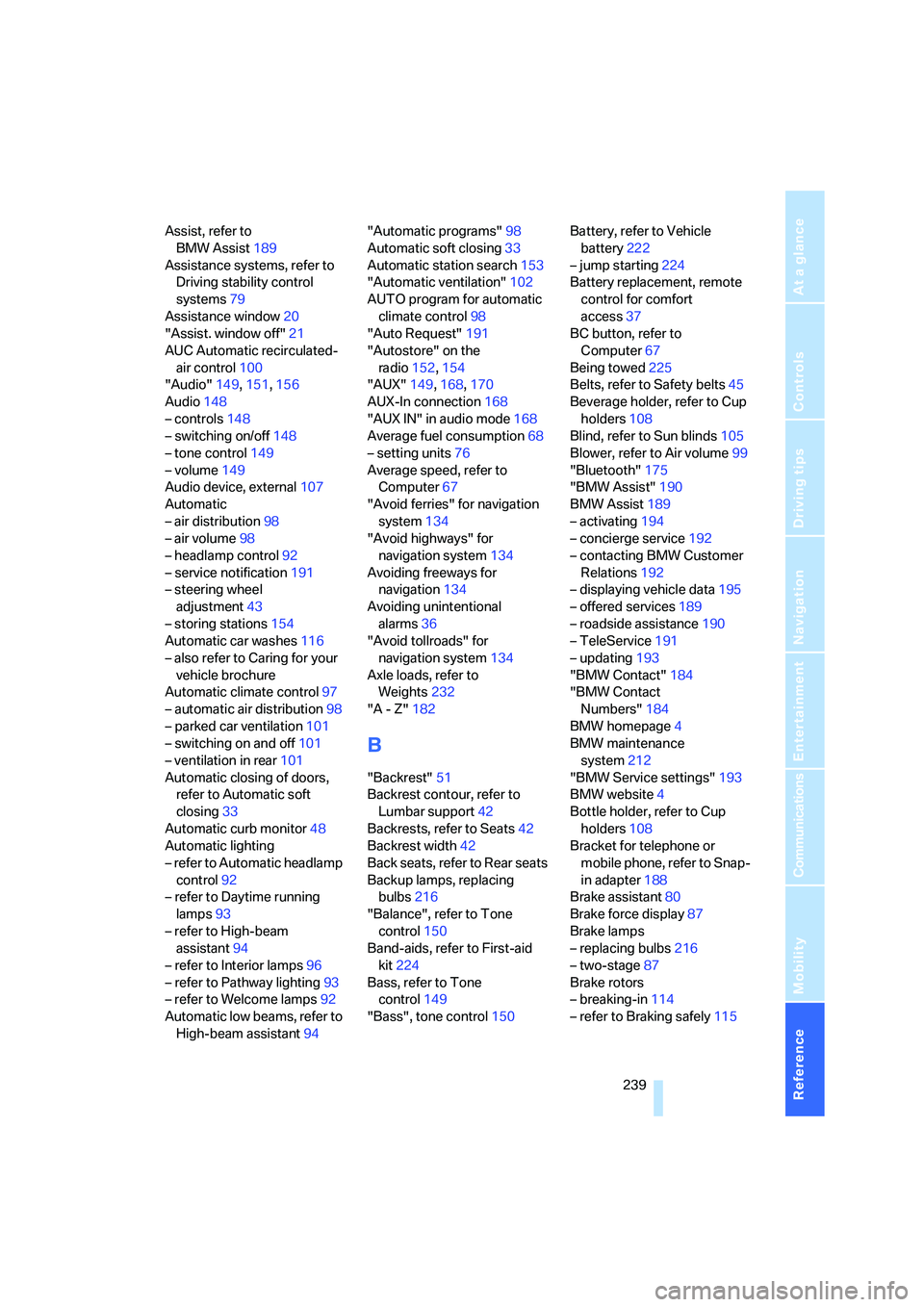
Assist, refer to
BMW Assist189
Assistance systems, refer to
Driving stability control
systems79
Assistance window20
"Assist. window off"21
AUC Automatic recirculated-
air control100
"Audio"149,151,156
Audio148
– controls148
– switching on/off148
– tone control149
– volume149
Audio device, external107
Automatic
– air distribution98
– air volume98
– headlamp control92
– service notification191
– steering wheel
adjustment43
– storing stations154
Automatic car washes116
– also refer to Caring for your
vehicle brochure
Automatic climate control97
– automatic air distribution98
– parked car ventilation101
– switching on and off101
– ventilation in rear101
Automatic closing of doors,
refer to Automatic soft
closing33
Automatic curb monitor48
Automatic lighting
– refer to Automatic headlamp
control92
– refer to Daytime running
lamps93
– refer to High-beam
assistant94
– refer to Interior lamps96
– refer to Pathway lighting93
– refer to Welcome lamps92
Automatic low beams, refer to
High-beam assistant94"Automatic programs"98
Automatic soft closing33
Automatic station search153
"Automatic ventilation"102
AUTO program for automatic
climate control98
"Auto Request"191
"Autostore" on the
radio152,
154
"AUX"149,168,170
AUX-In connection168
"AUX IN" in audio mode168
Average fuel consumption68
– setting units76
Average speed, refer to
Computer67
"Avoid ferries" for navigation
system134
"Avoid highways" for
navigation system134
Avoiding freeways for
navigation134
Avoiding unintentional
alarms36
"Avoid tollroads" for
navigation system134
Axle loads, refer to
Weights232
"A - Z"182
B
"Backrest"51
Backrest contour, refer to
Lumbar support42
Backrests, refer to Seats42
Backrest width42
Back seats, refer to Rear seats
Backup lamps, replacing
bulbs216
"Balance", refer to Tone
control150
Band-aids, refer to First-aid
kit224
Bass, refer to Tone
control149
"Bass", tone control150Battery, refer to Vehicle
battery222
– jump starting224
Battery replacement, remote
control for comfort
access37
BC button, refer to
Computer67
Being towed225
Belts, refer to Safety belts45
Beverage holder, refer to Cup
holders108
Blind, refer to Sun blinds105
Blower, refer to Air volume99
"Bluetooth"175
"BMW Assist"190
BMW Assist189
– activating194
– concierge service192
– contacting BMW Customer
Relations192
– displaying vehicle data195
– offered services189
– roadside assistance190
– TeleService191
– updating193
"BMW Contact"184
"BMW Contact
Numbers"184
BMW homepage4
BMW maintenance
system212
"BMW Service settings"193
BMW website4
Bottle holder, refer to Cup
holders108
Bracket for telephone or
mobile phone, refer to Snap-
in adapter188
Brake assistant80
Brake force display87
Brake lamps
– replacing bulbs216
– two-stage87
Brake rotors
– breaking-in114
– refer to Braking safely
115