turn signal BMW M5 2008 Owner's Manual
[x] Cancel search | Manufacturer: BMW, Model Year: 2008, Model line: M5, Model: BMW M5 2008Pages: 260, PDF Size: 6.66 MB
Page 158 of 260
Radio
156
Automatically sorting
stations*
For the "All stations" selection criterion, you
can set whether the most frequently used sta-
tions are displayed at the beginning.
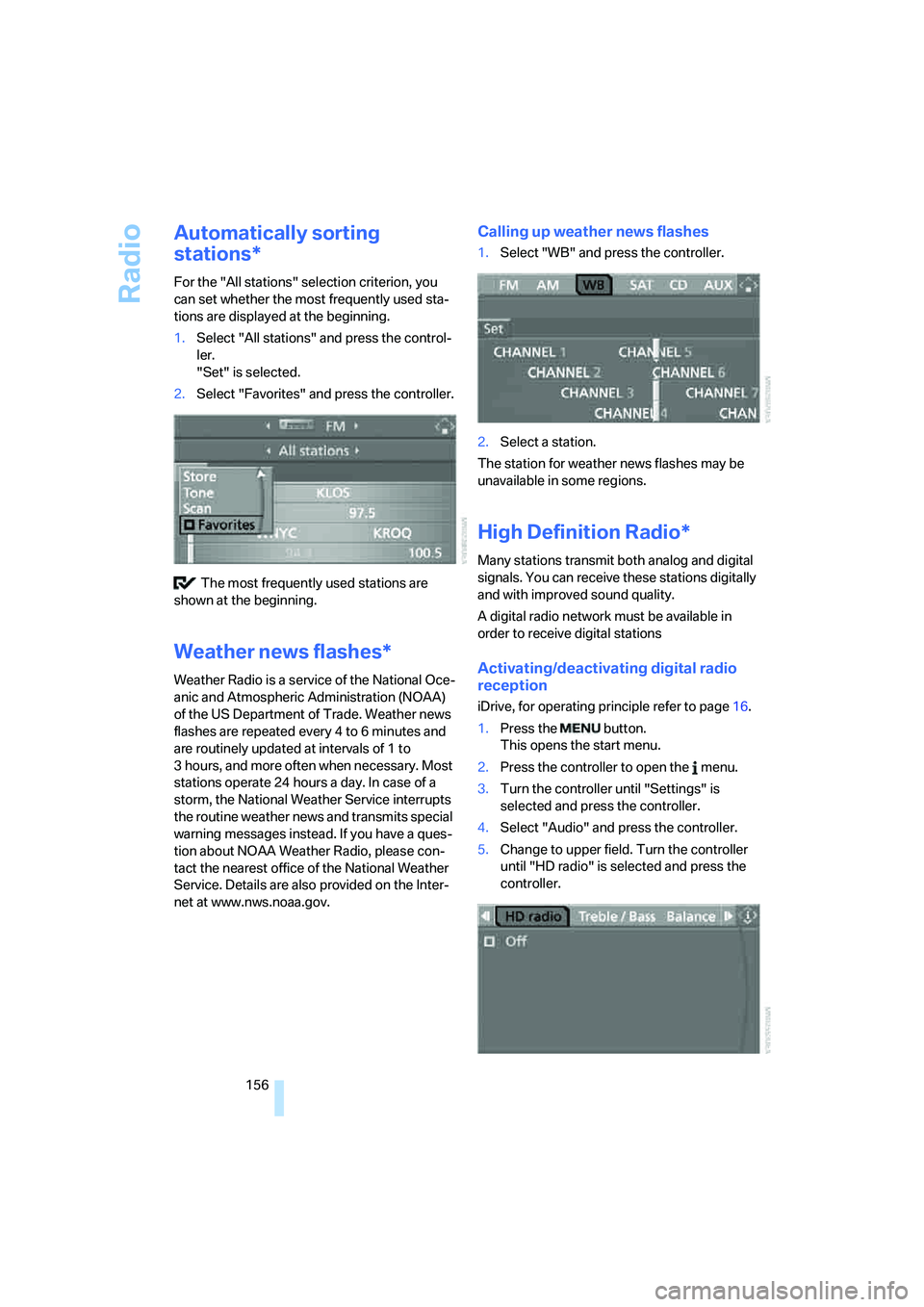
1.Select "All stations" and press the control-
ler.
"Set" is selected.
2.Select "Favorites" and press the controller.
The most frequently used stations are
shown at the beginning.
Weather news flashes*
Weather Radio is a service of the National Oce-
anic and Atmospheric Administration (NOAA)
of the US Department of Trade. Weather news
flashes are repeated every 4 to 6 minutes and
are routinely updated at intervals of 1 to
3 hours, and more often when necessary. Most
stations operate 24 hours a day. In case of a
storm, the National Weather Service interrupts
the routine weather news and transmits special
warning messages instead. If you have a ques-
tion about NOAA Weather Radio, please con-
tact the nearest office of the National Weather
Service. Details are also provided on the Inter-
net at www.nws.noaa.gov.
Calling up weather news flashes
1.Select "WB" and press the controller.
2.Select a station.
The station for weather news flashes may be
unavailable in some regions.
High Definition Radio*
Many stations transmit both analog and digital
signals. You can receive these stations digitally
and with improved sound quality.
A digital radio network must be available in
order to receive digital stations
Activating/deactivating digital radio
reception
iDrive, for operating principle refer to page16.
1.Press the button.
This opens the start menu.
2.Press the controller to open the menu.
3.Turn the controller until "Settings" is
selected and press the controller.
4.Select "Audio" and press the controller.
5.Change to upper field. Turn the controller
until "HD radio" is selected and press the
controller.
Page 163 of 260
Navigation
Entertainment
Driving tips
161Reference
At a glance
Controls
Communications
Mobility
Storing channel
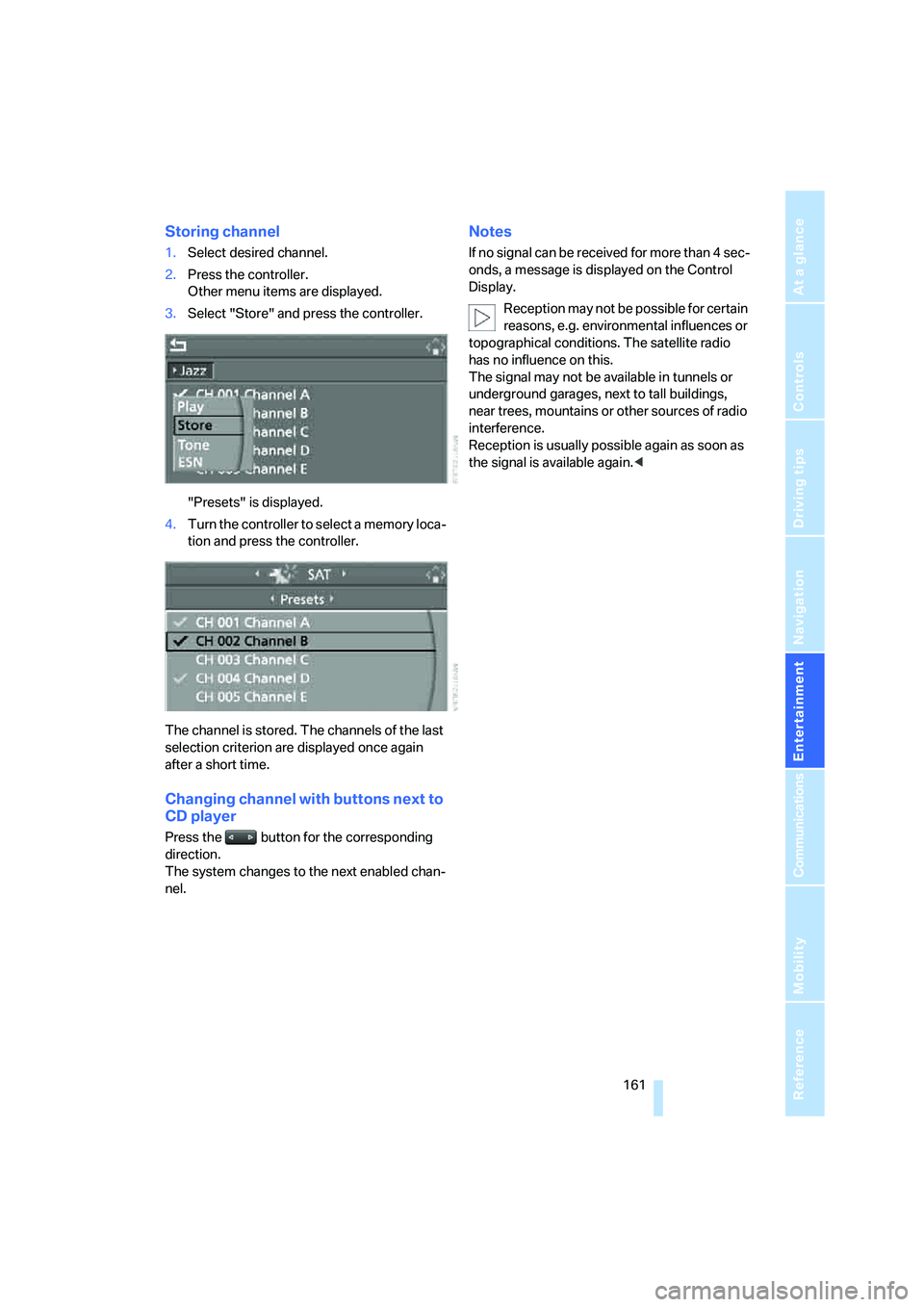
1.Select desired channel.
2.Press the controller.
Other menu items are displayed.
3.Select "Store" and press the controller.
"Presets" is displayed.
4.Turn the controller to select a memory loca-
tion and press the controller.
The channel is stored. The channels of the last
selection criterion are displayed once again
after a short time.
Changing channel with buttons next to
CD player
Press the button for the corresponding
direction.
The system changes to the next enabled chan-
nel.
Notes
If no signal can be received for more than 4 sec-
onds, a message is displayed on the Control
Display.
Reception may not be possible for certain
reasons, e.g. environmental influences or
topographical conditions. The satellite radio
has no influence on this.
The signal may not be available in tunnels or
underground garages, next to tall buildings,
near trees, mountains or other sources of radio
interference.
Reception is usually possible again as soon as
the signal is available again.<
Page 210 of 260
Under the hood
208
Engine oil
The engine oil consumption is dependent on
driving style and driving conditions.
Checking engine oil level
Your vehicle is equipped with an electronic oil
level check.
The oil level can be displayed when the engine
is at operating temperature. Constant short-
distance driving or a very sporty driving style
can make it impossible for a measurement to be
taken.
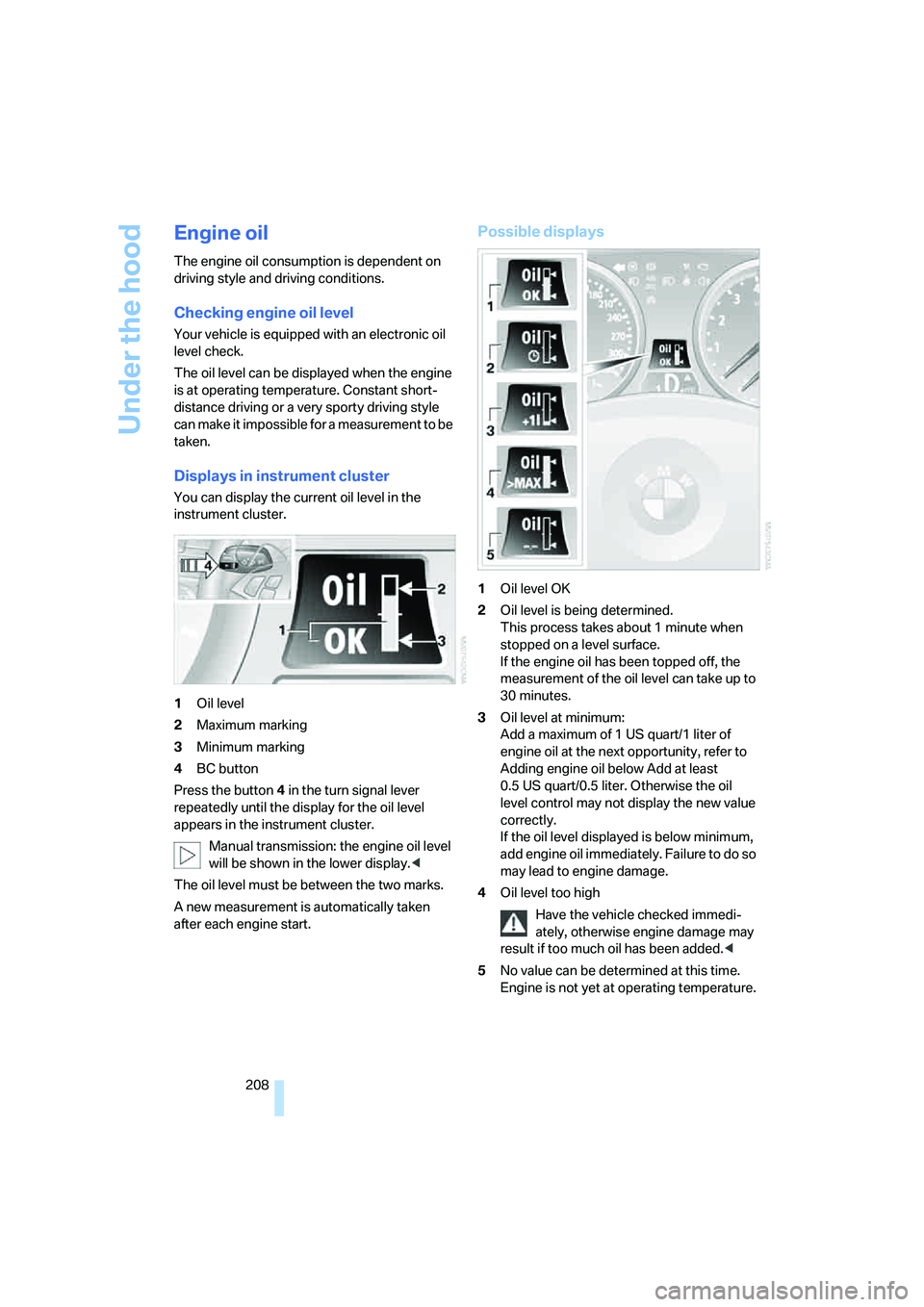
Displays in instrument cluster
You can display the current oil level in the
instrument cluster.
1Oil level
2Maximum marking
3Minimum marking
4BC button
Press the button4 in the turn signal lever
repeatedly until the display for the oil level
appears in the instrument cluster.
Manual transmission: the engine oil level
will be shown in the lower display.<
The oil level must be between the two marks.
A new measurement is automatically taken
after each engine start.
Possible displays
1Oil level OK
2Oil level is being determined.
This process takes about 1 minute when
stopped on a level surface.
If the engine oil has been topped off, the
measurement of the oil level can take up to
30 minutes.
3Oil level at minimum:
Add a maximum of 1 US quart/1 liter of
engine oil at the next opportunity, refer to
Adding engine oil below Add at least
0.5 US quart/0.5 liter. Otherwise the oil
level control may not display the new value
correctly.
If the oil level displayed is below minimum,
add engine oil immediately. Failure to do so
may lead to engine damage.
4Oil level too high
Have the vehicle checked immedi-
ately, otherwise engine damage may
result if too much oil has been added.<
5No value can be determined at this time.
Engine is not yet at operating temperature.
Page 211 of 260
Mobility
209Reference
At a glance
Controls
Driving tips
Communications
Navigation
Entertainment
Fast measurement
In addition to the automatic measurement, you
can also determine the current oil level manu-
ally, e.g. after adding engine oil, but with a lower
degree of measuring accuracy.
1.With the engine at operating temperature,
i.e. after at least 6 miles/10 km of uninter-
rupted driving, park the vehicle in a horizon-
tal position.
2.Allow the engine to run at idle.
3.Press the BC button on the turn signal lever
repeatedly until the oil level display is
shown in the instrument cluster.
4.Press the BC button for at least 2 seconds.
The oil level is determined. A clock symbol
is displayed during the measurement.
5.After approx. 1 minute the current oil level is
displayed.
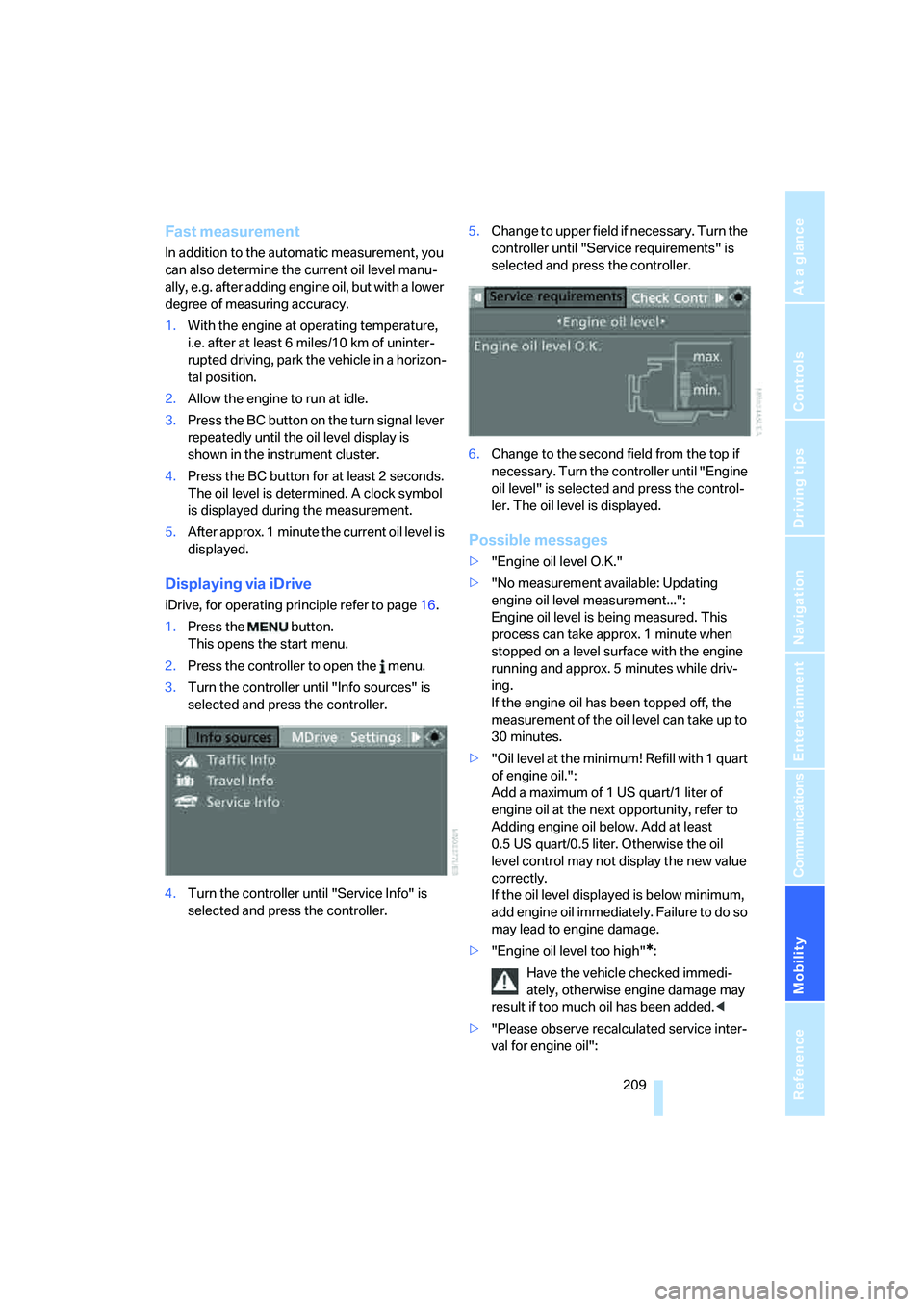
Displaying via iDrive
iDrive, for operating principle refer to page16.
1.Press the button.
This opens the start menu.
2.Press the controller to open the menu.
3.Turn the controller until "Info sources" is
selected and press the controller.
4.Turn the controller until "Service Info" is
selected and press the controller.5.Change to upper field if necessary. Turn the
controller until "Service requirements" is
selected and press the controller.
6.Change to the second field from the top if
necessary. Turn the controller until "Engine
oil level" is selected and press the control-
ler. The oil level is displayed.
Possible messages
>"Engine oil level O.K."
>"No measurement available: Updating
engine oil level measurement...":
Engine oil level is being measured. This
process can take approx. 1 minute when
stopped on a level surface with the engine
running and approx. 5 minutes while driv-
ing.
If the engine oil has been topped off, the
measurement of the oil level can take up to
30 minutes.
>"Oil level at the minimum! Refill with 1 quart
of engine oil.":
Add a maximum of 1 US quart/1 liter of
engine oil at the next opportunity, refer to
Adding engine oil below. Add at least
0.5 US quart/0.5 liter. Otherwise the oil
level control may not display the new value
correctly.
If the oil level displayed is below minimum,
add engine oil immediately. Failure to do so
may lead to engine damage.
>"Engine oil level too high"
*:
Have the vehicle checked immedi-
ately, otherwise engine damage may
result if too much oil has been added.<
>"Please observe recalculated service inter-
val for engine oil":
Page 218 of 260
Replacing components
216
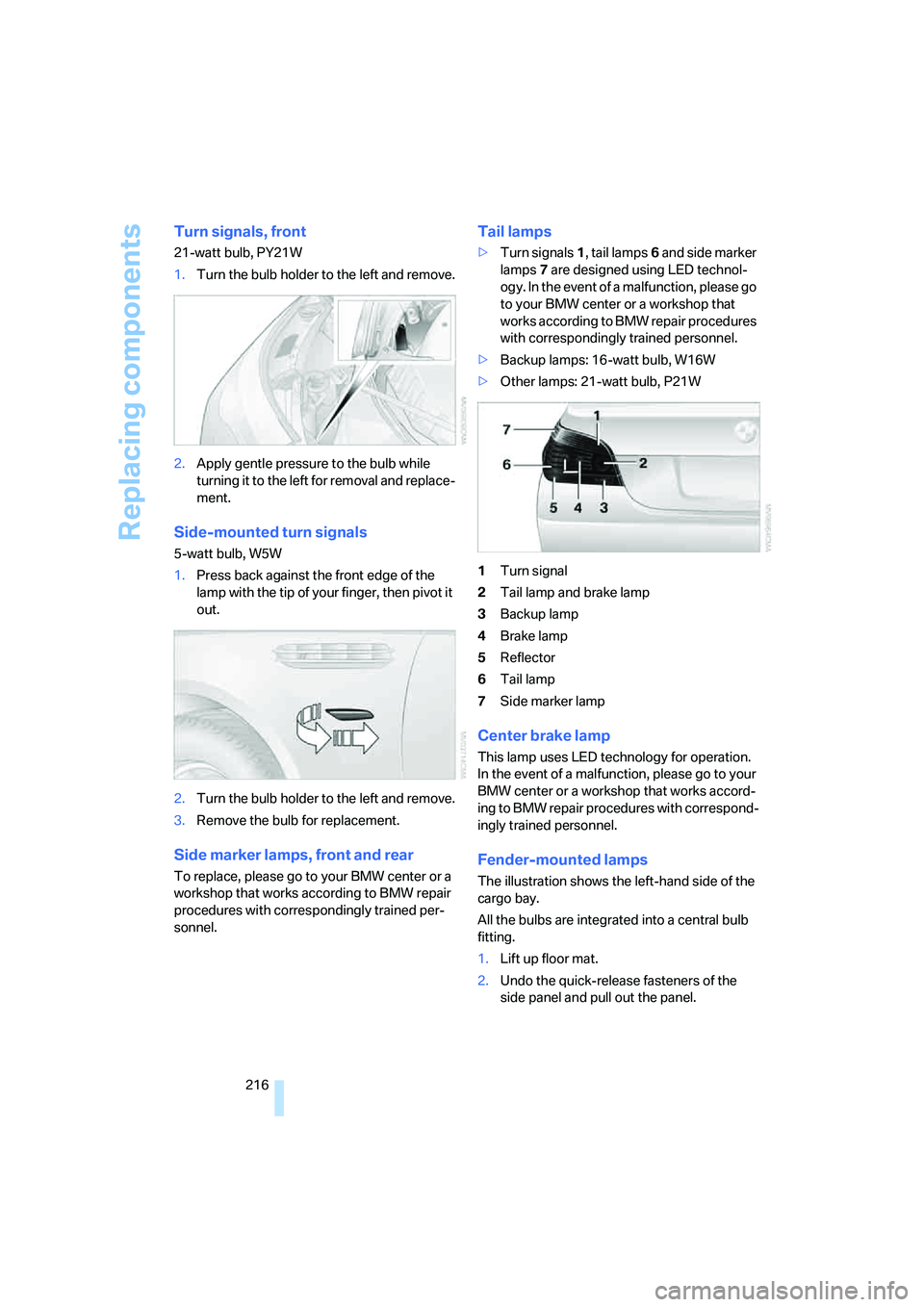
Turn signals, front
21-watt bulb, PY21W
1.Turn the bulb holder to the left and remove.
2.Apply gentle pressure to the bulb while
turning it to the left for removal and replace-
ment.
Side-mounted turn signals
5-watt bulb, W5W
1.Press back against the front edge of the
lamp with the tip of your finger, then pivot it
out.
2.Turn the bulb holder to the left and remove.
3.Remove the bulb for replacement.
Side marker lamps, front and rear
To replace, please go to your BMW center or a
workshop that works according to BMW repair
procedures with correspondingly trained per-
sonnel.
Tail lamps
>Turn signals1, tail lamps6 and side marker
lamps7 are designed using LED technol-
ogy. In the event of a malfunction, please go
to your BMW center or a workshop that
works according to BMW repair procedures
with correspondingly trained personnel.
>Backup lamps: 16-watt bulb, W16W
>Other lamps: 21-watt bulb, P21W
1Turn signal
2Tail lamp and brake lamp
3Backup lamp
4Brake lamp
5Reflector
6Tail lamp
7Side marker lamp
Center brake lamp
This lamp uses LED technology for operation.
In the event of a malfunction, please go to your
BMW center or a workshop that works accord-
ing to BMW repair procedures with correspond-
ingly trained personnel.
Fender-mounted lamps
The illustration shows the left-hand side of the
cargo bay.
All the bulbs are integrated into a central bulb
fitting.
1.Lift up floor mat.
2.Undo the quick-release fasteners of the
side panel and pull out the panel.
Page 227 of 260
Mobility
225Reference
At a glance
Controls
Driving tips
Communications
Navigation
Entertainment
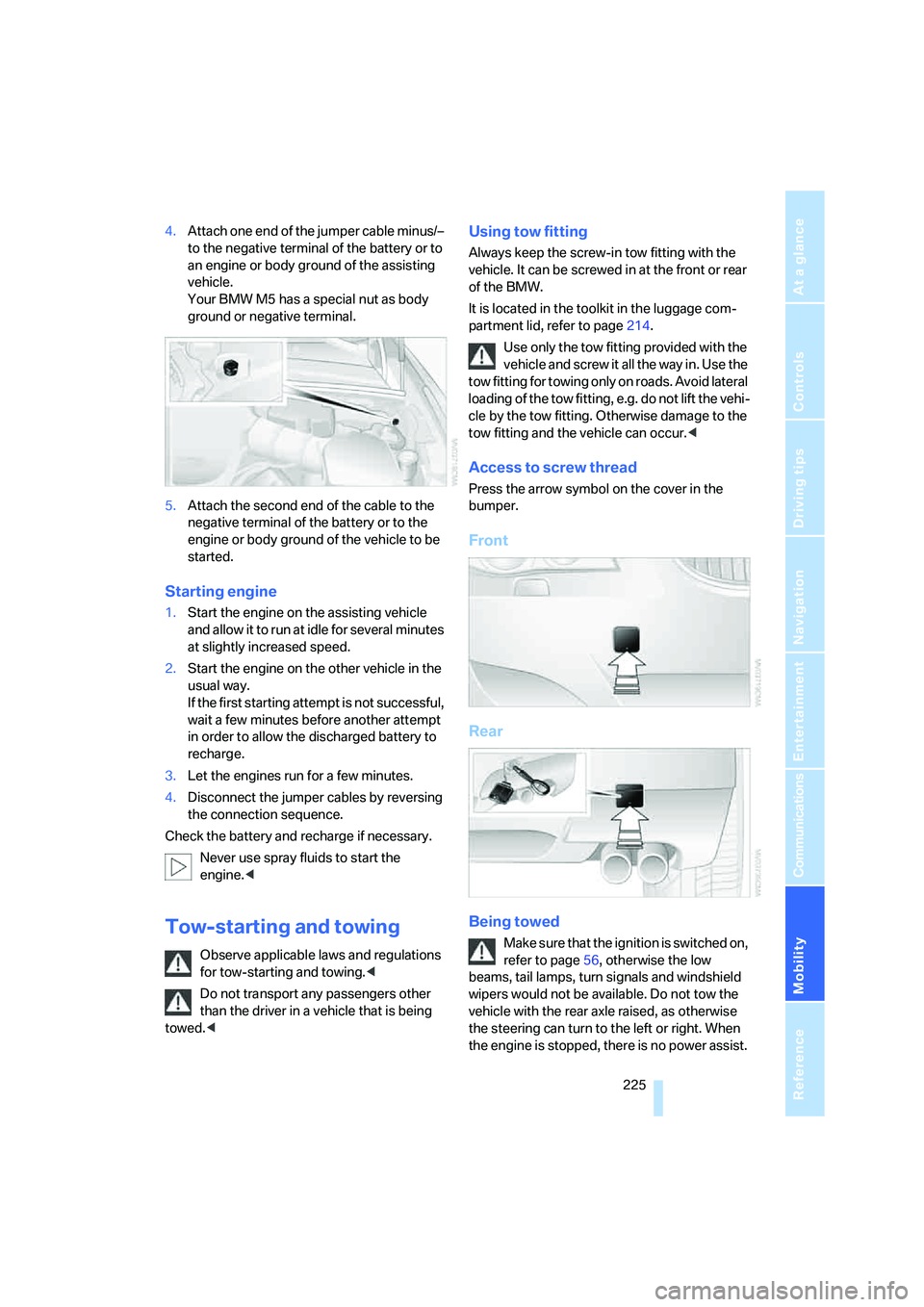
4.Attach one end of the jumper cable minus/–
to the negative terminal of the battery or to
an engine or body ground of the assisting
vehicle.
Your BMW M5 has a special nut as body
ground or negative terminal.
5.Attach the second end of the cable to the
negative terminal of the battery or to the
engine or body ground of the vehicle to be
started.
Starting engine
1.Start the engine on the assisting vehicle
and allow it to run at idle for several minutes
at slightly increased speed.
2.Start the engine on the other vehicle in the
usual way.
If the first starting attempt is not successful,
wait a few minutes before another attempt
in order to allow the discharged battery to
recharge.
3.Let the engines run for a few minutes.
4.Disconnect the jumper cables by reversing
the connection sequence.
Check the battery and recharge if necessary.
Never use spray fluids to start the
engine.<
Tow-starting and towing
Observe applicable laws and regulations
for tow-starting and towing.<
Do not transport any passengers other
than the driver in a vehicle that is being
towed.<
Using tow fitting
Always keep the screw-in tow fitting with the
vehicle. It can be screwed in at the front or rear
of the BMW.
It is located in the toolkit in the luggage com-
partment lid, refer to page214.
Use only the tow fitting provided with the
vehicle and screw it all the way in. Use the
tow fitting for towing only on roads. Avoid lateral
loading of the tow fitting, e.g. do not lift the vehi-
cle by the tow fitting. Otherwise damage to the
tow fitting and the vehicle can occur.<
Access to screw thread
Press the arrow symbol on the cover in the
bumper.
Front
Rear
Being towed
Make sure that the ignition is switched on,
refer to page56, otherwise the low
beams, tail lamps, turn signals and windshield
wipers would not be available. Do not tow the
vehicle with the rear axle raised, as otherwise
the steering can turn to the left or right. When
the engine is stopped, there is no power assist.
Page 244 of 260
Everything from A to Z
242 "Current position"143
Current position
– displaying143
– entering132
– storing132
"Customer
Relations"184,192
Cylinders, refer to Engine
data230
D
Dashboard, refer to
Cockpit10
Data, technical230
– dimensions231
– engine230
– weights232
"Date"76
Date
– date format76
– setting76
"Date format"76
"Daytime running lamps"93
Daytime running lamps93
DBC Dynamic Brake Control,
warning lamp81
"Deactivated"44
Decommissioning the vehicle,
refer to Caring for your
vehicle brochure
Defect
– door lock32
– fuel filler door198
– glass sunroof40
– luggage compartment lid34
Defrosting windows99
Defrosting windows and
removing condensation99
Defrosting windshield, refer to
Defrosting windows99
Defrost position, refer to
Defrosting windows99
"Delete address book" for
navigation system133
"Delete all numbers" for
mobile phone183"Delete data" for navigation
system133
"Delete" for mobile
phone183
Destination address
– deleting133
– entering124,127
Destination for navigation
– destination list130
– entering via voice127
– entry124
– selecting from address
book132
– selecting using
information129
– storing131
Destination guidance136
– bypassing route
sections140
– canceling voice
instructions50
– changing specified
route134
– displaying route137
– distance and arrival136
– interrupting136
– starting136
– terminating/continuing136
– voice instructions139
– volume of voice
instructions140
Destination list for
navigation130
Destinations recently driven
to130
"Details" in audio
mode164,170
"Dial" for mobile phone181
"Dial number"181
Digital clock67
Digital radio, refer to High
Definition Radio156
Dimensions231
Directional indicators, refer to
Turn signals62
Direction instructions, refer to
Voice instructions139Directory, refer to Phone
book182
Directory for navigation, refer
to Address book131
Direct selection buttons21
Displacement, refer to Engine
data230
"Display"76
Display, refer to iDrive
controls16
Display elements, refer to
Instrument cluster12
Displaying vehicle data195
Display lighting, refer to
Instrument lighting96
"Display off"21
Displays
– on Control Display, refer to
iDrive16
– refer to Instrument
cluster12
"Display settings"76,89
Displays on the windshield,
refer to Head-Up Display89
Disposal
– battery of remote control
with comfort access37
– coolant211
– vehicle battery222
Distance, refer to
Computer68
"Distance to dest."68
Distance to destination, refer
to Computer68
Distance warning, refer to
PDC Park Distance
Control78
Divided rear backrest, refer to
Through-loading
system110
Door entry lighting96
Door key, refer to Keys/
remote control28
Door lock32
Door locking, confirmation
signals31
"Door locks"30
Page 246 of 260
Everything from A to Z
244 Event Data Recorders213
Exhaust system, refer to Hot
exhaust system114
Exterior mirrors48
– adjusting48
– automatic dimming
feature49
– automatic heating48
– folding in and out48
– tilting down passenger-side
exterior mirror48
External audio device107
Eye for tow-starting and
towing, refer to Tow
fitting225
F
"Fader", refer to Tone
control150
Fader, refer to Tone
control150
Failure messages, refer to
Check Control71
False alarm
– refer to Avoiding
unintentional alarms36
– refer to Switching off
alarm35
Fastening safety belts, refer to
Safety belts45
– warning lamp46
Fastest route for
navigation134
"Fast route" for
navigation134
"Favorites", calling up with
radio156
Filler neck for washer fluid64
Filling bottle, refer to
M Mobility System217
Filling sealant into wheel218
Filter, refer to Microfilter/
activated-charcoal filter101
Fine wood, refer to Caring for
your vehicle brochure
First aid, refer to First-aid
kit224First-aid kit224
Flashing
– during locking/unlocking,
refer to Setting confirmation
signals31
– triple turn signal
activation63
Flashlight, refer to
Rechargeable flashlight106
Flat tire
– changing wheels219
– Flat Tire Monitor83,84
– M Mobility System84,217
– refer to Tire condition202
– spare wheel220
– TPM Tire Pressure
Monitor84
– warning lamp84,86
Flat Tire Monitor83
– false alarms83
– initializing system83
– snow chains204
– system limits83
– warning lamp84
Floor mat, refer to Caring for
your vehicle brochure
Floor mats/carpets, refer to
Caring for your vehicle
brochure
Fluid reservoir, refer to Filler
neck for washer fluid64
"FM", reception
range
149,152
FM, waveband152
Folding rear backrest110
Fold-over rear backrest110
Footbrake, refer to Braking
safely115
Footwell lamps, refer to
Interior lamps96
Forward, fast
– CD changer166
– CD player166
For your own safety5
Freeway, refer to Route
criteria134
Front airbags87Front armrest, refer to Center
armrest, front106
Front passenger airbags,
deactivating88
Front seat adjustment42
"FTM"84
FTM, refer to Flat Tire
Monitor83
Fuel199
– average consumption68
– display67
– high-quality brands199
– quality199
– specifications199
– tank contents, refer to
Capacities232
Fuel clock, refer to Fuel
gauge67
Fuel consumption display,
refer to Computer, average
fuel consumption68
Fuel display, refer to Fuel
gauge67
Fuel filler door198
– releasing in the event of
electrical malfunction198
Full mobile phone preparation
package174
Full screen display, refer to
Switching assistance
window off21
Fuses222
G
Garage door opener, refer to
Integrated universal remote
control104
Gasoline, refer to Required
fuel199
Gasoline display, refer to Fuel
gauge67
Gear changes61
Gear display, refer to Displays
in instrument cluster61
Gearshift lever60
– manual transmission58
Page 250 of 260
Everything from A to Z
248 Mobile phone battery188
Mobility System217
Monitor, refer to iDrive16
Monitoring pressure of tires,
refer to Flat Tire Monitor83
"Monitor on / off"50
Most recent mobile phone
numbers183
MP3
– compressed audio files162
– USB/audio interface169
Multi-function steering wheel,
refer to Buttons on steering
wheel11
Multifunction switch
– refer to Turn signals/
headlamp flasher62
– refer to Wiper system63
Music tracks
– finding164
– random play sequence165
– sampling, scan164
"Mute on / off"50
"M View"90
"M view"90
MW, waveband152
N
"Navigation"68,124
Navigation destination
– entering manually124
– home address133
– selecting via map128
Navigation drive, installation
location122
Navigation DVD122
Navigation instructions, refer
to Switching voice
instructions on/off139Navigation system122
– address book131
– bypassing route
sections140
– destination entry124
– destination guidance in
assistance window122
– destination list130
– displaying current
position143
– displaying route137
– entering a destination
manually124
– entering destination via
voice127
– last destinations130
– navigation DVD122
– route list139
– searching for a special
destination129
– selecting destination using
information129
– selecting destination via
map128
– selecting route criteria134
– starting destination
guidance136
– switching off, refer to
Terminating/continuing
destination guidance136
– terminating/continuing
destination guidance136
– voice instructions139
– volume adjustment140
"Navigation voice
instructions"50,139
Neck support, refer to Head
restraints44
"New address" for navigation
system131
"New destination"124,128
New remote control28
"New route"140
New wheels and tires203
"Next entertainment
source"50
"Normal" with EDC82
Nozzles, refer to Windshield
washer nozzles64
Nylon rope, refer to Tow-
starting and towing225
O
OBD socket, refer to Socket
for Onboard Diagnostics
interface213
Octane ratings, refer to Fuel
specifications199
Odometer66
Oil, refer to Engine oil208
Oil change intervals, refer to
Service requirements69
Oil temperature67
"On a new destination" for
navigation system129
Onboard computer, refer to
iDrive16
"Onboard info"68
Onboard toolkit214
"On destination"129
"On location"129
Opening and closing
– comfort access36
– from inside32
– from outside30
– using remote control30
– using the door lock32
Operating principle, iDrive17
Operation by voice for mobile
phone185
– adjusting volume186
– canceling185
– commands185
– correcting phone
number186
– dialing phone number186
– placing a call186
– redialing187
– voice phone book186
"Options"193
Orientation menu, refer to
Start menu17
Output, refer to Engine
data230
Page 254 of 260
Everything from A to Z
252 Settings
– changing on Control
Display74
– clock, 12h/24h mode75
– configuring, refer to
MDrive50
– configuring, refer to
Personal Profile28
– date76
– language77
– units of measure76
Settings menu, refer to
imenu17
Setting time, refer to
Preselecting activation
times102
Shifting61
Shifting into drive position,
refer to Selector lever
positions60
Shift lights62
Shiftlock60
Shift paddles on steering
wheel61
Shock absorber control, refer
to EDC Electronic Damping
Control82
Short commands of voice
command system233
"Short route" for
navigation134
Short route in navigation, refer
to Selecting route134
Shoulder support42
"Show current position"129
"Show destination
position"129
Shuffled, refer to Random
– CD changer165
– CD player165
Side airbags87
Side marker lamps, replacing
bulbs216
Side-mounted turn signals,
replacing bulbs216
Side window blinds, refer to
Sun blinds105Signal horn, refer to Horn10
Sitting safely41
– with airbags41
– with head restraint41
– with safety belts41
Ski bag110
Sliding/tilt sunroof, refer to
Glass sunroof, electric38
Slope assistant, refer to
Starting assistant82
SMG, refer to Sequential
Manual Transmission with
Drivelogic59
"SMG Drivelogic"51,62
Snap-in adapter
– mounting/removing
188
– using174
Snow chains204
Socket for Onboard
Diagnostics interface213
Socket for remote control,
refer to Ignition lock56
Sockets, refer to Connecting
electrical devices109
Soft closure aid, refer to
Automatic soft closing33
Song search on CD, refer to
Sampling tracks164
SOS, refer to Initiating an
emergency request223
Sound distribution in audio
mode
– front/rear fader150
– right/left balance150
Spare
– adapter for spare key28
– fuses222
– key28
– wheel, driving with spare
wheel221
– wheel, refer to Changing
wheels219
Special oils, refer to Approved
engine oils210
Specified oil grades, refer to
Approved engine oils210Speed-dependent
volume150
Speed limit73
Speed limit warning, refer to
Speed limit73
Speedometer12
"Speed volume", tone
control150
Speed with winter tires204
"Sport" with EDC82
Stability control, refer to
Driving stability control
systems79
Start/Stop button56
– starting the engine57
– switching off the engine57
"Start" for stopwatch74
"Start guidance"127,136
Starting, refer to Starting
engine57
Starting assistance, refer to
Jump starting224
Starting assistant82
Starting difficulties, refer to
Jump starting224
Starting off
– on a slippery surface82
– on slopes, refer to Starting
assistant82
Start menu, iDrive17
"Start route guidance"129
"Start service"
191
"Start Service" for
BMW Assist192
"State / Province" for
destination entry125
"State inspection"71
Station, refer to Radio152
"Status"70
Status information on Control
Display20
Status of this Owner's Manual
at time of printing5