wheel BMW M5 2008 Workshop Manual
[x] Cancel search | Manufacturer: BMW, Model Year: 2008, Model line: M5, Model: BMW M5 2008Pages: 260, PDF Size: 6.66 MB
Page 207 of 260
Mobility
205Reference
At a glance
Controls
Driving tips
Communications
Navigation
Entertainment
Make sure that the snow chains are always suf-
ficiently tensioned. Retighten as needed in
accordance with the chain manufacturer's
specifications.
After mounting snow chains, do not ini-
tialize the Flat Tire Monitor, otherwise
incorrect displays can occur.
After mounting or removing snow chains, the
slip detection of the Sequential Manual Trans-
mission must become familiar with the altered
state. To do this, reinitialize the system, refer to
After changing wheels/tires.<
Page 219 of 260
Mobility
217Reference
At a glance
Controls
Driving tips
Communications
Navigation
Entertainment
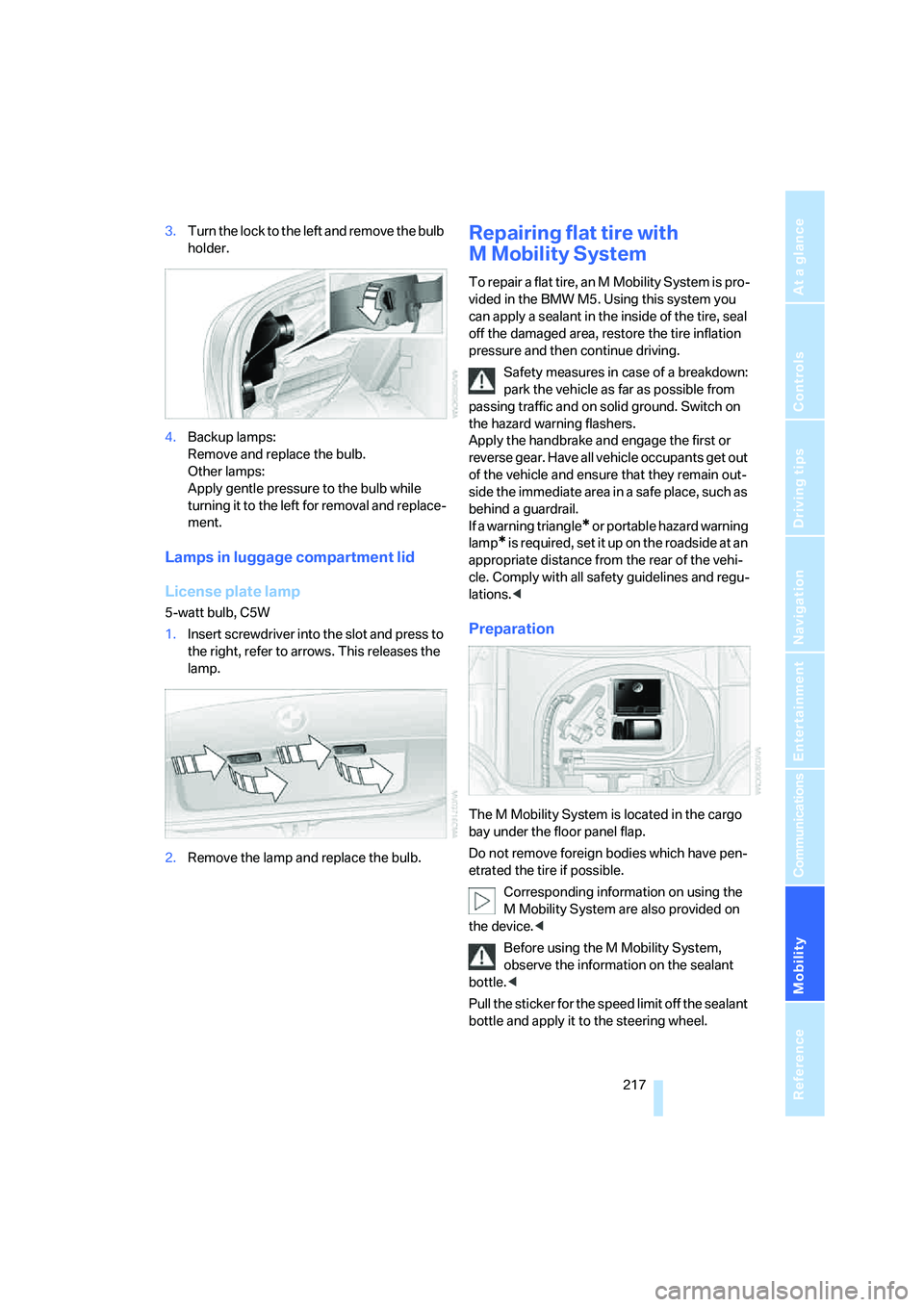
3.Turn the lock to the left and remove the bulb
holder.
4.Backup lamps:
Remove and replace the bulb.
Other lamps:
Apply gentle pressure to the bulb while
turning it to the left for removal and replace-
ment.
Lamps in luggage compartment lid
License plate lamp
5-watt bulb, C5W
1.Insert screwdriver into the slot and press to
the right, refer to arrows. This releases the
lamp.
2.Remove the lamp and replace the bulb.
Repairing flat tire with
M Mobility System
To repair a flat tire, an M Mobility System is pro-
vided in the BMW M5. Using this system you
can apply a sealant in the inside of the tire, seal
off the damaged area, restore the tire inflation
pressure and then continue driving.
Safety measures in case of a breakdown:
park the vehicle as far as possible from
passing traffic and on solid ground. Switch on
the hazard warning flashers.
Apply the handbrake and engage the first or
reverse gear. Have all vehicle occupants get out
of the vehicle and ensure that they remain out-
side the immediate area in a safe place, such as
behind a guardrail.
If a warning triangle
* or portable hazard warning
lamp
* is required, set it up on the roadside at an
appropriate distance from the rear of the vehi-
cle. Comply with all safety guidelines and regu-
lations.<
Preparation
The M Mobility System is located in the cargo
bay under the floor panel flap.
Do not remove foreign bodies which have pen-
etrated the tire if possible.
Corresponding information on using the
M Mobility System are also provided on
the device.<
Before using the M Mobility System,
observe the information on the sealant
bottle.<
Pull the sticker for the speed limit off the sealant
bottle and apply it to the steering wheel.
Page 220 of 260
Replacing components
218 Please observe the best-by date on the
sealant bottle.<
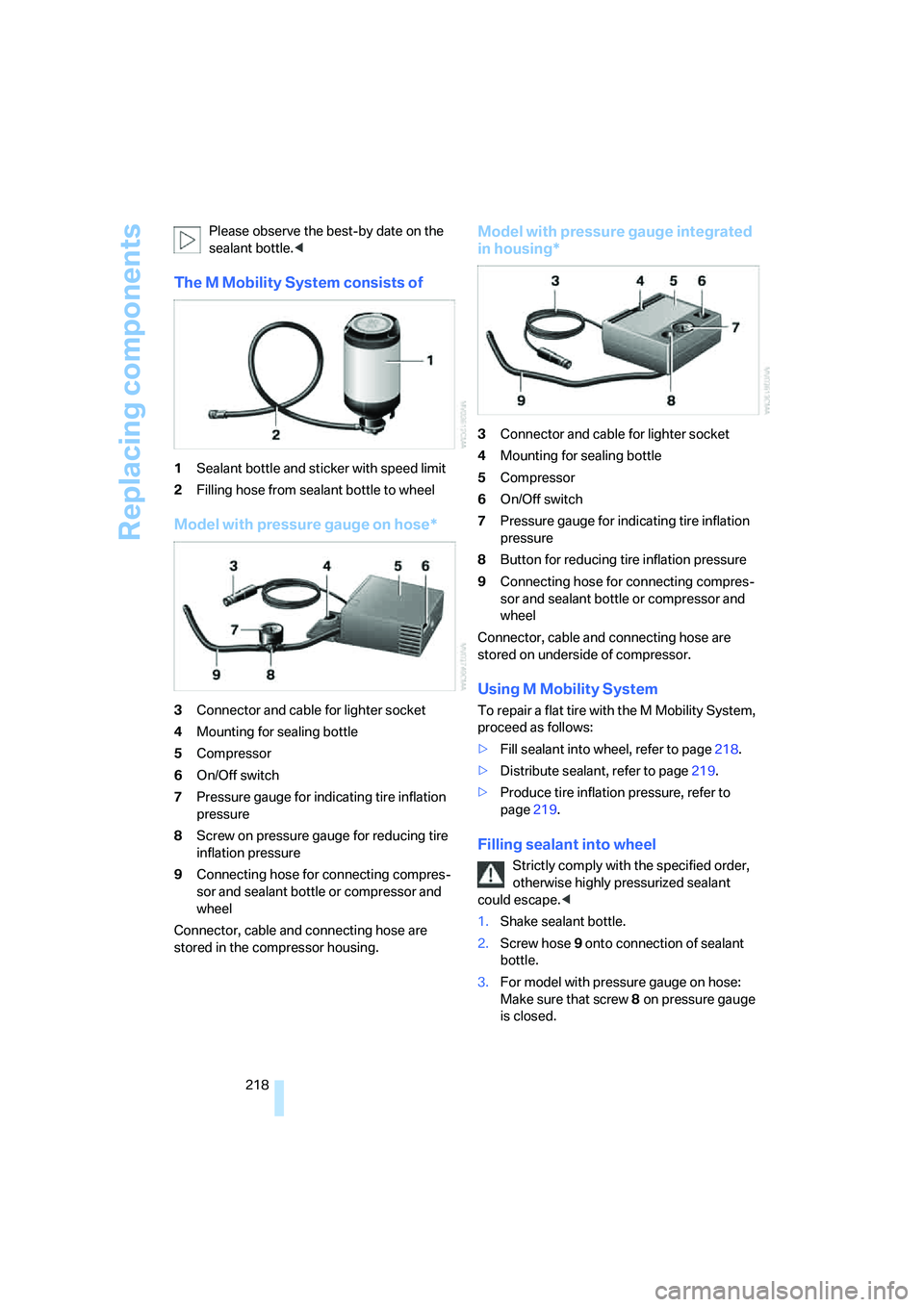
The M Mobility System consists of
1Sealant bottle and sticker with speed limit
2Filling hose from sealant bottle to wheel
Model with pressure gauge on hose*
3Connector and cable for lighter socket
4Mounting for sealing bottle
5Compressor
6On/Off switch
7Pressure gauge for indicating tire inflation
pressure
8Screw on pressure gauge for reducing tire
inflation pressure
9Connecting hose for connecting compres-
sor and sealant bottle or compressor and
wheel
Connector, cable and connecting hose are
stored in the compressor housing.
Model with pressure gauge integrated
in housing*
3Connector and cable for lighter socket
4Mounting for sealing bottle
5Compressor
6On/Off switch
7Pressure gauge for indicating tire inflation
pressure
8Button for reducing tire inflation pressure
9Connecting hose for connecting compres-
sor and sealant bottle or compressor and
wheel
Connector, cable and connecting hose are
stored on underside of compressor.
Using M Mobility System
To repair a flat tire with the M Mobility System,
proceed as follows:
>Fill sealant into wheel, refer to page218.
>Distribute sealant, refer to page219.
>Produce tire inflation pressure, refer to
page219.
Filling sealant into wheel
Strictly comply with the specified order,
otherwise highly pressurized sealant
could escape.<
1.Shake sealant bottle.
2.Screw hose9 onto connection of sealant
bottle.
3.For model with pressure gauge on hose:
Make sure that screw8 on pressure gauge
is closed.
Page 221 of 260
Mobility
219Reference
At a glance
Controls
Driving tips
Communications
Navigation
Entertainment
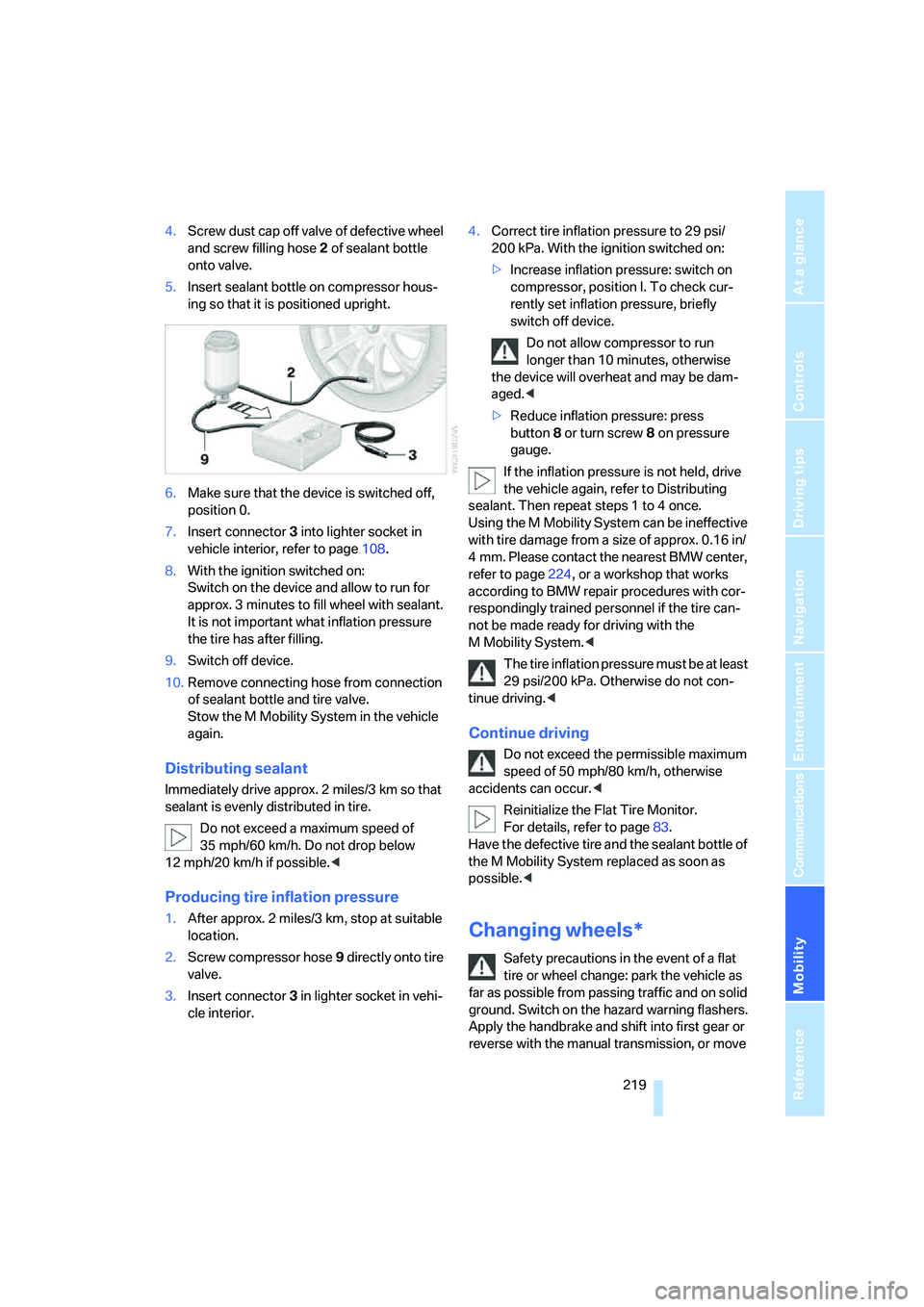
4.Screw dust cap off valve of defective wheel
and screw filling hose2 of sealant bottle
onto valve.
5.Insert sealant bottle on compressor hous-
ing so that it is positioned upright.
6.Make sure that the device is switched off,
position 0.
7.Insert connector3 into lighter socket in
vehicle interior, refer to page108.
8.With the ignition switched on:
Switch on the device and allow to run for
approx. 3 minutes to fill wheel with sealant.
It is not important what inflation pressure
the tire has after filling.
9.Switch off device.
10.Remove connecting hose from connection
of sealant bottle and tire valve.
Stow the M Mobility System in the vehicle
again.
Distributing sealant
Immediately drive approx. 2 miles/3 km so that
sealant is evenly distributed in tire.
Do not exceed a maximum speed of
35 mph/60 km/h. Do not drop below
12 mph/20 km/h if possible.<
Producing tire inflation pressure
1.After approx. 2 miles/3 km, stop at suitable
location.
2.Screw compressor hose9 directly onto tire
valve.
3.Insert connector 3 in lighter socket in vehi-
cle interior.4.Correct tire inflation pressure to 29 psi/
200 kPa. With the ignition switched on:
>Increase inflation pressure: switch on
compressor, position I. To check cur-
rently set inflation pressure, briefly
switch off device.
Do not allow compressor to run
longer than 10 minutes, otherwise
the device will overheat and may be dam-
aged.<
>Reduce inflation pressure: press
button8 or turn screw8 on pressure
gauge.
If the inflation pressure is not held, drive
the vehicle again, refer to Distributing
sealant. Then repeat steps 1 to 4 once.
Using the M Mobility System can be ineffective
with tire damage from a size of approx. 0.16 in/
4 mm. Please contact the nearest BMW center,
refer to page224, or a workshop that works
according to BMW repair procedures with cor-
respondingly trained personnel if the tire can-
not be made ready for driving with the
M Mobility System.<
The tire inflation pressure must be at least
29 psi/200 kPa. Otherwise do not con-
tinue driving.<
Continue driving
Do not exceed the permissible maximum
speed of 50 mph/80 km/h, otherwise
accidents can occur.<
Reinitialize the Flat Tire Monitor.
For details, refer to page83.
Have the defective tire and the sealant bottle of
the M Mobility System replaced as soon as
possible.<
Changing wheels*
Safety precautions in the event of a flat
tire or wheel change: park the vehicle as
far as possible from passing traffic and on solid
ground. Switch on the hazard warning flashers.
Apply the handbrake and shift into first gear or
reverse with the manual transmission, or move
Page 222 of 260
Replacing components
220 the selector lever into a drive position with the
sequential transmission.
Have all vehicle occupants get out of the vehicle
and ensure that they remain outside the imme-
diate area in a safe place, such as behind a
guardrail.
If a warning triangle
* or portable hazard warning
lamp
* is r e q u ir e d, s et i t up o n t h e ro a d s i d e a t a n
appropriate distance from the rear of the vehi-
cle. Comply with all safety guidelines and regu-
lations.
Change the wheel only on a level, firm surface
which is not slippery. The vehicle or the jack
could slip to the side if you attempt to raise the
vehicle on a soft or slippery surface such as
snow, ice, tiles, etc.
Position the jack on a firm support surface.
Do not use a wooden block or similar object as a
support base for the jack, as this would prevent
it from extending to its full support height and
reduce its load-carrying capacity.
To avoid serious or fatal injury: never lie under
the vehicle, and never start the engine while it is
supported by the jack.<
What you will need
To avoid rattling noises later on, note the posi-
tions of the tools before removing them, then
return them to their initial positions after com-
pleting work.
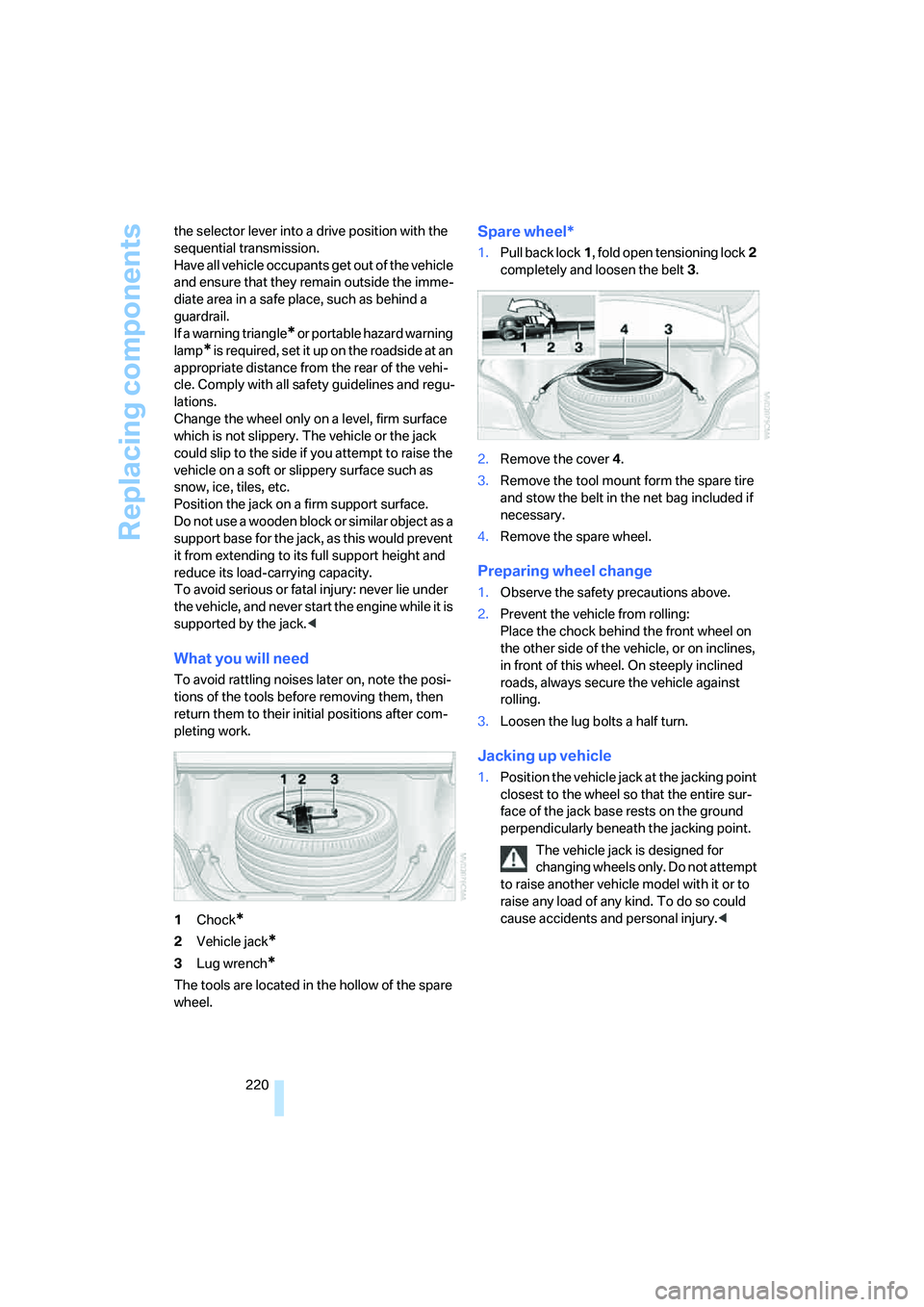
1Chock
*
2Vehicle jack*
3Lug wrench*
The tools are located in the hollow of the spare
wheel.
Spare wheel*
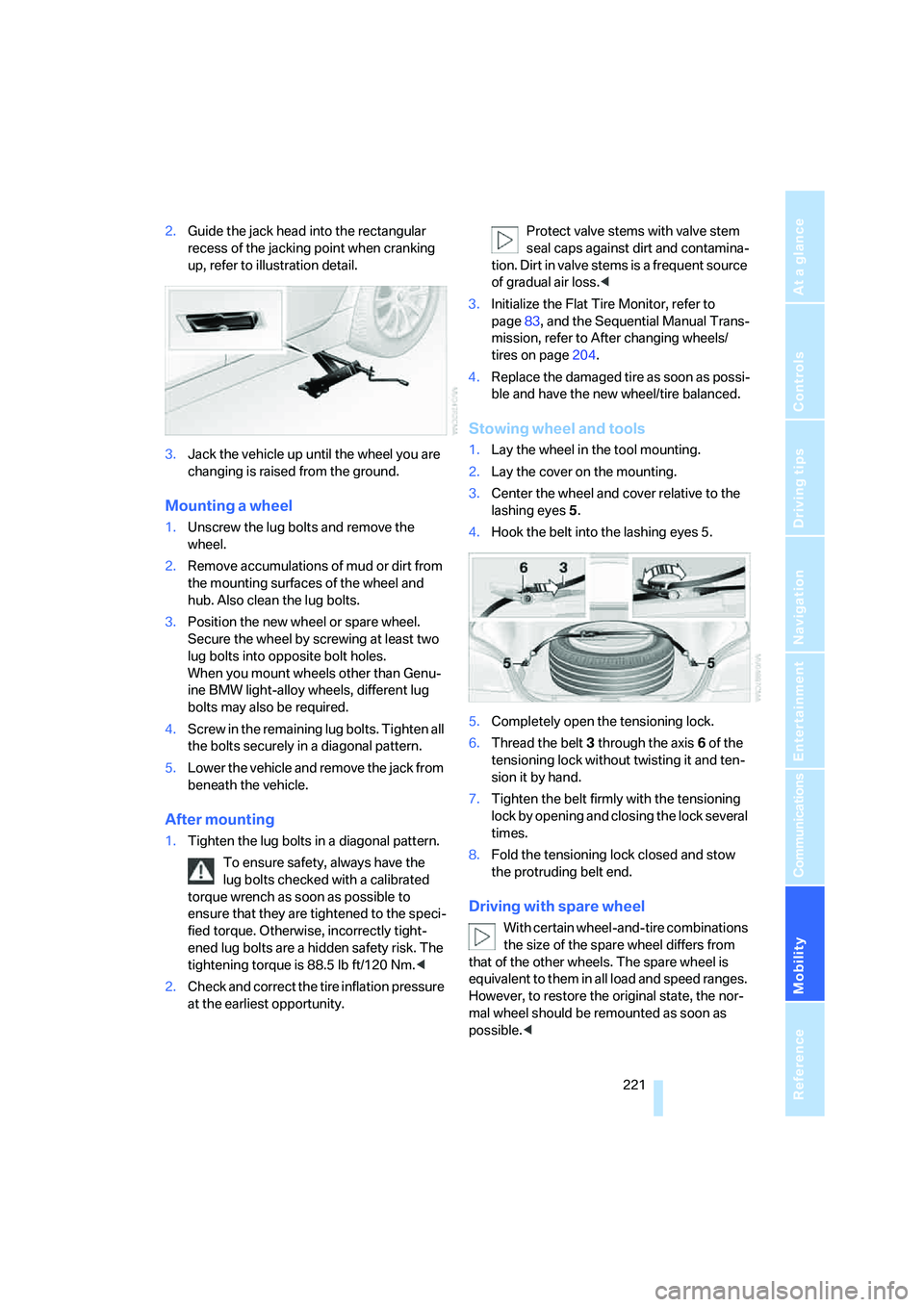
1.Pull back lock1, fold open tensioning lock2
completely and loosen the belt3.
2.Remove the cover4.
3.Remove the tool mount form the spare tire
and stow the belt in the net bag included if
necessary.
4.Remove the spare wheel.
Preparing wheel change
1.Observe the safety precautions above.
2.Prevent the vehicle from rolling:
Place the chock behind the front wheel on
the other side of the vehicle, or on inclines,
in front of this wheel. On steeply inclined
roads, always secure the vehicle against
rolling.
3.Loosen the lug bolts a half turn.
Jacking up vehicle
1.Position the vehicle jack at the jacking point
closest to the wheel so that the entire sur-
face of the jack base rests on the ground
perpendicularly beneath the jacking point.
The vehicle jack is designed for
changing wheels only. Do not attempt
to raise another vehicle model with it or to
raise any load of any kind. To do so could
cause accidents and personal injury.<
Page 223 of 260
Mobility
221Reference
At a glance
Controls
Driving tips
Communications
Navigation
Entertainment
2.Guide the jack head into the rectangular
recess of the jacking point when cranking
up, refer to illustration detail.
3.Jack the vehicle up until the wheel you are
changing is raised from the ground.
Mounting a wheel
1.Unscrew the lug bolts and remove the
wheel.
2.Remove accumulations of mud or dirt from
the mounting surfaces of the wheel and
hub. Also clean the lug bolts.
3.Position the new wheel or spare wheel.
Secure the wheel by screwing at least two
lug bolts into opposite bolt holes.
When you mount wheels other than Genu-
ine BMW light-alloy wheels, different lug
bolts may also be required.
4.Screw in the remaining lug bolts. Tighten all
the bolts securely in a diagonal pattern.
5.Lower the vehicle and remove the jack from
beneath the vehicle.
After mounting
1.Tighten the lug bolts in a diagonal pattern.
To ensure safety, always have the
lug bolts checked with a calibrated
torque wrench as soon as possible to
ensure that they are tightened to the speci-
fied torque. Otherwise, incorrectly tight-
ened lug bolts are a hidden safety risk. The
tightening torque is 88.5 lb ft/120 Nm.<
2.Check and correct the tire inflation pressure
at the earliest opportunity.Protect valve stems with valve stem
seal caps against dirt and contamina-
tion. Dirt in valve stems is a frequent source
of gradual air loss.<
3.Initialize the Flat Tire Monitor, refer to
page83, and the Sequential Manual Trans-
mission, refer to After changing wheels/
tires on page204.
4.Replace the damaged tire as soon as possi-
ble and have the new wheel/tire balanced.
Stowing wheel and tools
1.Lay the wheel in the tool mounting.
2.Lay the cover on the mounting.
3.Center the wheel and cover relative to the
lashing eyes5.
4.Hook the belt into the lashing eyes 5.
5.Completely open the tensioning lock.
6.Thread the belt3 through the axis6 of the
tensioning lock without twisting it and ten-
sion it by hand.
7.Tighten the belt firmly with the tensioning
lock by opening and closing the lock several
times.
8.Fold the tensioning lock closed and stow
the protruding belt end.
Driving with spare wheel
With certain wheel-and-tire combinations
the size of the spare wheel differs from
that of the other wheels. The spare wheel is
equivalent to them in all load and speed ranges.
However, to restore the original state, the nor-
mal wheel should be remounted as soon as
possible.<
Page 224 of 260
Replacing components
222
Vehicle battery
Battery care
The battery is 100 % maintenance-free, i.e., the
electrolyte will last for the life of the battery
when the vehicle is operated in a temperate cli-
ma te. Your BM W center will be glad to advise in
all matters concerning the battery.
Charging battery
Only charge the battery in the vehicle via the
terminals in the engine compartment with the
engine switched off. Connections, refer to
Jump starting on page224.
Disposal
Have old batteries disposed of by your
BMW center or hand them in to a recy-
cling center. Maintain the battery in an upright
position for transport and storage. Always
restrain the battery to prevent it from tipping
over during transport.<
Power failure
After a temporary power supply interruption,
some settings are lost. Take the following
steps:
>Seat, mirror and steering wheel memory
Store the positions again, refer to page43.
>Time and date
Reset, refer to text starting on page75.
>Radio
Store stations again, refer to page154.
>Navigation system
Wait until the system starts, refer to
page122.
Fuses
Never attempt to repair a blown fuse and
do not replace a defective fuse with a sub-
stitute of another color or amperage rating, as
this could lead to a circuit overload, ultimately
resulting in a fire in the vehicle.<
Spare fuses, plastic tweezers and fuse alloca-
tion diagram are located in the compartment for
the onboard tool kit, refer to page214.
In glove compartment
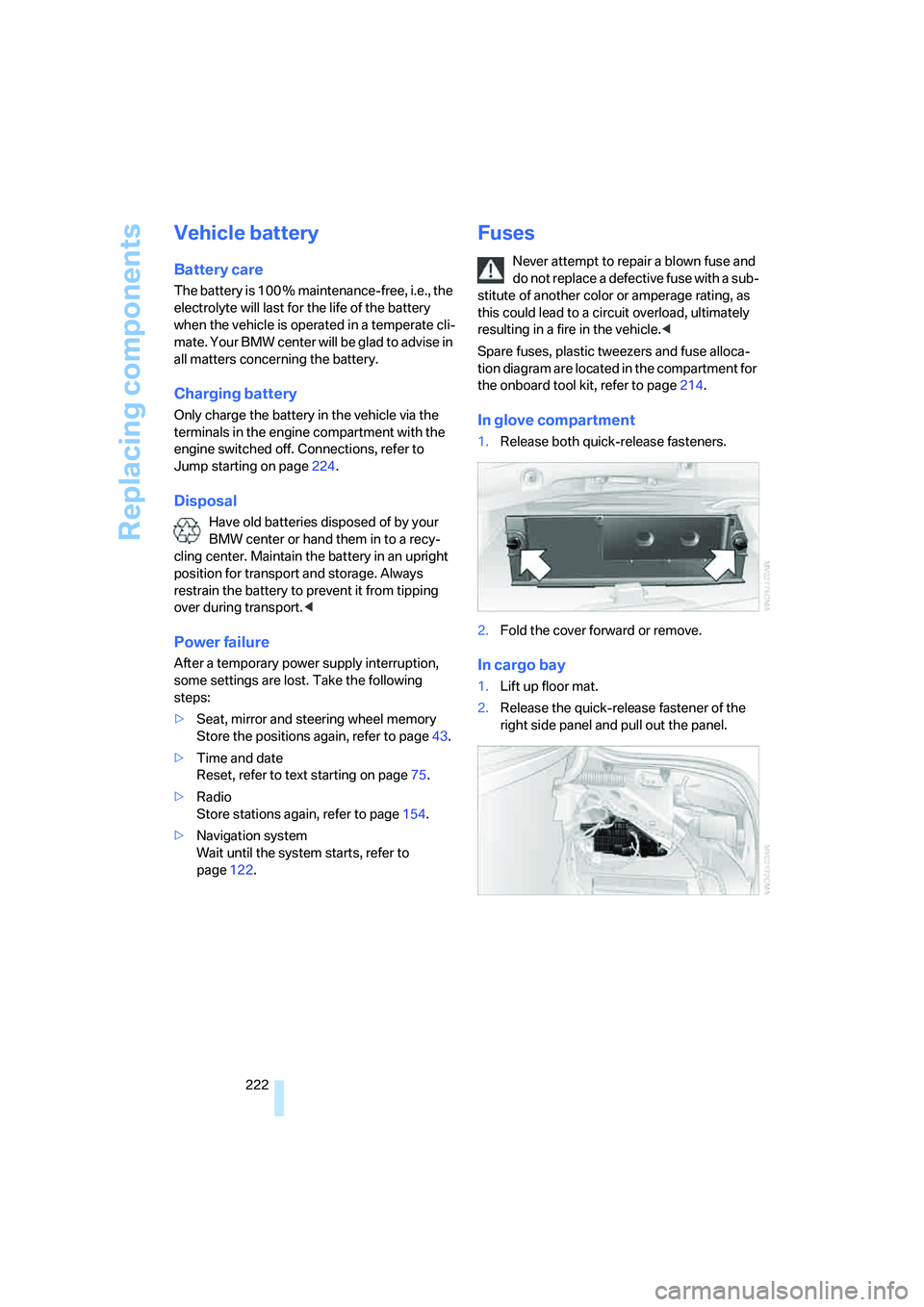
1.Release both quick-release fasteners.
2.Fold the cover forward or remove.
In cargo bay
1.Lift up floor mat.
2.Release the quick-release fastener of the
right side panel and pull out the panel.
Page 238 of 260
Short commands of voice command system
236
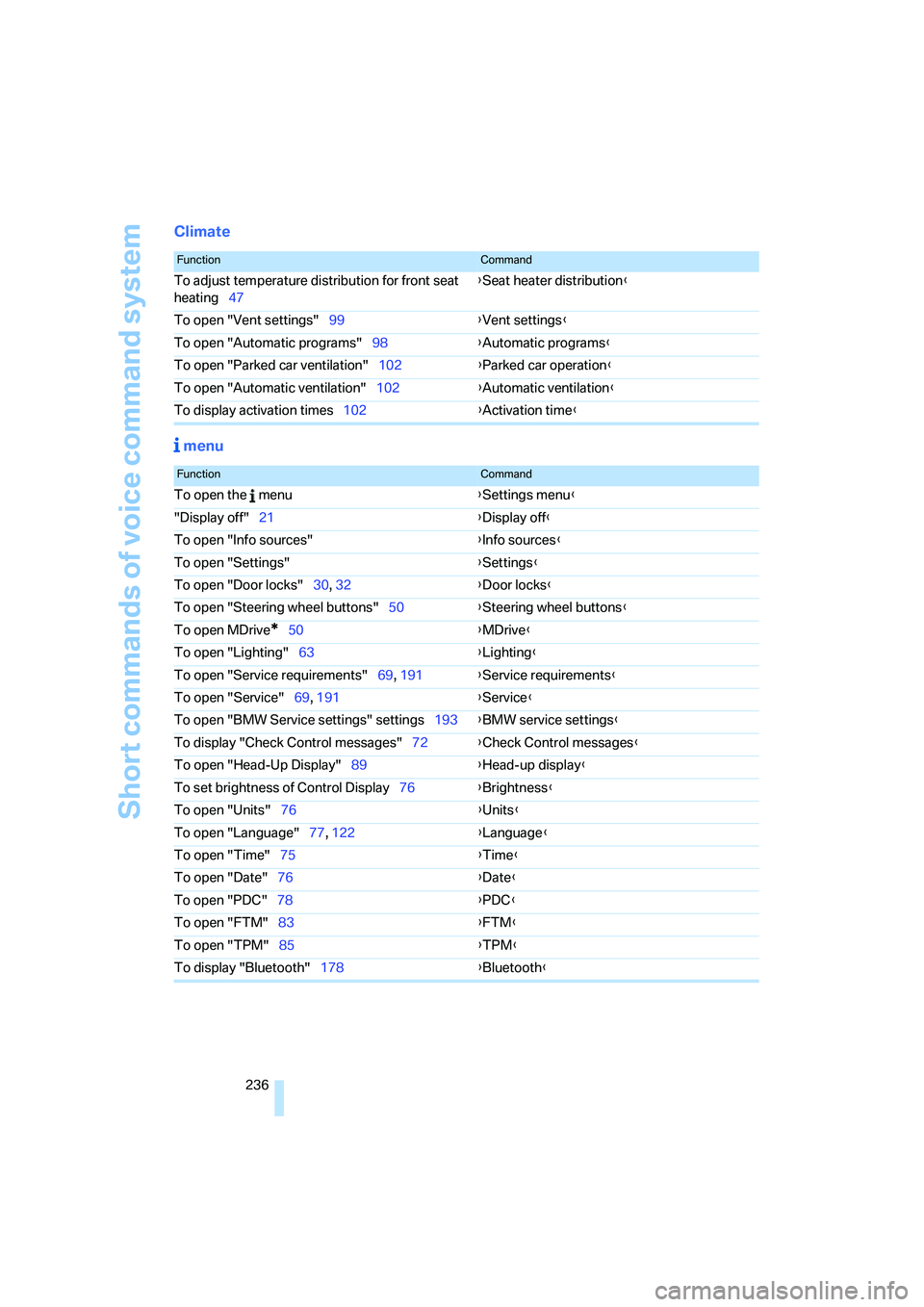
Climate
menu
FunctionCommand
To adjust temperature distribution for front seat
heating47{Seat heater distribution}
To open "Vent settings"99{Vent settings}
To open "Automatic programs"98{Automatic programs}
To open "Parked car ventilation"102{Parked car operation}
To open "Automatic ventilation"102{Automatic ventilation}
To display activation times102{Activation time}
FunctionCommand
To open the menu{Settings menu}
"Display off"21{Display off}
To open "Info sources"{Info sources}
To open "Settings"{Settings}
To open "Door locks"30, 32{Door locks}
To open "Steering wheel buttons"50{Steering wheel buttons}
To open MDrive
*50{MDrive}
To open "Lighting"63{Lighting}
To open "Service requirements"69, 191{Service requirements}
To open "Service"69, 191{Service}
To open "BMW Service settings" settings193{BMW service settings}
To display "Check Control messages"72{Check Control messages}
To open "Head-Up Display"89{Head-up display}
To set brightness of Control Display76{Brightness}
To open "Units"76{Units}
To open "Language"77, 122{Language}
To open "Time"75{Time}
To open "Date"76{Date}
To open "PDC"78{PDC}
To open "FTM"83{FTM}
To open "TPM"85{TPM}
To display "Bluetooth"178{Bluetooth}
Page 240 of 260
Everything from A to Z
238
Everything from A to Z
Index
"..." Identifies Control Display
texts used to select
individual functions, and
indicates where to find them
in the text.
A
ABS Antilock Brake
System79
– indicator lamp81
Accepted calls182
Accessories6
Accident, refer to Emergency
request223
Acoustic signal, refer to Check
Control71
Activated-charcoal filter for
automatic climate
control101
"Activation time" for parked-
car ventilation102
Active front head restraints44
Active seat ventilation47
Adapter for spare key28
Adaptive brake lamps, refer to
Brake force display87
Adaptive Head Light94
"Add digits" for mobile
phone182
Additives
– coolant211
– engine oil, refer to Approved
engine oils210
"Address book" for navigation
system131
Address for navigation
– deleting133
– entering124,127
– selecting132
– storing131
– storing current position132"Add to address book"131
"Add to destination
list"127,128
Adjusting active backrest
width43
Adjusting interior
temperature98
Adjusting the tone during
audio operation, refer to
Tone control149
Adjusting thigh support42
"After door opened"44
"After unlocking"44
Airbags87
– indicator/warning lamp89
– indicator lamp for front
passenger airbags88
– sitting safely41
Air distribution
– automatic98
– manual99
Airing, refer to Ventilation101
Air recirculation
– AUC Automatic
recirculated-air control100
– recirculated-air mode100
"Air recirculation on / off"50
Air supply, automatic climate
control97
Air volume99
AKI, refer to Fuel quality199
Alarm system35
– avoiding unintentional
alarms36
– interior motion sensor35
– switching off alarm35
– switching off tilt alarm
sensor and interior motion
sensor36
– tilt alarm sensor35
"All channels"160
"All doors"30All-season tires, refer to
Winter tires204
"All stations", calling up with
radio152,156
Alterations, technical, refer to
For your own safety5
Altering stretch of road140
"AM", reception
range149,152
Antenna, refer to Caring for
your vehicle brochure
Antenna for mobile phone174
Antifreeze
– coolant211
– washer fluid64
Antilock Brake System
ABS79
Anti-theft alarm system, refer
to Alarm system35
Anti-theft system, refer to
Central locking system29
Approved axle loads, refer to
Weights232
Approved engine oils210
Approved gross vehicle
weight, refer to Weights232
Armrest, refer to Center
armrest, rear110
Around the center console14
Around the steering wheel10
Arrival time
– refer to Computer68
– refer to Starting destination
guidance136
"Arrow display" for navigation
system137
"Arrow display pop-up
instructions"123
Ashtray
– front108
– rear109
Page 241 of 260
Reference 239
At a glance
Controls
Driving tips
Communications
Navigation
Entertainment
Mobility
Assist, refer to
BMW Assist189
Assistance systems, refer to
Driving stability control
systems79
Assistance window20
"Assist. window off"21
AUC Automatic recirculated-
air control100
"Audio"149,151,156
Audio148
– controls148
– switching on/off148
– tone control149
– volume149
Audio device, external107
Automatic
– air distribution98
– air volume98
– headlamp control92
– service notification191
– steering wheel
adjustment43
– storing stations154
Automatic car washes116
– also refer to Caring for your
vehicle brochure
Automatic climate control97
– automatic air distribution98
– parked car ventilation101
– switching on and off101
– ventilation in rear101
Automatic closing of doors,
refer to Automatic soft
closing33
Automatic curb monitor48
Automatic lighting
– refer to Automatic headlamp
control92
– refer to Daytime running
lamps93
– refer to High-beam
assistant94
– refer to Interior lamps96
– refer to Pathway lighting93
– refer to Welcome lamps92
Automatic low beams, refer to
High-beam assistant94"Automatic programs"98
Automatic soft closing33
Automatic station search153
"Automatic ventilation"102
AUTO program for automatic
climate control98
"Auto Request"191
"Autostore" on the
radio152,
154
"AUX"149,168,170
AUX-In connection168
"AUX IN" in audio mode168
Average fuel consumption68
– setting units76
Average speed, refer to
Computer67
"Avoid ferries" for navigation
system134
"Avoid highways" for
navigation system134
Avoiding freeways for
navigation134
Avoiding unintentional
alarms36
"Avoid tollroads" for
navigation system134
Axle loads, refer to
Weights232
"A - Z"182
B
"Backrest"51
Backrest contour, refer to
Lumbar support42
Backrests, refer to Seats42
Backrest width42
Back seats, refer to Rear seats
Backup lamps, replacing
bulbs216
"Balance", refer to Tone
control150
Band-aids, refer to First-aid
kit224
Bass, refer to Tone
control149
"Bass", tone control150Battery, refer to Vehicle
battery222
– jump starting224
Battery replacement, remote
control for comfort
access37
BC button, refer to
Computer67
Being towed225
Belts, refer to Safety belts45
Beverage holder, refer to Cup
holders108
Blind, refer to Sun blinds105
Blower, refer to Air volume99
"Bluetooth"175
"BMW Assist"190
BMW Assist189
– activating194
– concierge service192
– contacting BMW Customer
Relations192
– displaying vehicle data195
– offered services189
– roadside assistance190
– TeleService191
– updating193
"BMW Contact"184
"BMW Contact
Numbers"184
BMW homepage4
BMW maintenance
system212
"BMW Service settings"193
BMW website4
Bottle holder, refer to Cup
holders108
Bracket for telephone or
mobile phone, refer to Snap-
in adapter188
Brake assistant80
Brake force display87
Brake lamps
– replacing bulbs216
– two-stage87
Brake rotors
– breaking-in114
– refer to Braking safely
115