ESP BMW M5 2008 Manual PDF
[x] Cancel search | Manufacturer: BMW, Model Year: 2008, Model line: M5, Model: BMW M5 2008Pages: 260, PDF Size: 6.66 MB
Page 221 of 260
Mobility
219Reference
At a glance
Controls
Driving tips
Communications
Navigation
Entertainment
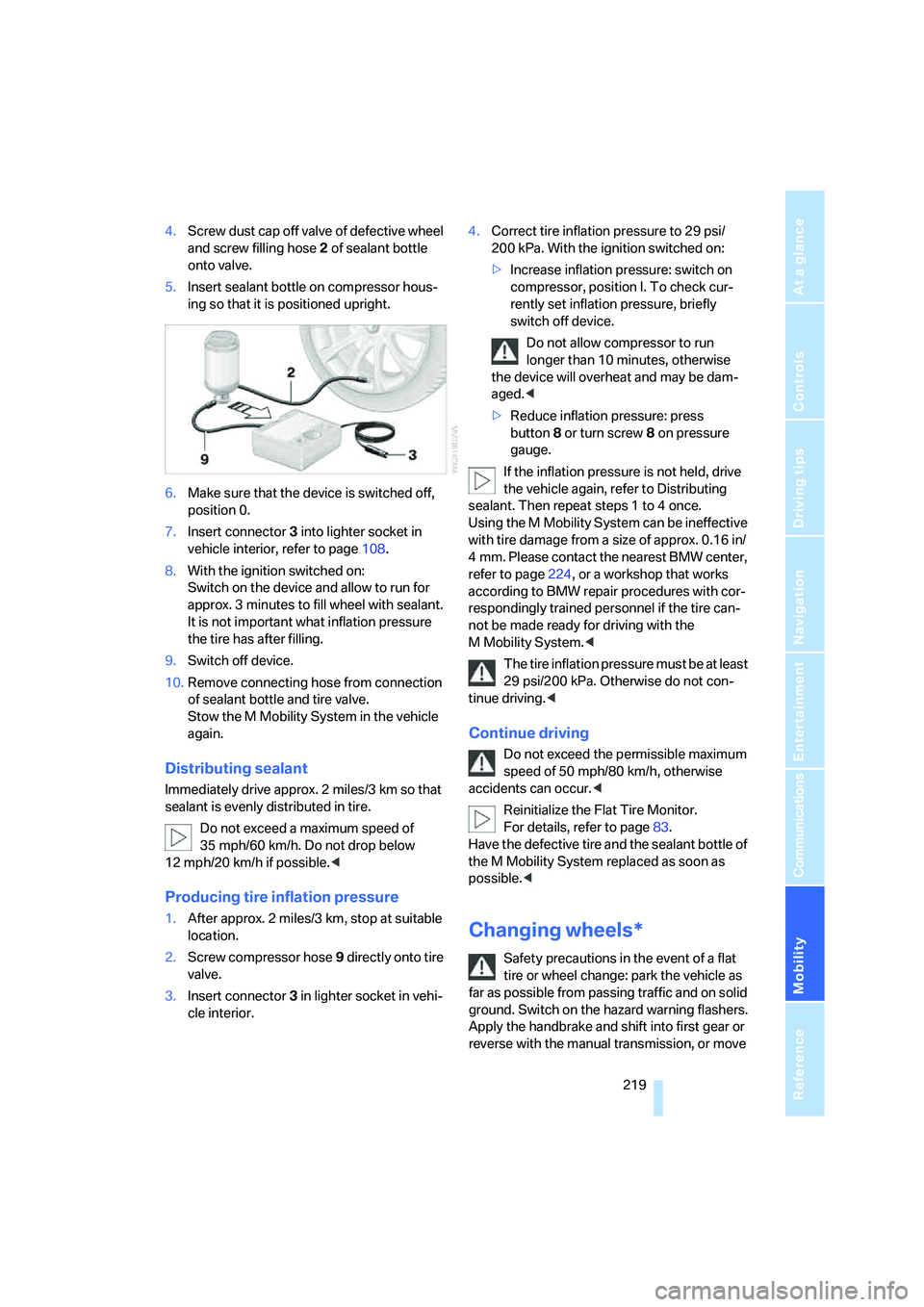
4.Screw dust cap off valve of defective wheel
and screw filling hose2 of sealant bottle
onto valve.
5.Insert sealant bottle on compressor hous-
ing so that it is positioned upright.
6.Make sure that the device is switched off,
position 0.
7.Insert connector3 into lighter socket in
vehicle interior, refer to page108.
8.With the ignition switched on:
Switch on the device and allow to run for
approx. 3 minutes to fill wheel with sealant.
It is not important what inflation pressure
the tire has after filling.
9.Switch off device.
10.Remove connecting hose from connection
of sealant bottle and tire valve.
Stow the M Mobility System in the vehicle
again.
Distributing sealant
Immediately drive approx. 2 miles/3 km so that
sealant is evenly distributed in tire.
Do not exceed a maximum speed of
35 mph/60 km/h. Do not drop below
12 mph/20 km/h if possible.<
Producing tire inflation pressure
1.After approx. 2 miles/3 km, stop at suitable
location.
2.Screw compressor hose9 directly onto tire
valve.
3.Insert connector 3 in lighter socket in vehi-
cle interior.4.Correct tire inflation pressure to 29 psi/
200 kPa. With the ignition switched on:
>Increase inflation pressure: switch on
compressor, position I. To check cur-
rently set inflation pressure, briefly
switch off device.
Do not allow compressor to run
longer than 10 minutes, otherwise
the device will overheat and may be dam-
aged.<
>Reduce inflation pressure: press
button8 or turn screw8 on pressure
gauge.
If the inflation pressure is not held, drive
the vehicle again, refer to Distributing
sealant. Then repeat steps 1 to 4 once.
Using the M Mobility System can be ineffective
with tire damage from a size of approx. 0.16 in/
4 mm. Please contact the nearest BMW center,
refer to page224, or a workshop that works
according to BMW repair procedures with cor-
respondingly trained personnel if the tire can-
not be made ready for driving with the
M Mobility System.<
The tire inflation pressure must be at least
29 psi/200 kPa. Otherwise do not con-
tinue driving.<
Continue driving
Do not exceed the permissible maximum
speed of 50 mph/80 km/h, otherwise
accidents can occur.<
Reinitialize the Flat Tire Monitor.
For details, refer to page83.
Have the defective tire and the sealant bottle of
the M Mobility System replaced as soon as
possible.<
Changing wheels*
Safety precautions in the event of a flat
tire or wheel change: park the vehicle as
far as possible from passing traffic and on solid
ground. Switch on the hazard warning flashers.
Apply the handbrake and shift into first gear or
reverse with the manual transmission, or move
Page 225 of 260
Mobility
223Reference
At a glance
Controls
Driving tips
Communications
Navigation
Entertainment
Giving and receiving assistance
Emergency request
Conditions for an emergency request:
>Full preparation package mobile phone.
With this equipment, an emergency request
is still possible when no mobile phone is
paired in the vehicle.
>BMW Assist is activated.
Activating BMW Assist, refer to page194.
>Radio readiness is activated.
>The BMW Assist system is logged on to a
mobile phone network.
>The emergency request system is opera-
ble.
Once your BMW Assist subscription expires,
the BMW Assist system can be deactivated by
a BMW center without you having to visit a
workshop. Once the BMW Assist system has
been deactivated, emergency requests are not
possible. The BMW Assist system can be reac-
tivated by a BMW center after signing a new
contract.
Initiating an emergency request
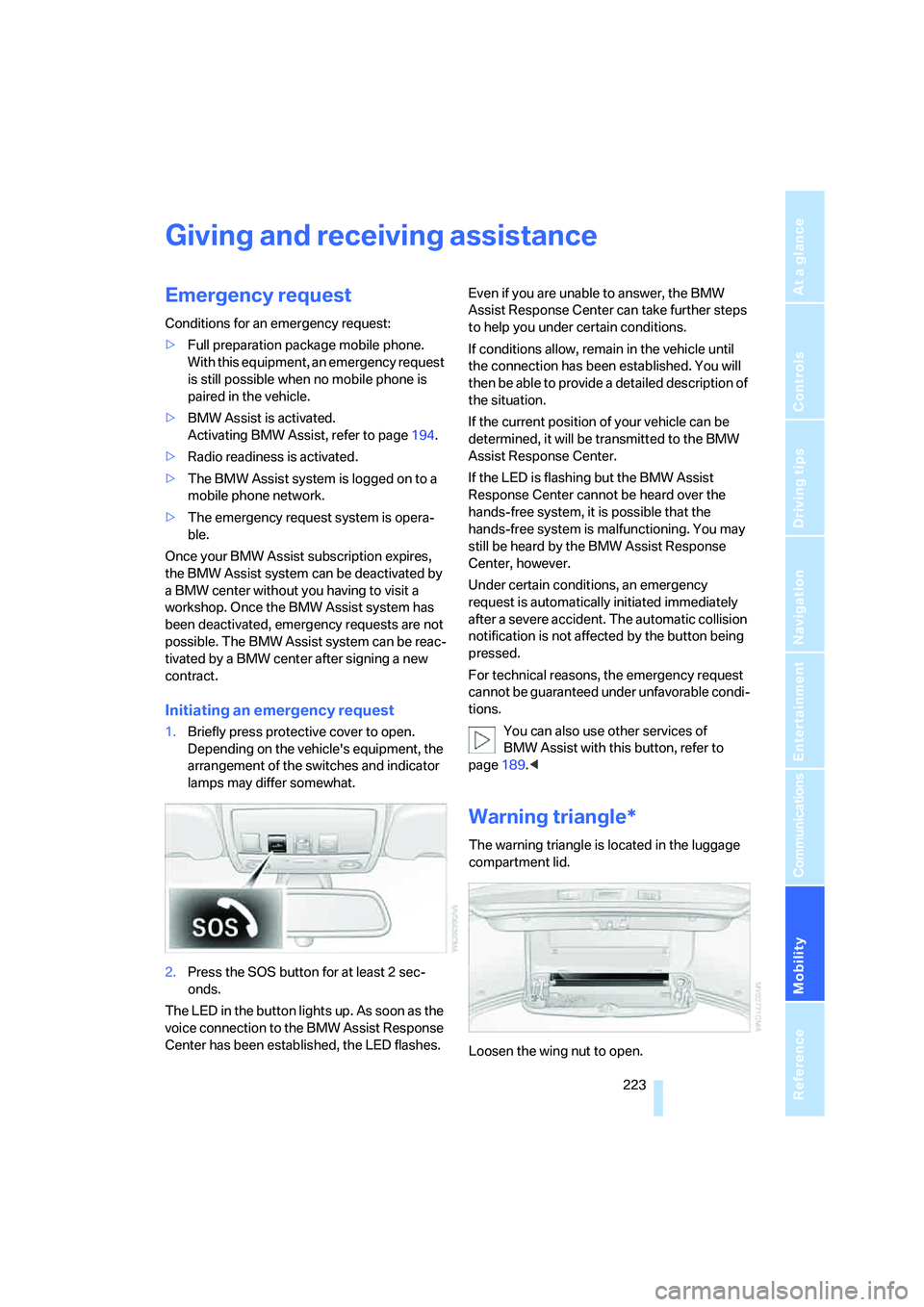
1.Briefly press protective cover to open.
Depending on the vehicle's equipment, the
arrangement of the switches and indicator
lamps may differ somewhat.
2.Press the SOS button for at least 2 sec-
onds.
The LED in the button lights up. As soon as the
voice connection to the BMW Assist Response
Center has been established, the LED flashes.Even if you are unable to answer, the BMW
Assist Response Center can take further steps
to help you under certain conditions.
If conditions allow, remain in the vehicle until
the connection has been established. You will
then be able to provide a detailed description of
the situation.
If the current position of your vehicle can be
determined, it will be transmitted to the BMW
Assist Response Center.
If the LED is flashing but the BMW Assist
Response Center cannot be heard over the
hands-free system, it is possible that the
hands-free system is malfunctioning. You may
still be heard by the BMW Assist Response
Center, however.
Under certain conditions, an emergency
request is automatically initiated immediately
after a severe accident. The automatic collision
notification is not affected by the button being
pressed.
For technical reasons, the emergency request
cannot be guaranteed under unfavorable condi-
tions.
You can also use other services of
BMW Assist with this button, refer to
page189.<
Warning triangle*
The warning triangle is located in the luggage
compartment lid.
Loosen the wing nut to open.
Page 228 of 260
Giving and receiving assistance
226 This then requires increased effort for braking
and steering.<
Switch on the hazard warning flashers depend-
ing on the local regulations. If the electrical sys-
tem fails, mark the vehicle to be towed, e.g. with
a sign or warning triangle in the rear window.
Manual transmission
Gearshift lever in neutral position.
Sequential Manual Transmission with
Drivelogic
Make sure that selector lever position N is
engaged with the ignition switched on, as
otherwise the engine can be damaged during
towing.<
Towing methods
Do not lift vehicle by tow fitting or body
and chassis parts, otherwise damage may
result.<
In some countries, towing with tow bars or
ropes in public traffic is not permitted. Familiar-
ize yourself with the regulations on towing in the
respective country.
With tow bar
The towing vehicle may not be lighter
than the vehicle to be towed, otherwise it
will not be possible to reliably control vehicle
response.<
The tow fittings used should be on the same
side on both vehicles. Should it prove impossi-
ble to avoid mounting the tow bar at an offset
angle, please observe the following:
>Clearance and maneuvering capability will
be sharply limited during cornering.
>When mounted at an angle, the tow bar will
exert lateral forces, tending to push the
vehicle sideways.
Only attach the tow bar to the tow fittings,
as attachment to other vehicle parts can
lead to damage.<
With tow rope
When starting off in the towing vehicle, make
sure that the tow rope is taut.
To avoid jerking and the associated
stresses on vehicle components when
towing, always use nylon ropes or nylon straps.
Only attach tow ropes to the tow fittings, as
attachment to other vehicle parts can lead to
damage.<
With tow truck
Do not tow the vehicle with only the front
or rear axle raised, as otherwise the
engine may be damaged or the steering can
turn to the left or right.<
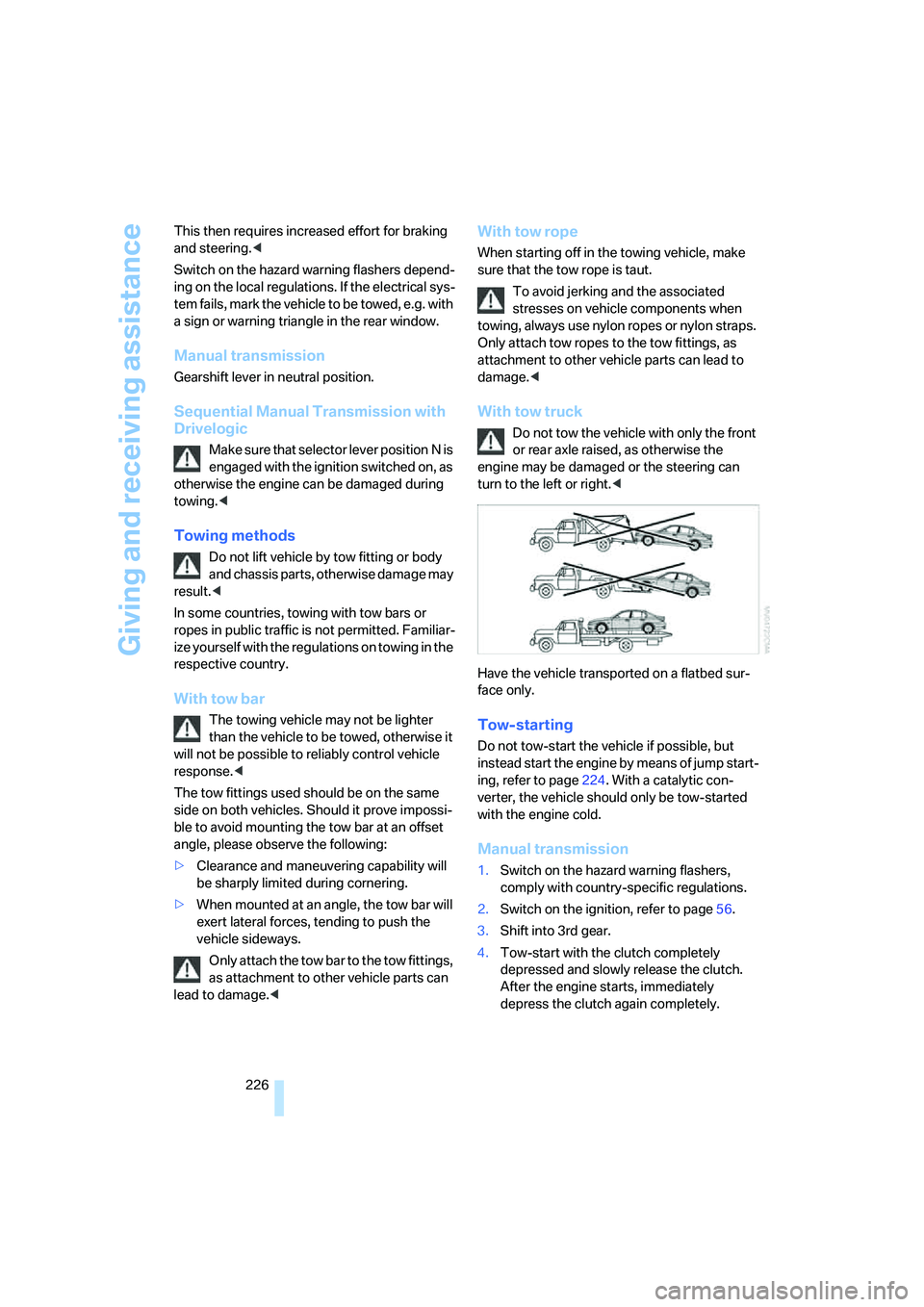
Have the vehicle transported on a flatbed sur-
face only.
Tow-starting
Do not tow-start the vehicle if possible, but
instead start the engine by means of jump start-
ing, refer to page224. With a catalytic con-
verter, the vehicle should only be tow-started
with the engine cold.
Manual transmission
1.Switch on the hazard warning flashers,
comply with country-specific regulations.
2.Switch on the ignition, refer to page56.
3.Shift into 3rd gear.
4.Tow-start with the clutch completely
depressed and slowly release the clutch.
After the engine starts, immediately
depress the clutch again completely.
Page 245 of 260
Reference 243
At a glance
Controls
Driving tips
Communications
Navigation
Entertainment
Mobility
Doors
– manual operation32
– remote control30
DOT Quality Grades202
Draft-free ventilation101
Drinks holder, refer to Cup
holders108
Drivelogic61
Drive mode60
"Driver's door only"30
Driving lamps, refer to Parking
lamps/low beams92
Driving programs, refer to
Drivelogic61
Driving route, refer to
Displaying route137
Driving stability control
systems79
Driving through water115
Driving tips, refer to General
driving notes114
Dry air, refer to Cooling
function100
Drying the air, refer to Cooling
function100
"DSC"51,80
DSC Dynamic Stability
Control80
– indicator lamp13,80
– malfunction81
DVD for navigation122
"Dynamic route" for
navigation134
Dynamic Stability Control
DSC80
– M Dynamic Mode MDM80
E
Easy entry/exit49
– backrest width43
"EDC"51
EDC Electronic Damping
Control82
– "Comfort"82
– "Normal"82
– "Sport"82
Eject button, refer to Buttons
in area of CD player148Electrical malfunction
– door lock32
– driver's door32
– fuel filler door198
– glass sunroof, electric40
– luggage compartment lid34
Electric steering wheel
adjustment49
Electronic brake-force
distribution79
Electronic Damping Control
EDC82
Emergency operation, refer to
Manual operation
– door lock32
– driver's door32
– fuel filler door198
– luggage compartment lid34
Emergency operation, refer to
Moving manually
– glass sunroof40
Emergency release for
luggage compartment lid in
cargo bay34
Emergency request223
Emergency services, refer to
Roadside Assistance224
"Enabled services"195
"Enable services"195
"End call"182
Engaging drive position, refer
to Selector lever
positions60
Engine
– breaking-in114
– data230
– M Engine Dynamic
Control59
– overheated, refer to Coolant
temperature66
– speed230
– starting57
– starting, with comfort
access36
– switching off57
Engine compartment207
Engine coolant211Engine oil
– adding210
– additives, refer to Approved
engine oils210
– approved engine oil210
– checking oil level208
– fast measurement209
– interval between changes,
refer to Service
requirements69
– oil change210
– oil grades, refer to Approved
engine oils210
– possible displays208
– temperature67
– temperature gauge67
"Engine oil level"209
Engine output, refer to Engine
data230
Engine overheating, refer to
Coolant temperature66
Engine speed, refer to Engine
data230
Engine starting, refer to
Starting engine57
"Enter address"124,131
Entering destination via town/
city name125
Entering intersection,
navigation126
Entering the
address124,127
Entering town/city for
navigation125
Entering zip code for
navigation125
"Entertainment"148
Entertainment sound output
on/off149
Entry map for destination128
"Equalizer", refer to Tone
control151
Equalizer, refer to Tone
control151
"ESN"159
ESP Electronic Stability
Program, refer to DSC
Dynamic Stability
Control80