instrument cluster BMW M5 2010 User Guide
[x] Cancel search | Manufacturer: BMW, Model Year: 2010, Model line: M5, Model: BMW M5 2010Pages: 266, PDF Size: 9.08 MB
Page 84 of 266
Technology for comfort, convenience and safety
82
Deactivating MDM again
Press the button on the steering wheel or the
MDM button
* again; the MDM indicator lamp
goes out.
Deactivating DSC
To maintain vehicle stability, drive with
the system activated whenever possi-
ble.<
When rocking free or starting off from deep
snow or on loose road surfaces, it can be useful
to briefly deactivate DSC.
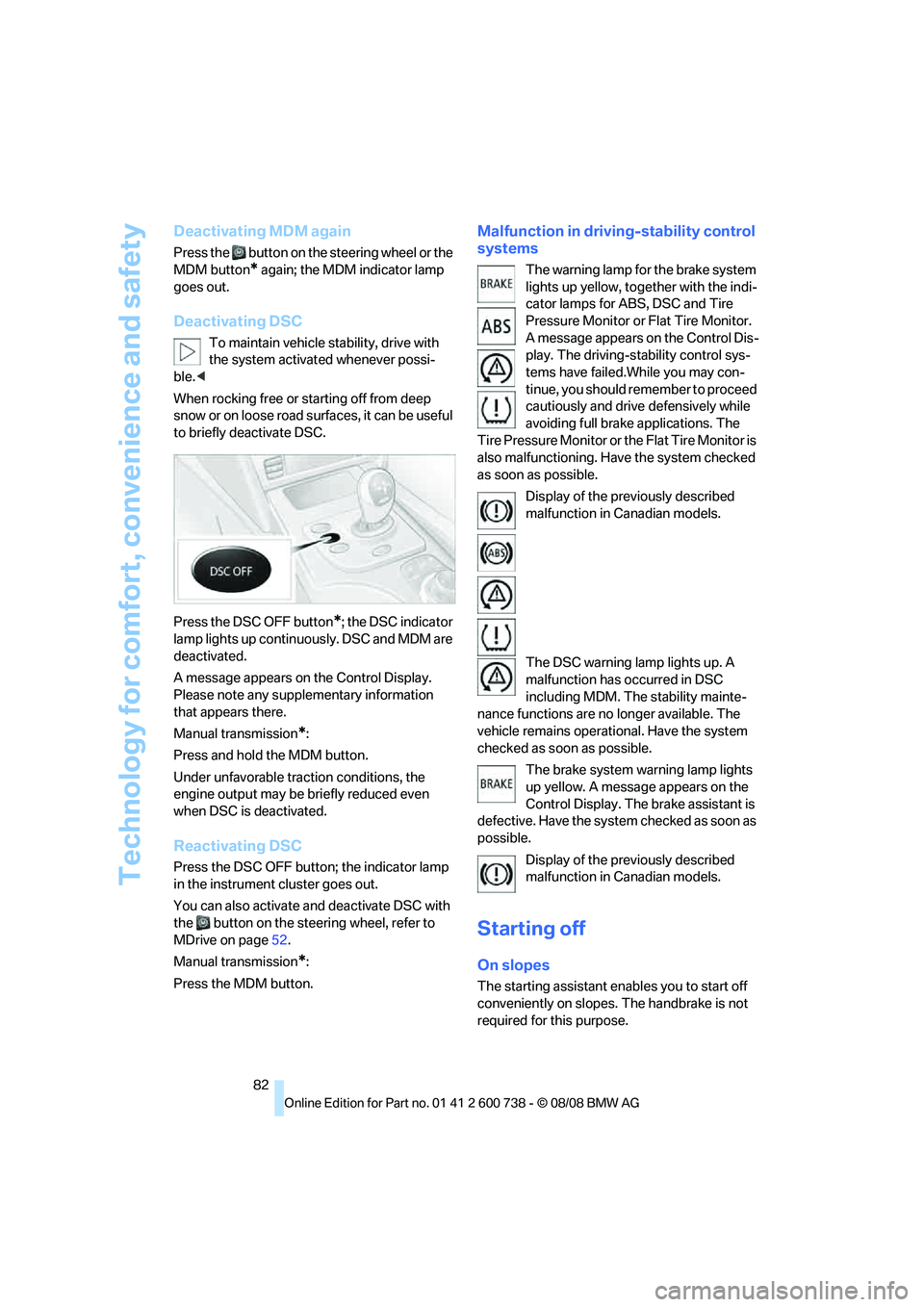
Press the DSC OFF button
*; the DSC indicator
lamp lights up continuously. DSC and MDM are
deactivated.
A message appears on the Control Display.
Please note any supplementary information
that appears there.
Manual transmission
*:
Press and hold the MDM button.
Under unfavorable traction conditions, the
engine output may be briefly reduced even
when DSC is deactivated.
Reactivating DSC
Press the DSC OFF button; the indicator lamp
in the instrument cluster goes out.
You can also activate and deactivate DSC with
the button on the steering wheel, refer to
MDrive on page52.
Manual transmission
*:
Press the MDM button.
Malfunction in driving-stability control
systems
The warning lamp for the brake system
lights up yellow, together with the indi-
cator lamps for ABS, DSC and Tire
Pressure Monitor or Flat Tire Monitor.
A message appears on the Control Dis-
play. The driving-stability control sys-
tems have failed.While you may con-
tinue, you should remember to proceed
cautiously and drive defensively while
avoiding full brake applications. The
Tire Pressure Monitor or the Flat Tire Monitor is
also malfunctioning. Have the system checked
as soon as possible.
Display of the previously described
malfunction in Canadian models.
The DSC warning lamp lights up. A
malfunction has occurred in DSC
including MDM. The stability mainte-
nance functions are no longer available. The
vehicle remains operational. Have the system
checked as soon as possible.
The brake system warning lamp lights
up yellow. A message appears on the
Control Display. The brake assistant is
defective. Have the system checked as soon as
possible.
Display of the previously described
malfunction in Canadian models.
Starting off
On slopes
The starting assistant enables you to start off
conveniently on slopes. The handbrake is not
required for this purpose.
Page 86 of 266
Technology for comfort, convenience and safety
84 The last selected program is active each time
the engine is started.
You can also activate your preferred program
with the button on the steering wheel, refer
to MDrive on page52.
FTM Flat Tire Monitor*
The concept
The Flat Tire Monitor detects a pressure loss in
one tire by comparing the speeds of the individ-
ual wheels during driving.
In the event of a pressure loss, there is a change
in the rolling circumference and therefore the
rotation speed of the corresponding wheel. The
system detects this change and reports it as a
flat tire.
Functional requirement
In order to ensure that a flat tire is reported cor-
rectly, the system must be initialized while the
tires have the correct inflation pressure.
The initialization must be repeated after
each time the tire inflation pressure is cor-
rected and after every tire or wheel change.<
System limits
The Flat Tire Monitor cannot indicate sudden
severe tire damage caused by outside factors
and does not detect a natural, even pressure
drop in all four tires.
In the following situations, the system could be
delayed or malfunction:
>System has not been initialized
>Driving on snowy or slippery road surface
>Sporty driving style: slip in the drive wheels,
high lateral acceleration
>Driving with snow chains
*
Initializing system
The initialization finishes during driving,
which can be interrupted at any time.
When driving resumes, the initialization is con-
tinued automatically. The system is initialized after this activation phase. When driving with
snow chains, the system is not initialized.<
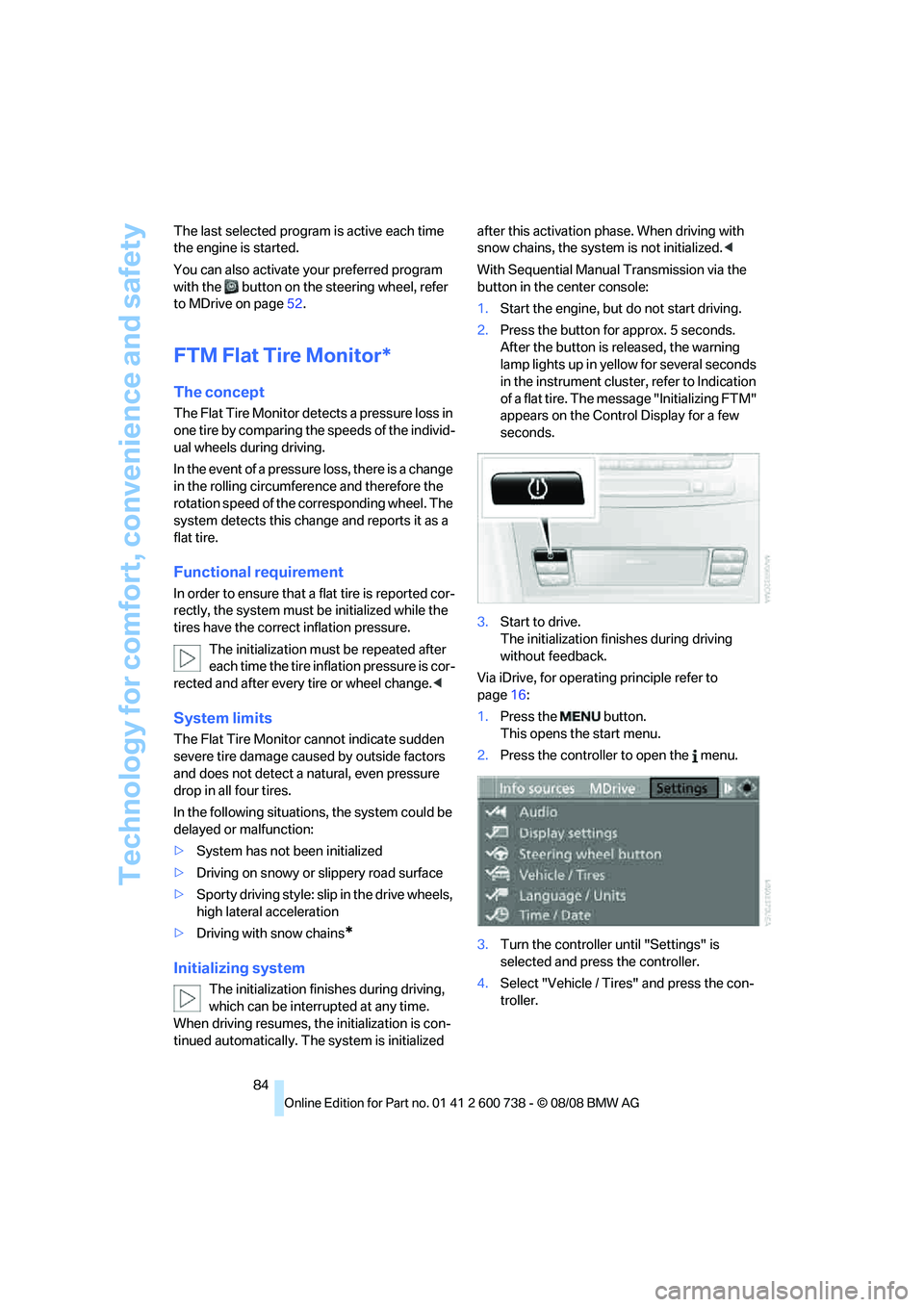
With Sequential Manual Transmission via the
button in the center console:
1.Start the engine, but do not start driving.
2.Press the button for approx. 5 seconds.
After the button is released, the warning
lamp lights up in yellow for several seconds
in the instrument cluster, refer to Indication
of a flat tire. The message "Initializing FTM"
appears on the Control Display for a few
seconds.
3.Start to drive.
The initialization finishes during driving
without feedback.
Via iDrive, for operating principle refer to
page16:
1.Press the button.
This opens the start menu.
2.Press the controller to open the menu.
3.Turn the controller until "Settings" is
selected and press the controller.
4.Select "Vehicle / Tires" and press the con-
troller.
Page 97 of 266
Controls
95Reference
At a glance
Driving tips
Communications
Navigation
Entertainment
Mobility
Adaptive Head Light*
The concept
Adaptive Head Light is a variable headlamp
control system that enables better illumination
of the road surface. Depending on the steering
angle and other parameters, the light from the
headlamp follows the course of the road.
In tight curves at speeds up to approx. 45 mph/
70 km/h, e.g. on mountainous roads or when
negotiating curves, turning lamps are switched
on that light up the inside area of the curve.
Activating the Adaptive Head Light
With the ignition switched on, turn the light
switch into position 3, refer to page93.
The turning lamps are automatically switched
on depending on the steering angle or the use
of turn signals.
To avoid blinding oncoming traffic, the Adaptive
Head Light directs light towards the front pas-
senger side when the vehicle is at a standstill.
When driving in reverse, only the turning lamps
are active and illuminate the outer area of
curves.
High beams/
roadside parking lamps
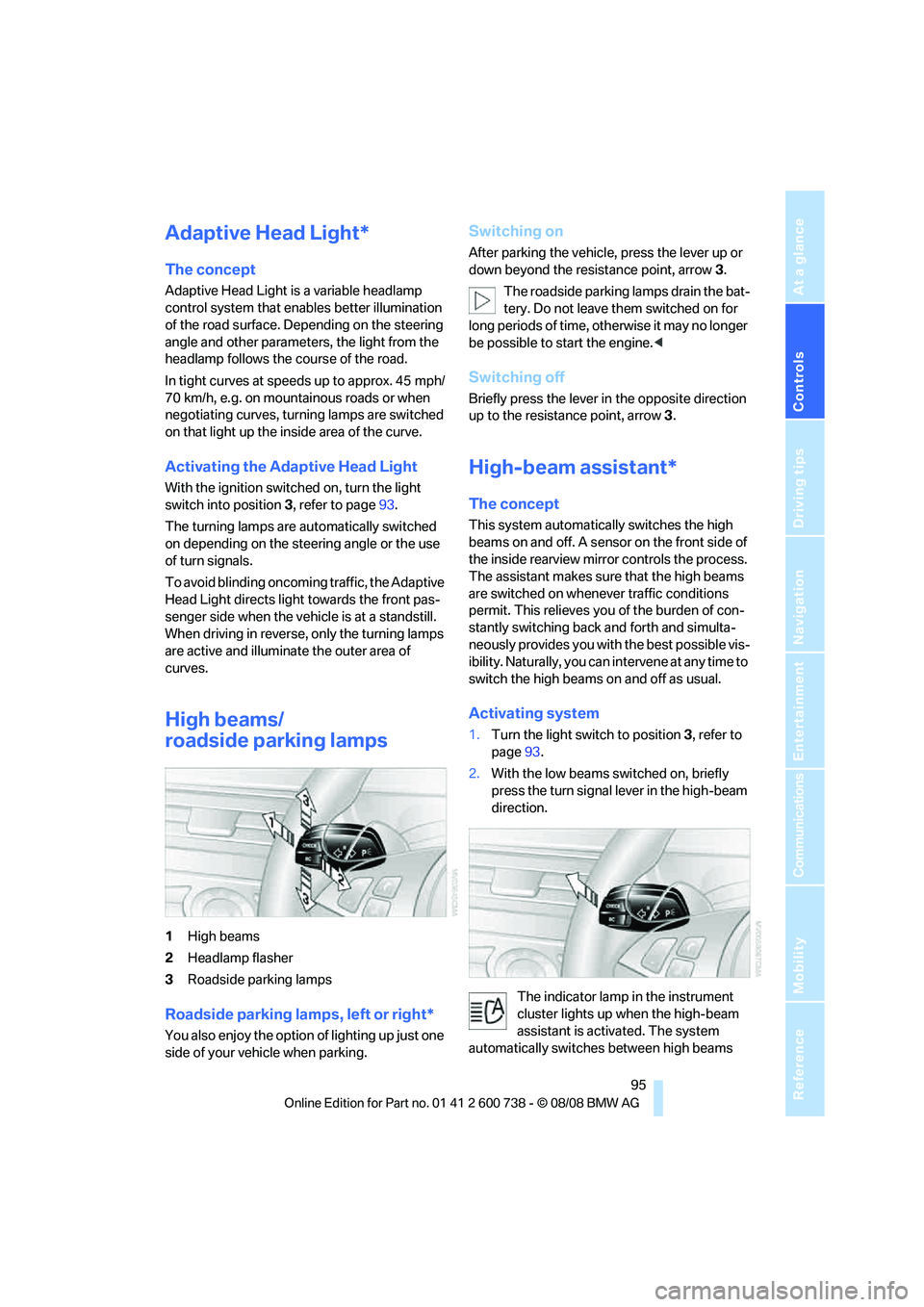
1High beams
2Headlamp flasher
3Roadside parking lamps
Roadside parking lamps, left or right*
You also enjoy the option of lighting up just one
side of your vehicle when parking.
Switching on
After parking the vehicle, press the lever up or
down beyond the resistance point, arrow 3.
The roadside parking lamps drain the bat-
tery. Do not leave them switched on for
long periods of time, otherwise it may no longer
be possible to start the engine.<
Switching off
Briefly press the lever in the opposite direction
up to the resistance point, arrow3.
High-beam assistant*
The concept
This system automatically switches the high
beams on and off. A sensor on the front side of
the inside rearview mirror controls the process.
The assistant makes sure that the high beams
are switched on whenever traffic conditions
permit. This relieves you of the burden of con-
stantly switching back and forth and simulta-
neously provides you with the best possible vis-
ibility. Naturally, you can intervene at any time to
switch the high beams on and off as usual.
Activating system
1.Turn the light switch to position3, refer to
page93.
2.With the low beams switched on, briefly
press the turn signal lever in the high-beam
direction.
The indicator lamp in the instrument
cluster lights up when the high-beam
assistant is activated. The system
automatically switches between high beams
Page 214 of 266
Under the hood
212
Engine oil
The engine oil consumption is dependent on
driving style and driving conditions.
Checking engine oil level
Your vehicle is equipped with an electronic oil
level check.
The oil level can be displayed when the engine
is at operating temperature. Constant short-
distance driving or a very sporty driving style
can make it impossible for a measurement to be
taken.
Displays in instrument cluster
You can display the current oil level in the
instrument cluster.
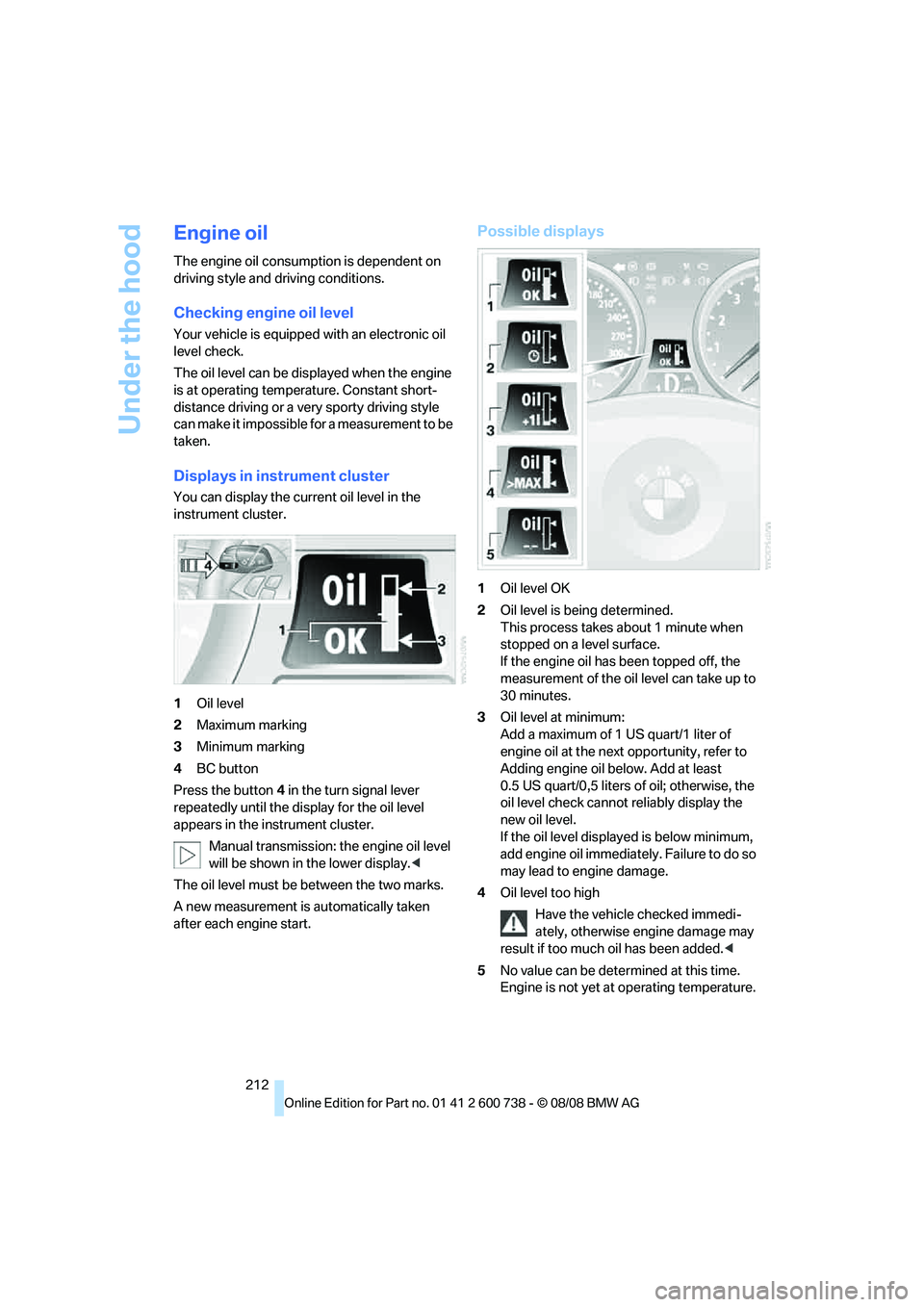
1Oil level
2Maximum marking
3Minimum marking
4BC button
Press the button4 in the turn signal lever
repeatedly until the display for the oil level
appears in the instrument cluster.
Manual transmission: the engine oil level
will be shown in the lower display.<
The oil level must be between the two marks.
A new measurement is automatically taken
after each engine start.
Possible displays
1Oil level OK
2Oil level is being determined.
This process takes about 1 minute when
stopped on a level surface.
If the engine oil has been topped off, the
measurement of the oil level can take up to
30 minutes.
3Oil level at minimum:
Add a maximum of 1 US quart/1 liter of
engine oil at the next opportunity, refer to
Adding engine oil below. Add at least
0.5 US quart/0,5 liters of oil; otherwise, the
oil level check cannot reliably display the
new oil level.
If the oil level displayed is below minimum,
add engine oil immediately. Failure to do so
may lead to engine damage.
4Oil level too high
Have the vehicle checked immedi-
ately, otherwise engine damage may
result if too much oil has been added.<
5No value can be determined at this time.
Engine is not yet at operating temperature.
Page 215 of 266
Mobility
213Reference
At a glance
Controls
Driving tips
Communications
Navigation
Entertainment
Fast measurement
In addition to the automatic measurement, you
can also determine the current oil level manu-
ally, e.g. after adding engine oil, but with a lower
degree of measuring accuracy.
1.With the engine at operating temperature,
i.e. after at least 6 miles/10 km of uninter-
rupted driving, park the vehicle in a horizon-
tal position.
2.Allow the engine to run at idle.
3.Press the BC button on the turn signal lever
repeatedly until the oil level display is
shown in the instrument cluster.
4.Press the BC button for at least 2 seconds.
The oil level is determined. A clock symbol
is displayed during the measurement.
5.After approx. 1 minute the current oil level is
displayed.
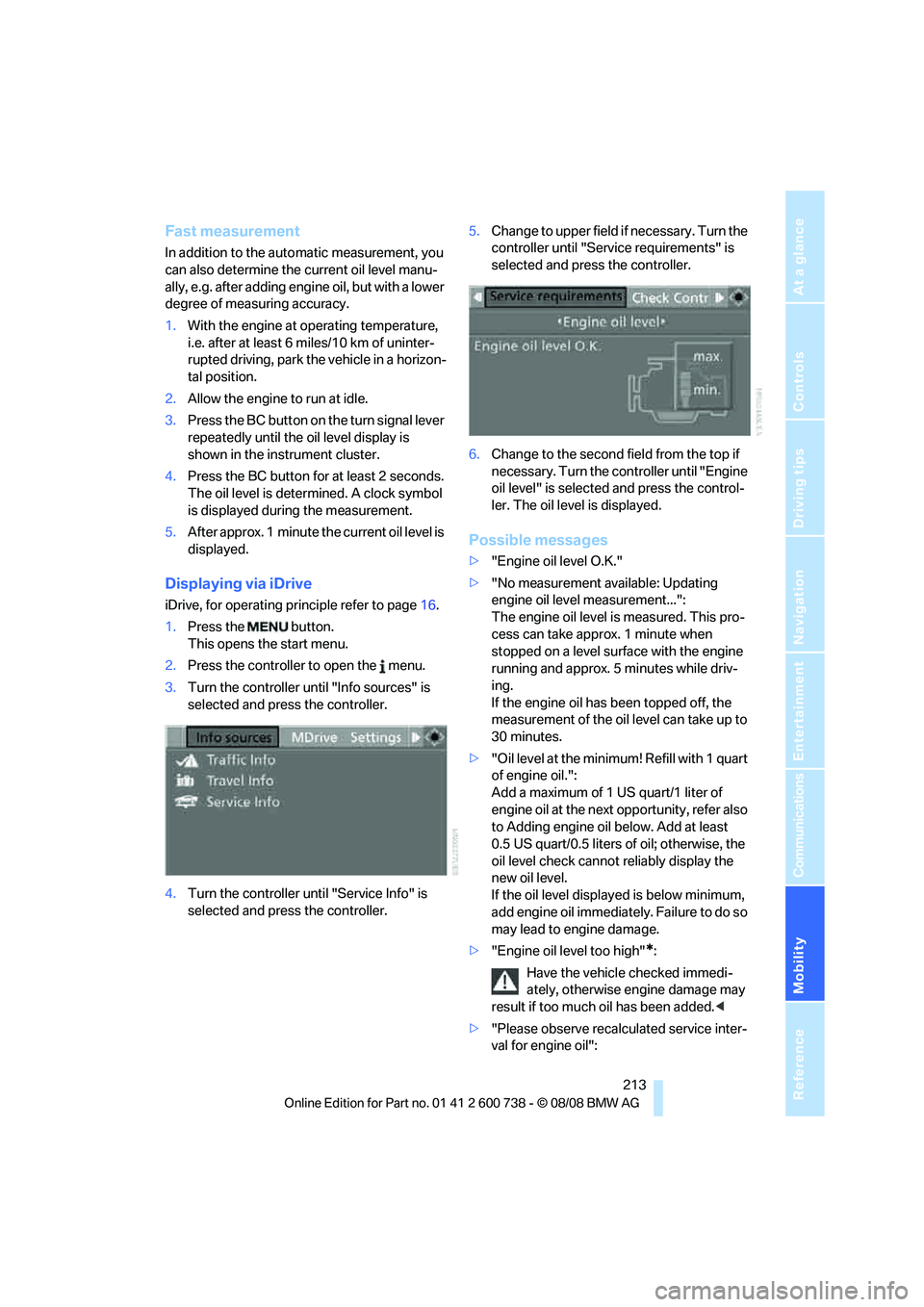
Displaying via iDrive
iDrive, for operating principle refer to page16.
1.Press the button.
This opens the start menu.
2.Press the controller to open the menu.
3.Turn the controller until "Info sources" is
selected and press the controller.
4.Turn the controller until "Service Info" is
selected and press the controller.5.Change to upper field if necessary. Turn the
controller until "Service requirements" is
selected and press the controller.
6.Change to the second field from the top if
necessary. Turn the controller until "Engine
oil level" is selected and press the control-
ler. The oil level is displayed.
Possible messages
>"Engine oil level O.K."
>"No measurement available: Updating
engine oil level measurement...":
The engine oil level is measured. This pro-
cess can take approx. 1 minute when
stopped on a level surface with the engine
running and approx. 5 minutes while driv-
ing.
If the engine oil has been topped off, the
measurement of the oil level can take up to
30 minutes.
>"Oil level at the minimum! Refill with 1 quart
of engine oil.":
Add a maximum of 1 US quart/1 liter of
engine oil at the next opportunity, refer also
to Adding engine oil below. Add at least
0.5 US quart/0.5 liters of oil; otherwise, the
oil level check cannot reliably display the
new oil level.
If the oil level displayed is below minimum,
add engine oil immediately. Failure to do so
may lead to engine damage.
>"Engine oil level too high"
*:
Have the vehicle checked immedi-
ately, otherwise engine damage may
result if too much oil has been added.<
>"Please observe recalculated service inter-
val for engine oil":
Page 250 of 266
Everything from A to Z
248 Cup holders109
Curb weight, refer to
Weights239
Current position
– displaying145
– entering134
– storing134
"Customer
Relations"186,194
Cylinders, refer to Engine
data238
D
Dashboard, refer to
Cockpit10
Data, technical238
– dimensions238
– engine238
– weights239
Date
– date format77
– setting77
Daytime running lamps94
"Deactivated"46
Defect
– door lock34
– fuel filler door202
– glass sunroof41
– luggage compartment lid36
Defrosting windows100
Defrosting windows and
removing condensation100
Defrosting windshield, refer to
Defrosting windows100
Defrost position, refer to
Defrosting windows100
"Delete address book" in
navigation136
"Delete all numbers" in mobile
phone mode185
"Delete data" in
navigation136
"Delete" in mobile phone
mode185
Destination address
– deleting135
– entering126,129Destination for navigation
– destination list133
– entering via voice129
– entry126
– selecting from address
book135
– selecting using
information132
– storing134
Destination guidance138
– bypassing route
sections142
– canceling voice
instructions52
– changing specified
route136
– displaying route139
– distance and arrival138
– interrupting138
– starting138
– terminating/continuing138
– voice instructions141
– volume of voice
instructions142
Destination list for
navigation
133
Destinations recently driven
to133
"Details" in audio
mode166,172
"Details" in radio mode162
"Detour" in navigation145
"Dial" in mobile phone
mode183
"Dial number"183
Digital clock68
Digital radio, refer to High
Definition Radio158
Dimensions238
Directional indicators, refer to
Turn signals63
Direction announcements,
refer to Voice
instructions141
Direction instructions, refer to
Voice instructions141Directory, refer to Phone
book184
Directory for navigation, refer
to Address book134
Displacement, refer to Engine
data238
"Display"77
Display, refer to iDrive
controls16
Display elements, refer to
Instrument cluster12
Displaying vehicle data198
Display lighting, refer to
Instrument lighting97
"Display off"22
Displays
– on Control Display, refer to
iDrive16
– refer to Instrument
cluster12
"Display settings"77,90
Displays on the windshield,
refer to Head-Up Display90
Disposal
– battery of remote control
with comfort access39
– coolant215
– vehicle battery230
Distance, refer to
Computer69
"Distance to dest."69
Distance to destination, refer
to Computer69
Distance warning, refer to
PDC Park Distance
Control79
Divided rear backrest, refer to
Through-loading
system111
Door entry lighting97
Door key, refer to Keys/
remote control30
Door lock34
Door locking, confirmation
signals33
"Door locks"32
Page 252 of 266
Everything from A to Z
250 Entering zip code for
navigation128
"Entertainment"150
Entertainment sound output
on/off151
Entry map for destination131
Equalizer, refer to Tone
control153
"Equalizer", tone control153
"ESN"161
ESP Electronic Stability
Program, refer to DSC
Dynamic Stability
Control81
Event Data Recorders217
Exhaust system, refer to Hot
exhaust system116
Exterior mirrors50
– adjusting50
– automatic dimming
feature51
– automatic heating50
– folding in and out50
– tilting down passenger-side
exterior mirror50
External audio device108
Eye for tow-starting and
towing, refer to Tow
fitting233
F
Fader, refer to Tone
control152
Failure messages, refer to
Check Control72
False alarm
– refer to Avoiding
unintentional alarms37
– refer to Switching off
alarm37
Fastening safety belts, refer to
Safety belts47
– warning lamp48
Fastest route for
navigation136
"Fast route" in navigation137
Filler neck for washer fluid65Filling bottle, refer to
M Mobility System225
Filling sealant into wheel226
Filter, refer to Microfilter/
activated-charcoal filter102
First aid, refer to First-aid
kit232
First-aid kit232
Flashing
– during locking/unlocking,
refer to Setting confirmation
signals33
– triple turn signal
activation63
Flat tire
– changing wheels227
– Flat Tire Monitor84,85
– M Mobility System85,225
– refer to Tire condition206
– spare wheel228
– TPM Tire Pressure
Monitor85
– warning lamp85,86
Flat Tire Monitor84
– false alarms84
– initializing system84
– snow chains208
– system limits84
– warning lamp85
Fluid reservoir, refer to Filler
neck for washer fluid65
"FM", reception
range150,154
FM, waveband154
Folding rear backrest111
Fold-over rear backrest111
Footbrake, refer to Braking
safely117
Footwell lamps, refer to
Interior lamps97
Forward, fast
– CD changer
168
– CD player168
For your own safety5
Freeway, refer to Route
criteria136
Front airbags88
Front armrest, refer to Center
armrest, front107Front passenger airbags
– deactivating89
Front seat adjustment43
"FTM"85
FTM, refer to Flat Tire
Monitor84
Fuel203
– average consumption69
– display68
– high-quality brands203
– quality203
– specifications203
– tank contents, refer to
Capacities239
Fuel clock, refer to Fuel
gauge68
Fuel consumption display,
refer to Computer, average
fuel consumption69
Fuel display, refer to Fuel
gauge68
Fuel filler door202
– releasing in the event of
electrical malfunction202
Full mobile phone preparation
package176
Full screen display, refer to
Switching assistance
window off22
Fuses230
G
Garage door opener, refer to
Integrated universal remote
control105
Gasoline, refer to Required
fuel203
Gasoline display, refer to Fuel
gauge68
Gear changes62
Gear display, refer to Displays
in instrument cluster61
Gearshift lever60
– manual transmission59
General driving notes116
Page 254 of 266
Everything from A to Z
252 Indicator/warning lamps
– ABS Antilock Brake
System82
– airbags90
– brake system82
– DSC13,81
– Flat Tire Monitor85
– high beams13
– MDrive13,53
– M Dynamic Mode13,81
– parking lamps/low beams13
– safety belt warning48
– TPM Tire Pressure
Monitor86
Indicator and warning
lamps13
Inflation pressure, refer to Tire
inflation pressure204
Inflation pressure monitoring,
refer to Flat Tire Monitor84
Inflation pressure monitoring,
refer to TPM Tire Pressure
Monitor85
Info menu18
Information
– on another location132
– on current position132
– on destination location132
"Information" in
navigation132
Information menu, refer to
imenu18
"Information on
destination"134
"Info sources"71
Initializing
– Flat Tire Monitor84
– radio, refer to Storing
stations156
– refer to Power failure230
– refer to Setting time and
date76
– seat, mirror and steering
wheel memory45
"Input map"131
Installation location
– CD changer168
– drive for navigation DVD124
– mobile phone107Instructions for navigation
system, refer to Voice
instructions141
Instrument cluster12
Instrument illumination, refer
to Instrument lighting97
Instrument lighting97
Instrument panel, refer to
Cockpit10
Instrument panel, refer to
Instrument cluster12
Integrated key30
Integrated universal remote
control105
Interesting destination for
navigation132
"Interim time"75
Interior lamps97
– switching on with remote
control33
Interior motion sensor37
– switching off38
Interior rearview mirror51
– automatic dimming
feature51
Intermittent mode of the
wipers64
J
Jacking points228
Joystick, refer to iDrive16
Jumpering, refer to Jump
starting232
Jump starting232
K
Keyless-Go, refer to Comfort
access38
Keyless opening and closing,
refer to Comfort access38
Key Memory, refer to Personal
Profile31
"Keypad"186Keys30
– key-related settings, refer to
Personal Profile31
– spare key30
Knock control203
L
Lamps
– refer to High-beam
assistant95
– refer to Parking lamps/low
beams93
Lamps and bulbs222
"Language / Units"77,78
"Language / Units" in
navigation125,141
"Languages"78
"Languages" in
navigation125,141
Lashing eyes, refer to
Securing cargo119
Last destinations, refer to
Destination list133
"Last seat pos."46
LATCH child restraint fixing
system55
Leather care220
LEDs light-emitting
diodes222
Length, refer to
Dimensions238
License plate lamp, replacing
bulbs225
Light-emitting diodes
LEDs222
Lighter109
"Lighting"64
Lighting
– instruments97
– lamps and bulbs222
– of the vehicle, refer to
Lamps93
Light switch93
"Limit"74