roof BMW M5 2010 User Guide
[x] Cancel search | Manufacturer: BMW, Model Year: 2010, Model line: M5, Model: BMW M5 2010Pages: 266, PDF Size: 9.08 MB
Page 90 of 266
Technology for comfort, convenience and safety
88
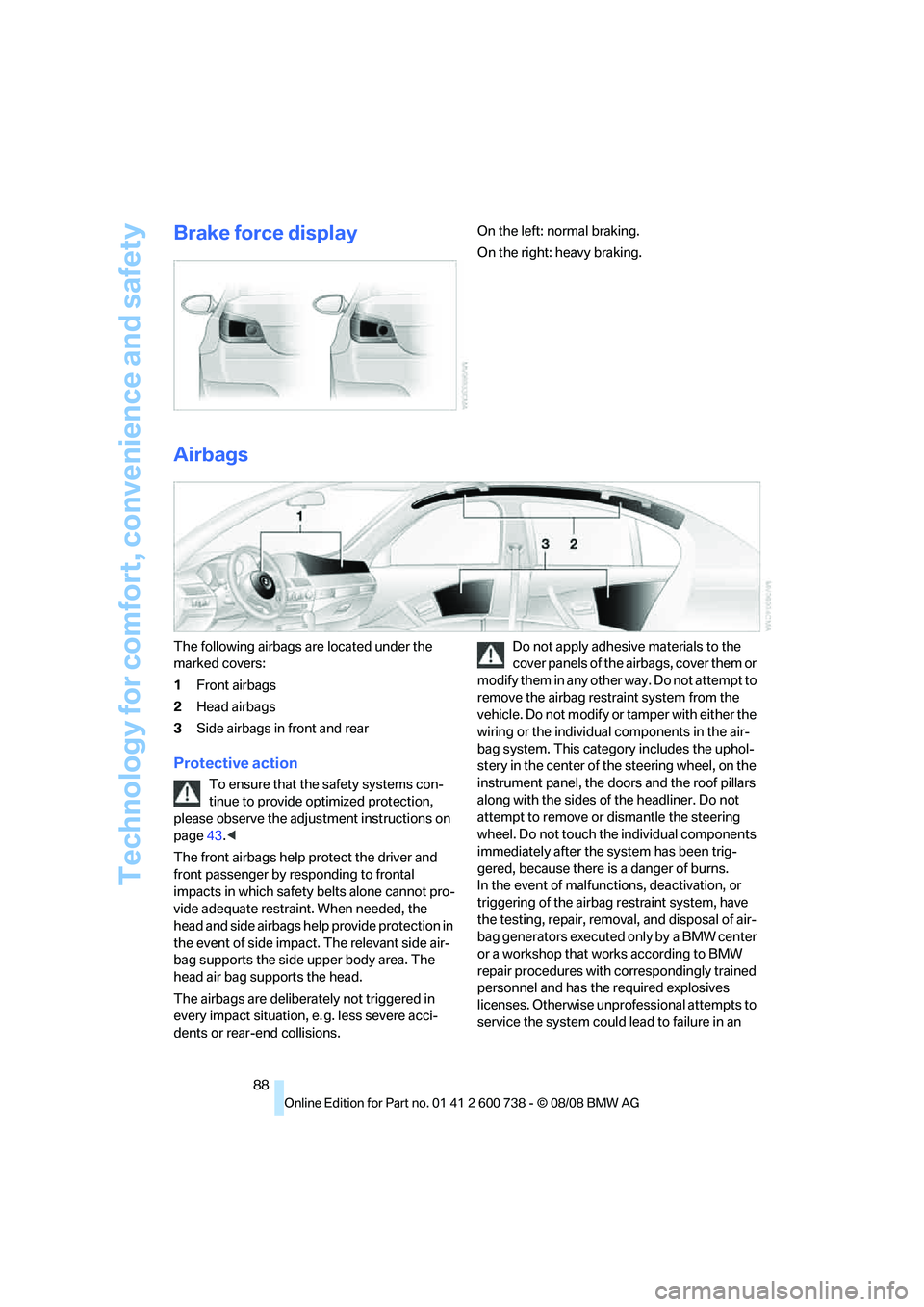
Brake force displayOn the left: normal braking.
On the right: heavy braking.
Airbags
The following airbags are located under the
marked covers:
1Front airbags
2Head airbags
3Side airbags in front and rear
Protective action
To ensure that the safety systems con-
tinue to provide optimized protection,
please observe the adjustment instructions on
page43.<
The front airbags help protect the driver and
front passenger by responding to frontal
impacts in which safety belts alone cannot pro-
vide adequate restraint. When needed, the
head and side airbags help provide protection in
the event of side impact. The relevant side air-
bag supports the side upper body area. The
head air bag supports the head.
The airbags are deliberately not triggered in
every impact situation, e. g. less severe acci-
dents or rear-end collisions.Do not apply adhesive materials to the
cover panels of the airbags, cover them or
modify them in any other way. Do not attempt to
remove the airbag restraint system from the
vehicle. Do not modify or tamper with either the
wiring or the individual components in the air-
bag system. This category includes the uphol-
stery in the center of the steering wheel, on the
instrument panel, the doors and the roof pillars
along with the sides of the headliner. Do not
attempt to remove or dismantle the steering
wheel. Do not touch the individual components
immediately after the system has been trig-
gered, because there is a danger of burns.
In the event of malfunctions, deactivation, or
triggering of the airbag restraint system, have
the testing, repair, removal, and disposal of air-
bag generators executed only by a BMW center
or a workshop that works according to BMW
repair procedures with correspondingly trained
personnel and has the required explosives
licenses. Otherwise unprofessional attempts to
service the system could lead to failure in an
Page 118 of 266
Things to remember when driving
116
Things to remember when driving
Break-in period
Moving parts need breaking-in time to adjust to
each other. To ensure that your vehicle contin-
ues to provide optimized economy of operation
throughout an extended service life, we request
that you devote careful attention to the follow-
ing section.
Do not use the driving programs 5 and 6 during
break-in, refer to Drivelogic on page62.
Engine and differential
Always obey all official speed limits.
Up to 1,200 miles/2,000 km
Drive at changing engine and driving speeds,
however do not exceed 5,500 rpm or 105 mph/
170 km/h.
Avoid full-throttle operation and use of the
transmission's kick-down mode during these
initial miles.
From 1,200 miles/2,000 km to
3,000 miles/5,000 km
The engine and driving speed can gradually be
increased up to a continuous vehicle speed of
135 mph/220 km/h. Only drive at top speed
briefly, e.g. when passing.
Transmission
The function of the transmission is only at its
optimized level after driving a distance of
approx. 300 miles/500 km. Do not exceed
engine speeds of 5,500 rpm during this time.
Tires
Due to technical factors associated with their
manufacture, tires do not achieve their full trac-
tion potential until after an initial break-in
period. Therefore, drive reservedly during the
first 200 miles/300 km.
Brake system
Brakes require an initial break-in period of
approx. 300 miles/500 km to achieve optimized
contact and wear patterns between brake pads
and rotors. Drive in a reserved manner during
this break-in period.
Clutch
The function of the clutch is only at its opti-
mized level after a distance driven of approx.
300 miles/500 km. With manual transmission:
During this break-in period, engage the clutch
gently.
Following part replacement
Observe the break-in instructions again if com-
ponents mentioned above must be replaced
after subsequent driving operation.
General driving notes
Closing luggage compartment lid
Operate the vehicle only when the lug-
gage compartment lid is completely
closed. Otherwise, exhaust fumes could pene-
trate into the passenger compartment.<
If it is absolutely necessary to drive with the lug-
gage compartment lid open:
1.Close all windows and the glass sunroof.
2.Increase the air volume of the automatic cli-
mate control to a high level, refer to
page100.
Hot exhaust system
As in all vehicles, extremely high temper-
atures are generated on the exhaust sys-
tem. Do not remove the heat shields installed
adjacent to it, and never apply undercoating to
them. When driving, standing at idle and while
parking take care to avoid possible contact
between the hot exhaust system and any highly
flammable materials such as hay, leaves, grass,
Page 121 of 266
Driving tips
119Reference
At a glance
Controls
Communications
Navigation
Entertainment
Mobility
Stowing cargo
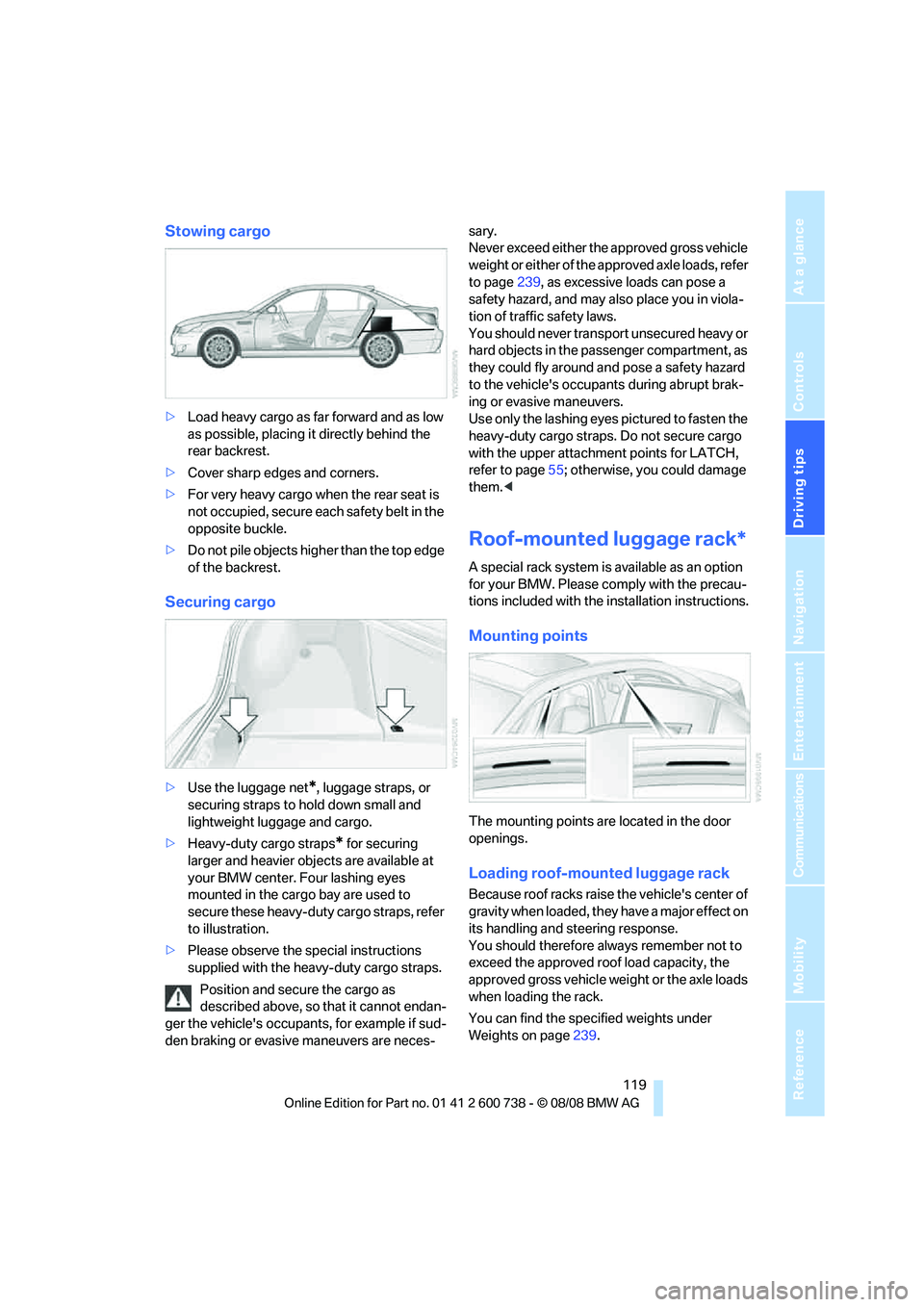
>Load heavy cargo as far forward and as low
as possible, placing it directly behind the
rear backrest.
>Cover sharp edges and corners.
>For very heavy cargo when the rear seat is
not occupied, secure each safety belt in the
opposite buckle.
>Do not pile objects higher than the top edge
of the backrest.
Securing cargo
>Use the luggage net*, luggage straps, or
securing straps to hold down small and
lightweight luggage and cargo.
>Heavy-duty cargo straps
* for securing
larger and heavier objects are available at
your BMW center. Four lashing eyes
mounted in the cargo bay are used to
secure these heavy-duty cargo straps, refer
to illustration.
>Please observe the special instructions
supplied with the heavy-duty cargo straps.
Position and secure the cargo as
described above, so that it cannot endan-
ger the vehicle's occupants, for example if sud-
den braking or evasive maneuvers are neces-sary.
Never exceed either the approved gross vehicle
weight or either of the approved axle loads, refer
to page239, as excessive loads can pose a
safety hazard, and may also place you in viola-
tion of traffic safety laws.
You should never transport unsecured heavy or
hard objects in the passenger compartment, as
they could fly around and pose a safety hazard
to the vehicle's occupants during abrupt brak-
ing or evasive maneuvers.
Use only the lashing eyes pictured to fasten the
heavy-duty cargo straps. Do not secure cargo
with the upper attachment points for LATCH,
refer to page55; otherwise, you could damage
them.<
Roof-mounted luggage rack*
A special rack system is available as an option
for your BMW. Please comply with the precau-
tions included with the installation instructions.
Mounting points
The mounting points are located in the door
openings.
Loading roof-mounted luggage rack
Because roof racks raise the vehicle's center of
gravity when loaded, they have a major effect on
its handling and steering response.
You should therefore always remember not to
exceed the approved roof load capacity, the
approved gross vehicle weight or the axle loads
when loading the rack.
You can find the specified weights under
Weights on page239.
Page 122 of 266
Things to remember when driving
120 Distribute the roof load uniformly. The load
must not be too large in area. Always stow the
heaviest pieces on the bottom. Be sure that
adequate clearance is maintained for raising the
glass sunroof, and that objects do not project
into the opening path of the luggage compart-
ment lid.
Secure roof-mounted cargo correctly and
securely to prevent it from shifting or falling off
during the trip.
Drive smoothly. Avoid sudden acceleration and
braking maneuvers. Take corners gently.
Page 191 of 266
189
Entertainment
Reference
At a glance
Controls
Driving tips Communications
Navigation
Mobility
{Delete phone book} deletes all entries in the
phone book.
Have entries read aloud and select:
You can have all the entries of your voice phone
book read aloud in the order of input and select
a certain entry to establish a connection:
Selecting an entry
The connection to the phone number of the
selected entry is established.
Redialing
The {Redial} command opens "Redial".
Notes
Important for voice commands
For voice commands, keep the following in
mind:
>Issue the commands smoothly and at nor-
mal volume, avoiding excessive emphasis
and pauses.
>Keep the doors, windows and glass sunroof
closed to prevent interference from ambi-
ent noise.
>Avoid making other noise in the vehicle
while speaking.
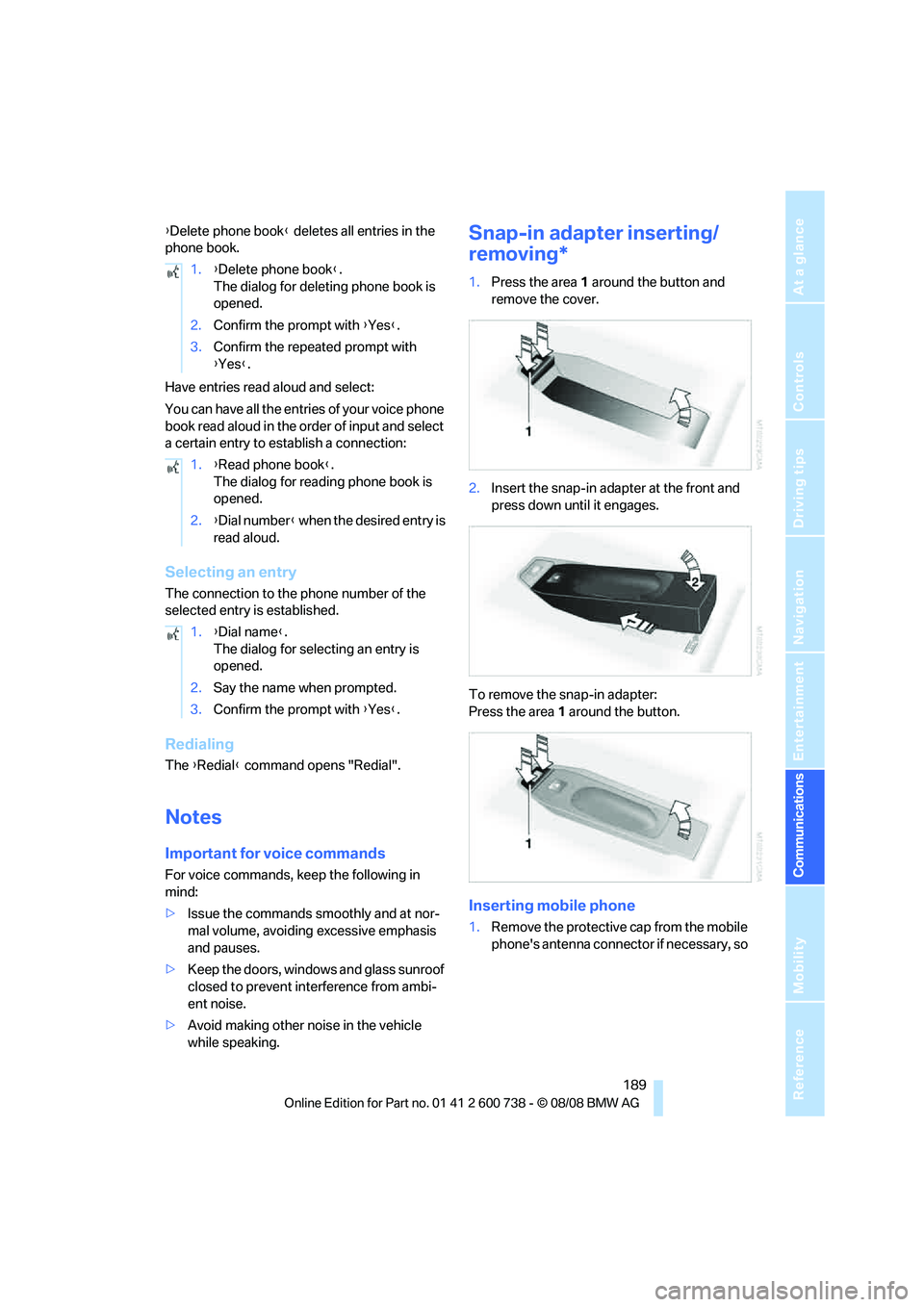
Snap-in adapter inserting/
removing*
1.Press the area 1 around the button and
remove the cover.
2.Insert the snap-in adapter at the front and
press down until it engages.
To remove the snap-in adapter:
Press the area 1 around the button.
Inserting mobile phone
1.Remove the protective cap from the mobile
phone's antenna connector if necessary, so 1.{Delete phone book}.
The dialog for deleting phone book is
opened.
2.Confirm the prompt with {Yes}.
3.Confirm the repeated prompt with
{Yes}.
1.{Read phone book}.
The dialog for reading phone book is
opened.
2.{Dial number} when the desired entry is
read aloud.
1.{Dial name}.
The dialog for selecting an entry is
opened.
2.Say the name when prompted.
3.Confirm the prompt with {Yes}.
Page 232 of 266
Replacing components
230
Vehicle battery
Battery care
The battery is 100 % maintenance-free, i.e., the
electrolyte will last for the life of the battery
when the vehicle is operated in a temperate cli-
mate. Your BMW center will be glad to advise in
all matters concerning the battery.
Charging battery
Only charge the battery in the vehicle via the
terminals in the engine compartment with the
engine switched off. Connections, refer to
Jump starting on page232.
Disposal
Have old batteries disposed of by your
BMW center or hand them in to a recy-
cling center. Maintain the battery in an upright
position for transport and storage. Always
restrain the battery to prevent it from tipping
over during transport.<
Power failure
Following a temporary power failure, e.g. due to
a discharged battery, the use of some equip-
ment will be restricted, requiring its reinitializa-
tion. In the same way, individual settings are lost
and must be updated again:
>Seat, mirror and steering wheel memory
The positions must be stored again, refer to
page45.
>Time and date
Must be updated again, refer to page76.
>Radio
Radio stations must be stored again, refer
to page156.
>Navigation system
You must wait until the system becomes
functional again, refer to page124.
>Glass roof, electric
It may only be possible to raise the glass
roof. The system must be initialized, refer to
page41.
>Power windows
The pinch prevention system for the power windows must be reinitialized, refer to
page39.
Talk to your BMW center before placing
the stored vehicle back in service.<
Fuses
Never attempt to repair a blown fuse and
do not replace a defective fuse with a sub-
stitute of another color or amperage rating, as
this could lead to a circuit overload, ultimately
resulting in a fire in the vehicle.<
Spare fuses, plastic tweezers and fuse alloca-
tion diagram are located in the compartment for
the onboard tool kit, refer to page222.
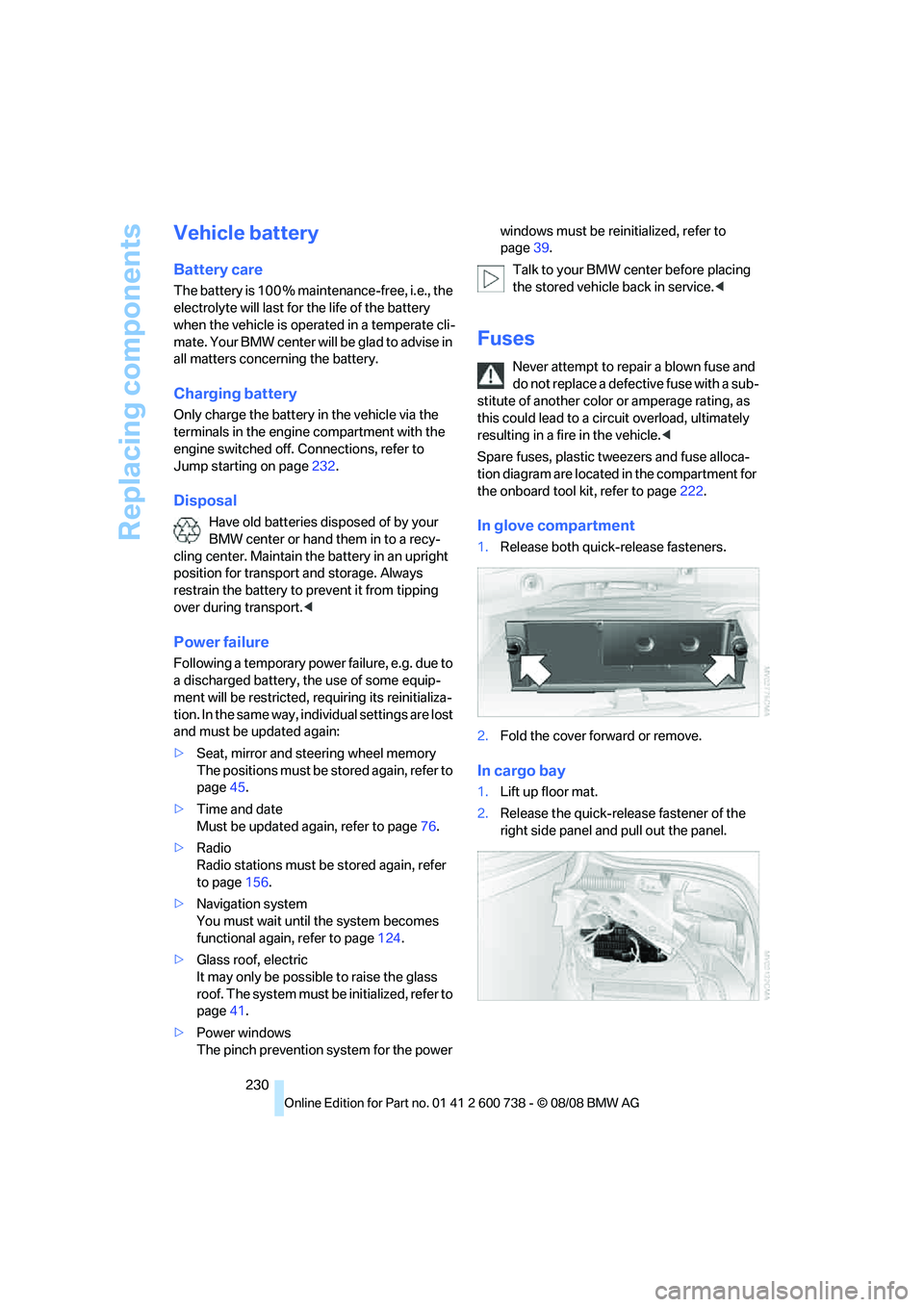
In glove compartment
1.Release both quick-release fasteners.
2.Fold the cover forward or remove.
In cargo bay
1.Lift up floor mat.
2.Release the quick-release fastener of the
right side panel and pull out the panel.
Page 241 of 266
Reference 239
At a glance
Controls
Driving tips
Communications
Navigation
Entertainment
Mobility
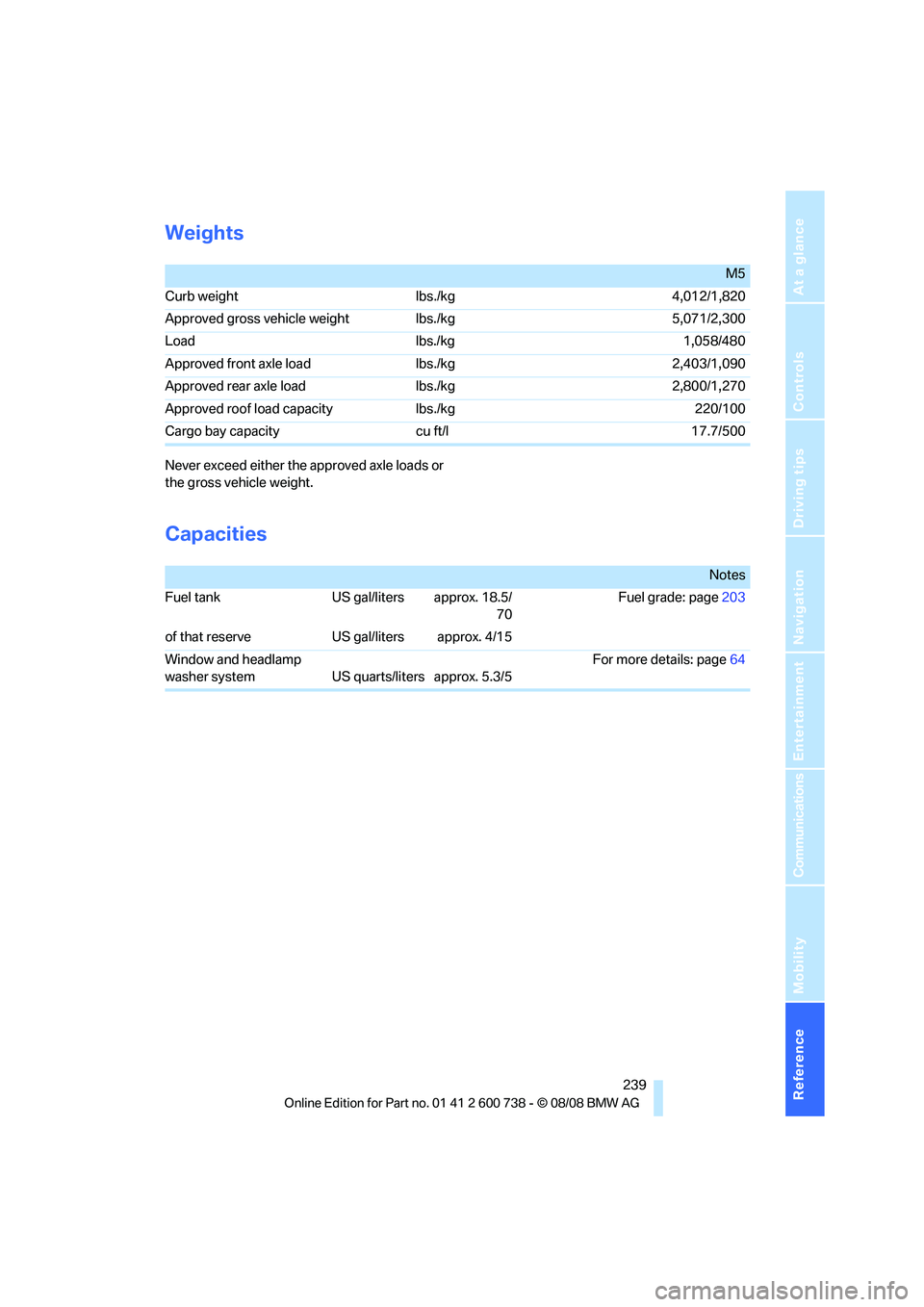
Weights
Never exceed either the approved axle loads or
the gross vehicle weight.
Capacities
M5
Curb weight lbs./kg 4,012/1,820
Approved gross vehicle weight lbs./kg 5,071/2,300
Load lbs./kg 1,058/480
Approved front axle load lbs./kg 2,403/1,090
Approved rear axle load lbs./kg 2,800/1,270
Approved roof load capacity lbs./kg 220/100
Cargo bay capacity cu ft/l 17.7/500
Notes
Fuel tank US gal/liters approx. 18.5/
70Fuel grade: page203
of that reserve US gal/liters approx. 4/15
Window and headlamp
washer system US quarts/liters approx. 5.3/5For more details: page64
Page 249 of 266
Reference 247
At a glance
Controls
Driving tips
Communications
Navigation
Entertainment
Mobility
CD player164
– controls150
– fast forward/reverse168
– random sequence167
– repeating a track167
– sampling a track166
– selecting a track165
– switching on/off150
– tone control151
– volume151
Center armrest
– front107
– rear111
Center brake lamp224
Center console14
Central locking
– from inside34
– from outside32
Central locking system32
– comfort access38
Changes, technical, refer to
For your own safety5
Changes, technical, refer to
Parts and accessories6
Changing language on
Control Display78
Changing scale for
navigation140
Changing units of measure on
Control Display77
Changing wheels207,227
CHECK button73
Check Control72
"Check Control
messages"74
Check Gas Cap202
Checking the air pressure,
refer to Tire inflation
pressure204
Child restraint fixing system
LATCH55
Child restraint systems54
Child-safety lock56
Child seats, refer to
Transporting children
safely54
Chime, refer to Check
Control72
Chock228Chrome-plated parts220
Chrome polish220
Cigarette lighter109
Cigarette lighter socket, refer
to Connecting electrical
devices110
Cleaning your BMW, refer to
Care218
"Climate"49,
99
Clock68
– 12h/24h format76
– hour signal76
– setting time and date76
Closing
– from inside34
– from outside32
Closing fuel filler cap202
Clothes hooks108
Cockpit10
Cold start, refer to Starting
engine58
Comfort access38
– replacing battery, remote
control39
Comfort area, refer to Around
the center console14
"Comfort" with EDC83
"Communication"182,192,1
93,195
Compact Disc
– refer to CD changer164
– refer to CD player164
Compartment for remote
control, refer to Ignition
lock57
Compartments, refer to
Storage compartments108
Compressed audio files164
Computer68
– clock68
– displays on Control
Display69
– hour signal76
"Concert hall", tone
control153
"Concierge"195
Concierge service194
Condensation, refer to When
vehicle is parked117Condition Based Service
CBS216
"Confirmation"33
Confirmation signals for
locking and unlocking33
Connecting car vacuum
cleaner, refer to Connecting
electrical devices110
Consumption, refer to
Average fuel
consumption69
Consumption statistics, refer
to Average fuel
consumption69
"Continue guidance to
destination?"139
Control Center, refer to
iDrive16
Control Display, refer to
iDrive16
– setting brightness77
– switching off/on22
Controller, refer to iDrive16
Controls, refer to Cockpit10
Convenient operation
– glass sunroof33
– windows33
– windows and glass sunroof
with comfort access39
Coolant215
– checking level215
– temperature67
Cooling, maximum101
Cooling fluid, refer to
Coolant215
Cooling function, automatic
climate control101
Cooling system, refer to
Coolant215
Copyright2
Cornering Brake Control
CBC80
Country of destination for
navigation127
Courtesy lamps97
Cradle for telephone or mobile
phone107
Cruise control65
Cruising range69
Page 250 of 266
Everything from A to Z
248 Cup holders109
Curb weight, refer to
Weights239
Current position
– displaying145
– entering134
– storing134
"Customer
Relations"186,194
Cylinders, refer to Engine
data238
D
Dashboard, refer to
Cockpit10
Data, technical238
– dimensions238
– engine238
– weights239
Date
– date format77
– setting77
Daytime running lamps94
"Deactivated"46
Defect
– door lock34
– fuel filler door202
– glass sunroof41
– luggage compartment lid36
Defrosting windows100
Defrosting windows and
removing condensation100
Defrosting windshield, refer to
Defrosting windows100
Defrost position, refer to
Defrosting windows100
"Delete address book" in
navigation136
"Delete all numbers" in mobile
phone mode185
"Delete data" in
navigation136
"Delete" in mobile phone
mode185
Destination address
– deleting135
– entering126,129Destination for navigation
– destination list133
– entering via voice129
– entry126
– selecting from address
book135
– selecting using
information132
– storing134
Destination guidance138
– bypassing route
sections142
– canceling voice
instructions52
– changing specified
route136
– displaying route139
– distance and arrival138
– interrupting138
– starting138
– terminating/continuing138
– voice instructions141
– volume of voice
instructions142
Destination list for
navigation
133
Destinations recently driven
to133
"Details" in audio
mode166,172
"Details" in radio mode162
"Detour" in navigation145
"Dial" in mobile phone
mode183
"Dial number"183
Digital clock68
Digital radio, refer to High
Definition Radio158
Dimensions238
Directional indicators, refer to
Turn signals63
Direction announcements,
refer to Voice
instructions141
Direction instructions, refer to
Voice instructions141Directory, refer to Phone
book184
Directory for navigation, refer
to Address book134
Displacement, refer to Engine
data238
"Display"77
Display, refer to iDrive
controls16
Display elements, refer to
Instrument cluster12
Displaying vehicle data198
Display lighting, refer to
Instrument lighting97
"Display off"22
Displays
– on Control Display, refer to
iDrive16
– refer to Instrument
cluster12
"Display settings"77,90
Displays on the windshield,
refer to Head-Up Display90
Disposal
– battery of remote control
with comfort access39
– coolant215
– vehicle battery230
Distance, refer to
Computer69
"Distance to dest."69
Distance to destination, refer
to Computer69
Distance warning, refer to
PDC Park Distance
Control79
Divided rear backrest, refer to
Through-loading
system111
Door entry lighting97
Door key, refer to Keys/
remote control30
Door lock34
Door locking, confirmation
signals33
"Door locks"32
Page 251 of 266
Reference 249
At a glance
Controls
Driving tips
Communications
Navigation
Entertainment
Mobility
Doors
– manual operation34
– remote control32
DOT Quality Grades206
Draft-free ventilation102
Drinks holder, refer to Cup
holders109
Drivelogic62
Drive mode61
"Driver's door only"32
Driving lamps, refer to Parking
lamps/low beams93
Driving programs, refer to
Drivelogic62
Driving route, refer to
Displaying route139
Driving stability control
systems80
Driving through water117
Driving tips, refer to General
driving notes116
Dry air, refer to Cooling
function101
Drying the air, refer to Cooling
function101
"DSC"53,81
DSC Dynamic Stability
Control81
– indicator lamp13,81
– malfunction82
DVD for navigation124
Dynamic Brake Control DBC
– warning lamp82
"Dynamic route" in
navigation137
Dynamic Stability Control
DSC81
– M Dynamic Mode MDM81
E
Easy entry/exit51
– backrest width45
"EDC"53
EDC Electronic Damping
Control83Eject button, refer to Buttons
in area of CD player150
Electrical malfunction
– door lock34
– driver's door34
– fuel filler door202
– glass sunroof, electric41
– luggage compartment lid36
Electric steering wheel
adjustment51
Electronic brake-force
distribution80
Electronic Damper Control
EDC
– "Comfort"83
– "Normal"83
– "Sport"83
Electronic Damping Control
EDC83
Electronic oil level check212
Emergency operation, refer to
Manual operation
– door lock34
– driver's door34
– fuel filler door202
– luggage compartment lid36
Emergency operation, refer to
Moving manually
– glass sunroof41
Emergency release for
luggage compartment lid in
cargo bay36
Emergency request231
Emergency services, refer to
Roadside Assistance232
"Enabled services"197
"Enabled TeleServices"194
"Enable services"197
"End call"184
Engaging drive position, refer
to Selector lever
positions60Engine
– breaking-in116
– data238
– M Engine Dynamic
Control59
– overheated, refer to Coolant
temperature67
– speed238
– starting58
– starting, with comfort
access38
– switching off58
Engine compartment211
Engine coolant215
Engine oil
– adding214
– additives, refer to Approved
engine oils214
– approved engine oil214
– checking oil level212
– electronic oil level check212
– fast measurement213
– interval between changes,
refer to Service
requirements70
– oil change214
– oil grades, refer to Approved
engine oils214
– possible displays212
– temperature68
– temperature gauge68
"Engine oil level"213
Engine output, refer to Engine
data238
Engine overheating, refer to
Coolant temperature67
Engine speed, refer to Engine
data238
Engine starting, refer to
Starting engine58
"Enter address"126,134
Entering destination via town/
city name127
Entering intersection,
navigation128
Entering the
address126,129
Entering town/city for
navigation127