audio BMW M5 2010 Owner's Manual
[x] Cancel search | Manufacturer: BMW, Model Year: 2010, Model line: M5, Model: BMW M5 2010Pages: 266, PDF Size: 9.08 MB
Page 170 of 266
CD player and CD changer
168
Compressed audio files*
1.Select the current track and press the con-
troller.
2.Select the desired menu item:
>To play all tracks of the current directory
in random order, select "Random direc-
tory" and press the controller.
>To play all tracks of the CD in random
order, select "Random all" and press the
controller.
To stop random function:
1.Press the controller.
2.Select "Random directory" or "Random all"
and press the controller.
Fast forward/reverse
Buttons next to CD player:
Press and hold the button for the corre-
sponding direction.
CD magazine
The BMW CD changer for six CDs is installed in
the glove compartment.
Removing CD magazine
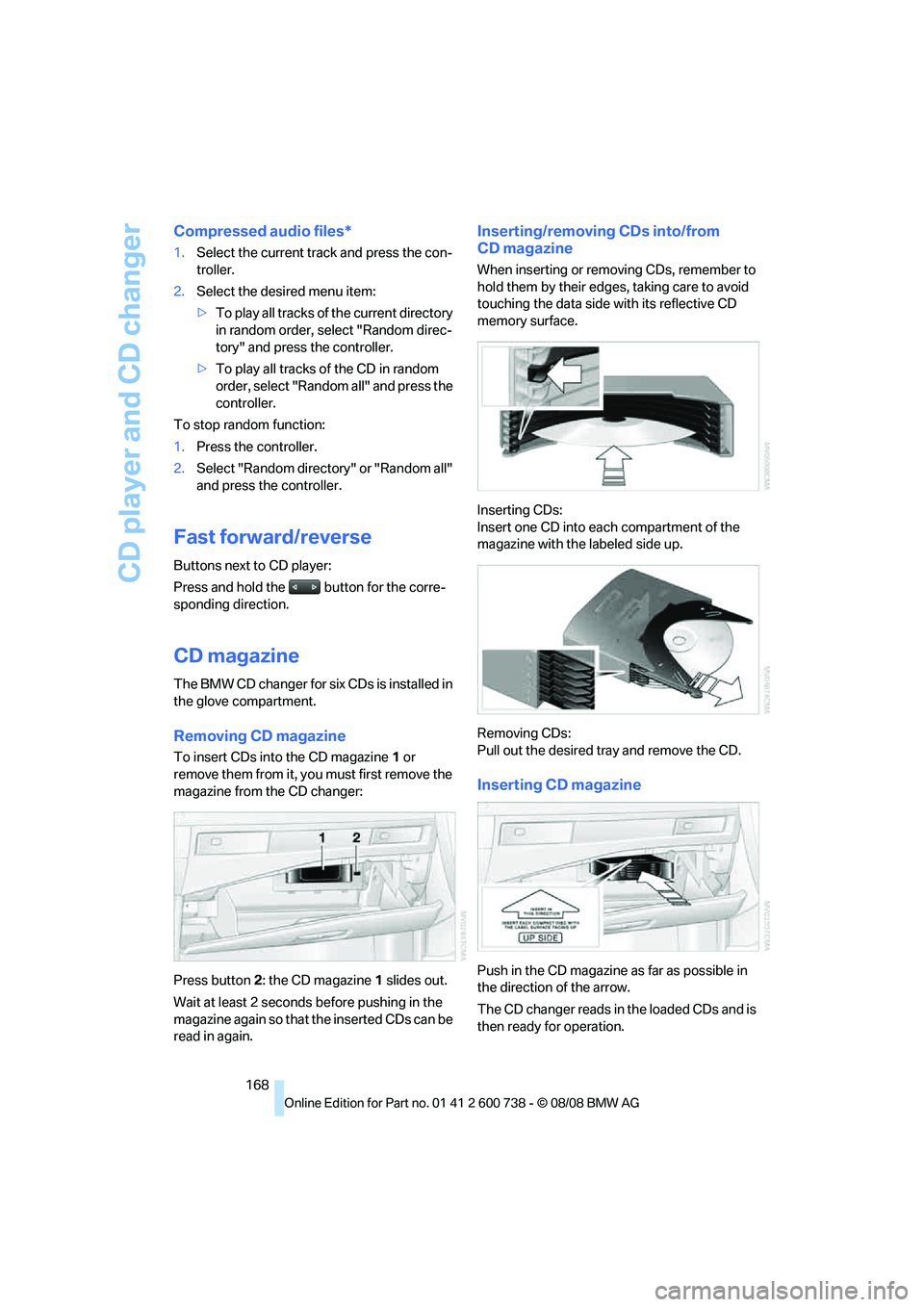
To insert CDs into the CD magazine 1 or
remove them from it, you must first remove the
magazine from the CD changer:
Press button2: the CD magazine1 slides out.
Wait at least 2 seconds before pushing in the
magazine again so that the inserted CDs can be
read in again.
Inserting/removing CDs into/from
CD magazine
When inserting or removing CDs, remember to
hold them by their edges, taking care to avoid
touching the data side with its reflective CD
memory surface.
Inserting CDs:
Insert one CD into each compartment of the
magazine with the labeled side up.
Removing CDs:
Pull out the desired tray and remove the CD.
Inserting CD magazine
Push in the CD magazine as far as possible in
the direction of the arrow.
The CD changer reads in the loaded CDs and is
then ready for operation.
Page 172 of 266
AUX-IN connection
170
AUX-IN connection
You can connect an external audio device, e.g.
an MP3 player, and play the sound via the vehi-
cle speakers. The sound can be adjusted via
iDrive.
Connecting
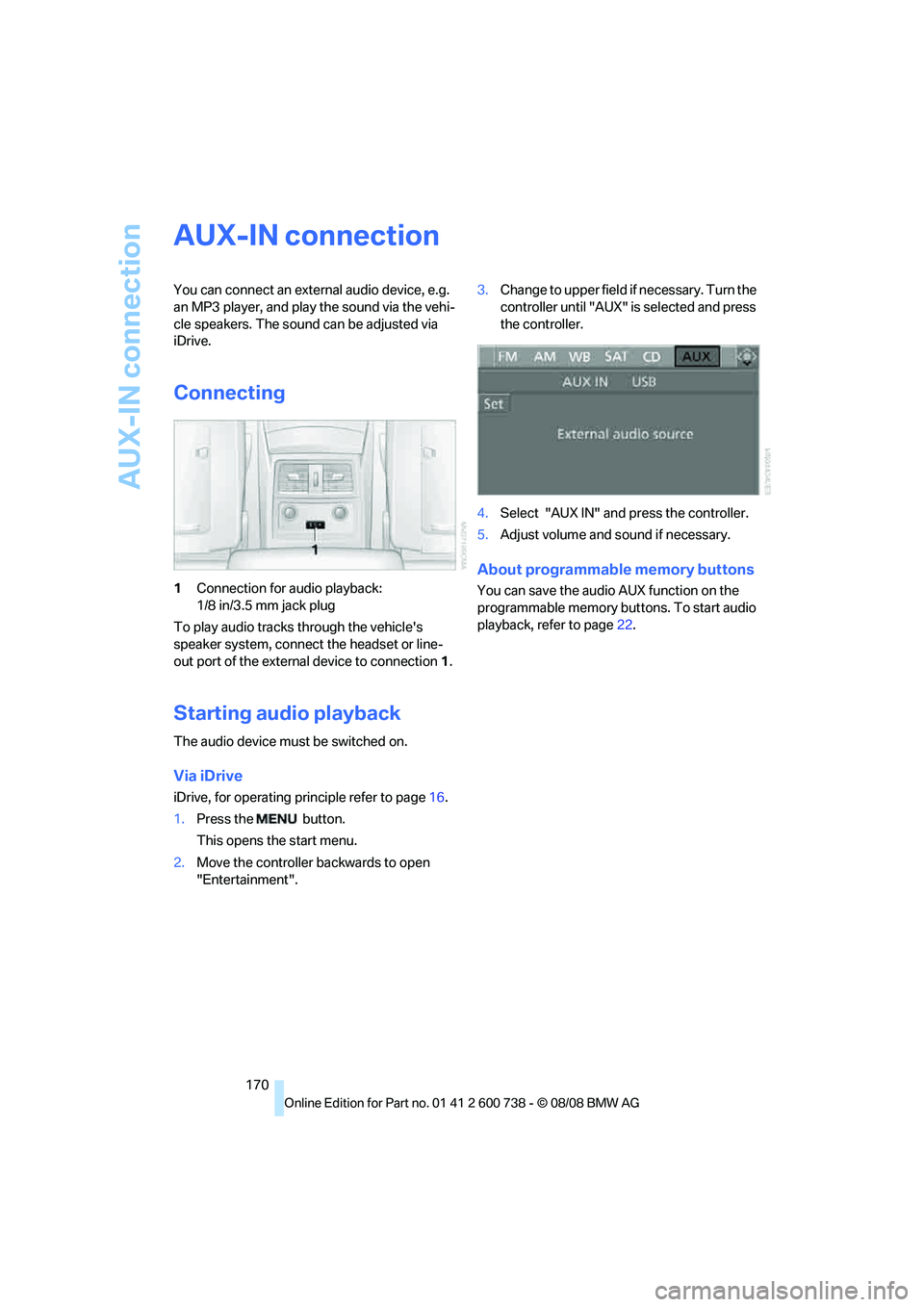
1Connection for audio playback:
1/8 in/3.5 mm jack plug
To play audio tracks through the vehicle's
speaker system, connect the headset or line-
out port of the external device to connection 1.
Starting audio playback
The audio device must be switched on.
Via iDrive
iDrive, for operating principle refer to page16.
1.Press the button.
This opens the start menu.
2.Move the controller backwards to open
"Entertainment".3.Change to upper field if necessary. Turn the
controller until "AUX" is selected and press
the controller.
4.Select "AUX IN" and press the controller.
5.Adjust volume and sound if necessary.
About programmable memory buttons
You can save the audio AUX function on the
programmable memory buttons. To start audio
playback, refer to page22.
Page 173 of 266
Navigation
Entertainment
Driving tips
171Reference
At a glance
Controls
Communications
Mobility
USB-audio interface/mobile phone audio
interface
You can connect audio devices, e. g. an iPod/
iPhone or a USB device (MP3 player, USB flash
drive), to the USB-audio interface. You can then
operate these via iDrive.
When using an iPhone / mobile phone as a
music player, connect the device to the snap-in
adapter, refer to the separate operating instruc-
tions. Playback is only possible if a device is not
connected to the USB-audio interface.
The system can play back common audio files,
e.g. MP3, WMA, WAV (PCM) and AAC, as well
as playback lists in the M3U format.
Due to the large number of audio devices avail-
able on the market, operation via the vehicle
cannot be ensured for every audio device.
Ask your BMW center which audio devices are
suitable.
Connecting
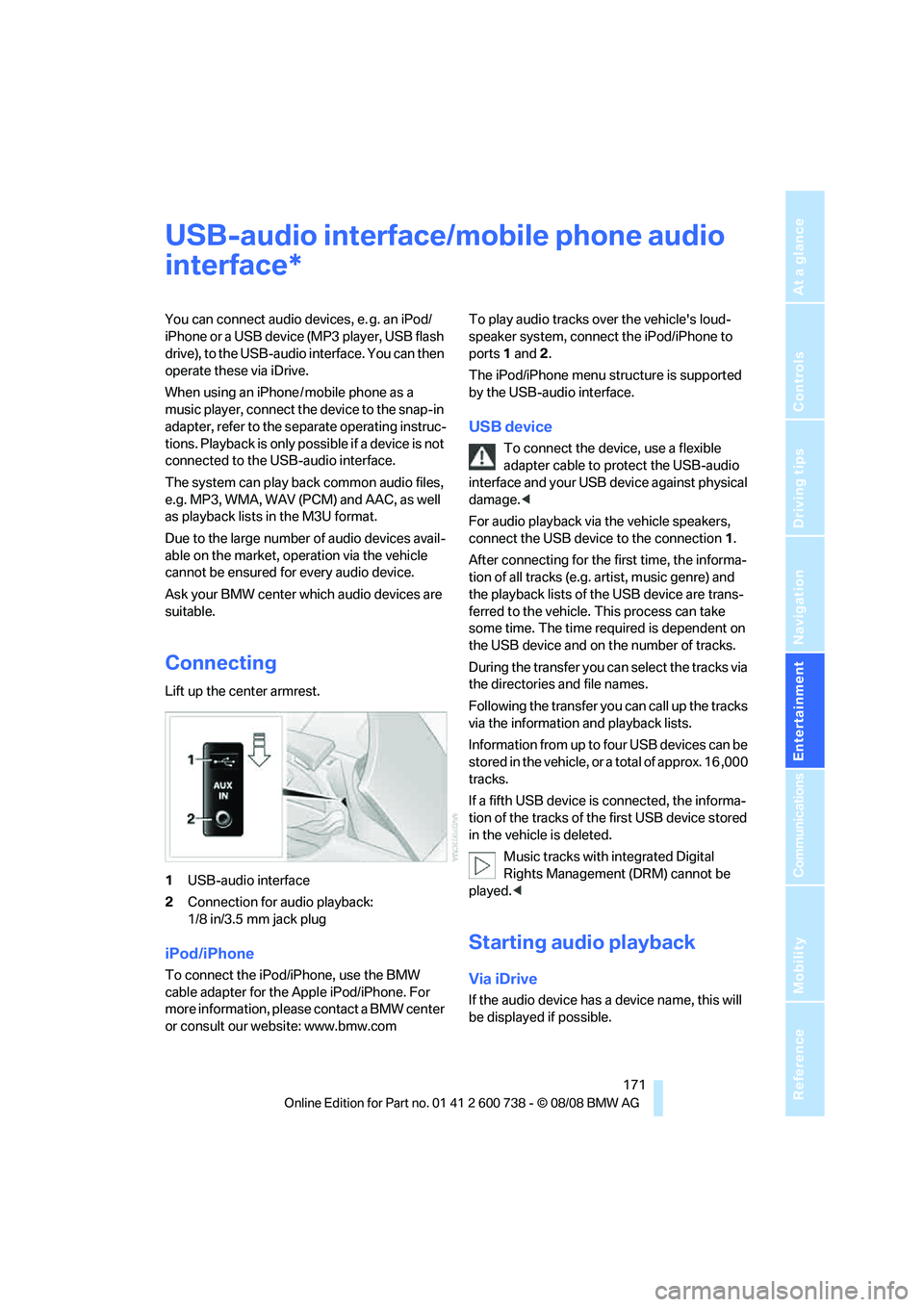
Lift up the center armrest.
1USB-audio interface
2Connection for audio playback:
1/8 in/3.5 mm jack plug
iPod/iPhone
To connect the iPod/iPhone, use the BMW
cable adapter for the Apple iPod/iPhone. For
more information, please contact a BMW center
or consult our website: www.bmw.comTo play audio tracks over the vehicle's loud-
speaker system, connect the iPod/iPhone to
ports 1 and 2.
The iPod/iPhone menu structure is supported
by the USB-audio interface.
USB device
To connect the device, use a flexible
adapter cable to protect the USB-audio
interface and your USB device against physical
damage.<
For audio playback via the vehicle speakers,
connect the USB device to the connection 1.
After connecting for the first time, the informa-
tion of all tracks (e.g. artist, music genre) and
the playback lists of the USB device are trans-
ferred to the vehicle. This process can take
some time. The time required is dependent on
the USB device and on the number of tracks.
During the transfer you can select the tracks via
the directories and file names.
Following the transfer you can call up the tracks
via the information and playback lists.
Information from up to four USB devices can be
stored in the vehicle, or a total of approx. 16 ,000
tracks.
If a fifth USB device is connected, the informa-
tion of the tracks of the first USB device stored
in the vehicle is deleted.
Music tracks with integrated Digital
Rights Management (DRM) cannot be
played.<
Starting audio playback
Via iDrive
If the audio device has a device name, this will
be displayed if possible.
*
Page 174 of 266
USB-audio interface/mobile phone audio interface
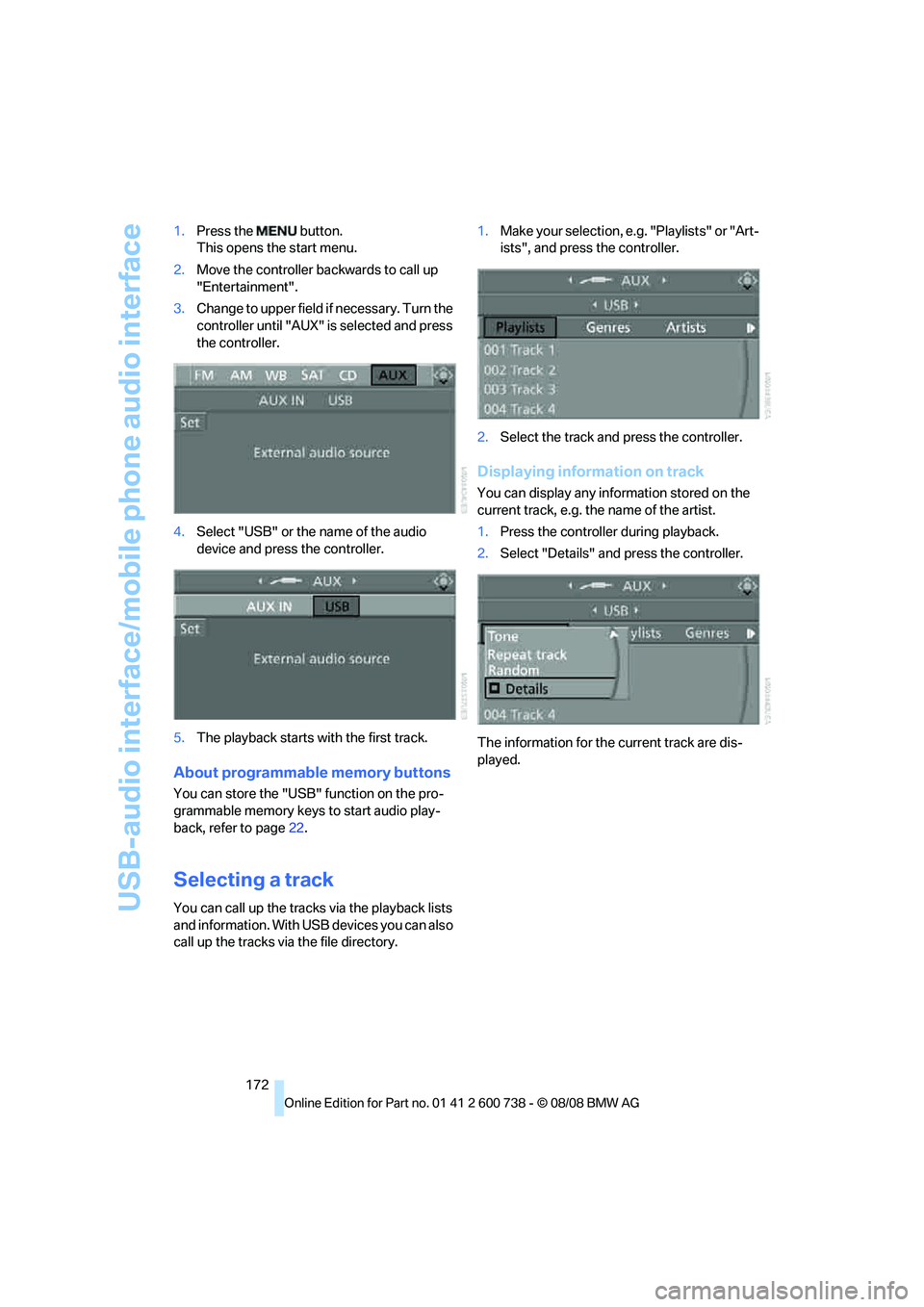
172 1.Press the button.
This opens the start menu.
2.Move the controller backwards to call up
"Entertainment".
3.Change to upper field if necessary. Turn the
controller until "AUX" is selected and press
the controller.
4.Select "USB" or the name of the audio
device and press the controller.
5.The playback starts with the first track.
About programmable memory buttons
You can store the "USB" function on the pro-
grammable memory keys to start audio play-
back, refer to page22.
Selecting a track
You can call up the tracks via the playback lists
and information. With USB devices you can also
call up the tracks via the file directory.1.Make your selection, e.g. "Playlists" or "Art-
ists", and press the controller.
2.Select the track and press the controller.
Displaying information on track
You can display any information stored on the
current track, e.g. the name of the artist.
1.Press the controller during playback.
2.Select "Details" and press the controller.
The information for the current track are dis-
played.
Page 175 of 266
Navigation
Entertainment
Driving tips
173Reference
At a glance
Controls
Communications
Mobility
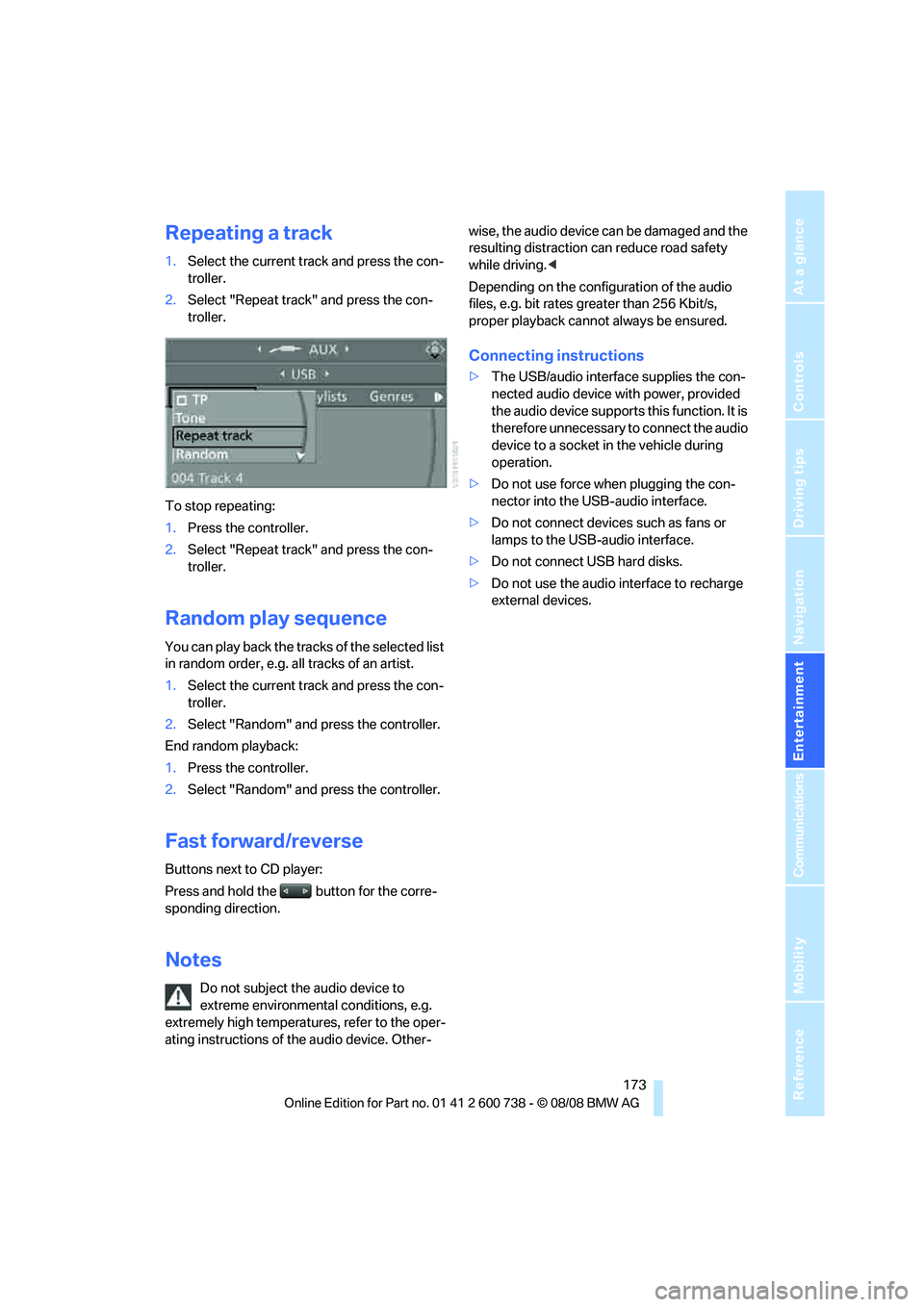
Repeating a track
1.Select the current track and press the con-
troller.
2.Select "Repeat track" and press the con-
troller.
To stop repeating:
1.Press the controller.
2.Select "Repeat track" and press the con-
troller.
Random play sequence
You can play back the tracks of the selected list
in random order, e.g. all tracks of an artist.
1.Select the current track and press the con-
troller.
2.Select "Random" and press the controller.
End random playback:
1.Press the controller.
2.Select "Random" and press the controller.
Fast forward/reverse
Buttons next to CD player:
Press and hold the button for the corre-
sponding direction.
Notes
Do not subject the audio device to
extreme environmental conditions, e.g.
extremely high temperatures, refer to the oper-
ating instructions of the audio device. Other-wise, the audio device can be damaged and the
resulting distraction can reduce road safety
while driving.<
Depending on the configuration of the audio
files, e.g. bit rates greater than 256 Kbit/s,
proper playback cannot always be ensured.
Connecting instructions
>The USB/audio interface supplies the con-
nected audio device with power, provided
the audio device supports this function. It is
therefore unnecessary to connect the audio
device to a socket in the vehicle during
operation.
>Do not use force when plugging the con-
nector into the USB-audio interface.
>Do not connect devices such as fans or
lamps to the USB-audio interface.
>Do not connect USB hard disks.
>Do not use the audio interface to recharge
external devices.
Page 184 of 266
Telephoning
182
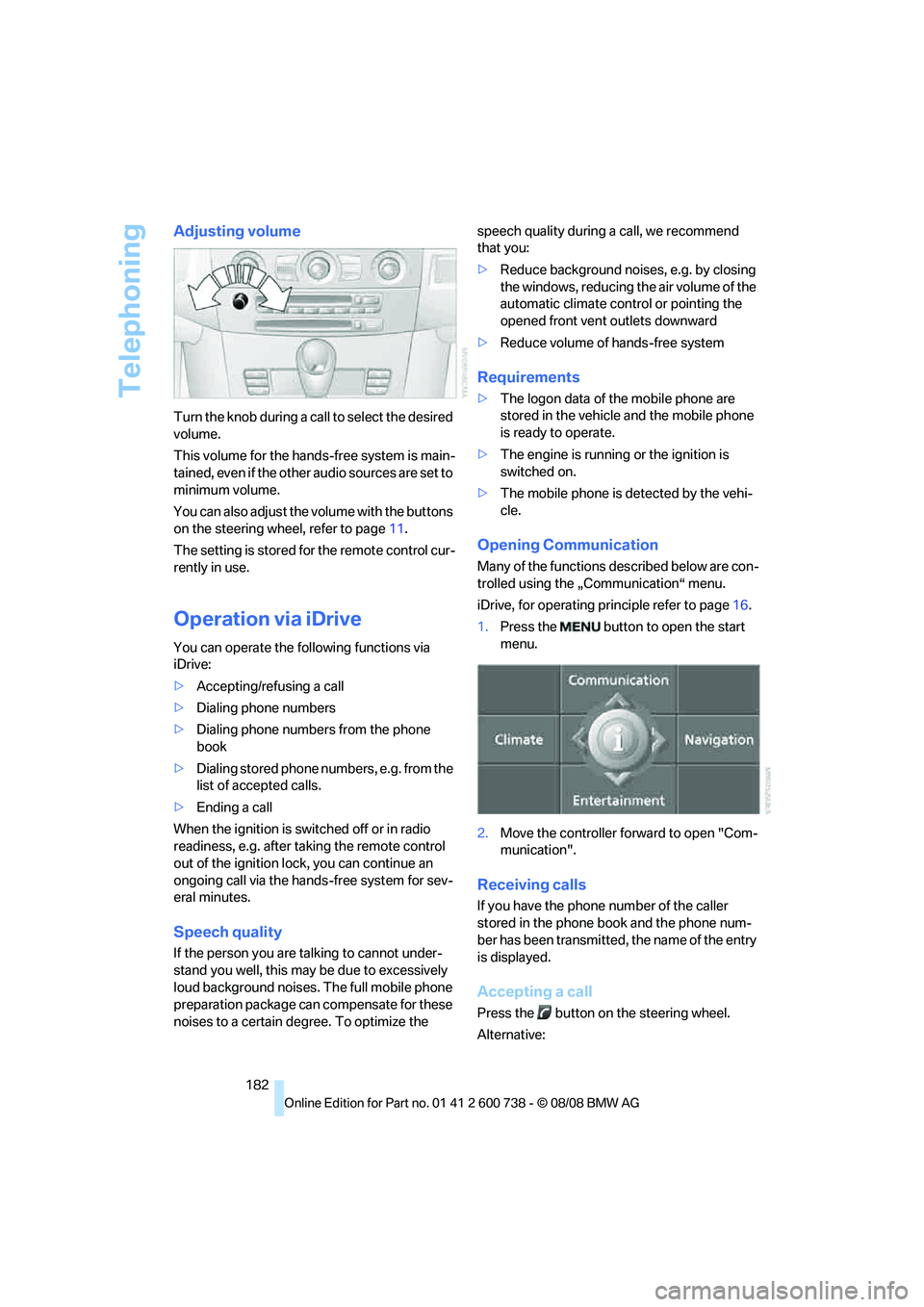
Adjusting volume
Turn the knob during a call to select the desired
volume.
This volume for the hands-free system is main-
tained, even if the other audio sources are set to
minimum volume.
You can also adjust the volume with the buttons
on the steering wheel, refer to page11.
The setting is stored for the remote control cur-
rently in use.
Operation via iDrive
You can operate the following functions via
iDrive:
>Accepting/refusing a call
>Dialing phone numbers
>Dialing phone numbers from the phone
book
>Dialing stored phone numbers, e.g. from the
list of accepted calls.
>Ending a call
When the ignition is switched off or in radio
readiness, e.g. after taking the remote control
out of the ignition lock, you can continue an
ongoing call via the hands-free system for sev-
eral minutes.
Speech quality
If the person you are talking to cannot under-
stand you well, this may be due to excessively
loud background noises. The full mobile phone
preparation package can compensate for these
noises to a certain degree. To optimize the speech quality during a call, we recommend
that you:
>Reduce background noises, e.g. by closing
the windows, reducing the air volume of the
automatic climate control or pointing the
opened front vent outlets downward
>Reduce volume of hands-free system
Requirements
>The logon data of the mobile phone are
stored in the vehicle and the mobile phone
is ready to operate.
>The engine is running or the ignition is
switched on.
>The mobile phone is detected by the vehi-
cle.
Opening Communication
Many of the functions described below are con-
trolled using the „Communication“ menu.
iDrive, for operating principle refer to page16.
1.Press the button to open the start
menu.
2.Move the controller forward to open "Com-
munication".
Receiving calls
If you have the phone number of the caller
stored in the phone book and the phone num-
ber has been transmitted, the name of the entry
is displayed.
Accepting a call
Press the button on the steering wheel.
Alternative:
Page 190 of 266
Telephoning
188
Setting volume of instructions
You can adjust the volume for the instructions
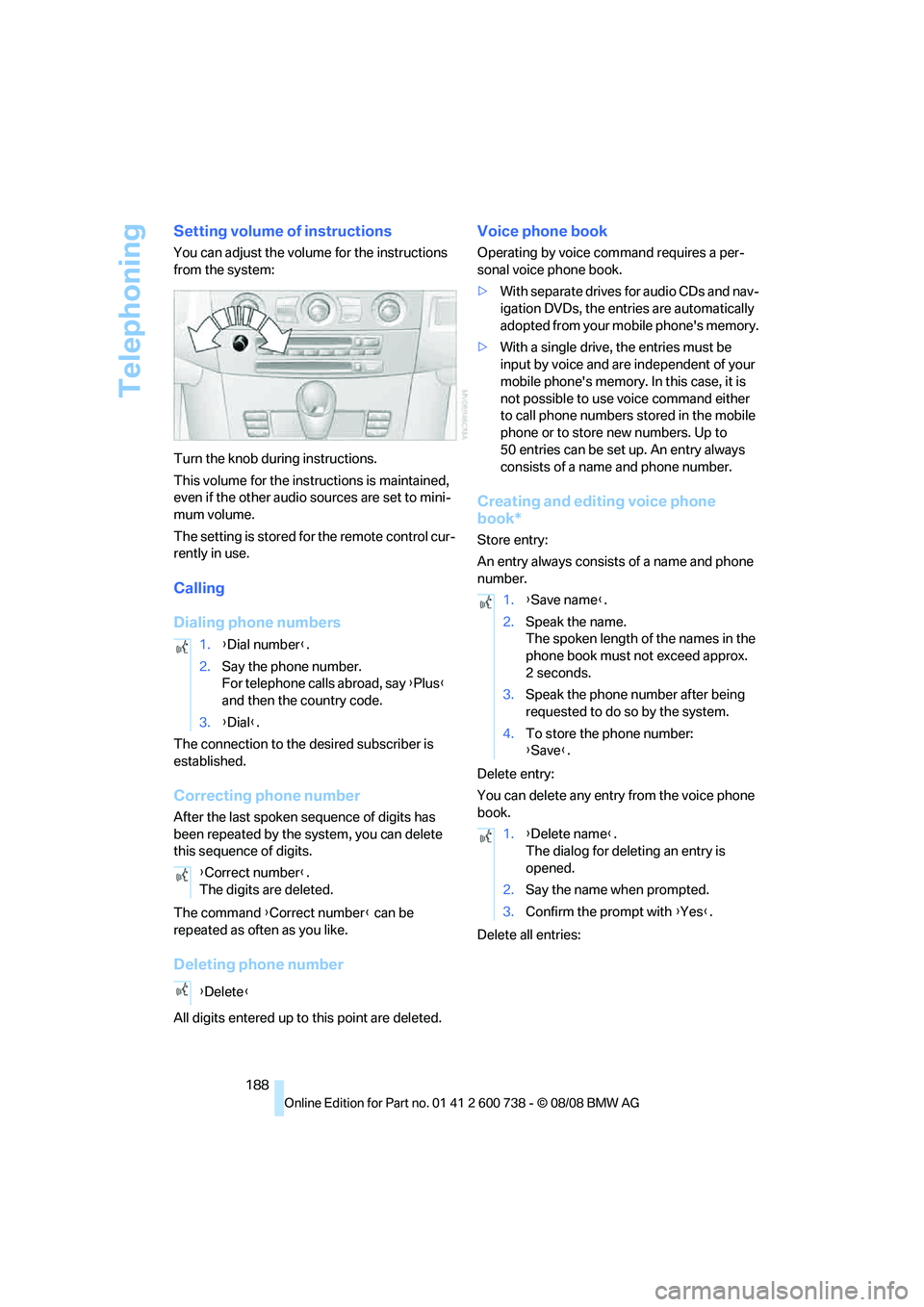
from the system:
Turn the knob during instructions.
This volume for the instructions is maintained,
even if the other audio sources are set to mini-
mum volume.
The setting is stored for the remote control cur-
rently in use.
Calling
Dialing phone numbers
The connection to the desired subscriber is
established.
Correcting phone number
After the last spoken sequence of digits has
been repeated by the system, you can delete
this sequence of digits.
The command {Correct number} can be
repeated as often as you like.
Deleting phone number
All digits entered up to this point are deleted.
Voice phone book
Operating by voice command requires a per-
sonal voice phone book.
>With separate drives for audio CDs and nav-
igation DVDs, the entries are automatically
adopted from your mobile phone's memory.
>With a single drive, the entries must be
input by voice and are independent of your
mobile phone's memory. In this case, it is
not possible to use voice command either
to call phone numbers stored in the mobile
phone or to store new numbers. Up to
50 entries can be set up. An entry always
consists of a name and phone number.
Creating and editing voice phone
book*
Store entry:
An entry always consists of a name and phone
number.
Delete entry:
You can delete any entry from the voice phone
book.
Delete all entries: 1.{Dial number}.
2.Say the phone number.
For telephone calls abroad, say {Plus}
and then the country code.
3.{Dial}.
{Correct number}.
The digits are deleted.
{Delete}
1.{Save name}.
2.Speak the name.
The spoken length of the names in the
phone book must not exceed approx.
2seconds.
3.Speak the phone number after being
requested to do so by the system.
4.To store the phone number:
{Save}.
1.{Delete name}.
The dialog for deleting an entry is
opened.
2.Say the name when prompted.
3.Confirm the prompt with {Yes}.
Page 243 of 266
Reference 241
At a glance
Controls
Driving tips
Communications
Navigation
Entertainment
Mobility
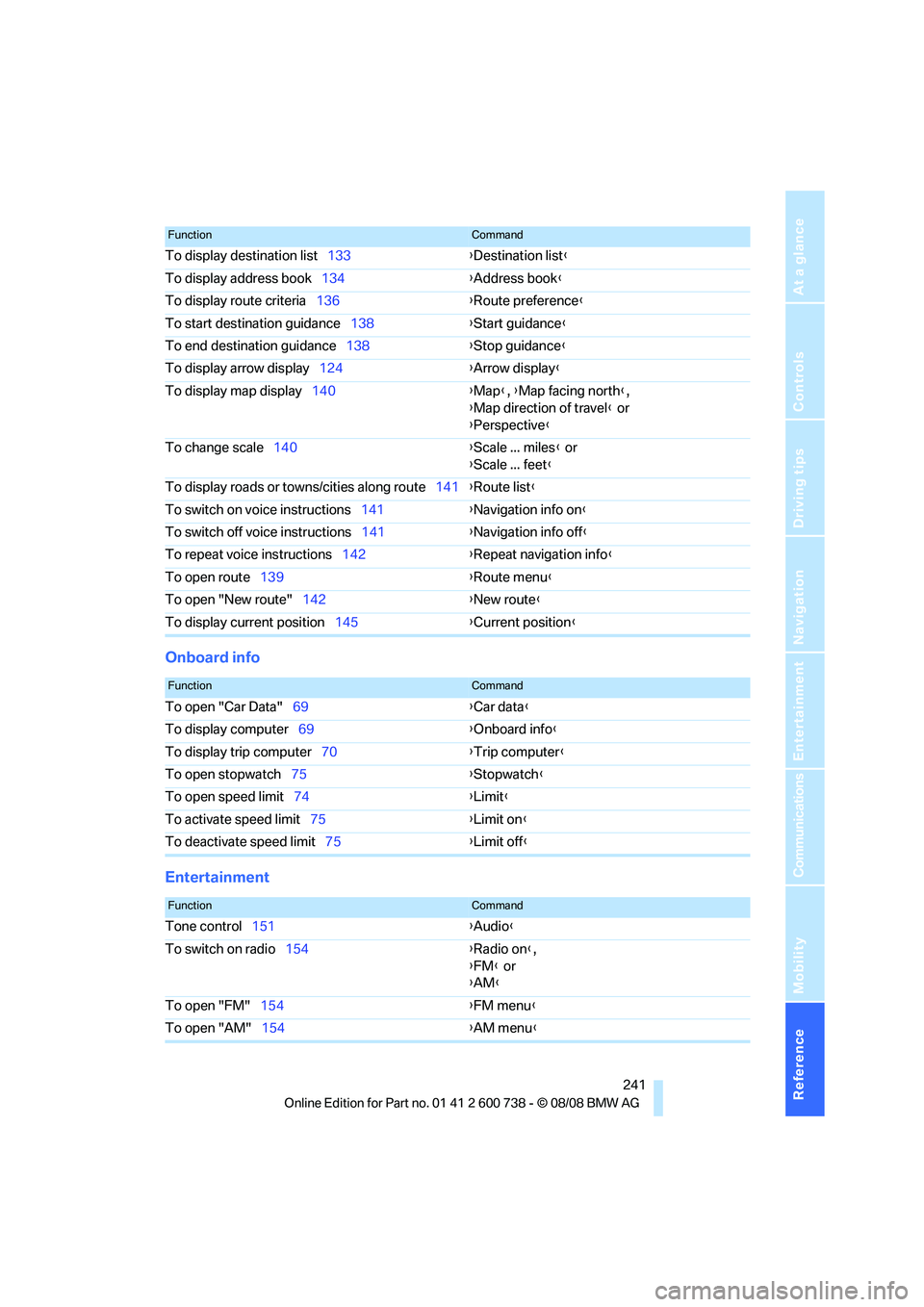
Onboard info
Entertainment
To display destination list133{Destination list}
To display address book134{Address book}
To display route criteria136{Route preference}
To start destination guidance138{Start guidance}
To end destination guidance138{Stop guidance}
To display arrow display124{Arrow display}
To display map display140{Map}, {Map facing north},
{Map direction of travel} or
{Perspective}
To change scale140{Scale ... miles} or
{Scale ... feet}
To display roads or towns/cities along route141{Route list}
To switch on voice instructions141{Navigation info on}
To switch off voice instructions141{Navigation info off}
To repeat voice instructions142{Repeat navigation info}
To open route139{Route menu}
To open "New route"142{New route}
To display current position145{Current position}
FunctionCommand
FunctionCommand
To open "Car Data"69{Car data}
To display computer69{Onboard info}
To display trip computer70{Trip computer}
To open stopwatch75{Stopwatch}
To open speed limit74{Limit}
To activate speed limit75{Limit on}
To deactivate speed limit75{Limit off}
FunctionCommand
Tone control151{Audio}
To switch on radio154{Radio on},
{FM} or
{AM}
To open "FM"154{FM menu}
To open "AM"154{AM menu}
Page 244 of 266
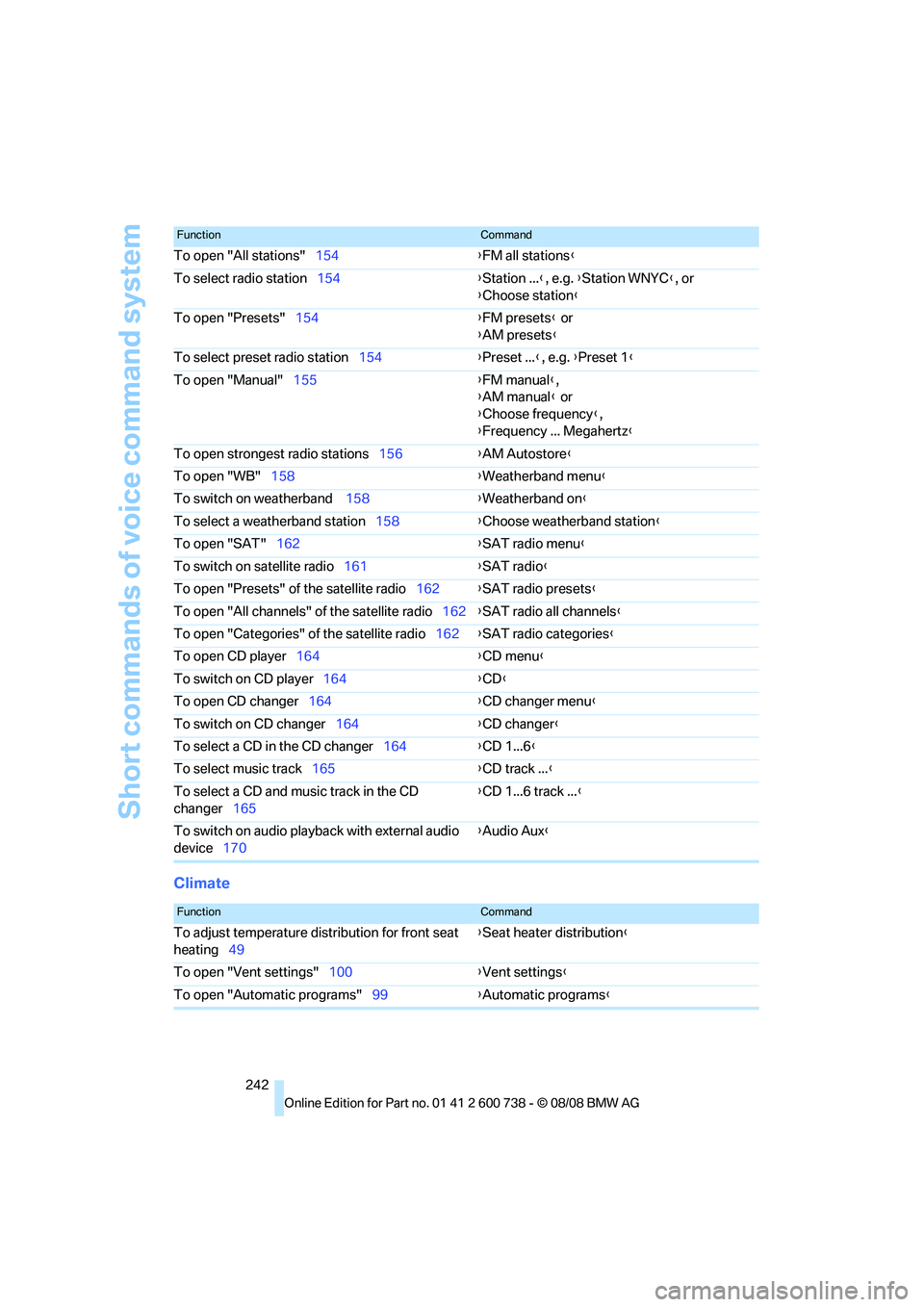
Short commands of voice command system
242
Climate
To open "All stations"154{FM all stations}
To select radio station154{Station ...}, e.g. {Station WNYC}, or
{Choose station}
To open "Presets"154{FM presets} or
{AM presets}
To select preset radio station154{Preset ...}, e.g. {Preset 1}
To open "Manual"155{FM manual},
{AM manual} or
{Choose frequency},
{Frequency ... Megahertz}
To open strongest radio stations156{AM Autostore}
To open "WB"158{Weatherband menu}
To switch on weatherband 158{Weatherband on}
To select a weatherband station158{Choose weatherband station}
To open "SAT"162{SAT radio menu}
To switch on satellite radio161{SAT radio}
To open "Presets" of the satellite radio162{SAT radio presets}
To open "All channels" of the satellite radio162{SAT radio all channels}
To open "Categories" of the satellite radio162{SAT radio categories}
To open CD player164{
CD menu}
To switch on CD player164{CD}
To open CD changer164{CD changer menu}
To switch on CD changer164{CD changer}
To select a CD in the CD changer164{CD 1...6}
To select music track165{CD track ...}
To select a CD and music track in the CD
changer165{CD 1...6 track ...}
To switch on audio playback with external audio
device170{Audio Aux}
FunctionCommand
FunctionCommand
To adjust temperature distribution for front seat
heating49{Seat heater distribution}
To open "Vent settings"100{Vent settings}
To open "Automatic programs"99{Automatic programs}
Page 246 of 266
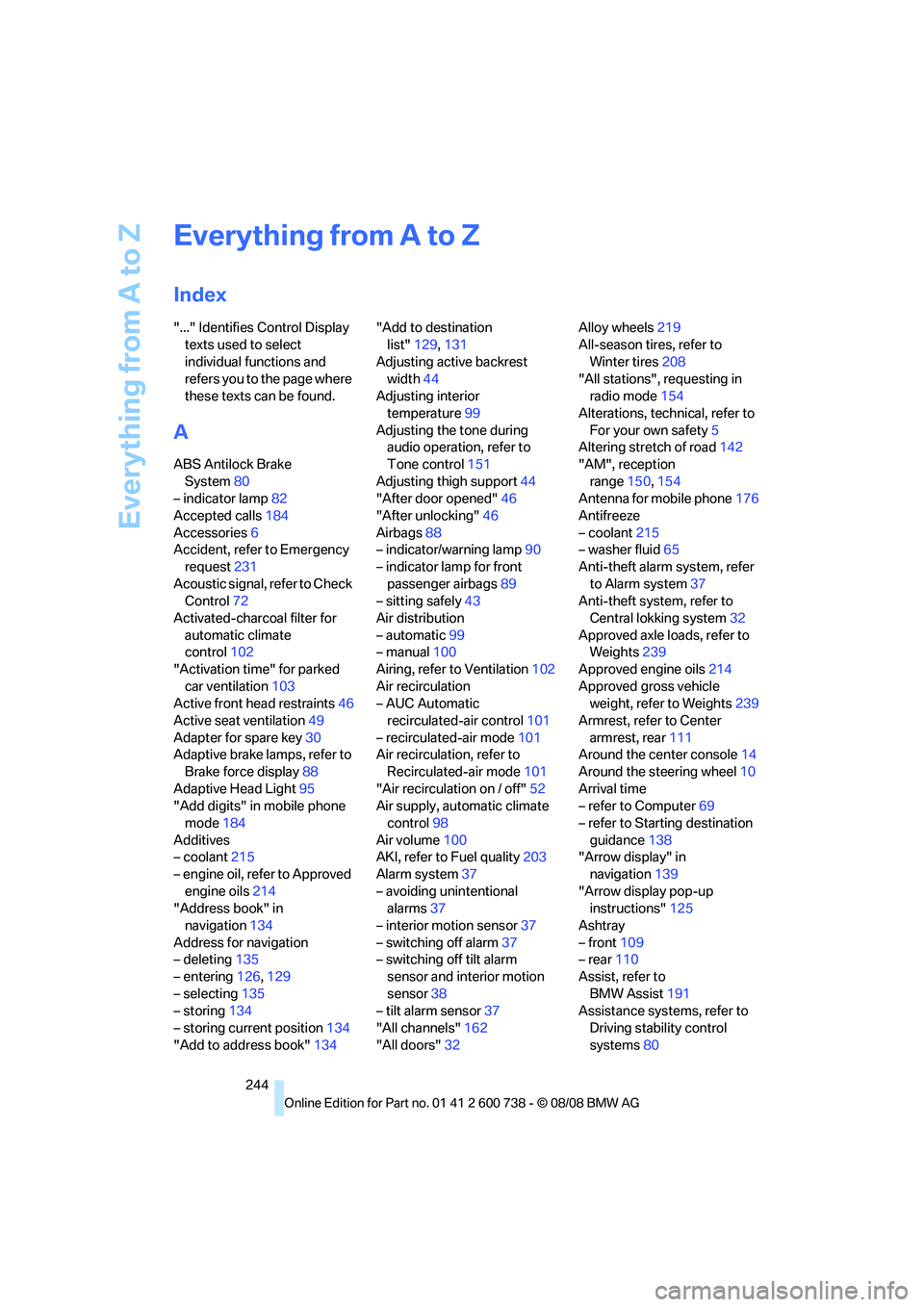
Everything from A to Z
244
Everything from A to Z
Index
"..." Identifies Control Display
texts used to select
individual functions and
refers you to the page where
these texts can be found.
A
ABS Antilock Brake
System80
– indicator lamp82
Accepted calls184
Accessories6
Accident, refer to Emergency
request231
Acoustic signal, refer to Check
Control72
Activated-charcoal filter for
automatic climate
control102
"Activation time" for parked
car ventilation103
Active front head restraints46
Active seat ventilation49
Adapter for spare key30
Adaptive brake lamps, refer to
Brake force display88
Adaptive Head Light95
"Add digits" in mobile phone
mode184
Additives
– coolant215
– engine oil, refer to Approved
engine oils214
"Address book" in
navigation134
Address for navigation
– deleting135
– entering126,129
– selecting135
– storing134
– storing current position134
"Add to address book"134"Add to destination
list"129,131
Adjusting active backrest
width44
Adjusting interior
temperature99
Adjusting the tone during
audio operation, refer to
Tone control151
Adjusting thigh support44
"After door opened"46
"After unlocking"46
Airbags88
– indicator/warning lamp90
– indicator lamp for front
passenger airbags89
– sitting safely43
Air distribution
– automatic99
– manual100
Airing, refer to Ventilation102
Air recirculation
– AUC Automatic
recirculated-air control101
– recirculated-air mode
101
Air recirculation, refer to
Recirculated-air mode101
"Air recirculation on / off"52
Air supply, automatic climate
control98
Air volume100
AKI, refer to Fuel quality203
Alarm system37
– avoiding unintentional
alarms37
– interior motion sensor37
– switching off alarm37
– switching off tilt alarm
sensor and interior motion
sensor38
– tilt alarm sensor37
"All channels"162
"All doors"32Alloy wheels219
All-season tires, refer to
Winter tires208
"All stations", requesting in
radio mode154
Alterations, technical, refer to
For your own safety5
Altering stretch of road142
"AM", reception
range150,154
Antenna for mobile phone176
Antifreeze
– coolant215
– washer fluid65
Anti-theft alarm system, refer
to Alarm system37
Anti-theft system, refer to
Central lokking system32
Approved axle loads, refer to
Weights239
Approved engine oils214
Approved gross vehicle
weight, refer to Weights239
Armrest, refer to Center
armrest, rear111
Around the center console14
Around the steering wheel10
Arrival time
– refer to Computer69
– refer to Starting destination
guidance138
"Arrow display" in
navigation139
"Arrow display pop-up
instructions"125
Ashtray
– front109
– rear110
Assist, refer to
BMW Assist191
Assistance systems, refer to
Driving stability control
systems80