climate settings BMW M5 2010 Owners Manual
[x] Cancel search | Manufacturer: BMW, Model Year: 2010, Model line: M5, Model: BMW M5 2010Pages: 266, PDF Size: 9.08 MB
Page 20 of 266
iDrive
18
Menu overview
Communication
>Telephone*
>BMW Assist* or BMW TeleServices*
Navigation or onboard information
>Navigation system*
>Onboard information, e.g. for displaying
the average fuel consumption
Entertainment
>Radio
>CD player and CD changer
*
>AUX-IN connection
>USB-audio interface
* for external audio
device
Climate
>Vent settings
>Automatic programs
>Seat heater distribution
*
>Parked car operation
menu
>Switching off Control Display
>Tone and display settings
>Settings for your vehicle, e.g. for MDrive, or
for the central locking system
>Display of maintenance intervals and dead-
lines for legally mandated inspections
>Settings for telephone
Operating principle
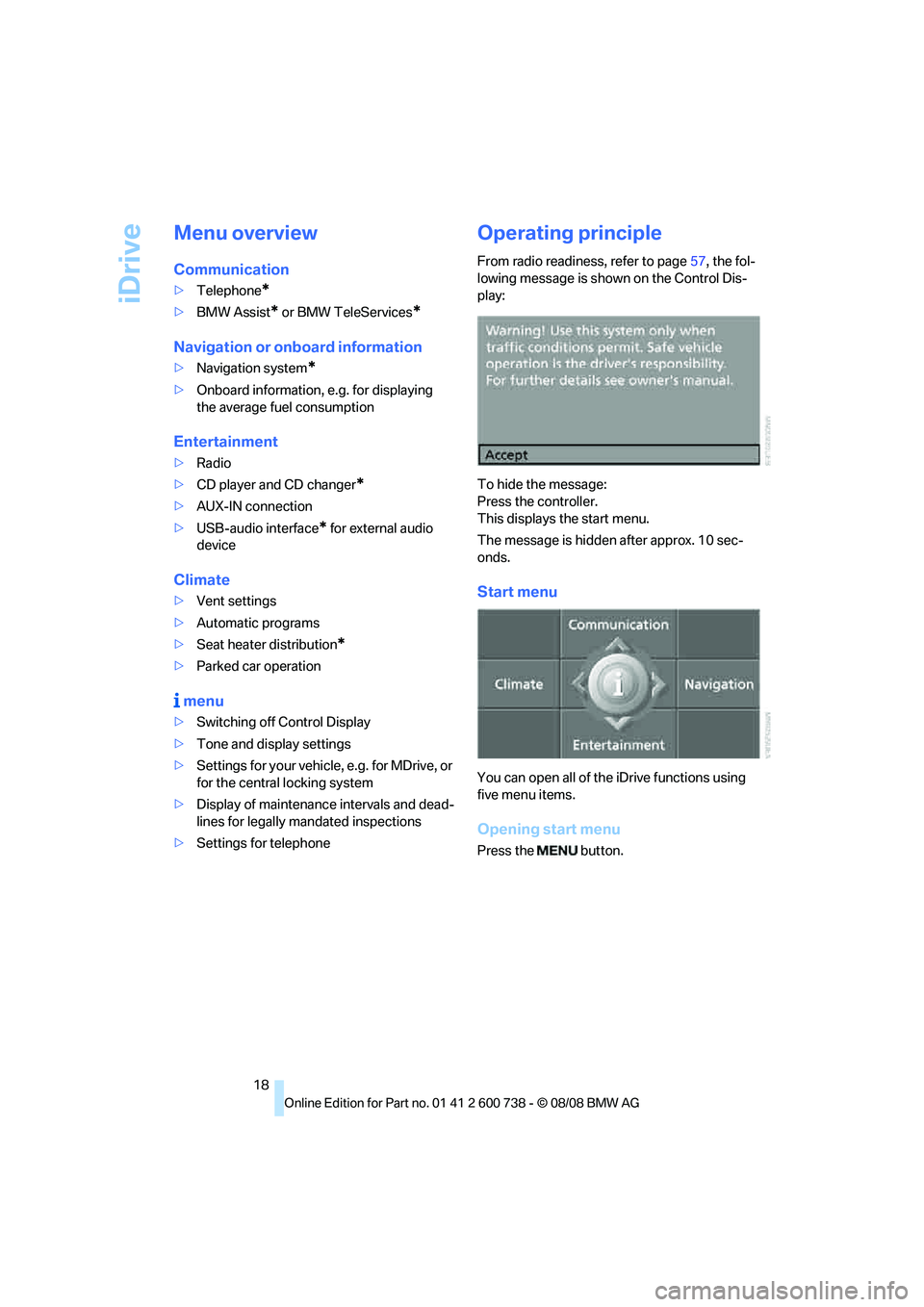
From radio readiness, refer to page57, the fol-
lowing message is shown on the Control Dis-
play:
To hide the message:
Press the controller.
This displays the start menu.
The message is hidden after approx. 10 sec-
onds.
Start menu
You can open all of the iDrive functions using
five menu items.
Opening start menu
Press the button.
Page 21 of 266
At a glance
19Reference
Controls
Driving tips
Communications
Navigation
Entertainment
Mobility
Opening menu items of the start menu
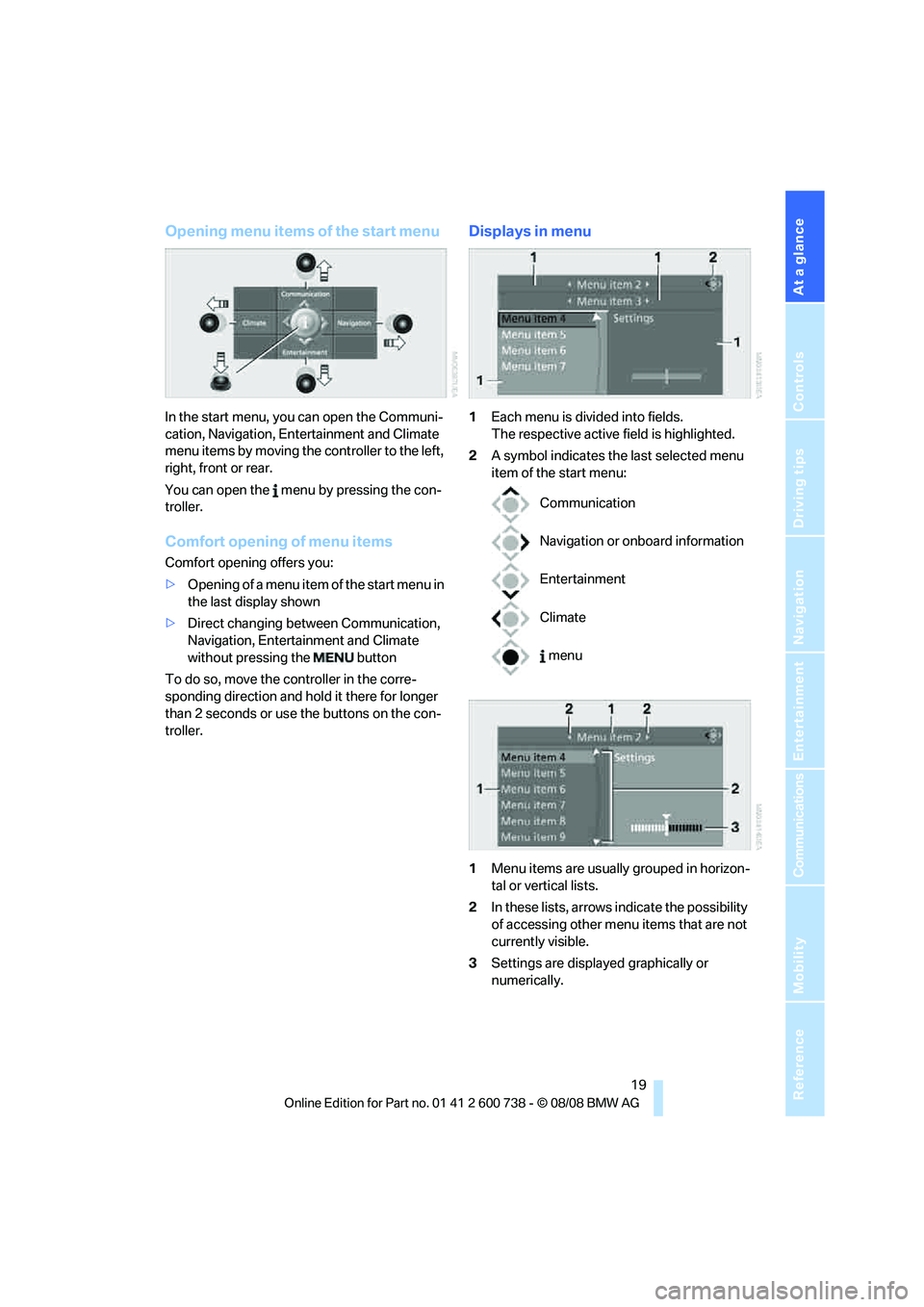
In the start menu, you can open the Communi-
cation, Navigation, Entertainment and Climate
menu items by moving the controller to the left,
right, front or rear.
You can open the menu by pressing the con-
troller.
Comfort opening of menu items
Comfort opening offers you:
>Opening of a menu item of the start menu in
the last display shown
>Direct changing between Communication,
Navigation, Entertainment and Climate
without pressing the button
To do so, move the controller in the corre-
sponding direction and hold it there for longer
than 2 seconds or use the buttons on the con-
troller.
Displays in menu
1Each menu is divided into fields.
The respective active field is highlighted.
2A symbol indicates the last selected menu
item of the start menu:
1Menu items are usually grouped in horizon-
tal or vertical lists.
2In these lists, arrows indicate the possibility
of accessing other menu items that are not
currently visible.
3Settings are displayed graphically or
numerically.
Communication
Navigation or onboard information
Entertainment
Climate
menu
Page 33 of 266
Controls
31Reference
At a glance
Driving tips
Communications
Navigation
Entertainment
Mobility
Remove the adapter from the holder in the
glove compartment and slide the spare key into
the adapter before use.
Personal Profile
The concept
You can set a number of functions of your BMW
individually according to your preferences. Per-
sonal Profile ensures that most of these set-
tings are stored for the remote control currently
in use without you having to do anything. When
the vehicle is unlocked, the corresponding
remote control is detected and the settings
stored for it are called up and carried out.
This means that you will always find your BMW
set to your own personal settings even if
another person with his/her own remote control
and settings has used the vehicle since the last
time you drove it. The individual settings are
stored for a maximum of four remote controls,
for two with comfort access
*.
Personal Profile settings
Details on the settings are provided on the
specified pages.
>Behavior of the central locking system
when unlocking vehicle, refer to page32
>Automatic locking of the vehicle, refer to
page34
>Programming button on steering wheel,
refer to page51>Displays on Control Display:
>Brightness of the Control Display, refer
to page77
>Measuring units for consumption, route/
distances, temperature, and pressure,
refer to page77
>12h/24h clock format, refer to page76
>Date format, refer to page77
>Language on Control Display, refer to
page78
>Lighting settings:
>Triple turn signal activation, refer to
page63
>Welcome lamps, refer to page93
>Pathway lighting, refer to page94
>Daytime running lamps
*, refer to
page94
>High-beam assistant
*, refer to page95
>Individual settings for MDrive, refer to
page52
>Drivelogic driving program in the Sequential
mode, refer to page62
>PDC Park Distance Control
*: optical warn-
ing, refer to page79
>Head-Up Display
*: selection and bright-
ness of display, refer to page90
>Automatic climate control: AUTO program
and intensity, cooling function, and auto-
matic recirculated air control/recirculated
air mode, temperature, air distribution, tem-
perature in the upper body region, refer to
text starting on page99
>Navigation system
*: voice instructions for
destination guidance, refer to page141
In addition, the following, most recently
selected settings are recalled during unlocking:
>Programmable memory buttons: selecting
stored functions, refer to page22
>Positions of driver's seat, outside mirrors,
and steering wheel
*, refer to page45
>Audio sources: volume and tone settings,
refer to page151
Page 101 of 266
Controls
99Reference
At a glance
Driving tips
Communications
Navigation
Entertainment
Mobility
16Air grill for interior temperature sensor –
please keep clear and unobstructed
The current setting for air distribution is dis-
played on the Control Display.
A congenial climate
The AUTO program offers the optimum air dis-
tribution and air volume for virtually all condi-
tions, refer to AUTO program below. Now you
only need to select an interior temperature
pleasant to you.
The following sections contain more detailed
information on the available setting options.
Most settings are stored for the remote control
currently in use, also refer to Personal Profile
settings on page31.
AUTO program
The AUTO program handles the
adjustment of air volume and air
distribution to the windshield and
side windows, in the direction of
the upper body and in the footwell.
It also adapts your instructions for the tempera-
ture to outside influences throughout the year.
The cooling function is switched on along with
the AUTO program. At the same time, a con-
densation sensor controls the program in such
a way that window condensation is prevented
as much as possible.
Intensity of AUTO program
You can adjust the intensity of the AUTO pro-
gram by repeatedly pressing the AUTO button.
The respective current setting is briefly dis-
played on the Control Display when the button
is pressed.
You can also adjust the intensity of the AUTO
program via iDrive.
iDrive, for operating principle refer to page16.
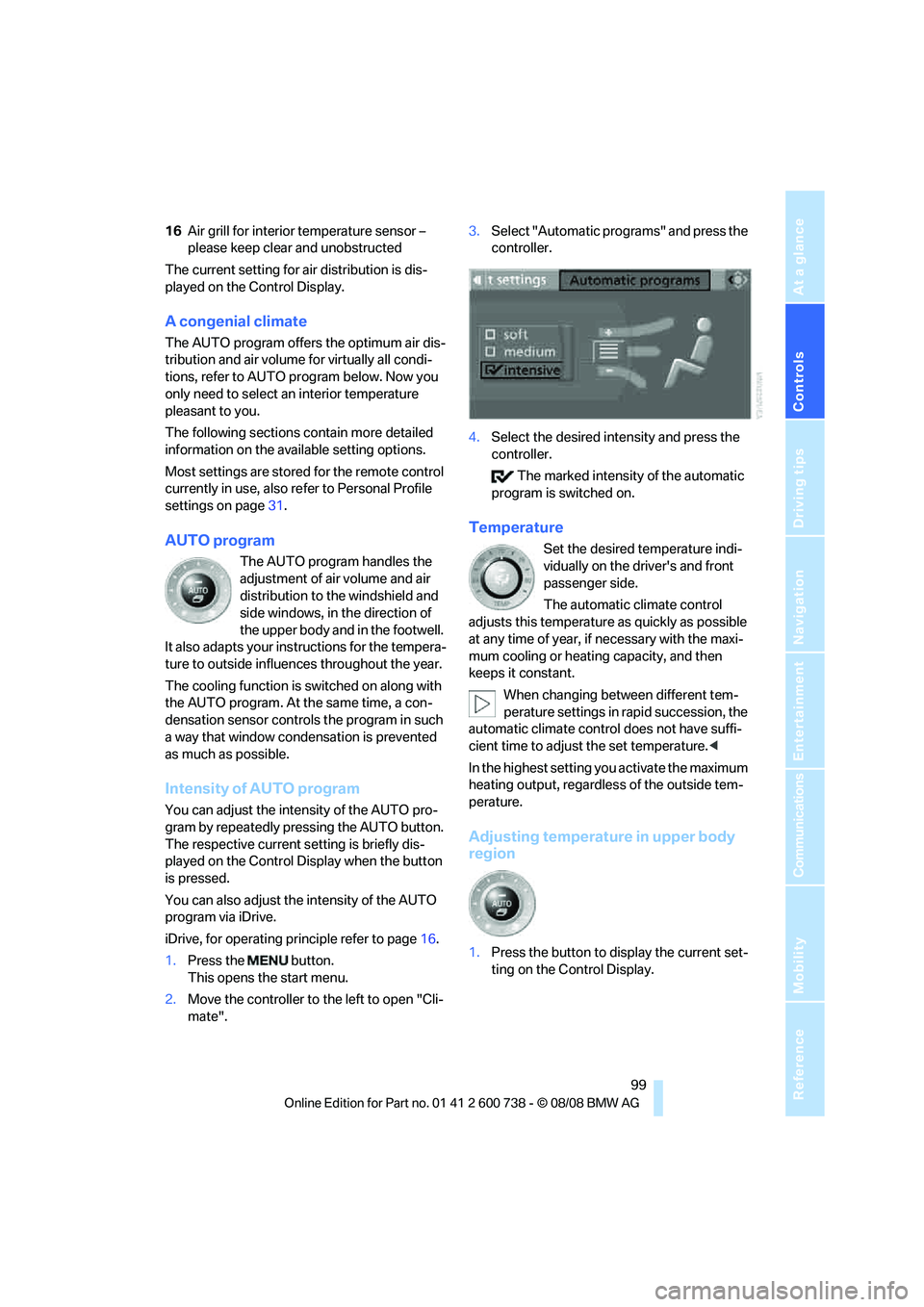
1.Press the button.
This opens the start menu.
2.Move the controller to the left to open "Cli-
mate".3.Select "Automatic programs" and press the
controller.
4.Select the desired intensity and press the
controller.
The marked intensity of the automatic
program is switched on.
Temperature
Set the desired temperature indi-
vidually on the driver's and front
passenger side.
The automatic climate control
adjusts this temperature as quickly as possible
at any time of year, if necessary with the maxi-
mum cooling or heating capacity, and then
keeps it constant.
When changing between different tem-
perature settings in rapid succession, the
automatic climate control does not have suffi-
cient time to adjust the set temperature.<
In the highest setting you activate the maximum
heating output, regardless of the outside tem-
perature.
Adjusting temperature in upper body
region
1.Press the button to display the current set-
ting on the Control Display.
Page 102 of 266
Climate
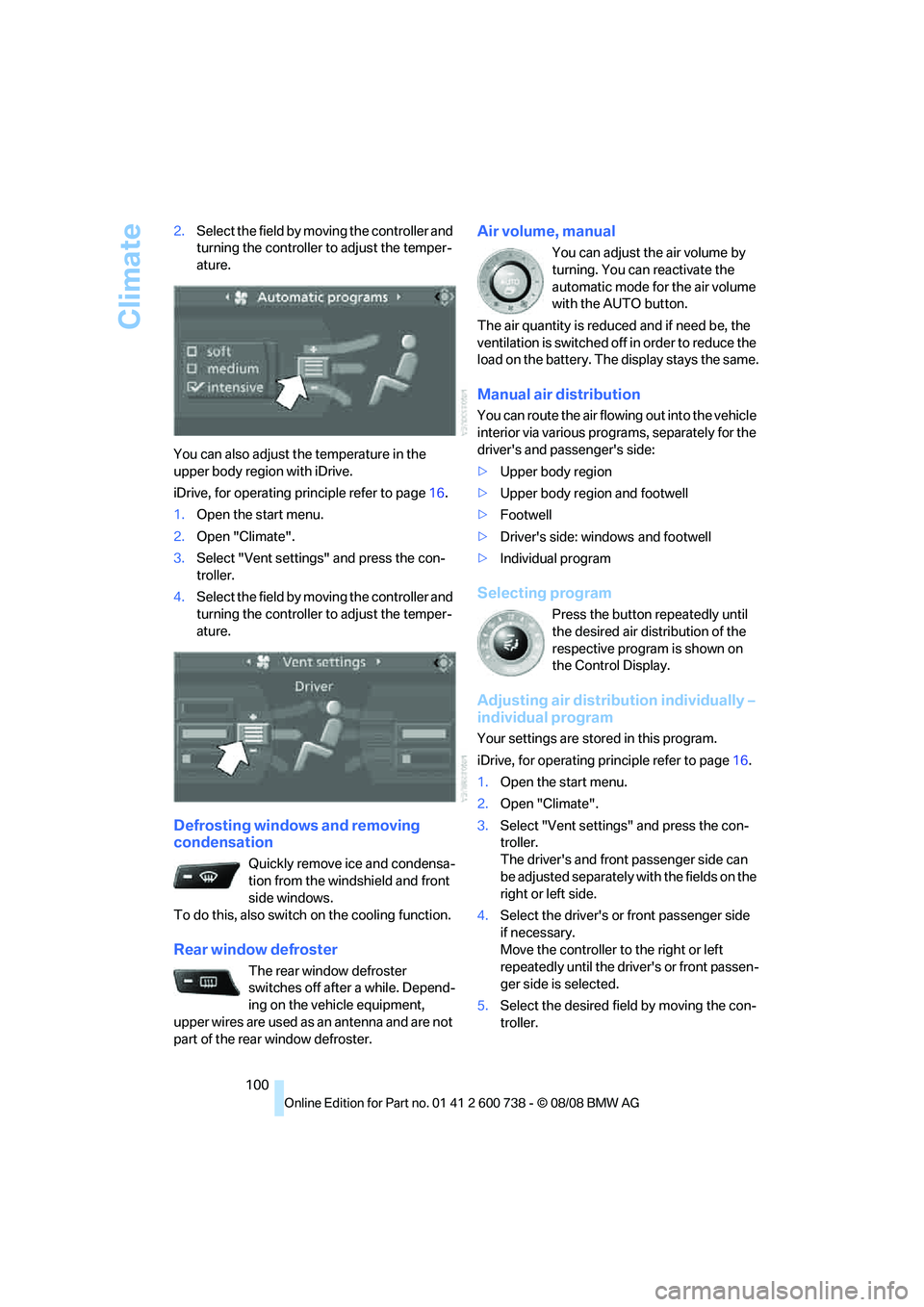
100 2.Select the field by moving the controller and
turning the controller to adjust the temper-
ature.
You can also adjust the temperature in the
upper body region with iDrive.
iDrive, for operating principle refer to page16.
1.Open the start menu.
2.Open "Climate".
3.Select "Vent settings" and press the con-
troller.
4.Select the field by moving the controller and
turning the controller to adjust the temper-
ature.
Defrosting windows and removing
condensation
Quickly remove ice and condensa-
tion from the windshield and front
side windows.
To do this, also switch on the cooling function.
Rear window defroster
The rear window defroster
switches off after a while. Depend-
ing on the vehicle equipment,
upper wires are used as an antenna and are not
part of the rear window defroster.
Air volume, manual
You can adjust the air volume by
turning. You can reactivate the
automatic mode for the air volume
with the AUTO button.
The air quantity is reduced and if need be, the
ventilation is switched off in order to reduce the
load on the battery. The display stays the same.
Manual air distribution
You can route the air flowing out into the vehicle
interior via various programs, separately for the
driver's and passenger's side:
>Upper body region
>Upper body region and footwell
>Footwell
>Driver's side: windows and footwell
>Individual program
Selecting program
Press the button repeatedly until
the desired air distribution of the
respective program is shown on
the Control Display.
Adjusting air distribution individually –
individual program
Your settings are stored in this program.
iDrive, for operating principle refer to page16.
1.Open the start menu.
2.Open "Climate".
3.Select "Vent settings" and press the con-
troller.
The driver's and front passenger side can
be adjusted separately with the fields on the
right or left side.
4.Select the driver's or front passenger side
if necessary.
Move the controller to the right or left
repeatedly until the driver's or front passen-
ger side is selected.
5.Select the desired field by moving the con-
troller.
Page 244 of 266
Short commands of voice command system
242
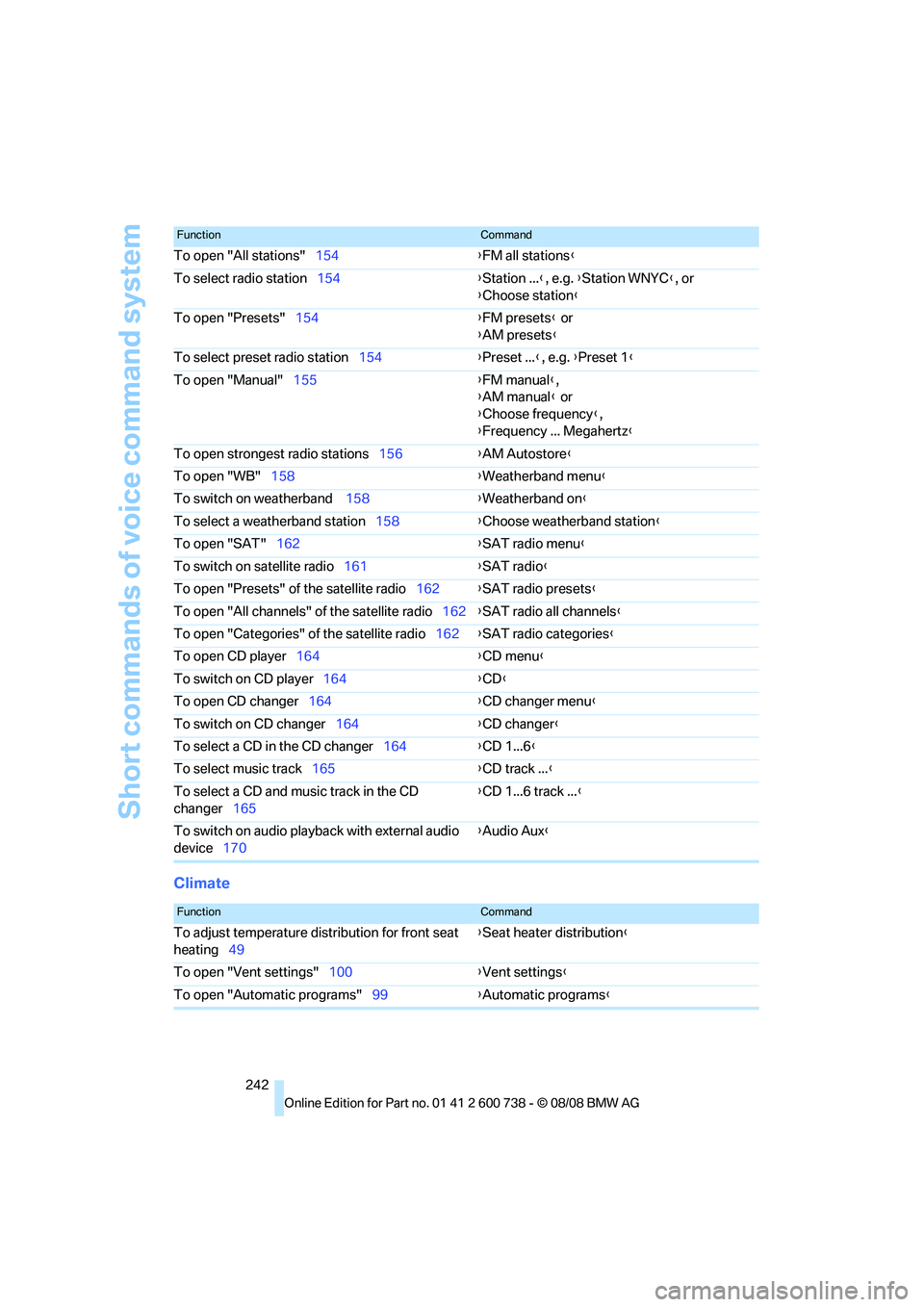
Climate
To open "All stations"154{FM all stations}
To select radio station154{Station ...}, e.g. {Station WNYC}, or
{Choose station}
To open "Presets"154{FM presets} or
{AM presets}
To select preset radio station154{Preset ...}, e.g. {Preset 1}
To open "Manual"155{FM manual},
{AM manual} or
{Choose frequency},
{Frequency ... Megahertz}
To open strongest radio stations156{AM Autostore}
To open "WB"158{Weatherband menu}
To switch on weatherband 158{Weatherband on}
To select a weatherband station158{Choose weatherband station}
To open "SAT"162{SAT radio menu}
To switch on satellite radio161{SAT radio}
To open "Presets" of the satellite radio162{SAT radio presets}
To open "All channels" of the satellite radio162{SAT radio all channels}
To open "Categories" of the satellite radio162{SAT radio categories}
To open CD player164{
CD menu}
To switch on CD player164{CD}
To open CD changer164{CD changer menu}
To switch on CD changer164{CD changer}
To select a CD in the CD changer164{CD 1...6}
To select music track165{CD track ...}
To select a CD and music track in the CD
changer165{CD 1...6 track ...}
To switch on audio playback with external audio
device170{Audio Aux}
FunctionCommand
FunctionCommand
To adjust temperature distribution for front seat
heating49{Seat heater distribution}
To open "Vent settings"100{Vent settings}
To open "Automatic programs"99{Automatic programs}
Page 247 of 266
Reference 245
At a glance
Controls
Driving tips
Communications
Navigation
Entertainment
Mobility
Assistance window21
"Assist. window off"22
AUC Automatic recirculated-
air control101
"Audio"151,153,158
Audio150
– controls150
– switching on/off150
– tone control151
– volume151
Audio device, external108
Automatic
– air distribution99
– air volume99
– headlamp control93
– service notification193
– steering wheel
adjustment45
– storing stations156
Automatic car washes118
Automatic climate control98
– automatic air distribution99
– parked car ventilation102
– switching on and off102
– ventilation in rear102
Automatic closing of doors,
refer to Automatic soft
closing35
Automatic curb monitor50
Automatic lighting
– refer to Automatic headlamp
control93
– refer to Daytime running
lamps94
– refer to Interior lamps97
– refer to Pathway lighting94
– refer to Welcome lamps93
Automatic lights
– refer to High-beam
assistant95
Automatic low beams, refer to
High-beam assistant95
"Automatic programs"99
Automatic soft closing35
Automatic station search155
"Automatic ventilation"103
AUTO program for automatic
climate control99
"Auto Request"193"Autostore" on the
radio154,156
"AUX"150,170,172
AUX-IN connection
170
"AUX IN" in audio mode170
Average fuel consumption69
– setting units77
Average speed, refer to
Computer68
"Avoid ferries" in
navigation137
"Avoid highways" in
navigation137
Avoiding freeways for
navigation136
Avoiding unintentional
alarms37
"Avoid tollroads" in
navigation137
Axle loads, refer to
Weights239
"A - Z"184
B
"Backrest"53
Backrest contour, refer to
Lumbar support44
Backrests, refer to Seats43
Backrest width44
Back seats, refer to Rear seats
Backup lamps, replacing
bulbs224
"Balance", tone control152
Band-aids, refer to First-aid
kit232
Bass, refer to Tone
control151
"Bass", tone control151
Battery, refer to Vehicle
battery230
– jump starting232
Battery replacement
– remote control for comfort
access39
BC button, refer to
Computer68
Being towed233
Belts, refer to Safety belts47Beverage holder, refer to Cup
holders109
Blind, refer to Sun blinds106
Blower, refer to Air
volume100
"Bluetooth"177
BMW
– Car Shampoo220
"BMW Assist"192,193
BMW Assist191
– activating197
– BMW TeleServices193
– concierge service194
– contacting BMW Customer
Relations194
– displaying vehicle data198
– offered services191
– roadside assistance192
– updating196
BMW Assist My Info195
"BMW Contact"186
"BMW Contact
Numbers"186
BMW homepage4
BMW maintenance
system216
"BMW Service settings"196
BMW TeleServices193
BMW TeleServices services
– displaying194
– updating194
BMW website4
Bottle holder, refer to Cup
holders109
Bracket for telephone or
mobile phone
– refer to Snap-in adapter189
Brake assistant80
Brake force display88
Brake lamps
– replacing bulbs224
– two-stage88
Brake rotors
– breaking-in116
– refer to Braking safely117
Page 253 of 266
Reference 251
At a glance
Controls
Driving tips
Communications
Navigation
Entertainment
Mobility
Glass sunroof, electric40
– convenient operation from
outside34
– convenient operation with
comfort access39
– moving manually41
– remote control33
Glove compartment107
– lighting107
GPS navigation, refer to
Navigation system124
Grills, refer to Ventilation102
Gross vehicle weight, refer to
Weights239
Ground clearance118
H
Handbrake59
– indicator lamp13,59
Hands-free system, refer to
Microphone14
Hand washing219
Hazard warning flashers15
"HD radio"158
HD radio, refer to High
Definition Radio158
Head airbags88
Headlamp
– cleaning tank, refer to
Capacities239
Headlamp control,
automatic93
Headlamp flasher63
Headlamps93
– cleaning, refer to Wiper
system64
– filler neck for washer
fluid211
Head Light, refer to Adaptive
Head Light95
Head restraints46
– active front head
restraints46
– removing47
– sitting safely43
"Head-Up Display"53,90Head-Up Display90
– default view91
– M view90
– shift lights63
Heated
– mirrors50
– rear window100
– seats48
– steering wheel51
Heating98
– exterior mirrors50
– interior98
– rear window100
– residual heat101
– seats48
– steering wheel51
Heating with engine switched
off, refer to Residual
heat101
Heavy cargo, refer to Securing
cargo119
Height, refer to
Dimensions238
Height adjustment
– seats44
– steering wheel51
High-beam assistant95,97
High beams95
– headlamp flasher95
– indicator lamp13
High Definition Radio158
High-pressure cleaning
jets218,219
High water, refer to Driving
through water117
Hills117
Holder for cups109
"Home address" in
navigation136
Homepage of BMW4
Hood210
Horn10
Hot exhaust system116
"Hour memo"76
"House number" in
destination entry129
Hydraulic brake assistant,
refer to Brake assistant80
Hydroplaning117
I
IBOC, refer to High Definition
Radio158
Ice, refer to Outside
temperature warning68
ID3 tag, refer to Information on
track166
Identification mark
– recommended tire
brands208
– tire coding205
Idle61
iDrive16
– assistance window21
– automatic climate control
with expanded scope99
– changing date and time76
– changing language78
– changing menu page20
– changing settings75
– changing units of measure
and display type77
– confirming selection or
entry20
– controller16
– controls16
– displays, menus18
– operating principle18
– selecting menu item20
– setting brightness77
– start menu18
– status information21
– symbols19
Ignition57
– switched off58
– switched on57
Ignition key, refer to Keys/
remote control30
Ignition key position 1, refer to
Radio readiness57
Ignition key position 2, refer to
Ignition on57
Ignition lock57
– starting engine with comfort
access39
i menu18
Imprint2
Page 261 of 266
Reference 259
At a glance
Controls
Driving tips
Communications
Navigation
Entertainment
Mobility
Station, refer to Radio154
"Status"71
Status information on Control
Display21
Status of this Owner's Manual
at time of printing5
Steam cleaners218,219
Steering wheel
– adjustment51
– automatic adjustment, refer
to Steering wheel
memory45
– buttons on steering
wheel11
– easy entry/exit51
– heating51
– lock, refer to Ignition lock57
– MDrive button52
– memory45
– programmable button51
– shift paddles62
"Steering wheel button"52
"Stop" for stopwatch75
Stopwatch75
Storage compartments108
"Store in address book" in
navigation134
"Store" in radio
mode157,163
Storing221
Storing current position134
Storing radio stations156
Storing sitting position, refer
to Seat, mirror and steering
wheel memory45
Storing tires208
Storing your vehicle221
"Street" in destination
entry128
Summer tires, refer to Wheels
and tires204
Sun blinds106
"Surround Settings", tone
control152,153
SW, waveband154
Switches, refer to Cockpit10Switching automatically
between high beams and
low beams, refer to High-
beam assistant95
Switching off engine58
Switching on
– audio150
– CD changer150
– CD player150
– radio150
Switching on hour signal76
Swiveling
– headlamps, refer to Adaptive
Head Light95
Symbols4
– indicator/warning lamps13
– navigation system144
– status information21
– traffic information with
navigation system142
T
Tachometer67
Tail lamps224
– replacing bulbs224
Tank contents, refer to
Capacities239
Target cursor for
navigation131
Technical alterations, refer to
For your own safety5
Technical data238
– capacities239
– dimensions238
Telematics, refer to
BMW Assist191
Telephone
– installation location, refer to
Center armrest107
– refer to Mobile phone176
"Telephone list"52Temperature
– adjusting in upper body
region99
– adjusting with automatic
climate control99
– changing units of
measure77
– refer to Coolant
temperature67
Temperature display
– changing units of
measure77
– outside temperature
warning68
Temperature gauge
– engine oil68
Tempomat, refer to Cruise
control65
"Text language"78
"Theater", tone control153
The individual vehicle5
Third brake lamp, refer to
Center brake lamp224
Through-loading system111
Tightening torque of the lug
bolts, refer to After
mounting229
Tilt alarm sensor37
– switching off38
Tilting down passenger-side
exterior mirror50
"Time"76
"Time format"76
Timer, refer to Preselecting
activation times103
"Timer 2" for parked-car
ventilation103
"Timer 1" for parked-car
ventilation103
Tire inflation pressures204
Tire pressure
– loss85,86
Tire Pressure Monitor
TPM
85
Tire Quality Grading206
Tire replacement
– new wheels and tires207
Page 263 of 266
Reference 261
At a glance
Controls
Driving tips
Communications
Navigation
Entertainment
Mobility
Units
– average fuel
consumption77
– temperature77
Universal garage-door
opener, refer to Integrated
universal remote
control105
Universal remote control105
"Unlock button"32
Unlocking
– from inside35
– from outside32
– setting unlocking
behavior32
– without key, refer to Comfort
access38
Unlocking without key, refer to
Comfort access38
"Update services"197
Upshift display, refer to Shift
lights63
USB-audio interface/mobile
phone audio interface171
"USB" in audio mode172
"Use current location as
address"134,136
Used batteries
– refer to Disposal230
– refer to Replacing battery39
Using turn signals63
V
Valve screw caps, refer to
After mounting229
Vehicle
– battery230
– breaking-in116
– loading118
– measurements, refer to
Dimensions238
– parking58
– weights239
"Vehicle / Tires" in
unlokking32
Vehicle care, refer to Care218
Vehicle jack228
– jacking points228Vehicle position, refer to
Displaying current
position145
Ventilation102
– draft-free102
– in rear102
– while stationary102
Venting, refer to
Ventilation102
Vent outlets98
– refer to Ventilation102
Vent outlets of automatic
climate control98
Vents, refer to Ventilation102
"Vent settings"100
Viscosity214
Voice, refer to Destination
guidance with voice
instructions141
Voice command system
– overview24
– short commands240
Voice instructions for
navigation system141
– muting52
– repeating52,142
– switching on/off52,141
– volume142
Voice phone book188
Volume150
– audio sources150
– cargo bay239
– fuel tank, refer to
Capacities239
– mobile phone182
– setting speed-
dependent152
– voice instructions142
– windshield cleaning system,
refer to Capacities239
W
Warning lamps, refer to
Indicator and warning
lamps13
Warning messages, refer to
Check Control72
Warning triangle231Warranty and Service Guide
Booklet for Canadian
models216
Washer fluid65
– capacity of the reservoir65
Waste container, refer to
Ashtray109
Water on roads, refer to
Driving through water117
Water penetration218,219
Waveband for radio154
"WB"150,158
Wear indicators in tires, refer
to Minimum tread depth206
Weather news flashes158
Website BMW4
Weights239
Welcome lamps93
"Welcome light"94
Wheel/tire combination, refer
to New wheels and tires207
Wheel/tire damage207
Wheelbase, refer to
Dimensions238
Wheels and tires204
Width, refer to
Dimensions238
Windows39
– convenient operation33
– convenient operation from
outside34
– convenient operation with
comfort access39
– safety switch40
Windshield
– cleaning, refer to Wiper
system64
– defrosting, refer to
Defrosting windows100
– displays, refer to Head-Up
Display90