seats BMW M5 2010 Owners Manual
[x] Cancel search | Manufacturer: BMW, Model Year: 2010, Model line: M5, Model: BMW M5 2010Pages: 266, PDF Size: 9.08 MB
Page 17 of 266
At a glance
15Reference
Controls
Driving tips
Communications
Navigation
Entertainment
Mobility
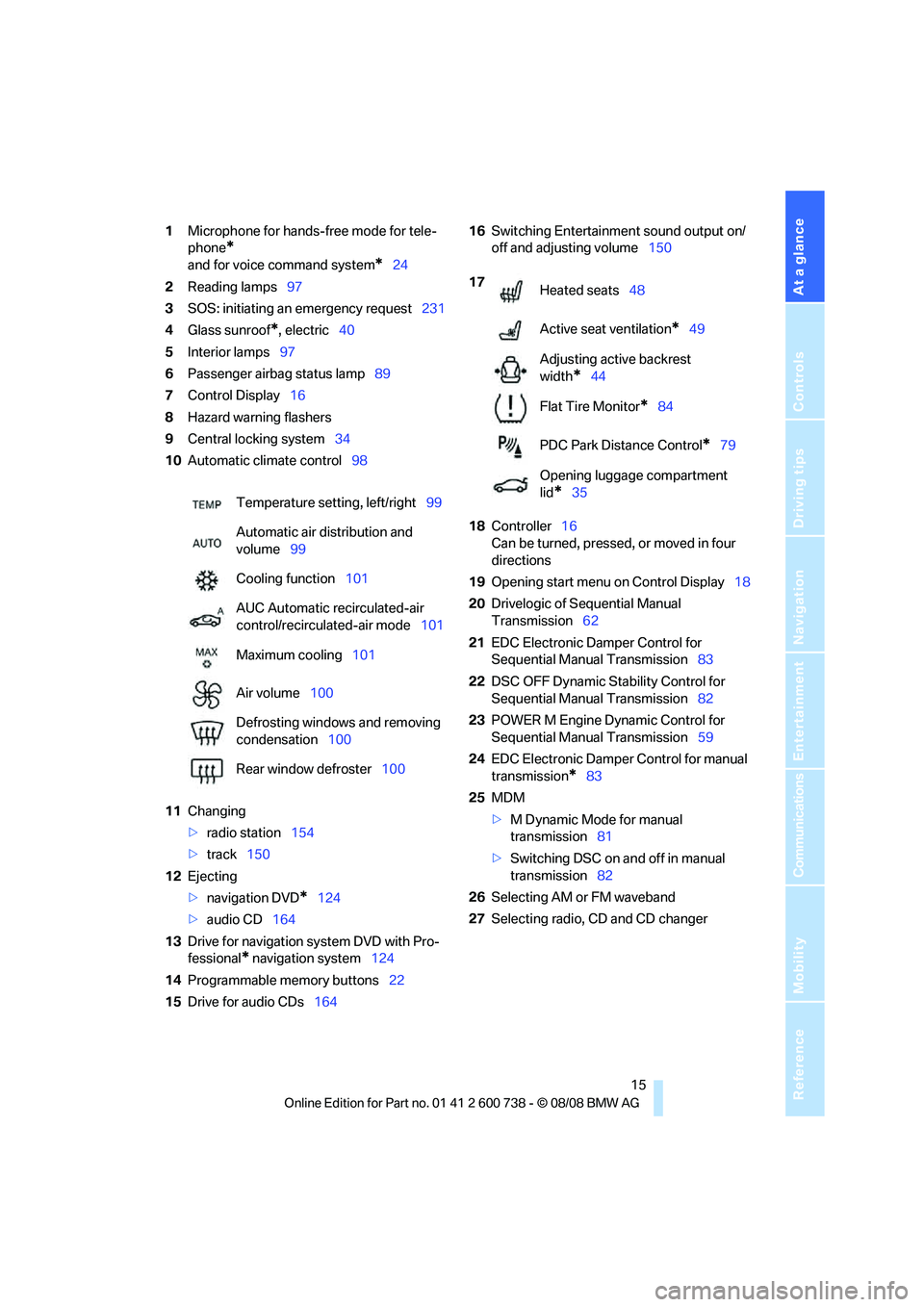
1Microphone for hands-free mode for tele-
phone
*
and for voice command system*24
2Reading lamps97
3SOS: initiating
an emergency request231
4Glass sunroof
*, electric40
5Interior lamps97
6Passenger airbag status lamp89
7Control Display16
8Hazard warning flashers
9Central locking system34
10Automatic climate control98
11Changing
>radio station154
>track150
12Ejecting
>navigation DVD
*124
>audio CD164
13Drive for navigation system DVD with Pro-
fessional
* navigation system124
14Programmable memory buttons22
15Drive for audio CDs16416Switching Entertainment sound output on/
off and adjusting volume150
18Controller16
Can be turned, pressed, or moved in four
directions
19Opening start menu on Control Display18
20Drivelogic of Sequential Manual
Transmission62
21EDC Electronic Damper Control for
Sequential Manual Transmission83
22DSC OFF Dynamic Stability Control for
Sequential Manual Transmission82
23POWER M Engine Dynamic Control for
Sequential Manual Transmission59
24EDC Electronic Damper Control for manual
transmission
*83
25MDM
>M Dynamic Mode for manual
transmission81
>Switching DSC on and off in manual
transmission82
26Selecting AM or FM waveband
27Selecting radio, CD and CD changer Temperature setting, left/right99
Automatic air distribution and
volume99
Cooling function101
AUC Automatic recirculated-air
control/recirculated-air mode101
Maximum cooling101
Air volume100
Defrosting windows and removing
condensation100
Rear window defroster100
17
Heated seats48
Active seat ventilation
*49
Adjusting active backrest
width
*44
Flat Tire Monitor
*84
PDC Park Distance Control
*79
Opening luggage compartment
lid
*35
Page 45 of 266
Controls
43Reference
At a glance
Driving tips
Communications
Navigation
Entertainment
Mobility
Adjusting
Sitting safely
The ideal sitting position can make a vital con-
tribution to relaxed, fatigue-free driving. In the
interaction with the safety belts, the head
restraints and the airbags, the sitting position
plays an important role in an accident. To
ensure that the safety systems operate with
optimal efficiency, we strongly urge you to
observe the instructions contained in the fol-
lowing section.
For additional information on transporting chil-
dren safely, refer to page54.
Airbags
Always maintain an adequate distance
between yourself and the airbags. Always
hold the steering wheel by its rim with hands at
the 9 o'clock and 3 o'clock positions, to mini-
mize the risk of injuries to your hands and arms
in the event of airbag deployment.
No one and nothing is to come between the air-
bags and the seat occupant.
Do not use the cover of the front airbag on the
front passenger side as a storage area. Make
sure that the front passenger is sitting correctly
and does not rest feet or legs on the instrument
panel, otherwise leg injuries can occur if the
front airbags are triggered.
Make sure that occupants do not rest their head
on the side or head airbags, otherwise injuries
can occur if the airbags are triggered.<
Even if you adhere to all the instructions, inju-
ries resulting from contact with airbags cannot
be fully excluded, depending on the circum-
stances. The ignition and inflation noise may
provoke a mild hearing loss in extremely sensi-
tive individuals. This effect is usually only tem-
porary.
For airbag locations and additional information
on airbags, refer to page88.
Head restraints
A correctly adjusted head restraint reduces the
risk of spinal injury in the event of an accident.
Adjust the head restraint so that its center
is approx. at ear level. Otherwise there is
increased danger of injury in the event of an
accident.<
Head restraints, refer to page46.
Safety belts
Before every drive, make sure that safety belts
are being worn at all of the occupied seats. Air-
bags complement the safety belt as an addi-
tional safety device, but they do not represent a
substitute.
Your vehicle is provided with five seats, which
are all equipped with a safety belt.
Never allow more than one person to
wear a single safety belt. Never allow
infants or small children to ride in a passenger's
lap. Make sure that the belt lies low around the
hips in the lap area and does not press on the
abdomen. The safety belt must not lie across
the neck, rub against sharp edges, be routed
over solid or breakable objects or be pinched.
Wear the safety belt without twisting, snugly
across the lap and shoulders, as close to the
body as possible. Otherwise the belt can slip
over the hips in the lap area in a frontal impact
and injure the abdomen. Avoid wearing clothing
that prevents the belt from fitting properly and
pull the belt in the upper body area periodically
to readjust the tension, in order to avoid a
reduction in the restraint of the safety belt.<
Safety belts, refer to page47.
Seats
Note before adjusting
Never attempt to adjust your seat while
the vehicle is moving. The seat could
respond with unexpected movement, and the
Page 49 of 266
Controls
47Reference
At a glance
Driving tips
Communications
Navigation
Entertainment
Mobility
are triggered in a rear-end collision. Only have
this work carried out by a BMW center or a
workshop that works according to BMW repair
procedures with correspondingly trained per-
sonnel. Otherwise, this safety equipment will
not function properly.<
Please contact a BMW center if you wish
to have the front head restraints removed
and installed.<
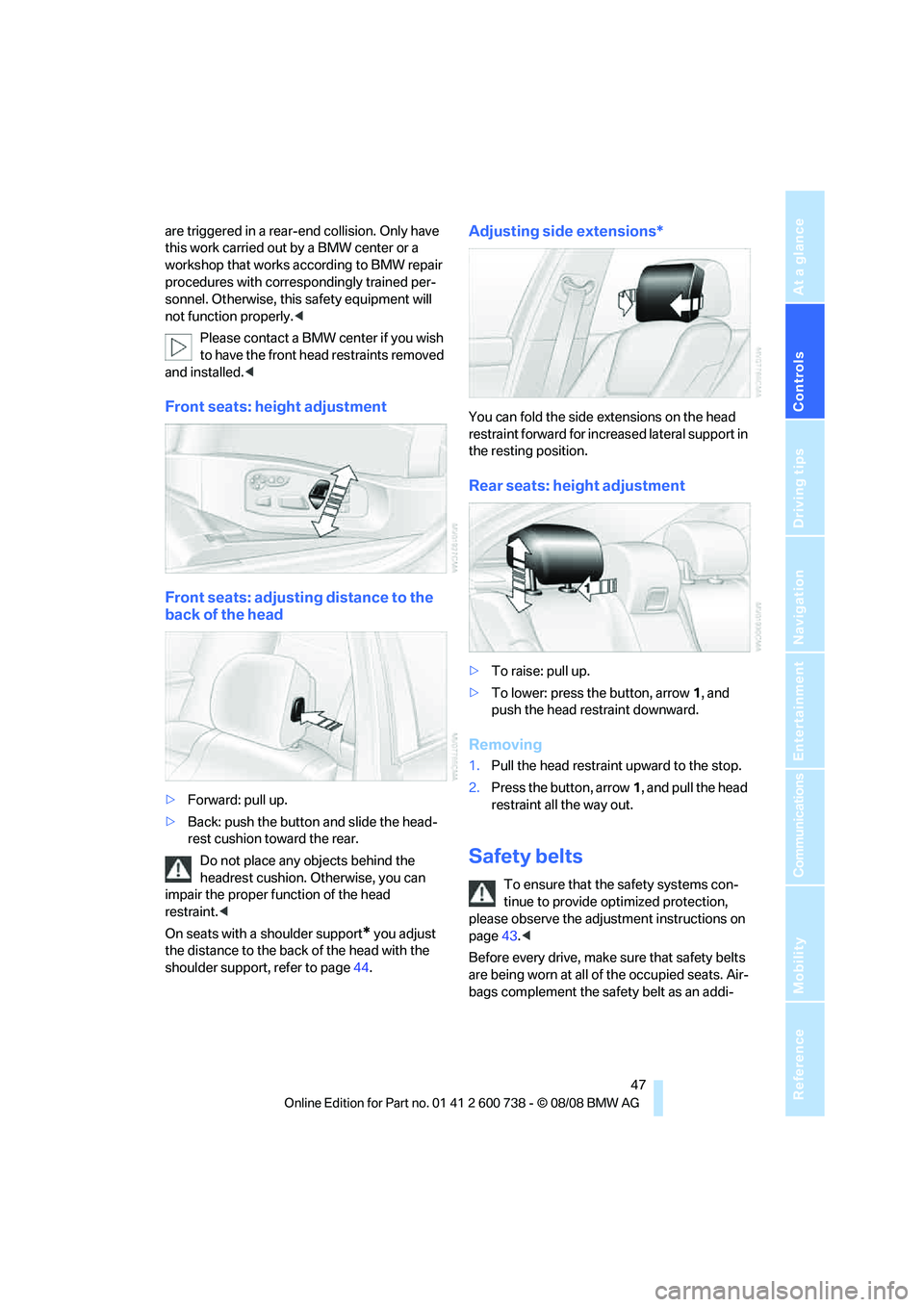
Front seats: height adjustment
Front seats: adjusting distance to the
back of the head
>Forward: pull up.
>Back: push the button and slide the head-
rest cushion toward the rear.
Do not place any objects behind the
headrest cushion. Otherwise, you can
impair the proper function of the head
restraint.<
On seats with a shoulder support
* you adjust
the distance to the back of the head with the
shoulder support, refer to page44.
Adjusting side extensions*
You can fold the side extensions on the head
restraint forward for increased lateral support in
the resting position.
Rear seats: height adjustment
>To raise: pull up.
>To lower: press the button, arrow1, and
push the head restraint downward.
Removing
1.Pull the head restraint upward to the stop.
2.Press the button, arrow1, and pull the head
restraint all the way out.
Safety belts
To ensure that the safety systems con-
tinue to provide optimized protection,
please observe the adjustment instructions on
page43.<
Before every drive, make sure that safety belts
are being worn at all of the occupied seats. Air-
bags complement the safety belt as an addi-
Page 57 of 266
Controls
55Reference
At a glance
Driving tips
Communications
Navigation
Entertainment
Mobility
Unlocking safety belt
1.Open the belt buckle.
2.Remove the child restraint system.
3.Allow the belt webbing to retract com-
pletely.
LATCH child restraint fixing system
LATCH: Lower Anchor and Tethers for CHil-
dren.
Follow the system manufacturer's
instructions on installation and use of
LATCH child restraint systems in order not to
impair their protective function.<
Before attaching the LATCH child's seat, pull
the belt away from the region of the child
restraint fixing system.
Make sure that the LATCH mounts have
properly clicked into place and that the
child restraint system is resting snugly against
the backrest. Otherwise, the protective action
may be impeded.<
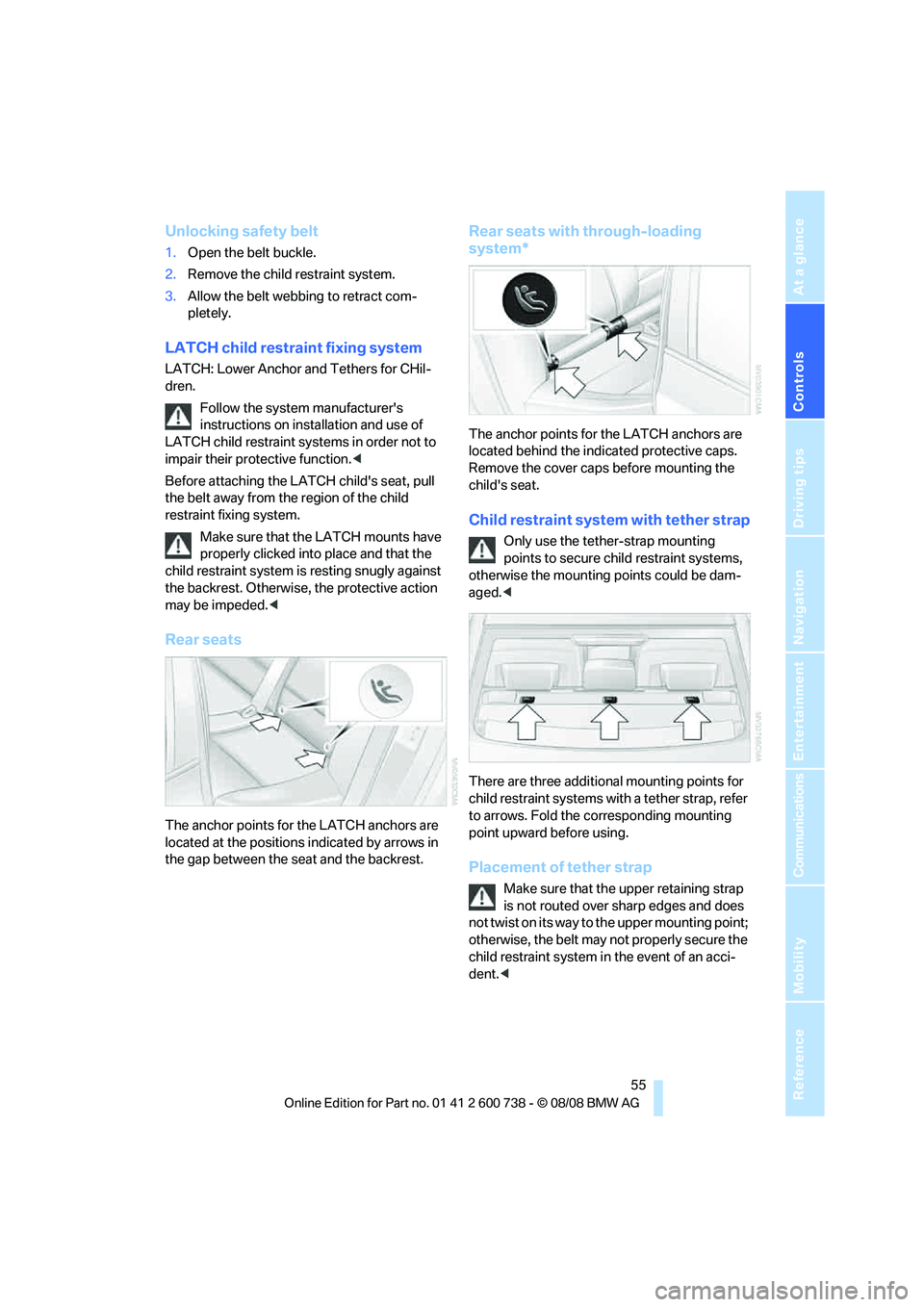
Rear seats
The anchor points for the LATCH anchors are
located at the positions indicated by arrows in
the gap between the seat and the backrest.
Rear seats with through-loading
system*
The anchor points for the LATCH anchors are
located behind the indicated protective caps.
Remove the cover caps before mounting the
child's seat.
Child restraint system with tether strap
Only use the tether-strap mounting
points to secure child restraint systems,
otherwise the mounting points could be dam-
aged.<
There are three additional mounting points for
child restraint systems with a tether strap, refer
to arrows. Fold the corresponding mounting
point upward before using.
Placement of tether strap
Make sure that the upper retaining strap
is not routed over sharp edges and does
not twist on its way to the upper mounting point;
otherwise, the belt may not properly secure the
child restraint system in the event of an acci-
dent.<
Page 91 of 266
Controls
89Reference
At a glance
Driving tips
Communications
Navigation
Entertainment
Mobility
emergency or undesired airbag triggering,
either of which could result in personal injury.<
Warnings and information on the airbags is also
provided on the sun visors.
Automatic deactivation of front
passenger airbags
The occupation of the seat is detected by eval-
uating the impression on the occupied seat sur-
face of the front passenger seat. The front and
side airbags on the front passenger side are
activated or deactivated accordingly by the sys-
tem.
The current status of the front passenger
airbag, i.e. deactivated or activated, is
indicated by the indicator lamp over the interior
rearview mirror, refer to Operating state of front
passenger airbags in the following.<
Before transporting a child on the front
passenger seat, observe the safety infor-
mation and handling instructions under Trans-
porting children safely refer to page54.
The front and side airbags on the front passen-
ger side can be deactivated for teenagers and
adults in certain sitting positions; then the indi-
cator lamp for the front passenger airbags lights
up. In these cases, change the sitting position
so that the front passenger airbags are acti-
vated and the indicator lamp goes out. If the
desired status cannot be produced by changing
the sitting position, transport the correspond-
ing person on the rear seat. Do not fit seat cov-
ers, seat cushion padding, ball mats or other
items onto the front passenger seat unless they
are specifically recommended by BMW. Do not
lay objects under the seat which could press
against the seat from below. Otherwise a cor-
rect evaluation of the occupied seat surface
cannot be ensured.<
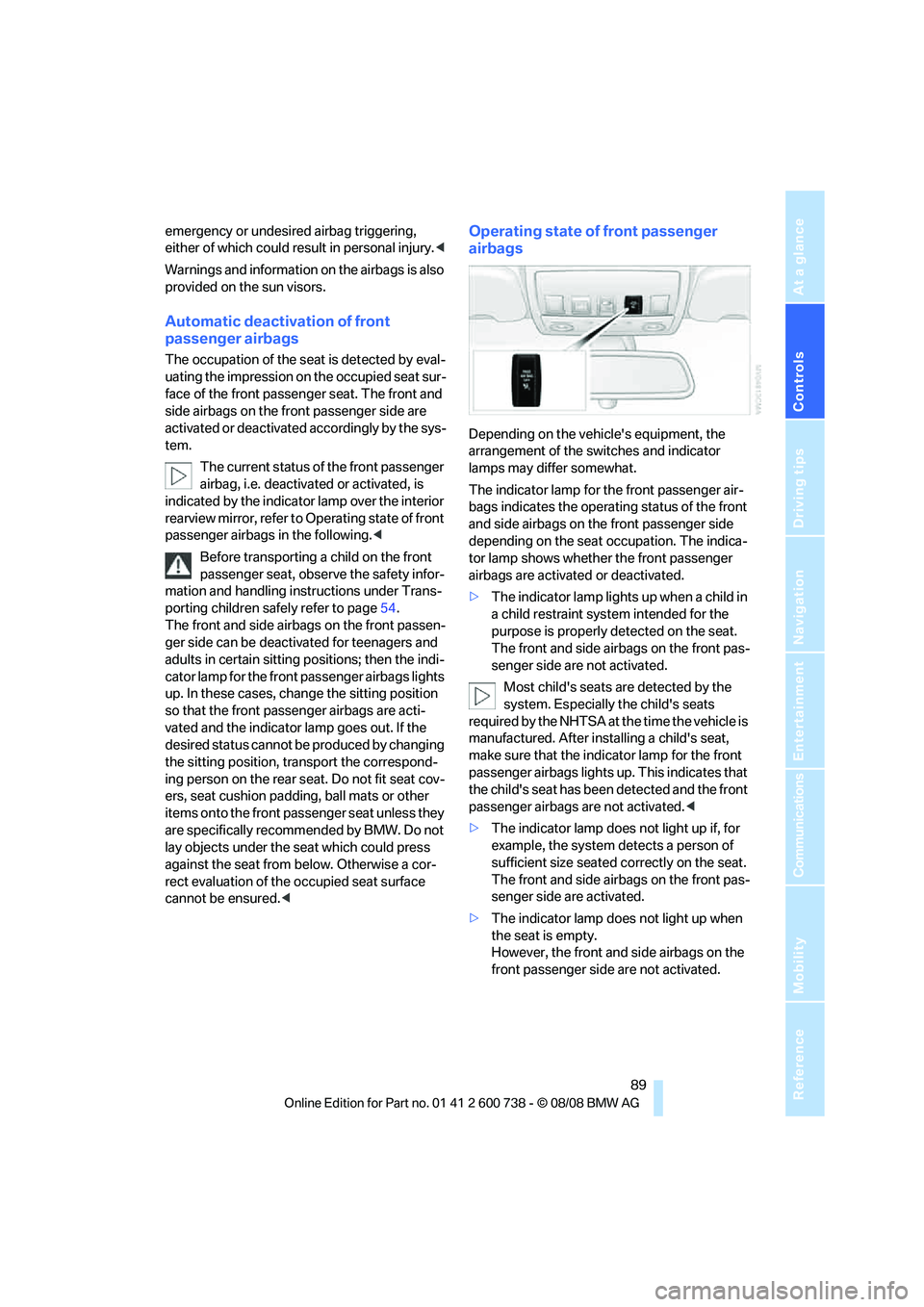
Operating state of front passenger
airbags
Depending on the vehicle's equipment, the
arrangement of the switches and indicator
lamps may differ somewhat.
The indicator lamp for the front passenger air-
bags indicates the operating status of the front
and side airbags on the front passenger side
depending on the seat occupation. The indica-
tor lamp shows whether the front passenger
airbags are activated or deactivated.
>The indicator lamp lights up when a child in
a child restraint system intended for the
purpose is properly detected on the seat.
The front and side airbags on the front pas-
senger side are not activated.
Most child's seats are detected by the
system. Especially the child's seats
required by the NHTSA at the time the vehicle is
manufactured. After installing a child's seat,
make sure that the indicator lamp for the front
passenger airbags lights up. This indicates that
the child's seat has been detected and the front
passenger airbags are not activated.<
>The indicator lamp does not light up if, for
example, the system detects a person of
sufficient size seated correctly on the seat.
The front and side airbags on the front pas-
senger side are activated.
>The indicator lamp does not light up when
the seat is empty.
However, the front and side airbags on the
front passenger side are not activated.
Page 110 of 266
Practical interior accessories
108
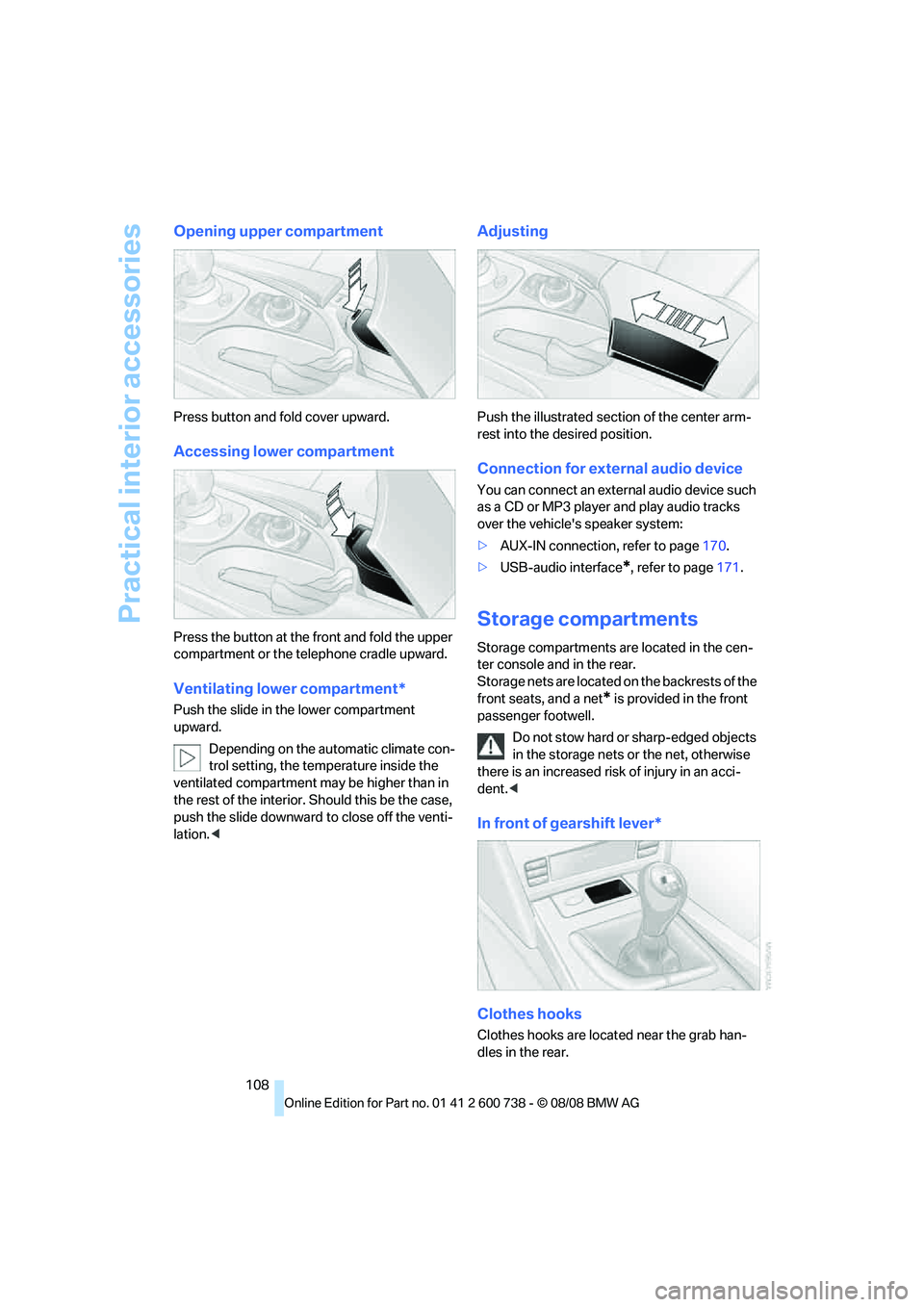
Opening upper compartment
Press button and fold cover upward.
Accessing lower compartment
Press the button at the front and fold the upper
compartment or the telephone cradle upward.
Ventilating lower compartment*
Push the slide in the lower compartment
upward.
Depending on the automatic climate con-
trol setting, the temperature inside the
ventilated compartment may be higher than in
the rest of the interior. Should this be the case,
push the slide downward to close off the venti-
lation.<
Adjusting
Push the illustrated section of the center arm-
rest into the desired position.
Connection for external audio device
You can connect an external audio device such
as a CD or MP3 player and play audio tracks
over the vehicle's speaker system:
>AUX-IN connection, refer to page170.
>USB-audio interface
*, refer to page171.
Storage compartments
Storage compartments are located in the cen-
ter console and in the rear.
Storage nets are located on the backrests of the
front seats, and a net
* is provided in the front
passenger footwell.
Do not stow hard or sharp-edged objects
in the storage nets or the net, otherwise
there is an increased risk of injury in an acci-
dent.<
In front of gearshift lever*
Clothes hooks
Clothes hooks are located near the grab han-
dles in the rear.
Page 114 of 266
Practical interior accessories
112
Ski bag*
The ski bag is designed for safe, clean transport
of up to 4 pairs of standard skis or up to 2 snow-
boards.
With the ski bag you can stow skis with a length
o f u p t o 6 . 9 f t / 2 . 1 0 m . W h e n s k i s o f 6 . 9 f t / 2 . 1 0 m
in length are loaded, the ski bag will tend to con-
tract, reducing its overall capacity.
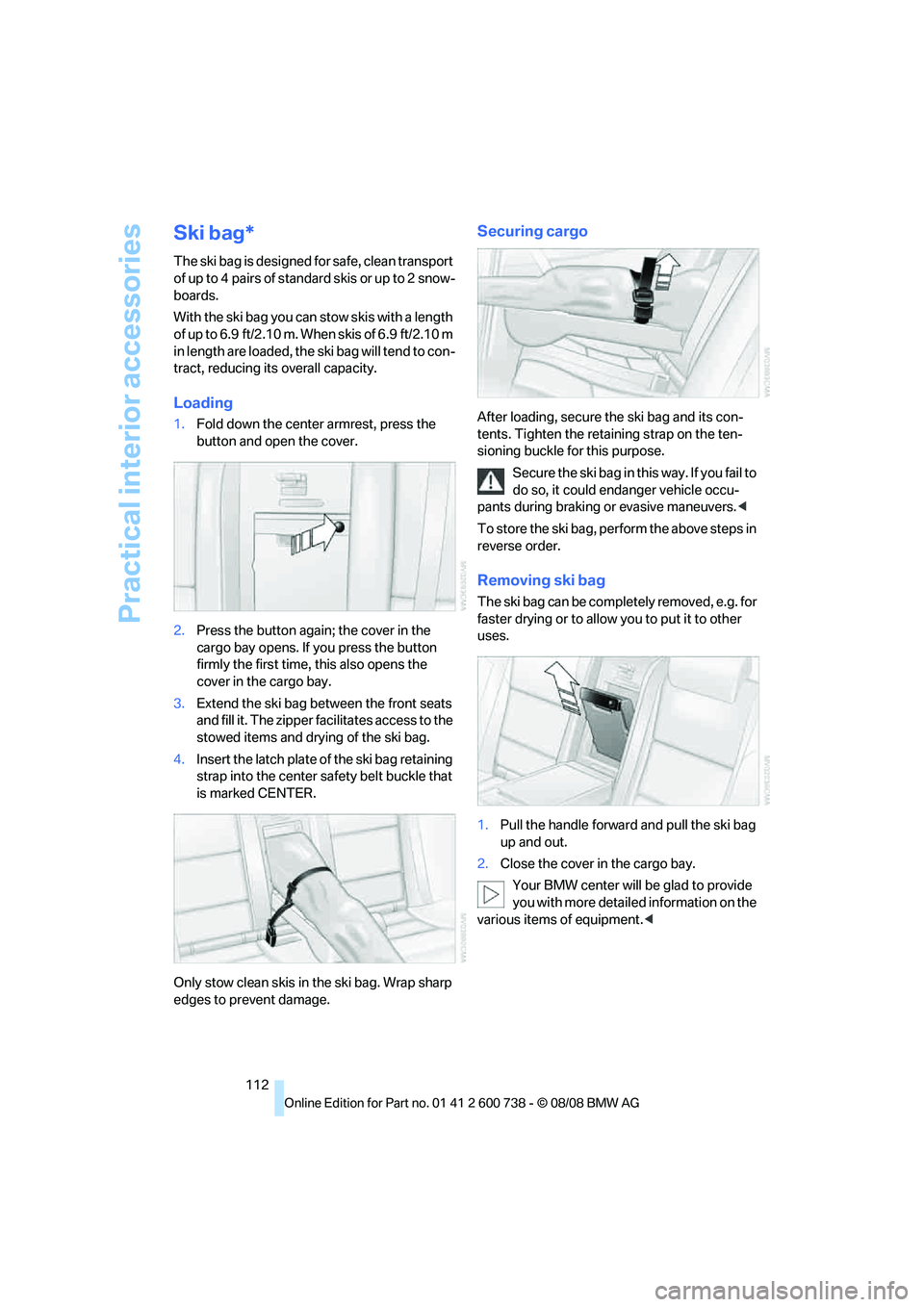
Loading
1.Fold down the center armrest, press the
button and open the cover.
2.Press the button again; the cover in the
cargo bay opens. If you press the button
firmly the first time, this also opens the
cover in the cargo bay.
3.Extend the ski bag between the front seats
and fill it. The zipper facilitates access to the
stowed items and drying of the ski bag.
4.Insert the latch plate of the ski bag retaining
strap into the center safety belt buckle that
is marked CENTER.
Only stow clean skis in the ski bag. Wrap sharp
edges to prevent damage.
Securing cargo
After loading, secure the ski bag and its con-
tents. Tighten the retaining strap on the ten-
sioning buckle for this purpose.
Secure the ski bag in this way. If you fail to
do so, it could endanger vehicle occu-
pants during braking or evasive maneuvers.<
To store the ski bag, perform the above steps in
reverse order.
Removing ski bag
The ski bag can be completely removed, e.g. for
faster drying or to allow you to put it to other
uses.
1.Pull the handle forward and pull the ski bag
up and out.
2.Close the cover in the cargo bay.
Your BMW center will be glad to provide
you with more detailed information on the
various items of equipment.<
Page 247 of 266
Reference 245
At a glance
Controls
Driving tips
Communications
Navigation
Entertainment
Mobility
Assistance window21
"Assist. window off"22
AUC Automatic recirculated-
air control101
"Audio"151,153,158
Audio150
– controls150
– switching on/off150
– tone control151
– volume151
Audio device, external108
Automatic
– air distribution99
– air volume99
– headlamp control93
– service notification193
– steering wheel
adjustment45
– storing stations156
Automatic car washes118
Automatic climate control98
– automatic air distribution99
– parked car ventilation102
– switching on and off102
– ventilation in rear102
Automatic closing of doors,
refer to Automatic soft
closing35
Automatic curb monitor50
Automatic lighting
– refer to Automatic headlamp
control93
– refer to Daytime running
lamps94
– refer to Interior lamps97
– refer to Pathway lighting94
– refer to Welcome lamps93
Automatic lights
– refer to High-beam
assistant95
Automatic low beams, refer to
High-beam assistant95
"Automatic programs"99
Automatic soft closing35
Automatic station search155
"Automatic ventilation"103
AUTO program for automatic
climate control99
"Auto Request"193"Autostore" on the
radio154,156
"AUX"150,170,172
AUX-IN connection
170
"AUX IN" in audio mode170
Average fuel consumption69
– setting units77
Average speed, refer to
Computer68
"Avoid ferries" in
navigation137
"Avoid highways" in
navigation137
Avoiding freeways for
navigation136
Avoiding unintentional
alarms37
"Avoid tollroads" in
navigation137
Axle loads, refer to
Weights239
"A - Z"184
B
"Backrest"53
Backrest contour, refer to
Lumbar support44
Backrests, refer to Seats43
Backrest width44
Back seats, refer to Rear seats
Backup lamps, replacing
bulbs224
"Balance", tone control152
Band-aids, refer to First-aid
kit232
Bass, refer to Tone
control151
"Bass", tone control151
Battery, refer to Vehicle
battery230
– jump starting232
Battery replacement
– remote control for comfort
access39
BC button, refer to
Computer68
Being towed233
Belts, refer to Safety belts47Beverage holder, refer to Cup
holders109
Blind, refer to Sun blinds106
Blower, refer to Air
volume100
"Bluetooth"177
BMW
– Car Shampoo220
"BMW Assist"192,193
BMW Assist191
– activating197
– BMW TeleServices193
– concierge service194
– contacting BMW Customer
Relations194
– displaying vehicle data198
– offered services191
– roadside assistance192
– updating196
BMW Assist My Info195
"BMW Contact"186
"BMW Contact
Numbers"186
BMW homepage4
BMW maintenance
system216
"BMW Service settings"196
BMW TeleServices193
BMW TeleServices services
– displaying194
– updating194
BMW website4
Bottle holder, refer to Cup
holders109
Bracket for telephone or
mobile phone
– refer to Snap-in adapter189
Brake assistant80
Brake force display88
Brake lamps
– replacing bulbs224
– two-stage88
Brake rotors
– breaking-in116
– refer to Braking safely117
Page 249 of 266
Reference 247
At a glance
Controls
Driving tips
Communications
Navigation
Entertainment
Mobility
CD player164
– controls150
– fast forward/reverse168
– random sequence167
– repeating a track167
– sampling a track166
– selecting a track165
– switching on/off150
– tone control151
– volume151
Center armrest
– front107
– rear111
Center brake lamp224
Center console14
Central locking
– from inside34
– from outside32
Central locking system32
– comfort access38
Changes, technical, refer to
For your own safety5
Changes, technical, refer to
Parts and accessories6
Changing language on
Control Display78
Changing scale for
navigation140
Changing units of measure on
Control Display77
Changing wheels207,227
CHECK button73
Check Control72
"Check Control
messages"74
Check Gas Cap202
Checking the air pressure,
refer to Tire inflation
pressure204
Child restraint fixing system
LATCH55
Child restraint systems54
Child-safety lock56
Child seats, refer to
Transporting children
safely54
Chime, refer to Check
Control72
Chock228Chrome-plated parts220
Chrome polish220
Cigarette lighter109
Cigarette lighter socket, refer
to Connecting electrical
devices110
Cleaning your BMW, refer to
Care218
"Climate"49,
99
Clock68
– 12h/24h format76
– hour signal76
– setting time and date76
Closing
– from inside34
– from outside32
Closing fuel filler cap202
Clothes hooks108
Cockpit10
Cold start, refer to Starting
engine58
Comfort access38
– replacing battery, remote
control39
Comfort area, refer to Around
the center console14
"Comfort" with EDC83
"Communication"182,192,1
93,195
Compact Disc
– refer to CD changer164
– refer to CD player164
Compartment for remote
control, refer to Ignition
lock57
Compartments, refer to
Storage compartments108
Compressed audio files164
Computer68
– clock68
– displays on Control
Display69
– hour signal76
"Concert hall", tone
control153
"Concierge"195
Concierge service194
Condensation, refer to When
vehicle is parked117Condition Based Service
CBS216
"Confirmation"33
Confirmation signals for
locking and unlocking33
Connecting car vacuum
cleaner, refer to Connecting
electrical devices110
Consumption, refer to
Average fuel
consumption69
Consumption statistics, refer
to Average fuel
consumption69
"Continue guidance to
destination?"139
Control Center, refer to
iDrive16
Control Display, refer to
iDrive16
– setting brightness77
– switching off/on22
Controller, refer to iDrive16
Controls, refer to Cockpit10
Convenient operation
– glass sunroof33
– windows33
– windows and glass sunroof
with comfort access39
Coolant215
– checking level215
– temperature67
Cooling, maximum101
Cooling fluid, refer to
Coolant215
Cooling function, automatic
climate control101
Cooling system, refer to
Coolant215
Copyright2
Cornering Brake Control
CBC80
Country of destination for
navigation127
Courtesy lamps97
Cradle for telephone or mobile
phone107
Cruise control65
Cruising range69
Page 253 of 266
Reference 251
At a glance
Controls
Driving tips
Communications
Navigation
Entertainment
Mobility
Glass sunroof, electric40
– convenient operation from
outside34
– convenient operation with
comfort access39
– moving manually41
– remote control33
Glove compartment107
– lighting107
GPS navigation, refer to
Navigation system124
Grills, refer to Ventilation102
Gross vehicle weight, refer to
Weights239
Ground clearance118
H
Handbrake59
– indicator lamp13,59
Hands-free system, refer to
Microphone14
Hand washing219
Hazard warning flashers15
"HD radio"158
HD radio, refer to High
Definition Radio158
Head airbags88
Headlamp
– cleaning tank, refer to
Capacities239
Headlamp control,
automatic93
Headlamp flasher63
Headlamps93
– cleaning, refer to Wiper
system64
– filler neck for washer
fluid211
Head Light, refer to Adaptive
Head Light95
Head restraints46
– active front head
restraints46
– removing47
– sitting safely43
"Head-Up Display"53,90Head-Up Display90
– default view91
– M view90
– shift lights63
Heated
– mirrors50
– rear window100
– seats48
– steering wheel51
Heating98
– exterior mirrors50
– interior98
– rear window100
– residual heat101
– seats48
– steering wheel51
Heating with engine switched
off, refer to Residual
heat101
Heavy cargo, refer to Securing
cargo119
Height, refer to
Dimensions238
Height adjustment
– seats44
– steering wheel51
High-beam assistant95,97
High beams95
– headlamp flasher95
– indicator lamp13
High Definition Radio158
High-pressure cleaning
jets218,219
High water, refer to Driving
through water117
Hills117
Holder for cups109
"Home address" in
navigation136
Homepage of BMW4
Hood210
Horn10
Hot exhaust system116
"Hour memo"76
"House number" in
destination entry129
Hydraulic brake assistant,
refer to Brake assistant80
Hydroplaning117
I
IBOC, refer to High Definition
Radio158
Ice, refer to Outside
temperature warning68
ID3 tag, refer to Information on
track166
Identification mark
– recommended tire
brands208
– tire coding205
Idle61
iDrive16
– assistance window21
– automatic climate control
with expanded scope99
– changing date and time76
– changing language78
– changing menu page20
– changing settings75
– changing units of measure
and display type77
– confirming selection or
entry20
– controller16
– controls16
– displays, menus18
– operating principle18
– selecting menu item20
– setting brightness77
– start menu18
– status information21
– symbols19
Ignition57
– switched off58
– switched on57
Ignition key, refer to Keys/
remote control30
Ignition key position 1, refer to
Radio readiness57
Ignition key position 2, refer to
Ignition on57
Ignition lock57
– starting engine with comfort
access39
i menu18
Imprint2