key BMW M5 SEDAN 2003 Owner's Manual
[x] Cancel search | Manufacturer: BMW, Model Year: 2003, Model line: M5 SEDAN, Model: BMW M5 SEDAN 2003Pages: 155, PDF Size: 1.87 MB
Page 55 of 155
55n
OverviewControlsMaintenanceRepairsDataIndex
Vehicle Memory, Key Memory How the system functionsNo doubt you have reflected at one
time or another on how great it would
be if you could permanently configure
your vehicle's various features and
adjustments to mirror your own indi-
vidual preferences. In engineering your
vehicle, BMW has incorporated a
number of options for personal adjust-
ment that can be programmed into your
vehicle at your BMW center.
The available configuration data fall into
two categories, according to whether
their primary orientation is the vehicle
("Vehicle Memory") or the individual
("Key Memory"). Provided that each
person has a separate remote-control
key, you can have your BMW center
enter two personal adjustments for two
different individuals into the system.463de029
When your vehicle is unlocked with the
remote control, the vehicle recognizes
the individual user by means of a data
exchange with the key, and makes
adjustments accordingly.
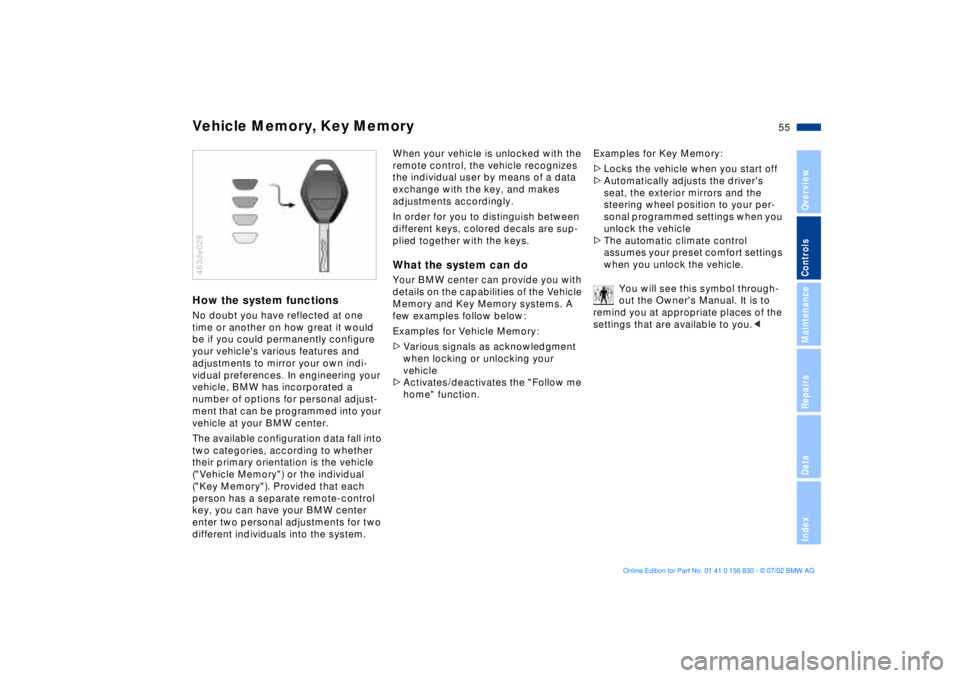
In order for you to distinguish between
different keys, colored decals are sup-
plied together with the keys.What the system can doYour BMW center can provide you with
details on the capabilities of the Vehicle
Memory and Key Memory systems. A
few examples follow below:
Examples for Vehicle Memory:
>Various signals as acknowledgment
when locking or unlocking your
vehicle
>Activates/deactivates the "Follow me
home" function.Examples for Key Memory:
>Locks the vehicle when you start off
>Automatically adjusts the driver's
seat, the exterior mirrors and the
steering wheel position to your per-
sonal programmed settings when you
unlock the vehicle
>The automatic climate control
assumes your preset comfort settings
when you unlock the vehicle.
You will see this symbol through-
out the Owner's Manual. It is to
remind you at appropriate places of the
settings that are available to you.<
Page 56 of 155
56n
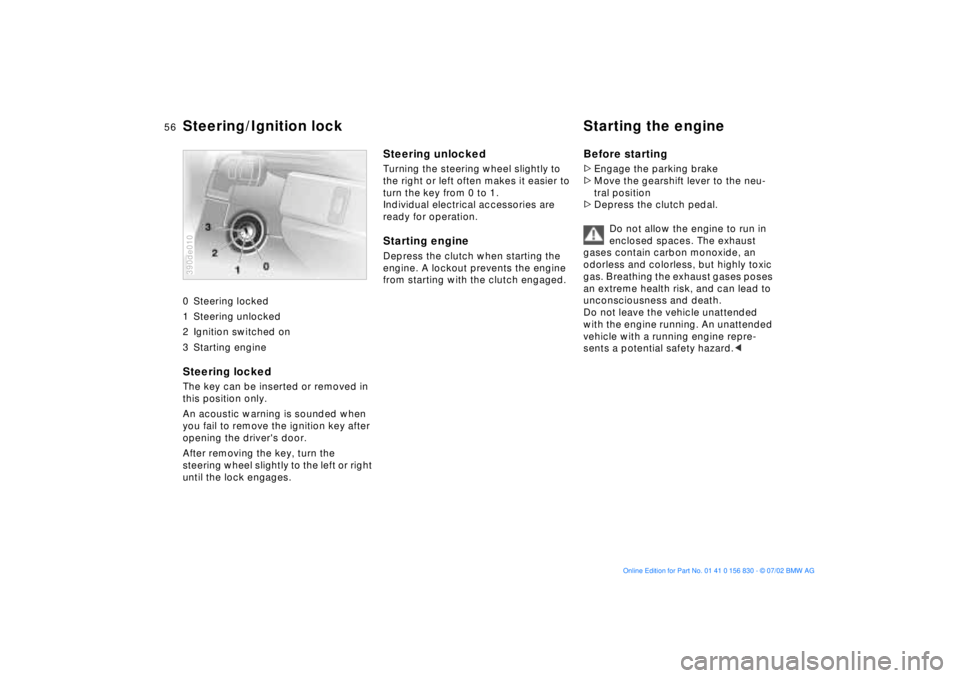
0 Steering locked
1 Steering unlocked
2 Ignition switched on
3 Starting engine
Steering locked The key can be inserted or removed in
this position only.
An acoustic warning is sounded when
you fail to remove the ignition key after
opening the driver's door.
After removing the key, turn the
steering wheel slightly to the left or right
until the lock engages. 390de010
Steering unlocked Turning the steering wheel slightly to
the right or left often makes it easier to
turn the key from 0 to 1.
Individual electrical accessories are
ready for operation.Starting engine Depress the clutch when starting the
engine. A lockout prevents the engine
from starting with the clutch engaged.
Before starting>Engage the parking brake
>Move the gearshift lever to the neu-
tral position
>Depress the clutch pedal.
Do not allow the engine to run in
enclosed spaces. The exhaust
gases contain carbon monoxide, an
odorless and colorless, but highly toxic
gas. Breathing the exhaust gases poses
an extreme health risk, and can lead to
unconsciousness and death.
Do not leave the vehicle unattended
with the engine running. An unattended
vehicle with a running engine repre-
sents a potential safety hazard.<
Steering/Ignition lock Starting the engine
Page 57 of 155
57n
OverviewControlsMaintenanceRepairsDataIndex
Starting the engine Switching off the engine Starting engineDo not press the accelerator pedal
while starting the engine.
While it is important not to release
the key prematurely, you should
also avoid allowing the starter to
operate continuously for more than
20 seconds at a time. Release the igni-
tion key immediately when the engine
starts.<
Do not warm up the engine by allowing
it to run with the vehicle parked.
Instead, you should drive away immedi-
ately while taking care to avoid high
engine speeds until the engine warms
to its normal operating temperature.
If the engine does not start on the first
attempt (the engine is very hot or cold,
for instance):
>Press the accelerator pedal halfway
down while engaging the starter.
Cold starts at extremely low tempera-
tures of roughly +57 (Ð156) or below
and at altitudes of over 3,300 ft
(1,000 m):
>Allow the starter to turn somewhat
longer (approx. 10 seconds) during
your initial starting attempt.
The engine's idle speed is automatically
regulated by the computerized engine-
management system. A brief period at
high idle is normal just after starting; the
idle speed should gradually return to
normal as the engine warms. Should
the engine fail to revert to its normal
idle speed after warming, a problem
may exist: please refer the problem to
your BMW center.
To prevent the battery from discharging,
always switch off any electrical devices
not in use, as well as the ignition when
the vehicle is not being driven.
Extended starting attempts,
characterized by excessively fre-
quent or long periods with the
starter engaged, can lead to catalyst
damage.<
When driving, standing at idle,
and parking the vehicle, take care
to avoid contact between the exhaust
system and flammable materials (grass,
hay, leaves, etc.). Such contact could
lead to a fire, resulting in serious per-
sonal injury and property damage.<
Turn the ignition key to position 1 or 0.
Do not remove the ignition key
while the vehicle is still moving. If
you do so, the steering will lock, making
it impossible to steer the vehicle.
When you leave the vehicle, always
remove the ignition key and engage the
steering lock.
Always engage the parking brake
when parking on hills and inclined sur-
faces, as even first gear or reverse may
not provide adequate resistance to
rolling.<
Page 58 of 155
58n
Parking brake Manual transmission The parking brake is designed primarily
to prevent the vehicle from rolling when
it is parked. It operates on the rear
wheels.To engageThe lever engages automatically when
it is pulled up, and the "PARK BRAKE"
(in Canada "P") indicator lamp comes
on in the instrument cluster in ignition
key position 2. Refer to page 17. To releasePull up slightly on the lever, press the
button and lower the lever.390de714
If, in exceptional circumstances, it
should be necessary to engage
the parking brake while the vehicle is in
motion, do not pull it with excessive
pressure. Keep your thumb pressed
against the release button while care-
fully pulling the lever up to apply mod-
erate pressure.
Excessive pressure can lead to over-
braking and loss of traction (fishtailing)
at the rear axle.
The brake lamps do not come on when
the parking brake is applied. Always
engage the parking brake when parking
on hills and inclined surfaces, as even
first gear or reverse may not provide
adequate resistance to rolling.<
You can help prevent corrosion and
maintain balanced braking by periodi-
cally pulling up the parking brake lever
gently while coasting to a stop at a
traffic light. Always check traffic condi-
tions first to avoid posing a hazard to
yourself or other road users.
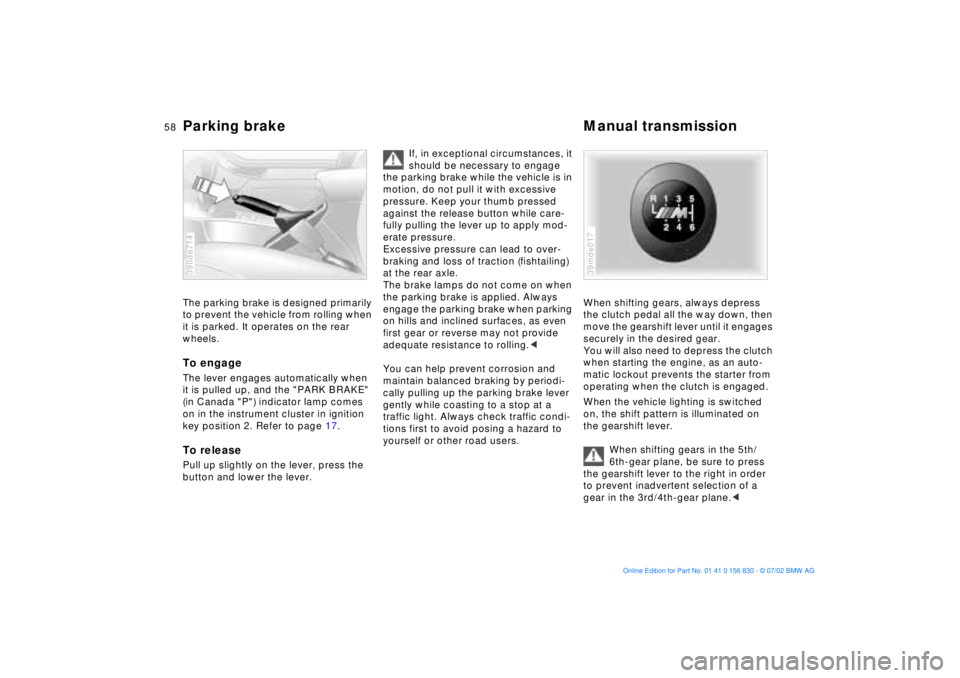
When shifting gears, always depress
the clutch pedal all the way down, then
move the gearshift lever until it engages
securely in the desired gear.
You will also need to depress the clutch
when starting the engine, as an auto-
matic lockout prevents the starter from
operating when the clutch is engaged.
When the vehicle lighting is switched
on, the shift pattern is illuminated on
the gearshift lever.
When shifting gears in the 5th/
6th-gear plane, be sure to press
the gearshift lever to the right in order
to prevent inadvertent selection of a
gear in the 3rd/4th-gear plane.<39mde017
Page 59 of 155
59n
OverviewControlsMaintenanceRepairsDataIndex
Manual transmission Turn signal/Headlamp flasherReverse Select only when the vehicle is com-
pletely stopped. Press the gearshift
lever to the left to overcome the resis-
tance.
As you do this, the backup lamps will
turn on automatically when the ignition
key is in position 2.
Do not hold the vehicle in place on
slopes by slipping or "riding" the
clutch. Use the parking brake instead.
Riding the clutch causes the clutch
assembly to wear out prematurely.<
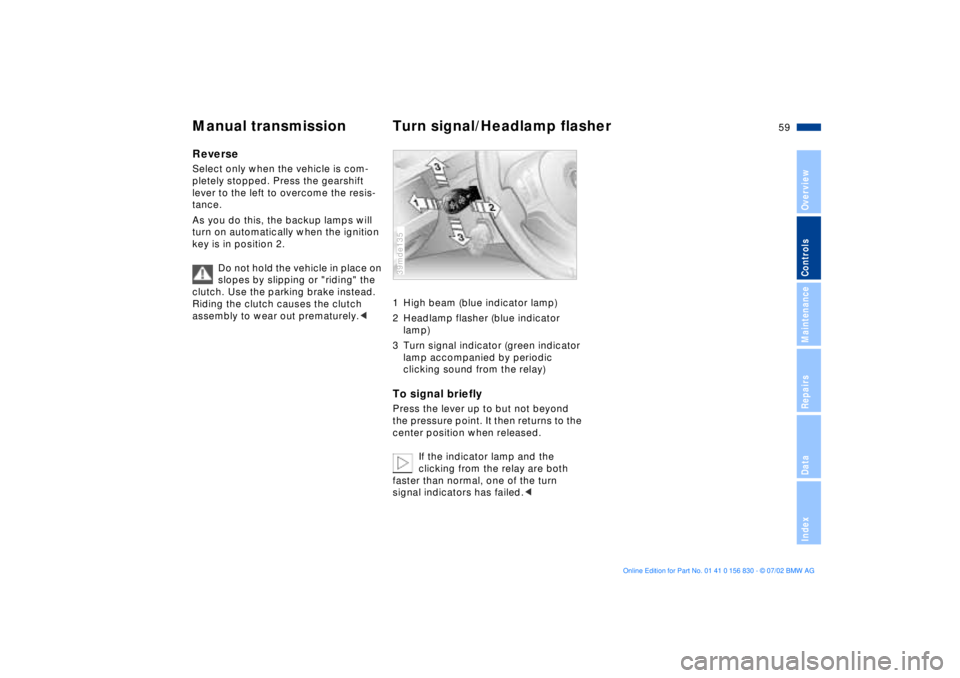
1 High beam (blue indicator lamp)
2 Headlamp flasher (blue indicator
lamp)
3 Turn signal indicator (green indicator
lamp accompanied by periodic
clicking sound from the relay)To signal brieflyPress the lever up to but not beyond
the pressure point. It then returns to the
center position when released.
If the indicator lamp and the
clicking from the relay are both
faster than normal, one of the turn
signal indicators has failed.<39mde135
Page 60 of 155
60n
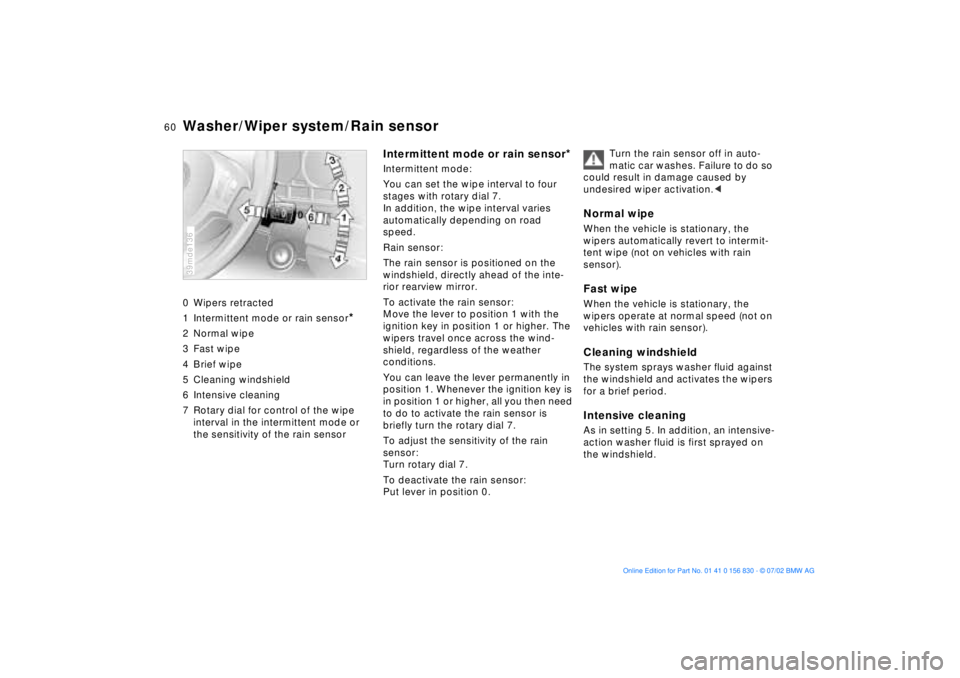
Washer/Wiper system/Rain sensor0 Wipers retracted
1 Intermittent mode or rain sensor
*
2 Normal wipe
3 Fast wipe
4 Brief wipe
5 Cleaning windshield
6 Intensive cleaning
7 Rotary dial for control of the wipe
interval in the intermittent mode or
the sensitivity of the rain sensor39mde136
Intermittent mode or rain sensor
*
Intermittent mode:
You can set the wipe interval to four
stages with rotary dial 7.
In addition, the wipe interval varies
automatically depending on road
speed.
Rain sensor:
The rain sensor is positioned on the
windshield, directly ahead of the inte-
rior rearview mirror.
To activate the rain sensor:
Move the lever to position 1 with the
ignition key in position 1 or higher. The
wipers travel once across the wind-
shield, regardless of the weather
conditions.
You can leave the lever permanently in
position 1. Whenever the ignition key is
in position 1 or higher, all you then need
to do to activate the rain sensor is
briefly turn the rotary dial 7.
To adjust the sensitivity of the rain
sensor:
Turn rotary dial 7.
To deactivate the rain sensor:
Put lever in position 0.Turn the rain sensor off in auto-
matic car washes. Failure to do so
could result in damage caused by
undesired wiper activation.<
Normal wipeWhen the vehicle is stationary, the
wipers automatically revert to intermit-
tent wipe (not on vehicles with rain
sensor).Fast wipeWhen the vehicle is stationary, the
wipers operate at normal speed (not on
vehicles with rain sensor).Cleaning windshieldThe system sprays washer fluid against
the windshield and activates the wipers
for a brief period.Intensive cleaningAs in setting 5. In addition, an intensive-
action washer fluid is first sprayed on
the windshield.
Page 61 of 155
61n
OverviewControlsMaintenanceRepairsDataIndex
Washer/Wiper system Cruise control Cleaning headlampsWhen the headlamps are on, they are
also cleaned automatically every fifth
time you activate "Cleaning windshield"
5 or "Intensive cleaning" 6.
Do not use the washers if there is
any danger that the fluid will
freeze on the windshield, as your vision
could be obscured. You can reduce this
danger by adding a windshield washer
antifreeze. Refer to page 115. Do not
activate the washer if the reservoir is
empty, as the washer pump could be
damaged.
position 2.
You can store and automatically main-
tain any desired vehicle speed above
approx. 20 mph (30 km/h).
The cruise control is available whenever
the engine is running and the system
has been activated.
To activate the system From ignition key position 2:
Press the button and the indicator lamp
on the instrument cluster (refer to
page 18) will come on. You can now
use the cruise control.
Do not use cruise control on
twisting roads, when high traffic
density prevents driving at a constant
speed, or when the road surface is slick
(snow, rain, ice) or loose (rocks or
gravel, sand).
cluster goes out.
Cruise control is also deactivated when
the ignition key is in position 0.
The speed stored in memory is deleted.
Page 63 of 155
63n
OverviewControlsMaintenanceRepairsDataIndex
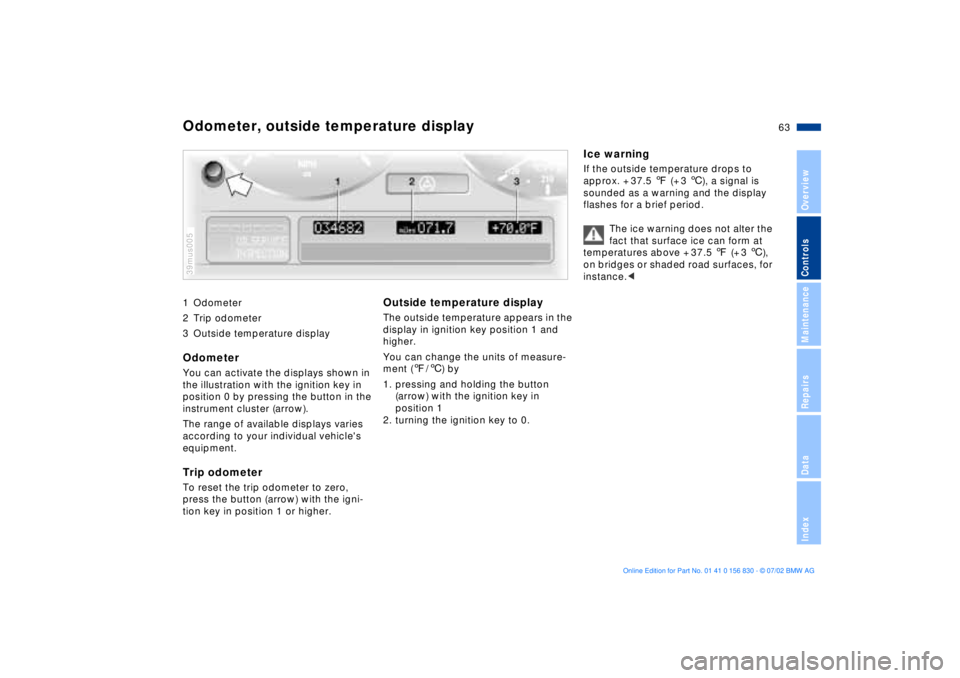
1 Odometer
2 Trip odometer
3 Outside temperature display Odometer You can activate the displays shown in
the illustration with the ignition key in
position 0 by pressing the button in the
instrument cluster (arrow).
The range of available displays varies
according to your individual vehicle's
equipment.Trip odometer To reset the trip odometer to zero,
press the button (arrow) with the igni-
tion key in position 1 or higher. 39mus005
Outside temperature display The outside temperature appears in the
display in ignition key position 1 and
higher.
You can change the units of measure-
ment (7/6) by
1. pressing and holding the button
(arrow) with the ignition key in
position 1
2. turning the ignition key to 0.
Ice warningIf the outside temperature drops to
approx. + 37.5 7 (+ 3 6), a signal is
sounded as a warning and the display
flashes for a brief period.
The ice warning does not alter the
fact that surface ice can form at
temperatures above + 37.5 7 (+ 3 6),
on bridges or shaded road surfaces, for
instance.<
Odometer, outside temperature display
Page 66 of 155
66n
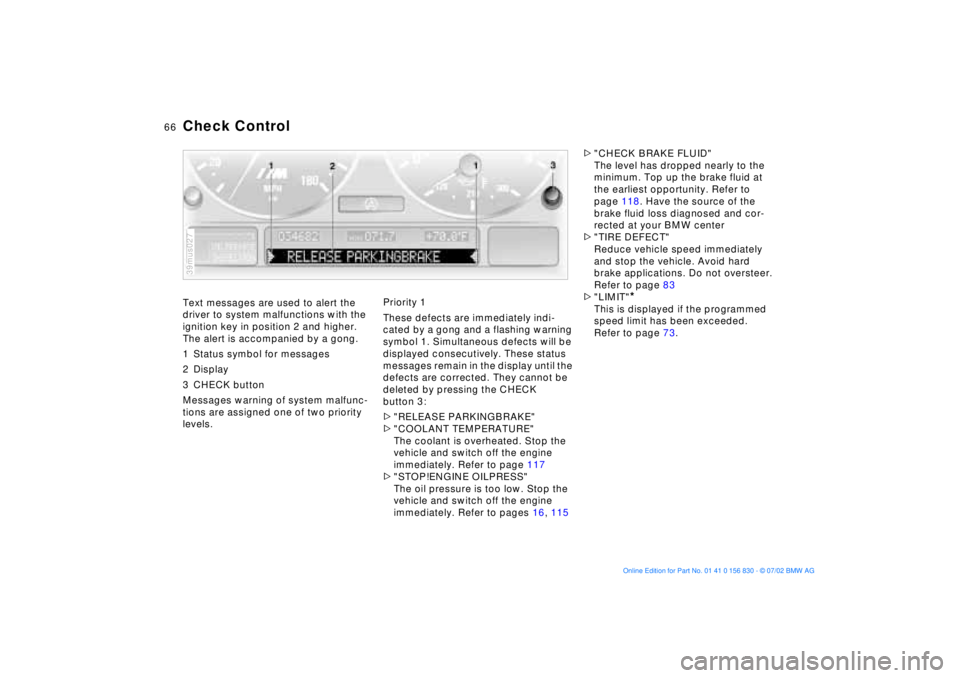
Text messages are used to alert the
driver to system malfunctions with the
ignition key in position 2 and higher.
The alert is accompanied by a gong.
1 Status symbol for messages
2 Display
3 CHECK button
Messages warning of system malfunc-
tions are assigned one of two priority
levels.
39mus027
Priority 1
These defects are immediately indi-
cated by a gong and a flashing warning
symbol 1. Simultaneous defects will be
displayed consecutively. These status
messages remain in the display until the
defects are corrected. They cannot be
deleted by pressing the CHECK
button 3:
>"RELEASE PARKINGBRAKE"
>"COOLANT TEMPERATURE"
The coolant is overheated. Stop the
vehicle and switch off the engine
immediately. Refer to page 117
>"STOP!ENGINE OILPRESS"
The oil pressure is too low. Stop the
vehicle and switch off the engine
immediately. Refer to pages 16, 115>"CHECK BRAKE FLUID"
The level has dropped nearly to the
minimum. Top up the brake fluid at
the earliest opportunity. Refer to
page 118. Have the source of the
brake fluid loss diagnosed and cor-
rected at your BMW center
>"TIRE DEFECT"
Reduce vehicle speed immediately
and stop the vehicle. Avoid hard
brake applications. Do not oversteer.
Refer to page 83
>"LIMIT"
*
This is displayed if the programmed
speed limit has been exceeded.
Refer to page 73.
Check Control
Page 67 of 155
67n
OverviewControlsMaintenanceRepairsDataIndex
Check Control Priority 2
These displays appear for 20 seconds
with the ignition key in position 2. The
warning symbols remain after the mes-
sage disappears. The messages can be
recalled again with CHECK button 3.
>"TRUNKLID OPEN"
This message appears only when you
initially begin a trip
>"DOOR OPEN"
This message appears after a defined
road speed has been exceeded
>"FASTEN SEAT BELTS"
*
In addition to this message, an indi-
cator lamp with the safety belt icon
appears and an acoustic signal is
sounded
>"WASHER FLUID LOW"
Too low; top up fluid at the next
opportunity. Refer to page 115
>"CHECK ENGINE OIL LEV"
The oil level is at the absolute min-
imum, so add engine oil as soon as
possible. Refer to page 115. Until
then, do not drive more than approx.
30 miles (50 km)>"TIRE PRESSURE SET"
The Flat Tire Monitor has adopted the
tires' current inflation pressures as its
reference levels. Refer to page 82
>"TIRECONTROL INACTIVE"
Transient malfunctions and system
errors in the Flat Tire Monitor. Refer
to page 83
>"CHECK BRAKE LIGHTS"
A lamp has failed or the electrical cir-
cuit has a fault. Refer to pages 126
and 132 or consult a BMW center
>"CHECK LOWBEAM LIGHTS"
"CHECK SIDE LIGHTS"
"CHECK REAR LIGHTS"
"CHECK FRONT FOGLAMPS"
"CHECK LICPLATE LIGHT"
"CHECK HIGHBEAM LIGHT"
"CHECK BACK UP LIGHTS"
Defective bulb or circuit. Refer to
page 124 and following and
page 132 or consult a BMW center>"CHECK BRAKE LININGS"
Have the brake pads checked at your
BMW center. Refer to page 108
>"CHECK COOLANT LEVEL"
The coolant level is too low; top off
at the next opportunity. Refer to
page 118
>"CHECK FILLER CAP"
Check to see whether the fuel filler
cap has been properly closed. Refer
to page 21
>"ENGINE FAILSAFE PROG"
Indicates a malfunction in the elec-
tronic engine-management system,
which then reverts to an emergency
default program allowing continued
operation at reduced power and
lower engine speeds.
Please have the system inspected by
your BMW center
>
"OUTSIDE TEMPERATURE 24 7
(Ð 5.0 6)"This temperature display is only an
example. The current temperature is
displayed at outside temperatures of
37.5 7 (+3 6) and below. Refer also
to page 63.