m button BMW M5 SEDAN 2006 E60 Manual Online
[x] Cancel search | Manufacturer: BMW, Model Year: 2006, Model line: M5 SEDAN, Model: BMW M5 SEDAN 2006 E60Pages: 231, PDF Size: 8.44 MB
Page 171 of 231
169
Entertainment
Reference
At a glance
Controls
Driving tips Communications
Navigation
Mobility
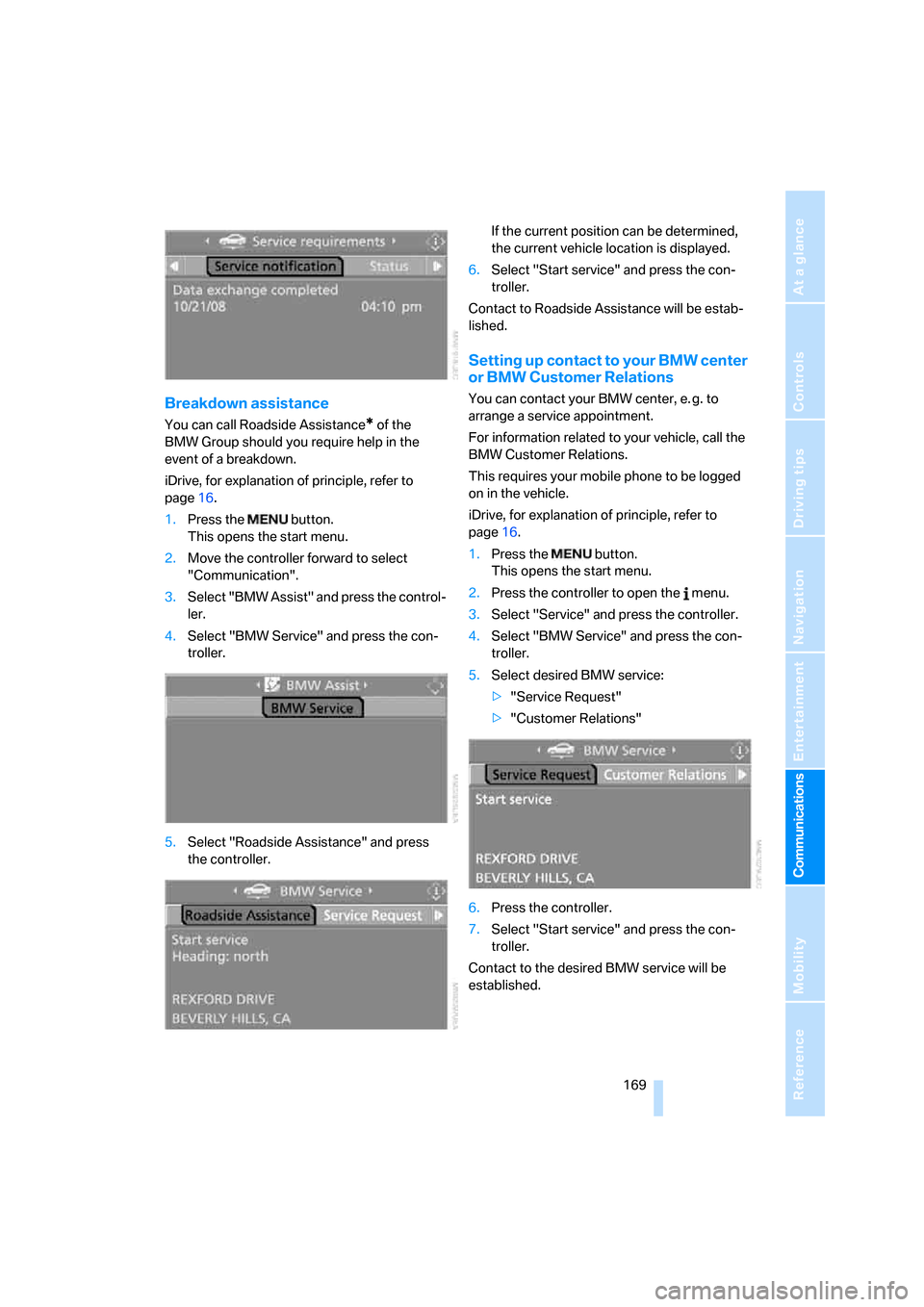
Breakdown assistance
You can call Roadside Assistance* of the
BMW Group should you require help in the
event of a breakdown.
iDrive, for explanation of principle, refer to
page16.
1.Press the button.
This opens the start menu.
2.Move the controller forward to select
"Communication".
3.Select "BMW Assist" and press the control-
ler.
4.Select "BMW Service" and press the con-
troller.
5.Select "Roadside Assistance" and press
the controller.If the current position can be determined,
the current vehicle location is displayed.
6.Select "Start service" and press the con-
troller.
Contact to Roadside Assistance will be estab-
lished.
Setting up contact to your BMW center
or BMW Customer Relations
You can contact your BMW center, e. g. to
arrange a service appointment.
For information related to your vehicle, call the
BMW Customer Relations.
This requires your mobile phone to be logged
on in the vehicle.
iDrive, for explanation of principle, refer to
page16.
1.Press the button.
This opens the start menu.
2.Press the controller to open the menu.
3.Select "Service" and press the controller.
4.Select "BMW Service" and press the con-
troller.
5.Select desired BMW service:
>"Service Request"
>"Customer Relations"
6.Press the controller.
7.Select "Start service" and press the con-
troller.
Contact to the desired BMW service will be
established.
Page 184 of 231
Under the hood
182
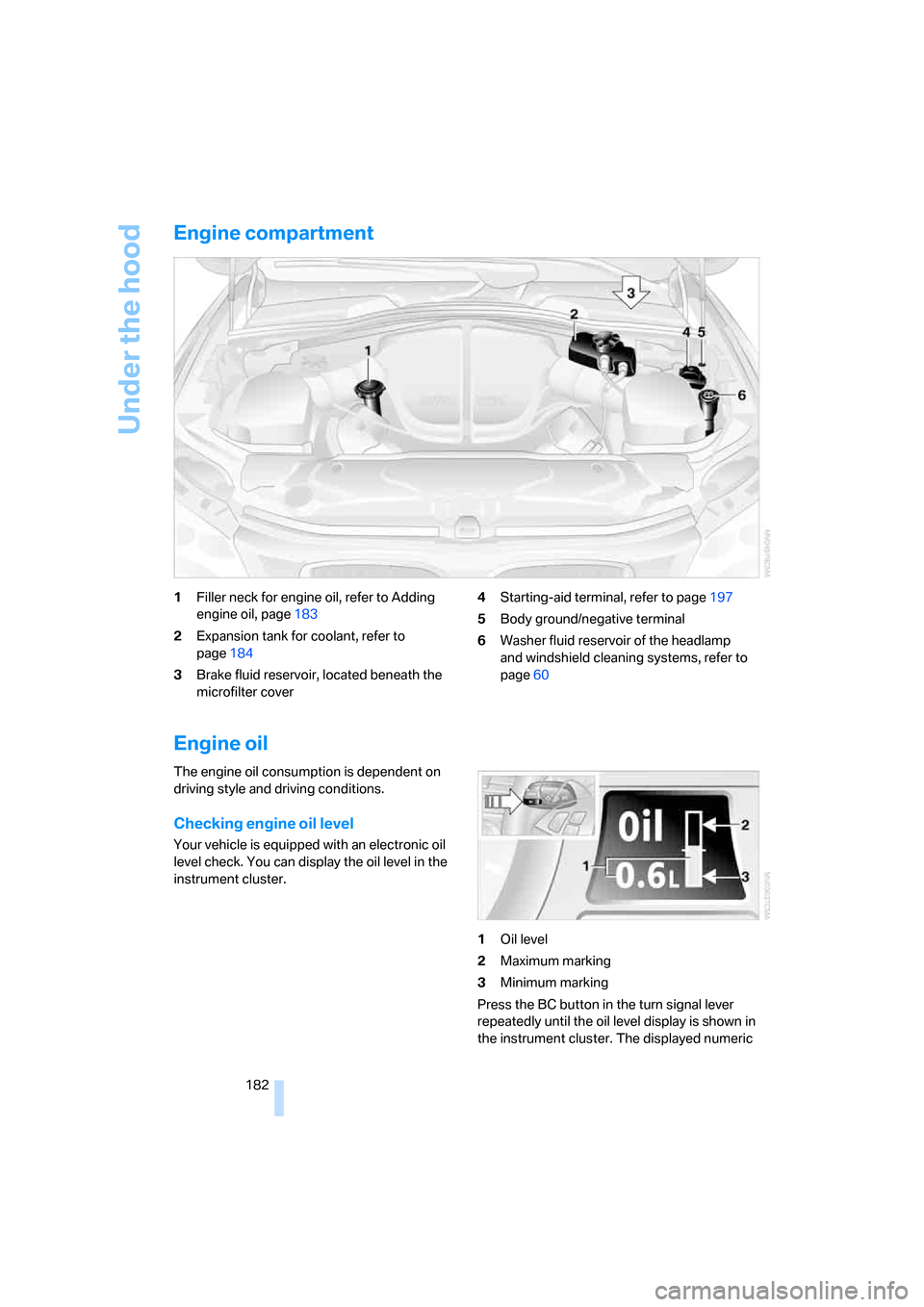
Engine compartment
1Filler neck for engine oil, refer to Adding
engine oil, page183
2Expansion tank for coolant, refer to
page184
3Brake fluid reservoir, located beneath the
microfilter cover4Starting-aid terminal, refer to page197
5Body ground/negative terminal
6Washer fluid reservoir of the headlamp
and windshield cleaning systems, refer to
page60
Engine oil
The engine oil consumption is dependent on
driving style and driving conditions.
Checking engine oil level
Your vehicle is equipped with an electronic oil
level check. You can display the oil level in the
instrument cluster.
1Oil level
2Maximum marking
3Minimum marking
Press the BC button in the turn signal lever
repeatedly until the oil level display is shown in
the instrument cluster. The displayed numeric
Page 185 of 231
Mobility
183Reference
At a glance
Controls
Driving tips
Communications
Navigation
Entertainment
value indicates the current oil level in liters
above Minimum.
After starting the engine, the last determined
value is displayed.
The oil level must be between the two marks.
Exact measurement
The oil level is measured continuously while
driving or when stopped with the engine run-
ning.
The determination of a new value can take
30 minutes or longer.
If only dashes are shown in the display, it
was not possible to determine a new
value. This can, for example, be the case when
driving short distances or with a sporty driving
style.<
Fast measurement
In addition to the continuous measurement, you
can also quickly determine the current oil level,
e.g. after adding engine oil, however with a low
measuring accuracy.
1.With the engine at operating temperature,
i.e. after at least 6 miles/10 km of uninter-
rupted driving, park the vehicle in a horizon-
tal position.
2.Allow the engine to run at idle.
3.Press the BC button in the turn signal lever
repeatedly until the oil level display is
shown in the instrument cluster.
4.Press the BC button in the turn signal lever
for at least 2 seconds.
The oil level is determined. A clock symbol
is displayed during the measurement.
5.After approx. 1 minute the current oil level is
displayed.
If not all measuring conditions are met,
e.g. with the engine cold, "-.-" is dis-
played. The requested measurement is carried
out as soon as possible.<
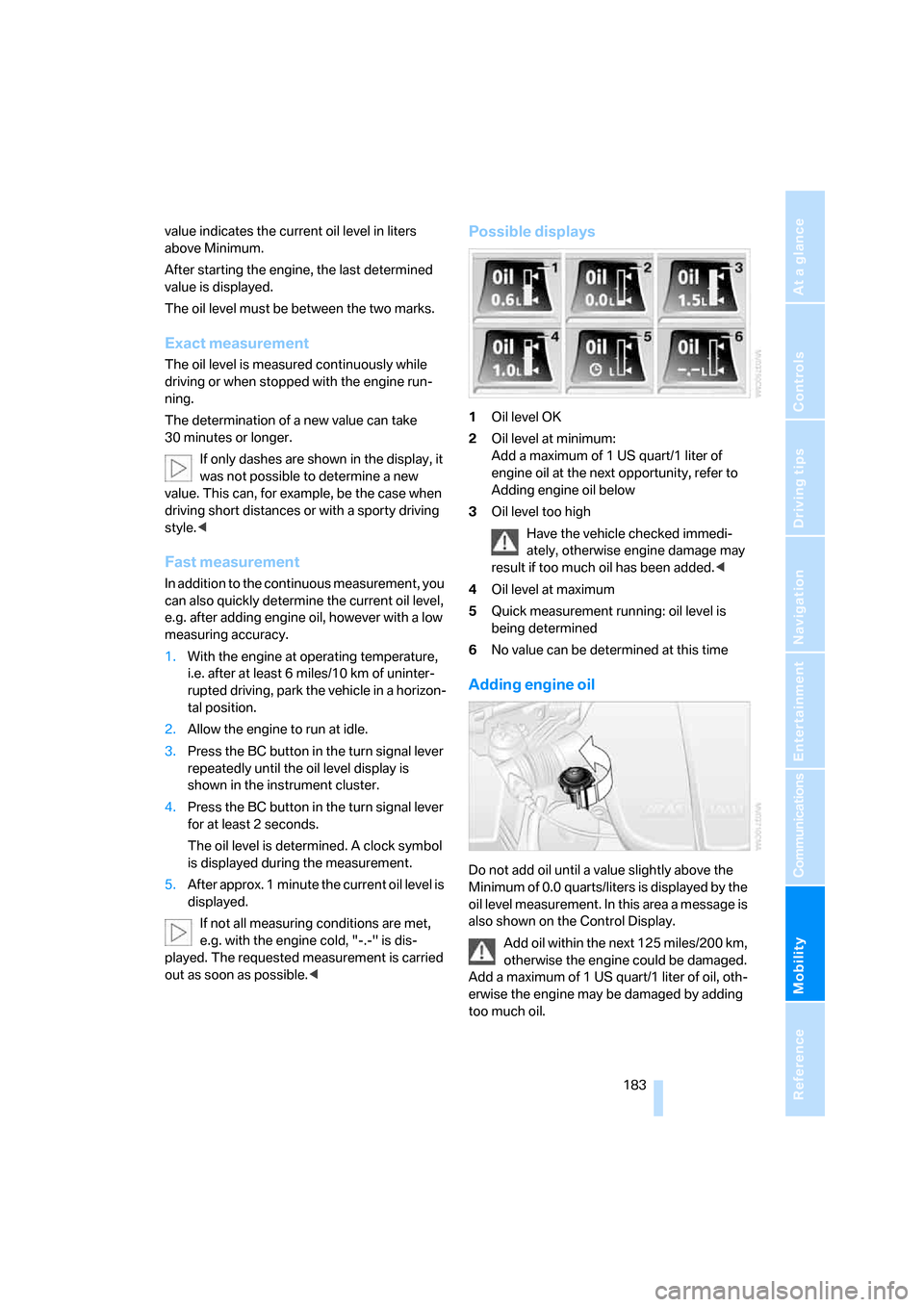
Possible displays
1Oil level OK
2Oil level at minimum:
Add a maximum of 1 US quart/1 liter of
engine oil at the next opportunity, refer to
Adding engine oil below
3Oil level too high
Have the vehicle checked immedi-
ately, otherwise engine damage may
result if too much oil has been added.<
4Oil level at maximum
5Quick measurement running: oil level is
being determined
6No value can be determined at this time
Adding engine oil
Do not add oil until a value slightly above the
Minimum of 0.0 quarts/liters is displayed by the
oil level measurement. In this area a message is
also shown on the Control Display.
Add oil within the next 125 miles/200 km,
otherwise the engine could be damaged.
Add a maximum of 1 US quart/1 liter of oil, oth-
erwise the engine may be damaged by adding
too much oil.
Page 193 of 231
Mobility
191Reference
At a glance
Controls
Driving tips
Communications
Navigation
Entertainment
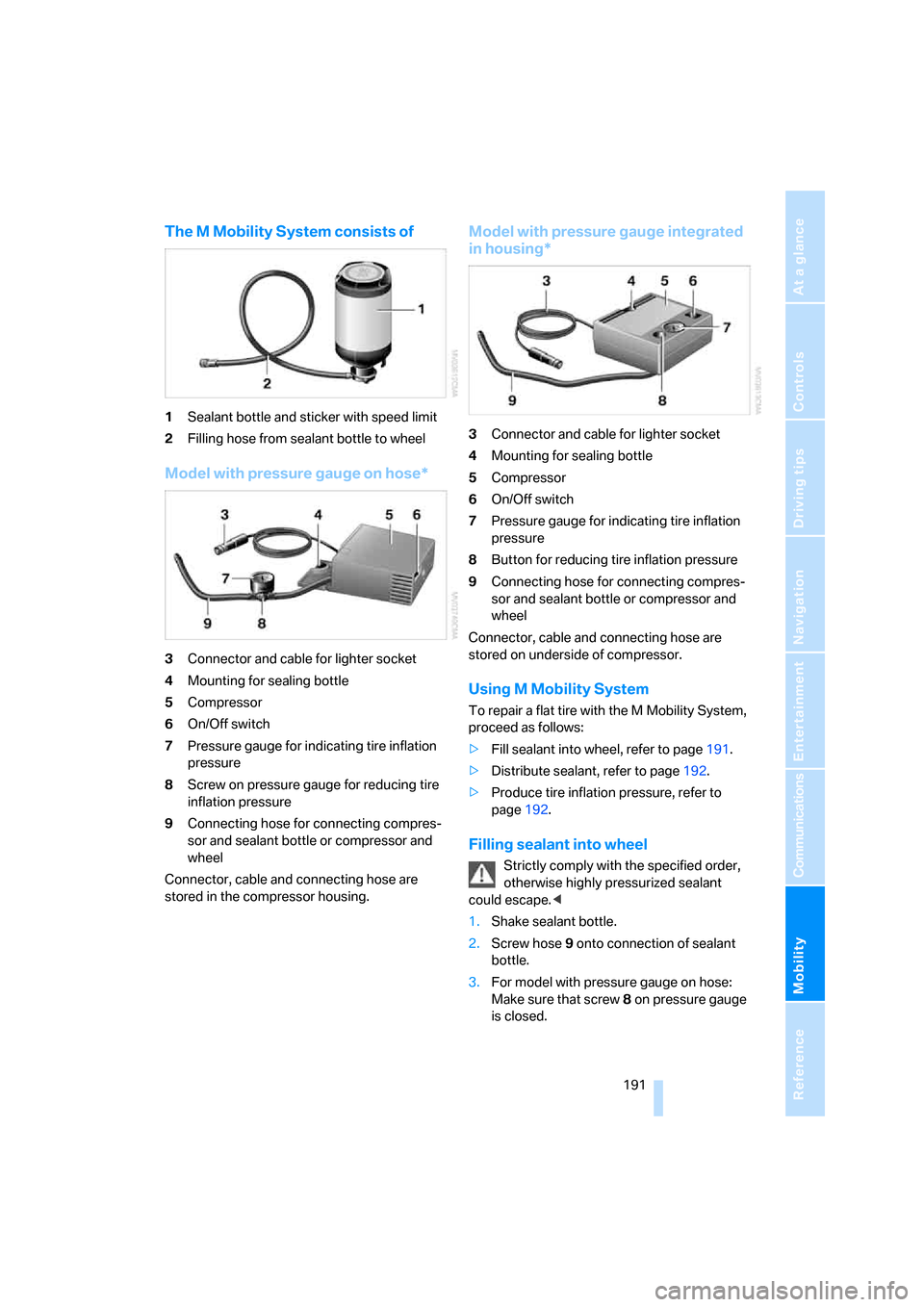
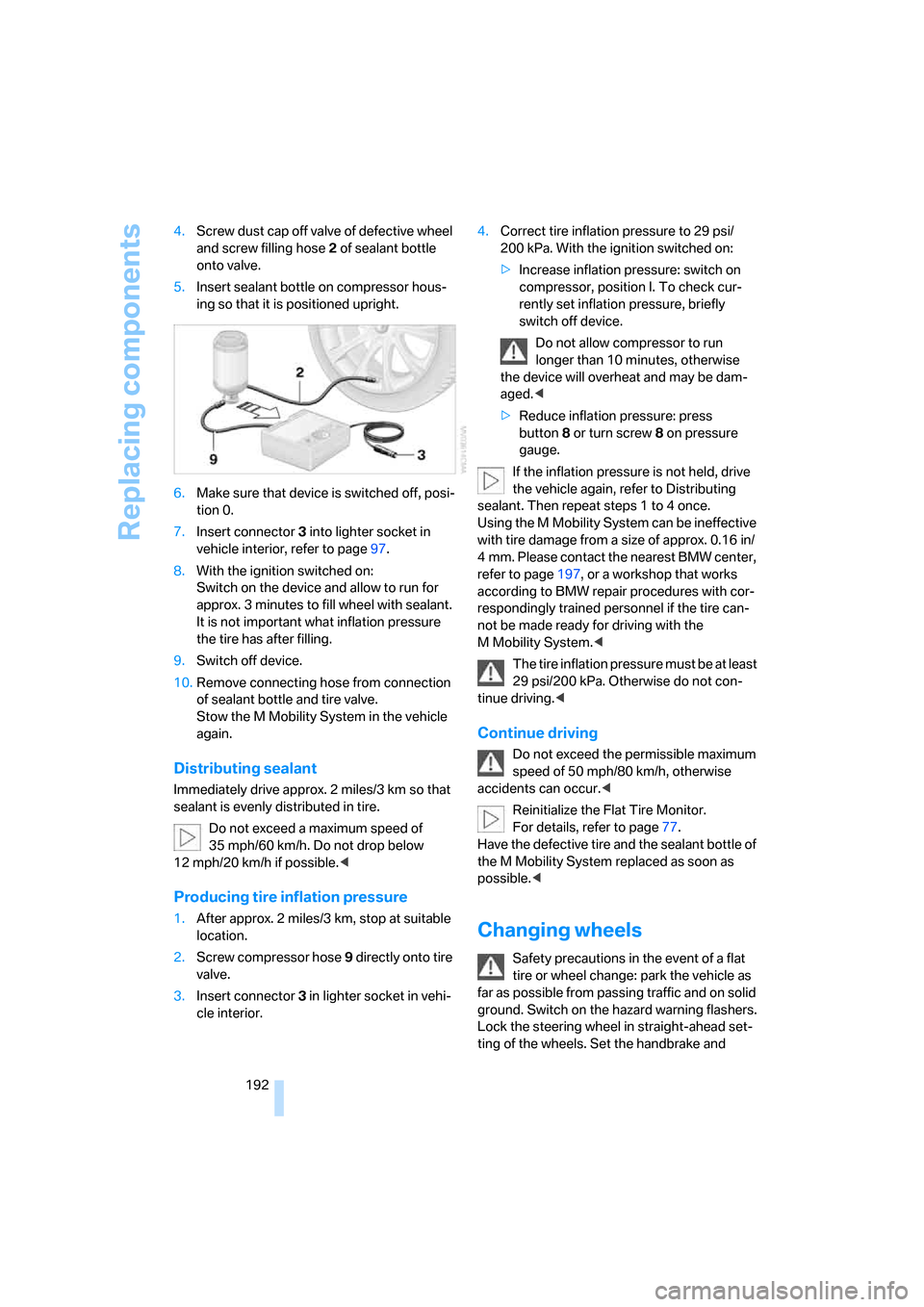
The M Mobility System consists of
1Sealant bottle and sticker with speed limit
2Filling hose from sealant bottle to wheel
Model with pressure gauge on hose*
3Connector and cable for lighter socket
4Mounting for sealing bottle
5Compressor
6On/Off switch
7Pressure gauge for indicating tire inflation
pressure
8Screw on pressure gauge for reducing tire
inflation pressure
9Connecting hose for connecting compres-
sor and sealant bottle or compressor and
wheel
Connector, cable and connecting hose are
stored in the compressor housing.
Model with pressure gauge integrated
in housing*
3Connector and cable for lighter socket
4Mounting for sealing bottle
5Compressor
6On/Off switch
7Pressure gauge for indicating tire inflation
pressure
8Button for reducing tire inflation pressure
9Connecting hose for connecting compres-
sor and sealant bottle or compressor and
wheel
Connector, cable and connecting hose are
stored on underside of compressor.
Using M Mobility System
To repair a flat tire with the M Mobility System,
proceed as follows:
>Fill sealant into wheel, refer to page191.
>Distribute sealant, refer to page192.
>Produce tire inflation pressure, refer to
page192.
Filling sealant into wheel
Strictly comply with the specified order,
otherwise highly pressurized sealant
could escape.<
1.Shake sealant bottle.
2.Screw hose9 onto connection of sealant
bottle.
3.For model with pressure gauge on hose:
Make sure that screw8 on pressure gauge
is closed.
Page 194 of 231
Replacing components
192 4.Screw dust cap off valve of defective wheel
and screw filling hose2 of sealant bottle
onto valve.
5.Insert sealant bottle on compressor hous-
ing so that it is positioned upright.
6.Make sure that device is switched off, posi-
tion 0.
7.Insert connector3 into lighter socket in
vehicle interior, refer to page97.
8.With the ignition switched on:
Switch on the device and allow to run for
approx. 3 minutes to fill wheel with sealant.
It is not important what inflation pressure
the tire has after filling.
9.Switch off device.
10.Remove connecting hose from connection
of sealant bottle and tire valve.
Stow the M Mobility System in the vehicle
again.
Distributing sealant
Immediately drive approx. 2 miles/3 km so that
sealant is evenly distributed in tire.
Do not exceed a maximum speed of
35 mph/60 km/h. Do not drop below
12 mph/20 km/h if possible.<
Producing tire inflation pressure
1.After approx. 2 miles/3 km, stop at suitable
location.
2.Screw compressor hose9 directly onto tire
valve.
3.Insert connector 3 in lighter socket in vehi-
cle interior.4.Correct tire inflation pressure to 29 psi/
200 kPa. With the ignition switched on:
>Increase inflation pressure: switch on
compressor, position I. To check cur-
rently set inflation pressure, briefly
switch off device.
Do not allow compressor to run
longer than 10 minutes, otherwise
the device will overheat and may be dam-
aged.<
>Reduce inflation pressure: press
button8 or turn screw8 on pressure
gauge.
If the inflation pressure is not held, drive
the vehicle again, refer to Distributing
sealant. Then repeat steps 1 to 4 once.
Using the M Mobility System can be ineffective
with tire damage from a size of approx. 0.16 in/
4 mm. Please contact the nearest BMW center,
refer to page197, or a workshop that works
according to BMW repair procedures with cor-
respondingly trained personnel if the tire can-
not be made ready for driving with the
M Mobility System.<
The tire inflation pressure must be at least
29 psi/200 kPa. Otherwise do not con-
tinue driving.<
Continue driving
Do not exceed the permissible maximum
speed of 50 mph/80 km/h, otherwise
accidents can occur.<
Reinitialize the Flat Tire Monitor.
For details, refer to page77.
Have the defective tire and the sealant bottle of
the M Mobility System replaced as soon as
possible.<
Changing wheels
Safety precautions in the event of a flat
tire or wheel change: park the vehicle as
far as possible from passing traffic and on solid
ground. Switch on the hazard warning flashers.
Lock the steering wheel in straight-ahead set-
ting of the wheels. Set the handbrake and
Page 198 of 231
Giving and receiving assistance
196
Giving and receiving assistance
Emergency call
Conditions for an emergency call:
>Full preparation package mobile phone.
With this equipment, an emergency call is
still possible when no mobile phone is
logged on in the vehicle.
>BMW Assist is enabled.
Enabling BMW Assist, refer to page167.
>Radio readiness is activated.
>The car phone is logged on to a mobile
communications network.
>The emergency call system is operable.
When the contract of participation with
BMW Assist expires, the car phone can be
deactivated by a BMW center without having to
visit a workshop. Following deactivation of the
car phone, no emergency calls can be made.
The car phone can be reactivated after signing a
new contract with a BMW center.
Initiating an emergency call
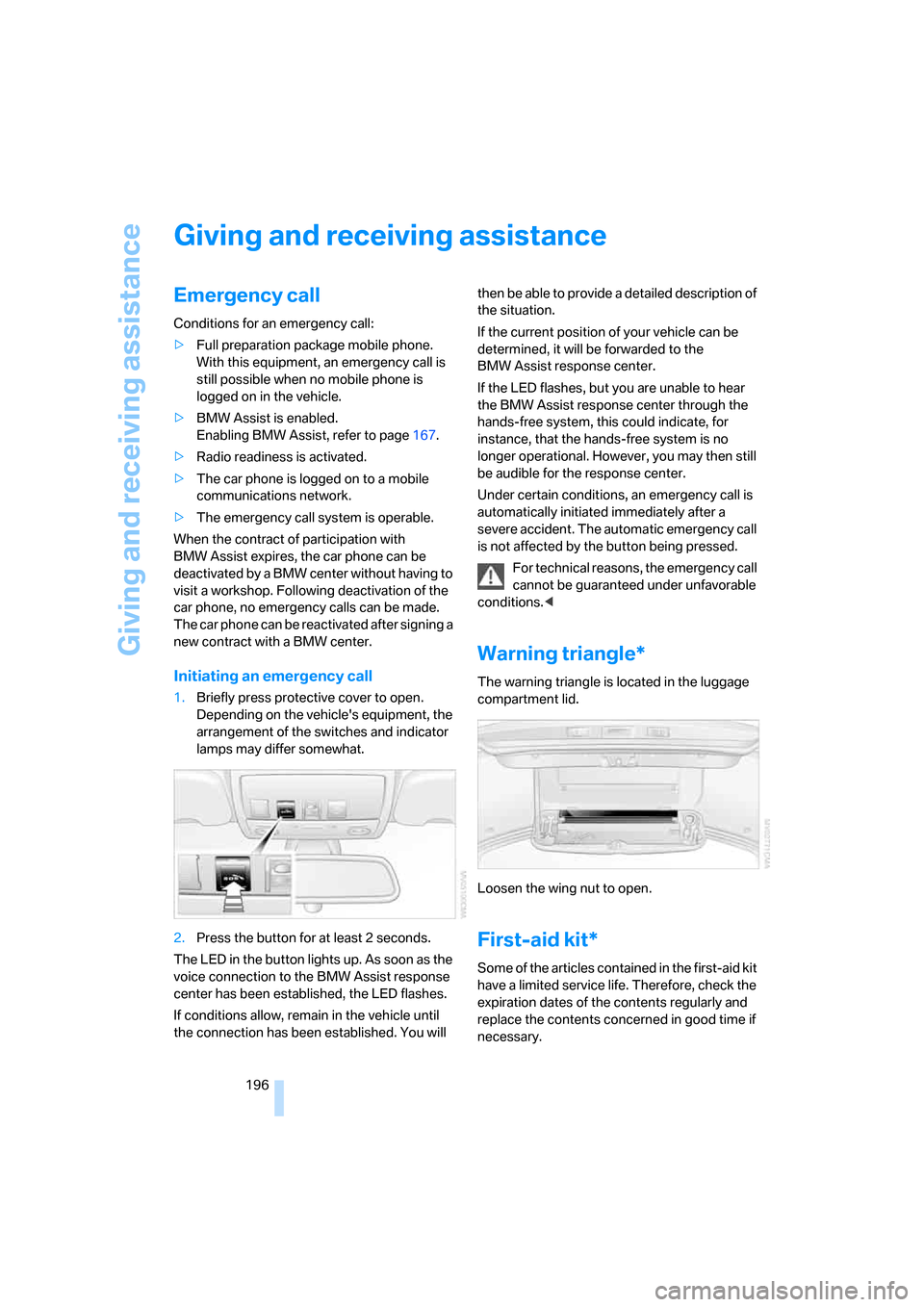
1.Briefly press protective cover to open.
Depending on the vehicle's equipment, the
arrangement of the switches and indicator
lamps may differ somewhat.
2.Press the button for at least 2 seconds.
The LED in the button lights up. As soon as the
voice connection to the BMW Assist response
center has been established, the LED flashes.
If conditions allow, remain in the vehicle until
the connection has been established. You will then be able to provide a detailed description of
the situation.
If the current position of your vehicle can be
determined, it will be forwarded to the
BMW Assist response center.
If the LED flashes, but you are unable to hear
the BMW Assist response center through the
hands-free system, this could indicate, for
instance, that the hands-free system is no
longer operational. However, you may then still
be audible for the response center.
Under certain conditions, an emergency call is
automatically initiated immediately after a
severe accident. The automatic emergency call
is not affected by the button being pressed.
For technical reasons, the emergency call
cannot be guaranteed under unfavorable
conditions.<
Warning triangle*
The warning triangle is located in the luggage
compartment lid.
Loosen the wing nut to open.
First-aid kit*
Some of the articles contained in the first-aid kit
have a limited service life. Therefore, check the
expiration dates of the contents regularly and
replace the contents concerned in good time if
necessary.
Page 210 of 231
Short commands of voice command system
208
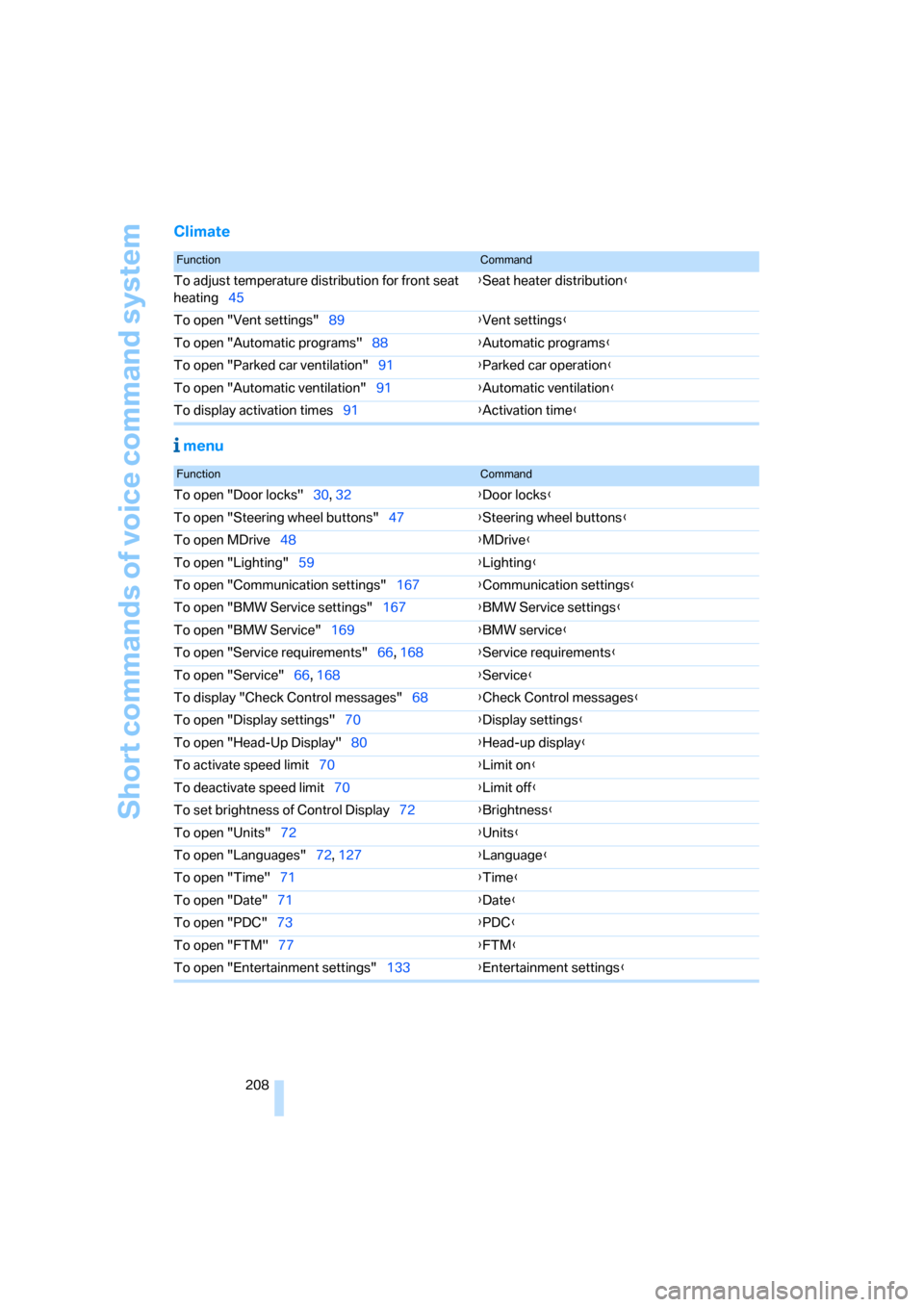
Climate
menu
FunctionCommand
To adjust temperature distribution for front seat
heating45{Seat heater distribution}
To open "Vent settings"89{Vent settings}
To open "Automatic programs"88{Automatic programs}
To open "Parked car ventilation"91{Parked car operation}
To open "Automatic ventilation"91{Automatic ventilation}
To display activation times91{Activation time}
FunctionCommand
To open "Door locks"30, 32{Door locks}
To open "Steering wheel buttons"47{Steering wheel buttons}
To open MDrive48{MDrive}
To open "Lighting"59{Lighting}
To open "Communication settings"167{Communication settings}
To open "BMW Service settings"167{BMW Service settings}
To open "BMW Service"169{BMW service}
To open "Service requirements"66, 168{Service requirements}
To open "Service"66, 168{Service}
To display "Check Control messages"68{Check Control messages}
To open "Display settings"70{Display settings}
To open "Head-Up Display"80{Head-up display}
To activate speed limit70{Limit on}
To deactivate speed limit70{Limit off}
To set brightness of Control Display72{Brightness}
To open "Units"72{Units}
To open "Languages"72, 127{Language}
To open "Time"71{Time}
To open "Date"71{
Date}
To open "PDC"73{PDC}
To open "FTM"77{FTM}
To open "Entertainment settings"133{Entertainment settings}
Page 214 of 231
Everything from A to Z
212 Brake system104,185
– brake fluid level185
– brake pads104,185
– breaking-in104
– disk brakes106
– warning lamp185
Braking
– CBC Cornering Brake
Control74
– DBC Dynamic Brake
Control74
– electronic brake-force
distribution74
– refer to Braking safely106
Braking safely106
Breakdown, M Mobility
System190
Breakdown assistance169
Breakdown services, refer to
Roadside Assistance197
Breaking-in the clutch104
Breaking-in the
differential104
Break-in period104
"Brightness"72
Brightness of Control
Display72
Button for starting engine53
Buttons on steering wheel11
C
California Proposition 65
Warning6
"Call"160
Call
– accepting158
– displaying accepted160
– ending159
– in absence160
– starting159
Calling
– from phone book159
– from Top 8 list160
– redialing160
Can holder, refer to Cup
holders96
Capacities204Capacity of luggage
compartment204
Car battery, refer to Vehicle
battery195
Car care, refer to Caring for
your vehicle brochure
Car-care products, refer to
Caring for your vehicle
brochure
"Car Data"64
Care187
– refer to Caring for your
vehicle brochure
Cargo
– refer to Loading106
– securing108
– securing with ski bag100
Cargo area
– capacity204
– opening with remote
control31
Caring for artificial leather,
refer to Caring for your
vehicle brochure
Caring for leather, refer to
Caring for your vehicle
brochure
Caring for light-alloy wheels,
refer to Caring for your
vehicle brochure
Caring for the carpet, refer to
Caring for your vehicle
brochure
Caring for the vehicle finish,
refer to Caring for your
vehicle brochure
Car key, refer to Keys/remote
control28
Car phone154
– installation location, refer to
Center armrest95
– refer to Mobile phone154
– refer to separate operating
instructions
Car radio, refer to Radio136
Car wash106
– also refer to Caring for your
vehicle brochureCatalytic converter, refer to
Hot exhaust system104
"Categories"143
CBC Cornering Brake
Control74
CBS Condition Based
Service186
"CD"132,145
CD changer145
– controls132
– fast forward/reverse149
– installation location149
– playing a track147
– random order148
– repeating a track148
– selecting a CD145
– selecting a track146
– switching on/off132
– tone control133
– volume133
CD player145
– controls132
– fast forward/reverse149
– playing a track147
– random order148
– repeating a track148
– selecting a track146
– switching on/off132
– tone control133
– volume133
Center armrest
– front95
– rear98
Center brake lamp189
Center console14
"Central locking"30
Central locking system29
– comfort access36
– from inside vehicle32
Changes, technical
– refer to For your own
safety5
– refer to Parts and
accessories6
Changing language on
Control Display72
Changing units of measure on
Control Display72
Changing wheels179,192
Page 215 of 231
Reference 213
At a glance
Controls
Driving tips
Communications
Navigation
Entertainment
Mobility
CHECK button68
Check Control67
"Check Control
messages"68
Check Gas Cap174
Checking the air pressure,
refer to Tire inflation
pressure176
Child-restraint fixing system
LATCH51
Child restraint systems50
Child-safety lock52
Child seats50
Chime, refer to Check
Control67
Chock193
Chrome parts, care, refer to
Caring for your vehicle
brochure
Cigarette lighter97
Cleaning, refer to Caring for
your vehicle brochure
"Climate"45,88
Clock63
– 12h/24h mode71
– setting time and date71
Closing
– from inside32
– from outside30
Closing fuel filler cap174
Clothes hooks96
Cockpit10
Cold start, refer to Starting
engine54
"Comfort", active backrest
width adjustment42
Comfort access36
– replacing battery37
Comfort area, refer to Around
the center console14
Comfort operation
– windows with comfort
access36
– with comfort access36
"Comfort" with EDC76
"Communication"158,169
"Communication
settings"168Compact Disc
– refer to CD changer145
– refer to CD player145
Compartment for remote
control, refer to Ignition
lock53
Compartments, refer to
Storage compartments96
Compressed audio files145
Computer63
– displays on Control
Display64
– hour signal
71
"Concert hall", refer to Tone
control134
Condition Based Service
CBS186
"Confirmation"31
Connecting car vacuum
cleaner, refer to Connecting
electrical devices97
Consumption, refer to
Average fuel
consumption64
Consumption statistics, refer
to Average fuel
consumption64
"Continue guidance to
destination?"125
Control Center, refer to
iDrive16
Control Display, refer to
iDrive16
– setting brightness72
Controller, refer to iDrive16
Controls, refer to Cockpit10
Convenience operation
– glass sunroof30
– windows30
Convenience start, refer to
Starting engine54
Coolant184
– checking level184
– temperature62
Cooling, maximum89
Cornering Brake Control
CBC74
Country of destination for
navigation114Courtesy lamps86
Cradle for telephone or mobile
phone95
Cruise control61
Cruising range64
Cup holders96
Curb weight, refer to
Weights204
"Current position"128
Current position
– displaying128
– entering120
– storing120
"Customer
Relations"162,169
Cylinders, refer to Engine
data202
D
Dashboard, refer to
Cockpit10
Data202
– capacities204
– dimensions203
– engine202
– technical data202
– weights204
"Date"71
Date
– display format72
– setting71
"Date format"72
Daytime running lamps84
DBC Dynamic Brake
Control74
"Deactivated"43
Decommissioning the vehicle,
refer to Caring for your
vehicle brochure
Defect
– fuel filler door174
– glass sunroof39
– luggage compartment lid34
Defrosting windows89
Defrosting windows and
removing condensation89
Defrost position, refer to
Defrosting windows89
Page 216 of 231
Everything from A to Z
214 "Delete address book" for
navigation system122
"Delete all numbers" for
mobile phone161
"Delete data" for navigation
system122
"Delete" for mobile
phone161
Destination address
– deleting121
– entering113,116
Destination for navigation
– destination list119
– entering via voice116
– entry113
– selecting from address
book121
– selecting using
information118
– storing120
Destination guidance124
– bypassing route
sections128
– canceling voice
instructions47
– changing specified
route122
– displaying routes125
– distance and arrival124
– interrupting124
– starting124
– terminating/continuing124
– voice instructions127
– volume of voice
instructions127
Destination list for
navigation119
Destinations recently driven
to119
"Details" in audio mode147
"Dial" for mobile phone159
"Dial number"159
Digital clock63
Digital radio, refer to High
Definition Radio140
Dimensions203
Directional indicators, refer to
Turn signals59Direction announcements,
refer to Voice
instructions127
Direction instructions, refer to
Voice instructions127
Directory for navigation, refer
to Address book120
Displacement, refer to Engine
data202
"Display"72
Display, refer to iDrive16
Display lighting, refer to
Instrument lighting
86
"Display off"21
Displays, refer to Instrument
cluster12
"Display settings"71
Displays on the windshield,
refer to Head-Up Display80
Disposal
– battery of remote control
with comfort access37
– vehicle battery195
Distance, refer to
Computer64
"Distance to dest."65
Distance to destination, refer
to Computer64
Distance warning, refer to
PDC Park Distance
Control73
Divided rear seat back, refer to
Through-loading system98
Door entry lighting86
Door key, refer to Keys/
remote control28
Door lock32
Door locking, acknowl-
edgment signals31
"Door locks"30
Doors
– manual operation32
– remote control30
DOT Quality Grades178
Draft-free ventilation90
Drinks holder, refer to Cup
holders96
Drivelogic57
Drive mode56"Driver's door only"30
Driving lamps, refer to Parking
lamps/low beams83
Driving notes104
Driving programs, refer to
Drivelogic57
Driving route, refer to
Displaying route125
Driving stability control
systems74
Driving through water105
Driving tips, refer to Driving
notes104
Dry air, refer to Cooling
function89
Drying the air, refer to Cooling
function89
"DSC"48,75
DSC Dynamic Stability
Control74
– indicator lamp13,75
DVD for navigation112
Dynamic Brake Control
DBC74
Dynamic Stability Control
DSC74
– M Dynamic Mode MDM75
E
Easy entry/exit47
– backrest width42
"EDC"48
EDC Electronic Damping
Control76
– "Comfort"76
– "Normal"76
– "Sport"76
Eject button, refer to Buttons
on CD player132
Electrical malfunction
– door lock32
– driver's door32
– fuel filler door174
– glass sunroof, electric39
– luggage compartment lid34
Electric steering wheel
adjustment47