engine BMW M5 SEDAN 2007 E60 Workshop Manual
[x] Cancel search | Manufacturer: BMW, Model Year: 2007, Model line: M5 SEDAN, Model: BMW M5 SEDAN 2007 E60Pages: 256, PDF Size: 12.5 MB
Page 223 of 256
Mobility
221Reference
At a glance
Controls
Driving tips
Communications
Navigation
Entertainment
3.Attach the second end of the cable to the
positive terminal of the battery or to a start-
ing-aid terminal of the vehicle to be started.
4.Attach one end of the jumper cable minus/–
to the negative terminal of the battery or to
an engine or body ground of the assisting
vehicle.
Your BMW M5 has a special nut as body
ground or negative terminal.
5.Attach the second end of the cable to the
negative terminal of the battery or to the
engine or body ground of the vehicle to be
started.
Starting engine
1.Start the engine on the assisting vehicle
and allow it to run at idle for several minutes
at slightly increased speed.
2.Start the engine on the other vehicle in the
usual way.
If the first starting attempt is not successful,
wait a few minutes before another attempt
in order to allow the discharged battery to
recharge.
3.Let the engines run for a few minutes.
4.Disconnect the jumper cables by reversing
the connection sequence.
Check the battery and recharge if necessary.
Never use spray fluids to start the
engine.<
Tow-starting and towing
Observe applicable laws and regulations
for tow-starting and towing.<
Do not transport any passengers other
than the driver in a vehicle that is being
towed.<
Using tow fitting
The screw-on tow-fitting must always be car-
ried in the vehicle. It can be screwed in at the
front or rear of the BMW M5.
It is located in the toolkit in the luggage com-
partment lid, refer to page210.
Use only the tow fitting provided with the
vehicle and screw it all the way in. Use the
tow fitting for towing only on roads. Avoid lateral
loading of the tow fitting, e.g. do not lift the vehi-
cle by the tow fitting. Otherwise damage to the
tow fitting and the vehicle can occur.<
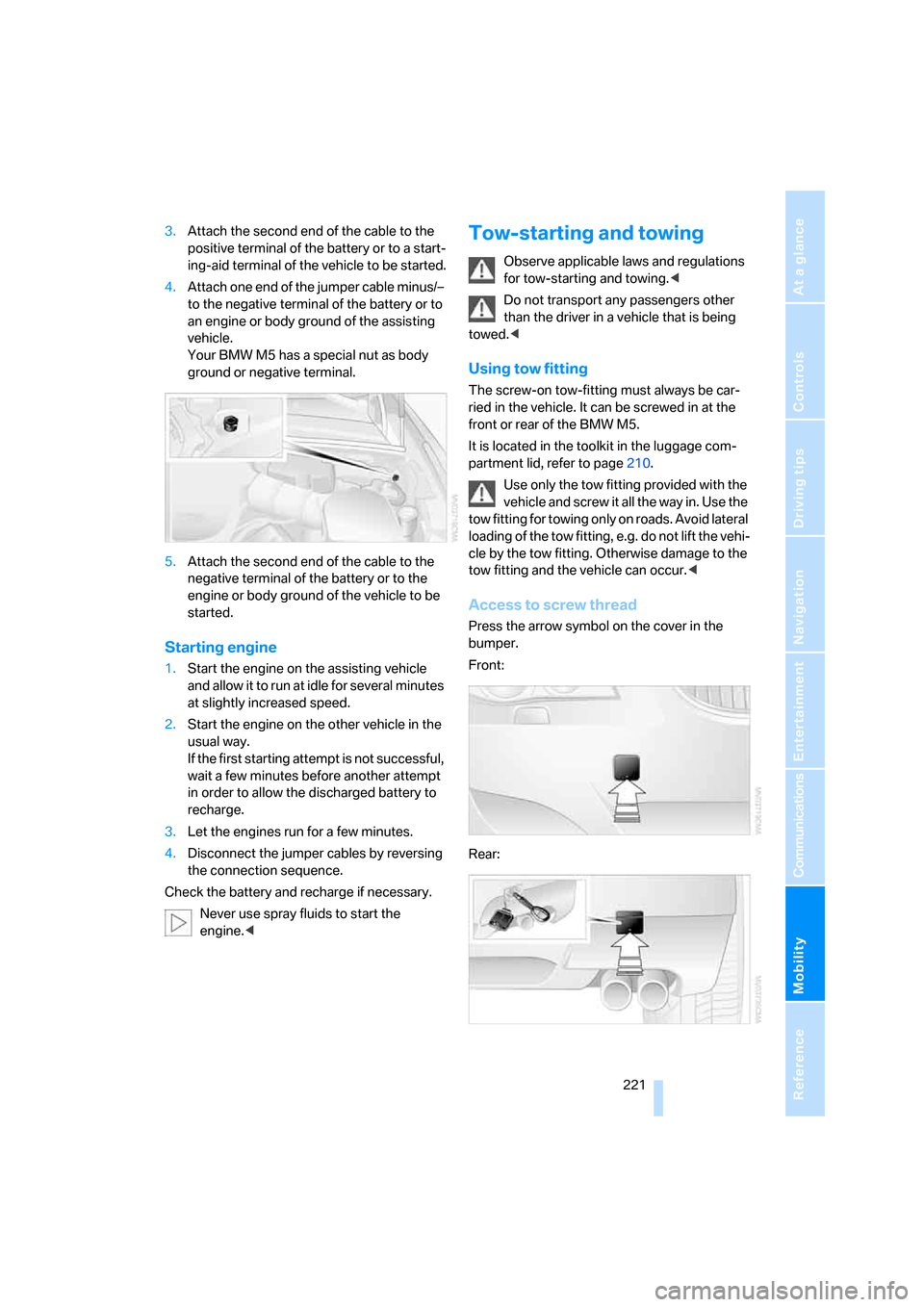
Access to screw thread
Press the arrow symbol on the cover in the
bumper.
Front:
Rear:
ba8_m5us.book Seite 221 Montag, 5. Februar 2007 12:03 12
Page 224 of 256
Giving and receiving assistance
222
Being towed
Make sure that the ignition is switched on,
refer to page55, otherwise the low
beams, tail lamps, turn signals and windshield
wipers would not be available. Do not tow the
vehicle with the rear axle raised, as otherwise
the steering can turn to the left or right. When
the engine is stopped, there is no power assist.
This then requires increased effort for braking
and steering.<
Switch on the hazard warning flashers depend-
ing on the local regulations. If the electrical sys-
tem fails, mark the vehicle to be towed, e.g. with
a sign or warning triangle in the rear window.
Manual transmission
Gearshift lever in neutral position.
Sequential Manual Transmission with
Drivelogic
Make sure that selector lever position N is
engaged with the ignition switched on, as
otherwise the engine can be damaged during
towing.<
Towing methods
Do not lift vehicle by tow fitting or body
and chassis parts, otherwise damage may
result.<
In some countries, towing with tow bars or
ropes in public traffic is not permitted. Familiar-
ize yourself with the regulations on towing in the
respective country.
With tow bar
The towing vehicle may not be lighter
than the vehicle to be towed, otherwise it
will not be possible to reliably control vehicle
response.<
The tow fittings used should be on the same
side on both vehicles. Should it prove impossi-
ble to avoid mounting the tow bar at an offset
angle, please observe the following:
>Clearance and maneuvering capability will
be sharply limited during cornering.>When mounted at an angle, the tow bar will
exert lateral forces, tending to push the
vehicle sideways.
Only attach the tow bar to the tow fittings,
as attachment to other vehicle parts can
lead to damage.<
With tow rope
When starting off in the towing vehicle, make
sure that the tow rope is taut.
To avoid jerking and the associated
stresses on vehicle components when
towing, always use nylon ropes or nylon straps.
Only attach tow ropes to the tow fittings, as
attachment to other vehicle parts can lead to
damage.<
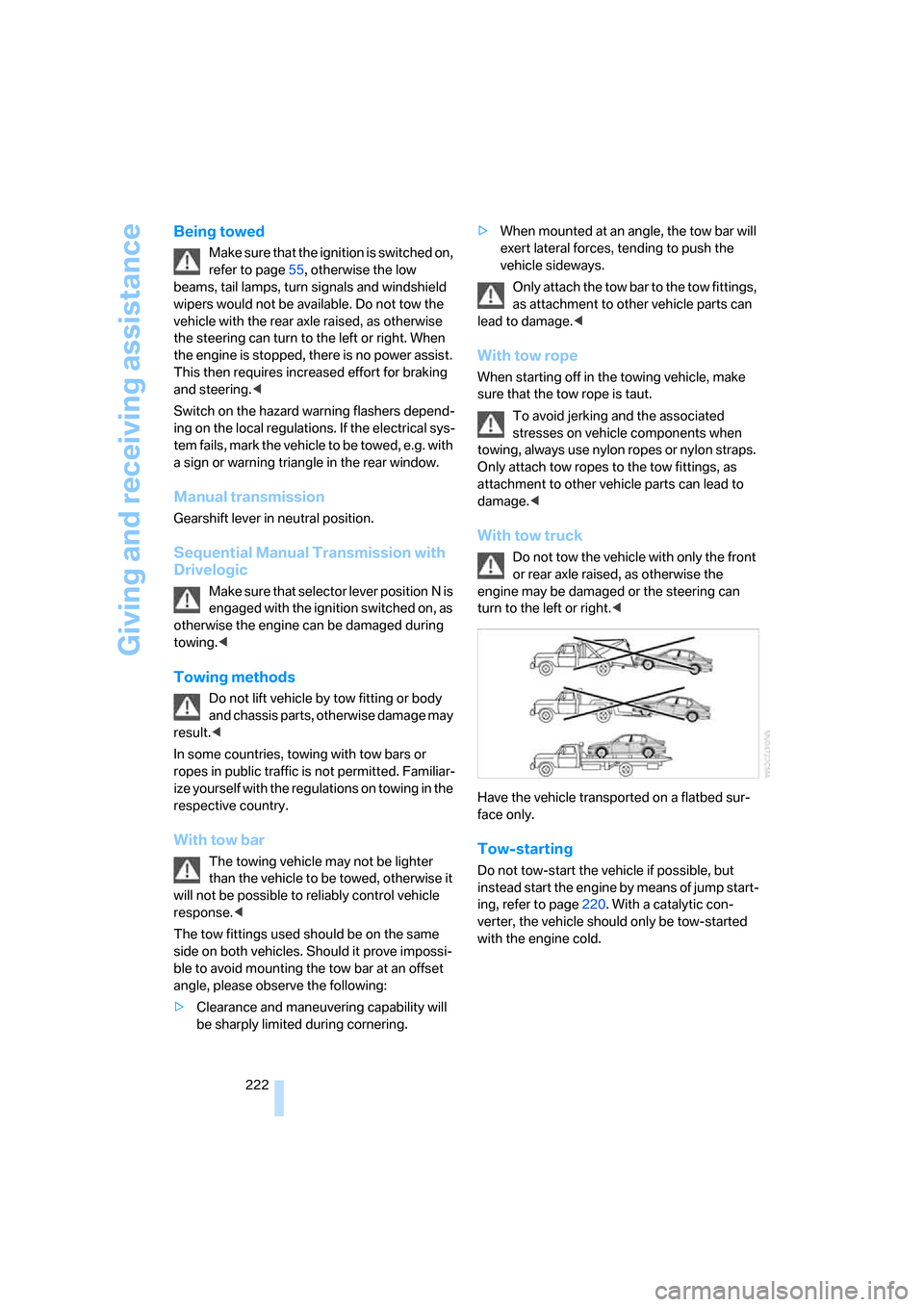
With tow truck
Do not tow the vehicle with only the front
or rear axle raised, as otherwise the
engine may be damaged or the steering can
turn to the left or right.<
Have the vehicle transported on a flatbed sur-
face only.
Tow-starting
Do not tow-start the vehicle if possible, but
instead start the engine by means of jump start-
ing, refer to page220. With a catalytic con-
verter, the vehicle should only be tow-started
with the engine cold.
ba8_m5us.book Seite 222 Montag, 5. Februar 2007 12:03 12
Page 225 of 256
Mobility
223Reference
At a glance
Controls
Driving tips
Communications
Navigation
Entertainment
Manual transmission
1.Switch on the hazard warning flashers,
comply with country-specific regulations.
2.Switch on the ignition, refer to page55.
3.Shift into 3rd gear.
4.Tow-start with the clutch completely
depressed and slowly release the clutch.
After the engine starts, immediately
depress the clutch again completely.
5.Stop at a suitable location, remove the tow
bar or rope and switch off the hazard warn-
ing flashers.
6.Have the vehicle checked.
Sequential Manual Transmission with
Drivelogic
1.Switch on the hazard warning flashers,
comply with country-specific regulations.
2.Switch on the ignition, refer to page55.
3.Tow-start in selector lever position N.
4.Move the selector lever into the drive posi-
tion and pull toward + within 2 seconds.
The correct gear will be selected and
engaged automatically.
5.Stop at a suitable location, remove the tow
bar or rope and switch off the hazard warn-
ing flashers.
6.Have the vehicle checked.
ba8_m5us.book Seite 223 Montag, 5. Februar 2007 12:03 12
Page 228 of 256
Technical data
226
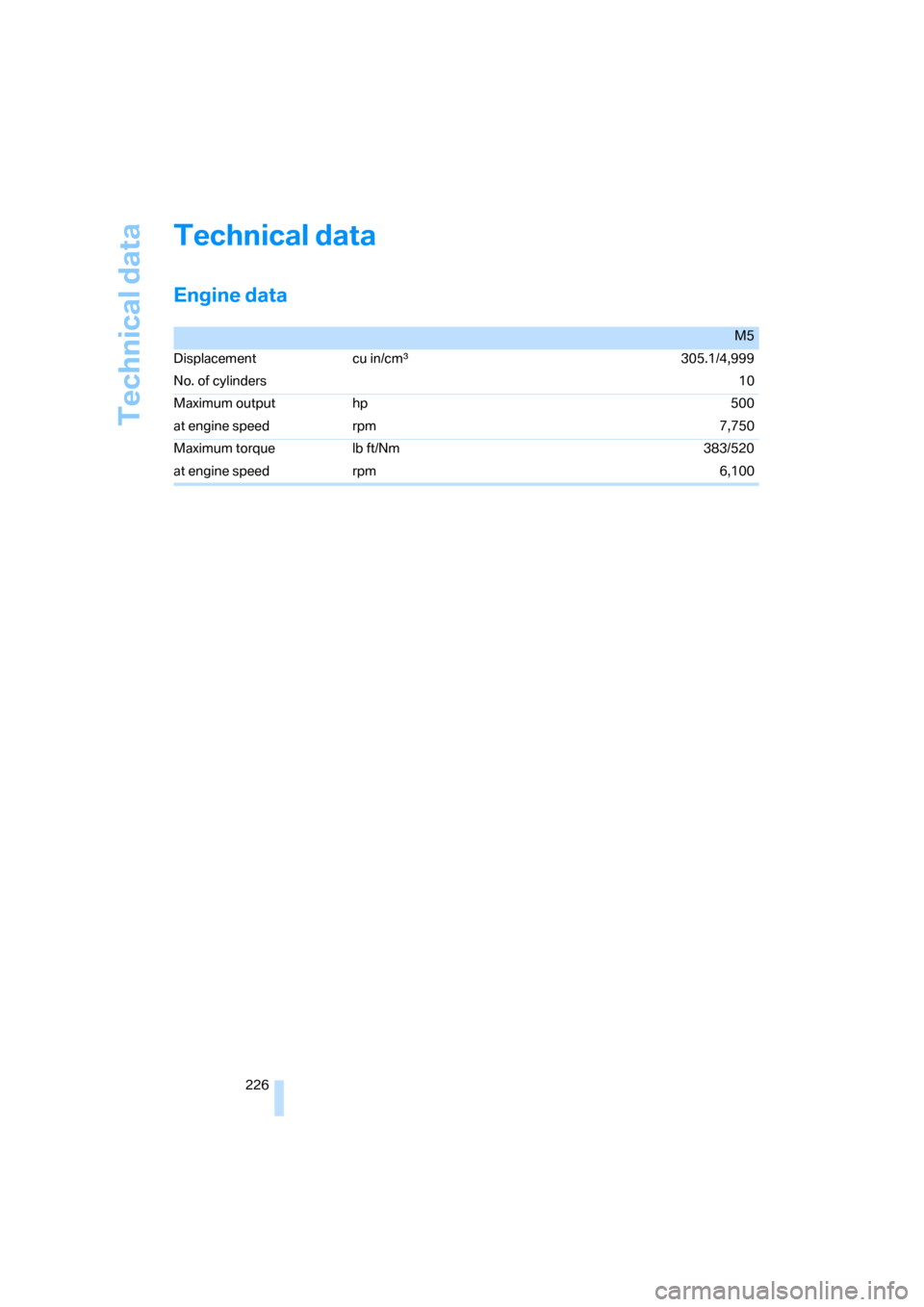
Technical data
Engine data
M5
Displacement cu in/cmµ305.1/4,999
No. of cylinders10
Maximum output hp 500
at engine speed rpm 7,750
Maximum torque lb ft/Nm 383/520
at engine speed rpm 6,100
ba8_m5us.book Seite 226 Montag, 5. Februar 2007 12:03 12
Page 236 of 256
Everything from A to Z
234
Everything from A to Z
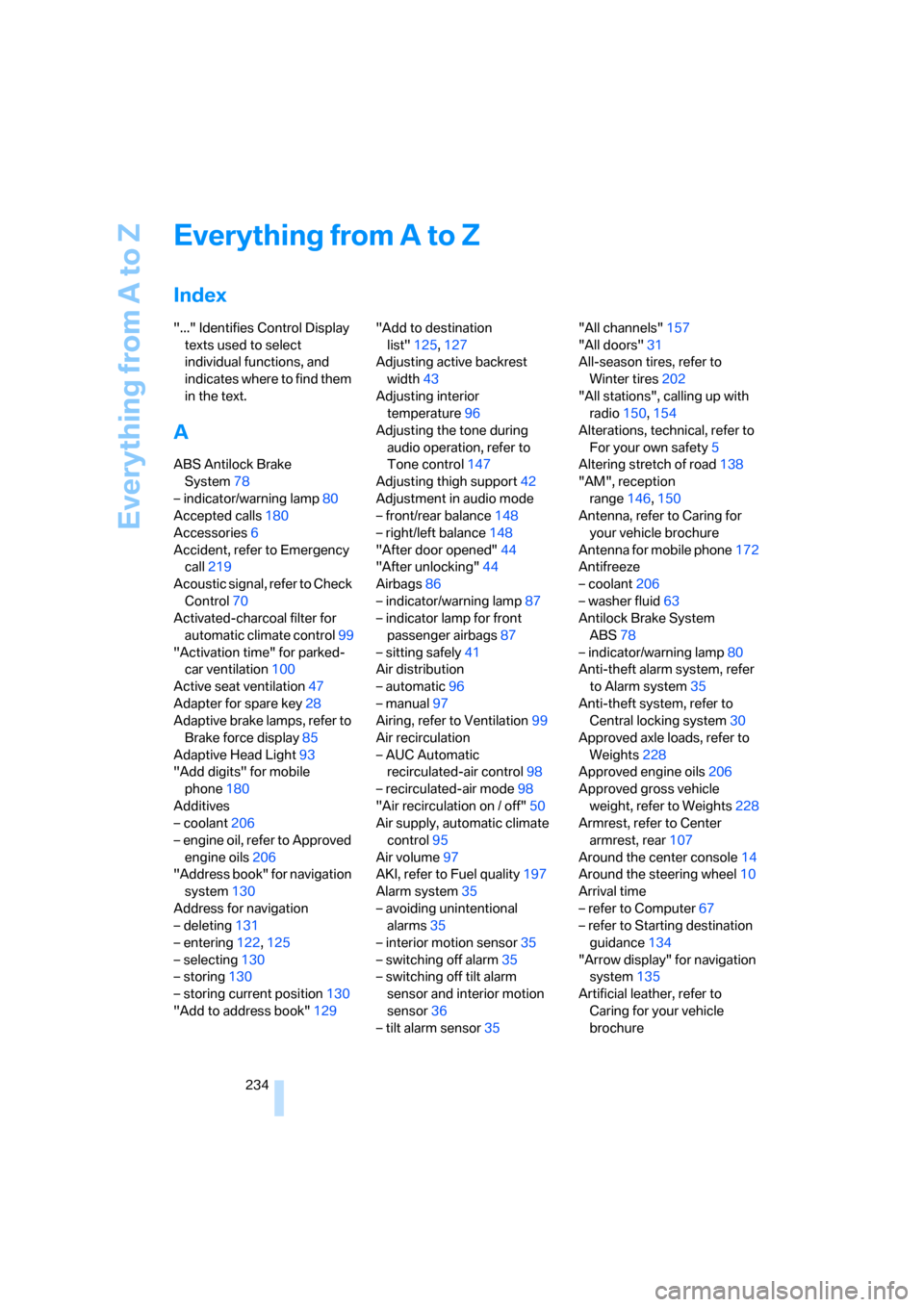
Index
"..." Identifies Control Display
texts used to select
individual functions, and
indicates where to find them
in the text.
A
ABS Antilock Brake
System78
– indicator/warning lamp80
Accepted calls180
Accessories6
Accident, refer to Emergency
call219
Acoustic signal, refer to Check
Control70
Activated-charcoal filter for
automatic climate control99
"Activation time" for parked-
car ventilation100
Active seat ventilation47
Adapter for spare key28
Adaptive brake lamps, refer to
Brake force display85
Adaptive Head Light93
"Add digits" for mobile
phone180
Additives
– coolant206
– engine oil, refer to Approved
engine oils206
"Address book" for navigation
system130
Address for navigation
– deleting131
– entering122,125
– selecting130
– storing130
– storing current position130
"Add to address book"129"Add to destination
list"125,127
Adjusting active backrest
width43
Adjusting interior
temperature96
Adjusting the tone during
audio operation, refer to
Tone control147
Adjusting thigh support42
Adjustment in audio mode
– front/rear balance148
– right/left balance148
"After door opened"44
"After unlocking"44
Airbags86
– indicator/warning lamp87
– indicator lamp for front
passenger airbags87
– sitting safely41
Air distribution
– automatic96
– manual97
Airing, refer to Ventilation99
Air recirculation
– AUC Automatic
recirculated-air control
98
– recirculated-air mode98
"Air recirculation on / off"50
Air supply, automatic climate
control95
Air volume97
AKI, refer to Fuel quality197
Alarm system35
– avoiding unintentional
alarms35
– interior motion sensor35
– switching off alarm35
– switching off tilt alarm
sensor and interior motion
sensor36
– tilt alarm sensor35"All channels"157
"All doors"31
All-season tires, refer to
Winter tires202
"All stations", calling up with
radio150,154
Alterations, technical, refer to
For your own safety5
Altering stretch of road138
"AM", reception
range146,150
Antenna, refer to Caring for
your vehicle brochure
Antenna for mobile phone172
Antifreeze
– coolant206
– washer fluid63
Antilock Brake System
ABS78
– indicator/warning lamp80
Anti-theft alarm system, refer
to Alarm system35
Anti-theft system, refer to
Central locking system30
Approved axle loads, refer to
Weights228
Approved engine oils206
Approved gross vehicle
weight, refer to Weights228
Armrest, refer to Center
armrest, rear107
Around the center console14
Around the steering wheel10
Arrival time
– refer to Computer67
– refer to Starting destination
guidance134
"Arrow display" for navigation
system135
Artificial leather, refer to
Caring for your vehicle
brochure
ba8_m5us.book Seite 234 Montag, 5. Februar 2007 12:03 12
Page 238 of 256
Everything from A to Z
236 Brakes
– ABS Antilock Brake
System78
– brake assistant79
– brake force display85
– breaking-in112
– CBC Cornering Brake
Control78
– electronic brake-force
distribution78
– handbrake57
– refer to Braking safely113
– warning lamps13
Brake system112
– brake pads112
– breaking-in112
– disk brakes114
– warning lamp80
Braking safely113
Breakdown, M Mobility
System213
Breakdown assistance188
Breakdown services, refer to
Roadside Assistance220
Breaking-in brake pads112
Breaking-in the clutch112
Breaking-in the differential,
refer to Engine and
differential112
Break-in period112
"Brightness"75,89
Brightness of Control
Display75
Button for starting engine,
refer to Start/Stop button55
Buttons on steering wheel11
C
California Proposition 65
Warning6
"Call"180,191
Call
– accepting178
– displaying accepted181
– ending179
– in absence181
– rejecting179
– starting179Calling
– by entering phone
number179
– from phone book180
– from Top 8 list181
– redialing181
Can holder, refer to Cup
holders105
Capacities228
Car battery, refer to Vehicle
battery218
Car care, refer to Caring for
your vehicle brochure
Car-care products, refer to
Caring for your vehicle
brochure
"Car Data"67
Care209
– refer to Caring for your
vehicle brochure
Cargo
– refer to Cargo loading114
– securing116
– securing with ski bag109
Cargo bay
– capacity228
– emergency release34
– opening/closing, refer to
Luggage compartment
lid33
– opening from inside33
– opening from outside34
– opening with remote
control31
– socket107
Caring for artificial leather,
refer to Caring for your
vehicle brochure
Caring for leather, refer to
Caring for your vehicle
brochure
Caring for light-alloy wheels,
refer to Caring for your
vehicle brochure
Caring for plastic, refer to the
Caring for your vehicle
brochureCaring for the carpet, refer to
Caring for your vehicle
brochure
Caring for the vehicle finish,
refer to Caring for your
vehicle brochure
Car key, refer to Keys/remote
control28
Car phone172
– installation location, refer to
Center armrest104
– refer to Mobile phone172
– refer to separate operating
instructions
Car radio, refer to Radio150
Car wash114
– also refer to Caring for your
vehicle brochure
Catalytic converter, refer to
Hot exhaust system112
"Categories"157
CBC Cornering Brake
Control78
CBS Condition Based
Service208
"CD"146,159
CD changer159
– controls146
– fast forward/reverse163
– installation location163
– random sequence162
– repeating a track162
– sampling tracks161
– selecting a CD160
– selecting a track160
– switching on/off146
– tone control147
– volume147
CD player159
– controls146
– fast forward/reverse163
– random sequence162
– repeating a track162
– sampling a track161
– selecting a track160
– switching on/off146
– tone control147
– volume147
ba8_m5us.book Seite 236 Montag, 5. Februar 2007 12:03 12
Page 239 of 256
Reference 237
At a glance
Controls
Driving tips
Communications
Navigation
Entertainment
Mobility
Center armrest
– front104
– rear107
Center brake lamp212
Center console14
"Central locking"30
Central locking
– from inside32
– from outside30
Central locking system30
– comfort access36
Changes, technical
– refer to For your own
safety5
– refer to Parts and
accessories6
Changing language on
Control Display76
Changing scale for
navigation136
Changing units of measure on
Control Display75
Changing wheels201,215
CHECK button71
Check Control70
"Check Control
messages"72
Check Gas Cap196
Checking the air pressure,
refer to Tire inflation
pressure198
Child restraint fixing system
LATCH53
Child restraint systems52
Child-safety lock54
Child seats, refer to
Transporting children
safely52
Chime, refer to Check
Control70
Chock216
Chrome parts, refer to Caring
for your vehicle brochure
Cigarette lighter106
Cigarette lighter socket, refer
to Connecting electrical
devices107
Cleaning, refer to Caring for
your vehicle brochure"Climate"47,96
Clock66
– 12h/24h mode74
– hour signal74
– setting time and date74
Closing
– from inside32
– from outside30
Closing fuel filler cap196
Clothes hooks105
Cockpit
10
Cold start, refer to Starting
engine56
Comfort access36
– replacing battery, remote
control37
Comfort area, refer to Around
the center console14
Comfort operation
– glass sunroof31
– windows31
– windows with comfort
access36
– with comfort access36
"Comfort" with EDC81
"Communication"178,188
Compact Disc
– refer to CD changer159
– refer to CD player159
Compartment for remote
control, refer to Ignition
lock55
Compartments, refer to
Storage compartments105
Compressed audio files159
Computer66
– clock66
– displays on Control
Display67
– hour signal74
"Concert hall", refer to Tone
control149
"Concierge"190
Condensation, refer to When
vehicle is parked114
Condition Based Service
CBS208
"Confirmation"31Confirmation signals for
locking and unlocking31
Connecting car vacuum
cleaner, refer to Connecting
electrical devices107
Consumption, refer to
Average fuel
consumption67
Consumption statistics, refer
to Average fuel
consumption67
"Continue guidance to
destination?"135
Control Center, refer to
iDrive16
Control Display, refer to
iDrive16
– setting brightness75
– switching off/on21
Controller, refer to iDrive16
Controls, refer to Cockpit10
Coolant206
– checking level206
– temperature
65
Cooling, maximum98
Cooling fluid, refer to
Coolant206
Cooling function, automatic
climate control98
Cooling system, refer to
Coolant206
Copyright2
Cornering Brake Control
CBC78
Country of destination for
navigation123
Courtesy lamps94
Cradle for telephone or mobile
phone104
Cruise control63
Cruising range67
Cup holders105
Curb weight, refer to
Weights228
"Current position"142
Current position
– displaying142
– entering130
– storing130
ba8_m5us.book Seite 237 Montag, 5. Februar 2007 12:03 12
Page 240 of 256
Everything from A to Z
238 "Customer
Relations"182,190
Cylinders, refer to Engine
data226
D
Dashboard, refer to
Cockpit10
Data, technical226
– dimensions227
– engine226
– weights228
"Date"75
Date
– display format75
– setting75
"Date format"75
"Daytime running lamps"92
Daytime running lamps92
DBC Dynamic Brake Control,
warning lamp81
"Deactivated"44
Decommissioning the vehicle,
refer to Caring for your
vehicle brochure
Defect
– door lock32
– fuel filler door196
– glass sunroof39
– luggage compartment lid34
Defrosting windows97
Defrosting windows and
removing condensation97
Defrosting windshield, refer to
Defrosting windows97
Defrost position, refer to
Defrosting windows97
"Delete address book" for
navigation system131
"Delete all numbers" for
mobile phone181
"Delete data" for navigation
system131
"Delete" for mobile
phone181
Destination address
– deleting131
– entering122,125Destination for navigation
– destination list129
– entering via voice125
– entry122
– selecting from address
book130
– selecting using
information128
– storing130
Destination guidance134
– bypassing route
sections138
– canceling voice
instructions50
– changing specified
route132
– displaying route135
– distance and arrival134
– interrupting
134
– starting134
– terminating/continuing134
– voice instructions137
– volume of voice
instructions138
Destination list for
navigation129
Destinations recently driven
to129
"Details" in audio
mode161,167
"Detour" for navigation
system141
"Dial" for mobile phone179
"Dial number"179
Digital clock66
Digital radio, refer to High
Definition Radio154
Dimensions227
Directional indicators, refer to
Turn signals61
Direction announcements,
refer to Voice
instructions137
Direction instructions, refer to
Voice instructions137
Directory, refer to Phone
book180Directory for navigation, refer
to Address book130
Direct selection buttons21
Displacement, refer to Engine
data226
"Display"75
Display, refer to iDrive
controls16
Display elements, refer to
Instrument cluster12
Displaying vehicle data193
Display lighting, refer to
Instrument lighting94
"Display off"21
Displays
– on Control Display, refer to
iDrive16
– refer to Instrument
cluster12
"Display settings"75,88
Displays on the windshield,
refer to Head-Up Display88
Disposal
– battery of remote control
with comfort access37
– coolant206
– vehicle battery218
Distance, refer to
Computer67
"Distance to dest."67
Distance to destination, refer
to Computer67
Distance warning, refer to
PDC Park Distance
Control77
Divided rear backrest, refer to
Through-loading
system108
Door entry lighting94
Door key, refer to Keys/
remote control28
Door lock32
Door locking, confirmation
signals31
"Door locks"30
Doors
– manual operation32
– remote control30
ba8_m5us.book Seite 238 Montag, 5. Februar 2007 12:03 12
Page 241 of 256
Reference 239
At a glance
Controls
Driving tips
Communications
Navigation
Entertainment
Mobility
DOT Quality Grades200
Draft-free ventilation99
Drinks holder, refer to Cup
holders105
Drivelogic60
Drive mode59
"Driver's door only"31
Driving lamps, refer to Parking
lamps/low beams91
Driving programs, refer to
Drivelogic60
Driving route, refer to
Displaying route135
Driving stability control
systems78
Driving through water113
Driving tips, refer to General
driving notes112
Dry air, refer to Cooling
function98
Drying the air, refer to Cooling
function98
"DSC"51,79
DSC Dynamic Stability
Control79
– indicator lamp13,79
– malfunction80
DVD for navigation120
"Dynamic route" for
navigation133
Dynamic Stability Control
DSC79
– M Dynamic Mode MDM79
E
Easy entry/exit49
– backrest width43
"EDC"51
EDC Electronic Damping
Control81
– "Comfort"81
– "Normal"81
– "Sport"81
Eject button, refer to Buttons
in area of CD player146Electrical malfunction
– door lock32
– driver's door32
– fuel filler door196
– glass sunroof, electric39
– luggage compartment lid34
Electric steering wheel
adjustment49
Electronic brake-force
distribution78
Electronic Damping Control
EDC81
Emergency call219
Emergency operation, refer to
Manual operation
– door lock32
– driver's door32
– fuel filler door196
– luggage compartment lid34
Emergency operation of glass
sunroof, refer to Moving
manually39
Emergency release for
luggage compartment lid in
cargo bay34
Emergency services, refer to
Roadside Assistance220
"Enable services"193
"End call"180
Engaging driving position,
refer to Selector lever
positions59
Engaging forward position,
refer to Selector lever
positions59
Engine
– breaking-in112
– data226
– M Engine Dynamic
Control58
– overheated, refer to Coolant
temperature65
– speed226
– starting56
– starting, with comfort
access36
– switching off56Engine compartment204
Engine coolant206
Engine oil
– adding205
– additives, refer to Approved
engine oils206
– approved engine oil206
– checking oil level204
– exact measurement205
– fast measurement205
– interval between changes,
refer to Service
requirements68
– oil change206
– oil grades, refer to Approved
engine oils206
– possible displays205
– temperature66
– temperature gauge66
Engine output, refer to Engine
data226
Engine overheating, refer to
Coolant temperature65
Engine speed, refer to Engine
data226
Engine starting, refer to
Starting engine56
"Enter address"122,130
Entering destination via town/
city name123
Entering intersection,
navigation124
Entering the
address122,125
Entering town/city for
navigation123
Entering zip code for
navigation123
"Entertainment"146
Entertainment sound output
on/off147
Entry map for destination127
"Equalizer", refer to Tone
control149
Equalizer, refer to Tone
control149
"ESN"157
ba8_m5us.book Seite 239 Montag, 5. Februar 2007 12:03 12
Page 243 of 256
Reference 241
At a glance
Controls
Driving tips
Communications
Navigation
Entertainment
Mobility
Gear display, refer to Displays
in instrument cluster60
Gearshift lever59
– manual transmission57
Gearshift lever positions,
manual transmission57
General driving notes112
Glass sunroof, electric38
– comfort operation from
outside32
– comfort operation with
comfort access36
– moving manually39
– remote control31
Glove compartment103
– lighting103
– rechargeable flashlight104
GPS navigation, refer to
Navigation system120
Grills, refer to Ventilation99
Gross vehicle weight, refer to
Weights228
Ground clearance114
H
Handbrake57
– indicator lamp13,57
Hand lamp, refer to
Rechargeable flashlight104
Hands-free system, refer to
Microphone14
Hazard warning flashers15
"HD radio"154
HD radio, refer to High
Definition Radio154
Head airbags86
Headlamp control,
automatic91
Headlamp flasher61
Headlamps91
– care, refer to Caring for your
vehicle brochure
– cleaning, refer to Wiper
system62
– cleaning tank, refer to
Capacities228
– filler neck for washer
fluid204Head Light, refer to Adaptive
Head Light93
Head restraints44
– installing45
– removing45
– sitting safely41
"Head-Up Display"51,88
Head-Up Display88
– default view88
– M view88
– shift lights61
Heated
– mirrors48
– rear window97
– seats46
– steering wheel49
Heating95
– exterior mirrors48
– interior95
– rear window97
– residual heat98
– seats46
– steering wheel49
Heating with engine switched
off, refer to Residual heat98
Heavy cargo, refer to Securing
cargo116
Height, refer to
Dimensions227
Height adjustment
– seats42
– steering wheel49
High beams93
– headlamp flasher93
– indicator lamp13
High Definition Radio154
High water, refer to Driving
through water113
Hills114
Holder for cups105
"Home address" for
navigation system132
Homepage of BMW4
Hood203
Horn10
Hot exhaust system112
"Hour memo"74
"House number" for
destination entry125Hydraulic brake assistant,
refer to Brake assistant79
Hydroplaning113
I
IBOC, refer to High Definition
Radio154
Ice, refer to Outside
temperature warning66
ID3 tag, refer to Information on
track161
Identification mark
– recommended tire
brands202
– tire coding199
Idle59
iDrive16
– assistance window20
– automatic climate control
with expanded scope96
– changing date and time74
– changing language76
– changing menu page19
– changing settings73
– changing units of measure
and display type75
– confirming selection or
entry19
– controller16
– controls16
– displays, menus17
– operating principle17
– selecting menu item19
– setting brightness75
– start menu17
– status information20
– symbols18
Ignition55
– switched off56
– switched on55
Ignition key, refer to Keys/
remote control28
Ignition key position 1, refer to
Radio readiness55
Ignition key position 2, refer to
Ignition on55
ba8_m5us.book Seite 241 Montag, 5. Februar 2007 12:03 12