center console BMW M5 SEDAN 2007 E60 Owner's Manual
[x] Cancel search | Manufacturer: BMW, Model Year: 2007, Model line: M5 SEDAN, Model: BMW M5 SEDAN 2007 E60Pages: 256, PDF Size: 12.5 MB
Page 16 of 256
Cockpit
14
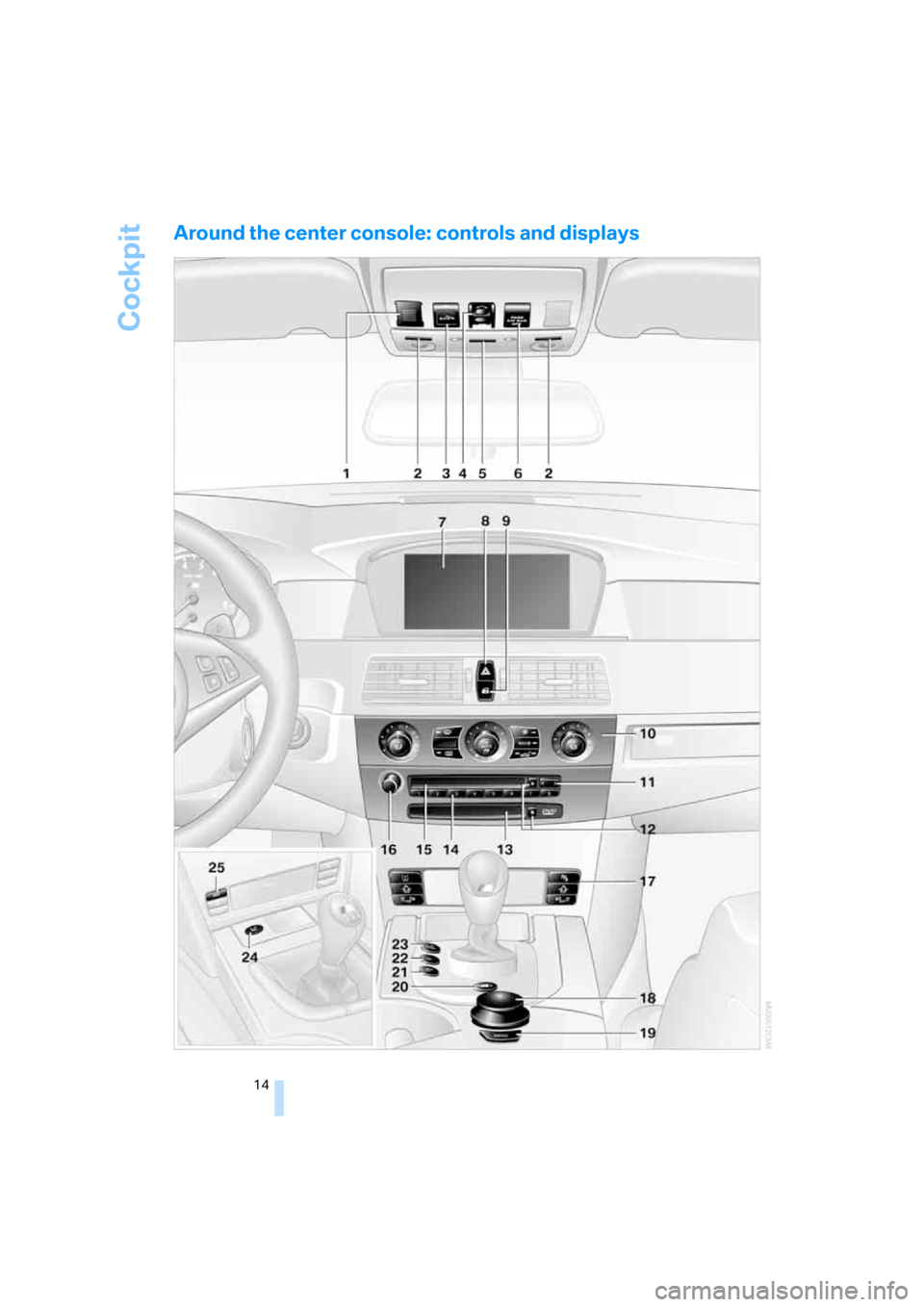
Around the center console: controls and displays
ba8_m5us.book Seite 14 Montag, 5. Februar 2007 12:03 12
Page 53 of 256
Controls
51Reference
At a glance
Driving tips
Communications
Navigation
Entertainment
Mobility
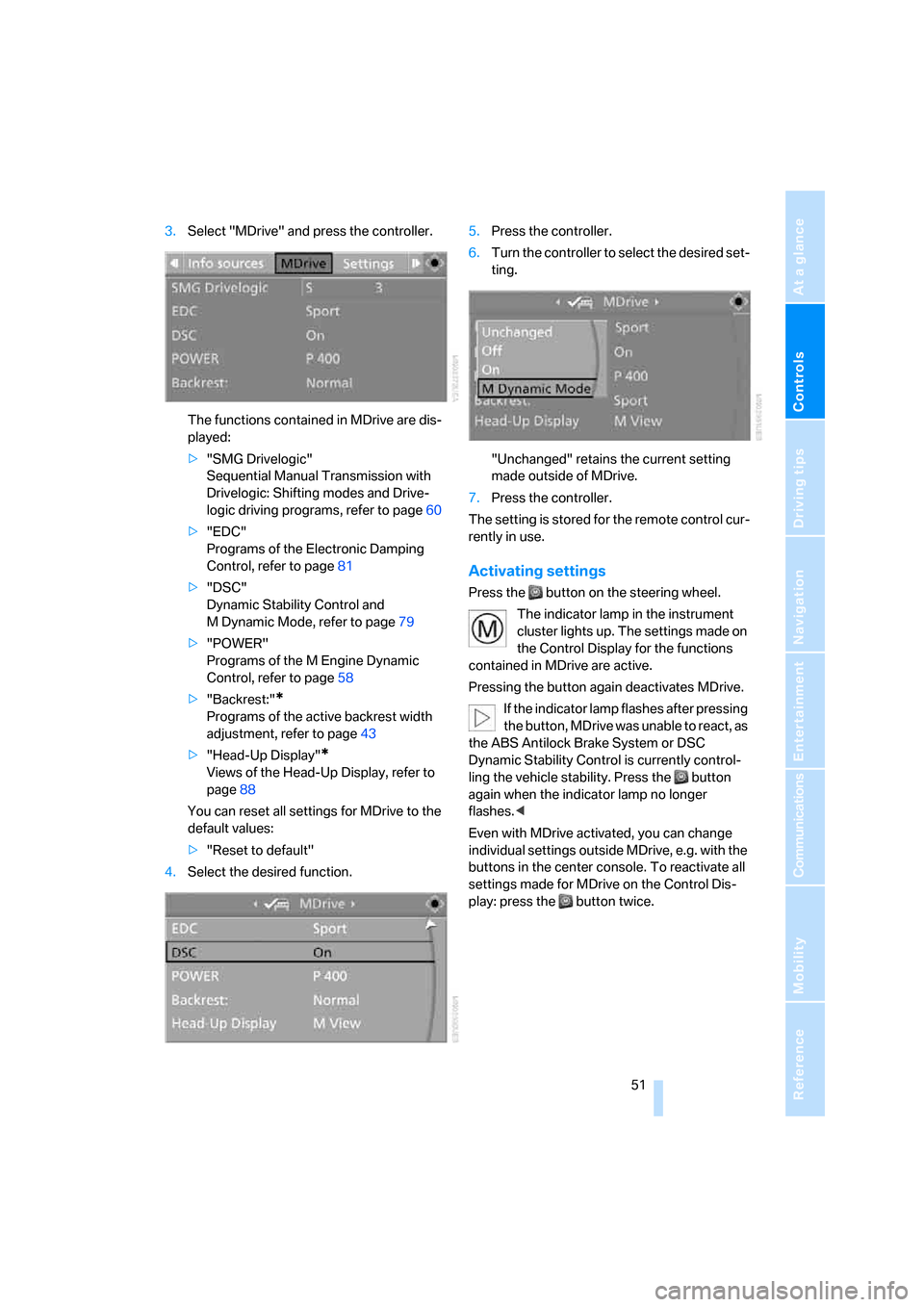
3.Select "MDrive" and press the controller.
The functions contained in MDrive are dis-
played:
>"SMG Drivelogic"
Sequential Manual Transmission with
Drivelogic: Shifting modes and Drive-
logic driving programs, refer to page60
>"EDC"
Programs of the Electronic Damping
Control, refer to page81
>"DSC"
Dynamic Stability Control and
M Dynamic Mode, refer to page79
>"POWER"
Programs of the M Engine Dynamic
Control, refer to page58
>"Backrest:"
*
Programs of the active backrest width
adjustment, refer to page43
>"Head-Up Display"
*
Views of the Head-Up Display, refer to
page88
You can reset all settings for MDrive to the
default values:
>"Reset to default"
4.Select the desired function.5.Press the controller.
6.Turn the controller to select the desired set-
ting.
"Unchanged" retains the current setting
made outside of MDrive.
7.Press the controller.
The setting is stored for the remote control cur-
rently in use.
Activating settings
Press the button on the steering wheel.
The indicator lamp in the instrument
cluster lights up. The settings made on
the Control Display for the functions
contained in MDrive are active.
Pressing the button again deactivates MDrive.
If the indicator lamp flashes after pressing
the button, MDrive was unable to react, as
the ABS Antilock Brake System or DSC
Dynamic Stability Control is currently control-
ling the vehicle stability. Press the button
again when the indicator lamp no longer
flashes.<
Even with MDrive activated, you can change
individual settings outside MDrive, e.g. with the
buttons in the center console. To reactivate all
settings made for MDrive on the Control Dis-
play: press the button twice.
ba8_m5us.book Seite 51 Montag, 5. Februar 2007 12:03 12
Page 62 of 256
Driving
60
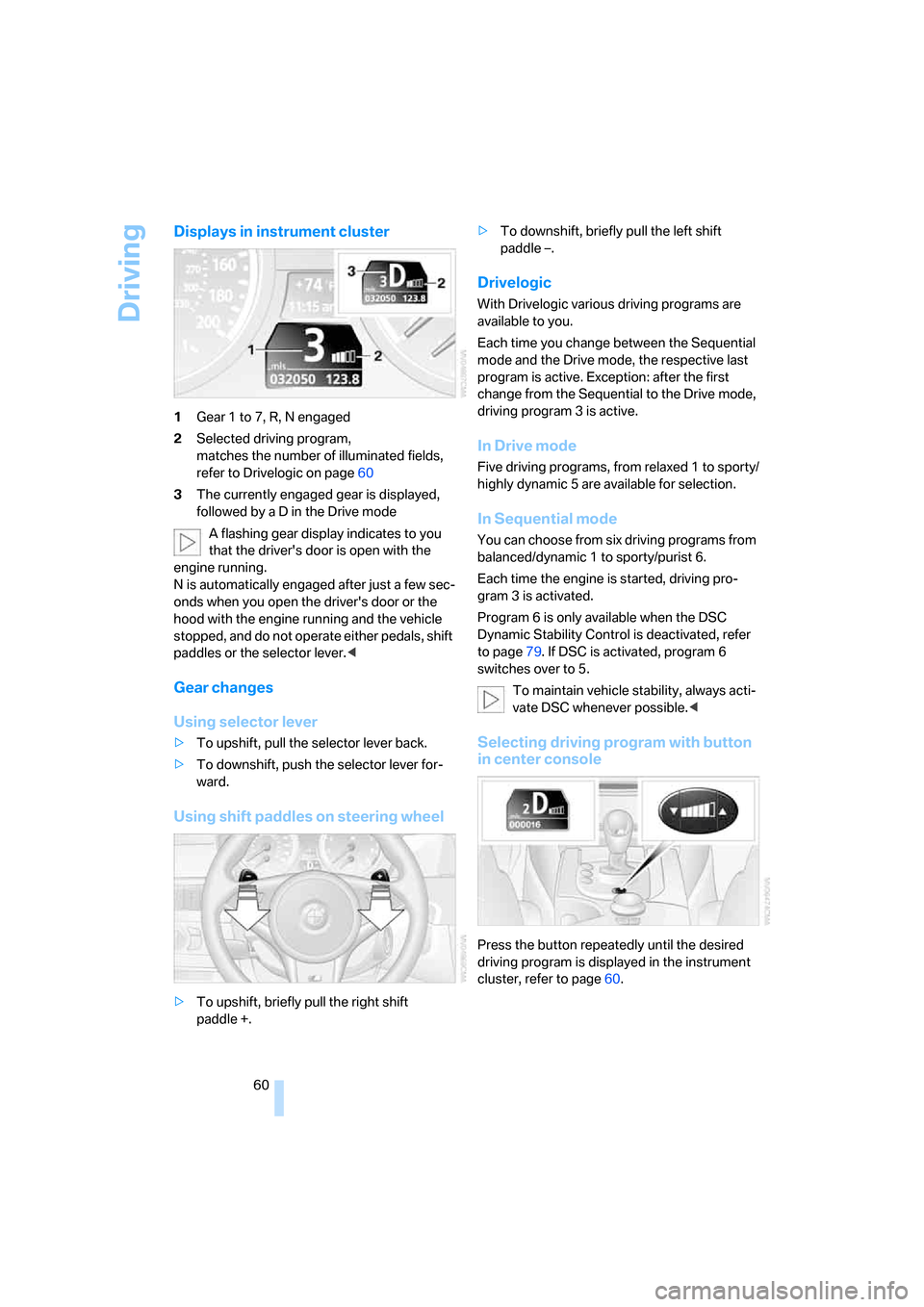
Displays in instrument cluster
1Gear 1 to 7, R, N engaged
2Selected driving program,
matches the number of illuminated fields,
refer to Drivelogic on page60
3The currently engaged gear is displayed,
followed by a D in the Drive mode
A flashing gear display indicates to you
that the driver's door is open with the
engine running.
N is automatically engaged after just a few sec-
onds when you open the driver's door or the
hood with the engine running and the vehicle
stopped, and do not operate either pedals, shift
paddles or the selector lever.<
Gear changes
Using selector lever
>To upshift, pull the selector lever back.
>To downshift, push the selector lever for-
ward.
Using shift paddles on steering wheel
>To upshift, briefly pull the right shift
paddle +.>To downshift, briefly pull the left shift
paddle –.
Drivelogic
With Drivelogic various driving programs are
available to you.
Each time you change between the Sequential
mode and the Drive mode, the respective last
program is active. Exception: after the first
change from the Sequential to the Drive mode,
driving program 3 is active.
In Drive mode
Five driving programs, from relaxed 1 to sporty/
highly dynamic 5 are available for selection.
In Sequential mode
You can choose from six driving programs from
balanced/dynamic 1 to sporty/purist 6.
Each time the engine is started, driving pro-
gram 3 is activated.
Program 6 is only available when the DSC
Dynamic Stability Control is deactivated, refer
to page79. If DSC is activated, program 6
switches over to 5.
To maintain vehicle stability, always acti-
vate DSC whenever possible.<
Selecting driving program with button
in center console
Press the button repeatedly until the desired
driving program is displayed in the instrument
cluster, refer to page60.
ba8_m5us.book Seite 60 Montag, 5. Februar 2007 12:03 12
Page 84 of 256
Technology for comfort, convenience and safety
82 change. This change is detected and is
reported as a flat tire.
Functional requirement
In order to assure the reliable reporting of a flat
tire, the system must be initialized for the cor-
rect tire inflation pressure.
The initialization must be repeated after
each time the tire inflation pressure is cor-
rected and after every tire or wheel change.<
System limits
The Flat Tire Monitor cannot indicate
sudden severe tire damage caused by
outside factors and does not detect a natural,
even pressure drop in all four tires.<
In the following situations, the system could be
delayed or malfunction:
>System has not been initialized
>Driving on snowy or slippery road surface
>Sporty driving style: slip in the drive wheels,
high lateral acceleration
>Driving with snow chains
*
Initializing system
The initialization finishes during driving,
which can be interrupted at any time.
When driving resumes, the initialization is con-
tinued automatically. Do not initialize the sys-
tem when driving with snow chains.<
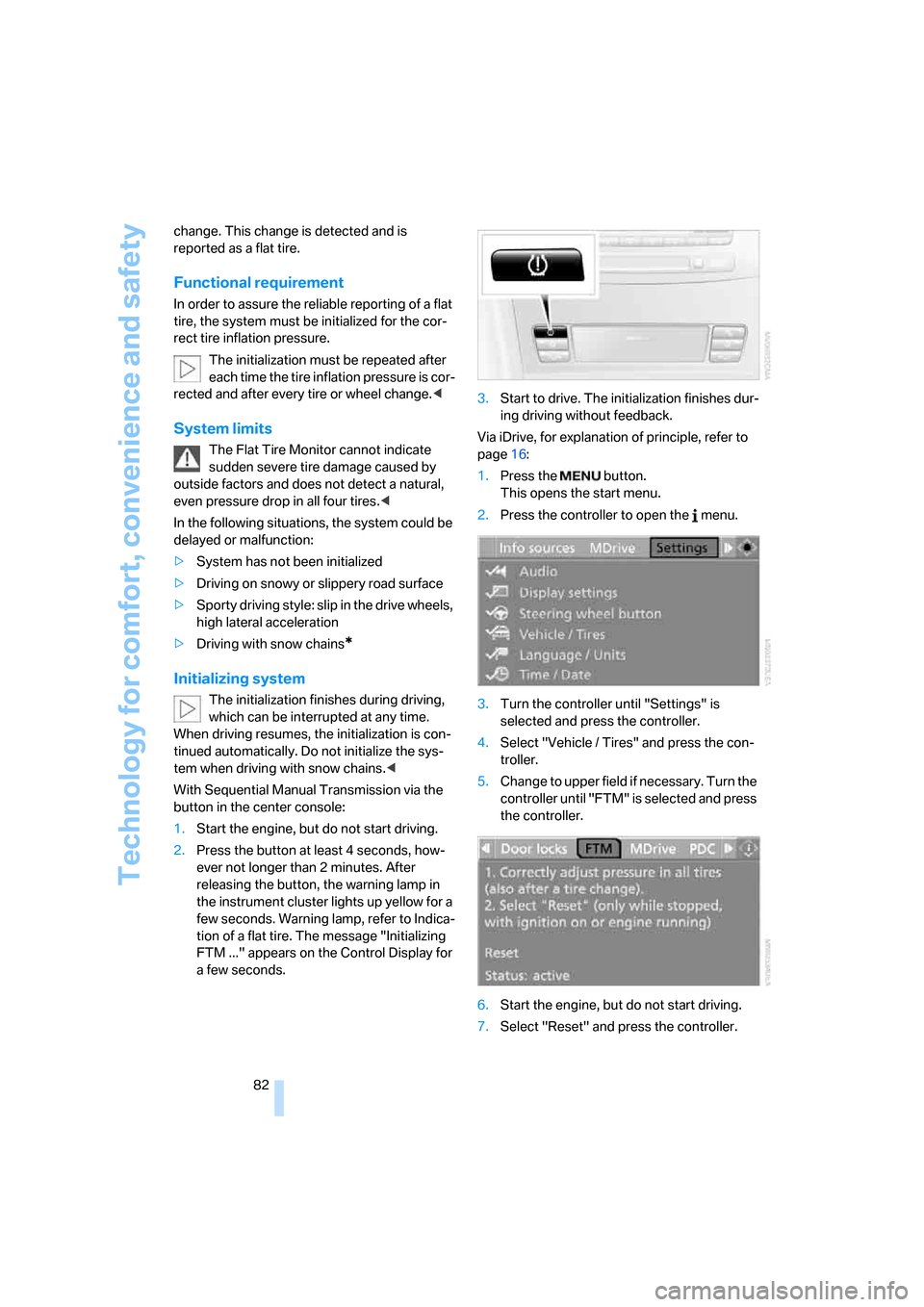
With Sequential Manual Transmission via the
button in the center console:
1.Start the engine, but do not start driving.
2.Press the button at least 4 seconds, how-
ever not longer than 2 minutes. After
releasing the button, the warning lamp in
the instrument cluster lights up yellow for a
few seconds. Warning lamp, refer to Indica-
tion of a flat tire. The message "Initializing
FTM ..." appears on the Control Display for
a few seconds.3.Start to drive. The initialization finishes dur-
ing driving without feedback.
Via iDrive, for explanation of principle, refer to
page16:
1.Press the button.
This opens the start menu.
2.Press the controller to open the menu.
3.Turn the controller until "Settings" is
selected and press the controller.
4.Select "Vehicle / Tires" and press the con-
troller.
5.Change to upper field if necessary. Turn the
controller until "FTM" is selected and press
the controller.
6.Start the engine, but do not start driving.
7.Select "Reset" and press the controller.
ba8_m5us.book Seite 82 Montag, 5. Februar 2007 12:03 12
Page 107 of 256
Controls
105Reference
At a glance
Driving tips
Communications
Navigation
Entertainment
Mobility
Ventilating lower compartment*
Push the slide in the lower compartment
upward.
Depending on the automatic climate con-
trol setting, the temperature inside the
ventilated compartment may be higher than in
the rest of the interior. Should this be the case,
push the slide downward to close off the venti-
lation.<
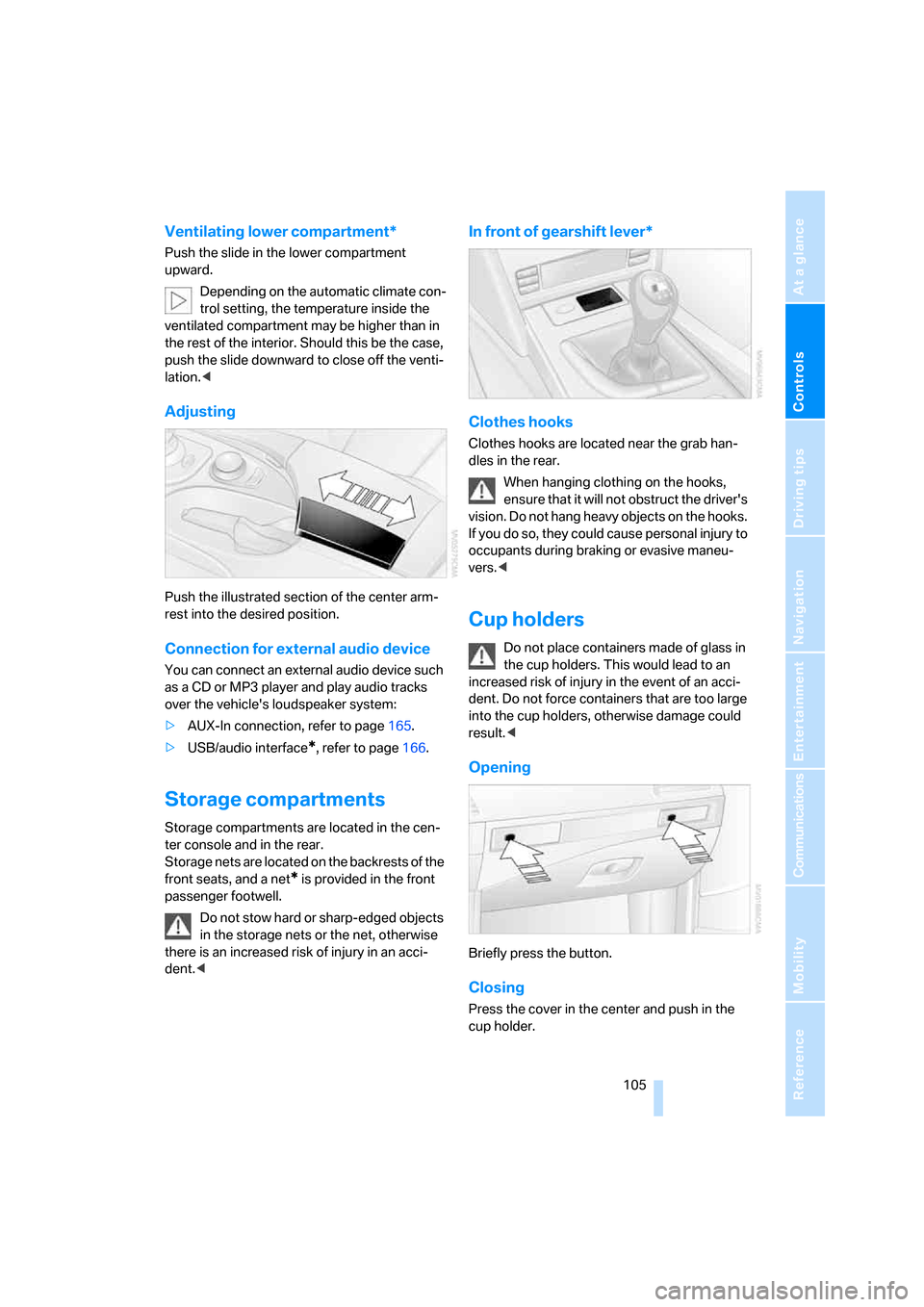
Adjusting
Push the illustrated section of the center arm-
rest into the desired position.
Connection for external audio device
You can connect an external audio device such
as a CD or MP3 player and play audio tracks
over the vehicle's loudspeaker system:
>AUX-In connection, refer to page165.
>USB/audio interface
*, refer to page166.
Storage compartments
Storage compartments are located in the cen-
ter console and in the rear.
Storage nets are located on the backrests of the
front seats, and a net
* is provided in the front
passenger footwell.
Do not stow hard or sharp-edged objects
in the storage nets or the net, otherwise
there is an increased risk of injury in an acci-
dent.<
In front of gearshift lever*
Clothes hooks
Clothes hooks are located near the grab han-
dles in the rear.
When hanging clothing on the hooks,
ensure that it will not obstruct the driver's
vision. Do not hang heavy objects on the hooks.
If you do so, they could cause personal injury to
occupants during braking or evasive maneu-
vers.<
Cup holders
Do not place containers made of glass in
the cup holders. This would lead to an
increased risk of injury in the event of an acci-
dent. Do not force containers that are too large
into the cup holders, otherwise damage could
result.<
Opening
Briefly press the button.
Closing
Press the cover in the center and push in the
cup holder.
ba8_m5us.book Seite 105 Montag, 5. Februar 2007 12:03 12
Page 109 of 256
Controls
107Reference
At a glance
Driving tips
Communications
Navigation
Entertainment
Mobility
Connecting electrical devices
Sockets
With the engine running or the ignition switched
on, the cigarette lighter socket can be used as a
power outlet for hand flashlights, car vacuum
cleaners, etc., with power ratings of up to
approx. 200 W at 12 V. Avoid damaging the
socket due to inserting plugs of different
shapes or sizes. The same is true for all power
outlets in the vehicle.
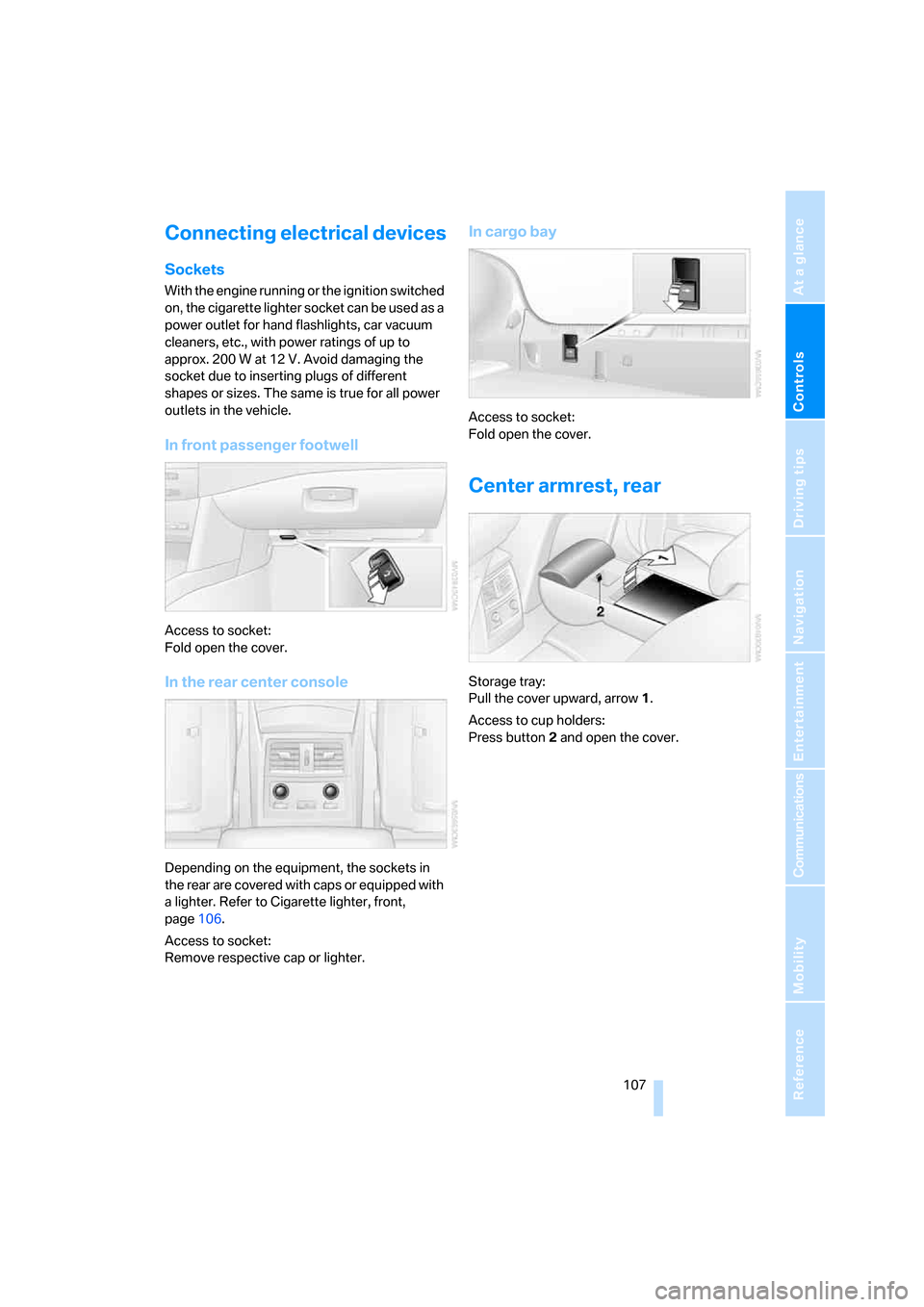
In front passenger footwell
Access to socket:
Fold open the cover.
In the rear center console
Depending on the equipment, the sockets in
the rear are covered with caps or equipped with
a lighter. Refer to Cigarette lighter, front,
page106.
Access to socket:
Remove respective cap or lighter.
In cargo bay
Access to socket:
Fold open the cover.
Center armrest, rear
Storage tray:
Pull the cover upward, arrow1.
Access to cup holders:
Press button2 and open the cover.
ba8_m5us.book Seite 107 Montag, 5. Februar 2007 12:03 12
Page 127 of 256
Navigation
Driving tips
125Reference
At a glance
Controls
Communications
Entertainment
Mobility
Entering house number
All house numbers stored for the street on the
navigation DVD can be entered.
1.Select "House number" and press the con-
troller.
2.Enter the house number:
Select the desired digits and press the con-
troller.
3.Change into the third field from the top.
Turn the controller until the house number
is selected and press the controller.
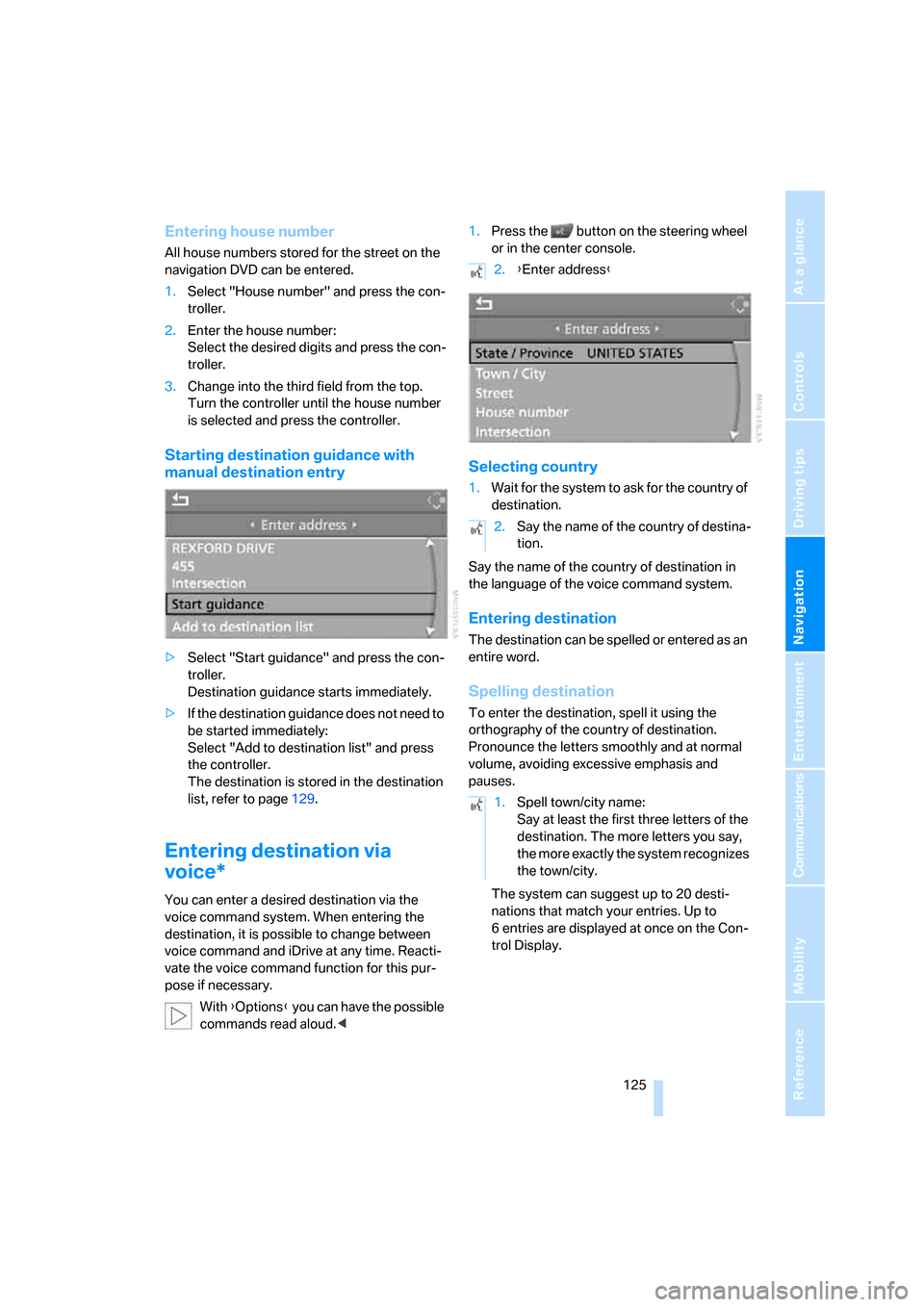
Starting destination guidance with
manual destination entry
>Select "Start guidance" and press the con-
troller.
Destination guidance starts immediately.
>If the destination guidance does not need to
be started immediately:
Select "Add to destination list" and press
the controller.
The destination is stored in the destination
list, refer to page129.
Entering destination via
voice*
You can enter a desired destination via the
voice command system. When entering the
destination, it is possible to change between
voice command and iDrive at any time. Reacti-
vate the voice command function for this pur-
pose if necessary.
With {Options} you can have the possible
commands read aloud.<1.Press the button on the steering wheel
or in the center console.
Selecting country
1.Wait for the system to ask for the country of
destination.
Say the name of the country of destination in
the language of the voice command system.
Entering destination
The destination can be spelled or entered as an
entire word.
Spelling destination
To enter the destination, spell it using the
orthography of the country of destination.
Pronounce the letters smoothly and at normal
volume, avoiding excessive emphasis and
pauses.
The system can suggest up to 20 desti-
nations that match your entries. Up to
6 entries are displayed at once on the Con-
trol Display.
2.{Enter address}
2.Say the name of the country of destina-
tion.
1.Spell town/city name:
Say at least the first three letters of the
destination. The more letters you say,
the more exactly the system recognizes
the town/city.
ba8_m5us.book Seite 125 Montag, 5. Februar 2007 12:03 12
Page 236 of 256
Everything from A to Z
234
Everything from A to Z
Index
"..." Identifies Control Display
texts used to select
individual functions, and
indicates where to find them
in the text.
A
ABS Antilock Brake
System78
– indicator/warning lamp80
Accepted calls180
Accessories6
Accident, refer to Emergency
call219
Acoustic signal, refer to Check
Control70
Activated-charcoal filter for
automatic climate control99
"Activation time" for parked-
car ventilation100
Active seat ventilation47
Adapter for spare key28
Adaptive brake lamps, refer to
Brake force display85
Adaptive Head Light93
"Add digits" for mobile
phone180
Additives
– coolant206
– engine oil, refer to Approved
engine oils206
"Address book" for navigation
system130
Address for navigation
– deleting131
– entering122,125
– selecting130
– storing130
– storing current position130
"Add to address book"129"Add to destination
list"125,127
Adjusting active backrest
width43
Adjusting interior
temperature96
Adjusting the tone during
audio operation, refer to
Tone control147
Adjusting thigh support42
Adjustment in audio mode
– front/rear balance148
– right/left balance148
"After door opened"44
"After unlocking"44
Airbags86
– indicator/warning lamp87
– indicator lamp for front
passenger airbags87
– sitting safely41
Air distribution
– automatic96
– manual97
Airing, refer to Ventilation99
Air recirculation
– AUC Automatic
recirculated-air control
98
– recirculated-air mode98
"Air recirculation on / off"50
Air supply, automatic climate
control95
Air volume97
AKI, refer to Fuel quality197
Alarm system35
– avoiding unintentional
alarms35
– interior motion sensor35
– switching off alarm35
– switching off tilt alarm
sensor and interior motion
sensor36
– tilt alarm sensor35"All channels"157
"All doors"31
All-season tires, refer to
Winter tires202
"All stations", calling up with
radio150,154
Alterations, technical, refer to
For your own safety5
Altering stretch of road138
"AM", reception
range146,150
Antenna, refer to Caring for
your vehicle brochure
Antenna for mobile phone172
Antifreeze
– coolant206
– washer fluid63
Antilock Brake System
ABS78
– indicator/warning lamp80
Anti-theft alarm system, refer
to Alarm system35
Anti-theft system, refer to
Central locking system30
Approved axle loads, refer to
Weights228
Approved engine oils206
Approved gross vehicle
weight, refer to Weights228
Armrest, refer to Center
armrest, rear107
Around the center console14
Around the steering wheel10
Arrival time
– refer to Computer67
– refer to Starting destination
guidance134
"Arrow display" for navigation
system135
Artificial leather, refer to
Caring for your vehicle
brochure
ba8_m5us.book Seite 234 Montag, 5. Februar 2007 12:03 12
Page 239 of 256
Reference 237
At a glance
Controls
Driving tips
Communications
Navigation
Entertainment
Mobility
Center armrest
– front104
– rear107
Center brake lamp212
Center console14
"Central locking"30
Central locking
– from inside32
– from outside30
Central locking system30
– comfort access36
Changes, technical
– refer to For your own
safety5
– refer to Parts and
accessories6
Changing language on
Control Display76
Changing scale for
navigation136
Changing units of measure on
Control Display75
Changing wheels201,215
CHECK button71
Check Control70
"Check Control
messages"72
Check Gas Cap196
Checking the air pressure,
refer to Tire inflation
pressure198
Child restraint fixing system
LATCH53
Child restraint systems52
Child-safety lock54
Child seats, refer to
Transporting children
safely52
Chime, refer to Check
Control70
Chock216
Chrome parts, refer to Caring
for your vehicle brochure
Cigarette lighter106
Cigarette lighter socket, refer
to Connecting electrical
devices107
Cleaning, refer to Caring for
your vehicle brochure"Climate"47,96
Clock66
– 12h/24h mode74
– hour signal74
– setting time and date74
Closing
– from inside32
– from outside30
Closing fuel filler cap196
Clothes hooks105
Cockpit
10
Cold start, refer to Starting
engine56
Comfort access36
– replacing battery, remote
control37
Comfort area, refer to Around
the center console14
Comfort operation
– glass sunroof31
– windows31
– windows with comfort
access36
– with comfort access36
"Comfort" with EDC81
"Communication"178,188
Compact Disc
– refer to CD changer159
– refer to CD player159
Compartment for remote
control, refer to Ignition
lock55
Compartments, refer to
Storage compartments105
Compressed audio files159
Computer66
– clock66
– displays on Control
Display67
– hour signal74
"Concert hall", refer to Tone
control149
"Concierge"190
Condensation, refer to When
vehicle is parked114
Condition Based Service
CBS208
"Confirmation"31Confirmation signals for
locking and unlocking31
Connecting car vacuum
cleaner, refer to Connecting
electrical devices107
Consumption, refer to
Average fuel
consumption67
Consumption statistics, refer
to Average fuel
consumption67
"Continue guidance to
destination?"135
Control Center, refer to
iDrive16
Control Display, refer to
iDrive16
– setting brightness75
– switching off/on21
Controller, refer to iDrive16
Controls, refer to Cockpit10
Coolant206
– checking level206
– temperature
65
Cooling, maximum98
Cooling fluid, refer to
Coolant206
Cooling function, automatic
climate control98
Cooling system, refer to
Coolant206
Copyright2
Cornering Brake Control
CBC78
Country of destination for
navigation123
Courtesy lamps94
Cradle for telephone or mobile
phone104
Cruise control63
Cruising range67
Cup holders105
Curb weight, refer to
Weights228
"Current position"142
Current position
– displaying142
– entering130
– storing130
ba8_m5us.book Seite 237 Montag, 5. Februar 2007 12:03 12