smg BMW M6 2008 E63 Owner's Manual
[x] Cancel search | Manufacturer: BMW, Model Year: 2008, Model line: M6, Model: BMW M6 2008 E63Pages: 262, PDF Size: 8.86 MB
Page 56 of 262
Adjusting
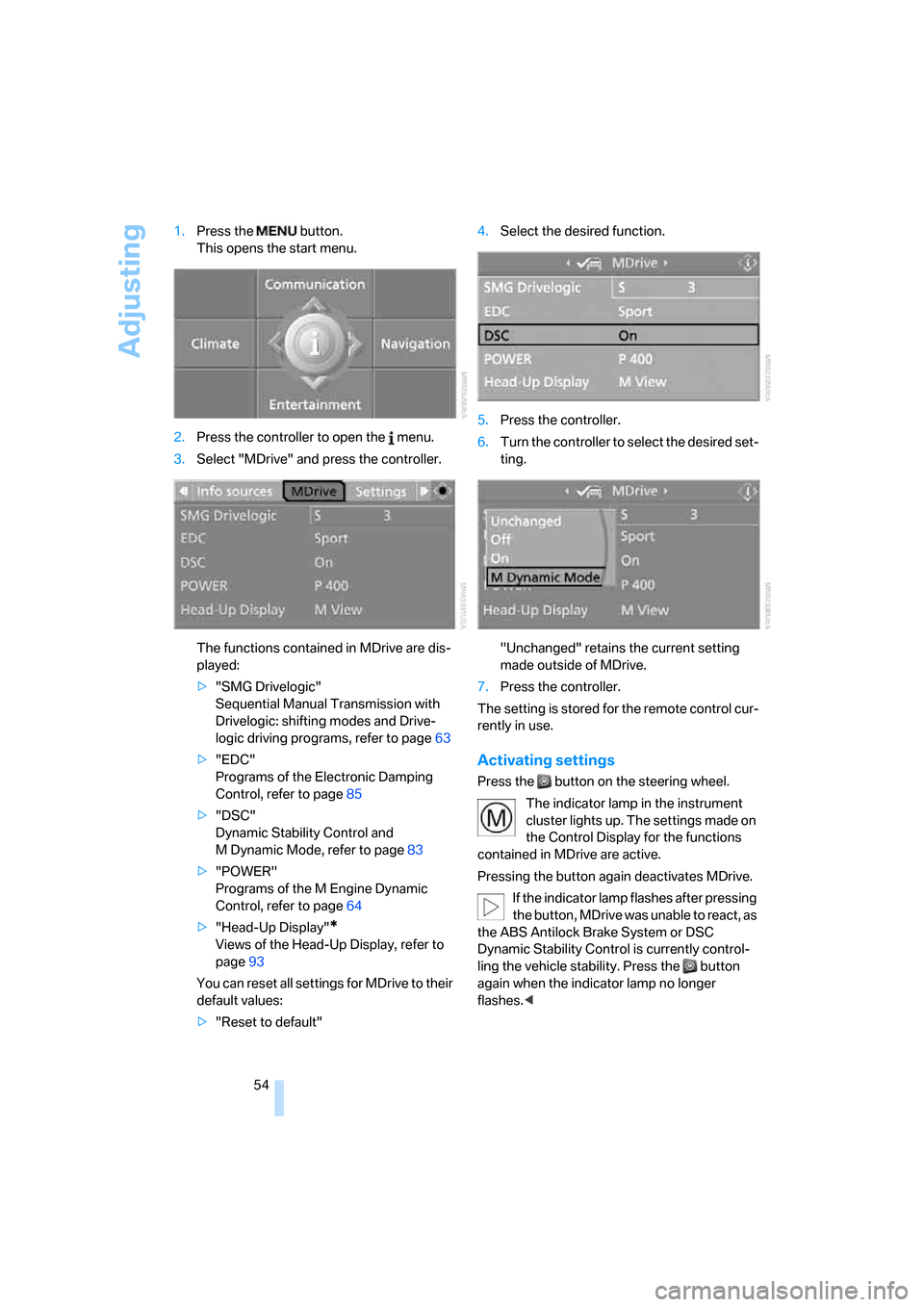
54 1.Press the button.
This opens the start menu.
2.Press the controller to open the menu.
3.Select "MDrive" and press the controller.
The functions contained in MDrive are dis-
played:
>"SMG Drivelogic"
Sequential Manual Transmission with
Drivelogic: shifting modes and Drive-
logic driving programs, refer to page63
>"EDC"
Programs of the Electronic Damping
Control, refer to page85
>"DSC"
Dynamic Stability Control and
M Dynamic Mode, refer to page83
>"POWER"
Programs of the M Engine Dynamic
Control, refer to page64
>"Head-Up Display"
*
Views of the Head-Up Display, refer to
page93
You can reset all settings for MDrive to their
default values:
>"Reset to default"4.Select the desired function.
5.Press the controller.
6.Turn the controller to select the desired set-
ting.
"Unchanged" retains the current setting
made outside of MDrive.
7.Press the controller.
The setting is stored for the remote control cur-
rently in use.
Activating settings
Press the button on the steering wheel.
The indicator lamp in the instrument
cluster lights up. The settings made on
the Control Display for the functions
contained in MDrive are active.
Pressing the button again deactivates MDrive.
If the indicator lamp flashes after pressing
the button, MDrive was unable to react, as
the ABS Antilock Brake System or DSC
Dynamic Stability Control is currently control-
ling the vehicle stability. Press the button
again when the indicator lamp no longer
flashes.<
Page 64 of 262
Driving
62
Sequential Manual
Transmission with Drivelogic
The concept
The SMG Sequential Manual Transmission
with Drivelogic is an automated manual trans-
mission in which an electrohydraulic system
handles the clutching and gear changes.
The Sequential Manual Transmission is oper-
ated with the selector lever and two shift pad-
dles on the steering wheel.
It offers the following functions:
>Choice of manual or automatic mode:
Sequential mode or Drive mode
>Selection option between different driving
programs, Drivelogic, refer to page63
>Upshift display, shift lights, refer to page64
>Automatic downshifting and prevention of
incorrect shifting even in Sequential opera-
tion
>Automatic double clutching
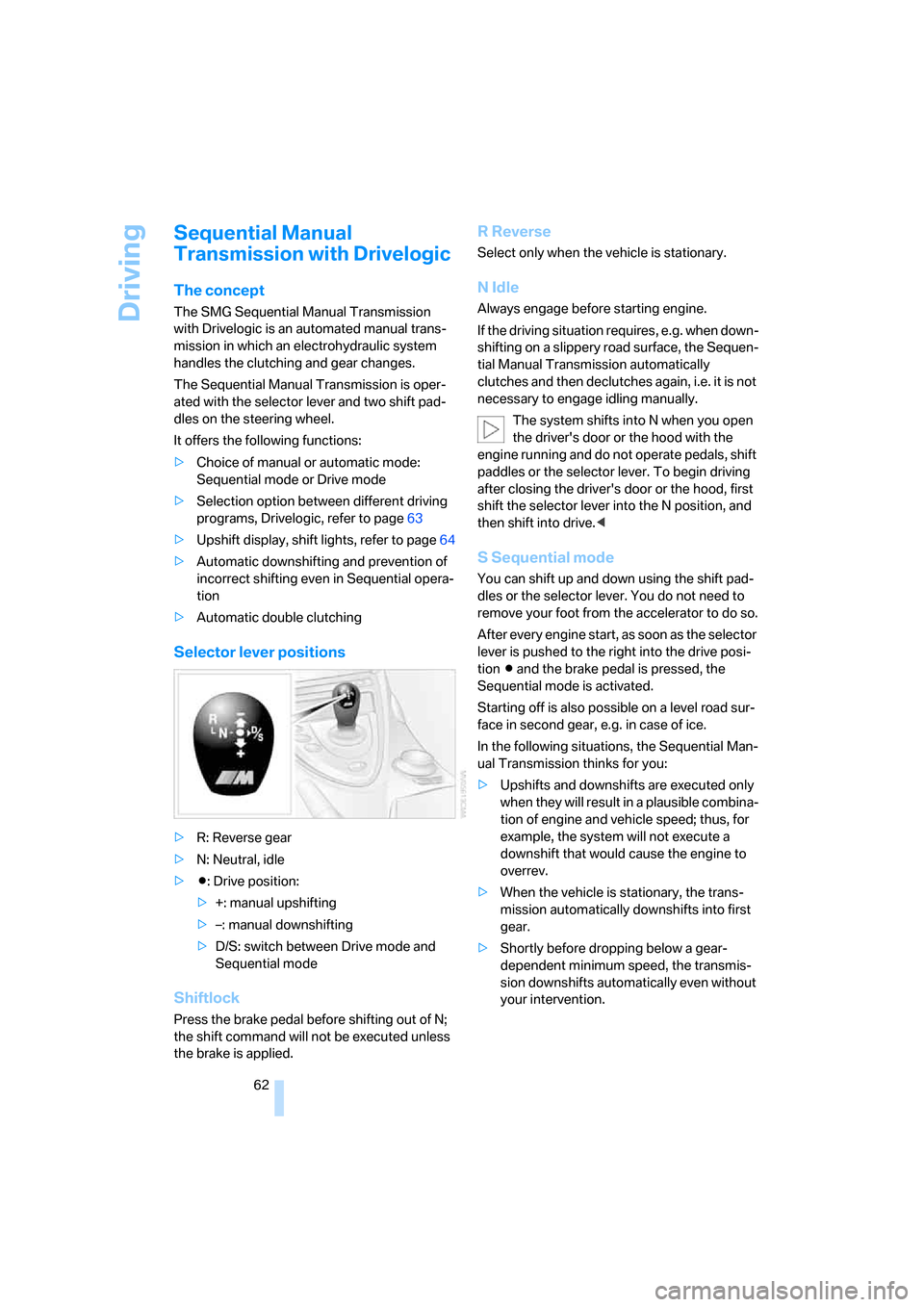
Selector lever positions
>R: Reverse gear
>N: Neutral, idle
>Β: Drive position:
>+: manual upshifting
>–: manual downshifting
>D/S: switch between Drive mode and
Sequential mode
Shiftlock
Press the brake pedal before shifting out of N;
the shift command will not be executed unless
the brake is applied.
R Reverse
Select only when the vehicle is stationary.
N Idle
Always engage before starting engine.
If the driving situation requires, e.g. when down-
shifting on a slippery road surface, the Sequen-
tial Manual Transmission automatically
clutches and then declutches again, i.e. it is not
necessary to engage idling manually.
The system shifts into N when you open
the driver's door or the hood with the
engine running and do not operate pedals, shift
paddles or the selector lever. To begin driving
after closing the driver's door or the hood, first
shift the selector lever into the N position, and
then shift into drive.<
S Sequential mode
You can shift up and down using the shift pad-
dles or the selector lever. You do not need to
remove your foot from the accelerator to do so.
After every engine start, as soon as the selector
lever is pushed to the right into the drive posi-
tion Β and the brake pedal is pressed, the
Sequential mode is activated.
Starting off is also possible on a level road sur-
face in second gear, e.g. in case of ice.
In the following situations, the Sequential Man-
ual Transmission thinks for you:
>Upshifts and downshifts are executed only
when they will result in a plausible combina-
tion of engine and vehicle speed; thus, for
example, the system will not execute a
downshift that would cause the engine to
overrev.
>When the vehicle is stationary, the trans-
mission automatically downshifts into first
gear.
>Shortly before dropping below a gear-
dependent minimum speed, the transmis-
sion downshifts automatically even without
your intervention.
Page 66 of 262
Driving
64
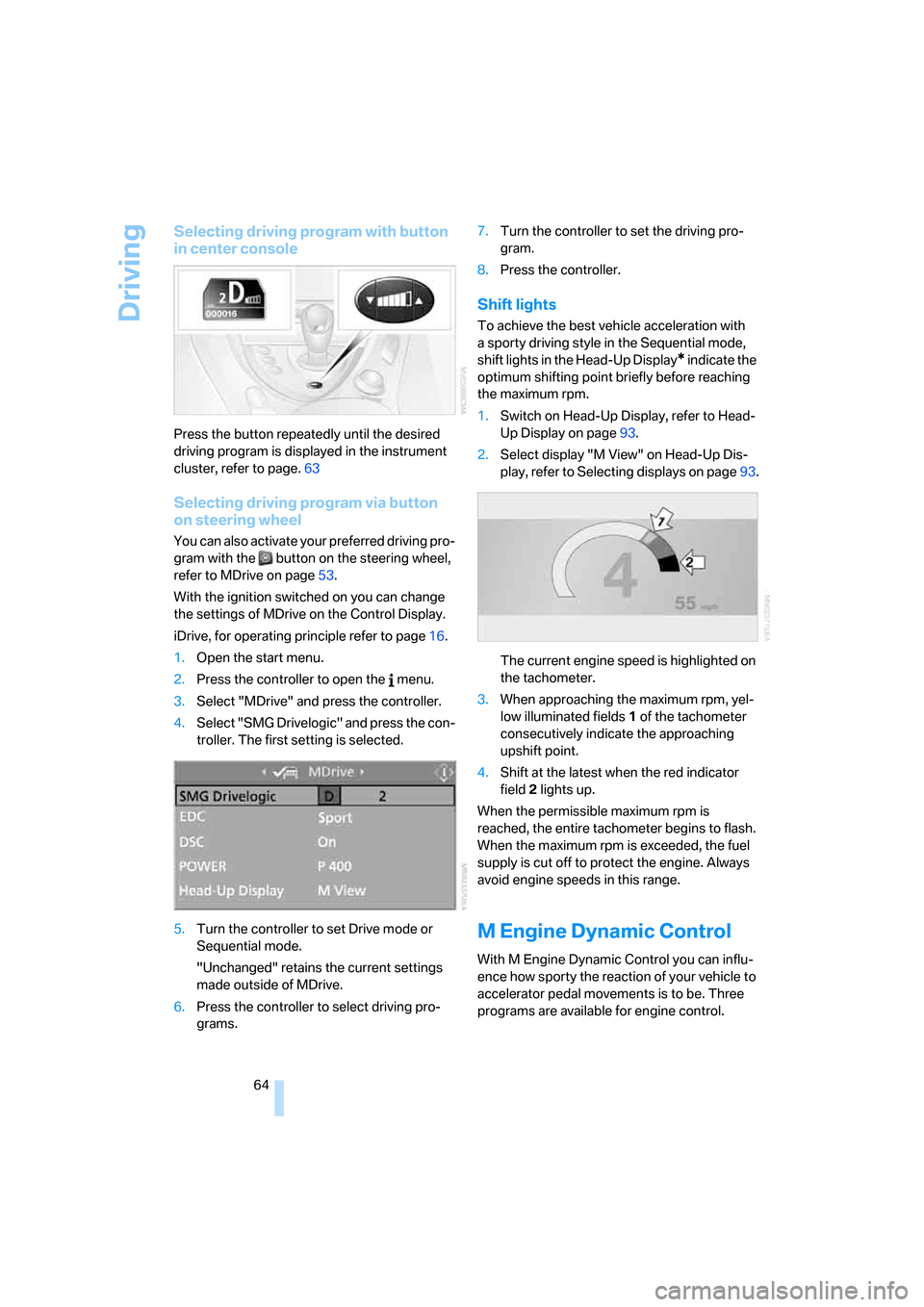
Selecting driving program with button
in center console
Press the button repeatedly until the desired
driving program is displayed in the instrument
cluster, refer to page.63
Selecting driving program via button
on steering wheel
You can also activate your preferred driving pro-
gram with the button on the steering wheel,
refer to MDrive on page53.
With the ignition switched on you can change
the settings of MDrive on the Control Display.
iDrive, for operating principle refer to page16.
1.Open the start menu.
2.Press the controller to open the menu.
3.Select "MDrive" and press the controller.
4.Select "SMG Drivelogic" and press the con-
troller. The first setting is selected.
5.Turn the controller to set Drive mode or
Sequential mode.
"Unchanged" retains the current settings
made outside of MDrive.
6.Press the controller to select driving pro-
grams.7.Turn the controller to set the driving pro-
gram.
8.Press the controller.
Shift lights
To achieve the best vehicle acceleration with
a sporty driving style in the Sequential mode,
shift lights in the Head-Up Display
* indicate the
optimum shifting point briefly before reaching
the maximum rpm.
1.Switch on Head-Up Display, refer to Head-
Up Display on page93.
2.Select display "M View" on Head-Up Dis-
play, refer to Selecting displays on page93.
The current engine speed is highlighted on
the tachometer.
3.When approaching the maximum rpm, yel-
low illuminated fields1 of the tachometer
consecutively indicate the approaching
upshift point.
4.Shift at the latest when the red indicator
field2 lights up.
When the permissible maximum rpm is
reached, the entire tachometer begins to flash.
When the maximum rpm is exceeded, the fuel
supply is cut off to protect the engine. Always
avoid engine speeds in this range.
M Engine Dynamic Control
With M Engine Dynamic Control you can influ-
ence how sporty the reaction of your vehicle to
accelerator pedal movements is to be. Three
programs are available for engine control.
Page 256 of 262
Everything from A to Z
254 Signal horn, refer to Horn10
Signaling a turn, triple turn
signal activation65
Sill panel lighting, refer to
Interior lamps100
Sitting safely45
– with airbags45
– with head restraints45
– with safety belts45
Ski bag112
Slope assistant, refer to
Starting off on slopes117
SMG, refer to Sequential
Manual Transmission with
Drivelogic62
"SMG Drivelogic"54,64
Snap-in adapter
– mounting/removing189
– using176
Snow chains207
Socket, refer to Connecting
electrical devices112
Socket for Onboard
Diagnostics interface215
Socket for remote control,
refer to Ignition lock59
Soft closure aid, refer to
Automatic soft closing34
Song search with CD, refer to
Sampling tracks, scan166
SOS, refer to Initiating an
emergency request224
Spare
– adapter for spare key28
– fuses223
– key28
– wheel, driving with spare
wheel222
– wheel, refer to Changing
wheels220
Special oils, refer to Approved
engine oils212
Speed-dependent
volume152
Speed limit warning, refer to
Speed limit76
Speedometer12"Speed volume", refer to Tone
control152
Speed with winter tires206
"Sport" with EDC85
Stability control, refer to
Driving stability control
systems82
Start/Stop button59
– starting the engine60
– switching off the engine60
"Start" for stopwatch77
"Start guidance"129,138
Starting assistant, refer to
Starting off on slopes117
Starting difficulties, refer to
Jump starting225
Starting engine60
Starting off
– on a slippery surface117
– on slopes117
Start menu, iDrive17
"Start route guidance"131
"Start service"193
"Start Service" for
BMW Assist194
"State / Province" for
destination entry127
"State inspection"74
Station, refer to Radio154
"Status"73
Status information on Control
Display20
Status of this Owner's Manual
at time of printing5
Steering wheel
– adjustment52
– automatic adjustment, refer
to Easy entry/exit52
– automatic adjustment, refer
to Steering wheel
memory47
– buttons on steering
wheel11
– heating52
– lock, refer to Ignition lock59
– MDrive button53
– memory47
– programmable button53
– shift paddles63"Steering wheel button"53
Steering-wheel shift buttons,
refer to Shift paddles63
"Stop" for stopwatch77
"Stopwatch"77
Stopwatch77
Storage compartments110
"Store in address book" for
navigation system134
"Store" on the radio156,163
Storing current position134
Storing sitting position, refer
to Seat, mirror and steering
wheel memory47
Storing tires207
"Street" for destination
entry128
Summer tires, refer to Wheels
and tires202
"Surround Settings", refer to
Tone control152
SW, waveband154
Switches, refer to Cockpit10
Switching automatically
between high beams and
low beams, refer to High-
beam assistant98
Switching on
– audio150
– CD changer150
– CD player150
– radio150
Swiveling headlamps, refer to
Adaptive Head Light98
Symbols4
– indicator and warning
lamps13
– navigation system144
– status information20
– traffic information with
navigation system142