sat BMW M6 CONVERTIBLE 2008 User Guide
[x] Cancel search | Manufacturer: BMW, Model Year: 2008, Model line: M6 CONVERTIBLE, Model: BMW M6 CONVERTIBLE 2008Pages: 262, PDF Size: 8.86 MB
Page 164 of 262
Satellite radio
162
Selecting and storing channel
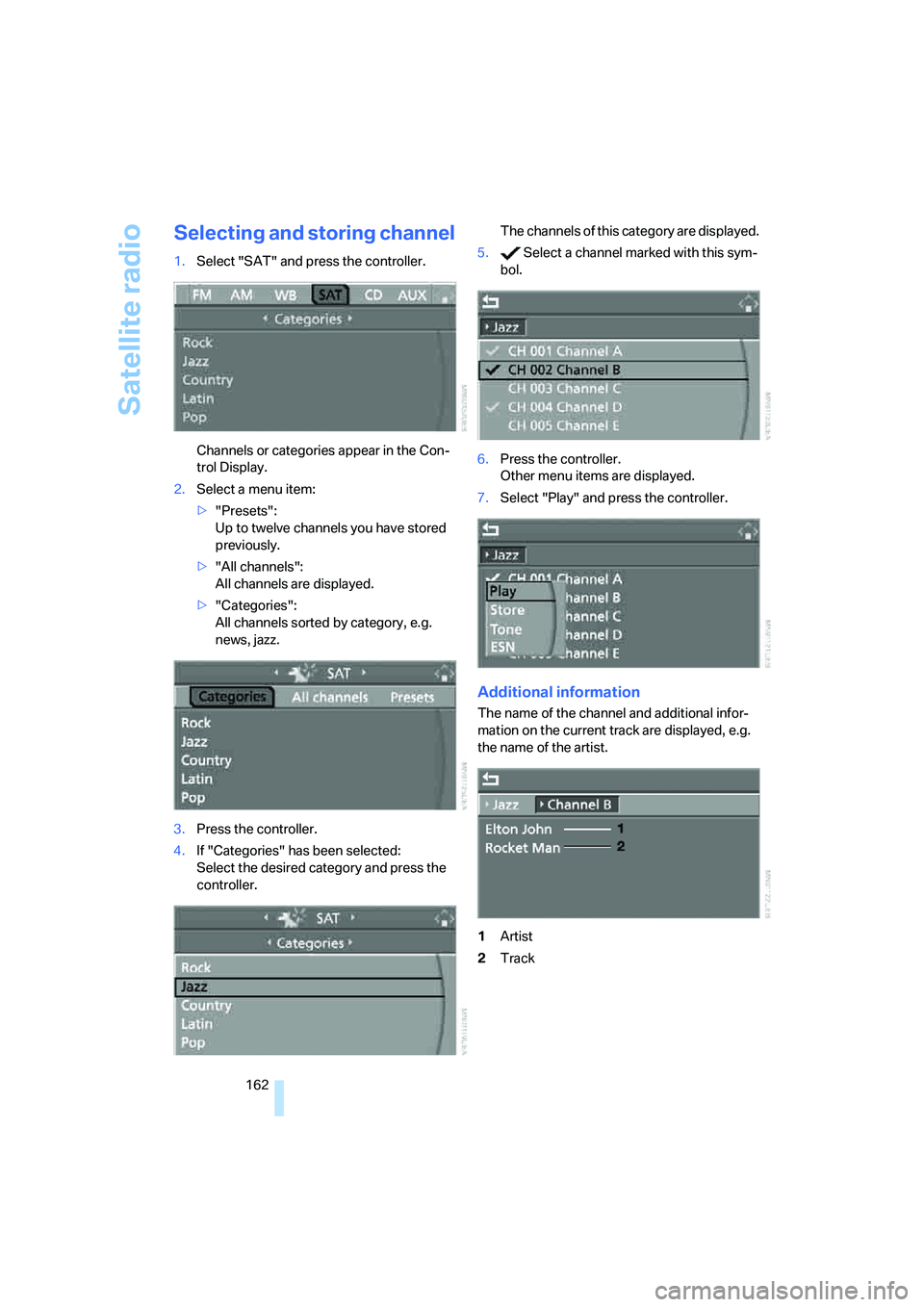
1.Select "SAT" and press the controller.
Channels or categories appear in the Con-
trol Display.
2.Select a menu item:
>"Presets":
Up to twelve channels you have stored
previously.
>"All channels":
All channels are displayed.
>"Categories":
All channels sorted by category, e.g.
news, jazz.
3.Press the controller.
4.If "Categories" has been selected:
Select the desired category and press the
controller.The channels of this category are displayed.
5. Select a channel marked with this sym-
bol.
6.Press the controller.
Other menu items are displayed.
7.Select "Play" and press the controller.
Additional information
The name of the channel and additional infor-
mation on the current track are displayed, e.g.
the name of the artist.
1Artist
2Track
Page 165 of 262
Navigation
Entertainment
Driving tips
163Reference
At a glance
Controls
Communications
Mobility
Storing channel
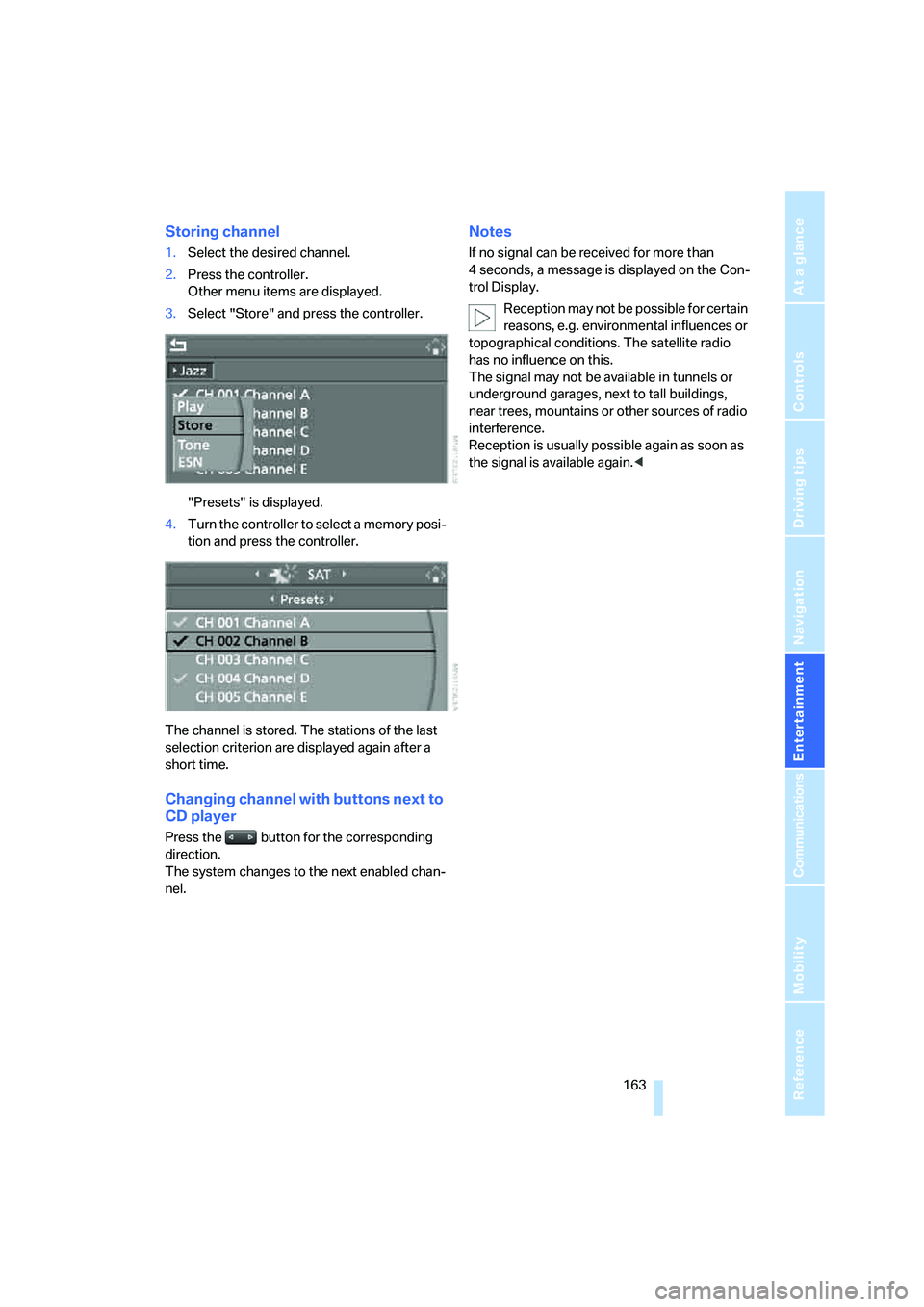
1.Select the desired channel.
2.Press the controller.
Other menu items are displayed.
3.Select "Store" and press the controller.
"Presets" is displayed.
4.Turn the controller to select a memory posi-
tion and press the controller.
The channel is stored. The stations of the last
selection criterion are displayed again after a
short time.
Changing channel with buttons next to
CD player
Press the button for the corresponding
direction.
The system changes to the next enabled chan-
nel.
Notes
If no signal can be received for more than
4 seconds, a message is displayed on the Con-
trol Display.
Reception may not be possible for certain
reasons, e.g. environmental influences or
topographical conditions. The satellite radio
has no influence on this.
The signal may not be available in tunnels or
underground garages, next to tall buildings,
near trees, mountains or other sources of radio
interference.
Reception is usually possible again as soon as
the signal is available again.<
Page 184 of 262
Telephoning
182
Adjusting volume
Turn the knob during a call to select the desired
volume.
This volume for the hands-free system is main-
tained, even if the other audio sources are set to
minimum volume.
You can also adjust the volume with the buttons
on the steering wheel, refer to page11.
The setting is stored for the remote control cur-
rently in use.
Operation via iDrive
You can operate the following functions via
iDrive:
>Accepting/rejecting a call
>Dialing phone numbers
>Dialing phone numbers from the phone
book
>Dialing stored phone numbers, e.g. from the
list of accepted calls
>Ending a call
When the ignition and radio readiness are
switched off, e.g. after removing the remote
control from the ignition lock, you can continue
an ongoing call via the hands-free system for no
more than 25 minutes.
Speech quality
If the person you are talking to cannot under-
stand you well, this may be due to excessively
loud background noises. The full mobile phone
preparation package can compensate for these
noises to a certain degree. To optimize the speech quality during a call, we recommend
that you:
>Reduce background noises, e.g. by closing
the windows, reducing the air volume of the
automatic climate control or pointing the
opened front vent outlets downward.
>Reduce the volume of the hands-free sys-
tem.
Requirements
>The pairing data of the mobile phone are
stored in the vehicle and the mobile phone
is ready to operate.
>The engine is running or the ignition is
switched on.
>The mobile phone is detected by the vehi-
cle.
Opening Communication
You operate many of the functions described in
the following via the "Communication" menu.
iDrive, for operating principle refer to page16.
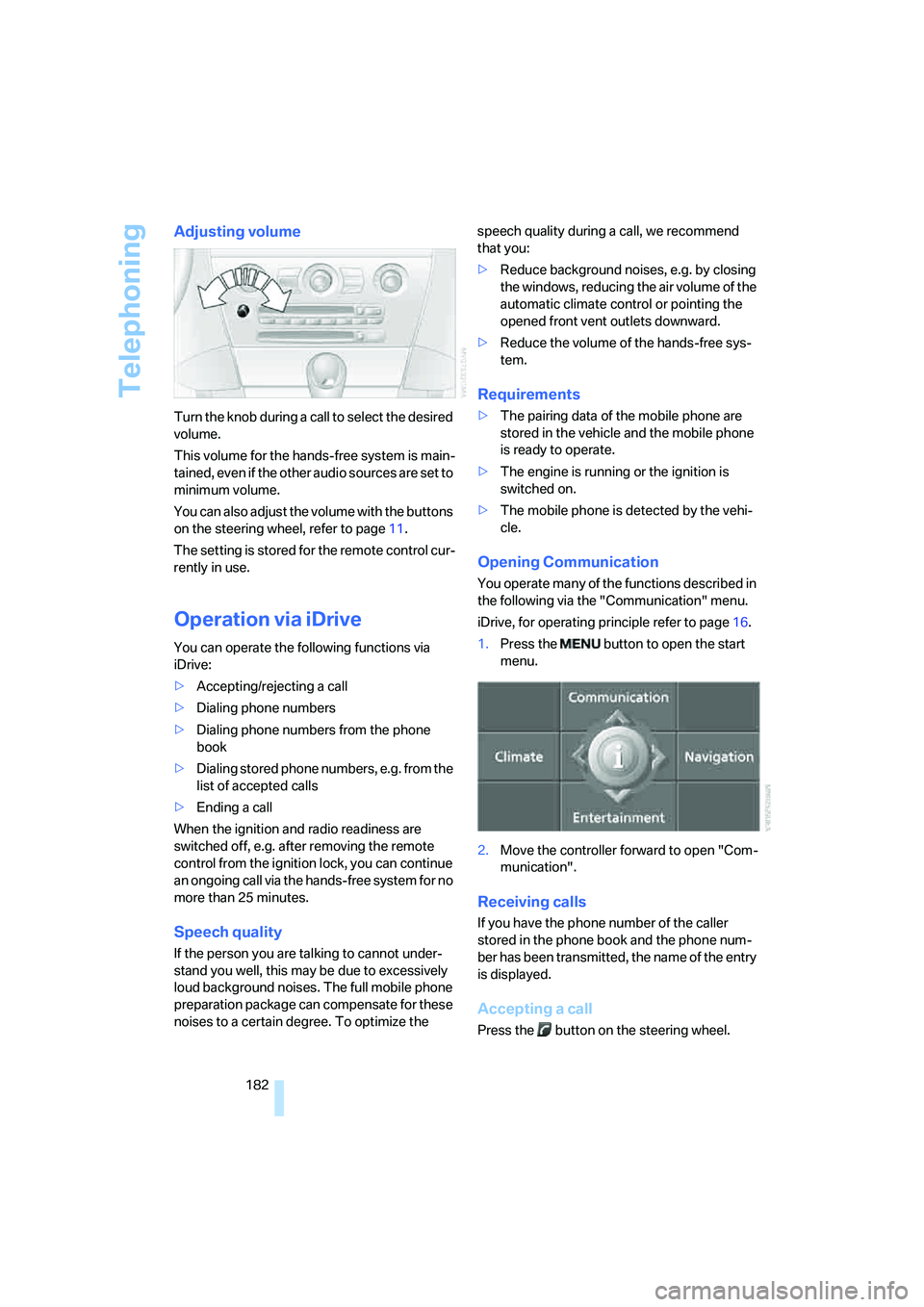
1.Press the button to open the start
menu.
2.Move the controller forward to open "Com-
munication".
Receiving calls
If you have the phone number of the caller
stored in the phone book and the phone num-
ber has been transmitted, the name of the entry
is displayed.
Accepting a call
Press the button on the steering wheel.
Page 189 of 262
187
Entertainment
Reference
At a glance
Controls
Driving tips Communications
Navigation
Mobility
Changing between mobile
phone and hands-free system
From mobile phone to hands-free
system*
You can continue calls begun outside the Blue-
tooth range of the vehicle via the hands-free
system when the engine is running or the igni-
tion is switched on. Depending on your mobile
phone, the system automatically switches over
to the hands-free mode.
For mobile phones that do not automatically
switch over to the hands-free mode:
>Depending on the mobile phone model
used, the conversation can be continued via
the hands-free system if necessary. Follow
the instructions displayed on the mobile
phone display, refer to the operating
instructions of your mobile phone.
>Press the button above the storage
compartment. Switching over may take
several seconds.
From hands-free system to mobile
phone
When you telephone via the hands-free system,
you can also continue the call via the mobile
phone if necessary, depending on the mobile
phone model. Act according to what is shown
on the mobile phone display, refer to the oper-
ating instructions of your mobile phone.
As an alternative, you can deactivate the Blue-
tooth link.
Depending on your mobile phone model, poor
reception of the wireless communications net-
work can result in the system switching from
the hands-free system to the mobile phone.
Operation by voice*
The concept
You can operate your mobile phone without
having to remove your hands from the steering
wheel. When making your entries, you will be
supported by announcements or questions in
many cases.
The same prerequisites as for operation via
iDrive apply, refer to page182.
Voice commands
Activating system
1.Briefly press the button on the steering
wheel.
An acoustic signal indicates that you can
say commands.
2.Say the command.
Ending/canceling operation by voice
Press the button on the steering wheel
or
In dialogs where text is spoken, not a command,
e.g. a name, canceling is only possible using the
button on the steering wheel.
Having possible commands read aloud
The system understands default commands
that must be spoken word for word.
You can have the possible commands spoken
by the system at any point:
Using alternative commands
There are often a number of commands to run a
function, e.g.:
The system recognizes digits from zero to nine.
You can say each digit individually or group
them into a sequence to accelerate the input.
{Cancel}.
{Help}.
{Dial name} or {Name}.
Page 240 of 262
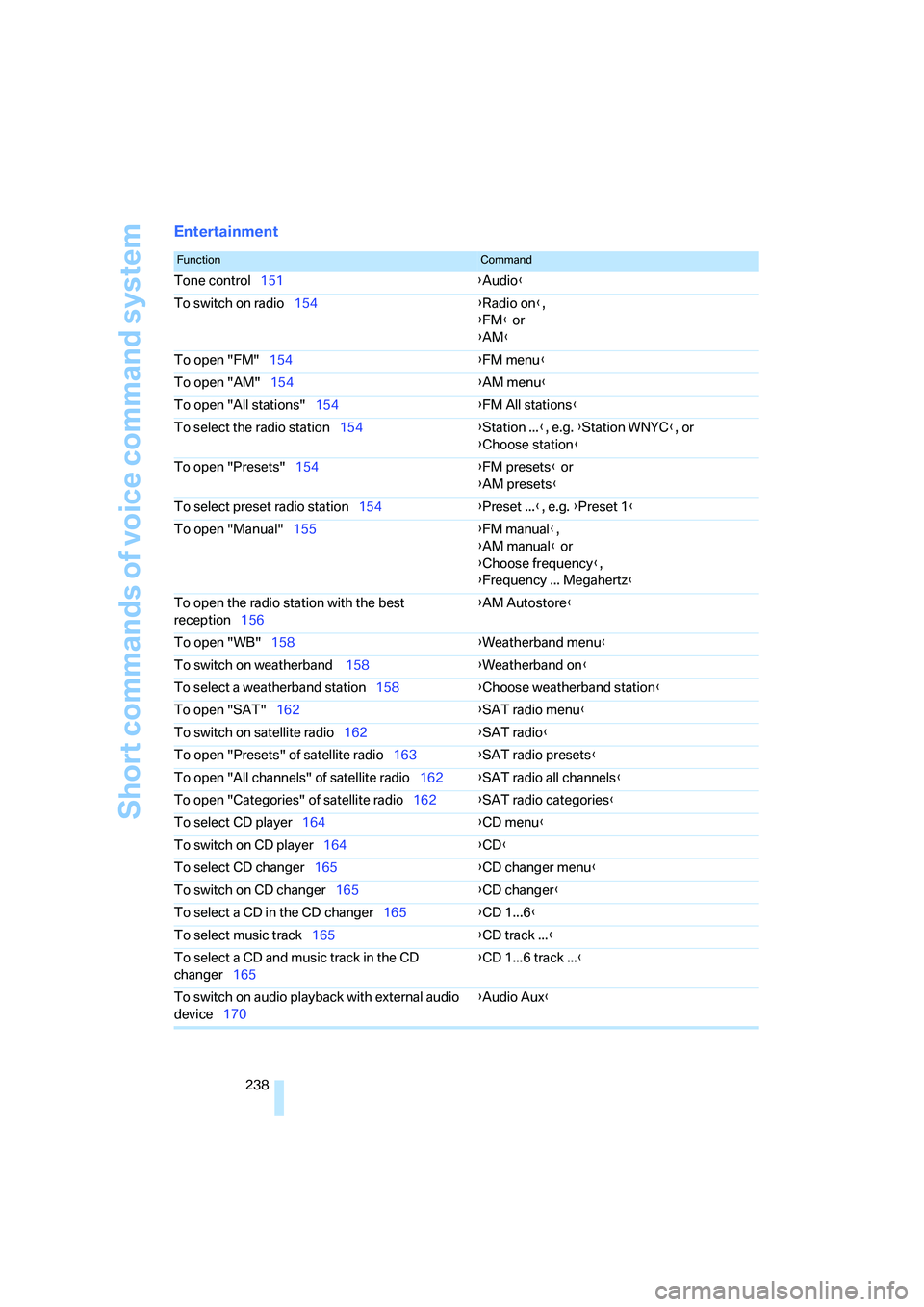
Short commands of voice command system
238
Entertainment
FunctionCommand
Tone control151{Audio}
To switch on radio154{Radio on},
{FM} or
{AM}
To open "FM"154{FM menu}
To open "AM"154{AM menu}
To open "All stations"154{FM All stations}
To select the radio station154{Station ...}, e.g. {Station WNYC}, or
{Choose station}
To open "Presets"154{FM presets} or
{AM presets}
To select preset radio station154{Preset ...}, e.g. {Preset 1}
To open "Manual"155{FM manual},
{AM manual} or
{Choose frequency},
{Frequency ... Megahertz}
To open the radio station with the best
reception156{AM Autostore}
To open "WB"158{Weatherband menu}
To switch on weatherband 158{Weatherband on}
To select a weatherband station158{Choose weatherband station
}
To open "SAT"162{SAT radio menu}
To switch on satellite radio162{SAT radio}
To open "Presets" of satellite radio163{SAT radio presets}
To open "All channels" of satellite radio162{SAT radio all channels}
To open "Categories" of satellite radio162{SAT radio categories}
To select CD player164{CD menu}
To switch on CD player164{CD}
To select CD changer165{CD changer menu}
To switch on CD changer165{CD changer}
To select a CD in the CD changer165{CD 1...6}
To select music track165{CD track ...}
To select a CD and music track in the CD
changer165{CD 1...6 track ...}
To switch on audio playback with external audio
device170{Audio Aux}
Page 245 of 262
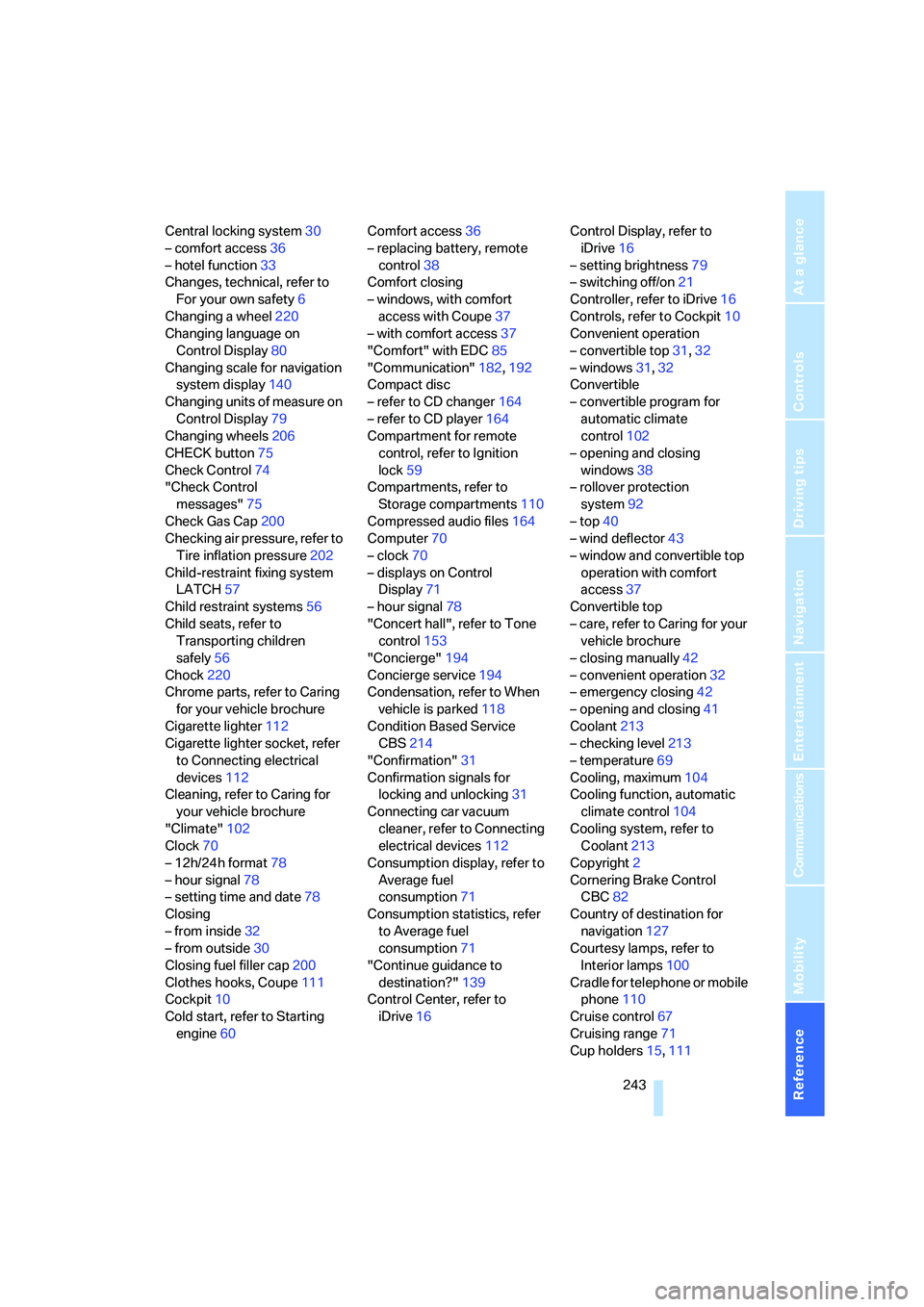
Reference 243
At a glance
Controls
Driving tips
Communications
Navigation
Entertainment
Mobility
Central locking system30
– comfort access36
– hotel function33
Changes, technical, refer to
For your own safety6
Changing a wheel220
Changing language on
Control Display80
Changing scale for navigation
system display140
Changing units of measure on
Control Display79
Changing wheels206
CHECK button75
Check Control74
"Check Control
messages"75
Check Gas Cap200
Checking air pressure, refer to
Tire inflation pressure202
Child-restraint fixing system
LATCH57
Child restraint systems56
Child seats, refer to
Transporting children
safely56
Chock220
Chrome parts, refer to Caring
for your vehicle brochure
Cigarette lighter112
Cigarette lighter socket, refer
to Connecting electrical
devices112
Cleaning, refer to Caring for
your vehicle brochure
"Climate"102
Clock70
– 12h/24h format78
– hour signal78
– setting time and date78
Closing
– from inside32
– from outside30
Closing fuel filler cap200
Clothes hooks, Coupe111
Cockpit10
Cold start, refer to Starting
engine60Comfort access36
– replacing battery, remote
control38
Comfort closing
– windows, with comfort
access with Coupe37
– with comfort access37
"Comfort" with EDC85
"Communication"182,192
Compact disc
– refer to CD changer164
– refer to CD player164
Compartment for remote
control, refer to Ignition
lock59
Compartments, refer to
Storage compartments110
Compressed audio files164
Computer70
– clock70
– displays on Control
Display71
– hour signal78
"Concert hall", refer to Tone
control153
"Concierge"194
Concierge service194
Condensation, refer to When
vehicle is parked118
Condition Based Service
CBS214
"Confirmation"31
Confirmation signals for
locking and unlocking31
Connecting car vacuum
cleaner, refer to Connecting
electrical devices112
Consumption display, refer to
Average fuel
consumption71
Consumption statistics, refer
to Average fuel
consumption71
"Continue guidance to
destination?"139
Control Center, refer to
iDrive16Control Display, refer to
iDrive16
– setting brightness79
– switching off/on21
Controller, refer to iDrive16
Controls, refer to Cockpit10
Convenient operation
– convertible top31,32
– windows31,32
Convertible
– convertible program for
automatic climate
control102
– opening and closing
windows38
– rollover protection
system92
– top40
– wind deflector43
– window and convertible top
operation with comfort
access37
Convertible top
– care, refer to Caring for your
vehicle brochure
– closing manually42
– convenient operation32
– emergency closing42
– opening and closing41
Coolant213
– checking level213
– temperature69
Cooling, maximum104
Cooling function, automatic
climate control104
Cooling system, refer to
Coolant213
Copyright2
Cornering Brake Control
CBC82
Country of destination for
navigation127
Courtesy lamps, refer to
Interior lamps100
Cradle for telephone or mobile
phone110
Cruise control67
Cruising range71
Cup holders15,111
Page 246 of 262
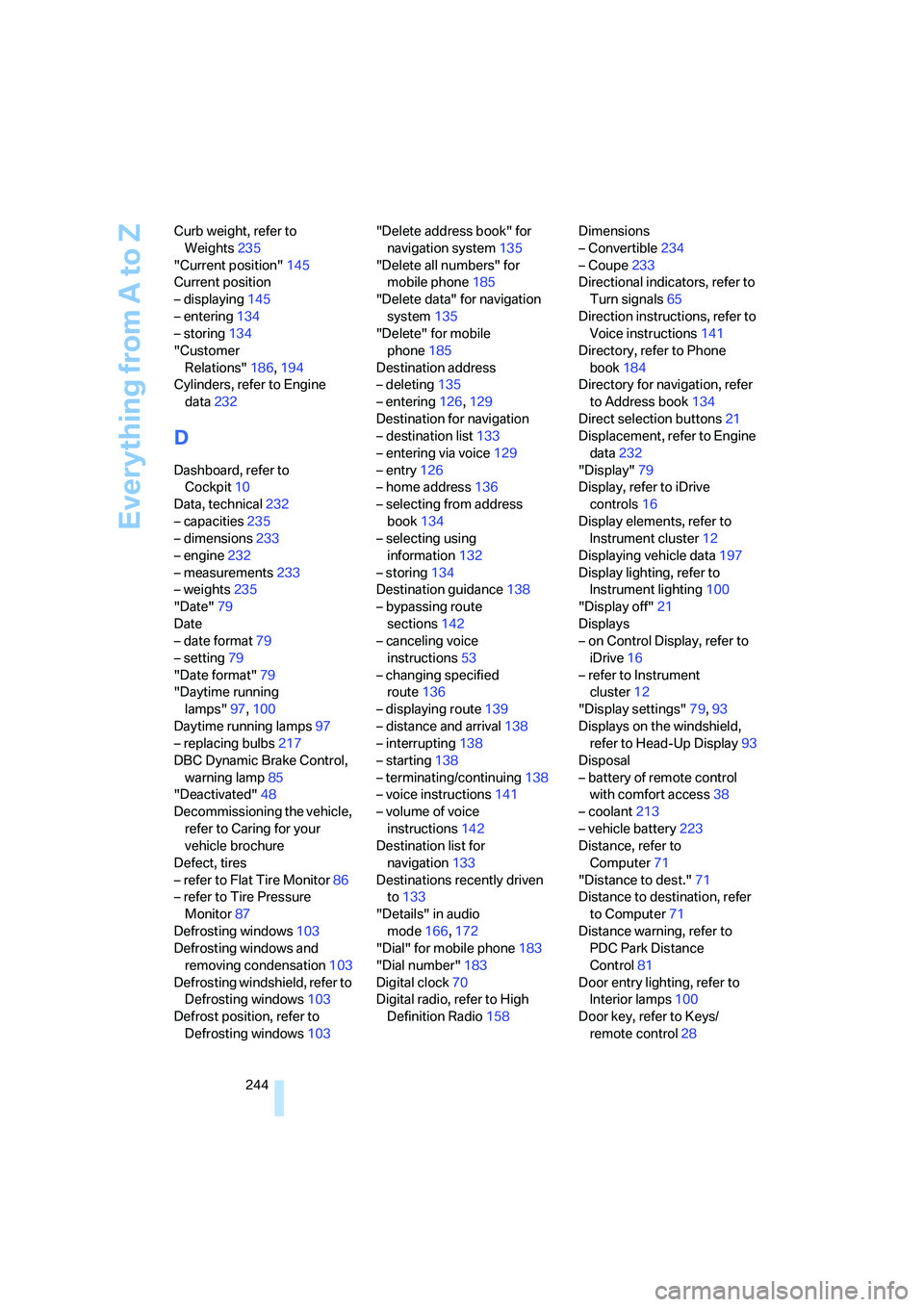
Everything from A to Z
244 Curb weight, refer to
Weights235
"Current position"145
Current position
– displaying145
– entering134
– storing134
"Customer
Relations"186,194
Cylinders, refer to Engine
data232
D
Dashboard, refer to
Cockpit10
Data, technical232
– capacities235
– dimensions233
– engine232
– measurements233
– weights235
"Date"79
Date
– date format79
– setting79
"Date format"79
"Daytime running
lamps"97,100
Daytime running lamps97
– replacing bulbs217
DBC Dynamic Brake Control,
warning lamp85
"Deactivated"48
Decommissioning the vehicle,
refer to Caring for your
vehicle brochure
Defect, tires
– refer to Flat Tire Monitor86
– refer to Tire Pressure
Monitor87
Defrosting windows103
Defrosting windows and
removing condensation103
Defrosting windshield, refer to
Defrosting windows103
Defrost position, refer to
Defrosting windows103"Delete address book" for
navigation system135
"Delete all numbers" for
mobile phone185
"Delete data" for navigation
system135
"Delete" for mobile
phone185
Destination address
– deleting135
– entering126,129
Destination for navigation
– destination list133
– entering via voice129
– entry126
– home address136
– selecting from address
book134
– selecting using
information132
– storing134
Destination guidance138
– bypassing route
sections142
– canceling voice
instructions53
– changing specified
route136
– displaying route139
– distance and arrival138
– interrupting138
– starting138
– terminating/continuing138
– voice instructions141
– volume of voice
instructions142
Destination list for
navigation133
Destinations recently driven
to133
"Details" in audio
mode166,172
"Dial" for mobile phone183
"Dial number"183
Digital clock70
Digital radio, refer to High
Definition Radio158Dimensions
– Convertible234
– Coupe233
Directional indicators, refer to
Turn signals65
Direction instructions, refer to
Voice instructions141
Directory, refer to Phone
book184
Directory for navigation, refer
to Address book134
Direct selection buttons21
Displacement, refer to Engine
data232
"Display"79
Display, refer to iDrive
controls16
Display elements, refer to
Instrument cluster12
Displaying vehicle data197
Display lighting, refer to
Instrument lighting100
"Display off"21
Displays
– on Control Display, refer to
iDrive16
– refer to Instrument
cluster12
"Display settings"79,93
Displays on the windshield,
refer to Head-Up Display93
Disposal
– battery of remote control
with comfort access38
– coolant213
– vehicle battery223
Distance, refer to
Computer71
"Distance to dest."71
Distance to destination, refer
to Computer71
Distance warning, refer to
PDC Park Distance
Control81
Door entry lighting, refer to
Interior lamps100
Door key, refer to Keys/
remote control28
Page 253 of 262
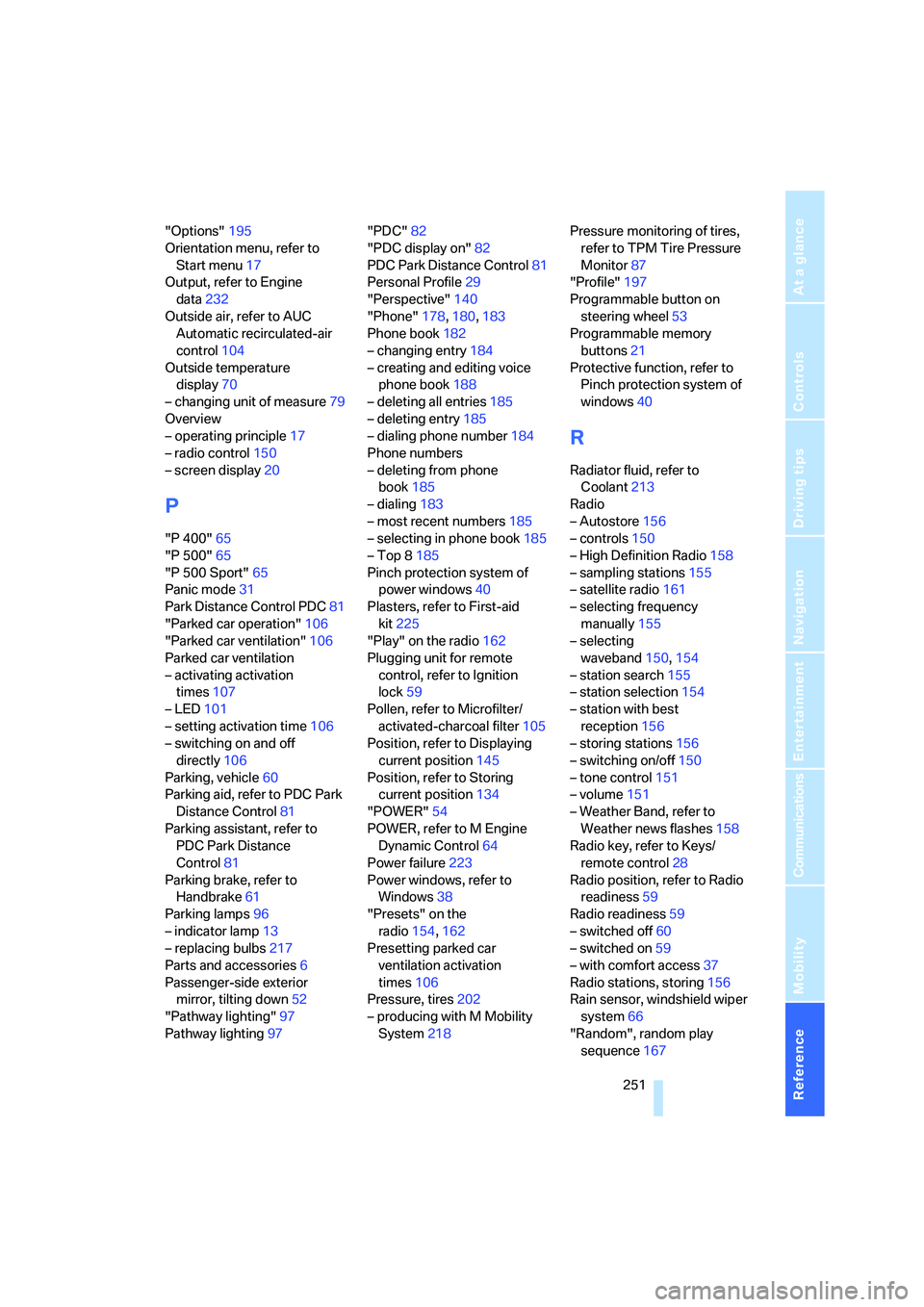
Reference 251
At a glance
Controls
Driving tips
Communications
Navigation
Entertainment
Mobility
"Options"195
Orientation menu, refer to
Start menu17
Output, refer to Engine
data232
Outside air, refer to AUC
Automatic recirculated-air
control104
Outside temperature
display70
– changing unit of measure79
Overview
– operating principle17
– radio control150
– screen display20
P
"P 400"65
"P 500"65
"P 500 Sport"65
Panic mode31
Park Distance Control PDC81
"Parked car operation"106
"Parked car ventilation"106
Parked car ventilation
– activating activation
times107
– LED101
– setting activation time106
– switching on and off
directly106
Parking, vehicle60
Parking aid, refer to PDC Park
Distance Control81
Parking assistant, refer to
PDC Park Distance
Control81
Parking brake, refer to
Handbrake61
Parking lamps96
– indicator lamp13
– replacing bulbs217
Parts and accessories6
Passenger-side exterior
mirror, tilting down52
"Pathway lighting"97
Pathway lighting97"PDC"82
"PDC display on"82
PDC Park Distance Control81
Personal Profile29
"Perspective"140
"Phone"178,180,183
Phone book182
– changing entry184
– creating and editing voice
phone book188
– deleting all entries185
– deleting entry185
– dialing phone number184
Phone numbers
– deleting from phone
book185
– dialing183
– most recent numbers185
– selecting in phone book185
– Top 8185
Pinch protection system of
power windows40
Plasters, refer to First-aid
kit225
"Play" on the radio162
Plugging unit for remote
control, refer to Ignition
lock59
Pollen, refer to Microfilter/
activated-charcoal filter105
Position, refer to Displaying
current position145
Position, refer to Storing
current position134
"POWER"54
POWER, refer to M Engine
Dynamic Control64
Power failure223
Power windows, refer to
Windows38
"Presets" on the
radio154,162
Presetting parked car
ventilation activation
times106
Pressure, tires202
– producing with M Mobility
System218Pressure monitoring of tires,
refer to TPM Tire Pressure
Monitor87
"Profile"197
Programmable button on
steering wheel53
Programmable memory
buttons21
Protective function, refer to
Pinch protection system of
windows40
R
Radiator fluid, refer to
Coolant213
Radio
– Autostore156
– controls150
– High Definition Radio158
– sampling stations155
– satellite radio161
– selecting frequency
manually155
– selecting
waveband150,154
– station search155
– station selection154
– station with best
reception156
– storing stations156
– switching on/off150
– tone control151
– volume151
– Weather Band, refer to
Weather news flashes158
Radio key, refer to Keys/
remote control28
Radio position, refer to Radio
readiness59
Radio readiness59
– switched off60
– switched on59
– with comfort access37
Radio stations, storing156
Rain sensor, windshield wiper
system66
"Random", random play
sequence167
Page 254 of 262
Everything from A to Z
252 "Random all" in audio
mode168
"Random directory" in audio
mode167
Random play sequence
– CD changer167
– CD player167
"RDS"157
Reading lamps100
Rear lamps, refer to Tail
lamps217
Rearview mirrors, refer to
Mirrors51
Rear window
– heating103
– opening and closing39
"Received calls"184
Reception
– quality157
– radio stations157
– regional station156
Reception quality of mobile
phone, refer to Status
information20
Rechargeable flashlight110
Recirculated-air mode, refer
to AUC Automatic
recirculated-air control104
Recirculation of air, refer to
AUC Automatic
recirculated-air control104
Reclining seat, refer to
Seats46
Recording times, refer to
Stopwatch77
"Redial" for mobile phone184
Redialing with mobile
phone189
Reflectors, refer to Tail
lamps217
Refueling200
Releasing, hood208
Releasing the locks, refer to
Unlocking37
"Relock door if not
opened"33
Remaining distance, refer to
Cruising range71Remaining distance to
destination, refer to
Computer71
Remote control28
– battery replacement38
– comfort access36
– garage-door opener108
– luggage compartment lid31
– malfunction31,38
Removing condensation from
windows103
"Repeat directory" in audio
mode167
"Repeat" in audio mode167
"Repeat track" in audio
mode
167
Replacement fuses223
Replacement remote control,
refer to New remote
controls28
Replacing bulbs, refer to
Lamps and bulbs216
Replacing tires, changing a
wheel220
Reporting safety defects7
Required fuel201
Reserve warning, refer to Fuel
gauge70
"Reset"87,88
– stopwatch77
– tone settings153
Reset, refer to Resetting tone
settings153
"Reset to default" with
MDrive54
Residual heat105
Restraint systems
– for children56
– refer to Safety belts50
Retreaded tires206
Reverse, fast
– CD changer168
– CD player168
Reverse gear62
– manual transmission61
Road map140
"Roadside
Assistance"186,192Roadside Assistance225
Roadside assistance192
Roadside parking lamps98
– replacing bulbs, refer to
Parking lamps217
Rollover protection system on
Convertible92
– lowering92
Rope, refer to Tow-starting
and towing226
Rotary/pushbutton, refer to
iDrive16
Route136
– bypassing sections142
– changing142
– changing criteria136
– display139
– displaying arrow display139
– displaying map view140
– displaying streets or towns/
cities141
– selecting136
Route information, refer to
Destination guidance with
voice instructions141
Route map, refer to Displaying
map view140
"Route preference",
changing136
Route selection136
Rubber parts, refer to Caring
for your vehicle brochure
Run-flat tires
– continuing driving with a
damaged tire88
– flat tire88
S
Safety belts50
– damage51
– indicator lamp50
– refer to Caring for your
vehicle brochure
– reminder50
– sitting safely45
Safety belt tensioners, refer to
Safety belts50
Page 255 of 262
Reference 253
At a glance
Controls
Driving tips
Communications
Navigation
Entertainment
Mobility
Safety systems
– ABS Antilock Brake
System82
– airbags90
– driving stability control
systems82
– rollover protection system,
Convertible92
– safety belts50
Satellite radio161
– enabling channels161
– selecting channel162
– storing channel162
"SAT" with radio150,161
"Save current
destination"136
"Scan"
– music tracks on CD166
– stations with radio155
Scan
– CD changer166
– CD player166
– radio155
"Scan all" in audio mode166
"Scan directory" in audio
mode166
Screw thread for tow
fitting227
SDARS, refer to Satellite
radio161
Seats46
– adjusting46
– adjusting backrest width46
– heating51
– lumbar support46
– memory, refer to Seat, mirror
and steering wheel
memory47
– sitting safely45
– storing the setting47
– thigh support46
Securing cargo119
– ski bag113
"Select as
destination"132,195
"Select current speed"77
Selecting audio sources, refer
to Operating via iDrive150Selecting frequency
manually155
Selecting menu items19
Selecting route136
Selection options with
navigation system136
Selector lever62
– manual transmission61
– Sequential Manual
Transmission62
Selector lever lock, refer to
Shiftlock62
Sequential Manual
Transmission with
Drivelogic62
– Drivelogic driving
programs63
– Drive mode63
– idle62
– initializing system, refer to
After changing wheels/
tires207
– kick-down63
– reverse gear62
– Sequential mode62
– shift lights64
– shiftlock62
– towing227
– tow-starting228
Sequential mode62
"Service"73,193,211
Service, refer to Roadside
Assistance225
Service and Warranty
Information Booklet for
US models214
Service Interval Display
– refer to CBS Condition
Based Service214
– refer to Service
requirements72
"Service notification"193
"Service Request"186,193
"Service
requirements"73,193,211
Service requirements72
– refer to CBS Condition
Based Service214"Service Status"197
"Set"
– in audio mode150
– in trip computer72
"Set date"79
"Set service date"74
"Set time"78
Setting button, refer to
Controls, controller16
"Settings"197
– for BMW Assist195
– for unlocking30
Settings
– changing on Control
Display77
– clock, 12h/24h mode78
– configuring, refer to
MDrive53
– configuring, refer to
Personal Profile29
– date79
– language80
– units of measure79
Settings menu, refer to
imenu17
Setting time, refer to
Preselecting activation
time106
Shifting63
Shift lights64
Shiftlock62
Shift paddles on steering
wheel63
Shock absorber control, refer
to EDC Electronic Damping
Control85
Short commands of voice
command system236
"Short route" for
navigation136
Short route in navigation, refer
to Selecting route136
"Show current position"131
"Show destination
position"131
Side airbags90
Side turn signals, replacing
bulbs217