Adapt BMW M6 COUPE 2006 E63 User Guide
[x] Cancel search | Manufacturer: BMW, Model Year: 2006, Model line: M6 COUPE, Model: BMW M6 COUPE 2006 E63Pages: 227, PDF Size: 8.32 MB
Page 150 of 227
Telephoning
148
Telephoning
The concept
Your BMW is equipped with a full mobile phone
preparation package. After a suitable mobile
phone has been logged onto the vehicle once,
you can operate the mobile phone via iDrive,
with the buttons on the steering wheel and by
voice.
A mobile phone that has been logged on once is
automatically detected again as soon as it is
brought back inside the vehicle, provided that
the engine is running or the ignition is switched
on. The logon data of up to four mobile phones
can be stored simultaneously. If several mobile
phones are detected simultaneously, the most
recently logged-on mobile phone can be oper-
ated via the vehicle.
Using a phone in your vehicle
Using snap-in adapter*
The so-called snap-in adapter, a mobile phone
cradle, enables the battery to be charged and
the mobile phone to be connected to the exter-
nal antenna of your vehicle. This ensures
improved network reception and a consistent
voice reproduction quality. Ask your BMW cen-
ter which mobile phones will fit in the snap-in
adapters they offer.
BMW discourages the use of mobile
phones or other mobile communications
devices inside the vehicle without a direct con-
nection to an outside antenna. Otherwise, the
vehicle electronics and mobile communication
device can interfere with each other. In addition,
there is no assurance that the radiation that
results from transmission will be dissipated
from the vehicle interior.<
A mobile phone detected by the vehicle should
not be operated by the mobile phone's keypad;
otherwise malfunctions may occur.
For your safety
A car phone makes life more convenient in
many ways, and can even save lives in an emer-
gency. While you should consult your mobile
phone's separate operating instructions for a
detailed description of safety precautions and
information, we request that you direct your
particular attention to the following:
Only make entries when the traffic situa-
tion allows you to do so. Do not hold the
mobile phone in your hand while you are driving;
use the handsfree system instead. If you do not
observe this precaution, your being distracted
can endanger vehicle occupants and other road
users.<
Suitable mobile phones
Ask your BMW center which mobile phones
with a Bluetooth interface are supported by the
mobile phone preparation package or which
mobile phones will fit in the snap-in adapters
they offer. These mobile phones support the
functions described in this Owner's Manual,
provided they are running a certain software
version. Malfunctions can occur with other
mobile phones.
Care instructions
You can find what you need to know about car-
ing for your mobile phone in the separate Caring
for your vehicle brochure and in the mobile
phone operating instructions.
Operating options
You can operate the mobile phone* using:
>The steering wheel, refer to page11
>iDrive, refer to page16
>Voice commands, refer to page156
*
Page 153 of 227
151
Entertainment
Reference
At a glance
Controls
Driving tips Communications
Navigation
Mobility
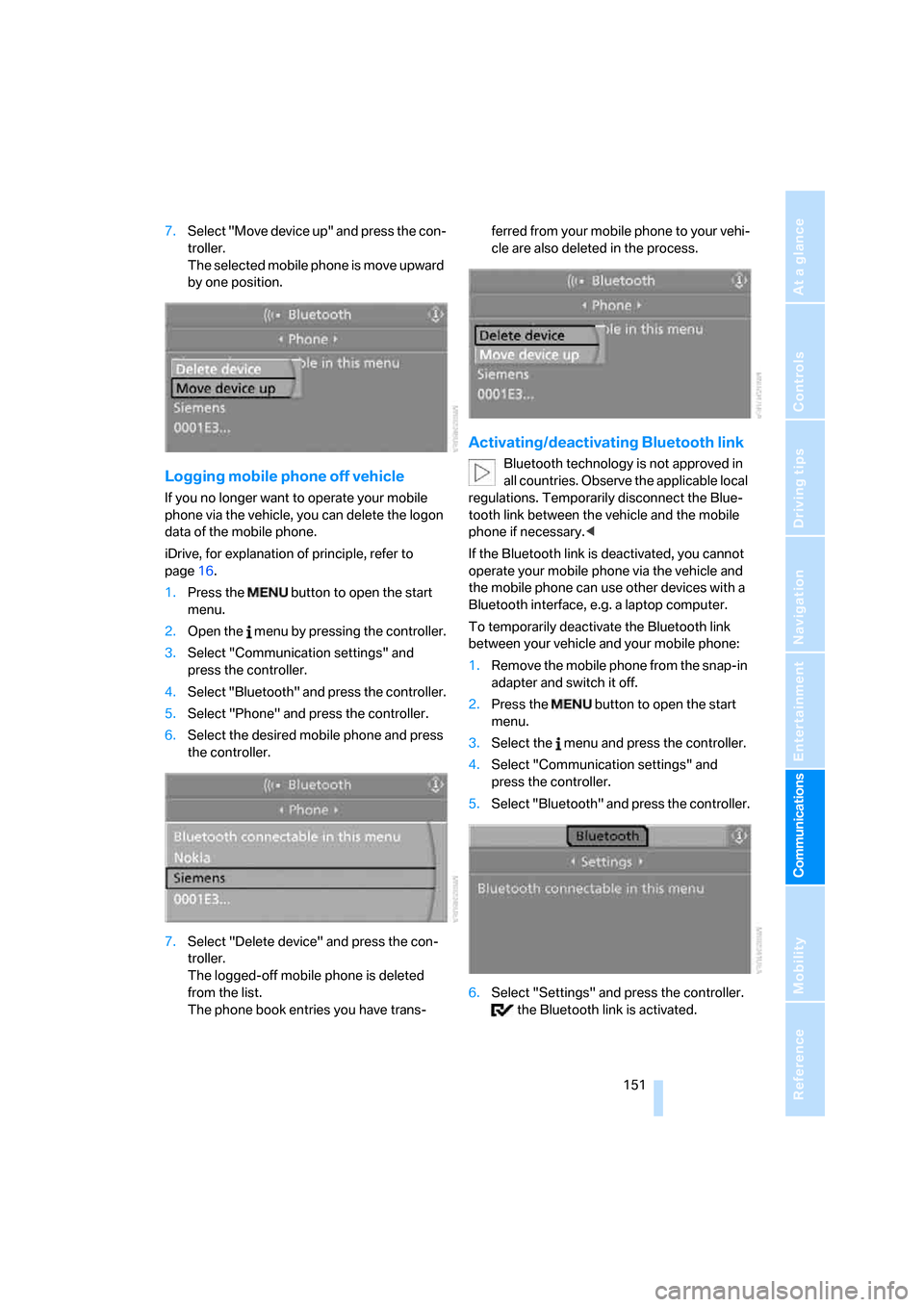
7.Select "Move device up" and press the con-
troller.
The selected mobile phone is move upward
by one position.
Logging mobile phone off vehicle
If you no longer want to operate your mobile
phone via the vehicle, you can delete the logon
data of the mobile phone.
iDrive, for explanation of principle, refer to
page16.
1.Press the button to open the start
menu.
2.Open the menu by pressing the controller.
3.Select "Communication settings" and
press the controller.
4.Select "Bluetooth" and press the controller.
5.Select "Phone" and press the controller.
6.Select the desired mobile phone and press
the controller.
7.Select "Delete device" and press the con-
troller.
The logged-off mobile phone is deleted
from the list.
The phone book entries you have trans-ferred from your mobile phone to your vehi-
cle are also deleted in the process.
Activating/deactivating Bluetooth link
Bluetooth technology is not approved in
all countries. Observe the applicable local
regulations. Temporarily disconnect the Blue-
tooth link between the vehicle and the mobile
phone if necessary.<
If the Bluetooth link is deactivated, you cannot
operate your mobile phone via the vehicle and
the mobile phone can use other devices with a
Bluetooth interface, e.g. a laptop computer.
To temporarily deactivate the Bluetooth link
between your vehicle and your mobile phone:
1.Remove the mobile phone from the snap-in
adapter and switch it off.
2.Press the button to open the start
menu.
3.Select the menu and press the controller.
4.Select "Communication settings" and
press the controller.
5.Select "Bluetooth" and press the controller.
6.Select "Settings" and press the controller.
the Bluetooth link is activated.
Page 161 of 227
159
Entertainment
Reference
At a glance
Controls
Driving tips Communications
Navigation
Mobility
Selecting an entry
The connection to the phone number of the
selected entry is established.
Redialing
The {Redial} command calls up "Redial".
Notes
The commands in English were available
as of this printing. Other languages are
currently not available. To operate the mobile
phone via the voice command system, refer to
page22.<
Important for voice commands
For voice commands, keep the following in
mind:
>Issue the commands smoothly and at nor-
mal volume, avoiding excessive emphasis
and pauses.
>Keep the doors and windows closed to pre-
vent interference from ambient noise.
>Avoid making other noise in the vehicle
while speaking.
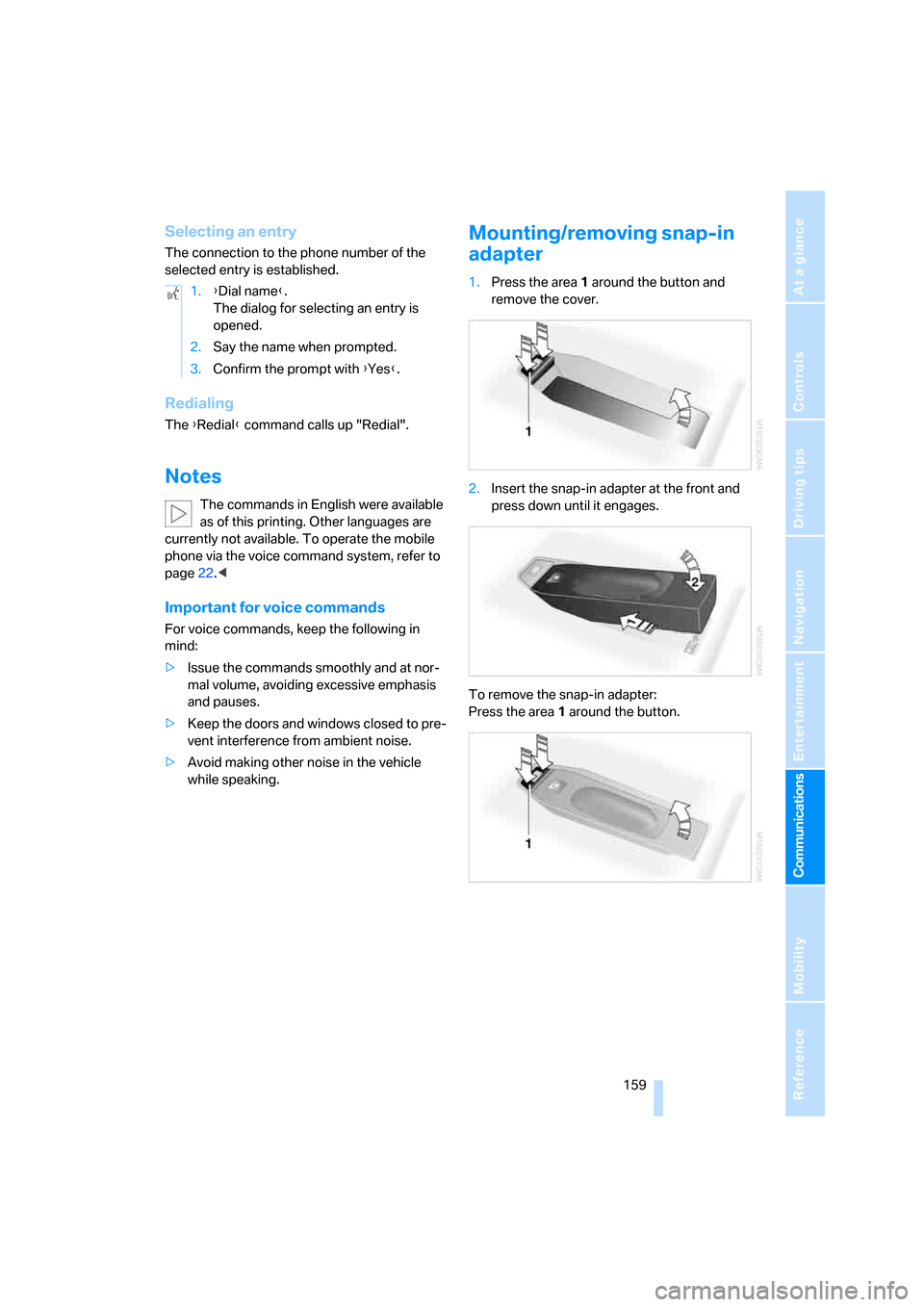
Mounting/removing snap-in
adapter
1.Press the area 1 around the button and
remove the cover.
2.Insert the snap-in adapter at the front and
press down until it engages.
To remove the snap-in adapter:
Press the area 1 around the button. 1.{Dial name}.
The dialog for selecting an entry is
opened.
2.Say the name when prompted.
3.Confirm the prompt with {Yes}.
Page 162 of 227
Telephoning
160
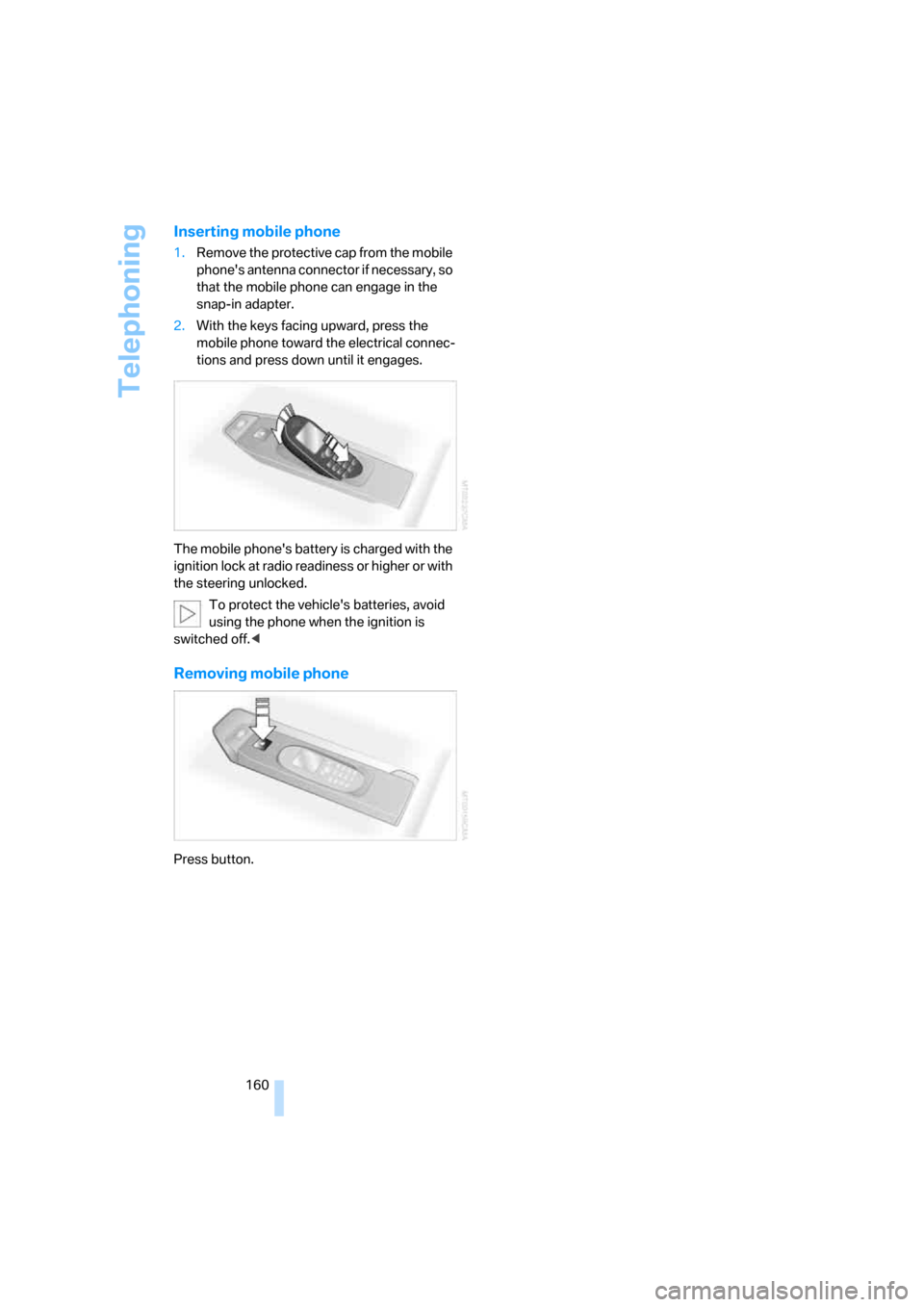
Inserting mobile phone
1.Remove the protective cap from the mobile
phone's antenna connector if necessary, so
that the mobile phone can engage in the
snap-in adapter.
2.With the keys facing upward, press the
mobile phone toward the electrical connec-
tions and press down until it engages.
The mobile phone's battery is charged with the
ignition lock at radio readiness or higher or with
the steering unlocked.
To protect the vehicle's batteries, avoid
using the phone when the ignition is
switched off.<
Removing mobile phone
Press button.
Page 166 of 227
TeleService, BMW Assist
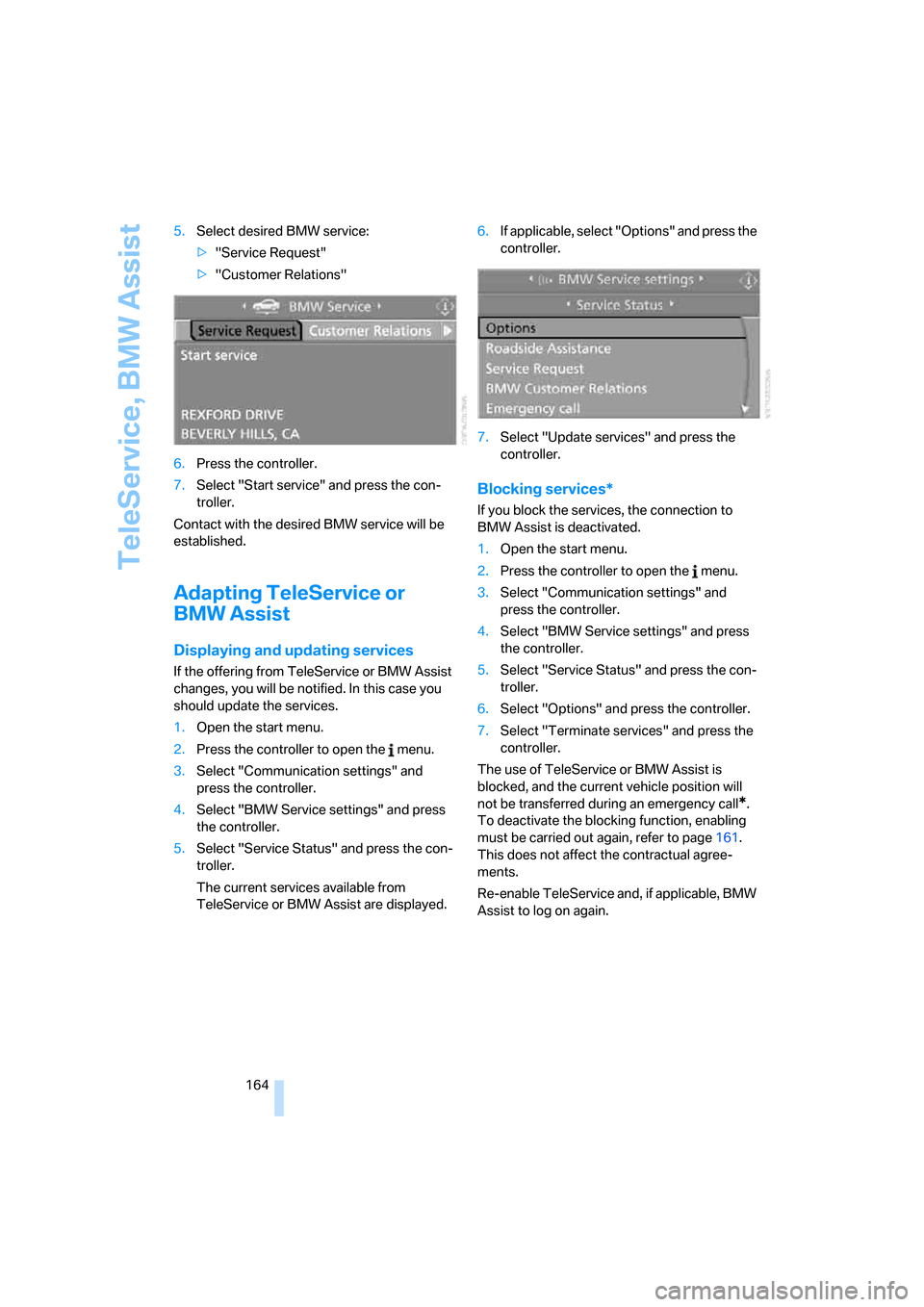
164 5.Select desired BMW service:
>"Service Request"
>"Customer Relations"
6.Press the controller.
7.Select "Start service" and press the con-
troller.
Contact with the desired BMW service will be
established.
Adapting TeleService or
BMW Assist
Displaying and updating services
If the offering from TeleService or BMW Assist
changes, you will be notified. In this case you
should update the services.
1.Open the start menu.
2.Press the controller to open the menu.
3.Select "Communication settings" and
press the controller.
4.Select "BMW Service settings" and press
the controller.
5.Select "Service Status" and press the con-
troller.
The current services available from
TeleService or BMW Assist are displayed.6.If applicable, select "Options" and press the
controller.
7.Select "Update services" and press the
controller.
Blocking services*
If you block the services, the connection to
BMW Assist is deactivated.
1.Open the start menu.
2.Press the controller to open the menu.
3.Select "Communication settings" and
press the controller.
4.Select "BMW Service settings" and press
the controller.
5.Select "Service Status" and press the con-
troller.
6.Select "Options" and press the controller.
7.Select "Terminate services" and press the
controller.
The use of TeleService or BMW Assist is
blocked, and the current vehicle position will
not be transferred during an emergency call
*.
To deactivate the blocking function, enabling
must be carried out again, refer to page161.
This does not affect the contractual agree-
ments.
Re-enable TeleService and, if applicable, BMW
Assist to log on again.
Page 181 of 227
Mobility
179Reference
At a glance
Controls
Driving tips
Communications
Navigation
Entertainment
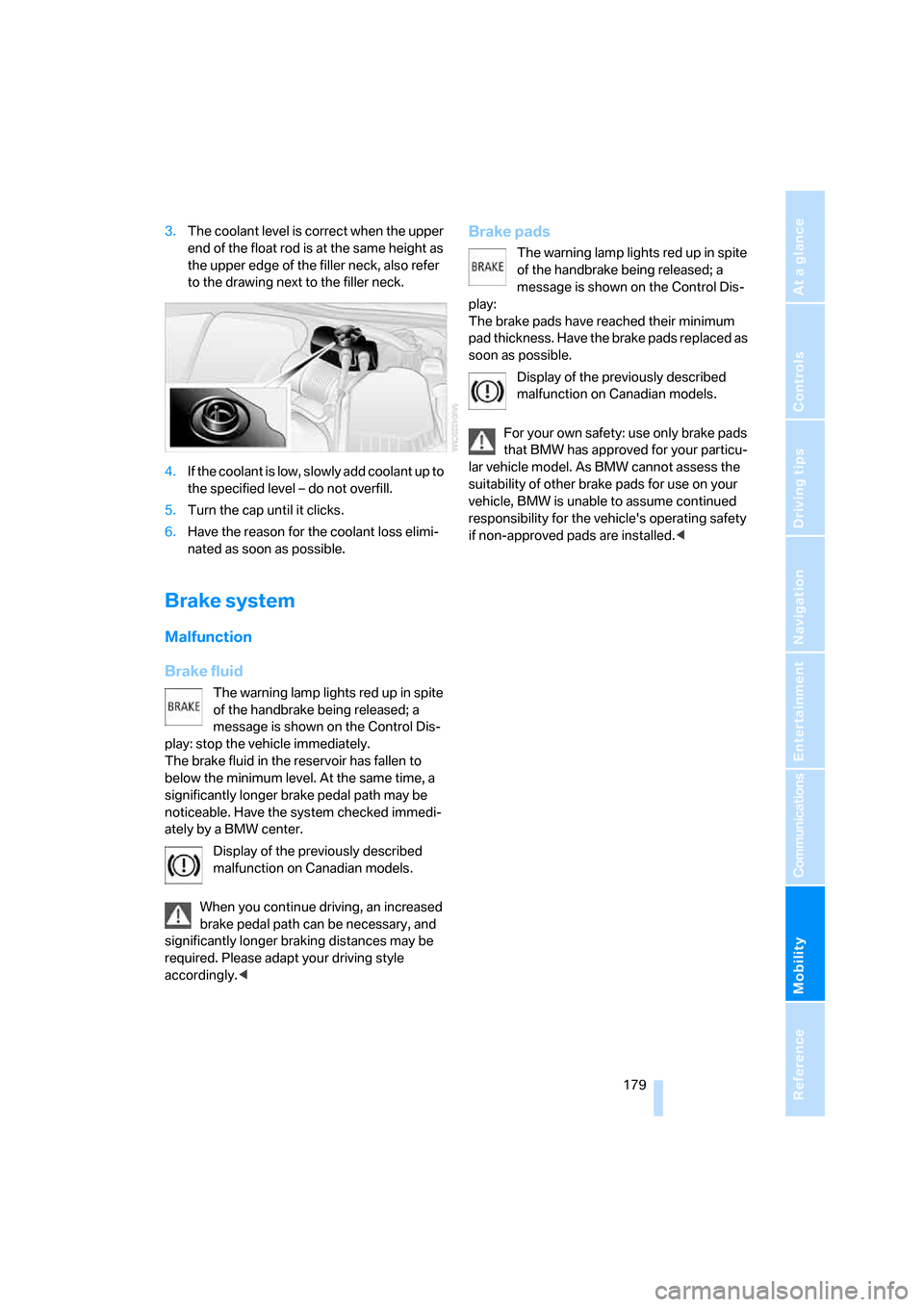
3.The coolant level is correct when the upper
end of the float rod is at the same height as
the upper edge of the filler neck, also refer
to the drawing next to the filler neck.
4.If the coolant is low, slowly add coolant up to
the specified level – do not overfill.
5.Turn the cap until it clicks.
6.Have the reason for the coolant loss elimi-
nated as soon as possible.
Brake system
Malfunction
Brake fluid
The warning lamp lights red up in spite
of the handbrake being released; a
message is shown on the Control Dis-
play: stop the vehicle immediately.
The brake fluid in the reservoir has fallen to
below the minimum level. At the same time, a
significantly longer brake pedal path may be
noticeable. Have the system checked immedi-
ately by a BMW center.
Display of the previously described
malfunction on Canadian models.
When you continue driving, an increased
brake pedal path can be necessary, and
significantly longer braking distances may be
required. Please adapt your driving style
accordingly.<
Brake pads
The warning lamp lights red up in spite
of the handbrake being released; a
message is shown on the Control Dis-
play:
The brake pads have reached their minimum
pad thickness. Have the brake pads replaced as
soon as possible.
Display of the previously described
malfunction on Canadian models.
For your own safety: use only brake pads
that BMW has approved for your particu-
lar vehicle model. As BMW cannot assess the
suitability of other brake pads for use on your
vehicle, BMW is unable to assume continued
responsibility for the vehicle's operating safety
if non-approved pads are installed.<
Page 208 of 227
Everything from A to Z
206
Everything from A to Z
Index
"..." Identifies Control Display
texts used to select
individual functions, and
indicates where to find them
in the text.
A
ABS Antilock Brake
System71
Accessories6
Activated-charcoal filter87
Activating hour signal68
"Activation time" for parked
car ventilation88
Adapter for spare key28
Adaptive brake lamps, refer to
Brake force display75
Adaptive Head Light81
"Add digits" for mobile
phone154
"Address book" for
navigation114
Address for navigation
– deleting115
– entering107,110
– selecting115
– storing114
– storing current position114
"Add to address book"114
"Add to destination list"110
Adjusting confirmation signals
for locking and unlocking31
Adjusting the thigh support40
Adjusting tone in audio mode,
refer to Tone control127
"After door opened"41
"After unlocking"41Airbags75
– deactivating, refer to
Exception for front
passenger seat48
– sitting safely39
– warning lamp77
Air distribution
– automatic85
– manual86
Airing, refer to Ventilation87
Air recirculation, refer to AUC
Automatic recirculated-air
control87
"Air recirculation on / off"45
Air vents, refer to
Ventilation87
Air volume86
AKI, refer to Fuel
specifications169
Alarm system35
– avoiding unintentional
alarms35
– interior motion sensor35
– switching off alarm35
– switching off tilt alarm
sensor and interior motion
sensor36
– tilt alarm sensor35
"All channels"136
"All doors"30
All-season tires, refer to
Winter tires174
"All stations" on the radio,
selecting130,133
Alterations, technical, refer to
For your own safety6
"AM", reception
range126,130
Antenna for mobile phone148
Antifreeze
– coolant178
– washer fluid57Antilock Brake System
ABS71
Anti-theft alarm system, refer
to Alarm system35
Anti-theft system, refer to
Central locking system29
Approved axle loads, refer to
Weights200
Approved engine oils178
Approved gross vehicle
weight, refer to Weights200
Armrest, refer to Center
armrest92
Around the center console14
Around the steering wheel10
Arrival time
– refer to Computer61
– refer to Starting destination
guidance118
"Arrow display" during
Navigation119
Ashtray93
Assist, refer to
BMW Assist161
Assistance systems, refer to
Driving stability control
systems71
Assistance window20
"Assist. window off"21
AUC Automatic recirculated-
air control87
Audio126
– controls126
– switching on/off126
– tone control127
– volume127
"Audio", refer to Tone
control127
Page 214 of 227
Everything from A to Z
212
G
Garage-door opener, refer to
Integrated universal remote
control90
Gasoline
– refer to Average fuel
consumption61
– refer to Fuel
specifications169
– refer to Required fuel169
Gasoline display, refer to Fuel
gauge60
Gear changes53
Gear display, refer to Displays
in instrument cluster53
General driving notes98
Glove compartment91
– rechargeable flashlight91
GPS navigation, refer to
Navigation system106
Grills, refer to Ventilation87
Gross vehicle weight, refer to
Weights200
Ground clearance100
H
Handbrake51
– indicator lamp13,52
Hands-free system, refer to
Microphone14
Hazard warning flashers15
HD, refer to High Definition
Radio134
Head airbags75
Headlamp control,
automatic80
Headlamp flasher56
Headlamps
– care, refer to the Caring for
your vehicle brochure
– cleaning, refer to Wiper
system57
– replacing bulbs182
Head Light, refer to Adaptive
Head Light81Head restraints
– front41
– removing42
– sitting safely39
"Head-Up Display"46,77
Head-Up Display77
– default view78
– shift lights55
Heated
– mirrors, refer to Automatic
functions44
– rear window86
– seats43
Heater85
Heating
– exterior mirrors44
– interior84
– rear window86
– residual heat87
– seats43
Heating with engine switched
off, refer to Residual heat87
Heavy cargo, refer to Securing
cargo101
Height, refer to
Dimensions199
Height adjustment
– seats40
– steering wheel44
High-beam assistant81
High beams81
– headlamp flasher81
– indicator lamp13
– replacing bulbs183
High Definition Radio134
High water, refer to Driving
through water99
Hills100
Hold37
Holder for cups93
"Home address" in
navigation116
Homepage4
Hood175
Horn10
Hotel function33
– unlocking manually33
Hot exhaust system98
"Hour memo"68"House number" for desti-
nation entry110
Hydraulic brake assistant,
refer to DBC Dynamic Brake
Control71
Hydroplaning99
– also refer to Minimum tread
depth172
I
IBOC, refer to High Definition
Radio134
Ice, refer to Outside
temperature60
ID3-Tag, refer to Information
about track141
Idle53
iDrive16
– adjusting brightness69
– assistance window20
– changing date and time68
– changing language69
– changing menu page19
– changing settings67
– changing unit of measure
units and display form69
– controller16
– controls16
– displaying menus17
– selecting menu item19
– selecting or confirming
entry19
– start menu17
– status information20
– symbols18
Ignition50
– switched off50
– switched on50
Ignition key, refer to Keys/
remote control28
Ignition key position 1, refer to
Radio readiness50
Ignition key position 2, refer to
Ignition on50
Ignition lock50
– starting engine with comfort
access37
Page 220 of 227
Everything from A to Z
218 "Service"63,162
Service, refer to Roadside
Assistance192
Service and Warranty Infor-
mation Booklet for US
models180
Service interval display, refer
to Service requirements63
"Service notification"163
"Service Request"155,164
"Service
requirements"63,162
Service requirements63
– also refer to CBS Condition
Based Service180
"Service Status"162
"Set"
– in audio mode126
– in trip computer62
"Set date"68
"Set service date"64
"Set time"68
Settings
– changing on Control
Display67
– clock, 12h/24h mode68
– configuring, refer to
MDrive46
– configuring, refer to
Personal Profile29
Setting speed limit66
Setting time, refer to Prese-
lecting activation time88
"Set tire pressure"74
Shifting53
Shifting paddles54
Shift lights55
Shiftlock52
Shock absorber control, refer
to EDC Electronic Damping
Control73
Short commands of voice
command system201
"Short route" for
navigation117
Short route in navigation, refer
to Selecting route116
"Show current position"112"Show destination
position"112
Side airbags75
Side markers, replacing
bulbs184
Side turn signals, replacing
bulbs184
Signal horn, refer to Horn10
Sill panel lighting, refer to
Interior lamps83
Sitting safely39
– with airbags39
– with head restraints39
– with safety belts39
Ski bag94
Slope assistant, refer to
Starting off on slopes99
SMG, refer to Sequential
Manual Transmission with
Drivelogic52
"SMG Drivelogic"46,54
Snow chains174
Socket, refer to Connecting
electrical devices94
Socket for Onboard
Diagnostics interface181
Socket for remote control,
refer to Ignition lock50
Soft closure aid, refer to
Automatic soft closing33
Song search with CD, refer to
Playing a track141
SOS, refer to Initiating an
emergency call191
Spare fuses190
Spare key28
– adapter28
Spare remote control28
Spare wheel188
– driving with spare wheel189
Special oils, refer to Approved
engine oils178
Speed-dependent
volume128
Speed limit66
Speed limit warning, refer to
Speed limit66
Speedometer12"Speed volume", tone
control128
Speed with winter tires174
"Sport" with EDC73
Stability control, refer to
Driving stability control
systems71
Start/Stop button50
"Start" for stopwatch67
"Start guidance"110,118
Starting assistant, refer to
Starting off on slopes99
Starting difficulties
– jump starting192
– refer to Special starting
conditions51
Starting engine51
Starting off
– on a slippery surface99
– on slopes99
Start menu, iDrive17
"Start route guidance"112
"Start service"163
"State / Province" for desti-
nation entry108
"State inspection"64
Station, refer to Radio130
"Status"63
Status information on Control
Display20
Status of this Owner's Manual
at time of printing5
Steering wheel
– adjustment44
– automatic adjustment, refer
to Easy entry/exit45
– buttons on steering
wheel11
– lock50
– locking50
– MDrive button46
– memory40
– programmable button45
"Steering wheel button"45
Steering-wheel shift buttons,
refer to Shift paddles54
"Stop" for stopwatch67
"Stopwatch"67
Stopwatch67
Page 221 of 227
Reference 219
At a glance
Controls
Driving tips
Communications
Navigation
Entertainment
Mobility
Storage compartments92
"Store in address book" for
navigation114
"Store" on the radio132,137
Storing current position114
Storing radio stations132
Storing sitting position, refer
to Seat, mirror and steering
wheel memory40
Storing tires174
Straps, refer to Loading101
"Street" for destination
entry109
Summer tires, refer to Wheels
and tires170
"Surround Settings", adjust
the sound128
SW, waveband130
Switches, refer to Cockpit10
Switching between high
beams and low beams,
automatic, refer to High-
beam assistant81
Switching off tilt alarm
sensor36
Switching on
– audio126
– CD changer126
– CD player126
– radio126
Switching the cooling function
on and off86
Swiveling headlamps, refer to
Adaptive Head Light81
Symbols4
– indicator and warning
lamps13
T
Tachometer59
Tail lamps184
– replacing bulbs184
Tank capacity
– also refer to Filling
capacities200
– fuel tank capacity168
Target cursor for
navigation112Technical alterations, refer to
For your own safety6
Technical data198
Telematic, refer to
TeleService,
BMW Assist161
Telephone
– refer to Mobile phone148
– refer to separate operating
instructions
"Telephone list"45
TeleService161
– enabling161
– services offered162
Temperature
– adjusting in upper body
region85
– adjusting with automatic
climate control85
– of coolant, refer to Coolant
temperature59
Temperature display
– changing units of
measure69
– outside temperature60
Temperature gauge, engine
oil60
Temperature warning, refer to
Outside temperature60
Tempomat, refer to Cruise
control57
"Terminate services"164
"Text language"69
"Theater", refer to Tone
control128
The individual vehicle5
Tie-down points, refer to
Securing cargo101
Tightening torque of the lug
bolts, refer to After
mounting189
Tilting down passenger-side
exterior mirror44
"Time"68
"Time format"68
Timer, refer to Preselecting
activation time88
"Timer 1" for parked car
ventilation88"Timer 2" for parked car
ventilation88
Tire inflation pressures170
Tire Quality Grading172
Tires
– age171
– air loss74
– breaking-in
98
– condition172
– damage173
– inflation pressure170
– minimum tread depth172
– M Mobility System185
– new wheels and tires173
– replacing173
– retreaded tires173
– size, refer to The right
wheels and tires173
– wear indicators173
– wheel/tire combination173
– winter tires174
"Tone"127
Tone dialing method156
Tone in audio mode
– adjusting127
– middle setting129
Tone on locking/unlocking31
Tools, refer to Onboard tool
kit182
"Top 8" for mobile phone153
Torque
– lug bolts, refer to After
mounting189
– refer to Engine
specifications198
Touch tone dialing, refer to
Tone dialing method156
Tow fitting193
Towing193
– tow fitting193
"Town / City" for destination
entry108
Tow-starting193,194
Tracks
– finding141
– random play sequence142
– sample, Scan141
Track width, refer to
Dimensions199