door lock BMW M6 COUPE 2006 E63 User Guide
[x] Cancel search | Manufacturer: BMW, Model Year: 2006, Model line: M6 COUPE, Model: BMW M6 COUPE 2006 E63Pages: 227, PDF Size: 8.32 MB
Page 43 of 227
Controls
41Reference
At a glance
Driving tips
Communications
Navigation
Entertainment
Mobility
3.Press the button:
The LED in the button lights up.
4.Press the desired memory button 1, 2 or3:
The LED goes out.
Requesting
Do not request a position from the mem-
ory while the vehicle is moving. There is a
risk of accident from unexpected movement of
the seat or steering wheel.<
Convenience mode
1.Open the driver's door after unlocking or
switch on radio readiness, refer to page50.
2.Briefly press the desired memory button1,
2 or3.
The system immediately cancels the adjust-
ment procedure when you briefly press one of
the seat adjustment switches or one of the
memory buttons.
The adjusting procedure for the steering wheel
is immediately interrupted if you briefly press
the switch for the steering wheel adjustment in
any direction, refer to page44.
Safety feature
1.Close the driver's door and switch ignition
on or off, refer to page50.
2.Press the desired memory button 1, 2 or3
and maintain pressure until the adjustment
process has been completed.
If the button was pressed inadvertently:
press the button again; the LED goes out.
Activating with remote control
The last positions of the driver's seat, external
rearview mirrors, and steering wheel are stored
for the remote key currently in use.
You can choose when the position is requested:
>Request when unlocking vehicle
>Request when opening driver's door
iDrive, for explanation of principle, refer to
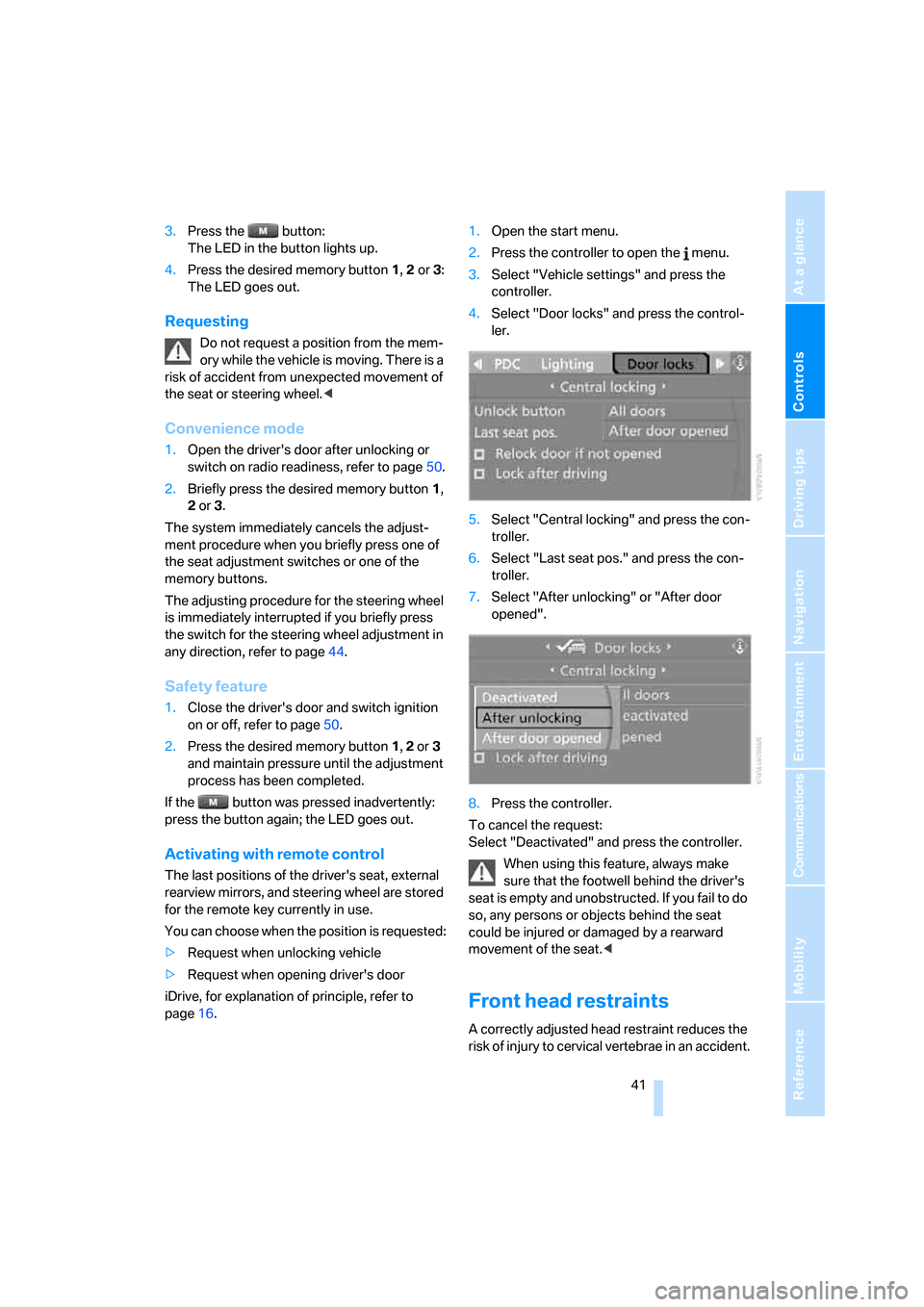
page16.1.Open the start menu.
2.Press the controller to open the menu.
3.Select "Vehicle settings" and press the
controller.
4.Select "Door locks" and press the control-
ler.
5.Select "Central locking" and press the con-
troller.
6.Select "Last seat pos." and press the con-
troller.
7.Select "After unlocking" or "After door
opened".
8.Press the controller.
To cancel the request:
Select "Deactivated" and press the controller.
When using this feature, always make
sure that the footwell behind the driver's
seat is empty and unobstructed. If you fail to do
so, any persons or objects behind the seat
could be injured or damaged by a rearward
movement of the seat.<
Front head restraints
A correctly adjusted head restraint reduces the
risk of injury to cervical vertebrae in an accident.
Page 50 of 227
Transporting children safely
48
Transporting children safely
The right place for children
Do not leave children unattended in the
vehicle; otherwise, they could endanger
themselves and other persons, e.g. by opening
the doors.<
Children always in the rear
Accident research shows that the safest place
for children is in the back.
Children younger than 13 years of age or
with a height under 5 ft/150 cm may only
be transported in the rear in child restraint sys-
tems which correspond to the age, weight and
height of the child. Otherwise there is an
increased danger of injury in an accident.<
Children 13 years of age or older must wear a
safety belt as soon as a suitable child restraint
system can no longer be used due to their age,
size and weight.
With the exception of the driver's seat, all seats
in your BMW comply with the recommenda-
tions of the standard SAE J1819 for the safe
securing of child restraint systems in motor
vehicles.
Exception for front passenger seat
Should it be necessary to use a child
restraint system on the front passenger
seat, the front, knee and side airbag on the pas-
senger side must be deactivated. Otherwise,
there is an increased risk of injury for the child if
the airbags are triggered, even with a child
restraint system. Your BMW center will be glad
to advise you.<
For more information on automatic deactivation
of the front passenger airbags, refer to page76.
Installing child restraint
systems
Follow child-restraint system manufac-
turer's instructions for the selection,
installation and use of child restraint systems.
Otherwise the degree of protection they offer
may be reduced.<
Backrest width on front passenger seat
Before mounting a child restraint system
on the front passenger seat, the backrest
width adjustment must be open completely.<
1.Adjust the backrest width to the fully open
position, refer to page40.
2.Install child's seat.
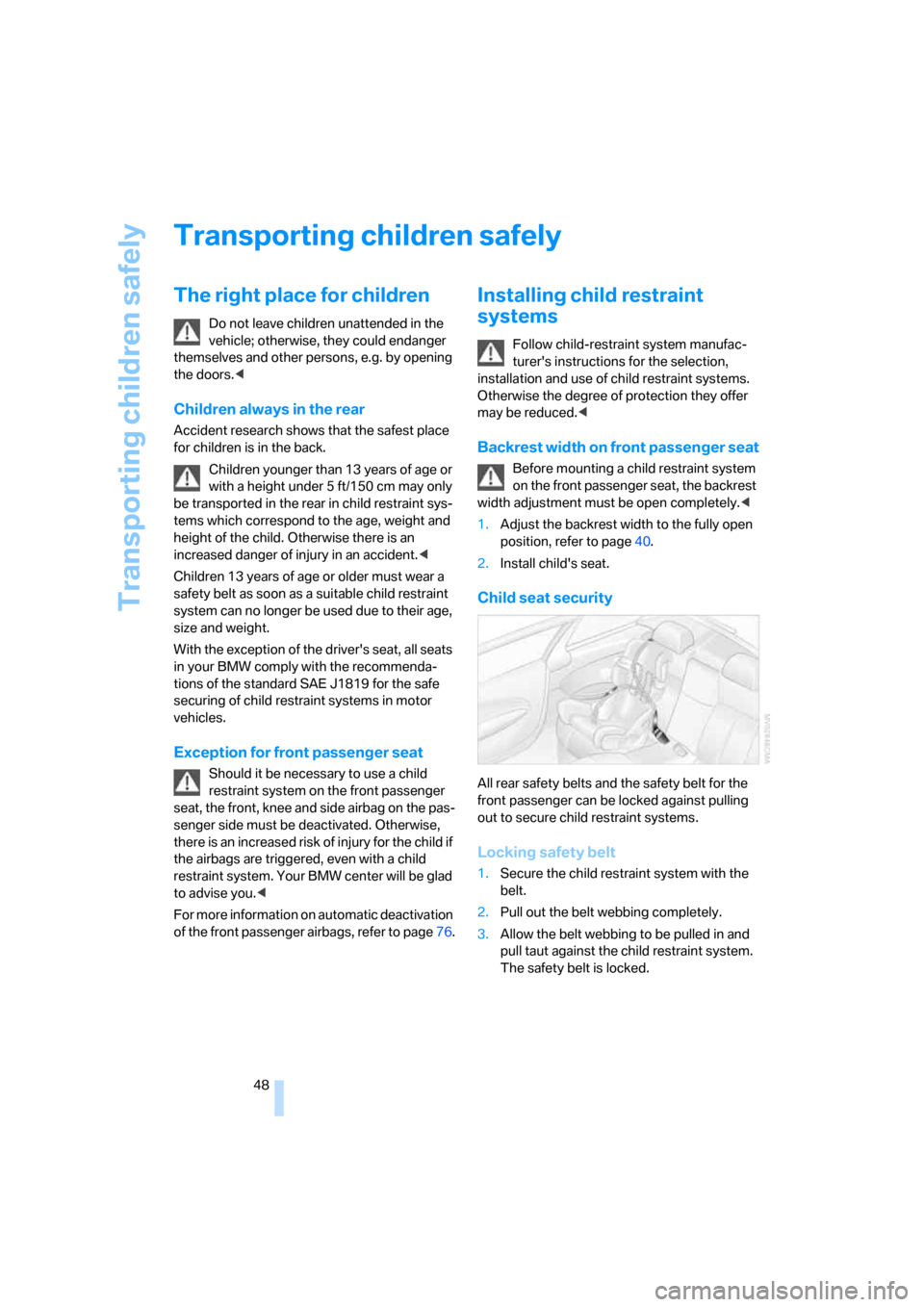
Child seat security
All rear safety belts and the safety belt for the
front passenger can be locked against pulling
out to secure child restraint systems.
Locking safety belt
1.Secure the child restraint system with the
belt.
2.Pull out the belt webbing completely.
3.Allow the belt webbing to be pulled in and
pull taut against the child restraint system.
The safety belt is locked.
Page 52 of 227
Driving
50
Driving
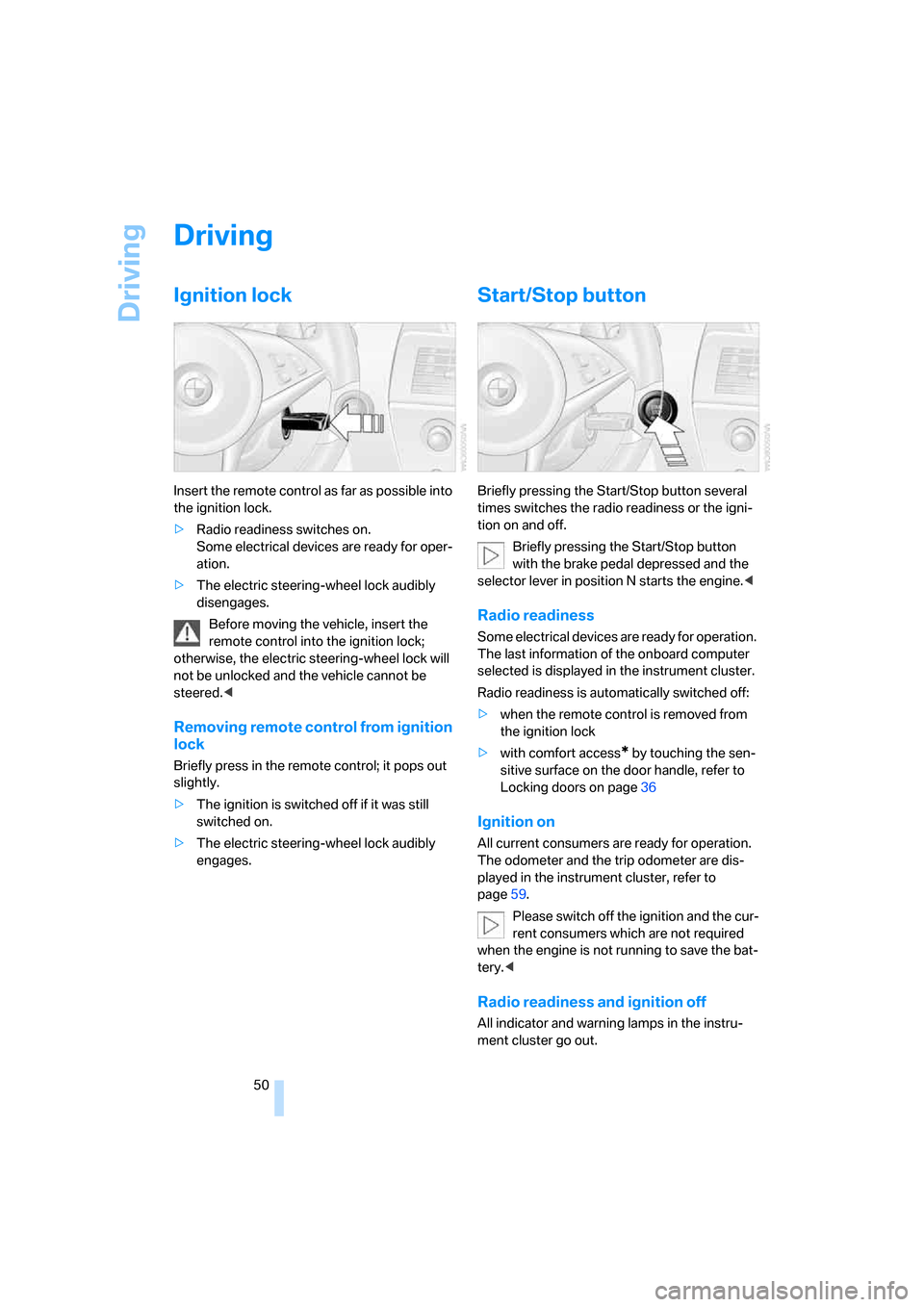
Ignition lock
Insert the remote control as far as possible into
the ignition lock.
>Radio readiness switches on.
Some electrical devices are ready for oper-
ation.
>The electric steering-wheel lock audibly
disengages.
Before moving the vehicle, insert the
remote control into the ignition lock;
otherwise, the electric steering-wheel lock will
not be unlocked and the vehicle cannot be
steered.<
Removing remote control from ignition
lock
Briefly press in the remote control; it pops out
slightly.
>The ignition is switched off if it was still
switched on.
>The electric steering-wheel lock audibly
engages.
Start/Stop button
Briefly pressing the Start/Stop button several
times switches the radio readiness or the igni-
tion on and off.
Briefly pressing the Start/Stop button
with the brake pedal depressed and the
selector lever in position N starts the engine.<
Radio readiness
Some electrical devices are ready for operation.
The last information of the onboard computer
selected is displayed in the instrument cluster.
Radio readiness is automatically switched off:
>when the remote control is removed from
the ignition lock
>with comfort access
* by touching the sen-
sitive surface on the door handle, refer to
Locking doors on page36
Ignition on
All current consumers are ready for operation.
The odometer and the trip odometer are dis-
played in the instrument cluster, refer to
page59.
Please switch off the ignition and the cur-
rent consumers which are not required
when the engine is not running to save the bat-
tery.<
Radio readiness and ignition off
All indicator and warning lamps in the instru-
ment cluster go out.
Page 94 of 227
Practical interior accessories
92 Remove the flashlight from the socket when
needed.
Be sure that the flashlight is switched off
when it is inserted into its socket. Failure
to comply with this precaution could lead to
overcharging and damage.<
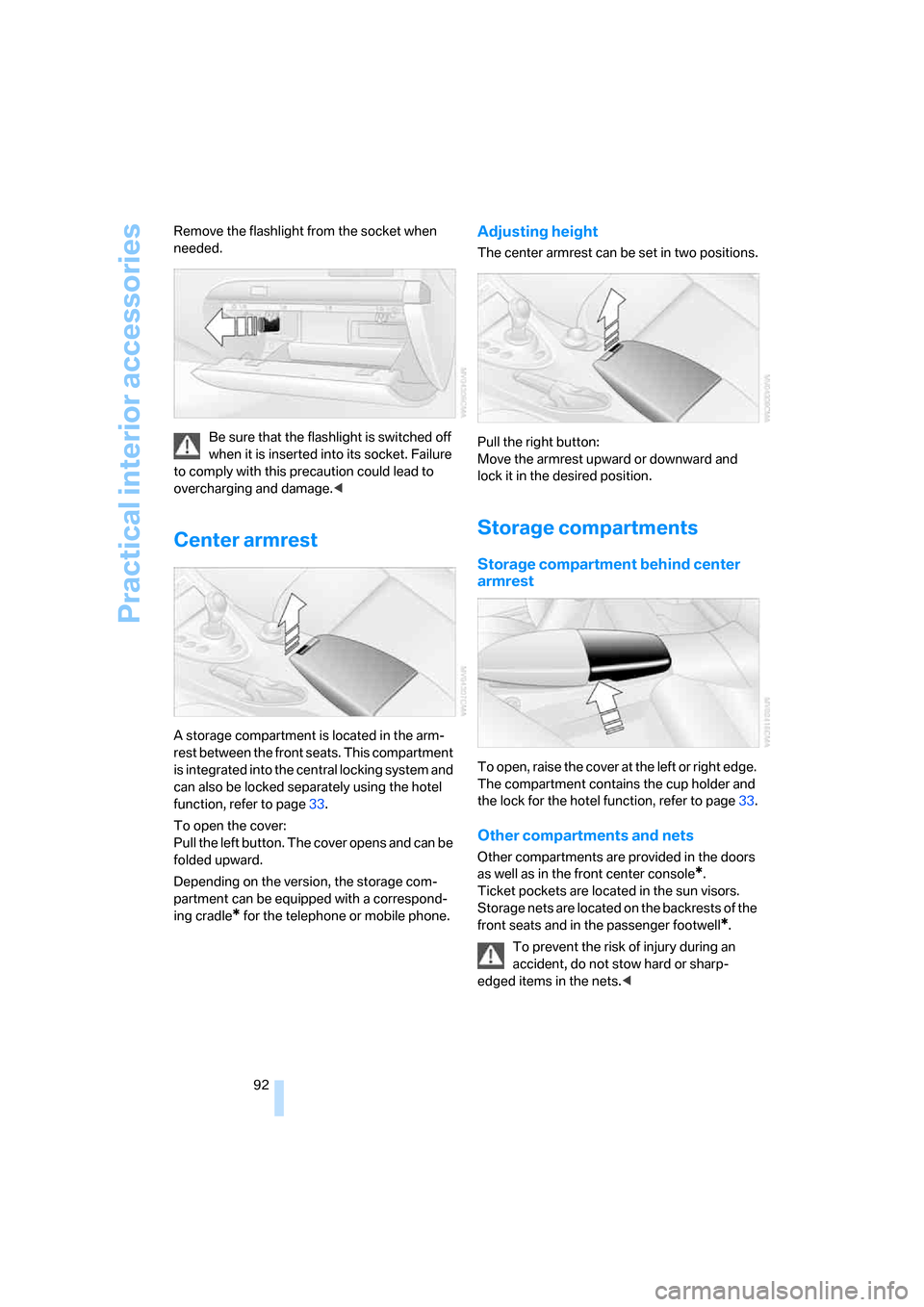
Center armrest
A storage compartment is located in the arm-
rest between the front seats. This compartment
is integrated into the central locking system and
can also be locked separately using the hotel
function, refer to page33.
To open the cover:
Pull the left button. The cover opens and can be
folded upward.
Depending on the version, the storage com-
partment can be equipped with a correspond-
ing cradle
* for the telephone or mobile phone.
Adjusting height
The center armrest can be set in two positions.
Pull the right button:
Move the armrest upward or downward and
lock it in the desired position.
Storage compartments
Storage compartment behind center
armrest
To open, raise the cover at the left or right edge.
The compartment contains the cup holder
and
the lock for the hotel function, refer to page33.
Other compartments and nets
Other compartments are provided in the doors
as well as in the front center console
*.
Ticket pockets are located in the sun visors.
Storage nets are located on the backrests of the
front seats and in the passenger footwell
*.
To prevent the risk of injury during an
accident, do not stow hard or sharp-
edged items in the nets.<
Page 170 of 227
Refueling
168
Refueling
Always switch off the engine before refu-
eling, otherwise no fuel can be filled into
the tank and a message is displayed.<
When handling fuel, always observe all
applicable precautionary measures and
regulations. Never transport reserve fuel con-
tainers in the vehicle. They can leak and cause
an explosion or a fire in an accident.<
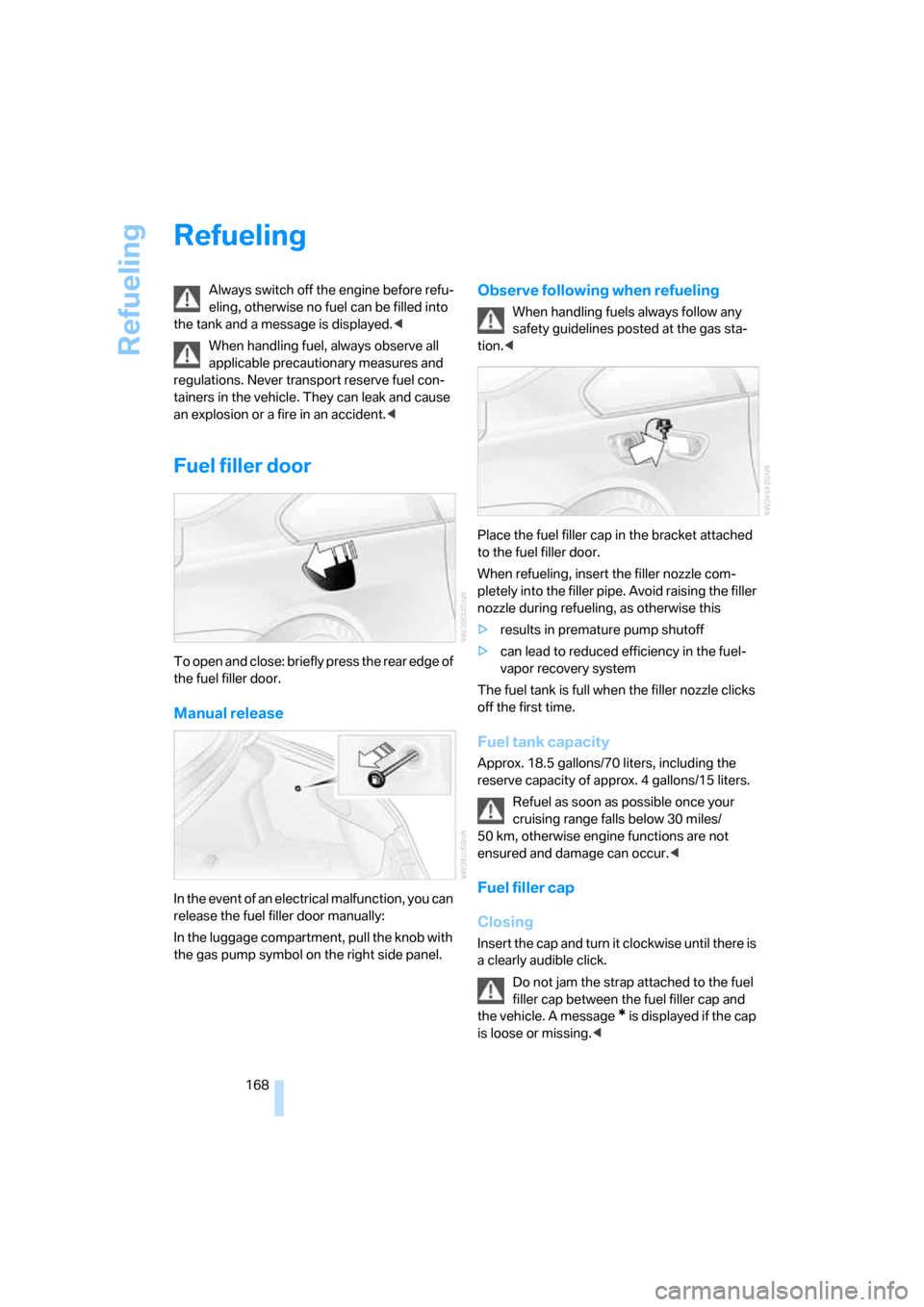
Fuel filler door
To open and close: briefly press the rear edge of
the fuel filler door.
Manual release
In the event of an electrical malfunction, you can
release the fuel filler door manually:
In the luggage compartment, pull the knob with
the gas pump symbol on the right side panel.
Observe following when refueling
When handling fuels always follow any
safety guidelines posted at the gas sta-
tion.<
Place the fuel filler cap in the bracket attached
to the fuel filler door.
When refueling, insert the filler nozzle com-
pletely into the filler pipe. Avoid raising the filler
nozzle during refueling, as otherwise this
>results in premature pump shutoff
>can lead to reduced efficiency in the fuel-
vapor recovery system
The fuel tank is full when the filler nozzle clicks
off the first time.
Fuel tank capacity
Approx. 18.5 gallons/70 liters, including the
reserve capacity of approx. 4 gallons/15 liters.
Refuel as soon as possible once your
cruising range falls below 30 miles/
50 km, otherwise engine functions are not
ensured and damage can occur.<
Fuel filler cap
Closing
Insert the cap and turn it clockwise until there is
a clearly audible click.
Do not jam the strap attached to the fuel
filler cap between the fuel filler cap and
the vehicle. A message
* is displayed if the cap
is loose or missing.<
Page 206 of 227
Short commands of voice command system
204
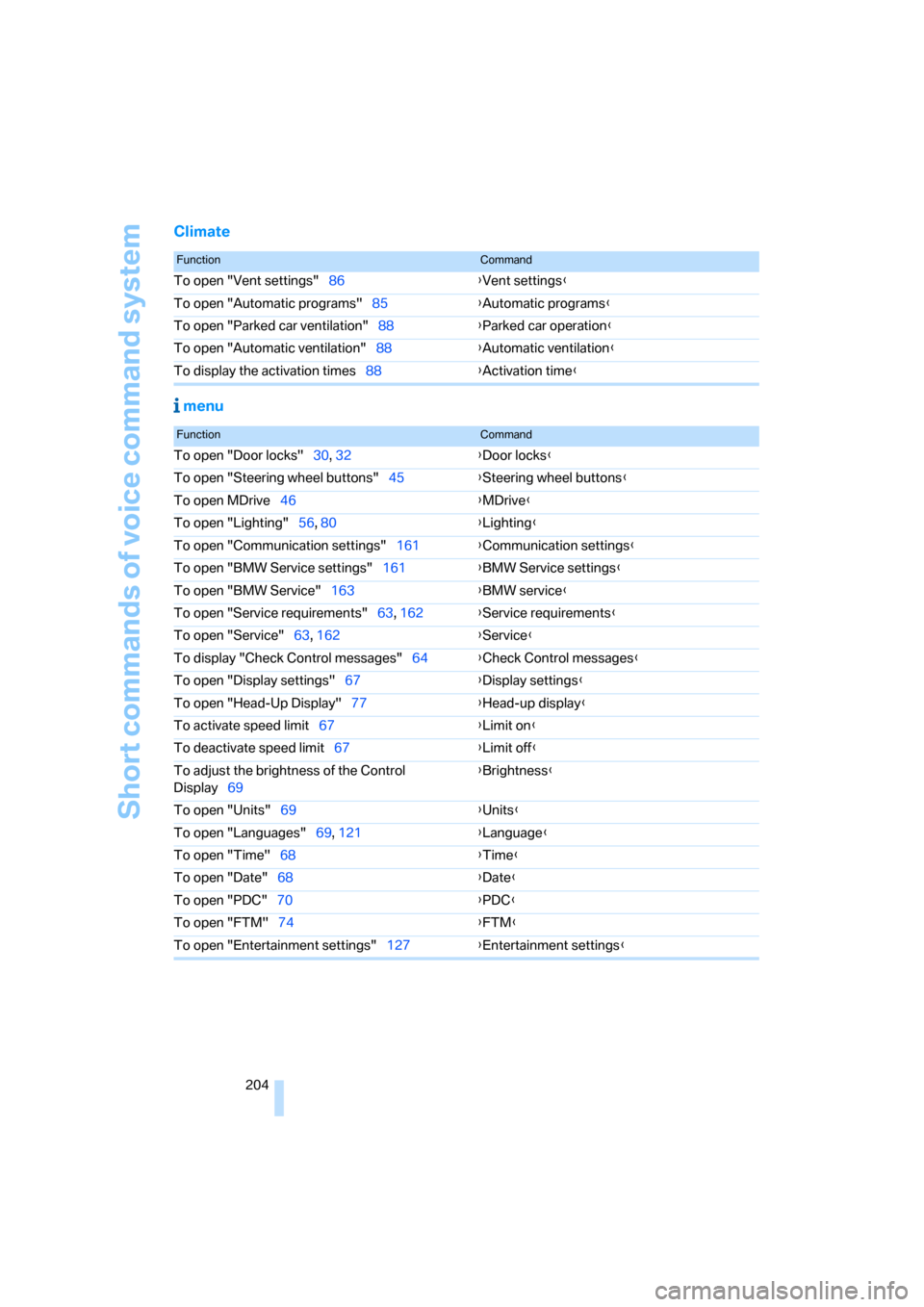
Climate
menu
FunctionCommand
To open "Vent settings"86{Vent settings}
To open "Automatic programs"85{Automatic programs}
To open "Parked car ventilation"88{Parked car operation}
To open "Automatic ventilation"88{Automatic ventilation}
To display the activation times88{Activation time}
FunctionCommand
To open "Door locks"30, 32{Door locks}
To open "Steering wheel buttons"45{Steering wheel buttons}
To open MDrive46{MDrive}
To open "Lighting"56, 80{Lighting}
To open "Communication settings"161{Communication settings}
To open "BMW Service settings"161{BMW Service settings}
To open "BMW Service"163{BMW service}
To open "Service requirements"63, 162{Service requirements}
To open "Service"63, 162{Service}
To display "Check Control messages"64{Check Control messages}
To open "Display settings"67{Display settings}
To open "Head-Up Display"77{Head-up display}
To activate speed limit67{Limit on}
To deactivate speed limit67{Limit off}
To adjust the brightness of the Control
Display69{Brightness}
To open "Units"69{Units}
To open "Languages"69, 121{Language}
To open "Time"68{Time}
To open "Date"68{Date}
To open "PDC"70{PDC}
To open "FTM"74{FTM}
To open "Entertainment settings"127{Entertainment settings}
Page 208 of 227
Everything from A to Z
206
Everything from A to Z
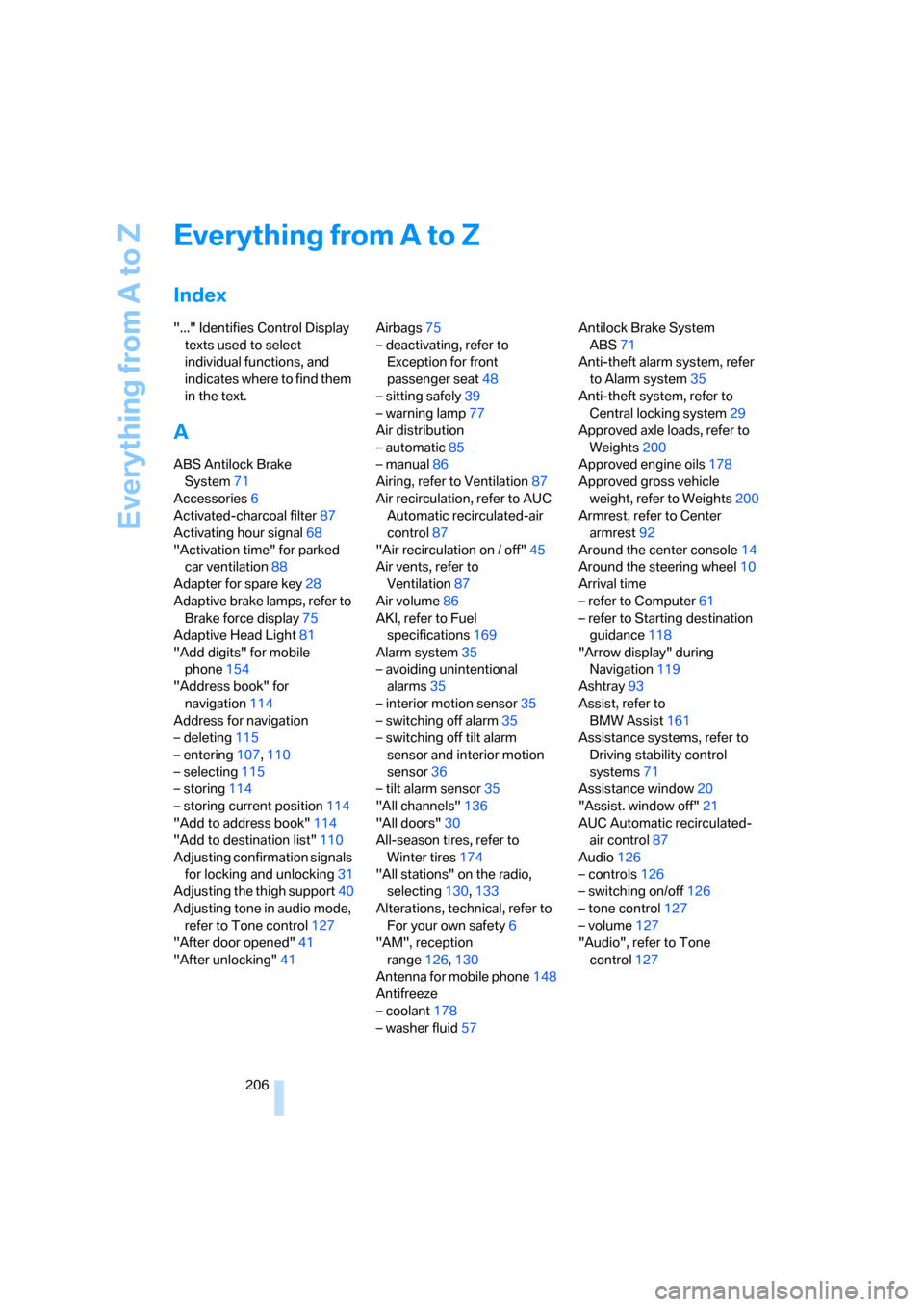
Index
"..." Identifies Control Display
texts used to select
individual functions, and
indicates where to find them
in the text.
A
ABS Antilock Brake
System71
Accessories6
Activated-charcoal filter87
Activating hour signal68
"Activation time" for parked
car ventilation88
Adapter for spare key28
Adaptive brake lamps, refer to
Brake force display75
Adaptive Head Light81
"Add digits" for mobile
phone154
"Address book" for
navigation114
Address for navigation
– deleting115
– entering107,110
– selecting115
– storing114
– storing current position114
"Add to address book"114
"Add to destination list"110
Adjusting confirmation signals
for locking and unlocking31
Adjusting the thigh support40
Adjusting tone in audio mode,
refer to Tone control127
"After door opened"41
"After unlocking"41Airbags75
– deactivating, refer to
Exception for front
passenger seat48
– sitting safely39
– warning lamp77
Air distribution
– automatic85
– manual86
Airing, refer to Ventilation87
Air recirculation, refer to AUC
Automatic recirculated-air
control87
"Air recirculation on / off"45
Air vents, refer to
Ventilation87
Air volume86
AKI, refer to Fuel
specifications169
Alarm system35
– avoiding unintentional
alarms35
– interior motion sensor35
– switching off alarm35
– switching off tilt alarm
sensor and interior motion
sensor36
– tilt alarm sensor35
"All channels"136
"All doors"30
All-season tires, refer to
Winter tires174
"All stations" on the radio,
selecting130,133
Alterations, technical, refer to
For your own safety6
"AM", reception
range126,130
Antenna for mobile phone148
Antifreeze
– coolant178
– washer fluid57Antilock Brake System
ABS71
Anti-theft alarm system, refer
to Alarm system35
Anti-theft system, refer to
Central locking system29
Approved axle loads, refer to
Weights200
Approved engine oils178
Approved gross vehicle
weight, refer to Weights200
Armrest, refer to Center
armrest92
Around the center console14
Around the steering wheel10
Arrival time
– refer to Computer61
– refer to Starting destination
guidance118
"Arrow display" during
Navigation119
Ashtray93
Assist, refer to
BMW Assist161
Assistance systems, refer to
Driving stability control
systems71
Assistance window20
"Assist. window off"21
AUC Automatic recirculated-
air control87
Audio126
– controls126
– switching on/off126
– tone control127
– volume127
"Audio", refer to Tone
control127
Page 209 of 227
Reference 207
At a glance
Controls
Driving tips
Communications
Navigation
Entertainment
Mobility
Automatic
– air distribution85
– air volume85
– headlamp control80
– service notification162
– steering wheel adjustment,
refer to Easy entry/exit45
– storing stations131
Automatically switching
between high beams and
low beams, refer to High-
beam assistant81
Automatic car washes100
– also refer to the Caring for
your vehicle brochure
Automatic climate control84
– automatic air distribution85
– switching off87
Automatic closing of doors,
see Automatic soft
closing33
Automatic curb monitor44
Automatic lighting
– refer to Automatic headlamp
control80
– refer to Daytime running
lamps81
– refer to High-beam
assistant81
– refer to Interior lamps83
– refer to Pathway lighting80
"Automatic programs"85
Automatic recirculated-air
control AUC87
Automatic soft closing33
Automatic station search131
"Automatic ventilation"88
AUTO program with
automatic climate control85
"Autostore" on the
radio130,132
Average fuel consumption61
– setting units69
"Avoid ferries" for
navigation117
"Avoid highways" for
navigation117Avoiding freeways for
navigation116
Avoiding unintentional
alarms35
"Avoid tollroads" for
navigation117
Axle loads, refer to
Weights200
"A - Z"153,154
B
Backrest contour, refer to
Lumbar support40
Backrests, refer to Seats39
Backrest width adjustment40
Backup lamps, replacing
bulbs, refer to Tail
lamps184
"Balance", refer to Tone
control128
Balance, refer to Tone
control128
Balance adjustment in audio
mode, right/left128
Band-aids, refer to First-aid
kit192
Bass, refer to Tone
control127
"Bass", tone control127
Battery
– disposal37
– jump starting192
– refer to Vehicle battery189
Battery change37
Being towed194
Belts, refer to Safety belts42
Beverage holder, refer to Cup
holders93
Blower, refer to Air volume86
"BMW Assist"163
BMW Assist161
– enabling161
– services offered162
"BMW Contact"155
"BMW Contact
Numbers"155BMW homepage4
BMW Maintenance
System180
"BMW Service"163
"BMW Service settings"162
BMW website4
Bottle holder, refer to Cup
holders93
Brake Assistant, refer to DBC
Dynamic Brake Control71
Brake fluid179
– level179
– warning lamp179
Brake force display75
Brake hydraulic system179
Brake lamps
– brake force display75
– replacing bulbs, refer to Tail
lamps184
Brake pads179
– breaking-in98
Brakes
– ABS Antilock Brake
System71
– brake fluid
179
– brake force display75
– brake pads179
– breaking-in98
– CBC Cornering Brake
Control71
– handbrake51
Brake system98
– brake fluid level179
– brake pads98,179
– brake rotors100
– breaking-in98
– warning lamp13,179
Brake wear warning
– brake pads179
– warning lamp179
Braking
– electronic brake-force
distribution71
– refer to Braking safely99
Braking safely99
Breakdown, M Mobility
System185
Page 212 of 227
Everything from A to Z
210 Destination guidance118
– bypassing route
sections122
– canceling voice
instructions45
– changing specified
route116
– displaying routes119
– distance and arrival118
– interrupting118
– starting118
– terminating/continuing118
– voice instructions121
– volume of voice
instructions121
Destination list for
navigation113
Destinations recently driven
to113
"Details" in audio mode141
"Dial" for mobile phone153
"Dial number"153
Digital clock60
Digital radio, refer to High
Definition Radio134
Dimensions199
Directional indicators, refer to
Turn signals56
Direction announcements,
refer to Voice
instructions121
Direction instructions, refer to
Voice instructions121
Directory for navigation, refer
to Address book114
Displacement, refer to Engine
data198
"Display"69
Display, refer to iDrive16
Display lighting, refer to
Instrument lighting83
"Display off"21
Displays, refer to Instrument
cluster12
"Display settings"67
Displays on the windshield,
refer to Head-Up Display77Disposal
– battery of remote control
with comfort access37
– vehicle battery190
Distance, refer to
Computer61
"Distance to dest."62
Distance to destination, refer
to Computer61
Distance warning, refer to
PDC Park Distance
Control70
Door entry lighting, refer to
Interior lamps83
Door key, refer to Keys/
remote control
28
Door lock32
"Door locks"30
Doors
– manual operation32
– remote control31
DOT Quality Grades172
Draft-free ventilation87
Drivelogic54
"Driver's door only"30
Driving lamps, refer to Parking
lamps/low beams80
Driving notes98
Driving programs, refer to
Drivelogic54
Driving route, refer to
Displaying the route119
Driving stability control
systems71
Driving through water99
Driving tips, refer to Driving
notes98
Drying the air, refer to Cooling
function86
"DSC"46,72
DSC Dynamic Stability
Control71
– indicator lamp13,72
DVD for navigation106
Dynamic Brake Control
DBC71
Dynamic Stability Control
DSC71
– M Dynamic Mode MDM72
E
Easy entry, refer to Entering
rear42
Easy entry/exit45
EBV, refer to Electronic brake-
force distribution71
"EDC"46
EDC Electronic Damping
Control73
– "Comfort"73
– "Normal"73
– "Sport"73
Eject button, refer to Buttons
on CD player126
Electrical malfunction
– door lock32
– driver's door32
– fuel filler door168
– luggage compartment lid34
– storage compartment, hotel
function33
Electric steering wheel
adjustment44
Electronic brake-force
distribution71
Electronic Damping Control
EDC73
Emergency assistance, refer
to Roadside Assistance192
Emergency call191
Emergency operation, refer to
Manual operation
– door lock32
– driver's door32
– fuel filler door168
– hotel function33
– luggage compartment lid34
Emergency release for
luggage compartment lid in
luggage compartment34
Emergency services, refer to
Roadside Assistance192
"Emission inspect."64
"Enable services"162
"End call"153
Page 213 of 227
Reference 211
At a glance
Controls
Driving tips
Communications
Navigation
Entertainment
Mobility
Engine
– breaking-in98
– data198
– M Engine Dynamic
Control55
– overheated, refer to Coolant
temperature59
– speed198
– starting51
– starting, comfort access36
– starting difficulties51
– switching off51
Engine compartment176
Engine coolant178
Engine oil
– additives178
– approved oils178
– checking oil level176
– exact measurement177
– fast measurement177
– possible displays177
– recommended oils178
– temperature60
– temperature gauge60
– topping off177
Engine output, refer to Engine
data198
Engine overheating, refer to
Coolant temperature59
Engine speed, refer to Engine
specifications198
Engine starting, refer to
Starting engine51
"Enter address"108,114
Entering address107,110
Entering destination via town/
city name108
Entering intersection109
Entering rear42
Entering town/city for
navigation108
Entering zip code for
navigation109
"Entertainment"126
"Entertainment
settings"127,134
Entertainment sound output
on/off127
Entry map for destination111Equalizer, refer to Tone
control129
"Equalizer", tone control129
"ESN"136
ESP Electronic Stability
Program, refer to DSC
Dynamic Stability
Control71
Event data recorders181
Exhaust system, refer to Hot
exhaust system98
Exterior mirrors43
– automatic dimming
feature44
– automatic heating44
– folding in and out44
– tilting down passenger-side
mirror44
Eye for tow-starting and
towing, refer to Tow
fitting193
Eyes for lashing, refer to
Securing cargo101
F
"Fader", refer to Tone
control128
Fader, refer to Tone
control128
Failure messages, refer to
Check Control64
False alarms, refer to Avoiding
unintentional alarms35
Fastening safety belts, refer to
Safety belts42
Fastest route for
navigation116
Fast forward
– CD changer143
– CD player143
"Fast route" for
navigation117
"Favorites" calling up with
radio133
Filling bottle, refer to
M Mobility System185
Filling capacities200First aid, refer to First-aid
kit192
First-aid kit192
Flashing when locking and
unlocking, refer to Setting
acknowledgment signals31
Flashlight, refer to
Rechargeable flashlight91
Flat tire
– M Mobility System185
– spare wheel188
Flat Tire Monitor
– false alarms74
– initializing system74
– limits of system74
– show chains174
– warning lamp74
"FM", reception
range126,130
FM, waveband130
Footbrake, refer to Braking
safely99
Footwell lighting, refer to
Interior lamps83
For specified oil grades, refer
to Approved engine oils178
For your own safety6
Freeway, refer to Route
criteria116
Front airbags75
Front passenger airbags
deactivating76
"FTM"74
Fuel
– average consumption61
– display60
– fuel specifications169
– high-quality brands169
– quality169
– specifications
169
– tank capacity168
Fuel display, refer to Fuel
gauge60
Fuel filler door168
– releasing in the event of
electrical malfunction168
Fuel gauge60
Fuses190