start stop button BMW M6 COUPE 2006 E63 User Guide
[x] Cancel search | Manufacturer: BMW, Model Year: 2006, Model line: M6 COUPE, Model: BMW M6 COUPE 2006 E63Pages: 227, PDF Size: 8.32 MB
Page 89 of 227
Controls
87Reference
At a glance
Driving tips
Communications
Navigation
Entertainment
Mobility
body. It is therefore necessary for these vents to
be open for maximum cooling.
AUC Automatic recirculated-air
control/recirculated-air mode
You can respond to unpleasant
odors or pollutants in the immedi-
ate environment by temporarily
suspending the supply of outside air. The sys-
tem then recirculates the air currently within the
vehicle. In AUC mode, a sensor detects pollut-
ants in the outside air and controls the shut-off
automatically.
Press the button repeatedly to run through the
following control sequence:
>LED off: outside air flows into the vehicle
continuously.
>Right LED on, AUC mode: the system
detects pollutants in the outside air and
responds by blocking the supply of outside
air when required.
>Left LED on, recirculated-air mode: the
supply of outside air into the vehicle is shut
off continuously.
If condensation starts to form on the
inside window surfaces during operation
in the recirculated-air mode, you should switch
it off while also increasing the air volume as
required.
The recirculated-air mode should not be used
over a longer period of time, as the air quality
inside the vehicle deteriorates continuously.<
Residual heat
The heat stored in the engine is
used to heat the passenger com-
partment, e.g. while stopped at a
school to pick up a child.
The function can be switched on when the fol-
lowing conditions are met:
>up to 15 minutes after switching off the
engine
>engine at operating temperature
>sufficient battery voltage
>outside temperature below 777/256The LED lights up when the function is
switched on.
With the ignition lock at radio readiness or
higher the interior temperature, the air volume
and the air distribution can be set.
Switching off automatic climate control
The air volume, the heater and the
cooling function are all switched
off.
You can restart the automatic cli-
mate control by pressing any of its buttons
except the REST button.
Ventilation
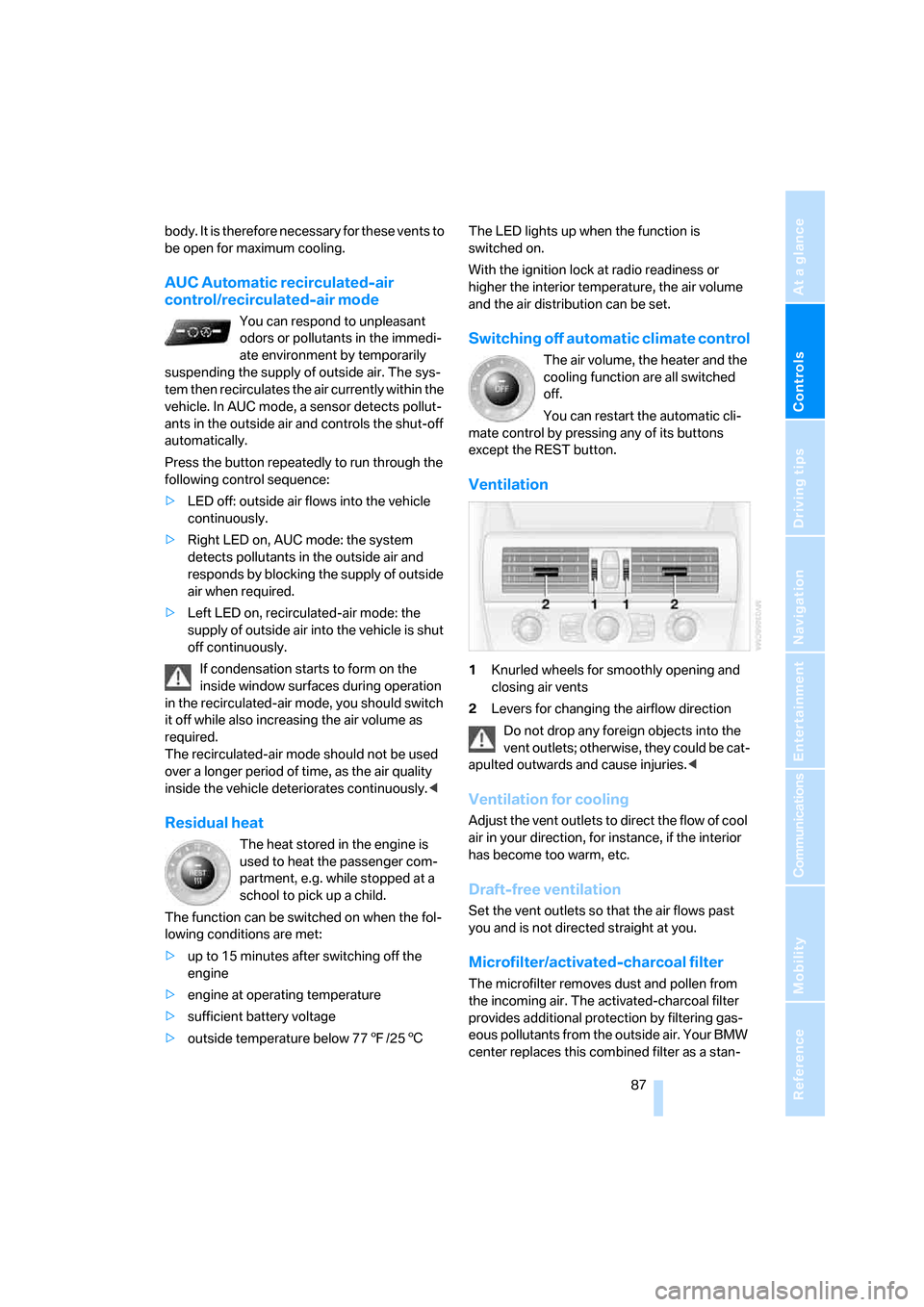
1Knurled wheels for smoothly opening and
closing air vents
2Levers for changing the airflow direction
Do not drop any foreign objects into the
vent outlets; otherwise, they could be cat-
apulted outwards and cause injuries.<
Ventilation for cooling
Adjust the vent outlets to direct the flow of cool
air in your direction, for instance, if the interior
has become too warm, etc.
Draft-free ventilation
Set the vent outlets so that the air flows past
you and is not directed straight at you.
Microfilter/activated-charcoal filter
The microfilter removes dust and pollen from
the incoming air. The activated-charcoal filter
provides additional protection by filtering gas-
eous pollutants from the outside air. Your BMW
center replaces this combined filter as a stan-
Page 151 of 227
149
Entertainment
Reference
At a glance
Controls
Driving tips Communications
Navigation
Mobility
Making calls with car phone:
BMW Assist calls
You can use the car phone via the handsfree
system for BMW Assist calls.
When the status information "BMW Assist" or
"BMW Service" is displayed in "Communica-
tion", only BMW Assist calls are possible.
It may not be possible to establish a telephone
connection using the mobile phone while a con-
nection is being established to BMW Assist
or while a call to BMW Assist is already in
progress. If this happens, you must unpair the
mobile phone and the vehicle if you wish to
place a call with the mobile phone.
Initial operation
Logging on mobile phone on vehicle
The following prerequisites must be met:
>The mobile phone is ready to operate.
>The Bluetooth links of the vehicle, refer to
page151, and the mobile phone are active.
>Depending on the mobile phone, presets in
the mobile phone are required: e.g. acti-
vated via the menu item Bluetooth or the
menu item Connection not with confirma-
tion.
>To log on, specify any desired number as
the Bluetooth passkey, e.g. 1. This Blue-
tooth passkey is no longer required follow-
ing successful logon.
>The ignition is switched on.
Only log on the mobile phone with the
vehicle stopped; otherwise you may
become distracted and inadvertently endanger
your passengers and other road users.<
Switching on ignition
1.Insert the remote control as far as possible
into the ignition lock.
2.S w i t c h o n t h e s w i t c h o n i g n i t i o n b y p r e s s i n g
the Start/Stop button without depressing
the brake or clutch pedal.
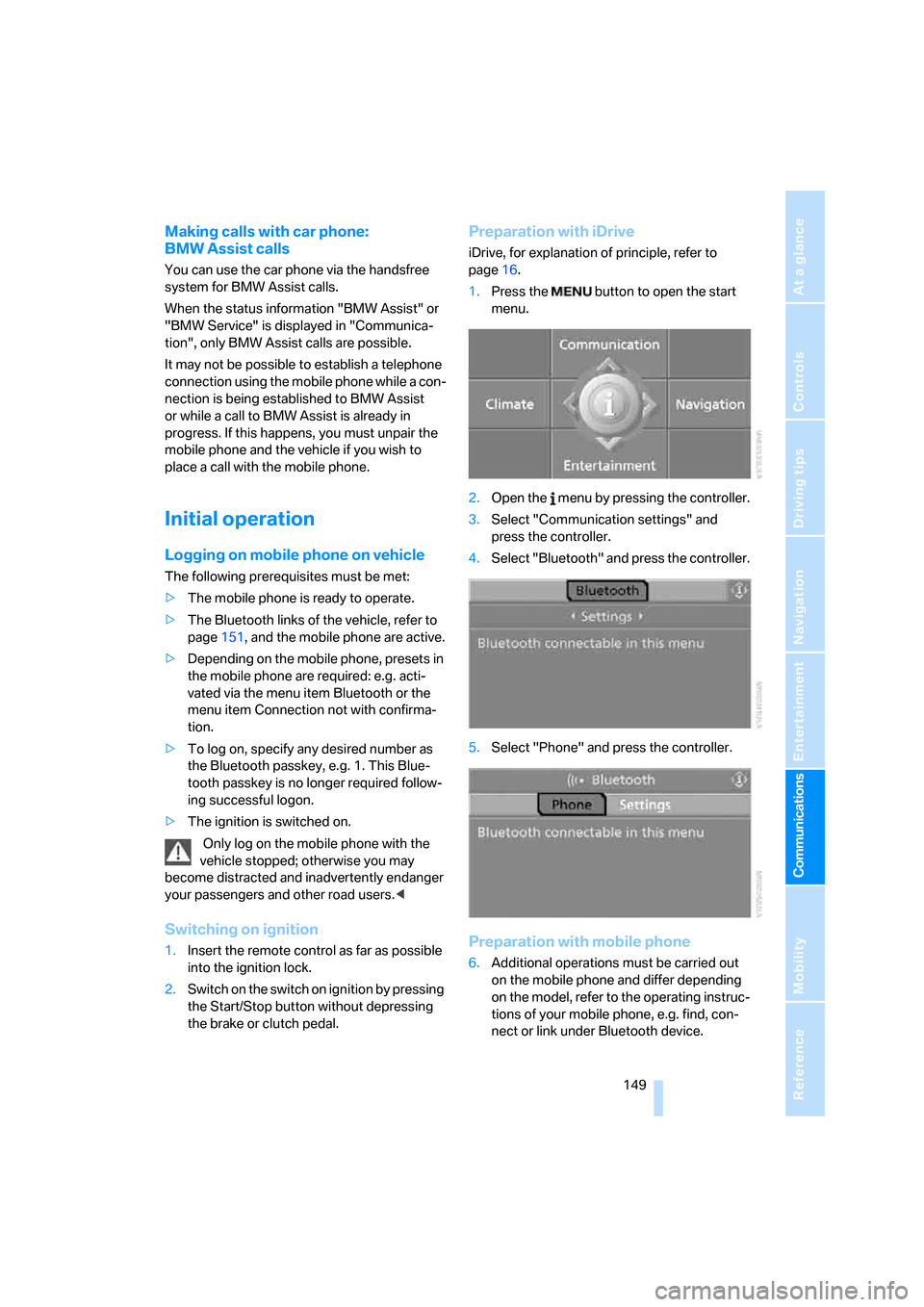
Preparation with iDrive
iDrive, for explanation of principle, refer to
page16.
1.Press the button to open the start
menu.
2.Open the menu by pressing the controller.
3.Select "Communication settings" and
press the controller.
4.Select "Bluetooth" and press the controller.
5.Select "Phone" and press the controller.
Preparation with mobile phone
6.Additional operations must be carried out
on the mobile phone and differ depending
on the model, refer to the operating instruc-
tions of your mobile phone, e.g. find, con-
nect or link under Bluetooth device.
Page 179 of 227
Mobility
177Reference
At a glance
Controls
Driving tips
Communications
Navigation
Entertainment
value indicates the current oil level in liters
above Minimum.
After starting the engine, the last determined
value is displayed.
The oil level must be between the two marks.
Exact measurement
The oil level is measured continuously while
driving or when stopped with the engine run-
ning.
The determination of a new value can take
30 minutes or longer.
If only dashes are shown in the display,
it was not possible to determine a new
value. This can, for example, be the case when
driving short distances or with a sporty driving
style.<
Fast measurement
In addition to the continuous measurement, you
can also quickly determine the current oil level,
e.g. after adding engine oil, however with a low
measuring accuracy.
1.With the engine at operating temperature,
i.e. after at least 6 miles/10 km of uninter-
rupted driving, park the vehicle in a horizon-
tal position.
2.Allow the engine to run at idle.
3.Press the BC button in the turn signal lever
repeatedly until the oil level display is
shown in the instrument cluster.
4.Press the BC button in the turn signal lever
for at least 2 seconds.
The oil level is determined. A clock symbol
is displayed during the measurement.
5.After approx. 1 minute the current oil level is
displayed.
If not all measuring conditions are met,
e.g. with the engine cold, "-.-" is dis-
played. The requested measurement is carried
out as soon as possible.<
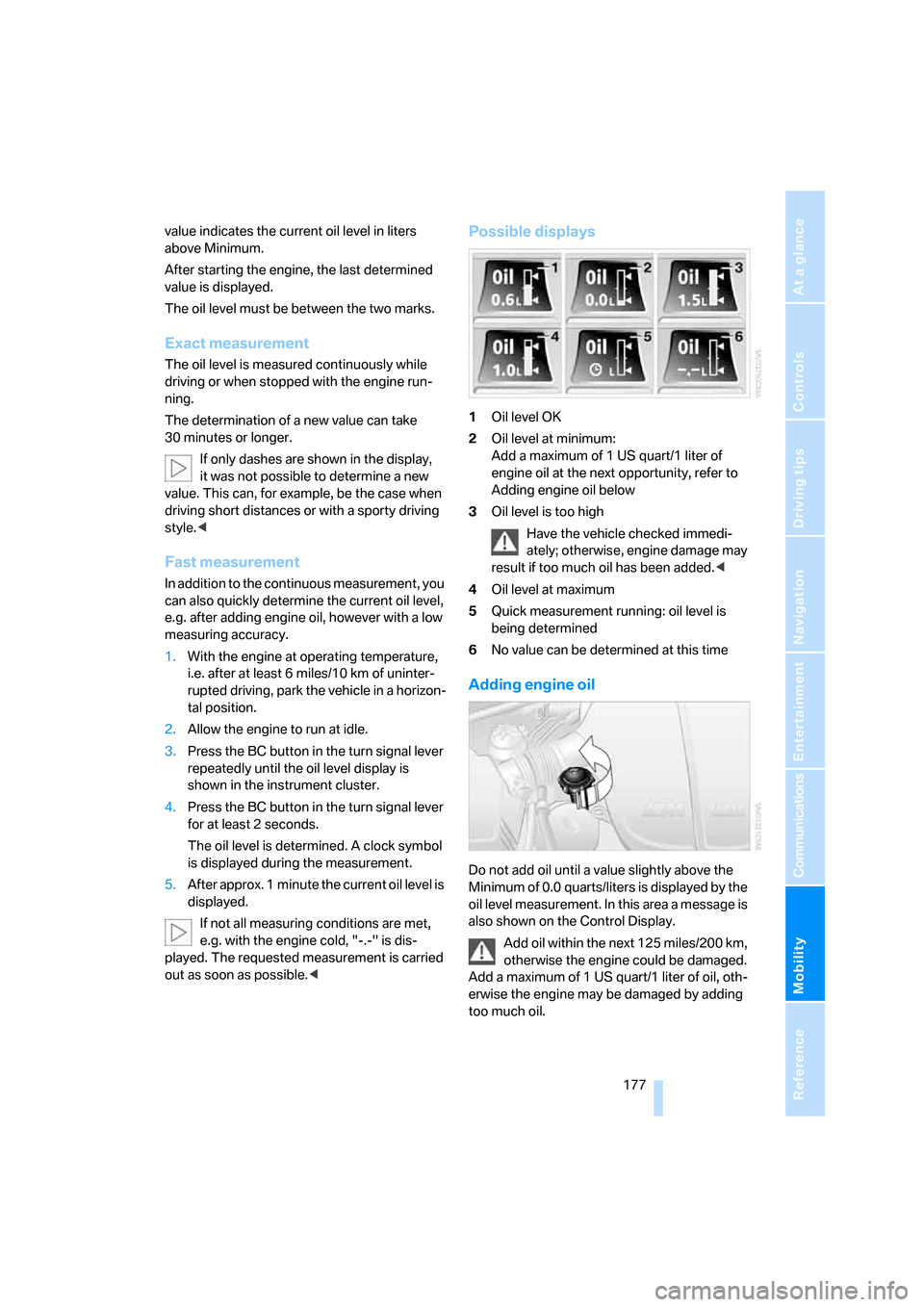
Possible displays
1Oil level OK
2Oil level at minimum:
Add a maximum of 1 US quart/1 liter of
engine oil at the next opportunity, refer to
Adding engine oil below
3Oil level is too high
Have the vehicle checked immedi-
ately; otherwise, engine damage may
result if too much oil has been added.<
4Oil level at maximum
5Quick measurement running: oil level is
being determined
6No value can be determined at this time
Adding engine oil
Do not add oil until a value slightly above the
Minimum of 0.0 quarts/liters is displayed by the
oil level measurement. In this area a message is
also shown on the Control Display.
Add oil within the next 125 miles/200 km,
otherwise the engine could be damaged.
Add a maximum of 1 US quart/1 liter of oil, oth-
erwise the engine may be damaged by adding
too much oil.
Page 220 of 227
Everything from A to Z
218 "Service"63,162
Service, refer to Roadside
Assistance192
Service and Warranty Infor-
mation Booklet for US
models180
Service interval display, refer
to Service requirements63
"Service notification"163
"Service Request"155,164
"Service
requirements"63,162
Service requirements63
– also refer to CBS Condition
Based Service180
"Service Status"162
"Set"
– in audio mode126
– in trip computer62
"Set date"68
"Set service date"64
"Set time"68
Settings
– changing on Control
Display67
– clock, 12h/24h mode68
– configuring, refer to
MDrive46
– configuring, refer to
Personal Profile29
Setting speed limit66
Setting time, refer to Prese-
lecting activation time88
"Set tire pressure"74
Shifting53
Shifting paddles54
Shift lights55
Shiftlock52
Shock absorber control, refer
to EDC Electronic Damping
Control73
Short commands of voice
command system201
"Short route" for
navigation117
Short route in navigation, refer
to Selecting route116
"Show current position"112"Show destination
position"112
Side airbags75
Side markers, replacing
bulbs184
Side turn signals, replacing
bulbs184
Signal horn, refer to Horn10
Sill panel lighting, refer to
Interior lamps83
Sitting safely39
– with airbags39
– with head restraints39
– with safety belts39
Ski bag94
Slope assistant, refer to
Starting off on slopes99
SMG, refer to Sequential
Manual Transmission with
Drivelogic52
"SMG Drivelogic"46,54
Snow chains174
Socket, refer to Connecting
electrical devices94
Socket for Onboard
Diagnostics interface181
Socket for remote control,
refer to Ignition lock50
Soft closure aid, refer to
Automatic soft closing33
Song search with CD, refer to
Playing a track141
SOS, refer to Initiating an
emergency call191
Spare fuses190
Spare key28
– adapter28
Spare remote control28
Spare wheel188
– driving with spare wheel189
Special oils, refer to Approved
engine oils178
Speed-dependent
volume128
Speed limit66
Speed limit warning, refer to
Speed limit66
Speedometer12"Speed volume", tone
control128
Speed with winter tires174
"Sport" with EDC73
Stability control, refer to
Driving stability control
systems71
Start/Stop button50
"Start" for stopwatch67
"Start guidance"110,118
Starting assistant, refer to
Starting off on slopes99
Starting difficulties
– jump starting192
– refer to Special starting
conditions51
Starting engine51
Starting off
– on a slippery surface99
– on slopes99
Start menu, iDrive17
"Start route guidance"112
"Start service"163
"State / Province" for desti-
nation entry108
"State inspection"64
Station, refer to Radio130
"Status"63
Status information on Control
Display20
Status of this Owner's Manual
at time of printing5
Steering wheel
– adjustment44
– automatic adjustment, refer
to Easy entry/exit45
– buttons on steering
wheel11
– lock50
– locking50
– MDrive button46
– memory40
– programmable button45
"Steering wheel button"45
Steering-wheel shift buttons,
refer to Shift paddles54
"Stop" for stopwatch67
"Stopwatch"67
Stopwatch67