tires BMW M6 COUPE 2006 E63 User Guide
[x] Cancel search | Manufacturer: BMW, Model Year: 2006, Model line: M6 COUPE, Model: BMW M6 COUPE 2006 E63Pages: 227, PDF Size: 8.32 MB
Page 175 of 227
Mobility
173Reference
At a glance
Controls
Driving tips
Communications
Navigation
Entertainment
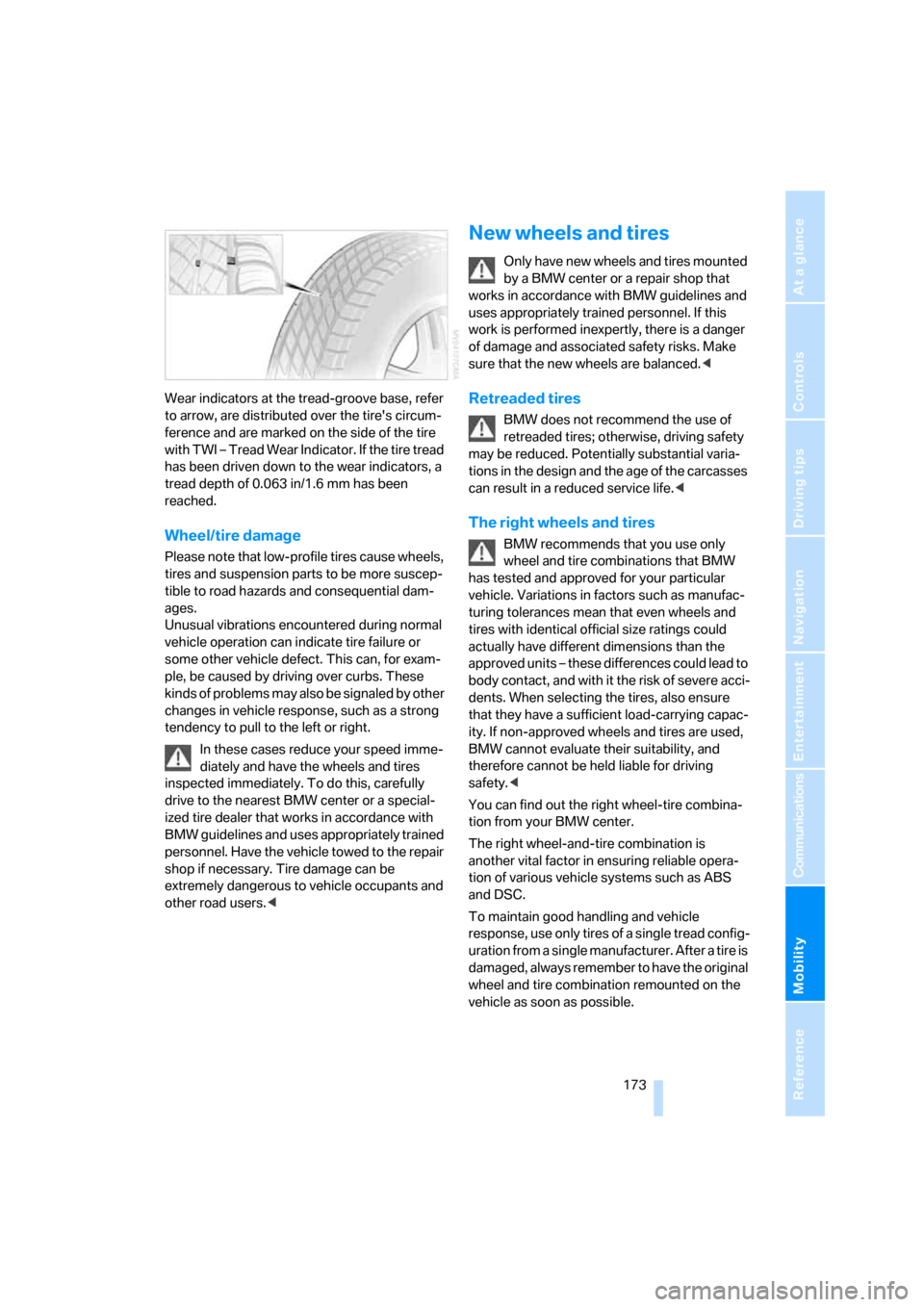
Wear indicators at the tread-groove base, refer
to arrow, are distributed over the tire's circum-
ference and are marked on the side of the tire
with TWI – Tread Wear Indicator. If the tire tread
has been driven down to the wear indicators, a
tread depth of 0.063 in/1.6 mm has been
reached.
Wheel/tire damage
Please note that low-profile tires cause wheels,
tires and suspension parts to be more suscep-
tible to road hazards and consequential dam-
ages.
Unusual vibrations encountered during normal
vehicle operation can indicate tire failure or
some other vehicle defect. This can, for exam-
ple, be caused by driving over curbs. These
kinds of problems may also be signaled by other
changes in vehicle response, such as a strong
tendency to pull to the left or right.
In these cases reduce your speed imme-
diately and have the wheels and tires
inspected immediately. To do this, carefully
drive to the nearest BMW center or a special-
ized tire dealer that works in accordance with
BMW guidelines and uses appropriately trained
personnel. Have the vehicle towed to the repair
shop if necessary. Tire damage can be
extremely dangerous to vehicle occupants and
other road users.<
New wheels and tires
Only have new wheels and tires mounted
by a BMW center or a repair shop that
works in accordance with BMW guidelines and
uses appropriately trained personnel. If this
work is performed inexpertly, there is a danger
of damage and associated safety risks. Make
sure that the new wheels are balanced.<
Retreaded tires
BMW does not recommend the use of
retreaded tires; otherwise, driving safety
may be reduced. Potentially substantial varia-
tions in the design and the age of the carcasses
can result in a reduced service life.<
The right wheels and tires
BMW recommends that you use only
wheel and tire combinations that BMW
has tested and approved for your particular
vehicle. Variations in factors such as manufac-
turing tolerances mean that even wheels and
tires with identical official size ratings could
actually have different dimensions than the
approved units – these differences could lead to
body contact, and with it the risk of severe acci-
dents. When selecting the tires, also ensure
that they have a sufficient load-carrying capac-
ity. If non-approved wheels and tires are used,
BMW cannot evaluate their suitability, and
therefore cannot be held liable for driving
safety.<
You can find out the right wheel-tire combina-
tion from your BMW center.
The right wheel-and-tire combination is
another vital factor in ensuring reliable opera-
tion of various vehicle systems such as ABS
and DSC.
To maintain good handling and vehicle
response, use only tires of a single tread config-
uration from a single manufacturer. After a tire is
damaged, always remember to have the original
wheel and tire combination remounted on the
vehicle as soon as possible.
Page 176 of 227
Wheels and tires
174
Recommended tire brands
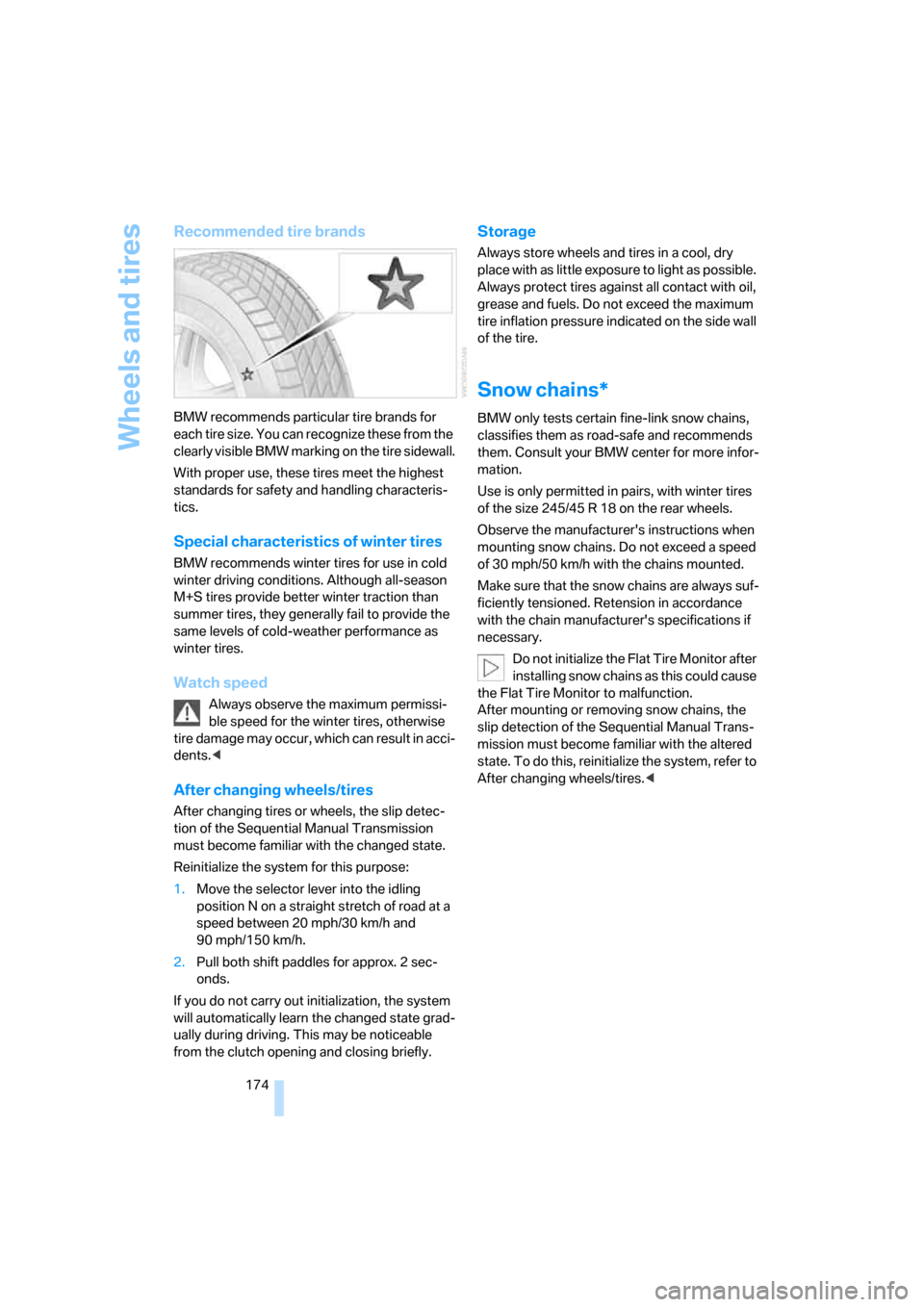
BMW recommends particular tire brands for
each tire size. You can recognize these from the
clearly visible BMW marking on the tire sidewall.
With proper use, these tires meet the highest
standards for safety and handling characteris-
tics.
Special characteristics of winter tires
BMW recommends winter tires for use in cold
winter driving conditions. Although all-season
M+S tires provide better winter traction than
summer tires, they generally fail to provide the
same levels of cold-weather performance as
winter tires.
Watch speed
Always observe the maximum permissi-
ble speed for the winter tires, otherwise
tire damage may occur, which can result in acci-
dents.<
After changing wheels/tires
After changing tires or wheels, the slip detec-
tion of the Sequential Manual Transmission
must become familiar with the changed state.
Reinitialize the system for this purpose:
1.Move the selector lever into the idling
position N on a straight stretch of road at a
speed between 20 mph/30 km/h and
90 mph/150 km/h.
2.Pull both shift paddles for approx. 2 sec-
onds.
If you do not carry out initialization, the system
will automatically learn the changed state grad-
ually during driving. This may be noticeable
from the clutch opening and closing briefly.
Storage
Always store wheels and tires in a cool, dry
place with as little exposure to light as possible.
Always protect tires against all contact with oil,
grease and fuels. Do not exceed the maximum
tire inflation pressure indicated on the side wall
of the tire.
Snow chains*
BMW only tests certain fine-link snow chains,
classifies them as road-safe and recommends
them. Consult your BMW center for more infor-
mation.
Use is only permitted in pairs, with winter tires
of the size 245/45 R 18 on the rear wheels.
Observe the manufacturer's instructions when
mounting snow chains. Do not exceed a speed
of 30 mph/50 km/h with the chains mounted.
Make sure that the snow chains are always suf-
ficiently tensioned. Retension in accordance
with the chain manufacturer's specifications if
necessary.
Do not initialize the Flat Tire Monitor after
installing snow chains as this could cause
the Flat Tire Monitor to malfunction.
After mounting or removing snow chains, the
slip detection of the Sequential Manual Trans-
mission must become familiar with the altered
state. To do this, reinitialize the system, refer to
After changing wheels/tires.<
Page 191 of 227
Mobility
189Reference
At a glance
Controls
Driving tips
Communications
Navigation
Entertainment
Mounting a wheel
1.Unscrew the lug bolts and remove the
wheel.
2.Remove accumulations of mud or dirt from
the mounting surfaces of the wheel and
hub. Also clean the lug bolts.
3.Position the new wheel or spare wheel.
Secure the wheel by screwing at least two
lug bolts into opposite bolt holes.
When you mount wheels other than Genu-
ine BMW light-alloy wheels, different lug
bolts may also be required.
4.Screw in the remaining lug bolts. Tighten all
the bolts securely in a diagonal pattern.
5.Lower the vehicle and remove the jack from
beneath the vehicle.
After mounting
1.Tighten the lug bolts in a diagonal pattern.
To ensure safety, always have the
lug bolts checked with a calibrated
torque wrench as soon as possible to
ensure that they are tightened to the speci-
fied torque. The tightening torque is
88.5 lb ft/120 Nm.<
2.Check and correct the tire inflation pressure
at the earliest opportunity.
Protect valve stems and valve stem
seal caps against dirt and contamina-
tion. Dirt in valve stems is a frequent source
of gradual air loss.<
3.Initialize the Flat Tire Monitor, refer to
page74, and the Sequential Manual Trans-
mission, refer to After changing wheels/
tires on page174.
4.Replace the damaged tire as soon as possi-
ble and have the new wheel/tire balanced.
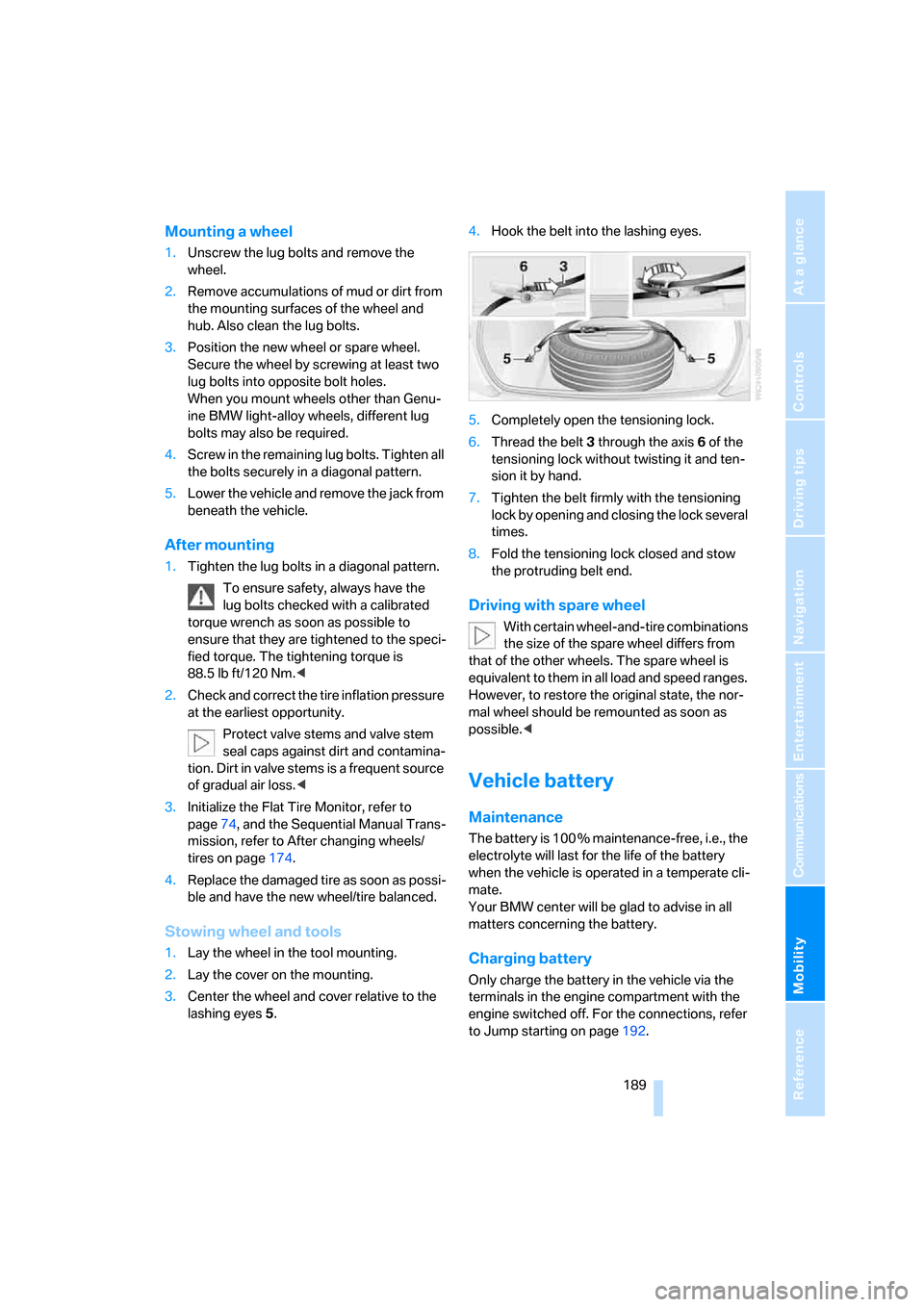
Stowing wheel and tools
1.Lay the wheel in the tool mounting.
2.Lay the cover on the mounting.
3.Center the wheel and cover relative to the
lashing eyes5.4.Hook the belt into the lashing eyes.
5.Completely open the tensioning lock.
6.Thread the belt3 through the axis6 of the
tensioning lock without twisting it and ten-
sion it by hand.
7.Tighten the belt firmly with the tensioning
lock by opening and closing the lock several
times.
8.Fold the tensioning lock closed and stow
the protruding belt end.
Driving with spare wheel
With certain wheel-and-tire combinations
the size of the spare wheel differs from
that of the other wheels. The spare wheel is
equivalent to them in all load and speed ranges.
However, to restore the original state, the nor-
mal wheel should be remounted as soon as
possible.<
Vehicle battery
Maintenance
The battery is 100 % maintenance-free, i.e., the
electrolyte will last for the life of the battery
when the vehicle is operated in a temperate cli-
mate.
Your BMW center will be glad to advise in all
matters concerning the battery.
Charging battery
Only charge the battery in the vehicle via the
terminals in the engine compartment with the
engine switched off. For the connections, refer
to Jump starting on page192.
Page 208 of 227
Everything from A to Z
206
Everything from A to Z
Index
"..." Identifies Control Display
texts used to select
individual functions, and
indicates where to find them
in the text.
A
ABS Antilock Brake
System71
Accessories6
Activated-charcoal filter87
Activating hour signal68
"Activation time" for parked
car ventilation88
Adapter for spare key28
Adaptive brake lamps, refer to
Brake force display75
Adaptive Head Light81
"Add digits" for mobile
phone154
"Address book" for
navigation114
Address for navigation
– deleting115
– entering107,110
– selecting115
– storing114
– storing current position114
"Add to address book"114
"Add to destination list"110
Adjusting confirmation signals
for locking and unlocking31
Adjusting the thigh support40
Adjusting tone in audio mode,
refer to Tone control127
"After door opened"41
"After unlocking"41Airbags75
– deactivating, refer to
Exception for front
passenger seat48
– sitting safely39
– warning lamp77
Air distribution
– automatic85
– manual86
Airing, refer to Ventilation87
Air recirculation, refer to AUC
Automatic recirculated-air
control87
"Air recirculation on / off"45
Air vents, refer to
Ventilation87
Air volume86
AKI, refer to Fuel
specifications169
Alarm system35
– avoiding unintentional
alarms35
– interior motion sensor35
– switching off alarm35
– switching off tilt alarm
sensor and interior motion
sensor36
– tilt alarm sensor35
"All channels"136
"All doors"30
All-season tires, refer to
Winter tires174
"All stations" on the radio,
selecting130,133
Alterations, technical, refer to
For your own safety6
"AM", reception
range126,130
Antenna for mobile phone148
Antifreeze
– coolant178
– washer fluid57Antilock Brake System
ABS71
Anti-theft alarm system, refer
to Alarm system35
Anti-theft system, refer to
Central locking system29
Approved axle loads, refer to
Weights200
Approved engine oils178
Approved gross vehicle
weight, refer to Weights200
Armrest, refer to Center
armrest92
Around the center console14
Around the steering wheel10
Arrival time
– refer to Computer61
– refer to Starting destination
guidance118
"Arrow display" during
Navigation119
Ashtray93
Assist, refer to
BMW Assist161
Assistance systems, refer to
Driving stability control
systems71
Assistance window20
"Assist. window off"21
AUC Automatic recirculated-
air control87
Audio126
– controls126
– switching on/off126
– tone control127
– volume127
"Audio", refer to Tone
control127
Page 216 of 227
Everything from A to Z
214 Luggage compartment
– capacity200
– emergency release34
– hotel function33
– opening/closing, refer to
Luggage compartment
lid34
– opening from inside34
– opening from outside34
– opening with remote
control31
Luggage compartment lid33
– emergency operation34
– emergency release34
– opening from inside34
– opening from outside34
– opening with remote
control31,34
– unlocking manually34
Lumbar support40
LW, waveband130
M
MDynamic Mode MDM72
– indicator lamp13,72
MEngine Dynamic Control55
– "P 400"55
– "P 500"55
– "P 500 Sport"55
M Mobility System185
M+S tires, refer to Winter
tires174
Maintenance
– refer to Service
requirements63
– refer to the Service and
Warranty Information
Booklet for US models180
– refer to Warranty and
Service Guide Booklet for
Canadian models180
Maintenance system180
Malfunction
– door lock32
– fuel filler door168
– hotel function33
– luggage compartment lid34Malfunction warnings, refer to
Check Control64
Manual air distribution86
"Manual" on the radio131
Manual operation
– door lock32
– driver's door32
– fuel filler door168
– hotel function33
– luggage compartment lid34
"Map direction of travel"120
"Map facing north"120
Map for navigation
– changing scale120
– destination entry111
Map view119
Map view facing north119
Master key, refer to Keys/
remote control28
Maximum cooling86
Maximum speed with winter
tires174
MDM, refer to M Dynamic
Mode72
"MDrive"46,72
MDrive46
"M Dynamic Mode"72
Memory, refer to Seat, mirror
and steering wheel
memory40
Menus, refer to iDrive16
Microfilter87
Microphone
– for telephone14
– for voice command
system14
Mirror dimming feature44
Mirrors43
– automatic curb monitor44
– heating44
– memory, refer to Seat, mirror
and steering wheel
memory40
"Missed calls"154
Missed calls154
Mobile communications
devices in vehicle99Mobile phone
– accepted calls154
– adjusting volume152
– calling153
– ending call153
– missed calls154
– operation via iDrive152
– redialing154
– refer to separate operating
instructions
– Top 8154
– touch tone dialing, refer to
Tone dialing method156
Mobile phones, use in vehicle,
refer to Mobile communica-
tions devices in vehicle99
Mobile Service, refer to
Roadside Assistance192
Mobility System185
Monitor, refer to iDrive16
"Monitor on / off"45
Most recent mobile phone
numbers154
MP3, refer to Compressed
audio files139
Multi-function steering wheel,
refer to Buttons on steering
wheel11
Multifunction switch
– refer to Turn signals/
headlamp flasher56
– refer to Wiper/washer
system56
"Mute on / off"45
"M View"78
M view78
MW, waveband130
N
"Navigation"61,107
Navigation destination
– manual entry107
– selecting via map111
Navigation drive, installation
location106
Navigation DVD106
Page 217 of 227
Reference 215
At a glance
Controls
Driving tips
Communications
Navigation
Entertainment
Mobility
Navigation instructions, refer
to Switching voice instruc-
tions on/off121
Navigation system106
– address book114
– bypassing route
sections122
– destination entry107
– destination guidance in
assistance window106
– destination list113
– displaying current
position122
– entering a destination
manually107
– entering destination via
voice110
– last destinations113
– looking for interesting
destination112
– route display119
– route list120
– selecting destination using
information112
– selecting destination via
map111
– selecting route criteria116
– starting107
– starting destination
guidance118
– switching off, refer to Termi-
nating/continuing desti-
nation guidance118
– terminating/continuing
destination guidance118
– voice instructions121
– volume adjustment121
"Navigation voice
instructions"45
"Navigation voice instructions
on"121
Neck support, refer to Front
head restraints41
"New address" for
navigation114
"New destination"107,111
New remote control28
"New route"122New wheels and tires173
"Next entertainment
source"45
"Normal" with EDC73
Nozzles
– refer to Ventilation87
– refer to Windshield washer
nozzles57
Nylon rope, refer to Tow-
starting and towing193
O
OBD Socket181
Octane ratings, refer to Fuel
specifications169
Odometer59
Oil
– additives178
– approved engine oils178
– capacity200
– consumption176
– level176
– topping off177
Oil change intervals
– refer to Service
requirements63
– refer to the Service and
Warranty Information
Booklet for US models or to
the Warranty and Service
Guide Booklet for Canadian
models
"On a new destination" for
navigation113
"Onboard info"61
Onboard monitor, refer to
iDrive16
Onboard tool kit182
"On destination"113
"On location"113
Opening and closing
– comfort access36
– from inside32
– from outside30
– using door lock32
– using the remote control30Operation by voice for mobile
phone156
– adjusting volume157
– canceling157
– commands157
– correcting phone
number158
– dialing phone number158
– placing a call158
– redialing159
– voice phone book158
"Options"164
Orientation menu, refer to
Start menu17
Output, refer to Engine
data198
Outside air, refer to AUC
Automatic recirculated-air
control87
Outside temperature
display60
– changing unit of measure69
P
"P 400"55
"P 500"55
"P 500 Sport"55
Panic mode31
Park Distance Control PDC70
"Parked car operation"88
"Parked car ventilation"88
Parked car ventilation
– activating an activation
time89
– setting activation time88
– switching on and off
directly88
Parking, vehicle51
Parking aid, refer to PDC Park
Distance Control70
Parking assistant, refer to
PDC Park Distance
Control70
Parking brake, refer to
Handbrake51
Parking lamps80
– indicator lamp13
– replacing bulbs183
Page 218 of 227
Everything from A to Z
216 Parts and accessories6
Passenger airbags, deacti-
vating, refer to Exception for
front passenger seat48
Passenger-side exterior
mirror, tilting down44
"Pathway lighting"80
Pathway lighting80
"PDC"71
"PDC display on"71
PDC Park Distance Control70
Personal Profile29
"Perspective"120
"Phone"153
Phone book152
Phone numbers
– deleting from phone
book155
– dialing153
– most recent numbers154
– selecting in phone book154
– Top 8154
Pinch protection system of
power windows38
Plasters, refer to First-aid
kit192
"Play"
– in audio mode140
– on the radio, selecting137
Plug-in unit for remote
control, refer to Ignition
lock50
Pollen, refer to Microfilter/
activated-charcoal filter87
Position
– displaying122
– storing114
"POWER"46
POWER, refer to M Engine
Dynamic Control55
Power failure190
Power windows, refer to
Windows37
"Presets" on the
radio130,136
Presetting parked car venti-
lation activation times88Pressure, tires170
– producing with M Mobility
System185
"Profile"165
Programmable button on
steering wheel45
Protective function, refer to
Pinch protection system of
windows38
R
Radio
– Autostore131
– controls126
– High Definition Radio134
– playing stations131
– satellite radio135
– selecting frequency
manually131
– selecting
waveband126,130
– station search131
– station selection130
– station with best
reception131
– storing stations132
– switching on/off126
– tone control127
– volume127
– Weather Band, refer to
Weather news flashes133
Radio key, refer to Keys/
remote control28
Radio position, refer to Radio
readiness50
Radio readiness50
– switched off50
– switched on50
– with comfort access37
Rain sensor, windshield
washer system57
"Random", random play
sequence, selecting142
"Random all" in audio
mode142
"Random directory" in audio
mode142Random play sequence
– CD changer142
– CD player142
"RDS"133
Reading lamps83
Rear lamps, refer to Tail
lamps184
Rearview mirrors, refer to
Mirrors43
"Received calls"154
Reception
– quality133
– radio stations133
– regional station131
Reception quality of mobile
phone, refer to Status
information20
Rechargeable flashlight91
Recirculated-air mode, refer
to AUC Automatic recircu-
lated-air control87
Recirculation of air, refer to
AUC Automatic recircu-
lated-air control87
Reclining seat, refer to
Backrest40
Recording times, refer to
Stopwatch67
"Redial" for mobile phone153
Reflectors, refer to Tail
lamps184
Refueling168
Releasing, hood175
"Relock door if not
opened"32
Remaining distance, refer to
Cruising range60
Remaining distance to desti-
nation, refer to Computer61
Remote control28
– battery replacement37
– comfort access36
– garage-door opener90
– luggage compartment lid31
– malfunction31,37
Removing condensation from
windows86
Page 219 of 227
Reference 217
At a glance
Controls
Driving tips
Communications
Navigation
Entertainment
Mobility
"Repeat directory" in audio
mode142
"Repeat" in audio mode142
"Repeat track" in audio
mode142
Replacement fuses190
Replacing bulbs, refer to
Lamps and bulbs182
Replacing tires
– changing a wheel187
– new wheels and tires173
Reporting an accident, refer to
Initiating emergency
call191
Reporting safety defects7
Required fuel169
Reserve warning, refer to Fuel
gauge60
Reservoir for washer
systems57
"Reset"
– for stopwatch67
– tone settings129
Reset, refer to Resetting tone
settings129
"Reset to default" with
MDrive46
Residual heat87
Restraint systems
– for children48
– refer to Safety belts42
Retreaded tires173
Reverse, fast
– CD changer143
– CD player143
Reverse gear52
Road map119
"Roadside
Assistance"155,163
Roadside Assistance192
Roadside parking lamps81
– replacing bulbs, refer to
Parking lamps183
Rope, refer to Tow-starting
and towing193
Rotary fuel controller, refer to
iDrive16Route116
– bypassing sections122
– changing116,122
– display119
– displaying arrow display119
– displaying map119
– displaying towns/cities and
streets120
– list120
– selecting116
– selecting criteria116
Route map, refer to Map
view119
"Route preference",
changing116
Route selection116
S
Safety belts42
– damage43
– indicator lamp43
– sitting safely39
Safety belt tensioners, refer to
Safety belts42
Safety systems
– ABS Antilock Brake
System71
– airbags75
– DSC Dynamic Stability
Control71
– safety belts42
Satellite radio135
– enabling channels136
– selecting channel136
– storing channel136
"SAT" on the radio126,136
"Save current
destination"116
"Scan"
– playing a music track141
– playing stations131
Scan
– CD changer141
– CD player141
– radio131
"Scan all" in audio mode141
"Scan directory" in audio
mode141Screw thread for tow
fitting193
SDARS, refer to Satellite
radio135
Seats39
– adjusting40
– adjusting backrest width40
– heating43
– lumbar support40
– memory, refer to Seat, mirror
and steering wheel
memory40
– sitting safely39
– storing the setting40
– thigh support40
Securing cargo101
– ski bag95
"Select as destination"113
"Select current speed"67
Selecting audio sources, refer
to Operating via iDrive126
Selecting frequency
manually131
Selecting menu items19
Selecting new scale for
navigation system
display120
Selecting route116
Selection options with
navigation system
116
Selector lever, Sequential
Manual Transmission52
Selector lever lock, refer to
Shiftlock52
Sequential Manual Trans-
mission with Drivelogic52
– Drivelogic driving
programs54
– Drive mode53
– idle53
– initializing system, refer to
After changing wheels/
tires174
– kick-down53
– reverse gear52
– Sequential mode53
– shift lights55
– shiftlock52
Sequential mode53
Page 220 of 227
Everything from A to Z
218 "Service"63,162
Service, refer to Roadside
Assistance192
Service and Warranty Infor-
mation Booklet for US
models180
Service interval display, refer
to Service requirements63
"Service notification"163
"Service Request"155,164
"Service
requirements"63,162
Service requirements63
– also refer to CBS Condition
Based Service180
"Service Status"162
"Set"
– in audio mode126
– in trip computer62
"Set date"68
"Set service date"64
"Set time"68
Settings
– changing on Control
Display67
– clock, 12h/24h mode68
– configuring, refer to
MDrive46
– configuring, refer to
Personal Profile29
Setting speed limit66
Setting time, refer to Prese-
lecting activation time88
"Set tire pressure"74
Shifting53
Shifting paddles54
Shift lights55
Shiftlock52
Shock absorber control, refer
to EDC Electronic Damping
Control73
Short commands of voice
command system201
"Short route" for
navigation117
Short route in navigation, refer
to Selecting route116
"Show current position"112"Show destination
position"112
Side airbags75
Side markers, replacing
bulbs184
Side turn signals, replacing
bulbs184
Signal horn, refer to Horn10
Sill panel lighting, refer to
Interior lamps83
Sitting safely39
– with airbags39
– with head restraints39
– with safety belts39
Ski bag94
Slope assistant, refer to
Starting off on slopes99
SMG, refer to Sequential
Manual Transmission with
Drivelogic52
"SMG Drivelogic"46,54
Snow chains174
Socket, refer to Connecting
electrical devices94
Socket for Onboard
Diagnostics interface181
Socket for remote control,
refer to Ignition lock50
Soft closure aid, refer to
Automatic soft closing33
Song search with CD, refer to
Playing a track141
SOS, refer to Initiating an
emergency call191
Spare fuses190
Spare key28
– adapter28
Spare remote control28
Spare wheel188
– driving with spare wheel189
Special oils, refer to Approved
engine oils178
Speed-dependent
volume128
Speed limit66
Speed limit warning, refer to
Speed limit66
Speedometer12"Speed volume", tone
control128
Speed with winter tires174
"Sport" with EDC73
Stability control, refer to
Driving stability control
systems71
Start/Stop button50
"Start" for stopwatch67
"Start guidance"110,118
Starting assistant, refer to
Starting off on slopes99
Starting difficulties
– jump starting192
– refer to Special starting
conditions51
Starting engine51
Starting off
– on a slippery surface99
– on slopes99
Start menu, iDrive17
"Start route guidance"112
"Start service"163
"State / Province" for desti-
nation entry108
"State inspection"64
Station, refer to Radio130
"Status"63
Status information on Control
Display20
Status of this Owner's Manual
at time of printing5
Steering wheel
– adjustment44
– automatic adjustment, refer
to Easy entry/exit45
– buttons on steering
wheel11
– lock50
– locking50
– MDrive button46
– memory40
– programmable button45
"Steering wheel button"45
Steering-wheel shift buttons,
refer to Shift paddles54
"Stop" for stopwatch67
"Stopwatch"67
Stopwatch67
Page 221 of 227
Reference 219
At a glance
Controls
Driving tips
Communications
Navigation
Entertainment
Mobility
Storage compartments92
"Store in address book" for
navigation114
"Store" on the radio132,137
Storing current position114
Storing radio stations132
Storing sitting position, refer
to Seat, mirror and steering
wheel memory40
Storing tires174
Straps, refer to Loading101
"Street" for destination
entry109
Summer tires, refer to Wheels
and tires170
"Surround Settings", adjust
the sound128
SW, waveband130
Switches, refer to Cockpit10
Switching between high
beams and low beams,
automatic, refer to High-
beam assistant81
Switching off tilt alarm
sensor36
Switching on
– audio126
– CD changer126
– CD player126
– radio126
Switching the cooling function
on and off86
Swiveling headlamps, refer to
Adaptive Head Light81
Symbols4
– indicator and warning
lamps13
T
Tachometer59
Tail lamps184
– replacing bulbs184
Tank capacity
– also refer to Filling
capacities200
– fuel tank capacity168
Target cursor for
navigation112Technical alterations, refer to
For your own safety6
Technical data198
Telematic, refer to
TeleService,
BMW Assist161
Telephone
– refer to Mobile phone148
– refer to separate operating
instructions
"Telephone list"45
TeleService161
– enabling161
– services offered162
Temperature
– adjusting in upper body
region85
– adjusting with automatic
climate control85
– of coolant, refer to Coolant
temperature59
Temperature display
– changing units of
measure69
– outside temperature60
Temperature gauge, engine
oil60
Temperature warning, refer to
Outside temperature60
Tempomat, refer to Cruise
control57
"Terminate services"164
"Text language"69
"Theater", refer to Tone
control128
The individual vehicle5
Tie-down points, refer to
Securing cargo101
Tightening torque of the lug
bolts, refer to After
mounting189
Tilting down passenger-side
exterior mirror44
"Time"68
"Time format"68
Timer, refer to Preselecting
activation time88
"Timer 1" for parked car
ventilation88"Timer 2" for parked car
ventilation88
Tire inflation pressures170
Tire Quality Grading172
Tires
– age171
– air loss74
– breaking-in
98
– condition172
– damage173
– inflation pressure170
– minimum tread depth172
– M Mobility System185
– new wheels and tires173
– replacing173
– retreaded tires173
– size, refer to The right
wheels and tires173
– wear indicators173
– wheel/tire combination173
– winter tires174
"Tone"127
Tone dialing method156
Tone in audio mode
– adjusting127
– middle setting129
Tone on locking/unlocking31
Tools, refer to Onboard tool
kit182
"Top 8" for mobile phone153
Torque
– lug bolts, refer to After
mounting189
– refer to Engine
specifications198
Touch tone dialing, refer to
Tone dialing method156
Tow fitting193
Towing193
– tow fitting193
"Town / City" for destination
entry108
Tow-starting193,194
Tracks
– finding141
– random play sequence142
– sample, Scan141
Track width, refer to
Dimensions199