ignition BMW M6 COUPE 2006 E63 Owner's Guide
[x] Cancel search | Manufacturer: BMW, Model Year: 2006, Model line: M6 COUPE, Model: BMW M6 COUPE 2006 E63Pages: 227, PDF Size: 8.32 MB
Page 151 of 227
149
Entertainment
Reference
At a glance
Controls
Driving tips Communications
Navigation
Mobility
Making calls with car phone:
BMW Assist calls
You can use the car phone via the handsfree
system for BMW Assist calls.
When the status information "BMW Assist" or
"BMW Service" is displayed in "Communica-
tion", only BMW Assist calls are possible.
It may not be possible to establish a telephone
connection using the mobile phone while a con-
nection is being established to BMW Assist
or while a call to BMW Assist is already in
progress. If this happens, you must unpair the
mobile phone and the vehicle if you wish to
place a call with the mobile phone.
Initial operation
Logging on mobile phone on vehicle
The following prerequisites must be met:
>The mobile phone is ready to operate.
>The Bluetooth links of the vehicle, refer to
page151, and the mobile phone are active.
>Depending on the mobile phone, presets in
the mobile phone are required: e.g. acti-
vated via the menu item Bluetooth or the
menu item Connection not with confirma-
tion.
>To log on, specify any desired number as
the Bluetooth passkey, e.g. 1. This Blue-
tooth passkey is no longer required follow-
ing successful logon.
>The ignition is switched on.
Only log on the mobile phone with the
vehicle stopped; otherwise you may
become distracted and inadvertently endanger
your passengers and other road users.<
Switching on ignition
1.Insert the remote control as far as possible
into the ignition lock.
2.S w i t c h o n t h e s w i t c h o n i g n i t i o n b y p r e s s i n g
the Start/Stop button without depressing
the brake or clutch pedal.
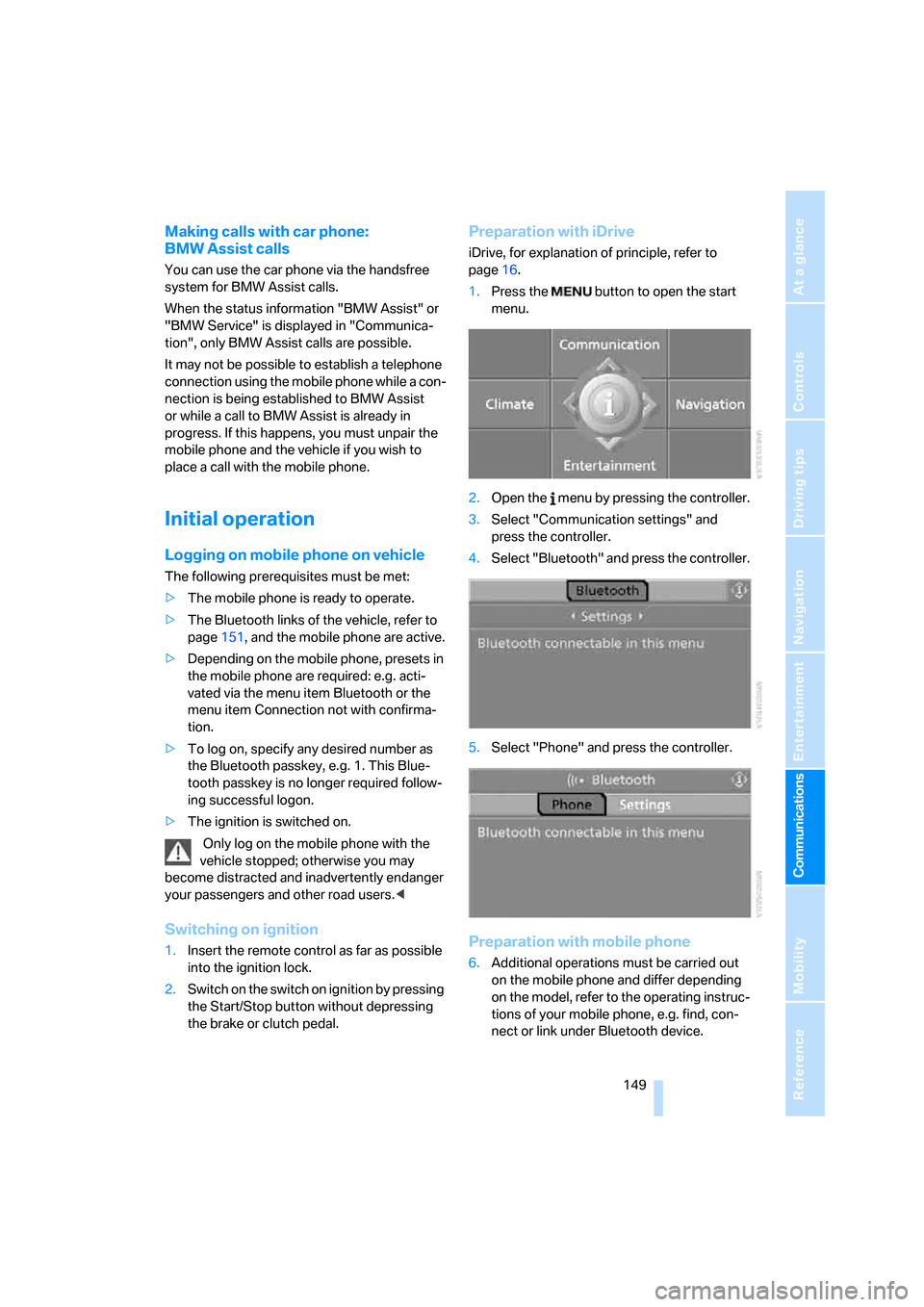
Preparation with iDrive
iDrive, for explanation of principle, refer to
page16.
1.Press the button to open the start
menu.
2.Open the menu by pressing the controller.
3.Select "Communication settings" and
press the controller.
4.Select "Bluetooth" and press the controller.
5.Select "Phone" and press the controller.
Preparation with mobile phone
6.Additional operations must be carried out
on the mobile phone and differ depending
on the model, refer to the operating instruc-
tions of your mobile phone, e.g. find, con-
nect or link under Bluetooth device.
Page 152 of 227
Telephoning
150
Logging on
Depending on your mobile phone, first, the dis-
play of your mobile phone and then the Control
Display will ask you to enter the Bluetooth pass-
key you specified.
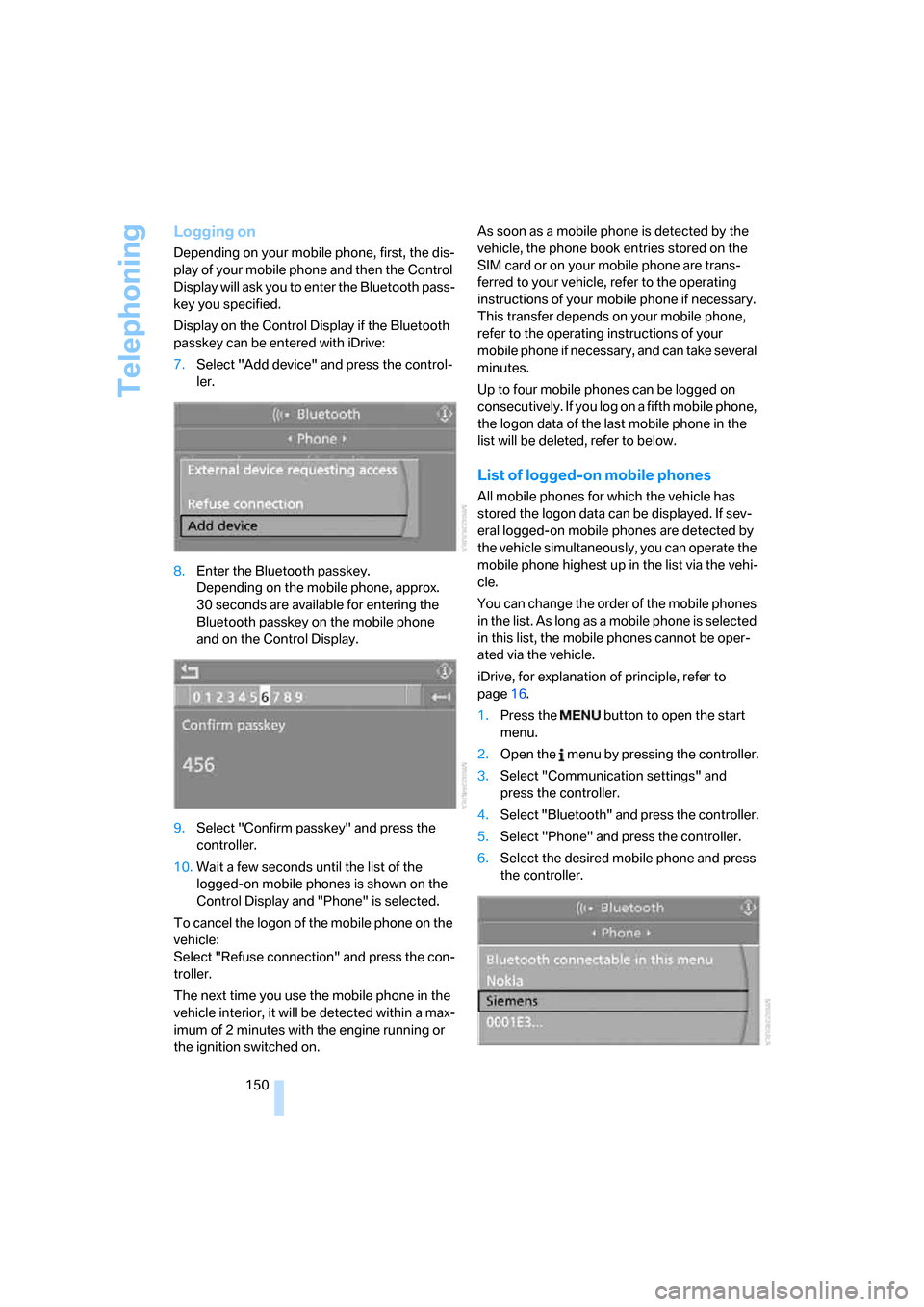
Display on the Control Display if the Bluetooth
passkey can be entered with iDrive:
7.Select "Add device" and press the control-
ler.
8.Enter the Bluetooth passkey.
Depending on the mobile phone, approx.
30 seconds are available for entering the
Bluetooth passkey on the mobile phone
and on the Control Display.
9.Select "Confirm passkey" and press the
controller.
10.Wait a few seconds until the list of the
logged-on mobile phones is shown on the
Control Display and "Phone" is selected.
To cancel the logon of the mobile phone on the
vehicle:
Select "Refuse connection" and press the con-
troller.
The next time you use the mobile phone in the
vehicle interior, it will be detected within a max-
imum of 2 minutes with the engine running or
the ignition switched on.As soon as a mobile phone is detected by the
vehicle, the phone book entries stored on the
SIM card or on your mobile phone are trans-
ferred to your vehicle, refer to the operating
instructions of your mobile phone if necessary.
This transfer depends on your mobile phone,
refer to the operating instructions of your
mobile phone if necessary, and can take several
minutes.
Up to four mobile phones can be logged on
consecutively. If you log on a fifth mobile phone,
the logon data of the last mobile phone in the
list will be deleted, refer to below.
List of logged-on mobile phones
All mobile phones for which the vehicle has
stored the logon data can be displayed. If sev-
eral logged-on mobile phones are detected by
the vehicle simultaneously, you can operate the
mobile phone highest up in the list via the vehi-
cle.
You can change the order of the mobile phones
in the list. As long as a mobile phone is selected
in this list, the mobile phones cannot be oper-
ated via the vehicle.
iDrive, for explanation of principle, refer to
page16.
1.Press the button to open the start
menu.
2.Open the menu by pressing the controller.
3.Select "Communication settings" and
press the controller.
4.Select "Bluetooth" and press the controller.
5.Select "Phone" and press the controller.
6.Select the desired mobile phone and press
the controller.
Page 154 of 227
Telephoning
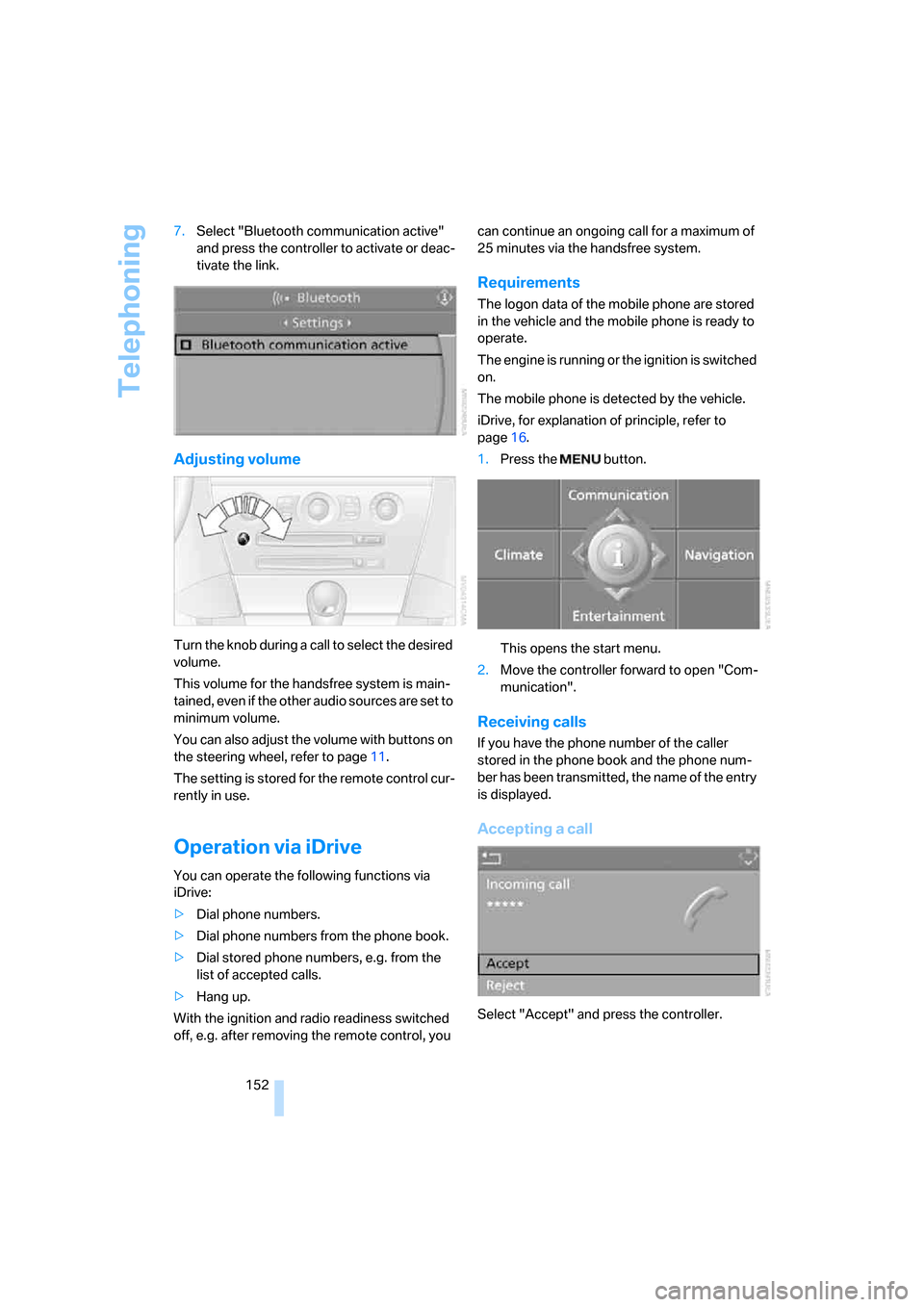
152 7.Select "Bluetooth communication active"
and press the controller to activate or deac-
tivate the link.
Adjusting volume
Turn the knob during a call to select the desired
volume.
This volume for the handsfree system is main-
tained, even if the other audio sources are set to
minimum volume.
You can also adjust the volume with buttons on
the steering wheel, refer to page11.
The setting is stored for the remote control cur-
rently in use.
Operation via iDrive
You can operate the following functions via
iDrive:
>Dial phone numbers.
>Dial phone numbers from the phone book.
>Dial stored phone numbers, e.g. from the
list of accepted calls.
>Hang up.
With the ignition and radio readiness switched
off, e.g. after removing the remote control, you can continue an ongoing call for a maximum of
25 minutes via the handsfree system.
Requirements
The logon data of the mobile phone are stored
in the vehicle and the mobile phone is ready to
operate.
The engine is running or the ignition is switched
on.
The mobile phone is detected by the vehicle.
iDrive, for explanation of principle, refer to
page16.
1.Press the button.
This opens the start menu.
2.Move the controller forward to open "Com-
munication".
Receiving calls
If you have the phone number of the caller
stored in the phone book and the phone num-
ber has been transmitted, the name of the entry
is displayed.
Accepting a call
Select "Accept" and press the controller.
Page 158 of 227
Telephoning
156
Transferring phone number via tone
dialing method
The tone dialing method is required for access
to network services or for controlling devices,
e.g. remote checking of an answering machine.
This function is available when a connection
has been established.
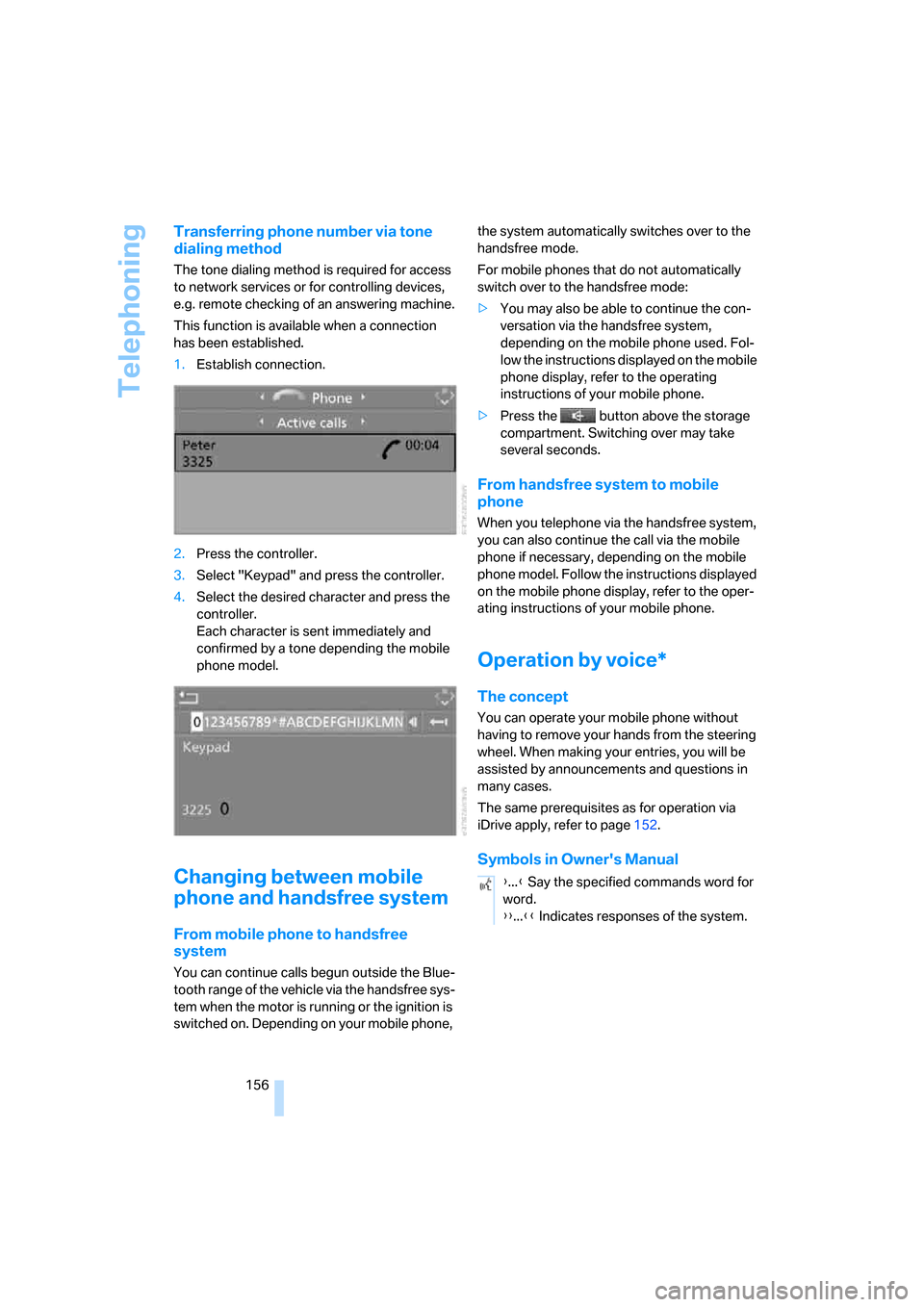
1.Establish connection.
2.Press the controller.
3.Select "Keypad" and press the controller.
4.Select the desired character
and press the
controller.
Each character is sent immediately and
confirmed by a tone depending the mobile
phone model.
Changing between mobile
phone and handsfree system
From mobile phone to handsfree
system
You can continue calls begun outside the Blue-
tooth range of the vehicle via the handsfree sys-
tem when the motor is running or the ignition is
switched on. Depending on your mobile phone, the system automatically switches over to the
handsfree mode.
For mobile phones that do not automatically
switch over to the handsfree mode:
>You may also be able to continue the con-
versation via the handsfree system,
depending on the mobile phone used. Fol-
low the instructions displayed on the mobile
phone display, refer to the operating
instructions of your mobile phone.
>Press the button above the storage
compartment. Switching over may take
several seconds.
From handsfree system to mobile
phone
When you telephone via the handsfree system,
you can also continue the call via the mobile
phone if necessary, depending on the mobile
phone model. Follow the instructions displayed
on the mobile phone display, refer to the oper-
ating instructions of your mobile phone.
Operation by voice*
The concept
You can operate your mobile phone without
having to remove your hands from the steering
wheel. When making your entries, you will be
assisted by announcements and questions in
many cases.
The same prerequisites as for operation via
iDrive apply, refer to page152.
Symbols in Owner's Manual
{...} Say the specified commands word for
word.
{{...}} Indicates responses of the system.
Page 162 of 227
Telephoning
160
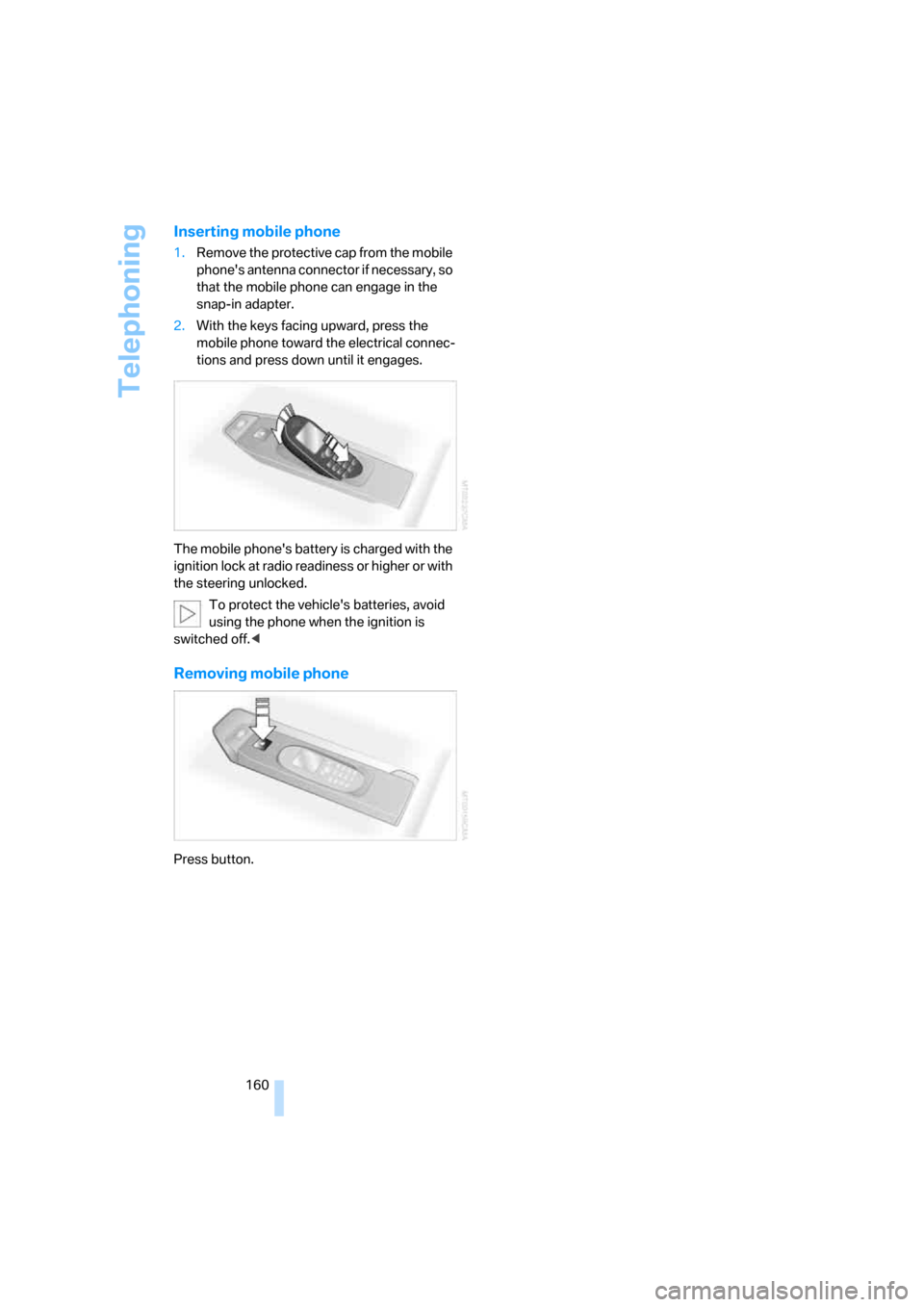
Inserting mobile phone
1.Remove the protective cap from the mobile
phone's antenna connector if necessary, so
that the mobile phone can engage in the
snap-in adapter.
2.With the keys facing upward, press the
mobile phone toward the electrical connec-
tions and press down until it engages.
The mobile phone's battery is charged with the
ignition lock at radio readiness or higher or with
the steering unlocked.
To protect the vehicle's batteries, avoid
using the phone when the ignition is
switched off.<
Removing mobile phone
Press button.
Page 185 of 227
Mobility
183Reference
At a glance
Controls
Driving tips
Communications
Navigation
Entertainment
procedures with correspondingly trained per-
sonnel. Due to the high voltage involved, there
is a danger to life and limb when work is carried
out improperly.<
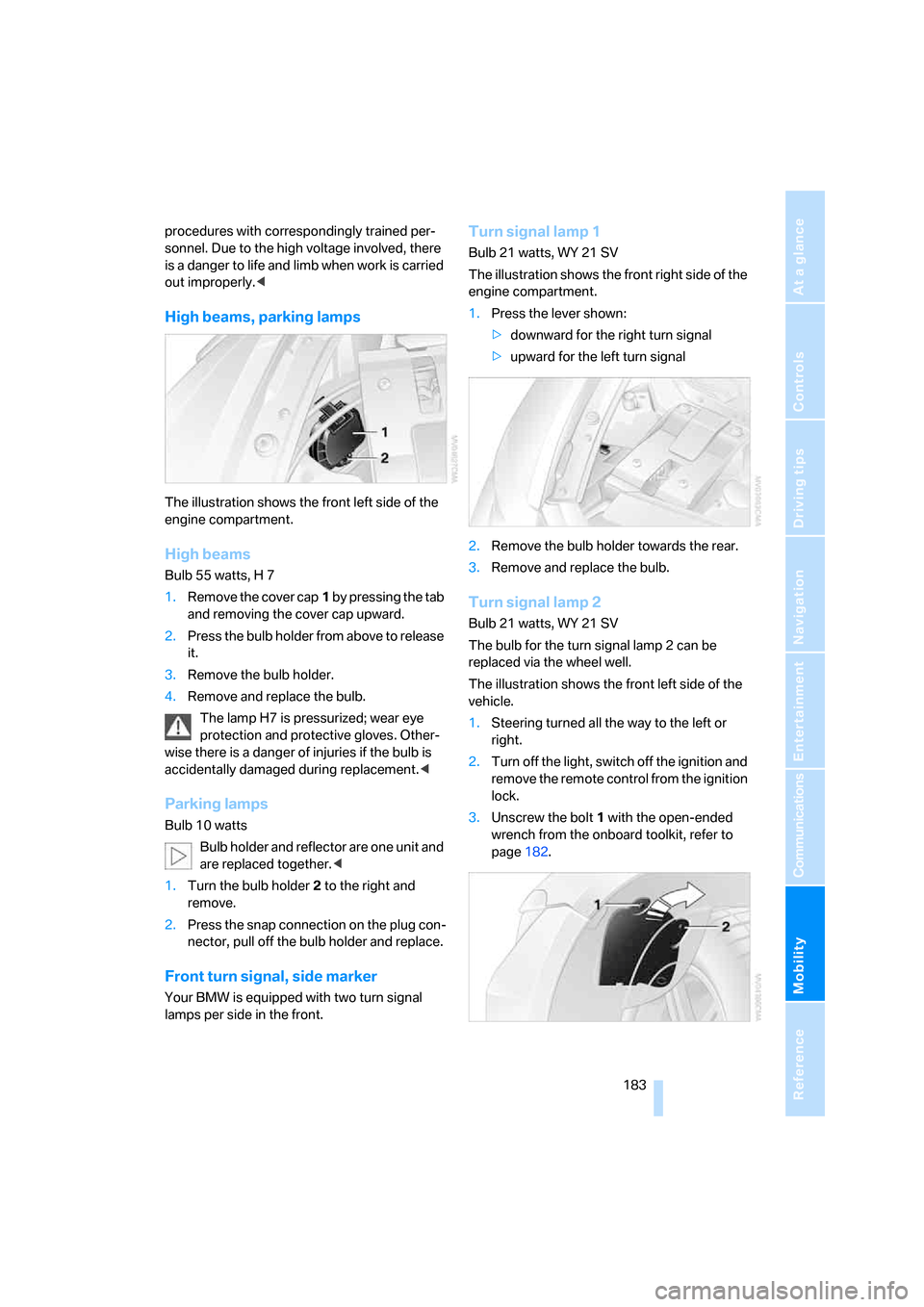
High beams, parking lamps
The illustration shows the front left side of the
engine compartment.
High beams
Bulb 55 watts, H 7
1.Remove the cover cap1 by pressing the tab
and removing the cover cap upward.
2.Press the bulb holder from above to release
it.
3.Remove the bulb holder.
4.Remove and replace the bulb.
The lamp H7 is pressurized; wear eye
protection and protective gloves. Other-
wise there is a danger of injuries if the bulb is
accidentally damaged during replacement.<
Parking lamps
Bulb 10 watts
Bulb holder and reflector are one unit and
are replaced together.<
1.Turn the bulb holder2 to the right and
remove.
2.Press the snap connection on the plug con-
nector, pull off the bulb holder and replace.
Front turn signal, side marker
Your BMW is equipped with two turn signal
lamps per side in the front.
Turn signal lamp 1
Bulb 21 watts, WY 21 SV
The illustration shows the front right side of the
engine compartment.
1.Press the lever shown:
>downward for the right turn signal
>upward for the left turn signal
2.Remove the bulb holder towards the rear.
3.Remove and replace the bulb.
Turn signal lamp 2
Bulb 21 watts, WY 21 SV
The bulb for the turn signal lamp 2 can be
replaced via the wheel well.
The illustration shows the front left side of the
vehicle.
1.Steering turned all the way to the left or
right.
2.Turn off the light, switch off the ignition and
remove the remote control from the ignition
lock.
3.Unscrew the bolt 1 with the open-ended
wrench from the onboard toolkit, refer to
page182.
Page 189 of 227
Mobility
187Reference
At a glance
Controls
Driving tips
Communications
Navigation
Entertainment
8.With the ignition switched on, refer to
page50:
Switch on the device and allow to run for
approx. 3 minutes to fill wheel with sealant.
It is not important what inflation pressure
the tire has after filling.
9.Switch off device.
10.Remove connecting hose from connection
of sealant bottle and tire valve.
Stow the M Mobility System in the vehicle
again.
Distributing sealant
Immediately drive approx. 2 miles/3 km so that
sealant is evenly distributed in tire.
Do not exceed a maximum speed of
35 mph/60 km/h. Do not drop below
12 mph/20 km/h if possible.<
Producing tire inflation pressure
1.After approx. 2 miles/3 km, stop at suitable
location.
2.Screw compressor hose9 directly onto tire
valve.
3.Insert connector 3 in lighter socket in vehi-
cle interior.
4.Correct tire inflation pressure to 29 psi/
200 kPa. With the ignition switched on:
>Increase inflation pressure: switch on
device, position I. To check currently set
inflation pressure, briefly switch off
device.
Do not allow compressor to run
longer than 10 minutes, otherwise
the device will overheat and may be dam-
aged.<
>Reduce inflation pressure: press but-
ton8 or turn screw8 on pressure gauge.
If the inflation pressure is not held, drive
the vehicle again, refer to Distributing
sealant. Then repeat steps 1 to 4 once.
Using the M Mobility System can be ineffective
with tire damage from a size of approx. 0.16 in/
4 mm. Please contact the nearest BMW center,
refer to page192, or a workshop that works according to BMW repair procedures with cor-
respondingly trained personnel if the tire can-
not be made ready for driving with the
M Mobility System.<
The tire inflation pressure must be at least
29 psi/200 kPa. Otherwise do not con-
tinue driving.<
Continue driving
Do not exceed the permissible maximum
speed of 50 mph/80 km/h, otherwise
accidents can occur.<
Reinitialize the Flat Tire Monitor.
For details, refer to page74.
Have the defective tire and the sealant bottle of
the M Mobility System replaced as soon as
possible.<
Changing wheels
Safety precautions in the event of a flat
tire or wheel change: park the vehicle as
far as possible from passing traffic and on solid
ground. Switch on the hazard warning flashers.
Lock the steering wheel in straight-ahead set-
ting of the wheels. Set the handbrake and
engage a driving position with the selector
lever.
Have all vehicle occupants get out of the vehicle
and ensure that they remain outside the imme-
diate area in a safe place, such as behind a
guardrail.
If a warning triangle or portable hazard warning
lamp is required, set it up on the roadside at an
appropriate distance from the rear of the vehi-
cle. Comply with all safety guidelines and regu-
lations.
Change the wheel only on a level, firm surface
which is not slippery. The vehicle or the jack
could slip to the side if you attempt to raise the
vehicle on a soft or slippery surface such as
snow, ice, tiles, etc.
Position the jack on a firm support surface.
Do not use a wooden block or similar object as a
support base for the jack, as this would prevent
it from extending to its full support height and
reduce its load-carrying capacity.
Page 196 of 227
Giving and receiving assistance
194 Rear
Being towed
Make sure that the ignition is switched on,
refer to page50; otherwise, the low-beam
headlights, tail lights, turn signals and wind-
shield wipers would not be available. If the vehi-
cle electrical system fails, do not tow-start or
tow the vehicle. The electric steering-wheel
lock cannot be unlocked and the vehicle cannot
be steered. For information on jump starting,
refer to page192. There is no power assistance
with the engine stopped. This then requires
increased effort for braking and steering.<
Switch on the hazard warning flashers depend-
ing on the local regulations. If the electrical sys-
tem fails, mark the vehicle to be towed, e.g. with
a sign or warning triangle in the rear window.
Engage selector lever position N with the igni-
tion switched on.
Towing methods
Do not lift vehicle by tow fitting or body
and chassis parts; otherwise, damage
may result.<
In some countries, towing with tow bars or
ropes in public traffic is not permitted. Familiar-
ize yourself with the regulations on towing in the
respective country.
With tow bar
The towing vehicle may not be lighter
than the vehicle to be towed; otherwise, it
will not be possible to reliably control vehicle
response.
ble to avoid mounting the tow bar at an offset
angle, please note the following:
>Clearance and maneuvering capability will
be strictly limited during cornering.
>When mounted at an angle, the tow bar will
exert lateral forces, tending to push the
vehicle sideways.
Attach the tow bar to the tow fittings only,
as attachment to other vehicle parts can
lead to damage.<
With tow rope
When starting off in the towing vehicle, make
sure that the tow rope is taut.
To avoid jerking and the associated
stresses on vehicle components when
towing, always use nylon ropes or nylon straps.
Attach tow ropes to the tow fittings only, as
attachment to other vehicle parts can lead to
damage.<
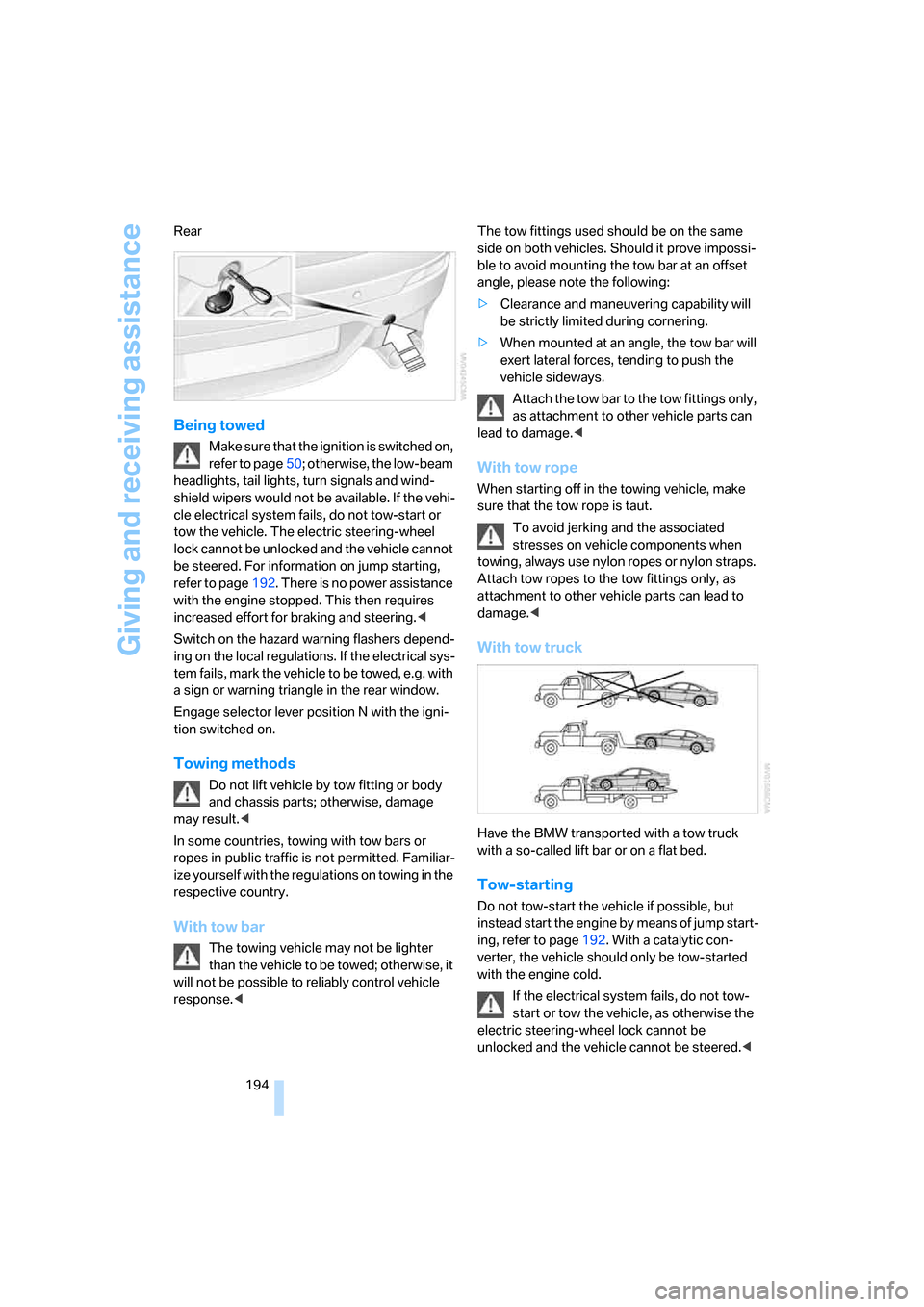
With tow truck
Have the BMW transported with a tow truck
with a so-called lift bar or on a flat bed.
Tow-starting
Do not tow-start the vehicle if possible, but
instead start the engine by means of jump start-
ing, refer to page192. With a catalytic con-
verter, the vehicle should only be tow-started
with the engine cold.
If the electrical system fails, do not tow-
start or tow the vehicle, as otherwise the
electric steering-wheel lock cannot be
unlocked and the vehicle cannot be steered.<
Page 197 of 227
Mobility
195Reference
At a glance
Controls
Driving tips
Communications
Navigation
Entertainment
1.Switch on the hazard warning flashers,
comply with country-specific regulations.
2.Switch on the ignition, refer to page50.
3.Tow-start in selector-lever position N.
4.Move the selector lever into the drive posi-
tion and pull toward + within 2 seconds.
The correct gear will be selected and
engaged automatically.
5.Stop at a suitable location, remove the tow
bar or rope and switch off the hazard warn-
ing flashers.
6.Have the vehicle checked.
Page 211 of 227
Reference 209
At a glance
Controls
Driving tips
Communications
Navigation
Entertainment
Mobility
Child restraint systems48
Chock188
Chrome parts, care, refer to
the Caring for your vehicle
brochure
Cigarette lighter93
Cigarette lighter socket, refer
to Connecting electrical
devices94
Cleaning, refer to Caring for
your vehicle brochure
"Climate"85
Clock60
– 12h/24h mode68
– setting time and date68
Closing
– from inside32
– from outside30
Closing fuel filler cap168
Clothes hooks93
Cockpit10
Cold start, refer to Starting
engine51
Comfort access36
– replacing battery37
Comfort closing
– windows with comfort
access37
– with comfort access37
"Comfort" with EDC73
"Communication"152,163
"Communication
settings"162
Compact disc
– refer to CD changer139
– refer to CD player139
Compartment for remote
control, refer to Ignition
lock50
Compartments, refer to
Storage compartments92
Compressed audio files139
Computer60
– displays on Control
Display61
– hour signal68
"Concert hall", refer to Tone
control128Condition Based Service
CBS180
"Confirmation"31
Connecting car vacuum
cleaner, refer to Connecting
electrical devices94
Consumption display, refer to
Average fuel
consumption61
Consumption statistics, refer
to Average fuel
consumption61
"Continue guidance to
destination?"118
Control Center, refer to
iDrive16
Control Display, refer to
iDrive16
– setting brightness
69
Controller, refer to iDrive16
Controls, refer to Cockpit10
Convenience operation,
windows31,32
Coolant178
– checking level178
– temperature59
Cooling, maximum86
Cornering Brake Control
CBC71
Country of destination for
navigation108
Courtesy lamps, refer to
Interior lamps83
Cruise control57
Cruising range60
Cup holders93
Curb weight, refer to
Weights200
"Current position"122
Current position
– displaying122
– entering114
– storing114
"Customer
Relations"155,164
Cylinders, refer to Engine
data198
D
Dashboard, refer to
Cockpit10
Data
– capacities200
– dimensions199
– engine198
– technical data198
– weights200
"Date"68
Date, setting68
"Date format"69
Daytime running lamps81
DBC Dynamic Brake
Control71
"Deactivated"41
Decommissioning the vehicle
– refer to Caring for your
vehicle brochure
– refer to the Caring for your
vehicle brochure
Defrosting windows86
Defrosting windows and
removing condensation86
Defrost position, refer to
Defrosting windows86
"Delete address book" for
navigation116
"Delete all numbers" on the
mobile phone155
"Delete data" for
navigation116
"Delete" for mobile
phone155
Destination address
– deleting115
– entering107,110
Destination for navigation
– destination list113
– entering via voice110
– entry107
– home address116
– selecting from address
book115
– selecting using
information112
– storing114