tow BMW M6 COUPE 2006 E63 Owner's Guide
[x] Cancel search | Manufacturer: BMW, Model Year: 2006, Model line: M6 COUPE, Model: BMW M6 COUPE 2006 E63Pages: 227, PDF Size: 8.32 MB
Page 187 of 227
Mobility
185Reference
At a glance
Controls
Driving tips
Communications
Navigation
Entertainment
License plate lamps
Bulb 5 watts, WY 5 W
1.Push a screwdriver from the left under the
lamp and pry out the lamp toward the right.
2.Turn the bulb holder to the left by 905 and
remove.
3.Remove and replace the bulb.
Repairing flat tire with
M Mobility System
To repair a flat tire, an M Mobility System is pro-
vided in the BMW M6. Using this system you
can apply a sealant in the inside of the tire, seal
off the damaged area, restore the tire inflation
pressure and then continue driving.
Safety measures in case of a breakdown:
park the vehicle as far as possible from
passing traffic and on solid ground. Switch on
the hazard warning flashers.
Lock the steering wheel in straight-ahead set-
ting of the wheels. Set the handbrake and
engage the first or reverse gear. Have all vehicle
occupants get out of the vehicle and ensure
that they remain outside the immediate area in a
safe place, such as behind a guardrail.
If a warning triangle or portable hazard warning
lamp is required, set it up on the roadside at an
appropriate distance from the rear of the vehi-
cle. Comply with all safety guidelines and regu-
lations.<
Preparation
The M Mobility System is located in the lug-
gage compartment under the floor panel flap.
Do not remove foreign bodies which have pen-
etrated the tire if possible.
Corresponding information on using the
M Mobility System are also provided on
the device.<
Before using the M Mobility System,
observe the information on the sealant
bottle.<
Pull the sticker for the speed limit off the sealant
bottle and apply it to the steering wheel.
Please observe the best-by date on the
sealant bottle.<
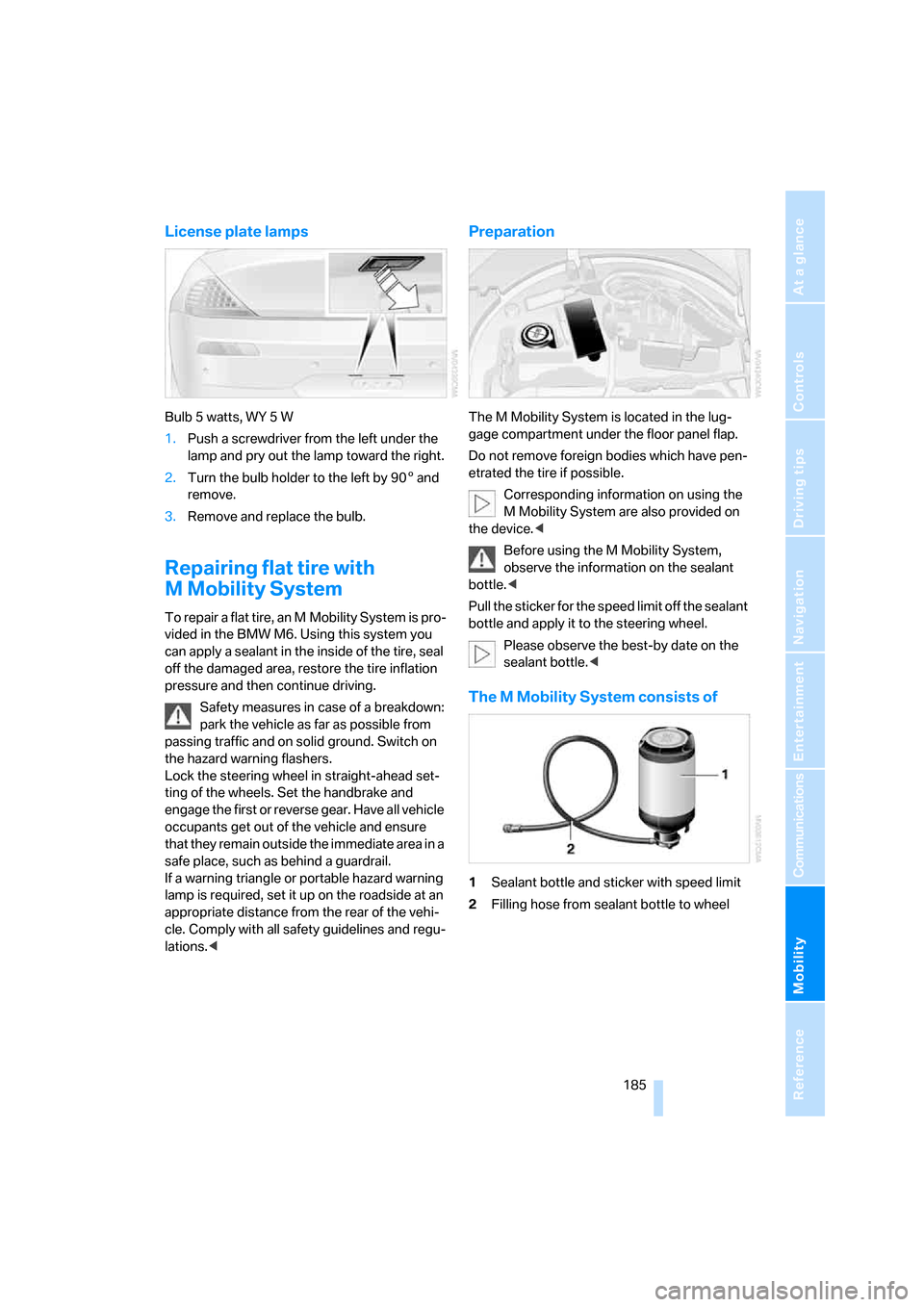
The M Mobility System consists of
1Sealant bottle and sticker with speed limit
2Filling hose from sealant bottle to wheel
Page 189 of 227
Mobility
187Reference
At a glance
Controls
Driving tips
Communications
Navigation
Entertainment
8.With the ignition switched on, refer to
page50:
Switch on the device and allow to run for
approx. 3 minutes to fill wheel with sealant.
It is not important what inflation pressure
the tire has after filling.
9.Switch off device.
10.Remove connecting hose from connection
of sealant bottle and tire valve.
Stow the M Mobility System in the vehicle
again.
Distributing sealant
Immediately drive approx. 2 miles/3 km so that
sealant is evenly distributed in tire.
Do not exceed a maximum speed of
35 mph/60 km/h. Do not drop below
12 mph/20 km/h if possible.<
Producing tire inflation pressure
1.After approx. 2 miles/3 km, stop at suitable
location.
2.Screw compressor hose9 directly onto tire
valve.
3.Insert connector 3 in lighter socket in vehi-
cle interior.
4.Correct tire inflation pressure to 29 psi/
200 kPa. With the ignition switched on:
>Increase inflation pressure: switch on
device, position I. To check currently set
inflation pressure, briefly switch off
device.
Do not allow compressor to run
longer than 10 minutes, otherwise
the device will overheat and may be dam-
aged.<
>Reduce inflation pressure: press but-
ton8 or turn screw8 on pressure gauge.
If the inflation pressure is not held, drive
the vehicle again, refer to Distributing
sealant. Then repeat steps 1 to 4 once.
Using the M Mobility System can be ineffective
with tire damage from a size of approx. 0.16 in/
4 mm. Please contact the nearest BMW center,
refer to page192, or a workshop that works according to BMW repair procedures with cor-
respondingly trained personnel if the tire can-
not be made ready for driving with the
M Mobility System.<
The tire inflation pressure must be at least
29 psi/200 kPa. Otherwise do not con-
tinue driving.<
Continue driving
Do not exceed the permissible maximum
speed of 50 mph/80 km/h, otherwise
accidents can occur.<
Reinitialize the Flat Tire Monitor.
For details, refer to page74.
Have the defective tire and the sealant bottle of
the M Mobility System replaced as soon as
possible.<
Changing wheels
Safety precautions in the event of a flat
tire or wheel change: park the vehicle as
far as possible from passing traffic and on solid
ground. Switch on the hazard warning flashers.
Lock the steering wheel in straight-ahead set-
ting of the wheels. Set the handbrake and
engage a driving position with the selector
lever.
Have all vehicle occupants get out of the vehicle
and ensure that they remain outside the imme-
diate area in a safe place, such as behind a
guardrail.
If a warning triangle or portable hazard warning
lamp is required, set it up on the roadside at an
appropriate distance from the rear of the vehi-
cle. Comply with all safety guidelines and regu-
lations.
Change the wheel only on a level, firm surface
which is not slippery. The vehicle or the jack
could slip to the side if you attempt to raise the
vehicle on a soft or slippery surface such as
snow, ice, tiles, etc.
Position the jack on a firm support surface.
Do not use a wooden block or similar object as a
support base for the jack, as this would prevent
it from extending to its full support height and
reduce its load-carrying capacity.
Page 191 of 227
Mobility
189Reference
At a glance
Controls
Driving tips
Communications
Navigation
Entertainment
Mounting a wheel
1.Unscrew the lug bolts and remove the
wheel.
2.Remove accumulations of mud or dirt from
the mounting surfaces of the wheel and
hub. Also clean the lug bolts.
3.Position the new wheel or spare wheel.
Secure the wheel by screwing at least two
lug bolts into opposite bolt holes.
When you mount wheels other than Genu-
ine BMW light-alloy wheels, different lug
bolts may also be required.
4.Screw in the remaining lug bolts. Tighten all
the bolts securely in a diagonal pattern.
5.Lower the vehicle and remove the jack from
beneath the vehicle.
After mounting
1.Tighten the lug bolts in a diagonal pattern.
To ensure safety, always have the
lug bolts checked with a calibrated
torque wrench as soon as possible to
ensure that they are tightened to the speci-
fied torque. The tightening torque is
88.5 lb ft/120 Nm.<
2.Check and correct the tire inflation pressure
at the earliest opportunity.
Protect valve stems and valve stem
seal caps against dirt and contamina-
tion. Dirt in valve stems is a frequent source
of gradual air loss.<
3.Initialize the Flat Tire Monitor, refer to
page74, and the Sequential Manual Trans-
mission, refer to After changing wheels/
tires on page174.
4.Replace the damaged tire as soon as possi-
ble and have the new wheel/tire balanced.
Stowing wheel and tools
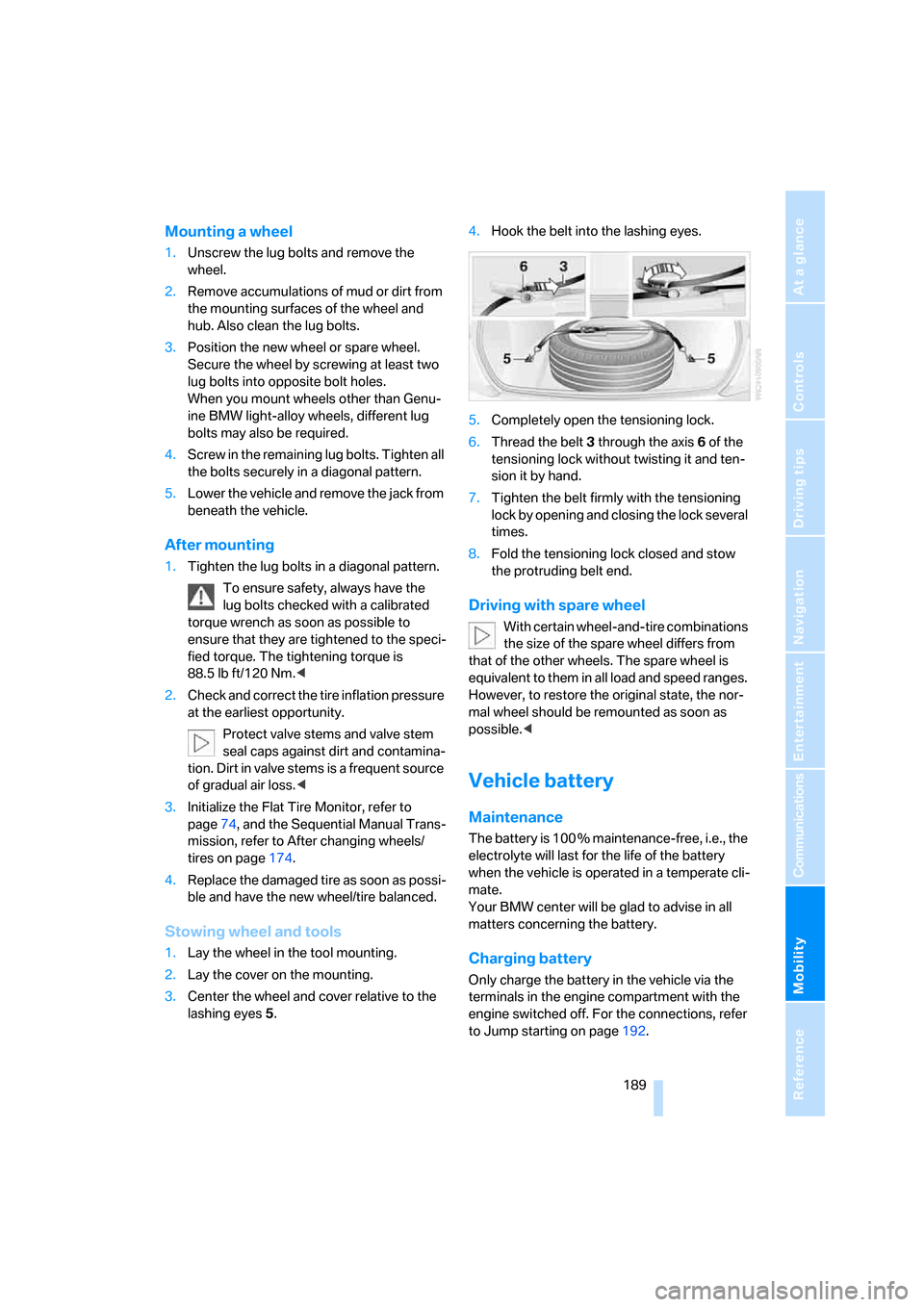
1.Lay the wheel in the tool mounting.
2.Lay the cover on the mounting.
3.Center the wheel and cover relative to the
lashing eyes5.4.Hook the belt into the lashing eyes.
5.Completely open the tensioning lock.
6.Thread the belt3 through the axis6 of the
tensioning lock without twisting it and ten-
sion it by hand.
7.Tighten the belt firmly with the tensioning
lock by opening and closing the lock several
times.
8.Fold the tensioning lock closed and stow
the protruding belt end.
Driving with spare wheel
With certain wheel-and-tire combinations
the size of the spare wheel differs from
that of the other wheels. The spare wheel is
equivalent to them in all load and speed ranges.
However, to restore the original state, the nor-
mal wheel should be remounted as soon as
possible.<
Vehicle battery
Maintenance
The battery is 100 % maintenance-free, i.e., the
electrolyte will last for the life of the battery
when the vehicle is operated in a temperate cli-
mate.
Your BMW center will be glad to advise in all
matters concerning the battery.
Charging battery
Only charge the battery in the vehicle via the
terminals in the engine compartment with the
engine switched off. For the connections, refer
to Jump starting on page192.
Page 195 of 227
Mobility
193Reference
At a glance
Controls
Driving tips
Communications
Navigation
Entertainment
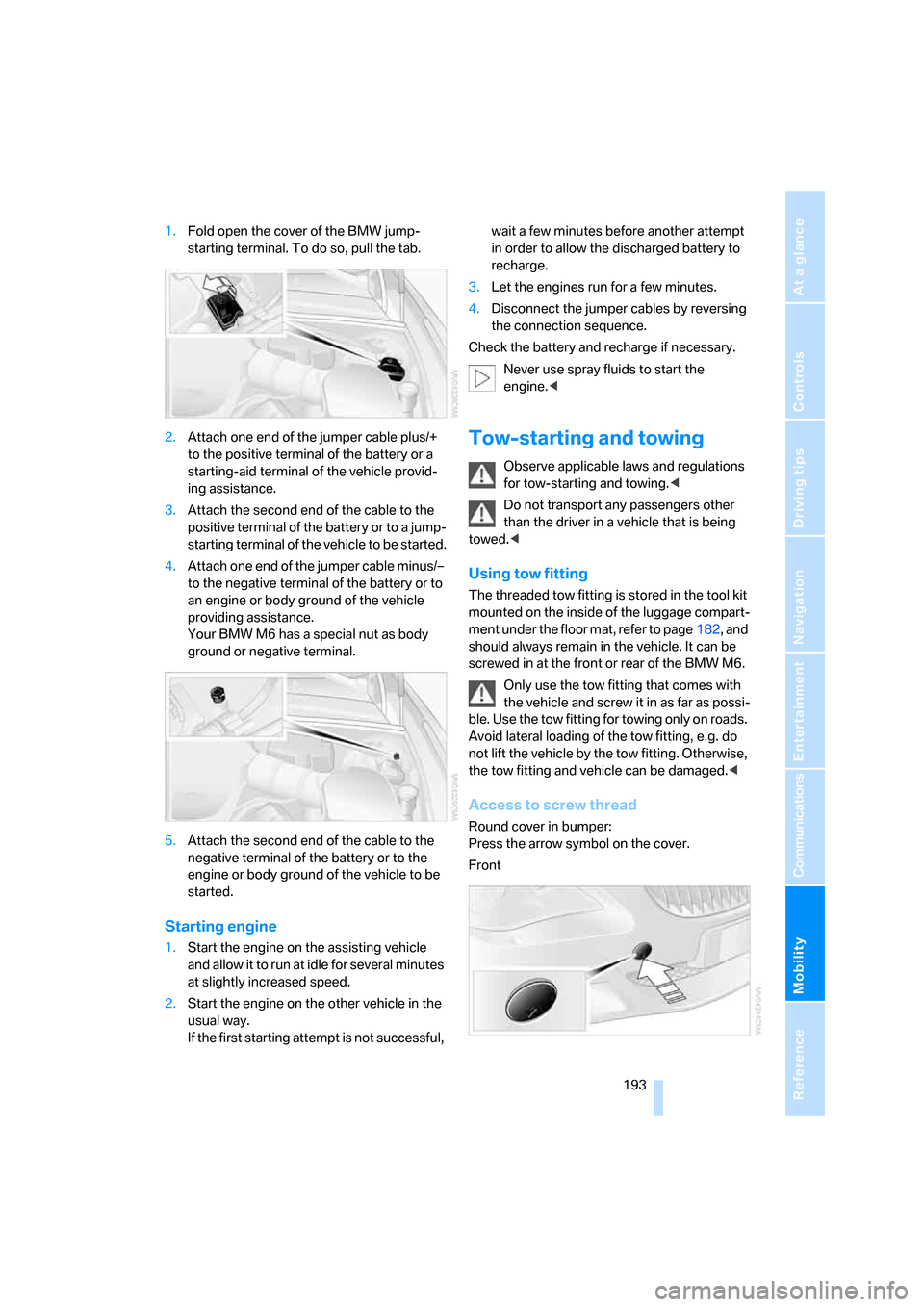
1.Fold open the cover of the BMW jump-
starting terminal. To do so, pull the tab.
2.Attach one end of the jumper cable plus/+
to the positive terminal of the battery or a
starting-aid terminal of the vehicle provid-
ing assistance.
3.Attach the second end of the cable to the
positive terminal of the battery or to a jump-
starting terminal of the vehicle to be started.
4.Attach one end of the jumper cable minus/–
to the negative terminal of the battery or to
an engine or body ground of the vehicle
providing assistance.
Your BMW M6 has a special nut as body
ground or negative terminal.
5.Attach the second end of the cable to the
negative terminal of the battery or to the
engine or body ground of the vehicle to be
started.
Starting engine
1.Start the engine on the assisting vehicle
and allow it to run at idle for several minutes
at slightly increased speed.
2.Start the engine on the other vehicle in the
usual way.
If the first starting attempt is not successful, wait a few minutes before another attempt
in order to allow the discharged battery to
recharge.
3.Let the engines run for a few minutes.
4.Disconnect the jumper cables by reversing
the connection sequence.
Check the battery and recharge if necessary.
Never use spray fluids to start the
engine.<
Tow-starting and towing
Observe applicable laws and regulations
for tow-starting and towing.<
Do not transport any passengers other
than the driver in a vehicle that is being
towed.<
Using tow fitting
The threaded tow fitting is stored in the tool kit
mounted on the inside of the luggage compart-
ment under the floor mat, refer to page182, and
should always remain in the vehicle. It can be
screwed in at the front or rear of the BMW M6.
Only use the tow fitting that comes with
the vehicle and screw it in as far as possi-
ble. Use the tow fitting for towing only on roads.
Avoid lateral loading of the tow fitting, e.g. do
not lift the vehicle by the tow fitting. Otherwise,
the tow fitting and vehicle can be damaged.<
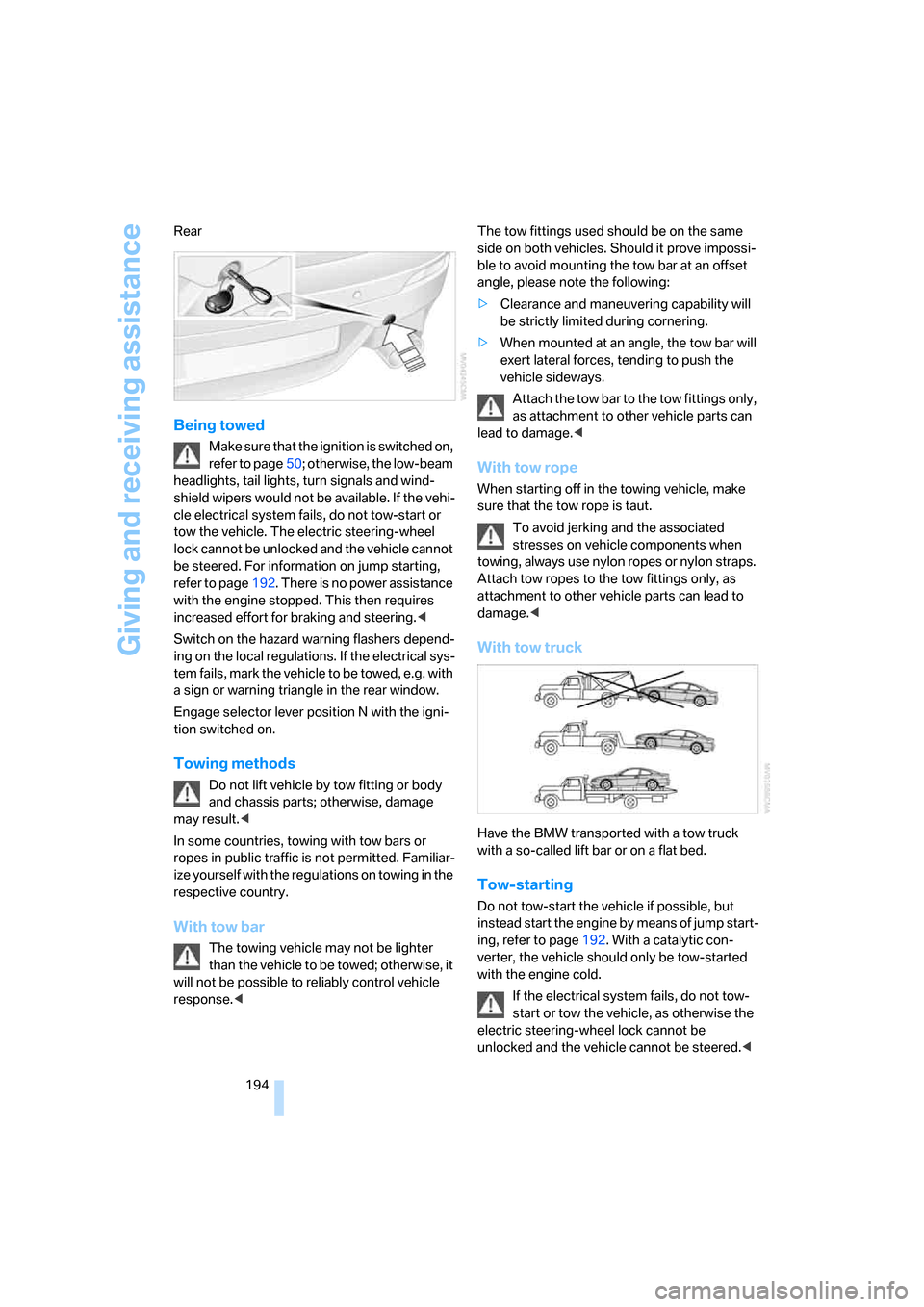
Access to screw thread
Round cover in bumper:
Press the arrow symbol on the cover.
Front
Page 196 of 227
Giving and receiving assistance
194 Rear
Being towed
Make sure that the ignition is switched on,
refer to page50; otherwise, the low-beam
headlights, tail lights, turn signals and wind-
shield wipers would not be available. If the vehi-
cle electrical system fails, do not tow-start or
tow the vehicle. The electric steering-wheel
lock cannot be unlocked and the vehicle cannot
be steered. For information on jump starting,
refer to page192. There is no power assistance
with the engine stopped. This then requires
increased effort for braking and steering.<
Switch on the hazard warning flashers depend-
ing on the local regulations. If the electrical sys-
tem fails, mark the vehicle to be towed, e.g. with
a sign or warning triangle in the rear window.
Engage selector lever position N with the igni-
tion switched on.
Towing methods
Do not lift vehicle by tow fitting or body
and chassis parts; otherwise, damage
may result.<
In some countries, towing with tow bars or
ropes in public traffic is not permitted. Familiar-
ize yourself with the regulations on towing in the
respective country.
With tow bar
The towing vehicle may not be lighter
than the vehicle to be towed; otherwise, it
will not be possible to reliably control vehicle
response.
ble to avoid mounting the tow bar at an offset
angle, please note the following:
>Clearance and maneuvering capability will
be strictly limited during cornering.
>When mounted at an angle, the tow bar will
exert lateral forces, tending to push the
vehicle sideways.
Attach the tow bar to the tow fittings only,
as attachment to other vehicle parts can
lead to damage.<
With tow rope
When starting off in the towing vehicle, make
sure that the tow rope is taut.
To avoid jerking and the associated
stresses on vehicle components when
towing, always use nylon ropes or nylon straps.
Attach tow ropes to the tow fittings only, as
attachment to other vehicle parts can lead to
damage.<
With tow truck
Have the BMW transported with a tow truck
with a so-called lift bar or on a flat bed.
Tow-starting
Do not tow-start the vehicle if possible, but
instead start the engine by means of jump start-
ing, refer to page192. With a catalytic con-
verter, the vehicle should only be tow-started
with the engine cold.
If the electrical system fails, do not tow-
start or tow the vehicle, as otherwise the
electric steering-wheel lock cannot be
unlocked and the vehicle cannot be steered.<
Page 197 of 227
Mobility
195Reference
At a glance
Controls
Driving tips
Communications
Navigation
Entertainment
1.Switch on the hazard warning flashers,
comply with country-specific regulations.
2.Switch on the ignition, refer to page50.
3.Tow-start in selector-lever position N.
4.Move the selector lever into the drive posi-
tion and pull toward + within 2 seconds.
The correct gear will be selected and
engaged automatically.
5.Stop at a suitable location, remove the tow
bar or rope and switch off the hazard warn-
ing flashers.
6.Have the vehicle checked.
Page 204 of 227
Short commands of voice command system
202
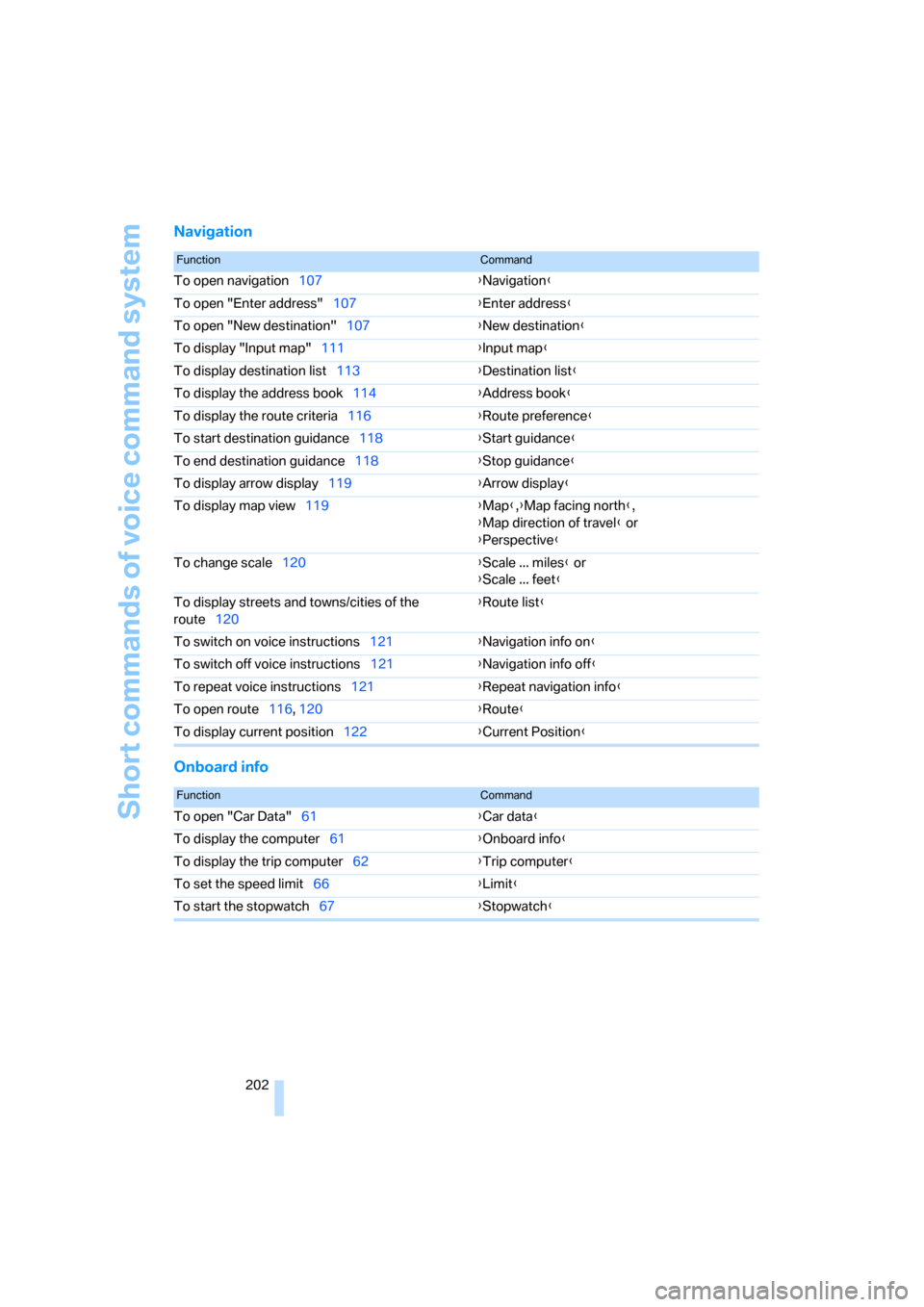
Navigation
Onboard info
FunctionCommand
To open navigation107{Navigation}
To open "Enter address"107{Enter address}
To open "New destination"107{New destination}
To display "Input map"111{Input map}
To display destination list113{Destination list}
To display the address book114{Address book}
To display the route criteria116{Route preference}
To start destination guidance118{Start guidance}
To end destination guidance118{Stop guidance}
To display arrow display119{Arrow display}
To display map view119{Map},{Map facing north},
{Map direction of travel} or
{Perspective}
To change scale120{Scale ... miles} or
{Scale ... feet}
To display streets and towns/cities of the
route120{Route list}
To switch on voice instructions121{Navigation info on}
To switch off voice instructions121{Navigation info off}
To repeat voice instructions121{Repeat navigation info}
To open route116, 120
{Route}
To display current position122{Current Position}
FunctionCommand
To open "Car Data"61{Car data}
To display the computer61{Onboard info}
To display the trip computer62{Trip computer}
To set the speed limit66{Limit}
To start the stopwatch67{Stopwatch}
Page 209 of 227
Reference 207
At a glance
Controls
Driving tips
Communications
Navigation
Entertainment
Mobility
Automatic
– air distribution85
– air volume85
– headlamp control80
– service notification162
– steering wheel adjustment,
refer to Easy entry/exit45
– storing stations131
Automatically switching
between high beams and
low beams, refer to High-
beam assistant81
Automatic car washes100
– also refer to the Caring for
your vehicle brochure
Automatic climate control84
– automatic air distribution85
– switching off87
Automatic closing of doors,
see Automatic soft
closing33
Automatic curb monitor44
Automatic lighting
– refer to Automatic headlamp
control80
– refer to Daytime running
lamps81
– refer to High-beam
assistant81
– refer to Interior lamps83
– refer to Pathway lighting80
"Automatic programs"85
Automatic recirculated-air
control AUC87
Automatic soft closing33
Automatic station search131
"Automatic ventilation"88
AUTO program with
automatic climate control85
"Autostore" on the
radio130,132
Average fuel consumption61
– setting units69
"Avoid ferries" for
navigation117
"Avoid highways" for
navigation117Avoiding freeways for
navigation116
Avoiding unintentional
alarms35
"Avoid tollroads" for
navigation117
Axle loads, refer to
Weights200
"A - Z"153,154
B
Backrest contour, refer to
Lumbar support40
Backrests, refer to Seats39
Backrest width adjustment40
Backup lamps, replacing
bulbs, refer to Tail
lamps184
"Balance", refer to Tone
control128
Balance, refer to Tone
control128
Balance adjustment in audio
mode, right/left128
Band-aids, refer to First-aid
kit192
Bass, refer to Tone
control127
"Bass", tone control127
Battery
– disposal37
– jump starting192
– refer to Vehicle battery189
Battery change37
Being towed194
Belts, refer to Safety belts42
Beverage holder, refer to Cup
holders93
Blower, refer to Air volume86
"BMW Assist"163
BMW Assist161
– enabling161
– services offered162
"BMW Contact"155
"BMW Contact
Numbers"155BMW homepage4
BMW Maintenance
System180
"BMW Service"163
"BMW Service settings"162
BMW website4
Bottle holder, refer to Cup
holders93
Brake Assistant, refer to DBC
Dynamic Brake Control71
Brake fluid179
– level179
– warning lamp179
Brake force display75
Brake hydraulic system179
Brake lamps
– brake force display75
– replacing bulbs, refer to Tail
lamps184
Brake pads179
– breaking-in98
Brakes
– ABS Antilock Brake
System71
– brake fluid
179
– brake force display75
– brake pads179
– breaking-in98
– CBC Cornering Brake
Control71
– handbrake51
Brake system98
– brake fluid level179
– brake pads98,179
– brake rotors100
– breaking-in98
– warning lamp13,179
Brake wear warning
– brake pads179
– warning lamp179
Braking
– electronic brake-force
distribution71
– refer to Braking safely99
Braking safely99
Breakdown, M Mobility
System185
Page 210 of 227
Everything from A to Z
208 Breakdown assistance163
Breakdown services, refer to
Roadside Assistance192
Breaking-in98
Breaking-in the clutch98
Breaking-in the differential98
"Brightness"69,78
Brightness of Control
Display69
Button for starting engine50
Buttons on steering wheel11
Bypassing route sections122
C
California Proposition 65
Warning6
"Call"154
Call
– accepting152
– displaying accepted154
– ending153
– in absence154
– starting153
Calling
– from phone book153
– from Top 8 list154
– redialing154
Can holder, refer to Cup
holders93
Capacity of luggage
compartment200
Car battery, refer to Vehicle
battery189
Car care, refer to the Caring
for your vehicle brochure
Car-care products, refer to the
Caring for your vehicle
brochure
"Car Data"61
Care181
– refer to the Caring for your
vehicle brochure
Cargo loading
– securing cargo101
– stowing cargo101
– vehicle100Caring for artificial leather,
refer to the Caring for your
vehicle brochure
Caring for leather, refer to the
Caring for your vehicle
brochure
Caring for light-alloy wheels,
refer to the Caring for your
vehicle brochure
Caring for plastic, refer to the
Caring for your vehicle
brochure
Caring for the carpet, refer to
the Caring for your vehicle
brochure
Caring for the vehicle finish,
refer to the Caring for your
vehicle brochure
Car key, refer to Keys/remote
control28
Car phone148
– installation location, refer to
Center armrest92
– refer to Mobile phone148
– refer to separate operating
instructions
Car radio, refer to Radio130
Car wash100
– refer to Before driving into a
car wash100
– refer to the Caring for your
vehicle brochure
Catalytic converter, refer to
Hot exhaust system98
"Categories"137
CBC Cornering Brake
Control71
CBS Condition Based
Service180
"CD"126,139CD changer139
– controls126
– fast forward/reverse
143
– installation location143
– playing a track141
– random play sequence142
– repeating a track142
– selecting a CD139
– selecting a track140
– switching on/off126
– tone control127
– volume127
CD player139
– controls126
– fast forward/reverse143
– playing a track141
– random play sequence142
– repeating a track142
– selecting a track140
– switching on/off126
– tone control127
– volume127
Center armrest, adjusting
height92
Center console14
"Central locking"30
Central locking system29
– comfort access36
– from inside vehicle32
Changes, technical, refer to
For your own safety6
Changing a wheel187
Changing language on
Control Display69
Changing units of measure on
Control Display69
Changing wheels173
CHECK button65
Check Control64
"Check Control
messages"66
Check Gas Cap168
Checking air pressure, refer to
Tire inflation pressure170
Children's seats, refer to Child
restraint systems48
Child-restraint fixing system
LATCH49
Page 213 of 227
Reference 211
At a glance
Controls
Driving tips
Communications
Navigation
Entertainment
Mobility
Engine
– breaking-in98
– data198
– M Engine Dynamic
Control55
– overheated, refer to Coolant
temperature59
– speed198
– starting51
– starting, comfort access36
– starting difficulties51
– switching off51
Engine compartment176
Engine coolant178
Engine oil
– additives178
– approved oils178
– checking oil level176
– exact measurement177
– fast measurement177
– possible displays177
– recommended oils178
– temperature60
– temperature gauge60
– topping off177
Engine output, refer to Engine
data198
Engine overheating, refer to
Coolant temperature59
Engine speed, refer to Engine
specifications198
Engine starting, refer to
Starting engine51
"Enter address"108,114
Entering address107,110
Entering destination via town/
city name108
Entering intersection109
Entering rear42
Entering town/city for
navigation108
Entering zip code for
navigation109
"Entertainment"126
"Entertainment
settings"127,134
Entertainment sound output
on/off127
Entry map for destination111Equalizer, refer to Tone
control129
"Equalizer", tone control129
"ESN"136
ESP Electronic Stability
Program, refer to DSC
Dynamic Stability
Control71
Event data recorders181
Exhaust system, refer to Hot
exhaust system98
Exterior mirrors43
– automatic dimming
feature44
– automatic heating44
– folding in and out44
– tilting down passenger-side
mirror44
Eye for tow-starting and
towing, refer to Tow
fitting193
Eyes for lashing, refer to
Securing cargo101
F
"Fader", refer to Tone
control128
Fader, refer to Tone
control128
Failure messages, refer to
Check Control64
False alarms, refer to Avoiding
unintentional alarms35
Fastening safety belts, refer to
Safety belts42
Fastest route for
navigation116
Fast forward
– CD changer143
– CD player143
"Fast route" for
navigation117
"Favorites" calling up with
radio133
Filling bottle, refer to
M Mobility System185
Filling capacities200First aid, refer to First-aid
kit192
First-aid kit192
Flashing when locking and
unlocking, refer to Setting
acknowledgment signals31
Flashlight, refer to
Rechargeable flashlight91
Flat tire
– M Mobility System185
– spare wheel188
Flat Tire Monitor
– false alarms74
– initializing system74
– limits of system74
– show chains174
– warning lamp74
"FM", reception
range126,130
FM, waveband130
Footbrake, refer to Braking
safely99
Footwell lighting, refer to
Interior lamps83
For specified oil grades, refer
to Approved engine oils178
For your own safety6
Freeway, refer to Route
criteria116
Front airbags75
Front passenger airbags
deactivating76
"FTM"74
Fuel
– average consumption61
– display60
– fuel specifications169
– high-quality brands169
– quality169
– specifications
169
– tank capacity168
Fuel display, refer to Fuel
gauge60
Fuel filler door168
– releasing in the event of
electrical malfunction168
Fuel gauge60
Fuses190