Smg BMW M6 COUPE 2006 E63 Owner's Manual
[x] Cancel search | Manufacturer: BMW, Model Year: 2006, Model line: M6 COUPE, Model: BMW M6 COUPE 2006 E63Pages: 227, PDF Size: 8.32 MB
Page 48 of 227
Adjustments
46
MDrive
With MDrive you can configure several individ-
ual settings for your vehicle on the Control Dis-
play and activate them simultaneously with the
button on the steering wheel.
Configuring settings
With the ignition switched on you can change
the settings of MDrive on the Control Display.
iDrive, for explanation of principle, refer to
page16.
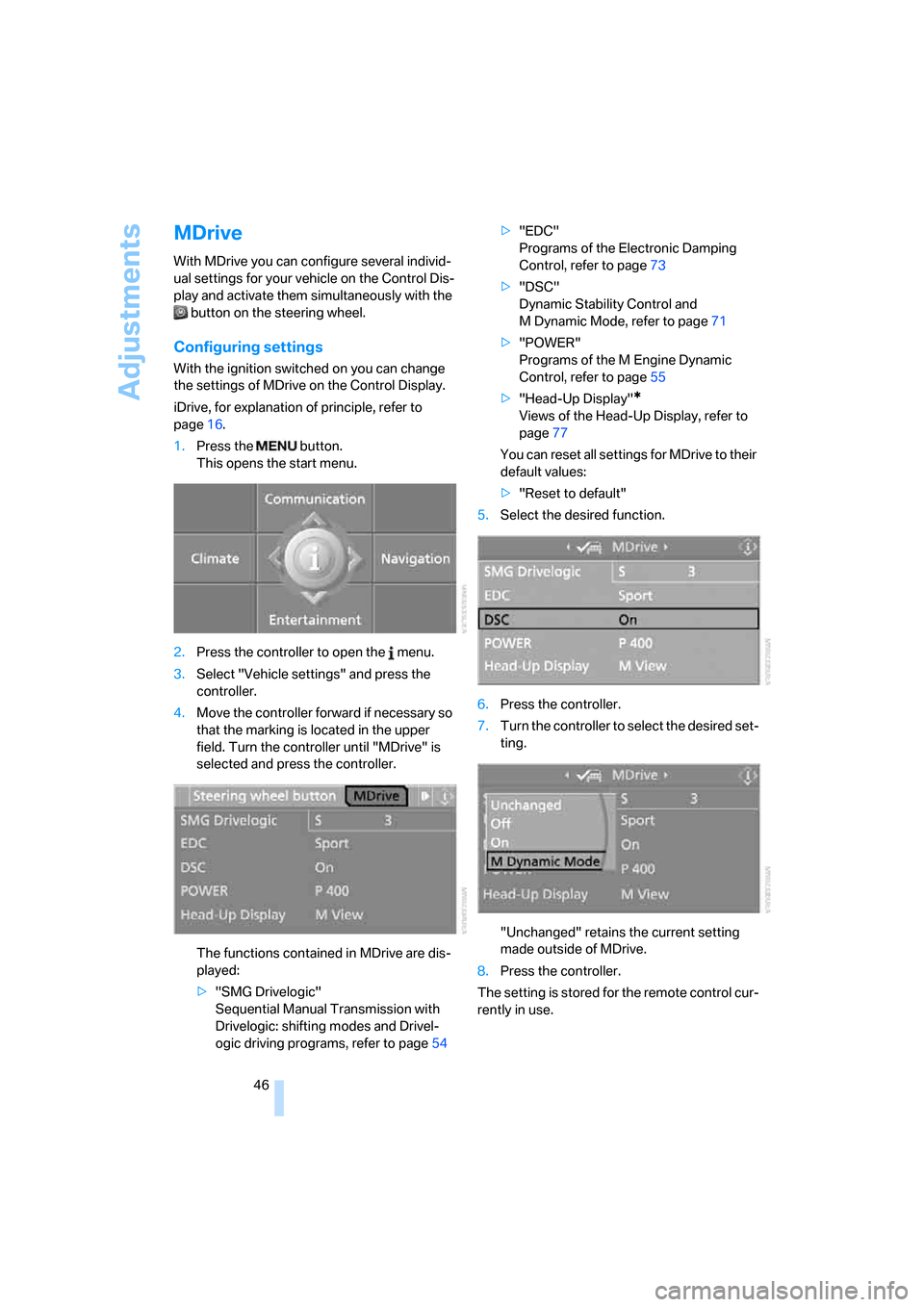
1.Press the button.
This opens the start menu.
2.Press the controller to open the menu.
3.Select "Vehicle settings" and press the
controller.
4.Move the controller forward if necessary so
that the marking is located in the upper
field. Turn the controller until "MDrive" is
selected and press the controller.
The functions contained in MDrive are dis-
played:
>"SMG Drivelogic"
Sequential Manual Transmission with
Drivelogic: shifting modes and Drivel-
ogic driving programs, refer to page54>"EDC"
Programs of the Electronic Damping
Control, refer to page73
>"DSC"
Dynamic Stability Control and
M Dynamic Mode, refer to page71
>"POWER"
Programs of the M Engine Dynamic
Control, refer to page55
>"Head-Up Display"
*
Views of the Head-Up Display, refer to
page77
You can reset all settings for MDrive to their
default values:
>"Reset to default"
5.Select the desired function.
6.Press the controller.
7.Turn the controller to select the desired set-
ting.
"Unchanged" retains the current setting
made outside of MDrive.
8.Press the controller.
The setting is stored for the remote control cur-
rently in use.
Page 54 of 227
Driving
52
Indicator lamp
The indicator lamp lights up, and a sig-
nal also sounds when starting off. The
handbrake is engaged.
Indicator lamp for Canadian models.
Engaging
The lever engages automatically.
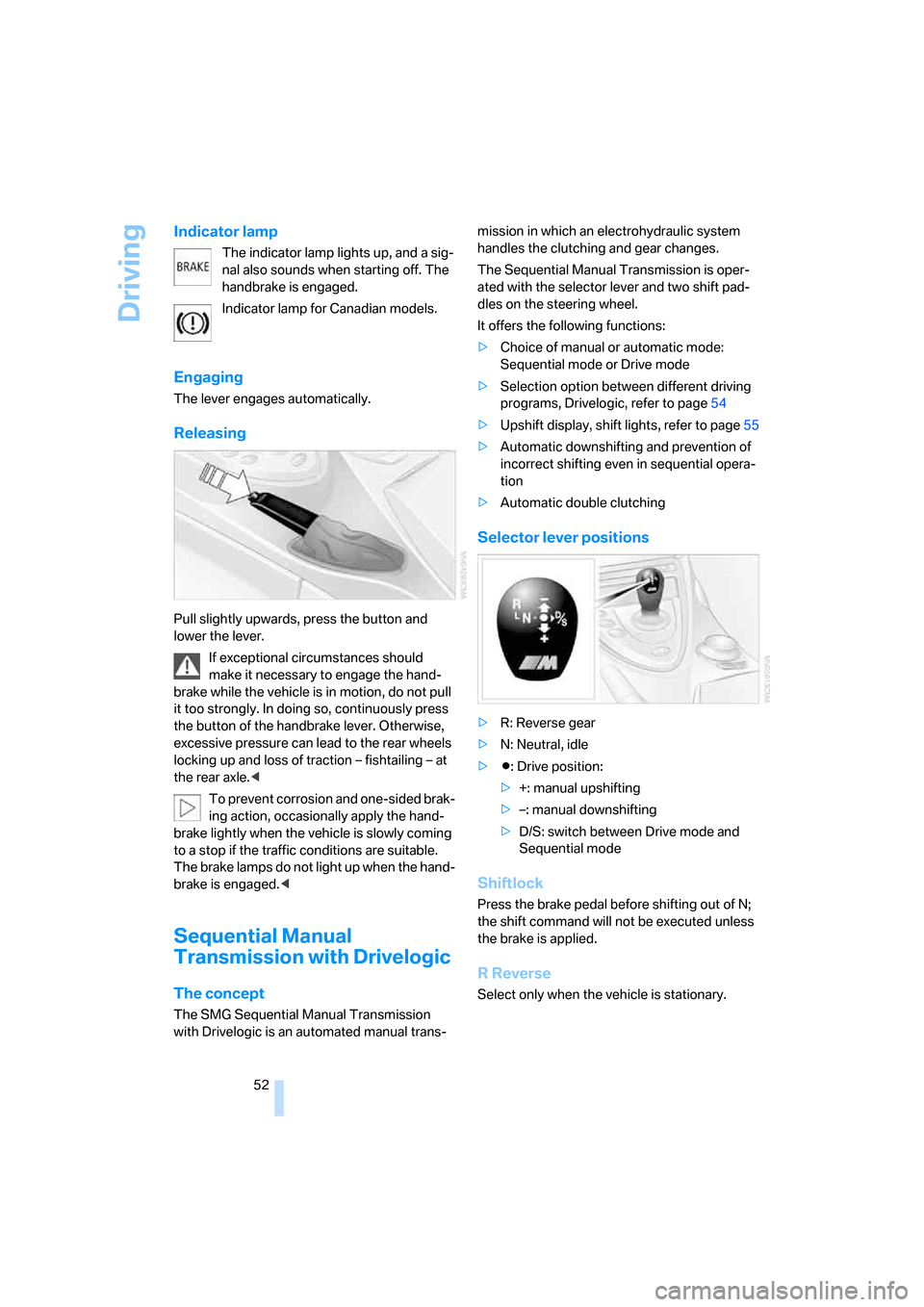
Releasing
Pull slightly upwards, press the button and
lower the lever.
If exceptional circumstances should
make it necessary to engage the hand-
brake while the vehicle is in motion, do not pull
it too strongly. In doing so, continuously press
the button of the handbrake lever. Otherwise,
excessive pressure can lead to the rear wheels
locking up and loss of traction – fishtailing – at
the rear axle.<
To prevent corrosion and one-sided brak-
ing action, occasionally apply the hand-
brake lightly when the vehicle is slowly coming
to a stop if the traffic conditions are suitable.
The brake lamps do not light up when the hand-
brake is engaged.<
Sequential Manual
Transmission with Drivelogic
The concept
The SMG Sequential Manual Transmission
with Drivelogic is an automated manual trans-mission in which an electrohydraulic system
handles the clutching and gear changes.
The Sequential Manual Transmission is oper-
ated with the selector lever and two shift pad-
dles on the steering wheel.
It offers the following functions:
>Choice of manual or automatic mode:
Sequential mode or Drive mode
>Selection option between different driving
programs, Drivelogic, refer to page54
>Upshift display, shift lights, refer to page55
>Automatic downshifting and prevention of
incorrect shifting even in sequential opera-
tion
>Automatic double clutching
Selector lever positions
>R: Reverse gear
>N: Neutral, idle
>Β: Drive position:
>+: manual upshifting
>–: manual downshifting
>D/S: switch between Drive mode and
Sequential mode
Shiftlock
Press the brake pedal before shifting out of N;
the shift command will not be executed unless
the brake is applied.
R Reverse
Select only when the vehicle is stationary.
Page 56 of 227
Driving
54
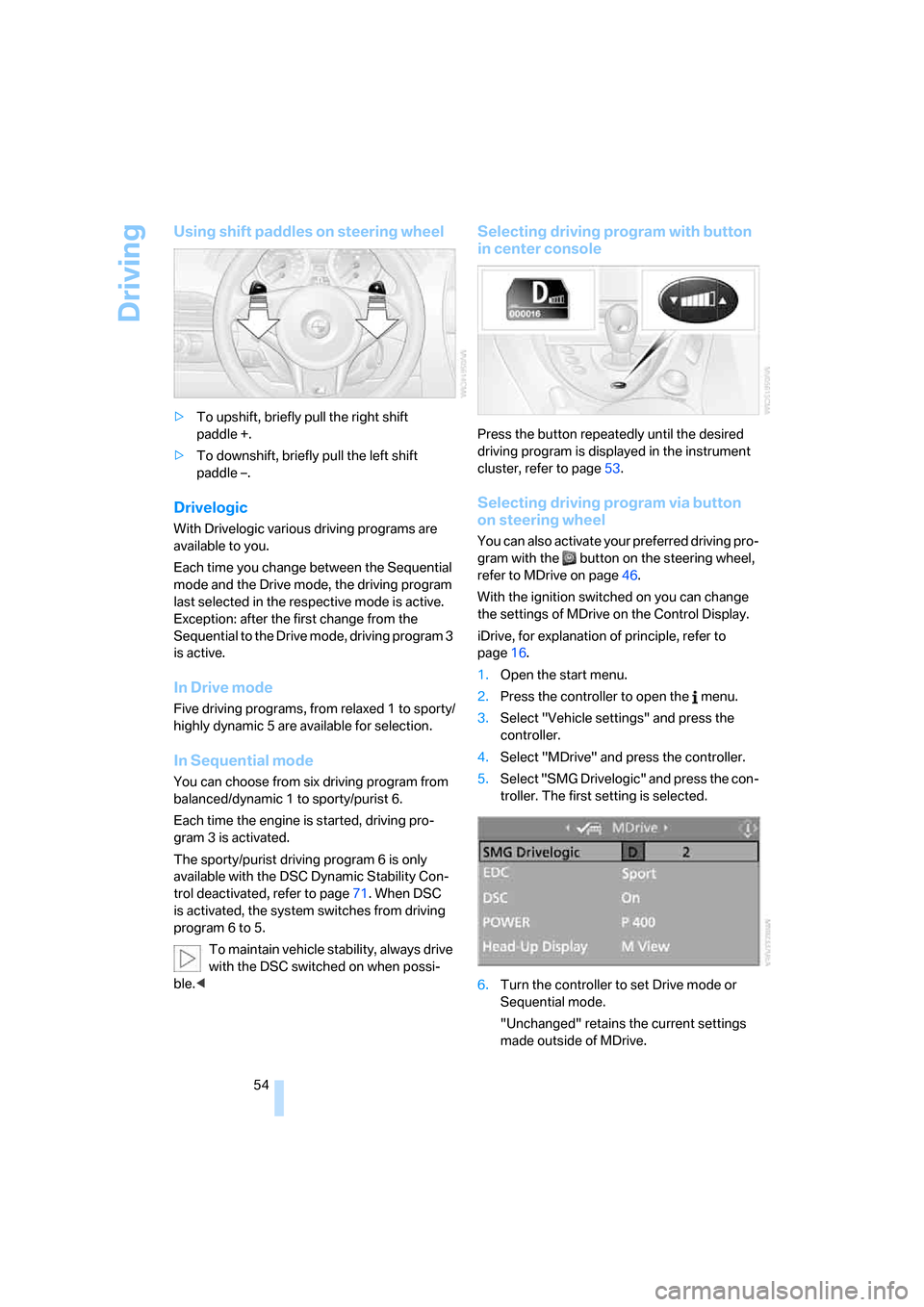
Using shift paddles on steering wheel
>To upshift, briefly pull the right shift
paddle +.
>To downshift, briefly pull the left shift
paddle –.
Drivelogic
With Drivelogic various driving programs are
available to you.
Each time you change between the Sequential
mode and the Drive mode, the driving program
last selected in the respective mode is active.
Exception: after the first change from the
Sequential to the Drive mode, driving program 3
is active.
In Drive mode
Five driving programs, from relaxed 1 to sporty/
highly dynamic 5 are available for selection.
In Sequential mode
You can choose from six driving program from
balanced/dynamic 1 to sporty/purist 6.
Each time the engine is started, driving pro-
gram 3 is activated.
The sporty/purist driving program 6 is only
available with the DSC Dynamic Stability Con-
trol deactivated, refer to page71. When DSC
is activated, the system switches from driving
program 6 to 5.
To maintain vehicle stability, always drive
with the DSC switched on when possi-
ble.<
Selecting driving program with button
in center console
Press the button repeatedly until the desired
driving program is displayed in the instrument
cluster, refer to page53.
Selecting driving program via button
on steering wheel
You can also activate your preferred driving pro-
gram with the button on the steering wheel,
refer to MDrive on page46.
With the ignition switched on you can change
the settings of MDrive on the Control Display.
iDrive, for explanation of principle, refer to
page16.
1.Open the start menu.
2.Press the controller to open the menu.
3.Select "Vehicle settings" and press the
controller.
4.Select "MDrive" and press the controller.
5.Select "SMG Drivelogic" and press the con-
troller. The first setting is selected.
6.Turn the controller to set Drive mode or
Sequential mode.
"Unchanged" retains the current settings
made outside of MDrive.
Page 220 of 227
Everything from A to Z
218 "Service"63,162
Service, refer to Roadside
Assistance192
Service and Warranty Infor-
mation Booklet for US
models180
Service interval display, refer
to Service requirements63
"Service notification"163
"Service Request"155,164
"Service
requirements"63,162
Service requirements63
– also refer to CBS Condition
Based Service180
"Service Status"162
"Set"
– in audio mode126
– in trip computer62
"Set date"68
"Set service date"64
"Set time"68
Settings
– changing on Control
Display67
– clock, 12h/24h mode68
– configuring, refer to
MDrive46
– configuring, refer to
Personal Profile29
Setting speed limit66
Setting time, refer to Prese-
lecting activation time88
"Set tire pressure"74
Shifting53
Shifting paddles54
Shift lights55
Shiftlock52
Shock absorber control, refer
to EDC Electronic Damping
Control73
Short commands of voice
command system201
"Short route" for
navigation117
Short route in navigation, refer
to Selecting route116
"Show current position"112"Show destination
position"112
Side airbags75
Side markers, replacing
bulbs184
Side turn signals, replacing
bulbs184
Signal horn, refer to Horn10
Sill panel lighting, refer to
Interior lamps83
Sitting safely39
– with airbags39
– with head restraints39
– with safety belts39
Ski bag94
Slope assistant, refer to
Starting off on slopes99
SMG, refer to Sequential
Manual Transmission with
Drivelogic52
"SMG Drivelogic"46,54
Snow chains174
Socket, refer to Connecting
electrical devices94
Socket for Onboard
Diagnostics interface181
Socket for remote control,
refer to Ignition lock50
Soft closure aid, refer to
Automatic soft closing33
Song search with CD, refer to
Playing a track141
SOS, refer to Initiating an
emergency call191
Spare fuses190
Spare key28
– adapter28
Spare remote control28
Spare wheel188
– driving with spare wheel189
Special oils, refer to Approved
engine oils178
Speed-dependent
volume128
Speed limit66
Speed limit warning, refer to
Speed limit66
Speedometer12"Speed volume", tone
control128
Speed with winter tires174
"Sport" with EDC73
Stability control, refer to
Driving stability control
systems71
Start/Stop button50
"Start" for stopwatch67
"Start guidance"110,118
Starting assistant, refer to
Starting off on slopes99
Starting difficulties
– jump starting192
– refer to Special starting
conditions51
Starting engine51
Starting off
– on a slippery surface99
– on slopes99
Start menu, iDrive17
"Start route guidance"112
"Start service"163
"State / Province" for desti-
nation entry108
"State inspection"64
Station, refer to Radio130
"Status"63
Status information on Control
Display20
Status of this Owner's Manual
at time of printing5
Steering wheel
– adjustment44
– automatic adjustment, refer
to Easy entry/exit45
– buttons on steering
wheel11
– lock50
– locking50
– MDrive button46
– memory40
– programmable button45
"Steering wheel button"45
Steering-wheel shift buttons,
refer to Shift paddles54
"Stop" for stopwatch67
"Stopwatch"67
Stopwatch67