belt BMW M6 COUPE 2007 E63 User Guide
[x] Cancel search | Manufacturer: BMW, Model Year: 2007, Model line: M6 COUPE, Model: BMW M6 COUPE 2007 E63Pages: 256, PDF Size: 8.11 MB
Page 200 of 256
Wheels and tires
198
Tire identification marks
Knowledge of the labeling on the side of the tire
makes it easier to identify and choose the right
tires.
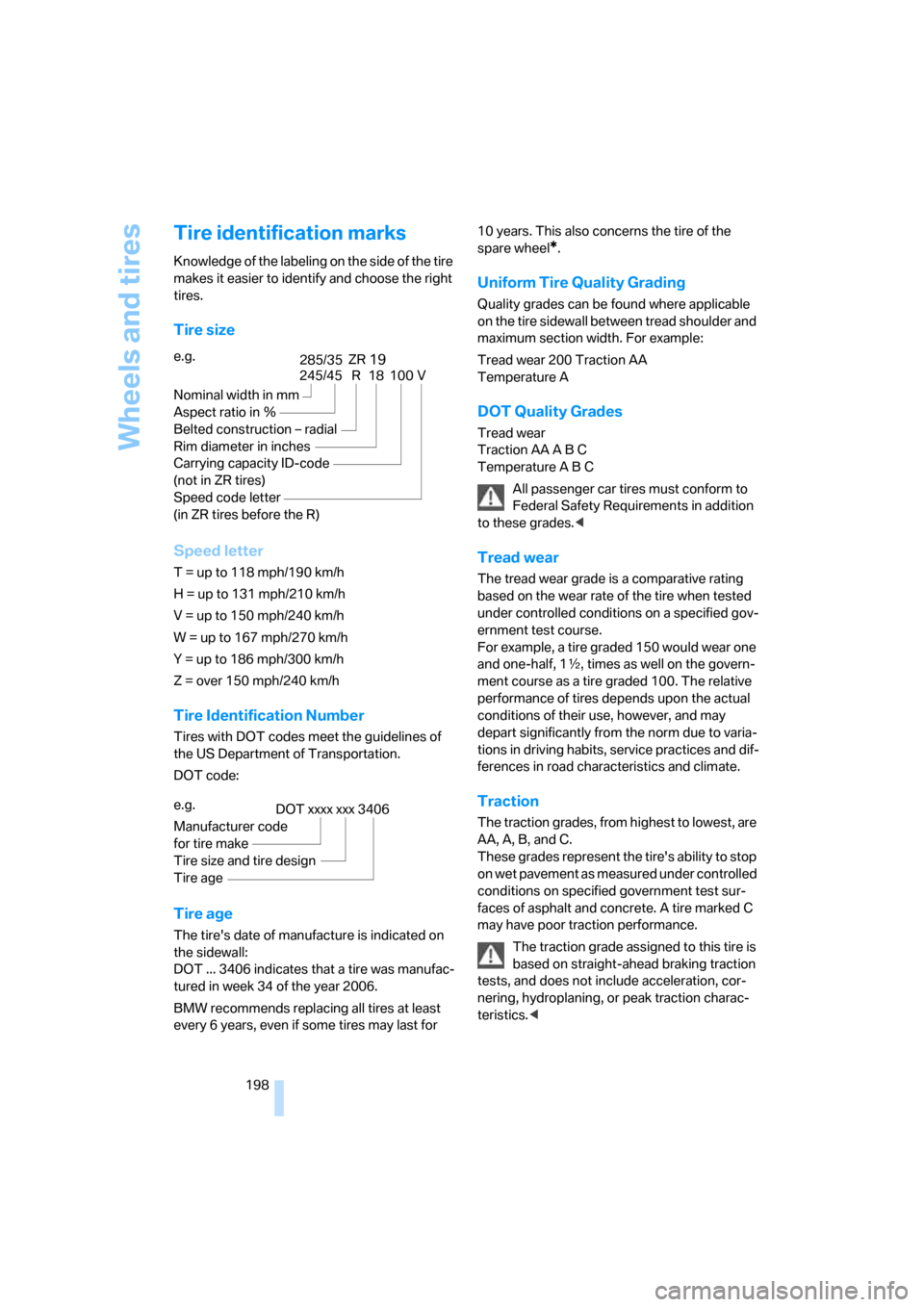
Tire size
Speed letter
T = up to 118 mph/190 km/h
H = up to 131 mph/210 km/h
V = up to 150 mph/240 km/h
W = up to 167 mph/270 km/h
Y = up to 186 mph/300 km/h
Z = over 150 mph/240 km/h
Tire Identification Number
Tires with DOT codes meet the guidelines of
the US Department of Transportation.
DOT code:
Tire age
The tire's date of manufacture is indicated on
the sidewall:
DOT ... 3406 indicates that a tire was manufac-
tured in week 34 of the year 2006.
BMW recommends replacing all tires at least
every 6 years, even if some tires may last for 10 years. This also concerns the tire of the
spare wheel
*.
Uniform Tire Quality Grading
Quality grades can be found where applicable
on the tire sidewall between tread shoulder and
maximum section width. For example:
Tread wear 200 Traction AA
Temperature A
DOT Quality Grades
Tread wear
Traction AA A B C
Temperature A B C
All passenger car tires must conform to
Federal Safety Requirements in addition
to these grades.<
Tread wear
The tread wear grade is a comparative rating
based on the wear rate of the tire when tested
under controlled conditions on a specified gov-
ernment test course.
For example, a tire graded 150 would wear one
and one-half, 1γ, times as well on the govern-
ment course as a tire graded 100. The relative
performance of tires depends upon the actual
conditions of their use, however, and may
depart significantly from the norm due to varia-
tions in driving habits, service practices and dif-
ferences in road characteristics and climate.
Traction
The traction grades, from highest to lowest, are
AA, A, B, and C.
These grades represent the tire's ability to stop
on wet pavement as measured under controlled
conditions on specified government test sur-
faces of asphalt and concrete. A tire marked C
may have poor traction performance.
The traction grade assigned to this tire is
based on straight-ahead braking traction
tests, and does not include acceleration, cor-
nering, hydroplaning, or peak traction charac-
teristics.< e.g.
Nominal width in mm
Aspect ratio in Ξ
Belted construction – radial
Rim diameter in inches
Carrying capacity ID-code
(not in ZR tires)
Speed code letter
(in ZR tires before the R)
245/45 R 18 100 V
285/3519ZR
e.g.
Manufacturer code
for tire make
Tire size and tire design
Tire age
DOT xxxx xxx 3406
Page 217 of 256
Mobility
215Reference
At a glance
Controls
Driving tips
Communications
Navigation
Entertainment
Changing wheels*
Safety precautions in the event of a flat
tire or wheel change: Park the vehicle as
far as possible from passing traffic and on solid
ground. Switch on the hazard warning flashers.
Apply the handbrake and engage first gear or
reverse gear with a manual transmission, or
select a drive position with the selector level for
a sequential transmission.
Have all vehicle occupants get out of the vehicle
and ensure that they remain outside the imme-
diate area in a safe place, such as behind a
guardrail.
If a warning triangle
* or portable hazard warning
lamp
* is r e q u ir e d , s e t i t up o n t h e ro a d s id e a t a n
appropriate distance from the rear of the vehi-
cle. Comply with all safety guidelines and regu-
lations.
Change the wheel only on a level, firm surface
which is not slippery. The vehicle or the jack
could slip to the side if you attempt to raise the
vehicle on a soft or slippery surface such as
snow, ice, tiles, etc.
Position the jack on a firm support surface.
Do not use a wooden block or similar object as a
support base for the jack, as this would prevent
it from extending to its full support height and
reduce its load-carrying capacity.
To avoid serious or fatal injury: never lie under
the vehicle, and never start the engine while it is
supported by the jack.<
What you will need
To avoid rattling noises later on, note the posi-
tions of the tools before removing them, then
return them to their initial positions after com-
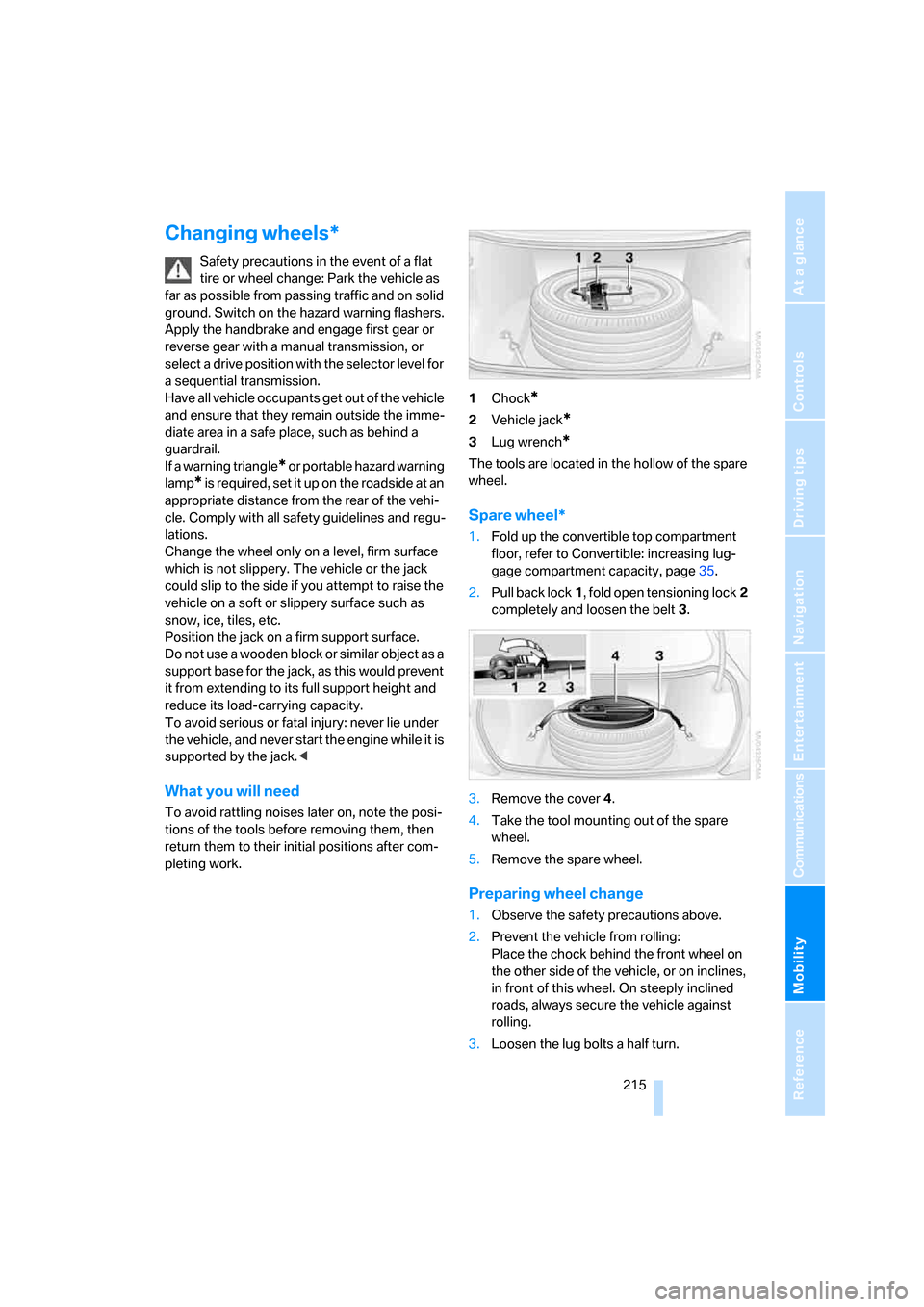
pleting work.1Chock
*
2Vehicle jack*
3Lug wrench*
The tools are located in the hollow of the spare
wheel.
Spare wheel*
1.Fold up the convertible top compartment
floor, refer to Convertible: increasing lug-
gage compartment capacity, page35.
2.Pull back lock1, fold open tensioning lock2
completely and loosen the belt3.
3.Remove the cover4.
4.Take the tool mounting out of the spare
wheel.
5.Remove the spare wheel.
Preparing wheel change
1.Observe the safety precautions above.
2.Prevent the vehicle from rolling:
Place the chock behind the front wheel on
the other side of the vehicle, or on inclines,
in front of this wheel. On steeply inclined
roads, always secure the vehicle against
rolling.
3.Loosen the lug bolts a half turn.
Page 219 of 256
Mobility
217Reference
At a glance
Controls
Driving tips
Communications
Navigation
Entertainment
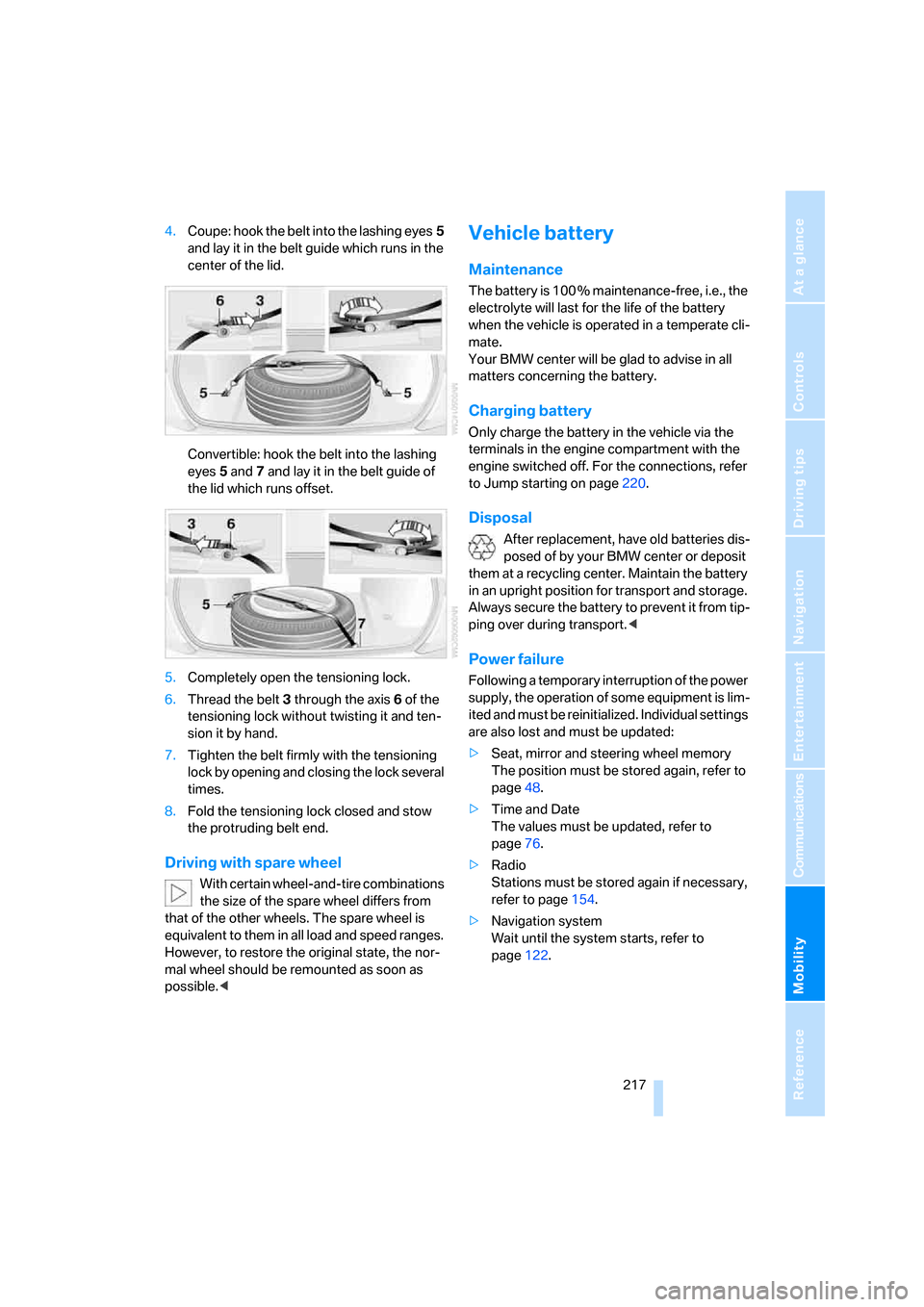
4.Coupe: hook the belt into the lashing eyes5
and lay it in the belt guide which runs in the
center of the lid.
Convertible: hook the belt into the lashing
eyes5 and7 and lay it in the belt guide of
the lid which runs offset.
5.Completely open the tensioning lock.
6.Thread the belt3 through the axis6 of the
tensioning lock without twisting it and ten-
sion it by hand.
7.Tighten the belt firmly with the tensioning
lock by opening and closing the lock several
times.
8.Fold the tensioning lock closed and stow
the protruding belt end.
Driving with spare wheel
With certain wheel-and-tire combinations
the size of the spare wheel differs from
that of the other wheels. The spare wheel is
equivalent to them in all load and speed ranges.
However, to restore the original state, the nor-
mal wheel should be remounted as soon as
possible.<
Vehicle battery
Maintenance
The battery is 100 % maintenance-free, i.e., the
electrolyte will last for the life of the battery
when the vehicle is operated in a temperate cli-
mate.
Your BMW center will be glad to advise in all
matters concerning the battery.
Charging battery
Only charge the battery in the vehicle via the
terminals in the engine compartment with the
engine switched off. For the connections, refer
to Jump starting on page220.
Disposal
After replacement, have old batteries dis-
posed of by your BMW center or deposit
them at a recycling center. Maintain the battery
in an upright position for transport and storage.
Always secure the battery to prevent it from tip-
ping over during transport.<
Power failure
Following a temporary interruption of the power
supply, the operation of some equipment is lim-
ited and must be reinitialized. Individual settings
are also lost and must be updated:
>Seat, mirror and steering wheel memory
The position must be stored again, refer to
page48.
>Time and Date
The values must be updated, refer to
page76.
>Radio
Stations must be stored again if necessary,
refer to page154.
>Navigation system
Wait until the system starts, refer to
page122.
Page 237 of 256
Reference 235
At a glance
Controls
Driving tips
Communications
Navigation
Entertainment
Mobility
Assistance window20
"Assist. window off"21
AUC Automatic recirculated-
air control102
"Audio"149,151,156
Audio148
– controls148
– switching on/off148
– tone control149
– volume149
Audio device, external107
Automatic
– air distribution100
– air volume100
– cruise control66
– headlamp control95
– recirculated-air control
AUC102
– service notification187
– steering wheel
adjustment48
– storing stations153
Automatic car washes116
– also refer to Caring for your
vehicle brochure
Automatic climate control99
– automatic air
distribution100
– convertible program100
– switching on and off102
– ventilation with vehicle
parked103
Automatic closing of doors,
refer to Automatic soft
closing34
Automatic curb monitor52
Automatic lighting
– refer to Automatic headlamp
control95
– refer to Daytime running
lamps96
– refer to Interior lamps97
– refer to Pathway lighting95
"Automatic programs"100
Automatic soft closing34
Automatic station search153
"Automatic ventilation"103AUTO program with
automatic climate
control100
"Autostore" on the
radio152,154
"AUX"148,167
AUX-In connection107,167
Average fuel consumption70
– setting units78
"Avoid ferries" for navigation
system135
"Avoid highways" for
navigation system134
Avoiding freeways for
navigation134
Avoiding unintentional
alarms36
"Avoid tollroads" for
navigation system135
Axle loads, refer to
Weights228
"A - Z"178
B
Backrest contour, refer to
Lumbar support47
Backrests, refer to Seats47
Backrest width adjustment47
Backup lamps, replacing
bulbs, refer to Tail
lamps211
"Balance", refer to Tone
control150
Band-aids, refer to First-aid
kit220
Bass, refer to Tone
control149
"Bass", tone control149
Battery
– jump starting220
– refer to Vehicle battery217
Battery replacement, remote
control for comfort
access38
BC button, refer to
Computer69
Being towed222
Belts, refer to Safety belts51Beverage holder, refer to Cup
holders108
Blower, refer to Air
volume101
"Bluetooth"172
"BMW Assist"186
BMW Assist185
– activating190
– breakdown assistance186
– contacting BMW Customer
Relations188
– displaying vehicle data191
– information service188
– services offered185
– TeleService187
– updating189
"BMW Contact"180
"BMW Contact
Numbers"180
BMW homepage4
BMW Maintenance
System207
"BMW Service settings"189
BMW website4
Bottle holder, refer to Cup
holders108
Bracket for telephone or
mobile phone, refer to Snap-
in adapter183
Brake assistant82
Brake force display88
Brake lamps
– replacing bulbs, refer to Tail
lamps211
– two-stage88
Brake rotors
– breaking-in114
– refer to Braking safely116
Brakes
– ABS Antilock Brake
System81
– brake force display88
– breaking-in114
– CBC Cornering Brake
Control81
– electronic brake-force
distribution81
– handbrake60
– refer to Braking safely116
Page 242 of 256
Everything from A to Z
240 Exhaust system, refer to Hot
exhaust system115
Exterior mirrors52
– adjusting52
– automatic dimming
feature52
– automatic heating52
– folding in and out52
– tilting down passenger-side
mirror52
External audio device107
Eye for tow-starting and
towing, refer to Tow
fitting221
Eyes for lashing, refer to
Securing cargo118
F
"Fader", refer to Tone
control150
Fader, refer to Tone
control150
Failure messages, refer to
Check Control73
False alarm
– refer to Avoiding
unintentional alarms36
– refer to Switching off
alarm36
Fastening safety belts, refer to
Safety belts51
Fastest route for
navigation134
Fast forward
– CD changer164
– CD player164
"Fast route" for
navigation134
"Favorites", calling up with
radio155
Filler neck for washer fluid66
Filling bottle, refer to
M Mobility System212
Filter, refer to Microfilter/
activated-charcoal filter103Fine wood, refer to Caring for
your vehicle brochure
First aid, refer to First-aid
kit220
First-aid kit220
Flashing, when locking and
unlocking, refer to Setting
confirmation signals31
Flashlight, refer to
Rechargeable flashlight106
Flat tire
– Flat Tire Monitor84
– M Mobility System212
– run-flat tires87
– spare wheel215
– Tire Pressure Monitor86
– warning lamp86,87
Flat Tire Monitor84
– false alarms85
– initializing system85
– limits of system85
– snow chains201
– warning lamp86
Floor mats, refer to Caring for
your vehicle brochure
Floor mats/carpets, refer to
Caring for your vehicle
brochure
Fluid reservoir, refer to Filler
neck for washer fluid66
"FM", reception
range148,152
FM, waveband152
Folding into raised position
convertible top
compartment floor,
Convertible35
Footbrake, refer to Braking
safely116
Footwell lighting, refer to
Interior lamps97
For specified oil grades, refer
to Approved engine oils205
For your own safety6
Freeway, refer to Route
criteria134
Front airbags89Front passenger airbags
– deactivating89
– deactivating, refer to
Exception for front
passenger seat56
"FTM"85
FTM, refer to Flat Tire
Monitor84
Fuel
– average consumption70
– display69
– fuel specifications195
– high-quality brands195
– quality195
– specifications195
– tank contents, refer to
Capacities228
Fuel display, refer to Fuel
gauge69
Fuel filler door194
– releasing in the event of
electrical malfunction194
Fuel gauge69
Full mobile phone preparation
package170
Full screen display, refer to
Switching assistance
window off20
Fuses218
G
Garage-door opener, refer to
Integrated universal remote
control105
Gasoline
– refer to Average fuel
consumption70
– refer to Fuel
specifications195
– refer to Required fuel195
Gasoline display, refer to Fuel
gauge69
Gear changes62
Gear display, refer to Displays
in instrument cluster62
Gearshift lever, manual
transmission60
Page 244 of 256
Everything from A to Z
242 Indicator/warning lamps
– ABS Antilock Brake
System83
– airbags90
– brake system83
– DSC13,82
– Flat Tire Monitor86
– handbrake13,60
– MDrive13,54
– M Dynamic Mode13,82
– parking lamps/low beams13
– safety belt warning51
– TPM Tire Pressure
Monitor87
Indicator and warning lamps,
overview13
Inflation pressure, refer to Tire
inflation pressure196
Inflation pressure monitoring
– refer to Flat Tire Monitor84
– refer to Tire Pressure
Monitor86
Info menu17
Information
– on another location130
– on current position130
– on town/city of
destination130
"Information" for navigation
system130
Information menu, refer to
imenu17
"Information on
destination"131
Information service188
"Info sources"72
Initializing
– Flat Tire Monitor85
– radio, refer to Storing
stations154
– refer to Power failure217
– seat, mirror and steering
wheel memory48
– time and date76
"Input map"129
Installation location
– CD changer164
– drive for navigation DVD122Instructions for navigation
system, refer to Voice
instructions139
Instrument cluster12
Instrument illumination, refer
to Instrument lighting97
Instrument lighting97
Instrument panel, refer to
Cockpit
10
Instrument panel, refer to
Instrument cluster12
Integrated key28
Integrated universal remote
control105
Interesting destination for
navigation130
"Interim time"76
Interior lamps97
– switching on with remote
control31
Interior motion sensor36
– switching off36
Interior rearview mirror,
automatic dimming
feature52
Intermittent wiper mode65
J
Jacking points216
Joystick, refer to iDrive16
Jump starting220
K
Keyless-Go, refer to Comfort
access37
Keyless opening and closing,
refer to Comfort access37
Key Memory, refer to Personal
Profile29
"Keypad"180
Keys28
– key-related settings, refer to
Personal Profile29
– spare key28
Kick-down, refer to Drive
mode62Knee airbags89
Knock control195
L
Lamps, refer to Parking lamps/
low beams95
Lamps and bulbs209
"Language / Units"78
– for navigation
system123,139
"Languages"79
– for navigation
system123,139
Lashing eyes, refer to
Securing cargo118
Last destinations, refer to
Destination list131
"Last seat pos."49
LATCH child restraint fixing
system57
LEDs light-emitting
diodes209
Length, refer to
Dimensions226
License plate lamps, replacing
bulbs212
Light-emitting diodes
LEDs209
Lighter108
"Lighting"65,96
Lighting
– instruments97
– lamps and bulbs209
– of the vehicle, refer to
Lamps95
Light switch95
"Limit"75
Loading, refer to Cargo
loading117
Load securing equipment,
refer to Securing cargo118
"Lock after driving"33
Lock buttons in the doors,
refer to Locking33
Page 248 of 256
Everything from A to Z
246
R
Radiator fluid, refer to
Coolant205
Radio
– Autostore153
– controls148
– High Definition Radio156
– sampling stations153
– satellite radio157
– selecting frequency
manually153
– selecting
waveband148,152
– station search153
– station selection152
– station with best
reception153
– storing stations154
– switching on/off148
– tone control149
– volume149
– Weather Band, refer to
Weather news flashes155
Radio key, refer to Keys/
remote control28
Radio position, refer to Radio
readiness58
Radio readiness58
– switched off59
– switched on58
– with comfort access38
Radio stations, storing154
Rain sensor, windshield wiper
system65
"Random", random play
sequence164
"Random all" in audio
mode164
"Random directory" in audio
mode164
Random play sequence
– CD changer164
– CD player164
"RDS"155
Reading lamps98
Rear lamps, refer to Tail
lamps211Rearview mirrors, refer to
Mirrors52
Rear window
– heating101
– opening and closing39
"Received calls"178
Reception
– quality155
– radio stations155
– regional station153
Reception quality of mobile
phone, refer to Status
information20
Rechargeable flashlight
106
Recirculated-air mode, refer
to AUC Automatic
recirculated-air control102
Recirculation of air, refer to
AUC Automatic
recirculated-air control102
Reclining seat, refer to
Seats47
Recording times, refer to
Stopwatch76
"Redial" for mobile phone178
Redialing with mobile
phone183
Reflectors, refer to Tail
lamps211
Refueling194
Releasing, hood202
Releasing the locks, refer to
Unlocking37
"Relock door if not
opened"33
Remaining distance, refer to
Cruising range70
Remaining distance to
destination, refer to
Computer70
Remote control28
– battery replacement38
– comfort access37
– garage-door opener105
– luggage compartment lid31
– malfunction31,38
Removing condensation from
windows101"Repeat directory" in audio
mode164
"Repeat" in audio mode164
"Repeat track" in audio
mode164
Replacement fuses218
Replacement remote control,
refer to New remote
controls28
Replacing bulbs, refer to
Lamps and bulbs209
Replacing tires, changing a
wheel215
Reporting safety defects7
Required fuel195
Reserve warning, refer to Fuel
gauge69
"Reset"85,87
– stopwatch76
– tone settings151
Reset, refer to Resetting tone
settings151
"Reset to default" with
MDrive54
Residual heat102
Restraint systems
– for children56
– refer to Safety belts51
Retreaded tires200
Reverse, fast
– CD changer164
– CD player164
Reverse gear61
– manual transmission60
Road map138
"Roadside
Assistance"180,186
Roadside Assistance220
Roadside parking lamps97
– replacing bulbs, refer to
Parking lamps210
Rollover protection system on
Convertible91
– lowering91
Rope, refer to Tow-starting
and towing221
Rotary/pushbutton, refer to
iDrive16
Page 249 of 256
Reference 247
At a glance
Controls
Driving tips
Communications
Navigation
Entertainment
Mobility
Route134
– bypassing sections140
– changing140
– changing criteria134
– display137
– displaying arrow display137
– displaying map view138
– displaying streets or towns/
cities139
– selecting134
Route information, refer to
Destination guidance with
voice instructions139
Route map, refer to Displaying
map view138
"Route preference",
changing134
Route selection134
Rubber parts, refer to Caring
for your vehicle brochure
Run-flat tires
– continuing driving with a
damaged tire87
– flat tire87
S
Safety belts51
– damage51
– indicator lamp51
– refer to Caring for your
vehicle brochure
– reminder51
– sitting safely46
Safety belt tensioners, refer to
Safety belts51
Safety systems
– ABS Antilock Brake
System81
– airbags89
– driving stability control
systems81
– rollover protection system,
Convertible91
– safety belts51
Satellite radio157
– enabling channels158
– selecting channel158
– storing channel158"SAT" with radio148,158
"Save current
destination"134
"Scan"
– music tracks on CD163
– stations with radio153
Scan
– CD changer163
– CD player163
– radio153
"Scan all" in audio mode163
"Scan directory" in audio
mode163
Screw thread for tow
fitting221
SDARS, refer to Satellite
radio157
Seats47
– adjusting47
– adjusting backrest width47
– heating51
– lumbar support47
– memory, refer to Seat, mirror
and steering wheel
memory48
– sitting safely46
– storing the setting48
– thigh support47
Securing cargo118
– ski bag110
"Select as
destination"130,189
"Select current speed"76
Selecting audio sources, refer
to Operating via iDrive148
Selecting frequency
manually153
Selecting menu items19
Selecting route134
Selection options with
navigation system134
Selector lever61
– manual transmission60
Selector lever lock, refer to
Shiftlock61
Selector lever positions61
– manual transmission60Sequential Manual
Transmission with
Drivelogic61
– Drivelogic driving
programs62
– Drive mode62
– idle61
– initializing system, refer to
After changing wheels/
tires201
– kick-down62
– reverse gear61
– Sequential mode61
– shift lights63
– shiftlock61
– towing222
– tow-starting223
Sequential mode61
"Service"72,187
Service, refer to Roadside
Assistance220
Service and Warranty
Information Booklet for
US models207
Service Interval Display
– refer to CBS Condition
Based Service207
– refer to Service
requirements71
"Service notification"187
"Service Request"180,187
"Service
requirements"72,187
Service requirements71
– refer to CBS Condition
Based Service207
"Service Status"191
"Set"
– in audio mode148
– in trip computer71
"Set date"78
"Set service date"73
"Set time"77
Setting button, refer to
Controls, controller16
"Settings"191
– for BMW Assist189
– for unlocking30
Page 250 of 256
Everything from A to Z
248 Settings
– changing on Control
Display76
– clock, 12h/24h mode77
– configuring, refer to
MDrive54
– configuring, refer to
Personal Profile29
– date78
– language79
– units of measure78
Settings menu, refer to
imenu17
Setting time, refer to
Preselecting activation
time103
Shifting62
Shift lights63
Shiftlock61
Shift paddles on steering
wheel62
Shock absorber control, refer
to EDC Electronic Damping
Control84
Short commands of voice
command system229
"Short route" for
navigation134
Short route in navigation, refer
to Selecting route134
"Show current position"129
"Show destination
position"129
Side airbags89
Side marker lamps, replacing
bulbs211
Side turn signals, replacing
bulbs211
Signal horn, refer to Horn10
Signaling a turn, triple turn
signal activation64
Sill panel lighting, refer to
Interior lamps97
Sitting safely46
– with airbags46
– with head restraints46
– with safety belts46
Ski bag109Slope assistant, refer to
Starting off on slopes115
SMG, refer to Sequential
Manual Transmission with
Drivelogic61
"SMG Drivelogic"54,63
Snap-in adapter
– mounting/removing183
– using170
Snow chains201
Socket, refer to Connecting
electrical devices109
Socket for Onboard
Diagnostics interface
208
Socket for remote control,
refer to Ignition lock58
Soft closure aid, refer to
Automatic soft closing34
Song search with CD, refer to
Sampling tracks, scan163
SOS, refer to Initiating an
emergency call219
Spare
– adapter for spare key28
– fuses218
– key28
– wheel, driving with spare
wheel217
– wheel, refer to Changing
wheels215
Special oils, refer to Approved
engine oils205
Speed-dependent
volume150
Speed limit warning, refer to
Speed limit75
Speedometer12
"Speed volume", refer to Tone
control150
Speed with winter tires200
"Sport" with EDC84
Stability control, refer to
Driving stability control
systems81
Start/Stop button58
– starting the engine59
– switching off the engine59
"Start" for stopwatch76
"Start guidance"127,136Starting assistant, refer to
Starting off on slopes115
Starting difficulties, jump
starting220
Starting engine59
Starting off
– on a slippery surface115
– on slopes115
Start menu, iDrive17
"Start route guidance"129
"Start service"186
"Start Service" for BMW
Assist188
"State / Province" for
destination entry125
"State inspection"73
Station, refer to Radio152
"Status"72
Status information on Control
Display20
Status of this Owner's Manual
at time of printing5
Steering wheel
– adjustment53
– automatic adjustment, refer
to Easy entry/exit53
– automatic adjustment, refer
to Steering wheel
memory48
– buttons on steering
wheel11
– lock, refer to Ignition lock58
– MDrive button54
– memory48
– programmable button53
– shift paddles62
"Steering wheel button"53
Steering-wheel shift buttons,
refer to Shift paddles62
"Stop" for stopwatch76
"Stopwatch"76
Stopwatch76
Storage compartments107
"Store in address book" for
navigation system132
"Store" on the radio154,159
Storing current position132
Storing radio stations154