instrument cluster BMW M6 COUPE 2007 E63 User Guide
[x] Cancel search | Manufacturer: BMW, Model Year: 2007, Model line: M6 COUPE, Model: BMW M6 COUPE 2007 E63Pages: 256, PDF Size: 8.11 MB
Page 85 of 256
Controls
83Reference
At a glance
Driving tips
Communications
Navigation
Entertainment
Mobility
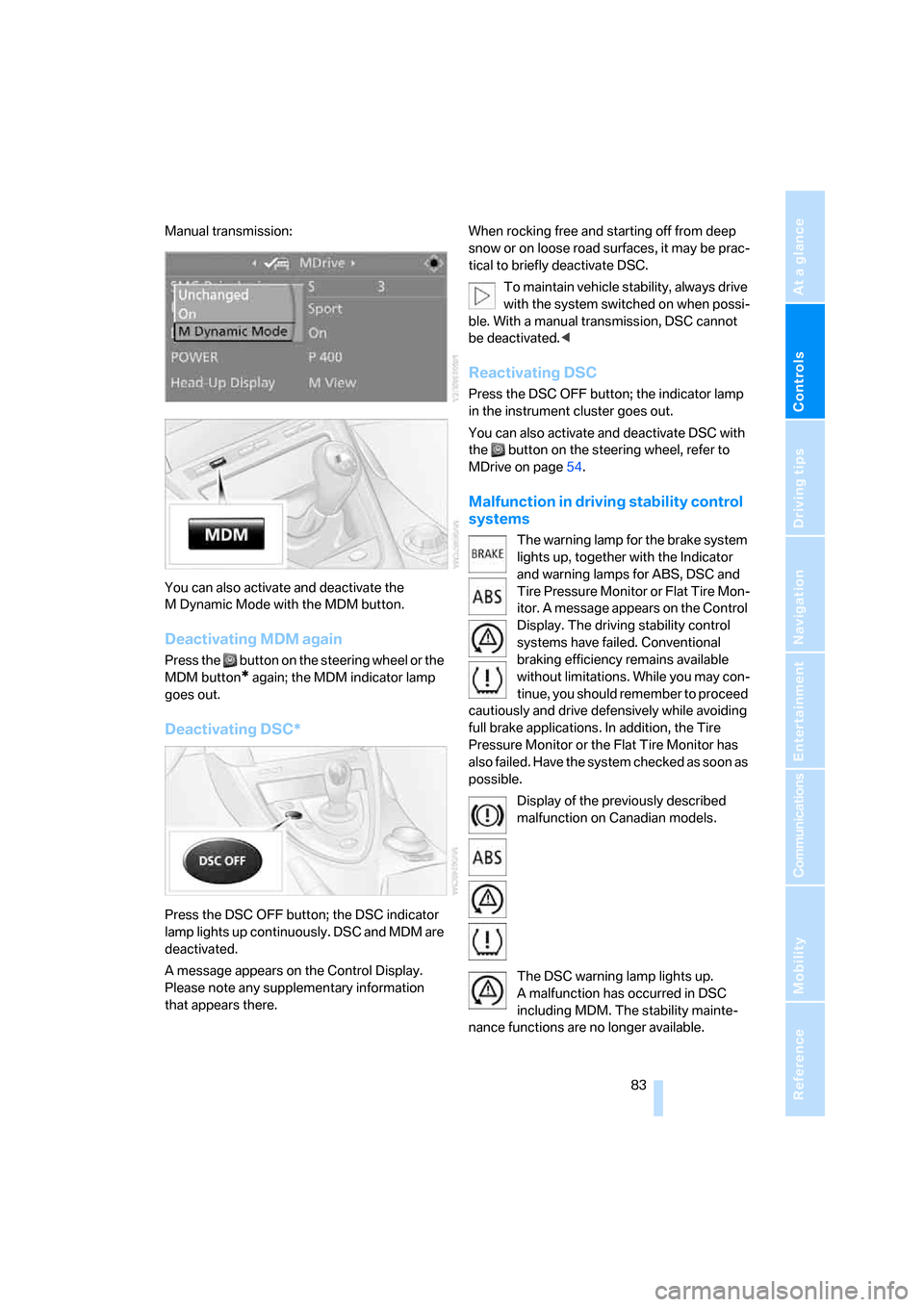
Manual transmission:
You can also activate and deactivate the
M Dynamic Mode with the MDM button.
Deactivating MDM again
Press the button on the steering wheel or the
MDM button
* again; the MDM indicator lamp
goes out.
Deactivating DSC*
Press the DSC OFF button; the DSC indicator
lamp lights up continuously. DSC and MDM are
deactivated.
A message appears on the Control Display.
Please note any supplementary information
that appears there.When rocking free and starting off from deep
snow or on loose road surfaces, it may be prac-
tical to briefly deactivate DSC.
To maintain vehicle stability, always drive
with the system switched on when possi-
ble. With a manual transmission, DSC cannot
be deactivated.<
Reactivating DSC
Press the DSC OFF button; the indicator lamp
in the instrument cluster goes out.
You can also activate and deactivate DSC with
the button on the steering wheel, refer to
MDrive on page54.
Malfunction in driving stability control
systems
The warning lamp for the brake system
lights up, together with the Indicator
and warning lamps for ABS, DSC and
Tire Pressure Monitor or Flat Tire Mon-
itor. A message appears on the Control
Display. The driving stability control
systems have failed. Conventional
braking efficiency remains available
without limitations. While you may con-
tinue, you should remember to proceed
cautiously and drive defensively while avoiding
full brake applications. In addition, the Tire
Pressure Monitor or the Flat Tire Monitor has
also failed. Have the system checked as soon as
possible.
Display of the previously described
malfunction on Canadian models.
The DSC warning lamp lights up.
A malfunction has occurred in DSC
including MDM. The stability mainte-
nance functions are no longer available.
Page 87 of 256
Controls
85Reference
At a glance
Driving tips
Communications
Navigation
Entertainment
Mobility
change. This change is detected and signaled
as a flat tire.
Functional requirement
To ensure the reliable signaling of a flat tire, the
system must be initialized at the correct tire
inflation pressure.
The initialization must be repeated after
every correction of the tire inflation pres-
sure and after every tire or wheel change.<
System limits
The Flat Tire Monitor cannot indicate
sudden severe tire damage caused by
outside factors and does not detect a natural,
even pressure drop in all four tires.<
In the following situations, the system could be
delayed or malfunction:
>System has not been initialized
>Driving on snow-covered or slippery roads
>Sporty driving style: slip in the drive wheels,
high lateral acceleration
>Driving with snow chains
*
Initializing system
The initialization finishes during driving,
which can be interrupted at any time.
When driving resumes, the initialization is auto-
matically continued.
Do not initialize the system when driving with
snow chains
*.<
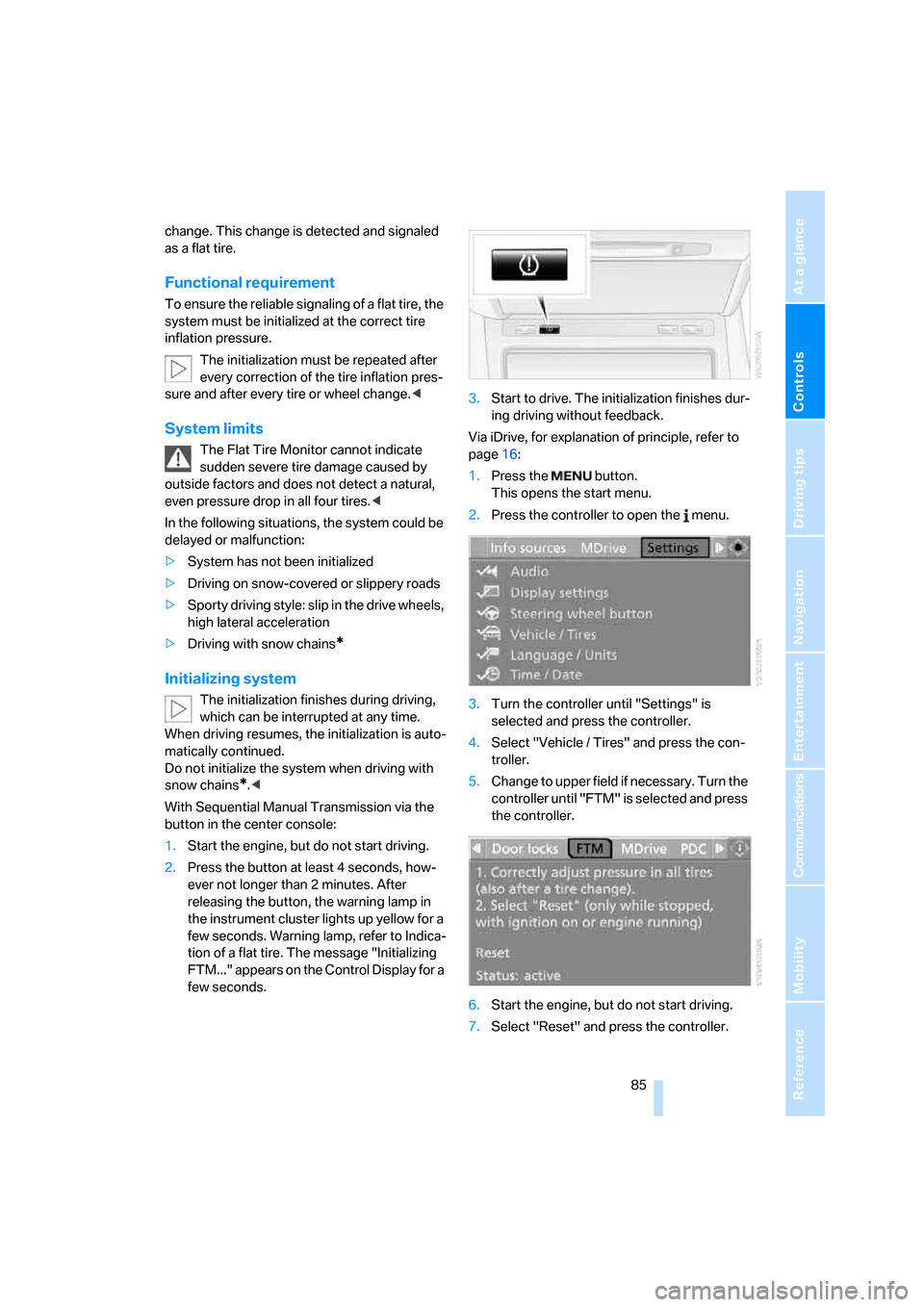
With Sequential Manual Transmission via the
button in the center console:
1.Start the engine, but do not start driving.
2.Press the button at least 4 seconds, how-
ever not longer than 2 minutes. After
releasing the button, the warning lamp in
the instrument cluster lights up yellow for a
few seconds. Warning lamp, refer to Indica-
tion of a flat tire. The message "Initializing
FTM..." appears on the Control Display for a
few seconds.3.Start to drive. The initialization finishes dur-
ing driving without feedback.
Via iDrive, for explanation of principle, refer to
page16:
1.Press the button.
This opens the start menu.
2.Press the controller to open the menu.
3.Turn the controller until "Settings" is
selected and press the controller.
4.Select "Vehicle / Tires" and press the con-
troller.
5.Change to upper field if necessary. Turn the
controller until "FTM" is selected and press
the controller.
6.Start the engine, but do not start driving.
7.Select "Reset" and press the controller.
Page 88 of 256
Technology for comfort, convenience and safety
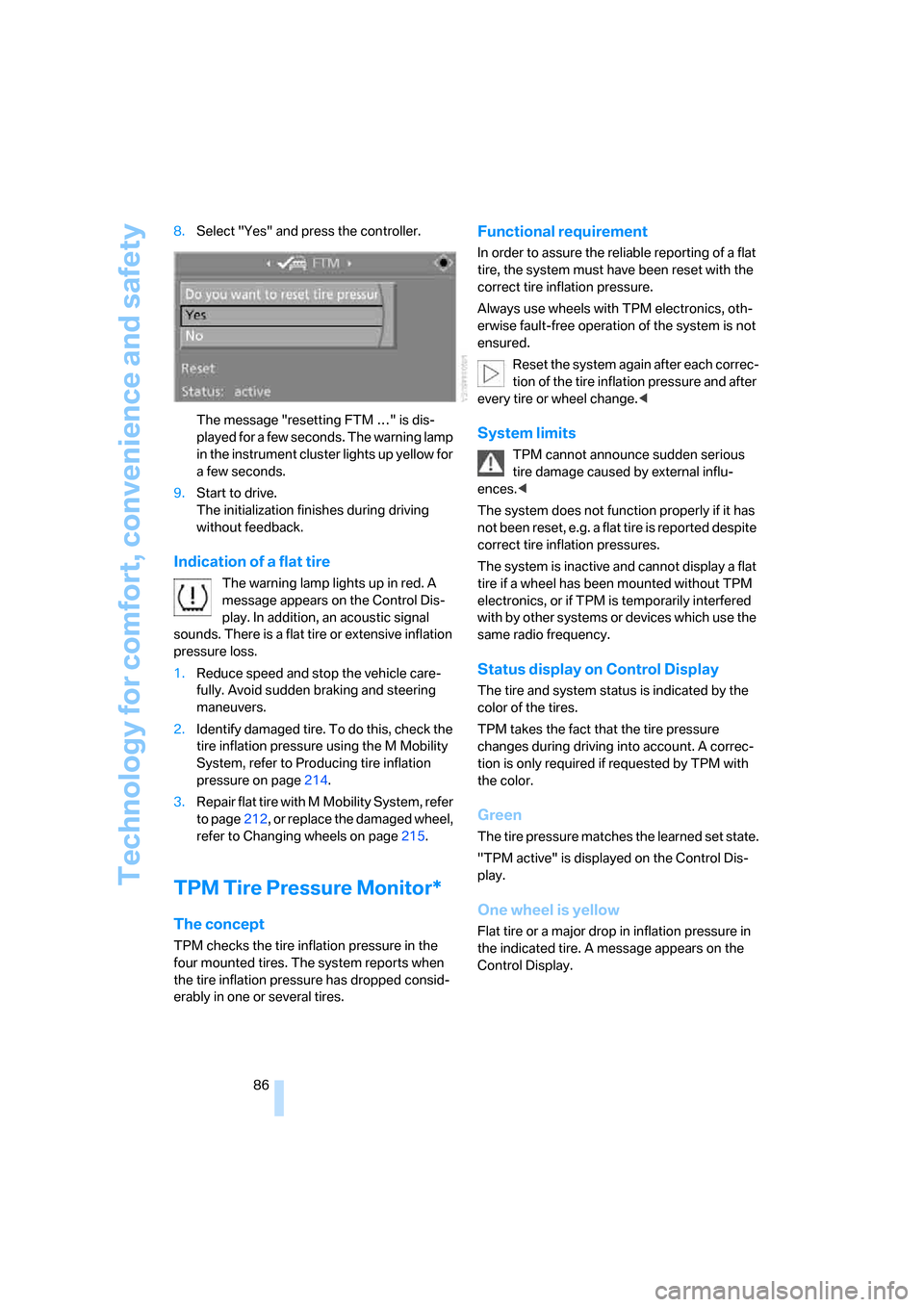
86 8.Select "Yes" and press the controller.
The message "resetting FTM …" is dis-
played for a few seconds. The warning lamp
in the instrument cluster lights up yellow for
a few seconds.
9.Start to drive.
The initialization finishes during driving
without feedback.
Indication of a flat tire
The warning lamp lights up in red. A
message appears on the Control Dis-
play. In addition, an acoustic signal
sounds. There is a flat tire or extensive inflation
pressure loss.
1.Reduce speed and stop the vehicle care-
fully. Avoid sudden braking and steering
maneuvers.
2.Identify damaged tire. To do this, check the
tire inflation pressure using the M Mobility
System, refer to Producing tire inflation
pressure on page214.
3.Repair flat tire with M Mobility System, refer
to page212, or replace the damaged wheel,
refer to Changing wheels on page215.
TPM Tire Pressure Monitor*
The concept
TPM checks the tire inflation pressure in the
four mounted tires. The system reports when
the tire inflation pressure has dropped consid-
erably in one or several tires.
Functional requirement
In order to assure the reliable reporting of a flat
tire, the system must have been reset with the
correct tire inflation pressure.
Always use wheels with TPM electronics, oth-
erwise fault-free operation of the system is not
ensured.
Reset the system again after each correc-
tion of the tire inflation pressure and after
every tire or wheel change.<
System limits
TPM cannot announce sudden serious
tire damage caused by external influ-
ences.<
The system does not function properly if it has
not been reset, e.g. a flat tire is reported despite
correct tire inflation pressures.
The system is inactive and cannot display a flat
tire if a wheel has been mounted without TPM
electronics, or if TPM is temporarily interfered
with by other systems or devices which use the
same radio frequency.
Status display on Control Display
The tire and system status is indicated by the
color of the tires.
TPM takes the fact that the tire pressure
changes during driving into account. A correc-
tion is only required if requested by TPM with
the color.
Green
The tire pressure matches the learned set state.
"TPM active" is displayed on the Control Dis-
play.
One wheel is yellow
Flat tire or a major drop in inflation pressure in
the indicated tire. A message appears on the
Control Display.
Page 205 of 256
Mobility
203Reference
At a glance
Controls
Driving tips
Communications
Navigation
Entertainment
Engine compartment
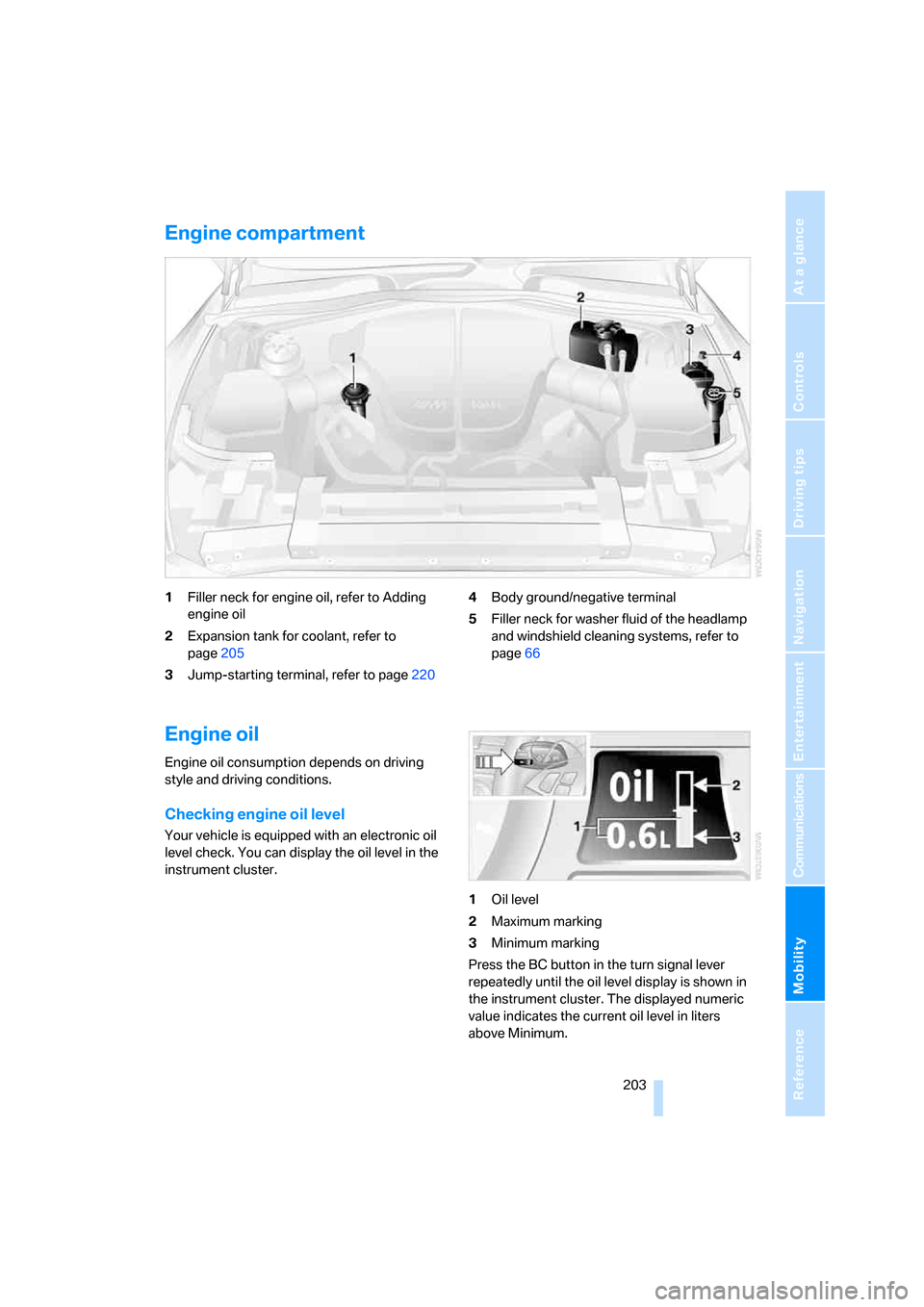
1Filler neck for engine oil, refer to Adding
engine oil
2Expansion tank for coolant, refer to
page205
3Jump-starting terminal, refer to page2204Body ground/negative terminal
5Filler neck for washer fluid of the headlamp
and windshield cleaning systems, refer to
page66
Engine oil
Engine oil consumption depends on driving
style and driving conditions.
Checking engine oil level
Your vehicle is equipped with an electronic oil
level check. You can display the oil level in the
instrument cluster.
1Oil level
2Maximum marking
3Minimum marking
Press the BC button in the turn signal lever
repeatedly until the oil level display is shown in
the instrument cluster. The displayed numeric
value indicates the current oil level in liters
above Minimum.
Page 206 of 256
Under the hood
204 After starting the engine, the last determined
value is displayed.
The oil level must be between the two marks.
Manual transmission: the fluid level will be
shown in the lower display.<
Exact measurement
The oil level is measured continuously while
driving or when stopped with the engine run-
ning.
The determination of a new value can take
30 minutes or longer.
If only dashes are shown in the display,
it was not possible to determine a new
value. This can, for example, be the case when
driving short distances or with a sporty driving
style.<
Fast measurement
In addition to the continuous measurement, you
can also quickly determine the current oil level,
e.g. after adding engine oil, however with a low
measuring accuracy.
1.With the engine at operating temperature,
i.e. after at least 6 miles/10 km of uninter-
rupted driving, park the vehicle in a horizon-
tal position.
2.Allow the engine to run at idle.
3.Press the BC button in the turn signal lever
repeatedly until the oil level display is
shown in the instrument cluster.
4.Press the BC button in the turn signal lever
for at least 2 seconds.
The oil level is determined. A clock symbol
is displayed during the measurement.
5.After approx. 1 minute the current oil level is
displayed.
If not all measuring conditions are met,
e.g. with the engine cold, "-.-" is dis-
played. The requested measurement is carried
out as soon as possible.<
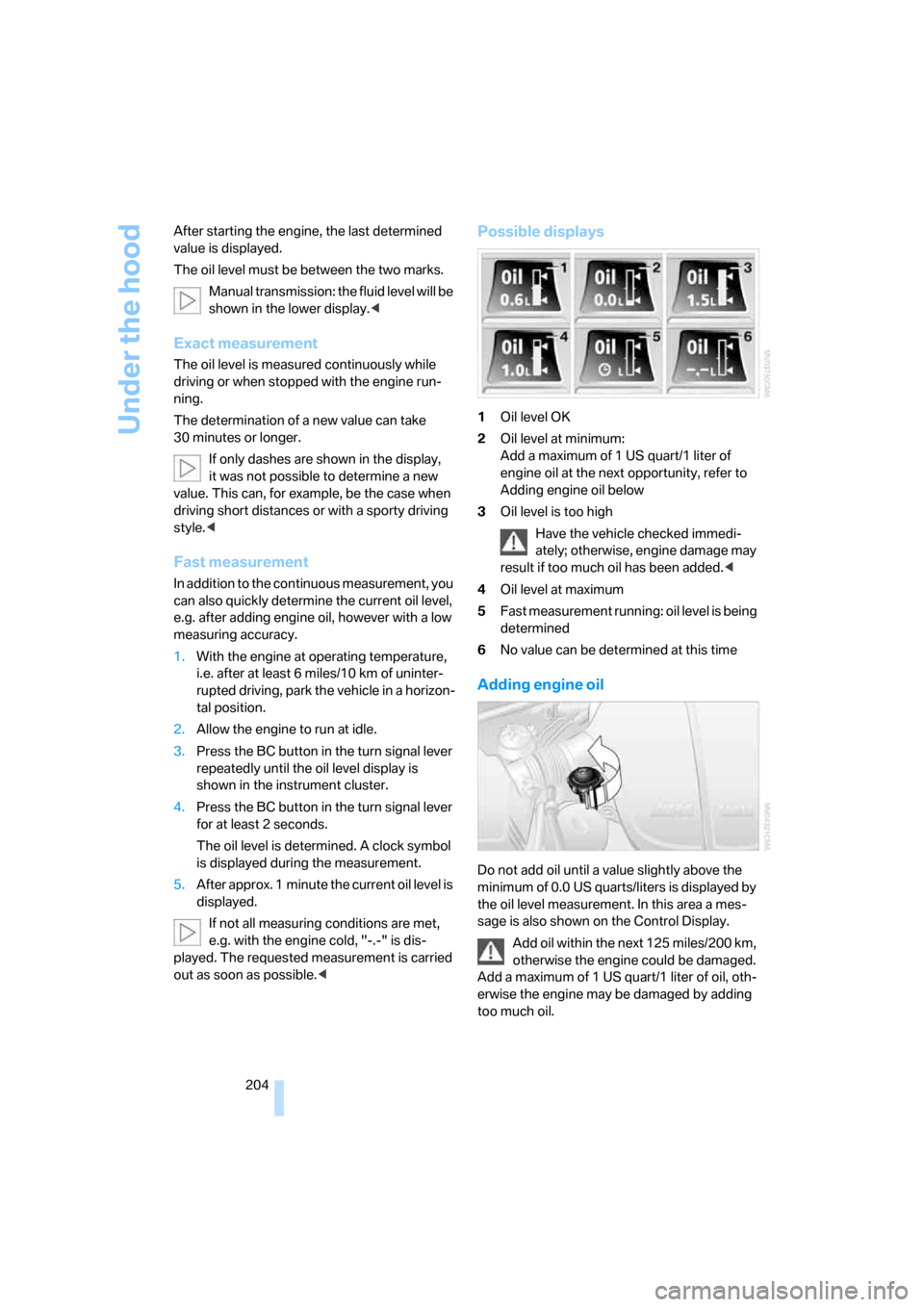
Possible displays
1Oil level OK
2Oil level at minimum:
Add a maximum of 1 US quart/1 liter of
engine oil at the next opportunity, refer to
Adding engine oil below
3Oil level is too high
Have the vehicle checked immedi-
ately; otherwise, engine damage may
result if too much oil has been added.<
4Oil level at maximum
5Fast measurement running: oil level is being
determined
6No value can be determined at this time
Adding engine oil
Do not add oil until a value slightly above the
minimum of 0.0 US quarts/liters is displayed by
the oil level measurement. In this area a mes-
sage is also shown on the Control Display.
Add oil within the next 125 miles/200 km,
otherwise the engine could be damaged.
Add a maximum of 1 US quart/1 liter of oil, oth-
erwise the engine may be damaged by adding
too much oil.
Page 240 of 256
Everything from A to Z
238
D
Dashboard, refer to
Cockpit10
Data, technical226
– capacities228
– dimensions226
– measurements226
– weights228
"Date"78
Date
– display format78
– setting78
"Date format"78
"Daytime running lamps"96
Daytime running lamps96
DBC Dynamic Brake Control,
warning lamp84
"Deactivated"49
Decommissioning the vehicle,
refer to Caring for your
vehicle brochure
Defect
– tires, refer to Flat Tire
Monitor84
– tires, refer to Tire Pressure
Monitor86
Defrosting windows101
Defrosting windows and
removing condensation101
Defrosting windshield, refer to
Defrosting windows101
Defrost position, refer to
Defrosting windows101
"Delete address book" for
navigation system133
"Delete all numbers" for
mobile phone179
"Delete data" for navigation
system133
"Delete" for mobile
phone179
Destination address
– deleting133
– entering124,127Destination for navigation
– destination list131
– entering via voice127
– entry124
– home address134
– selecting from address
book132
– selecting using
information130
– storing132
Destination guidance136
– bypassing route
sections140
– canceling voice
instructions54
– changing specified
route134
– displaying route137
– distance and arrival136
– interrupting136
– starting136
– terminating/continuing136
– voice instructions139
– volume of voice
instructions140
Destination list for
navigation131
Destinations recently driven
to131
"Details" in audio mode163
"Detour" for navigation
system143
"Dial" for mobile phone177
"Dial number"177
Digital clock69
Digital radio, refer to High
Definition Radio156
Dimensions
– Convertible227
– Coupe226
Directional indicators, refer to
Turn signals64
Direction announcements,
refer to Voice
instructions139
Direction instructions, refer to
Voice instructions139Directory, refer to Phone
book178
Directory for navigation, refer
to Address book132
"Display"78
Display, refer to iDrive
controls16
Display elements, refer to
Instrument cluster12
Displaying vehicle data191
Display lighting, refer to
Instrument lighting97
"Display off"21
Displays
– on Control Display, refer to
iDrive16
– refer to Instrument
cluster12
"Display settings"78,92
Displays on the windshield,
refer to Head-Up Display91
Disposal
– battery of remote control
with comfort access38
– coolant205
– vehicle battery217
Distance, refer to
Computer70
"Distance to dest."70
Distance to destination, refer
to Computer70
Distance warning, refer to
PDC Park Distance
Control80
Door entry lighting, refer to
Interior lamps
97
Door key, refer to Keys/
remote control28
Door lock32
"Door locks"30,72
Doors
– manual operation32
– remote control31
DOT Quality Grades198
Draft-free ventilation103
Drivelogic62
"Driver's door only"31
Page 242 of 256
Everything from A to Z
240 Exhaust system, refer to Hot
exhaust system115
Exterior mirrors52
– adjusting52
– automatic dimming
feature52
– automatic heating52
– folding in and out52
– tilting down passenger-side
mirror52
External audio device107
Eye for tow-starting and
towing, refer to Tow
fitting221
Eyes for lashing, refer to
Securing cargo118
F
"Fader", refer to Tone
control150
Fader, refer to Tone
control150
Failure messages, refer to
Check Control73
False alarm
– refer to Avoiding
unintentional alarms36
– refer to Switching off
alarm36
Fastening safety belts, refer to
Safety belts51
Fastest route for
navigation134
Fast forward
– CD changer164
– CD player164
"Fast route" for
navigation134
"Favorites", calling up with
radio155
Filler neck for washer fluid66
Filling bottle, refer to
M Mobility System212
Filter, refer to Microfilter/
activated-charcoal filter103Fine wood, refer to Caring for
your vehicle brochure
First aid, refer to First-aid
kit220
First-aid kit220
Flashing, when locking and
unlocking, refer to Setting
confirmation signals31
Flashlight, refer to
Rechargeable flashlight106
Flat tire
– Flat Tire Monitor84
– M Mobility System212
– run-flat tires87
– spare wheel215
– Tire Pressure Monitor86
– warning lamp86,87
Flat Tire Monitor84
– false alarms85
– initializing system85
– limits of system85
– snow chains201
– warning lamp86
Floor mats, refer to Caring for
your vehicle brochure
Floor mats/carpets, refer to
Caring for your vehicle
brochure
Fluid reservoir, refer to Filler
neck for washer fluid66
"FM", reception
range148,152
FM, waveband152
Folding into raised position
convertible top
compartment floor,
Convertible35
Footbrake, refer to Braking
safely116
Footwell lighting, refer to
Interior lamps97
For specified oil grades, refer
to Approved engine oils205
For your own safety6
Freeway, refer to Route
criteria134
Front airbags89Front passenger airbags
– deactivating89
– deactivating, refer to
Exception for front
passenger seat56
"FTM"85
FTM, refer to Flat Tire
Monitor84
Fuel
– average consumption70
– display69
– fuel specifications195
– high-quality brands195
– quality195
– specifications195
– tank contents, refer to
Capacities228
Fuel display, refer to Fuel
gauge69
Fuel filler door194
– releasing in the event of
electrical malfunction194
Fuel gauge69
Full mobile phone preparation
package170
Full screen display, refer to
Switching assistance
window off20
Fuses218
G
Garage-door opener, refer to
Integrated universal remote
control105
Gasoline
– refer to Average fuel
consumption70
– refer to Fuel
specifications195
– refer to Required fuel195
Gasoline display, refer to Fuel
gauge69
Gear changes62
Gear display, refer to Displays
in instrument cluster62
Gearshift lever, manual
transmission60
Page 244 of 256
Everything from A to Z
242 Indicator/warning lamps
– ABS Antilock Brake
System83
– airbags90
– brake system83
– DSC13,82
– Flat Tire Monitor86
– handbrake13,60
– MDrive13,54
– M Dynamic Mode13,82
– parking lamps/low beams13
– safety belt warning51
– TPM Tire Pressure
Monitor87
Indicator and warning lamps,
overview13
Inflation pressure, refer to Tire
inflation pressure196
Inflation pressure monitoring
– refer to Flat Tire Monitor84
– refer to Tire Pressure
Monitor86
Info menu17
Information
– on another location130
– on current position130
– on town/city of
destination130
"Information" for navigation
system130
Information menu, refer to
imenu17
"Information on
destination"131
Information service188
"Info sources"72
Initializing
– Flat Tire Monitor85
– radio, refer to Storing
stations154
– refer to Power failure217
– seat, mirror and steering
wheel memory48
– time and date76
"Input map"129
Installation location
– CD changer164
– drive for navigation DVD122Instructions for navigation
system, refer to Voice
instructions139
Instrument cluster12
Instrument illumination, refer
to Instrument lighting97
Instrument lighting97
Instrument panel, refer to
Cockpit
10
Instrument panel, refer to
Instrument cluster12
Integrated key28
Integrated universal remote
control105
Interesting destination for
navigation130
"Interim time"76
Interior lamps97
– switching on with remote
control31
Interior motion sensor36
– switching off36
Interior rearview mirror,
automatic dimming
feature52
Intermittent wiper mode65
J
Jacking points216
Joystick, refer to iDrive16
Jump starting220
K
Keyless-Go, refer to Comfort
access37
Keyless opening and closing,
refer to Comfort access37
Key Memory, refer to Personal
Profile29
"Keypad"180
Keys28
– key-related settings, refer to
Personal Profile29
– spare key28
Kick-down, refer to Drive
mode62Knee airbags89
Knock control195
L
Lamps, refer to Parking lamps/
low beams95
Lamps and bulbs209
"Language / Units"78
– for navigation
system123,139
"Languages"79
– for navigation
system123,139
Lashing eyes, refer to
Securing cargo118
Last destinations, refer to
Destination list131
"Last seat pos."49
LATCH child restraint fixing
system57
LEDs light-emitting
diodes209
Length, refer to
Dimensions226
License plate lamps, replacing
bulbs212
Light-emitting diodes
LEDs209
Lighter108
"Lighting"65,96
Lighting
– instruments97
– lamps and bulbs209
– of the vehicle, refer to
Lamps95
Light switch95
"Limit"75
Loading, refer to Cargo
loading117
Load securing equipment,
refer to Securing cargo118
"Lock after driving"33
Lock buttons in the doors,
refer to Locking33