instrument cluster BMW M6 COUPE 2010 E63 User Guide
[x] Cancel search | Manufacturer: BMW, Model Year: 2010, Model line: M6 COUPE, Model: BMW M6 COUPE 2010 E63Pages: 250, PDF Size: 8.4 MB
Page 80 of 250
Technology for comfort, convenience and safety
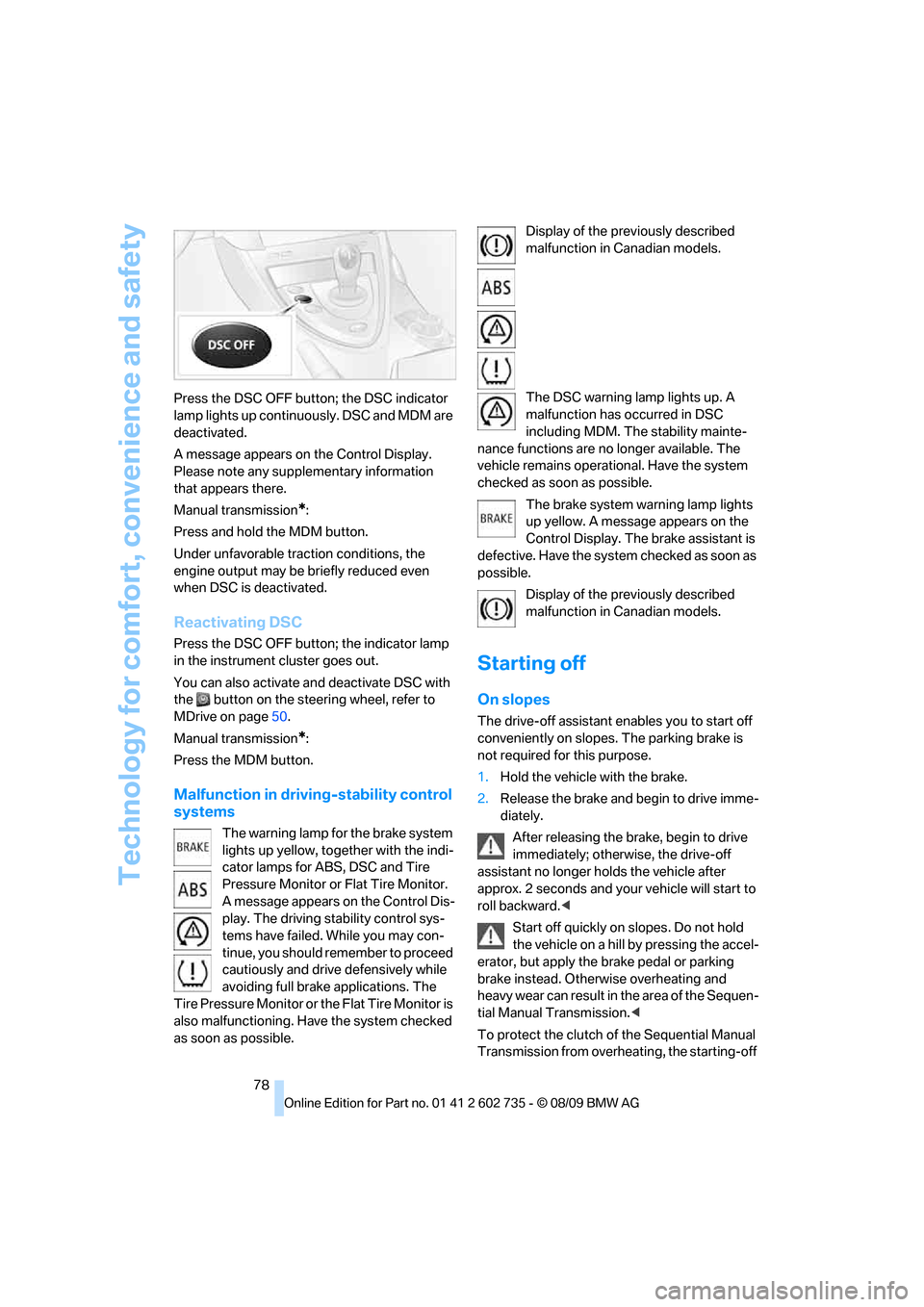
78 Press the DSC OFF button; the DSC indicator
lamp lights up continuously. DSC and MDM are
deactivated.
A message appears on the Control Display.
Please note any supplementary information
that appears there.
Manual transmission
*:
Press and hold the MDM button.
Under unfavorable traction conditions, the
engine output may be briefly reduced even
when DSC is deactivated.
Reactivating DSC
Press the DSC OFF button; the indicator lamp
in the instrument cluster goes out.
You can also activate and deactivate DSC with
the button on the steering wheel, refer to
MDrive on page50.
Manual transmission
*:
Press the MDM button.
Malfunction in driving-stability control
systems
The warning lamp for the brake system
lights up yellow, together with the indi-
cator lamps for ABS, DSC and Tire
Pressure Monitor or Flat Tire Monitor.
A message appears on the Control Dis-
play. The driving stability control sys-
tems have failed. While you may con-
tinue, you should remember to proceed
cautiously and drive defensively while
avoiding full brake applications. The
Tire Pressure Monitor or the Flat Tire Monitor is
also malfunctioning. Have the system checked
as soon as possible.Display of the previously described
malfunction in Canadian models.
The DSC warning lamp lights up. A
malfunction has occurred in DSC
including MDM. The stability mainte-
nance functions are no longer available. The
vehicle remains operational. Have the system
checked as soon as possible.
The brake system warning lamp lights
up yellow. A message appears on the
Control Display. The brake assistant is
defective. Have the system checked as soon as
possible.
Display of the previously described
malfunction in Canadian models.
Starting off
On slopes
The drive-off assistant enables you to start off
conveniently on slopes. The parking brake is
not required for this purpose.
1.Hold the vehicle with the brake.
2.Release the brake and begin to drive imme-
diately.
After releasing the brake, begin to drive
immediately; otherwise, the drive-off
assistant no longer holds the vehicle after
approx. 2 seconds and your vehicle will start to
roll backward.<
Start off quickly on slopes. Do not hold
the vehicle on a hill by pressing the accel-
erator, but apply the brake pedal or parking
brake instead. Otherwise overheating and
heavy wear can result in the area of the Sequen-
tial Manual Transmission.<
To protect the clutch of the Sequential Manual
Transmission from overheating, the starting-off
Page 82 of 250
Technology for comfort, convenience and safety
80 In the event of a pressure loss, there is a change
in the rolling circumference and therefore the
rotation speed of the corresponding wheel. The
system detects this change and reports it as a
flat tire.
Functional requirement
The system must have been initialized when the
tire inflation pressure was correct; otherwise,
reliable signaling of a flat tire is not ensured.
The initialization must be repeated after
every correction of the tire inflation pres-
sure and after every tire or wheel change.<
System limits
The Flat Tire Monitor is unable to warn
the driver of sudden, severe tire damage
caused by external factors, nor can it identify
the gradual loss of pressure that will inevitably
occur in all four tires over a lengthy period of
time.<
In the following situations, the system could be
delayed or malfunction:
>System has not been initialized
>Driving on snowy or slippery road surface
>Sporty driving style: slip in the drive wheels,
high lateral acceleration
>Driving with snow chains
*
Initializing system
The initialization finishes during driving,
which can be interrupted at any time.
When driving resumes, the initialization is con-
tinued automatically. The system is initialized
after this activation phase.
The initialization process adopts the set infla-
tion tire pressures as reference values for the
detection of a flat tire. Initialization is started by
confirming the inflation pressures.
The system is not initialized when traveling with
snow chains
*.<
With Sequential Manual Transmission via the
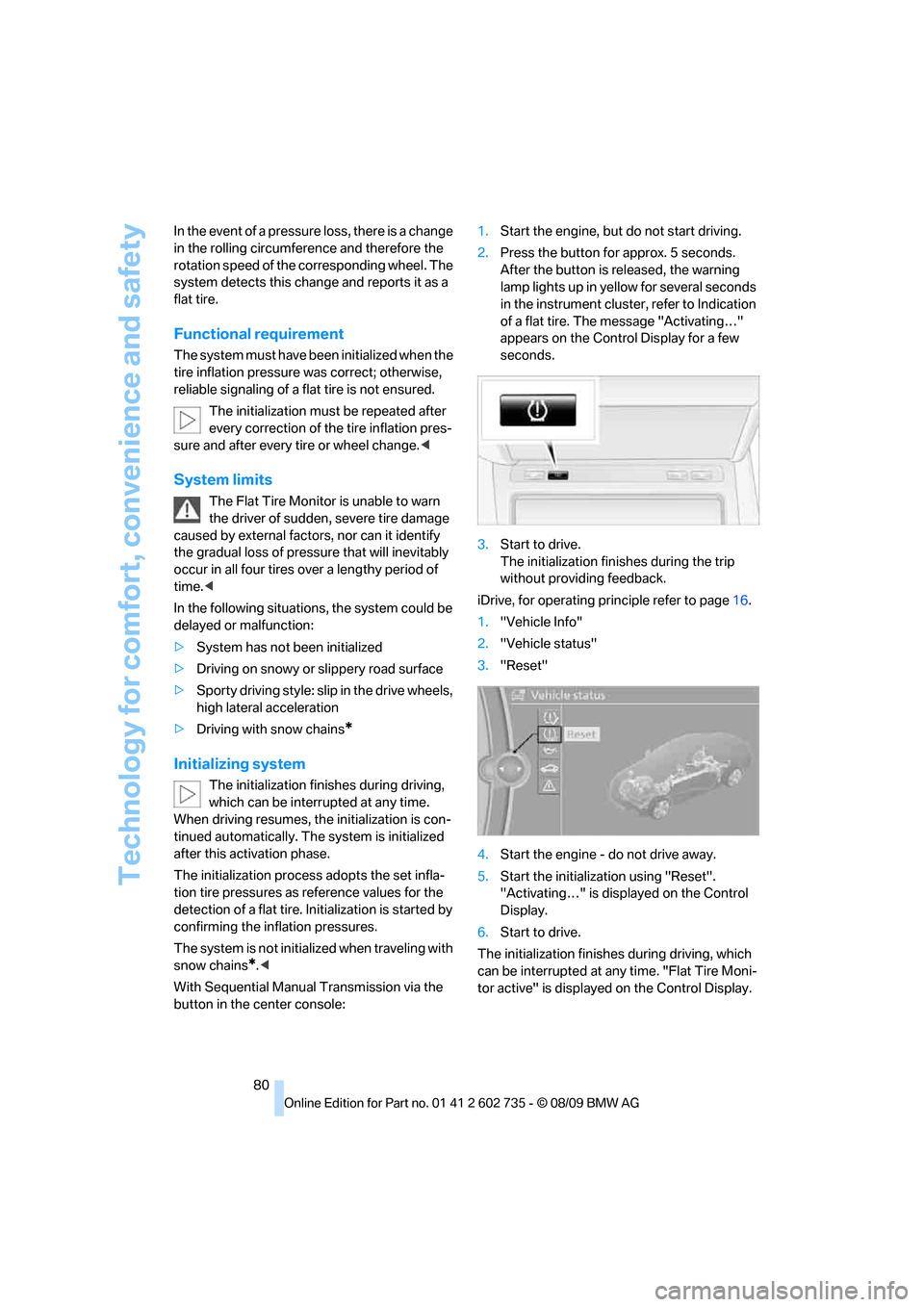
button in the center console:1.Start the engine, but do not start driving.
2.Press the button for approx. 5 seconds.
After the button is released, the warning
lamp lights up in yellow for several seconds
in the instrument cluster, refer to Indication
of a flat tire. The message "Activating…"
appears on the Control Display for a few
seconds.
3.Start to drive.
The initialization finishes during the trip
without providing feedback.
iDrive, for operating principle refer to page16.
1."Vehicle Info"
2."Vehicle status"
3."Reset"
4.Start the engine - do not drive away.
5.Start the initialization using "Reset".
"Activating…" is displayed on the Control
Display.
6.Start to drive.
The initialization finishes during driving, which
can be interrupted at any time. "Flat Tire Moni-
tor active" is displayed on the Control Display.
Page 93 of 250
Controls
91Reference
At a glance
Driving tips
Communications
Navigation
Entertainment
Mobility
High beams/
roadside parking lamps
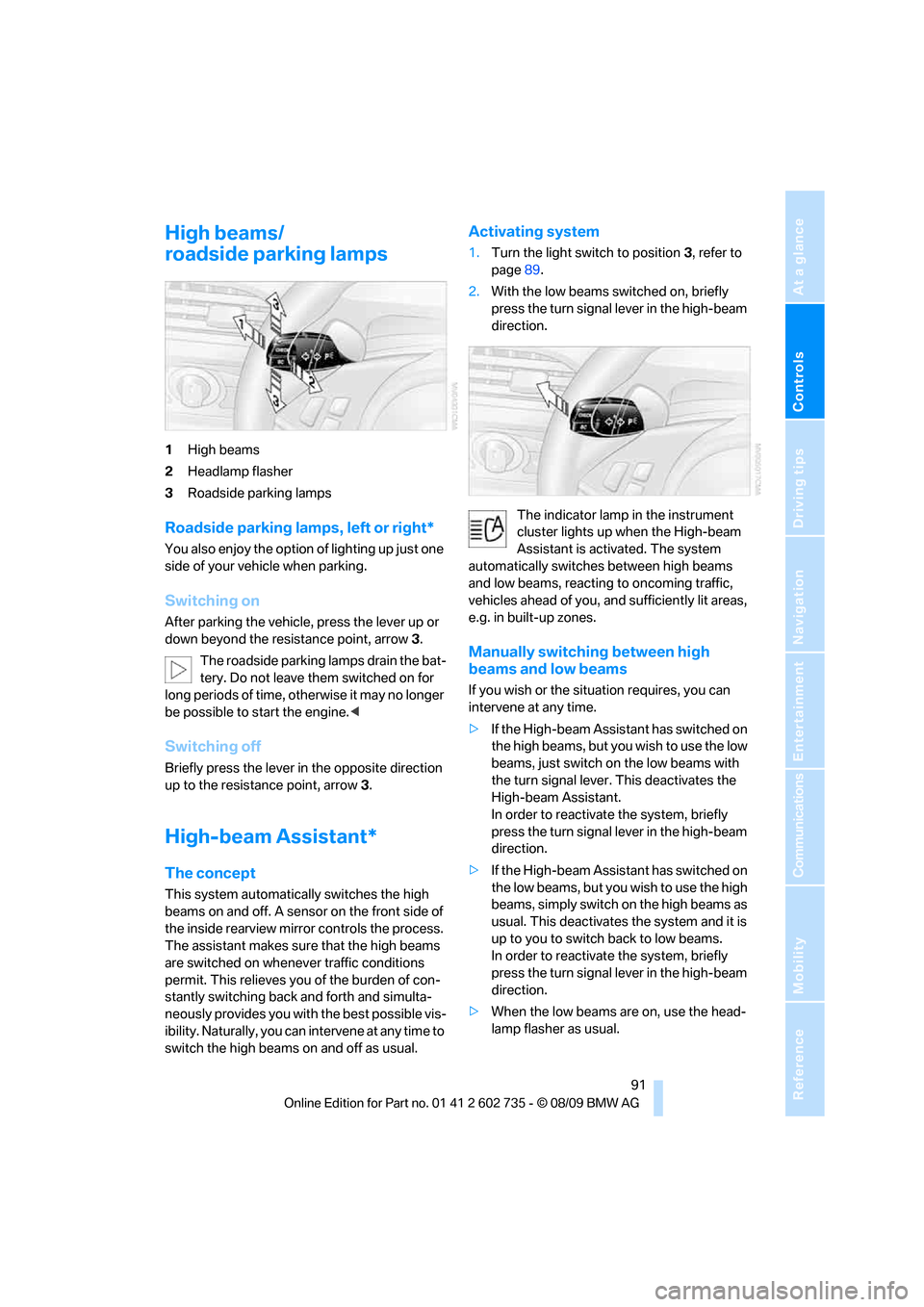
1High beams
2Headlamp flasher
3Roadside parking lamps
Roadside parking lamps, left or right*
You also enjoy the option of lighting up just one
side of your vehicle when parking.
Switching on
After parking the vehicle, press the lever up or
down beyond the resistance point, arrow 3.
The roadside parking lamps drain the bat-
tery. Do not leave them switched on for
long periods of time, otherwise it may no longer
be possible to start the engine.<
Switching off
Briefly press the lever in the opposite direction
up to the resistance point, arrow3.
High-beam Assistant*
The concept
This system automatically switches the high
beams on and off. A sensor on the front side of
the inside rearview mirror controls the process.
The assistant makes sure that the high beams
are switched on whenever traffic conditions
permit. This relieves you of the burden of con-
stantly switching back and forth and simulta-
neously provides you with the best possible vis-
ibility. Naturally, you can intervene at any time to
switch the high beams on and off as usual.
Activating system
1.Turn the light switch to position3, refer to
page89.
2.With the low beams switched on, briefly
press the turn signal lever in the high-beam
direction.
The indicator lamp in the instrument
cluster lights up when the High-beam
Assistant is activated. The system
automatically switches between high beams
and low beams, reacting to oncoming traffic,
vehicles ahead of you, and sufficiently lit areas,
e.g. in built-up zones.
Manually switching between high
beams and low beams
If you wish or the situation requires, you can
intervene at any time.
>If the High-beam Assistant has switched on
the high beams, but you wish to use the low
beams, just switch on the low beams with
the turn signal lever. This deactivates the
High-beam Assistant.
In order to reactivate the system, briefly
press the turn signal lever in the high-beam
direction.
>If the High-beam Assistant has switched on
the low beams, but you wish to use the high
beams, simply switch on the high beams as
usual. This deactivates the system and it is
up to you to switch back to low beams.
In order to reactivate the system, briefly
press the turn signal lever in the high-beam
direction.
>When the low beams are on, use the head-
lamp flasher as usual.
Page 195 of 250
Mobility
193Reference
At a glance
Controls
Driving tips
Communications
Navigation
Entertainment
Engine compartment
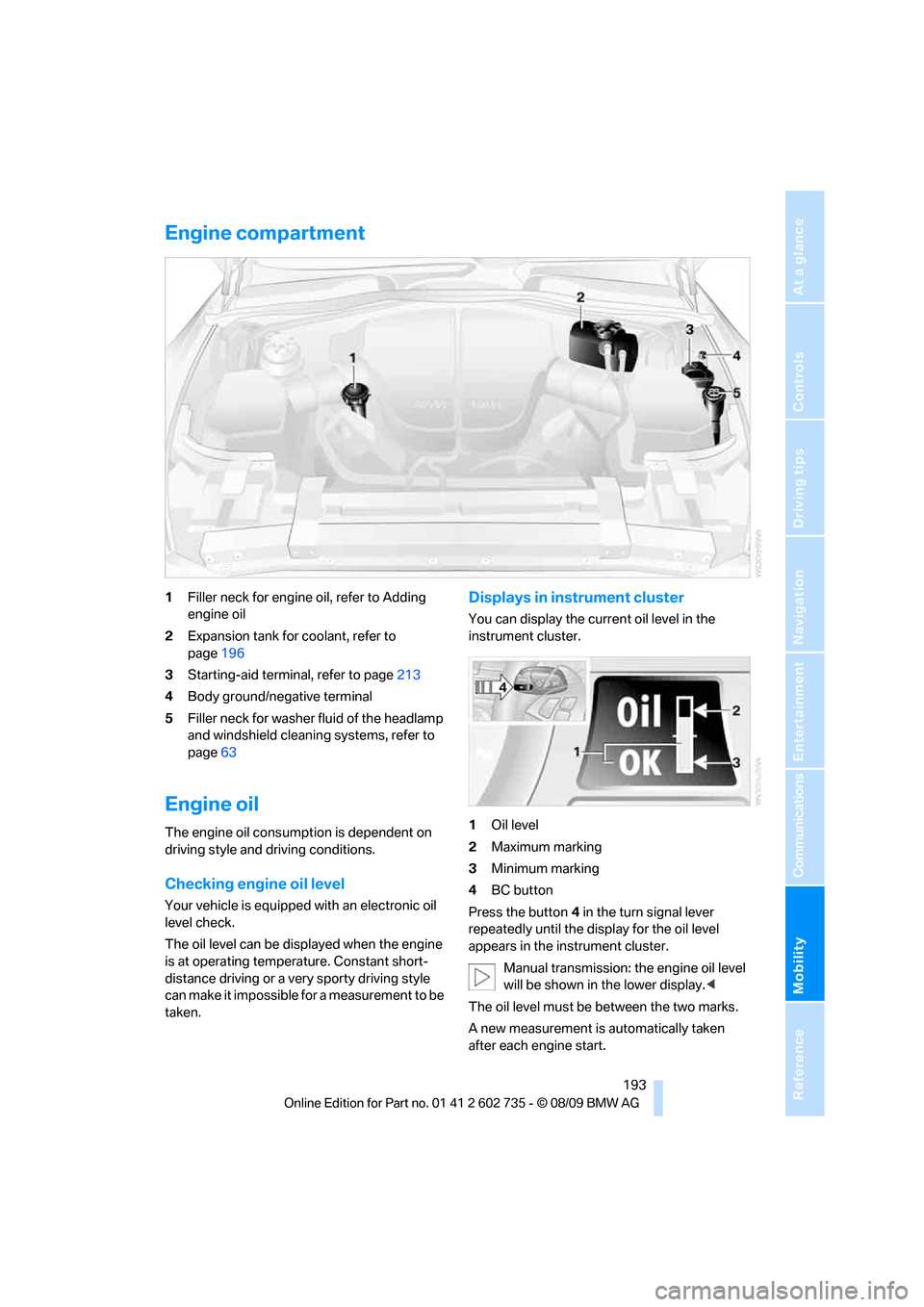
1Filler neck for engine oil, refer to Adding
engine oil
2Expansion tank for coolant, refer to
page196
3Starting-aid terminal, refer to page213
4Body ground/negative terminal
5Filler neck for washer fluid of the headlamp
and windshield cleaning systems, refer to
page63
Engine oil
The engine oil consumption is dependent on
driving style and driving conditions.
Checking engine oil level
Your vehicle is equipped with an electronic oil
level check.
The oil level can be displayed when the engine
is at operating temperature. Constant short-
distance driving or a very sporty driving style
can make it impossible for a measurement to be
taken.
Displays in instrument cluster
You can display the current oil level in the
instrument cluster.
1Oil level
2Maximum marking
3Minimum marking
4BC button
Press the button4 in the turn signal lever
repeatedly until the display for the oil level
appears in the instrument cluster.
Manual transmission: the engine oil level
will be shown in the lower display.<
The oil level must be between the two marks.
A new measurement is automatically taken
after each engine start.
Page 196 of 250
Under the hood
194
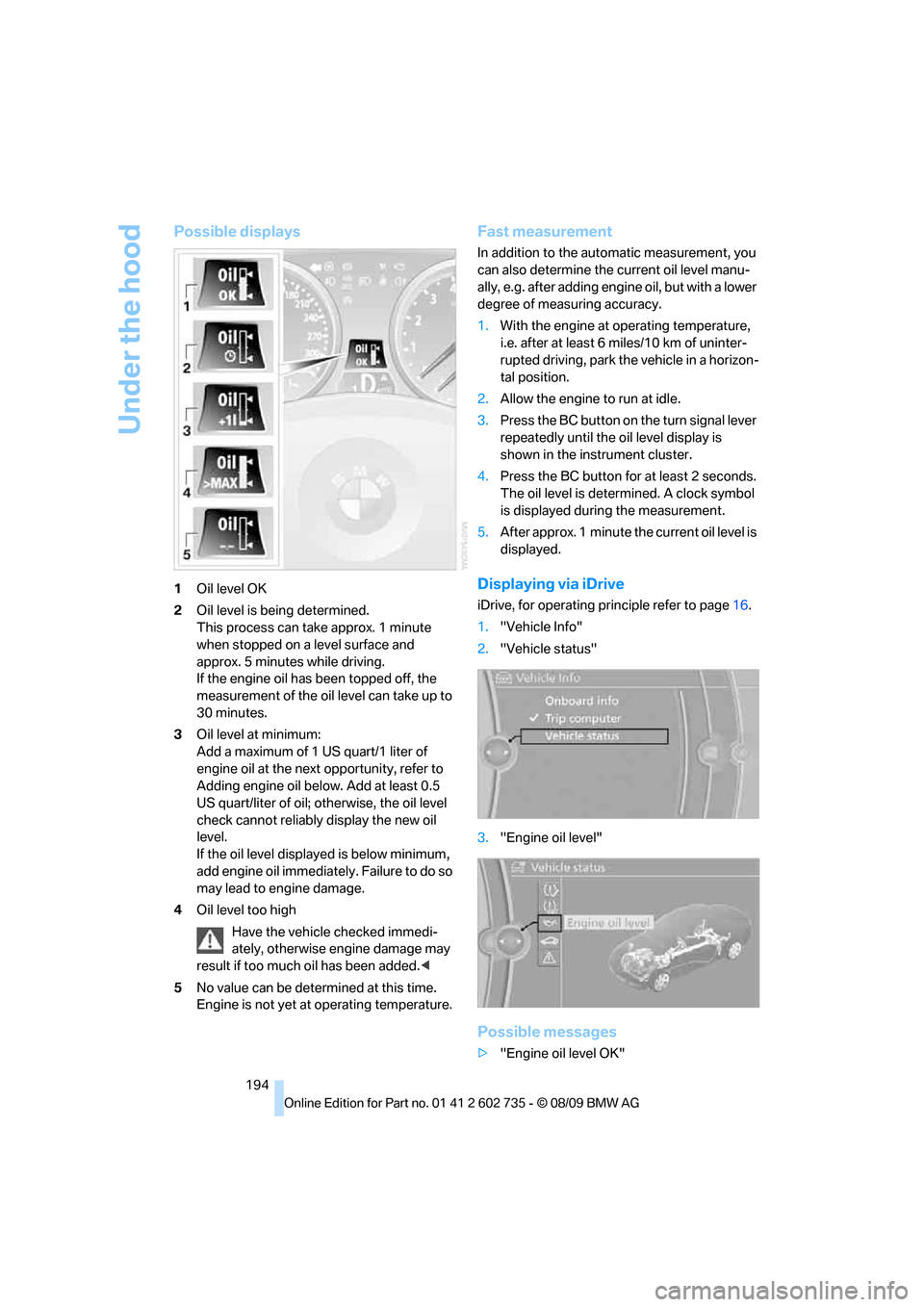
Possible displays
1Oil level OK
2Oil level is being determined.
This process can take approx. 1 minute
when stopped on a level surface and
approx. 5 minutes while driving.
If the engine oil has been topped off, the
measurement of the oil level can take up to
30 minutes.
3Oil level at minimum:
Add a maximum of 1 US quart/1 liter of
engine oil at the next opportunity, refer to
Adding engine oil below. Add at least 0.5
US quart/liter of oil; otherwise, the oil level
check cannot reliably display the new oil
level.
If the oil level displayed is below minimum,
add engine oil immediately. Failure to do so
may lead to engine damage.
4Oil level too high
Have the vehicle checked immedi-
ately, otherwise engine damage may
result if too much oil has been added.<
5No value can be determined at this time.
Engine is not yet at operating temperature.
Fast measurement
In addition to the automatic measurement, you
can also determine the current oil level manu-
ally, e.g. after adding engine oil, but with a lower
degree of measuring accuracy.
1.With the engine at operating temperature,
i.e. after at least 6 miles/10 km of uninter-
rupted driving, park the vehicle in a horizon-
tal position.
2.Allow the engine to run at idle.
3.Press the BC button on the turn signal lever
repeatedly until the oil level display is
shown in the instrument cluster.
4.Press the BC button for at least 2 seconds.
The oil level is determined. A clock symbol
is displayed during the measurement.
5.After approx. 1 minute the current oil level is
displayed.
Displaying via iDrive
iDrive, for operating principle refer to page16.
1."Vehicle Info"
2."Vehicle status"
3."Engine oil level"
Possible messages
>"Engine oil level OK"
Page 235 of 250
Reference 233
At a glance
Controls
Driving tips
Communications
Navigation
Entertainment
Mobility
Connecting car vacuum
cleaner, refer to Connecting
electrical devices104
Consumption display, refer to
Average fuel
consumption67
Consumption statistics, refer
to Average fuel
consumption67
Contacts
– creating174
Control Center, refer to
iDrive16
Control Display, refer to
iDrive16
– setting brightness74
– switching off/on19
Controller, refer to iDrive16
Controls, refer to Cockpit10
Convenient closing
– windows, with Comfort
Access with Coupe35
– with Comfort Access35
Convenient opening and
closing
– convertible top28,30
– windows28,30
Convertible
– convertible program for
automatic climate control95
– opening and closing
windows36
– rollover protection
system85
– top38
– wind deflector41
Convertible top
– closing manually39
– convenient opening and
closing30
– emergency closing39
– opening and closing38
Convertible top care200
Coolant196
– checking level196
– temperature65
Cooling, maximum96
Cooling fluid, refer to
Coolant196Cooling function, automatic
climate control96
Cooling system, refer to
Coolant196
Copyright2
Cornering Brake Control
CBC76
Country codes DVD146
Country of destination for
navigation117
Courtesy lamps, refer to
Interior lamps93
Cradle for telephone or mobile
phone102
Cruise control
63
Cruising range67
Cupholders15,103
Curb weight, refer to
Weights223
Current playback
– external devices158
– of music collection153
Customer Relations179
Cylinders, refer to Engine
data220
D
Dashboard, refer to
Cockpit10
Data, technical220
– dimensions221
– engine220
– weights223
Data transfer180
Date
– date format70
– setting70
Daytime running lamps90
– replacing bulbs204
Defect
– door lock30
– luggage compartment lid32
– tires, refer to Flat Tire
Monitor79
– tires, refer to Tire Pressure
Monitor81
Defrosting windows96Defrosting windows and
removing condensation96
Defrosting windshield, refer to
Defrosting windows96
Defrost position, refer to
Defrosting windows96
Destination address
– entering117,123
Destination entry via BMW
Assist121
Destination for navigation
– entering via map122
– entering via voice123
– entry117
Destination guidance126
– bypassing route
sections127
– changing specified
route126
– continuing126
– starting126
– voice instructions127
– volume of voice
instructions128
Detour, selecting131
Digital clock66
Digital radio, refer to HD
Radio140
Dimensions
– Convertible222
– Coupe221
Directional indicators, refer to
Turn signals61
Direction announcements,
refer to Voice
instructions127
Direction instructions, refer to
Voice instructions127
Directory for navigation, refer
to Address book119
Displacement, refer to Engine
data220
Display, refer to iDrive
controls16
Display elements, refer to
Instrument cluster12
Display lighting, refer to
Instrument lighting93
Page 236 of 250
Everything from A to Z
234 Displays
– on Control Display, refer to
iDrive16
– refer to Instrument
cluster12
Displays on the windshield,
refer to Head-up Display86
Disposal
– battery of remote control
with Comfort Access36
– coolant196
– vehicle battery210
Distance, refer to
Computer67
Distance to destination, refer
to Computer67
Distance warning, refer to
PDC Park Distance
Control75
Door entry lighting, refer to
Interior lamps93
Door key, refer to Keys/
remote control26
Door lock29
Doors
– manual operation30
– remote control28
DOT Quality Grades188
Draft-free ventilation97
Drinks holder, refer to
Cupholders103
Drivelogic50,59
Drive-off assistant, refer to
Starting off on uphill
slopes78
Driving lamps, refer to Parking
lamps/low beams89
Driving programs, refer to
Drivelogic59
Driving stability control
systems76
Driving through water109
Driving tips, refer to General
driving notes108
Dry air, refer to Cooling
function96
Drying the air, refer to Cooling
function96
DSC51DSC Dynamic Stability
Control76
– indicator lamp13,76
– malfunction78
DTC Dynamic Traction
Control
– indicator lamp13
DVD
– country codes146
– settings147
– video playback146
DVD menu147
DVD player, refer to CD
player
144
DVD video146
Dynamic destination
guidance127
Dynamic Stability Control
DSC76
– M Dynamic Mode MDM76
E
Easy entry, refer to Entering
rear47
Easy entry/exit50
EDC51
EDC Electronic Damping
Control79
Eject button, refer to Buttons
in area of the CD/DVD
player136
Electrical malfunction
– convertible top39
– door lock30
– driver's door30
– fuel filler flap184
– luggage compartment lid32
– storage compartment, hotel
function31
Electric convertible top38
Electric steering wheel
adjustment50
Electronic brake-force
distribution76Electronic Damping Control
EDC79
– Comfort program79
– Normal program79
– Sport program79
Emergency operation, refer to
Manual operation
– convertible top39
– door lock30
– driver's door30
– fuel filler flap184
– hotel function31
– luggage compartment lid32
Emergency release for
luggage compartment lid in
cargo area32
Emergency request212
Emergency services, refer to
Roadside Assistance213
Engine
– breaking-in108
– data220
– M Engine Dynamic
Control60
– overheated, refer to Coolant
temperature65
– speed220
– starting56
– starting, Comfort Access34
– switching off56
Engine compartment193
Engine coolant196
Engine oil
– adding195
– additives, refer to Approved
engine oils195
– approved oils195
– checking oil level193
– fast measurement
194
– interval between changes,
refer to Service
requirements68
– oil change195
– oil grades, refer to Approved
engine oils195
– possible displays194
– recommended oils195
– temperature66
– temperature gauge66
Page 237 of 250
Reference 235
At a glance
Controls
Driving tips
Communications
Navigation
Entertainment
Mobility
Engine output, refer to Engine
data220
Engine overheating, refer to
Coolant temperature65
Engine speed, refer to Engine
data220
Engine starting, refer to
Starting engine56
Entering destination via town/
city name117
Entering rear47
Entering zip code for
navigation118
Entertainment sound output
on/off136
Entry map for destination122
Equalizer, refer to Tone
control137
ESP Electronic Stability
Program, refer to DSC
Dynamic Stability
Control76
Event Data Recorders198
Exhaust system, refer to Hot
exhaust system109
Exterior mirrors49
– adjusting49
– automatic dimming
feature50
– automatic heating49
– folding in and out49
– tilting down passenger-side
exterior mirror49
External audio device102
External devices
– random sequence158
Eye for tow-starting and
towing, refer to Tow
fitting214
F
Failure messages, refer to
Check Control70
False alarm
– refer to Avoiding
unintentional alarms34
– refer to Switching off
alarm33Fastening safety belts, refer to
Safety belts48
Fastest route for
navigation126
Fast forward
– CD changer146
– CD player146
Filler neck for washer fluid63
Filling bottle, refer to
M Mobility System205
Filter, refer to Microfilter/
activated-charcoal filter98
First aid, refer to First aid
kit213
First aid kit213
Flashing
– during locking/unlocking,
refer to Setting confirmation
signals29
– triple turn signal
activation61
Flat tire
– Flat Tire Monitor79
– M Mobility System205
– run-flat tires82
– spare wheel208
– Tire Pressure Monitor81
– TPM Tire Pressure
Monitor81
– warning lamp81,82
Flat Tire Monitor79
– false alarms80
– initializing system80
– snow chains191
– system limits80
– warning lamp81
Fluid reservoir, refer to Filler
neck for washer fluid63
FM, waveband139
Folding into raised position
convertible top
compartment floor,
Convertible33
Footwell lamps, refer to
Interior lamps93
For your own safety5
Free memory capacity, music
collection154
Front airbags83Front passenger airbags
– deactivating84
FTM, refer to Flat Tire
Monitor79
Fuel
– average consumption67
– display66
– fuel specifications
185
– high-quality brands185
– quality185
– specifications185
– tank contents, refer to
Capacities223
Fuel clock, refer to Fuel
gauge66
Fuel display, refer to Fuel
gauge66
Fuel filler flap184
– releasing in the event of
electrical malfunction184
Fuses210
G
Garage door opener, refer to
Integrated universal remote
control100
Gasoline
– refer to Average fuel
consumption67
– refer to Fuel
specifications185
– refer to Required fuel185
Gasoline display, refer to Fuel
gauge66
Gas station
recommendations127
Gear changes59
Gear display, refer to Displays
in instrument cluster59
Gearshift lever
– manual transmission57
General driving notes108
Glass sunroof, electric with tilt
function
– convenient opening and
closing with Comfort
Access35
Glove compartment101
Page 239 of 250
Reference 237
At a glance
Controls
Driving tips
Communications
Navigation
Entertainment
Mobility
Inflation pressure monitoring,
refer to Tire Pressure
Monitor81
Initializing
– Flat Tire Monitor80
– radio, refer to Storing
stations140
– refer to Power failure210
– refer to Setting time and
date70
– seat, mirror and steering
wheel memory45
Instructions for navigation
system, refer to Voice
instructions127
Instrument cluster12
Instrument illumination, refer
to Instrument lighting93
Instrument lighting93
Instrument panel, refer to
Cockpit10
Instrument panel, refer to
Instrument cluster12
Integrated key26
Integrated universal remote
control100
Interactive map122
Interior lamps93
– switching on with remote
control28
Interior motion sensor34
– switching off34
Interior rearview mirror,
automatic dimming
feature50
Intermittent mode of the
wipers62
Intersection, entering for
navigation118
iPod, connecting, refer to
AUX-IN port156
iPod, connecting, refer to USB
audio interface156
J
Jacking points208
Joystick, refer to iDrive16Jumpering, refer to Jump
starting213
Jump starting213
K
Keyless-Go, refer to Comfort
Access34
Keyless opening and closing,
refer to Comfort Access34
Key Memory, refer to Personal
Profile26
Keys26
– key-related settings, refer to
Personal Profile26
– spare key26
Kickdown, refer to Drive
mode59
Knee airbags83
Knock control185
L
Lamps
– refer to High-beam
Assistant91
– refer to Parking lamps/low
beams89
Lamps and bulbs203
Lashing eyes, refer to
Securing cargo111
Last destinations120
LATCH child restraint fixing
system53
Leather care201
LEDs light-emitting
diodes203
Length, refer to
Dimensions221
License plate lamp, replacing
bulbs205
Light-emitting diodes
LEDs203
Lighter104
Lighting
– instruments93
– lamps and bulbs203
– of the vehicle, refer to
Lamps89Light switch89
Loading
– securing cargo111
– stowing cargo111
– vehicle110
Loading, refer to Cargo
loading110
Load securing equipment,
refer to Securing cargo111
Lock buttons in the doors,
refer to Locking31
Locking28
– confirmation signals29
– from inside31
– from outside28
– without key, refer to Comfort
Access34
Locking and unlocking doors
– confirmation signals29
– from inside30
– from outside28
Low beams89
– automatic89
– indicator lamp13
– replacing bulbs204
Lower back support, refer to
Lumbar support44
Lug bolts208
– tightening torque, refer to
After mounting209
– wrench208
Luggage compartment
– hotel function31
– increasing capacity,
Convertible33
Luggage compartment lid31
– emergency operation32
– emergency release32
– opening from inside31
– opening from outside32
– opening with remote
control29,32
– unlocking manually32
Luggage compartment lid/
tailgate
– Comfort Access35
Lumbar support44