mirror BMW M6 COUPE 2010 E63 User Guide
[x] Cancel search | Manufacturer: BMW, Model Year: 2010, Model line: M6 COUPE, Model: BMW M6 COUPE 2010 E63Pages: 250, PDF Size: 8.4 MB
Page 94 of 250
Lamps
92
System limits
The High-beam Assistant is designed to
maximize the amount of time that high
beams can be safely used and to quickly switch
back to low beams when traffic approaches.
The system cannot completely replace driver
intervention when unusual conditions are
encountered. For this reason, switch to low
beams when circumstances so dictate. Failure
to do so can pose a safety risk.<
Below are a few examples of situations in which
the system may not react or may only function
to a limited degree, requiring personal interven-
tion:
>in extremely unfavorable weather condi-
tions such as fog or heavy precipitation
>in sensing road users with poor inherent
illumination such as pedestrians, cyclists,
equestrians, horse-drawn vehicles, railroad
or shipping traffic close to the road, and at
deer crossings
>in tight curves, on steep crests or dips, with
cross-traffic, or with partially hidden
oncoming traffic on divided highways
>in poorly illuminated areas and in the pres-
ence of highly reflective signs
>in the low speed range
>when the windshield is fogged up, dirty or
covered with stickers, decals etc. in the area
of the inside rearview mirror
>when the sensor is dirty. Clean the sensor
on the front side of the inside rearview mir-
ror with a cloth slightly moistened with glass
cleaner
Moreover, no system can operate without limi-
tations. High-beam Assistant operation is sub-
ject to conditions that may reduce the system's
ability to recognize the difference between
actual vehicle head lamps or tail lamps and, for
example, highly reflective signs, markers, and
streetlights. To be on the safe side, the system
may periodically interpret these situations as
conditions that require low beams. Below are
some of the situations in which premature
switching to low beams can occur:>approaching large and/or highly reflective
signs
>approaching certain lights, such as drive-
way lighting and porch lights
>approaching certain traffic signals
>approaching large reflective markers
In these situations, the system may interpret
the above conditions as a vehicle ahead requir-
ing a switch to low beams. When the conditions
return to normal, the system will reactivate the
high beams.
The High-beam Assistant cannot replace the
driver's responsibility for complying with state
laws on high-beam switching or for adapting to
visibility and traffic conditions.
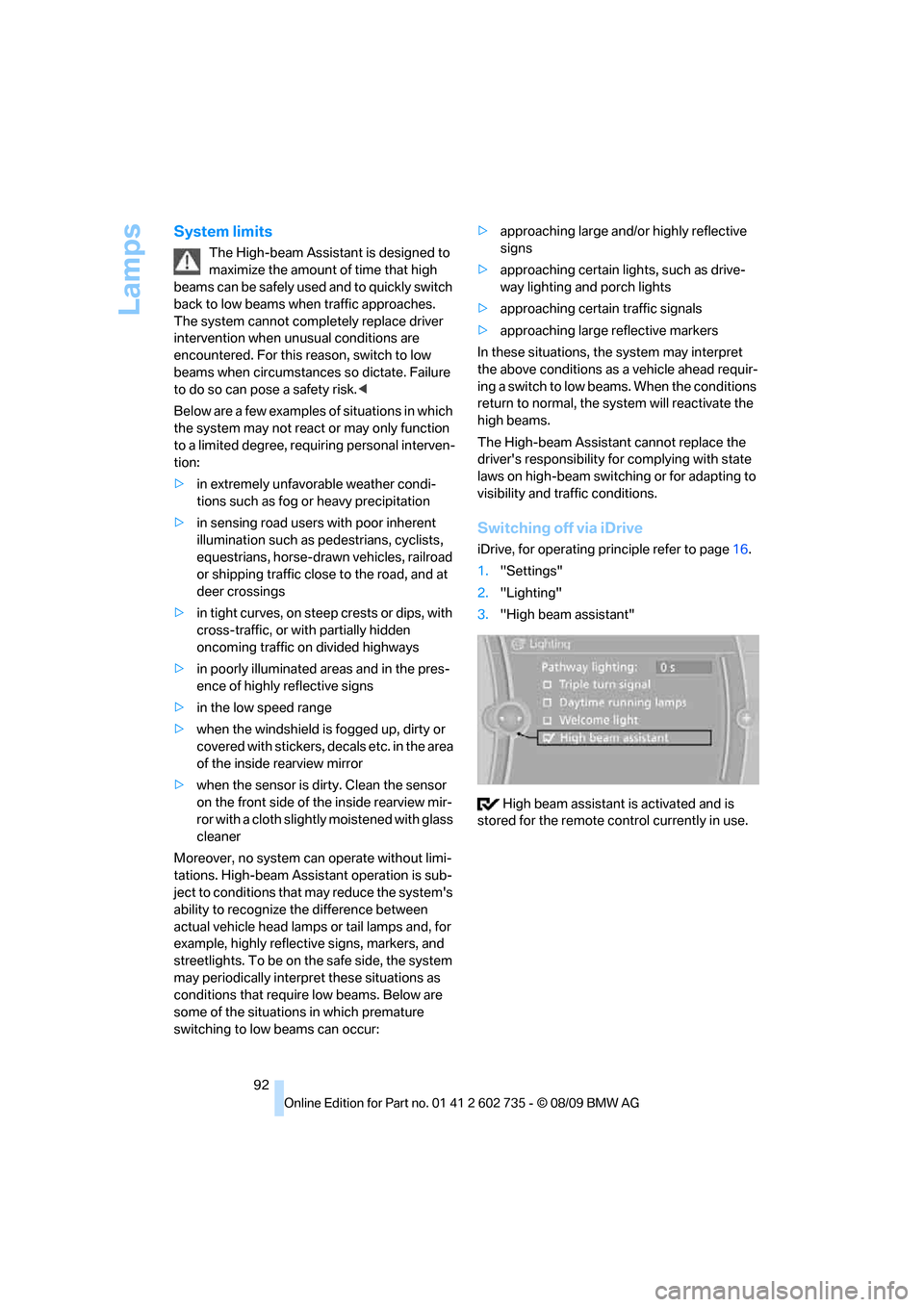
Switching off via iDrive
iDrive, for operating principle refer to page16.
1."Settings"
2."Lighting"
3."High beam assistant"
High beam assistant is activated and is
stored for the remote control currently in use.
Page 95 of 250
Controls
93Reference
At a glance
Driving tips
Communications
Navigation
Entertainment
Mobility
Instrument lighting
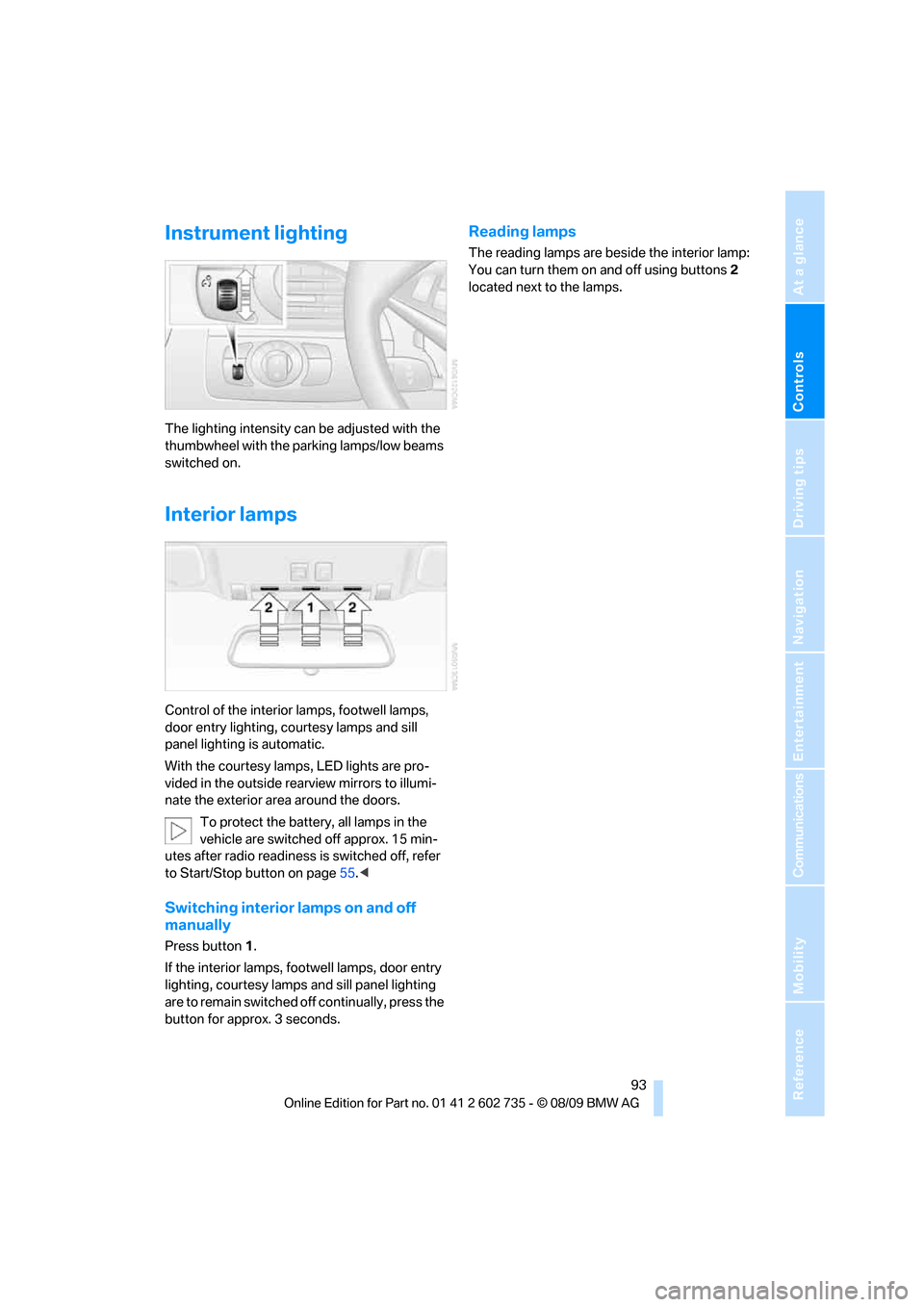
The lighting intensity can be adjusted with the
thumbwheel with the parking lamps/low beams
switched on.
Interior lamps
Control of the interior lamps, footwell lamps,
door entry lighting, courtesy lamps
and sill
panel lighting
is automatic.
With the courtesy lamps,
LED lights are pro-
vided in the outside rearview mirrors to illumi-
nate the exterior area around the doors.
To protect the battery, all lamps in the
vehicle are switched off approx. 15 min-
utes after radio readiness is switched off, refer
to Start/Stop button on page55.<
Switching interior lamps on and off
manually
Press button 1.
If the interior lamps, footwell lamps, door entry
lighting, courtesy lamps and sill panel lighting
are to remain switched off continually, press the
button for approx. 3 seconds.
Reading lamps
The reading lamps are beside the interior lamp:
You can turn them on and off using buttons2
located next to the lamps.
Page 201 of 250
Mobility
199Reference
At a glance
Controls
Driving tips
Communications
Navigation
Entertainment
Care
Car-care products
Regular cleaning and care make a significant
contribution to retaining your BMW's value.
For the cleaning and care of your vehicle, BMW
recommends using only products that BMW
has approved for this purpose.
Your BMW center will be glad to advise you
about products and services for the cleaning
and care of your BMW.
Original BMW Care Products are materi-
als tested, laboratory tested, and tested in
actual use. They offer optimum care and pro-
tection for your vehicle.<
Do not use cleaners that contain alcohol
or solvents; they can damage your vehi-
cle.<
Cleaning agents can contain substances
that are dangerous or pose health risks.
You should therefore heed the warnings and
hazard indications on the packaging. Open the
doors or windows on your vehicle whenever
cleaning the interior. Make sure there is suffi-
cient ventilation in enclosed spaces. Use only
products that are formulated for vehicle clean-
ing.<
Exterior care
Washing your vehicle
In the winter months, it is especially
important to ensure that the vehicle is
washed on a regular basis. Otherwise, signifi-
cant soiling and road salt can cause damage to
the vehicle.<
After washing the vehicle, apply the
brakes briefly to dry them. Failure to do so
may lead to a reduction in braking efficiency and
also to corrosion of the brake rotors.<
Car washes
Give preference to cloth car washes.Do not use high-pressure car washes
because they can cause drops of water to
penetrate in the vicinity of the windshield.<
Before driving into the car wash, make sure that
it is suitable for your BMW. Pay attention to the
following points:
>Dimensions of your vehicle, refer to
page221.
>If necessary, fold in the outside rearview
mirrors, refer to page49.
>Maximum permissible tire width.
>The convertible top must not be treated
with wax. Make sure that a program without
wax or a special convertible program is
available.
Avoid car washes with guide rail heights
over 4 in/10 cm; otherwise, there is a dan-
ger of damaging chassis parts.<
Preparations for driving into the car wash:
>Deactivate rain sensor to prevent unwanted
wiper activation.
>Remove additional add-on parts, e.g. spoil-
ers or phone antennas, if they could be
damaged.
Sequential Manual Transmission
Before driving into the car wash, make sure the
vehicle is able to roll by making sure to:
1.Insert the remote control into the ignition
lock, even with Comfort Access.
2.Shift into transmission position N.
3.Release the parking brake.
4.Switch off the engine.
5.Leave the remote control in the ignition lock
so that the vehicle can roll.
Steam jets/high-pressure washers
When using steam jets or high-pressure
washers, ensure that you maintain suffi-
cient clearance to the vehicle and do not exceed
a temperature of 140 °F/606.
Page 202 of 250
Care
200 Insufficient distance or excessive pressure or
temperature can damage parts of the vehicle or
can result in water penetration. Follow the oper-
ating instructions for the high-pressure clean-
ing jets.<
When using high-pressure cleaning jets,
do not remain in one place for a long time
and be sure to maintain a distance of at least
12 in/30 cm from sensors, e.g. Park Distance
Control sensors or radar sensors.<
Hand washing
When washing the vehicle by hand, use plenty
of water and car washing shampoo. Clean the
vehicle with gentle pressure using a sponge or a
washing brush.
Before cleaning the windshield, deacti-
vate the rain sensor or switch off the igni-
tion to prevent unwanted wiper operation.<
Follow local guidelines for washing vehi-
cles by hand.<
Headlamps
Do not rub dry and never use abrasives or
strong solvents to clean the covers.
Loosen dirt, e.g. insects, with shampoo or
insect remover and wash away with plenty of
water.
Use a window deicer to remove accumulated
ice and snow, not a scraper.
Windows
Use a glass cleaner to clean the inside and out-
side surfaces of the windows and the glass sur-
faces of the mirrors.
Do not use quartz-containing cleansers
to clean glass surfaces of the mirrors.<
Convertible top care
The appearance and service life of the convert-
ible top depend on proper care and operation.
Please follow these instructions:
>Never stow the convertible top in the con-
vertible top compartment when it is wet or frozen, since this can cause water marks,
mildew stains, and scuff marks.
>If water marks do occur on the headliner,
remove them with a microfiber cloth and
interior cleanser.
>When parking for long intervals in enclosed
spaces, make sure there is sufficient venti-
lation.
>Remove bird droppings immediately
because their caustic properties have a cor-
rosive effect on the convertible top and can
damage the rubber seals.
Do not use stain remover, paint thinner,
solvents, gasoline, or the like to remove
stains. These substances can damage the rub-
ber coating. Improper care and cleaning can
cause leaks to develop in the convertible top
and its seams.<
In the event of more serious soiling, use a spe-
cial convertible top cleaner.
When doing so, follow the manufacturer's
directions for use.
After three to five washings, treat the convert-
ible top with sealant.
Caring for the vehicle finish
Regular care helps your vehicle retain its value
and protects the paint from the long-term
effects of aggressive substances.
Regionally occurring environmental factors can
affect and damage vehicle finish. It is therefore
important to tailor the frequency and extent of
your car care accordingly.
Immediately remove particularly aggressive
substances such as spilled fuel, oil, grease,
brake fluid, tree resin, or bird droppings; other-
wise, they may damage your paint.
Repairing paint damage
Repair stone damage or scratches imme-
diately, depending on the severity of the
damage, to prevent the formation of rust.<
BMW recommends having paint damage pro-
fessionally repaired using Genuine BMW finish
materials in accordance with factory guidelines.
Page 212 of 250
Replacing components
210 mal wheel should be remounted as soon as
possible.<
Vehicle battery
Battery care
The battery is 100 % maintenance-free, i.e., the
electrolyte will last for the life of the battery
when the vehicle is operated in a temperate cli-
mate.
Your BMW center will be glad to advise in all
matters concerning the battery.
Charging battery
Only charge the battery in the vehicle via the
terminals in the engine compartment with the
engine switched off. Connections, refer to
Jump starting on page213.
Disposal
Have old batteries disposed of by your
BMW center or bring them a recycling
center. Maintain the battery in an upright posi-
tion for transport and storage. Always restrain
the battery to prevent it from tipping over during
transport.<
Power failure
Following a temporary power failure, e.g. due to
a discharged battery, the use of some equip-
ment will be restricted, requiring its reinitializa-
tion. In the same way, individual settings are lost
and must be updated again:
>Seat, mirror and steering wheel
* memory
The positions must be stored again, refer to
page45.
>Time and date
Must be updated again, refer to page69.
>Radio
Radio stations need to be stored again,
refer to page140.
>Navigation system
You must wait until the system becomes
functional again, refer to page116.>Power windows
The pinch prevention system for the power
windows must be reinitialized, refer to
page36.
Talk to your BMW center before placing
the stored vehicle back in service. <
Fuses
Never attempt to repair a blown fuse and
do not replace a defective fuse with a sub-
stitute of another color or amperage rating, as
this could lead to a circuit overload, ultimately
resulting in a fire in the vehicle.<
Spare fuses and a pair of plastic tweezers are
located in the compartment for the onboard tool
kit, refer to page203.
Information on fuse allocation is located below
the bracket for the onboard tool kit, see below.
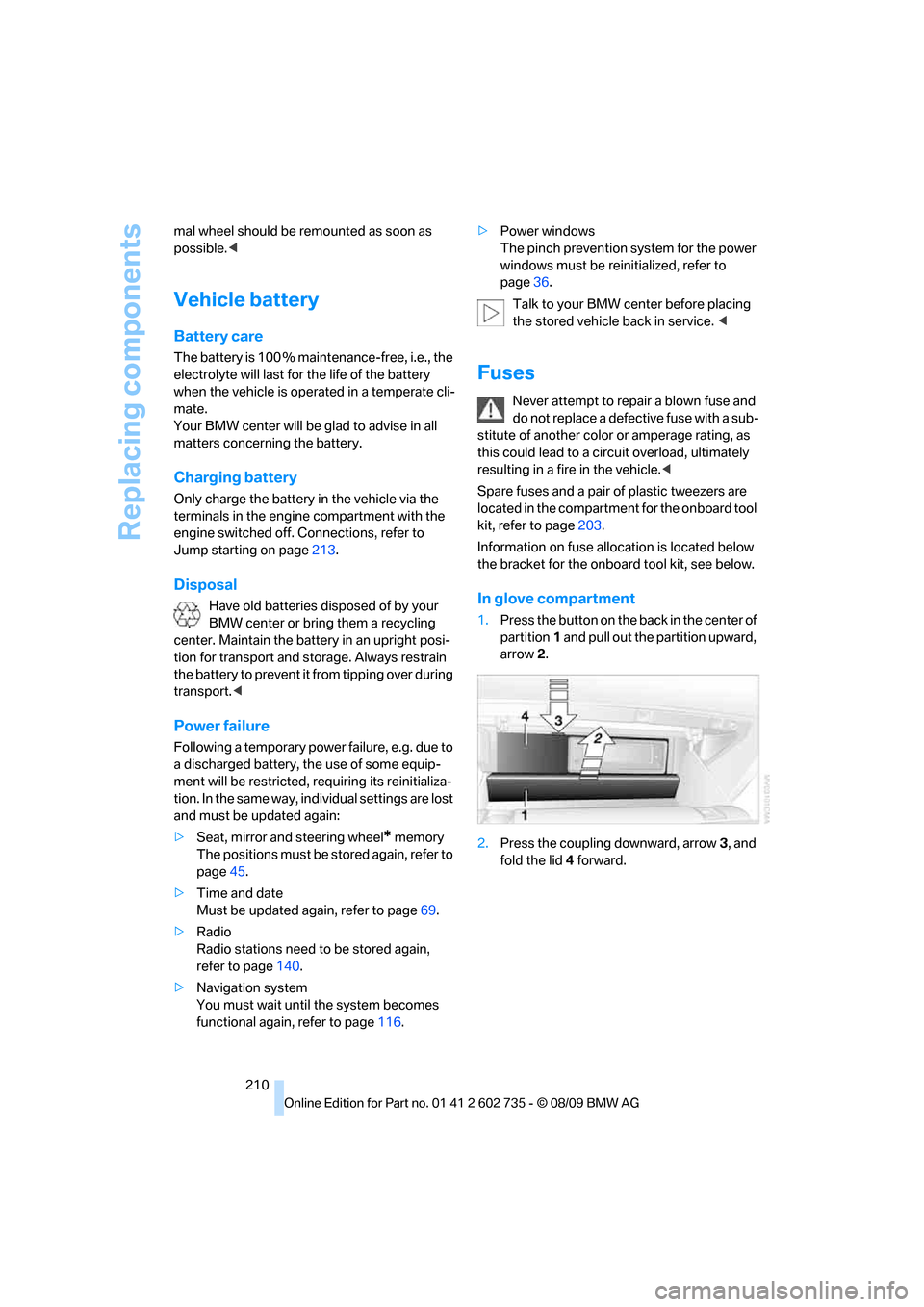
In glove compartment
1.Press the button on the back in the center of
partition1 and pull out the partition upward,
arrow2.
2.Press the coupling downward, arrow3, and
fold the lid 4 forward.
Page 237 of 250
Reference 235
At a glance
Controls
Driving tips
Communications
Navigation
Entertainment
Mobility
Engine output, refer to Engine
data220
Engine overheating, refer to
Coolant temperature65
Engine speed, refer to Engine
data220
Engine starting, refer to
Starting engine56
Entering destination via town/
city name117
Entering rear47
Entering zip code for
navigation118
Entertainment sound output
on/off136
Entry map for destination122
Equalizer, refer to Tone
control137
ESP Electronic Stability
Program, refer to DSC
Dynamic Stability
Control76
Event Data Recorders198
Exhaust system, refer to Hot
exhaust system109
Exterior mirrors49
– adjusting49
– automatic dimming
feature50
– automatic heating49
– folding in and out49
– tilting down passenger-side
exterior mirror49
External audio device102
External devices
– random sequence158
Eye for tow-starting and
towing, refer to Tow
fitting214
F
Failure messages, refer to
Check Control70
False alarm
– refer to Avoiding
unintentional alarms34
– refer to Switching off
alarm33Fastening safety belts, refer to
Safety belts48
Fastest route for
navigation126
Fast forward
– CD changer146
– CD player146
Filler neck for washer fluid63
Filling bottle, refer to
M Mobility System205
Filter, refer to Microfilter/
activated-charcoal filter98
First aid, refer to First aid
kit213
First aid kit213
Flashing
– during locking/unlocking,
refer to Setting confirmation
signals29
– triple turn signal
activation61
Flat tire
– Flat Tire Monitor79
– M Mobility System205
– run-flat tires82
– spare wheel208
– Tire Pressure Monitor81
– TPM Tire Pressure
Monitor81
– warning lamp81,82
Flat Tire Monitor79
– false alarms80
– initializing system80
– snow chains191
– system limits80
– warning lamp81
Fluid reservoir, refer to Filler
neck for washer fluid63
FM, waveband139
Folding into raised position
convertible top
compartment floor,
Convertible33
Footwell lamps, refer to
Interior lamps93
For your own safety5
Free memory capacity, music
collection154
Front airbags83Front passenger airbags
– deactivating84
FTM, refer to Flat Tire
Monitor79
Fuel
– average consumption67
– display66
– fuel specifications
185
– high-quality brands185
– quality185
– specifications185
– tank contents, refer to
Capacities223
Fuel clock, refer to Fuel
gauge66
Fuel display, refer to Fuel
gauge66
Fuel filler flap184
– releasing in the event of
electrical malfunction184
Fuses210
G
Garage door opener, refer to
Integrated universal remote
control100
Gasoline
– refer to Average fuel
consumption67
– refer to Fuel
specifications185
– refer to Required fuel185
Gasoline display, refer to Fuel
gauge66
Gas station
recommendations127
Gear changes59
Gear display, refer to Displays
in instrument cluster59
Gearshift lever
– manual transmission57
General driving notes108
Glass sunroof, electric with tilt
function
– convenient opening and
closing with Comfort
Access35
Glove compartment101
Page 238 of 250
Everything from A to Z
236 GPS navigation, refer to
Navigation system116
Grills, refer to Ventilation97
Gross vehicle weight, refer to
Weights223
Ground clearance108
H
Handbrake
– indicator lamp13,57
Handbrake, refer to Parking
brake57
Hands-free system, refer to
Microphone14
Hand washing200
Hazard warning flashers15
HD Radio140
Head airbags83
Headlamp
– cleaning tank, refer to
Capacities223
Headlamp control,
automatic89
Headlamp flasher61
Headlamps
– cleaning, refer to Wiper
system62
– filler neck for washer
fluid193
– replacing bulbs203
Head Light, refer to Adaptive
Light Control90
Head restraints
– active front head
restraints46
– front46
– sitting safely43
Head-up Display51,86
– default view87
– M view87
– shift lights60
Heated
– mirrors49
– rear window96
– seats48
– steering wheel50Heating95
– exterior mirrors49
– interior94
– rear window96
– residual heat97
– seats48
– steering wheel50
Heating with engine switched
off, refer to Residual heat97
Heavy cargo, refer to Securing
cargo111
Height, refer to
Dimensions221
Height adjustment
– seats44
– steering wheel50
High-beam Assistant91
High beams91
– headlamp flasher91
– indicator lamp13
High-pressure cleaning
jets199,200
High water, refer to Driving
through water109
Highway, refer to Route
criteria126
Hills109
Holder for cups103
Homepage of BMW4
Hood192
Horn10
Hotel function31
– unlocking manually31
Hot exhaust system109
Hydraulic brake assistant,
refer to Brake assistant76
Hydroplaning109
I
IBOC, refer to HD Radio140
Ice, refer to Outside
temperature warning66
Identification mark
– recommended tire
brands190
– tire coding188
Idle58iDrive16
– changing date and time70
– changing language73
– changing settings73
– changing units of measure
and display type68
– controller16
– controls16
– operating principle17
– setting brightness74
– start menu17
– status information19
Ignition55
– switched off56
– switched on55
Ignition key, refer to Keys/
remote control26
Ignition key position 1, refer to
Radio readiness55
Ignition key position 2, refer to
Ignition on55
Ignition lock55
– starting engine with Comfort
Access35
Impressum2
Imprint2
Indicator/warning lamps
– ABS Antilock Brake
System78
– airbags85
– brake system78
– DSC13,76
– DTC13
– Flat Tire Monitor81
– MDrive13,50
– M Dynamic Mode13,77
– parking brake13,57
– parking lamps/low beams13
– safety belt warning48
– TPM Tire Pressure
Monitor82
Indicator and warning lamps
– overview13
Inflation pressure, refer to Tire
inflation pressure186
Inflation pressure monitoring,
refer to Flat Tire Monitor79
Page 239 of 250
Reference 237
At a glance
Controls
Driving tips
Communications
Navigation
Entertainment
Mobility
Inflation pressure monitoring,
refer to Tire Pressure
Monitor81
Initializing
– Flat Tire Monitor80
– radio, refer to Storing
stations140
– refer to Power failure210
– refer to Setting time and
date70
– seat, mirror and steering
wheel memory45
Instructions for navigation
system, refer to Voice
instructions127
Instrument cluster12
Instrument illumination, refer
to Instrument lighting93
Instrument lighting93
Instrument panel, refer to
Cockpit10
Instrument panel, refer to
Instrument cluster12
Integrated key26
Integrated universal remote
control100
Interactive map122
Interior lamps93
– switching on with remote
control28
Interior motion sensor34
– switching off34
Interior rearview mirror,
automatic dimming
feature50
Intermittent mode of the
wipers62
Intersection, entering for
navigation118
iPod, connecting, refer to
AUX-IN port156
iPod, connecting, refer to USB
audio interface156
J
Jacking points208
Joystick, refer to iDrive16Jumpering, refer to Jump
starting213
Jump starting213
K
Keyless-Go, refer to Comfort
Access34
Keyless opening and closing,
refer to Comfort Access34
Key Memory, refer to Personal
Profile26
Keys26
– key-related settings, refer to
Personal Profile26
– spare key26
Kickdown, refer to Drive
mode59
Knee airbags83
Knock control185
L
Lamps
– refer to High-beam
Assistant91
– refer to Parking lamps/low
beams89
Lamps and bulbs203
Lashing eyes, refer to
Securing cargo111
Last destinations120
LATCH child restraint fixing
system53
Leather care201
LEDs light-emitting
diodes203
Length, refer to
Dimensions221
License plate lamp, replacing
bulbs205
Light-emitting diodes
LEDs203
Lighter104
Lighting
– instruments93
– lamps and bulbs203
– of the vehicle, refer to
Lamps89Light switch89
Loading
– securing cargo111
– stowing cargo111
– vehicle110
Loading, refer to Cargo
loading110
Load securing equipment,
refer to Securing cargo111
Lock buttons in the doors,
refer to Locking31
Locking28
– confirmation signals29
– from inside31
– from outside28
– without key, refer to Comfort
Access34
Locking and unlocking doors
– confirmation signals29
– from inside30
– from outside28
Low beams89
– automatic89
– indicator lamp13
– replacing bulbs204
Lower back support, refer to
Lumbar support44
Lug bolts208
– tightening torque, refer to
After mounting209
– wrench208
Luggage compartment
– hotel function31
– increasing capacity,
Convertible33
Luggage compartment lid31
– emergency operation32
– emergency release32
– opening from inside31
– opening from outside32
– opening with remote
control29,32
– unlocking manually32
Luggage compartment lid/
tailgate
– Comfort Access35
Lumbar support44
Page 240 of 250
Everything from A to Z
238
M
MDynamic Mode MDM76
– indicator lamp13,77
M Engine Dynamic Control60
M Mobility System205
M+S tires, refer to Winter
tires190
Maintenance197
– refer to Service
requirements68
Maintenance system197
Malfunction
– convertible top39
– driver's door30
– fuel filler flap184
– hotel function31
Malfunction warnings, refer to
Check Control70
Managing music154
Manual air distribution96
Manual operation
– convertible top39
– door lock30
– driver's door30
– fuel filler flap184
– hotel function31
– luggage compartment lid32
Manual transmission57
– tow-starting216
Map display128
Map for navigation
– changing scale129
– destination entry122
Map view facing north128
Master key, refer to Keys/
remote control26
Maximum cooling96
Maximum speed with winter
tires190
MDM, refer to M Dynamic
Mode76
MDrive50,77
Measurements, refer to
Dimensions
– Convertible222
– Coupe221Memory, refer to Seat, mirror
and steering wheel
memory45
Menus, refer to iDrive16
Messages168
Messages from the concierge
service169
Microfilter98
Microphone
– for telephone14
– for voice activation
system14
Mirror dimming feature
50
Mirrors49
– automatic curb monitor49
– folding in and out49
– heating49
– memory, refer to Seat, mirror
and steering wheel
memory45
Mobile phone
– adjusting volume165
– connecting, refer to Mobile
phone, pairing162
– installation location, refer to
Center armrest102
– operation via iDrive165
– pairing162
– refer to separate operating
instructions
Mobile phone, refer to
Telephone162
Mobile phone battery173
Mobility System205
Monitor, refer to iDrive16
Monitoring pressure of tires,
refer to Flat Tire Monitor79
MP3 player, connecting, refer
to AUX-IN port156
MP3 player, connecting, refer
to USB audio interface156
Multi-channel playback137
Multi-function steering wheel,
refer to Buttons on steering
wheel11
Multifunction switch
– refer to Turn signals/
headlamp flasher61
– refer to Wiper system62Music, playing152
Music collection151
– backup155
– deleting155
– random sequence154
– restoring155
Music player, connecting,
refer to AUX-IN port156
Music player, connecting,
refer to USB audio
interface156
Music search152
M View86
M view87
MW, waveband139
My Info169
N
Navigation
– starting destination
guidance after entering a
destination119
– storing current position119
– voice activation123
Navigation data116
Navigation destination
– entering manually117
– home address120
Navigation instructions, refer
to Switching voice
instructions on/off127
Page 241 of 250
Reference 239
At a glance
Controls
Driving tips
Communications
Navigation
Entertainment
Mobility
Navigation system116
– address book119
– bypassing route
sections127
– continuing destination
guidance126
– destination entry117
– dynamic destination
guidance127
– entering a destination
manually117
– entering destination via
voice123
– frequently asked
questions132
– gas station
recommendations127
– planning a trip124
– route list127
– selecting destination via
map122
– selecting route criteria126
– special destinations120
– starting destination
guidance126
– terminating destination
guidance126
– traffic bulletins129
– voice instructions127
– volume adjustment128
Neck support, refer to Front
head restraints46
New remote control26
New wheels and tires189
Normal program of EDC79
Nozzles, refer to Windshield
washer nozzles63
Nylon rope, refer to Tow-
starting and towing214
O
OBD socket, refer to Socket
for Onboard Diagnostics
interface198
Octane ratings, refer to Fuel
specifications185
Odometer65
Oil, refer to Engine oil193Oil change intervals
– refer to Service
requirements68
Onboard computer, refer to
iDrive16
Onboard vehicle tool kit203
Opening and closing
– Comfort Access34
– from inside30
– from outside28
– using remote control28
– using the door lock29
Operating principle, iDrive17
Orientation menu, refer to
Start menu17
Output, refer to Engine
data220
Outside air, refer to AUC
Automatic recirculated-air
control96
Outside temperature display
– changing unit of measure68
– in computer68
Overview
– operating principle17
– radio control136
P
P 400 program60
P 500 program61
P 500 Sport program61
Panic mode29
Park Distance Control PDC75
Parked car heating, refer to
Parked car ventilation/
heating98
Parked car ventilation98
– switching on and off
directly98
Parked car ventilation system
– LED94
Parking
– vehicle56
Parking aid, refer to PDC Park
Distance Control75
Parking assistant, refer to
PDC Park Distance
Control75Parking brake57
Parking brake, refer to
Handbrake57
Parking lamps89
– indicator lamp13
– replacing bulbs204
Parts and accessories6
Passenger-side exterior
mirror, tilting down49
Pathway lighting90
PDC Park Distance Control75
Personal Profile26
Phone book165
Phone numbers
– dialing166
Pinch protection system of
power windows37
Plasters, refer to First aid
kit213
Plug-in unit for remote
control, refer to Ignition
lock55
Polish202
Pollen, refer to Microfilter/
activated charcoal filter98
POWER51
POWER, refer to M Engine
Dynamic Control60
Power failure210
Power windows, refer to
Windows36
Pressure, tires186
– producing with M Mobility
System205
Pressure monitoring of tires,
refer to TPM Tire Pressure
Monitor81
Protective function, refer to
Pinch protection system of
windows37