steering BMW M6 COUPE 2015 F13M Service Manual
[x] Cancel search | Manufacturer: BMW, Model Year: 2015, Model line: M6 COUPE, Model: BMW M6 COUPE 2015 F13MPages: 222, PDF Size: 4.66 MB
Page 141 of 222
Cameras
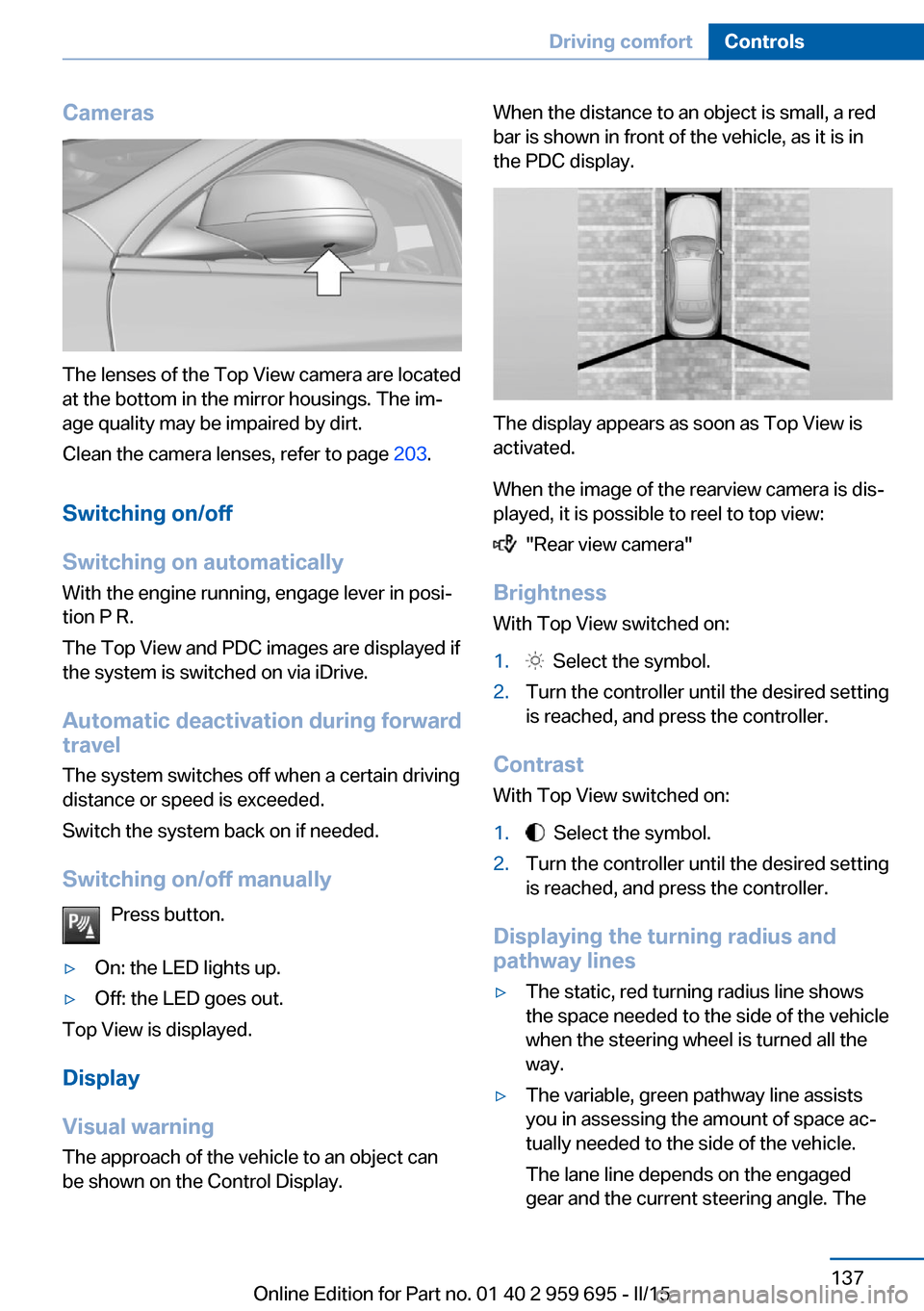
The lenses of the Top View camera are located
at the bottom in the mirror housings. The im‐
age quality may be impaired by dirt.
Clean the camera lenses, refer to page 203.
Switching on/off
Switching on automatically With the engine running, engage lever in posi‐
tion P R.
The Top View and PDC images are displayed if
the system is switched on via iDrive.
Automatic deactivation during forward
travel
The system switches off when a certain driving
distance or speed is exceeded.
Switch the system back on if needed.
Switching on/off manually Press button.
▷On: the LED lights up.▷Off: the LED goes out.
Top View is displayed.
Display
Visual warning
The approach of the vehicle to an object can
be shown on the Control Display.
When the distance to an object is small, a red
bar is shown in front of the vehicle, as it is in
the PDC display.
The display appears as soon as Top View is
activated.
When the image of the rearview camera is dis‐
played, it is possible to reel to top view:
"Rear view camera"
Brightness
With Top View switched on:
1. Select the symbol.2.Turn the controller until the desired setting
is reached, and press the controller.
Contrast
With Top View switched on:
1. Select the symbol.2.Turn the controller until the desired setting
is reached, and press the controller.
Displaying the turning radius and
pathway lines
▷The static, red turning radius line shows
the space needed to the side of the vehicle
when the steering wheel is turned all the
way.▷The variable, green pathway line assists
you in assessing the amount of space ac‐
tually needed to the side of the vehicle.
The lane line depends on the engaged
gear and the current steering angle. TheSeite 137Driving comfortControls137
Online Edition for Part no. 01 40 2 959 695 - II/15
Page 142 of 222
track line is continuously adjusted for the
steering wheel movement.
"Parking aid lines"
Turning circle and pathway lines are displayed.
System limits
Top View cannot be used in the following sit‐
uations:
▷With a door open.▷With the trunk lid open.▷With an exterior mirror folded in.▷In poor light.
A Check Control message is displayed in some
of these situations.
Seite 138ControlsDriving comfort138
Online Edition for Part no. 01 40 2 959 695 - II/15
Page 164 of 222
This phenomenon is referred to as hydroplan‐
ing. It is characterized by a partial or complete
loss of contact between the tires and the road
surface, ultimately undermining your ability to
steer and brake the vehicle.
Driving through water Observe water level and speed
Do not exceed the maximum water level
and maximum speed; otherwise, the vehicle's
engine, the electrical systems and the trans‐
mission may be damaged.◀
Drive though calm water only and only if it is
not deeper than 9.8 inches/25 cm and at this
height, no faster than walking speed, up to
3 mph/5 km/h.
Braking safely
Your vehicle is equipped with ABS as a stand‐
ard feature.
Applying the brakes fully is the most effective
way of braking in situations needed.
Steering is still responsive. You can still avoid
any obstacles with a minimum of steering ef‐
fort.
The pulsing of the brake pedal indicates that
ABS is in its active mode.
In certain braking situations, the perforated
brake discs can cause functional problems.
However, this has no effect on the perform‐
ance and operational reliability of the brake.
Objects within the range of movement
of the pedals
No objects in the area around the pedals
Keep floor mats, carpets, and any other
objects out of the pedal area; otherwise, the
function of the pedals could be impeded while driving and create the risk of an accident.
Do not place additional floor mats over existing
mats or other objects.Only use floor mats that have been approved
for the vehicle and can be properly attached to
floor.
Ensure that the floor mats are securely fas‐
tened again after they were removed for clean‐
ing, e.g.◀
Driving in wet conditions When roads are wet, salted, or in heavy rain,
press brake pedal ever so gently every few
miles.
Ensure that this action does not endanger other traffic.
The heat generated in this process helps dry
the brake discs and pads.
In this way braking efficiency will be available
when you need it.
Hills Avoid stressing the brakes
Avoid placing excessive stress on the
brake system. Light but consistent brake pres‐
sure can lead to high temperatures, brakes
wearing out and possibly even brake failure.◀
Do not drive in neutral
Do not drive in neutral or with the engine
stopped, as doing so disables engine braking.
In addition, steering and brake assist are un‐
available with the engine stopped.◀
Drive long or steep downhill gradients in the
gear that requires least braking efforts. Other‐
wise the brakes may overheat and reduce
brake efficiency.
Manual transmission:
You can increase the engine's braking effect
by shifting down, going all the way to first gear,
if needed.
M double-clutch transmission:
You can increase the engine's braking effect
by shifting down in sequential mode, refer to
page 73.Seite 160Driving tipsThings to remember when driving160
Online Edition for Part no. 01 40 2 959 695 - II/15
Page 181 of 222
Retreaded tires
Possibly substantial variations in the de‐
sign and age of the tire casing structures can
limit service life and have a negative impact on
road safety.◀
Winter tires
Winter tires are recommended for operating on
winter roads.
Although so-called all-season M+S tires pro‐
vide better winter traction than summer tires, they do not provide the same level of perform‐
ance as winter tires.
Maximum speed of winter tires If the maximum speed of the vehicle is higher
than the permissible speed for the winter tires,
then a respective symbol is displayed in your
field of vision. You can obtain this sign from the
tire specialist or from your service center.
Maximum speed for winter tires
Do not exceed the maximum speed for
the respective winter tires; otherwise, tire dam‐
age and accidents can occur.◀
Rotating wheels between axles The manufacturer of your vehicle advises
against switching wheels between the front
and rear axles. This can impair the handling
characteristics.
Rotating the tires is not permissible on vehi‐
cles with different tire sizes or rim sizes on the
front and rear axles.
StorageStore wheels and tires in a cool, dry place with
as little exposure to light as possible.
Always protect tires against all contact with oil,
grease and fuels.
Do not exceed the maximum tire inflation pres‐
sure indicated on the side wall of the tire.Repairing a flat tire
Safety measures in case of a breakdown
Park the vehicle as far away as possible
from passing traffic and on solid ground.
Switch on the hazard warning system.
Turn the steering wheel until the front wheels are in the straight-ahead position and engage
the steering wheel lock.
Secure the vehicle against rolling away by set‐
ting the parking brake.
Have all vehicle occupants get out of the vehi‐
cle and ensure that they remain outside the
immediate area in a safe place, such as behind
a guardrail.
If necessary, set up a warning triangle at an ap‐
propriate distance.
Comply with all safety guidelines and regula‐
tions.◀
Mobility System
The concept With the Mobility System, minor tire damage
can be sealed quickly to enable continued
travel. To accomplish this, sealant is pumped
into the tires, which seals the damage from the
inside.
The compressor can be used to check the tire
inflation pressure.
Hints▷Follow the instructions on using the Mobi‐
lity System found on the compressor and
sealant container.▷Use of the Mobility System may be ineffec‐
tive if the tire puncture measures approx.
1/8 in/4 mm or more.▷Contact the nearest service center if the
tire cannot be made drivable.Seite 177Wheels and tiresMobility177
Online Edition for Part no. 01 40 2 959 695 - II/15
Page 182 of 222
▷If possible, do not remove foreign bodies
that have penetrated the tire.▷Pull the speed limit sticker off the sealant
container and apply it to the steering
wheel.▷The use of a sealant can damage the TPM
wheel electronics. In this case, have the
electronics checked at the next opportu‐
nity and have them replaced if needed.
Enclosed areas
Do not let the engine run in enclosed
areas, since breathing in exhaust fumes may
lead to loss of consciousness and death. The
exhaust gases contain carbon monoxide, an
odorless and colorless but highly toxic gas.◀
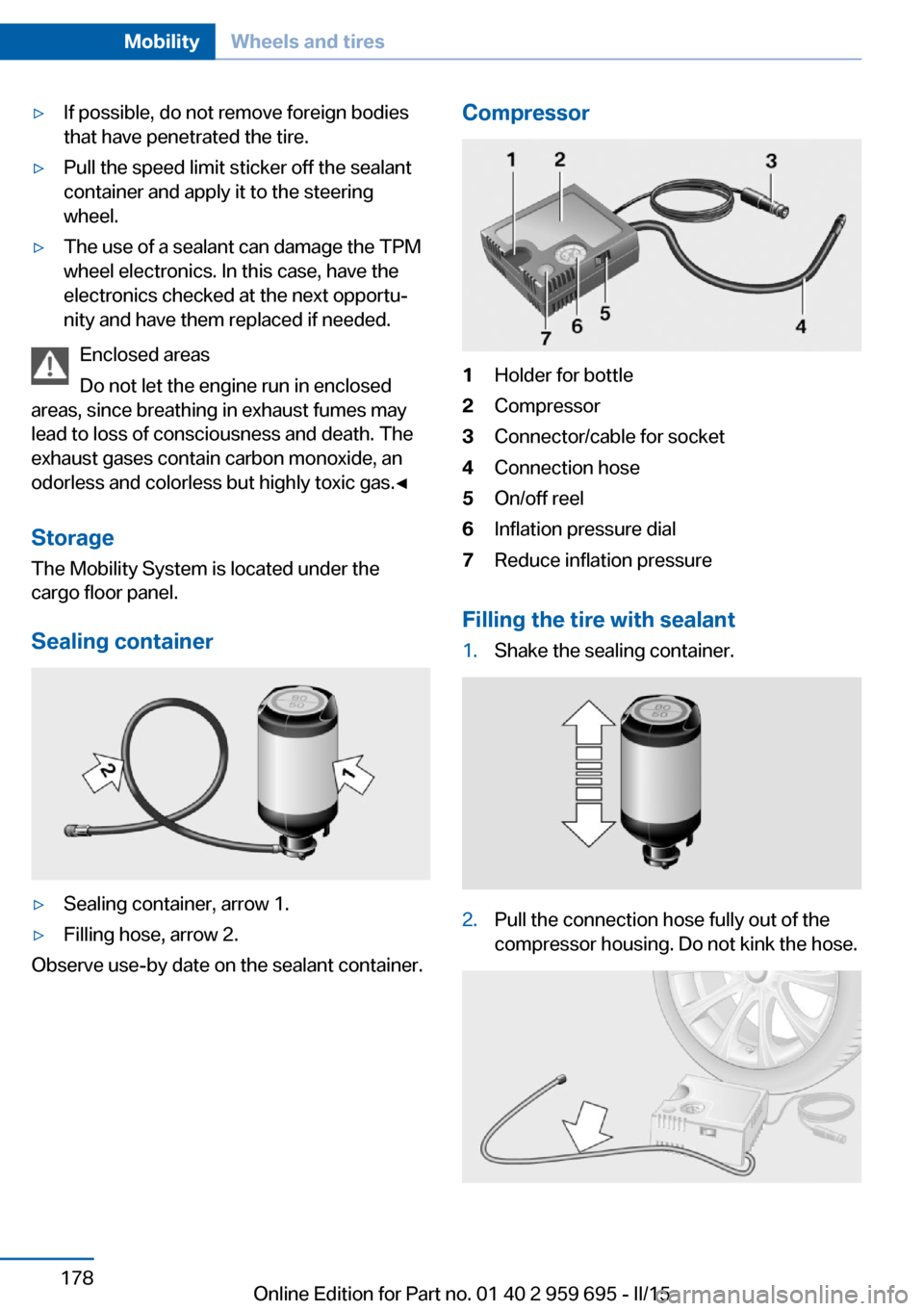
Storage The Mobility System is located under the
cargo floor panel.
Sealing container
▷Sealing container, arrow 1.▷Filling hose, arrow 2.
Observe use-by date on the sealant container.
Compressor1Holder for bottle2Compressor3Connector/cable for socket4Connection hose5On/off reel6Inflation pressure dial7Reduce inflation pressure
Filling the tire with sealant
1.Shake the sealing container.2.Pull the connection hose fully out of the
compressor housing. Do not kink the hose.Seite 178MobilityWheels and tires178
Online Edition for Part no. 01 40 2 959 695 - II/15
Page 196 of 222
pressure in the event of a flat tire is unneces‐
sary.
Which is why no spare tire is available.
The tools for changing wheels are available as
accessories from your service center.
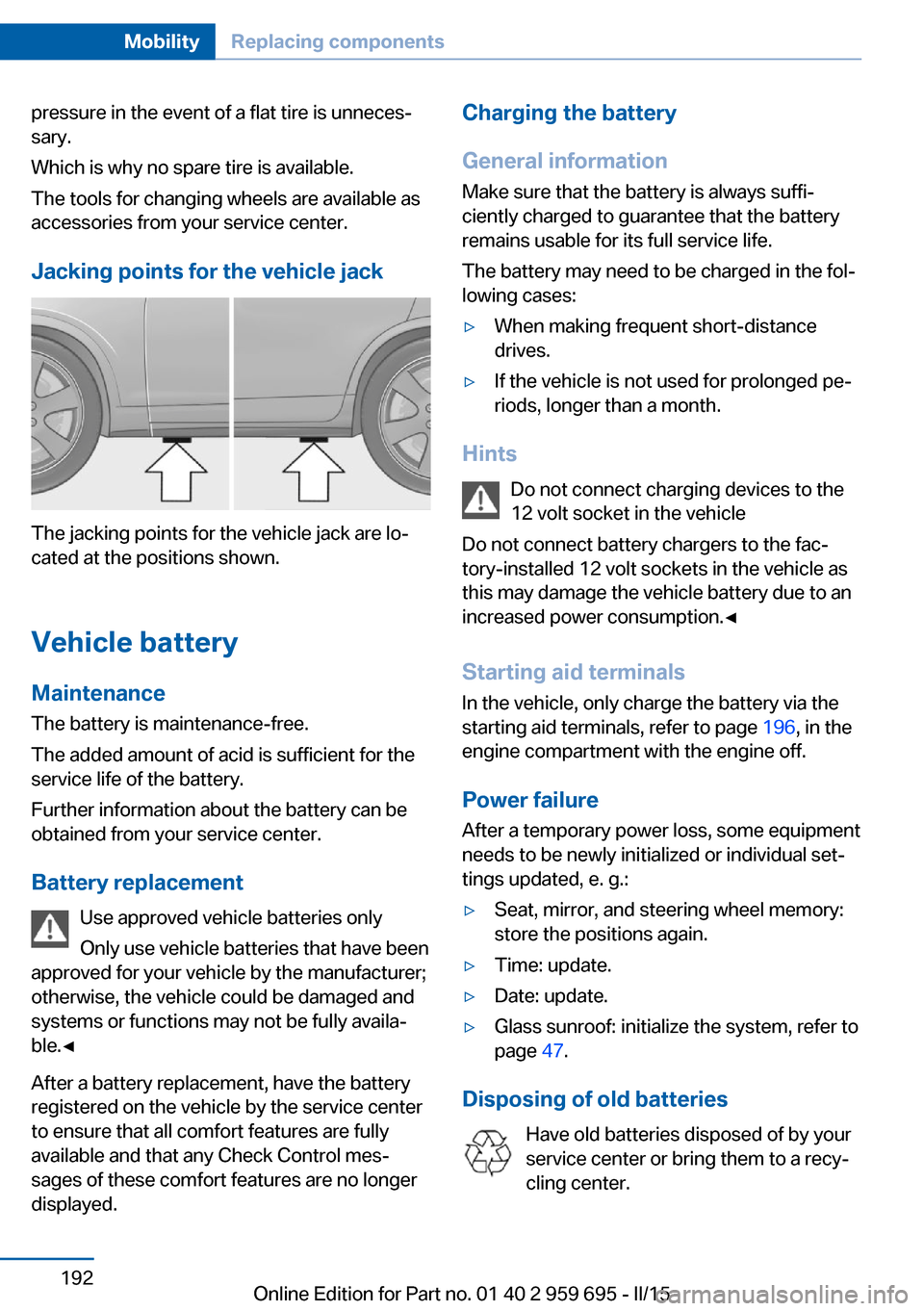
Jacking points for the vehicle jack
The jacking points for the vehicle jack are lo‐
cated at the positions shown.
Vehicle battery Maintenance
The battery is maintenance-free.
The added amount of acid is sufficient for the
service life of the battery.
Further information about the battery can be
obtained from your service center.
Battery replacement Use approved vehicle batteries only
Only use vehicle batteries that have been
approved for your vehicle by the manufacturer;
otherwise, the vehicle could be damaged and
systems or functions may not be fully availa‐
ble.◀
After a battery replacement, have the battery
registered on the vehicle by the service center
to ensure that all comfort features are fully
available and that any Check Control mes‐
sages of these comfort features are no longer
displayed.
Charging the battery
General information
Make sure that the battery is always suffi‐
ciently charged to guarantee that the battery
remains usable for its full service life.
The battery may need to be charged in the fol‐
lowing cases:▷When making frequent short-distance
drives.▷If the vehicle is not used for prolonged pe‐
riods, longer than a month.
Hints
Do not connect charging devices to the
12 volt socket in the vehicle
Do not connect battery chargers to the fac‐
tory-installed 12 volt sockets in the vehicle as
this may damage the vehicle battery due to an
increased power consumption.◀
Starting aid terminals
In the vehicle, only charge the battery via the
starting aid terminals, refer to page 196, in the
engine compartment with the engine off.
Power failure
After a temporary power loss, some equipment
needs to be newly initialized or individual set‐
tings updated, e. g.:
▷Seat, mirror, and steering wheel memory:
store the positions again.▷Time: update.▷Date: update.▷Glass sunroof: initialize the system, refer to
page 47.
Disposing of old batteries
Have old batteries disposed of by your
service center or bring them to a recy‐
cling center.
Seite 192MobilityReplacing components192
Online Edition for Part no. 01 40 2 959 695 - II/15
Page 201 of 222
corresponding engine or body ground of
the vehicle to be started.
Starting the engine
Never use spray fluids to start the engine.
1.Start the engine of the assisting vehicle
and let it run for several minutes at an in‐
creased idle speed.2.Start the engine of the vehicle that is to be
started in the usual way.
If the first starting attempt is not success‐
ful, wait a few minutes before making an‐
other attempt in order to allow the dis‐
charged battery to recharge.3.Let both engines run for several minutes.4.Disconnect the jumper cables in the re‐
verse order.
Check the battery and recharge if needed.
Tow-starting and towing Note Tow-starting and towing
For tow-starting or towing, switch off the
Intelligent Safety systems; otherwise malfunc‐
tions of the individual braking systems might
lead to accidents.◀
Manual transmission
Observe before towing your vehicle Gearshift lever in neutral position.
Towing When the parking brake is blocked
The parking brake cannot be released
manually.
Do not tow the vehicle with the parking brake
blocked, or the vehicle can be damaged.
Contact your service center.◀
Follow the towing instructions
Follow all towing instructions; otherwise,
vehicle damage or accidents may occur.◀▷Make sure that the ignition is switched on;
otherwise, the low beams, tail lights, turn
signals, and wipers may be unavailable.▷Do not tow the vehicle with the rear axle
tilted, as the front wheels could turn.▷When the engine is stopped, there is no
power assist. Consequently, more force
needs to be applied when braking and
steering.▷Larger steering wheel movements are re‐
quired.▷The towing vehicle must not be lighter
than the vehicle being towed; otherwise,
it will not be possible to control the vehi‐
cle's response.
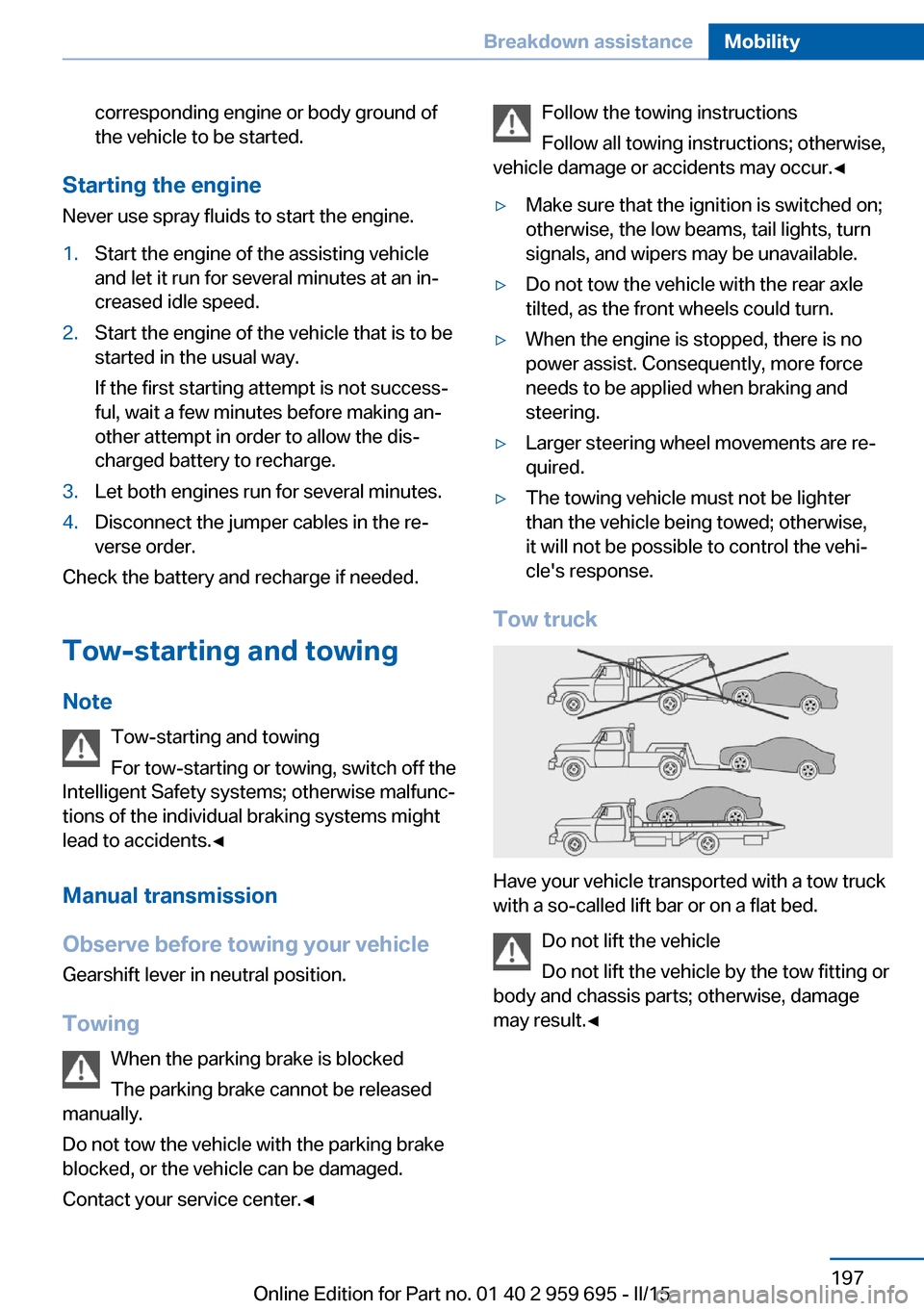
Tow truck
Have your vehicle transported with a tow truck
with a so-called lift bar or on a flat bed.
Do not lift the vehicle
Do not lift the vehicle by the tow fitting or
body and chassis parts; otherwise, damage
may result.◀
Seite 197Breakdown assistanceMobility197
Online Edition for Part no. 01 40 2 959 695 - II/15
Page 212 of 222
Everything from A to Z
IndexA ABS, Antilock Brake Sys‐ tem 122
Acceleration Assistant, refer to Launch Control 75
Accessories and parts 7
Activated-charcoal filter 142
Active Blind Spot Detec‐ tion 117
Active M differential 126
Active Protection 119
Active seat, front 51
Active seat ventilation, front 51
Adaptive brake lights, refer to Brake force display 119
Adaptive Light Control 96
Additives, oil 184
Adjusting, steering wheel 58
Adjustments, seats/head re‐ straints 49
After washing vehicle 201
Airbags 100
Airbags, indicator/warning light 101
Air circulation, refer to Recir‐ culated-air mode 141
Air, dehumidifying, refer to Cooling function 141
Air distribution, manual 140
Air flow, automatic climate control 140
Air outlets, see ventila‐ tion 142
Air pressure, tires 172
Alarm system 44
Alarm, unintentional 45
All around the center con‐ sole 16 All around the interior rear‐
view mirror 17
All around the steering wheel 14
All-season tires, refer to Win‐ ter tires 177
Alternating-code hand-held transmitter 145
Alternative oil types 185
Animal detection, see Night Vision 113
Antifreeze, washer fluid 71
Antilock Brake System, ABS 122
Anti-slip control, refer to DSC 124
Approved axle load 206
Approved engine oils, see Suitable engine oil
types 185
Armrest, refer to Front center armrest 151
Arrival time 90
Ashtray 146
Assistance when driving off 122
Attentiveness assistant 119
AUTO intensity 140
Automatic car wash 200
Automatic Curb Monitor 56
Automatic deactivation, front- seat passenger airbags 102
Automatic headlight con‐ trol 96
Automatic locking 43
Automatic recirculated-air control 141
Automatic Soft Closing, doors 40
AUTO program, automatic cli‐ mate control 140 AUTO program, intensity 140
Auto Start/Stop function 65
Average fuel consumption 89
Average speed 89
Axle loads, weights 206
B Backrest curvature, refer to Lumbar support 50
Backrest, seats 49
Backrest, width 50
Band-aids, refer to First aid kit 195
Bar for tow-starting/ towing 198
Battery replacement, vehicle battery 192
Battery replacement, vehicle remote control 35
Battery, vehicle 192
Belts, safety belts 52
Beverage holder, cu‐ pholder 152
Blinds, sun protection 46
BMW Assist, see user's manual for Navigation, En‐
tertainment and Communi‐
cation
BMW Driver’s Guide App 6
BMW Homepage 6
BMW Internet page 6
BMW maintenance sys‐ tem 187
BMW M technology 156
Bottle holder, refer to Cu‐ pholder 152
Brake assistant 122
Brake discs, break-in 158
Brake force display 119
Brake lights, adaptive 119 Seite 208ReferenceEverything from A to Z208
Online Edition for Part no. 01 40 2 959 695 - II/15
Page 213 of 222
Brake lights, brake force dis‐play 119
Brake lights, bulb replace‐ ment 191
Brake pads, break-in 158
Braking, hints 160
Breakdown assistance 194
Break-in 158
Brightness of Control Dis‐ play 92
Bulb replacement, front 189
Bulb replacement, rear 191
Button, Start/Stop 63
Bypassing, refer to Jump- starting 196
C
California Proposition 65 Warning 7
Calling up mirror adjust‐ ment 43
Calling up seat adjust‐ ment 43
Calling up steering wheel ad‐ justment 43
Camera lenses, care 203
Camera, rearview cam‐ era 133
Camera, Side View 135
Camera, Top View 137
Can holder, refer to Cu‐ pholder 152
Car battery 192
Carbon ceramic brake M 156
Car care products 201
Care, displays 203
Care, vehicle 201
Cargo 162
Cargo area, storage compart‐ ments 152
Cargo, securing 163
Cargo straps, securing cargo 163
Car key, refer to Remote con‐ trol 34 Carpet, care 203
Car wash 200
Catalytic converter, refer to Hot exhaust system 159
CBS Condition Based Serv‐ ice 187
CD/Multimedia, see user's manual for Navigation, En‐
tertainment and Communi‐
cation
Center console 16
Central locking system 40
Central screen, refer to Con‐ trol Display 18
Ceramic brake 156
Changes, technical, refer to Safety 7
Changing parts 189
Changing wheels 191
Changing wheels/tires 176
Chassis number, see vehicle identification number 9
Check Control 79
Checking the engine oil level electronically 183
Checking the oil level elec‐ tronically 183
Children, seating position 59
Children, transporting safely 59
Child restraint fixing sys‐ tem 59
Child restraint fixing system LATCH 61
Child restraint fixing systems, mounting 59
Child seat, mounting 59
Child seats 59
Chrome parts, care 202
Cigarette lighter 146
Cleaning displays 203
Climate control 139
Climate control laminated tinted safety glass 159
Climate control wind‐ shield 159 Clock 83
Closing/opening via door lock 39
Closing/opening with remote control 37
Clothes hooks 151
Combination reel, refer to Turn signals 69
Combination switch, refer to Wiper system 69
Comfort Access 41
Compound brake 156
Compressor 177
Computer, refer to On-board computer 88
Condensation on win‐ dows 140
Condensation under the vehi‐ cle 161
Condition Based Service CBS 187
Confirmation signal 43
ConnectedDrive, see user's manual for Navigation, En‐
tertainment and Communi‐
cation
ConnectedDrive Services
Control Display 18
Control Display, settings 91
Controller 18
Control systems, driving sta‐ bility 122
Convenient opening with the remote control 37
Coolant 186
Coolant level 186
Coolant temperature 83
Cooling function 141
Cooling, maximum 141
Cooling system 186
Cornering light 96
Corrosion on brake discs 161
Cosmetic mirror 146
Courtesy lamps during un‐ locking 37 Seite 209Everything from A to ZReference209
Online Edition for Part no. 01 40 2 959 695 - II/15
Page 214 of 222
Courtesy lamps with the vehi‐cle locked 38
Cruise control 128
Cruising range 84
Cupholder 152
Current fuel consumption 84
D
Damage, tires 175
Damping control 126
Damping control, dy‐ namic 126
Data, technical 206
Date 83
Daytime running lights 96
Defrosting, refer to Windows, defrosting 140
Dehumidifying, air 141
Deleting personal data 24
Deletion of personal data 24
Destination distance 89
Differential lock 126
Digital clock 83
Digital speed 83
Digital tachometer 83
Dimensions 206
Dimmable exterior mirrors 57
Dimmable interior rearview mirror 57
Direction indicator, refer to Turn signals 69
Display EfficientDynamics 85
Display, electronic, instru‐ ment cluster 78
Display in windshield 92
Display lighting, refer to In‐ strument lighting 98
Displays, cleaning 203
Disposal, coolant 186
Disposal, vehicle battery 192
Distance control, refer to PDC 130
Distance to destination 89
Divided screen view, split screen 23 Door lock 39
Door lock, refer to Remote control 34
Doors, Automatic Soft Clos‐ ing 40
Double-clutch transmis‐ sion 72
Drivelogic 74
Drive mode 73
Drive-off assistant 122
Drive-off assistant, refer to DSC 124
Driver assistance, refer to In‐ telligent Safety 107
Driving Assistant, refer to In‐ telligent Safety 107
Driving Dynamics Control 76
Driving instructions, break- in 158
Driving notes, general 159
Driving on racetracks 157
Driving program, refer to Drivelogic 74
Driving stability control sys‐ tems 122
Driving tips 159
DSC Dynamic Stability Con‐ trol 124
Dynamic Damping Con‐ trol 126
Dynamic driving systems 85
Dynamic driving, system states 85
Dynamic Stability Control DSC 124
E
EfficientDynamics 85
Electronic displays, instru‐ ment cluster 78
Electronic oil measure‐ ment 183
Electronic Stability Program ESP, refer to DSC 124 Emergency detection, remote
control 35
Emergency release, fuel filler flap 168
Emergency Request 194
Emergency start function, en‐ gine start 35
Emergency unlocking, trunk lid 41
Energy Control 84
Energy recovery 84
Engine, automatic Start/Stop function 65
Engine, automatic switch- off 65
Engine compartment 181
Engine compartment, work‐ ing in 181
Engine coolant 186
Engine oil 183
Engine oil, adding 184
Engine oil additives 184
Engine oil change 185
Engine oil filler neck 184
Engine oil temperature 82
Engine oil types, alterna‐ tive 185
Engine oil types, ap‐ proved 185
Engine start during malfunc‐ tion 35
Engine start, jump-start‐ ing 196
Engine start, refer to Starting the engine 64
Engine stop 64
Engine temperature 82
Entering/exiting vehicle, as‐ sistance, steering wheel 58
Entering a car wash 200
Equipment, interior 144
Error displays, see Check Control 79
ESP Electronic Stability Pro‐ gram, refer to DSC 124
Exchanging wheels/tires 176 Seite 210ReferenceEverything from A to Z210
Online Edition for Part no. 01 40 2 959 695 - II/15