center console BMW M6 COUPE 2015 F13M Owner's Manual
[x] Cancel search | Manufacturer: BMW, Model Year: 2015, Model line: M6 COUPE, Model: BMW M6 COUPE 2015 F13MPages: 222, PDF Size: 4.66 MB
Page 20 of 222
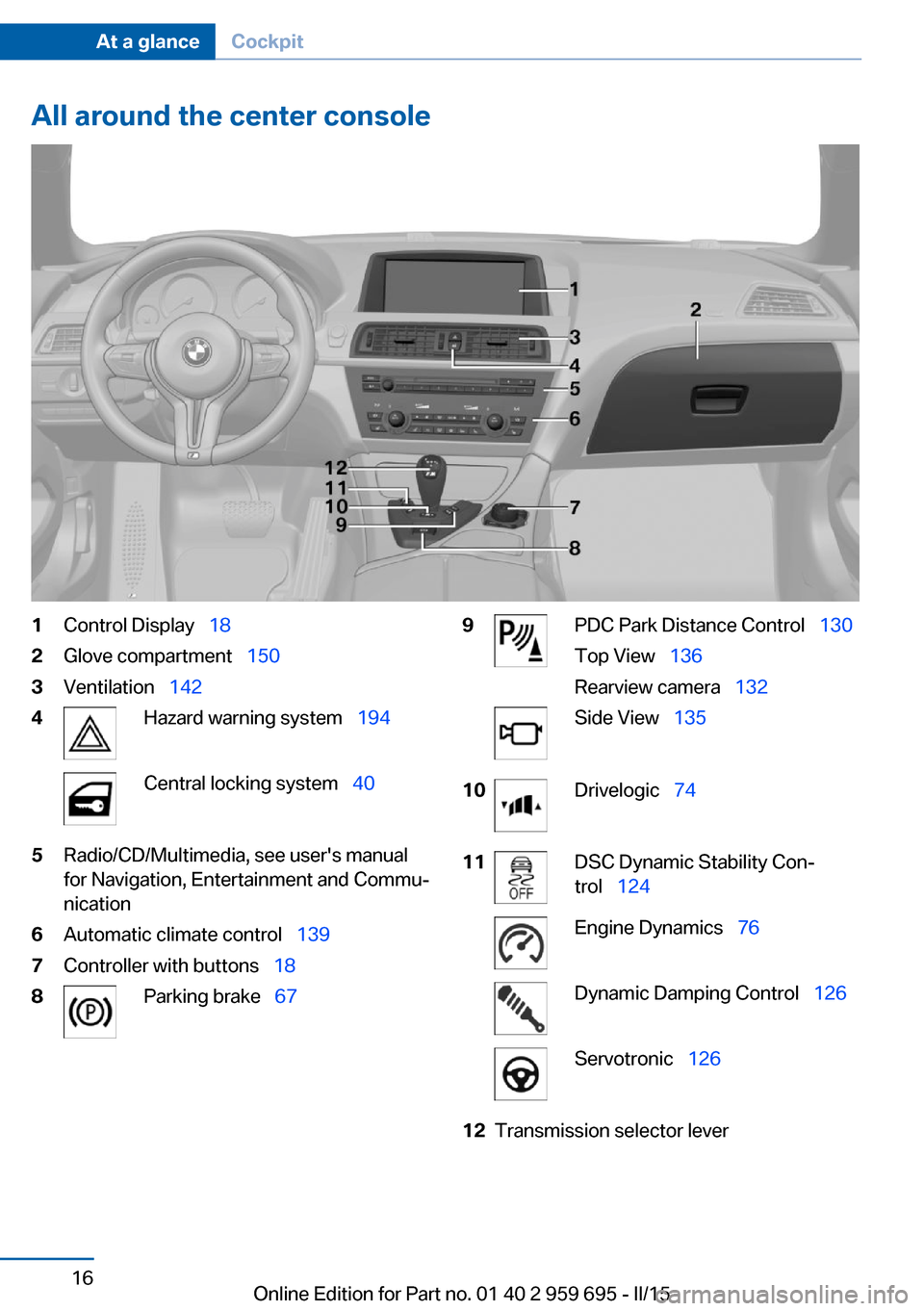
All around the center console1Control Display 182Glove compartment 1503Ventilation 1424Hazard warning system 194Central locking system 405Radio/CD/Multimedia, see user's manual
for Navigation, Entertainment and Commu‐
nication6Automatic climate control 1397Controller with buttons 188Parking brake 679PDC Park Distance Control 130
Top View 136
Rearview camera 132Side View 13510Drivelogic 7411DSC Dynamic Stability Con‐
trol 124Engine Dynamics 76Dynamic Damping Control 126Servotronic 12612Transmission selector leverSeite 16At a glanceCockpit16
Online Edition for Part no. 01 40 2 959 695 - II/15
Page 79 of 222
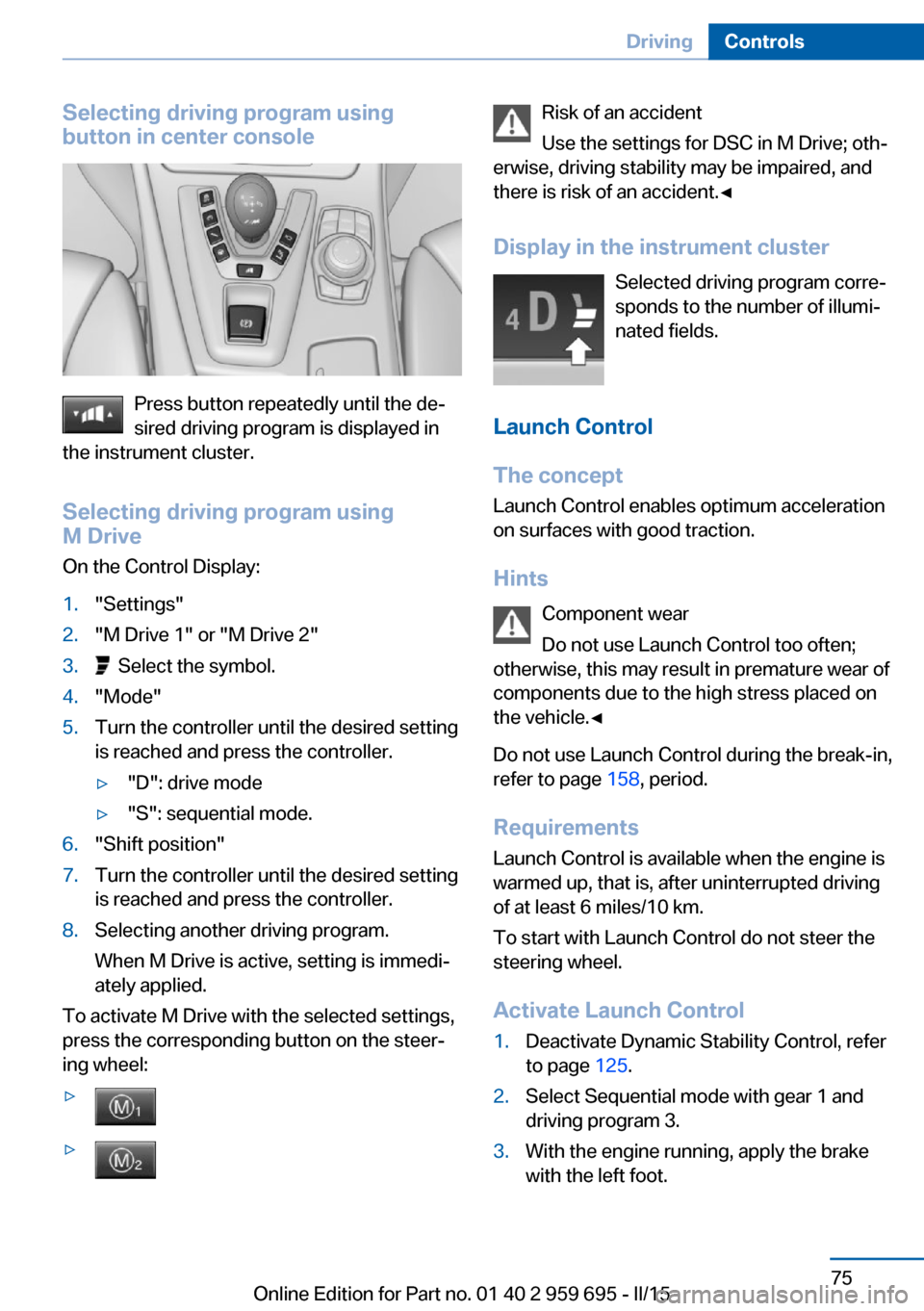
Selecting driving program using
button in center console
Press button repeatedly until the de‐
sired driving program is displayed in
the instrument cluster.
Selecting driving program using
M Drive
On the Control Display:
1."Settings"2."M Drive 1" or "M Drive 2"3. Select the symbol.4."Mode"5.Turn the controller until the desired setting
is reached and press the controller.▷"D": drive mode▷"S": sequential mode.6."Shift position"7.Turn the controller until the desired setting
is reached and press the controller.8.Selecting another driving program.
When M Drive is active, setting is immedi‐
ately applied.
To activate M Drive with the selected settings,
press the corresponding button on the steer‐
ing wheel:
▷▷Risk of an accident
Use the settings for DSC in M Drive; oth‐
erwise, driving stability may be impaired, and
there is risk of an accident.◀
Display in the instrument cluster Selected driving program corre‐
sponds to the number of illumi‐
nated fields.
Launch Control
The concept Launch Control enables optimum accelerationon surfaces with good traction.
Hints Component wear
Do not use Launch Control too often;
otherwise, this may result in premature wear of
components due to the high stress placed on
the vehicle.◀
Do not use Launch Control during the break-in,
refer to page 158, period.
Requirements Launch Control is available when the engine is
warmed up, that is, after uninterrupted driving
of at least 6 miles/10 km.
To start with Launch Control do not steer the
steering wheel.
Activate Launch Control1.Deactivate Dynamic Stability Control, refer
to page 125.2.Select Sequential mode with gear 1 and
driving program 3.3.With the engine running, apply the brake
with the left foot.Seite 75DrivingControls75
Online Edition for Part no. 01 40 2 959 695 - II/15
Page 127 of 222
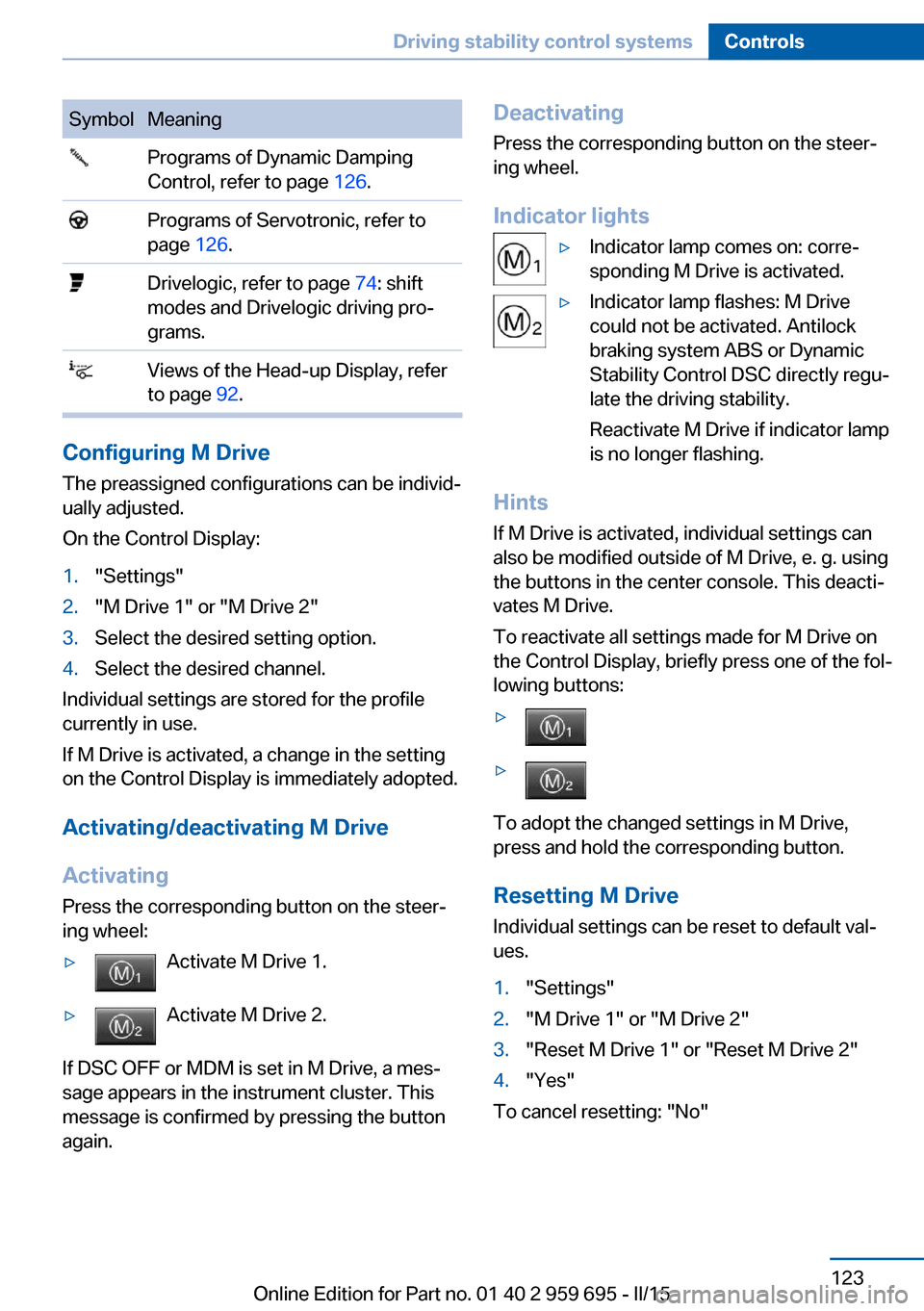
SymbolMeaning Programs of Dynamic Damping
Control, refer to page 126. Programs of Servotronic, refer to
page 126. Drivelogic, refer to page 74: shift
modes and Drivelogic driving pro‐
grams. Views of the Head-up Display, refer
to page 92.
Configuring M Drive
The preassigned configurations can be individ‐
ually adjusted.
On the Control Display:
1."Settings"2."M Drive 1" or "M Drive 2"3.Select the desired setting option.4.Select the desired channel.
Individual settings are stored for the profile
currently in use.
If M Drive is activated, a change in the setting
on the Control Display is immediately adopted.
Activating/deactivating M Drive
Activating Press the corresponding button on the steer‐
ing wheel:
▷Activate M Drive 1.▷Activate M Drive 2.
If DSC OFF or MDM is set in M Drive, a mes‐
sage appears in the instrument cluster. This
message is confirmed by pressing the button
again.
Deactivating
Press the corresponding button on the steer‐
ing wheel.
Indicator lights▷Indicator lamp comes on: corre‐
sponding M Drive is activated.▷Indicator lamp flashes: M Drive
could not be activated. Antilock
braking system ABS or Dynamic
Stability Control DSC directly regu‐
late the driving stability.
Reactivate M Drive if indicator lamp
is no longer flashing.
Hints
If M Drive is activated, individual settings can
also be modified outside of M Drive, e. g. using
the buttons in the center console. This deacti‐
vates M Drive.
To reactivate all settings made for M Drive on
the Control Display, briefly press one of the fol‐
lowing buttons:
▷▷
To adopt the changed settings in M Drive,
press and hold the corresponding button.
Resetting M Drive
Individual settings can be reset to default val‐
ues.
1."Settings"2."M Drive 1" or "M Drive 2"3."Reset M Drive 1" or "Reset M Drive 2"4."Yes"
To cancel resetting: "No"
Seite 123Driving stability control systemsControls123
Online Edition for Part no. 01 40 2 959 695 - II/15
Page 151 of 222
EmptyingTake out the insert.
Lighter Push in the lighter.
The lighter can be removed as
soon as it pops back out.
Danger of burns
Only hold the hot lighter by its knob; oth‐
erwise, there is a danger of getting burned.
Switch off the ignition and take the remote
control with you when leaving the vehicle so
that children cannot use the lighter and burn
themselves.◀
Replace the cover after use
Reinsert the lighter or socket cover after
use, otherwise objects may get into the lighter
socket or fixture and cause a short circuit.◀
Connecting electrical
devices
Hints Do not connect charging devices to the
12 volt socket in the vehicle
Do not connect battery chargers to the fac‐
tory-installed 12 volt sockets in the vehicle as
this may damage the vehicle battery due to an
increased power consumption.◀
Replace the cover after use
Reinsert the lighter or socket cover after
use, otherwise objects may get into the lighter
socket or fixture and cause a short circuit.◀Sockets
General information
The lighter socket can be used as a socket for
electrical equipment while the engine is run‐
ning or when the ignition is switched on.
NoteThe total load of all sockets must not exceed
140 watts at 12 volts.
Do not damage the socket by using unsuitable
connectors.
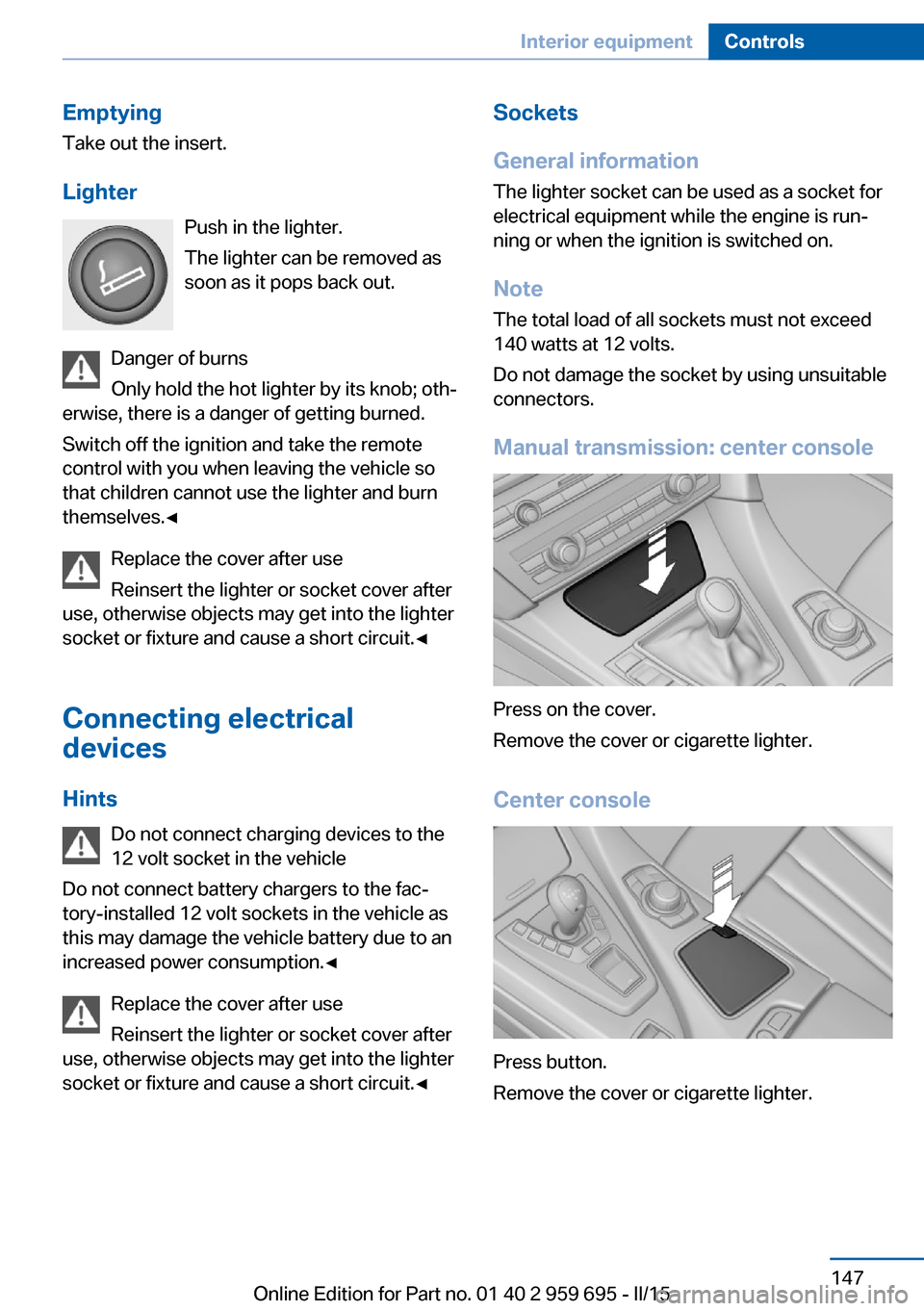
Manual transmission: center console
Press on the cover.
Remove the cover or cigarette lighter.
Center console
Press button.
Remove the cover or cigarette lighter.
Seite 147Interior equipmentControls147
Online Edition for Part no. 01 40 2 959 695 - II/15
Page 156 of 222
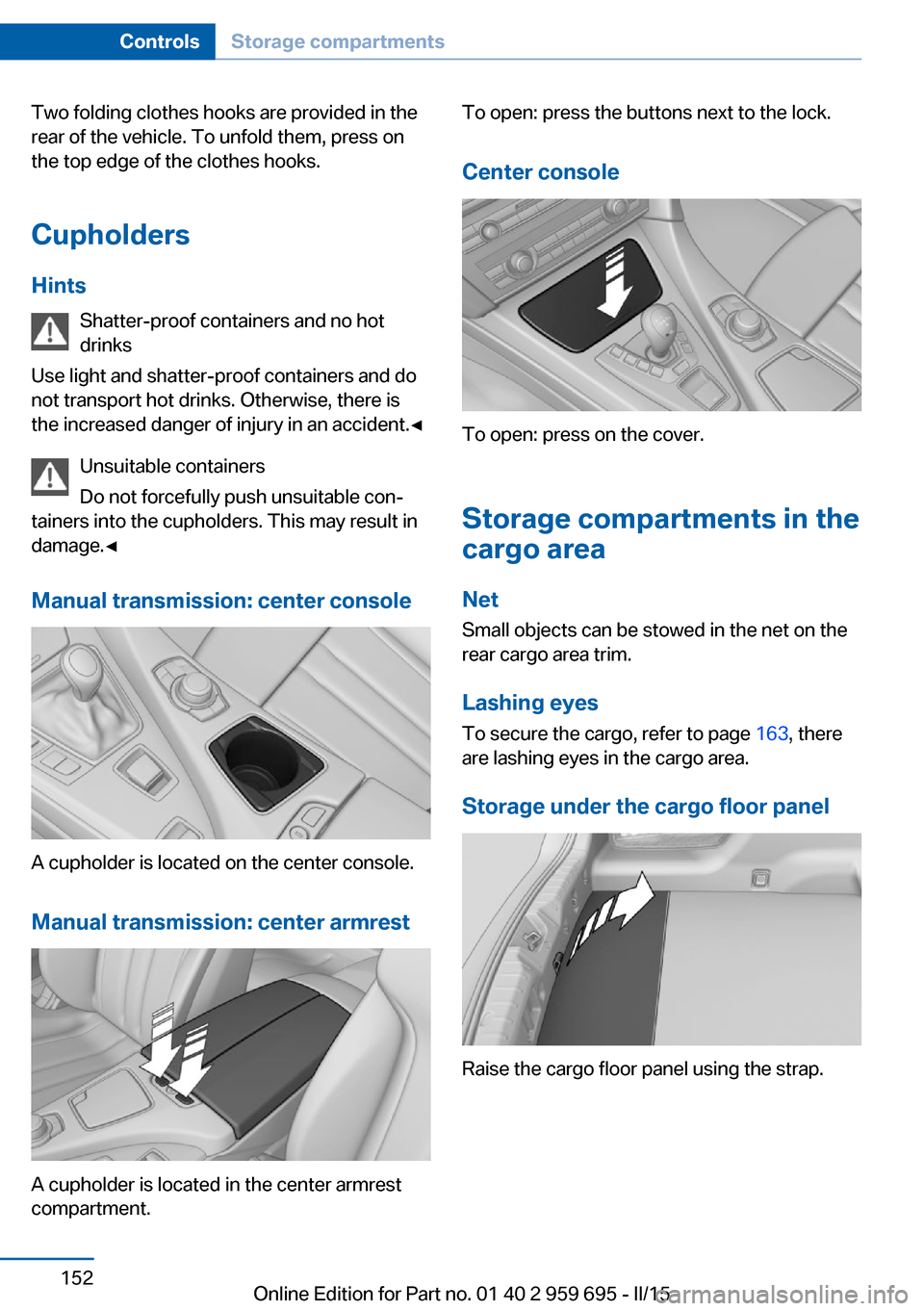
Two folding clothes hooks are provided in the
rear of the vehicle. To unfold them, press on
the top edge of the clothes hooks.
Cupholders Hints Shatter-proof containers and no hot
drinks
Use light and shatter-proof containers and do
not transport hot drinks. Otherwise, there is
the increased danger of injury in an accident.◀
Unsuitable containers
Do not forcefully push unsuitable con‐
tainers into the cupholders. This may result in
damage.◀
Manual transmission: center console
A cupholder is located on the center console.
Manual transmission: center armrest
A cupholder is located in the center armrest
compartment.
To open: press the buttons next to the lock.
Center console
To open: press on the cover.
Storage compartments in the
cargo area
Net Small objects can be stowed in the net on the
rear cargo area trim.
Lashing eyes To secure the cargo, refer to page 163, there
are lashing eyes in the cargo area.
Storage under the cargo floor panel
Raise the cargo floor panel using the strap.
Seite 152ControlsStorage compartments152
Online Edition for Part no. 01 40 2 959 695 - II/15
Page 198 of 222
Breakdown assistanceVehicle features and options
This chapter describes all standard, country-
specific and optional features offered with the
series. It also describes features that are not
necessarily available in your car, e. g., due to
the selected options or country versions. This
also applies to safety-related functions and
systems. The respectively applicable country
provisions must be observed when using the
respective features and systems.
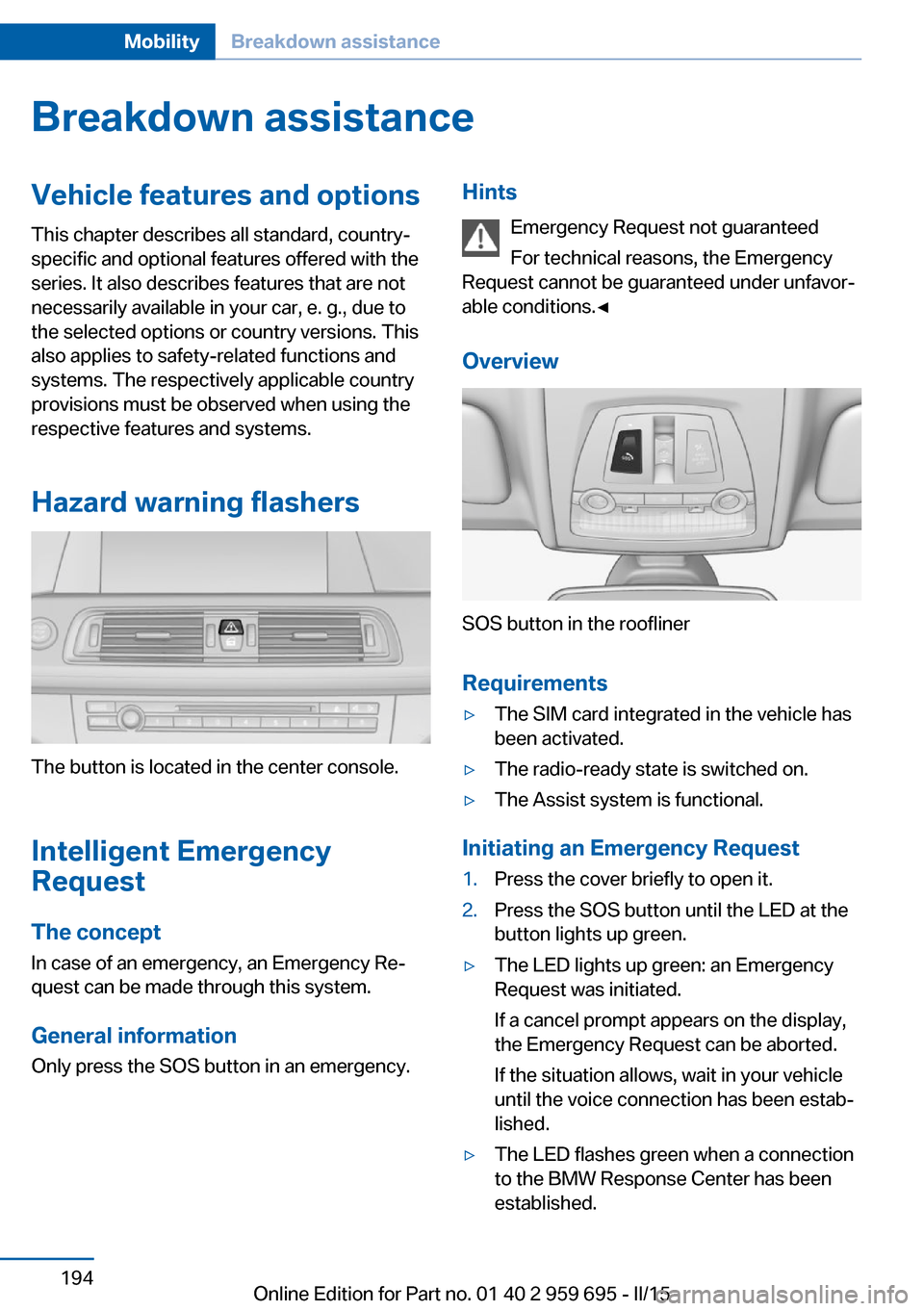
Hazard warning flashers
The button is located in the center console.
Intelligent Emergency
Request
The concept In case of an emergency, an Emergency Re‐
quest can be made through this system.
General information
Only press the SOS button in an emergency.
Hints
Emergency Request not guaranteed
For technical reasons, the Emergency
Request cannot be guaranteed under unfavor‐
able conditions.◀
Overview
SOS button in the roofliner
Requirements
▷The SIM card integrated in the vehicle has
been activated.▷The radio-ready state is switched on.▷The Assist system is functional.
Initiating an Emergency Request
1.Press the cover briefly to open it.2.Press the SOS button until the LED at the
button lights up green.▷The LED lights up green: an Emergency
Request was initiated.
If a cancel prompt appears on the display,
the Emergency Request can be aborted.
If the situation allows, wait in your vehicle
until the voice connection has been estab‐
lished.▷The LED flashes green when a connection
to the BMW Response Center has been
established.Seite 194MobilityBreakdown assistance194
Online Edition for Part no. 01 40 2 959 695 - II/15
Page 213 of 222
Brake lights, brake force dis‐play 119
Brake lights, bulb replace‐ ment 191
Brake pads, break-in 158
Braking, hints 160
Breakdown assistance 194
Break-in 158
Brightness of Control Dis‐ play 92
Bulb replacement, front 189
Bulb replacement, rear 191
Button, Start/Stop 63
Bypassing, refer to Jump- starting 196
C
California Proposition 65 Warning 7
Calling up mirror adjust‐ ment 43
Calling up seat adjust‐ ment 43
Calling up steering wheel ad‐ justment 43
Camera lenses, care 203
Camera, rearview cam‐ era 133
Camera, Side View 135
Camera, Top View 137
Can holder, refer to Cu‐ pholder 152
Car battery 192
Carbon ceramic brake M 156
Car care products 201
Care, displays 203
Care, vehicle 201
Cargo 162
Cargo area, storage compart‐ ments 152
Cargo, securing 163
Cargo straps, securing cargo 163
Car key, refer to Remote con‐ trol 34 Carpet, care 203
Car wash 200
Catalytic converter, refer to Hot exhaust system 159
CBS Condition Based Serv‐ ice 187
CD/Multimedia, see user's manual for Navigation, En‐
tertainment and Communi‐
cation
Center console 16
Central locking system 40
Central screen, refer to Con‐ trol Display 18
Ceramic brake 156
Changes, technical, refer to Safety 7
Changing parts 189
Changing wheels 191
Changing wheels/tires 176
Chassis number, see vehicle identification number 9
Check Control 79
Checking the engine oil level electronically 183
Checking the oil level elec‐ tronically 183
Children, seating position 59
Children, transporting safely 59
Child restraint fixing sys‐ tem 59
Child restraint fixing system LATCH 61
Child restraint fixing systems, mounting 59
Child seat, mounting 59
Child seats 59
Chrome parts, care 202
Cigarette lighter 146
Cleaning displays 203
Climate control 139
Climate control laminated tinted safety glass 159
Climate control wind‐ shield 159 Clock 83
Closing/opening via door lock 39
Closing/opening with remote control 37
Clothes hooks 151
Combination reel, refer to Turn signals 69
Combination switch, refer to Wiper system 69
Comfort Access 41
Compound brake 156
Compressor 177
Computer, refer to On-board computer 88
Condensation on win‐ dows 140
Condensation under the vehi‐ cle 161
Condition Based Service CBS 187
Confirmation signal 43
ConnectedDrive, see user's manual for Navigation, En‐
tertainment and Communi‐
cation
ConnectedDrive Services
Control Display 18
Control Display, settings 91
Controller 18
Control systems, driving sta‐ bility 122
Convenient opening with the remote control 37
Coolant 186
Coolant level 186
Coolant temperature 83
Cooling function 141
Cooling, maximum 141
Cooling system 186
Cornering light 96
Corrosion on brake discs 161
Cosmetic mirror 146
Courtesy lamps during un‐ locking 37 Seite 209Everything from A to ZReference209
Online Edition for Part no. 01 40 2 959 695 - II/15