high beam BMW M6 COUPE 2015 F13M Owner's Manual
[x] Cancel search | Manufacturer: BMW, Model Year: 2015, Model line: M6 COUPE, Model: BMW M6 COUPE 2015 F13MPages: 222, PDF Size: 4.66 MB
Page 19 of 222
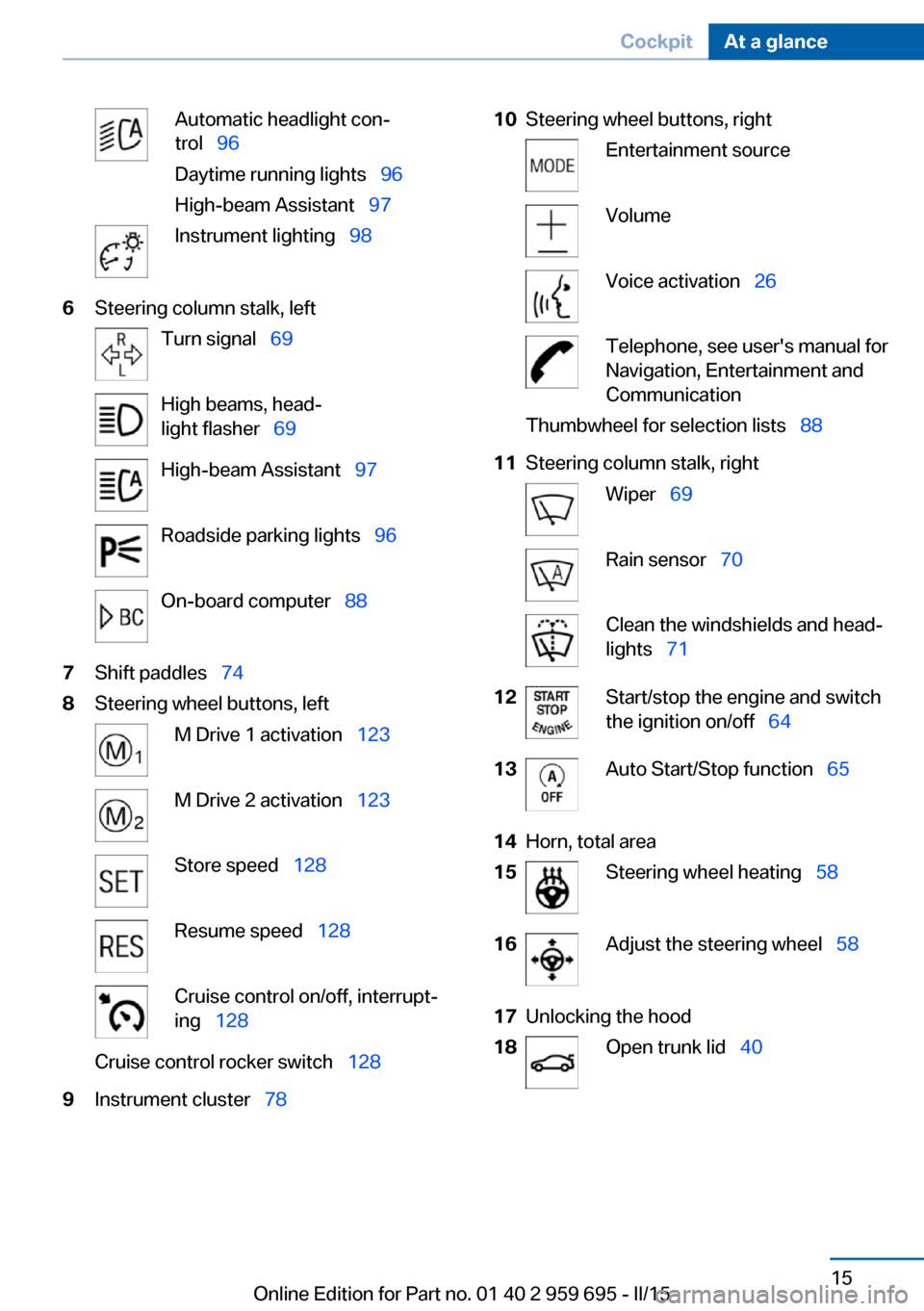
Automatic headlight con‐
trol 96
Daytime running lights 96
High-beam Assistant 97Instrument lighting 986Steering column stalk, leftTurn signal 69High beams, head‐
light flasher 69High-beam Assistant 97Roadside parking lights 96On-board computer 887Shift paddles 748Steering wheel buttons, leftM Drive 1 activation 123M Drive 2 activation 123Store speed 128Resume speed 128Cruise control on/off, interrupt‐
ing 128Cruise control rocker switch 1289Instrument cluster 7810Steering wheel buttons, rightEntertainment sourceVolumeVoice activation 26Telephone, see user's manual for
Navigation, Entertainment and
CommunicationThumbwheel for selection lists 8811Steering column stalk, rightWiper 69Rain sensor 70Clean the windshields and head‐
lights 7112Start/stop the engine and switch
the ignition on/off 6413Auto Start/Stop function 6514Horn, total area15Steering wheel heating 5816Adjust the steering wheel 5817Unlocking the hood18Open trunk lid 40Seite 15CockpitAt a glance15
Online Edition for Part no. 01 40 2 959 695 - II/15
Page 68 of 222
The radio-ready state switches off automati‐
cally:▷After approx. 8 minutes.▷When the vehicle is locked using the cen‐
tral locking system.▷Shortly before the battery is discharged
completely, so that the engine can still be
started.
The radio-ready state remains active if, e.g.,
the ignition is automatically switched off for the
following reasons:
▷Opening or closing the driver's door.▷Unfastening of the driver's safety belt.▷When automatically switching from low
beams to parking lights.
If the engine is switched off and the ignition is
switched on, the system automatically
switches to the radio-ready state if the lights
are turned off or, if correspondingly equipped,
the daytime running lights are activated.
Starting the engine
Hints Enclosed areas
Do not let the engine run in enclosed
areas, since breathing in exhaust fumes may
lead to loss of consciousness and death. The
exhaust gases contain carbon monoxide, an
odorless and colorless but highly toxic gas.◀
Unattended vehicle
Do not leave the vehicle unattended with
the engine running; doing so poses a risk of
danger.
Before leaving the vehicle with the engine run‐
ning, set the parking brake and engage trans‐
mission position P; otherwise, the vehicle may
begin to move.◀
Repeated starting in quick succession
Avoid trying to start the vehicle repeat‐
edly and in quick succession. Otherwise, the
fuel is not burned or is inadequately burned,
posing a risk of overheating and damage to the
catalytic converter.◀
Do not wait for the engine to warm-up while
the vehicle remains stationary. Start driving at
moderate engine speeds.
M double-clutch transmission
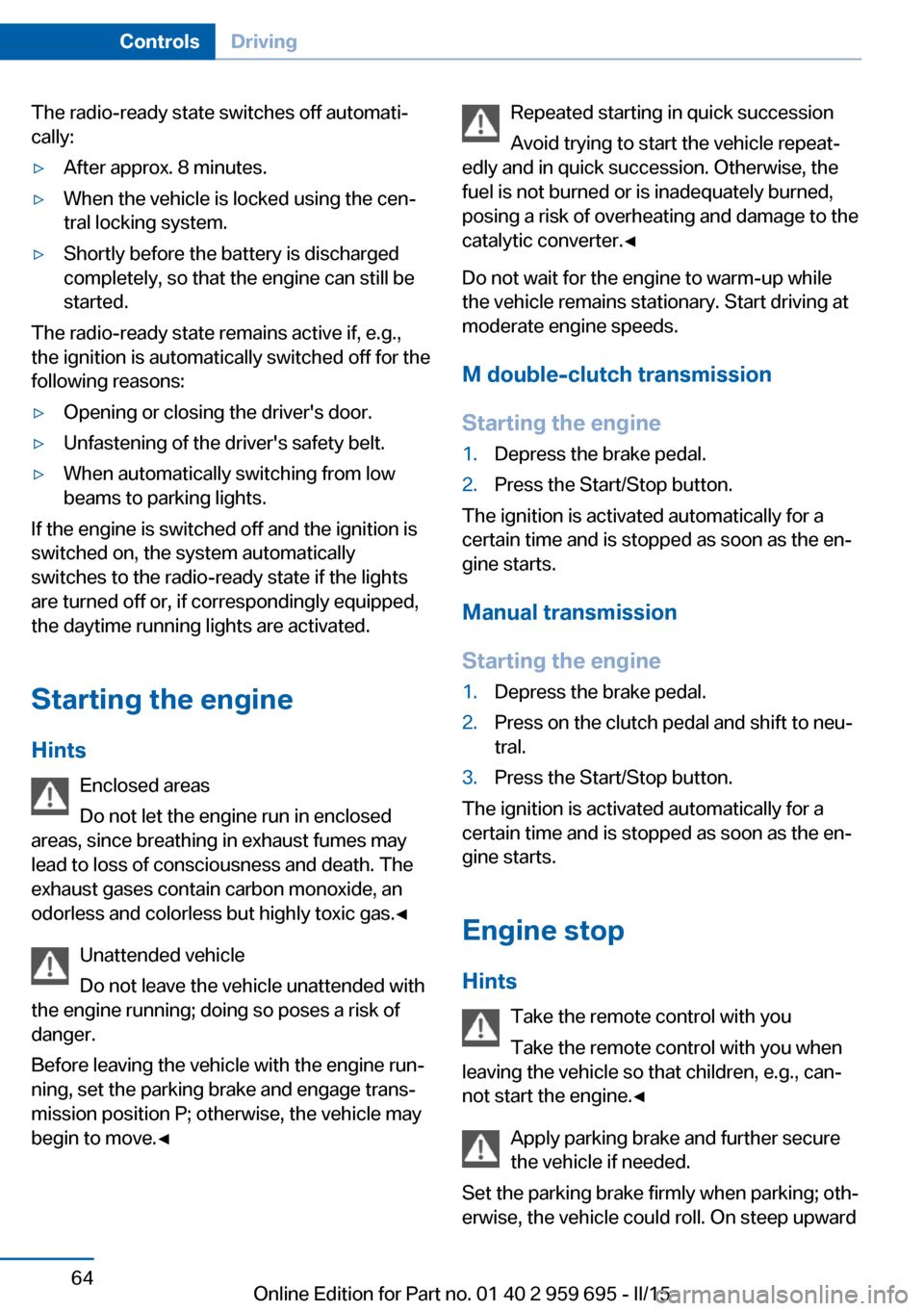
Starting the engine1.Depress the brake pedal.2.Press the Start/Stop button.
The ignition is activated automatically for a
certain time and is stopped as soon as the en‐
gine starts.
Manual transmission
Starting the engine
1.Depress the brake pedal.2.Press on the clutch pedal and shift to neu‐
tral.3.Press the Start/Stop button.
The ignition is activated automatically for a
certain time and is stopped as soon as the en‐
gine starts.
Engine stop
Hints Take the remote control with you
Take the remote control with you when
leaving the vehicle so that children, e.g., can‐
not start the engine.◀
Apply parking brake and further secure
the vehicle if needed.
Set the parking brake firmly when parking; oth‐
erwise, the vehicle could roll. On steep upward
Seite 64ControlsDriving64
Online Edition for Part no. 01 40 2 959 695 - II/15
Page 73 of 222
Turn signal, high beams,
headlight flasher
Turn signal
Using turn signals
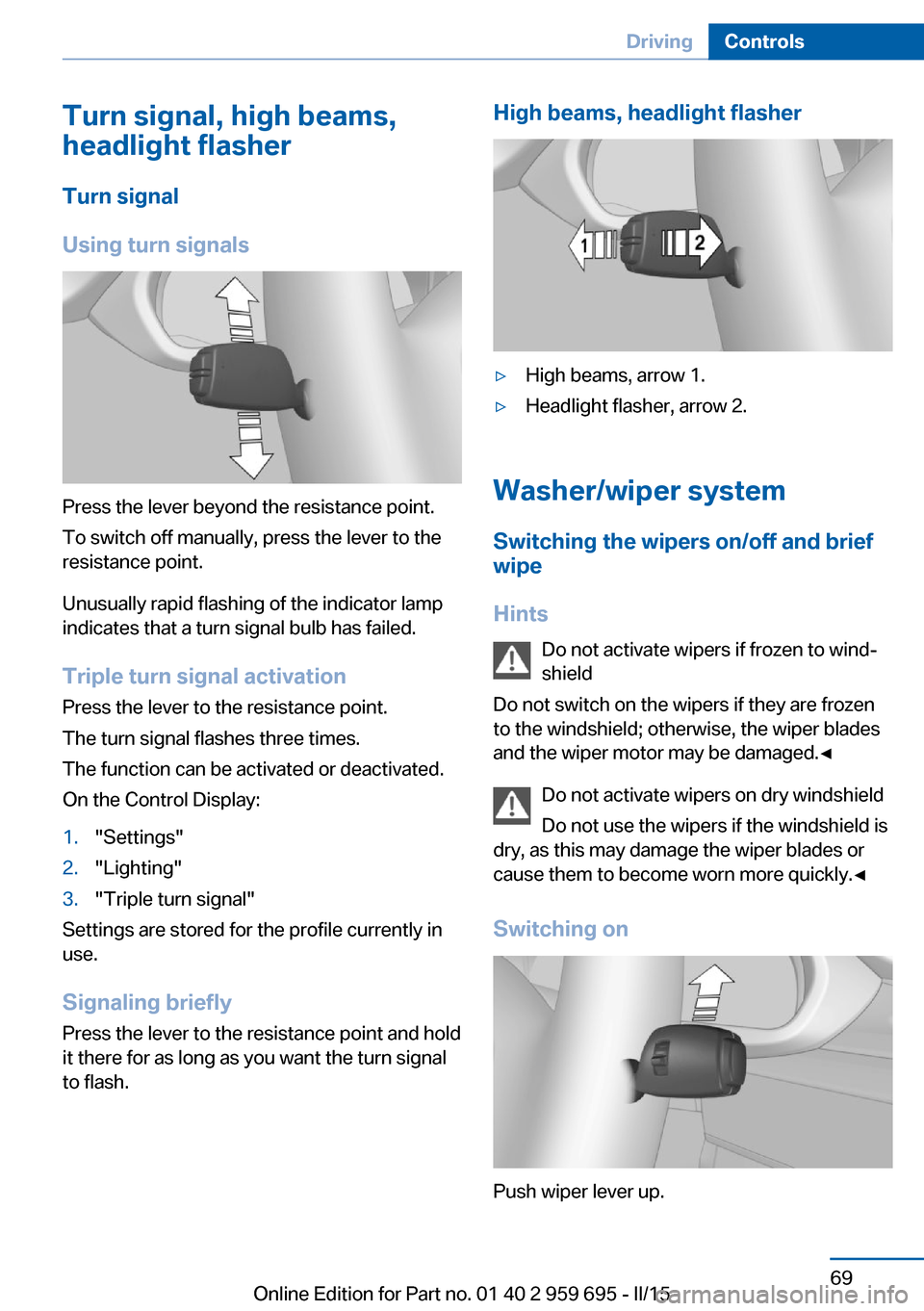
Press the lever beyond the resistance point.
To switch off manually, press the lever to the
resistance point.
Unusually rapid flashing of the indicator lamp
indicates that a turn signal bulb has failed.
Triple turn signal activation Press the lever to the resistance point.
The turn signal flashes three times.
The function can be activated or deactivated.
On the Control Display:
1."Settings"2."Lighting"3."Triple turn signal"
Settings are stored for the profile currently in
use.
Signaling briefly
Press the lever to the resistance point and hold
it there for as long as you want the turn signal
to flash.
High beams, headlight flasher▷High beams, arrow 1.▷Headlight flasher, arrow 2.
Washer/wiper system
Switching the wipers on/off and brief
wipe
Hints Do not activate wipers if frozen to wind‐
shield
Do not switch on the wipers if they are frozen
to the windshield; otherwise, the wiper blades
and the wiper motor may be damaged.◀
Do not activate wipers on dry windshield
Do not use the wipers if the windshield is
dry, as this may damage the wiper blades or
cause them to become worn more quickly.◀
Switching on
Push wiper lever up.
Seite 69DrivingControls69
Online Edition for Part no. 01 40 2 959 695 - II/15
Page 85 of 222
For more information, see Tire Pressure Moni‐
tor, refer to page 103.
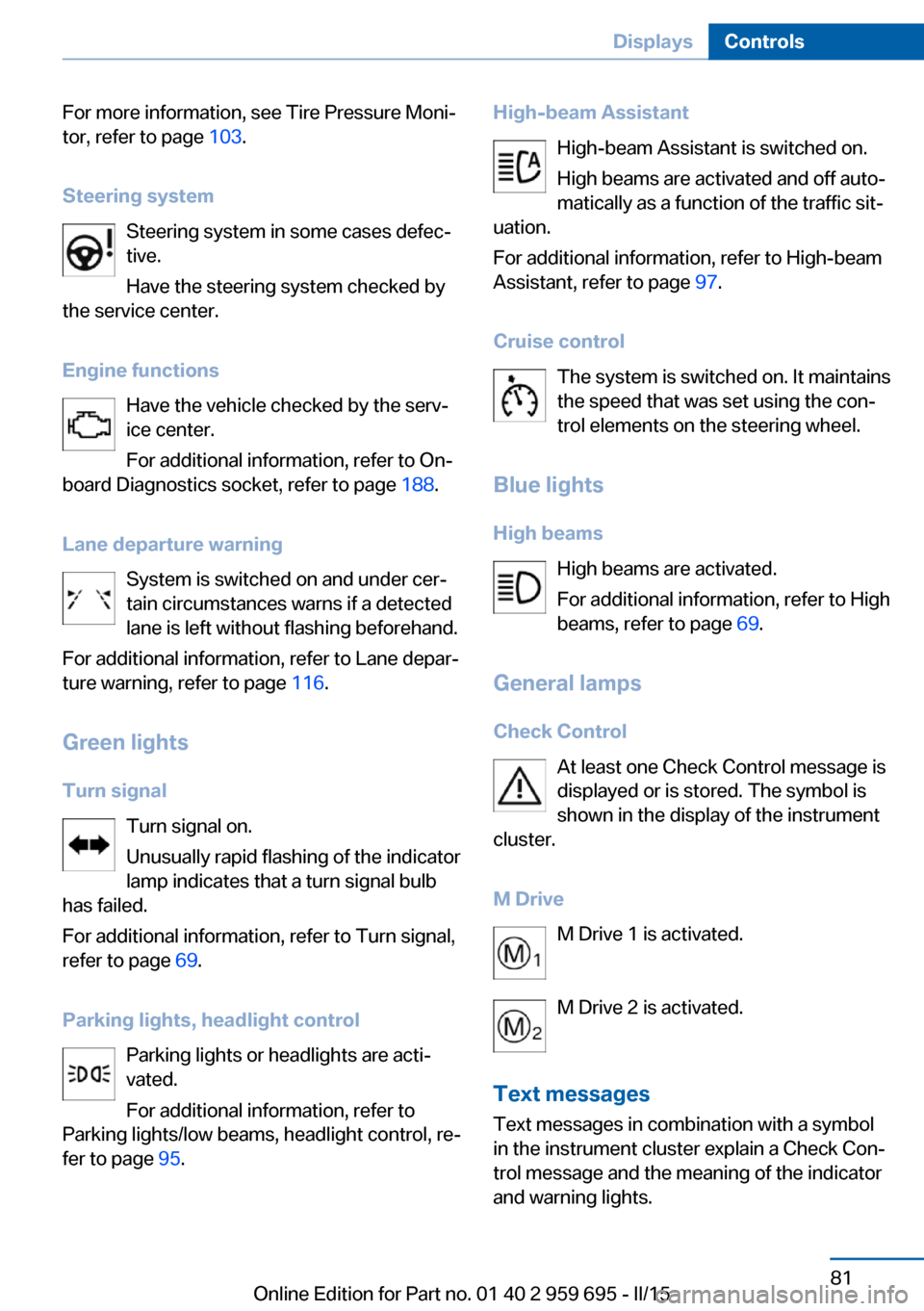
Steering system Steering system in some cases defec‐
tive.
Have the steering system checked by
the service center.
Engine functions Have the vehicle checked by the serv‐ice center.
For additional information, refer to On-
board Diagnostics socket, refer to page 188.
Lane departure warning System is switched on and under cer‐
tain circumstances warns if a detected
lane is left without flashing beforehand.
For additional information, refer to Lane depar‐
ture warning, refer to page 116.
Green lights Turn signal Turn signal on.
Unusually rapid flashing of the indicator
lamp indicates that a turn signal bulb
has failed.
For additional information, refer to Turn signal,
refer to page 69.
Parking lights, headlight control Parking lights or headlights are acti‐
vated.
For additional information, refer to
Parking lights/low beams, headlight control, re‐
fer to page 95.High-beam Assistant
High-beam Assistant is switched on.
High beams are activated and off auto‐
matically as a function of the traffic sit‐
uation.
For additional information, refer to High-beam
Assistant, refer to page 97.
Cruise control The system is switched on. It maintains
the speed that was set using the con‐
trol elements on the steering wheel.
Blue lights
High beams High beams are activated.
For additional information, refer to High
beams, refer to page 69.
General lamps
Check Control At least one Check Control message is
displayed or is stored. The symbol is
shown in the display of the instrument
cluster.
M Drive M Drive 1 is activated.
M Drive 2 is activated.
Text messages Text messages in combination with a symbol
in the instrument cluster explain a Check Con‐
trol message and the meaning of the indicator
and warning lights.Seite 81DisplaysControls81
Online Edition for Part no. 01 40 2 959 695 - II/15
Page 97 of 222
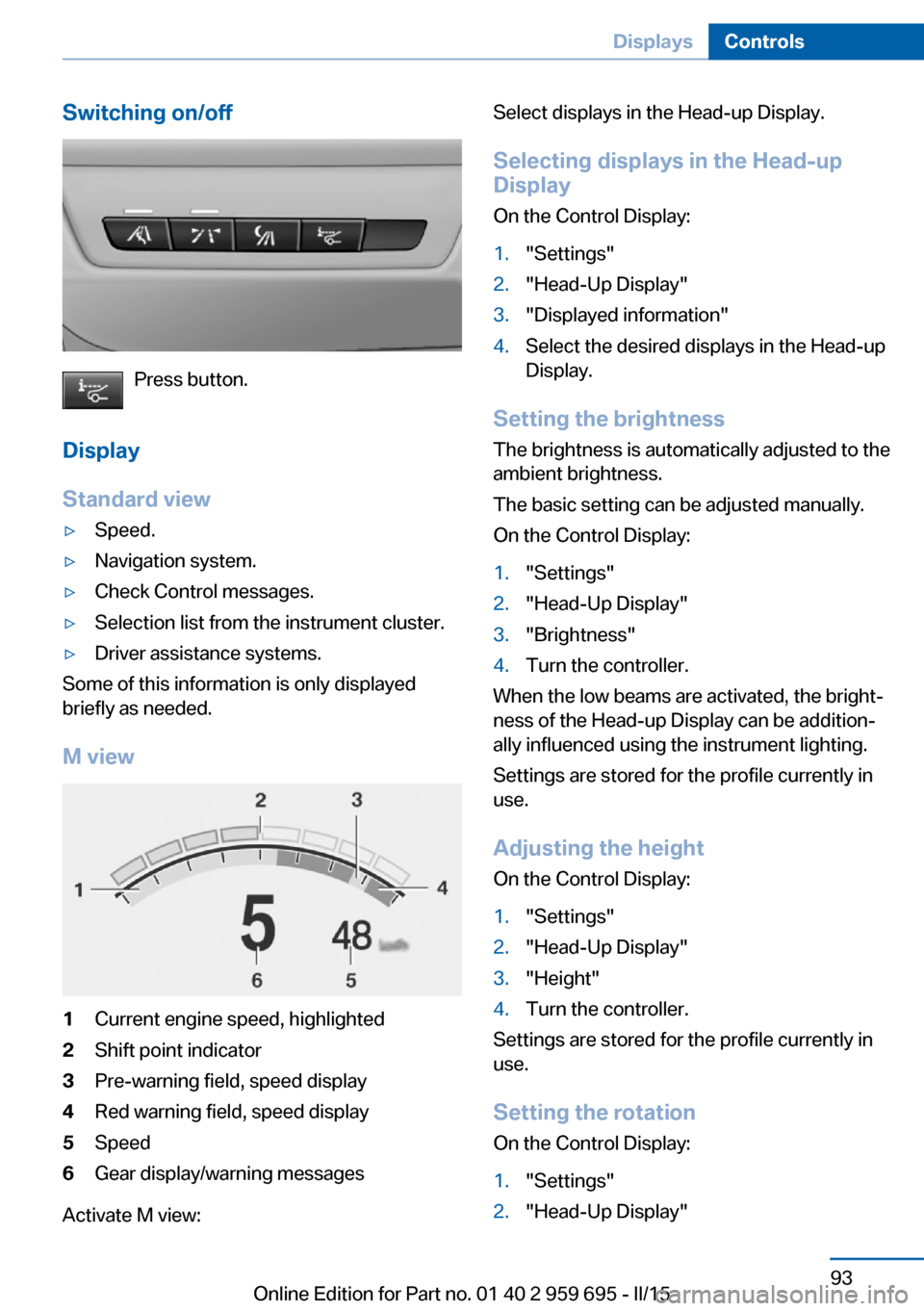
Switching on/off
Press button.
Display
Standard view
▷Speed.▷Navigation system.▷Check Control messages.▷Selection list from the instrument cluster.▷Driver assistance systems.
Some of this information is only displayed
briefly as needed.
M view
1Current engine speed, highlighted2Shift point indicator3Pre-warning field, speed display4Red warning field, speed display5Speed6Gear display/warning messages
Activate M view:
Select displays in the Head-up Display.
Selecting displays in the Head-up Display
On the Control Display:1."Settings"2."Head-Up Display"3."Displayed information"4.Select the desired displays in the Head-up
Display.
Setting the brightness
The brightness is automatically adjusted to the
ambient brightness.
The basic setting can be adjusted manually.
On the Control Display:
1."Settings"2."Head-Up Display"3."Brightness"4.Turn the controller.
When the low beams are activated, the bright‐
ness of the Head-up Display can be addition‐
ally influenced using the instrument lighting.
Settings are stored for the profile currently in
use.
Adjusting the height
On the Control Display:
1."Settings"2."Head-Up Display"3."Height"4.Turn the controller.
Settings are stored for the profile currently in
use.
Setting the rotation
On the Control Display:
1."Settings"2."Head-Up Display"Seite 93DisplaysControls93
Online Edition for Part no. 01 40 2 959 695 - II/15
Page 99 of 222
LightsVehicle features and optionsThis chapter describes all standard, country-
specific and optional features offered with the
series. It also describes features that are not
necessarily available in your car, e. g., due to
the selected options or country versions. This
also applies to safety-related functions and
systems. The respectively applicable country
provisions must be observed when using the
respective features and systems.
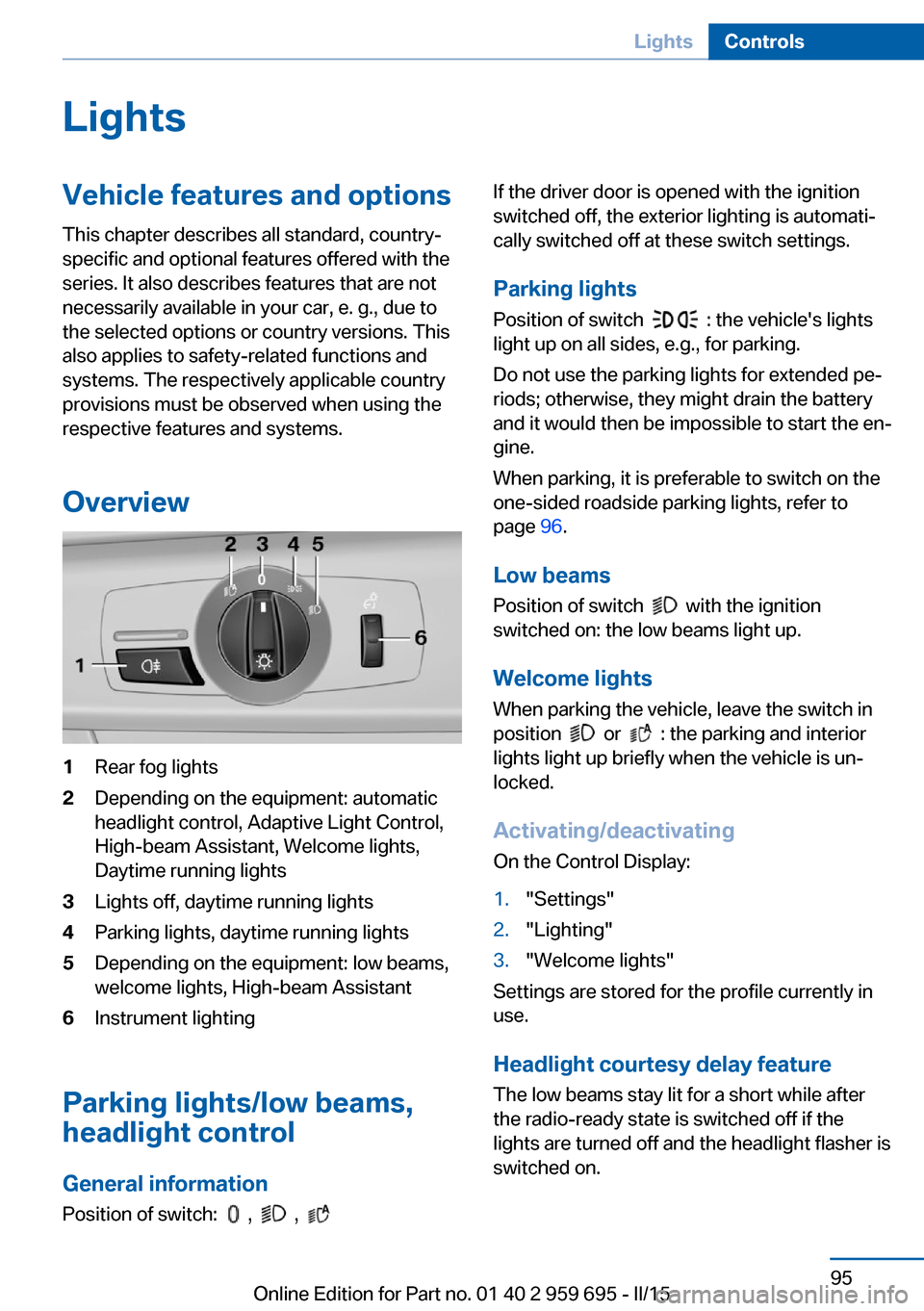
Overview1Rear fog lights2Depending on the equipment: automatic
headlight control, Adaptive Light Control,
High-beam Assistant, Welcome lights,
Daytime running lights3Lights off, daytime running lights4Parking lights, daytime running lights5Depending on the equipment: low beams,
welcome lights, High-beam Assistant6Instrument lighting
Parking lights/low beams,
headlight control
General information
Position of switch:
, ,
If the driver door is opened with the ignition
switched off, the exterior lighting is automati‐
cally switched off at these switch settings.
Parking lights
Position of switch
: the vehicle's lights
light up on all sides, e.g., for parking.
Do not use the parking lights for extended pe‐
riods; otherwise, they might drain the battery
and it would then be impossible to start the en‐
gine.
When parking, it is preferable to switch on the
one-sided roadside parking lights, refer to
page 96.
Low beams Position of switch
with the ignition
switched on: the low beams light up.
Welcome lights
When parking the vehicle, leave the switch in
position
or : the parking and interior
lights light up briefly when the vehicle is un‐
locked.
Activating/deactivating
On the Control Display:
1."Settings"2."Lighting"3."Welcome lights"
Settings are stored for the profile currently in
use.
Headlight courtesy delay featureThe low beams stay lit for a short while after
the radio-ready state is switched off if the
lights are turned off and the headlight flasher is
switched on.
Seite 95LightsControls95
Online Edition for Part no. 01 40 2 959 695 - II/15
Page 101 of 222
ActivatingPosition of switch
with the ignition
switched on.
To avoid blinding oncoming traffic, the Adap‐
tive Light Control does not swivel to the driv‐
er's side when the vehicle is at a standstill.
The turning lights are automatically switched
on depending on the steering angle or the use
of turn signals.
When driving in reverse, the turning lights may
be automatically switched on regardless of the
steering angle.
Self-leveling headlights The self-leveling headlights compensate for
acceleration and braking operations in order
not to blind the oncoming traffic and to achieve
optimum illumination of the roadway.
Malfunction A Check Control message is displayed.
Adaptive Light Control is malfunctioning or has
failed. Have the system checked as soon as
possible.
High-beam Assistant
The concept When the low beams are activated, this system
automatically switches the high beams on and
off or suppresses the light in the areas that
blind oncoming traffic. The procedure is con‐
trolled by a camera on the front of the interior
rearview mirror. The assistant ensures that the
high beams are activated whenever the traffic
situation allows. The driver can intervene at
any time and switch the high beams non and
off as usual.
Note
Personal responsibility
The High-beam Assistant cannot serve
as a substitute for the driver's personal judg‐
ment of when to use the high beams. There‐
fore, manually reel off the high beams in situa‐
tions where required to avoid a safety risk.◀
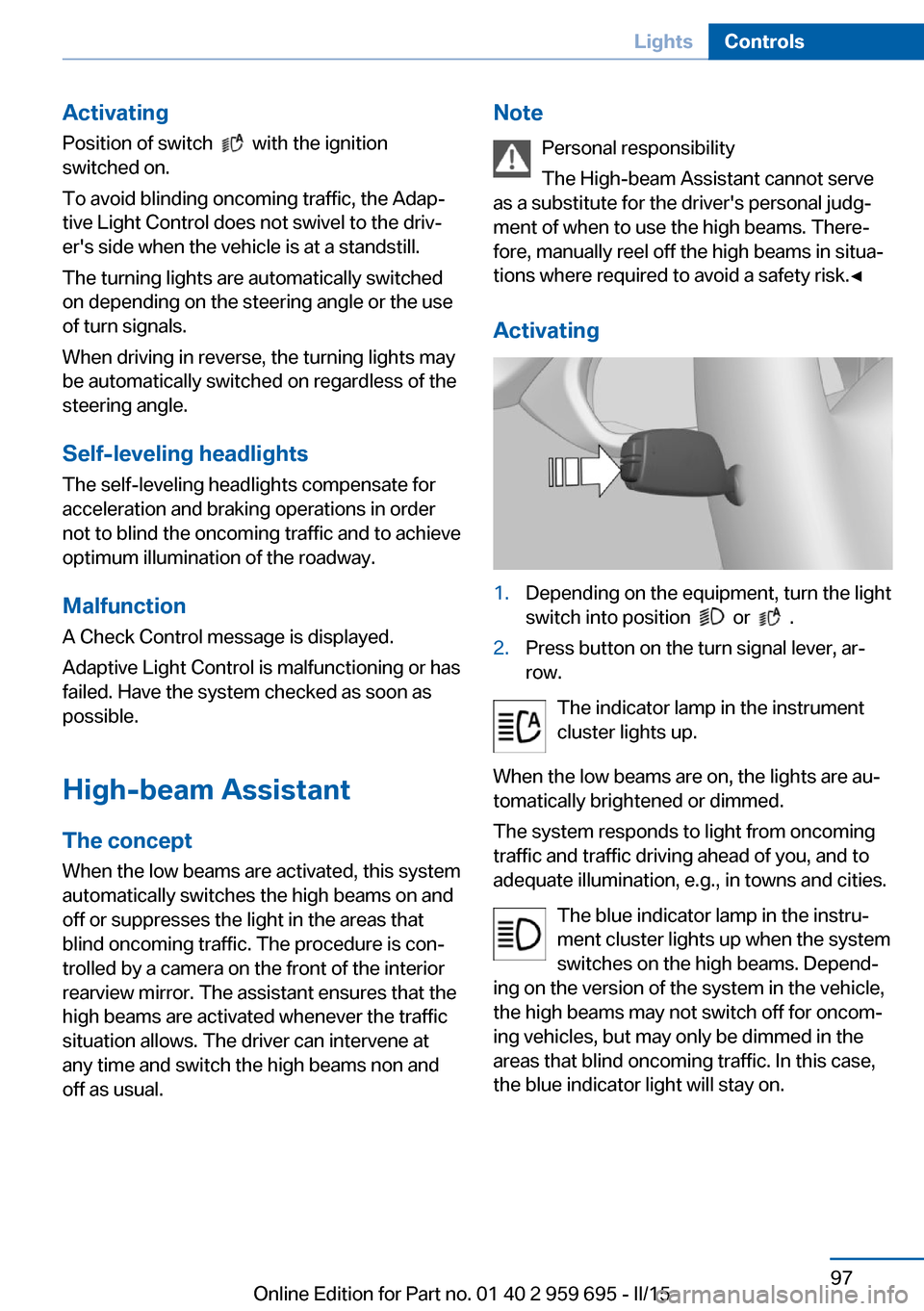
Activating1.Depending on the equipment, turn the light
switch into position
or .
2.Press button on the turn signal lever, ar‐
row.
The indicator lamp in the instrument
cluster lights up.
When the low beams are on, the lights are au‐
tomatically brightened or dimmed.
The system responds to light from oncoming
traffic and traffic driving ahead of you, and to
adequate illumination, e.g., in towns and cities.
The blue indicator lamp in the instru‐
ment cluster lights up when the system
switches on the high beams. Depend‐
ing on the version of the system in the vehicle, the high beams may not switch off for oncom‐
ing vehicles, but may only be dimmed in the
areas that blind oncoming traffic. In this case,
the blue indicator light will stay on.
Seite 97LightsControls97
Online Edition for Part no. 01 40 2 959 695 - II/15
Page 102 of 222
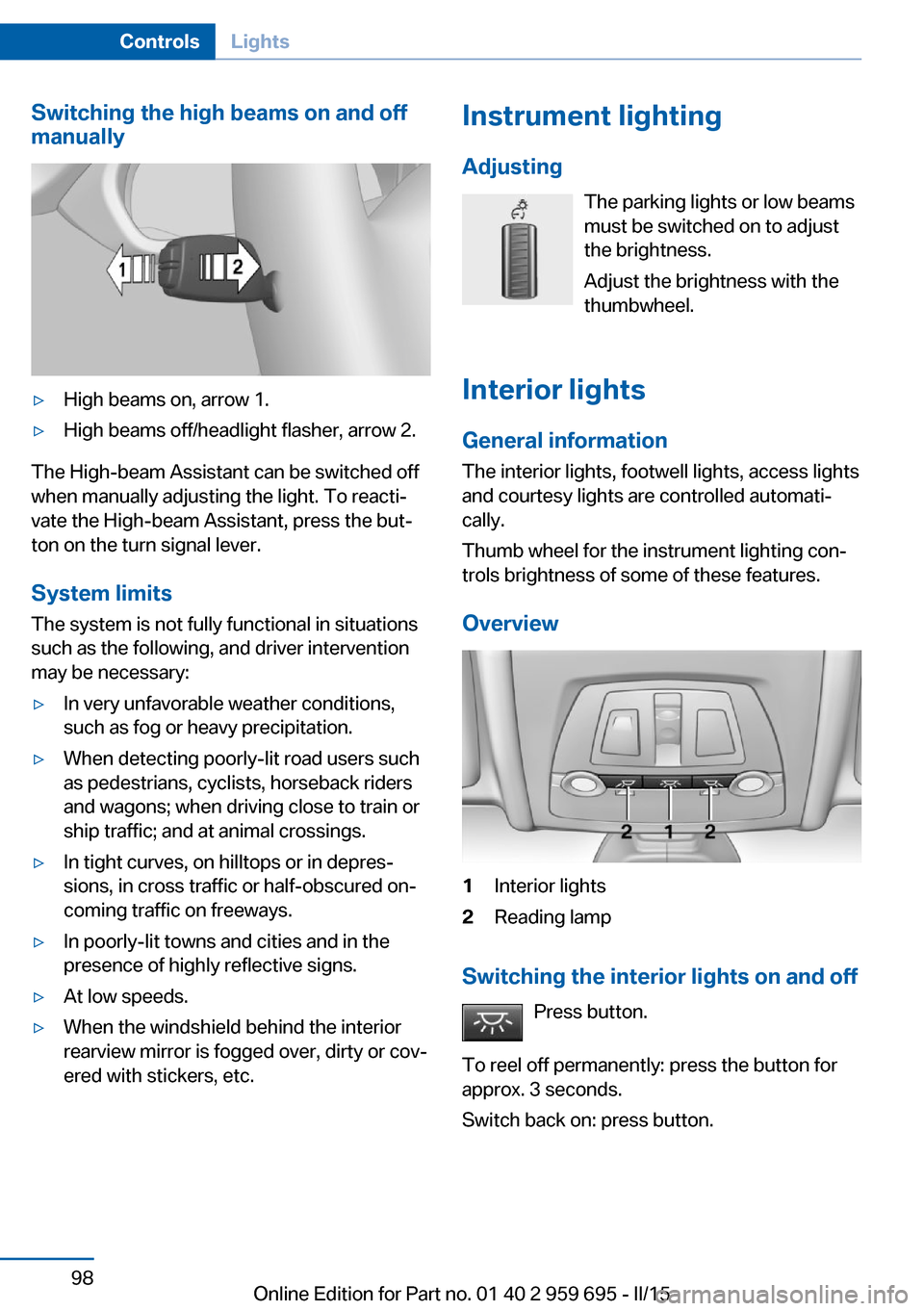
Switching the high beams on and off
manually▷High beams on, arrow 1.▷High beams off/headlight flasher, arrow 2.
The High-beam Assistant can be switched off
when manually adjusting the light. To reacti‐
vate the High-beam Assistant, press the but‐
ton on the turn signal lever.
System limits
The system is not fully functional in situations such as the following, and driver intervention
may be necessary:
▷In very unfavorable weather conditions,
such as fog or heavy precipitation.▷When detecting poorly-lit road users such
as pedestrians, cyclists, horseback riders
and wagons; when driving close to train or
ship traffic; and at animal crossings.▷In tight curves, on hilltops or in depres‐
sions, in cross traffic or half-obscured on‐
coming traffic on freeways.▷In poorly-lit towns and cities and in the
presence of highly reflective signs.▷At low speeds.▷When the windshield behind the interior
rearview mirror is fogged over, dirty or cov‐
ered with stickers, etc.Instrument lighting
Adjusting The parking lights or low beams
must be switched on to adjust
the brightness.
Adjust the brightness with the
thumbwheel.
Interior lights
General information
The interior lights, footwell lights, access lights
and courtesy lights are controlled automati‐
cally.
Thumb wheel for the instrument lighting con‐
trols brightness of some of these features.
Overview1Interior lights2Reading lamp
Switching the interior lights on and off Press button.
To reel off permanently: press the button for
approx. 3 seconds.
Switch back on: press button.
Seite 98ControlsLights98
Online Edition for Part no. 01 40 2 959 695 - II/15
Page 194 of 222
the service center if you are unfamiliar those or
if they have not been described here.
You can obtain a selection of replacement
bulbs at the service center.
Danger of burns
Only change bulbs when they are cool;
otherwise, there is a danger of getting
burned.◀
Working on the lighting system
When working on the lighting system,
you should always reel off the lights affected to
prevent short circuits.
To avoid possible injury or equipment damage
when replacing bulbs, observe any instructions
provided by the bulb manufacturer.◀
Do not touch the bulbs
Do not touch the glass of new bulbs with
your bare hands, as even minute amounts of
contamination will burn into the bulb's surface
and reduce its service life.
Use a clean tissue, cloth or something similar,
or hold the bulb by its base.◀
Light-emitting diodes (LEDs)
Some items of equipment use light-emitting
diodes installed behind a cover as a light
source.
These light-emitting diodes, which are related
to conventional lasers, are officially designated as Class 1 light-emitting diodes.
Do not remove the covers
Do not remove the covers, and never
stare into the unfiltered light for several hours;
otherwise, irritation of the retina could result.◀
Headlight glass
Condensation can form on the inside of the ex‐
ternal lights in cool or humid weather. When
driving with the light switched on, the conden‐
sation evaporates after a short time. The head‐
light glass does not need to be changed.If the headlights do not dim despite driving
with the light switched on, increasing humidity
forms, e. g. water droplets in the light, have the
service center check this.
Headlight setting The headlight adjustments can be affected by
changing lights and bulbs. Have the head‐
lights' settings checked and corrected by serv‐
ice after a replacement.
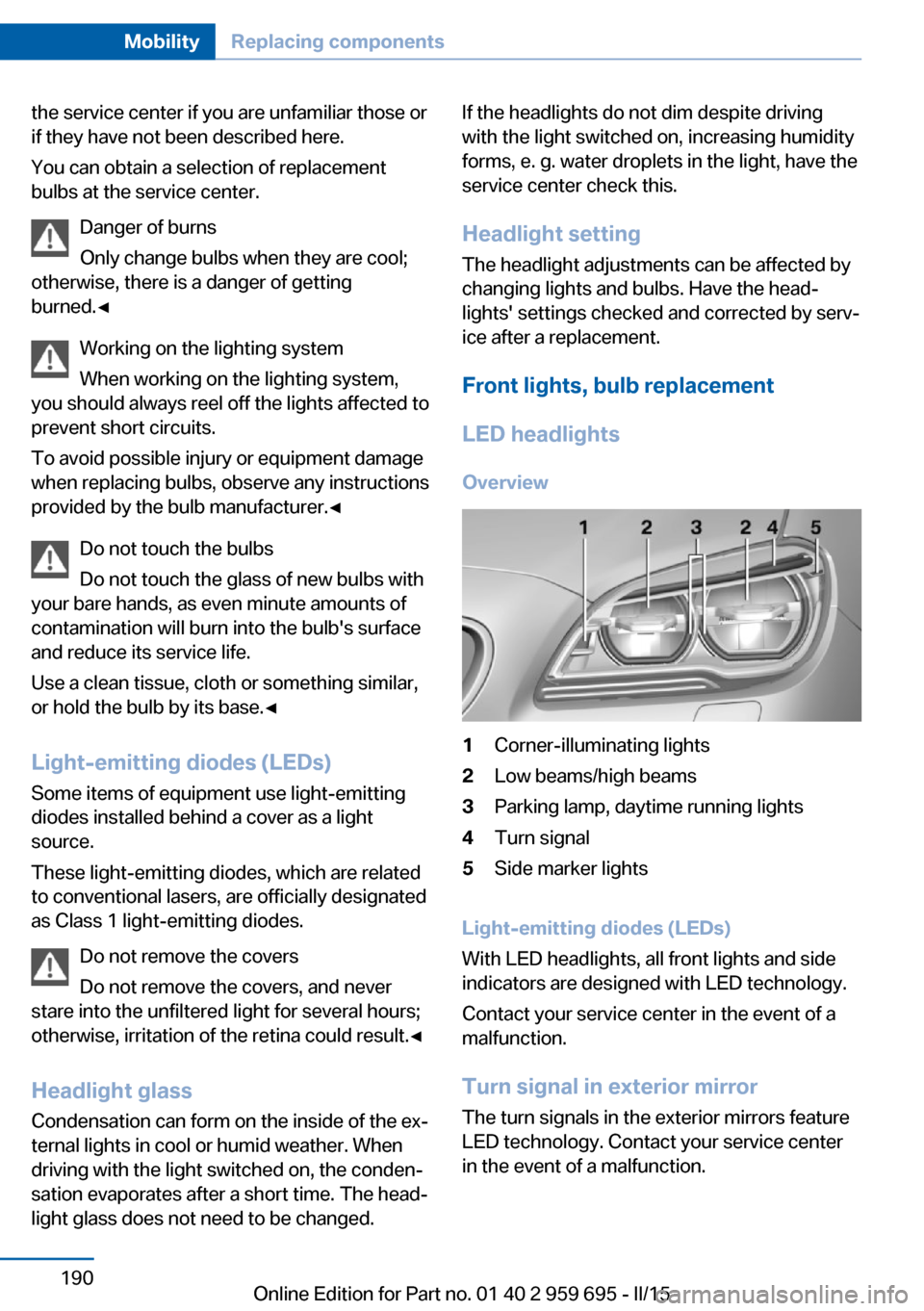
Front lights, bulb replacement LED headlights Overview1Corner-illuminating lights2Low beams/high beams3Parking lamp, daytime running lights4Turn signal5Side marker lights
Light-emitting diodes (LEDs)
With LED headlights, all front lights and side
indicators are designed with LED technology.
Contact your service center in the event of a
malfunction.
Turn signal in exterior mirrorThe turn signals in the exterior mirrors feature
LED technology. Contact your service center
in the event of a malfunction.
Seite 190MobilityReplacing components190
Online Edition for Part no. 01 40 2 959 695 - II/15
Page 215 of 222
Exhaust system 159
Exterior mirror, automatic dimming feature 57
Exterior mirrors 56
External start 196
External temperature dis‐ play 83
External temperature warn‐ ing 83
Eyes for securing cargo 163
F
Failure message, see Check Control 79
False alarm, refer to Uninten‐ tional alarm 45
Fan, refer to Air flow 140
Filler neck for engine oil 184
Fine wood, care 202
First aid kit 195
Fitting for towing, see Tow fit‐ ting 198
Flat tire, changing wheels 191
Flat Tire Monitor FTM 106
Flat tire, repairing 177
Flat tire, Tire Pressure Moni‐ tor TPM 103
Flat tire, warning lamp 104, 106
Flooding 160
Floor carpet, care 203
Floor mats, care 203
Fold-out position, wiper 71
Foot brake 160
For the roofliner, refer to All around the interior rearview
mirror 17
Front airbags 100
Front center armrest 151
Front-end collision warning with City Braking func‐
tion 108
Front lights 189 front-seat passenger airbags,
automatic deactivation 102
Front-seat passenger airbags, indicator lamp 102
Front seats 49
FTM Flat Tire Monitor 106
Fuel 170
Fuel consumption, refer to Average fuel consump‐
tion 89
Fuel filler flap 168
Fuel gauge 82
Fuel lid 168
Fuel quality 170
Fuel recommendation 170
Fuel, tank capacity 207
Fuse 193
G
Garage door opener, refer to Universal Integrated Remote
Control 144
Gasoline 170
Gear change 74
Gear shift indicator 86
General driving notes 159
Glare shield 146
Glass sunroof, powered with tilt function 46
Glove compartment 150
Gross vehicle weight, ap‐ proved 206
Ground clearance 161
H
Handbrake, refer to Parking brake 67
Hand-held transmitter, alter‐ nating code 145
Hazard warning flashers 194
Head airbags 100
Headlight control, auto‐ matic 96 Headlight courtesy delay fea‐
ture 95
Headlight courtesy delay fea‐ ture via remote control 38
Headlight flasher 69
Headlight glass 190
Headlights 189
Headlights, care 201
Headlight washer system 69
Head restraints 49
Head restraints, front 53
Head-up Display 92
Head-up Display, care 203
Head-up display, M view 93
Head-up display, standard view 93
Heavy cargo, stowing 163
Height, seats 49
Height, vehicle 206
High-beam Assistant 97
High beams 69
High beams/low beams, refer to High-beam Assistant 97
Higher speed range 161
Hills 160
Hill start assistant, refer to Drive-off assistant 122
Hints 6
Holder for beverages 152
Homepage 6
Hood 181
Horn 14
Hotel function, trunk lid 41
Hot exhaust system 159
HUD Head-up Display 92
Hydroplaning 159
I Ice warning, see External temperature warning 83
Icy roads, see External tem‐ perature warning 83
Identification marks, tires 173 Seite 211Everything from A to ZReference211
Online Edition for Part no. 01 40 2 959 695 - II/15