steering wheel BMW X1 2013 E84 Owner's Guide
[x] Cancel search | Manufacturer: BMW, Model Year: 2013, Model line: X1, Model: BMW X1 2013 E84Pages: 299, PDF Size: 6.66 MB
Page 200 of 299
TelephoneVehicle equipmentThis chapter describes all series equipment as
well as country-specific and special equipment
offered for this model series.Therefore, it also
describes equipment that may not be found in
your vehicle, for instance due to the selected
special equipment or the country version. This
also applies to safety-related functions and
systems.
At a glance
The concept Mobile phones or other external devices such
as audio players can be connected to the vehi‐
cle via Bluetooth.
Bluetooth® is a registered trademark of Blue‐
tooth® SIG, Inc.
After these devices are paired once, they are
recognized automatically when the ignition is
switched on as soon as they are in the vehicle
and can then be operated via iDrive, the but‐
tons on the steering wheel, and via voice acti‐
vation.
Depending on their functionality, external devi‐
ces can be used via the vehicle as a telephone
or as an audio source. The telephone functions
are described in the following. Operating the
audio functions, refer to page 187.
Up to four external devices can be paired.
Certain functions may need to be enabled by
the mobile phone provider or service provider.
Using the mobile phone while driving
Make entries only when traffic and road
conditions allow. Do not hold the mobile phone
in your hand while you are driving; use the
hands-free system instead. If you do not ob‐
serve this precaution, you can endanger the
vehicle occupants and other road users.◀Snap-in adapter
The snap-in adapter is used to:▷Hold the mobile phone.▷Recharge the battery.▷Connect the mobile phone to an outside
antenna of the vehicle.
This provides for better network reception
and consistent sound quality.
Approved mobile phones
Details on which mobile phones and external
devices with a Bluetooth interface are sup‐
ported by the mobile phone preparation pack‐
age can be obtained at www.bmwusa.com/
bluetooth.
Displaying the vehicle identification
number and software part number
The vehicle identification number and software part number are needed to determine which
mobile phones are supported by the mobile
phone preparation package. The software ver‐
sion of the mobile phone may also be required.
1."Telephone"2.Open "Options".3."Bluetooth® info"4."Display system information"
These approved mobile phones with a certain
software version, support the vehicle functions
described below.
Malfunctions may occur with other mobile
phones or software versions.
Do not operate a mobile phone that is con‐
nected to the vehicle on the mobile phone key‐
pad, as this may lead to a malfunction.
A software update, refer to page 191, can be
performed if necessary.
Seite 196CommunicationTelephone196
Online Edition for Part no. 01 40 2 911 269 - VI/13
Page 205 of 299
Incoming call
Receiving calls If the number of the caller is stored in the
phone book and is transmitted by the network,
the name of the contact is displayed. Other‐
wise, only the phone number is displayed.
If more than one phone number is assigned to
a contact, only the name of the contact is dis‐
played.
For calls on the additional telephone, the num‐
ber is only displayed if it is transmitted by the
network.
An incoming call to one of the telephones is
automatically rejected if there is an active call
on the other telephone.
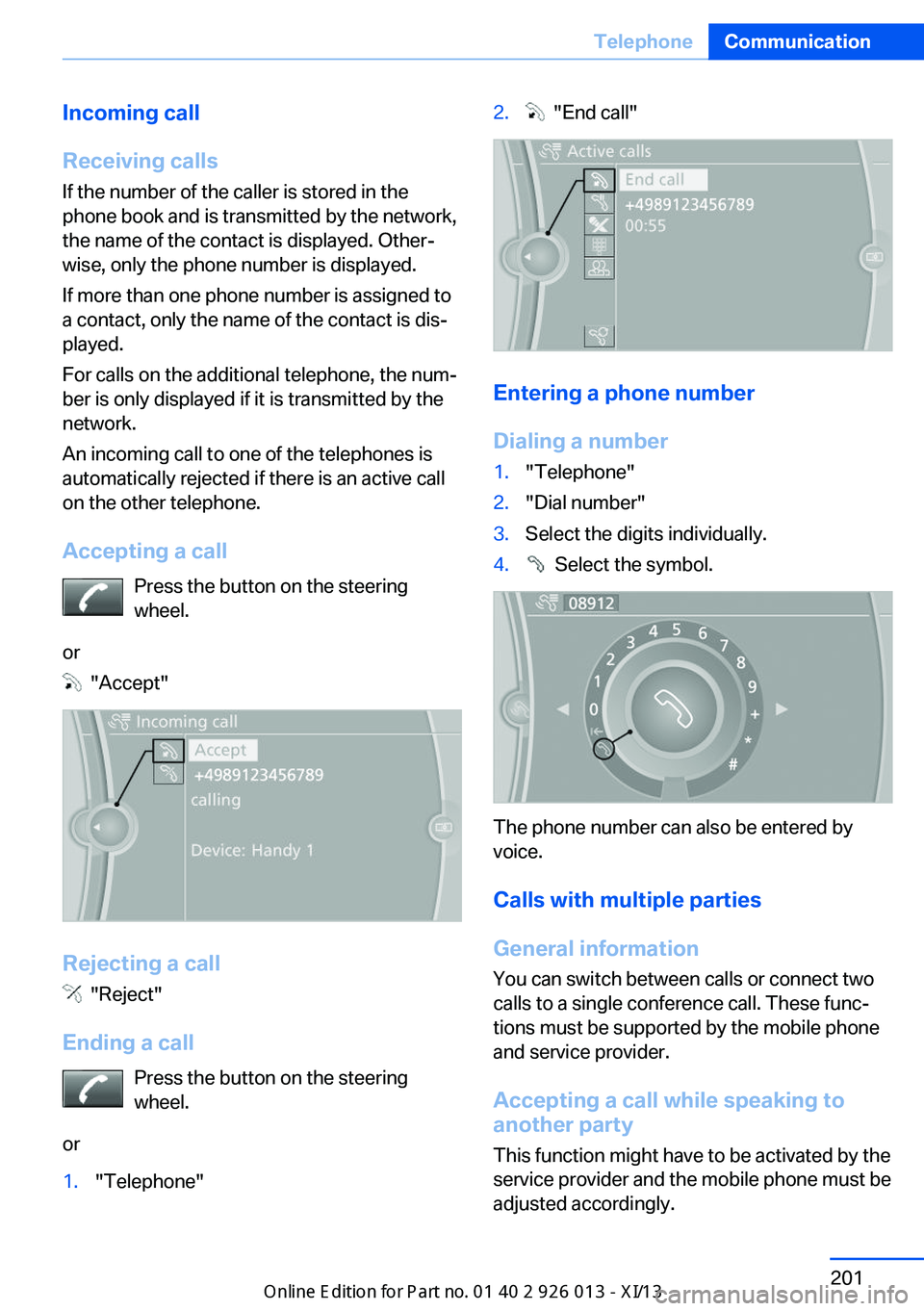
Accepting a call Press the button on the steering
wheel.
or
"Accept"
Rejecting a call
"Reject"
Ending a call Press the button on the steering
wheel.
or
1."Telephone"2. "End call"
Entering a phone number
Dialing a number
1."Telephone"2."Dial number"3.Select the digits individually.4. Select the symbol.
The phone number can also be entered by
voice.
Calls with multiple parties
General information
You can switch between calls or connect two
calls to a single conference call. These func‐
tions must be supported by the mobile phone
and service provider.
Accepting a call while speaking to
another party
This function might have to be activated by the
service provider and the mobile phone must be
adjusted accordingly.
Seite 201TelephoneCommunication201
Online Edition for Part no. 01 40 2 911 269 - VI/13
Page 207 of 299
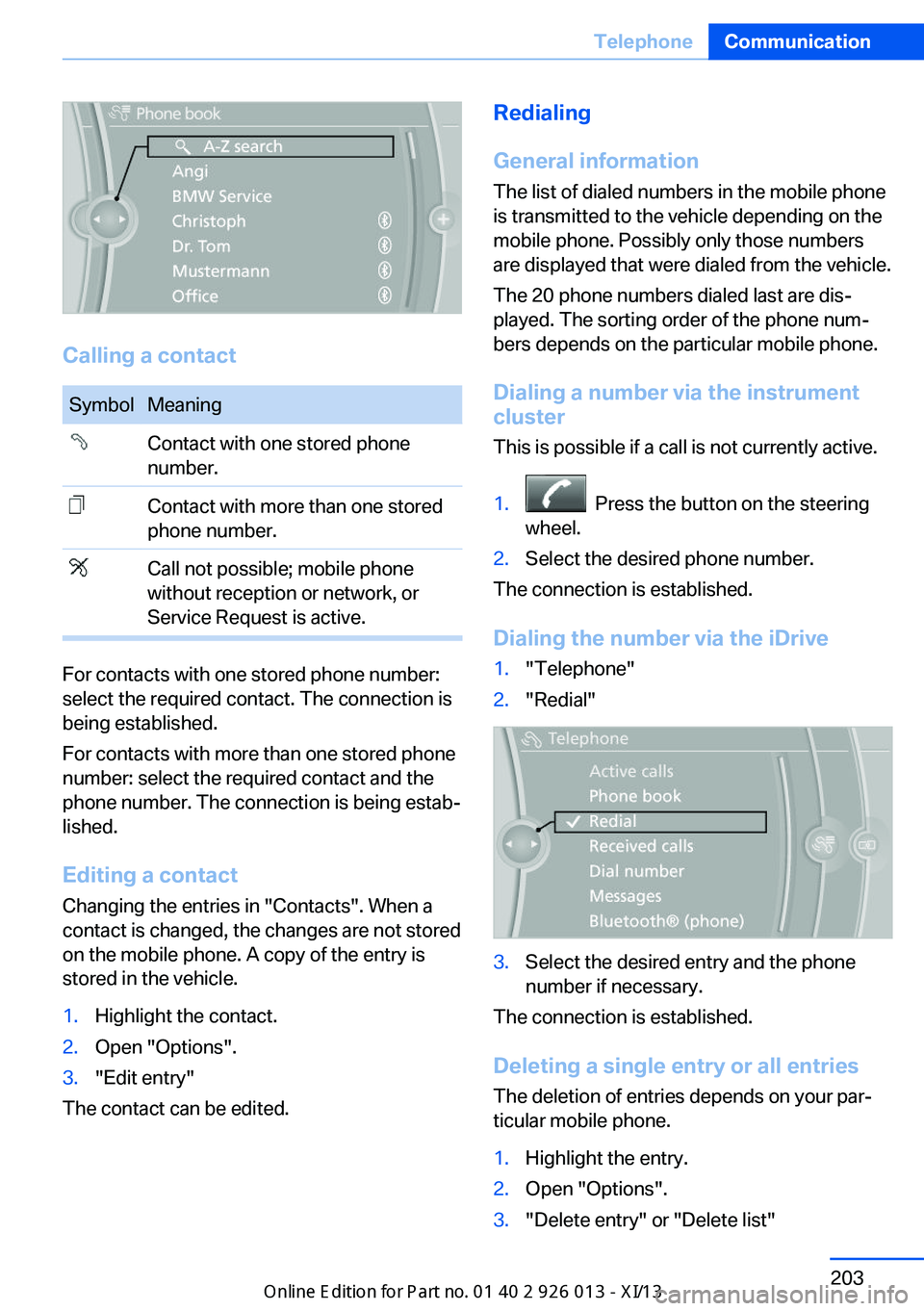
Calling a contact
SymbolMeaningContact with one stored phone
number.Contact with more than one stored
phone number.Call not possible; mobile phone
without reception or network, or
Service Request is active.
For contacts with one stored phone number:
select the required contact. The connection is
being established.
For contacts with more than one stored phone
number: select the required contact and the
phone number. The connection is being estab‐
lished.
Editing a contact Changing the entries in "Contacts". When a
contact is changed, the changes are not stored
on the mobile phone. A copy of the entry is
stored in the vehicle.
1.Highlight the contact.2.Open "Options".3."Edit entry"
The contact can be edited.
Redialing
General information
The list of dialed numbers in the mobile phone
is transmitted to the vehicle depending on the
mobile phone. Possibly only those numbers
are displayed that were dialed from the vehicle.
The 20 phone numbers dialed last are dis‐
played. The sorting order of the phone num‐
bers depends on the particular mobile phone.
Dialing a number via the instrument cluster
This is possible if a call is not currently active.1. Press the button on the steering
wheel.2.Select the desired phone number.
The connection is established.
Dialing the number via the iDrive
1."Telephone"2."Redial"3.Select the desired entry and the phone
number if necessary.
The connection is established.
Deleting a single entry or all entries The deletion of entries depends on your par‐
ticular mobile phone.
1.Highlight the entry.2.Open "Options".3."Delete entry" or "Delete list"Seite 203TelephoneCommunication203
Online Edition for Part no. 01 40 2 911 269 - VI/13
Page 209 of 299
Voice operationGeneral information
Vehicles equipped with the voice activation
system: operation, refer to page 25.
Vehicles not equipped with the voice activation
system: depending on the equipment, the mo‐
bile phone can be voice operated as described
below.
The list of short commands in the Owner's
Manual does not apply to this type of voice op‐
eration.
The concept▷The mobile phone can be operated without
taking your hands from the steering wheel.▷In many cases, the entries are accompa‐
nied by announcements or questions.▷›...‹ Verbal instructions to use with the voice
operation system.▷››...‹‹ Identifies the answers generated by
the voice operation system.
Using voice activation
Activating the voice activation system
1. Press the button on the steering
wheel.2.Say the command.
Terminating the voice activation
system
Press the button on the steering
wheel or ›Cancel‹.
Possible commands
Having possible commands read aloud Press the button on the steering
wheel.
›Help‹.
Possible commands are announced.
The digits from zero to nine are recognized.
The digits can be spoken separately or com‐
bined in a sequence to accelerate the entry.
Using alternative commands
The system often recognizes a number of dif‐
ferent commands to run a function; for in‐
stance:
›Dial name‹ or ›Name‹
Example: dialing a phone number1. Press the button on the steering
wheel.2.›Dial number‹
The system says: »Please say the number
«.3.For instance, ›123 456 790‹
The system says: »123 456 790. Con‐
tinue?«.4.›Dial‹
The system says: »Dialing number«.
Calling
Dialing a phone number
1.›Dial number‹2.Say the phone number.3.›Dial‹
Correcting the phone number The sequence of digits can be deleted after
the system has repeated the digits.
›Correct number‹
The command can be repeated as often as
necessary.
Deleting a phone number ›Delete‹
All digits entered up to that point are deleted.
Seite 205TelephoneCommunication205
Online Edition for Part no. 01 40 2 911 269 - VI/13
Page 265 of 299
needs to be applied when braking and
steering.▷Larger steering wheel movements are re‐
quired.▷Switch on the hazard warning system, de‐
pending on local regulations.▷If the electrical system has failed, clearly
identify the vehicle being towed by placing
a sign or a warning triangle in the rear win‐
dow.
Tow truck
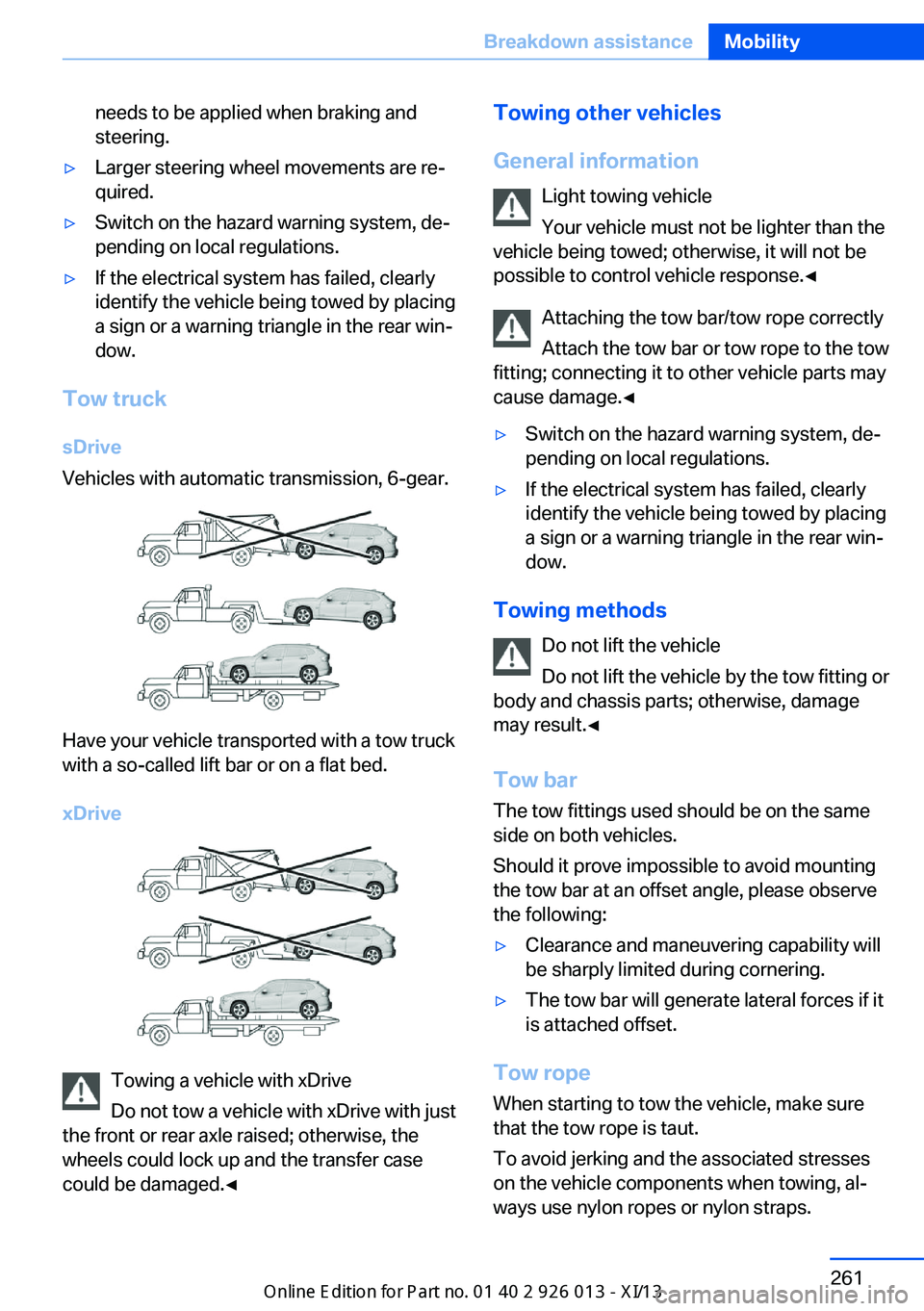
sDrive
Vehicles with automatic transmission, 6-gear.
Have your vehicle transported with a tow truck
with a so-called lift bar or on a flat bed.
xDrive
Towing a vehicle with xDrive
Do not tow a vehicle with xDrive with just
the front or rear axle raised; otherwise, the
wheels could lock up and the transfer case
could be damaged.◀
Towing other vehicles
General information Light towing vehicle
Your vehicle must not be lighter than the
vehicle being towed; otherwise, it will not be
possible to control vehicle response.◀
Attaching the tow bar/tow rope correctly
Attach the tow bar or tow rope to the tow
fitting; connecting it to other vehicle parts may
cause damage.◀▷Switch on the hazard warning system, de‐
pending on local regulations.▷If the electrical system has failed, clearly
identify the vehicle being towed by placing
a sign or a warning triangle in the rear win‐
dow.
Towing methods
Do not lift the vehicle
Do not lift the vehicle by the tow fitting or
body and chassis parts; otherwise, damage
may result.◀
Tow bar The tow fittings used should be on the same
side on both vehicles.
Should it prove impossible to avoid mounting
the tow bar at an offset angle, please observe
the following:
▷Clearance and maneuvering capability will
be sharply limited during cornering.▷The tow bar will generate lateral forces if it
is attached offset.
Tow rope
When starting to tow the vehicle, make sure
that the tow rope is taut.
To avoid jerking and the associated stresses
on the vehicle components when towing, al‐
ways use nylon ropes or nylon straps.
Seite 261Breakdown assistanceMobility261
Online Edition for Part no. 01 40 2 911 269 - VI/13
Page 294 of 299
Sensors, care 266
Service and warranty 7
Service data in the remote control 247
Service interval display, refer to Condition Based Service
CBS 247
Service interval display, refer to Service requirements 78
Service requirements 78
Service requirements, CBS Condition Based Serv‐
ice 247
Service, Roadside Assis‐ tance 258
Services, remote 225
Servotronic 100
Settings– Changing on the Control
Display 77– Language 77
Settings and information 74
Settings, configuring, refer to Personal Profile 30
Settings, DVD 177
Setting the clock, 12h/24h format 76
Shifting
– Automatic transmission with
Steptronic 66
Shifting, automatic transmis‐
sion with Steptronic 69
Shift lever
– Automatic transmission with
Steptronic 66
Shift paddles 69
Shift paddles on the steering wheel 67
Short commands, voice acti‐ vation 272
Side airbags 88
Side windows, refer to Win‐ dows 40
Size, refer to Dimensions 270
Ski bag, refer to Ski and snowboard bag 122
Slide/tilt glass roof, refer to
Panoramic glass sunroof 41
Slot for remote control 57
Smokers' package, refer to Ashtray 117
Snap-in adapter, mobile phone 207
Snap-in adapter, refer to Storage compartment of
center armrest 124
Snow chains 241
Socket, OBD Onboard Diag‐ nosis 248
Socket, refer to Connecting electrical devices 117
Software applications, iPhone 224
Software part number 196
Software update 191
SOS, refer to Emergency Re‐ quest, initiating 257
Sound output 166, 174
Spare fuse 256
Special destinations, naviga‐ tion 147
Special equipment, series equipment 6
Speed, average 73
Speed limit 81
Speed limit, setting 82
Speedometer 14
Speed, with winter tires 240
Split screen 22
Split screen map set‐ tings 157
Spoken instructions, naviga‐ tion 155
Sport program, automatic transmission with Step‐
tronic 66, 69
Spray nozzles, refer to Clean‐ ing the windshield and head‐
lamps 64
Spray nozzles, refer to Wind‐ shield washer nozzles 64
Stability control systems 97 Start/Stop button 57
Start/Stop button, starting the engine 58
Start/Stop button, switching off the engine 59
Starting the engine 58
Start problems, refer to Jump-starting 258
State/province, selecting for navigation 144
Stations, stored 172
Station, storing 166
Status information, iDrive 21
Status of Owner's Manual 6
Steam jets 263
Steering wheel 51
Steering wheel– Shift paddles 67
Steering wheel, adjusting 51
Steering wheel lock 57
Steptronic, refer to Automatic transmission with Step‐
tronic 65
Steptronic, refer to Sport pro‐ gram and manual mode M/
S 69
Stopping, engine 59
Storage compartment nets 124
Storage compart‐ ments 123, 124
Storage, tires 240
Storing the seat position, re‐ fer to Seat and mirror mem‐
ory 48
Storing the vehicle 266
Street, entering for naviga‐ tion 145
Summer tires, refer to Wheels and tires 232
Summer tires, tread 238
Switches, refer to Cockpit 12
Switching off, engine 59
Switching off, vehicle 59
Switch-on times, parked-car ventilation 112
Symbols 6
Seite 290ReferenceEverything from A to Z290
Online Edition for Part no. 01 40 2 911 269 - VI/13