Lamp BMW X1 2013 E84 Owner's Manual
[x] Cancel search | Manufacturer: BMW, Model Year: 2013, Model line: X1, Model: BMW X1 2013 E84Pages: 299, PDF Size: 6.66 MB
Page 7 of 299
Addendum
of your vehicle to be road safe and
are recommended by the
manufacturer of your vehicle.
Information about recommended
snow chains is available from a
service center.
13.At page 242, under the heading
“Hood,” the sentence beginning, “If
you are unfamiliar” should be
disregarded.
14.At page 245, under the heading:
“Approved oil types,” the references
to “Approved” should be read as
“Suitable.” Immediately preceding
the “Gasoline engine” chart, the
following sentence should be
inserted: “Add engine oils that meet
the following oil rating
standards: . . .” The reference to
“BMW High Performance SAE 5W-
30” should be disregarded.
15.At page 245, under the heading:
“Alternative oil types,” the text
preceding the chart should be
disregarded, and in lieu thereof
should be read as follows: “If an
engine oil suitable for continuous
use is not available, up to 1 US
quart/liter of an engine oil with the
following oil rating can be
added: . . .” The reference to
“specification” should be read as
“rating.”
16.At page 246, under the heading:
“Engine oil change,” the text should
be disregarded and in lieu thereof
should be read as follows:
BMW recommends that you have
the oil changed at your BMW
dealer’s service center or at another
service center that has trained
personnel that can perform the work
in accordance with BMW
specifications
17.At page 247 and page 248, under
the heading: “Service and Warranty
Information Booklet for US models
and Warranty and Service Guide
Booklet for Canadian models,” the
second paragraph should be
disregarded and the following text
read in lieu thereof:
The manufacturer of your vehicle
recommends that you have
maintenance and repair performed
by your BMW dealer’s service
center or another service center or
repair shop that employs trained
personnel that can perform
maintenance and repair work on
your vehicle in accordance with
BMW specifications. The
manufacturer of your vehicle
recommends that you maintain
records of all maintenance and
repair work performed on your
vehicle.
18.At page 250 and page 252, where it
reads: “Do not perform work/bulb
replacement on xenon headlamps,”
that text should be disregarded and
in lieu thereof the following text
should be read: “Xenon headlamp
work or replacement can cause
serious and fatal injuries.” In the
text that follows, where it reads:
“[h]ave any work on the xenon
lighting system . . . ,” the following
Page 9 of 299
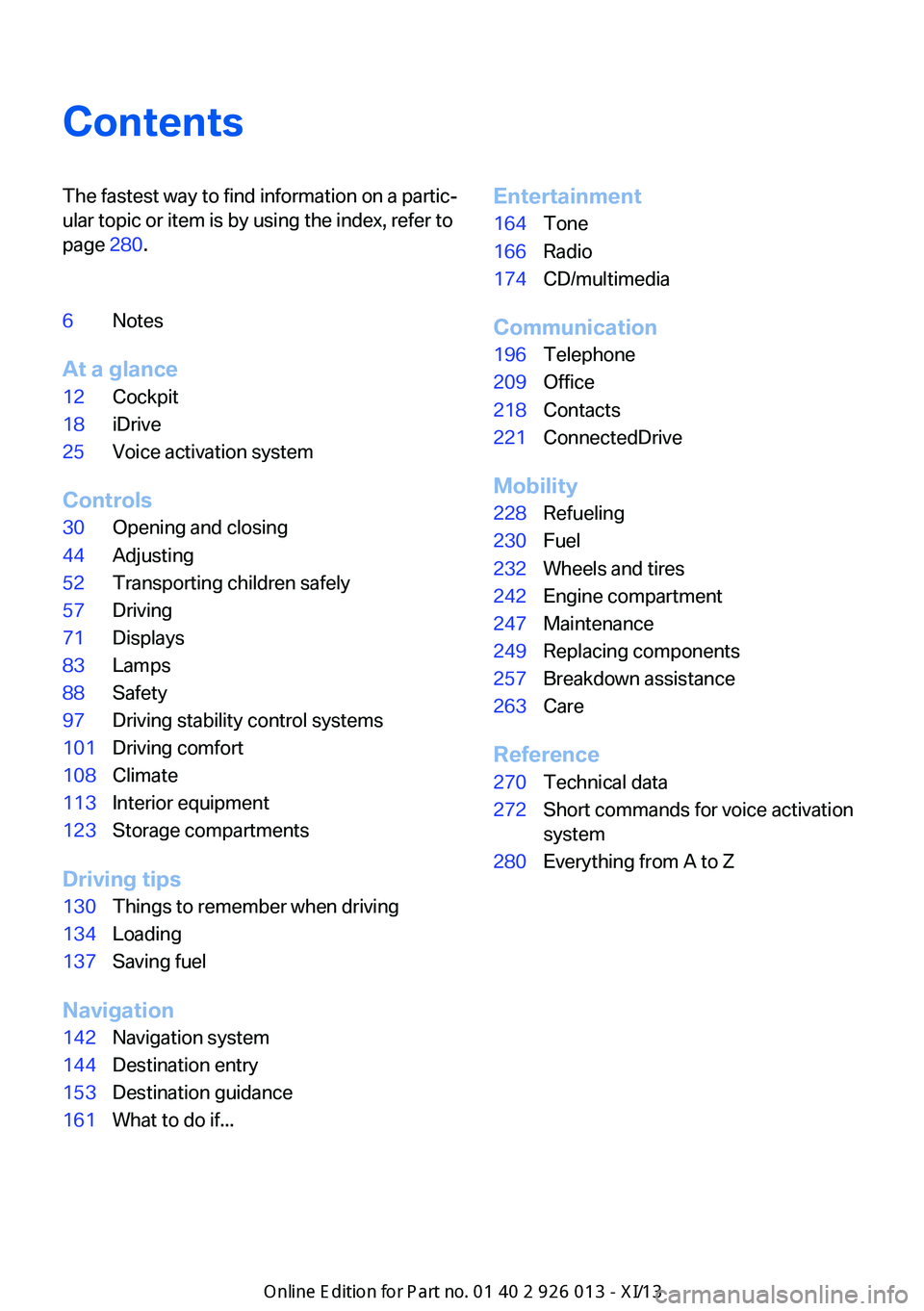
ContentsThe fastest way to find information on a partic‐
ular topic or item is by using the index, refer to
page 280.6Notes
At a glance
12Cockpit18iDrive25Voice activation system
Controls
30Opening and closing44Adjusting52Transporting children safely57Driving71Displays83Lamps88Safety97Driving stability control systems101Driving comfort108Climate113Interior equipment123Storage compartments
Driving tips
130Things to remember when driving134Loading137Saving fuel
Navigation
142Navigation system144Destination entry153Destination guidance161What to do if...Entertainment164Tone166Radio174CD/multimedia
Communication
196Telephone209Office218Contacts221ConnectedDrive
Mobility
228Refueling230Fuel232Wheels and tires242Engine compartment247Maintenance249Replacing components257Breakdown assistance263Care
Reference
270Technical data272Short commands for voice activation
system280Everything from A to Z
Online Edition for Part no. 01 40 2 911 269 - VI/13
Page 16 of 299
CockpitVehicle equipment
This chapter describes all series equipment as
well as country-specific and special equipment
offered for this model series.Therefore, it alsodescribes equipment that may not be found in
your vehicle, for instance due to the selected
special equipment or the country version. This
also applies to safety-related functions and
systems.
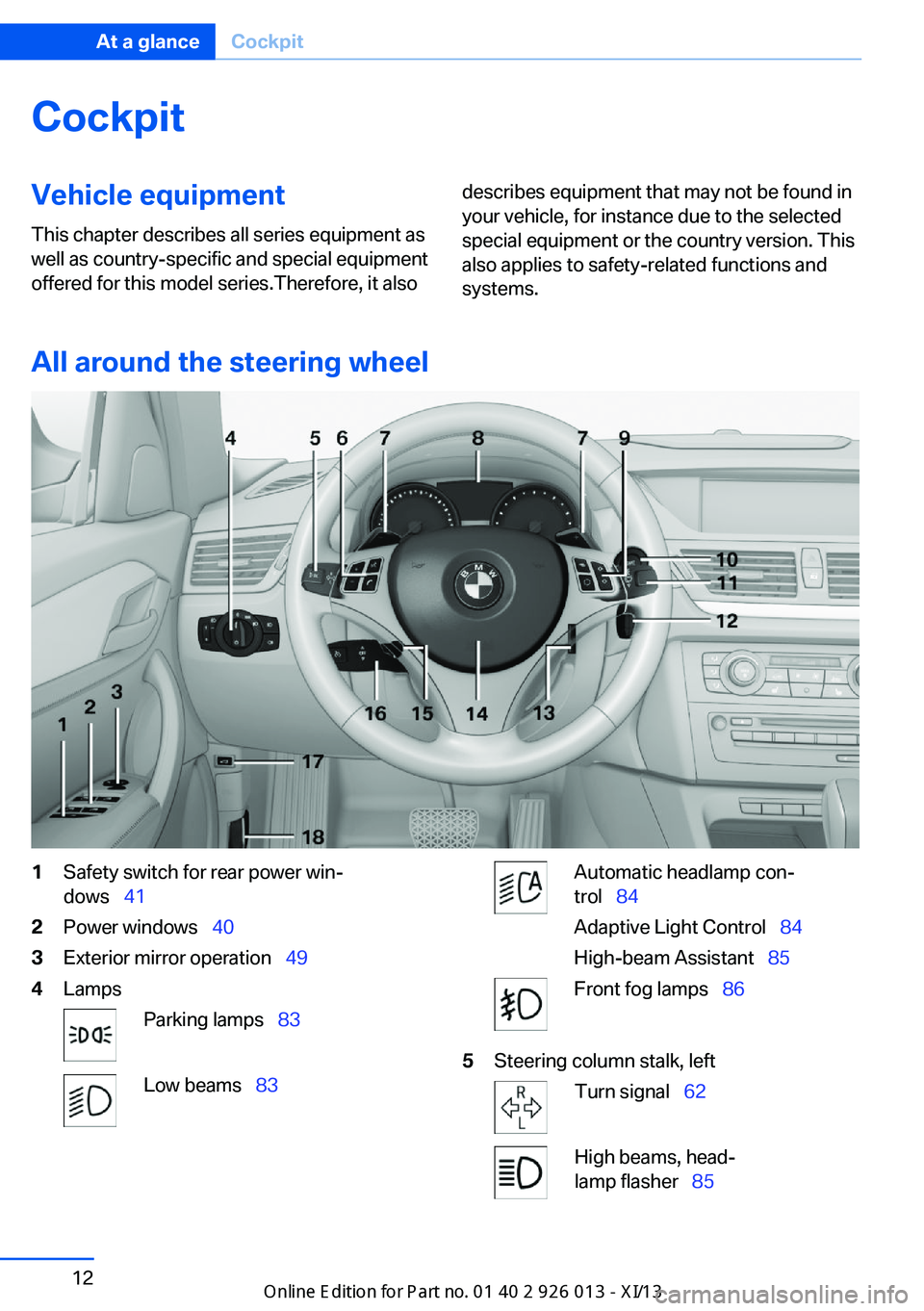
All around the steering wheel
1Safety switch for rear power win‐
dows 412Power windows 403Exterior mirror operation 494LampsParking lamps 83Low beams 83Automatic headlamp con‐
trol 84
Adaptive Light Control 84
High-beam Assistant 85Front fog lamps 865Steering column stalk, leftTurn signal 62High beams, head‐
lamp flasher 85Seite 12At a glanceCockpit12
Online Edition for Part no. 01 40 2 911 269 - VI/13
Page 17 of 299
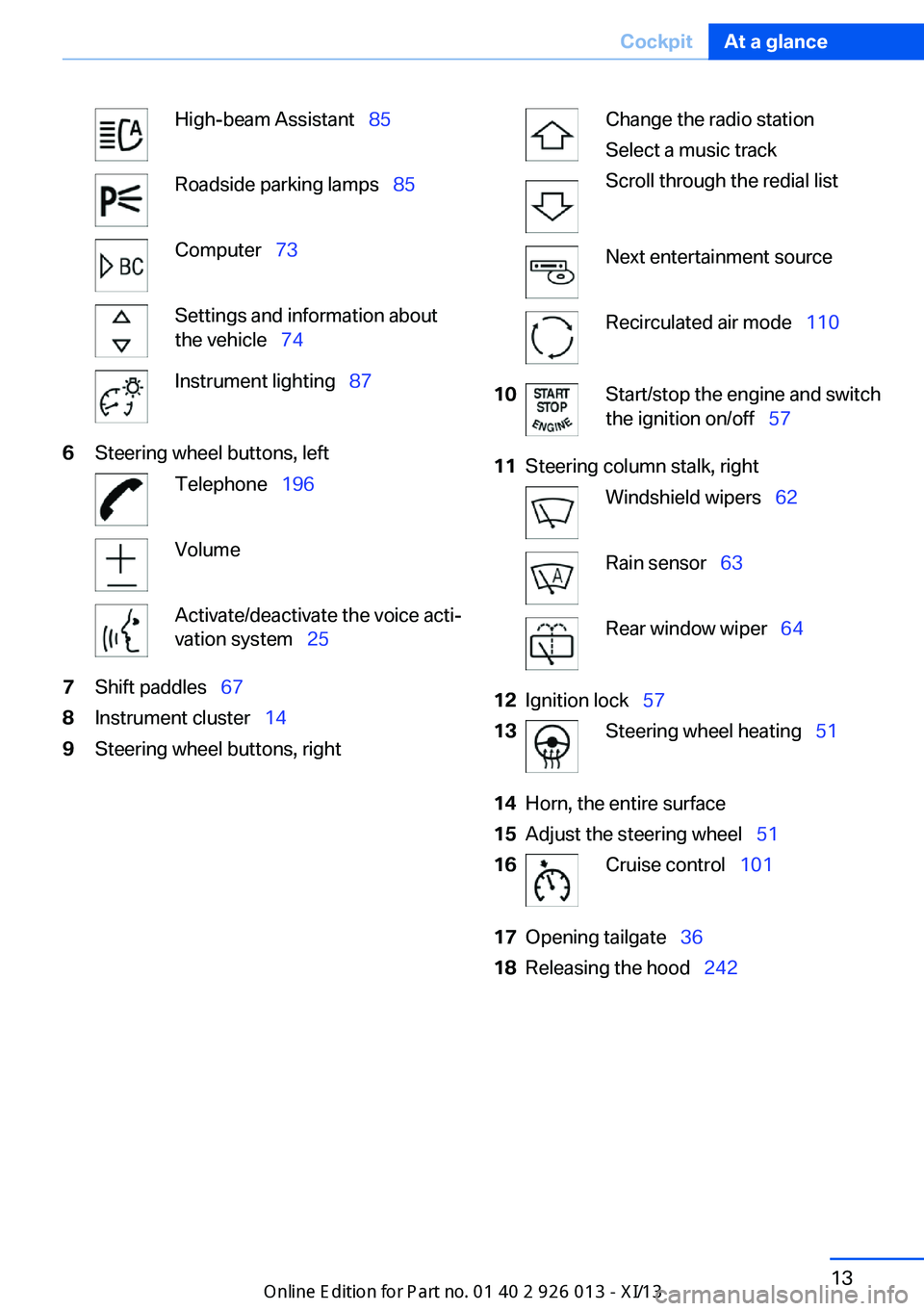
High-beam Assistant 85Roadside parking lamps 85Computer 73Settings and information about
the vehicle 74Instrument lighting 876Steering wheel buttons, leftTelephone 196VolumeActivate/deactivate the voice acti‐
vation system 257Shift paddles 678Instrument cluster 149Steering wheel buttons, rightChange the radio station
Select a music track
Scroll through the redial listNext entertainment sourceRecirculated air mode 11010Start/stop the engine and switch
the ignition on/off 5711Steering column stalk, rightWindshield wipers 62Rain sensor 63Rear window wiper 6412Ignition lock 5713Steering wheel heating 5114Horn, the entire surface15Adjust the steering wheel 5116Cruise control 10117Opening tailgate 3618Releasing the hood 242Seite 13CockpitAt a glance13
Online Edition for Part no. 01 40 2 911 269 - VI/13
Page 18 of 299
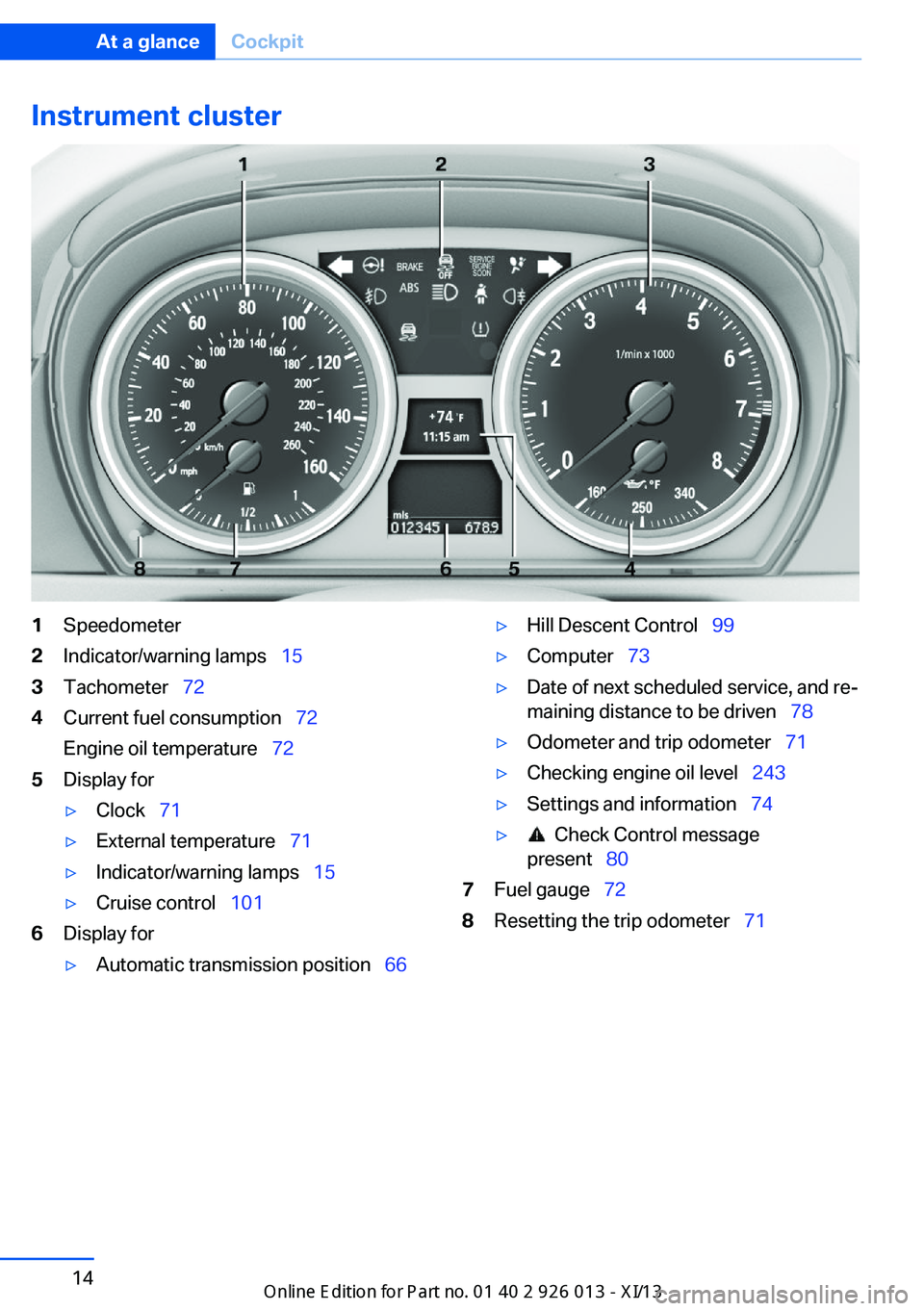
Instrument cluster1Speedometer2Indicator/warning lamps 153Tachometer 724Current fuel consumption 72
Engine oil temperature 725Display for▷Clock 71▷External temperature 71▷Indicator/warning lamps 15▷Cruise control 1016Display for▷Automatic transmission position 66▷Hill Descent Control 99▷Computer 73▷Date of next scheduled service, and re‐
maining distance to be driven 78▷Odometer and trip odometer 71▷Checking engine oil level 243▷Settings and information 74▷ Check Control message
present 807Fuel gauge 728Resetting the trip odometer 71Seite 14At a glanceCockpit14
Online Edition for Part no. 01 40 2 911 269 - VI/13
Page 19 of 299
Indicator/warning lampsThe concept
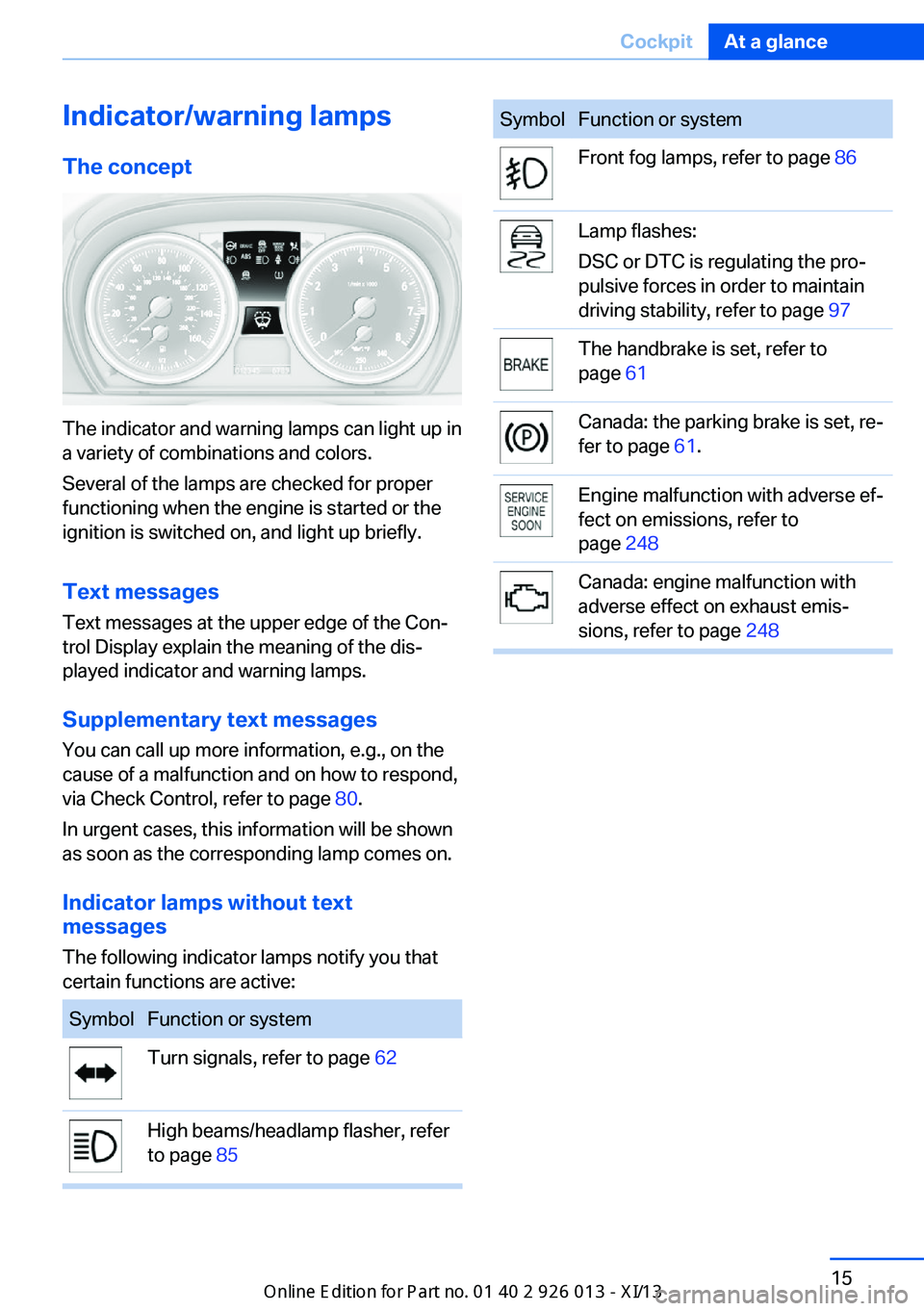
The indicator and warning lamps can light up in
a variety of combinations and colors.
Several of the lamps are checked for proper
functioning when the engine is started or the
ignition is switched on, and light up briefly.
Text messages Text messages at the upper edge of the Con‐
trol Display explain the meaning of the dis‐
played indicator and warning lamps.
Supplementary text messages
You can call up more information, e.g., on the
cause of a malfunction and on how to respond,
via Check Control, refer to page 80.
In urgent cases, this information will be shown
as soon as the corresponding lamp comes on.
Indicator lamps without text
messages
The following indicator lamps notify you that
certain functions are active:
SymbolFunction or systemTurn signals, refer to page 62High beams/headlamp flasher, refer
to page 85SymbolFunction or systemFront fog lamps, refer to page 86Lamp flashes:
DSC or DTC is regulating the pro‐
pulsive forces in order to maintain
driving stability, refer to page 97The handbrake is set, refer to
page 61Canada: the parking brake is set, re‐
fer to page 61.Engine malfunction with adverse ef‐
fect on emissions, refer to
page 248Canada: engine malfunction with
adverse effect on exhaust emis‐
sions, refer to page 248Seite 15CockpitAt a glance15
Online Edition for Part no. 01 40 2 911 269 - VI/13
Page 21 of 299
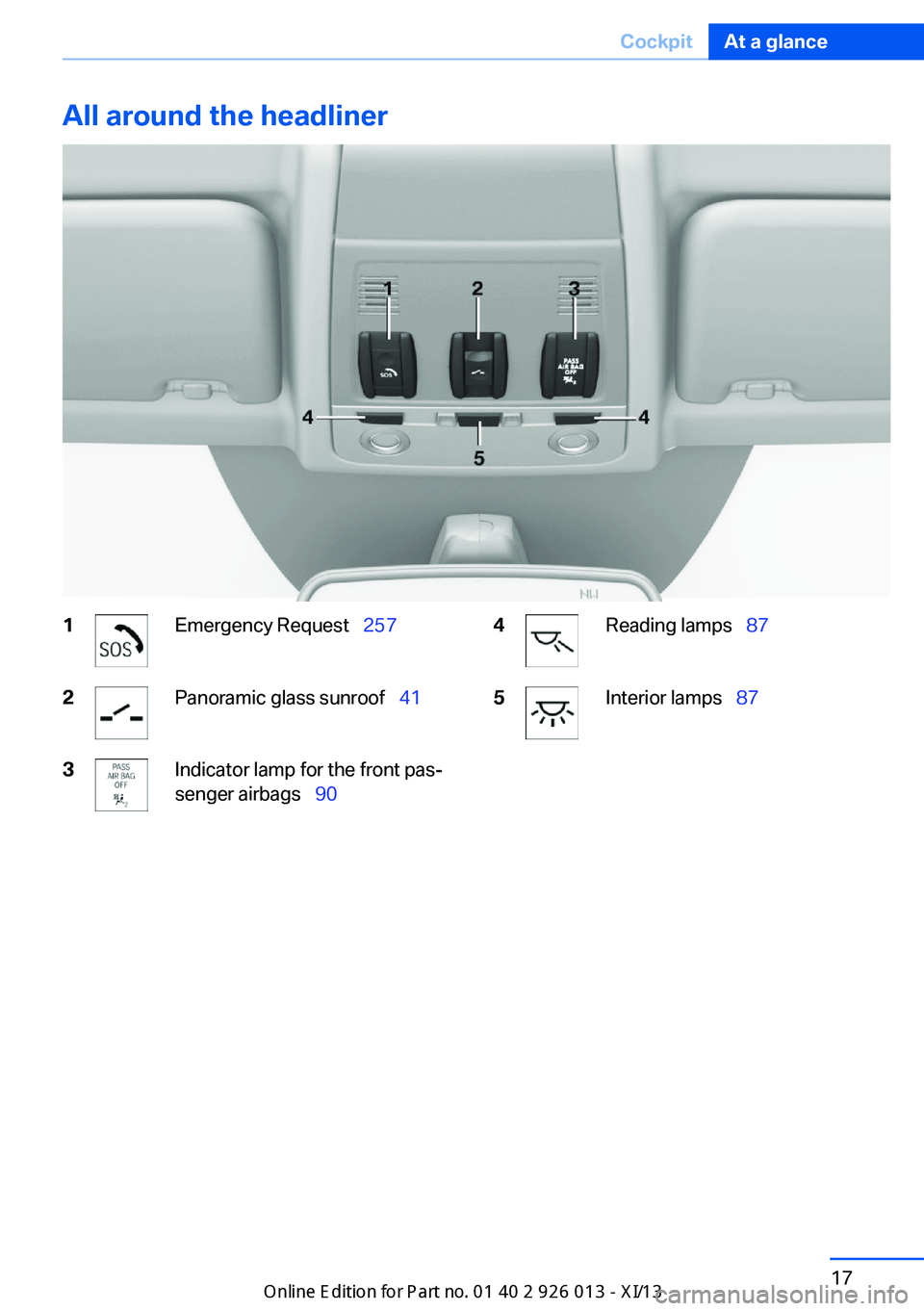
All around the headliner1Emergency Request 2572Panoramic glass sunroof 413Indicator lamp for the front pas‐
senger airbags 904Reading lamps 875Interior lamps 87Seite 17CockpitAt a glance17
Online Edition for Part no. 01 40 2 911 269 - VI/13
Page 35 of 299
▷The remote control used is detected when
the vehicle is unlocked and the stored pro‐
file is called up.▷Your personal settings will be recognized
and called up again even if the vehicle has
been used in the meantime by someone
else with another remote control.
The individual settings are stored for a maxi‐
mum of four remote controls. They are stored
for two remote controls if Comfort Access is in
use.
Personal Profile settingsThe following functions and settings can be
stored in a profile.
More information on the settings can be found
under:
▷Assigning the programmable memory but‐
tons, refer to page 22.▷Response of the central locking system
when the car is being unlocked, refer to
page 32.▷Automatic locking of the vehicle, refer to
page 35.▷Automatic call-up of the driver's seat posi‐
tion after unlocking, refer to page 33.▷Settings for the display on the Control Dis‐
play and in the instrument cluster:▷12h/24h clock format, refer to
page 76.▷Date format, refer to page 77.▷Brightness of the Control Display, refer
to page 78.▷Language on the Control Display, refer
to page 77.▷Units of measure for fuel consumption,
distance covered/remaining distances,
and temperature, refer to page 75.▷Show visual warning for the Park Distance
Control PDC, refer to page 104.▷Backup camera:▷Function selection, refer to page 106.▷Type of display, refer to page 107.▷Light settings:▷Triple turn signal activation, refer to
page 62.▷Welcome lamps, refer to page 83.▷Headlamp courtesy delay feature, refer
to page 84.▷Daytime running lights, refer to
page 84.▷High-beam Assistant, refer to
page 85.▷Automatic climate control: AUTO program,
cooling function and automatic recircu‐
lated air control activated/deactivated,
temperature, air flow rate and distribution,
refer to page 108.▷Navigation:▷Voice activation, refer to page 155.▷Route criteria, refer to page 153.▷Map view settings, refer to page 157.▷Entertainment:▷Tone control, refer to page 164.▷Radio, stored stations, refer to
page 172.▷CD/multimedia, audio source listened
to last, refer to page 174.▷Telephone: volume, refer to page 200.
Central locking system
The concept The central locking system becomes active
when the driver's door is closed.
The system simultaneously engages and re‐
leases the locks on the following:
▷Doors.▷Tailgate.▷Fuel filler flap.Seite 31Opening and closingControls31
Online Edition for Part no. 01 40 2 911 269 - VI/13
Page 36 of 299
Operating from the outside▷Via the remote control.▷Via the door lock.▷In cars with Comfort Access, via the door
handles on the driver's and front passen‐
ger sides.
The following takes place simultaneously
when locking/unlocking the vehicle via the re‐
mote control:
▷The welcome lamps, interior lamps and
courtesy lamps are switched on and off.▷The alarm system is armed or disarmed,
refer to page 39.
Operating from the inside
Via the button for the central locking system,
refer to page 35.
If the vehicle is locked from the inside, the fuel
filler flap remains unlocked.
If an accident of a certain severity occurs, the central locking system unlocks automatically.
The hazard warning system and interior lamps come on.
Opening and closing: from
the outside
Using the remote control
General information Take the remote control with you
People or animals left unattended in a
parked vehicle can lock the doors from the in‐
side. Always take the remote control with you
when leaving the vehicle so that the vehicle
can then be opened from the outside.◀
Unlocking
Press the button. The vehicle is unlocked.
The welcome lamps, interior lamps, and cour‐
tesy lamps are switched on.
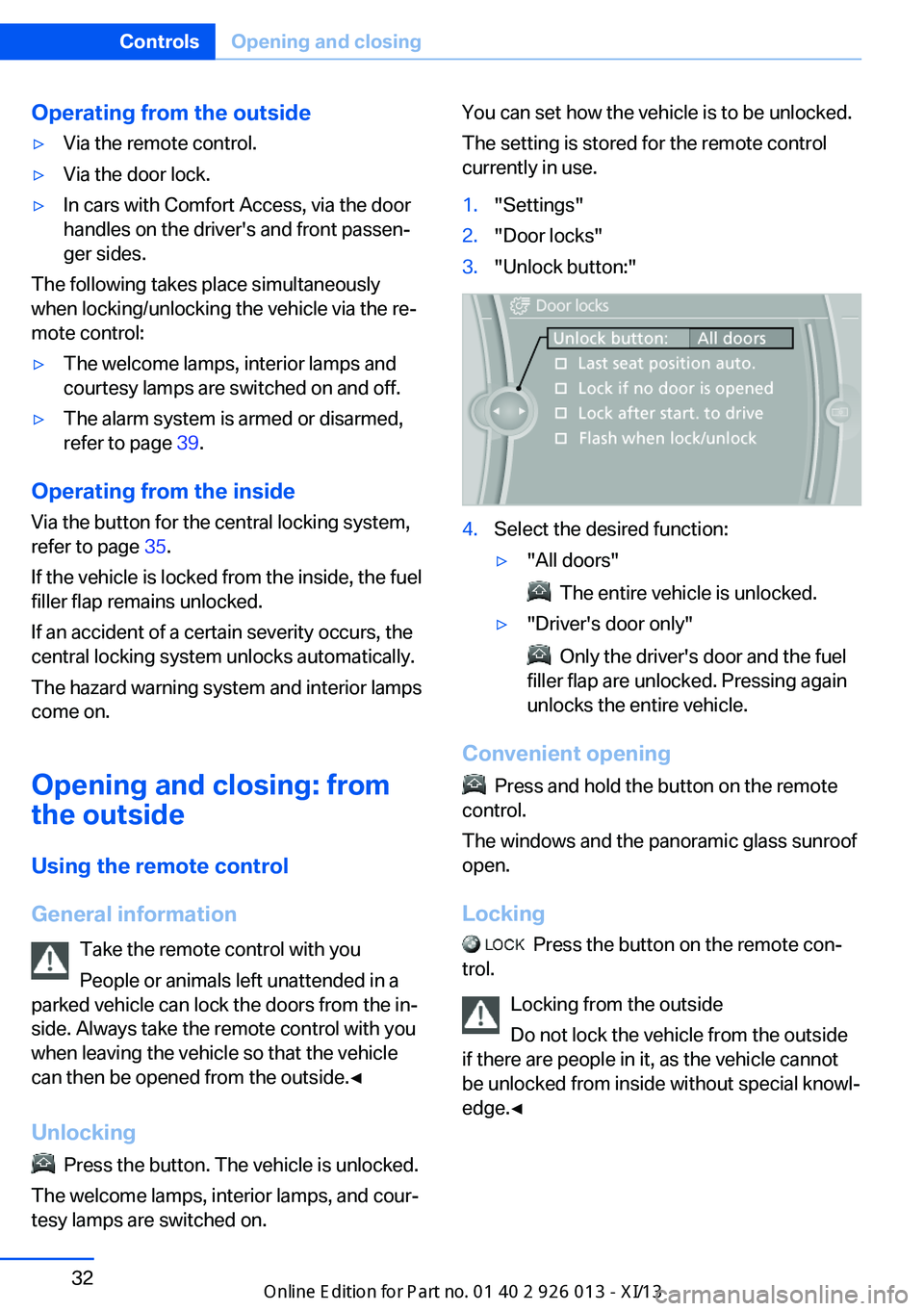
You can set how the vehicle is to be unlocked.
The setting is stored for the remote control
currently in use.1."Settings"2."Door locks"3."Unlock button:"4.Select the desired function:▷"All doors"
The entire vehicle is unlocked.
▷"Driver's door only"
Only the driver's door and the fuel
filler flap are unlocked. Pressing again
unlocks the entire vehicle.
Convenient opening
Press and hold the button on the remote
control.
The windows and the panoramic glass sunroof
open.
Locking
Press the button on the remote con‐
trol.
Locking from the outside
Do not lock the vehicle from the outside
if there are people in it, as the vehicle cannot
be unlocked from inside without special knowl‐
edge.◀
Seite 32ControlsOpening and closing32
Online Edition for Part no. 01 40 2 911 269 - VI/13
Page 37 of 299
Switching on the interior lamps and
courtesy lamps
Press the button on the remote con‐
trol with the vehicle locked.
Panic mode
You can trigger the alarm system if you find
yourself in a dangerous situation.
Press the button on the remote control for
at least 3 seconds.
To switch off the alarm: press any button.
Unlocking tailgate
Press the button on the remote control for
approx. 1 second and release.
The tailgate will open slightly, regardless of
whether it was previously locked or unlocked.
The tailgate pivots back and up when it opens.
Ensure that adequate clearance is available
before opening.
To avoid locking yourself out of the vehicle, do
not place the remote control into the cargo
area. The tailgate is locked again as soon as it
is pushed closed.
Before and after each trip, check that the tail‐
gate has not been inadvertently unlocked.
Confirmation signals from the vehicle
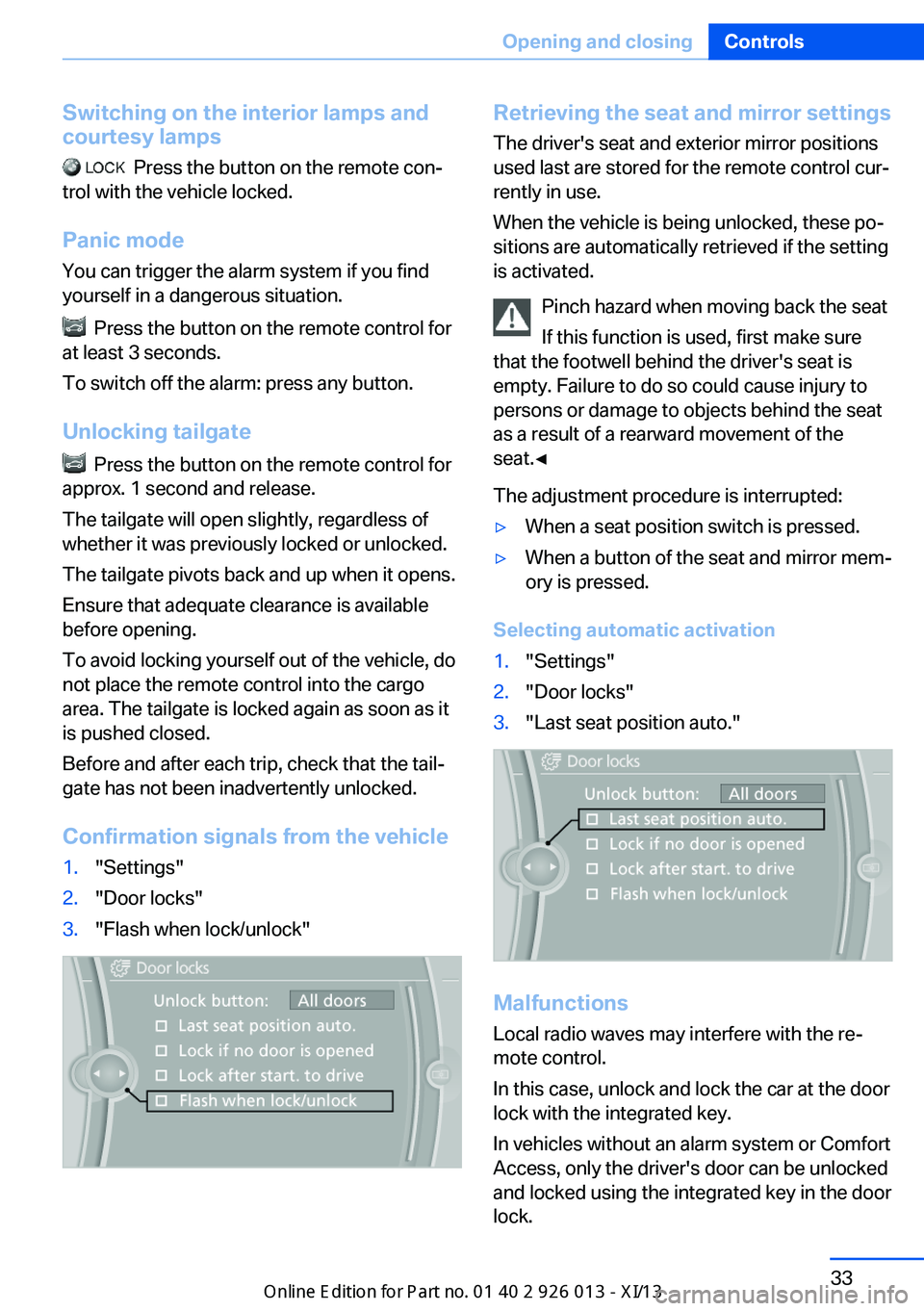
1."Settings"2."Door locks"3."Flash when lock/unlock"Retrieving the seat and mirror settings The driver's seat and exterior mirror positions
used last are stored for the remote control cur‐
rently in use.
When the vehicle is being unlocked, these po‐
sitions are automatically retrieved if the setting
is activated.
Pinch hazard when moving back the seat
If this function is used, first make sure
that the footwell behind the driver's seat is
empty. Failure to do so could cause injury to
persons or damage to objects behind the seat
as a result of a rearward movement of the
seat.◀
The adjustment procedure is interrupted:▷When a seat position switch is pressed.▷When a button of the seat and mirror mem‐
ory is pressed.
Selecting automatic activation
1."Settings"2."Door locks"3."Last seat position auto."
Malfunctions
Local radio waves may interfere with the re‐
mote control.
In this case, unlock and lock the car at the door
lock with the integrated key.
In vehicles without an alarm system or Comfort
Access, only the driver's door can be unlocked
and locked using the integrated key in the door
lock.
Seite 33Opening and closingControls33
Online Edition for Part no. 01 40 2 911 269 - VI/13