child BMW X1 2014 E84 User Guide
[x] Cancel search | Manufacturer: BMW, Model Year: 2014, Model line: X1, Model: BMW X1 2014 E84Pages: 297, PDF Size: 7 MB
Page 69 of 297
Washer fluid
General information Antifreeze for washer fluid
Antifreeze is flammable and can cause
injuries if used improperly.
Therefore, keep it away from sources of igni‐
tion.
Only keep it in the closed original container
and inaccessible to children.
Follow the notes and instructions on the con‐
tainer.
United States: The washer fluid mixture ratio is
regulated by the U.S. EPA and many individual
states; do not exceed the allowable washer
fluid dilution ratios limits that apply. Follow the
usage instructions on the washer fluid con‐
tainer. Use BMW's Windshield Washer Con‐
centrate or the equivalent.◀
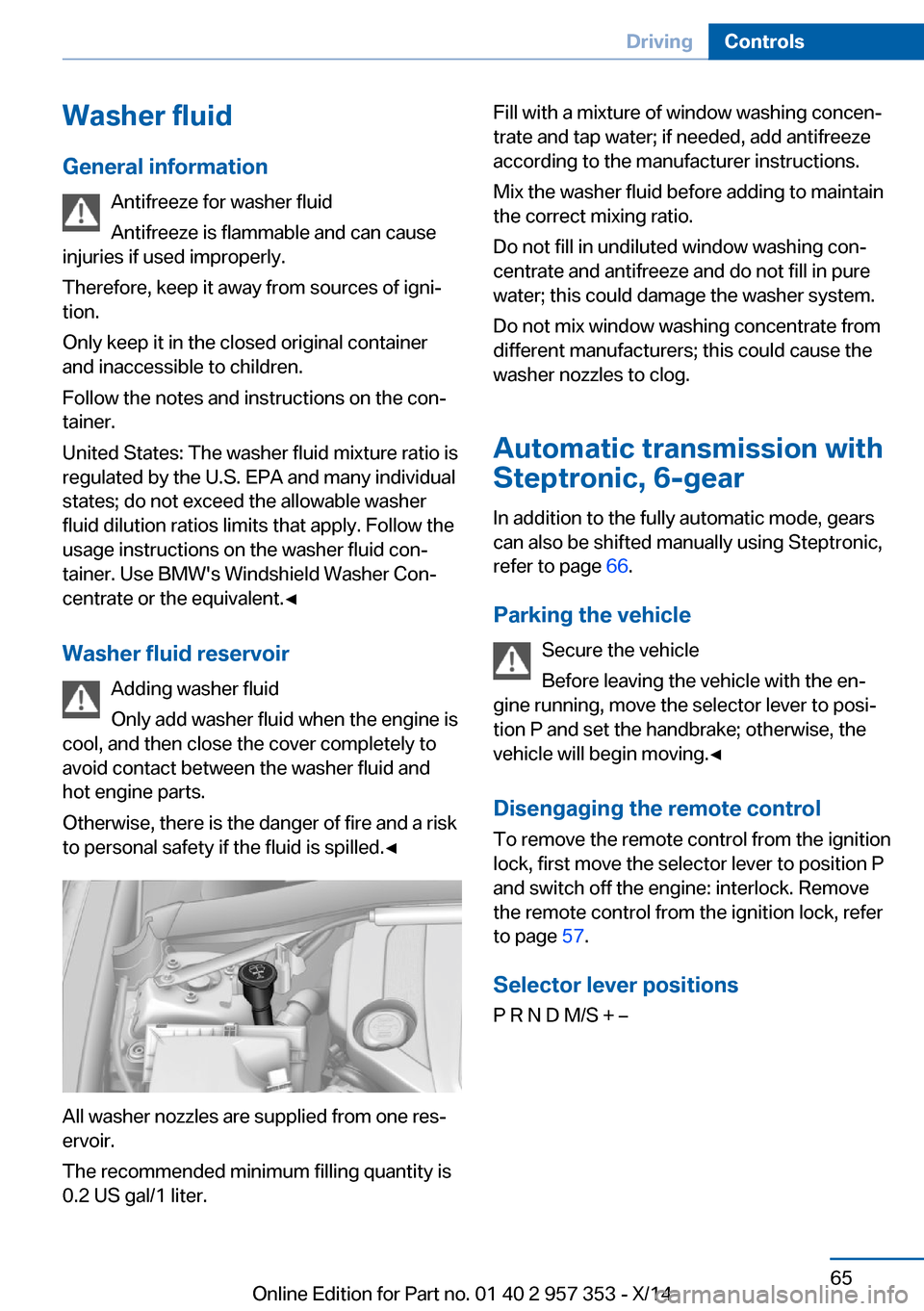
Washer fluid reservoir Adding washer fluid
Only add washer fluid when the engine is
cool, and then close the cover completely to
avoid contact between the washer fluid and
hot engine parts.
Otherwise, there is the danger of fire and a risk
to personal safety if the fluid is spilled.◀
All washer nozzles are supplied from one res‐
ervoir.
The recommended minimum filling quantity is
0.2 US gal/1 liter.
Fill with a mixture of window washing concen‐
trate and tap water; if needed, add antifreeze
according to the manufacturer instructions.
Mix the washer fluid before adding to maintain
the correct mixing ratio.
Do not fill in undiluted window washing con‐
centrate and antifreeze and do not fill in pure
water; this could damage the washer system.
Do not mix window washing concentrate from
different manufacturers; this could cause the
washer nozzles to clog.
Automatic transmission with
Steptronic, 6-gear
In addition to the fully automatic mode, gears
can also be shifted manually using Steptronic,
refer to page 66.
Parking the vehicle Secure the vehicle
Before leaving the vehicle with the en‐
gine running, move the selector lever to posi‐
tion P and set the handbrake; otherwise, the
vehicle will begin moving.◀
Disengaging the remote control To remove the remote control from the ignition
lock, first move the selector lever to position P
and switch off the engine: interlock. Remove
the remote control from the ignition lock, refer
to page 57.
Selector lever positions
P R N D M/S + –Seite 65DrivingControls65
Online Edition for Part no. 01 40 2 957 353 - X/14
Page 94 of 297
Leave feet in the footwell
Make sure that the front passenger
keeps his or her feet in the footwell; otherwise,
the front passenger airbags may not function
properly.◀
Child restraint fixing system in the front
passenger seat
Before transporting a child on the front pas‐
senger seat, refer to the safety notes and in‐
structions under Children on the front passen‐
ger seat, refer to page 52.◀
Malfunction of the automatic deactivation system
When transporting older children and adults,
the front passenger airbags may be deacti‐
vated in certain sitting positions. In this case,
the indicator lamp for the front passenger air‐
bags lights up.
In this case, change the sitting position so that
the front passenger airbags are activated and
the indicator lamp goes out.
If it is not possible to activate the airbags, have
the person sit in the rear.
To make sure that occupation of the seat
cushion can be detected correctly:▷Do not attach seat covers, seat cushion
padding, ball mats or other items to the
passenger seat unless they are specifically
recommended by BMW.▷Do not place electronic devices on the pas‐
senger seat if a child restraint fixing system
is mounted on the seat.▷Do not place objects under the seat that
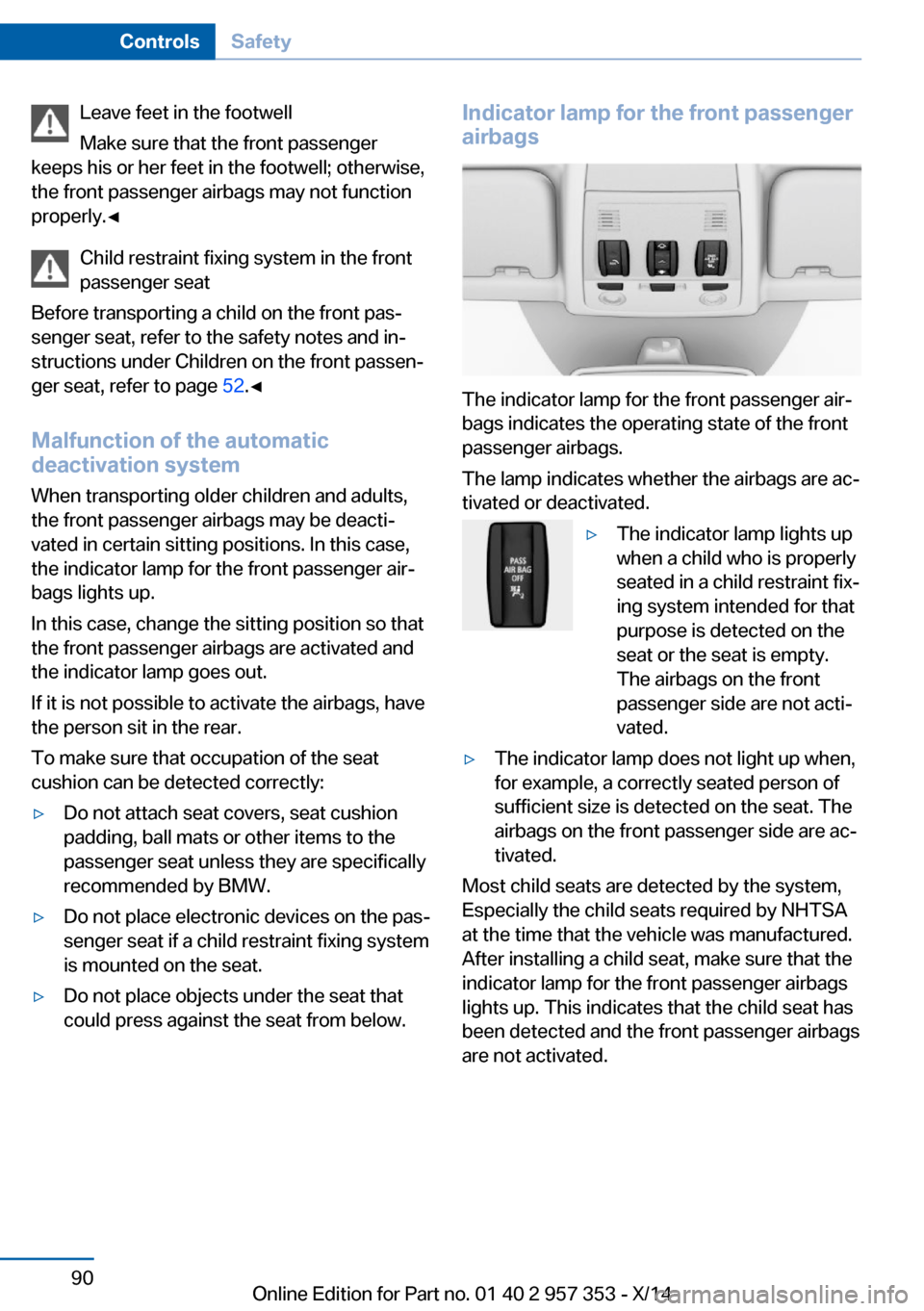
could press against the seat from below.Indicator lamp for the front passenger
airbags
The indicator lamp for the front passenger air‐
bags indicates the operating state of the front
passenger airbags.
The lamp indicates whether the airbags are ac‐
tivated or deactivated.
▷The indicator lamp lights up
when a child who is properly
seated in a child restraint fix‐
ing system intended for that
purpose is detected on the
seat or the seat is empty.
The airbags on the front
passenger side are not acti‐
vated.▷The indicator lamp does not light up when,
for example, a correctly seated person of
sufficient size is detected on the seat. The
airbags on the front passenger side are ac‐
tivated.
Most child seats are detected by the system,
Especially the child seats required by NHTSA
at the time that the vehicle was manufactured.
After installing a child seat, make sure that the
indicator lamp for the front passenger airbags
lights up. This indicates that the child seat has
been detected and the front passenger airbags
are not activated.
Seite 90ControlsSafety90
Online Edition for Part no. 01 40 2 957 353 - X/14
Page 121 of 297
Sun visorGlare protection
Folding down
Fold the sun visor down.
Folding up Fold the sun visor up.
Glare protection from the side Folding down1.Fold the sun visor down.2.Detach from the holder and pivot sideways
to the side window.
Folding up
To close the sun visor, proceed in reverse or‐
der.
Vanity mirror A vanity mirror is located behind a cover on
each sun visor. The mirror lighting comes on
when the cover is opened.
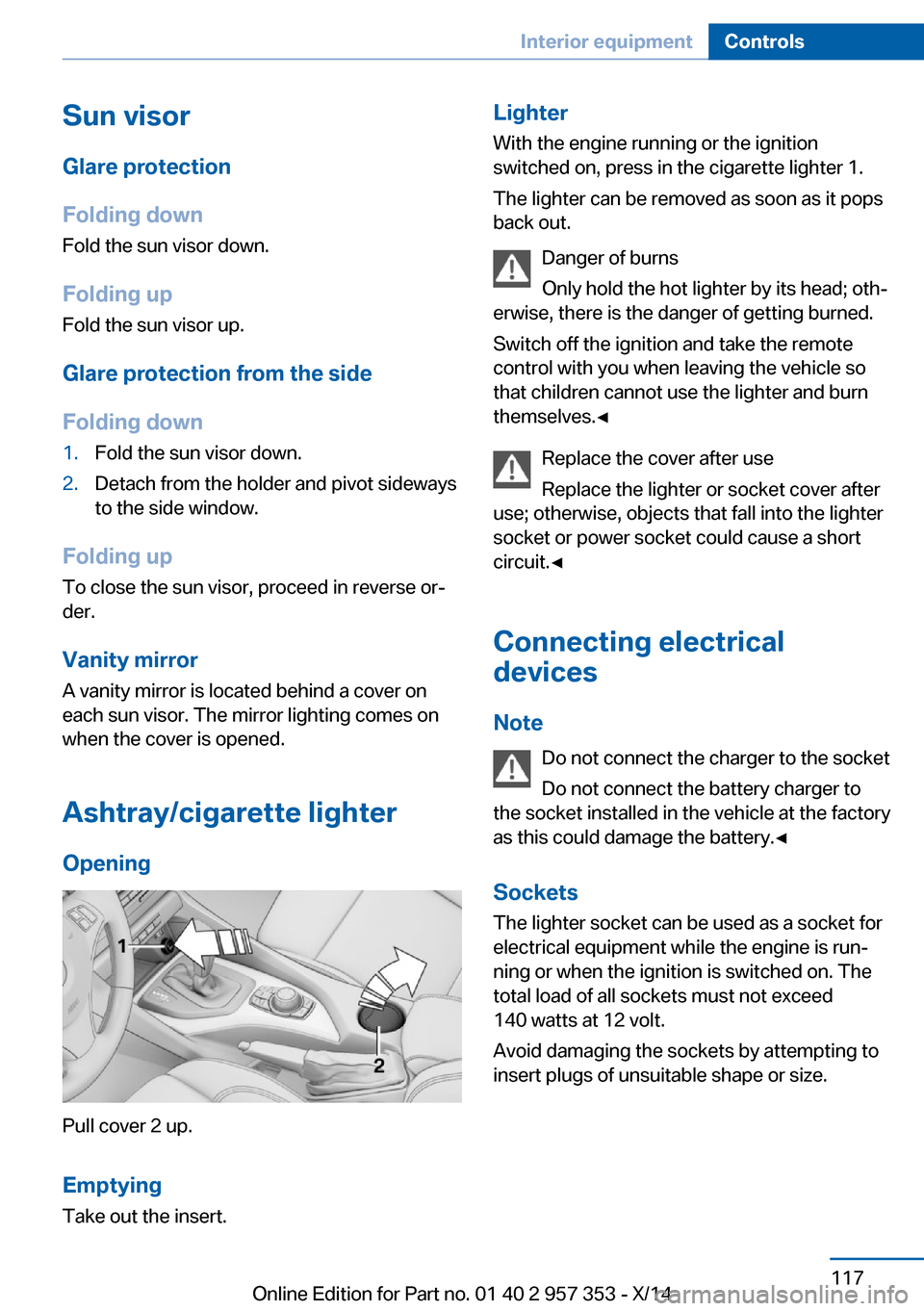
Ashtray/cigarette lighter Opening
Pull cover 2 up.
Emptying
Take out the insert.
Lighter With the engine running or the ignition
switched on, press in the cigarette lighter 1.
The lighter can be removed as soon as it pops
back out.
Danger of burns
Only hold the hot lighter by its head; oth‐
erwise, there is the danger of getting burned.
Switch off the ignition and take the remote
control with you when leaving the vehicle so
that children cannot use the lighter and burn
themselves.◀
Replace the cover after use
Replace the lighter or socket cover after
use; otherwise, objects that fall into the lighter
socket or power socket could cause a short
circuit.◀
Connecting electrical devices
Note Do not connect the charger to the socket
Do not connect the battery charger to
the socket installed in the vehicle at the factory
as this could damage the battery.◀
Sockets
The lighter socket can be used as a socket for
electrical equipment while the engine is run‐
ning or when the ignition is switched on. The
total load of all sockets must not exceed
140 watts at 12 volt.
Avoid damaging the sockets by attempting to
insert plugs of unsuitable shape or size.Seite 117Interior equipmentControls117
Online Edition for Part no. 01 40 2 957 353 - X/14
Page 123 of 297
Enlarging the cargo area
General information
The cargo area can be enlarged by folding
down the rear seat backrests.
The rear seat backrest is divided at a ratio of
40-20-40.
The backrests can be adjusted to 10 different
positions between the comfort and transport
positions and they can be folded down.
In the comfort position, the backrests are tilted
back to the greatest possible angle and in the
transport position they are nearly vertical.
Before mounting a child restraint fixing system,
note the instructions, refer to page 52.
Danger of pinching
Before folding down the rear seat back‐
rests, ensure that path of movement of the
backrests is clear. Especially when the middle
section is folded down, ensure that no one is
located in or reaches into the path of move‐
ment of the rear seat backrests. Otherwise, in‐
juries or damage may result.◀
Observe the instructions concerning the
safety belt
Observe the instructions concerning the safety
belt, refer to page 46. Otherwise, personal pro‐
tection may be compromised.◀
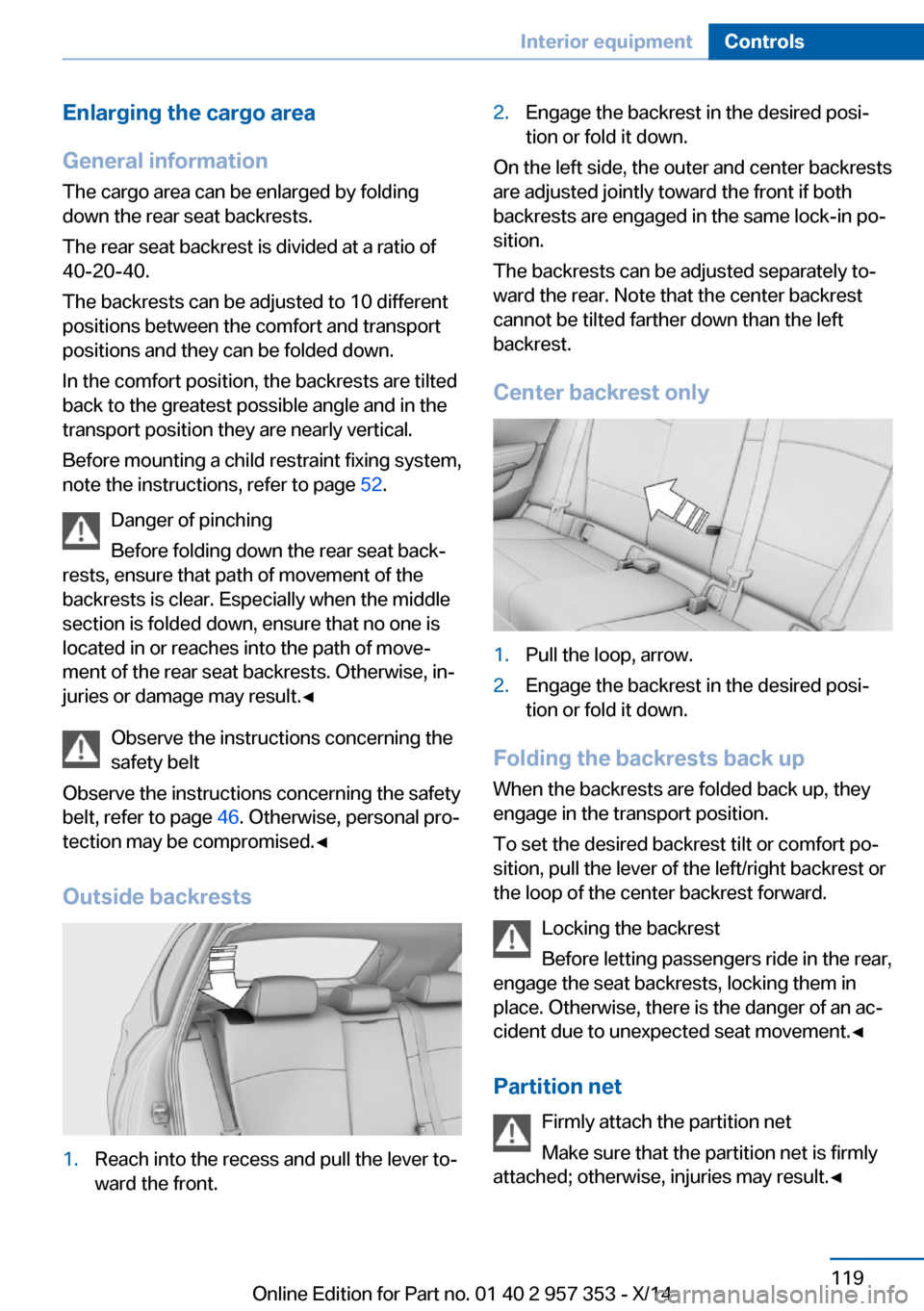
Outside backrests1.Reach into the recess and pull the lever to‐
ward the front.2.Engage the backrest in the desired posi‐
tion or fold it down.
On the left side, the outer and center backrests
are adjusted jointly toward the front if both
backrests are engaged in the same lock-in po‐
sition.
The backrests can be adjusted separately to‐
ward the rear. Note that the center backrest
cannot be tilted farther down than the left
backrest.
Center backrest only
1.Pull the loop, arrow.2.Engage the backrest in the desired posi‐
tion or fold it down.
Folding the backrests back up
When the backrests are folded back up, they
engage in the transport position.
To set the desired backrest tilt or comfort po‐
sition, pull the lever of the left/right backrest or
the loop of the center backrest forward.
Locking the backrest
Before letting passengers ride in the rear,
engage the seat backrests, locking them in
place. Otherwise, there is the danger of an ac‐
cident due to unexpected seat movement.◀
Partition net Firmly attach the partition net
Make sure that the partition net is firmly
attached; otherwise, injuries may result.◀
Seite 119Interior equipmentControls119
Online Edition for Part no. 01 40 2 957 353 - X/14
Page 247 of 297
Duration while driving: approx. 5 minutes.
If engine oil was added, it may take up to
30 minutes to obtain an oil level reading.▷"Engine oil level below minimum. Add 1
quart!"
Add a maximum quantity of 1 US quart/1 li‐
ter of engine oil at the next opportunity, re‐
fer also to Adding engine oil below.▷"Engine oil level too high! Have this
checked."
Too much engine oil
Have the vehicle checked immedi‐
ately; otherwise, surplus oil can lead to en‐
gine damage.◀▷"Measurement inactive. Have this
checked." Do not add engine oil. It is possi‐
ble to continue driving. Note the newly cal‐
culated remaining mileage until the next oil
service, refer to page 78. Have the system
checked as soon as possible.
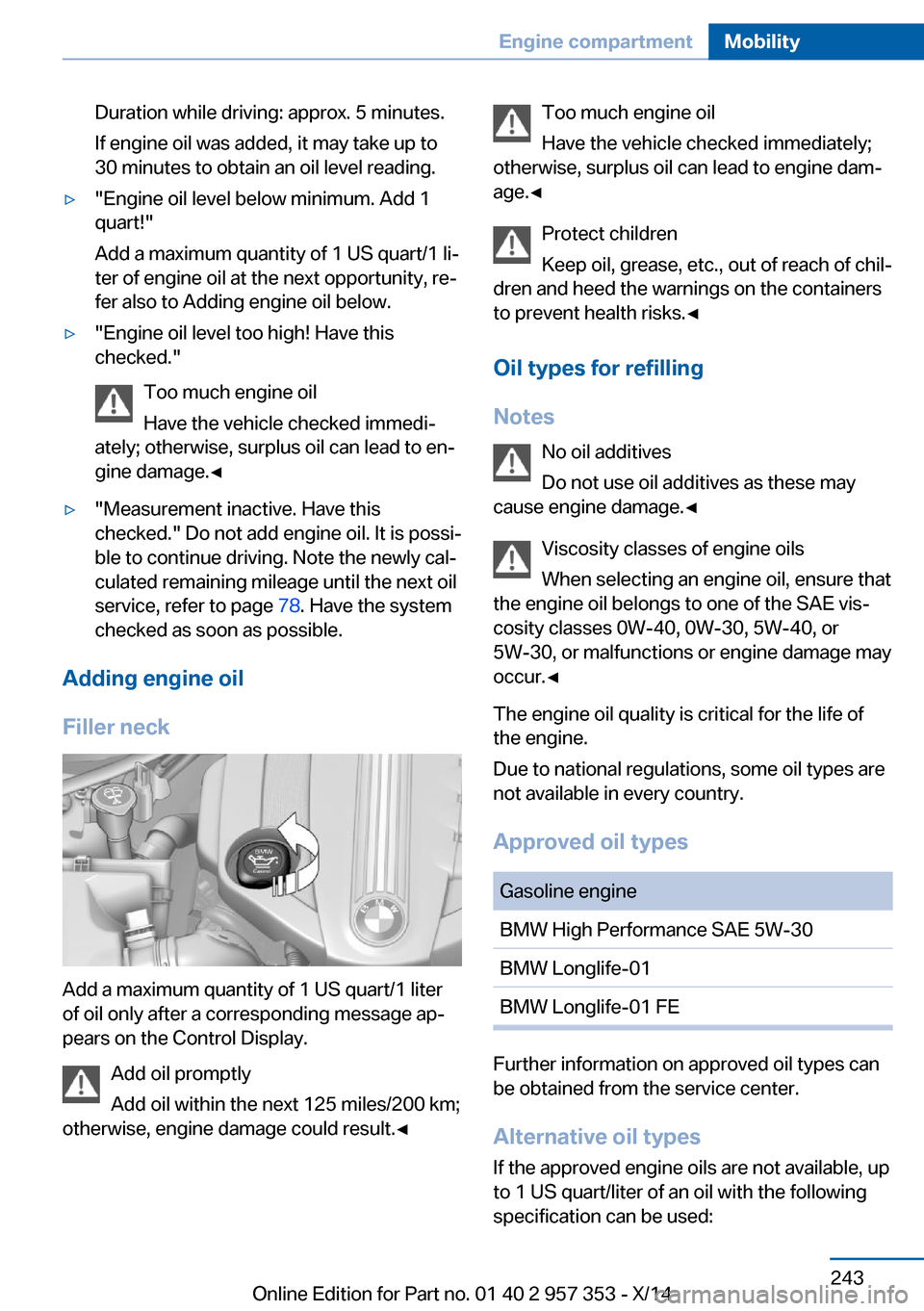
Adding engine oil
Filler neck
Add a maximum quantity of 1 US quart/1 liter
of oil only after a corresponding message ap‐
pears on the Control Display.
Add oil promptly
Add oil within the next 125 miles/200 km;
otherwise, engine damage could result.◀
Too much engine oil
Have the vehicle checked immediately;
otherwise, surplus oil can lead to engine dam‐
age.◀
Protect children
Keep oil, grease, etc., out of reach of chil‐
dren and heed the warnings on the containers
to prevent health risks.◀
Oil types for refilling
Notes No oil additives
Do not use oil additives as these may
cause engine damage.◀
Viscosity classes of engine oils
When selecting an engine oil, ensure that
the engine oil belongs to one of the SAE vis‐
cosity classes 0W-40, 0W-30, 5W-40, or
5W-30, or malfunctions or engine damage may
occur.◀
The engine oil quality is critical for the life of
the engine.
Due to national regulations, some oil types are
not available in every country.
Approved oil typesGasoline engineBMW High Performance SAE 5W-30BMW Longlife-01BMW Longlife-01 FE
Further information on approved oil types can
be obtained from the service center.
Alternative oil types If the approved engine oils are not available, up
to 1 US quart/liter of an oil with the following
specification can be used:
Seite 243Engine compartmentMobility243
Online Edition for Part no. 01 40 2 957 353 - X/14
Page 284 of 297
Car phone, installation loca‐tion, refer to Center arm‐
rest 124
Car phone, refer to Tele‐ phone 196
Car vacuum cleaner, connect‐ ing, refer to Connecting
electrical devices 117
Car wash 261
Catalytic converter, refer to Hot exhaust system 131
CBS Condition Based Serv‐ ice 245
CD/DVD 174
CD/DVD notes 178
CDs, storing 179
Cell phone 196
Cell phone, installation loca‐ tion, refer to Center arm‐
rest 124
Center armrest, front 124
Center armrest, rear 124
Center brake lamp, bulb re‐ placement 253
Center console, refer to Around the center con‐
sole 16
Central locking– Comfort Access 37– From the inside 35– Setting the unlocking char‐
acteristics 32
Central locking system
– From the outside 31– Principle 31
Central screen, refer to Con‐
trol Display 18
Changes, technical, refer to Safety 6
Changing wheels/tires 237
Check Control 80
Children, transporting 52
Child restraint fixing system LATCH 53
Child restraint fixing sys‐ tems 52
Child restraint fixing systems,
mounting 52
Child safety locks 55
Child seat, mounting 52
Child seats, refer to Trans‐ porting children safely 52
Chrome parts, care 263
Cigarette lighter, connecting electrical devices 117
Cigarette lighter, refer to Lighter 117
Cigarette lighter socket 117
Circulation of air, refer to Re‐ circulated air mode 110
Cleaning, displays 264
Cleaning your BMW, refer to Care 261
Clock 71
Clock– 12h/24h format 76– Setting the time and date 76
Closing
– From the inside 35– From the outside 32
Clothes hooks 125
Cockpit 12
Cold start, refer to Starting the engine 58
Combination instrument, refer to Instrument cluster 14
Combination switch, refer to Turn signal/high beams/
headlamp flasher 62
Combination switch, refer to Washer/wiper system 62
Comfort Access 37
Comfort Access
– Battery replacement 38
Comfort area, refer to Around
the center console 16
Compact wheel, inflation pressure 230
Compartment for remote control, refer to Ignition
lock 57
Compartment in floor 121
Compartments, refer to Stor‐
age compart‐
ments 123, 125
Compass, digital 115
Computer 73
Computer, displaying infor‐ mation 73
Computer, displays on the Control Display 74
Concierge service 219
Condensation under the vehi‐ cle 132
Condition Based Service CBS 245
Confirmation signals for lock‐ ing/unlocking the vehicle 33
Connecting, mobile phone, refer to Pairing the mobile
phone 197
Consumption, refer to Aver‐ age fuel consumption 73
Contacts 208, 216
Control Display 18
Control Display, care 264
Control Display, settings 77
Controller 19
Controls and displays 12
Control systems, driving sta‐ bility 97
Convenient operation– Glass sunroof 32– Window 32
Coolant 244
Coolant, checking the level 244
Coolant temperature 72
Cooling function, switching on and off 110
Cooling, maximum 109
Cooling system, refer to Cool‐ ant 244
Corrosion on brake discs 132
Courtesy lights, refer to Inte‐ rior lights 87
Cradle for telephone or mo‐ bile phone, refer to Snap-in
adapter 205
Seite 280ReferenceEverything from A to Z280
Online Edition for Part no. 01 40 2 957 353 - X/14
Page 288 of 297
Ignition lock 57
Ignition, switched off 58
Ignition, switched on 58
Indication of a flat tire 92, 94
Indicator and warning lights 15
Inflation pressure monitor, re‐ fer to Flat Tire Monitor 91
Inflation pressure, refer to Tire inflation pressure 230
Information on the navigation data 142
Initialization after power fail‐ ure 254
Initializing– Compass, refer to Calibrat‐
ing 116– Panoramic glass sunroof 43– Refer to Setting the time
and date 76
Initializing, Flat Tire Monitor
FTM 91
Initializing, Tire Pressure Monitor TPM 94
Inside brake lamps
– Bulb replacement 252
Installation location, tele‐
phone 124
Instrument cluster 14
Instrument lighting 87
Instrument panel, refer to In‐ strument cluster 14
Instruments, refer to Cock‐ pit 12
Integrated key 30
Interactive map 149
Interior equipment 113
Interior lamps
– Remote control 33
Interior lights 87
Interior mirror 50
Interior motion sensor 40
Interior rearview mirror, auto‐ matic dimming 50
Interior rearview mirror, com‐ pass 115
Interior temperature, setting– Automatic climate con‐
trol 108
Interlock, refer to Disengag‐
ing the remote control 65
Intermediate destina‐ tions 151
Internet page 6
Intersection, entering for navi‐ gation 145
iPod/iPhone 185
J
Jacking points for the vehicle jack 253
Jack, refer to Vehicle jack 253
Joystick, refer to Selector lever 68
Jump-starting 256
K
Keyless Go, refer to Comfort Access 37
Keyless opening and closing, refer to Comfort Access 37
Key Memory, refer to Per‐ sonal Profile 30
Key, refer to Integrated key/ remote control 30
Kickdown
– Automatic transmission with
Steptronic 66, 68
Knee airbag 88
Knocking control 228
L
Label, run-flat tire 239
Lamp and bulb replacement, lamp replacement 248
Lamps 83
Lamps, automatic headlamp control 83, 84
Lamps, High-beam Assis‐
tant 85
Lamps, parking lamps/low beams 83
Lamps, replacing, refer to Lamp and bulb replace‐
ment 248
Language, changing on the Control Display 77
Lap-and-shoulder belt, refer to Safety belts 46
Lashing eyes, securing cargo 135
LATCH child restraint fixing system 53
Leather, care 262
LEDs, light-emitting di‐ odes 248
Length, refer to Dimen‐ sions 268
Letters and numbers, enter‐ ing 23
License plate lamp, bulb re‐ placement 253
Light-alloy wheels, care 263
Light-emitting diodes, LEDs 248
Lighter 117
Lighting– Instruments 87– Lamp and bulb replace‐
ment 248
Lighting, vehicle, refer to
Lamps 83
Light switch 83
Limit, refer to Speed limit 81
Load 135
Loading 134
Lock buttons, doors, refer to Locking 35
Locking
– From the inside 35– From the outside 32– Setting the confirmation
signals 33– Without remote control, re‐
fer to Comfort Access 37Seite 284ReferenceEverything from A to Z284
Online Edition for Part no. 01 40 2 957 353 - X/14
Page 289 of 297
Locking the vehicle– From the inside 35– From the outside 32
Locks, doors, and win‐
dows 55
Longlife oils, alternative oil types 243
Longlife oils, refer to Ap‐ proved engine oils 243
Low beams 83
Low beams
– Automatic 84– Bulb replacement 249
Low beams, automatic 83
Low beams, automatic, refer to High-beam Assistant 85
Lower back support, refer to Lumbar support 45
Luggage rack
– Rear luggage rack 136
Luggage rack, refer to Roof-
mounted luggage rack 136
Lumbar support 45
M
Main inspection, refer to Service requirements 78
Maintenance 245
Maintenance, refer to Service booklet
Maintenance, refer to Service requirements 78
Maintenance require‐ ments 245
Maintenance system BMW 245
Makeup mirror 117
Malfunction
– Automatic transmission with
Steptronic 67– Door lock 35– Fuel filler flap 227– Tailgate 36
Malfunction warnings, refer to
Check Control 80
Manual air distribution 109
Manual mode, automatic
transmission with Step‐
tronic 66, 69
Manual operation– Door lock 35– Driver's door 35– Selector lever lock, auto‐
matic transmission 67
Manual operation, fuel filler
flap 227
Map, destination entry 149
Map display in black and white 158
Map in split screen 157
Map view 155
Marking on approved tires 238
Master key, refer to Remote control with integrated
key 30
Maximum cooling 109
Maximum speed, winter tires 238
Medical kit, refer to First aid kit 256
Memory, refer to Seat and mirror memory 48
Menus, operating, iDrive 18
Menus, refer to iDrive operat‐ ing concept 19
Message list, traffic bulle‐ tins 157
Messages 210
Microfilter
– With automatic climate con‐
trol 111
Minimum tread, tires 237
Mirror
– Mirror memory, refer to Seat
and mirror memory 48
Mirrors 49
Mirrors
– Automatic Curb Monitor 49
Mirrors, folding in and out 50
Mirrors, heating 50
Mirrors, interior mirror 50
Mobile communication devi‐
ces in the vehicle 131
Mobile phone, installation lo‐ cation, refer to Center arm‐
rest 124
Mobile phone, refer to Tele‐ phone 196
Modifications, technical, refer to Safety 6
Monitor, refer to Control Dis‐ play 18
Mounting of child restraint fix‐ ing systems 52
MP3 player 184
Multimedia 174
Music collection 179
Music search 181
Music, storing 179
N
Navigation 142
Navigation data 142
Navigation data, updat‐ ing 142
Navigation system– Destination entry by
voice 150
Neck restraints, refer to Head
restraints 47
Nets, refer to Storage com‐ partments 125
Neutral cleaner, care 263
New wheels and tires 237
Notes 6, 213
Nozzles, refer to Ventila‐ tion 111
O OBD Onboard Diagnos‐ tics 246
OBD socket, refer to Socket for OBD Onboard Diagno‐
sis 246
Octane number, refer to Fuel quality 228
Seite 285Everything from A to ZReference285
Online Edition for Part no. 01 40 2 957 353 - X/14
Page 293 of 297
Storage compartmentnets 125
Storage compart‐ ments 123, 125
Storage, tires 239
Storing the seat position, re‐ fer to Seat and mirror mem‐
ory 48
Storing the vehicle 264
Street, entering for naviga‐ tion 145
Summer tires, refer to Wheels and tires 230
Summer tires, tread 236
Sun visor 117
Switches, refer to Cockpit 12
Switching off, engine 59
Switching off, vehicle 59
Switch-on times, parked-car ventilation 112
Symbols 6
T Tachometer 72
Tailgate 35
Tailgate– Comfort Access 37– Emergency operation, refer
to Opening manually 36– Opening from the inside 36– Opening from the out‐
side 36– Opening manually 36– Remote control 33
Tail lamp, bulb replace‐
ment 253
Tail lamps 251
Tail lamps
– Bulb replacement 252
Tank gauge, refer to Fuel
gauge 72
Tasks 213
Technical changes, refer to Safety 6
Technical data 268
Telephone 196
Telephone, adjusting the vol‐
ume 200
Telephone, installation loca‐ tion, refer to Center arm‐
rest 124
TeleService 219
Temperature– Automatic climate con‐
trol 109– Changing the unit of meas‐
ure 75
Temperature, coolant, refer to
Coolant temperature 72
Temperature display
– External temperature 71– External temperature warn‐
ing 71– Setting the unit 75
Temperature, engine oil 72
Temperature warning 71
Text messages 210
Theft alarm system, refer to Alarm system 39
Thigh support adjustment 45
Third brake lamp, refer to
Center brake lamp 253
Tilt alarm sensor 40
Tilting the passenger side mirror 49
Time
– Setting the time 75– Setting the time zone 76
Tire age 235
Tire identification marks 235
Tire inflation pressure 230
Tire inflation pressure, check‐ ing 230
Tire pressure monitor, refer to Flat Tire Monitor 91
Tire Pressure Monitor TPM 93
Tire Quality Grading 236
Tires
– Inflation pressure 230
Tires, breaking in 130
Tires, changing 237
Tires, condition 236
Tires, damage 237
Tire size 235
Tires, minimum tread 237
Tires, retreaded tires 238
Tires, run-flat tires 239
Tires, storage 239
Tire tread 236
Toll roads, route 153
Tone 164
Tool kit, refer to Onboard ve‐ hicle tool kit 247
Tools, refer to Onboard vehi‐ cle tool kit 247
Tow bar 259
Tow fitting 259
Towing 257
Towing another vehicle 258
Towing, being towed 258
Towing with automatic trans‐ mission 258
Town/city, navigation 145
Tow rope 259
Tow-starting 257, 260
TPM Tire Pressure Moni‐ tor 93
Traction control 98
Traffic bulletins, naviga‐ tion 157
Transmission– Automatic transmission with
Steptronic 65– Overriding selector lever
lock in case of automatic
transmission with Step‐
tronic 67
Transmission, automatic
transmission with Step‐
tronic 68
Transmission lock
– Refer to Changing selector
lever positions 66– Refer to P Park 66
Transmission positions, auto‐
matic transmission with
Steptronic 68
Transporting children safely 52
Seite 289Everything from A to ZReference289
Online Edition for Part no. 01 40 2 957 353 - X/14