headlamp BMW X1 2014 E84 User Guide
[x] Cancel search | Manufacturer: BMW, Model Year: 2014, Model line: X1, Model: BMW X1 2014 E84Pages: 297, PDF Size: 7 MB
Page 90 of 297
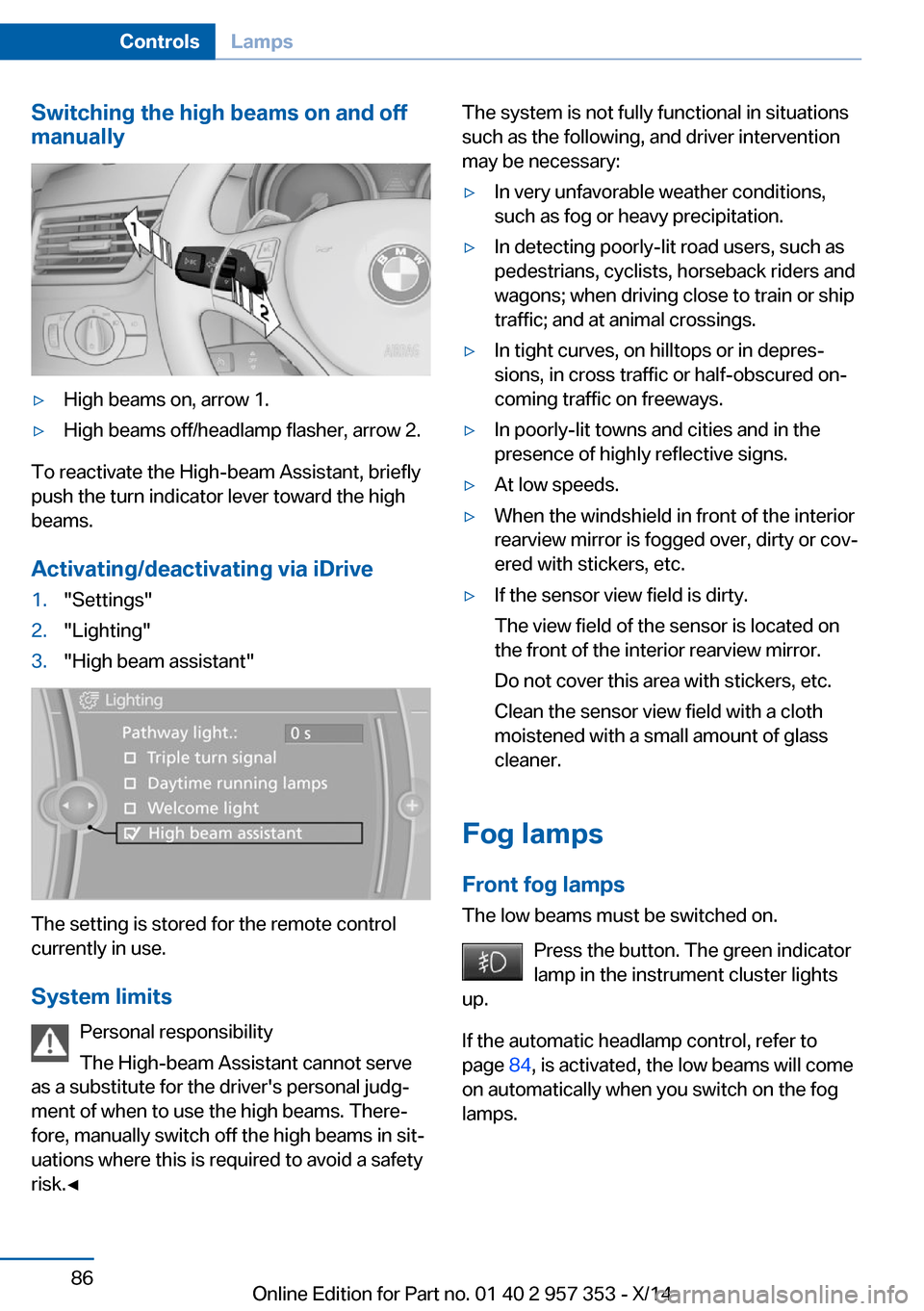
Switching the high beams on and off
manually▷High beams on, arrow 1.▷High beams off/headlamp flasher, arrow 2.
To reactivate the High-beam Assistant, briefly
push the turn indicator lever toward the high
beams.
Activating/deactivating via iDrive
1."Settings"2."Lighting"3."High beam assistant"
The setting is stored for the remote control
currently in use.
System limits Personal responsibility
The High-beam Assistant cannot serve
as a substitute for the driver's personal judg‐
ment of when to use the high beams. There‐
fore, manually switch off the high beams in sit‐
uations where this is required to avoid a safety
risk.◀
The system is not fully functional in situations
such as the following, and driver intervention
may be necessary:▷In very unfavorable weather conditions,
such as fog or heavy precipitation.▷In detecting poorly-lit road users, such as
pedestrians, cyclists, horseback riders and
wagons; when driving close to train or ship
traffic; and at animal crossings.▷In tight curves, on hilltops or in depres‐
sions, in cross traffic or half-obscured on‐
coming traffic on freeways.▷In poorly-lit towns and cities and in the
presence of highly reflective signs.▷At low speeds.▷When the windshield in front of the interior
rearview mirror is fogged over, dirty or cov‐
ered with stickers, etc.▷If the sensor view field is dirty.
The view field of the sensor is located on
the front of the interior rearview mirror.
Do not cover this area with stickers, etc.
Clean the sensor view field with a cloth
moistened with a small amount of glass
cleaner.
Fog lamps
Front fog lamps
The low beams must be switched on.
Press the button. The green indicator
lamp in the instrument cluster lights
up.
If the automatic headlamp control, refer to
page 84, is activated, the low beams will come
on automatically when you switch on the fog
lamps.
Seite 86ControlsLamps86
Online Edition for Part no. 01 40 2 957 353 - X/14
Page 252 of 297
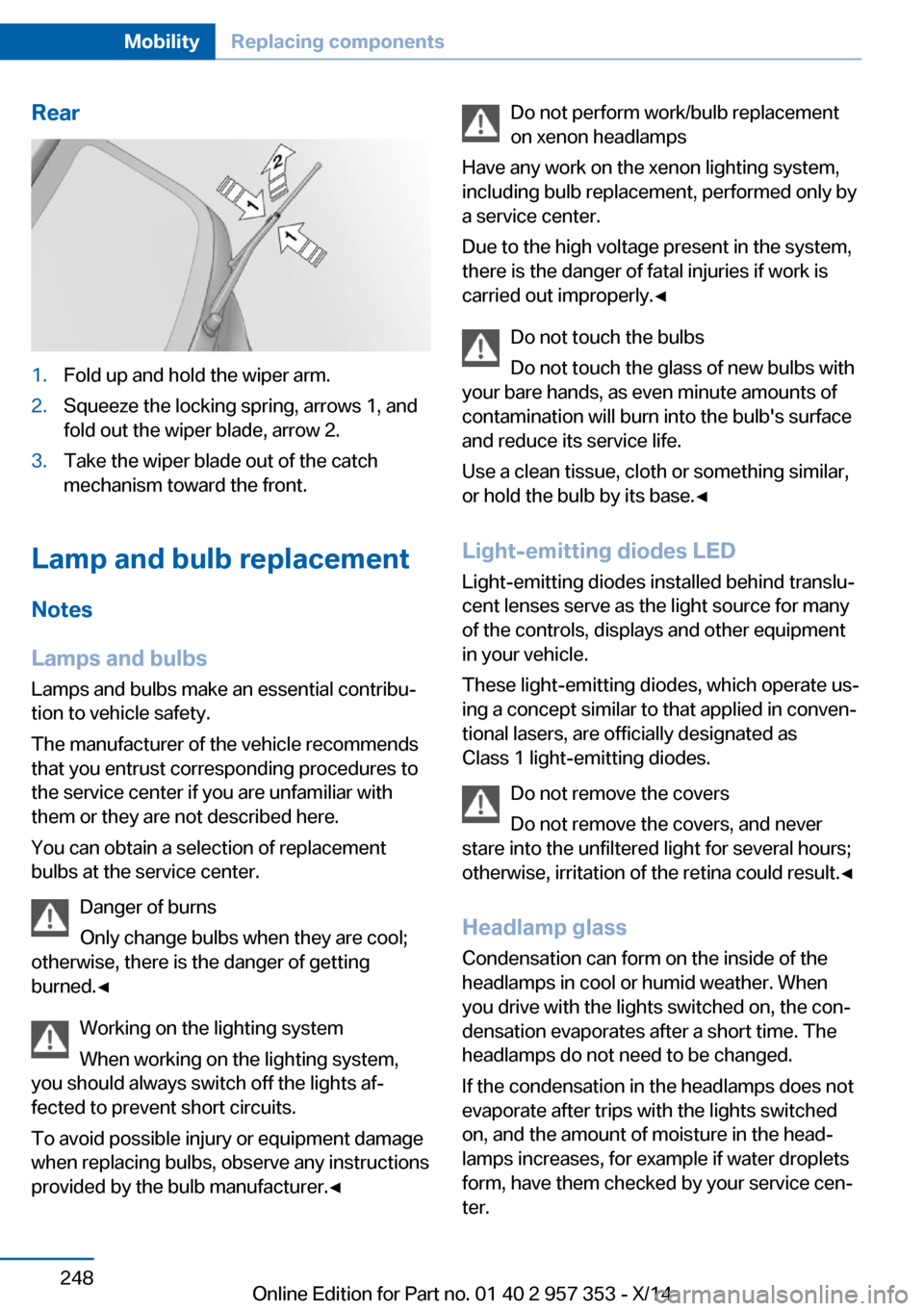
Rear1.Fold up and hold the wiper arm.2.Squeeze the locking spring, arrows 1, and
fold out the wiper blade, arrow 2.3.Take the wiper blade out of the catch
mechanism toward the front.
Lamp and bulb replacement
Notes
Lamps and bulbs
Lamps and bulbs make an essential contribu‐
tion to vehicle safety.
The manufacturer of the vehicle recommends
that you entrust corresponding procedures to
the service center if you are unfamiliar with them or they are not described here.
You can obtain a selection of replacement
bulbs at the service center.
Danger of burns
Only change bulbs when they are cool;
otherwise, there is the danger of getting
burned.◀
Working on the lighting system
When working on the lighting system,
you should always switch off the lights af‐
fected to prevent short circuits.
To avoid possible injury or equipment damage
when replacing bulbs, observe any instructions
provided by the bulb manufacturer.◀
Do not perform work/bulb replacement
on xenon headlamps
Have any work on the xenon lighting system,
including bulb replacement, performed only by
a service center.
Due to the high voltage present in the system,
there is the danger of fatal injuries if work is
carried out improperly.◀
Do not touch the bulbs
Do not touch the glass of new bulbs with
your bare hands, as even minute amounts of
contamination will burn into the bulb's surface
and reduce its service life.
Use a clean tissue, cloth or something similar,
or hold the bulb by its base.◀
Light-emitting diodes LED
Light-emitting diodes installed behind translu‐
cent lenses serve as the light source for many
of the controls, displays and other equipment
in your vehicle.
These light-emitting diodes, which operate us‐
ing a concept similar to that applied in conven‐
tional lasers, are officially designated as
Class 1 light-emitting diodes.
Do not remove the covers
Do not remove the covers, and never
stare into the unfiltered light for several hours; otherwise, irritation of the retina could result.◀
Headlamp glass
Condensation can form on the inside of the
headlamps in cool or humid weather. When
you drive with the lights switched on, the con‐
densation evaporates after a short time. The
headlamps do not need to be changed.
If the condensation in the headlamps does not
evaporate after trips with the lights switched
on, and the amount of moisture in the head‐
lamps increases, for example if water droplets
form, have them checked by your service cen‐
ter.Seite 248MobilityReplacing components248
Online Edition for Part no. 01 40 2 957 353 - X/14
Page 253 of 297
Headlight setting
Changing the bulbs and lights may influence
the headlight settings. Have the headlight set‐
ting checked by a service center and corrected
if necessary after changing bulbs or lights.
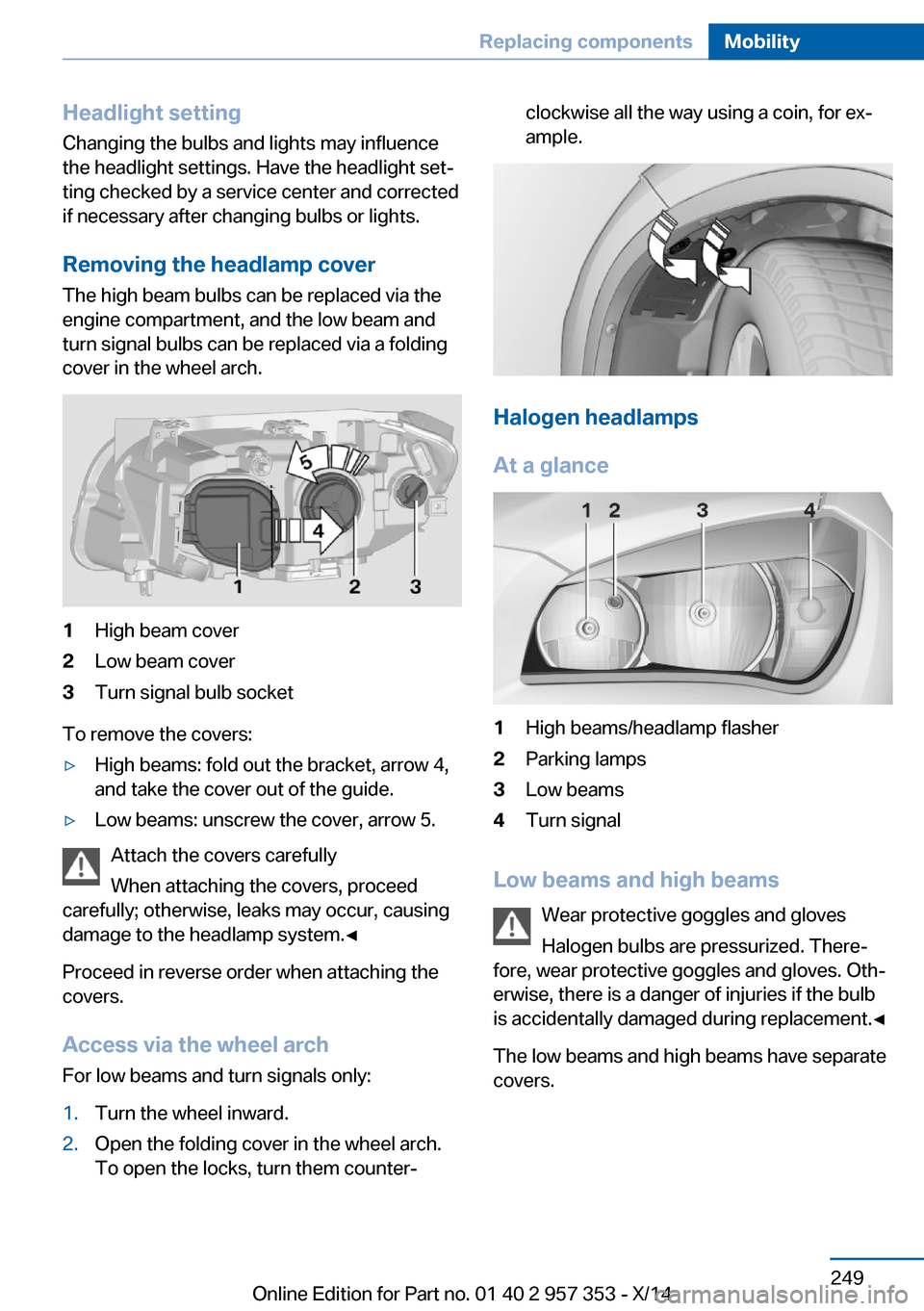
Removing the headlamp cover
The high beam bulbs can be replaced via the
engine compartment, and the low beam and
turn signal bulbs can be replaced via a folding
cover in the wheel arch.1High beam cover2Low beam cover3Turn signal bulb socket
To remove the covers:
▷High beams: fold out the bracket, arrow 4,
and take the cover out of the guide.▷Low beams: unscrew the cover, arrow 5.
Attach the covers carefully
When attaching the covers, proceed
carefully; otherwise, leaks may occur, causing
damage to the headlamp system.◀
Proceed in reverse order when attaching the
covers.
Access via the wheel arch For low beams and turn signals only:
1.Turn the wheel inward.2.Open the folding cover in the wheel arch.
To open the locks, turn them counter‐clockwise all the way using a coin, for ex‐
ample.
Halogen headlamps
At a glance
1High beams/headlamp flasher2Parking lamps3Low beams4Turn signal
Low beams and high beams Wear protective goggles and gloves
Halogen bulbs are pressurized. There‐
fore, wear protective goggles and gloves. Oth‐
erwise, there is a danger of injuries if the bulb
is accidentally damaged during replacement.◀
The low beams and high beams have separate
covers.
Seite 249Replacing componentsMobility249
Online Edition for Part no. 01 40 2 957 353 - X/14
Page 254 of 297
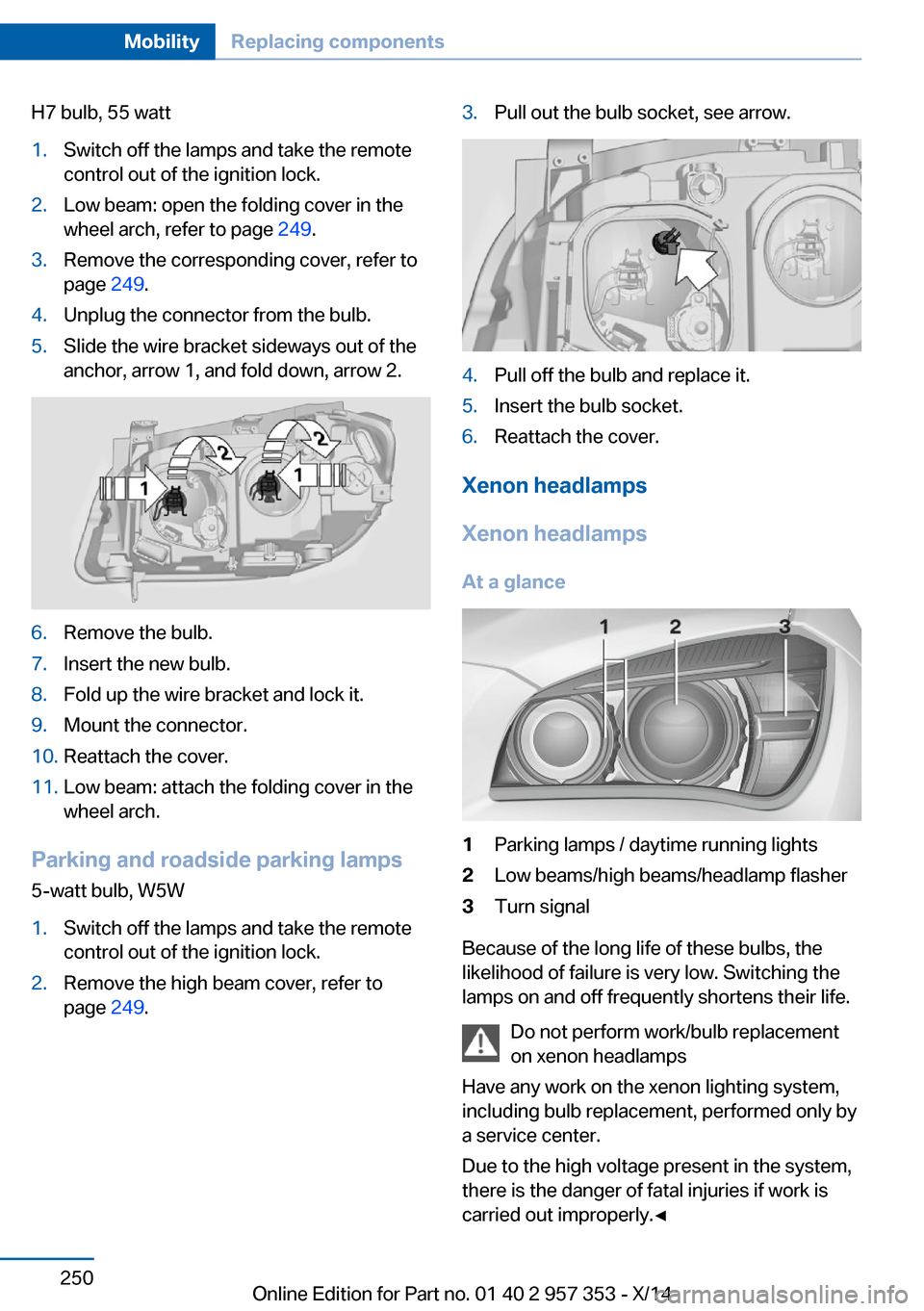
H7 bulb, 55 watt1.Switch off the lamps and take the remote
control out of the ignition lock.2.Low beam: open the folding cover in the
wheel arch, refer to page 249.3.Remove the corresponding cover, refer to
page 249.4.Unplug the connector from the bulb.5.Slide the wire bracket sideways out of the
anchor, arrow 1, and fold down, arrow 2.6.Remove the bulb.7.Insert the new bulb.8.Fold up the wire bracket and lock it.9.Mount the connector.10.Reattach the cover.11.Low beam: attach the folding cover in the
wheel arch.
Parking and roadside parking lamps
5-watt bulb, W5W
1.Switch off the lamps and take the remote
control out of the ignition lock.2.Remove the high beam cover, refer to
page 249.3.Pull out the bulb socket, see arrow.4.Pull off the bulb and replace it.5.Insert the bulb socket.6.Reattach the cover.
Xenon headlamps
Xenon headlamps At a glance
1Parking lamps / daytime running lights2Low beams/high beams/headlamp flasher3Turn signal
Because of the long life of these bulbs, the
likelihood of failure is very low. Switching the
lamps on and off frequently shortens their life.
Do not perform work/bulb replacement
on xenon headlamps
Have any work on the xenon lighting system,
including bulb replacement, performed only by
a service center.
Due to the high voltage present in the system,
there is the danger of fatal injuries if work is
carried out improperly.◀
Seite 250MobilityReplacing components250
Online Edition for Part no. 01 40 2 957 353 - X/14
Page 255 of 297
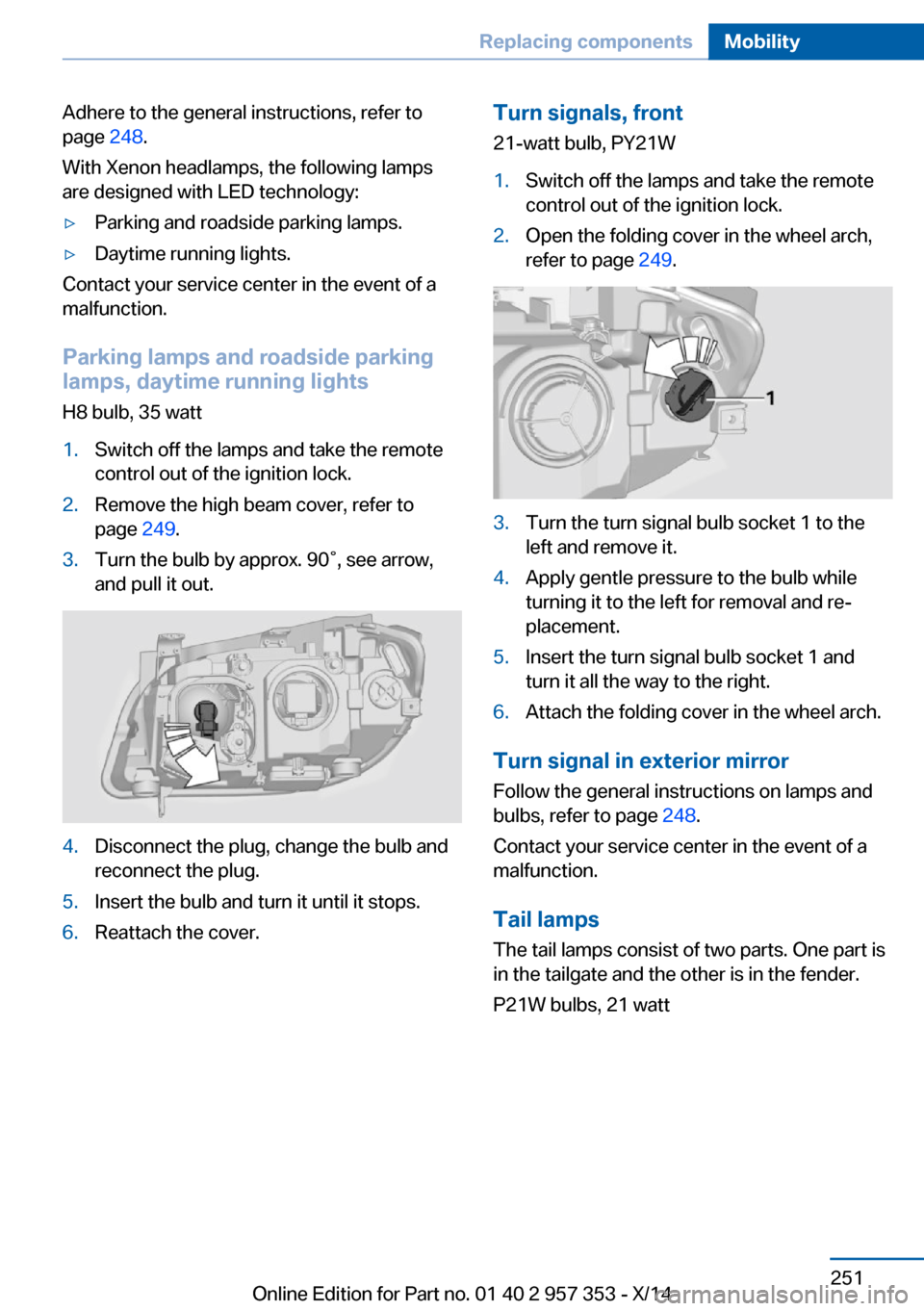
Adhere to the general instructions, refer to
page 248.
With Xenon headlamps, the following lamps
are designed with LED technology:▷Parking and roadside parking lamps.▷Daytime running lights.
Contact your service center in the event of a
malfunction.
Parking lamps and roadside parking
lamps, daytime running lights
H8 bulb, 35 watt
1.Switch off the lamps and take the remote
control out of the ignition lock.2.Remove the high beam cover, refer to
page 249.3.Turn the bulb by approx. 90˚, see arrow,
and pull it out.4.Disconnect the plug, change the bulb and
reconnect the plug.5.Insert the bulb and turn it until it stops.6.Reattach the cover.Turn signals, front
21-watt bulb, PY21W1.Switch off the lamps and take the remote
control out of the ignition lock.2.Open the folding cover in the wheel arch,
refer to page 249.3.Turn the turn signal bulb socket 1 to the
left and remove it.4.Apply gentle pressure to the bulb while
turning it to the left for removal and re‐
placement.5.Insert the turn signal bulb socket 1 and
turn it all the way to the right.6.Attach the folding cover in the wheel arch.
Turn signal in exterior mirror
Follow the general instructions on lamps and
bulbs, refer to page 248.
Contact your service center in the event of a
malfunction.
Tail lamps
The tail lamps consist of two parts. One part is
in the tailgate and the other is in the fender.
P21W bulbs, 21 watt
Seite 251Replacing componentsMobility251
Online Edition for Part no. 01 40 2 957 353 - X/14
Page 282 of 297
Everything from A to Z
IndexA ABS, Antilock Brake Sys‐ tem 97
Accident, refer to Emergency Request, initiating 255
Acoustic signal, refer to Check Control 80
Activated charcoal filter with automatic climate con‐
trol 111
Adaptive brake lights, refer to Brake force display 96
Adaptive Light Control 84
Additional telephone 196
Additives, coolant 244
Additives, engine oil 243
After washing vehicle 262
Airbags 88
Airbags, indicator/warning light 91
Air circulation, refer to Recir‐ culated air mode 110
Air conditioning mode– Automatic climate con‐
trol 108– Ventilation 111
Air distribution
– Automatic 109– Manual 109
Air drying, refer to Cooling
function 110
Air flow rate 110
Airing, refer to Ventila‐ tion 111
Air pressure, refer to Tire in‐ flation pressure 230
Air supply
– Automatic climate con‐
trol 108– Ventilation 111Air vents– Refer to Ventilation 111
Alarm system 39
Alarm system
– Avoiding unintentional
alarms 40– Ending an alarm 39– Interior motion sensor 40– Tilt alarm sensor 40
All around the headliner 17
ALL program 110
All-season tires, refer to Win‐ ter tires 238
All-wheel drive, refer to xDrive 99
Alternating-code hand-held transmitter 114
AM/FM station 166
Announcement, navigation, refer to Spoken instruc‐
tions 155
Antifreeze, coolant 244
Antifreeze, washer fluid 65
Antilock Brake System, ABS 97
Anti-slip control, refer to Dy‐ namic Stability Control
DSC 97
Anti-theft protection 32
Appointments 212
Approved axle loads, refer to Weights 268
Approved engine oils 243
Approved gross vehicle weight, refer to
Weights 268
Armrest, refer to Center arm‐ rest 124
Arrival time, refer to Com‐ puter 74
Ashtray 117
Assistance with driving off,
refer to Drive-off assis‐
tant 100
Assistance with starting en‐ gine, refer to Jump-start‐
ing 256
Audio device, external 124
Audio playback 175
Audio playback, Blue‐ tooth 187
Automatic– Air distribution 109– Air flow rate 109
Automatic car wash 261
Automatic climate con‐ trol 108
Automatic climate control
– Automatic air distribu‐
tion 109
Automatic, cruise control 101
Automatic Curb Monitor 49
Automatic Engine Start/Stop Function 59
Automatic headlamp con‐ trol 83, 84
Automatic recirculated air control 110
Automatic transmission with Steptronic 65, 68
Automatic transmission with
Steptronic
– Interlock 65– Kickdown 66, 68– Overriding selector lever
lock 67
AUTO program with auto‐
matic climate control 109
AUX-IN port 124, 184
Average fuel consumption 73
Average fuel consumption
– Setting the units 75
Average speed 73
Seite 278ReferenceEverything from A to Z278
Online Edition for Part no. 01 40 2 957 353 - X/14
Page 284 of 297
Car phone, installation loca‐tion, refer to Center arm‐
rest 124
Car phone, refer to Tele‐ phone 196
Car vacuum cleaner, connect‐ ing, refer to Connecting
electrical devices 117
Car wash 261
Catalytic converter, refer to Hot exhaust system 131
CBS Condition Based Serv‐ ice 245
CD/DVD 174
CD/DVD notes 178
CDs, storing 179
Cell phone 196
Cell phone, installation loca‐ tion, refer to Center arm‐
rest 124
Center armrest, front 124
Center armrest, rear 124
Center brake lamp, bulb re‐ placement 253
Center console, refer to Around the center con‐
sole 16
Central locking– Comfort Access 37– From the inside 35– Setting the unlocking char‐
acteristics 32
Central locking system
– From the outside 31– Principle 31
Central screen, refer to Con‐
trol Display 18
Changes, technical, refer to Safety 6
Changing wheels/tires 237
Check Control 80
Children, transporting 52
Child restraint fixing system LATCH 53
Child restraint fixing sys‐ tems 52
Child restraint fixing systems,
mounting 52
Child safety locks 55
Child seat, mounting 52
Child seats, refer to Trans‐ porting children safely 52
Chrome parts, care 263
Cigarette lighter, connecting electrical devices 117
Cigarette lighter, refer to Lighter 117
Cigarette lighter socket 117
Circulation of air, refer to Re‐ circulated air mode 110
Cleaning, displays 264
Cleaning your BMW, refer to Care 261
Clock 71
Clock– 12h/24h format 76– Setting the time and date 76
Closing
– From the inside 35– From the outside 32
Clothes hooks 125
Cockpit 12
Cold start, refer to Starting the engine 58
Combination instrument, refer to Instrument cluster 14
Combination switch, refer to Turn signal/high beams/
headlamp flasher 62
Combination switch, refer to Washer/wiper system 62
Comfort Access 37
Comfort Access
– Battery replacement 38
Comfort area, refer to Around
the center console 16
Compact wheel, inflation pressure 230
Compartment for remote control, refer to Ignition
lock 57
Compartment in floor 121
Compartments, refer to Stor‐
age compart‐
ments 123, 125
Compass, digital 115
Computer 73
Computer, displaying infor‐ mation 73
Computer, displays on the Control Display 74
Concierge service 219
Condensation under the vehi‐ cle 132
Condition Based Service CBS 245
Confirmation signals for lock‐ ing/unlocking the vehicle 33
Connecting, mobile phone, refer to Pairing the mobile
phone 197
Consumption, refer to Aver‐ age fuel consumption 73
Contacts 208, 216
Control Display 18
Control Display, care 264
Control Display, settings 77
Controller 19
Controls and displays 12
Control systems, driving sta‐ bility 97
Convenient operation– Glass sunroof 32– Window 32
Coolant 244
Coolant, checking the level 244
Coolant temperature 72
Cooling function, switching on and off 110
Cooling, maximum 109
Cooling system, refer to Cool‐ ant 244
Corrosion on brake discs 132
Courtesy lights, refer to Inte‐ rior lights 87
Cradle for telephone or mo‐ bile phone, refer to Snap-in
adapter 205
Seite 280ReferenceEverything from A to Z280
Online Edition for Part no. 01 40 2 957 353 - X/14
Page 287 of 297
Fuel tank capacity, refer toFilling capacities 269
Fuel tank contents, refer to Filling capacities 269
Fuel tank, refer to Filling ca‐ pacities 269
Fuse 254
G
Garage door opener, refer to Universal garage door
opener 113
Gasoline 228
Gasoline gauge, refer to Fuel gauge 72
Gas station recommenda‐ tion 155
Gear change– Automatic transmission with
Steptronic 66
Gear change, automatic
transmission with Step‐
tronic 69
Gear change, via shift pad‐ dles 69
Gear display, automatic trans‐ mission with Steptronic 65
General driving notes 130
Glare protection 117
Glass sunroof, electric
– Convenient operation 32– Remote control 32
Glass sunroof, refer to Panor‐
amic glass sunroof 41
Glove compartment 123
Glove compartment, light‐ ing 123
GPS navigation, refer to Navi‐ gation system 142
Gross vehicle weight, refer to Weights 268
H
Halogen headlamps
– Bulb replacement 249Hand-held transmitter, alter‐
nating code 114
Hands-free microphone 16
Hazard warning sys‐ tem 16, 255
HDC Hill Descent Control 99
HD Radio 167
Head airbags 88
Headlamp control, auto‐ matic 83, 84
Headlamp courtesy delay fea‐ ture 84
Headlamp cover, remov‐ ing 249
Headlamp flasher 62, 85
Headlamps 83
Headlamps– Bulb replacement 249
Headlamps, care 262
Headlamps, cleaning 64
Headlight flasher, indicator lamp 15
Headlights, cleaning, washer
fluid 65
Headliner 17
Head restraints 47
Head restraints
– Adjusting the height 47– Removing 48
Heating
– Rear window 111– Seats 46
Heating, mirrors 50
Heavy cargo, refer to Stowing cargo 135
Height adjustment
– Seats 44
Height, refer to Dimen‐
sions 268
High-beam Assistant 85
High beams 85
High beams
– Bulb replacement 249
High beams/low beams, auto‐
matic, refer to High-beam
Assistant 85
High-beams, indicator
lamp 15
High-pressure washers 261
Hill Descent Control HDC 99
Hill drive-off assistant, refer to Drive-off assistant 100
Hills 132
Holder for beverages 125
Holder for remote control, re‐ fer to Ignition lock 57
Homepage 6
Hood 241
Hood, opening 241
Horn 12
Hot exhaust system 131
Hotline 221
House number, entering for navigation 145
Hydraulic brake assistant 97
Hydroplaning 131
I Ice warning, refer to External temperature warning 71
Icy roads, refer to External temperature warning 71
Identification marks, tires 235
Identification number, refer to Engine compartment 240
iDrive 18
iDrive– Changing settings 77– Changing the date and
time 76– Changing the language 77– Changing the units of meas‐
ure and display format 75– Setting the brightness 78
Ignition 58
Ignition key position 1, refer to Radio ready state 57
Ignition key position 2, refer to Ignition on 58
Ignition key, refer to Remote control with integrated
key 30
Seite 283Everything from A to ZReference283
Online Edition for Part no. 01 40 2 957 353 - X/14
Page 288 of 297
Ignition lock 57
Ignition, switched off 58
Ignition, switched on 58
Indication of a flat tire 92, 94
Indicator and warning lights 15
Inflation pressure monitor, re‐ fer to Flat Tire Monitor 91
Inflation pressure, refer to Tire inflation pressure 230
Information on the navigation data 142
Initialization after power fail‐ ure 254
Initializing– Compass, refer to Calibrat‐
ing 116– Panoramic glass sunroof 43– Refer to Setting the time
and date 76
Initializing, Flat Tire Monitor
FTM 91
Initializing, Tire Pressure Monitor TPM 94
Inside brake lamps
– Bulb replacement 252
Installation location, tele‐
phone 124
Instrument cluster 14
Instrument lighting 87
Instrument panel, refer to In‐ strument cluster 14
Instruments, refer to Cock‐ pit 12
Integrated key 30
Interactive map 149
Interior equipment 113
Interior lamps
– Remote control 33
Interior lights 87
Interior mirror 50
Interior motion sensor 40
Interior rearview mirror, auto‐ matic dimming 50
Interior rearview mirror, com‐ pass 115
Interior temperature, setting– Automatic climate con‐
trol 108
Interlock, refer to Disengag‐
ing the remote control 65
Intermediate destina‐ tions 151
Internet page 6
Intersection, entering for navi‐ gation 145
iPod/iPhone 185
J
Jacking points for the vehicle jack 253
Jack, refer to Vehicle jack 253
Joystick, refer to Selector lever 68
Jump-starting 256
K
Keyless Go, refer to Comfort Access 37
Keyless opening and closing, refer to Comfort Access 37
Key Memory, refer to Per‐ sonal Profile 30
Key, refer to Integrated key/ remote control 30
Kickdown
– Automatic transmission with
Steptronic 66, 68
Knee airbag 88
Knocking control 228
L
Label, run-flat tire 239
Lamp and bulb replacement, lamp replacement 248
Lamps 83
Lamps, automatic headlamp control 83, 84
Lamps, High-beam Assis‐
tant 85
Lamps, parking lamps/low beams 83
Lamps, replacing, refer to Lamp and bulb replace‐
ment 248
Language, changing on the Control Display 77
Lap-and-shoulder belt, refer to Safety belts 46
Lashing eyes, securing cargo 135
LATCH child restraint fixing system 53
Leather, care 262
LEDs, light-emitting di‐ odes 248
Length, refer to Dimen‐ sions 268
Letters and numbers, enter‐ ing 23
License plate lamp, bulb re‐ placement 253
Light-alloy wheels, care 263
Light-emitting diodes, LEDs 248
Lighter 117
Lighting– Instruments 87– Lamp and bulb replace‐
ment 248
Lighting, vehicle, refer to
Lamps 83
Light switch 83
Limit, refer to Speed limit 81
Load 135
Loading 134
Lock buttons, doors, refer to Locking 35
Locking
– From the inside 35– From the outside 32– Setting the confirmation
signals 33– Without remote control, re‐
fer to Comfort Access 37Seite 284ReferenceEverything from A to Z284
Online Edition for Part no. 01 40 2 957 353 - X/14
Page 295 of 297
Windshield, defrosting, referto Defrosting windows 110
Windshield wash 62
Windshield washer fluid 65
Windshield wash, rear win‐ dow 64
Windshield wash, reservoir for washer fluid 65
Windshield wash, washer fluid 65
Windshield wash, washer nozzles 64
Windshield wiper blades, changing 247
Windshield wiper, refer to Washer/wiper system 62
Winter storage, care 264
Winter tires, setting the speed limit 82
Winter tires, suitable tires 238
Winter tires, tread 237
Wiper blades, changing 247
Wiper fluid 65
Wood, care 263
Word match concept, naviga‐ tion 23
Working in the engine com‐ partment 241
Wrench/screwdriver, refer to Onboard vehicle tool kit 247
X xDrive 99
Xenon headlamps– Bulb replacement 250
Y
Your individual vehicle
– Settings, refer to Personal
Profile 30Seite 291Everything from A to ZReference291
Online Edition for Part no. 01 40 2 957 353 - X/14