oil BMW X1 2014 E84 User Guide
[x] Cancel search | Manufacturer: BMW, Model Year: 2014, Model line: X1, Model: BMW X1 2014 E84Pages: 297, PDF Size: 7 MB
Page 246 of 297
Requirements▷The engine must be running and warm af‐
ter the vehicle has been driven for at least
6.2 miles/10 km.▷The vehicle is stopped or being driven on a
level roadway.
Display in the instrument cluster
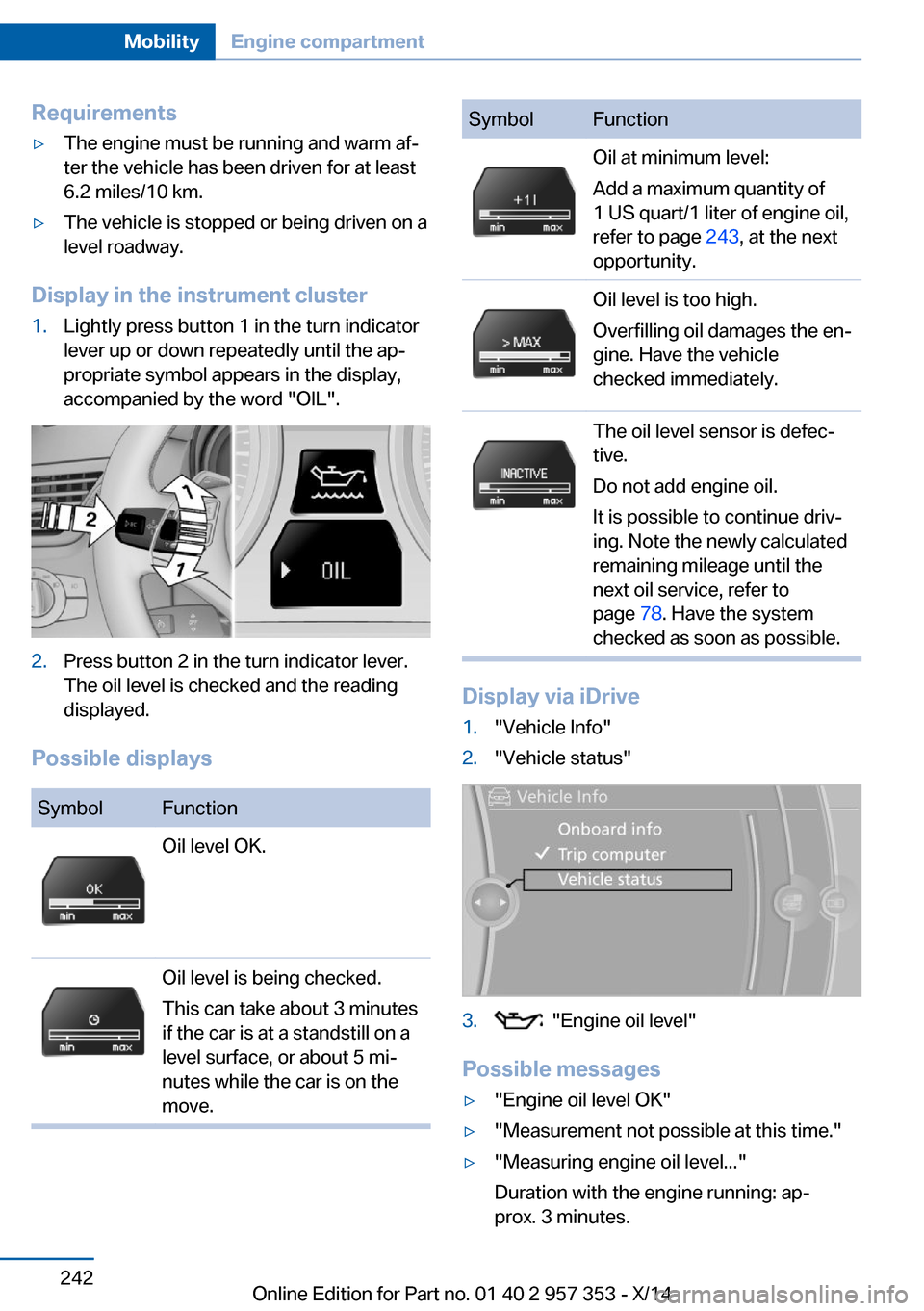
1.Lightly press button 1 in the turn indicator
lever up or down repeatedly until the ap‐
propriate symbol appears in the display,
accompanied by the word "OIL".2.Press button 2 in the turn indicator lever.
The oil level is checked and the reading
displayed.
Possible displays
SymbolFunctionOil level OK.Oil level is being checked.
This can take about 3 minutes
if the car is at a standstill on a
level surface, or about 5 mi‐
nutes while the car is on the
move.SymbolFunctionOil at minimum level:
Add a maximum quantity of
1 US quart/1 liter of engine oil,
refer to page 243, at the next
opportunity.Oil level is too high.
Overfilling oil damages the en‐
gine. Have the vehicle
checked immediately.The oil level sensor is defec‐
tive.
Do not add engine oil.
It is possible to continue driv‐
ing. Note the newly calculated
remaining mileage until the
next oil service, refer to
page 78. Have the system
checked as soon as possible.
Display via iDrive
1."Vehicle Info"2."Vehicle status"3. "Engine oil level"
Possible messages
▷"Engine oil level OK"▷"Measurement not possible at this time."▷"Measuring engine oil level..."
Duration with the engine running: ap‐
prox. 3 minutes.Seite 242MobilityEngine compartment242
Online Edition for Part no. 01 40 2 957 353 - X/14
Page 247 of 297
Duration while driving: approx. 5 minutes.
If engine oil was added, it may take up to
30 minutes to obtain an oil level reading.▷"Engine oil level below minimum. Add 1
quart!"
Add a maximum quantity of 1 US quart/1 li‐
ter of engine oil at the next opportunity, re‐
fer also to Adding engine oil below.▷"Engine oil level too high! Have this
checked."
Too much engine oil
Have the vehicle checked immedi‐
ately; otherwise, surplus oil can lead to en‐
gine damage.◀▷"Measurement inactive. Have this
checked." Do not add engine oil. It is possi‐
ble to continue driving. Note the newly cal‐
culated remaining mileage until the next oil
service, refer to page 78. Have the system
checked as soon as possible.
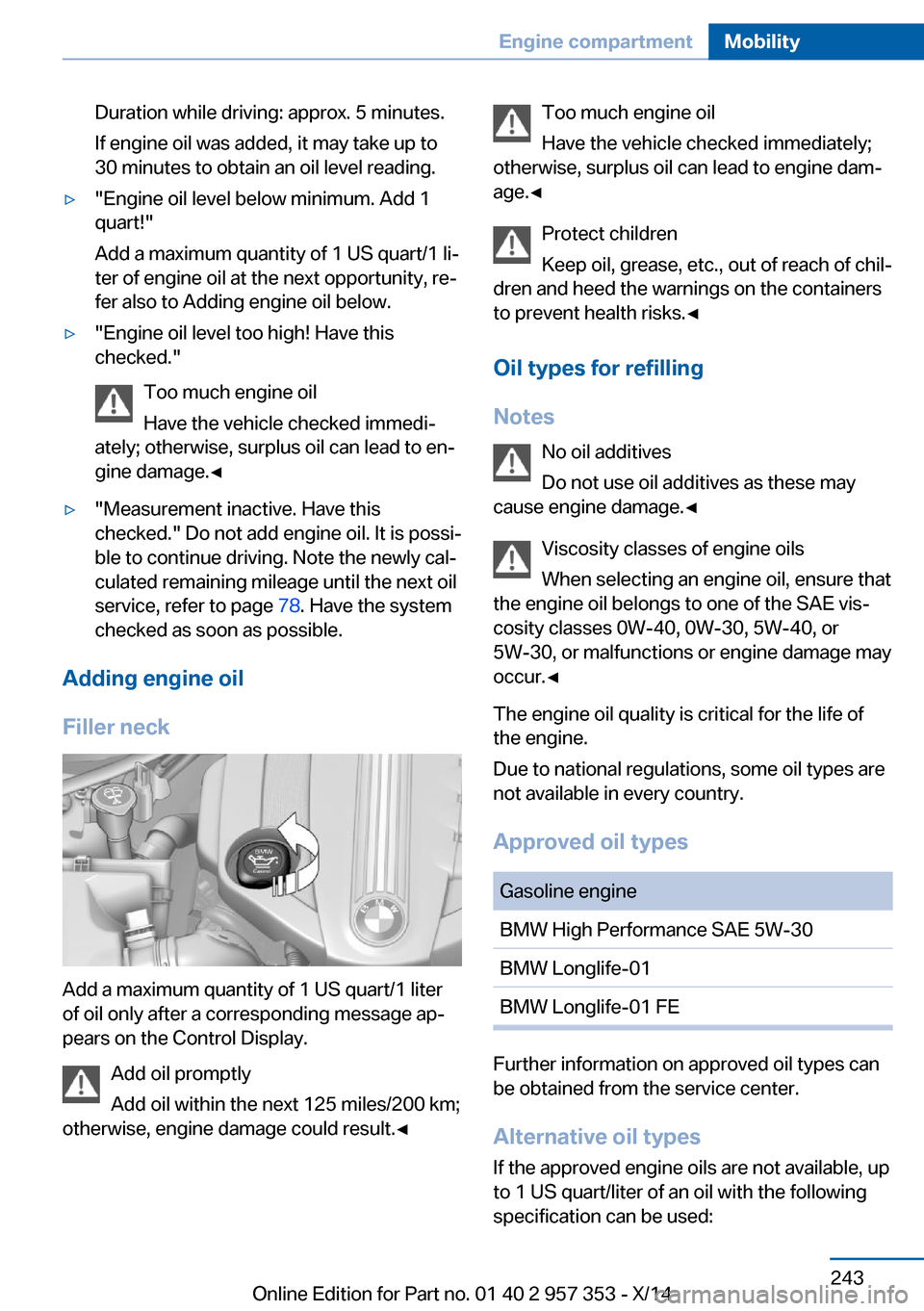
Adding engine oil
Filler neck
Add a maximum quantity of 1 US quart/1 liter
of oil only after a corresponding message ap‐
pears on the Control Display.
Add oil promptly
Add oil within the next 125 miles/200 km;
otherwise, engine damage could result.◀
Too much engine oil
Have the vehicle checked immediately;
otherwise, surplus oil can lead to engine dam‐
age.◀
Protect children
Keep oil, grease, etc., out of reach of chil‐
dren and heed the warnings on the containers
to prevent health risks.◀
Oil types for refilling
Notes No oil additives
Do not use oil additives as these may
cause engine damage.◀
Viscosity classes of engine oils
When selecting an engine oil, ensure that
the engine oil belongs to one of the SAE vis‐
cosity classes 0W-40, 0W-30, 5W-40, or
5W-30, or malfunctions or engine damage may
occur.◀
The engine oil quality is critical for the life of
the engine.
Due to national regulations, some oil types are
not available in every country.
Approved oil typesGasoline engineBMW High Performance SAE 5W-30BMW Longlife-01BMW Longlife-01 FE
Further information on approved oil types can
be obtained from the service center.
Alternative oil types If the approved engine oils are not available, up
to 1 US quart/liter of an oil with the following
specification can be used:
Seite 243Engine compartmentMobility243
Online Edition for Part no. 01 40 2 957 353 - X/14
Page 248 of 297
Gasoline engineAPI SM or a higher quality standard
Oil changeThe manufacturer of your vehicle recommends
having the engine oil changed by a service
center.
Coolant General information Danger of burns from hot engine
Do not open the cooling system while
the engine is hot; otherwise, escaping coolant
may cause burns.◀
Suitable additives
Only use suitable additives; otherwise,
engine damage may occur. The additives are
harmful to your health.◀
Coolant consists of water and additives.
Not all commercially available additives are
suitable for your vehicle. Ask your service cen‐
ter for suitable additives.
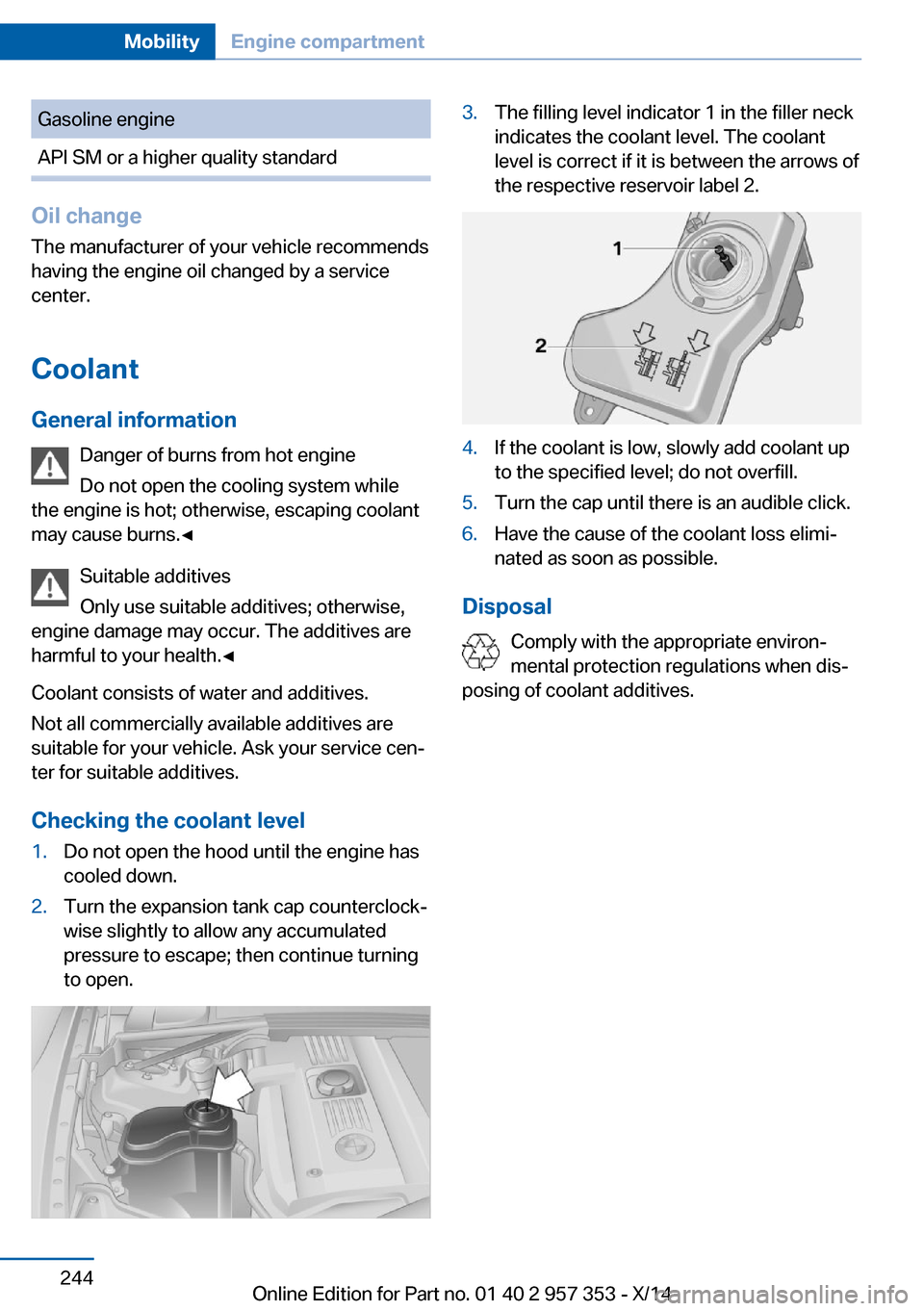
Checking the coolant level
1.Do not open the hood until the engine has
cooled down.2.Turn the expansion tank cap counterclock‐
wise slightly to allow any accumulated
pressure to escape; then continue turning
to open.3.The filling level indicator 1 in the filler neck
indicates the coolant level. The coolant
level is correct if it is between the arrows of
the respective reservoir label 2.4.If the coolant is low, slowly add coolant up
to the specified level; do not overfill.5.Turn the cap until there is an audible click.6.Have the cause of the coolant loss elimi‐
nated as soon as possible.
Disposal
Comply with the appropriate environ‐
mental protection regulations when dis‐
posing of coolant additives.
Seite 244MobilityEngine compartment244
Online Edition for Part no. 01 40 2 957 353 - X/14
Page 249 of 297
MaintenanceVehicle equipment
This chapter describes all series equipment as
well as country-specific and special equipment
offered for this model series. Therefore, it also
describes equipment that may not be found in
your vehicle, for instance due to the selected
special equipment or the country version. This
also applies to safety-related functions and
systems.
When using the features and systems descri‐
bed here, adhere to local regulations.
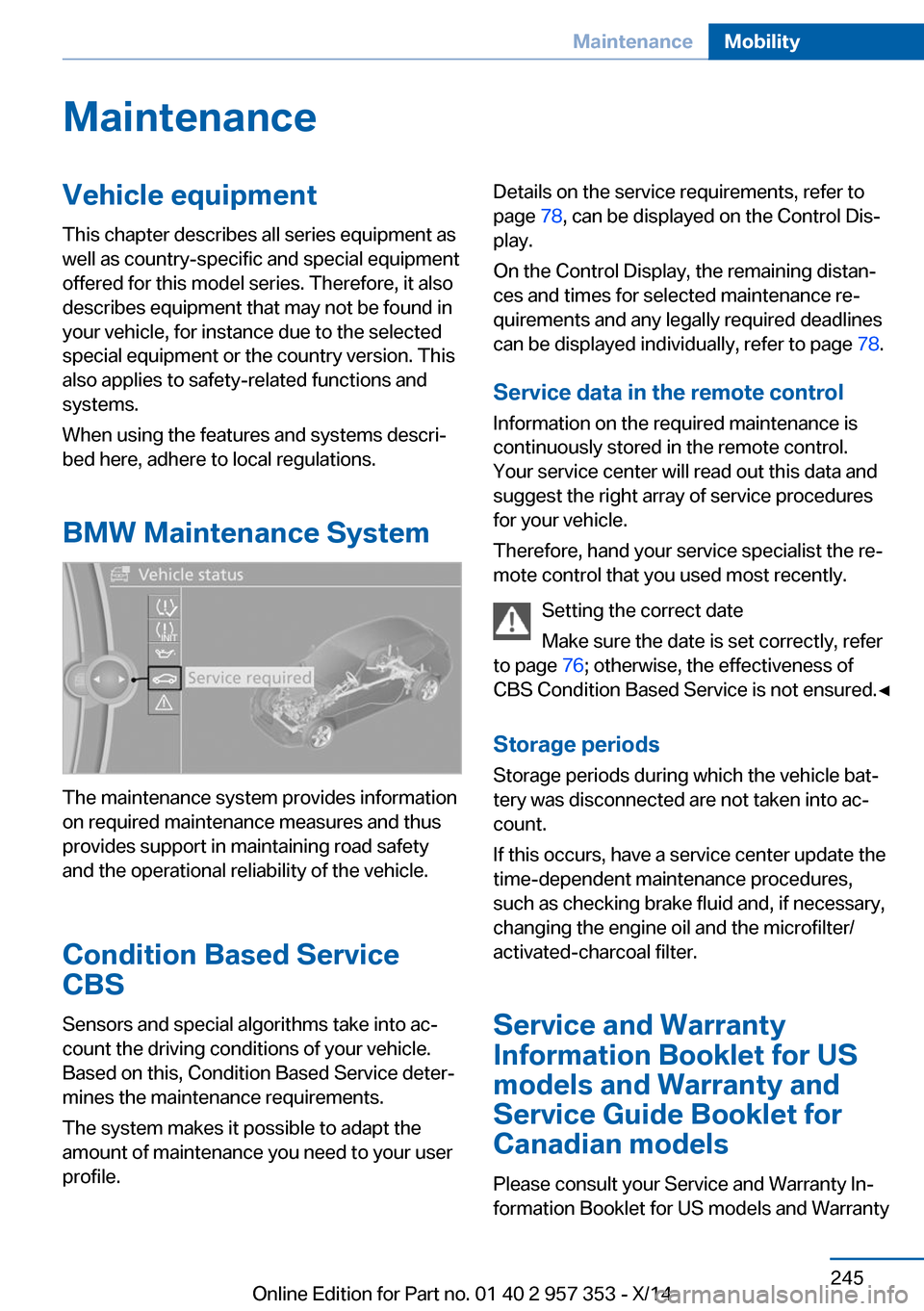
BMW Maintenance System
The maintenance system provides information
on required maintenance measures and thus
provides support in maintaining road safety
and the operational reliability of the vehicle.
Condition Based Service
CBS
Sensors and special algorithms take into ac‐
count the driving conditions of your vehicle.
Based on this, Condition Based Service deter‐
mines the maintenance requirements.
The system makes it possible to adapt the
amount of maintenance you need to your user
profile.
Details on the service requirements, refer to
page 78, can be displayed on the Control Dis‐
play.
On the Control Display, the remaining distan‐
ces and times for selected maintenance re‐
quirements and any legally required deadlines
can be displayed individually, refer to page 78.
Service data in the remote control Information on the required maintenance is
continuously stored in the remote control. Your service center will read out this data and
suggest the right array of service procedures
for your vehicle.
Therefore, hand your service specialist the re‐
mote control that you used most recently.
Setting the correct date
Make sure the date is set correctly, refer
to page 76; otherwise, the effectiveness of
CBS Condition Based Service is not ensured.◀
Storage periods Storage periods during which the vehicle bat‐
tery was disconnected are not taken into ac‐
count.
If this occurs, have a service center update the
time-dependent maintenance procedures,
such as checking brake fluid and, if necessary,
changing the engine oil and the microfilter/
activated-charcoal filter.
Service and Warranty
Information Booklet for US
models and Warranty and
Service Guide Booklet for Canadian models
Please consult your Service and Warranty In‐
formation Booklet for US models and WarrantySeite 245MaintenanceMobility245
Online Edition for Part no. 01 40 2 957 353 - X/14
Page 265 of 297
CareVehicle equipmentThis chapter describes all series equipment as
well as country-specific and special equipment
offered for this model series. Therefore, it also
describes equipment that may not be found in
your vehicle, for instance due to the selected
special equipment or the country version. This
also applies to safety-related functions and
systems.
When using the features and systems descri‐
bed here, adhere to local regulations.
Car washes Notes Steam jets or high-pressure washers
When using steam jets or high-pressure
washers, hold them a sufficient distance away
and use a maximum temperature of
140 ℉/60 ℃.
Holding them too close or using excessively
high pressures or temperatures can cause
damage or preliminary damage that may then
lead to long-term damage.
Follow the operating instructions for the high-
pressure washer.◀
Do not direct steam or high-pressure washers
toward the decorative labels applied by the
manufacturer; otherwise, damage may result.
Cleaning sensors/cameras with high-
pressure washers
When using high-pressure washers, do not
spray the exterior sensors and cameras, for
Park Distance Control or the backup camera,
for instance, for extended periods of time and
only from a distance of at least 12 in/30 cm.◀Regularly remove foreign bodies, such as
leaves, from the area below the windshield
when the hood is open.
Wash your vehicle frequently, particularly in
winter.
Intense soiling and road salt can damage the
vehicle.
Washing in automatic car washes Give preference to cloth car washes or those
that use soft brushes in order to avoid paint damage.
Notes Note the following:▷Make sure that the wheels and tires are not
damaged by the transport mechanisms.▷Fold in the exterior mirrors; otherwise, they
may be damaged, depending on the width
of the vehicle.▷Deactivate the rain sensor, refer to
page 63, to avoid unintentional wiper acti‐
vation.▷Move the rear window wiper to its resting
position, deactivate it, and protect it
against damage. Ask the car wash operator
about any necessary protective measures.▷Remove additional attachments, for in‐
stance a spoiler or telephone antenna, if
there is a risk that these may be damaged.
Guide rails in car washes
Avoid car washes with guide rails higher
than 4 in/10 cm; otherwise, the vehicle body
could be damaged.◀
Before driving into a car wash The vehicle is able to roll if the following steps
are taken.
Seite 261CareMobility261
Online Edition for Part no. 01 40 2 957 353 - X/14
Page 266 of 297
Automatic transmission1.Release the parking brake, refer to
page 61.2.Drive into the car wash.3.Depress the brake pedal if necessary.4.Engage the selector lever or transmission
position N.5.Switch the engine off.6.Leave the remote control in the ignition
lock so that the vehicle can roll.
In 8-gear automatic transmissions, transmis‐
sion position P is engaged automatically:
▷Automatically after approx. 30 minutes.▷When the remote control is removed from
the ignition lock.
Headlights
▷Do not rub dry and do not use abrasive or
caustic cleansers.▷Soak areas that have been soiled e.g. due
to insects, with shampoo and wash off with
water.▷Thaw ice with de-icing spray; do not use an
ice scraper.
After washing the vehicle
After washing the vehicle, apply the brakes
briefly to dry them; otherwise, braking action
can be reduced and corrosion of the brake
discs can occur.
Fully remove any residue from the windows to
prevent obstruction of view from streaking,
wiping noises, and wiper wear.
Vehicle careCar care productsBMW recommends using cleaning and care
products from BMW, since these have been
tested and approved.
Car care and cleaning products
Follow the instructions on the container.
When cleaning the interior, open the doors or
windows.
Only use products intended for cleaning vehi‐
cles.
Cleansers can contain substances that are
dangerous and harmful to your health.◀
Vehicle paint Regular care contributes to driving safety and
value retention. Environmental influences in
areas with high air pollution or natural contami‐
nants, such as tree resin or pollen, can have an
impact on the vehicle paint. Tailor the fre‐
quency and extent of your car care to these in‐
fluences.
Immediately remove aggressive substances,
such as spilled fuel, oil, grease, or bird drop‐
pings, to prevent damage to or discoloration of
the paintwork.
Leather care
Remove dust from the leather often, using a
cloth or vacuum cleaner.
Otherwise, particles of dust and road grime
chafe in pores and folds, and lead to increased
wear and premature degradation of the leather
surface.
To guard against discoloration, such as from
clothing, provide leather care roughly every
two months.
Clean light-colored leather more frequently as
dust and dirt are more noticeable.
Use leather care products; otherwise, dirt and
grease will gradually break down the protective
layer of the leather surface.
Suitable care products are available from the
service center.
Upholstery material care Vacuum regularly with a vacuum cleaner.Seite 262MobilityCare262
Online Edition for Part no. 01 40 2 957 353 - X/14
Page 282 of 297
Everything from A to Z
IndexA ABS, Antilock Brake Sys‐ tem 97
Accident, refer to Emergency Request, initiating 255
Acoustic signal, refer to Check Control 80
Activated charcoal filter with automatic climate con‐
trol 111
Adaptive brake lights, refer to Brake force display 96
Adaptive Light Control 84
Additional telephone 196
Additives, coolant 244
Additives, engine oil 243
After washing vehicle 262
Airbags 88
Airbags, indicator/warning light 91
Air circulation, refer to Recir‐ culated air mode 110
Air conditioning mode– Automatic climate con‐
trol 108– Ventilation 111
Air distribution
– Automatic 109– Manual 109
Air drying, refer to Cooling
function 110
Air flow rate 110
Airing, refer to Ventila‐ tion 111
Air pressure, refer to Tire in‐ flation pressure 230
Air supply
– Automatic climate con‐
trol 108– Ventilation 111Air vents– Refer to Ventilation 111
Alarm system 39
Alarm system
– Avoiding unintentional
alarms 40– Ending an alarm 39– Interior motion sensor 40– Tilt alarm sensor 40
All around the headliner 17
ALL program 110
All-season tires, refer to Win‐ ter tires 238
All-wheel drive, refer to xDrive 99
Alternating-code hand-held transmitter 114
AM/FM station 166
Announcement, navigation, refer to Spoken instruc‐
tions 155
Antifreeze, coolant 244
Antifreeze, washer fluid 65
Antilock Brake System, ABS 97
Anti-slip control, refer to Dy‐ namic Stability Control
DSC 97
Anti-theft protection 32
Appointments 212
Approved axle loads, refer to Weights 268
Approved engine oils 243
Approved gross vehicle weight, refer to
Weights 268
Armrest, refer to Center arm‐ rest 124
Arrival time, refer to Com‐ puter 74
Ashtray 117
Assistance with driving off,
refer to Drive-off assis‐
tant 100
Assistance with starting en‐ gine, refer to Jump-start‐
ing 256
Audio device, external 124
Audio playback 175
Audio playback, Blue‐ tooth 187
Automatic– Air distribution 109– Air flow rate 109
Automatic car wash 261
Automatic climate con‐ trol 108
Automatic climate control
– Automatic air distribu‐
tion 109
Automatic, cruise control 101
Automatic Curb Monitor 49
Automatic Engine Start/Stop Function 59
Automatic headlamp con‐ trol 83, 84
Automatic recirculated air control 110
Automatic transmission with Steptronic 65, 68
Automatic transmission with
Steptronic
– Interlock 65– Kickdown 66, 68– Overriding selector lever
lock 67
AUTO program with auto‐
matic climate control 109
AUX-IN port 124, 184
Average fuel consumption 73
Average fuel consumption
– Setting the units 75
Average speed 73
Seite 278ReferenceEverything from A to Z278
Online Edition for Part no. 01 40 2 957 353 - X/14
Page 285 of 297
Cruise control 101
Cruise control– Malfunction 103
Cupholder 125
Curb weight, refer to Weights 268
Current fuel consumption 72
Current location, storing 146
Curve lights, refer to Adaptive Light Control 84
D
Dashboard lighting, refer to Instrument lighting 87
Dashboard, refer to Cock‐ pit 12
Data, technical 268
Date
– Date format 77– Setting 76
Daytime running lights 84
Daytime running lights, bulb replacement 251
Defroster
– Rear window 111
Destination entry via the ad‐
dress book 146
Destination guidance 153
Destination guidance with in‐ termediate destinations 151
Destination input, naviga‐ tion 144
Digital clock 71
Digital compass 115
Digital radio 167
Dimming mirrors 50
Directional indicators, refer to Turn signals 62
Display lighting, refer to In‐ strument lighting 87
Displays and controls 12
Displays, care 264
Displays, cleaning 264
Displays, refer to Instrument cluster 14
Disposal, coolant 244
Disposal, vehicle battery 254
Distance warning, refer to Park Distance Control
PDC 103
Divided rear seat backrest, re‐ fer to Enlarging the cargo
area 119
Divided screen view, split screen 22
Door key, refer to Remote control with integrated
key 30
Door lock 34
Doors, manual operation 35
Doors, unlocking and locking– Confirmation signals 33– From the inside 35– From the outside 32
DOT Quality Grades 236
Downhill control 99
Draft-free ventilation 111
Drive-off assistant 100
Driving away on inclines, refer to Drive-off assistant 100
Driving notes, breaking in 130
Driving notes, general 130
Driving on poor roads 132
Driving stability control sys‐ tems 97
Driving through water 131
Driving tips, refer to Driving notes 130
Dry air, refer to Cooling func‐ tion 110
DSC Dynamic Stability Con‐ trol 97
DTC Dynamic Traction Con‐ trol 98
DTMF suffix dialing 202
DVD/CD 174
DVDs, storing 179
DVD, video 176
Dynamic destination guid‐ ance 160
Dynamic Stability Control DSC 97
Dynamic Traction Control
DTC 98
E
ECO PRO 138
ECO PRO display 138
ECO PRO driving mode 138
ECO PRO mode 138
EfficientDynamics, refer to Saving fuel 137
Electrical malfunction– Door lock 35– Driver's door 35– Fuel filler flap 227– Tailgate 36
Electric seat adjustment 45
Electronic brake-force distri‐ bution 97
Electronic engine oil level check 241
Electronic Stability Program ESP, refer to Dynamic Sta‐
bility Control DSC 97
Emergency activation
– Automatic transmission, re‐
fer to Overriding selector
lever lock 67
Emergency operation
– Door lock, refer to Manual
operation 35
Emergency operation, fuel
filler flap, unlocking man‐
ually 227
Emergency Request 255
Energy-conscious driving, re‐ fer to Current fuel consump‐
tion 72
Energy, saving
– Automatic Engine Start/
Stop Function 59
Energy, saving, refer to Sav‐
ing fuel 137
Engine, breaking in 130
Engine compartment 240
Engine coolant, refer to Cool‐ ant 244
Seite 281Everything from A to ZReference281
Online Edition for Part no. 01 40 2 957 353 - X/14
Page 286 of 297
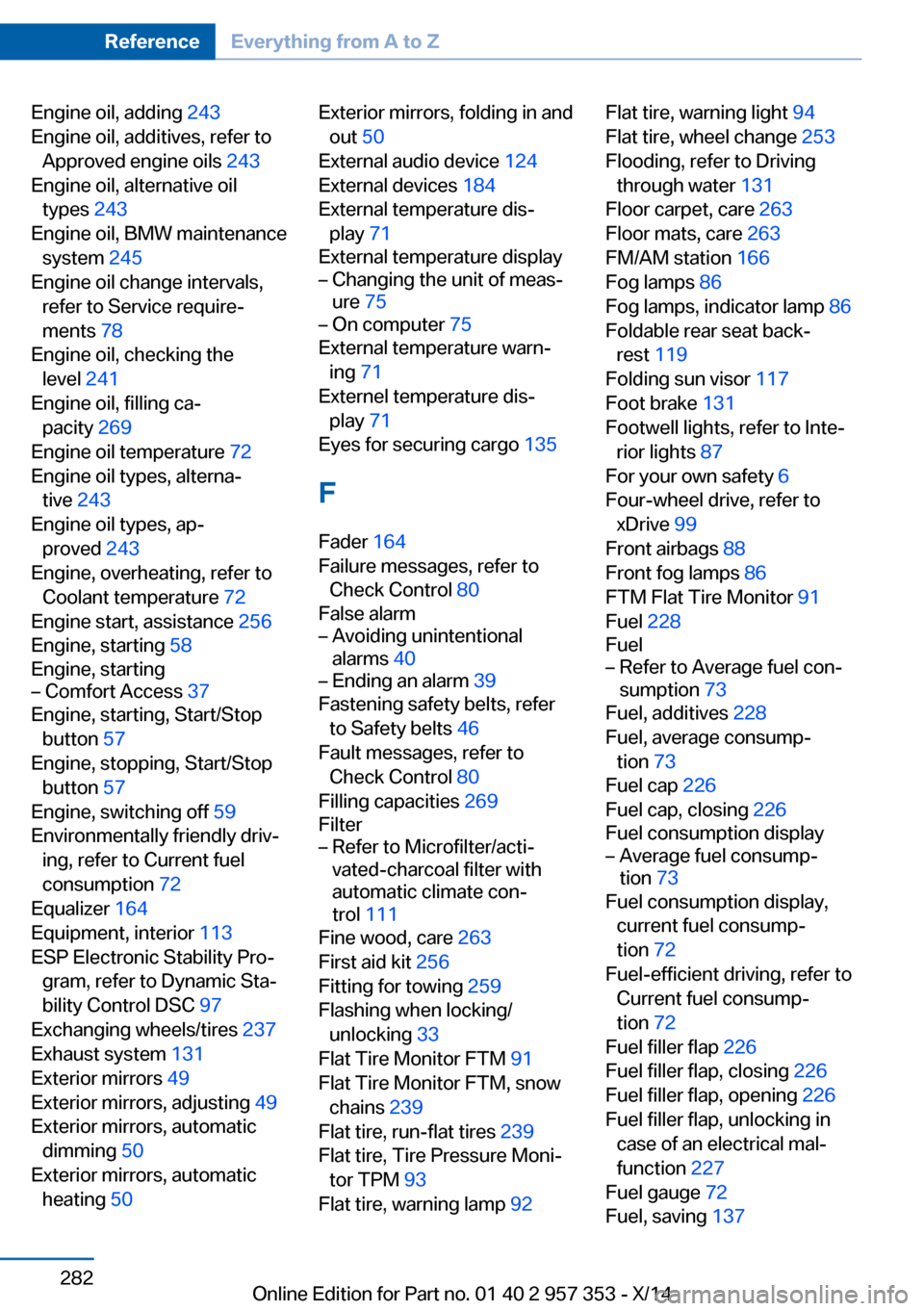
Engine oil, adding 243
Engine oil, additives, refer to Approved engine oils 243
Engine oil, alternative oil types 243
Engine oil, BMW maintenance system 245
Engine oil change intervals, refer to Service require‐
ments 78
Engine oil, checking the level 241
Engine oil, filling ca‐ pacity 269
Engine oil temperature 72
Engine oil types, alterna‐ tive 243
Engine oil types, ap‐ proved 243
Engine, overheating, refer to Coolant temperature 72
Engine start, assistance 256
Engine, starting 58
Engine, starting– Comfort Access 37
Engine, starting, Start/Stop
button 57
Engine, stopping, Start/Stop button 57
Engine, switching off 59
Environmentally friendly driv‐ ing, refer to Current fuel
consumption 72
Equalizer 164
Equipment, interior 113
ESP Electronic Stability Pro‐ gram, refer to Dynamic Sta‐
bility Control DSC 97
Exchanging wheels/tires 237
Exhaust system 131
Exterior mirrors 49
Exterior mirrors, adjusting 49
Exterior mirrors, automatic dimming 50
Exterior mirrors, automatic heating 50
Exterior mirrors, folding in and
out 50
External audio device 124
External devices 184
External temperature dis‐ play 71
External temperature display– Changing the unit of meas‐
ure 75– On computer 75
External temperature warn‐
ing 71
Externel temperature dis‐ play 71
Eyes for securing cargo 135
F
Fader 164
Failure messages, refer to Check Control 80
False alarm
– Avoiding unintentional
alarms 40– Ending an alarm 39
Fastening safety belts, refer
to Safety belts 46
Fault messages, refer to Check Control 80
Filling capacities 269
Filter
– Refer to Microfilter/acti‐
vated-charcoal filter with
automatic climate con‐
trol 111
Fine wood, care 263
First aid kit 256
Fitting for towing 259
Flashing when locking/ unlocking 33
Flat Tire Monitor FTM 91
Flat Tire Monitor FTM, snow chains 239
Flat tire, run-flat tires 239
Flat tire, Tire Pressure Moni‐ tor TPM 93
Flat tire, warning lamp 92
Flat tire, warning light 94
Flat tire, wheel change 253
Flooding, refer to Driving through water 131
Floor carpet, care 263
Floor mats, care 263
FM/AM station 166
Fog lamps 86
Fog lamps, indicator lamp 86
Foldable rear seat back‐ rest 119
Folding sun visor 117
Foot brake 131
Footwell lights, refer to Inte‐ rior lights 87
For your own safety 6
Four-wheel drive, refer to xDrive 99
Front airbags 88
Front fog lamps 86
FTM Flat Tire Monitor 91
Fuel 228
Fuel– Refer to Average fuel con‐
sumption 73
Fuel, additives 228
Fuel, average consump‐ tion 73
Fuel cap 226
Fuel cap, closing 226
Fuel consumption display
– Average fuel consump‐
tion 73
Fuel consumption display,
current fuel consump‐
tion 72
Fuel-efficient driving, refer to Current fuel consump‐
tion 72
Fuel filler flap 226
Fuel filler flap, closing 226
Fuel filler flap, opening 226
Fuel filler flap, unlocking in case of an electrical mal‐
function 227
Fuel gauge 72
Fuel, saving 137
Seite 282ReferenceEverything from A to Z282
Online Edition for Part no. 01 40 2 957 353 - X/14
Page 289 of 297
Locking the vehicle– From the inside 35– From the outside 32
Locks, doors, and win‐
dows 55
Longlife oils, alternative oil types 243
Longlife oils, refer to Ap‐ proved engine oils 243
Low beams 83
Low beams
– Automatic 84– Bulb replacement 249
Low beams, automatic 83
Low beams, automatic, refer to High-beam Assistant 85
Lower back support, refer to Lumbar support 45
Luggage rack
– Rear luggage rack 136
Luggage rack, refer to Roof-
mounted luggage rack 136
Lumbar support 45
M
Main inspection, refer to Service requirements 78
Maintenance 245
Maintenance, refer to Service booklet
Maintenance, refer to Service requirements 78
Maintenance require‐ ments 245
Maintenance system BMW 245
Makeup mirror 117
Malfunction
– Automatic transmission with
Steptronic 67– Door lock 35– Fuel filler flap 227– Tailgate 36
Malfunction warnings, refer to
Check Control 80
Manual air distribution 109
Manual mode, automatic
transmission with Step‐
tronic 66, 69
Manual operation– Door lock 35– Driver's door 35– Selector lever lock, auto‐
matic transmission 67
Manual operation, fuel filler
flap 227
Map, destination entry 149
Map display in black and white 158
Map in split screen 157
Map view 155
Marking on approved tires 238
Master key, refer to Remote control with integrated
key 30
Maximum cooling 109
Maximum speed, winter tires 238
Medical kit, refer to First aid kit 256
Memory, refer to Seat and mirror memory 48
Menus, operating, iDrive 18
Menus, refer to iDrive operat‐ ing concept 19
Message list, traffic bulle‐ tins 157
Messages 210
Microfilter
– With automatic climate con‐
trol 111
Minimum tread, tires 237
Mirror
– Mirror memory, refer to Seat
and mirror memory 48
Mirrors 49
Mirrors
– Automatic Curb Monitor 49
Mirrors, folding in and out 50
Mirrors, heating 50
Mirrors, interior mirror 50
Mobile communication devi‐
ces in the vehicle 131
Mobile phone, installation lo‐ cation, refer to Center arm‐
rest 124
Mobile phone, refer to Tele‐ phone 196
Modifications, technical, refer to Safety 6
Monitor, refer to Control Dis‐ play 18
Mounting of child restraint fix‐ ing systems 52
MP3 player 184
Multimedia 174
Music collection 179
Music search 181
Music, storing 179
N
Navigation 142
Navigation data 142
Navigation data, updat‐ ing 142
Navigation system– Destination entry by
voice 150
Neck restraints, refer to Head
restraints 47
Nets, refer to Storage com‐ partments 125
Neutral cleaner, care 263
New wheels and tires 237
Notes 6, 213
Nozzles, refer to Ventila‐ tion 111
O OBD Onboard Diagnos‐ tics 246
OBD socket, refer to Socket for OBD Onboard Diagno‐
sis 246
Octane number, refer to Fuel quality 228
Seite 285Everything from A to ZReference285
Online Edition for Part no. 01 40 2 957 353 - X/14