Trip BMW X1 2014 E84 Owner's Guide
[x] Cancel search | Manufacturer: BMW, Model Year: 2014, Model line: X1, Model: BMW X1 2014 E84Pages: 297, PDF Size: 7 MB
Page 164 of 297
▷Total length of the traffic obstructions on
the route.▷Time by which the trip is extended due to
the traffic obstructions.
The lower part of the message shows:
▷Detour recommendation with the distance
to the beginning of the detour.▷Difference between the length of the new
route compared to the original route.▷Time gained if the detour is taken com‐
pared to the original route with the traffic
obstructions.
Both the original route, shown in white, and the
detour are displayed on the split screen.
Accepting the detour
"Detour"
In the event of special hazards, e. g., objects on
the road, a message is displayed without a de‐
tour suggestion.
Detours can also be accepted if the traffic
messages are called up in the list.
1."Navigation"2."Map"3. "Traffic Info"4."Detour information"5. "Detour"
Dynamic destination guidance
The route is automatically changed in the
event of traffic obstructions.
▷The system does not point out traffic ob‐
structions along the original route.▷Traffic bulletins continue to be displayed
on the map.▷Depending on road type and the kind and
extent of the traffic obstruction, the calcu‐
lated route may lead through the traffic ob‐
struction.▷Dangerous situations are displayed regard‐
less of the setting.Activating dynamic destination guidance1."Navigation"2.Open "Options".3."Dynamic guidance"Seite 160NavigationDestination guidance160
Online Edition for Part no. 01 40 2 957 353 - X/14
Page 188 of 297
hours. Therefore, it is best to perform the
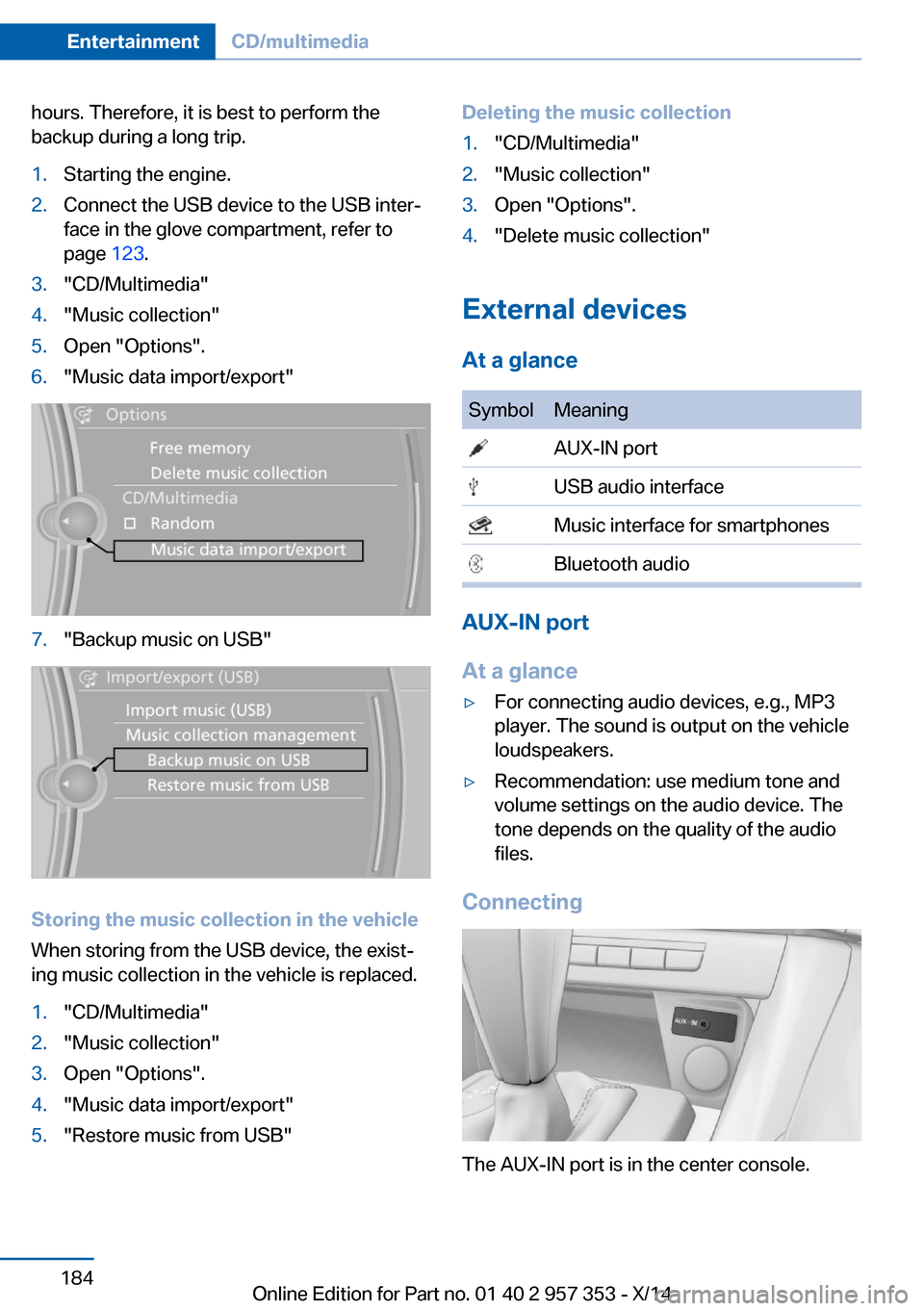
backup during a long trip.1.Starting the engine.2.Connect the USB device to the USB inter‐
face in the glove compartment, refer to
page 123.3."CD/Multimedia"4."Music collection"5.Open "Options".6."Music data import/export"7."Backup music on USB"
Storing the music collection in the vehicle
When storing from the USB device, the exist‐
ing music collection in the vehicle is replaced.
1."CD/Multimedia"2."Music collection"3.Open "Options".4."Music data import/export"5."Restore music from USB"Deleting the music collection1."CD/Multimedia"2."Music collection"3.Open "Options".4."Delete music collection"
External devices
At a glance
SymbolMeaning AUX-IN port USB audio interface Music interface for smartphones Bluetooth audio
AUX-IN port
At a glance
▷For connecting audio devices, e.g., MP3
player. The sound is output on the vehicle
loudspeakers.▷Recommendation: use medium tone and
volume settings on the audio device. The
tone depends on the quality of the audio
files.
Connecting
The AUX-IN port is in the center console.
Seite 184EntertainmentCD/multimedia184
Online Edition for Part no. 01 40 2 957 353 - X/14
Page 234 of 297
Wheels and tiresVehicle equipment
This chapter describes all series equipment as
well as country-specific and special equipment
offered for this model series. Therefore, it also
describes equipment that may not be found in
your vehicle, for instance due to the selected
special equipment or the country version. This
also applies to safety-related functions and
systems.
When using the features and systems descri‐
bed here, adhere to local regulations.
Tire inflation pressure Safety information
It is not merely the tires' service life, but also
driving comfort and, to a great extent, driving
safety that depend on the condition of the tires
and the maintenance of the specified tire pres‐
sure.
Checking the pressure Tires naturally lose pressure uniformly across
all four tires.
Only check the tire inflation pressure when the
tires are cold. This means after a maximum of
1.25 miles/2 km driving or when the vehicle
has been parked for at least 2 hours. When the
tires are warm, the tire inflation pressure is
higher.
Check the tire inflation pressure regularly
Regularly check the tire inflation pres‐
sure and correct it as needed: at least twice a
month and before a long trip. If you fail to ob‐
serve this precaution, you may be driving on
tires with incorrect tire pressures, a condition
that may not only compromise your vehicle's
driving stability, but also lead to tire damage
and the risk of an accident.◀Tires warm up during driving and the tire infla‐
tion pressure increases as the temperature
rises. The tire inflation pressure specifications
apply to cold tires or tires at ambient tempera‐
ture.
Only check the tire inflation pressure when the
tires are cold. This means after a maximum of
1.25 miles/2 km driving or when the vehicle
has been parked for at least 2 hours.
The values displayed by tire inflation stations
may be up to 0.1 bar, 2 psi too low.
For the Flat Tire Monitor: after adjusting the
tire inflation pressure to a new value, reinitialize
the Flat Tire Monitor, refer to page 91.
For the Tire Pressure Monitor: after adjusting
the tire inflation pressure to a new value, reset
the Tire Pressure Monitor, refer to page 94.
Pressure specifications The tables below provide all the correct infla‐
tion pressures for the specified tire sizes at
ambient temperature.
The inflation pressures apply to the tire sizes
approved and tire brands recommended by
BMW; a list of these is available from your
service center.
For correct identification of the right tire infla‐
tion pressures, observe the following:▷Tire sizes of your vehicle.▷Maximum allowable driving speed.
Tire inflation pressures for driving up
to 100 mph or 160 km/h
For normal driving up to 100 mph/160 km/h,
adjust pressures to the respective tire inflation
pressures listed on the following pages in the
column for traveling speeds up to 100 mph/
160 km/h to achieve optimum driving comfort.
Seite 230MobilityWheels and tires230
Online Edition for Part no. 01 40 2 957 353 - X/14
Page 252 of 297
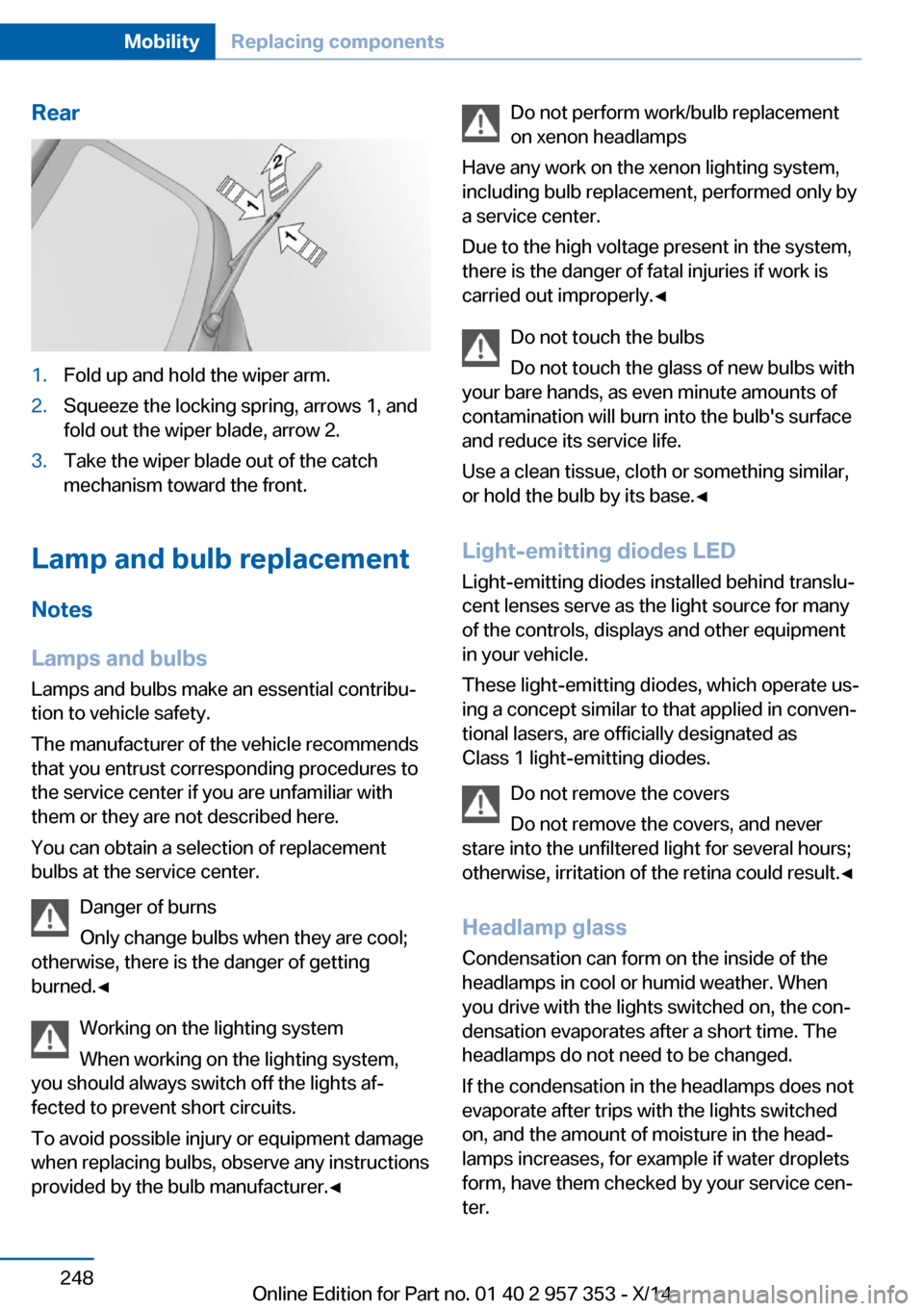
Rear1.Fold up and hold the wiper arm.2.Squeeze the locking spring, arrows 1, and
fold out the wiper blade, arrow 2.3.Take the wiper blade out of the catch
mechanism toward the front.
Lamp and bulb replacement
Notes
Lamps and bulbs
Lamps and bulbs make an essential contribu‐
tion to vehicle safety.
The manufacturer of the vehicle recommends
that you entrust corresponding procedures to
the service center if you are unfamiliar with them or they are not described here.
You can obtain a selection of replacement
bulbs at the service center.
Danger of burns
Only change bulbs when they are cool;
otherwise, there is the danger of getting
burned.◀
Working on the lighting system
When working on the lighting system,
you should always switch off the lights af‐
fected to prevent short circuits.
To avoid possible injury or equipment damage
when replacing bulbs, observe any instructions
provided by the bulb manufacturer.◀
Do not perform work/bulb replacement
on xenon headlamps
Have any work on the xenon lighting system,
including bulb replacement, performed only by
a service center.
Due to the high voltage present in the system,
there is the danger of fatal injuries if work is
carried out improperly.◀
Do not touch the bulbs
Do not touch the glass of new bulbs with
your bare hands, as even minute amounts of
contamination will burn into the bulb's surface
and reduce its service life.
Use a clean tissue, cloth or something similar,
or hold the bulb by its base.◀
Light-emitting diodes LED
Light-emitting diodes installed behind translu‐
cent lenses serve as the light source for many
of the controls, displays and other equipment
in your vehicle.
These light-emitting diodes, which operate us‐
ing a concept similar to that applied in conven‐
tional lasers, are officially designated as
Class 1 light-emitting diodes.
Do not remove the covers
Do not remove the covers, and never
stare into the unfiltered light for several hours; otherwise, irritation of the retina could result.◀
Headlamp glass
Condensation can form on the inside of the
headlamps in cool or humid weather. When
you drive with the lights switched on, the con‐
densation evaporates after a short time. The
headlamps do not need to be changed.
If the condensation in the headlamps does not
evaporate after trips with the lights switched
on, and the amount of moisture in the head‐
lamps increases, for example if water droplets
form, have them checked by your service cen‐
ter.Seite 248MobilityReplacing components248
Online Edition for Part no. 01 40 2 957 353 - X/14
Page 258 of 297
General information
Ensure that the battery is sufficiently charged
to achieve the full battery life.
It may be necessary to charge the battery in
the following cases:▷When the vehicle is frequently used to
drive short distances.▷When the vehicle has not been driven for
more than one month.
Starting aid terminals
Only charge using the starting aid terminals,
refer to page 257, in the engine compartment
while the engine is switched off.
Power failure
After a temporary power loss, some equipment
needs to be reinitialized.
Individual settings need to be reprogrammed:
▷Seat and mirror memory: store the posi‐
tions again, refer to page 48.▷Time: update, refer to page 75.▷Date: update, refer to page 76.▷Radio station: save again, refer to
page 166.▷Navigation system: wait for the navigation
system to be operational.▷Panoramic glass sunroof: it may only be
possible to tilt the roof. Have the system
initialized by the service center.▷Digital compass: recalibrate, refer to
page 115.▷xDrive: the system automatically initializes
as you drive. During this time, indicator
lamps light up. If the lamps do not disap‐
pear during the current trip, have the sys‐
tem checked.
Disposing of old batteries
Have old batteries disposed of by your
service center or bring them to a recy‐
cling center.
Maintain the battery in an upright position for
transport and storage. Secure the battery so
that it does not tip over during transport.
Fuses Replacing fuses
Never attempt to repair a blown fuse and
do not replace a defective fuse with a substi‐
tute of another color or amperage rating; this
could lead to a circuit overload, ultimately re‐
sulting in a fire in the vehicle.◀
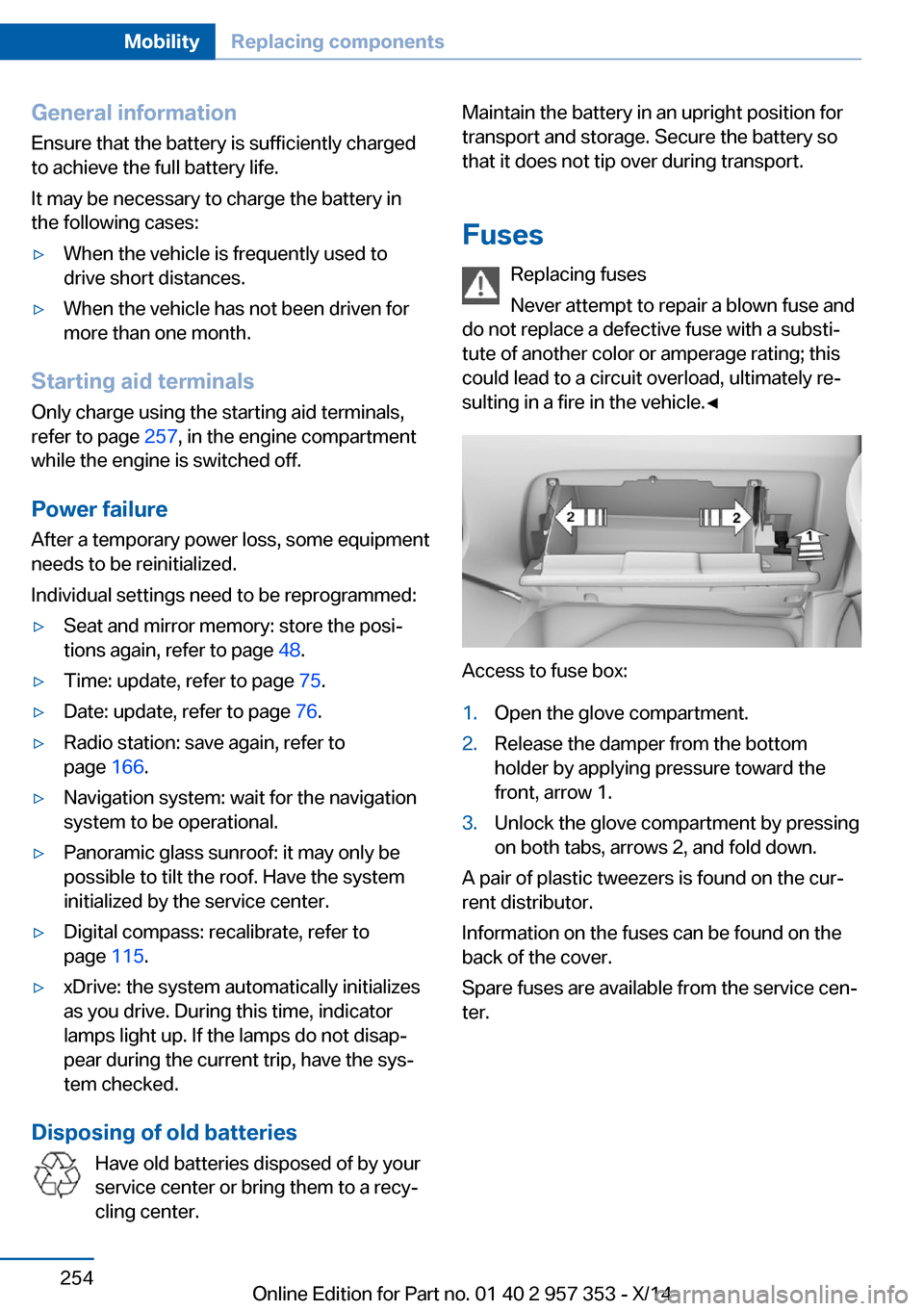
Access to fuse box:
1.Open the glove compartment.2.Release the damper from the bottom
holder by applying pressure toward the
front, arrow 1.3.Unlock the glove compartment by pressing
on both tabs, arrows 2, and fold down.
A pair of plastic tweezers is found on the cur‐
rent distributor.
Information on the fuses can be found on the
back of the cover.
Spare fuses are available from the service cen‐
ter.
Seite 254MobilityReplacing components254
Online Edition for Part no. 01 40 2 957 353 - X/14
Page 275 of 297
Vehicle information
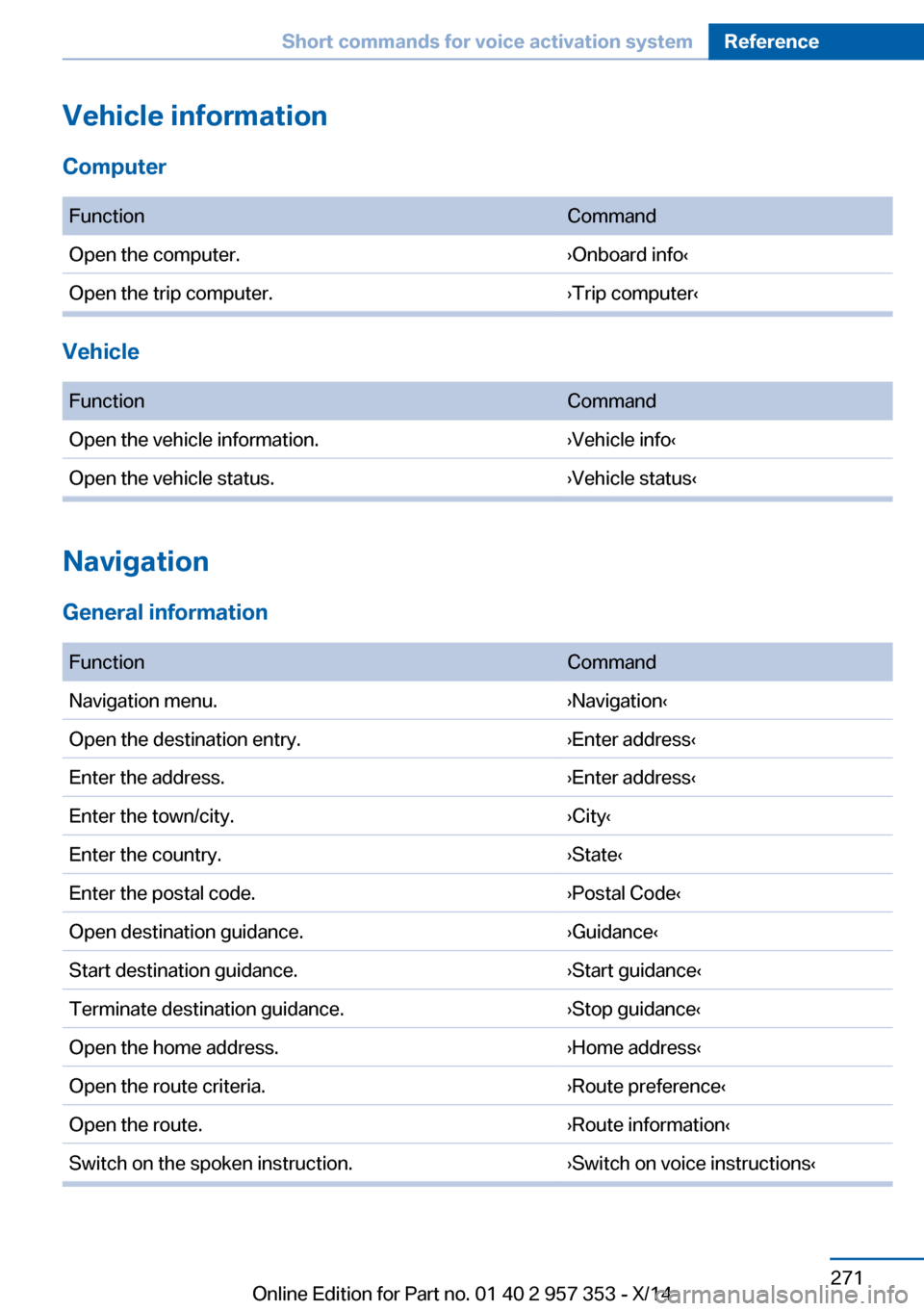
Computer FunctionCommandOpen the computer.›Onboard info‹Open the trip computer.›Trip computer‹
Vehicle
FunctionCommandOpen the vehicle information.›Vehicle info‹Open the vehicle status.›Vehicle status‹
Navigation
General information
FunctionCommandNavigation menu.›Navigation‹Open the destination entry.›Enter address‹Enter the address.›Enter address‹Enter the town/city.›City‹Enter the country.›State‹Enter the postal code.›Postal Code‹Open destination guidance.›Guidance‹Start destination guidance.›Start guidance‹Terminate destination guidance.›Stop guidance‹Open the home address.›Home address‹Open the route criteria.›Route preference‹Open the route.›Route information‹Switch on the spoken instruction.›Switch on voice instructions‹Seite 271Short commands for voice activation systemReference271
Online Edition for Part no. 01 40 2 957 353 - X/14
Page 277 of 297
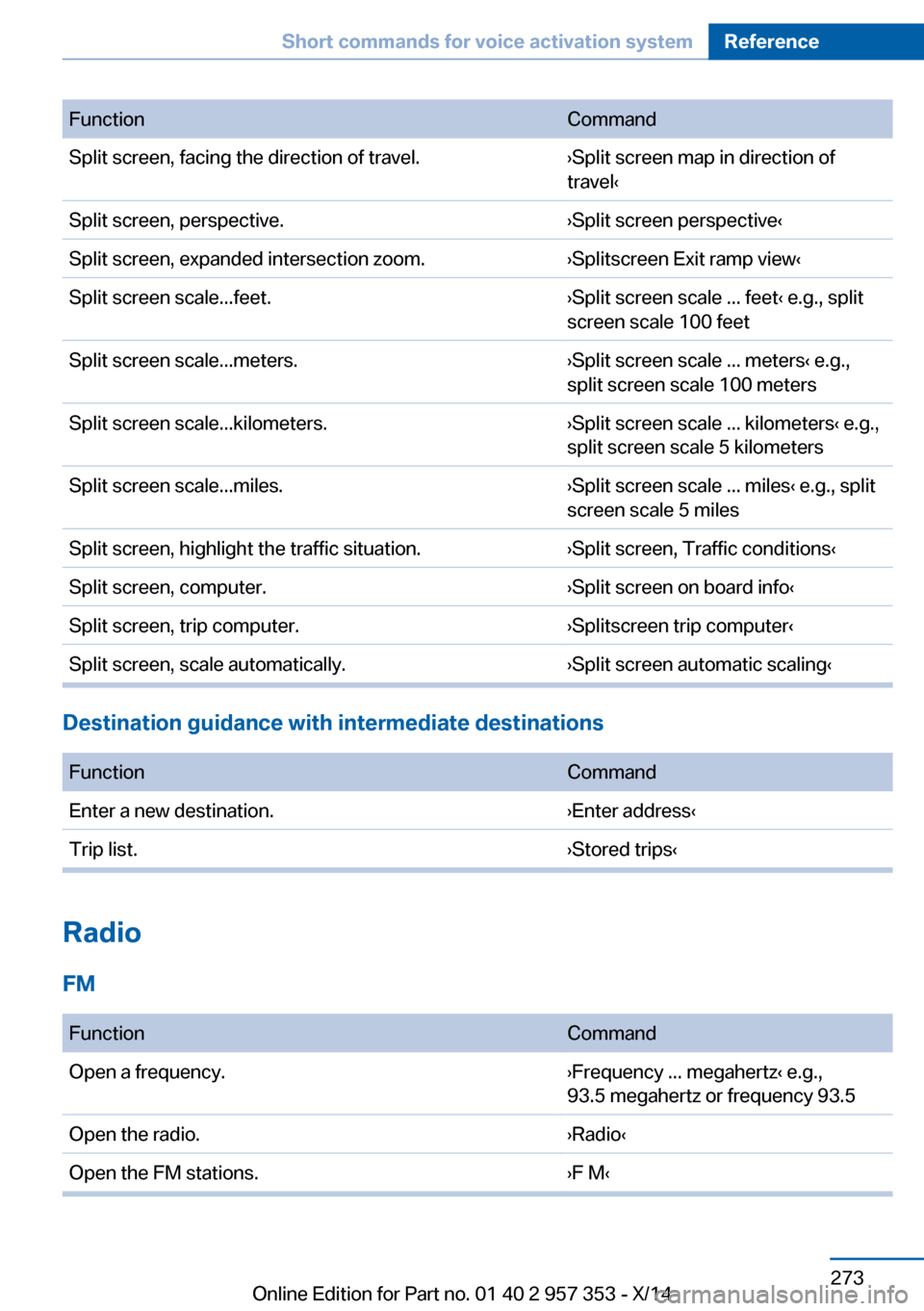
FunctionCommandSplit screen, facing the direction of travel.›Split screen map in direction of
travel‹Split screen, perspective.›Split screen perspective‹Split screen, expanded intersection zoom.›Splitscreen Exit ramp view‹Split screen scale...feet.›Split screen scale ... feet‹ e.g., split
screen scale 100 feetSplit screen scale...meters.›Split screen scale ... meters‹ e.g.,
split screen scale 100 metersSplit screen scale...kilometers.›Split screen scale ... kilometers‹ e.g.,
split screen scale 5 kilometersSplit screen scale...miles.›Split screen scale ... miles‹ e.g., split
screen scale 5 milesSplit screen, highlight the traffic situation.›Split screen, Traffic conditions‹Split screen, computer.›Split screen on board info‹Split screen, trip computer.›Splitscreen trip computer‹Split screen, scale automatically.›Split screen automatic scaling‹
Destination guidance with intermediate destinations
FunctionCommandEnter a new destination.›Enter address‹Trip list.›Stored trips‹
Radio
FM
FunctionCommandOpen a frequency.›Frequency ... megahertz‹ e.g.,
93.5 megahertz or frequency 93.5Open the radio.›Radio‹Open the FM stations.›F M‹Seite 273Short commands for voice activation systemReference273
Online Edition for Part no. 01 40 2 957 353 - X/14
Page 294 of 297
Treble, tone 164
Trip computer, refer to Dis‐ plays on the Control Dis‐
play 74
Trip-distance counter, refer to Trip odometer 71
Triple turn signal activa‐ tion 62
Trip odometer 71
Trips, planning 151
Trunk, refer to Cargo area 118
Turning circle, refer to Dimen‐ sions 268
Turning lamps, refer to Adap‐ tive Light Control 84
Turn signal– Indicator/warning lamp 14
Turn signals 62
Turn signals
– Bulb replacement 251– Bulb replacement, front 251
Turn signals, triple turn signal
activation 62
U Uniform Tire Quality Grading/ UTQG 236
Unintentional alarms, avoid‐ ing 40
Units
– Average fuel consump‐
tion 75– Temperature 75
Units of measure, changing
on Control Display 75
Universal remote control 113
Unlocking
– From the outside 32– Setting the unlocking char‐
acteristics 32– Tailgate 37– Without remote control, re‐
fer to Comfort Access 37
Unlocking, from the inside 35
Unlocking, hood 241
Updates made after the edito‐
rial deadline 6
Update, software 191
Upholstery care 262
USB audio interface 185
USB interface 123
V
Vacuum cleaner, connecting, refer to Connecting electri‐
cal devices 117
Vanity mirror 117
Vehicle– Identification number 196
Vehicle battery, chang‐
ing 253
Vehicle, breaking in 130
Vehicle care 262
Vehicle care, refer to Care 261
Vehicle equipment 6
Vehicle identification number,
refer to Identification num‐
ber in the engine compart‐
ment 240
Vehicle jack 253
Vehicle paint 262
Vehicle storage 264
Vehicle, switching off 59
Vehicle wash 261
Ventilation 111
Ventilation
– Draft-free 111
Ventilation, refer to Parked-
car ventilation 111
Version of the navigation data 142
Video playback 176
Voice activation
– Navigation 150
Voice activation, short com‐
mands 270
Voice activation system 25
Volume, setting 164
W
Warning and indicator lamps 15
Warning messages, refer to Check Control 80
Warning signal volumes 165
Warning triangle 256
Washer/wiper system 62
Washer/wiper system, rain sensor 63
Washer/wiper system, washer fluid 65
Washer/wiper system, wind‐ shield washer nozzles 64
Washer fluid 65
Washer fluid reservoir 65
Washing, vehicle 261
Waste tray, refer to Ash‐ tray 117
Water on roads, refer to Driv‐ ing through water 131
Weights 268
Welcome lamps 83
Wheelbase, refer to Dimen‐ sions 268
Wheel change 253
Wheels and tires 230
Wheels, changing 237
Wheels, Flat Tire Monitor FTM 91
Wheels, Tire Pressure Moni‐ tor TPM 93
Width, refer to Dimen‐ sions 268
Window, Convenient opera‐ tion 32
Windows 40
Windows– Safety switch 41
Windows, defrosting and de‐
fogging
– Automatic climate con‐
trol 110
Windows, pinch protec‐
tion 41
Windshield, cleaning 64
Seite 290ReferenceEverything from A to Z290
Online Edition for Part no. 01 40 2 957 353 - X/14